
Flutter 框架跨平台鸿蒙开发 - 打造经典飞机大战游戏
碰撞检测:AABB算法检测矩形碰撞游戏循环:60FPS的实时更新对象管理:动态生成和销毁游戏对象触摸控制:拖动和按钮操作道具系统:临时增益效果等级系统:动态难度调整数据持久化:保存最高分通过本项目,你不仅学会了如何实现飞机大战游戏,还掌握了Flutter中游戏开发的核心技术。这些知识可以应用到更多射击游戏和动作游戏的开发。挑战高分,成为王牌飞行员!欢迎加入开源鸿蒙跨平台社区:https://ope
Flutter实战:打造经典飞机大战游戏
前言
飞机大战是一款经典的射击游戏,考验玩家的反应速度和操作技巧。本文将带你从零开始,使用Flutter开发一个功能完整的飞机大战游戏,包含射击、敌机、道具、关卡等功能。
应用特色
- ✈️ 经典玩法:完整还原经典飞机大战
- 🎯 三种敌机:小型、中型、大型,难度递增
- 💥 射击系统:发射子弹消灭敌机
- 🎁 道具系统:生命、双倍火力、护盾
- 📊 等级系统:每10架敌机升一级
- 🏆 最高分:本地保存最高分记录
- ⏸️ 暂停功能:随时暂停/继续游戏
- 💫 碰撞检测:精确的碰撞判定
- 🎨 视觉效果:发光特效和阴影
- 📱 触摸控制:拖动移动,按钮射击
效果展示
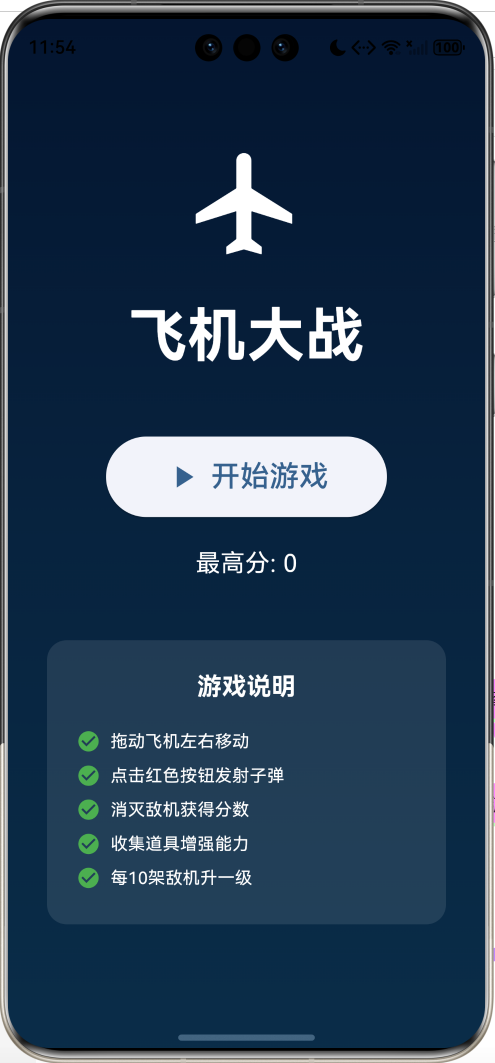
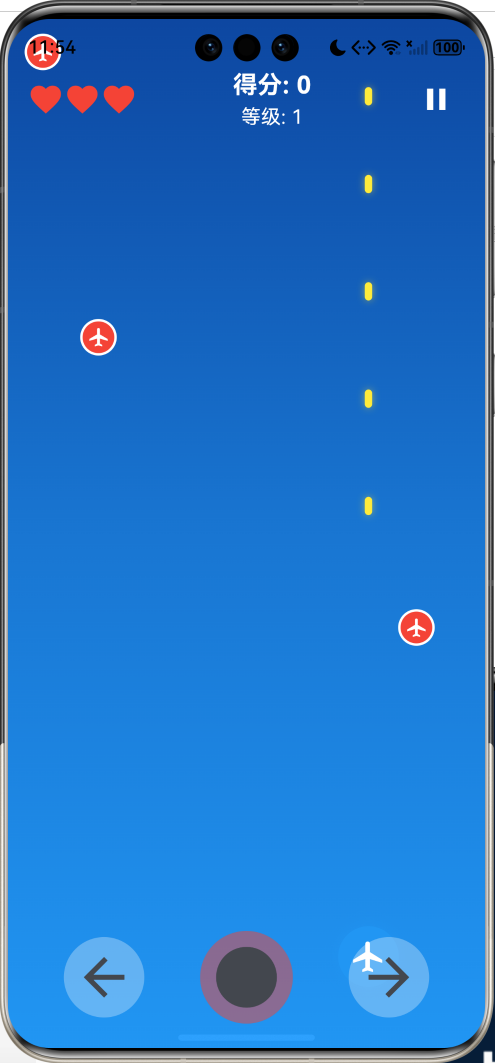
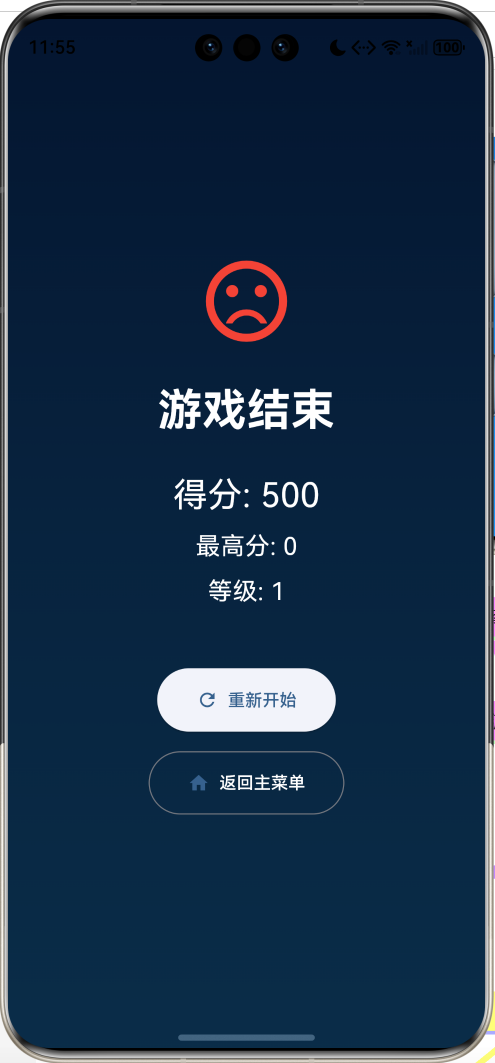
数据模型设计
1. 游戏对象基类
abstract class GameObject {
  double x;
  double y;
  double width;
  double height;
  bool isDestroyed = false;

  GameObject({
    required this.x,
    required this.y,
    required this.width,
    required this.height,
  });

  bool collidesWith(GameObject other) {
    return x < other.x + other.width &&
        x + width > other.x &&
        y < other.y + other.height &&
        y + height > other.y;
  }
}
2. 玩家飞机
class Player extends GameObject {
  int health = 3;
  int maxHealth = 3;

  Player({required double x, required double y})
      : super(x: x, y: y, width: 50, height: 50);

  void takeDamage() {
    health--;
    if (health <= 0) {
      isDestroyed = true;
    }
  }
}
3. 敌机类型
enum EnemyType {
  small(1, 2, 30, 30, 100),
  medium(2, 1.5, 40, 40, 200),
  large(3, 1, 60, 60, 500);

  final int health;
  final double speed;
  final double width;
  final double height;
  final int score;

  const EnemyType(this.health, this.speed, this.width, this.height, this.score);
}
4. 敌机模型
class Enemy extends GameObject {
  EnemyType type;
  int health;
  double speed;

  Enemy({
    required double x,
    required double y,
    required this.type,
  })  : health = type.health,
        speed = type.speed,
        super(x: x, y: y, width: type.width, height: type.height);

  void move() {
    y += speed;
    if (y > 800) {
      isDestroyed = true;
    }
  }

  void takeDamage() {
    health--;
    if (health <= 0) {
      isDestroyed = true;
    }
  }
}
5. 子弹模型
class Bullet extends GameObject {
  double speed = 8;

  Bullet({required double x, required double y})
      : super(x: x, y: y, width: 6, height: 15);

  void move() {
    y -= speed;
    if (y < -height) {
      isDestroyed = true;
    }
  }
}
6. 道具模型
enum PowerUpType {
  health,      // 生命恢复
  doubleFire,  // 双倍火力
  shield,      // 护盾
}

class PowerUp extends GameObject {
  PowerUpType type;
  double speed = 2;

  PowerUp({
    required double x,
    required double y,
    required this.type,
  }) : super(x: x, y: y, width: 30, height: 30);

  void move() {
    y += speed;
    if (y > 800) {
      isDestroyed = true;
    }
  }
}
核心算法实现
1. 碰撞检测算法(AABB)
轴对齐包围盒(Axis-Aligned Bounding Box)碰撞检测:
bool collidesWith(GameObject other) {
  return x < other.x + other.width &&
      x + width > other.x &&
      y < other.y + other.height &&
      y + height > other.y;
}
算法原理:
- 检查两个矩形是否在X轴和Y轴上都有重叠
- 如果两个轴都重叠,则发生碰撞
对象A: (x1, y1, w1, h1)
对象B: (x2, y2, w2, h2)

碰撞条件:
x1 < x2 + w2  AND
x1 + w1 > x2  AND
y1 < y2 + h2  AND
y1 + h1 > y2
2. 游戏主循环
使用Timer实现60FPS的游戏循环:
void _startGameLoop() {
  _gameTimer?.cancel();
  _gameTimer = Timer.periodic(const Duration(milliseconds: 16), (timer) {
    if (_gameState == GameState.playing) {
      _updateGame();
    }
  });
}
帧率计算:
- 60 FPS = 1000ms / 60 ≈ 16.67ms
- 每16ms更新一次游戏状态
3. 敌机生成算法
根据等级动态调整生成速度:
void _startEnemySpawn() {
  _enemySpawnTimer?.cancel();
  final spawnInterval = max(500, 2000 - _level * 100);
  _enemySpawnTimer = Timer.periodic(
    Duration(milliseconds: spawnInterval),
    (timer) {
      if (_gameState == GameState.playing) {
        _spawnEnemy();
      }
    },
  );
}

void _spawnEnemy() {
  final random = Random();
  final x = random.nextDouble() * (_screenWidth - 60);

  // 根据等级调整敌机类型概率
  EnemyType type;
  final rand = random.nextInt(100);
  if (rand < 60) {
    type = EnemyType.small;    // 60%
  } else if (rand < 90) {
    type = EnemyType.medium;   // 30%
  } else {
    type = EnemyType.large;    // 10%
  }

  _enemies.add(Enemy(x: x, y: -60, type: type));
}
生成速度:
| 等级 | 间隔时间 |
|---|---|
| 1 | 2000ms |
| 2 | 1900ms |
| 3 | 1800ms |
| … | … |
| 15+ | 500ms (最快) |
4. 碰撞检测与处理
void _updateGame() {
  setState(() {
    // 更新子弹
    for (var bullet in _bullets) {
      bullet.move();
    }
    _bullets.removeWhere((b) => b.isDestroyed);

    // 更新敌机
    for (var enemy in _enemies) {
      enemy.move();
    }

    // 检测子弹与敌机碰撞
    for (var bullet in _bullets) {
      for (var enemy in _enemies) {
        if (!bullet.isDestroyed &&
            !enemy.isDestroyed &&
            bullet.collidesWith(enemy)) {
          bullet.isDestroyed = true;
          enemy.takeDamage();
          if (enemy.isDestroyed) {
            _score += enemy.type.score;
            _enemiesKilled++;
            _checkLevelUp();
          }
        }
      }
    }

    // 检测玩家与敌机碰撞
    if (_player != null && !_player!.isDestroyed) {
      for (var enemy in _enemies) {
        if (!enemy.isDestroyed && _player!.collidesWith(enemy)) {
          enemy.isDestroyed = true;
          if (!_hasShield) {
            _player!.takeDamage();
            if (_player!.isDestroyed) {
              _gameOver();
            }
          }
        }
      }
    }

    _enemies.removeWhere((e) => e.isDestroyed);
  });
}
5. 射击系统
支持单发和双发模式:
void _shoot() {
  if (_player == null || _player!.isDestroyed) return;

  if (_hasDoubleFire) {
    // 双倍火力:发射两颗子弹
    _bullets.add(Bullet(
      x: _player!.x + 10,
      y: _player!.y,
    ));
    _bullets.add(Bullet(
      x: _player!.x + 34,
      y: _player!.y,
    ));
  } else {
    // 普通模式:发射一颗子弹
    _bullets.add(Bullet(
      x: _player!.x + 22,
      y: _player!.y,
    ));
  }
}
6. 道具系统
void _applyPowerUp(PowerUpType type) {
  switch (type) {
    case PowerUpType.health:
      if (_player != null && _player!.health < _player!.maxHealth) {
        _player!.health++;
      }
      break;
    case PowerUpType.doubleFire:
      _hasDoubleFire = true;
      _doubleFireDuration = 300; // 5秒 (300帧)
      break;
    case PowerUpType.shield:
      _hasShield = true;
      _shieldDuration = 300; // 5秒
      break;
  }
}
道具持续时间:
- 300帧 = 300 × 16ms = 4800ms ≈ 5秒
游戏机制详解
1. 得分系统
| 敌机类型 | 生命值 | 得分 |
|---|---|---|
| 小型 | 1 | 100 |
| 中型 | 2 | 200 |
| 大型 | 3 | 500 |
2. 等级系统
void _checkLevelUp() {
  final newLevel = (_enemiesKilled ~/ 10) + 1;
  if (newLevel > _level) {
    _level = newLevel;
    _startEnemySpawn(); // 更新敌机生成速度
  }
}
升级条件:每消灭10架敌机升一级
3. 道具效果
| 道具 | 效果 | 持续时间 |
|---|---|---|
| 生命 | 恢复1点生命 | 立即 |
| 双倍火力 | 同时发射2颗子弹 | 5秒 |
| 护盾 | 免疫伤害 | 5秒 |
UI组件设计
1. 玩家飞机渲染
Positioned(
  left: _player!.x,
  top: _player!.y,
  child: GestureDetector(
    onPanUpdate: (details) {
      _movePlayer(details.delta.dx);
    },
    child: Container(
      width: _player!.width,
      height: _player!.height,
      decoration: BoxDecoration(
        color: _hasShield ? Colors.cyan : Colors.blue,
        shape: BoxShape.circle,
        boxShadow: [
          BoxShadow(
            color: _hasShield
                ? Colors.cyan.withOpacity(0.5)
                : Colors.blue.withOpacity(0.5),
            blurRadius: 10,
            spreadRadius: 2,
          ),
        ],
      ),
      child: const Icon(
        Icons.flight,
        color: Colors.white,
        size: 30,
      ),
    ),
  ),
)
2. 敌机渲染
Container(
  width: enemy.width,
  height: enemy.height,
  decoration: BoxDecoration(
    color: _getEnemyColor(enemy.type),
    shape: BoxShape.circle,
    border: Border.all(color: Colors.white, width: 2),
  ),
  child: Center(
    child: Icon(
      Icons.airplanemode_active,
      color: Colors.white,
      size: enemy.width * 0.6,
    ),
  ),
)
3. 子弹渲染
Container(
  width: bullet.width,
  height: bullet.height,
  decoration: BoxDecoration(
    color: _hasDoubleFire ? Colors.orange : Colors.yellow,
    borderRadius: BorderRadius.circular(3),
    boxShadow: [
      BoxShadow(
        color: Colors.yellow.withOpacity(0.5),
        blurRadius: 5,
      ),
    ],
  ),
)
4. 顶部信息栏
Widget _buildTopBar() {
  return Positioned(
    top: 40,
    left: 0,
    right: 0,
    child: Container(
      padding: const EdgeInsets.symmetric(horizontal: 16),
      child: Row(
        mainAxisAlignment: MainAxisAlignment.spaceBetween,
        children: [
          // 生命值
          Row(
            children: List.generate(_player?.maxHealth ?? 0, (index) {
              return Icon(
                index < (_player?.health ?? 0)
                    ? Icons.favorite
                    : Icons.favorite_border,
                color: Colors.red,
                size: 30,
              );
            }),
          ),
          // 得分和等级
          Column(
            children: [
              Text('得分: $_score'),
              Text('等级: $_level'),
            ],
          ),
          // 暂停按钮
          IconButton(
            onPressed: _pauseGame,
            icon: const Icon(Icons.pause),
          ),
        ],
      ),
    ),
  );
}
5. 控制按钮
Widget _buildControls() {
  return Row(
    mainAxisAlignment: MainAxisAlignment.spaceEvenly,
    children: [
      IconButton(
        onPressed: () => _movePlayer(-20),
        icon: const Icon(Icons.arrow_back),
        iconSize: 50,
      ),
      IconButton(
        onPressed: _shoot,
        icon: const Icon(Icons.circle),
        iconSize: 60,
        style: IconButton.styleFrom(
          backgroundColor: Colors.red.withOpacity(0.5),
        ),
      ),
      IconButton(
        onPressed: () => _movePlayer(20),
        icon: const Icon(Icons.arrow_forward),
        iconSize: 50,
      ),
    ],
  );
}
技术要点详解
1. GestureDetector拖动
GestureDetector(
  onPanUpdate: (details) {
    _movePlayer(details.delta.dx);
  },
  child: // 玩家飞机
)
拖动逻辑:
details.delta.dx:手指在X轴上的移动距离- 实时更新飞机位置
2. 边界限制
void _movePlayer(double dx) {
  if (_player == null || _player!.isDestroyed) return;

  setState(() {
    _player!.x += dx;
    _player!.x = _player!.x.clamp(0, _screenWidth - _player!.width);
  });
}
clamp函数:限制值在指定范围内
3. 列表过滤
_bullets.removeWhere((b) => b.isDestroyed);
_enemies.removeWhere((e) => e.isDestroyed);
removeWhere:移除满足条件的元素
4. LayoutBuilder获取尺寸
LayoutBuilder(
  builder: (context, constraints) {
    _screenWidth = constraints.maxWidth;
    _screenHeight = constraints.maxHeight;
    return // 游戏内容
  },
)
5. 渐变背景
Container(
  decoration: BoxDecoration(
    gradient: LinearGradient(
      begin: Alignment.topCenter,
      end: Alignment.bottomCenter,
      colors: [
        Colors.blue.shade900,
        Colors.blue.shade700,
        Colors.blue.shade500,
      ],
    ),
  ),
)
游戏技巧
基本技巧
- 预判位置:提前移动到敌机路径上
- 连续射击:保持射击频率
- 收集道具:优先收集生命和护盾
- 避免碰撞:生命值比得分更重要
高级技巧
- 优先目标:先打大型敌机(分数高)
- 走位技巧:在屏幕中央活动,便于躲避
- 道具时机:在道具效果结束前收集新道具
- 等级策略:高等级时更谨慎,避免失误
功能扩展建议
1. Boss战
class Boss extends Enemy {
  List<BulletPattern> patterns;
  int phase = 1;

  Boss({required double x, required double y})
      : super(x: x, y: y, type: EnemyType.large) {
    health = 50;
  }

  void shoot() {
    // Boss发射子弹
  }

  void changePhase() {
    phase++;
    // 改变攻击模式
  }
}
2. 更多武器
enum WeaponType {
  normal,
  laser,
  missile,
  spread,
}

class Weapon {
  WeaponType type;
  int damage;
  int fireRate;

  void fire(Player player) {
    switch (type) {
      case WeaponType.laser:
        // 发射激光
        break;
      case WeaponType.missile:
        // 发射导弹
        break;
      case WeaponType.spread:
        // 发射散弹
        break;
    }
  }
}
3. 粒子效果
class Particle {
  double x, y;
  double vx, vy;
  Color color;
  int life;

  void update() {
    x += vx;
    y += vy;
    life--;
  }
}

void _createExplosion(double x, double y) {
  for (int i = 0; i < 20; i++) {
    final angle = Random().nextDouble() * 2 * pi;
    final speed = Random().nextDouble() * 5;
    _particles.add(Particle(
      x: x,
      y: y,
      vx: cos(angle) * speed,
      vy: sin(angle) * speed,
      color: Colors.orange,
      life: 30,
    ));
  }
}
4. 成就系统
class Achievement {
  String id;
  String name;
  String description;
  bool unlocked;

  Achievement({
    required this.id,
    required this.name,
    required this.description,
    this.unlocked = false,
  });
}

List<Achievement> achievements = [
  Achievement(
    id: 'first_kill',
    name: '首杀',
    description: '消灭第一架敌机',
  ),
  Achievement(
    id: 'hundred_kills',
    name: '百人斩',
    description: '累计消灭100架敌机',
  ),
  Achievement(
    id: 'perfect_level',
    name: '完美通关',
    description: '不受伤通过一关',
  ),
];
5. 关卡系统
class Level {
  int number;
  int enemyCount;
  List<EnemyWave> waves;
  Boss? boss;

  Level({
    required this.number,
    required this.enemyCount,
    required this.waves,
    this.boss,
  });
}

class EnemyWave {
  int delay;
  List<Enemy> enemies;

  EnemyWave({required this.delay, required this.enemies});
}
6. 音效和背景音乐
import 'package:audioplayers/audioplayers.dart';

class AudioManager {
  final AudioPlayer _bgmPlayer = AudioPlayer();
  final AudioPlayer _sfxPlayer = AudioPlayer();

  Future<void> playBGM() async {
    await _bgmPlayer.play(AssetSource('audio/bgm.mp3'));
    await _bgmPlayer.setReleaseMode(ReleaseMode.loop);
  }

  Future<void> playSFX(String sound) async {
    await _sfxPlayer.play(AssetSource('audio/$sound.mp3'));
  }
}

// 使用
_audioManager.playSFX('shoot');
_audioManager.playSFX('explosion');
_audioManager.playSFX('powerup');
性能优化
1. 对象池
避免频繁创建和销毁对象:
class ObjectPool<T> {
  final List<T> _available = [];
  final T Function() _creator;

  ObjectPool(this._creator);

  T acquire() {
    if (_available.isEmpty) {
      return _creator();
    }
    return _available.removeLast();
  }

  void release(T object) {
    _available.add(object);
  }
}

// 使用
final bulletPool = ObjectPool<Bullet>(() => Bullet(x: 0, y: 0));
2. 限制对象数量
void _shoot() {
  if (_bullets.length >= 50) return; // 限制子弹数量
  // 发射子弹
}
3. 减少setState调用
批量更新状态:
void _updateGame() {
  // 先更新所有对象
  for (var bullet in _bullets) {
    bullet.move();
  }
  for (var enemy in _enemies) {
    enemy.move();
  }

  // 最后统一调用setState
  setState(() {
    _bullets.removeWhere((b) => b.isDestroyed);
    _enemies.removeWhere((e) => e.isDestroyed);
  });
}
常见问题解答
Q1: 为什么游戏会卡顿?
A: 可能是对象太多。建议限制子弹和敌机数量,使用对象池优化内存分配。
Q2: 如何实现更精确的碰撞检测?
A: 可以使用圆形碰撞检测或像素级碰撞检测,但会增加计算量。
Q3: 如何平衡游戏难度?
A: 调整敌机生成速度、敌机血量、道具掉落率等参数,通过测试找到最佳平衡点。
项目结构
lib/
├── main.dart                    # 主程序入口
├── models/
│   ├── game_object.dart        # 游戏对象基类
│   ├── player.dart             # 玩家
│   ├── enemy.dart              # 敌机
│   ├── bullet.dart             # 子弹
│   └── power_up.dart           # 道具
├── screens/
│   ├── game_page.dart          # 游戏页面
│   └── menu_page.dart          # 菜单页面
├── widgets/
│   ├── game_board.dart         # 游戏画布
│   ├── top_bar.dart            # 顶部信息栏
│   └── controls.dart           # 控制按钮
└── utils/
    ├── collision_detector.dart # 碰撞检测
    └── object_pool.dart        # 对象池
总结
本文实现了一个功能完整的飞机大战游戏,涵盖了以下核心技术:
- 碰撞检测:AABB算法检测矩形碰撞
- 游戏循环:60FPS的实时更新
- 对象管理:动态生成和销毁游戏对象
- 触摸控制:拖动和按钮操作
- 道具系统:临时增益效果
- 等级系统:动态难度调整
- 数据持久化:保存最高分
通过本项目,你不仅学会了如何实现飞机大战游戏,还掌握了Flutter中游戏开发的核心技术。这些知识可以应用到更多射击游戏和动作游戏的开发。
挑战高分,成为王牌飞行员!
欢迎加入开源鸿蒙跨平台社区:https://openharmonycrossplatform.csdn.net

作为“人工智能6S店”的官方数字引擎,为AI开发者与企业提供一个覆盖软硬件全栈、一站式门户。
更多推荐

 8
8 0
0- 0


 已为社区贡献6条内容

所有评论(0)