
Flutter 框架跨平台鸿蒙开发 - 石头剪刀布游戏开发指南
枚举扩展- 使用extension为枚举添加属性和方法动画组合- 摇晃动画+弹性动画营造紧张感Timer动画- 使用定时器实现手势快速切换效果状态管理- 清晰的游戏状态流转统计系统- 完善的胜负平和连胜追踪游戏的乐趣不仅在于规则本身,更在于交互体验的打磨。通过精心设计的动画和反馈,即使是最简单的游戏也能变得引人入胜。欢迎加入开源鸿蒙跨平台社区:https://openharmonycrosspla
Flutter实战:石头剪刀布游戏开发指南
前言
石头剪刀布是最简单也最经典的对战游戏,虽然规则简单,但通过精心设计的动画和交互,可以打造出非常有趣的游戏体验。这个项目涵盖了动画系统、状态管理、枚举扩展等Flutter核心技术。
效果预览
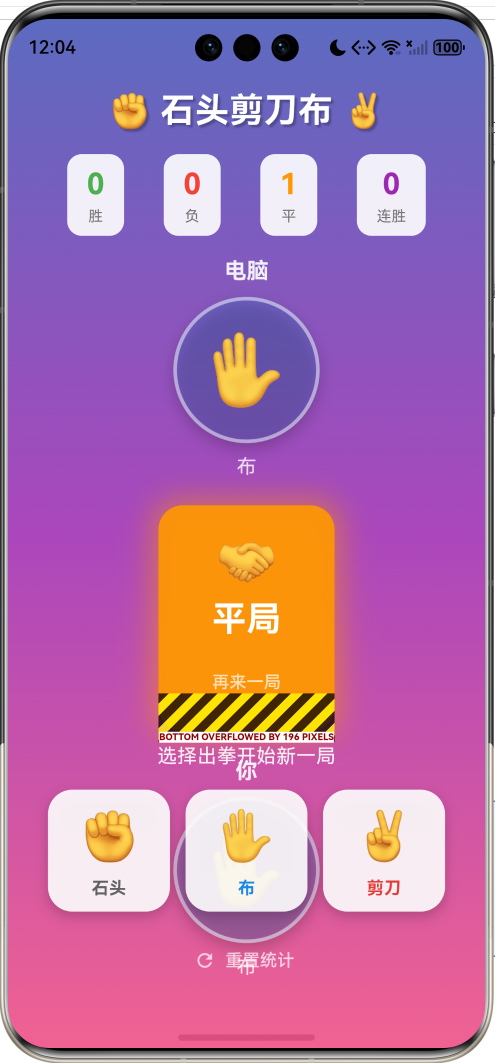
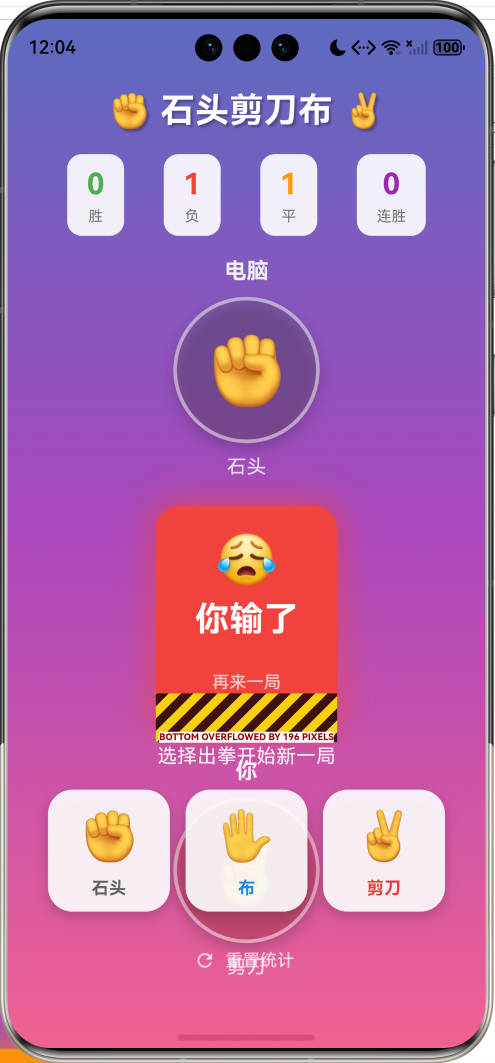
游戏特性:
- 经典三选一玩法(石头✊、剪刀✌️、布✋)
- 电脑出拳摇晃动画
- 结果弹出动画(弹性效果)
- 胜负平统计
- 连胜记录追踪
技术架构
核心数据结构
手势枚举
enum Gesture {
  rock,     // 石头
  paper,    // 布
  scissors, // 剪刀
}

enum GameResult {
  win,
  lose,
  draw,
}
枚举扩展
Dart的枚举扩展让代码更加优雅:
extension GestureExtension on Gesture {
  String get emoji {
    switch (this) {
      case Gesture.rock: return '✊';
      case Gesture.paper: return '✋';
      case Gesture.scissors: return '✌️';
    }
  }

  String get name {
    switch (this) {
      case Gesture.rock: return '石头';
      case Gesture.paper: return '布';
      case Gesture.scissors: return '剪刀';
    }
  }

  Color get color {
    switch (this) {
      case Gesture.rock: return Colors.grey.shade700;
      case Gesture.paper: return Colors.blue.shade600;
      case Gesture.scissors: return Colors.red.shade600;
    }
  }
}
使用方式:
Gesture.rock.emoji  // '✊'
Gesture.rock.name   // '石头'
Gesture.rock.color  // Colors.grey.shade700
胜负判定算法
规则矩阵
| 玩家\电脑 | 石头 | 剪刀 | 布 |
|---|---|---|---|
| 石头 | 平 | 胜 | 负 |
| 剪刀 | 负 | 平 | 胜 |
| 布 | 胜 | 负 | 平 |
判定代码
GameResult _calculateResult(Gesture player, Gesture computer) {
  // 相同则平局
  if (player == computer) return GameResult.draw;

  // 胜利条件
  if ((player == Gesture.rock && computer == Gesture.scissors) ||
      (player == Gesture.paper && computer == Gesture.rock) ||
      (player == Gesture.scissors && computer == Gesture.paper)) {
    return GameResult.win;
  }

  // 其他情况为失败
  return GameResult.lose;
}
游戏流程
动画系统
摇晃动画
late AnimationController _shakeController;
late Animation<double> _shakeAnimation;
void initState() {
super.initState();
_shakeController = AnimationController(
vsync: this,
duration: const Duration(milliseconds: 100),
);
_shakeAnimation = Tween<double>(begin: -0.1, end: 0.1).animate(
CurvedAnimation(parent: _shakeController, curve: Curves.easeInOut),
);
}
应用到Widget:
AnimatedBuilder(
  animation: _shakeAnimation,
  builder: (context, child) {
    return Transform.rotate(
      angle: isComputer && _isPlaying ? _shakeAnimation.value : 0,
      child: gestureWidget,
    );
  },
)
结果弹出动画
late AnimationController _resultController;
late Animation<double> _resultAnimation;

_resultController = AnimationController(
  vsync: this,
  duration: const Duration(milliseconds: 500),
);

_resultAnimation = Tween<double>(begin: 0, end: 1).animate(
  CurvedAnimation(parent: _resultController, curve: Curves.elasticOut),
);
Curves.elasticOut 产生弹性效果,让结果显示更有冲击力。
电脑出拳动画
void _startComputerAnimation() {
  int count = 0;
  _animTimer?.cancel();

  // 每100ms切换一次手势
  _animTimer = Timer.periodic(const Duration(milliseconds: 100), (timer) {
    setState(() {
      _computerAnimIndex = (_computerAnimIndex + 1) % 3;
    });

    // 同时播放摇晃动画
    _shakeController.forward().then((_) => _shakeController.reverse());

    count++;
    if (count >= 15) {  // 1.5秒后停止
      timer.cancel();
      _makeComputerChoice();
    }
  });
}
统计系统
数据追踪
int _wins = 0;      // 胜利次数
int _losses = 0;    // 失败次数
int _draws = 0;     // 平局次数
int _streak = 0;    // 当前连胜
int _maxStreak = 0; // 最大连胜
更新逻辑
switch (result) {
  case GameResult.win:
    _wins++;
    _streak++;
    if (_streak > _maxStreak) _maxStreak = _streak;
    break;
  case GameResult.lose:
    _losses++;
    _streak = 0;  // 连胜中断
    break;
  case GameResult.draw:
    _draws++;
    // 平局不影响连胜
    break;
}
胜率计算
WinRate=WinsWins+Losses+Draws×100%WinRate = \frac{Wins}{Wins + Losses + Draws} \times 100\%WinRate=Wins+Losses+DrawsWins×100%
UI组件设计
选择按钮
Widget _buildChoiceButton(Gesture gesture) {
  final isSelected = _playerChoice == gesture && !_showResult;

  return GestureDetector(
    onTap: _isPlaying ? null : () => _play(gesture),
    child: AnimatedContainer(
      duration: const Duration(milliseconds: 200),
      width: 100,
      height: 100,
      decoration: BoxDecoration(
        color: isSelected
          ? gesture.color
          : Colors.white.withValues(alpha: 0.9),
        borderRadius: BorderRadius.circular(20),
        boxShadow: [
          BoxShadow(
            color: Colors.black.withValues(alpha: 0.2),
            blurRadius: isSelected ? 15 : 8,
            offset: Offset(0, isSelected ? 8 : 4),
          ),
        ],
        border: Border.all(
          color: isSelected ? Colors.white : Colors.transparent,
          width: 3,
        ),
      ),
      child: Column(
        mainAxisAlignment: MainAxisAlignment.center,
        children: [
          Text(gesture.emoji, style: TextStyle(fontSize: 40)),
          Text(
            gesture.name,
            style: TextStyle(
              fontWeight: FontWeight.bold,
              color: isSelected ? Colors.white : gesture.color,
            ),
          ),
        ],
      ),
    ),
  );
}
结果显示
Widget _buildVsArea() {
  if (_showResult && _result != null) {
    return AnimatedBuilder(
      animation: _resultAnimation,
      builder: (context, child) {
        return Transform.scale(
          scale: _resultAnimation.value,
          child: Container(
            padding: EdgeInsets.symmetric(horizontal: 32, vertical: 16),
            decoration: BoxDecoration(
              color: _getResultColor().withValues(alpha: 0.9),
              borderRadius: BorderRadius.circular(20),
              boxShadow: [
                BoxShadow(
                  color: _getResultColor().withValues(alpha: 0.5),
                  blurRadius: 20,
                  spreadRadius: 5,
                ),
              ],
            ),
            child: Column(
              children: [
                Text(_getResultEmoji(), style: TextStyle(fontSize: 40)),
                Text(
                  _getResultText(),
                  style: TextStyle(
                    fontSize: 28,
                    fontWeight: FontWeight.bold,
                    color: Colors.white,
                  ),
                ),
              ],
            ),
          ),
        );
      },
    );
  }
  // ...
}
状态流转
随机性分析
电脑出拳策略
final computerChoice = Gesture.values[_random.nextInt(3)];
使用 Random().nextInt(3) 生成0-2的随机数,对应三种手势,保证完全随机。
概率分布
| 结果 | 理论概率 |
|---|---|
| 胜利 | 33.33% |
| 失败 | 33.33% |
| 平局 | 33.33% |
长期来看,胜负平的比例应该趋近于1:1:1。
性能优化
1. 动画资源管理
void dispose() {
_shakeController.dispose();
_resultController.dispose();
_animTimer?.cancel();
super.dispose();
}
2. 状态更新优化
void _play(Gesture playerChoice) {
  if (_isPlaying) return;  // 防止重复点击

  setState(() {
    _isPlaying = true;
    _playerChoice = playerChoice;
    _computerChoice = null;
    _result = null;
    _showResult = false;
  });
  // ...
}
3. 条件渲染
// 只在需要时显示结果动画
if (_showResult && _result != null) {
  return AnimatedBuilder(...);
}
扩展思路
进阶:石头剪刀布蜥蜴史波克
扩展版本增加两种手势:
enum GestureExtended {
  rock,     // 石头
  paper,    // 布
  scissors, // 剪刀
  lizard,   // 蜥蜴
  spock,    // 史波克
}
胜负关系:
- 剪刀 剪 布
- 布 包 石头
- 石头 砸 蜥蜴
- 蜥蜴 毒 史波克
- 史波克 掰 剪刀
- 剪刀 斩 蜥蜴
- 蜥蜴 吃 布
- 布 证伪 史波克
- 史波克 蒸发 石头
- 石头 砸 剪刀
总结
这个石头剪刀布游戏虽然规则简单,但实现了完整的游戏体验,核心技术点包括:
- 枚举扩展 - 使用extension为枚举添加属性和方法
- 动画组合 - 摇晃动画+弹性动画营造紧张感
- Timer动画 - 使用定时器实现手势快速切换效果
- 状态管理 - 清晰的游戏状态流转
- 统计系统 - 完善的胜负平和连胜追踪
游戏的乐趣不仅在于规则本身,更在于交互体验的打磨。通过精心设计的动画和反馈,即使是最简单的游戏也能变得引人入胜。
欢迎加入开源鸿蒙跨平台社区:https://openharmonycrossplatform.csdn.net

作为“人工智能6S店”的官方数字引擎,为AI开发者与企业提供一个覆盖软硬件全栈、一站式门户。
更多推荐
 20
20 0
0- 0


 已为社区贡献3条内容

所有评论(0)