
Flutter 框架跨平台鸿蒙开发 - 记忆翻牌游戏开发完全指南
·
Flutter实战:记忆翻牌游戏开发完全指南
前言
记忆翻牌(Memory Card Game)是一款经典的益智游戏,玩家需要通过记忆和匹配找到所有相同的卡片对。这个项目涵盖了3D翻转动画、游戏状态管理、计时系统和难度分级等核心技术。
效果预览
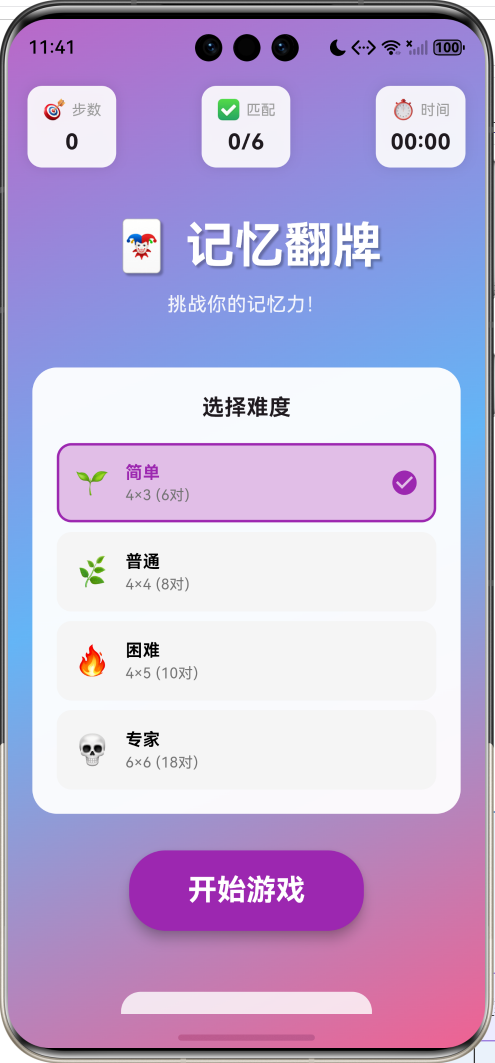
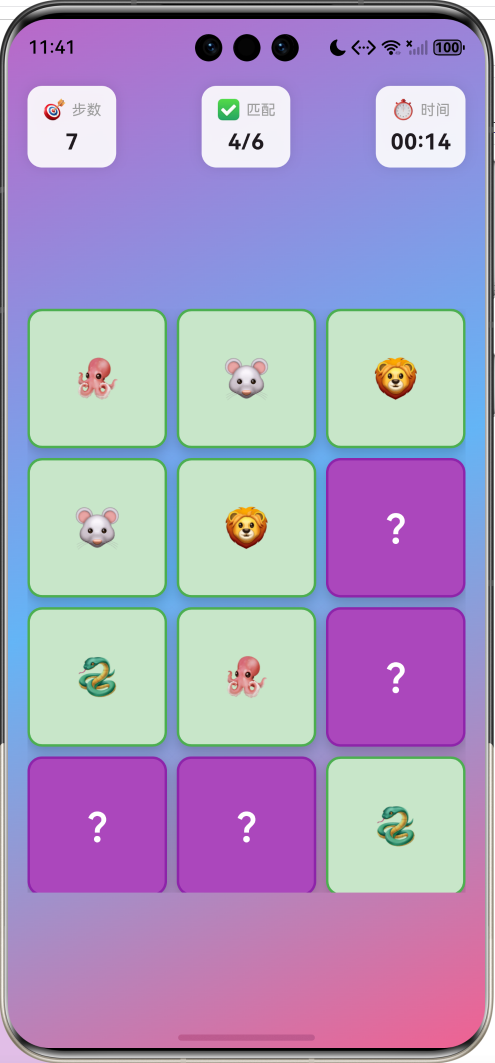
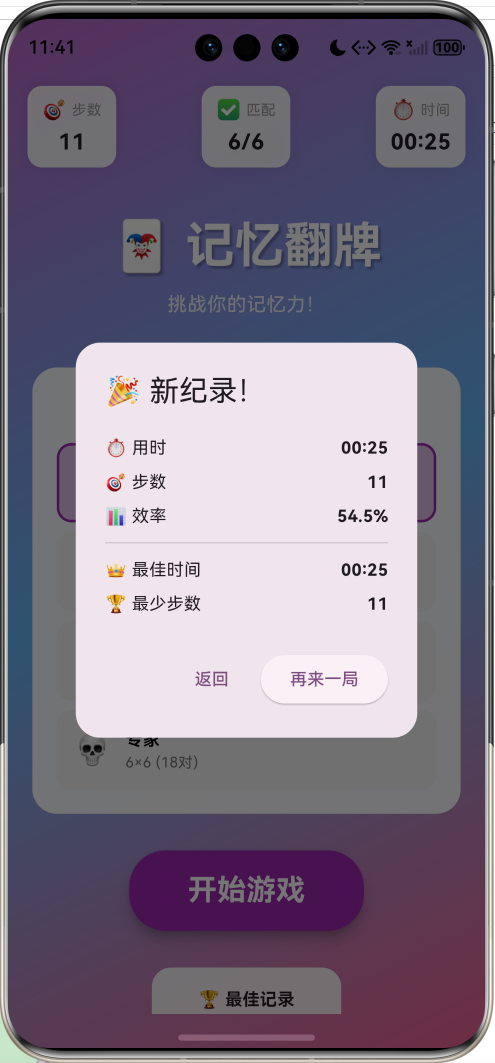
游戏特性:
- 四种难度等级(简单/普通/困难/专家)
- 3D翻牌动画效果
- 开局记忆时间(3秒预览)
- 步数统计和效率计算
- 最佳记录保存
- 匹配成功动画
技术架构
核心数据结构
卡片数据模型
class CardData {
  final String emoji;      // 卡片图案
  final int id;            // 配对ID(相同ID为一对)
  bool isFlipped;          // 是否翻开
  bool isMatched;          // 是否已匹配

  CardData({
    required this.emoji,
    required this.id,
    this.isFlipped = false,
    this.isMatched = false,
  });
}
难度配置
enum GameLevel {
  easy,    // 4×3 = 12张牌(6对)
  normal,  // 4×4 = 16张牌(8对)
  hard,    // 4×5 = 20张牌(10对)
  expert,  // 6×6 = 36张牌(18对)
}
| 难度 | 网格 | 卡片数 | 配对数 | 难度系数 |
|---|---|---|---|---|
| 简单 | 4×3 | 12 | 6 | ⭐ |
| 普通 | 4×4 | 16 | 8 | ⭐⭐ |
| 困难 | 4×5 | 20 | 10 | ⭐⭐⭐ |
| 专家 | 6×6 | 36 | 18 | ⭐⭐⭐⭐ |
游戏流程设计
卡片初始化算法
void _initCards() {
  final random = Random();

  // 1. 从40个emoji中随机选择需要的数量
  final selectedEmojis = List<String>.from(_emojis)..shuffle(random);
  final pairs = selectedEmojis.take(_totalPairs).toList();

  // 2. 创建配对的卡片(每个emoji创建两张)
  List<CardData> cards = [];
  for (int i = 0; i < pairs.length; i++) {
    cards.add(CardData(emoji: pairs[i], id: i));
    cards.add(CardData(emoji: pairs[i], id: i));
  }

  // 3. 打乱卡片顺序
  cards.shuffle(random);
  _cards = cards;
}
算法特点:
- 使用
id标识配对关系 - 每对卡片拥有相同的
id和emoji - 最终打乱确保随机分布
翻牌逻辑实现
核心代码
void _onCardTap(int index) {
  if (!_isPlaying || _isChecking) return;

  final card = _cards[index];

  // 已经翻开或已匹配的卡片不能再点击
  if (card.isFlipped || card.isMatched) return;

  // 已经翻开了两张卡片
  if (_flippedIndices.length >= 2) return;

  setState(() {
    card.isFlipped = true;
    _flippedIndices.add(index);
  });

  // 翻开了两张卡片,检查是否匹配
  if (_flippedIndices.length == 2) {
    _moves++;
    _checkMatch();
  }
}
匹配检测
void _checkMatch() {
  _isChecking = true;

  final index1 = _flippedIndices[0];
  final index2 = _flippedIndices[1];
  final card1 = _cards[index1];
  final card2 = _cards[index2];

  // 检查是否匹配(比较id)
  if (card1.id == card2.id) {
    // 匹配成功 - 播放动画
    _matchController.forward().then((_) {
      _matchController.reset();
      setState(() {
        card1.isMatched = true;
        card2.isMatched = true;
        _matches++;
        _flippedIndices.clear();
        _isChecking = false;

        // 检查是否完成游戏
        if (_matches == _totalPairs) {
          _endGame();
        }
      });
    });
  } else {
    // 不匹配 - 延迟后翻回
    Future.delayed(const Duration(milliseconds: 800), () {
      if (mounted) {
        setState(() {
          card1.isFlipped = false;
          card2.isFlipped = false;
          _flippedIndices.clear();
          _isChecking = false;
        });
      }
    });
  }
}
3D翻转动画
Transform矩阵原理
Transform(
  alignment: Alignment.center,
  transform: Matrix4.identity()
    ..setEntry(3, 2, 0.001)  // 设置透视效果
    ..rotateY(angle)          // Y轴旋转
    ..scale(scale),           // 缩放
  child: cardWidget,
)
关键参数说明:
setEntry(3, 2, 0.001)- 设置透视深度,值越大透视越明显rotateY(angle)- 绕Y轴旋转,实现翻转效果angle = 0时显示背面,angle = π时显示正面
翻转动画实现
Widget _buildCard(int index) {
  final card = _cards[index];
  final isFlipped = card.isFlipped || card.isMatched;

  return AnimatedBuilder(
    animation: card.isMatched ? _matchController : _flipController,
    builder: (context, child) {
      // 计算旋转角度
      final angle = isFlipped ? pi : 0.0;

      // 匹配成功时的缩放动画
      final scale = card.isMatched
        ? 1.0 + (_matchController.value * 0.2)
        : 1.0;

      return Transform(
        alignment: Alignment.center,
        transform: Matrix4.identity()
          ..setEntry(3, 2, 0.001)
          ..rotateY(angle)
          ..scale(scale),
        child: _buildCardContent(card, isFlipped),
      );
    },
  );
}
正反面渲染
Widget _buildCardContent(CardData card, bool isFlipped) {
  return Container(
    decoration: BoxDecoration(
      color: isFlipped
        ? (card.isMatched ? Colors.green.shade100 : Colors.white)
        : Colors.purple.shade400,
      borderRadius: BorderRadius.circular(12),
      border: Border.all(
        color: card.isMatched ? Colors.green : Colors.purple.shade200,
        width: 2,
      ),
    ),
    child: Center(
      child: isFlipped
        ? Transform(
            // 正面需要再次翻转以正确显示
            alignment: Alignment.center,
            transform: Matrix4.rotationY(pi),
            child: Text(card.emoji, style: TextStyle(fontSize: 32)),
          )
        : Icon(Icons.question_mark, size: 32, color: Colors.white),
    ),
  );
}
记忆预览功能
void _showAllCards() {
  // 1. 先显示所有卡片
  setState(() {
    for (var card in _cards) {
      card.isFlipped = true;
    }
  });

  // 2. 3秒后翻回
  Future.delayed(const Duration(seconds: 3), () {
    if (mounted && _isPlaying) {
      setState(() {
        for (var card in _cards) {
          card.isFlipped = false;
        }
      });
    }
  });
}
这个功能让玩家在游戏开始时有3秒时间记忆所有卡片的位置,增加游戏的策略性。
统计系统
效率计算公式
Efficiency=TotalPairsMoves×100%Efficiency = \frac{TotalPairs}{Moves} \times 100\%Efficiency=MovesTotalPairs×100%
理想情况下,玩家用最少的步数(等于配对数)完成游戏,效率为100%。
// 计算效率
final efficiency = (_totalPairs / _moves * 100).toStringAsFixed(1);
游戏数据统计
void _endGame() {
  _gameTimer?.cancel();
  _isPlaying = false;

  // 更新最佳记录
  bool isNewRecord = false;
  if (_timeElapsed < _bestTime || _moves < _bestMoves) {
    isNewRecord = true;
    if (_timeElapsed < _bestTime) _bestTime = _timeElapsed;
    if (_moves < _bestMoves) _bestMoves = _moves;
  }

  // 显示结果
  _showResultDialog(isNewRecord);
}
统计指标:
- ⏱️ 用时 - 从开始到完成的总时间
- 🎯 步数 - 翻牌的总次数(每翻两张算一步)
- 📊 效率 - 完美步数与实际步数的比率
- 👑 最佳时间 - 历史最快完成时间
- 🏆 最少步数 - 历史最少步数记录
响应式布局
Widget _buildGameArea() {
  return Center(
    child: Padding(
      padding: const EdgeInsets.all(16),
      child: AspectRatio(
        // 根据网格比例自动调整
        aspectRatio: _gridColumns / _gridRows,
        child: GridView.builder(
          physics: const NeverScrollableScrollPhysics(),
          gridDelegate: SliverGridDelegateWithFixedCrossAxisCount(
            crossAxisCount: _gridColumns,
            mainAxisSpacing: 8,
            crossAxisSpacing: 8,
          ),
          itemCount: _cards.length,
          itemBuilder: (context, index) => _buildCard(index),
        ),
      ),
    ),
  );
}
使用 AspectRatio 确保游戏区域在不同屏幕尺寸下保持正确的宽高比。
性能优化
1. 动画控制器复用
late AnimationController _flipController;
late AnimationController _matchController;
void initState() {
super.initState();
_flipController = AnimationController(
vsync: this,
duration: const Duration(milliseconds: 300),
);
_matchController = AnimationController(
vsync: this,
duration: const Duration(milliseconds: 500),
);
}
只创建两个动画控制器,所有卡片共享使用。
2. 状态检查优化
void _onCardTap(int index) {
  // 多重检查避免无效操作
  if (!_isPlaying || _isChecking) return;
  if (card.isFlipped || card.isMatched) return;
  if (_flippedIndices.length >= 2) return;

  // 执行翻牌逻辑
}
3. 组件生命周期管理
void dispose() {
_gameTimer?.cancel();
_flipController.dispose();
_matchController.dispose();
super.dispose();
}
难度平衡设计
难度设计考虑因素:
- 卡片数量 - 影响记忆负担
- 网格密度 - 影响视觉识别
- 图标大小 - 专家模式缩小以适应更多卡片
扩展功能思路
算法复杂度分析
时间复杂度
| 操作 | 复杂度 | 说明 |
|---|---|---|
| 初始化卡片 | O(n log n) | 洗牌算法 |
| 翻牌检测 | O(1) | 直接索引访问 |
| 匹配检查 | O(1) | 比较两个ID |
| 渲染卡片 | O(n) | 遍历所有卡片 |
空间复杂度
- 卡片列表:O(n),n为卡片总数
- 翻牌索引:O(1),最多存储2个索引
- 动画控制器:O(1),固定2个
总结
这个记忆翻牌游戏实现了完整的游戏体验,核心技术点包括:
- 3D动画 - 使用Transform矩阵实现逼真的翻转效果
- 状态管理 - 清晰的卡片状态流转和游戏状态控制
- 匹配算法 - 基于ID的配对检测机制
- 难度分级 - 四种难度满足不同水平玩家
- 统计系统 - 完善的数据记录和效率计算
游戏的核心在于平衡挑战性和可玩性,通过合理的难度设计和即时反馈,让玩家在锻炼记忆力的同时获得成就感。
欢迎加入开源鸿蒙跨平台社区:https://openharmonycrossplatform.csdn.net

作为“人工智能6S店”的官方数字引擎,为AI开发者与企业提供一个覆盖软硬件全栈、一站式门户。
更多推荐


 7
7 0
0- 0


 已为社区贡献3条内容

所有评论(0)