
Flutter 框架跨平台鸿蒙开发 - 打地鼠小游戏开发指南
状态机模式- 清晰管理地鼠的生命周期定时器协调- 游戏计时和地鼠生成的并行控制动画系统- 流畅的出现/消失动画概率系统- 不同类型地鼠的随机生成连击机制- 增加游戏深度和策略性游戏开发的关键在于平衡:难度曲线、奖惩机制、反馈及时性,这些都直接影响玩家体验。欢迎加入开源鸿蒙跨平台社区:https://openharmonycrossplatform.csdn.net。
·
Flutter实战:打地鼠小游戏开发指南
前言
打地鼠是一款经典的街机游戏,玩家需要在地鼠从洞里冒出来时快速点击将其打回去。这个项目涵盖了游戏开发中的核心概念:状态机、定时器管理、动画系统和得分机制。
效果预览
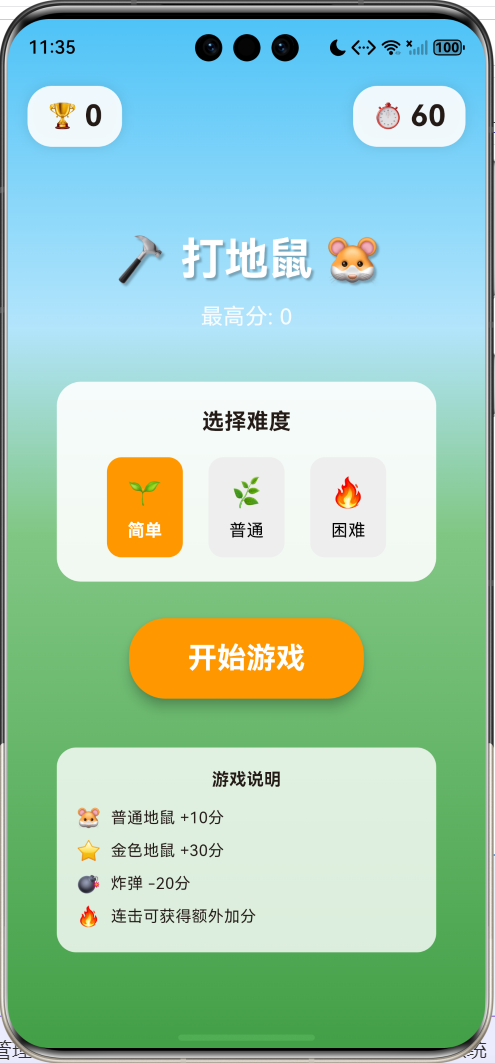
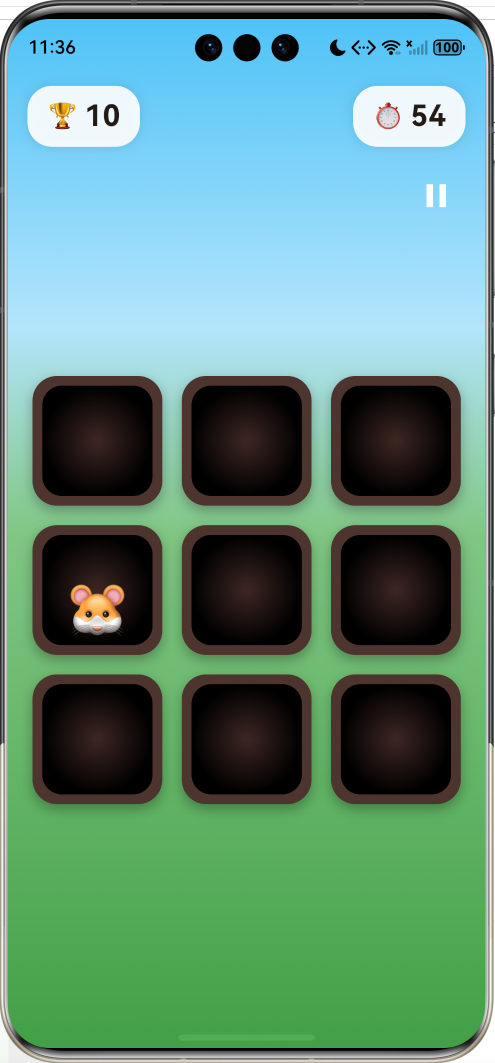
游戏包含以下特性:
- 3x3 九宫格游戏区域
- 三种难度(简单/普通/困难)
- 三种地鼠类型(普通/金色/炸弹)
- 连击系统和得分加成
- 60秒倒计时
- 暂停/继续功能
- 游戏结果统计
技术架构
核心数据结构
地鼠状态枚举
/// 地鼠状态
enum MoleState {
  hidden,    // 隐藏在洞里
  showing,   // 正在冒出
  visible,   // 完全显示
  hit,       // 被打中
  missed,    // 错过了
}

/// 地鼠类型
enum MoleType {
  normal,    // 普通地鼠 +10分
  golden,    // 金色地鼠 +30分
  bomb,      // 炸弹 -20分
}
地鼠数据模型
class Mole {
  MoleState state;
  MoleType type;
  int showDuration; // 显示时长(毫秒)

  Mole({
    this.state = MoleState.hidden,
    this.type = MoleType.normal,
    this.showDuration = 1000,
  });
}
状态机设计
地鼠的生命周期:
Hidden- 初始状态,等待被激活Showing- 播放冒出动画Visible- 完全显示,可被点击Hit- 被玩家击中Missed- 超时未被击中
难度系统
| 难度 | 出现间隔 | 显示时长 | 同时数量 |
|---|---|---|---|
| 简单 | 1200ms | 1500ms | 1 |
| 普通 | 800ms | 1000ms | 2 |
| 困难 | 500ms | 700ms | 3 |
int get _moleInterval {
  switch (_difficulty) {
    case Difficulty.easy: return 1200;
    case Difficulty.normal: return 800;
    case Difficulty.hard: return 500;
  }
}

int get _moleShowTime {
  switch (_difficulty) {
    case Difficulty.easy: return 1500;
    case Difficulty.normal: return 1000;
    case Difficulty.hard: return 700;
  }
}
地鼠生成算法
void _spawnMole() {
  // 1. 找出所有空闲的洞
  List<int> hiddenHoles = [];
  for (int i = 0; i < gridSize; i++) {
    if (_moles[i].state == MoleState.hidden) {
      hiddenHoles.add(i);
    }
  }

  if (hiddenHoles.isEmpty) return;

  // 2. 检查当前显示数量是否达到上限
  int currentVisible = _moles.where((m) =>
    m.state == MoleState.showing || m.state == MoleState.visible
  ).length;

  if (currentVisible >= _maxMolesAtOnce) return;

  // 3. 随机选择一个洞
  int holeIndex = hiddenHoles[_random.nextInt(hiddenHoles.length)];

  // 4. 决定地鼠类型(概率分布)
  MoleType type;
  int rand = _random.nextInt(100);
  if (rand < 5) {
    type = MoleType.bomb;    // 5% 炸弹
  } else if (rand < 15) {
    type = MoleType.golden;  // 10% 金色
  } else {
    type = MoleType.normal;  // 85% 普通
  }

  // 5. 创建地鼠并启动动画
  setState(() {
    _moles[holeIndex] = Mole(
      state: MoleState.showing,
      type: type,
      showDuration: _moleShowTime,
    );
  });
}
得分系统
分数计算公式
Score=BasePoints+(Combo×Multiplier)Score = BasePoints + (Combo \times Multiplier)Score=BasePoints+(Combo×Multiplier)
| 地鼠类型 | 基础分 | 连击乘数 |
|---|---|---|
| 普通 🐹 | 10 | 2 |
| 金色 ⭐ | 30 | 5 |
| 炸弹 💣 | -20 | 重置连击 |
void _hitMole(int index) {
  final mole = _moles[index];

  int points = 0;
  switch (mole.type) {
    case MoleType.normal:
      points = 10 + (_combo * 2);
      _combo++;
      _hits++;
      break;
    case MoleType.golden:
      points = 30 + (_combo * 5);
      _combo += 2;  // 金色地鼠连击+2
      _hits++;
      break;
    case MoleType.bomb:
      points = -20;
      _combo = 0;   // 炸弹重置连击
      break;
  }

  _score = (_score + points).clamp(0, 999999);
}
动画系统
地鼠出现动画
使用 AnimationController 控制地鼠从洞中冒出的动画:
// 为每个洞创建动画控制器
for (int i = 0; i < gridSize; i++) {
  _animControllers[i] = AnimationController(
    vsync: this,
    duration: const Duration(milliseconds: 150),
  );
}

// 播放出现动画
_animControllers[holeIndex]?.forward().then((_) {
  // 动画完成后更新状态
  setState(() {
    _moles[holeIndex].state = MoleState.visible;
  });
});
动画渲染
AnimatedBuilder(
  animation: controller,
  builder: (context, child) {
    return ClipRRect(
      borderRadius: BorderRadius.circular(16),
      child: Align(
        // 根据动画值计算位置
        alignment: Alignment(0, 1 - controller.value * 1.5),
        child: _buildMole(mole),
      ),
    );
  },
)
动画原理:
controller.value从 0 到 1Alignment.y从 1(底部)移动到 -0.5(顶部偏上)- 使用
ClipRRect裁剪超出洞口的部分
计时器管理
void _startGame() {
  // 游戏倒计时
  _gameTimer = Timer.periodic(const Duration(seconds: 1), (timer) {
    if (!_isPaused) {
      setState(() => _timeLeft--);
      if (_timeLeft <= 0) _endGame();
    }
  });

  // 地鼠生成器
  _moleTimer = Timer.periodic(
    Duration(milliseconds: _moleInterval),
    (timer) {
      if (!_isPaused && _isPlaying) {
        _spawnMole();
      }
    }
  );
}
UI组件设计
洞穴渲染
Widget _buildHole(int index) {
  return GestureDetector(
    onTapDown: (_) => _hitMole(index),
    child: Container(
      decoration: BoxDecoration(
        color: Colors.brown.shade800,
        borderRadius: BorderRadius.circular(20),
        boxShadow: [
          BoxShadow(
            color: Colors.black.withValues(alpha: 0.3),
            blurRadius: 8,
            offset: const Offset(0, 4),
          ),
        ],
      ),
      child: Stack(
        alignment: Alignment.center,
        children: [
          // 洞的内部(深色渐变)
          Container(
            margin: const EdgeInsets.all(8),
            decoration: BoxDecoration(
              borderRadius: BorderRadius.circular(16),
              gradient: RadialGradient(
                colors: [
                  Colors.brown.shade900,
                  Colors.black,
                ],
              ),
            ),
          ),
          // 地鼠(带动画)
          AnimatedBuilder(
            animation: controller,
            builder: (context, child) {
              return ClipRRect(
                borderRadius: BorderRadius.circular(16),
                child: Align(
                  alignment: Alignment(0, 1 - controller.value * 1.5),
                  child: _buildMole(mole),
                ),
              );
            },
          ),
        ],
      ),
    ),
  );
}
地鼠外观
Widget _buildMole(Mole mole) {
  String emoji;
  Color? bgColor;

  switch (mole.type) {
    case MoleType.normal:
      emoji = mole.state == MoleState.hit ? '😵' : '🐹';
      break;
    case MoleType.golden:
      emoji = mole.state == MoleState.hit ? '🌟' : '⭐';
      bgColor = Colors.amber.withValues(alpha: 0.3);
      break;
    case MoleType.bomb:
      emoji = mole.state == MoleState.hit ? '💥' : '💣';
      bgColor = Colors.red.withValues(alpha: 0.3);
      break;
  }

  return Container(
    width: 60,
    height: 70,
    decoration: BoxDecoration(
      color: bgColor,
      borderRadius: BorderRadius.circular(12),
    ),
    child: Column(
      mainAxisAlignment: MainAxisAlignment.center,
      children: [
        Text(emoji, style: TextStyle(fontSize: 40)),
        if (mole.state == MoleState.hit)
          Text(
            mole.type == MoleType.bomb ? '-20' : '+${points}',
            style: TextStyle(
              color: mole.type == MoleType.bomb ? Colors.red : Colors.green,
              fontWeight: FontWeight.bold,
            ),
          ),
      ],
    ),
  );
}
游戏流程
性能优化
1. 动画控制器复用
// 预创建所有动画控制器,避免频繁创建销毁
final Map<int, AnimationController> _animControllers = {};

void _initMoles() {
  for (int i = 0; i < gridSize; i++) {
    _animControllers[i] = AnimationController(
      vsync: this,
      duration: const Duration(milliseconds: 150),
    );
  }
}
2. 状态更新优化
// 只在必要时调用 setState
void _hideMole(int index, {bool missed = false}) {
  if (!mounted) return;  // 检查组件是否还在树中

  // 先播放动画,动画完成后再更新状态
  _animControllers[index]?.reverse().then((_) {
    if (mounted) {
      setState(() {
        _moles[index] = Mole();
      });
    }
  });
}
3. 计时器清理
void dispose() {
_gameTimer?.cancel();
_moleTimer?.cancel();
for (var controller in _animControllers.values) {
controller.dispose();
}
super.dispose();
}
扩展思路
总结
这个打地鼠游戏实现了完整的游戏循环,核心技术点包括:
- 状态机模式 - 清晰管理地鼠的生命周期
- 定时器协调 - 游戏计时和地鼠生成的并行控制
- 动画系统 - 流畅的出现/消失动画
- 概率系统 - 不同类型地鼠的随机生成
- 连击机制 - 增加游戏深度和策略性
游戏开发的关键在于平衡:难度曲线、奖惩机制、反馈及时性,这些都直接影响玩家体验。
欢迎加入开源鸿蒙跨平台社区:https://openharmonycrossplatform.csdn.net

作为“人工智能6S店”的官方数字引擎,为AI开发者与企业提供一个覆盖软硬件全栈、一站式门户。
更多推荐

 8
8 0
0- 0


 已为社区贡献3条内容

所有评论(0)