
Flutter 框架跨平台鸿蒙开发 - 打造实时汇率换算器,支持20+货币与离线模式
网络请求:使用http包调用REST API离线降级:网络失败时使用备用数据数据格式化:根据数值大小智能格式化:可拖动的底部弹窗实时计算:输入变化时自动更新结果汇率换算是一个很好的网络请求练习项目,涉及API调用、错误处理、数据解析等常见场景。欢迎加入开源鸿蒙跨平台社区:https://openharmonycrossplatform.csdn.net。
Flutter实战:打造实时汇率换算器,支持20+货币与离线模式
出国旅行、跨境购物、外汇投资都离不开汇率换算。本文将用Flutter实现一款实时汇率换算器,支持20多种主流货币,具备在线获取汇率和离线备用功能。
运行效果图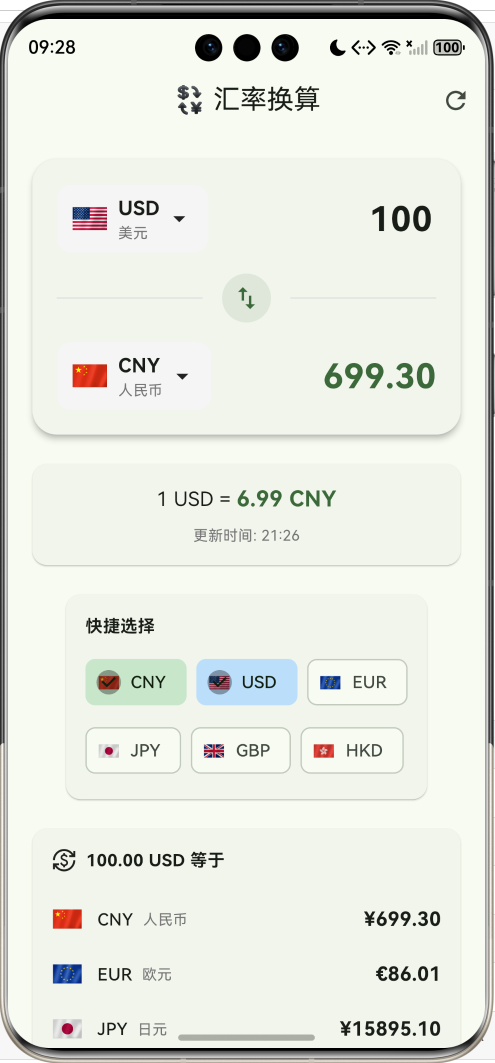
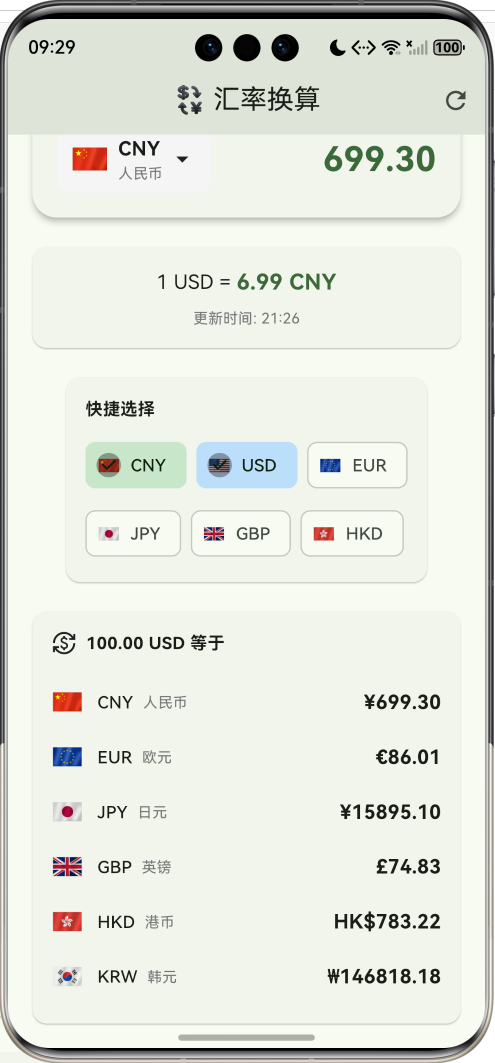
功能特性
- 💱 实时汇率:接入免费API获取最新汇率
- 🌍 20+货币:覆盖全球主流货币
- 🔄 双向换算:一键交换源/目标货币
- 📊 多币种结果:同时显示多种货币换算结果
- 📴 离线模式:网络不可用时使用备用汇率
- 🎯 快捷选择:常用货币一键切换
支持的货币
| 货币 | 代码 | 符号 | 国旗 |
|---|---|---|---|
| 人民币 | CNY | ¥ | 🇨🇳 |
| 美元 | USD | $ | 🇺🇸 |
| 欧元 | EUR | € | 🇪🇺 |
| 英镑 | GBP | £ | 🇬🇧 |
| 日元 | JPY | ¥ | 🇯🇵 |
| 韩元 | KRW | ₩ | 🇰🇷 |
| 港币 | HKD | HK$ | 🇭🇰 |
| 新台币 | TWD | NT$ | 🇹🇼 |
| 新加坡元 | SGD | S$ | 🇸🇬 |
| 澳元 | AUD | A$ | 🇦🇺 |
| … | … | … | … |
应用架构
数据模型
货币模型
class Currency {
  final String code;   // 货币代码 (USD, CNY, EUR...)
  final String name;   // 货币名称
  final String symbol; // 货币符号 ($, ¥, €...)
  final String flag;   // 国旗emoji

  const Currency({
    required this.code,
    required this.name,
    required this.symbol,
    required this.flag,
  });
}
预设货币数据
class CurrencyData {
  static const List<Currency> currencies = [
    Currency(code: 'CNY', name: '人民币', symbol: '¥', flag: '🇨🇳'),
    Currency(code: 'USD', name: '美元', symbol: '\$', flag: '🇺🇸'),
    Currency(code: 'EUR', name: '欧元', symbol: '€', flag: '🇪🇺'),
    Currency(code: 'GBP', name: '英镑', symbol: '£', flag: '🇬🇧'),
    Currency(code: 'JPY', name: '日元', symbol: '¥', flag: '🇯🇵'),
    // ... 更多货币
  ];

  static Currency? getByCode(String code) {
    try {
      return currencies.firstWhere((c) => c.code == code);
    } catch (_) {
      return null;
    }
  }
}
汇率获取
API调用
使用免费的 exchangerate-api 获取实时汇率:
Future<void> _fetchRates() async {
  setState(() {
    _isLoading = true;
    _error = null;
  });

  try {
    final response = await http.get(
      Uri.parse('https://api.exchangerate-api.com/v4/latest/CNY'),
    ).timeout(const Duration(seconds: 10));

    if (response.statusCode == 200) {
      final data = jsonDecode(response.body);
      final rates = Map<String, double>.from(
        (data['rates'] as Map).map((k, v) => MapEntry(k, (v as num).toDouble())),
      );
      setState(() {
        _rates = rates;
        _lastUpdate = DateTime.now();
        _isLoading = false;
      });
    } else {
      throw Exception('获取汇率失败');
    }
  } catch (e) {
    // 网络失败时使用离线汇率
    setState(() {
      _rates = _offlineRates;
      _error = '无法获取实时汇率,使用离线数据';
      _isLoading = false;
    });
  }
}
离线备用汇率
预设一份离线汇率数据,确保无网络时也能使用:
final Map<String, double> _offlineRates = {
  'CNY': 1.0,
  'USD': 0.14,
  'EUR': 0.13,
  'GBP': 0.11,
  'JPY': 21.0,
  'KRW': 187.0,
  'HKD': 1.09,
  // ... 更多货币
};
汇率计算
换算公式
以CNY为基准货币,换算公式为:
结果 = 金额 × 目标货币汇率 源货币汇率 结果 = 金额 \times \frac{目标货币汇率}{源货币汇率} 结果=金额×源货币汇率目标货币汇率
double get _convertedAmount {
  final amount = double.tryParse(_amountController.text) ?? 0;
  if (_rates.isEmpty) return 0;

  // 获取相对于CNY的汇率
  final fromRate = _rates[_fromCurrency.code] ?? 1;
  final toRate = _rates[_toCurrency.code] ?? 1;

  // 先转为CNY,再转为目标货币
  return amount / fromRate * toRate;
}

double get _exchangeRate {
  if (_rates.isEmpty) return 0;
  final fromRate = _rates[_fromCurrency.code] ?? 1;
  final toRate = _rates[_toCurrency.code] ?? 1;
  return toRate / fromRate;
}
计算示例
假设汇率数据(相对于1 CNY):
- USD: 0.14
- EUR: 0.13
- JPY: 21.0
换算 100 USD → EUR:
100 × 0.13 0.14 = 92.86 EUR 100 \times \frac{0.13}{0.14} = 92.86 \text{ EUR} 100×0.140.13=92.86 EUR
UI组件实现
货币输入组件
包含货币选择器和金额输入/显示:
Widget _buildCurrencyInput({
  required Currency currency,
  TextEditingController? controller,
  double? value,
  required bool isEditable,
  required VoidCallback onCurrencyTap,
}) {
  return Row(
    children: [
      // 货币选择器
      InkWell(
        onTap: onCurrencyTap,
        child: Container(
          padding: const EdgeInsets.all(12),
          decoration: BoxDecoration(
            color: Colors.grey.shade100,
            borderRadius: BorderRadius.circular(12),
          ),
          child: Row(
            children: [
              Text(currency.flag, style: const TextStyle(fontSize: 24)),
              const SizedBox(width: 8),
              Column(
                crossAxisAlignment: CrossAxisAlignment.start,
                children: [
                  Text(currency.code, style: const TextStyle(fontWeight: FontWeight.bold)),
                  Text(currency.name, style: TextStyle(fontSize: 12, color: Colors.grey)),
                ],
              ),
              const Icon(Icons.arrow_drop_down),
            ],
          ),
        ),
      ),
      const SizedBox(width: 16),
      // 金额输入/显示
      Expanded(
        child: isEditable
            ? TextField(
                controller: controller,
                keyboardType: TextInputType.numberWithOptions(decimal: true),
                textAlign: TextAlign.right,
                style: const TextStyle(fontSize: 28, fontWeight: FontWeight.bold),
                decoration: const InputDecoration(border: InputBorder.none),
                onChanged: (_) => setState(() {}),
              )
            : Text(
                _formatNumber(value ?? 0),
                textAlign: TextAlign.right,
                style: TextStyle(fontSize: 28, fontWeight: FontWeight.bold),
              ),
      ),
    ],
  );
}
数字格式化
根据数值大小选择合适的显示格式:
String _formatNumber(double value) {
  if (value >= 1000000) {
    // 大数字添加千分位
    return value.toStringAsFixed(0).replaceAllMapped(
      RegExp(r'(\d{1,3})(?=(\d{3})+(?!\d))'),
      (m) => '${m[1]},',
    );
  } else if (value >= 1) {
    // 普通数字保留2位小数
    return value.toStringAsFixed(2);
  } else {
    // 小数保留4位
    return value.toStringAsFixed(4);
  }
}
货币选择器
使用 DraggableScrollableSheet 实现可拖动的底部选择器:
void _showCurrencyPicker(bool isFrom) {
  showModalBottomSheet(
    context: context,
    isScrollControlled: true,
    shape: const RoundedRectangleBorder(
      borderRadius: BorderRadius.vertical(top: Radius.circular(20)),
    ),
    builder: (context) {
      return DraggableScrollableSheet(
        initialChildSize: 0.7,
        minChildSize: 0.5,
        maxChildSize: 0.9,
        expand: false,
        builder: (context, scrollController) {
          return Column(
            children: [
              // 标题
              Text(isFrom ? '选择源货币' : '选择目标货币'),
              // 货币列表
              Expanded(
                child: ListView.builder(
                  controller: scrollController,
                  itemCount: CurrencyData.currencies.length,
                  itemBuilder: (context, index) {
                    final currency = CurrencyData.currencies[index];
                    final rate = _rates[currency.code];

                    return ListTile(
                      leading: Text(currency.flag, style: TextStyle(fontSize: 28)),
                      title: Text('${currency.code} - ${currency.name}'),
                      subtitle: rate != null
                          ? Text('1 CNY = ${_formatNumber(rate)} ${currency.code}')
                          : null,
                      onTap: () {
                        setState(() {
                          if (isFrom) {
                            _fromCurrency = currency;
                          } else {
                            _toCurrency = currency;
                          }
                        });
                        Navigator.pop(context);
                      },
                    );
                  },
                ),
              ),
            ],
          );
        },
      );
    },
  );
}
多币种结果展示
同时显示多种货币的换算结果:
Widget _buildMultiCurrencyResult() {
  final amount = double.tryParse(_amountController.text) ?? 0;
  final fromRate = _rates[_fromCurrency.code] ?? 1;

  final displayCurrencies = ['CNY', 'USD', 'EUR', 'JPY', 'GBP', 'HKD']
      .where((code) => code != _fromCurrency.code)
      .take(6)
      .toList();

  return Card(
    child: Column(
      children: [
        Text('${_formatNumber(amount)} ${_fromCurrency.code} 等于'),
        ...displayCurrencies.map((code) {
          final currency = CurrencyData.getByCode(code)!;
          final toRate = _rates[code] ?? 1;
          final result = amount / fromRate * toRate;

          return Row(
            children: [
              Text(currency.flag),
              Text(currency.code),
              const Spacer(),
              Text('${currency.symbol}${_formatNumber(result)}'),
            ],
          );
        }),
      ],
    ),
  );
}
数据流程
项目依赖
dependencies:
  flutter:
    sdk: flutter
  http: ^1.2.0  # HTTP请求
扩展建议
- 汇率图表:显示历史汇率走势
- 汇率提醒:设置目标汇率,达到时通知
- 收藏货币:自定义常用货币列表
- 计算器模式:支持加减乘除运算
- 汇率缓存:本地缓存汇率,减少API调用
- 多数据源:支持切换不同的汇率API
项目结构
lib/
└── main.dart
    ├── Currency              # 货币模型
    ├── CurrencyData          # 货币数据
    └── CurrencyConverterApp  # 主应用
        ├── _fetchRates()     # 获取汇率
        ├── _convertedAmount  # 换算结果
        ├── _buildConverterCard()    # 换算卡片
        ├── _buildMultiCurrencyResult()  # 多币种结果
        └── _showCurrencyPicker()    # 货币选择器
总结
这个汇率换算器展示了几个实用的开发技巧:
- 网络请求:使用http包调用REST API
- 离线降级:网络失败时使用备用数据
- 数据格式化:根据数值大小智能格式化
- DraggableScrollableSheet:可拖动的底部弹窗
- 实时计算:输入变化时自动更新结果
汇率换算是一个很好的网络请求练习项目,涉及API调用、错误处理、数据解析等常见场景。
欢迎加入开源鸿蒙跨平台社区:https://openharmonycrossplatform.csdn.net

作为“人工智能6S店”的官方数字引擎,为AI开发者与企业提供一个覆盖软硬件全栈、一站式门户。
更多推荐


 2
2 0
0- 0


 已为社区贡献5条内容

所有评论(0)