
Flutter 框架跨平台鸿蒙开发 - 打造Markdown编辑器,支持实时预览与分屏模式
·
Flutter实战:打造Markdown编辑器,支持实时预览与分屏模式
Markdown是程序员最常用的文档格式。本文将用Flutter从零实现一款Markdown编辑器,支持实时预览、分屏编辑、快捷工具栏,并手写一个轻量级的Markdown渲染器。
运行效果图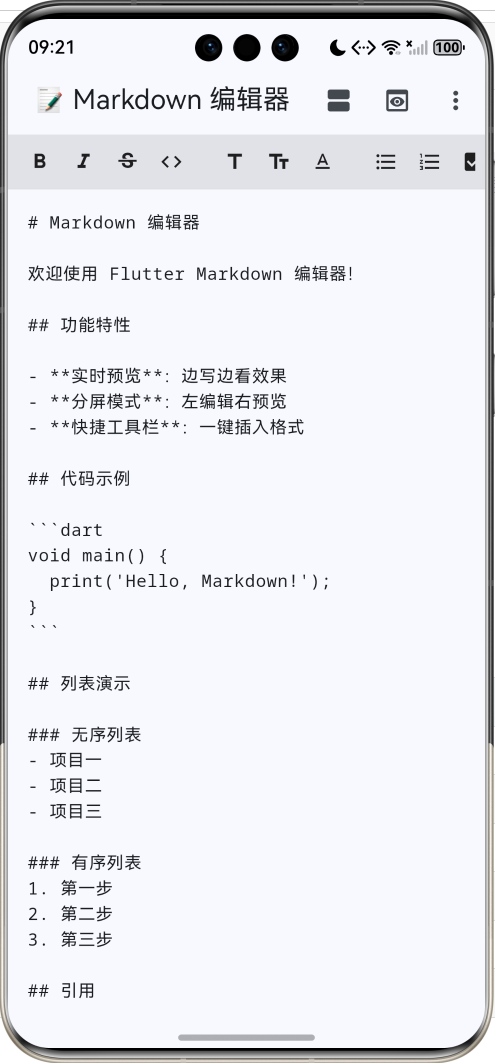
功能特性
- ✏️ 编辑模式:等宽字体,舒适的编辑体验
- 👁️ 预览模式:实时渲染Markdown效果
- 📐 分屏模式:左编辑右预览,同步查看
- 🔧 快捷工具栏:一键插入标题、列表、代码块等
- 📋 复制导出:一键复制全部内容
支持的Markdown语法
| 语法 | 示例 | 效果 |
|---|---|---|
| 标题 | # H1 ## H2 |
多级标题 |
| 粗体 | **粗体** |
粗体 |
| 斜体 | *斜体* |
斜体 |
| 删除线 | ~~删除~~ |
|
| 行内代码 | `code` |
code |
| 代码块 | ` ```dart ```` | 语法高亮 |
| 引用 | > 引用 |
左边框样式 |
| 无序列表 | - 项目 |
• 项目 |
| 有序列表 | 1. 项目 |
1. 项目 |
| 任务列表 | - [ ] 待办 |
☐ 待办 |
| 链接 | [文字](url) |
蓝色下划线 |
| 表格 | | 列1 | 列2 | |
表格样式 |
| 分割线 | --- |
水平线 |
应用架构
核心实现
文本插入
工具栏按钮需要在光标位置插入格式标记:
void _insertText(String before, [String after = '']) {
  final text = _controller.text;
  final selection = _controller.selection;

  // 获取选中的文本
  final selectedText = selection.textInside(text);

  // 在选中文本前后插入标记
  final newText = text.replaceRange(
    selection.start,
    selection.end,
    '$before$selectedText$after',
  );

  // 更新文本和光标位置
  _controller.value = TextEditingValue(
    text: newText,
    selection: TextSelection.collapsed(
      offset: selection.start + before.length + selectedText.length + after.length,
    ),
  );
}

// 使用示例
_insertText('**', '**');  // 粗体
_insertText('*', '*');    // 斜体
_insertText('# ');        // 一级标题
_insertText('```\n', '\n```');  // 代码块
工具栏组件
横向滚动的工具栏,包含常用格式按钮:
Widget _buildToolbar() {
  return SingleChildScrollView(
    scrollDirection: Axis.horizontal,
    child: Row(
      children: [
        _buildToolButton(Icons.format_bold, '粗体', () => _insertText('**', '**')),
        _buildToolButton(Icons.format_italic, '斜体', () => _insertText('*', '*')),
        _buildToolButton(Icons.strikethrough_s, '删除线', () => _insertText('~~', '~~')),
        _buildToolButton(Icons.code, '行内代码', () => _insertText('`', '`')),
        const VerticalDivider(),
        _buildToolButton(Icons.title, 'H1', () => _insertText('# ')),
        _buildToolButton(Icons.text_fields, 'H2', () => _insertText('## ')),
        _buildToolButton(Icons.text_format, 'H3', () => _insertText('### ')),
        const VerticalDivider(),
        _buildToolButton(Icons.format_list_bulleted, '无序列表', () => _insertText('- ')),
        _buildToolButton(Icons.format_list_numbered, '有序列表', () => _insertText('1. ')),
        _buildToolButton(Icons.check_box, '任务列表', () => _insertText('- [ ] ')),
        const VerticalDivider(),
        _buildToolButton(Icons.format_quote, '引用', () => _insertText('> ')),
        _buildToolButton(Icons.code_off, '代码块', () => _insertText('```\n', '\n```')),
        _buildToolButton(Icons.link, '链接', () => _insertText('[', '](url)')),
        _buildToolButton(Icons.table_chart, '表格', () => _insertText(_tableTemplate)),
      ],
    ),
  );
}

Widget _buildToolButton(IconData icon, String tooltip, VoidCallback onPressed) {
  return Tooltip(
    message: tooltip,
    child: InkWell(
      onTap: onPressed,
      child: Padding(
        padding: const EdgeInsets.all(8),
        child: Icon(icon, size: 20),
      ),
    ),
  );
}
视图切换
支持三种视图模式:纯编辑、纯预览、分屏:
Widget build(BuildContext context) {
  final isWide = MediaQuery.of(context).size.width > 600;

  return Column(
    children: [
      if (!_isPreviewMode) _buildToolbar(),
      Expanded(
        child: _isSplitView && isWide
            // 分屏模式(仅宽屏)
            ? Row(
                children: [
                  Expanded(child: _buildEditor()),
                  const VerticalDivider(width: 1),
                  Expanded(child: _buildPreview()),
                ],
              )
            // 单视图模式
            : _isPreviewMode
                ? _buildPreview()
                : _buildEditor(),
      ),
    ],
  );
}
Markdown渲染器
解析流程
渲染错误: Mermaid 渲染失败: Parse error on line 8: ...代码块] C -->|\| 包含| H[表格] C -->|其他 ----------------------^ Expecting 'SEMI', 'NEWLINE', 'SPACE', 'EOF', 'SQS', 'SHAPE_DATA', 'AMP', 'STYLE_SEPARATOR', 'DOUBLECIRCLESTART', 'PS', '(-', 'STADIUMSTART', 'SUBROUTINESTART', 'VERTEX_WITH_PROPS_START', 'COLON', 'CYLINDERSTART', 'DIAMOND_START', 'TAGEND', 'TRAPSTART', 'INVTRAPSTART', 'START_LINK', 'LINK', 'LINK_ID', 'DOWN', 'DEFAULT', 'NUM', 'COMMA', 'NODE_STRING', 'BRKT', 'MINUS', 'MULT', 'UNICODE_TEXT', got 'PIPE'
块级元素解析
逐行解析,识别不同的块级元素:
Widget build(BuildContext context) {
  final lines = markdown.split('\n');
  final widgets = <Widget>[];

  int i = 0;
  while (i < lines.length) {
    final line = lines[i];

    // 代码块(多行)
    if (line.startsWith('```')) {
      final codeLines = <String>[];
      final language = line.substring(3).trim();
      i++;
      while (i < lines.length && !lines[i].startsWith('```')) {
        codeLines.add(lines[i]);
        i++;
      }
      widgets.add(_buildCodeBlock(codeLines.join('\n'), language));
      i++;
      continue;
    }

    // 标题
    if (line.startsWith('# ')) {
      widgets.add(_buildHeading(line.substring(2), 1));
    } else if (line.startsWith('## ')) {
      widgets.add(_buildHeading(line.substring(3), 2));
    } else if (line.startsWith('### ')) {
      widgets.add(_buildHeading(line.substring(4), 3));
    }
    // 分割线
    else if (line.trim() == '---') {
      widgets.add(const Divider());
    }
    // 引用(可能多行)
    else if (line.startsWith('> ')) {
      final quoteLines = <String>[line.substring(2)];
      while (i + 1 < lines.length && lines[i + 1].startsWith('> ')) {
        i++;
        quoteLines.add(lines[i].substring(2));
      }
      widgets.add(_buildBlockquote(quoteLines.join('\n')));
    }
    // 无序列表
    else if (line.startsWith('- ')) {
      widgets.add(_buildListItem(line.substring(2), false));
    }
    // 有序列表
    else if (RegExp(r'^\d+\. ').hasMatch(line)) {
      final match = RegExp(r'^(\d+)\. (.*)').firstMatch(line);
      widgets.add(_buildListItem(match!.group(2)!, true, int.parse(match.group(1)!)));
    }
    // 普通段落
    else if (line.trim().isNotEmpty) {
      widgets.add(_buildParagraph(line));
    }

    i++;
  }

  return Column(crossAxisAlignment: CrossAxisAlignment.start, children: widgets);
}
行内样式解析
使用正则表达式匹配粗体、斜体、代码、链接等行内样式:
Widget _buildRichText(String text) {
  final spans = <InlineSpan>[];

  // 匹配所有行内样式
  final regex = RegExp(
    r'(\*\*(.+?)\*\*)|'  // 粗体 **text**
    r'(\*(.+?)\*)|'       // 斜体 *text*
    r'(`(.+?)`)|'         // 行内代码 `code`
    r'(\[(.+?)\]\((.+?)\))|'  // 链接 [text](url)
    r'(~~(.+?)~~)',       // 删除线 ~~text~~
  );

  int lastEnd = 0;
  for (final match in regex.allMatches(text)) {
    // 添加匹配前的普通文本
    if (match.start > lastEnd) {
      spans.add(TextSpan(text: text.substring(lastEnd, match.start)));
    }

    // 粗体
    if (match.group(1) != null) {
      spans.add(TextSpan(
        text: match.group(2),
        style: const TextStyle(fontWeight: FontWeight.bold),
      ));
    }
    // 斜体
    else if (match.group(3) != null) {
      spans.add(TextSpan(
        text: match.group(4),
        style: const TextStyle(fontStyle: FontStyle.italic),
      ));
    }
    // 行内代码
    else if (match.group(5) != null) {
      spans.add(WidgetSpan(
        child: Container(
          padding: const EdgeInsets.symmetric(horizontal: 4, vertical: 2),
          decoration: BoxDecoration(
            color: Colors.grey.shade200,
            borderRadius: BorderRadius.circular(4),
          ),
          child: Text(
            match.group(6)!,
            style: TextStyle(fontFamily: 'monospace', color: Colors.pink.shade700),
          ),
        ),
      ));
    }
    // 链接
    else if (match.group(7) != null) {
      spans.add(TextSpan(
        text: match.group(8),
        style: const TextStyle(color: Colors.blue, decoration: TextDecoration.underline),
      ));
    }
    // 删除线
    else if (match.group(10) != null) {
      spans.add(TextSpan(
        text: match.group(11),
        style: const TextStyle(decoration: TextDecoration.lineThrough),
      ));
    }

    lastEnd = match.end;
  }

  // 添加剩余文本
  if (lastEnd < text.length) {
    spans.add(TextSpan(text: text.substring(lastEnd)));
  }

  return Text.rich(TextSpan(children: spans));
}
代码块渲染
深色背景,等宽字体,显示语言标识:
Widget _buildCodeBlock(String code, String language) {
  return Container(
    width: double.infinity,
    margin: const EdgeInsets.symmetric(vertical: 8),
    padding: const EdgeInsets.all(12),
    decoration: BoxDecoration(
      color: Colors.grey.shade900,
      borderRadius: BorderRadius.circular(8),
    ),
    child: Column(
      crossAxisAlignment: CrossAxisAlignment.start,
      children: [
        if (language.isNotEmpty)
          Text(language, style: TextStyle(color: Colors.grey.shade500, fontSize: 12)),
        Text(
          code,
          style: const TextStyle(
            fontFamily: 'monospace',
            fontSize: 13,
            color: Colors.white,
          ),
        ),
      ],
    ),
  );
}
表格渲染
解析表格语法,使用 Table 组件渲染:
Widget _buildTable(List<String> lines) {
  // 解析表头
  final headers = lines[0]
      .split('|')
      .map((e) => e.trim())
      .where((e) => e.isNotEmpty)
      .toList();

  // 跳过分隔行(|---|---|),解析数据行
  final rows = <List<String>>[];
  for (int i = 2; i < lines.length; i++) {
    final cells = lines[i]
        .split('|')
        .map((e) => e.trim())
        .where((e) => e.isNotEmpty)
        .toList();
    if (cells.isNotEmpty) rows.add(cells);
  }

  return Table(
    border: TableBorder.all(color: Colors.grey),
    children: [
      // 表头行
      TableRow(
        decoration: BoxDecoration(color: Colors.grey.shade100),
        children: headers.map((h) => Padding(
          padding: const EdgeInsets.all(8),
          child: Text(h, style: const TextStyle(fontWeight: FontWeight.bold)),
        )).toList(),
      ),
      // 数据行
      ...rows.map((row) => TableRow(
        children: row.map((cell) => Padding(
          padding: const EdgeInsets.all(8),
          child: Text(cell),
        )).toList(),
      )),
    ],
  );
}
正则表达式详解
行内样式匹配的正则表达式:
| 模式 | 说明 | 示例 |
|---|---|---|
\*\*(.+?)\*\* |
粗体,非贪婪匹配 | **粗体** |
\*(.+?)\* |
斜体 | *斜体* |
`(.+?)` |
行内代码 | `code` |
\[(.+?)\]\((.+?)\) |
链接,两个捕获组 | [文字](url) |
~~(.+?)~~ |
删除线 | ~~删除~~ |
// 组合正则
final regex = RegExp(
  r'(\*\*(.+?)\*\*)|(\*(.+?)\*)|(`(.+?)`)|(\[(.+?)\]\((.+?)\))|(~~(.+?)~~)',
);

// 捕获组对应关系
// group(1): 粗体完整匹配  group(2): 粗体内容
// group(3): 斜体完整匹配  group(4): 斜体内容
// group(5): 代码完整匹配  group(6): 代码内容
// group(7): 链接完整匹配  group(8): 链接文字  group(9): 链接URL
// group(10): 删除线完整匹配  group(11): 删除线内容
数据流程
扩展建议
- 语法高亮:为代码块添加语法高亮
- 图片支持:支持图片预览和上传
- 文件操作:打开/保存Markdown文件
- 导出功能:导出为HTML、PDF
- 主题切换:支持多种预览主题
- 快捷键:Ctrl+B粗体、Ctrl+I斜体等
- 同步滚动:分屏模式下编辑和预览同步滚动
- 大纲视图:根据标题生成文档大纲
项目结构
lib/
└── main.dart
    ├── MarkdownEditorApp      # 主应用
    │   ├── _buildToolbar()    # 工具栏
    │   ├── _buildEditor()     # 编辑器
    │   ├── _buildPreview()    # 预览区
    │   └── _insertText()      # 文本插入
    └── MarkdownRenderer       # 渲染器
        ├── _buildHeading()    # 标题
        ├── _buildParagraph()  # 段落
        ├── _buildCodeBlock()  # 代码块
        ├── _buildBlockquote() # 引用
        ├── _buildListItem()   # 列表项
        ├── _buildTable()      # 表格
        └── _buildRichText()   # 行内样式
总结
这个Markdown编辑器展示了几个关键技术点:
- TextEditingController:控制文本输入和光标位置
- 正则表达式:解析Markdown语法
- Text.rich + InlineSpan:渲染富文本
- WidgetSpan:在文本中嵌入Widget(如行内代码背景)
- 响应式布局:根据屏幕宽度切换分屏/单视图
手写Markdown渲染器虽然功能有限,但能帮助理解Markdown解析原理。生产环境建议使用 flutter_markdown 等成熟库。
欢迎加入开源鸿蒙跨平台社区:https://openharmonycrossplatform.csdn.net

作为“人工智能6S店”的官方数字引擎,为AI开发者与企业提供一个覆盖软硬件全栈、一站式门户。
更多推荐
 3
3 0
0- 0


 已为社区贡献5条内容

所有评论(0)