
Flutter 框架跨平台鸿蒙开发 - 打造全能健康指数计算器,BMI/体脂率/热量/饮水一站式管理
BMI计算:最基础的体重评估指标,简单直观体脂率:比BMI更准确反映身体成分,区分肌肉和脂肪热量计算:科学制定饮食计划的基础,支持不同目标饮水追踪:容易被忽视但很重要的健康习惯通过这些工具,用户可以全面了解自己的身体状况,制定科学的健康管理计划。应用采用实时计算的方式,滑动调整参数即可看到结果变化,交互体验流畅。欢迎加入开源鸿蒙跨平台社区:https://openharmonycrossplatf
Flutter实战:打造全能健康指数计算器,BMI/体脂率/热量/饮水一站式管理
健康管理从了解自己的身体数据开始。本文将用Flutter实现一款全能健康指数计算器,集成BMI计算、体脂率估算、每日热量需求、饮水量追踪四大功能,帮助用户科学管理健康。
效果展示图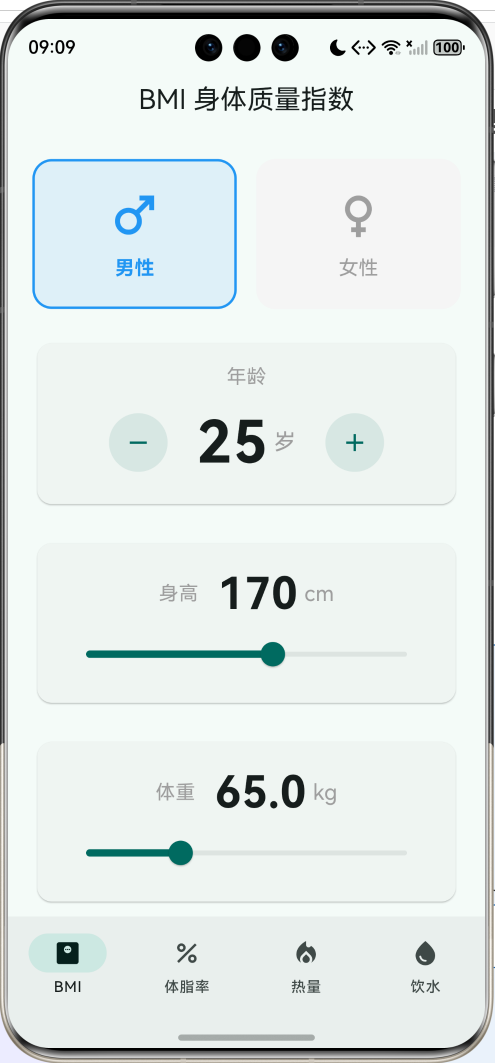
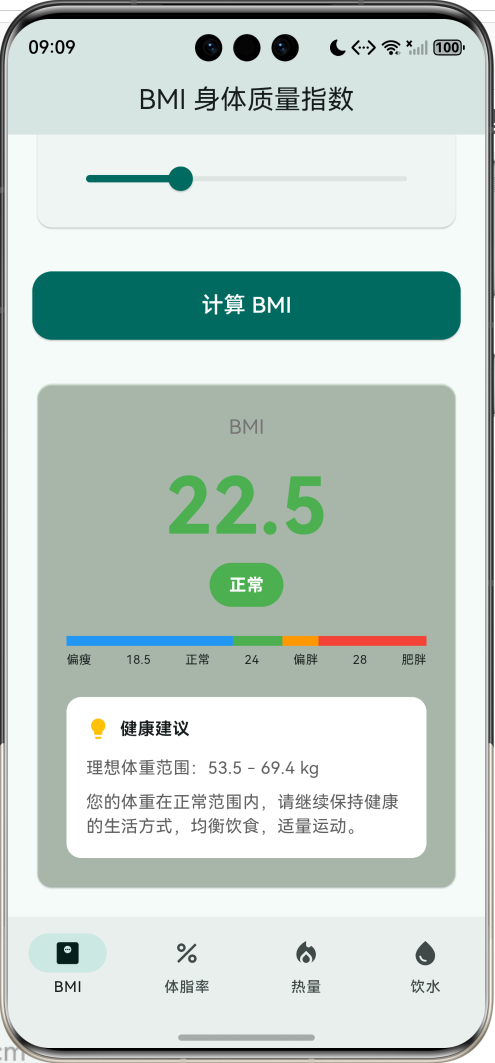
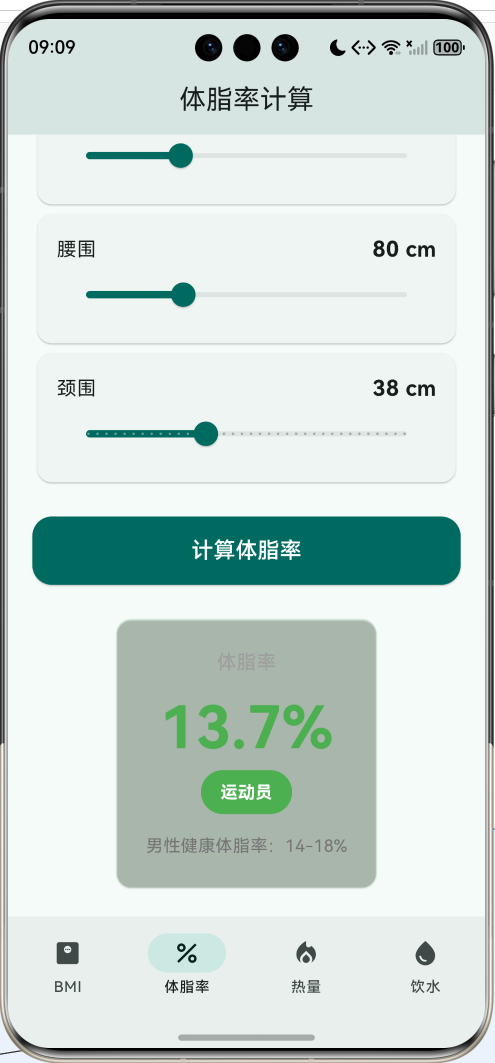
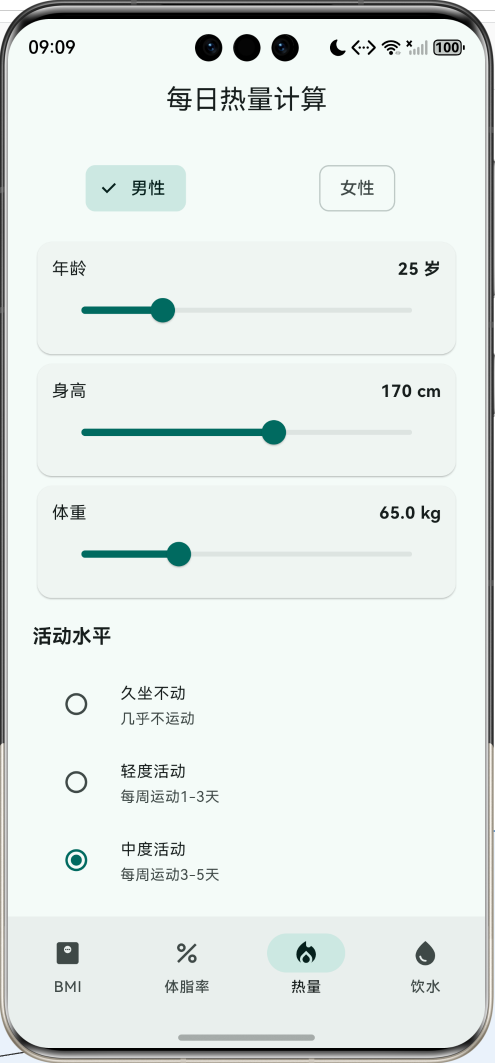
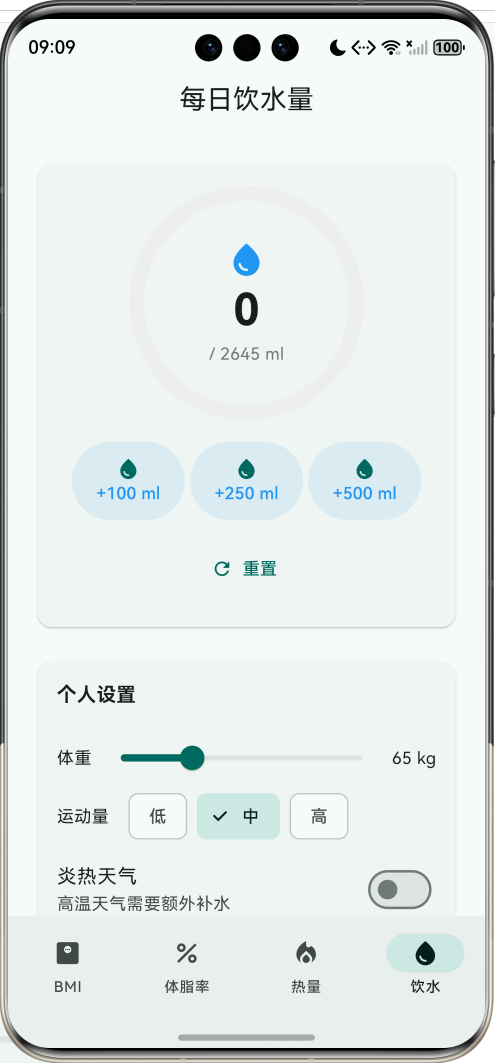
功能特性
- 📊 BMI计算:身体质量指数计算,含健康范围指示
- 💪 体脂率估算:美国海军公式,区分男女
- 🔥 热量计算:基础代谢率(BMR) + 每日总消耗(TDEE)
- 💧 饮水追踪:个性化饮水量建议 + 进度追踪
应用架构
BMI 计算
公式与标准
BMI(Body Mass Index)是国际通用的衡量人体胖瘦程度的指标:
BMI=体重(kg)身高(m)2 BMI = \frac{体重(kg)}{身高(m)^2} BMI=身高(m)2体重(kg)
中国成人BMI标准:
| BMI范围 | 分类 | 颜色标识 |
|---|---|---|
| < 18.5 | 偏瘦 | 🔵 蓝色 |
| 18.5 - 24 | 正常 | 🟢 绿色 |
| 24 - 28 | 偏胖 | 🟠 橙色 |
| ≥ 28 | 肥胖 | 🔴 红色 |
double get _bmi => _weight / pow(_height / 100, 2);

String get _bmiCategory {
  if (_bmi < 18.5) return '偏瘦';
  if (_bmi < 24) return '正常';
  if (_bmi < 28) return '偏胖';
  return '肥胖';
}

Color get _bmiColor {
  if (_bmi < 18.5) return Colors.blue;
  if (_bmi < 24) return Colors.green;
  if (_bmi < 28) return Colors.orange;
  return Colors.red;
}
理想体重范围
根据BMI正常范围(18.5-24)反推理想体重:
理想体重范围=[18.5×身高2,24×身高2] 理想体重范围 = [18.5 \times 身高^2, 24 \times 身高^2] 理想体重范围=[18.5×身高2,24×身高2]
double get _idealWeightMin => 18.5 * pow(_height / 100, 2).toDouble();
double get _idealWeightMax => 24.0 * pow(_height / 100, 2).toDouble();
体脂率计算
美国海军公式
体脂率(Body Fat Percentage)比BMI更能反映身体成分。美国海军公式通过身体围度估算体脂率:
男性公式:
体脂率=4951.0324−0.19077×log10(腰围−颈围)+0.15456×log10(身高)−450 体脂率 = \frac{495}{1.0324 - 0.19077 \times \log_{10}(腰围-颈围) + 0.15456 \times \log_{10}(身高)} - 450 体脂率=1.0324−0.19077×log10(腰围−颈围)+0.15456×log10(身高)495−450
女性公式:
体脂率=4951.29579−0.35004×log10(腰围+臀围−颈围)+0.22100×log10(身高)−450 体脂率 = \frac{495}{1.29579 - 0.35004 \times \log_{10}(腰围+臀围-颈围) + 0.22100 \times \log_{10}(身高)} - 450 体脂率=1.29579−0.35004×log10(腰围+臀围−颈围)+0.22100×log10(身高)495−450
double get _bodyFat {
  if (_isMale) {
    // 男性公式
    return 495 / (1.0324 - 0.19077 * log10(_waist - _neck)
           + 0.15456 * log10(_height)) - 450;
  } else {
    // 女性公式
    return 495 / (1.29579 - 0.35004 * log10(_waist + _hip - _neck)
           + 0.22100 * log10(_height)) - 450;
  }
}

double log10(double x) => log(x) / ln10;
体脂率标准
男女体脂率标准不同:
| 分类 | 男性 | 女性 |
|---|---|---|
| 过低 | < 6% | < 14% |
| 运动员 | 6-14% | 14-21% |
| 健康 | 14-18% | 21-25% |
| 可接受 | 18-25% | 25-32% |
| 肥胖 | > 25% | > 32% |
String get _bodyFatCategory {
  if (_isMale) {
    if (_bodyFat < 6) return '过低';
    if (_bodyFat < 14) return '运动员';
    if (_bodyFat < 18) return '健康';
    if (_bodyFat < 25) return '可接受';
    return '肥胖';
  } else {
    if (_bodyFat < 14) return '过低';
    if (_bodyFat < 21) return '运动员';
    if (_bodyFat < 25) return '健康';
    if (_bodyFat < 32) return '可接受';
    return '肥胖';
  }
}
每日热量计算
基础代谢率 (BMR)
基础代谢率是人体在静息状态下维持生命所需的最低热量。采用 Mifflin-St Jeor 公式:
男性:
BMR=10×体重+6.25×身高−5×年龄+5 BMR = 10 \times 体重 + 6.25 \times 身高 - 5 \times 年龄 + 5 BMR=10×体重+6.25×身高−5×年龄+5
女性:
BMR=10×体重+6.25×身高−5×年龄−161 BMR = 10 \times 体重 + 6.25 \times 身高 - 5 \times 年龄 - 161 BMR=10×体重+6.25×身高−5×年龄−161
double get _bmr {
  if (_isMale) {
    return 10 * _weight + 6.25 * _height - 5 * _age + 5;
  } else {
    return 10 * _weight + 6.25 * _height - 5 * _age - 161;
  }
}
每日总消耗 (TDEE)
TDEE = BMR × 活动系数
| 活动水平 | 描述 | 系数 |
|---|---|---|
| 久坐不动 | 几乎不运动 | 1.2 |
| 轻度活动 | 每周运动1-3天 | 1.375 |
| 中度活动 | 每周运动3-5天 | 1.55 |
| 高度活动 | 每周运动6-7天 | 1.725 |
| 极高活动 | 体力劳动/运动员 | 1.9 |
final List<Map<String, dynamic>> _activityLevels = [
  {'name': '久坐不动', 'factor': 1.2},
  {'name': '轻度活动', 'factor': 1.375},
  {'name': '中度活动', 'factor': 1.55},
  {'name': '高度活动', 'factor': 1.725},
  {'name': '极高活动', 'factor': 1.9},
];

double get _tdee => _bmr * _activityLevels[_activityLevel]['factor'];
目标热量建议
根据不同目标调整热量摄入:
每日饮水量
计算公式
基础饮水量与体重相关:
基础饮水量=体重(kg)×33ml 基础饮水量 = 体重(kg) \times 33ml 基础饮水量=体重(kg)×33ml
根据运动量和天气调整:
| 因素 | 调整量 |
|---|---|
| 低运动量 | +0 ml |
| 中运动量 | +500 ml |
| 高运动量 | +1000 ml |
| 炎热天气 | +500 ml |
double get _baseWater => _weight * 33;

double get _recommendedWater {
  double water = _baseWater;
  water += _activityLevel * 500;  // 运动量调整
  if (_hotWeather) water += 500;  // 天气调整
  return water;
}

int get _glasses => (_recommendedWater / 250).ceil();  // 换算成杯数
饮水进度追踪
使用 CircularProgressIndicator 展示饮水进度:
Widget build(BuildContext context) {
  final progress = (_consumed / _recommendedWater).clamp(0.0, 1.0);

  return Stack(
    alignment: Alignment.center,
    children: [
      SizedBox(
        width: 180,
        height: 180,
        child: CircularProgressIndicator(
          value: progress,
          strokeWidth: 12,
          backgroundColor: Colors.grey[200],
          valueColor: AlwaysStoppedAnimation(
            progress >= 1 ? Colors.green : Colors.blue,
          ),
        ),
      ),
      Column(
        children: [
          Icon(Icons.water_drop, color: Colors.blue),
          Text('${_consumed.toInt()} / ${_recommendedWater.toInt()} ml'),
        ],
      ),
    ],
  );
}
UI组件实现
性别选择卡片
带动画效果的性别选择器:
Widget _buildGenderCard({
  required IconData icon,
  required String label,
  required bool isSelected,
  required VoidCallback onTap,
  required Color color,
}) {
  return GestureDetector(
    onTap: onTap,
    child: AnimatedContainer(
      duration: const Duration(milliseconds: 200),
      padding: const EdgeInsets.symmetric(vertical: 20),
      decoration: BoxDecoration(
        color: isSelected ? color.withValues(alpha: 0.1) : Colors.grey[100],
        borderRadius: BorderRadius.circular(16),
        border: Border.all(
          color: isSelected ? color : Colors.transparent,
          width: 2,
        ),
      ),
      child: Column(
        children: [
          Icon(icon, size: 48, color: isSelected ? color : Colors.grey),
          Text(label, style: TextStyle(color: isSelected ? color : Colors.grey)),
        ],
      ),
    ),
  );
}
BMI范围指示器
可视化展示BMI所处区间:
Widget _buildBMIIndicator() {
  return Column(
    children: [
      Row(
        children: [
          Expanded(flex: 185, child: Container(height: 8, color: Colors.blue)),
          Expanded(flex: 55, child: Container(height: 8, color: Colors.green)),
          Expanded(flex: 40, child: Container(height: 8, color: Colors.orange)),
          Expanded(flex: 120, child: Container(height: 8, color: Colors.red)),
        ],
      ),
      Row(
        mainAxisAlignment: MainAxisAlignment.spaceBetween,
        children: [
          Text('偏瘦'),
          Text('18.5'),
          Text('正常'),
          Text('24'),
          Text('偏胖'),
          Text('28'),
          Text('肥胖'),
        ],
      ),
    ],
  );
}
滑块输入组件
统一的滑块输入样式:
Widget _buildSliderCard(
  String label,
  double value,
  double min,
  double max,
  String unit,
  ValueChanged<double> onChanged,
) {
  return Card(
    child: Padding(
      padding: const EdgeInsets.all(16),
      child: Column(
        children: [
          Row(
            mainAxisAlignment: MainAxisAlignment.spaceBetween,
            children: [
              Text(label),
              Text('${value.toInt()} $unit',
                   style: TextStyle(fontWeight: FontWeight.bold)),
            ],
          ),
          Slider(
            value: value,
            min: min,
            max: max,
            divisions: (max - min).toInt(),
            onChanged: onChanged,
          ),
        ],
      ),
    ),
  );
}
健康指数对照表
数据流程
扩展建议
- 数据持久化:保存历史记录,追踪变化趋势
- 图表展示:折线图展示BMI/体重变化
- 目标设定:设定目标体重,计算达成进度
- 提醒功能:定时提醒喝水、运动
- 健康报告:生成周/月健康报告
- 社交分享:分享健康成就
项目结构
lib/
└── main.dart
    ├── HealthCalculatorApp   # 主应用(底部导航)
    ├── BMICalculatorPage     # BMI计算页
    ├── BodyFatPage           # 体脂率计算页
    ├── CaloriePage           # 热量计算页
    └── WaterIntakePage       # 饮水追踪页
公式汇总
| 指标 | 公式 | 说明 |
|---|---|---|
| BMI | WH2\frac{W}{H^2}H2W | W=体重(kg), H=身高(m) |
| 理想体重 | [18.5H2,24H2][18.5H^2, 24H^2][18.5H2,24H2] | H=身高(m) |
| BMR(男) | 10W+6.25H−5A+510W + 6.25H - 5A + 510W+6.25H−5A+5 | A=年龄 |
| BMR(女) | 10W+6.25H−5A−16110W + 6.25H - 5A - 16110W+6.25H−5A−161 | H=身高(cm) |
| TDEE | BMR×活动系数BMR \times 活动系数BMR×活动系数 | 系数1.2-1.9 |
| 饮水量 | W×33mlW \times 33mlW×33ml | 基础量 |
总结
这个健康指数计算器整合了四个常用的健康评估工具:
- BMI计算:最基础的体重评估指标,简单直观
- 体脂率:比BMI更准确反映身体成分,区分肌肉和脂肪
- 热量计算:科学制定饮食计划的基础,支持不同目标
- 饮水追踪:容易被忽视但很重要的健康习惯
通过这些工具,用户可以全面了解自己的身体状况,制定科学的健康管理计划。应用采用实时计算的方式,滑动调整参数即可看到结果变化,交互体验流畅。
欢迎加入开源鸿蒙跨平台社区:https://openharmonycrossplatform.csdn.net

作为“人工智能6S店”的官方数字引擎,为AI开发者与企业提供一个覆盖软硬件全栈、一站式门户。
更多推荐


 4
4 0
0- 0


 已为社区贡献5条内容

所有评论(0)