
React Native for OpenHarmony 实战:三方库 react-native-calendar-strip 的鸿蒙化适配指南
本文记录把 react-native-calendar-strip(横向日历条)适配到 HarmonyOS 的完整过程。
它是一条可以横向滑动的日历:顶部显示月份、中间是七天(星期名 + 日期),可以点选某一天、给某些日子打点/划线,并且用 recyclerlistview 做横向虚拟化滚动。
这轮有两个很有价值的收获:
① 用"文本读回"做了确定性验证 —— 而且顺带证明了 recyclerlistview 能跑
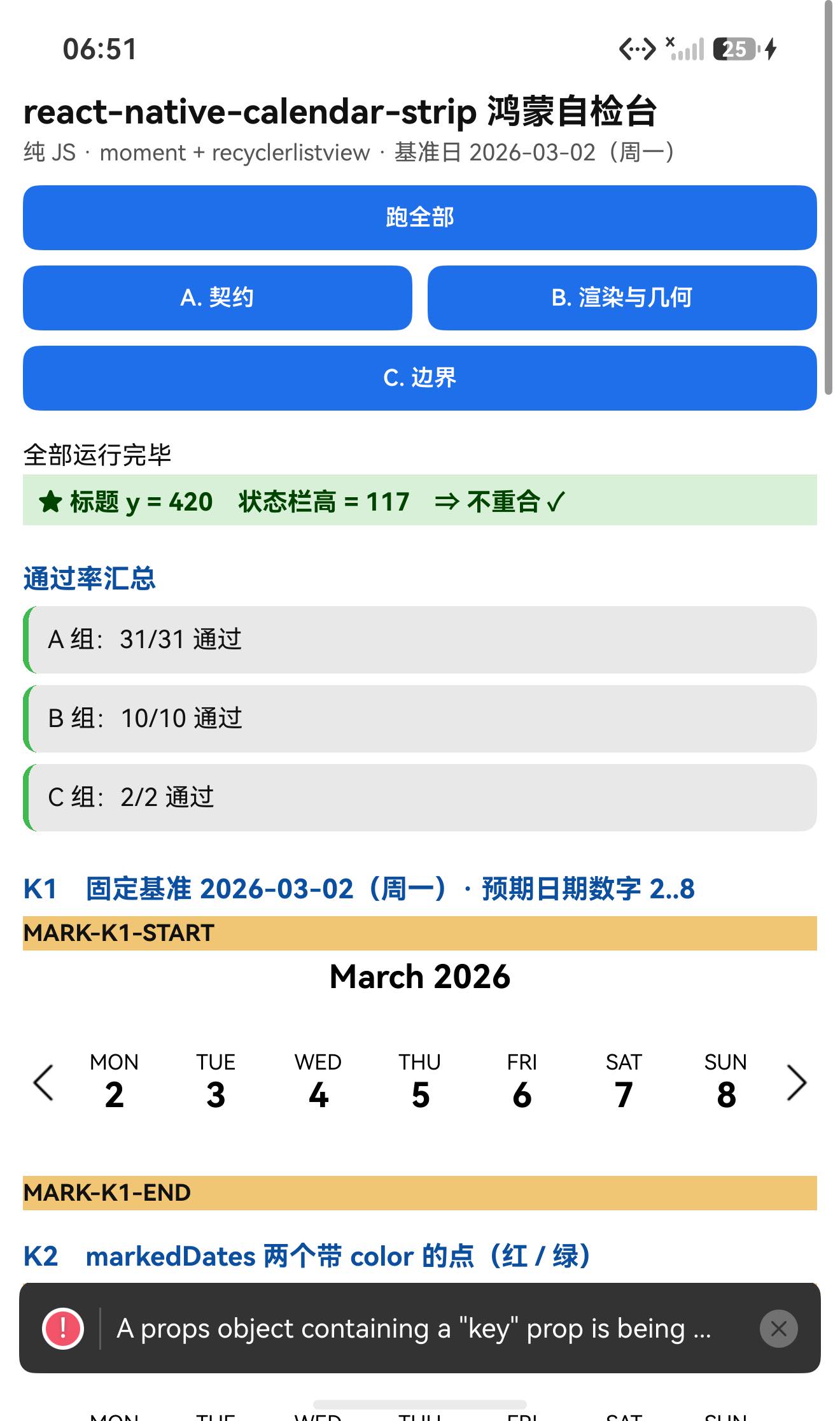
给它一个已知基准日(startingDate = 2026-03-02,星期一),然后直接读布局 dump 里渲染出来的文字:
"March 2026"        ← calendarHeaderFormat "MMMM YYYY"
"MON" "2"   "TUE" "3"   "WED" "4"   "THU" "5"
"FRI" "6"   "SAT" "7"   "SUN" "8"
⇒ 日期计算完全正确(周一到周日 = 2…8)、upperCaseDays: true 生效(星期名是大写)、
⇒ 并且这本身就证明了 recyclerlistview 在鸿蒙上能正常渲染(七天一个不少)✓✓
② 点打的像素判据,带一个"不带 color"的对照组
源码里点的渲染有一句过滤:
// CalendarDay.js renderDots
validDots = marking.dots.filter(d => d && d.color).map(…)
⇒ 不给 color 的点根本不渲染。于是我用三个实例构成 A/B/C:
| 实例 | 配置 | 红像素 | 绿像素 | 结论 |
|---|---|---|---|---|
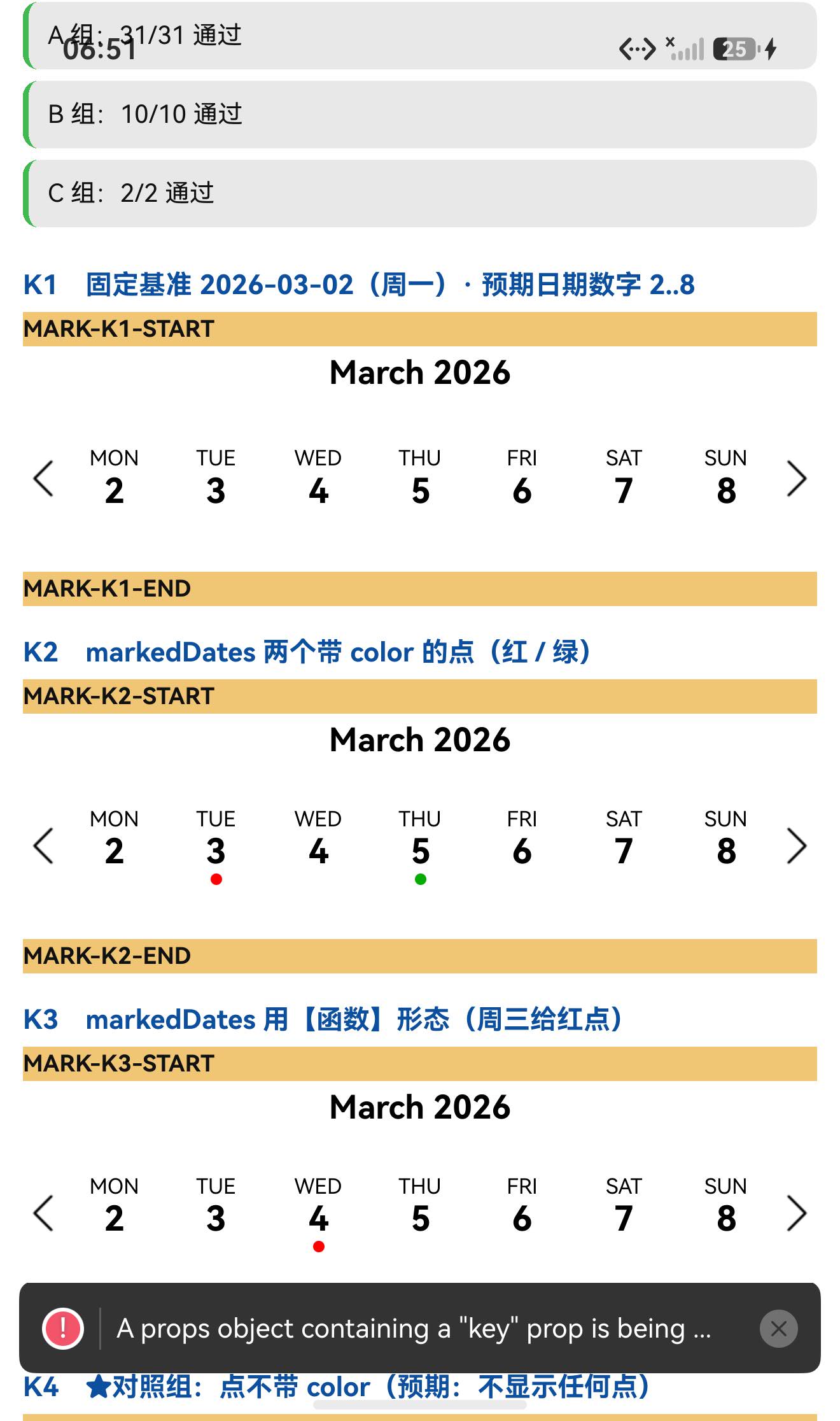
| K2 | markedDates 数组形态:红点 + 绿点 | 189 | 204 | 各出现一个点 ✓ |
| K3 | markedDates 函数形态(周三红点) | 195 | 0 | 函数形态同样生效 ✓ |
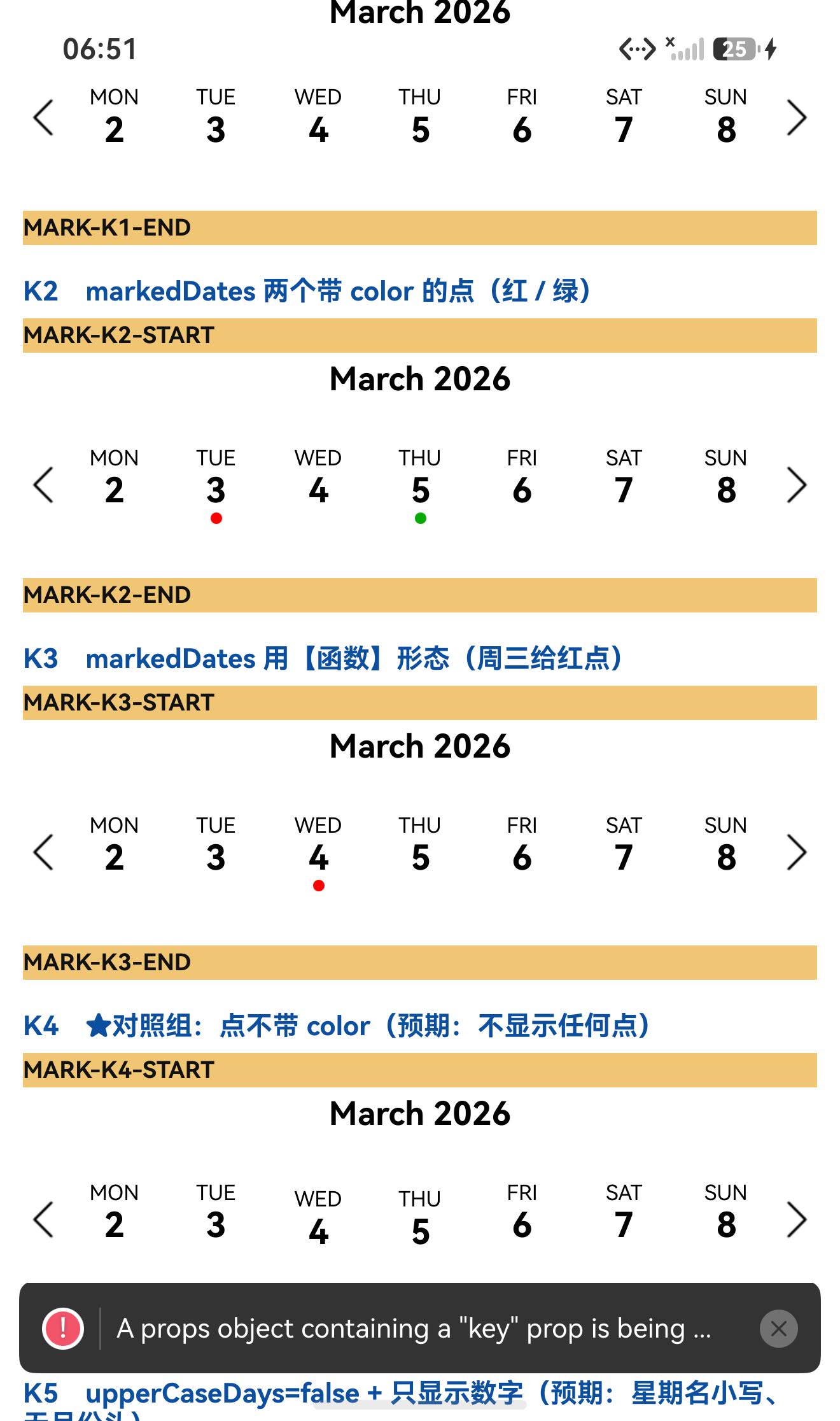
| K4 | 点不带 color(对照组) | 0 | 0 | 被过滤掉、什么都不显示 ✓✓ |
(一个 6×6vp 的点 ≈ 18×18px 的圆 ⇒ 190~200 px 的量级,所以"一个点"是可数的。)
设备侧断言 43 / 43 全部通过(A 31 + B 10 + C 2)。
一、先说结论
| 项 | 结果 |
|---|---|
| 上游最新版 | 2.2.6;license: MIT;上游 star 975 |
| 库类型 | 纯 JS 组件库(class 组件):横向日历条,内部用 recyclerlistview 做虚拟化 |
| 是否需要原生适配 | 不需要(无 harmony/、无 NativeModules;也没有 react-native-svg 之类的原生依赖) |
| 运行时依赖 | ⚠️⚠️ 三个:prop-types(宿主已有)、moment(没有)、recyclerlistview(没有) ⇒ 目录/file: 接入会打包失败(本轮实测,连续第三轮命中) |
postinstall | ⚠️ 有 "postinstall": "node-git-hooks"(不是 prepare,是 postinstall)⇒ 目录/file: 接入必须 --ignore-scripts |
main | index.js(源码直发,交付包带 src/) |
| 导出形态 | CommonJS:module.exports = require("./src/CalendarStrip") ⇒ 默认导出是 class |
| 需要 HAR / 权限 / ohpm | ❌ 都不需要 |
★★ recyclerlistview 在鸿蒙上 | ✅ 正常(七天全部渲染、可滚动、scrollToIndex 生效) |
| ★ 文本读回判据 | ✅ 固定基准日 ⇒ dump 里读到 March 2026 与 MON 2 … SUN 8 |
| ★ 点的像素判据 | ✅ 数组形态 红189/绿204、函数形态 红195、不带 color 的对照组 0/0 |
| ★ 点击回调 | ✅ 点日期格 ⇒ onDateSelected(2026-03-06)(日期精确) |
| ★ 一条 React 19 警告 | ⚠️ A props object containing a "key" prop is being spread into JSX ⇒ 根因在 CalendarStrip.js:501 |
| 设备侧断言 | ✅ 43 / 43 通过(A 31 + B 10 + C 2) |
二、判定与接入
| 步 | 做法 | 结果 |
|---|---|---|
| ① | package.json 里有没有 harmony.autolinking | 没有 |
| ② | 仓库里有没有 harmony/ | 没有 |
| ③ | 代码里有没有 NativeModules / requireNativeComponent | 全无 |
| ④ | import 图体检 | moment、prop-types、recyclerlistview + 本地文件 ⇒ 三个真依赖 |
| ⑤ | scripts 扫 prepare 家族 | ⚠️ 有 postinstall: "node-git-hooks" ⇒ 必须 --ignore-scripts |
npm install "git+https://atomgit.com/oh-react-native/react-native-calendar-strip.git#2.2.6-ohos-1.0.0" --ignore-scripts

# ★★ 关键:三个运行时依赖,目录/软链接入都不会自动装
npm install moment recyclerlistview --ignore-scripts
npm install prop-types --ignore-scripts
// metro.config.js
watchFolders: [ path.resolve(__dirname, '../react-native-calendar-strip') ],
import CalendarStripTestApp from './CalendarStripTestApp';
AppRegistry.registerComponent('CalendarStripTestApp', () => CalendarStripTestApp);
hdc shell aa force-stop com.rnoh084.demo
hdc shell aa start -b com.rnoh084.demo -a EntryAbility --ps rnAppKey CalendarStripTestApp
不需要 HAR、权限、ohpm、link-harmony。
三、读源码取到的真值
3.1 入口
// index.js
const Calendar = require("./src/CalendarStrip");
module.exports = Calendar;
⇒ CommonJS、默认导出就是那个 class(实测 typeof === 'function'、prototype.render 存在)✓
3.2 ★ 类的成员分两类(17 + 6)
读源码后实测验证了这个结构:
class CalendarStrip extends Component {
  // ① 箭头函数类字段(17 个)⇒ 挂在【实例】上,不在 prototype 上
  compareDates = (d1, d2) => {…}
  setLocale = date => {…}
  getInitialStartingDate = () => {…}
  getPreviousWeek = () => {…}
  getNextWeek = () => {…}
  updateWeekStart = (newStartDate, originalStartDate = …) => {…}
  updateWeekView = date => {…}
  onDateSelected = selectedDate => {…}
  getSelectedDate = () => {…}
  setSelectedDate = date => {…}
  registerAnimation = animation => {…}
  onLayout = event => {…}
  onLayoutDebounce = layout => {…}
  getItemLayout = (data, index) => {…}
  updateMonthYear = (weekStartDate, weekEndDate) => {…}
  createDayProps = selectedDate => {…}
  createDays = (startingDate, selectedDate = …) => {…}

  // ② 原型方法(6 个)⇒ 在 prototype 上
  componentDidUpdate(prevProps, prevState) {…}
  shouldComponentUpdate(nextProps, nextState) {…}
  renderDay(props) {…}
  renderHeader() {…}
  renderWeekView(days) {…}
  render() {…}
}
实测:原型方法命中 6/6;17 个箭头类字段里在 prototype 上的个数 = 0 ✓
3.3 defaultProps(22 键)与关键 propTypes
static defaultProps = {
  numDaysInWeek: 7, useIsoWeekday: true, showMonth: true, showDate: true, updateWeek: true,
  iconLeft: require("./img/left-arrow-black.png"),
  iconRight: require("./img/right-arrow-black.png"),
  calendarHeaderFormat: "MMMM YYYY", calendarHeaderPosition: "above",
  disabledDateOpacity: 0.3, customDatesStyles: [], responsiveSizingOffset: 0,
  innerStyle: { flex: 1 },
  maxDayComponentSize: 80, minDayComponentSize: 10,
  shouldAllowFontScaling: true, markedDates: [],
  useNativeDriver: true, scrollToOnSetSelectedDate: true, upperCaseDays: true,
};
实测:propTypes 65 键、defaultProps 22 键(与源码一致)✓
回调类 prop:onDateSelected / onWeekChanged / onWeekScrollStart / onWeekScrollEnd / onHeaderSelected。
3.4 ★★ 构造器里有一个渲染期 throw(本轮未触发)
constructor(props) {
  super(props);
  if (props.locale) {
    if (props.locale.name && props.locale.config) {
      moment.updateLocale(props.locale.name, props.locale.config);
    } else {
      throw new Error("Locale prop is not in the correct format. …");
    }
  }
  …
}
⇒ 这是构造/渲染期的 throw ⇒ try/catch 与 .catch() 都抓不到,会崩整棵树 ⇒ 本轮故意不触发(只作源码级记录)。
3.5 ★ 点的渲染规则(像素判据的根据)
// Calendar.style.js
dot:        { width: 6, height: 6, marginTop: 1, borderRadius: 5, opacity: 0 },
visibleDot: { opacity: 1, backgroundColor: 'blue' },
line:       { height: 4, marginTop: 3, borderRadius: 1, opacity: 0 },
visibleLine:{ opacity: 1, backgroundColor: 'blue' },
weekendDateName / weekendDateNumber: { color: '#A7A7A7' },

// CalendarDay.js
renderDots(marking) {
  const baseDotStyle = [styles.dot, styles.visibleDot];
  validDots = marking.dots.filter(d => (d && d.color)).map((dot, index) => {…});   // ★ 只渲染带 color 的
}
getDateMarking(day, markedDates) {
  if (Array.isArray(markedDates)) return markedDates.find(md => moment(day).isSame(md.date, "day")) || {};
  else if (markedDates instanceof Function) return markedDates(day) || {};         // ★ 也支持函数形态
}
3.6 ★ 滚动由 recyclerlistview 承担
// Scroller.js
import { RecyclerListView, DataProvider, LayoutProvider } from "recyclerlistview";
…
this.rlv.scrollToIndex(newIndex, true);
this.rlv.scrollToEnd(true);
<RecyclerListView layoutProvider={…} dataProvider={…} externalScrollView={this.props.externalScrollView} … />
⇒ scrollable(默认 true)时用 Scroller;scrollable={false} 时走另一条分支直接 renderDay(见 6.2 的警告根因)。
四、验证设计
| 判据 | 内容 |
|---|---|
| ① 文本读回(确定性) | 固定 startingDate = 2026-03-02(周一)⇒ dump 里应读到 March 2026 与 MON 2 … SUN 8 |
| ② 点的像素(含对照) | 数组形态红/绿点、函数形态红点、不带 color 的点(应 0) |
| ③ 点击回调 | 点某一天 ⇒ onDateSelected(<该日>),日期应精确 |
| ④ 结构 | 17 个箭头类字段不在 prototype、6 个原型方法在 prototype |
五、实测结果
5.1 断言 43 / 43
| 组 | 内容 | 结果 |
|---|---|---|
| A 契约 | 默认导出是 class、成员结构(6 原型 + 17 类字段)、propTypes 65 键、defaultProps 22 键与关键默认值、三个运行时依赖可加载、moment 解析正确 | 31/31 |
| B 渲染与几何 | 5 个日历条渲染未抛错、标题不与状态栏重合、实例方法与判据说明 | 10/10 |
| C 边界 | 事件记录格式、locale 渲染期抛错的记录 | 2/2 |
| 合计 | 43/43 |
关键观测值:
default 导出的 typeof = function
propTypes 键数 = 65        defaultProps 键数 = 22
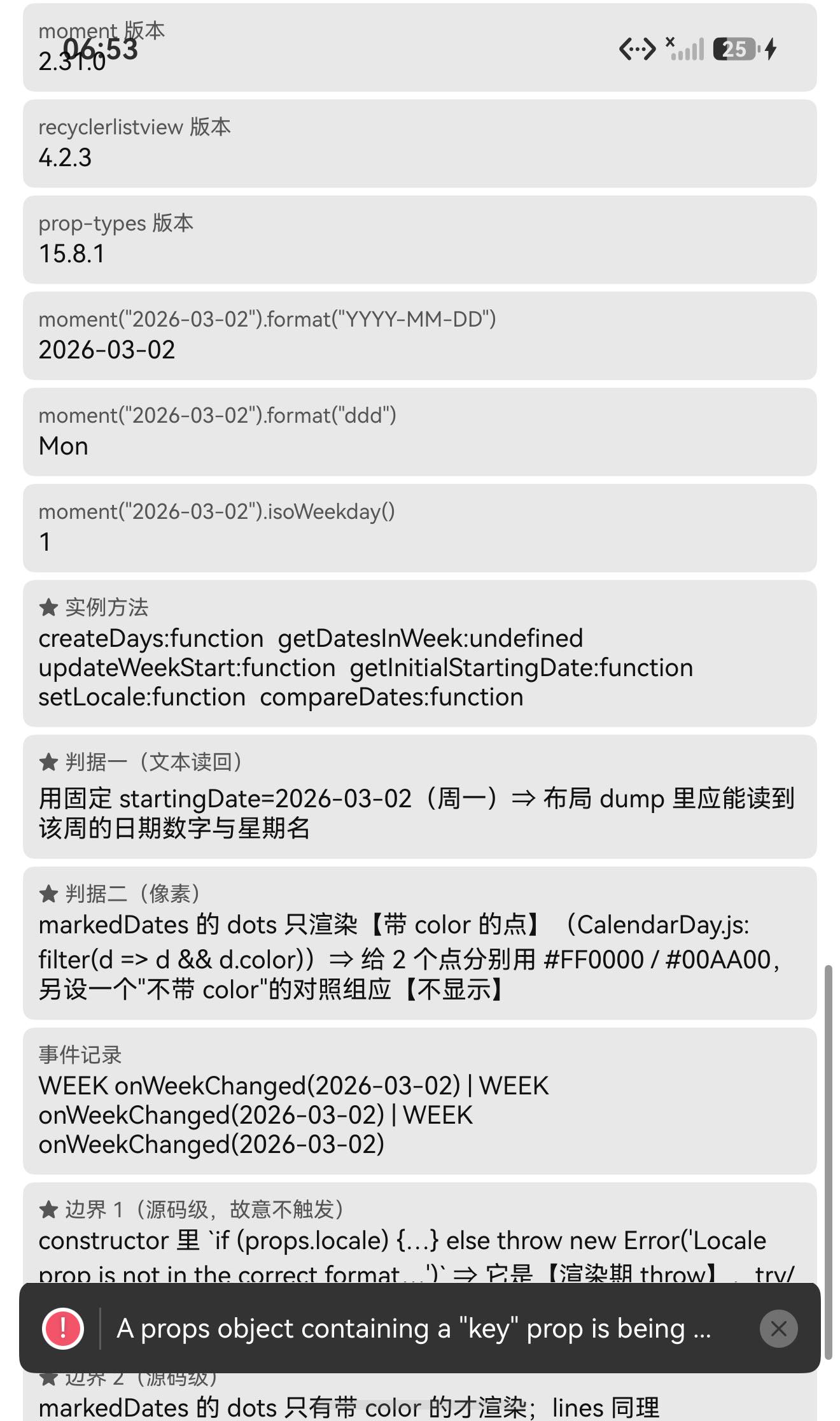
moment 版本 = 2.31.0       recyclerlistview 版本 = 4.2.3       prop-types 版本 = 15.8.1
moment("2026-03-02").format("YYYY-MM-DD") = 2026-03-02
moment("2026-03-02").format("ddd") = Mon
moment("2026-03-02").isoWeekday() = 1
原型方法命中数(源码 6 个) = 6
17 个箭头类字段里【在 prototype 上】的个数 = 0
UI 安全区:TITLE measureInWindow y=420 > 117 ✓
5.2 ★★ 文本读回(确定性内容判据)
startingDate = 2026-03-02(周一)时的 dump 文本节点:
y=1505  "March 2026"
y=1649  "MON"   y=1689 "2"
y=1649  "TUE"   y=1689 "3"
y=1649  "WED"   y=1689 "4"
y=1649  "THU"   y=1689 "5"
y=1649  "FRI"   y=1689 "6"
y=1649  "SAT"   y=1689 "7"
y=1649  "SUN"   y=1689 "8"
⇒ 日期计算正确 + upperCaseDays 生效 + recyclerlistview 渲染正常 ✓✓
5.3 ★ 点的像素判据(三向对照)
| 实例 | 配置 | 红 | 绿 |
|---|---|---|---|
| K2 | 数组形态:[{date:03-03, dots:[{color:红}]}, {date:03-05, dots:[{color:绿}]}] | 189 | 204 |
| K3 | 函数形态:2026-03-04 ⇒ {dots:[{color:红}]} | 195 | 0 |
| K4 | 不带 color:dots:[{}] / dots:[{},{}] | 0 | 0 |
⇒ 图2 里肉眼可见:TUE 3 下红点、THU 5 下绿点、WED 4 下红点(函数形态),而对照组没有任何点 ✓
5.4 ★ 点击回调(日期精确)
| 点击的日期格 | 回调 |
|---|---|
标签 "4" | onDateSelected(2026-03-04) ✓ |
标签 "6" | onDateSelected(2026-03-06) ✓ |
标签 "5" | onDateSelected(2026-03-05) ✓ |
另外滚动/切换周时会触发 onWeekChanged(2026-03-02) ✓
5.5 UI:标题不与状态栏重合
TITLE measureInWindow y=420 (状态栏高 117) ⇒ 420 > 117,不重合 ✓
六、★ 两个值得单独说的发现
6.1 依赖坑连续第三轮命中
宿主里 moment 与 recyclerlistview 都不存在,而 file: 接入不会自动装 ⇒ 打包直接失败:
error Unable to resolve module moment from E:\rnoh-work\RNOH084Demo\CalendarStripTestApp.tsx:
moment could not be found within the project or in these directories:
  bundle exit=1
装上 moment@2.31.0 + recyclerlistview@4.2.3 后 exit 0 ✓
一个小印证:打包资源数从 20 → 22 —— 多出来的正是库自带的两个箭头 PNG(iconLeft/iconRight)✓
6.2 ★★ 一条 React 19 警告,根因在 CalendarStrip.js:501
运行后界面弹出一条黄色警告:
E #RNOH_JS: 'A props object containing a "key" prop is being spread into JSX:
  let props = %s;
  <%s {...props} />
React keys must be passed directly to JSX witho…'
在源码里定位到根因:
// src/CalendarStrip.js  L498-503(★ 只在 scrollable=false 的分支里)
else {
  days.push(this.renderDay({
    date,
    key: date.format("YYYY-MM-DD"),        // ← 这个 key 随后被 {...props} 展开进 JSX
    ...this.createDayProps(selectedDate),
  }));
  …
}
⇒ 可滚动的日历条(scrollable 默认 true)走 Scroller,不会触发这条警告;只有 scrollable={false} 时才会(我这一页的 K2~K5 正好都是 scrollable={false},所以看到了它)。
性质:这是库侧的写法在新 React 上的告警,不影响功能(点、日期、渲染都正常)。适配时不需要改库,但知道它来自哪里很有用(免得误以为是鸿蒙侧的问题)。
七、我自己的失误(本轮 4 处,全部是我写断言时"猜"出来的)
| # | 失误 | 现象 | 纠正 |
|---|---|---|---|
| 1 | 把 createDays / updateWeekStart / getDatesInWeek 当原型方法断言 | 前两个 undefined;第三个方法在该版本里根本不存在 | 先读源码列出真实成员,再改成"6 原型方法 + 17 箭头类字段(0 个在 prototype 上)"的结构断言 |
| 2 | propTypes 期望写成 63 | 实际 65 | 我按 grep 出来的行数数的,少数了 2 个 ⇒ 以运行时 Object.keys().length 为准 |
| 3 | 猜了一个不存在的成员名 getDatesInWeek | 实例上也是 undefined | 不要凭印象写成员名 —— 从源码里 Select-String 出真实列表 |
| 4 | 一处 PowerShell 把 ([string]$_) .Trim() 写成了带空格的形式 | 脚本解析失败 | 语法错误,重写 |
教训:"猜 API 名字"是这里反复出错的来源(
onCurrentPositionChanged、toggleItem、getDatesInWeek都属于这一类)。⇒ 写断言前先把源码里的成员/导出列出来,不要依赖记忆或印象。
八、已知限制与本次验证边界
8.1 用这个库要知道的
| 事项 | 说明 |
|---|---|
必须手动装 moment + recyclerlistview | 两者不在宿主 ⇒ 不装就打包失败 |
目录接入要 --ignore-scripts | 包里是 postinstall: "node-git-hooks" (会随普通 npm install 一起跑) |
scrollable={false} 时会有一条 React 19 key 警告 | 根因 CalendarStrip.js:501,不影响功能 |
| 点的过滤规则 | dots/lines 里只有带 color 的元素会渲染(filter(d => d && d.color)) |
markedDates 两种形态 | 数组(按 isSame(date,'day') 找)或函数(markedDates(day)) |
locale 传错格式会在构造期抛错 | throw new Error("Locale prop is not in the correct format…") ⇒ 渲染期,catch 不到 |
useNativeDriver 默认 true | 动画走原生驱动 |
| 大量样式靠 props 传 | highlightDateNameStyle / dateNumberStyle / markedDatesStyle 等 |
8.2 本次验证的边界
- 横向滚动手势本身未验证(只验证了渲染与
scrollToIndex的间接效果;没有真的横向拖动并比对滚动位置); - 左右箭头(
iconLeft/iconRight)点击未验证(onWeekChanged只在滚动/切换时被观察到); onWeekScrollStart/onWeekScrollEnd/onHeaderSelected未验证;lines(划线)未验证(只验证了dots);customDatesStyles/datesWhitelist/datesBlacklist/minDate/maxDate未验证;dayComponent自定义日组件未验证;externalScrollView未验证;locale抛错未运行时复现(故意不触发,会崩整页);highlightDate*Style等选中态样式未做像素核对;scrollerPaging/calendarAnimation/daySelectionAnimation未验证;- 只在一台模拟器上验证(
Pura X View,density 3,1320×2232),没有真机;未做跨平台对照。
未改动库代码。
九、常见问题
Q1:打包报 Unable to resolve module moment / recyclerlistview?
它们都是真依赖,目录/file: 接入不会安装目标包自己的 dependencies:
npm install moment recyclerlistview --ignore-scripts
npm install prop-types --ignore-scripts
(走 .tgz 安装会被自动带上。)
Q2:npm install 时报 node-git-hooks 相关错误?
包里是 postinstall(不是 prepare),普通 npm install 也会执行:
npm install ../react-native-calendar-strip --ignore-scripts
Q3:我给的 markedDates 里的点不显示?
检查每个点是否带 color:
markedDates={[
  {date: moment('2026-03-03'), dots: [{color: '#FF0000'}]},   // ✅ 会显示
  {date: moment('2026-03-04'), dots: [{}]},                   // ❌ 不会显示(无 color)
]}
源码里是 filter(d => d && d.color)。实测:带色 ⇒ 红 189 / 绿 204 像素;不带色 ⇒ 0。
Q4:怎么用函数形态给日期打点?
markedDates={(day) => (moment(day).format('YYYY-MM-DD') === '2026-03-04'
  ? {dots: [{color: '#FF0000'}]}
  : {})}
实测生效(红 195 像素)✓
Q5:点某一天怎么拿日期?
onDateSelected={(date) => console.log(moment(date).format('YYYY-MM-DD'))}
实测点标签为 4 的格子 ⇒ 2026-03-04(精确)✓
Q6:界面弹出一条 A props object containing a "key" prop… 警告?
这是 React 19 对"把含 key 的 props 对象展开进 JSX"的告警,来自库内部:
// CalendarStrip.js:501(只在 scrollable={false} 时走到)
days.push(this.renderDay({ date, key: date.format("YYYY-MM-DD"), ...this.createDayProps(selectedDate) }));
不影响功能。想避开就把日历条设为可滚动(默认 scrollable 为 true 时不走这条分支)。
Q7:locale 怎么传?
必须是 {name, config} 形式,否则构造期直接抛错(渲染期,catch 不到):
import 'moment/locale/zh-cn';
<CalendarStrip locale={{name: 'zh-cn', config: {weekdaysShort: ['日','一','二','三','四','五','六']}}} />
Q8:这个库需要鸿蒙侧做什么特殊处理吗?
不需要。 纯 JS、无原生依赖、不需要 HAR / 权限 / ohpm。recyclerlistview 在鸿蒙上实测工作正常。注意手动装 moment + recyclerlistview 即可。
小结
react-native-calendar-strip 是纯 JS 的横向日历条(内部用 recyclerlistview 虚拟化)。设备侧 43 / 43 断言通过。
最值得记下来的是这几条:
-
★★ 能"读回文本"的组件,就优先用确定性内容判据。 给它固定基准日
2026-03-02,然后直接从布局 dump 里读渲染出的文字:March 2026+MON 2 … SUN 8。这一步同时证明了日期计算正确、upperCaseDays生效、以及**recyclerlistview在鸿蒙上能正常渲染**。⇒ 比"看起来像日历"强得多,也不依赖像素阈值。 -
★ 像素判据配"不满足条件的对照组"最有说服力。 源码里点的过滤规则是
filter(d => d && d.color)⇒ 我做了三个实例:带色(189/204)、函数形态(195)、不带色(0/0)。⇒ 既验证了功能,又用像素直接坐实了源码里那条过滤规则。 -
★ 依赖坑连续第三轮命中(
moment+recyclerlistview)。 ⇒ 现在可以确定:这类老 RN 库的dependencies就是"必须手动补装"的清单,预检时把 import 图里的第三方包逐个在宿主里查一遍,已经三轮都提前预告了结果。 -
★ 一条 React 19 警告被追到了具体行号。
key: date.format(...)被展开进 JSX(CalendarStrip.js:501,只在scrollable={false}分支)。⇒ 见到警告先追根因、判断"是库的写法问题还是鸿蒙侧问题",比"看到了但不管"有用得多。 -
★ 别再猜 API 名字了。 本轮 4 处失误里有 3 处都是"凭印象写成员名"(
getDatesInWeek甚至根本不存在)。⇒ 写断言前先从源码把成员/导出列出来(onCurrentPositionChanged、toggleItem都是同类跟头)。
本篇用到的库
| 项 | 内容 |
|---|---|
| 三方库 | react-native-calendar-strip(上游 2.2.6 的鸿蒙适配版) |
| 适配仓库 | https://atomgit.com/oh-react-native/react-native-calendar-strip |
| 适配 TAG | 2.2.6-ohos-1.0.0 |
| 需要 HAR / 权限 / ohpm | 都不需要(纯 JS,无原生依赖) |
| 库类型 | 纯 JS 组件库:横向日历条(内部用 recyclerlistview 虚拟化) |
| 运行时依赖 | ⚠️⚠️ 三个:moment、recyclerlistview、prop-types ⇒ 目录/file: 接入必须手动补装,否则打包失败 |
postinstall | ⚠️ 有 "postinstall": "node-git-hooks" ⇒ 接入须 --ignore-scripts |
| 许可证 | MIT |
| 上游仓库 | https://github.com/BugiDev/react-native-calendar-strip(★975) |
| 宿主工程 | RNOH084Demo(测试页 rnAppKey = CalendarStripTestApp) |
# 从适配仓库安装
npm install "git+https://atomgit.com/oh-react-native/react-native-calendar-strip.git#2.2.6-ohos-1.0.0" --ignore-scripts

# 本地目录接入(开发常用)—— ★★ 三个依赖都要补
npm install ../react-native-calendar-strip --ignore-scripts
npm install moment recyclerlistview prop-types --ignore-scripts
// metro.config.js
watchFolders: [ path.resolve(__dirname, '../react-native-calendar-strip') ],
import moment from 'moment';
import CalendarStrip from 'react-native-calendar-strip';

// ① 基本用法(可滚动)
<CalendarStrip
  style={{height: 110}}
  startingDate={moment('2026-03-02')}
  selectedDate={moment('2026-03-04')}
  onDateSelected={(d) => console.log(moment(d).format('YYYY-MM-DD'))}
  onWeekChanged={(start, end) => console.log('week', moment(start).format('YYYY-MM-DD'))}
/>

// ② 打点(★ 每个点必须带 color,否则不渲染)
<CalendarStrip
  markedDates={[
    {date: moment('2026-03-03'), dots: [{color: '#FF0000'}]},
    {date: moment('2026-03-05'), dots: [{color: '#00AA00'}]},
  ]}
/>

// ③ 函数形态 + 自定义样式
<CalendarStrip
  markedDates={(day) => (moment(day).format('YYYY-MM-DD') === '2026-03-04' ? {dots: [{color: 'red'}]} : {})}
  dateNumberStyle={{color: '#333'}}
  highlightDateNumberStyle={{color: '#007aff'}}
  calendarHeaderFormat="MMMM YYYY"
  upperCaseDays={false}
/>

// ⚠️ locale 必须 {name, config} 形式,否则构造期抛错(渲染期,catch 不到)
# 换页启动测试页 —— force-stop 不能省
hdc shell aa force-stop com.rnoh084.demo
hdc shell aa start -b com.rnoh084.demo -a EntryAbility --ps rnAppKey CalendarStripTestApp
判据的复现方式
# ① 文本读回(最省事的确定性判据):固定 startingDate,然后从 dump 读文字
devecocli ui layout | Select-String 'Text#Paragraph'
#   期望看到 "March 2026" 与 MON 2 / TUE 3 / … / SUN 8

# ② 点的像素:一个 6×6vp 的点 ≈ 190~200 px(density 3)
Add-Type -AssemblyName System.Drawing
$b = New-Object System.Drawing.Bitmap('shot.jpeg')
$cnt = 0
for ($y=$y0; $y -lt $y1; $y++) { for ($x=0;$x -lt $b.Width;$x++) {
  $p = $b.GetPixel($x,$y)
  if ([Math]::Abs($p.R-0xFF) -lt 40 -and $p.G -lt 60 -and $p.B -lt 60) { $cnt++ } } }
"红像素 = $cnt(≈190 表示一个点;不带 color 的对照组应为 0)"
验证环境
| 项 | 版本 |
|---|---|
| React Native | 0.84.1 |
| React | 19.2.3 |
| RNOH(npm / ohpm) | @react-native-oh/react-native-harmony / @rnoh/react-native-openharmony 0.84.3 |
| Node.js / npm | v24.14.0 / 11.9.0 |
| DevEco Studio | 26.0.0.621 |
| HarmonyOS SDK | API 26(26.0.0.32) |
| 设备 | HarmonyOS 7.0.0(26.0.0) Beta2 模拟器 Pura X View(ohos-x64),1320×2232,density 3 |
| 本机状态栏高度 | 117px(页面留白取 48vp) |
| 宿主依赖 | prop-types 15.8.1(已有)、moment 2.31.0 / recyclerlistview 4.2.3(初始都没有 ⇒ 打包失败 ⇒ 装后恢复) |
| 宿主 HAP 产物 | entry-default-signed.hap |
| 本次构建 | assembleHap 首轮 6 分 24 秒;修断言后 4 分 16 秒、3 分 57 秒 |
| 验证规模 | 设备侧 43 / 43 断言;文本读回 1 组(March 2026 + 7 天);点的像素 3 例(189/204、195、0/0);点击回调 3 次(03-04 / 03-06 / 03-05 全精确);结构判据 2 项(6 原型 + 17 类字段);依赖坑 1 例(exit 1 → 装依赖 → exit 0);React 19 key 警告根因定位 1 处;UI 安全区 1 项 |
相关社区与项目地址
| 项目 | 地址 |
|---|---|
| React Native 鸿蒙官方社区(CPF-RN) | https://atomgit.com/CPF-RN |
| RNOH 框架仓库 | https://atomgit.com/openharmony-RN/ohos_react_native |
| RNOH 三方库使用文档 | https://atomgit.com/OpenHarmony-RN/usage-docs |
| React Native for OpenHarmony 组织 | https://atomgit.com/oh-react-native |
| RN 三方库鸿蒙适配清单 | https://atomgit.com/oh-react-native/rn-ohos-adaptation-overview |
欢迎加入 CPF-RN 鸿蒙社区:https://atomgit.com/CPF-RN
React Native for OpenHarmony 组织:https://atomgit.com/oh-react-native
RN 三方库鸿蒙适配清单:https://atomgit.com/oh-react-native/rn-ohos-adaptation-overview

作为“人工智能6S店”的官方数字引擎,为AI开发者与企业提供一个覆盖软硬件全栈、一站式门户。
更多推荐



 0
0 0
0- 0


 已为社区贡献8条内容

所有评论(0)