
React Native for OpenHarmony 实战:三方库 react-native-animatable 的鸿蒙化适配指南
本文记录把 react-native-animatable(声明式动画库)适配到 HarmonyOS 的完整过程。
这是一个动画库:给任意组件套一层 <Animatable.View animation="fadeIn" duration={600}> 就会出现动画;内置 62 个动画(fadeIn / bounce / zoomIn / slideInDown…),也支持自己注册。它还有一套命令式实例方法(ref.animate() / ref.transitionTo()),并且把这 62 个动画名批量挂成了实例方法。
它有两个特别值得写下来的点:
-
★★ 同一个库里存在三类性质完全不同的"会报错" —— 而它们的捕获方式完全不同:
# 出错位置 性质 怎么捕获 本轮实测 ① createAnimation(definition)(已导出,直接调用)同步 throw try / catch✅ 抓到 Animation definitions must have at least two values.② ref.animate('不存在的名字')throw 发生在 new Promise的执行器内 ⇒ Promise reject.catch()✅ 抓到 No animation registred by the name of __no_such_animation__③ render()里同时给animation+transition渲染期 throw 都抓不到,会崩整棵树 ⚠️ 故意不触发 -
★★ 用"末态"做像素判据,再给它配一个对照组。
fadeIn是opacity 0→1,而源码里
getAnimationTarget(iteration, direction)对reverse返回0、对normal返回1
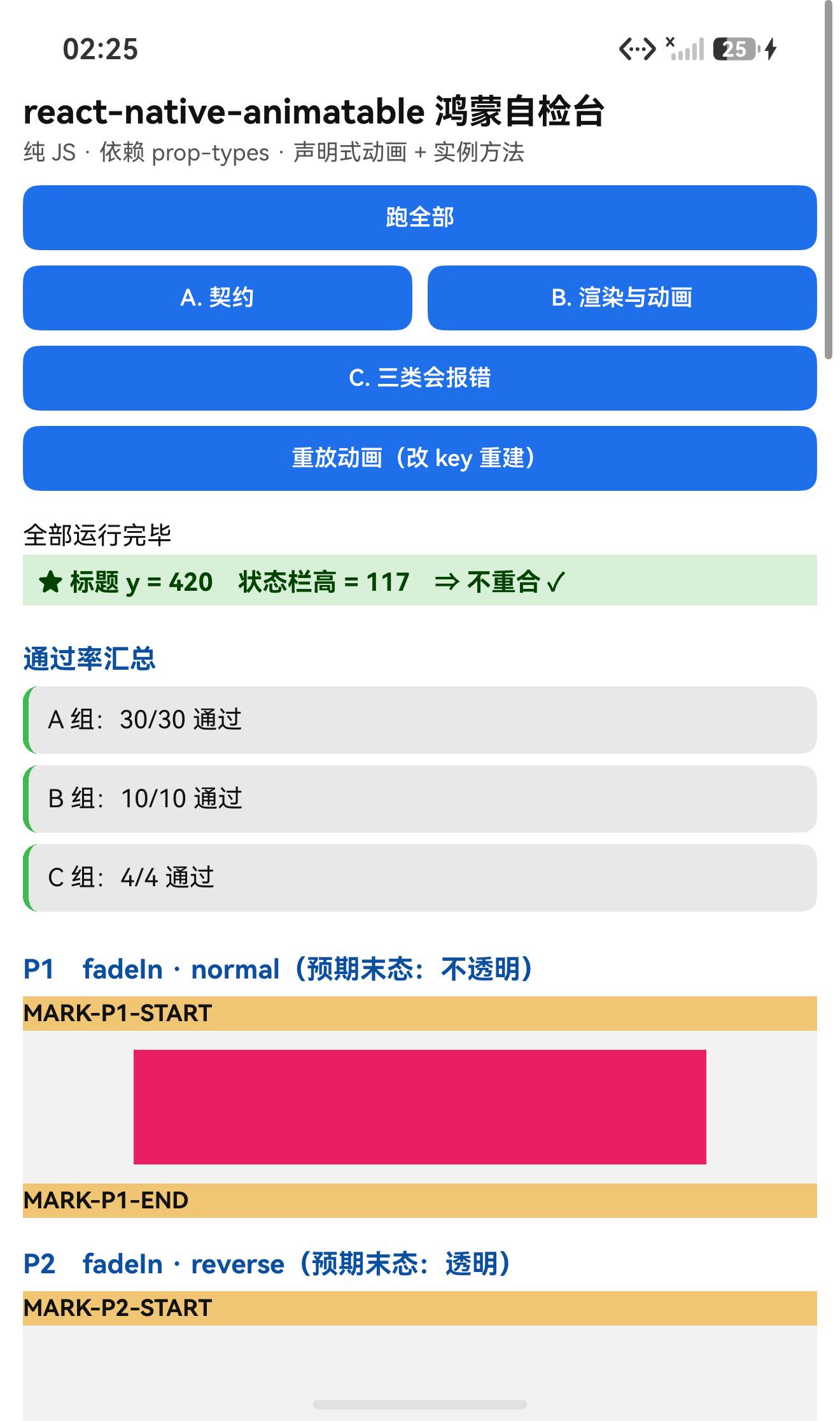
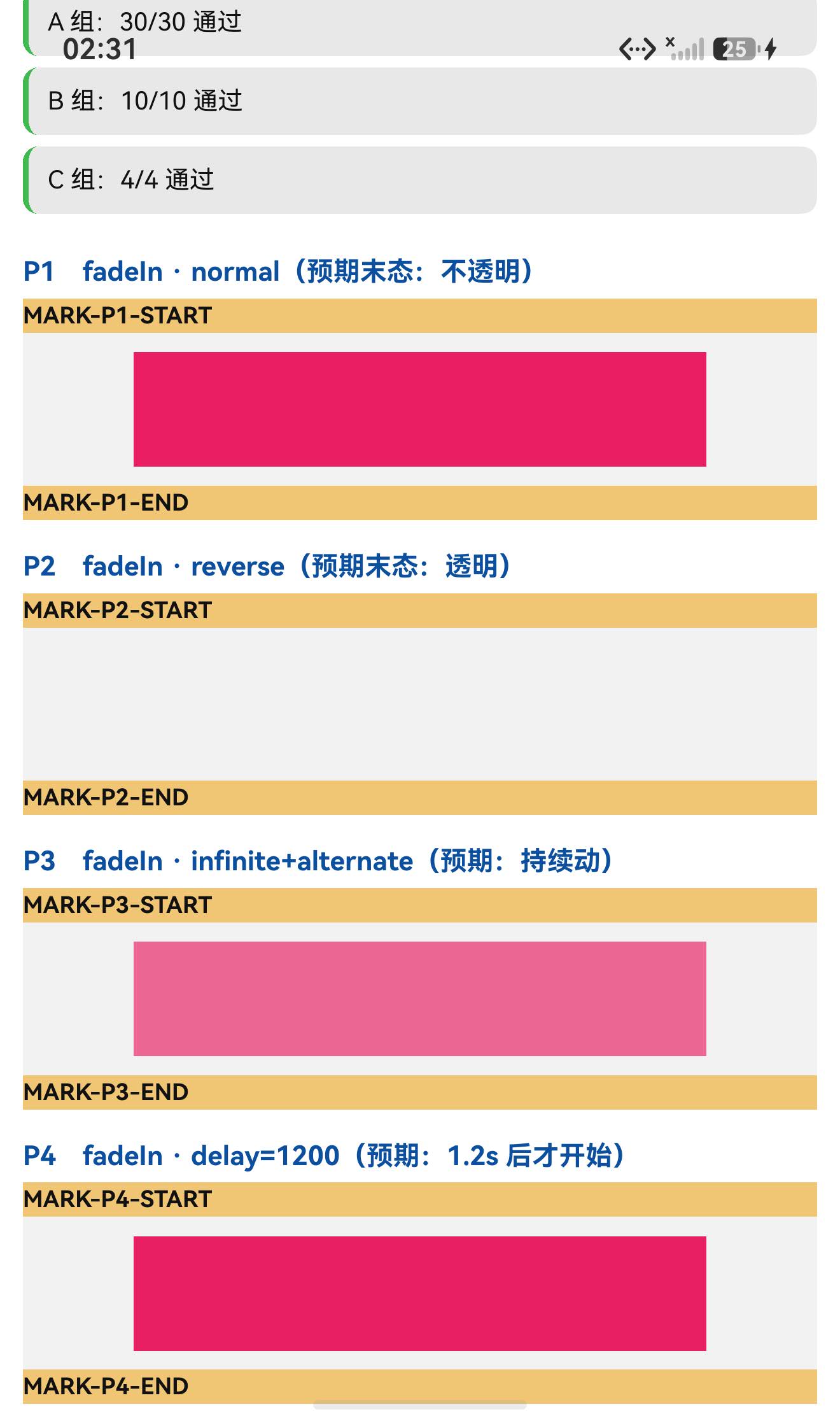
⇒ 同一个动画、只改direction,末态就完全相反。实测(标记色#E91E63):实例 配置 末态标记色像素 结论 P1 fadeIn·normal57.8%(两万多像素) 末态不透明 ✓ P2 fadeIn·reverse0(一个都没有) 末态透明 ✓ 再用两帧差分验"是不是真的在动",并配一个静止对照:
实例 配置 两帧不同像素 结论 P3 iterationCount="infinite"+alternate26,556 / 44,220 = 60.05%(最大通道差 280) 持续在动 ✓ P4 动画已结束( delay过期后跑完)0 / 44,220 完全静止 ✓(对照组)
设备侧断言 44 / 44 全部通过,一次构建就过。
一、先说结论
| 项 | 结果 |
|---|---|
| 上游最新版 | 1.4.0;license: MIT;上游 star 9.9k |
| 库类型 | 纯 JS 组件库(声明式动画 + 命令式实例方法):View / Text / Image 三个包装组件 |
| 是否需要原生适配 | 不需要(无 harmony/、无 NativeModules;import 图只有相对路径 + prop-types / react / react-native) |
| 运行时依赖 | ⚠️ prop-types@^15.8.1 ⇒ 目录/file: 接入不会自动装(宿主已有 15.8.1 ⇒ 本轮未被咬到) |
prepare 家族 | ✅ 没有(只有 jest / lint / test / format) |
main | index.js(源码直发,没有编译产物目录) |
| 导出形态 | 7 个:View / Text / Image / createAnimatableComponent / createAnimation / registerAnimation / initializeRegistryWithDefinitions |
| 内置动画数 | 62 个;easing 名 29 个 |
| 需要 HAR / 权限 / ohpm | ❌ 都不需要 |
| 设备侧断言 | ✅ 44 / 44 全部通过(A 30 + B 10 + C 4),一轮构建就过 |
| ★★ 三类"会报错" | ✅ ① 同步 throw(try/catch)② Promise reject(.catch())③ 渲染期 throw(故意不触发) |
| ★ 末态像素判据 | ✅ normal ⇒ 57.8% 不透明、reverse ⇒ 0 透明 |
| ★ 两帧差分 + 对照 | ✅ 在动 60.05% vs 静止 0 |
⚠️ 一个值得注意的交付状态:本库交付包的
spec.json里
"validation": "build-pass-device-pending"
—— 意思是交付方只做了构建验证、设备侧验证尚未完成。本轮把这一步补上了(44/44 断言 + 像素判据 + 两帧差分)。
二、判定与接入
| 步 | 做法 | 结果 |
|---|---|---|
| ① | package.json 里有没有 harmony.autolinking | 没有 |
| ② | 仓库里有没有 harmony/ | 没有 |
| ③ | 代码里有没有 NativeModules / requireNativeComponent | 全无 |
| ④ | import 图体检 | 只有相对路径 + prop-types / react / react-native ✓ |
| ⑤ | scripts 扫 prepare 家族 | ✅ 没有 |
npm install "git+https://atomgit.com/oh-react-native/react-native-animatable.git#1.4.0-ohos-1.0.0" --ignore-scripts

# ⚠️ 它带运行时依赖 prop-types,目录/软链接入不会自动装
npm install prop-types --ignore-scripts
// metro.config.js
watchFolders: [ path.resolve(__dirname, '../react-native-animatable') ],
import AnimatableTestApp from './AnimatableTestApp';
AppRegistry.registerComponent('AnimatableTestApp', () => AnimatableTestApp);
hdc shell aa force-stop com.rnoh084.demo
hdc shell aa start -b com.rnoh084.demo -a EntryAbility --ps rnAppKey AnimatableTestApp
不需要 HAR、权限、ohpm、link-harmony。
三、读源码取到的真值
3.1 入口(index.js)
import createComponent from './createAnimatableComponent';
import { initializeRegistryWithDefinitions } from './registry';
import * as ANIMATION_DEFINITIONS from './definitions';

initializeRegistryWithDefinitions(ANIMATION_DEFINITIONS);   // ← 模块加载时就把 62 个动画注册好

export const createAnimatableComponent = createComponent;
export const View  = createComponent(CoreView);
export const Text  = createComponent(CoreText);
export const Image = createComponent(CoreImage);
export { default as createAnimation } from './createAnimation';
export { registerAnimation, initializeRegistryWithDefinitions } from './registry';
实测:命名空间正好 7 个导出 ✓;View.displayName === 'withAnimatable(View)' ✓
3.2 ★ 包装组件的契约(createAnimatableComponent.js,607 行)
return class AnimatableComponent extends Component {
  static displayName = `withAnimatable(${wrappedComponentName})`;
  static propTypes = { … 15 键 … };      // 实测 15
  static defaultProps = {                // 实测 15
    animation: undefined, delay: 0, direction: 'normal', duration: undefined,
    easing: undefined, iterationCount: 1, iterationDelay: 0,
    onAnimationBegin() {}, onAnimationEnd() {},
    onTransitionBegin() {}, onTransitionEnd() {},
    style: undefined, transition: undefined,
    useNativeDriver: false, isInteraction: undefined,
  };
★ iterationCount 带一个自定义校验器(可以直接调用,不需要渲染):
iterationCount(props, propName) {
  const val = props[propName];
  if (val !== 'infinite' && !(typeof val === 'number' && val >= 1)) {
    return new Error('iterationCount must be a positive number or "infinite"');
  }
  return null;
}
实测:1 → null、'infinite' → null、0 → Error、'x' → Error ✓
3.3 ★★ 62 个动画被批量挂成"实例方法"
// 构造器里
getAnimationNames().forEach((animationName) => {
  if (!(animationName in this)) {
    this[animationName] = this.animate.bind(this, animationName);
  }
});
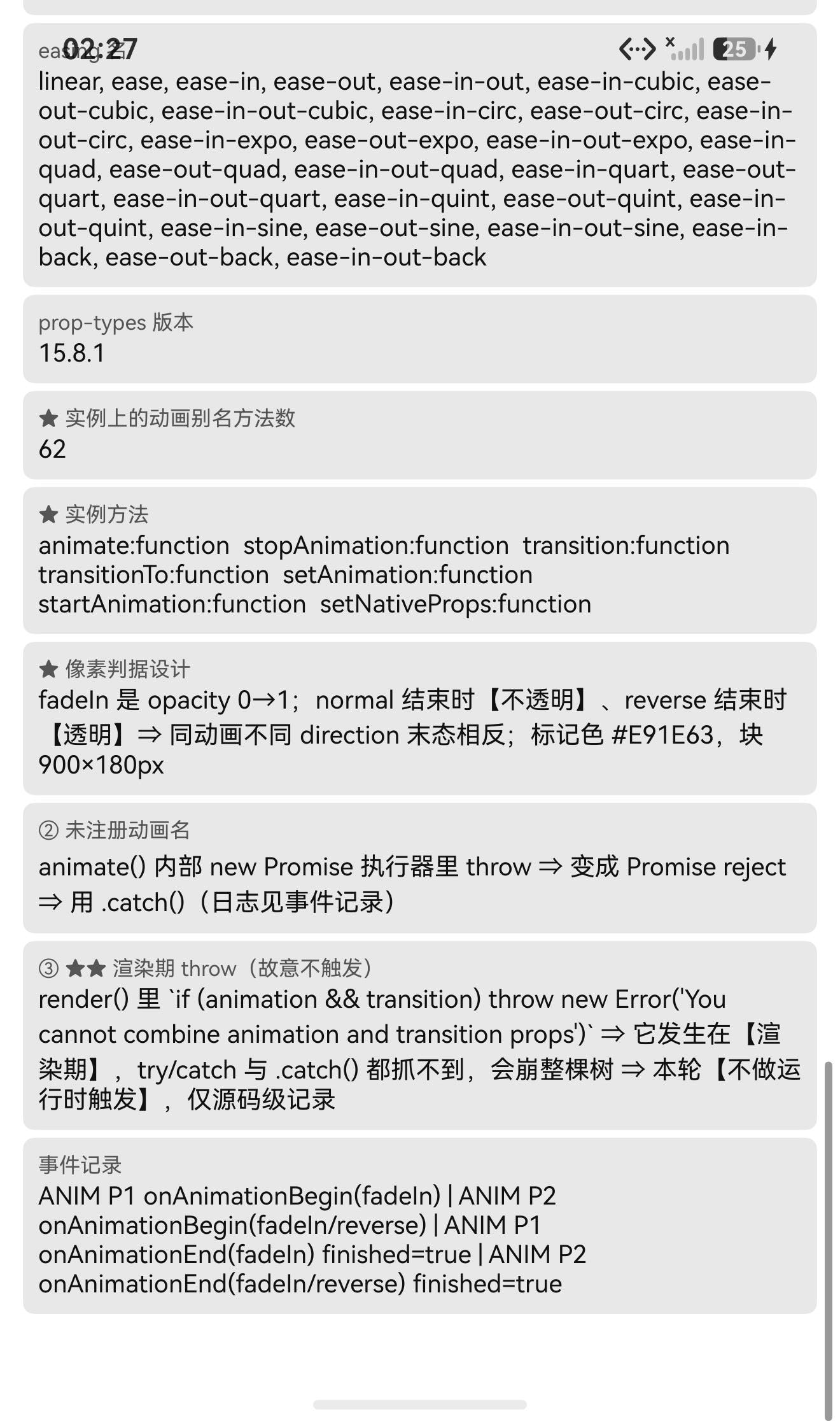
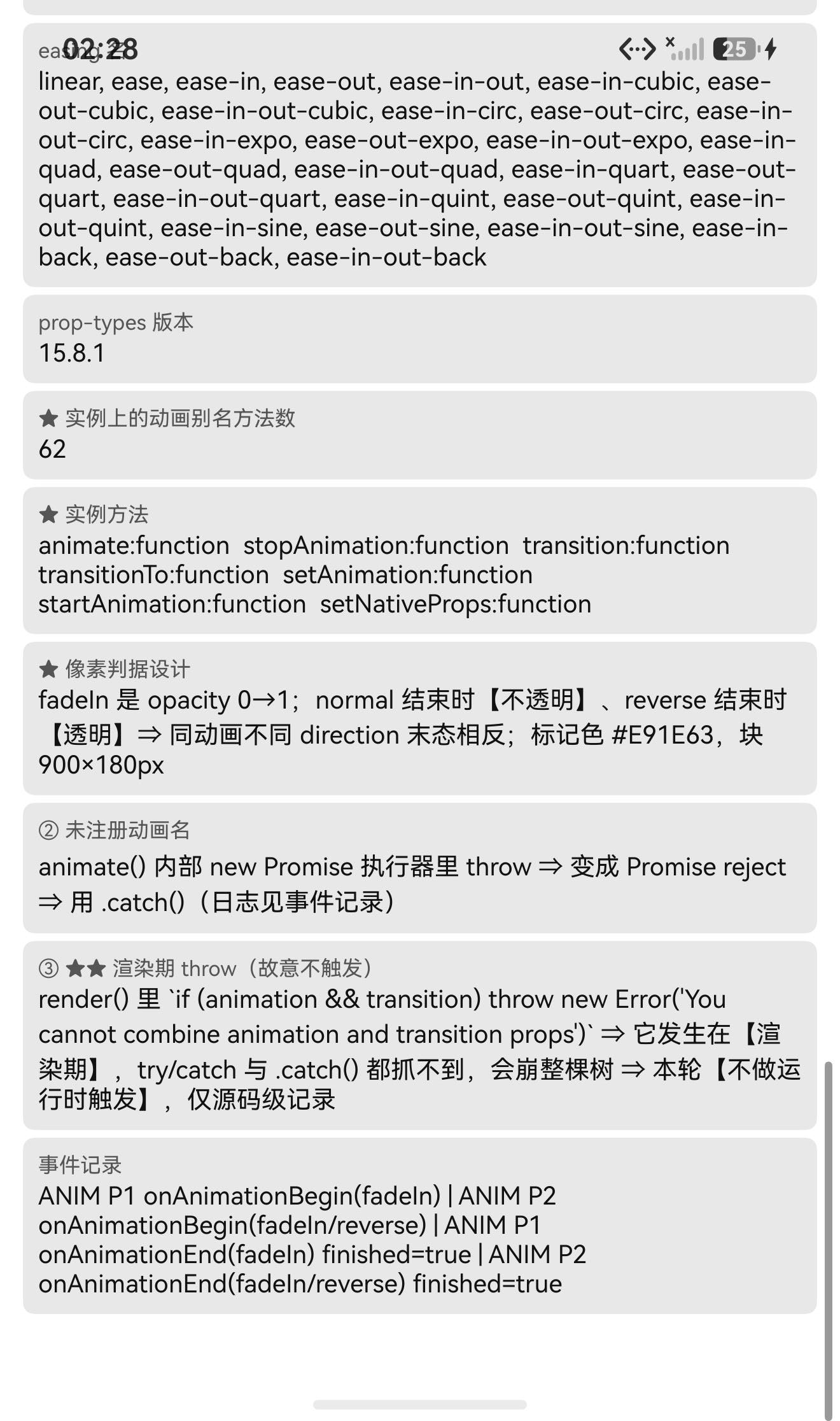
实测:注册动画 62 个,实例上的别名方法也是 62 个 ✓ 完全一致
⇒ ref.current.fadeIn() / ref.current.bounce() … 都能直接调 ✓
实例方法实测:
animate:function  stopAnimation:function  transition:function  transitionTo:function
setAnimation:function  startAnimation:function  setNativeProps:function
3.4 ★★★ 三类"会报错"(性质完全不同)
① 同步 throw —— createAnimation(已导出)
export default function createAnimation(definition) {
  const positions = Object.keys(definition).map(parsePosition).filter(notNull);
  positions.sort(compareNumbers);
  if (positions.length < 2) {
    throw new Error('Animation definitions must have at least two values.');   // ← 同步
  }
  …
  if (!keyframe) {
    throw new Error('Missing animation keyframe, this should not happen');     // ← 同步
  }
实测:createAnimation({from:{opacity:0}}) ⇒ try/catch 抓到
Animation definitions must have at least two values. ✓
它还有模块级 cache(键 = JSON.stringify(definition)):
const cache = {};
const cacheKey = JSON.stringify(definition);
if (cache[cacheKey]) { return cache[cacheKey]; }
实测:同一 definition 两次调用返回同一个对象(=== 为 true)✓
② Promise reject —— 未注册的动画名
function getCompiledAnimation(animation) {
  if (typeof animation === 'string') {
    const compiledAnimation = getAnimationByName(animation);
    if (!compiledAnimation) {
      throw new Error(`No animation registred by the name of ${animation}`);   // ← 在下面这个 Promise 执行器里
    }
    …
  }
  return createAnimation(animation);
}

// 而 animate 是这样包的:
animate(animation, duration, iterationDelay) {
  return new Promise((resolve) => {
    this.setAnimation(animation, () => { this.startAnimation(duration, 0, iterationDelay, resolve); });
  });                                  // ↑ throw 发生在这里 ⇒ 变成 Promise reject
}
实测(用 ref.current.animate('__no_such_animation__') + .catch()):
No animation registred by the name of __no_such_animation__ ✓ 页面没有崩 ✓
③ 渲染期 throw —— 同时给 animation 和 transition
render() {
  const { style, animation, transition } = this.props;
  if (animation && transition) {
    throw new Error('You cannot combine animation and transition props');   // ← 渲染期
  }
⚠️ 本轮的测试页【故意不触发它】 —— 因为渲染期的异常既不会被调用点的 try/catch 抓到,也不会被 .catch() 抓到,它会变成一次 React 渲染错误、把整棵树搞崩。
⇒ 只作源码级记录,并在文章里明确标注"运行时未触发"。
3.5 ★ 末态为什么相反(像素判据的根据)
function getAnimationTarget(iteration, direction) {
  switch (direction) {
    case 'reverse':            return 0;
    case 'alternate':          return iteration % 2 ? 0 : 1;
    case 'alternate-reverse':  return iteration % 2 ? 1 : 0;
    case 'normal':
    default:                   return 1;
  }
}
function getAnimationOrigin(iteration, direction) {
  return getAnimationTarget(iteration, direction) ? 0 : 1;
}
而 fadeIn 是 from {opacity: 0} → to {opacity: 1}(createAnimation 把 from→位置 0、to→位置 1)
⇒ normal 结束时 animatedValue = 1(不透明);reverse 结束时 = 0(透明) ✓
3.6 其它
- 默认时长:
duration || this.props.duration || 1000(1000ms); isInteraction默认:iterationCount <= 1;useNativeDriver默认 false(JS 驱动);- 可插值的样式属性表
INTERPOLATION_STYLE_PROPERTIES(rotate*/skew*/ 各种*Color/tintColor等); width/height属ZERO_CLAMPED_STYLE_PROPERTIES(带clamp外推)。
四、验证设计
| 判据 | 内容 |
|---|---|
| ① 末态像素 | 同一动画只改 direction:normal 末态不透明、reverse 末态透明 ⇒ 数标记色像素 |
| ② 两帧差分 + 对照 | iterationCount="infinite" 应持续在动;已结束的实例应完全相同 |
| ③ 三类报错各自的可捕获性 | ① try/catch ② .catch() ③ 不触发 |
五、实测结果
5.1 断言 44 / 44
| 组 | 内容 | 结果 |
|---|---|---|
| A 契约 | 7 个导出、displayName、defaultProps/propTypes 各 15 键、iterationCount 校验器直调 4 例、① 同步 throw、cache 同一性、62 个动画、29 个 easing、prop-types 可加载 | 30/30 |
| B 渲染与动画 | 4 个动画实例渲染未抛错、标题不与状态栏重合、实例 7 个方法 + 62 个别名方法、animate() 返回 Promise | 10/10 |
| C 三类报错 | ① try/catch 有效、② .catch() 接管 reject、③ 识别并故意不触发、事件记录格式 | 4/4 |
| 合计 | 44/44 |
关键观测值(日志):
命名空间导出 = Image, Text, View, createAnimatableComponent, createAnimation,
               initializeRegistryWithDefinitions, registerAnimation
View.displayName = withAnimatable(View)
defaultProps 键数 = 15        propTypes 键数 = 15
已注册动画名数量 = 62          easing 名数量 = 29
★ 实例上的动画别名方法数 = 62
★ 实例方法 = animate:function stopAnimation:function transition:function
             transitionTo:function setAnimation:function startAnimation:function setNativeProps:function
事件 = ANIM P1 onAnimationBegin(fadeIn) | ANIM P2 onAnimationBegin(fadeIn/reverse)
     | ANIM P1 onAnimationEnd(fadeIn) finished=true | ANIM P2 onAnimationEnd(fadeIn/reverse) finished=true
5.2 ★★ 末态像素判据
标记块 = 300×60 vp = 900×180 px,标记色 #E91E63。
| 实例 | 配置 | 区域命中率 | 结论 |
|---|---|---|---|
| P1 | fadeIn · normal | 57.8%(22,899 点) | 末态不透明 ✓ |
| P2 | fadeIn · reverse | 0%(0 点) | 末态透明 ✓ |
⇒ 同屏内"一个有色块、一个什么都没有",getAnimationTarget 的 reverse ⇒ 0 语义被像素坐实 ✓
5.3 ★★ 两帧差分(含静止对照组)
| 实例 | 配置 | 两帧不同像素 | 最大通道差 | 结论 |
|---|---|---|---|---|
| P3 | fadeIn · infinite + alternate | 26,556 / 44,220 = 60.05% | 280 | 持续在动 ✓ |
| P4 | delay=1200 后跑完的实例 | 0 / 44,220 | 0 | 完全静止 ✓ |
⇒ "在动"这个结论有对照组支撑(同一测法、同一区域尺寸、同样的阈值 24),不是只看一个数字 ✓
5.4 ★ 三类报错的实测日志
① createAnimation({from}) 的结果 = Animation definitions must have at least two values.
② 未注册名 ⇒ Promise reject:No animation registred by the name of __no_such_animation__
③ 渲染期 throw(故意不触发)—— 仅源码级记录
5.5 UI:标题不与状态栏重合
TITLE measureInWindow y=420 (状态栏高 117) ⇒ 420 > 117,不重合 ✓
六、本轮的方法要点
6.1 ★ "会报错"要分成三类看
如果只把"会报错"当成一种情况,很容易写错用例。这个库把三种情况同时摆在了面前:
| 类别 | 判断方法 | 捕获方式 |
|---|---|---|
| 同步 throw | throw 就在被调函数体里,调用栈同步返回 | try / catch |
| Promise 内 throw | throw 在 new Promise(executor) 的 executor 里 ⇒ 变成 reject | .catch()(否则就是 unhandled rejection) |
| 渲染期 throw | throw 在 render() / 函数组件体 / 子组件渲染中 | 都抓不到 —— 需要 error boundary,或别触发 |
⇒ 写"预期报错"的用例前,先把它归到这三类中的哪一类。
6.2 ★ 用"末态"而不是"过程"做判据,最省事也最稳
动画的中间帧依赖时序(截图早一点晚一点都不一样),但末态是稳定的。
fadeIn 的末态只由 direction 决定 ⇒ 两个实例同屏对照,一个有色块一个没有 ⇒ 判据二值、无阈值调参、可肉眼复核。
6.3 ★ 差分法必须自带对照组
"两帧不同像素 60%“这个数字本身不能证明"在动”——阈值、压缩噪声、采样密度都会影响它。
所以我同时测了一个已知动画已结束的实例(P4)⇒ 0 / 44,220。两个数字一起看,"在动/没动"才是可信的。
七、已知限制与本次验证边界
7.1 用这个库要知道的
| 事项 | 说明 |
|---|---|
有运行时依赖 prop-types | 目录/file: 接入要手动补装 |
animation 与 transition 不能同时给 | 同时给会在渲染期抛错、整棵树崩 |
| 62 个动画名被挂成实例方法 | 别用这些名字当自己的方法名,否则可能撞名 |
| 动画名写错不会同步报错 | 从 ref.animate('错名') 调用时是 Promise reject(不 catch 就是 unhandled rejection);而作为 animation prop 给错名,是在构造/渲染期抛错 |
| 默认时长 1000ms | duration 不传时按 1000ms |
useNativeDriver 默认 false | 想走原生驱动要显式开 |
createAnimation 有全局 cache | 同一 definition 返回同一对象(注意别就地改它) |
7.2 本次验证的边界
transition/transitionTo/onTransitionBegin/onTransitionEnd未验证(只确认方法存在);iterationCount的真实循环次数未逐次数验证(只验了校验器 +infinite持续在动);direction: 'alternate'/'alternate-reverse'的末态未逐轮验证;easing29 个函数只验了"存在",未逐个比对曲线;onAnimationEnd的endState只看了finished,未验cancelled等分支;stopAnimation()未验证(以及"动画中途把animation置空会停止"这条源码行为);delay/iterationDelay只从源码确认语义,未做严格计时;transition相关的INTERPOLATION_STYLE_PROPERTIES/ZERO_CLAMPED_STYLE_PROPERTIES分支未验证;Text/Image两个包装组件未单独验证(只测了View);createAnimatableComponent(自定义组件)未验证;- ③ 渲染期 throw 未运行时复现(故意不触发);
- 只在一台模拟器上验证(
Pura X View,density 3,1320×2232),没有真机;未做跨平台对照。
未改动库代码。
八、常见问题
Q1:animation 名字写错了会怎样?
分两种情况(这是本库最容易踩的点):
// ① 作为 prop 给错名 ⇒ 在【构造/渲染期】抛错 ⇒ try/catch 抓不到,会崩
<Animatable.View animation="fadeInnn" />        // ❌

// ② 用实例方法调用 ⇒ 变成 Promise reject ⇒ 能 .catch()
ref.current.animate('fadeInnn').catch(e => console.log(e.message));
// No animation registred by the name of fadeInnn
Q2:为什么我的动画"方向反了"?
看 direction:
normal → 结束在 to;reverse → 结束在 from;alternate / alternate-reverse → 交替。
例如 fadeIn(opacity 0→1)配 direction="reverse" 的末态是透明(实测标记色像素 0)。
Q3:能不能同时用 animation 和 transition?
不能。 源码 render() 里明确:
if (animation && transition) { throw new Error('You cannot combine animation and transition props'); }
⚠️ 这是渲染期抛错 ⇒ 会崩整棵树(不是某一行报错)。
Q4:怎么让动画一直循环?
<Animatable.View animation="fadeIn" iterationCount="infinite" direction="alternate" duration={800} />
iterationCount 只接受正整数或 "infinite"(源码里的自定义校验器:iterationCount must be a positive number or "infinite")。
Q5:能不能不写 JSX,直接用代码触发动画?
能,用实例方法(62 个动画名都是方法):
const ref = useRef(null);
<Animatable.View ref={ref} />
ref.current.fadeIn(600);        // 等价于 animate('fadeIn', 600)
ref.current.animate('bounce', 800).then(() => console.log('done'));
ref.current.transitionTo({opacity: 0.5}, 300);
ref.current.stopAnimation();
Q6:npm install 之后报找不到 prop-types?
它带运行时依赖 prop-types,而目录/file: 接入不会安装目标包自己的 dependencies:
npm install prop-types --ignore-scripts
Q7:为什么改同一个动画定义,行为没变化?
createAnimation 有全局 cache(键是 JSON.stringify(definition))⇒ 同样的定义返回同一个对象。要新定义请改内容(让 JSON.stringify 不同),不要就地修改返回的对象。
Q8:这个库需要鸿蒙侧做什么特殊处理吗?
不需要。 纯 JS、无原生模块、不需要 HAR / 权限 / ohpm。注意上面几条(prop-types、animation+transition 冲突、动画名写错的两种报错形态)即可。
小结
react-native-animatable 是纯 JS 声明式动画库,零原生接线、源码直发。设备侧 44 / 44 断言通过,一次构建就过。
最值得记下来的是这几条:
-
★★ "会报错"要分成三类,捕获方式完全不同。 这个库同时具备:
① 同步 throw(createAnimation,try/catch抓到)、
② Promise 执行器内 throw(animate('错名')⇒ reject,.catch()抓到)、
③ 渲染期 throw(animation+transition同时给 ⇒ 都抓不到,崩整棵树)。
⇒ 由此可以把"预期报错"的用例先归类再写:三类各有各的捕获方式。 -
★ 用"末态"做判据比用"过程"稳。
fadeIn+normal⇒ 末态不透明(57.8% 标记色)、fadeIn+reverse⇒ 末态透明(0)。同屏二值对照、无阈值调参、可肉眼复核。 -
★ 差分法要自带对照组。 我不仅测了在动的实例(60.05%),还测了一个已知动画已结束的实例:0 / 44,220 ⇒ 两个数字一起看才可信。
-
★ 顺手把"批量生成的东西"数量对齐验证。 源码在构造器里把每个注册动画挂成实例方法 ⇒ 我同时断言 注册动画数 = 62 与 实例别名方法数 = 62,两者一致才说明那段循环真的生效(比只断言"存在"强)。
-
交付包状态也值得记录:本库
spec.json是"build-pass-device-pending"(构建通过、设备侧待验证)⇒ 本轮的 44/44 + 像素判据 + 两帧差分正好把设备侧那一格补上。
本篇用到的库
| 项 | 内容 |
|---|---|
| 三方库 | react-native-animatable(上游 1.4.0 的鸿蒙适配版) |
| 适配仓库 | https://atomgit.com/oh-react-native/react-native-animatable |
| 适配 TAG | 1.4.0-ohos-1.0.0 |
| 需要 HAR / 权限 / ohpm | 都不需要(纯 JS) |
| 库类型 | 纯 JS 组件库:声明式动画(View / Text / Image 三个包装组件) |
| 运行时依赖 | ⚠️ prop-types@^15.8.1 ⇒ 目录/file: 接入须手动补装 |
prepare / prepublish | 都没有 |
| 内置动画 / easing | 62 个动画、29 个 easing 名 |
| 许可证 | MIT |
| 上游仓库 | https://github.com/oblador/react-native-animatable(★9.9k) |
| 宿主工程 | RNOH084Demo(测试页 rnAppKey = AnimatableTestApp) |
# 从适配仓库安装
npm install "git+https://atomgit.com/oh-react-native/react-native-animatable.git#1.4.0-ohos-1.0.0" --ignore-scripts

# 本地目录接入(开发常用):必须补 prop-types
npm install ../react-native-animatable --ignore-scripts
npm install prop-types --ignore-scripts
// metro.config.js
watchFolders: [ path.resolve(__dirname, '../react-native-animatable') ],
import * as Animatable from 'react-native-animatable';
import { createAnimation, registerAnimation } from 'react-native-animatable';

// ① 声明式:套一层就有动画
<Animatable.View animation="fadeIn" duration={600} direction="normal"
                 onAnimationBegin={() => {}} onAnimationEnd={(e) => console.log(e.finished)} />

// ② 一直循环(末态交替)
<Animatable.View animation="fadeIn" iterationCount="infinite"
                 direction="alternate" duration={800} />

// ③ 延迟 + 缓动
<Animatable.Text animation="bounceIn" delay={500} duration={1000} easing="ease-out"
                 style={{fontSize: 20}}>你好</Animatable.Text>

// ④ 命令式(62 个动画名都是实例方法)
const ref = useRef<any>(null);
<Animatable.View ref={ref} style={{width: 300, height: 60, backgroundColor: '#E91E63'}} />
// 之后:
ref.current.fadeIn(600);
ref.current.animate('bounce', 800).then(() => console.log('done')).catch(e => console.log(e.message));
ref.current.transitionTo({opacity: 0.5}, 300);
ref.current.stopAnimation();

// ⑤ 自定义动画(注册后即可用 animation="myFade")
registerAnimation('myFade', createAnimation({ from: {opacity: 0}, to: {opacity: 1} }));
// ⚠️ createAnimation 至少要有两个关键帧,否则【同步抛错】
// ⚠️ 不要同时给 animation 和 transition(渲染期抛错、崩整棵树)
# 换页启动测试页(force-stop 不能省,换页参数只在冷启动生效)
hdc shell aa force-stop com.rnoh084.demo
hdc shell aa start -b com.rnoh084.demo -a EntryAbility --ps rnAppKey AnimatableTestApp
三类报错的复现方式
// ① 同步 throw ⇒ try/catch 有效
try { createAnimation({from: {opacity: 0}}); }
catch (e) { console.log(e.message); }        // Animation definitions must have at least two values.

// ② Promise reject ⇒ .catch() 有效
ref.current.animate('__no_such_animation__')
  .then(() => {})
  .catch(e => console.log(e.message));       // No animation registred by the name of __no_such_animation__

// ③ 渲染期 throw ⇒ 都不要试(会崩整棵树)
// <Animatable.View animation="fadeIn" transition={{opacity: 1}} />
//   render() 里 throw new Error('You cannot combine animation and transition props')
两帧差分 + 对照组的复现方式
# 阈值:sum(|ΔR|+|ΔG|+|ΔB|) > 24
# 同一区域、同样采样密度,测两次:
#   在动的实例(iterationCount="infinite")⇒ 应得到较大的百分比
#   已结束的实例                        ⇒ 应为 0(对照组)
# 两者一起看,才能说"确实在动"
验证环境
| 项 | 版本 |
|---|---|
| React Native | 0.84.1 |
| React | 19.2.3 |
| RNOH(npm / ohpm) | @react-native-oh/react-native-harmony / @rnoh/react-native-openharmony 0.84.3 |
| Node.js / npm | v24.14.0 / 11.9.0 |
| DevEco Studio | 26.0.0.621 |
| HarmonyOS SDK | API 26(26.0.0.32) |
| 设备 | HarmonyOS 7.0.0(26.0.0) Beta2 模拟器 Pura X View(ohos-x64),1320×2232,density 3 |
| 本机状态栏高度 | 117px(页面留白取 48vp) |
宿主 prop-types | 15.8.1 |
| 宿主 HAP 产物 | entry-default-signed.hap |
| 本次构建 | assembleHap 4 分 45 秒(一轮就过,无重编) |
| 验证规模 | 设备侧 44 / 44 断言;末态像素判据 2 组(不透明 57.8% vs 透明 0);两帧差分 2 组(在动 60.05% vs 静止 0,含对照组);三类报错各 1 例(① 抓到 ② 抓到 ③ 故意不触发);UI 安全区 1 项 |
相关社区与项目地址
| 项目 | 地址 |
|---|---|
| React Native 鸿蒙官方社区(CPF-RN) | https://atomgit.com/CPF-RN |
| RNOH 框架仓库 | https://atomgit.com/openharmony-RN/ohos_react_native |
| RNOH 三方库使用文档 | https://atomgit.com/OpenHarmony-RN/usage-docs |
| React Native for OpenHarmony 组织 | https://atomgit.com/oh-react-native |
| RN 三方库鸿蒙适配清单 | https://atomgit.com/oh-react-native/rn-ohos-adaptation-overview |
欢迎加入 CPF-RN 鸿蒙社区:https://atomgit.com/CPF-RN
React Native for OpenHarmony 组织:https://atomgit.com/oh-react-native
RN 三方库鸿蒙适配清单:https://atomgit.com/oh-react-native/rn-ohos-adaptation-overview

作为“人工智能6S店”的官方数字引擎,为AI开发者与企业提供一个覆盖软硬件全栈、一站式门户。
更多推荐

 0
0 0
0- 0


 已为社区贡献6条内容

所有评论(0)