
React Native for OpenHarmony 实战:三方库 react-native-autolink 的鸿蒙化适配指南
本文记录把 react-native-autolink(自动识别链接的文本组件)适配到 HarmonyOS 的完整过程。
它做的事很直观:把一段文本里符合规则的片段自动变成可点的链接 —— URL、邮箱、电话号码、话题标签、@提及,还支持自己写 matcher。内部靠 autolinker 做解析。
它有 三个特别值得写下来的点,而且这轮一个依赖坑真的咬到我了:
① phone={true} 并不认"裸号码"
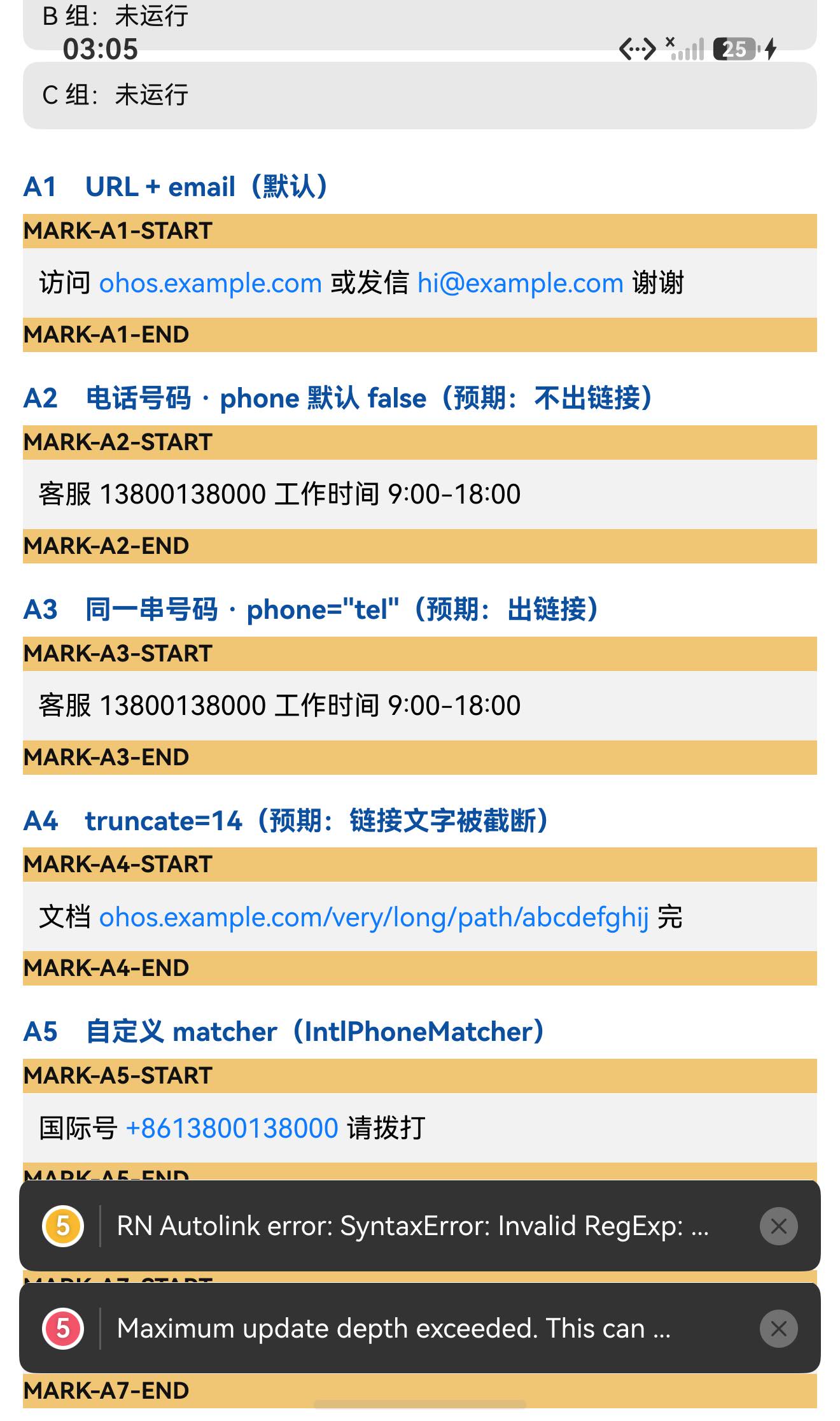
我做了三向对照(分词日志 + 蓝色像素两个独立判据):
| 实例 | 配置 | 出链接次数 | 链接色像素 |
|---|---|---|---|
| A2 | 电话号码 + phone 默认(false) | 0 | 0 |
| A3 | 同一个裸号码 13800138000 + phone="tel" | 0 | 0 |
| A7 | 国际格式 +8613800138000 + phone="tel" | 有 | 2117 |
| A5 | 国际格式 + matchers={[IntlPhoneMatcher]} | 有 | 2077 |
⇒ phone="tel" 对裸的本地号码无效 —— autolinker 的电话匹配要求国际格式(带 +)。
这正是本库额外导出 IntlPhoneMatcher 和 PhoneMatchersByCountry(FR/PL/UK/US)的原因:要覆盖各国本地号码格式,得自己挂 matcher。
② 依赖坑第一次真的生效了
autolinker 是真正的第三方运行时依赖。用 file: 方式接入时它不会被自动安装:
error Unable to resolve module autolinker/dist/commonjs/truncate/truncate-end
from E:\rnoh-work\react-native-autolink\dist\truncate.js:
autolinker/dist/commonjs/truncate/truncate-end could not be found within the project or in these directories:
打包直接失败(exit 1)。装上 autolinker@3.16.2 后立刻恢复正常(exit 0)。
(前几个库的 prop-types 恰好已在宿主里,所以这个坑一直没咬到我;这次是真的踩了。)
③ 无效 matcher 会被"内部吞掉",静默变成什么都不渲染
matchers 里给一个非法正则(例如 pattern: '('),组件不会崩:
catch (e) {
  console.warn('RN Autolink error:', e);
  return null;                 // ← 整个组件什么都不渲染
}
实测日志:
W #RNOH_JS: 'RN Autolink error:', [SyntaxError: Invalid RegExp: Invalid flags]
⇒ 该实例一个分词都没有渲染(分词条数 0、蓝色像素 0),而且每次渲染都会再警告一次(本轮观察到 5 次)。
设备侧断言 30 / 30 全部通过。
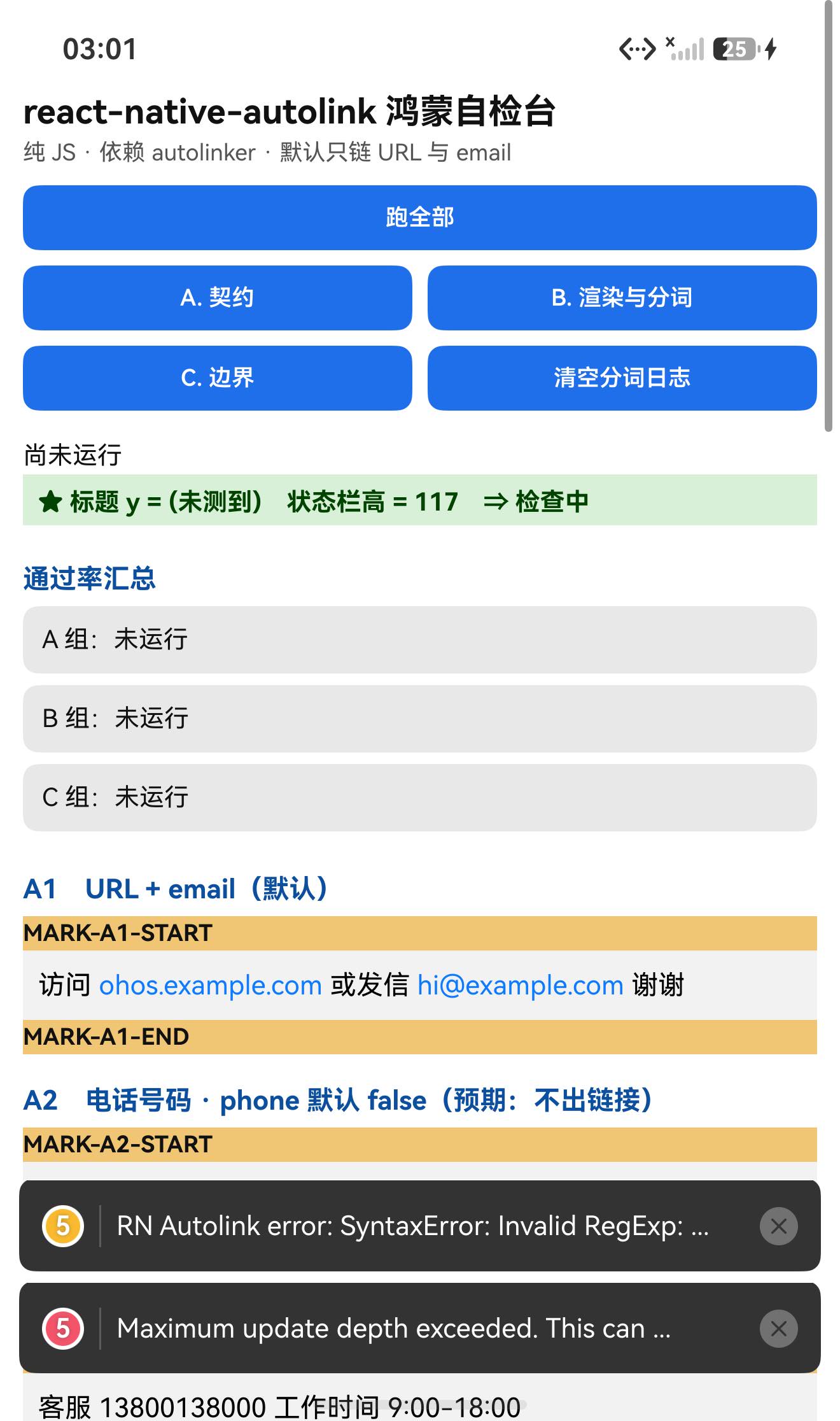
一、先说结论
| 项 | 结果 |
|---|---|
| 上游最新版 | 4.2.3;license: MIT;上游 star 661 |
| 库类型 | 纯 JS 组件库:把文本里的 URL/邮箱/电话/话题/@提及 变成可点链接 |
| 是否需要原生适配 | 不需要(无 harmony/、无 NativeModules;import 图只有相对路径 + autolinker/dist/commonjs + react / react-native) |
| 运行时依赖 | ⚠️⚠️ autolinker@^3.16.2 —— 目录/file: 接入不会装它 ⇒ 打包直接失败(本轮实测) |
prepare / prepack | ⚠️ 交付包保留了 "prepare": "husky"(上游还有 prepack: "pnpm build")⇒ 目录/file: 接入必须 --ignore-scripts |
main | dist/index.js(tsc 编译产物,交付包不带 src/) |
| 导出形态 | default = Autolink(React.memo 对象)+ Autolink / CustomMatch / truncate / urls.* / matchers.* |
| 需要 HAR / 权限 / ohpm | ❌ 都不需要 |
| 设备侧断言 | ✅ 30 / 30 全部通过(A 22 + B 4 + C 4) |
| ★ 默认链接范围 | url: true、email: true、phone: false、hashtag: false、mention: false |
| ★ 链接样式 | 默认 {color: '#0E7AFE'}(蓝) ⇒ 天然像素判据 |
| ★ 可观测钩子 | renderText / renderLink ⇒ 可以把分词结果全部打日志 |
| ★★ 我踩到的依赖坑 | autolinker 没被自动装 ⇒ Metro Unable to resolve module … ⇒ 打包 exit 1 |
★★ phone 的真相 | 裸本地号 13800138000 不认(0 链接);国际格式 +86… 才认 |
| ★ 无效 matcher | 被内部 try/catch 吞掉 ⇒ console.warn + return null(什么都不渲染) |
二、判定与接入
| 步 | 做法 | 结果 |
|---|---|---|
| ① | package.json 里有没有 harmony.autolinking | 没有 |
| ② | 仓库里有没有 harmony/ | 没有 |
| ③ | 代码里有没有 NativeModules / requireNativeComponent | 全无 |
| ④ | import 图体检 | 只有相对路径 + autolinker/dist/commonjs(/**) + react / react-native ⇒ 注意这个真依赖 |
| ⑤ | scripts 扫 prepare 家族 | ⚠️ 有 prepare: "husky" ⇒ 必须 --ignore-scripts |
npm install "git+https://atomgit.com/oh-react-native/react-native-autolink.git#4.2.3-ohos-1.0.0" --ignore-scripts

# ★★ 关键:它带一个真正的运行时依赖 autolinker,目录/软链接入不会自动装
npm install autolinker@^3.16.2 --ignore-scripts
// metro.config.js
watchFolders: [ path.resolve(__dirname, '../react-native-autolink') ],
import AutolinkTestApp from './AutolinkTestApp';
AppRegistry.registerComponent('AutolinkTestApp', () => AutolinkTestApp);
hdc shell aa force-stop com.rnoh084.demo
hdc shell aa start -b com.rnoh084.demo -a EntryAbility --ps rnAppKey AutolinkTestApp
不需要 HAR、权限、ohpm、link-harmony。
三、读源码取到的真值
⚠️ 交付包只带
dist/**(编译产物),没有src/,所以以下引用都来自dist/**。
3.1 入口与默认导出
// dist/index.js
import { Autolink } from './Autolink';
export * from './Autolink';
export * from './CustomMatch';
export * from './matchers';
export { truncate } from './truncate';
export * from './urls';
export default Autolink;

// dist/Autolink.js
export const Autolink = React.memo(AutolinkComponent);
⇒ 默认导出是 React.memo(...) 返回的对象(typeof 'object'、有 $$typeof、没有可用的 prototype.render)✓ 实测确认。
3.2 ★ props 与默认值(全部来自解构默认值)
function AutolinkComponent({
  as, component,
  email = true, hashtag = false, linkProps = {}, linkStyle,
  matchers = [], mention = false, onPress: onPressProp, onLongPress: onLongPressProp,
  phone = false, renderLink: renderLinkProp, renderText, showAlert = false,
  stripPrefix = true, stripTrailingSlash = true, text, textProps = {},
  truncate: truncateProp = 0, truncateChars = '..', truncateLocation = 'smart',
  url = true, useNativeSchemes = false, ...props
}) { … }
| prop | 默认 | 说明 |
|---|---|---|
url | true | 识别网址 |
email | true | 识别邮箱 |
phone | false | 识别电话(⚠️ 只认国际格式,见第五、六节) |
hashtag | false | #话题 |
mention | false | @提及 |
stripPrefix | true | 显示时去掉 http:// / https:// |
stripTrailingSlash | true | 去掉结尾斜杠 |
truncate | 0 | 链接文字截断长度(0 = 不截断) |
truncateLocation | 'smart' | end / middle / 其它=smart |
showAlert | false | 打开前先弹确认框 |
renderText / renderLink | — | ★ 自定义渲染(绝佳的观测点) |
as / component | — | 换成别的容器组件(默认渲染 <Text>) |
3.3 ★ 链接样式与像素判据
const styles = StyleSheet.create({ link: { color: '#0E7AFE' } });
// renderLink 里:style = (matcher.style) || linkStyle || styles.link
⇒ 默认链接色 #0E7AFE(蓝),普通文字是黑 ⇒ 数蓝色像素就知道哪些实例出了链接 ✓
3.4 ★★ 分词钩子(本轮的页内可观测性来源)
const nodes = parts.map((part, index) => {
  if (typeof part !== 'string') {
    if (part instanceof CustomMatch) {
      const customRender = part.getRenderFn();
      if (customRender) return customRender(part.getAnchorText(), part, index);
    }
    return (renderLinkProp || renderLink)(part.getAnchorText(), part, index);   // ← 每个链接
  }
  return renderText ? (renderText(part, index)) : createElement(Text, {...textProps, key: index}, part);   // ← 每段纯文本
});
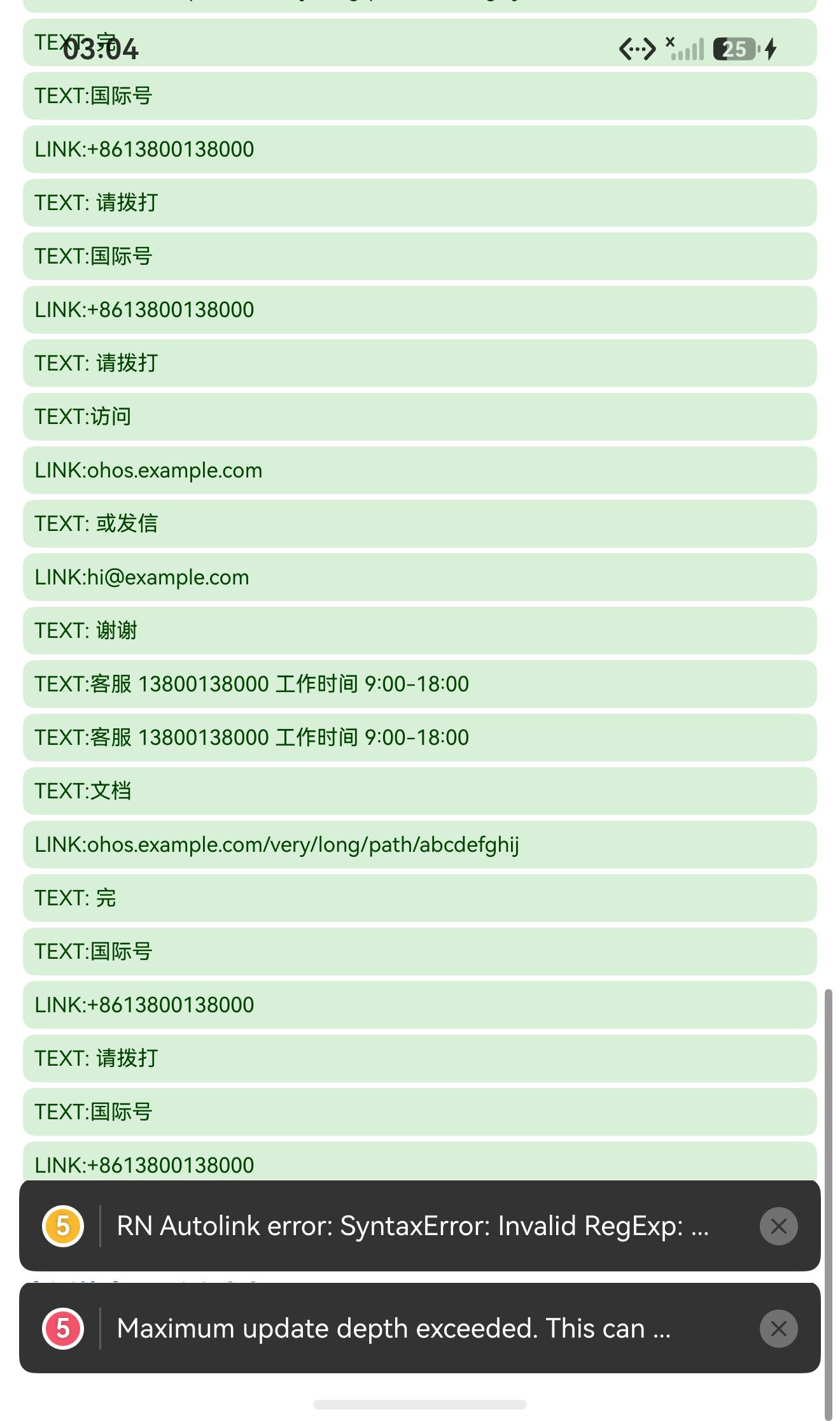
⇒ 我在测试页里给 renderText / renderLink 传了会打日志的实现,于是整个分词结果都进了日志:
TOK LINK:ohos.example.com          ← ★ stripPrefix=true 已去掉 https://
TOK TEXT: 或发信
TOK LINK:hi@example.com
TOK TEXT: 谢谢
TOK TEXT:客服 13800138000 工作时间 9:00-18:00     ← A2(phone 关)
TOK TEXT:客服 13800138000 工作时间 9:00-18:00     ← A3(phone="tel",裸号)★ 仍是纯文本!
TOK LINK:+8613800138000                            ← A5/A7(国际格式)★ 出链接
3.5 ★ 解析失败会被内部吞掉
try {
  matches = Autolinker.parse(input, { email, hashtag, mention, phone: !!phone, urls: url, stripPrefix, stripTrailingSlash });
  matchers.forEach((matcher) => { … new RegExp(matcher.pattern.source, `${matcher.pattern.flags}g`) … });
}
catch (e) {
  console.warn('RN Autolink error:', e);
  return null;                    // ← 整个组件不渲染任何东西
}
⇒ 非法 matcher(如 pattern: '(')不会崩,而是:警告 + 什么都不渲染 ✓
3.6 其它工具(都是可直调的纯函数)
// dist/urls.js
getEmailUrl = (match) => `mailto:${encodeURIComponent(match.getEmail())}`
getPhoneUrl = (match, method = 'tel') => method === 'sms' || method === 'text' ? `sms:${number}` : `tel:${number}`
// getHashtagUrl / getMentionUrl 默认返回 match.getMatchedText()

// dist/truncate.js
truncate = (text, length = 32, chars = '..', location = 'smart') => …
四、验证设计
| 判据 | 内容 |
|---|---|
| ① 分词日志(页内) | 用 renderText / renderLink 钩子把每个片段打出来 ⇒ 完整分词结果可见 |
| ② 链接像素 | 数 #0E7AFE 蓝色像素 ⇒ 该实例有没有链接(与①互相独立印证) |
| ③ 三向对照 | 裸本地号 vs 国际格式号 × phone 开关 |
| ④ 无效 matcher | 是否崩 / 是否渲染 |
五、实测结果
5.1 断言 30 / 30
| 组 | 内容 | 结果 |
|---|---|---|
| A 契约 | 默认导出是 memo 对象(typeof 'object'、有 $$typeof、无 prototype.render)、具名导出、truncate / getEmailUrl / getPhoneUrl 纯函数直调、autolinker 可加载且主版本 3、matcher 导出 | 22/22 |
| B 渲染与分词 | 7 个实例渲染未抛错、标题不与状态栏重合、分词日志、像素判据说明 | 4/4 |
| C 边界 | 无效 matcher ⇒ 0 分词、裸号 0 链接、国际格式 >0 链接、格式检查 | 4/4 |
| 合计 | 30/30 |
关键观测值:
默认导出 typeof = object          (memo 对象)
truncate("https://example.com/abcdefghij", 12, "..", "end") = https://e..
getEmailUrl(假 match) = mailto:a%40b.com
getPhoneUrl(假 match) = tel:13800138000      getPhoneUrl(…, 'sms') = sms:13800138000
autolinker 版本 = 3.16.2
IntlPhoneMatcher.type = phone-intl           PhoneMatchersByCountry 含 US
★ 全页 LINK 次数 = 13
5.2 ★★ 三向对照(分词日志 + 像素,两个独立判据)
| 实例 | 配置 | 出链接次数(日志) | 蓝色像素 |
|---|---|---|---|
| A1 | URL + 邮箱(默认) | 有 | 3399 |
| A2 | 电话号码 + phone 默认 false | 0 | 0 |
| A3 | 裸号 13800138000 + phone="tel" | 0 | 0 |
| A4 | truncate={14}(链接文字被截断) | 有 | 4466 |
| A5 | IntlPhoneMatcher + +8613800138000 | 有 | 2077 |
| A7 | +8613800138000 + phone="tel" | 有 | 2117 |
| A6 | 无效 matcher(pattern:'(') | 0 | 0 |
⇒ A3 与 A7 是同一个 phone="tel"、同一个位置,唯一区别是号码格式 ⇒ 0 vs 2117 像素 ⇒ 结论锁定:phone={true} 只认国际格式。
⇒ A5 与 A7 都出链接(2077 / 2117) ⇒ 对国际格式而言,内置匹配器和 IntlPhoneMatcher 等效。
⇒ 要覆盖本地格式,必须自己挂 matcher(本库已备好 PhoneMatchersByCountry)。
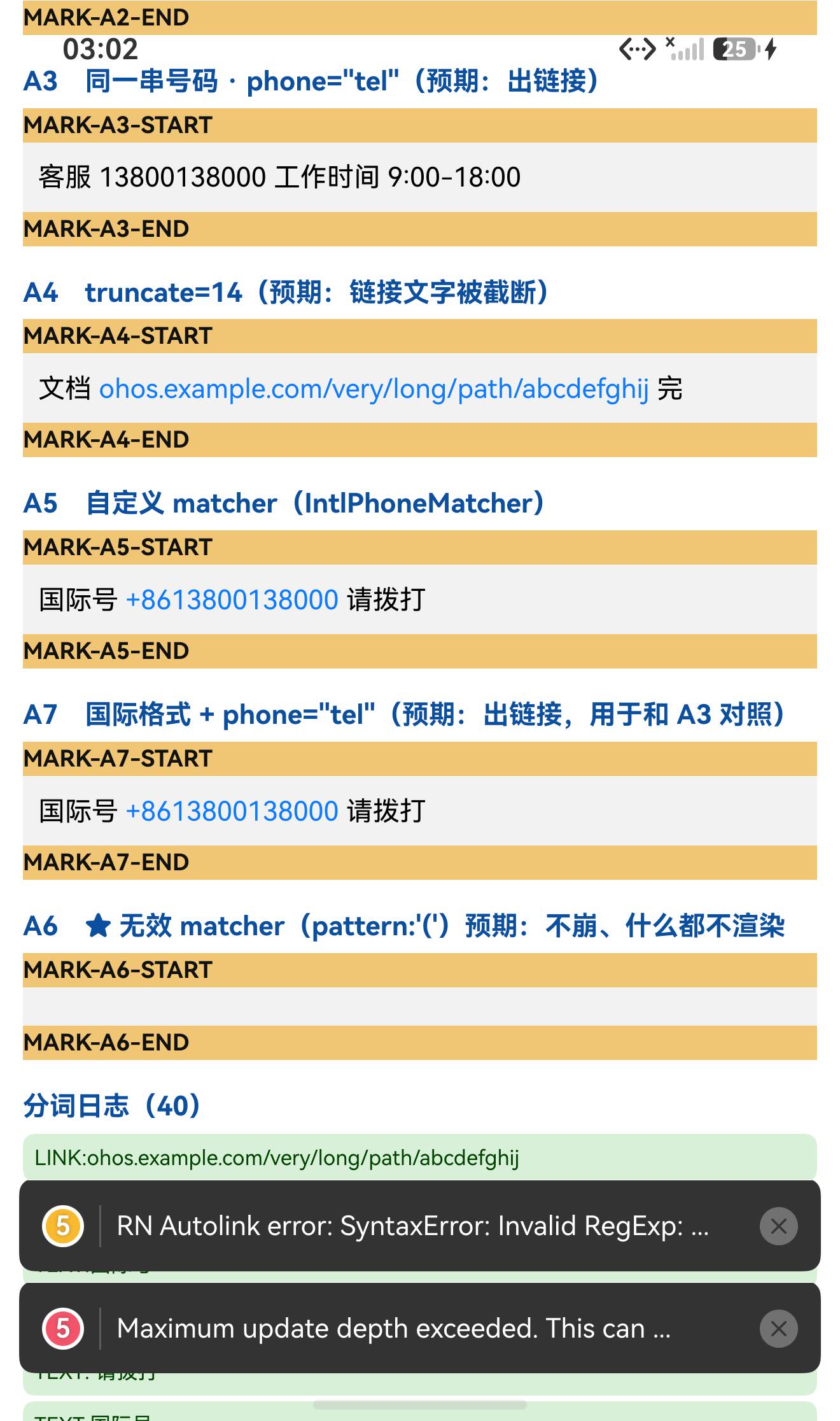
5.3 ★ 无效 matcher 的真实行为
日志(源码里那行 console.warn 确认被触发,重复 5 次 = 每次渲染都重抛):
W A0beef/#RNOH_JS: 'RN Autolink error:', [SyntaxError: Invalid RegExp: Invalid flags]
⇒ 该实例:分词条数 0、蓝色像素 0 ⇒ 什么都没渲染,页面也没崩 ✓
5.4 ★ stripPrefix 被日志坐实
TOK LINK:ohos.example.com ← 原文是 https://ohos.example.com;显示时前缀已被去掉
5.5 UI:标题不与状态栏重合
TITLE measureInWindow y=420 (状态栏高 117) ⇒ 420 > 117,不重合 ✓
六、我自己的两个测试 bug(都值得记)
bug 1:拿"前缀"去做精确相等
第一版里我写:
record('C', '…', true, all.filter(t => t === 'TEXT:' || t === 'LINK:').length > 0);
但我的分词行实际是 TEXT:<内容> / LINK:<内容>(带内容后缀)⇒ 「等于 TEXT:」永远为假 ⇒ 断言必挂。
⇒ 改成对内容判断(t.indexOf('这段文字不应该出现') >= 0)才有意义。
bug 2:子串匹配造成假阳性
第二版里我写:
const a3Tok = all.filter(t => t.indexOf('LINK:') === 0 && t.indexOf('13800138000') >= 0);
以为它在数"裸号 13800138000 的链接",结果报出 6 次 —— 因为 LINK:+8613800138000 里就含有子串 13800138000 ✗
⇒ 把 A5/A7 的国际号链接全算进了 A3。改成精确相等(t === 'LINK:13800138000')后,A3 如实变成 0 ✓
教训:做"分类计数"的断言时,优先用精确相等(
===)或带边界的匹配;子串包含(indexOf/includes)在号码、URL、路径这类"一个可能是另一个前缀/子串"的场景里极易假阳。
七、已知限制与本次验证边界
7.1 用这个库要知道的
| 事项 | 说明 |
|---|---|
必须手动装 autolinker | 它是真依赖,目录/file: 接入不会自动装 ⇒ 不装就打包失败 |
目录接入要 --ignore-scripts | 包里保留了 prepare: "husky" |
phone={true} 只认国际格式 | 裸本地号(如 13800138000)不会变链接;要覆盖本地格式请用 matchers(本库已备 PhoneMatchersByCountry) |
linkStyle 默认 #0E7AFE | 想换色用 linkStyle 或 matcher 的 style |
| 非法 matcher 会静默"整体不渲染" | 被内部 try/catch 吞掉 ⇒ 只有 console.warn,界面上什么都没有;每次渲染都再警告一次 |
stripPrefix 默认 true | 显示会去掉 http(s)://(但链接目标不变) |
点击默认走 Linking.openURL | 想自己处理就传 onPress(url, match);showAlert 会先弹确认框 |
main 指向编译产物 | dist/**,交付包不带 src/ |
7.2 本次验证的边界
hashtag/mention未验证(源码里默认 false,且getHashtagUrl/getMentionUrl需要 service 参数);useNativeSchemes未验证(fb:///instagram://等原生 scheme 分支);showAlert未验证(会弹Alert,本轮没触发);onPress/onLongPress未验证(我用renderLink里的onPress记了一次TOK PRESS:…,但没有真正点击);truncateLocation的middle分支未验证(只测了end);CustomMatch的render/onPress覆盖未验证;stripTrailingSlash未验证;as/component换容器未验证;linkProps/textProps透传未验证;- matcher 与内置匹配的"重叠避让"逻辑未验证(源码里有专门的重叠检测);
LocationMatcher未验证(只用了IntlPhoneMatcher);- 只在一台模拟器上验证(
Pura X View,density 3,1320×2232),没有真机;未做跨平台对照。
未改动库代码。
八、常见问题
Q1:npm install 之后打包报 Unable to resolve module autolinker/...?
因为它带的是真依赖 autolinker,而目录/file: 接入不会安装目标包自己的 dependencies。实测报错:
error Unable to resolve module autolinker/dist/commonjs/truncate/truncate-end
from …/react-native-autolink/dist/truncate.js
解法:
npm install autolinker@^3.16.2 --ignore-scripts
(走 .tgz 安装会被自动带上。)
Q2:我传了 phone={true},本地手机号还是点不了?
因为 autolinker 的电话匹配要求国际格式(带 + 和国别码)。实测:
| 文本 | phone="tel" | 结果 |
|---|---|---|
13800138000 | ✅ 传了 | 不出链接(0 蓝像素) |
+8613800138000 | ✅ 传了 | 出链接(2117 蓝像素) |
要覆盖本地格式,请挂 matcher(本库已内置若干):
import Autolink, {PhoneMatchersByCountry, IntlPhoneMatcher} from 'react-native-autolink';

<Autolink text="客服 13800138000" matchers={[PhoneMatchersByCountry.US]} />
<Autolink text="国际 +8613800138000" matchers={[IntlPhoneMatcher]} />
Q3:文本里明明有电话/话题,为什么没变蓝?
看这三个默认值:phone: false、hashtag: false、mention: false —— 默认只链 URL 和邮箱。要开就显式传:
<Autolink text="…" phone="tel" hashtag="twitter" mention="twitter" url email />
Q4:某个实例整段文字都不显示了?
很可能是它的 matchers 里有非法正则。源码里解析被包在 try/catch 里,出错时只 console.warn('RN Autolink error:', e) 然后 return null ⇒ 这一整块什么都不渲染(页面不崩)。
排查:看 hilog 里有没有 RN Autolink error:(本轮实测是 SyntaxError: Invalid RegExp: Invalid flags)。
Q5:怎么知道到底把哪些片段识别成了链接?
用两个渲染钩子,把分词结果打出来(本轮就是这么做的):
<Autolink
  text={text}
  renderText={(t, i) => { console.log('TEXT', t); return <Text key={i}>{t}</Text>; }}
  renderLink={(t, match, i) => { console.log('LINK', t, match.getAnchorHref()); return <Text key={i}>{t}</Text>; }}
/>
Q6:怎么改链接颜色 / 截断长链接?
<Autolink text={text} linkStyle={{color: '#0E7AFE'}} />
<Autolink text={text} truncate={14} truncateChars=".." truncateLocation="end" />
Q7:为什么链接文字里 https:// 没了?
stripPrefix 默认 true(显示层去前缀,链接目标不变)。本轮日志实测:TOK LINK:ohos.example.com。
Q8:这个库需要鸿蒙侧做什么特殊处理吗?
不需要。 纯 JS、无原生模块、不需要 HAR / 权限 / ohpm。唯一必须注意的是手动装 autolinker,以及 phone 只认国际格式这条。
小结
react-native-autolink 是纯 JS 的文本自动链接组件(内部用 autolinker 解析)。设备侧 30 / 30 断言通过。
最值得记下来的是这几条:
-
★★ "目录接入要手动补依赖"这个坑,这次真的咬到我了。 前几个库的
prop-types恰好已在宿主里,所以一直只是"提醒";这次autolinker不在,打包直接失败:Unable to resolve module autolinker/dist/commonjs/truncate/truncate-end(exit 1),装上后立刻 exit 0。⇒ 预检里"跑 import 图体检"这一步的价值就在这里:能从 import 里看出哪些是"真依赖",而不是等打包失败。 -
★★ 用"三向对照"把原因锁死。 我一开始以为"
phone="tel"不管用",但有可能只是"这个号码格式不被识别"。于是我加了 A7(同一个phone="tel"、只把号码换成国际格式)⇒ A3 = 0 像素、A7 = 2117 像素 ⇒ 结论从"参数没用"精确变成"只认国际格式",也顺带解释了本库为什么额外导出PhoneMatchersByCountry。
⇒ 当"某个开关看起来没生效"时,再补一个"只改一件事"的实例,往往能把"开关坏了"和"输入不匹配"区分开。 -
★ 找"页内可观测钩子"比外部探测省事得多。 这个库正好有
renderText/renderLink⇒ 我把它们换成"打日志的实现",整段分词结果直接进日志(TEXT:/LINK:序列),比去猜渲染结果可靠得多。⇒ 接一个组件前,先看它有没有 render 回调 / 事件钩子可以借用。 -
★ 内部
try/catch是第三种"静默失效"。 非法 matcher ⇒ 只console.warn+return null(整块不渲染、页面不崩、每次渲染都再警告一次)。这类"看起来没渲染"的问题,先去日志里搜组件自己的 warn 文案。 -
★ 断言里的字符串匹配要小心。 我这轮写错了两次:一次拿前缀做精确相等,一次用子串包含数分类 —— 后者因为
+8613800138000含13800138000而假阳性。⇒ 分类计数请用精确相等或带边界匹配。
本篇用到的库
| 项 | 内容 |
|---|---|
| 三方库 | react-native-autolink(上游 4.2.3 的鸿蒙适配版) |
| 适配仓库 | https://atomgit.com/oh-react-native/react-native-autolink |
| 适配 TAG | 4.2.3-ohos-1.0.0 |
| 需要 HAR / 权限 / ohpm | 都不需要(纯 JS) |
| 库类型 | 纯 JS 组件库:文本自动链接(URL / 邮箱 / 电话 / 话题 / @提及) |
| 运行时依赖 | ⚠️⚠️ autolinker@^3.16.2 ⇒ 目录/file: 接入必须手动补装,否则打包失败 |
prepare / prepack | ⚠️ 有 prepare: "husky" ⇒ 接入须 --ignore-scripts |
| 许可证 | MIT |
| 上游仓库 | https://github.com/joshswan/react-native-autolink(★661) |
| 宿主工程 | RNOH084Demo(测试页 rnAppKey = AutolinkTestApp) |
# 从适配仓库安装
npm install "git+https://atomgit.com/oh-react-native/react-native-autolink.git#4.2.3-ohos-1.0.0" --ignore-scripts

# 本地目录接入(开发常用)—— ★★ 必须补 autolinker,否则 Metro 解析失败
npm install ../react-native-autolink --ignore-scripts
npm install autolinker@^3.16.2 --ignore-scripts
// metro.config.js
watchFolders: [ path.resolve(__dirname, '../react-native-autolink') ],
import Autolink, {
  PhoneMatchersByCountry,
  IntlPhoneMatcher,
  truncate,
} from 'react-native-autolink';

// ① 基本用法:默认只把 URL 与邮箱变成链接
<Autolink text="访问 https://ohos.example.com 或发信 hi@example.com" />

// ② 开电话 / 话题 / 提及(默认都是关的)
<Autolink text="#鸿蒙 @ohos 客服 13800138000" phone="tel" hashtag="twitter" mention="twitter" />

// ③ ★ 本地号码要挂 matcher(内置匹配器只认国际格式)
<Autolink text="客服 13800138000" matchers={[PhoneMatchersByCountry.US]} />
<Autolink text="国际 +8613800138000" matchers={[IntlPhoneMatcher]} />

// ④ 自己处理点击(默认会 Linking.openURL)
<Autolink text="https://ohos.example.com" onPress={(url, match) => console.log(url, match.getType())} />

// ⑤ 换色 / 截断 / 自定义渲染
<Autolink
  text="https://ohos.example.com/very/long/path/abcdefghij"
  linkStyle={{color: '#0E7AFE'}}
  truncate={14}
  truncateLocation="end"
  renderLink={(t, match, i) => <Text key={i} style={{color: 'blue'}}>{t}</Text>}
  renderText={(t, i) => <Text key={i}>{t}</Text>}
/>

// ⚠️ matchers 里的正则必须合法:非法正则会被内部 try/catch 吞掉,
//    结果是【这一整块什么都不渲染】,只在日志里留一行 console.warn
# 换页启动测试页(force-stop 不能省,换页参数只在冷启动生效)
hdc shell aa force-stop com.rnoh084.demo
hdc shell aa start -b com.rnoh084.demo -a EntryAbility --ps rnAppKey AutolinkTestApp
判据的复现方式
# ① 分词:用 renderText / renderLink 打日志,看 TEXT:/LINK: 序列
# ② 像素:链接默认色 #0E7AFE(普通文字是黑)
Add-Type -AssemblyName System.Drawing
$b = New-Object System.Drawing.Bitmap('shot.jpeg')
$cnt = 0
for ($y=$y0; $y -lt $y1; $y++) { for ($x=0;$x -lt $b.Width;$x++) {
  $p = $b.GetPixel($x,$y)
  if ([Math]::Abs($p.R-0x0E) -lt 45 -and [Math]::Abs($p.G-0x7A) -lt 45 -and [Math]::Abs($p.B-0xFE) -lt 45) { $cnt++ } } }
"该实例区蓝色像素 = $cnt(0 表示没有链接)"

# ⚠️ 分类计数时不要用子串包含:'+8613800138000' 里含有 '13800138000'
验证环境
| 项 | 版本 |
|---|---|
| React Native | 0.84.1 |
| React | 19.2.3 |
| RNOH(npm / ohpm) | @react-native-oh/react-native-harmony / @rnoh/react-native-openharmony 0.84.3 |
| Node.js / npm | v24.14.0 / 11.9.0 |
| DevEco Studio | 26.0.0.621 |
| HarmonyOS SDK | API 26(26.0.0.32) |
| 设备 | HarmonyOS 7.0.0(26.0.0) Beta2 模拟器 Pura X View(ohos-x64),1320×2232,density 3 |
| 本机状态栏高度 | 117px(页面留白取 48vp) |
宿主 autolinker | 3.16.2(初始不存在 ⇒ 打包失败 ⇒ 装后恢复) |
| 宿主 HAP 产物 | entry-default-signed.hap |
| 本次构建 | assembleHap 首轮 6 分 21 秒;修断言后 4 分 32 秒、3 分 54 秒 |
| 验证规模 | 设备侧 30 / 30 断言;分词日志(全页 13 次 LINK);蓝色像素 7 个实例(3399 / 0 / 0 / 4466 / 2077 / 2117 / 0);三向对照 1 组(裸号 vs 国际号);无效 matcher 1 例;UI 安全区 1 项 |
相关社区与项目地址
| 项目 | 地址 |
|---|---|
| React Native 鸿蒙官方社区(CPF-RN) | https://atomgit.com/CPF-RN |
| RNOH 框架仓库 | https://atomgit.com/openharmony-RN/ohos_react_native |
| RNOH 三方库使用文档 | https://atomgit.com/OpenHarmony-RN/usage-docs |
| React Native for OpenHarmony 组织 | https://atomgit.com/oh-react-native |
| RN 三方库鸿蒙适配清单 | https://atomgit.com/oh-react-native/rn-ohos-adaptation-overview |
欢迎加入 CPF-RN 鸿蒙社区:https://atomgit.com/CPF-RN
React Native for OpenHarmony 组织:https://atomgit.com/oh-react-native
RN 三方库鸿蒙适配清单:https://atomgit.com/oh-react-native/rn-ohos-adaptation-overview

作为“人工智能6S店”的官方数字引擎,为AI开发者与企业提供一个覆盖软硬件全栈、一站式门户。
更多推荐

 0
0 0
0- 0


 已为社区贡献6条内容

所有评论(0)