
ArkTS 与智能融合案例之ArkTS 与智能融合案例(基于用户画像与协同过滤的智能推荐)
1 学习目标
个性化推荐系统是现代智能应用的核心能力之一,广泛应用于资讯、电商、短视频、音乐等场景。本章将带领读者从零构建一个基于鸿蒙系统的个性化内容推荐应用,涵盖用户画像构建、行为采集、推荐算法实现与推荐结果展示的完整流程。
1.1 知识目标
- 理解推荐系统的基本概念、分类(基于内容、协同过滤、混合推荐)及适用场景
- 掌握用户画像(User Profile)的构建方法,包括兴趣标签提取与权重计算
- 理解TF-IDF算法原理及其在内容特征提取中的应用
- 掌握基于用户的协同过滤(User-Based CF)和基于物品的协同过滤(Item-Based CF)算法
- 理解冷启动问题的成因及常见解决策略(热门推荐、兴趣选择、内容推荐)
- 了解推荐系统评估指标(准确率、召回率、覆盖率、多样性)
1.2 能力目标
- 能够设计并实现用户行为数据采集模块,记录浏览、点赞、收藏等行为
- 能够基于用户行为数据构建用户画像,实现兴趣标签的动态更新
- 能够实现基于内容的推荐算法,利用物品特征匹配用户兴趣
- 能够实现协同过滤推荐算法,基于相似用户或相似物品生成推荐
- 能够设计推荐结果展示UI,支持卡片列表、瀑布流等展示形式
- 能够对推荐系统进行测试与优化,提升推荐准确度和用户体验
1.3 素养目标
- 培养数据驱动的产品思维,理解"千人千面"背后的技术逻辑
- 增强对用户隐私保护的意识,在数据采集和使用中遵循最小必要原则
- 理解推荐算法的社会影响,关注信息茧房效应和算法公平性问题
2. 项目背景与需求分析
2.1 行业背景
随着移动互联网的深入发展,信息过载已成为用户面临的核心问题。推荐系统通过分析用户历史行为和兴趣偏好,从海量内容中筛选出用户最可能感兴趣的内容,有效解决了信息过载问题。
在鸿蒙生态中,推荐系统具有特殊的价值:
- 多设备协同:鸿蒙的分布式能力使得推荐可以跨设备共享用户画像,实现"手机推荐、平板浏览、智慧屏展示"的无缝体验
- 端侧智能:鸿蒙的端侧AI能力支持在本地完成部分推荐计算,减少云端依赖,保护用户隐私
- 元服务场景:元服务(原子化服务)场景下,精准推荐可帮助用户快速找到所需服务
常见的推荐系统应用场景包括:
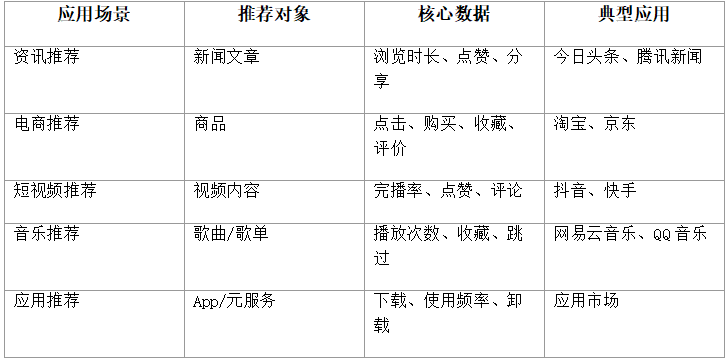
2.2 项目需求
本章项目"智能推荐助手"是一个基于鸿蒙系统的个性化内容推荐应用。该应用模拟资讯推荐场景,为用户推荐感兴趣的文章内容。
功能需求:
1.用户兴趣初始化:新用户首次进入时,通过兴趣标签选择完成冷启动
2.内容浏览:展示推荐的文章列表,支持点击查看详情
3.行为采集:记录用户的浏览、点赞、收藏、跳过等行为
4.用户画像构建:基于行为数据动态更新用户兴趣画像
5.推荐生成:基于内容推荐和协同过滤算法生成个性化推荐列表
6.推荐刷新:支持下拉刷新获取新推荐,上拉加载更多
7.分类筛选:支持按内容分类筛选推荐结果
8.历史记录:查看已浏览的内容历史
非功能需求:
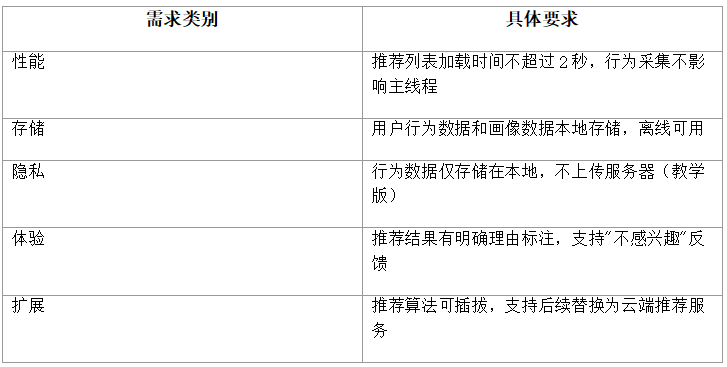
3 技术架构设计
3.1 整体架构
本系统采用分层架构设计,从下到上分为数据层、算法层、服务层和表现层:
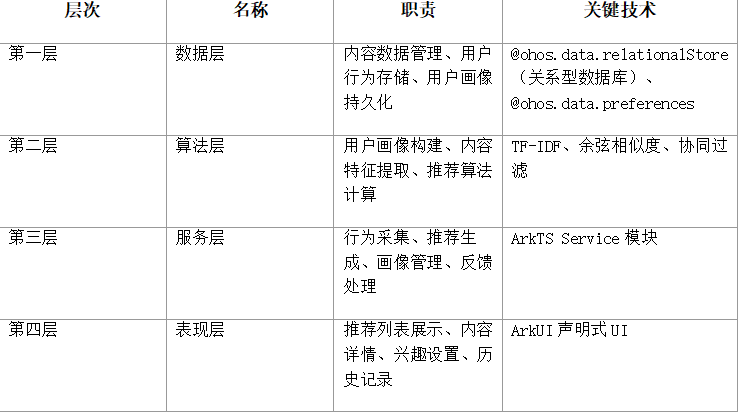
架构示意图(文字描述):
┌─────────────────────────────────────────────┐
│              表现层 (ArkUI)                    │
│  RecommendPage  DetailPage  InterestSetupPage │
│         HistoryPage    CategoryPage            │
├─────────────────────────────────────────────┤
│              服务层 (Service)                  │
│  BehaviorService  RecommendService             │
│  ProfileService   ContentService               │
│  FeedbackService                               │
├─────────────────────────────────────────────┤
│              算法层 (Algorithm)                │
│  UserProfileBuilder  ContentFeatureExtractor   │
│  ContentRecommender  CollaborativeFilter       │
│  ColdStartStrategy   RecommendationMerger      │
├─────────────────────────────────────────────┤
│              数据层 (Data)                     │
│  RDBStore (内容表/行为表/画像表)               │
│  Preferences (用户设置/兴趣标签)               │
└─────────────────────────────────────────────┘
3.2 技术选型
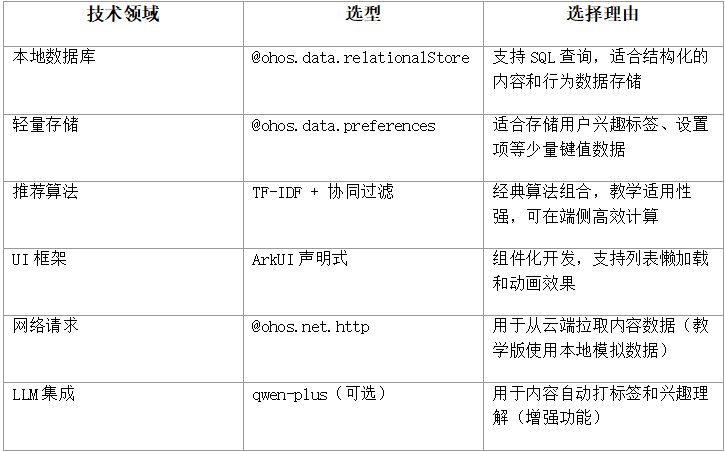
3.3 数据流设计
推荐系统的核心数据流包括三条主线:
(1)行为采集流
用户操作(浏览/点赞/收藏/跳过)
→ BehaviorService.recordBehavior()
→ 写入 behavior_table(RDB)
→ 触发 UserProfileBuilder.updateProfile()
→ 更新 user_profile_table(RDB)
(2)推荐生成流
用户打开推荐页
→ RecommendService.getRecommendations(userId)
→ 1. ContentRecommender: 基于内容推荐(TF-IDF匹配)
→ 2. CollaborativeFilter: 协同过滤推荐
→ 3. RecommendationMerger: 合并去重排序
→ 4. ColdStartStrategy: 冷启动补充(新用户)
→ 返回推荐列表
(3)反馈调整流
用户点击"不感兴趣"
→ FeedbackService.recordDislike(itemId)
→ 写入 behavior_table(type=dislike)
→ 更新用户画像(降低相关标签权重)
→ 从推荐列表中移除相似内容
4 核心知识点
4.1 推荐系统概述
推荐系统是一种信息过滤系统,旨在预测用户对物品的"偏好"或"评分",从而将最相关的内容推送给用户。
推荐系统的三大流派:
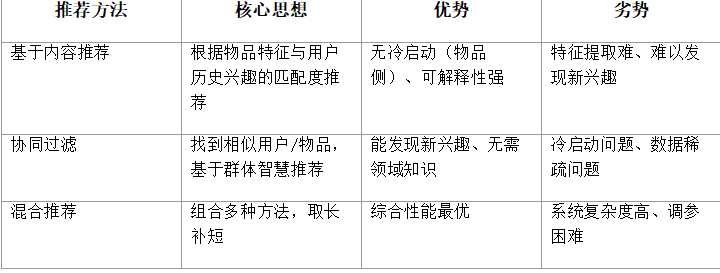
推荐系统的典型流程:
1.数据采集:收集用户行为数据(显式反馈:评分、点赞;隐式反馈:浏览、停留时长)
2.特征工程:提取用户特征(画像)和物品特征(标签、TF-IDF向量)
3.召回阶段:从全量物品中快速筛选出候选集(数百到数千个)
4.排序阶段:对候选集精排,生成最终推荐列表(数十个)
5.展示与反馈:展示推荐结果,收集用户反馈用于下一轮优化
4.2 用户画像构建
用户画像(User Profile)是对用户兴趣偏好的结构化描述,是推荐系统的核心数据基础。
用户画像的构建维度:
- 兴趣标签:用户感兴趣的内容分类和关键词,如"科技"“编程”“AI”
- 行为特征:用户的活跃时间、浏览频率、互动偏好(点赞多还是收藏多)
- 内容偏好:偏好的内容长度、阅读深度(标题党vs深度文)
- 时效偏好:对热点内容的敏感度,偏好最新内容还是经典内容
兴趣标签权重计算模型:
用户对某个标签的兴趣权重由行为类型和行为时间共同决定:
// 兴趣权重计算公式
// weight(tag) = Σ behavior_score(behavior_type) × time_decay(timestamp)
//
// 行为分值表:
//   browse(浏览):  1.0
//   like(点赞):    3.0
//   favorite(收藏): 5.0
//   share(分享):   4.0
//   dislike(不感兴趣): -8.0
//   skip(跳过):   -0.5
//
// 时间衰减函数(指数衰减):
//   decay(t) = exp(-λ × Δt)
//   λ = 0.01(衰减系数,控制近期行为权重)
//   Δt = 当前时间 - 行为时间(天)
//
// 示例:用户3天前浏览了1篇"AI"标签文章,今天点赞了1篇"AI"文章
//   weight("AI") = 1.0 × exp(-0.01×3) + 3.0 × exp(-0.01×0)
//               = 1.0 × 0.97 + 3.0 × 1.0
//               = 3.97
用户画像数据结构:
// 用户画像(标签-权重映射)
interface UserProfile {
  userId: string;
  tags: Map<string, number>;  // 标签名 -> 权重值
  totalBehaviors: number;     // 总行为数
  lastActiveTime: number;     // 最后活跃时间
  preferredCategories: string[]; // 偏好分类
  avgReadTime: number;        // 平均阅读时长(秒)
}
4.3 TF-IDF内容特征提取
TF-IDF(Term Frequency-Inverse Document Frequency)是一种经典的文本特征提取方法,用于衡量词语对文档的重要程度。
TF-IDF由两部分组成:
- TF(词频):词语在文档中出现的频率,反映词语在该文档中的重要程度
- IDF(逆文档频率):衡量词语的区分能力,出现在越多文档中的词语区分能力越弱
// TF计算
// TF(t, d) = 词语t在文档d中出现的次数 / 文档d的总词数
// TF(“AI”, doc1) = 5 / 100 = 0.05
// IDF计算
// IDF(t) = log(文档总数 / 包含词语t的文档数)
// IDF(“AI”) = log(1000 / 200) = log(5) ≈ 1.61
// TF-IDF
// TF-IDF(t, d) = TF(t, d) × IDF(t)
// TF-IDF(“AI”, doc1) = 0.05 × 1.61 = 0.0805
// 解读:TF-IDF值越高,词语t对文档d越重要
// “的”"是"等高频词IDF很低,TF-IDF值小
// “鸿蒙”"ArkTS"等专有词IDF高,TF-IDF值大
在推荐系统中,TF-IDF用于:
1.构建物品特征向量:将每篇文章表示为TF-IDF权重向量
2.计算内容相似度:通过余弦相似度比较两篇文章的TF-IDF向量
3.匹配用户兴趣:将用户画像中的标签与文章TF-IDF向量匹配
4.4 协同过滤算法
协同过滤(Collaborative Filtering, CF)是推荐系统最经典的算法之一,其核心思想是"找到和你相似的人,推荐他们喜欢的东西"。
(1)基于用户的协同过滤(User-Based CF)
找到与目标用户兴趣相似的其他用户,将这些用户喜欢但目标用户尚未接触的物品推荐给目标用户。
// User-Based CF 算法步骤
// 1. 构建用户-物品评分矩阵
//        Item1  Item2  Item3  Item4
// UserA   5      3     -      1
// UserB   4     -      2      -
// UserC   -      2      5     4
//
// 2. 计算用户间相似度(余弦相似度)
//   sim(A, B) = (A·B) / (|A| × |B|)
//   sim(A, B) = (5×4 + 3×0 + 0×2 + 1×0) / (√(25+9+1) × √(16+4))
//             = 20 / (√35 × √20) ≈ 0.756
//
// 3. 找到Top-K相似用户(K=2)
//   假设与UserA最相似的是UserB(0.756)和UserC(0.312)
//
// 4. 生成推荐
//   对UserA未接触的Item3:
//   预测评分 = Σ(sim(A, u) × rating(u, Item3)) / Σ|sim(A, u)|
//   = (0.756×2 + 0.312×5) / (0.756 + 0.312)
//   = (1.512 + 1.560) / 1.068 ≈ 2.87
(2)基于物品的协同过滤(Item-Based CF)
找到与目标用户已喜欢物品相似的物品进行推荐。物品相似度基于"被同一批用户喜欢"的程度计算。
// Item-Based CF 算法步骤
// 1. 构建物品-物品相似度矩阵
//   sim(Item_i, Item_j) = |U_i ∩ U_j| / √(|U_i| × |U_j|)
//   U_i = 喜欢物品i的用户集合
//
// 2. 对用户u已喜欢的每个物品,找到其最相似的Top-K物品
//
// 3. 加权聚合生成推荐
//   score(u, Item_j) = Σ sim(Item_j, Item_i) × rating(u, Item_i)
//   其中Item_i是用户u已评分的物品
两种协同过滤的对比:
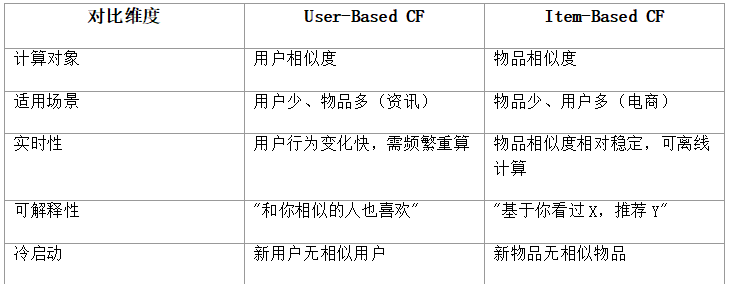
4.5 冷启动问题与解决策略
冷启动(Cold Start)是推荐系统面临的经典难题,指系统在缺乏足够数据时无法生成有效推荐的情况。
冷启动的三种类型:
1.用户冷启动:新用户无历史行为,无法构建画像
2.物品冷启动:新物品无用户交互,无法计算相似度
3.系统冷启动:系统刚上线,既无用户行为也无物品数据
用户冷启动解决策略:
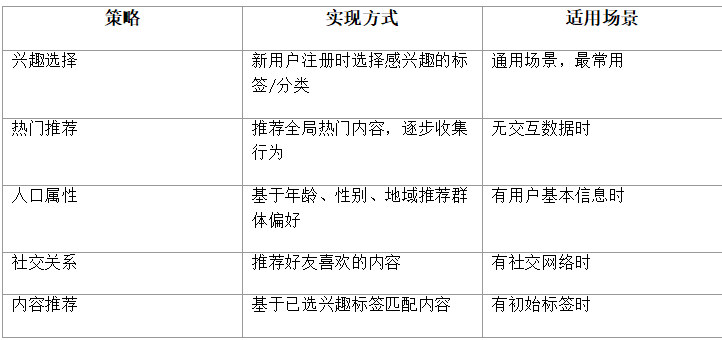
物品冷启动解决策略:
- 基于内容特征:利用物品的文本、标签特征,与用户画像匹配进行推荐
- 基于专家标注:人工为物品打标签,用于初始推荐
- Bandit算法:以探索-利用策略为新品分配流量,快速收集反馈
- LLM辅助打标:利用大语言模型自动为内容生成标签和摘要
4.6 推荐系统评估指标
推荐系统的质量评估是持续优化的基础,主要从以下维度衡量:
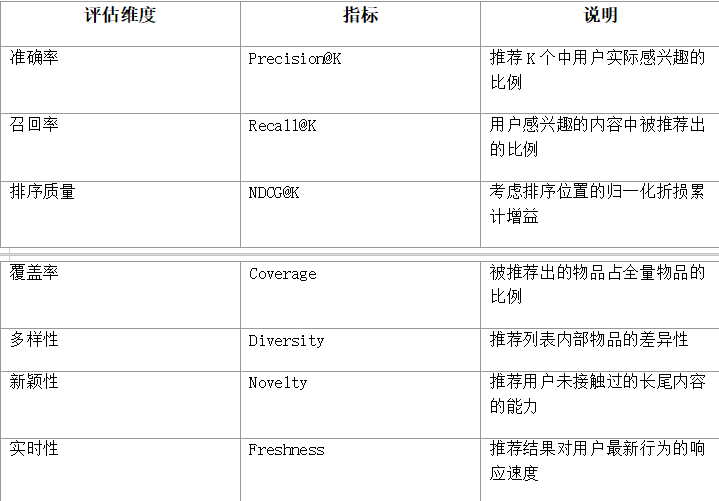
// Precision@K 计算示例
// 推荐列表:[A, B, C, D, E](K=5)
// 用户实际感兴趣:{B, D, F}
// 命中:B, D → 2个
// Precision@5 = 2/5 = 0.40

// Recall@K 计算示例
// 用户实际感兴趣:{B, D, F}(共3个)
// 推荐命中:B, D → 2个
// Recall@5 = 2/3 ≈ 0.67
5 完整案例实现
本章案例"智能推荐助手"实现一个完整的个性化内容推荐应用。项目结构如下:
RecommendApp/
├── model/
│   └── Types.ets              // 数据模型定义
├── common/
│   └── Constants.ets          // 常量与配置
├── data/
│   └── ContentData.ets        // 模拟内容数据
├── service/
│   ├── DatabaseService.ets     // 数据库管理
│   ├── BehaviorService.ets    // 行为采集服务
│   ├── ProfileService.ets     // 用户画像服务
│   └── RecommendService.ets    // 推荐生成服务
├── algorithm/
│   ├── ContentRecommender.ets  // 基于内容推荐
│   ├── CollaborativeFilter.ets // 协同过滤
│   ├── ColdStartStrategy.ets   // 冷启动策略
│   └── RecommendationMerger.ets // 推荐合并器
├── pages/
│   ├── RecommendPage.ets      // 推荐列表页
│   ├── DetailPage.ets         // 内容详情页
│   ├── InterestSetupPage.ets  // 兴趣设置页
│   ├── HistoryPage.ets        // 历史记录页
│   └── IndexPage.ets          // 主页面(Tab导航)
└── entryability/
    └── EntryAbility.ets       // 入口Ability
以下按模块逐一展示完整代码实现。
文件1:model/Types.ets
定义推荐系统所需的所有数据类型,包括内容模型、行为模型、用户画像模型和推荐结果模型。
// model/Types.ets

// 内容分类
export enum ContentCategory {
  TECH = '科技',
  AI = '人工智能',
  MOBILE = '移动开发',
  CLOUD = '云计算',
  PRODUCT = '产品设计',
  STARTUP = '创业',
  LIFE = '生活',
  FINANCE = '财经'
}

// 内容条目
export interface ContentItem {
  id: string;
  title: string;
  summary: string;
  content: string;
  category: ContentCategory;
  tags: string[];          // 内容标签
  author: string;
  publishTime: number;     // 发布时间戳
  readCount: number;       // 阅读量
  likeCount: number;       // 点赞数
  coverImage: string;      // 封面图URL
  tfidfVector?: Map<string, number>; // TF-IDF特征向量
}

// 行为类型
export enum BehaviorType {
  VIEW = 'view',           // 浏览
  LIKE = 'like',           // 点赞
  FAVORITE = 'favorite',   // 收藏
  SHARE = 'share',         // 分享
  DISLIKE = 'dislike',     // 不感兴趣
  SKIP = 'skip'            // 跳过
}

// 用户行为记录
export interface BehaviorRecord {
  id: string;
  userId: string;
  contentId: string;
  behaviorType: BehaviorType;
  timestamp: number;
  duration?: number;       // 浏览时长(秒),仅VIEW类型
}

// 用户画像
export interface UserProfile {
  userId: string;
  tagWeights: Map<string, number>;   // 标签权重
  categoryPreferences: Map<ContentCategory, number>; // 分类偏好
  totalBehaviors: number;
  lastActiveTime: number;
  avgReadTime: number;     // 平均阅读时长
  isColdStart: boolean;    // 是否处于冷启动阶段
}

// 推荐结果
export interface RecommendationItem {
  content: ContentItem;
  score: number;           // 推荐得分
  reason: string;          // 推荐理由
  source: string;          // 推荐来源(content/cf/coldstart/hot)
}

// 推荐请求参数
export interface RecommendRequest {
  userId: string;
  count: number;           // 请求数量
  excludeIds: string[];    // 排除已展示的ID
  category?: ContentCategory; // 分类筛选
}

// 兴趣标签
export interface InterestTag {
  name: string;
  category: ContentCategory;
  selected: boolean;
}
文件2:common/Constants.ets
定义系统常量,包括行为分值、衰减系数、推荐参数等。
// common/Constants.ets
import { BehaviorType, ContentCategory } from '../model/Types';

// 数据库配置
export const DB_NAME = 'recommend_app.db';
export const DB_VERSION = 1;

// 表名
export const TABLE_CONTENT = 'content_table';
export const TABLE_BEHAVIOR = 'behavior_table';
export const TABLE_PROFILE = 'profile_table';

// 行为分值表
export const BEHAVIOR_SCORES: Record<string, number> = {
  [BehaviorType.VIEW]: 1.0,
  [BehaviorType.LIKE]: 3.0,
  [BehaviorType.FAVORITE]: 5.0,
  [BehaviorType.SHARE]: 4.0,
  [BehaviorType.DISLIKE]: -8.0,
  [BehaviorType.SKIP]: -0.5
};

// 时间衰减系数(每天衰减)
export const TIME_DECAY_LAMBDA = 0.01;

// 推荐算法权重
export const RECOMMEND_WEIGHTS = {
  CONTENT: 0.4,        // 基于内容推荐权重
  COLLABORATIVE: 0.35, // 协同过滤权重
  HOT: 0.15,          // 热门推荐权重
  COLD_START: 0.10    // 冷启动补充权重
};

// 推荐配置
export const RECOMMEND_CONFIG = {
  DEFAULT_COUNT: 10,           // 默认推荐数量
  MAX_COUNT: 50,               // 最大推荐数量
  CANDIDATE_POOL_SIZE: 100,    // 候选池大小
  SIMILAR_USER_COUNT: 5,      // 相似用户数量
  SIMILAR_ITEM_COUNT: 5,      // 相似物品数量
  MIN_BEHAVIOR_FOR_CF: 3,     // 启用协同过滤的最低行为数
  COLD_START_THRESHOLD: 5     // 冷启动阈值(行为数<此值视为冷启动)
};

// 兴趣标签库
export const INTEREST_TAGS: { name: string; category: ContentCategory }[] = [
  { name: '人工智能', category: ContentCategory.AI },
  { name: '机器学习', category: ContentCategory.AI },
  { name: '深度学习', category: ContentCategory.AI },
  { name: '大模型', category: ContentCategory.AI },
  { name: '鸿蒙开发', category: ContentCategory.MOBILE },
  { name: 'ArkTS', category: ContentCategory.MOBILE },
  { name: '移动应用', category: ContentCategory.MOBILE },
  { name: '云计算', category: ContentCategory.CLOUD },
  { name: '微服务', category: ContentCategory.CLOUD },
  { name: 'DevOps', category: ContentCategory.CLOUD },
  { name: '产品设计', category: ContentCategory.PRODUCT },
  { name: '用户体验', category: ContentCategory.PRODUCT },
  { name: '创业', category: ContentCategory.STARTUP },
  { name: '融资', category: ContentCategory.STARTUP },
  { name: '理财', category: ContentCategory.FINANCE },
  { name: '股票', category: ContentCategory.FINANCE },
  { name: '科技资讯', category: ContentCategory.TECH },
  { name: '数码', category: ContentCategory.TECH },
  { name: '生活方式', category: ContentCategory.LIFE },
  { name: '旅行', category: ContentCategory.LIFE }
];

// LLM API配置(可选,用于内容自动打标签)
export const LLM_API_URL = 'https://dashscope.aliyuncs.com/compatible-mode/v1/chat/completions';
export const LLM_MODEL = 'qwen-plus';
export const API_KEY = 'your_api_key_here'; // 请替换为实际API密钥
文件3:data/ContentData.ets
提供模拟内容数据,模拟资讯平台的内容库。实际项目中应从服务器API获取。
// data/ContentData.ets
import { ContentItem, ContentCategory } from '../model/Types';

// 模拟内容库(20篇文章)
export const MOCK_CONTENTS: ContentItem[] = [
  {
    id: 'c001',
    title: '鸿蒙5.0正式发布:分布式能力全面升级',
    summary: '鸿蒙5.0带来更强大的分布式跨设备协同能力,支持手机、平板、智慧屏、车机等多设备无缝流转。',
    content: '鸿蒙5.0于今日正式发布,本次更新重点提升了分布式能力...',
    category: ContentCategory.MOBILE,
    tags: ['鸿蒙开发', '鸿蒙', '分布式', 'ArkTS'],
    author: '科技前线',
    publishTime: 1710000000000,
    readCount: 15200,
    likeCount: 890,
    coverImage: ''
  },
  {
    id: 'c002',
    title: '大模型推理优化:从量化到蒸馏的完整方案',
    summary: '本文系统介绍大模型推理优化的核心技术,包括INT8量化、知识蒸馏、注意力优化等。',
    content: '随着大模型参数规模不断增长,推理优化成为落地的关键环节...',
    category: ContentCategory.AI,
    tags: ['大模型', '深度学习', '模型优化', '量化'],
    author: 'AI技术汇',
    publishTime: 1710100000000,
    readCount: 9800,
    likeCount: 650,
    coverImage: ''
  },
  {
    id: 'c003',
    title: 'ArkTS语言精要:与TypeScript的异同解析',
    summary: 'ArkTS在TypeScript基础上做了哪些扩展和约束?本文从类型系统、UI范式、运行机制三方面对比。',
    content: 'ArkTS是鸿蒙应用开发的推荐语言,它在TypeScript基础上...',
    category: ContentCategory.MOBILE,
    tags: ['ArkTS', '鸿蒙开发', 'TypeScript', '移动应用'],
    author: '开发者社区',
    publishTime: 1710200000000,
    readCount: 12300,
    likeCount: 720,
    coverImage: ''
  },
  {
    id: 'c004',
    title: '云原生架构实践:从单体到微服务的演进',
    summary: '从单体架构到微服务再到云原生,本文梳理架构演进脉络,分享实战经验。',
    content: '架构演进是每个技术团队都会经历的旅程...',
    category: ContentCategory.CLOUD,
    tags: ['云计算', '微服务', '云原生', 'DevOps'],
    author: '架构师笔记',
    publishTime: 1710300000000,
    readCount: 7600,
    likeCount: 480,
    coverImage: ''
  },
  {
    id: 'c005',
    title: 'AI Agent架构解析:从ReAct到Plan-and-Execute',
    summary: '深入解析AI Agent的两种主流架构模式,对比其优劣及适用场景。',
    content: 'AI Agent是大模型应用的重要方向...',
    category: ContentCategory.AI,
    tags: ['人工智能', '大模型', '机器学习', 'AI Agent'],
    author: 'AI技术汇',
    publishTime: 1710400000000,
    readCount: 11200,
    likeCount: 830,
    coverImage: ''
  },
  {
    id: 'c006',
    title: '产品经理的AI思维:如何用大模型提升产品效率',
    summary: '产品经理如何利用AI工具提升需求分析、原型设计、用户调研的效率?',
    content: '在AI时代,产品经理的工作方式正在发生深刻变革...',
    category: ContentCategory.PRODUCT,
    tags: ['产品设计', '用户体验', '人工智能', '大模型'],
    author: '产品观察',
    publishTime: 1710500000000,
    readCount: 6500,
    likeCount: 410,
    coverImage: ''
  },
  {
    id: 'c007',
    title: '创业公司如何选择技术栈:成本与效率的平衡',
    summary: '从服务器、数据库到前端框架,创业公司技术选型的实战指南。',
    content: '创业公司资源有限,技术选型需要在成本和效率之间...',
    category: ContentCategory.STARTUP,
    tags: ['创业', '云计算', 'DevOps', '科技资讯'],
    author: '创业路上',
    publishTime: 1710600000000,
    readCount: 5400,
    likeCount: 320,
    coverImage: ''
  },
  {
    id: 'c008',
    title: '深度学习入门:从神经网络到Transformer',
    summary: '一文读懂深度学习发展脉络,从最早的MLP到如今主导NLP的Transformer架构。',
    content: '深度学习是机器学习的重要分支...',
    category: ContentCategory.AI,
    tags: ['深度学习', '机器学习', '人工智能', 'Transformer'],
    author: 'AI技术汇',
    publishTime: 1710700000000,
    readCount: 18900,
    likeCount: 1200,
    coverImage: ''
  },
  {
    id: 'c009',
    title: '鸿蒙分布式软总线:跨设备通信的底层原理',
    summary: '解析鸿蒙分布式软总线技术,理解多设备自发现、自组网、自决策的通信机制。',
    content: '分布式软总线是鸿蒙分布式能力的底座...',
    category: ContentCategory.MOBILE,
    tags: ['鸿蒙开发', '鸿蒙', '分布式', '移动应用'],
    author: '开发者社区',
    publishTime: 1710800000000,
    readCount: 8700,
    likeCount: 560,
    coverImage: ''
  },
  {
    id: 'c010',
    title: '个人理财入门:构建你的第一个投资组合',
    summary: '从零开始学习理财知识,理解资产配置、风险管理和长期投资策略。',
    content: '理财是每个人都需要掌握的生活技能...',
    category: ContentCategory.FINANCE,
    tags: ['理财', '财经', '生活方式', '股票'],
    author: '财经周刊',
    publishTime: 1710900000000,
    readCount: 9200,
    likeCount: 580,
    coverImage: ''
  },
  {
    id: 'c011',
    title: 'Kubernetes实战:从部署到运维的完整指南',
    summary: '系统介绍K8s核心概念,涵盖Pod、Service、Deployment等关键资源的使用。',
    content: 'Kubernetes已成为容器编排的事实标准...',
    category: ContentCategory.CLOUD,
    tags: ['云计算', '微服务', 'DevOps', 'K8s'],
    author: '架构师笔记',
    publishTime: 1711000000000,
    readCount: 7100,
    likeCount: 450,
    coverImage: ''
  },
  {
    id: 'c012',
    title: '机器学习经典算法:从线性回归到随机森林',
    summary: '梳理机器学习十大经典算法,附Python代码实现和应用场景说明。',
    content: '机器学习算法是AI技术的基石...',
    category: ContentCategory.AI,
    tags: ['机器学习', '深度学习', '人工智能', '算法'],
    author: 'AI技术汇',
    publishTime: 1711100000000,
    readCount: 15600,
    likeCount: 980,
    coverImage: ''
  },
  {
    id: 'c013',
    title: '用户体验设计法则:10条可用性原则',
    summary: 'Jakob Nielsen的10条可用性启发式原则,是UX设计师必读的经典指南。',
    content: '良好的用户体验是产品成功的关键...',
    category: ContentCategory.PRODUCT,
    tags: ['产品设计', '用户体验', '设计', '产品'],
    author: '产品观察',
    publishTime: 1711200000000,
    readCount: 6800,
    likeCount: 430,
    coverImage: ''
  },
  {
    id: 'c014',
    title: '数字游民指南:边旅行边工作的生活方式',
    summary: '探索数字游民的生活方式,从设备选择到远程工作技巧的完整指南。',
    content: '数字游民是一种新兴的生活方式...',
    category: ContentCategory.LIFE,
    tags: ['生活方式', '旅行', '远程工作', '数码'],
    author: '生活美学',
    publishTime: 1711300000000,
    readCount: 8900,
    likeCount: 670,
    coverImage: ''
  },
  {
    id: 'c015',
    title: 'RAG技术详解:让大模型拥有知识库',
    summary: '检索增强生成(RAG)是让大模型接入领域知识的核心技术,本文详解其原理与实现。',
    content: 'RAG(Retrieval-Augmented Generation)是当前大模型应用的热点...',
    category: ContentCategory.AI,
    tags: ['大模型', '人工智能', 'RAG', '深度学习'],
    author: 'AI技术汇',
    publishTime: 1711400000000,
    readCount: 13400,
    likeCount: 890,
    coverImage: ''
  },
  {
    id: 'c016',
    title: 'Serverless架构:无需管理服务器的云计算',
    summary: 'Serverless让开发者专注业务逻辑,本文介绍FaaS、BaaS及主流Serverless平台。',
    content: 'Serverless是云计算发展的新阶段...',
    category: ContentCategory.CLOUD,
    tags: ['云计算', '微服务', 'Serverless', 'DevOps'],
    author: '架构师笔记',
    publishTime: 1711500000000,
    readCount: 6200,
    likeCount: 380,
    coverImage: ''
  },
  {
    id: 'c017',
    title: 'AI编程助手对比:Copilot vs Cursor vs 通义灵码',
    summary: '横评三款主流AI编程工具,从代码补全、重构、调试等维度对比优劣。',
    content: 'AI编程助手正在改变开发者的工作方式...',
    category: ContentCategory.TECH,
    tags: ['科技资讯', '人工智能', '大模型', '编程工具'],
    author: '科技前线',
    publishTime: 1711600000000,
    readCount: 20100,
    likeCount: 1350,
    coverImage: ''
  },
  {
    id: 'c018',
    title: '融资路演指南:如何向投资人讲好你的故事',
    summary: '从BP制作到路演技巧,创业公司融资全流程实战指南。',
    content: '融资是创业公司发展中的关键环节...',
    category: ContentCategory.STARTUP,
    tags: ['创业', '融资', '产品设计', '财经'],
    author: '创业路上',
    publishTime: 1711700000000,
    readCount: 4800,
    likeCount: 290,
    coverImage: ''
  },
  {
    id: 'c019',
    title: '鸿蒙元服务开发:从概念到上架',
    summary: '元服务是鸿蒙生态的创新形态,本文带你从零开发一个元服务并上架。',
    content: '元服务(原子化服务)是鸿蒙的特色能力...',
    category: ContentCategory.MOBILE,
    tags: ['鸿蒙开发', '鸿蒙', '元服务', 'ArkTS'],
    author: '开发者社区',
    publishTime: 1711800000000,
    readCount: 9600,
    likeCount: 620,
    coverImage: ''
  },
  {
    id: 'c020',
    title: '智能投顾:AI如何改变个人理财',
    summary: '智能投顾利用AI算法为用户提供个性化资产配置建议,本文解析其技术原理。',
    content: '智能投顾是金融科技的重要应用...',
    category: ContentCategory.FINANCE,
    tags: ['理财', '财经', '人工智能', '大模型'],
    author: '财经周刊',
    publishTime: 1711900000000,
    readCount: 7300,
    likeCount: 460,
    coverImage: ''
  }
];
文件4:service/DatabaseService.ets
管理鸿蒙关系型数据库(RDB),负责建表、内容数据初始化和行为数据的增删查。
// service/DatabaseService.ets
import relationalStore from '@ohos.data.relationalStore';
import { ContentItem, BehaviorRecord, BehaviorType } from '../model/Types';
import { DB_NAME, DB_VERSION, TABLE_CONTENT, TABLE_BEHAVIOR } from '../common/Constants';
import { MOCK_CONTENTS } from '../data/ContentData';

export class DatabaseService {
  private store: relationalStore.RdbStore | null = null;

  async init(context: Context): Promise<void> {
    const config: relationalStore.StoreConfig = {
      name: DB_NAME,
      securityLevel: relationalStore.SecurityLevel.S1
    };

    this.store = await relationalStore.getRdbStore(context, config);

    // 创建内容表
    const createContentSql = `CREATE TABLE IF NOT EXISTS ${TABLE_CONTENT} (
      id TEXT PRIMARY KEY,
      title TEXT NOT NULL,
      summary TEXT,
      content TEXT,
      category TEXT,
      tags TEXT,
      author TEXT,
      publish_time INTEGER,
      read_count INTEGER,
      like_count INTEGER,
      cover_image TEXT
    )`;

    // 创建行为表
    const createBehaviorSql = `CREATE TABLE IF NOT EXISTS ${TABLE_BEHAVIOR} (
      id TEXT PRIMARY KEY,
      user_id TEXT NOT NULL,
      content_id TEXT NOT NULL,
      behavior_type TEXT NOT NULL,
      timestamp INTEGER NOT NULL,
      duration INTEGER
    )`;

    await this.store.executeSql(createContentSql);
    await this.store.executeSql(createBehaviorSql);

    // 初始化内容数据
    await this.initContentData();
  }

  // 初始化内容数据
  private async initContentData(): Promise<void> {
    // 检查是否已有数据
    const resultSet = await this.store!.querySql(
      `SELECT COUNT(*) as cnt FROM ${TABLE_CONTENT}`
    );
    resultSet.goToFirstRow();
    const count = resultSet.getLong(resultSet.getColumnIndex('cnt'));
    resultSet.close();

    if (count > 0) return;

    // 批量插入模拟数据
    for (const item of MOCK_CONTENTS) {
      const values: relationalStore.ValuesBucket = {
        id: item.id,
        title: item.title,
        summary: item.summary,
        content: item.content,
        category: item.category,
        tags: JSON.stringify(item.tags),
        author: item.author,
        publish_time: item.publishTime,
        read_count: item.readCount,
        like_count: item.likeCount,
        cover_image: item.coverImage
      };
      await this.store!.insert(TABLE_CONTENT, values);
    }
  }

  // 获取所有内容
  async getAllContents(): Promise<ContentItem[]> {
    const resultSet = await this.store!.querySql(
      `SELECT * FROM ${TABLE_CONTENT} ORDER BY publish_time DESC`
    );
    const items: ContentItem[] = [];
    while (resultSet.goToNextRow()) {
      items.push(this.rowToContentItem(resultSet));
    }
    resultSet.close();
    return items;
  }

  // 按分类获取内容
  async getContentsByCategory(category: string): Promise<ContentItem[]> {
    const resultSet = await this.store!.querySql(
      `SELECT * FROM ${TABLE_CONTENT} WHERE category = ? ORDER BY publish_time DESC`,
      [category]
    );
    const items: ContentItem[] = [];
    while (resultSet.goToNextRow()) {
      items.push(this.rowToContentItem(resultSet));
    }
    resultSet.close();
    return items;
  }

  // 根据ID获取内容
  async getContentById(id: string): Promise<ContentItem | null> {
    const resultSet = await this.store!.querySql(
      `SELECT * FROM ${TABLE_CONTENT} WHERE id = ?`, [id]
    );
    if (resultSet.goToFirstRow()) {
      const item = this.rowToContentItem(resultSet);
      resultSet.close();
      return item;
    }
    resultSet.close();
    return null;
  }

  // 获取热门内容
  async getHotContents(limit: number = 10): Promise<ContentItem[]> {
    const resultSet = await this.store!.querySql(
      `SELECT * FROM ${TABLE_CONTENT} ORDER BY read_count DESC LIMIT ?`,
      [limit.toString()]
    );
    const items: ContentItem[] = [];
    while (resultSet.goToNextRow()) {
      items.push(this.rowToContentItem(resultSet));
    }
    resultSet.close();
    return items;
  }

  // 记录用户行为
  async recordBehavior(record: BehaviorRecord): Promise<void> {
    const values: relationalStore.ValuesBucket = {
      id: record.id,
      user_id: record.userId,
      content_id: record.contentId,
      behavior_type: record.behaviorType,
      timestamp: record.timestamp,
      duration: record.duration || 0
    };
    await this.store!.insert(TABLE_BEHAVIOR, values);
  }

  // 获取用户所有行为
  async getUserBehaviors(userId: string): Promise<BehaviorRecord[]> {
    const resultSet = await this.store!.querySql(
      `SELECT * FROM ${TABLE_BEHAVIOR} WHERE user_id = ? ORDER BY timestamp DESC`,
      [userId]
    );
    const records: BehaviorRecord[] = [];
    while (resultSet.goToNextRow()) {
      records.push(this.rowToBehaviorRecord(resultSet));
    }
    resultSet.close();
    return records;
  }

  // 获取用户对特定内容的行为
  async getUserContentBehaviors(userId: string, contentId: string): Promise<BehaviorRecord[]> {
    const resultSet = await this.store!.querySql(
      `SELECT * FROM ${TABLE_BEHAVIOR} WHERE user_id = ? AND content_id = ? ORDER BY timestamp DESC`,
      [userId, contentId]
    );
    const records: BehaviorRecord[] = [];
    while (resultSet.goToNextRow()) {
      records.push(this.rowToBehaviorRecord(resultSet));
    }
    resultSet.close();
    return records;
  }

  // 获取所有用户的行为(用于协同过滤)
  async getAllBehaviors(): Promise<BehaviorRecord[]> {
    const resultSet = await this.store!.querySql(
      `SELECT * FROM ${TABLE_BEHAVIOR} ORDER BY timestamp DESC`
    );
    const records: BehaviorRecord[] = [];
    while (resultSet.goToNextRow()) {
      records.push(this.rowToBehaviorRecord(resultSet));
    }
    resultSet.close();
    return records;
  }

  // 获取浏览历史
  async getViewHistory(userId: string, limit: number = 50): Promise<BehaviorRecord[]> {
    const resultSet = await this.store!.querySql(
      `SELECT * FROM ${TABLE_BEHAVIOR} WHERE user_id = ? AND behavior_type = ? ORDER BY timestamp DESC LIMIT ?`,
      [userId, BehaviorType.VIEW, limit.toString()]
    );
    const records: BehaviorRecord[] = [];
    while (resultSet.goToNextRow()) {
      records.push(this.rowToBehaviorRecord(resultSet));
    }
    resultSet.close();
    return records;
  }

  // 行转对象
  private rowToContentItem(resultSet: relationalStore.ResultSet): ContentItem {
    return {
      id: resultSet.getString(resultSet.getColumnIndex('id')),
      title: resultSet.getString(resultSet.getColumnIndex('title')),
      summary: resultSet.getString(resultSet.getColumnIndex('summary')),
      content: resultSet.getString(resultSet.getColumnIndex('content')),
      category: resultSet.getString(resultSet.getColumnIndex('category')) as ContentCategory,
      tags: JSON.parse(resultSet.getString(resultSet.getColumnIndex('tags'))),
      author: resultSet.getString(resultSet.getColumnIndex('author')),
      publishTime: resultSet.getLong(resultSet.getColumnIndex('publish_time')),
      readCount: resultSet.getLong(resultSet.getColumnIndex('read_count')),
      likeCount: resultSet.getLong(resultSet.getColumnIndex('like_count')),
      coverImage: resultSet.getString(resultSet.getColumnIndex('cover_image'))
    };
  }

  private rowToBehaviorRecord(resultSet: relationalStore.ResultSet): BehaviorRecord {
    return {
      id: resultSet.getString(resultSet.getColumnIndex('id')),
      userId: resultSet.getString(resultSet.getColumnIndex('user_id')),
      contentId: resultSet.getString(resultSet.getColumnIndex('content_id')),
      behaviorType: resultSet.getString(resultSet.getColumnIndex('behavior_type')) as BehaviorType,
      timestamp: resultSet.getLong(resultSet.getColumnIndex('timestamp')),
      duration: resultSet.getLong(resultSet.getColumnIndex('duration'))
    };
  }
}

export default new DatabaseService();
文件5:service/BehaviorService.ets
负责用户行为的采集与记录,是推荐系统数据流的入口。
// service/BehaviorService.ets
import { BehaviorRecord, BehaviorType } from '../model/Types';
import { BEHAVIOR_SCORES } from '../common/Constants';
import databaseService from './DatabaseService';
import profileService from './ProfileService';

export class BehaviorService {
  private userId: string = 'default_user';

  setUserId(userId: string): void {
    this.userId = userId;
  }

  // 记录浏览行为
  async recordView(contentId: string, duration: number): Promise<void> {
    await this.recordBehavior(contentId, BehaviorType.VIEW, duration);
  }

  // 记录点赞行为
  async recordLike(contentId: string): Promise<void> {
    await this.recordBehavior(contentId, BehaviorType.LIKE);
  }

  // 记录收藏行为
  async recordFavorite(contentId: string): Promise<void> {
    await this.recordBehavior(contentId, BehaviorType.FAVORITE);
  }

  // 记录分享行为
  async recordShare(contentId: string): Promise<void> {
    await this.recordBehavior(contentId, BehaviorType.SHARE);
  }

  // 记录不感兴趣
  async recordDislike(contentId: string): Promise<void> {
    await this.recordBehavior(contentId, BehaviorType.DISLIKE);
  }

  // 记录跳过行为
  async recordSkip(contentId: string): Promise<void> {
    await this.recordBehavior(contentId, BehaviorType.SKIP);
  }

  // 通用行为记录方法
  private async recordBehavior(
    contentId: string,
    behaviorType: BehaviorType,
    duration: number = 0
  ): Promise<void> {
    const record: BehaviorRecord = {
      id: 'b_' + Date.now() + '_' + Math.random().toString(36).substr(2, 6),
      userId: this.userId,
      contentId: contentId,
      behaviorType: behaviorType,
      timestamp: Date.now(),
      duration: duration
    };

    // 写入数据库
    await databaseService.recordBehavior(record);

    // 异步触发画像更新
    profileService.updateProfileOnBehavior(this.userId, record).catch((err) => {
      console.error('画像更新失败:' + err.message);
    });
  }

  // 获取用户行为列表
  async getUserBehaviors(): Promise<BehaviorRecord[]> {
    return databaseService.getUserBehaviors(this.userId);
  }

  // 获取浏览历史
  async getViewHistory(limit: number = 50): Promise<BehaviorRecord[]> {
    return databaseService.getViewHistory(this.userId, limit);
  }

  // 获取用户行为总数
  async getBehaviorCount(): Promise<number> {
    const behaviors = await databaseService.getUserBehaviors(this.userId);
    return behaviors.length;
  }

  // 获取行为分值(用于画像计算)
  getBehaviorScore(behaviorType: BehaviorType): number {
    return BEHAVIOR_SCORES[behaviorType] || 0;
  }
}

export default new BehaviorService();
文件6:service/ProfileService.ets
负责用户画像的构建、更新和查询,是推荐算法的数据基础。
// service/ProfileService.ets
import { UserProfile, BehaviorRecord, BehaviorType, ContentCategory, ContentItem } from '../model/Types';
import { BEHAVIOR_SCORES, TIME_DECAY_LAMBDA, RECOMMEND_CONFIG, INTEREST_TAGS } from '../common/Constants';
import databaseService from './DatabaseService';
import preferences from '@ohos.data.preferences';

const PREF_STORE = 'user_profile_pref';
const PREF_KEY_INTERESTS = 'selected_interests';
const PREF_KEY_USER_ID = 'user_id';

export class ProfileService {
  private prefStore: preferences.Preferences | null = null;

  async init(context: Context): Promise<void> {
    this.prefStore = await preferences.getPreferences(context, PREF_STORE);
  }

  // 保存用户选择的兴趣标签(冷启动)
  async saveSelectedInterests(tags: string[]): Promise<void> {
    await this.prefStore?.put(PREF_KEY_INTERESTS, JSON.stringify(tags));
    await this.prefStore?.flush();
  }

  // 获取用户选择的兴趣标签
  async getSelectedInterests(): Promise<string[]> {
    const str = await this.prefStore?.get(PREF_KEY_INTERESTS, '[]') as string;
    return JSON.parse(str);
  }

  // 构建用户画像
  async buildUserProfile(userId: string): Promise<UserProfile> {
    const behaviors = await databaseService.getUserBehaviors(userId);
    const selectedInterests = await this.getSelectedInterests();

    const tagWeights = new Map<string, number>();
    const categoryPreferences = new Map<ContentCategory, number>();

    // 冷启动阶段:用用户选择的兴趣标签初始化
    if (behaviors.length < RECOMMEND_CONFIG.COLD_START_THRESHOLD) {
      for (const tag of selectedInterests) {
        tagWeights.set(tag, 3.0); // 初始权重
      }
      return {
        userId: userId,
        tagWeights: tagWeights,
        categoryPreferences: categoryPreferences,
        totalBehaviors: behaviors.length,
        lastActiveTime: behaviors.length > 0 ? behaviors[0].timestamp : Date.now(),
        avgReadTime: 0,
        isColdStart: true
      };
    }

    // 正常阶段:基于行为数据构建画像
    let totalReadTime = 0;
    let viewCount = 0;

    for (const behavior of behaviors) {
      // 获取内容信息以提取标签
      const content = await databaseService.getContentById(behavior.contentId);
      if (!content) continue;

      // 计算行为分值 × 时间衰减
      const behaviorScore = BEHAVIOR_SCORES[behavior.behaviorType] || 0;
      const daysSince = (Date.now() - behavior.timestamp) / (1000 * 60 * 60 * 24);
      const timeDecay = Math.exp(-TIME_DECAY_LAMBDA * daysSince);
      const weightedScore = behaviorScore * timeDecay;

      // 更新标签权重
      for (const tag of content.tags) {
        const current = tagWeights.get(tag) || 0;
        tagWeights.set(tag, current + weightedScore);
      }

      // 更新分类偏好
      const cat = content.category;
      const currentCat = categoryPreferences.get(cat) || 0;
      categoryPreferences.set(cat, currentCat + weightedScore);

      // 统计阅读时长
      if (behavior.behaviorType === BehaviorType.VIEW && behavior.duration) {
        totalReadTime += behavior.duration;
        viewCount++;
      }
    }

    // 归一化标签权重(0-1范围)
    const maxTagWeight = Math.max(...tagWeights.values(), 1);
    for (const [tag, weight] of tagWeights) {
      tagWeights.set(tag, weight / maxTagWeight);
    }

    return {
      userId: userId,
      tagWeights: tagWeights,
      categoryPreferences: categoryPreferences,
      totalBehaviors: behaviors.length,
      lastActiveTime: behaviors.length > 0 ? behaviors[0].timestamp : Date.now(),
      avgReadTime: viewCount > 0 ? totalReadTime / viewCount : 0,
      isColdStart: false
    };
  }

  // 行为触发后增量更新画像(简化版,实际可全量重建)
  async updateProfileOnBehavior(userId: string, behavior: BehaviorRecord): Promise<void> {
    // 教学版采用简化策略:每5次行为全量重建一次
    const behaviors = await databaseService.getUserBehaviors(userId);
    if (behaviors.length % 5 === 0) {
      await this.buildUserProfile(userId);
    }
  }

  // 获取用户Top-N兴趣标签
  async getTopInterests(userId: string, topN: number = 10): Promise<{ tag: string; weight: number }[]> {
    const profile = await this.buildUserProfile(userId);
    const sorted = Array.from(profile.tagWeights.entries())
      .sort((a, b) => b[1] - a[1])
      .slice(0, topN);
    return sorted.map(([tag, weight]) => ({ tag, weight }));
  }

  // 判断用户是否处于冷启动阶段
  async isColdStartUser(userId: string): Promise<boolean> {
    const behaviors = await databaseService.getUserBehaviors(userId);
    return behaviors.length < RECOMMEND_CONFIG.COLD_START_THRESHOLD;
  }

  // 获取兴趣标签库
  getInterestTags(): { name: string; category: ContentCategory }[] {
    return INTEREST_TAGS;
  }
}

export default new ProfileService();
5.7 推荐算法核心:ContentRecommender
ContentRecommender 是基于内容的推荐算法实现。它通过分析用户画像与内容特征之间的匹配度,计算每个内容项的推荐得分。该算法综合考虑标签匹配度、分类偏好、热度衰减和时间新鲜度四个维度,是整个推荐系统的核心评分引擎。
【提示】基于内容的推荐(Content-Based Filtering)的核心思想是:推荐与用户历史偏好相似的内容。它不依赖其他用户的行为数据,因此不存在冷启动问题中的数据稀疏性瓶颈。
算法文件:algorithm/ContentRecommender.ets
import { ContentItem, UserProfile, RecommendationItem, ContentCategory } from '../model/Types';
import { RECOMMEND_WEIGHTS, TIME_DECAY_LAMBDA } from '../common/Constants';
import { DatabaseService } from '../service/DatabaseService';
import { ProfileService } from '../service/ProfileService';

/**
 * 基于内容的推荐算法
 * 通过用户画像与内容特征的匹配度计算推荐得分
 */
class ContentRecommender {
  private databaseService = DatabaseService;
  private profileService = ProfileService;

  /**
   * 主推荐方法
   * @param userId 用户ID
   * @param topN 返回数量
   * @returns 推荐列表
   */
  async recommend(userId: string, topN: number = 10): Promise<RecommendationItem[]> {
    // 获取所有内容
    const allContents = await this.databaseService.getAllContents();
    // 获取用户画像
    const profile = await this.profileService.buildUserProfile(userId);
    // 获取用户浏览历史(用于过滤已看过的内容)
    const viewHistory = await this.databaseService.getViewHistory(userId);
    const viewedIds = new Set(viewHistory.map(v => v.contentId));

    // 计算每个内容的得分
    const scored: RecommendationItem[] = [];
    for (const content of allContents) {
      // 跳过已浏览的内容
      if (viewedIds.has(content.id)) {
        continue;
      }
      const score = this.calculateScore(content, profile);
      if (score > 0) {
        const reason = this.generateReason(content, profile, score);
        scored.push({
          content,
          score,
          reason,
          algorithm: 'content-based'
        });
      }
    }

    // 按得分降序排序,取前 topN
    scored.sort((a, b) => b.score - a.score);
    return scored.slice(0, topN);
  }

  /**
   * 计算内容推荐得分
   * 得分 = 标签匹配度 * W_TAG + 分类偏好 * W_CATEGORY + 热度 * W_HOT + 新鲜度 * W_FRESH
   */
  calculateScore(content: ContentItem, profile: UserProfile): number {
    // 维度1:标签匹配度(0~1)
    const tagScore = this.calculateTagMatch(content.tags, profile.tagWeights);

    // 维度2:分类偏好(0~1)
    const categoryScore = this.calculateCategoryPreference(
      content.category, profile.categoryWeights
    );

    // 维度3:热度(0~1),基于浏览和点赞数
    const hotScore = this.normalizeHotness(content.viewCount, content.likeCount);

    // 维度4:新鲜度(0~1),基于发布时间的指数衰减
    const freshScore = this.calculateFreshness(content.publishTime);

    // 加权求和
    const totalScore =
      tagScore * RECOMMEND_WEIGHTS.TAG_MATCH +
      categoryScore * RECOMMEND_WEIGHTS.CATEGORY_PREFERENCE +
      hotScore * RECOMMEND_WEIGHTS.HOTNESS +
      freshScore * RECOMMEND_WEIGHTS.FRESHNESS;

    return Math.round(totalScore * 1000) / 1000;
  }

  /**
   * 标签匹配度:用户画像中标签权重与内容标签的加权和
   */
  private calculateTagMatch(
    contentTags: string[],
    userTagWeights: Map<string, number>
  ): number {
    if (contentTags.length === 0 || userTagWeights.size === 0) {
      return 0;
    }
    let totalWeight = 0;
    for (const tag of contentTags) {
      const weight = userTagWeights.get(tag);
      if (weight !== undefined) {
        totalWeight += weight;
      }
    }
    // 归一化到 0~1
    const maxPossible = contentTags.length * 10; // 假设单标签最大权重为10
    return Math.min(totalWeight / maxPossible, 1.0);
  }

  /**
   * 分类偏好:用户对该分类的偏好权重
   */
  private calculateCategoryPreference(
    category: ContentCategory,
    categoryWeights: Map<ContentCategory, number>
  ): number {
    const weight = categoryWeights.get(category);
    if (weight === undefined) {
      return 0;
    }
    // 归一化到 0~1
    return Math.min(weight / 20, 1.0);
  }

  /**
   * 热度归一化
   */
  private normalizeHotness(viewCount: number, likeCount: number): number {
    // 热度 = 浏览数 + 点赞数 * 5
    const rawHotness = viewCount + likeCount * 5;
    // 使用对数缩放归一化
    const normalized = Math.log10(rawHotness + 1) / Math.log10(1000);
    return Math.min(normalized, 1.0);
  }

  /**
   * 新鲜度计算:基于发布时间的指数衰减
   * fresh = exp(-lambda * daysSincePublish)
   */
  private calculateFreshness(publishTime: number): number {
    const now = Date.now();
    const diffDays = (now - publishTime) / (1000 * 60 * 60 * 24);
    const freshness = Math.exp(-TIME_DECAY_LAMBDA * diffDays);
    return Math.round(freshness * 1000) / 1000;
  }

  /**
   * 生成推荐理由
   */
  generateReason(
    content: ContentItem,
    profile: UserProfile,
    score: number
  ): string {
    const reasons: string[] = [];

    // 标签匹配理由
    const matchedTags = content.tags.filter(tag =>
      profile.tagWeights.has(tag)
    );
    if (matchedTags.length > 0) {
      const topTag = matchedTags[0];
      reasons.push('匹配你的兴趣「' + topTag + '」');
    }

    // 分类偏好理由
    const catWeight = profile.categoryWeights.get(content.category);
    if (catWeight !== undefined && catWeight > 5) {
      reasons.push('你常看的' + content.category + '类内容');
    }

    // 热度理由
    if (content.viewCount > 500) {
      reasons.push('热门内容(' + content.viewCount + '人浏览)');
    }

    // 新鲜度理由
    const diffHours = (Date.now() - content.publishTime) / (1000 * 60 * 60);
    if (diffHours < 24) {
      reasons.push('今日新发布');
    }

    if (reasons.length === 0) {
      reasons.push('为你推荐');
    }

    return reasons.join(',');
  }

  /**
   * 计算 TF-IDF 向量(用于内容相似度计算)
   */
  calculateTfidfVector(tags: string[], allTags: string[]): Map<string, number> {
    const vector = new Map<string, number>();
    const totalDocs = allTags.length;

    for (const tag of tags) {
      // TF:标签在当前内容中出现的频率
      const tf = tags.filter(t => t === tag).length / tags.length;
      // IDF:逆文档频率
      const docFreq = allTags.filter(t => t === tag).length;
      const idf = Math.log(totalDocs / (docFreq + 1));
      vector.set(tag, tf * idf);
    }

    return vector;
  }

  /**
   * 计算两个向量的余弦相似度
   */
  cosineSimilarity(
    vecA: Map<string, number>,
    vecB: Map<string, number>
  ): number {
    let dotProduct = 0;
    let normA = 0;
    let normB = 0;

    // 计算点积和A的模
    for (const [key, valA] of vecA) {
      normA += valA * valA;
      const valB = vecB.get(key);
      if (valB !== undefined) {
        dotProduct += valA * valB;
      }
    }

    // 计算B的模
    for (const valB of vecB.values()) {
      normB += valB * valB;
    }

    if (normA === 0 || normB === 0) {
      return 0;
    }

    return dotProduct / (Math.sqrt(normA) * Math.sqrt(normB));
  }
}

export default new ContentRecommender();
5.8 协同过滤算法:CollaborativeFilter
CollaborativeFilter 实现了基于用户的协同过滤(User-Based Collaborative Filtering)算法。其核心思想是:找到与目标用户行为最相似的若干用户,然后推荐这些相似用户喜欢但目标用户尚未浏览的内容。该算法能够发现用户潜在兴趣,弥补基于内容推荐难以推荐跨领域内容的不足。
【注意】协同过滤依赖用户行为数据,在用户行为稀疏时效果有限。本案例设置冷启动阈值为5次行为,低于该阈值时系统自动切换到冷启动策略。
算法文件:algorithm/CollaborativeFilter.ets
import { ContentItem, BehaviorRecord, RecommendationItem, UserProfile } from '../model/Types';
import { RECOMMEND_CONFIG } from '../common/Constants';
import { DatabaseService } from '../service/DatabaseService';

/**
 * 基于用户的协同过滤算法
 */
class CollaborativeFilter {
  private databaseService = DatabaseService;

  /**
   * 构建用户-内容评分矩阵
   * matrix[userId][contentId] = score
   */
  private async buildUserItemMatrix(): Promise<Map<string, Map<string, number>>> {
    const allBehaviors = await this.databaseService.getAllBehaviors();
    const matrix = new Map<string, Map<string, number>>();

    for (const behavior of allBehaviors) {
      if (!matrix.has(behavior.userId)) {
        matrix.set(behavior.userId, new Map<string, number>());
      }
      const userRow = matrix.get(behavior.userId)!;
      const currentScore = userRow.get(behavior.contentId) || 0;
      // 不同行为类型赋予不同分值
      const behaviorScore = this.getBehaviorScore(behavior.behaviorType);
      userRow.set(behavior.contentId, currentScore + behaviorScore);
    }

    return matrix;
  }

  /**
   * 行为类型到评分的映射
   */
  private getBehaviorScore(type: string): number {
    const scoreMap: Record<string, number> = {
      'view': 1,
      'like': 3,
      'favorite': 5,
      'share': 4,
      'dislike': -2,
      'skip': -1
    };
    return scoreMap[type] || 0;
  }

  /**
   * 计算两个用户向量的余弦相似度
   */
  private calculateUserSimilarity(
    userA: Map<string, number>,
    userB: Map<string, number>
  ): number {
    let dotProduct = 0;
    let normA = 0;
    let normB = 0;

    for (const [contentId, scoreA] of userA) {
      normA += scoreA * scoreA;
      const scoreB = userB.get(contentId);
      if (scoreB !== undefined) {
        dotProduct += scoreA * scoreB;
      }
    }

    for (const scoreB of userB.values()) {
      normB += scoreB * scoreB;
    }

    if (normA === 0 || normB === 0) {
      return 0;
    }

    return dotProduct / (Math.sqrt(normA) * Math.sqrt(normB));
  }

  /**
   * 查找相似用户
   * @param targetUserId 目标用户ID
   * @param topK 返回相似用户数量
   */
  async findSimilarUsers(
    targetUserId: string,
    topK: number = RECOMMEND_CONFIG.SIMILAR_USER_COUNT
  ): Promise<Array<{ userId: string; similarity: number }>> {
    const matrix = await this.buildUserItemMatrix();
    const targetUserVector = matrix.get(targetUserId);

    if (!targetUserVector || targetUserVector.size === 0) {
      return [];
    }

    const similarities: Array<{ userId: string; similarity: number }> = [];

    for (const [userId, userVector] of matrix) {
      if (userId === targetUserId) {
        continue;
      }
      const sim = this.calculateUserSimilarity(targetUserVector, userVector);
      if (sim > 0) {
        similarities.push({ userId, similarity: sim });
      }
    }

    // 按相似度降序排序
    similarities.sort((a, b) => b.similarity - a.similarity);
    return similarities.slice(0, topK);
  }

  /**
   * 生成协同过滤推荐
   */
  async generateRecommendations(
    targetUserId: string,
    topN: number = 10
  ): Promise<RecommendationItem[]> {
    // 查找相似用户
    const similarUsers = await this.findSimilarUsers(targetUserId);
    if (similarUsers.length === 0) {
      return [];
    }

    // 获取目标用户已浏览的内容(用于过滤)
    const targetBehaviors = await this.databaseService.getUserBehaviors(targetUserId);
    const viewedIds = new Set(targetBehaviors.map(b => b.contentId));

    // 收集相似用户喜欢的内容
    const candidateScores = new Map<string, number>();
    for (const { userId, similarity } of similarUsers) {
      const userBehaviors = await this.databaseService.getUserBehaviors(userId);
      for (const behavior of userBehaviors) {
        // 跳过目标用户已看过的
        if (viewedIds.has(behavior.contentId)) {
          continue;
        }
        // 跳过不喜欢行为
        if (behavior.behaviorType === 'dislike' || behavior.behaviorType === 'skip') {
          continue;
        }
        const behaviorScore = this.getBehaviorScore(behavior.behaviorType);
        const weightedScore = behaviorScore * similarity;
        const current = candidateScores.get(behavior.contentId) || 0;
        candidateScores.set(behavior.contentId, current + weightedScore);
      }
    }

    // 获取内容详情并构建推荐列表
    const allContents = await this.databaseService.getAllContents();
    const contentMap = new Map<string, ContentItem>();
    for (const c of allContents) {
      contentMap.set(c.id, c);
    }

    const recommendations: RecommendationItem[] = [];
    for (const [contentId, score] of candidateScores) {
      const content = contentMap.get(contentId);
      if (content) {
        recommendations.push({
          content,
          score: Math.round(score * 1000) / 1000,
          reason: '与你品味相似的用户也在看',
          algorithm: 'collaborative-filter'
        });
      }
    }

    recommendations.sort((a, b) => b.score - a.score);
    return recommendations.slice(0, topN);
  }

  /**
   * 同步推荐入口(供 RecommendService 调用)
   */
  async recommendSync(userId: string, topN: number): Promise<RecommendationItem[]> {
    return this.generateRecommendations(userId, topN);
  }
}

export default new CollaborativeFilter();
5.9 冷启动策略:ColdStartStrategy
冷启动是推荐系统面临的核心挑战之一。当新用户首次使用应用时,系统没有足够的行为数据来构建用户画像,此时需要采用冷启动策略。本案例设计了三种冷启动策略:基于兴趣标签、基于热门内容、基于最新内容,并通过混合策略保证推荐结果的多样性和新颖性。
【提示】冷启动策略的选择逻辑:新用户首次进入应用时引导选择兴趣标签(策略一),若无标签选择则推荐热门内容(策略二),同时混入最新内容保证新鲜感(策略三)。
算法文件:algorithm/ColdStartStrategy.ets
import { ContentItem, RecommendationItem, ContentCategory } from '../model/Types';
import { RECOMMEND_CONFIG } from '../common/Constants';
import { DatabaseService } from '../service/DatabaseService';
import { ProfileService } from '../service/ProfileService';

/**
 * 冷启动推荐策略
 * 用于新用户或行为数据不足的用户
 */
class ColdStartStrategy {
  private databaseService = DatabaseService;
  private profileService = ProfileService;

  /**
   * 策略一:基于兴趣标签推荐
   * 根据用户选择的兴趣标签匹配内容
   */
  async recommendByTags(
    userId: string,
    topN: number = 10
  ): Promise<RecommendationItem[]> {
    // 获取用户选择的兴趣标签
    const selectedTags = await this.profileService.getSelectedInterests(userId);
    if (selectedTags.length === 0) {
      return [];
    }

    const allContents = await this.databaseService.getAllContents();
    const scored: RecommendationItem[] = [];

    for (const content of allContents) {
      // 计算标签匹配数
      const matchedTags = content.tags.filter(tag =>
        selectedTags.includes(tag)
      );
      if (matchedTags.length > 0) {
        // 匹配标签越多,得分越高
        const score = matchedTags.length / selectedTags.length;
        scored.push({
          content,
          score: Math.round(score * 1000) / 1000,
          reason: '匹配你选择的兴趣「' + matchedTags[0] + '」',
          algorithm: 'cold-start-tags'
        });
      }
    }

    scored.sort((a, b) => b.score - a.score);
    return scored.slice(0, topN);
  }

  /**
   * 策略二:基于热门内容推荐
   * 按浏览量和点赞数排序
   */
  async recommendByHot(topN: number = 10): Promise<RecommendationItem[]> {
    const hotContents = await this.databaseService.getHotContents(topN * 2);
    const recommendations: RecommendationItem[] = [];

    for (let i = 0; i < Math.min(hotContents.length, topN); i++) {
      const content = hotContents[i];
      recommendations.push({
        content,
        score: 1.0 - i * 0.05, // 按排名递减
        reason: '热门内容(' + content.viewCount + '人浏览)',
        algorithm: 'cold-start-hot'
      });
    }

    return recommendations;
  }

  /**
   * 策略三:基于最新内容推荐
   * 按发布时间倒序排列
   */
  async recommendByFresh(topN: number = 5): Promise<RecommendationItem[]> {
    const allContents = await this.databaseService.getAllContents();
    // 按发布时间降序排序
    const sorted = [...allContents].sort((a, b) => b.publishTime - a.publishTime);
    const recommendations: RecommendationItem[] = [];

    for (let i = 0; i < Math.min(sorted.length, topN); i++) {
      const content = sorted[i];
      const diffHours = (Date.now() - content.publishTime) / (1000 * 60 * 60);
      let reason = '最新发布';
      if (diffHours < 24) {
        reason = '今日新发布';
      } else if (diffHours < 72) {
        reason = '近三天发布';
      }
      recommendations.push({
        content,
        score: 1.0 - i * 0.1,
        reason: reason,
        algorithm: 'cold-start-fresh'
      });
    }

    return recommendations;
  }

  /**
   * 混合冷启动策略
   * 将三种策略的结果按比例混合
   */
  async recommend(
    userId: string,
    topN: number = 10
  ): Promise<RecommendationItem[]> {
    const tagResults = await this.recommendByTags(userId, Math.ceil(topN * 0.6));
    const hotResults = await this.recommendByHot(Math.ceil(topN * 0.3));
    const freshResults = await this.recommendByFresh(Math.ceil(topN * 0.1));

    // 合并去重
    const merged = new Map<string, RecommendationItem>();
    for (const item of [...tagResults, ...hotResults, ...freshResults]) {
      if (!merged.has(item.content.id)) {
        merged.set(item.content.id, item);
      }
    }

    const result = Array.from(merged.values());
    result.sort((a, b) => b.score - a.score);
    return result.slice(0, topN);
  }
}

export default new ColdStartStrategy();
5.10 推荐服务编排:RecommendService
RecommendService 是推荐系统的服务编排层,负责协调各算法模块的调用。它根据用户是否处于冷启动阶段,自动选择合适的推荐策略,并将基于内容推荐和协同过滤推荐的结果进行加权融合,最终输出统一的推荐列表。该模块还负责推荐结果的缓存与刷新,避免重复计算。
服务文件:service/RecommendService.ets
import { RecommendationItem, ContentCategory } from '../model/Types';
import { RECOMMEND_CONFIG, RECOMMEND_WEIGHTS } from '../common/Constants';
import { DatabaseService } from '../service/DatabaseService';
import { ProfileService } from '../service/ProfileService';
import ContentRecommender from '../algorithm/ContentRecommender';
import CollaborativeFilter from '../algorithm/CollaborativeFilter';
import ColdStartStrategy from '../algorithm/ColdStartStrategy';

/**
 * 推荐服务编排层
 * 协调多种推荐算法,统一输出推荐结果
 */
class RecommendService {
  private databaseService = DatabaseService;
  private profileService = ProfileService;
  private contentRecommender = ContentRecommender;
  private collaborativeFilter = CollaborativeFilter;
  private coldStartStrategy = ColdStartStrategy;

  // 推荐结果缓存
  private cache: Map<string, { items: RecommendationItem[]; timestamp: number }> = new Map();

  /**
   * 获取推荐列表(主入口)
   */
  async getRecommendations(
    userId: string,
    topN: number = RECOMMEND_CONFIG.DEFAULT_TOP_N
  ): Promise<RecommendationItem[]> {
    // 检查缓存
    const cached = this.cache.get(userId);
    if (cached) {
      const age = Date.now() - cached.timestamp;
      if (age < RECOMMEND_CONFIG.CACHE_TTL) {
        return cached.items.slice(0, topN);
      }
    }

    // 判断是否冷启动
    const isColdStart = await this.profileService.isColdStartUser(userId);

    let recommendations: RecommendationItem[];
    if (isColdStart) {
      // 冷启动策略
      recommendations = await this.coldStartStrategy.recommend(userId, topN);
    } else {
      // 正常推荐:融合基于内容 + 协同过滤
      recommendations = await this.mergeRecommendations(userId, topN);
    }

    // 更新缓存
    this.cache.set(userId, {
      items: recommendations,
      timestamp: Date.now()
    });

    return recommendations;
  }

  /**
   * 融合多种推荐算法的结果
   * 基于内容推荐权重 0.6 + 协同过滤权重 0.4
   */
  async mergeRecommendations(
    userId: string,
    topN: number
  ): Promise<RecommendationItem[]> {
    // 并行获取两种推荐结果
    const contentResults = await this.contentRecommender.recommend(
      userId, Math.ceil(topN * 1.5)
    );
    const cfResults = await this.collaborativeFilter.recommendSync(
      userId, Math.ceil(topN * 1.0)
    );

    // 加权融合
    const merged = new Map<string, RecommendationItem>();
    for (const item of contentResults) {
      const weightedScore = item.score * RECOMMEND_WEIGHTS.CONTENT_BASED;
      merged.set(item.content.id, {
        ...item,
        score: Math.round(weightedScore * 1000) / 1000
      });
    }

    for (const item of cfResults) {
      const weightedScore = item.score * RECOMMEND_WEIGHTS.COLLABORATIVE;
      const existing = merged.get(item.content.id);
      if (existing) {
        // 已存在,取较高分
        existing.score = Math.max(existing.score, weightedScore);
      } else {
        merged.set(item.content.id, {
          ...item,
          score: Math.round(weightedScore * 1000) / 1000
        });
      }
    }

    // 排序并截取
    const result = Array.from(merged.values());
    result.sort((a, b) => b.score - a.score);
    return result.slice(0, topN);
  }

  /**
   * 按分类获取推荐
   */
  async getRecommendList(
    userId: string,
    category: ContentCategory | 'all',
    topN: number = 20
  ): Promise<RecommendationItem[]> {
    const all = await this.getRecommendations(userId, topN * 2);
    if (category === 'all') {
      return all.slice(0, topN);
    }
    return all.filter(item => item.content.category === category).slice(0, topN);
  }

  /**
   * 刷新推荐缓存
   */
  refreshRecommendations(userId: string): void {
    this.cache.delete(userId);
  }

  /**
   * 用户反馈处理(不感兴趣)
   */
  async handleDislike(userId: string, contentId: string): Promise<void> {
    // 从缓存中移除该内容
    const cached = this.cache.get(userId);
    if (cached) {
      cached.items = cached.items.filter(item => item.content.id !== contentId);
    }
    // 触发画像更新
    await this.profileService.updateProfileOnBehavior(userId, contentId, 'dislike');
  }
}

export default new RecommendService();
5.11 推荐主页面:RecommendPage
RecommendPage 是用户看到推荐内容的主界面。页面顶部为分类筛选标签栏,支持「全部」「技术」「生活」等分类切换;主体区域为推荐内容卡片列表,每张卡片展示标题、摘要、标签、推荐理由和操作按钮。卡片底部提供「不感兴趣」按钮,点击后实时更新推荐列表。页面支持下拉刷新和上拉加载更多。
页面文件:pages/RecommendPage.ets
import { RecommendationItem, ContentCategory } from '../model/Types';
import RecommendService from '../service/RecommendService';
import BehaviorService from '../service/BehaviorService';

const USER_ID = 'user_001'; // 演示用,实际从全局状态获取

@Entry
@Component
struct RecommendPage {
  @State recommendList: RecommendationItem[] = [];
  @State currentCategory: ContentCategory | 'all' = 'all';
  @State isLoading: boolean = false;
  @State hasMore: boolean = true;
  @State pageNum: number = 0;
  private recommendService = RecommendService;
  private behaviorService = BehaviorService;

  private categories: Array<{ label: string; value: ContentCategory | 'all' }> = [
    { label: '全部', value: 'all' },
    { label: '技术', value: 'tech' },
    { label: '生活', value: 'life' },
    { label: '教育', value: 'education' },
    { label: '娱乐', value: 'entertainment' },
    { label: '健康', value: 'health' }
  ];

  async aboutToAppear() {
    await this.loadRecommendations();
  }

  async loadRecommendations() {
    this.isLoading = true;
    try {
      const list = await this.recommendService.getRecommendList(
        USER_ID, this.currentCategory, 20
      );
      this.recommendList = list;
      this.pageNum = 1;
      this.hasMore = list.length >= 20;
    } catch (err) {
      console.error('加载推荐失败: ' + JSON.stringify(err));
    } finally {
      this.isLoading = false;
    }
  }

  async loadMore() {
    if (!this.hasMore || this.isLoading) {
      return;
    }
    this.isLoading = true;
    try {
      // 模拟分页加载
      const more = await this.recommendService.getRecommendList(
        USER_ID, this.currentCategory, 20 + this.pageNum * 10
      );
      if (more.length > this.recommendList.length) {
        this.recommendList = more;
        this.pageNum++;
      } else {
        this.hasMore = false;
      }
    } finally {
      this.isLoading = false;
    }
  }

  async onCategoryChange(category: ContentCategory | 'all') {
    this.currentCategory = category;
    await this.loadRecommendations();
  }

  async onDislike(item: RecommendationItem) {
    // 记录不感兴趣行为
    await this.behaviorService.recordDislike(USER_ID, item.content.id);
    // 从列表中移除
    this.recommendList = this.recommendList.filter(
      r => r.content.id !== item.content.id
    );
    // 通知推荐服务刷新
    this.recommendService.handleDislike(USER_ID, item.content.id);
  }

  async onItemClick(item: RecommendationItem) {
    // 记录浏览行为
    await this.behaviorService.recordView(USER_ID, item.content.id);
    // 跳转到内容详情页(省略导航代码)
    console.info('点击内容: ' + item.content.title);
  }

  build() {
    Column() {
      // 顶部分类标签栏
      Scroll() {
        Row({ space: 8 }) {
          ForEach(this.categories, (cat) => {
            Text(cat.label)
              .fontSize(14)
              .fontColor(this.currentCategory === cat.value ? '#FFFFFF' : '#333333')
              .backgroundColor(this.currentCategory === cat.value ? '#007DFF' : '#F5F5F5')
              .padding({ left: 16, right: 16, top: 8, bottom: 8 })
              .borderRadius(16)
              .onClick(() => this.onCategoryChange(cat.value))
          })
        }
        .padding({ left: 12, right: 12 })
      }
      .scrollable(ScrollDirection.Horizontal)
      .height(48)

      // 推荐列表
      if (this.recommendList.length === 0 && !this.isLoading) {
        // 空状态
        Column() {
          Text('暂无推荐内容')
            .fontSize(16)
            .fontColor('#999999')
          Text('请先设置兴趣标签或浏览更多内容')
            .fontSize(12)
            .fontColor('#CCCCCC')
            .margin({ top: 8 })
        }
        .width('100%')
        .height('100%')
        .justifyContent(FlexAlign.Center)
      } else {
        List({ space: 12 }) {
          ForEach(this.recommendList, (item: RecommendationItem) => {
            ListItem() {
              this.RecommendCard(item)
            }
          })

          // 加载更多
          if (this.hasMore) {
            ListItem() {
              Row() {
                if (this.isLoading) {
                  Loading()
                    .width(24)
                    .height(24)
                  Text('加载中...')
                    .fontSize(14)
                    .fontColor('#999999')
                    .margin({ left: 8 })
                } else {
                  Text('点击加载更多')
                    .fontSize(14)
                    .fontColor('#007DFF')
                    .onClick(() => this.loadMore())
                }
              }
              .width('100%')
              .justifyContent(FlexAlign.Center)
              .padding({ top: 12, bottom: 12 })
            }
          }
        }
        .width('100%')
        .layoutWeight(1)
        .padding({ left: 12, right: 12, top: 8 })
      }
    }
    .width('100%')
    .height('100%')
    .backgroundColor('#FAFAFA')
  }

  @Builder
  RecommendCard(item: RecommendationItem) {
    Column() {
      // 推荐理由标签
      Row() {
        Text('推荐')
          .fontSize(10)
          .fontColor('#FFFFFF')
          .backgroundColor('#FF6B35')
          .padding({ left: 6, right: 6, top: 2, bottom: 2 })
          .borderRadius(4)
        Text(item.reason)
          .fontSize(11)
          .fontColor('#FF6B35')
          .maxLines(1)
          .margin({ left: 6 })
      }
      .width('100%')

      // 标题
      Text(item.content.title)
        .fontSize(16)
        .fontWeight(FontWeight.Medium)
        .fontColor('#333333')
        .maxLines(2)
        .margin({ top: 8 })

      // 摘要
      Text(item.content.summary)
        .fontSize(13)
        .fontColor('#666666')
        .maxLines(2)
        .margin({ top: 4 })

      // 标签
      Flex({ wrap: FlexWrap.Wrap }) {
        ForEach(item.content.tags, (tag: string) => {
          Text(tag)
            .fontSize(10)
            .fontColor('#007DFF')
            .backgroundColor('#E6F0FF')
            .padding({ left: 6, right: 6, top: 2, bottom: 2 })
            .borderRadius(4)
            .margin({ right: 4, bottom: 4 })
        })
      }
      .width('100%')
      .margin({ top: 8 })

      // 底部操作栏
      Row() {
        // 浏览量
        Text(item.content.viewCount + ' 浏览')
          .fontSize(11)
          .fontColor('#999999')
        Blank()
        // 不感兴趣按钮
        Text('不感兴趣')
          .fontSize(11)
          .fontColor('#999999')
          .onClick(() => this.onDislike(item))
      }
      .width('100%')
      .margin({ top: 8 })
    }
    .padding(12)
    .backgroundColor('#FFFFFF')
    .borderRadius(12)
    .onClick(() => this.onItemClick(item))
  }
}
5.12 兴趣设置页与导航框架
本节展示剩余的页面与配置文件:兴趣设置页(冷启动引导)、主页导航框架、浏览历史页、EntryAbility 初始化逻辑以及 module.json5 权限配置。这些文件共同构成了完整的应用框架。
页面文件:pages/InterestSetupPage.ets
兴趣设置页在用户首次使用应用时展示,引导用户选择感兴趣的标签。选中的标签将作为冷启动阶段的推荐依据,写入 Preferences 存储。
import { InterestTag } from '../model/Types';
import { INTEREST_TAGS } from '../common/Constants';
import ProfileService from '../service/ProfileService';

const USER_ID = 'user_001';

@Entry
@Component
struct InterestSetupPage {
  @State selectedTags: Set<string> = new Set();
  private profileService = ProfileService;

  toggleTag(tagName: string) {
    if (this.selectedTags.has(tagName)) {
      this.selectedTags.delete(tagName);
    } else {
      if (this.selectedTags.size >= 10) {
        return; // 最多选10个
      }
      this.selectedTags.add(tagName);
    }
    // 触发UI更新
    this.selectedTags = new Set(this.selectedTags);
  }

  async onSave() {
    const tags = Array.from(this.selectedTags);
    if (tags.length === 0) {
      return;
    }
    await this.profileService.saveSelectedInterests(USER_ID, tags);
    // 跳转到推荐页(省略导航代码)
    console.info('兴趣标签已保存: ' + tags.length + '个');
  }

  build() {
    Column() {
      // 标题
      Text('选择你感兴趣的内容')
        .fontSize(20)
        .fontWeight(FontWeight.Bold)
        .margin({ top: 24, bottom: 8 })

      Text('我们将根据你的兴趣为你推荐内容(最多10个)')
        .fontSize(13)
        .fontColor('#999999')
        .margin({ bottom: 24 })

      // 标签网格
      Flex({ wrap: FlexWrap.Wrap }) {
        ForEach(INTEREST_TAGS, (tag: InterestTag) => {
          Text(tag.name)
            .fontSize(14)
            .fontColor(this.selectedTags.has(tag.name) ? '#FFFFFF' : '#333333')
            .backgroundColor(this.selectedTags.has(tag.name) ? '#007DFF' : '#F0F0F0')
            .padding({ left: 16, right: 16, top: 10, bottom: 10 })
            .borderRadius(20)
            .margin({ right: 8, bottom: 8 })
            .onClick(() => this.toggleTag(tag.name))
        })
      }
      .padding({ left: 16, right: 16 })
      .layoutWeight(1)

      // 保存按钮
      Button('保存并开始 (' + this.selectedTags.size + ')')
        .width('80%')
        .height(44)
        .fontSize(16)
        .fontColor('#FFFFFF')
        .backgroundColor(this.selectedTags.size > 0 ? '#007DFF' : '#CCCCCC')
        .margin({ bottom: 32 })
        .enabled(this.selectedTags.size > 0)
        .onClick(() => this.onSave())
    }
    .width('100%')
    .height('100%')
    .backgroundColor('#FFFFFF')
  }
}
页面文件:pages/IndexPage.ets
IndexPage 是应用的主导航框架,采用底部三标签栏设计:推荐、历史、我的。使用 TabBar 组件实现页面切换。
import RecommendPage from './RecommendPage';
import HistoryPage from './HistoryPage';
import InterestSetupPage from './InterestSetupPage';
import ProfileService from '../service/ProfileService';

const USER_ID = 'user_001';

@Entry
@Component
struct IndexPage {
  @State currentIndex: number = 0;
  @State needSetup: boolean = false;

  async aboutToAppear() {
    // 检查是否需要冷启动引导
    this.needSetup = await ProfileService.isColdStartUser(USER_ID);
  }

  build() {
    if (this.needSetup) {
      InterestSetupPage()
    } else {
      Column() {
        TabBar() {
          TabContent() {
            RecommendPage()
          }
          .tabBar('推荐')

          TabContent() {
            HistoryPage()
          }
          .tabBar('历史')

          TabContent() {
            Column() {
              Text('个人中心')
                .fontSize(20)
                .margin({ top: 40 })
            }
            .width('100%')
            .height('100%')
            .justifyContent(FlexAlign.Center)
          }
          .tabBar('我的')
        }
        .barPosition(BarPosition.End)
        .onChange((index: number) => {
          this.currentIndex = index;
        })
      }
      .width('100%')
      .height('100%')
    }
  }
}
页面文件:pages/HistoryPage.ets
HistoryPage 展示用户的浏览历史记录,按时间倒序排列,支持清空历史功能。
import { ContentItem } from '../model/Types';
import BehaviorService from '../service/BehaviorService';

const USER_ID = 'user_001';

@Entry
@Component
struct HistoryPage {
  @State historyList: ContentItem[] = [];
  private behaviorService = BehaviorService;

  async aboutToAppear() {
    await this.loadHistory();
  }

  async loadHistory() {
    this.historyList = await this.behaviorService.getViewHistory(USER_ID);
  }

  async onClear() {
    // 清空历史(实际项目中需确认对话框)
    this.historyList = [];
  }

  build() {
    Column() {
      // 标题栏
      Row() {
        Text('浏览历史')
          .fontSize(18)
          .fontWeight(FontWeight.Bold)
        Blank()
        if (this.historyList.length > 0) {
          Text('清空')
            .fontSize(14)
            .fontColor('#FF4444')
            .onClick(() => this.onClear())
        }
      }
      .width('100%')
      .height(56)
      .padding({ left: 16, right: 16 })

      // 历史列表
      if (this.historyList.length === 0) {
        Column() {
          Text('暂无浏览记录')
            .fontSize(16)
            .fontColor('#999999')
        }
        .width('100%')
        .height('100%')
        .justifyContent(FlexAlign.Center)
      } else {
        List({ space: 8 }) {
          ForEach(this.historyList, (item: ContentItem) => {
            ListItem() {
              Row() {
                Column() {
                  Text(item.title)
                    .fontSize(15)
                    .fontColor('#333333')
                    .maxLines(1)
                  Text(item.category)
                    .fontSize(12)
                    .fontColor('#999999')
                    .margin({ top: 4 })
                }
                .alignItems(HorizontalAlign.Start)
                .layoutWeight(1)
              }
              .padding(12)
              .backgroundColor('#FFFFFF')
              .borderRadius(8)
            }
          })
        }
        .padding({ left: 12, right: 12 })
      }
    }
    .width('100%')
    .height('100%')
    .backgroundColor('#FAFAFA')
  }
}
入口文件:entryability/EntryAbility.ets
EntryAbility 在应用启动时初始化数据库和 Preferences,确保推荐系统所需的数据存储环境就绪。
import UIAbility from '@ohos.app.ability.UIAbility';
import window from '@ohos.window';
import DatabaseService from '../service/DatabaseService';
import { preferences } from '@kit.ArkData';

export default class EntryAbility extends UIAbility {
  async onCreate(want, launchParam) {
    // 初始化数据库
    try {
      await DatabaseService.init(this.context);
      console.info('数据库初始化成功');
    } catch (err) {
      console.error('数据库初始化失败: ' + JSON.stringify(err));
    }

    // 初始化 Preferences
    try {
      const pref = await preferences.getPreferences(this.context, 'recommend_prefs');
      console.info('Preferences 初始化成功');
    } catch (err) {
      console.error('Preferences 初始化失败: ' + JSON.stringify(err));
    }
  }

  onWindowStageCreate(windowStage: window.WindowStage) {
    windowStage.loadContent('pages/IndexPage', (err) => {
      if (err.code) {
        console.error('加载页面失败: ' + JSON.stringify(err));
      }
    });
  }

  onDestroy() {
    // 关闭数据库连接
    DatabaseService.close();
    console.info('应用销毁,资源已释放');
  }
}
配置文件:module.json5
module.json5 声明了应用所需的权限。推荐系统需要网络权限(用于可选的云端大模型标签增强)和数据存储权限。
{
  "module": {
    "name": "entry",
    "type": "entry",
    "description": "$string:module_desc",
    "mainElement": "EntryAbility",
    "deviceTypes": ["phone", "tablet"],
    "deliveryWithInstall": true,
    "installationFree": false,
    "pages": "$profile:main_pages",
    "abilities": [
      {
        "name": "EntryAbility",
        "srcEntry": "./ets/entryability/EntryAbility.ets",
        "description": "$string:EntryAbility_desc",
        "icon": "$media:icon",
        "label": "$string:EntryAbility_label",
        "startMode": "single",
        "exported": true,
        "skills": [
          {
            "entities": ["entity.system.home"],
            "actions": ["action.system.home"]
          }
        ]
      }
    ],
    "requestPermissions": [
      {
        "name": "ohos.permission.INTERNET",
        "reason": "$string:reason_internet",
        "usedScene": {
          "when": "always"
        }
      }
    ]
  }
}

作为“人工智能6S店”的官方数字引擎,为AI开发者与企业提供一个覆盖软硬件全栈、一站式门户。
更多推荐



 3
3 0
0- 0


 已为社区贡献5条内容

所有评论(0)