
深度解析鸿蒙ArkTS视觉健康应用:VISION LAB视觉检测与护眼中心的全栈架构与实现
技术要点:本文深入剖析了一个基于鸿蒙HarmonyOS ArkTS语言构建的视觉健康管理应用的完整源码。该应用涵盖了视力验光报告、视疲劳监测、护眼装备商城三大核心场景,采用了临床验光洁净风的浅色设计语言。全文将从色彩令牌体系、数据模型接口设计、全局纯函数、弹窗组件架构、主入口组件的多Tab页面切换机制以及ForEach列表渲染、animateTo动画系统等ArkUI核心技术点进行逐段逐行的深度解读。
一、技术背景与开发范式概述
鸿蒙HarmonyOS作为华为自主研发的分布式操作系统,其应用开发框架ArkUI提供了一套完整的声明式UI开发范式。ArkTS是在TypeScript基础上扩展而来的应用开发语言,它保留了TypeScript的静态类型检查能力,同时增加了@State、@Component、@Entry、@Builder等装饰器语法,使开发者能够以声明式的方式描述界面结构和状态管理逻辑。
ArkUI声明式UI范式的核心理念在于"状态驱动视图"。开发者只需声明状态变量与UI之间的映射关系,当状态变量发生改变时,ArkUI框架会自动重新执行build方法中受影响的部分,从而更新界面渲染。这种范式相比传统的命令式UI编程(如Android的findViewById + setText模式),大幅减少了样板代码,使开发者能够更专注于业务逻辑本身。
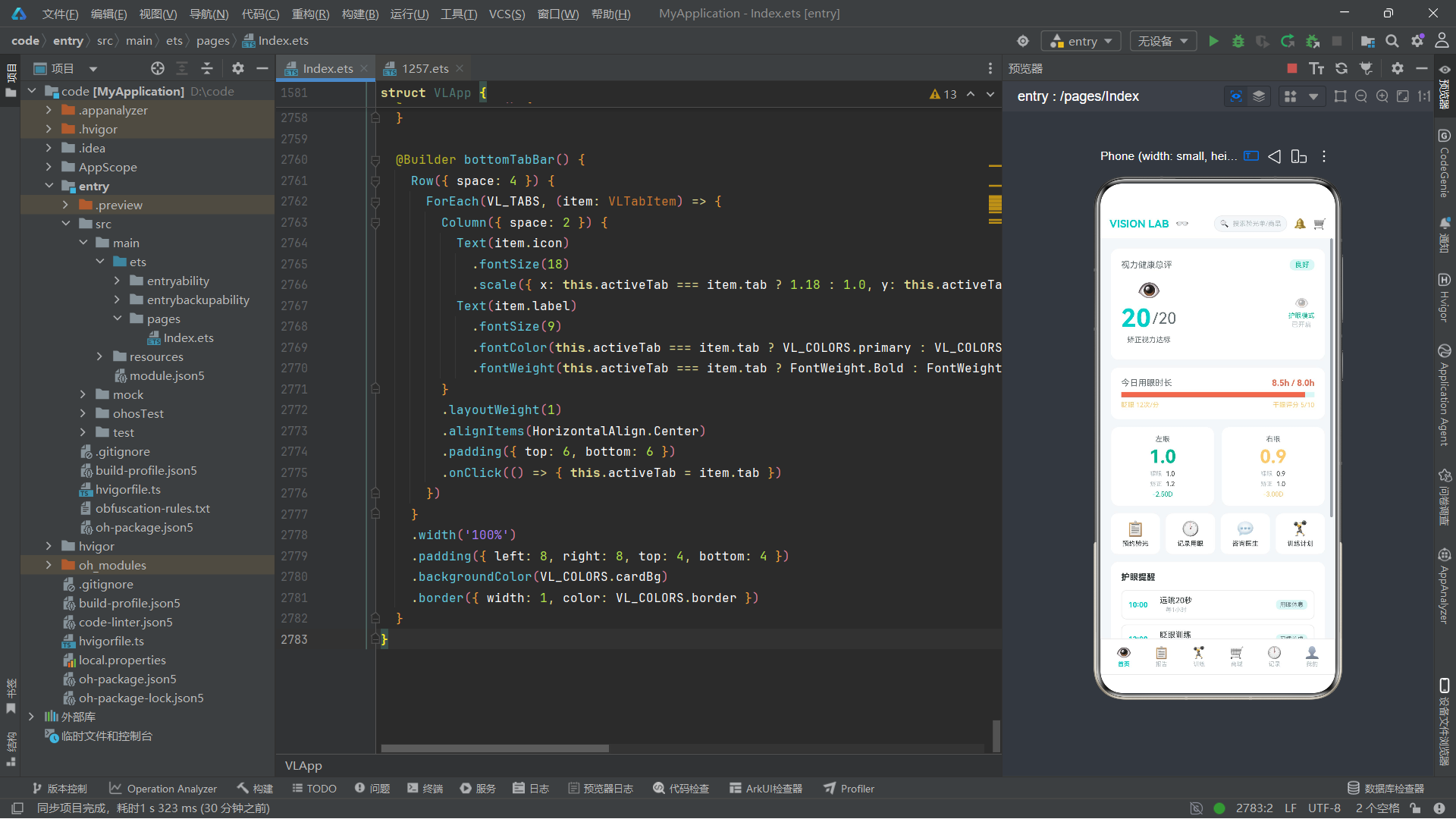
在本应用中,状态管理体现在多个层面。主组件VLApp通过@State装饰器声明了activeTab变量来控制当前显示的Tab页面,当用户点击底部导航栏的某个Tab时,activeTab的值发生改变,contentArea Builder中的if-else条件分支会自动重新评估,从而切换显示对应Tab的内容。同样地,showBookExam、showAddScreen等布尔类型的状态变量控制着各类弹窗的显示与隐藏,这些弹窗通过Stack堆叠布局覆盖在主内容之上,实现了模态对话框的效果。
在动画方面,本应用使用了aboutToAppear生命周期回调中调用animateTo的方法,为界面元素注入了持续的脉冲动画效果。animateTo是ArkUI提供的显式动画接口,它接受一个动画参数对象(包括duration持续时间、iterations迭代次数、playMode播放模式、curve缓动曲线)和一个闭包函数。在闭包中修改状态变量的值,ArkUI会自动在该状态变量驱动的UI属性上应用动画过渡。本应用中设置了三个独立运行的无限循环动画,分别控制眼部图标的缩放脉冲、护眼模式标识的透明度渐变以及镜片闪光效果的闪烁,这些动画为界面注入了活力感,使应用从静态走向动态。
在数据层面,本应用采用了"接口定义 + 硬编码常量 + 纯函数"的三层架构。所有数据结构通过interface定义,所有演示数据通过const常量硬编码,所有颜色映射与格式转换逻辑通过独立的全局纯函数实现。这种架构虽然不涉及网络请求和持久化存储,但清晰地展示了如何在ArkTS中组织数据层与表现层之间的边界,为实际项目中的数据替换(如接入后端API)提供了良好的切入点。
二、色彩令牌体系分析
应用首先定义了一套完整的色彩令牌接口和常量配置,这是整个UI视觉风格的基础。
interface VLColorPalette {
  bg: string
  cardBg: string
  primary: string
  primaryDark: string
  primaryLight: string
  text: string
  textSub: string
  textHint: string
  danger: string
  warning: string
  success: string
  auxBg: string
  border: string
  white: string
  chartLeft: string
  chartRight: string
  chipBg: string
}

const VL_COLORS: VLColorPalette = {
  bg: '#F5F7FA',
  cardBg: '#FFFFFF',
  primary: '#00CEC9',
  primaryDark: '#00A8A3',
  primaryLight: '#5FFFF8',
  text: '#2D3436',
  textSub: '#636E72',
  textHint: '#B2BEC3',
  danger: '#E17055',
  warning: '#FDCB6E',
  success: '#00B894',
  auxBg: '#DFF6F5',
  border: '#E8ECEF',
  white: '#FFFFFF',
  chartLeft: '#00CEC9',
  chartRight: '#E17055',
  chipBg: '#F0F7F7'
};
设计理念:色彩令牌(Color Token)是现代前端工程化中的标准实践。通过将所有颜色值集中定义在一个常量对象中,而不是在代码各处散落硬编码十六进制值,可以确保整个应用色彩风格的一致性,同时也便于后期主题切换或暗色模式适配。
这段代码定义了一个VLColorPalette接口,包含17个字符串类型的色彩属性。接口本身只是类型声明,真正的色彩值赋值在VL_COLORS常量中完成。从色彩选择来看,这套配色方案体现了"临床验光洁净风"的设计意图:页面背景bg使用#F5F7FA这种极浅的蓝灰色,营造洁净的医疗环境氛围;卡片背景cardBg使用纯白#FFFFFF,与页面背景形成微妙的层次对比;主色primary采用#00CEC9这种带青色调的蓝绿色,这种颜色在色彩心理学中被称为"爱眼青",给人以专业、清洁、安全的感受。
文字色彩采用了三级灰度体系:text(#2D3436)为光学深灰,用于主标题和重要数值;textSub(#636E72)为中度灰,用于副标题和说明文字;textHint(#B2BEC3)为浅灰,用于提示文字和辅助信息。这种三级灰度体系是移动端UI设计的标准做法,能够建立清晰的信息层级。
功能色方面,danger使用#E17055这种偏暖的珊瑚红色,warning使用#FDCB6E金黄色,success使用#00B894翠绿色。这三组功能色并非随意选择,而是经过精心调配:danger的珊瑚红比纯红更温和,适合医疗场景中表达警示而不至于引起恐慌;warning的金黄色有足够的辨识度但不会过于刺眼;success的翠绿与主色青色形成色相上的呼应,保持了整体色调的和谐。
辅助色方面,auxBg使用#DFF6F5极浅青色,用于选中态背景、Chip标签背景等需要轻微色彩区分的场景;border使用#E8ECEF极浅灰,用于卡片边框和分割线。chartLeft和chartRight分别设为primary和danger的颜色,用于图表中左右眼数据的区分标识。
三、底部导航与Tab枚举体系
enum VLTab {
  HOME = 0,
  REPORT = 1,
  TRAIN = 2,
  SHOP = 3,
  LOG = 4,
  ME = 5
}

interface VLTabItem {
  icon: string
  label: string
  tab: VLTab
}

const VL_TABS: VLTabItem[] = [
  { icon: '👁', label: '首页', tab: VLTab.HOME },
  { icon: '📋', label: '报告', tab: VLTab.REPORT },
  { icon: '🏋', label: '训练', tab: VLTab.TRAIN },
  { icon: '🛒', label: '商城', tab: VLTab.SHOP },
  { icon: '🕐', label: '记录', tab: VLTab.LOG },
  { icon: '👤', label: '我的', tab: VLTab.ME }
];
这里定义了一个枚举类型VLTab,包含6个成员:HOME、REPORT、TRAIN、SHOP、LOG、ME,分别对应首页、报告、训练、商城、记录、我的六个功能模块。使用枚举而非简单的数字常量,是TypeScript中推荐的实践,因为枚举提供了更好的类型安全和代码可读性。
VLTabItem接口定义了每个Tab项的结构,包含icon(图标emoji)、label(文字标签)和tab(对应的枚举值)三个字段。VL_TABS数组将6个Tab项按顺序硬编码。在主组件的底部导航栏中,这个数组将通过ForEach进行遍历渲染。
技术要点:ForEach是ArkUI中用于列表渲染的核心组件。它的第一个参数是要遍历的数据数组,第二个参数是一个箭头函数,接收当前数组元素作为参数,返回要渲染的UI结构。ForEach内部会自动进行diff算法优化,当数组数据变化时只更新变化的项,而不是重新渲染整个列表。
四、数据模型接口体系
本应用定义了超过20个interface接口来描述各类数据实体。这种密集的接口定义体现了良好的类型安全意识。
4.1 视力历史与验光数据
interface VLVisionHistory {
  date: string
  leftNaked: string
  rightNaked: string
  leftCorrected: string
  rightCorrected: string
  leftDegree: number
  rightDegree: number
}
VLVisionHistory描述了一条视力复查历史记录,包含日期、左眼裸眼视力、右眼裸眼视力、左眼矫正视力、右眼矫正视力、左眼度数、右眼度数。视力和度数分别使用string和number类型,这是因为视力值通常表示为"1.0"、"0.9"这样的标准对数视力表格式,而度数则用负数表示近视度数(如-2.50表示近视250度),适合数值计算。
interface VLOptometryRecord {
  date: string
  hospital: string
  doctor: string
  sphereLeft: number
  cylinderLeft: number
  axisLeft: number
  sphereRight: number
  cylinderRight: number
  axisRight: number
  pupilDistance: number
  examType: string
}
VLOptometryRecord是验光单数据接口,包含完整的屈光检查参数:球镜(sphere,表示近视或远视度数)、柱镜(cylinder,表示散光度数)、轴位(axis,散光的方向角度),左右眼各一组,加上瞳距和检查类型。这些字段名称直接对应临床验光术语,体现了应用的专业性。
4.2 视疲劳与用眼数据
interface VLFatigueMetric {
  date: string
  screenHours: number
  blinkRate: number
  dryEyeScore: number
  breakCount: number
  outdoorMinutes: number
}
VLFatigueMetric描述了每日视疲劳指标,包括屏幕使用时长(小时)、眨眼频率(次/分)、干眼评分(0-10)、休息次数、户外活动时间(分钟)。这些指标综合反映了用眼强度和眼睛疲劳程度,是视疲劳监测的核心数据。
4.3 训练课程与商品数据
interface VLTrainCourse {
  id: number
  name: string
  duration: number
  difficulty: string
  icon: string
  desc: string
  followCount: number
}

interface VLShopProduct {
  id: number
  name: string
  category: string
  price: number
  originalPrice: number
  rating: number
  sold: number
  tag: string
  icon: string
}
VLTrainCourse描述了护眼训练课程,包含课程名称、时长、难度等级、描述和跟练人数。VLShopProduct描述了商城商品,包含名称、分类、现价、原价、评分、销量、标签和图标。这两个接口设计简洁但信息完整,足以支撑训练列表和商品列表的渲染需求。
4.4 其他数据模型
应用还定义了VLScreenSession(用眼时段记录)、VLReviewPlan(复查计划)、VLDoctorSchedule(医生排班)、VLFamilyMember(家庭成员)、VLGlassesRecord(镜片档案)、VLReminder(护眼提醒)、VLYearlyDegree(历年度数对比)、VLExamItem(检查项目)、VLStore(门店配置)、VLDateChip(日期选择器数据)、VLSlotChip(时段选择器数据)、VLDeviceChip(设备选择器数据)、VLDistanceChip(距离选择器数据)、VLLensType(镜片类型)、VLSymptomChip(症状选择器数据)等接口。这些接口覆盖了应用所有功能模块的数据需求。
技术要点:在ArkTS中使用interface定义数据模型是一种推荐做法。interface只包含类型声明,不包含实现代码,编译后不会产生运行时开销。它为开发提供了编译时的类型检查,当数据字段名拼写错误或类型不匹配时,编译器会立即报错,从而在开发阶段就消除大量潜在Bug。
五、硬编码数据集分析
应用为每个数据模型接口都提供了硬编码的常量数据。这些数据虽然不会在实际生产环境中使用,但对于UI开发和演示至关重要。
5.1 视力历史数据(12条记录)
const VL_VISION_HISTORY: VLVisionHistory[] = [
  { date: '2026-08-20', leftNaked: '1.0', rightNaked: '0.9', leftCorrected: '1.2', rightCorrected: '1.0', leftDegree: -2.50, rightDegree: -3.00 },
  { date: '2026-07-18', leftNaked: '0.9', rightNaked: '0.8', leftCorrected: '1.2', rightCorrected: '1.0', leftDegree: -2.25, rightDegree: -2.75 },
  // ... 共12条记录,从2026-08-20回溯至2025-09-05
];
这12条记录展示了一年内的视力变化趋势,度数从最初的-1.00D/-1.25D逐渐增长到-2.50D/-3.00D,体现了近视度数逐年加深的典型模式。这些数据在报告Tab的视力历史趋势图中被用于绘制散点图。
5.2 验光单数据(6份)
VL_OPTOMETRY_RECORDS包含6份验光单,记录了从2025年5月到2026年8月的验光历史。每份验光单包含完整的球镜、柱镜、轴位、瞳距数据和检查类型,数据结构专业且真实。
5.3 视疲劳指标(14天)
VL_FATIGUE_METRICS包含14天的视疲劳数据,screenHours从6.0到11.0不等,blinkRate从7到18不等,dryEyeScore从2到8不等。这些数据展示了用眼强度与视疲劳程度之间的关联关系。
5.4 商品与课程数据
VL_SHOP_PRODUCTS包含10件护眼商品,涵盖防蓝光眼镜、蒸汽眼罩、叶黄素胶囊、人工泪液等多个品类。VL_TRAIN_COURSES包含6门护眼训练课程,从入门级的睫状肌放松训练到高级的调节灵敏度训练。这些数据设计合理,能够充分展示商城和训练模块的UI效果。
六、全局纯函数分析
应用定义了9个全局纯函数,用于颜色映射和格式转换。纯函数是指相同的输入永远产生相同的输出、不产生副作用的函数。
function vlVisionColor(value: string): string {
  const num: number = parseFloat(value)
  if (num >= 1.0) { return VL_COLORS.success }
  if (num >= 0.7) { return VL_COLORS.warning }
  return VL_COLORS.danger
}
vlVisionColor函数将视力值字符串转换为对应的颜色:1.0及以上为成功绿色(视力达标),0.7到1.0之间为警告黄色(视力偏低),0.7以下为危险红色(视力低下)。这种基于数据值动态映射颜色的模式在数据可视化中非常常见。
function vlDegreeColor(degree: number): string {
  const abs: number = Math.abs(degree)
  if (abs >= 6.0) { return VL_COLORS.danger }
  if (abs >= 3.0) { return VL_COLORS.warning }
  return VL_COLORS.success
}
vlDegreeColor函数将度数映射为颜色:绝对值6.0D以上为危险红(高度近视),3.0D以上为警告黄(中度近视),3.0D以下为成功绿(轻度近视)。这里使用Math.abs取绝对值是因为近视度数为负数,但颜色判断只关心度数的严重程度。
function vlProgressPercent(current: number, target: number): number {
  const pct: number = (current / target) * 100
  if (pct > 100) { return 100 }
  return pct
}
vlProgressPercent函数计算进度百分比,并限制最大值为100。这种限制是为了防止进度条溢出容器边界。在UI渲染中,进度条的宽度通常使用百分比设置,如果计算出的值超过100%,可能导致布局异常。
技术要点:将这些颜色映射和格式转换逻辑提取为全局纯函数,而不是内联在组件的build方法中,有几个好处:一是代码可读性更好,build方法中的UI代码不会被逻辑代码淹没;二是函数可复用,多个组件可以调用同一个函数;三是便于单元测试,纯函数不依赖组件状态,可以独立测试。
七、弹窗组件架构分析
应用定义了7个弹窗组件,每个都是一个独立的@Component装饰的struct。这些弹窗组件遵循统一的架构模式。
7.1 VLBookExamForm —— 预约验光弹窗
@Component
struct VLBookExamForm {
  onClose: () => void = () => {}
  @State selectedExam: string = '电脑验光'
  @State selectedStore: string = '明视眼科中心'
  @State selectedDate: string = '08-28'
  @State selectedSlot: string = '上午09:00'

  build() {
    Column() {
      Column()
        .width('100%').height('100%')
        .backgroundColor('rgba(0,0,0,0.45)')
        .onClick(() => { this.onClose() })
      Column() {
        Row({ space: 8 }) {
          Text('预约验光')
            .fontSize(18).fontWeight(FontWeight.Bold)
            .fontColor(VL_COLORS.text)
          Column().layoutWeight(1)
          Text('X')
            .fontSize(22).fontColor(VL_COLORS.textHint)
            .onClick(() => { this.onClose() })
        }
        .width('100%')
        .margin({ bottom: 16 })
        // ... 检查项目选择、门店选择、日期选择、时段选择
      }
      .width('86%')
      .backgroundColor(VL_COLORS.cardBg)
      .borderRadius(16)
      .padding(20)
      .position({ x: '7%', y: '6%' })
    }
    .width('100%').height('100%')
    .position({ x: 0, y: 0 })
    .zIndex(999)
  }
}
技术要点:@Component装饰器将一个struct声明为可复用的自定义组件。每个@Component可以拥有自己的@State状态变量和build方法。@State装饰的变量是组件内部的响应式状态,当其值改变时,引用该变量的UI部分会自动重新渲染。
这个弹窗组件的架构设计非常典型。首先,onClose是一个回调函数属性,默认值为空箭头函数,由父组件在实例化时传入实际回调。这种模式是ArkTS中实现子组件向父组件通信的标准方式——子组件不直接操作父组件状态,而是通过回调通知父组件执行状态变更。
弹窗的视觉结构采用双层Column嵌套:外层Column作为全屏遮罩层,设置半透明黑色背景(rgba(0,0,0,0.45)),点击时调用onClose关闭弹窗;内层Column是实际的弹窗内容容器,宽度86%,白色背景,16圆角,通过position绝对定位居中显示。这种遮罩+内容的双层结构是移动端弹窗设计的通用模式。
组件内部使用了4个@State变量来管理用户的选择状态:selectedExam(检查项目)、selectedStore(门店)、selectedDate(日期)、selectedSlot(时段)。每个选择项的UI通过三元运算符动态设置选中态样式:当选项被选中时,背景色变为auxBg(浅青),边框色变为primary(爱眼青),文字色变为primary;未选中时,背景为普通bg色,边框为border色,文字为textSub色。这种模式使得用户的选择能够即时反映在UI上,实现了良好的交互反馈。
7.2 VLAddScreenForm —— 记录屏幕时间弹窗
VLAddScreenForm弹窗用于记录用眼时段数据。它包含了设备选择(手机/电脑/平板)、时长调节器、观看距离选择和夜间使用开关。时长调节器使用了减号和加号按钮,点击时在15到600分钟之间以15分钟为步进调整duration状态变量。夜间使用开关是一个自定义的Toggle组件,通过改变nightUse布尔值来控制开关圆点的位置(left margin在4和22之间切换)和背景色。
7.3 VLEditGlassesForm —— 编辑镜片档案弹窗
这个弹窗用于编辑镜片档案,包含镜片类型选择(防蓝光/离焦/变色)、左右眼球镜度数调节器(以25度=0.25D为步进,范围0到2000即0到20.00D)、瞳距调节器(以1mm为步进,范围50到75mm)和配镜日期选择。度数显示使用了toFixed(2)保留两位小数,并在前面加上负号表示近视。
7.4 VLDeleteRecordForm —— 删除确认弹窗
VLDeleteRecordForm是一个简洁的确认弹窗,包含一个警告图标、标题、描述文字、记录摘要标签和取消/确认删除两个按钮。这个组件额外定义了onConfirm回调,在确认删除时先调用onConfirm再调用onClose,实现了操作的双回调机制。
7.5 VLBuyLensForm —— 购买护眼商品弹窗
这个弹窗模拟了护眼商品的购买流程,包含商品信息展示、镜框款式选择(全框/半框/无框)、镜片类型选择、度数填写和价格合计。值得注意的是,弹窗中有一条黄色提示文字:“度数填写提示:请前往门店验光后填写实际度数,线上下单仅锁定款式。”,这体现了线上线下一体化的O2O商业模式设计。
7.6 VLTrainPlanForm —— 定制训练计划弹窗
VLTrainPlanForm弹窗用于定制个性化护眼训练计划,包含症状多选(干涩/模糊/胀痛/流泪/畏光,使用布尔状态变量控制选中态)、每日训练时长调节器和提醒时段选择。症状多选使用了一组boolean类型的@State变量,点击时取反,选中时背景色为primary、文字色为白色,未选中时背景为bg、文字为textSub。
7.7 VLDoctorForm —— 咨询医生弹窗
VLDoctorForm弹窗用于在线咨询眼科医生,包含医生选择列表(3位医生卡片,展示姓名、职称、专长和号源信息)、问题描述文本框和附图发送开关。医生列表的渲染使用了纵向排列的Row卡片,每个卡片包含医生emoji图标、信息Column和右侧的选择/号源标签。
八、主入口组件 VLApp 深度分析
8.1 组件声明与状态管理
@Entry
@Component
struct VLApp {
  @State activeTab: VLTab = VLTab.HOME
  @State showBookExam: boolean = false
  @State showAddScreen: boolean = false
  @State showEditGlasses: boolean = false
  @State showDeleteRecord: boolean = false
  @State showBuyLens: boolean = false
  @State showTrainPlan: boolean = false
  @State showDoctor: boolean = false
  @State showAbout: boolean = false
  @State eyeBlinkScale: number = 1.0
  @State pulseGreenOpacity: number = 0.0
  @State lensFlashOpacity: number = 0.0
技术要点:@Entry装饰器标记此组件为页面入口组件,一个页面只能有一个@Entry。@Component声明此struct为自定义组件。@State装饰器声明的变量是组件的响应式状态,当其值改变时,引用该变量的build方法中的UI部分会自动重新渲染。
主组件VLApp声明了12个@State状态变量,可以分为三类:Tab切换控制(activeTab)、弹窗显示控制(7个show布尔值)和动画状态(3个数值)。这种集中式的状态管理使得组件的状态变化来源清晰可追踪。
8.2 生命周期与动画初始化
aboutToAppear(): void {
  this.getUIContext().animateTo({ duration: 1800, iterations: -1, playMode: PlayMode.Alternate, curve: Curve.EaseInOut }, () => {
    this.eyeBlinkScale = 1.15
  })
  this.getUIContext().animateTo({ duration: 1400, iterations: -1, playMode: PlayMode.Alternate, curve: Curve.EaseInOut }, () => {
    this.pulseGreenOpacity = 0.35
  })
  this.getUIContext().animateTo({ duration: 900, iterations: -1, playMode: PlayMode.Alternate, curve: Curve.EaseInOut }, () => {
    this.lensFlashOpacity = 0.5
  })
}
技术要点:aboutToAppear是ArkUI组件的生命周期回调,在组件创建后、build方法执行前调用。它常用于初始化状态、启动动画、发起网络请求等。animateTo是ArkUI的显式动画API,iterations设为-1表示无限循环,PlayMode.Alternate表示交替播放(正向结束后反向播放),Curve.EaseInOut表示缓入缓出曲线。
在aboutToAppear中启动了三个独立的动画。第一个动画控制eyeBlinkScale从1.0到1.15的缩放,持续1800ms,应用到首页的👁图标上,模拟眼睛的眨动效果。第二个动画控制pulseGreenOpacity从0.0到0.35的透明度变化,持续1400ms,应用到护眼模式标识上,产生脉冲呼吸效果。第三个动画控制lensFlashOpacity从0.0到0.5的透明度变化,持续900ms,应用到训练勋章卡片上,产生闪光效果。三个动画的持续时间不同(1800、1400、900),这种非同步的设计避免了所有动画同时变化带来的机械感,使界面显得更加自然有机。
8.3 build方法与整体布局
build() {
  Column() {
    this.header()
    this.contentArea()
    this.bottomTabBar()
  }
  .width('100%').height('100%')
  .backgroundColor(VL_COLORS.bg)
}
build方法是每个组件的核心,描述了组件的UI结构。VLApp的build方法使用Column纵向布局容器将界面分为三层:顶部导航栏header、中间内容区域contentArea、底部Tab栏bottomTabBar。这种三段式布局是移动端应用的标准结构。
技术要点:Column是ArkUI中最基础的纵向布局容器,它的作用是将子元素按照从上到下的顺序依次排列。Column可以设置space参数来控制子元素之间的间距。在未设置layoutWeight的情况下,Column中子元素的高度由其内容决定;设置layoutWeight(1)的子元素会占满剩余空间。
8.4 header 顶部导航栏
@Builder header() {
  Row({ space: 10 }) {
    Text('VISION LAB')
      .fontSize(16).fontWeight(FontWeight.Bold)
      .fontColor(VL_COLORS.primary)
    Text('👓').fontSize(16)
    Column().layoutWeight(1)
    Row({ space: 6 }) {
      Text('🔍').fontSize(11)
      Text('搜索验光单/商品')
        .fontSize(10).fontColor(VL_COLORS.textHint)
    }
    .padding({ left: 8, right: 8, top: 5, bottom: 5 })
    .borderRadius(14)
    .backgroundColor(VL_COLORS.bg)
    .border({ width: 1, color: VL_COLORS.border })
    Text('🔔').fontSize(16)
      .onClick(() => { this.showAbout = true })
    Text('🛒').fontSize(16)
      .onClick(() => { this.activeTab = VLTab.SHOP })
  }
  .width('100%')
  .padding({ left: 14, right: 14, top: 10, bottom: 10 })
  .backgroundColor(VL_COLORS.cardBg)
}
技术要点:@Builder装饰器用于声明一个构建UI结构的函数。与直接在build方法中写UI不同,@Builder方法可以被多次调用,实现UI结构的复用。@Builder方法中可以使用this访问组件的状态变量和其他@Builder方法。
header使用Row横向布局容器构建。Row是ArkUI中的水平布局容器,子元素从左到右排列。这里使用了一个空Column设置layoutWeight(1)来占位,将搜索框推到中间偏右的位置,这是一个常用的弹性布局技巧——在两段内容之间插入一个layoutWeight(1)的空元素来实现两端对齐。
搜索框是一个Row嵌套了搜索图标和提示文字,外层设置了圆角14、浅色背景和边框,形成了一个搜索框样式。通知铃铛图标点击后设置showAbout为true,显示关于弹窗。购物车图标点击后切换到SHOP Tab,实现快速跳转。
8.5 contentArea 内容区域与Tab切换
@Builder contentArea() {
  Stack() {
    if (this.activeTab === VLTab.HOME) {
      this.homeTab()
    } else if (this.activeTab === VLTab.REPORT) {
      this.reportTab()
    } else if (this.activeTab === VLTab.TRAIN) {
      this.trainTab()
    } else if (this.activeTab === VLTab.SHOP) {
      this.shopTab()
    } else if (this.activeTab === VLTab.LOG) {
      this.logTab()
    } else {
      this.meTab()
    }
    if (this.showBookExam) {
      VLBookExamForm({ onClose: () => { this.showBookExam = false } })
    }
    if (this.showAddScreen) {
      VLAddScreenForm({ onClose: () => { this.showAddScreen = false } })
    }
    // ... 其他弹窗的条件渲染
  }
  .width('100%')
  .layoutWeight(1)
}
技术要点:Stack是ArkUI中的堆叠布局容器,子元素可以在Z轴上重叠堆叠。Stack中的子元素按照声明顺序从底到顶层叠,后声明的子元素覆盖在先声明的子元素之上。本应用利用Stack的这一特性,将弹窗组件声明在Tab内容之后,使弹窗能够覆盖在页面内容之上。
contentArea是整个应用的核心调度区域。它使用Stack容器,内部通过if-else条件分支根据activeTab的值来渲染对应的Tab页面Builder。这是ArkUI中条件渲染的标准用法——if-else分支会在条件变化时自动销毁旧分支的组件并创建新分支的组件。
在Tab内容之后,7个弹窗组件通过各自的show布尔状态变量进行条件渲染。当showBookExam为true时,VLBookExamForm组件被创建并渲染在Stack的上层,覆盖在Tab内容之上。每个弹窗在实例化时传入onClose回调,回调中将对应的show变量设为false,从而销毁弹窗组件。这种基于状态变量的弹窗管理机制简洁而有效。
8.6 homeTab 首页分析
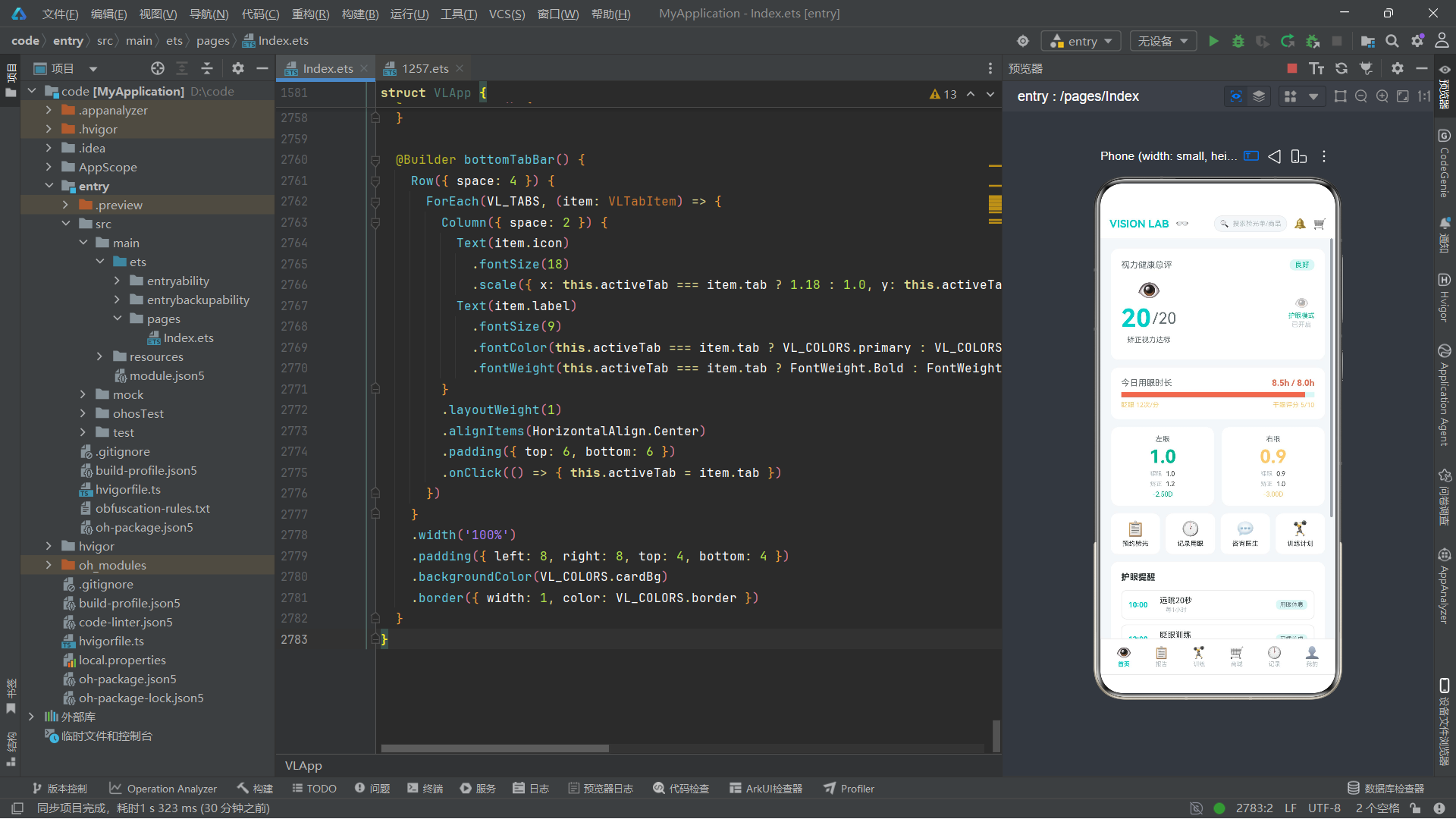
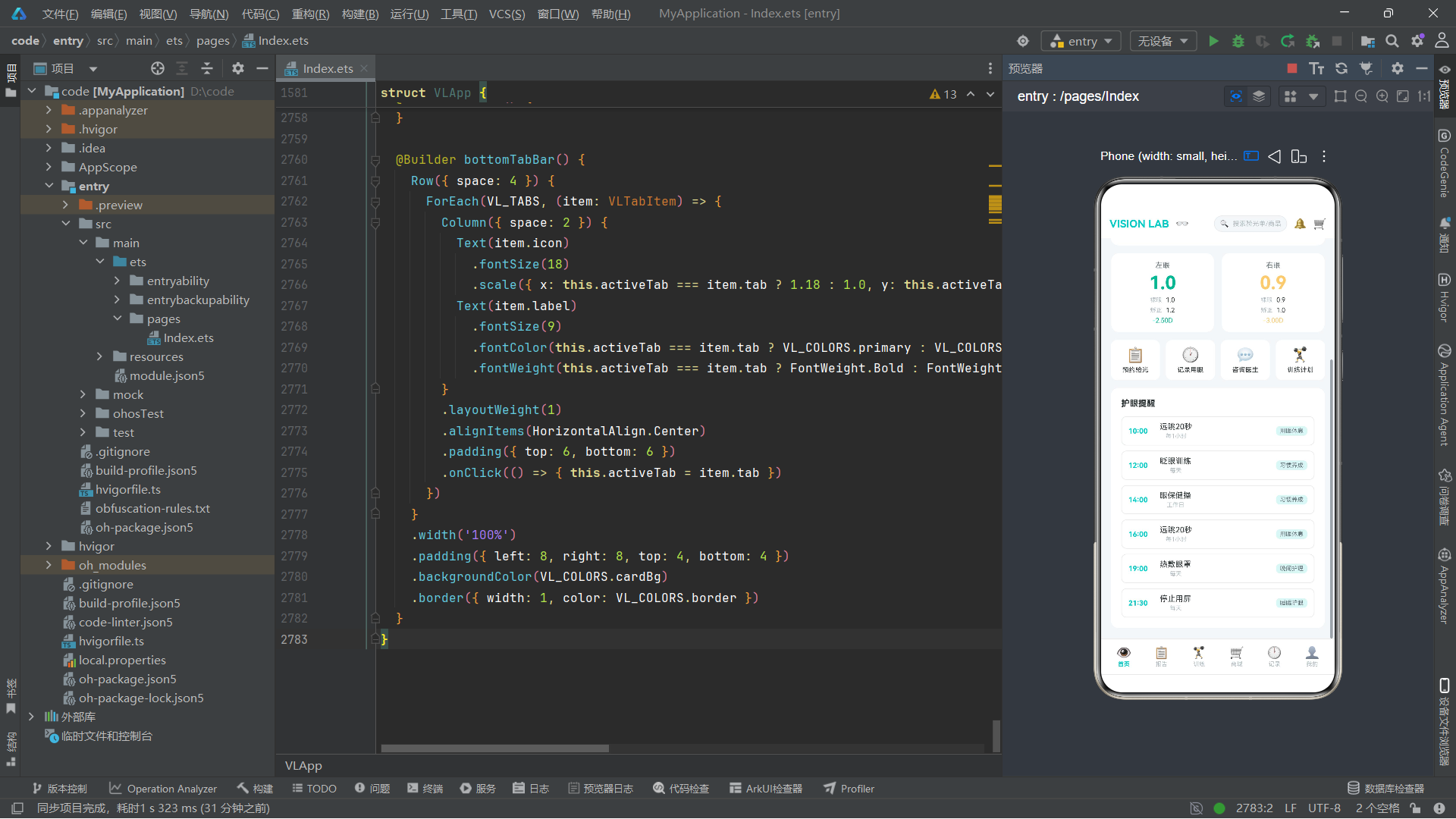
首页是应用的主入口,包含了视力健康总评、今日用眼时长、左右眼视力卡片、快捷功能入口和护眼提醒列表。
@Builder homeTab() {
  Scroll() {
    Column({ space: 12 }) {
      Column({ space: 6 }) {
        Row({ space: 8 }) {
          Text('视力健康总评')
            .fontSize(13).fontColor(VL_COLORS.textSub)
          Column().layoutWeight(1)
          Text('良好')
            .fontSize(11).fontColor(VL_COLORS.success)
            .padding({ left: 8, right: 8, top: 2, bottom: 2 })
            .borderRadius(8).backgroundColor(VL_COLORS.auxBg)
        }
        .width('100%')
        Row({ space: 16 }) {
          Column({ space: 4 }) {
            Text('👁')
              .fontSize(28)
              .scale({ x: this.eyeBlinkScale, y: this.eyeBlinkScale })
            Row({ space: 2 }) {
              Text('20')
                .fontSize(38).fontWeight(FontWeight.Bold)
                .fontColor(VL_COLORS.primary)
              Text('/20')
                .fontSize(24).fontColor(VL_COLORS.textSub)
            }
            Text('矫正视力达标')
              .fontSize(11).fontColor(VL_COLORS.textSub)
          }
          .alignItems(HorizontalAlign.Center)
          Column().layoutWeight(1)
          Column({ space: 2 }) {
            Text('👁')
              .fontSize(20)
              .opacity(this.pulseGreenOpacity)
            Text('护眼模式')
              .fontSize(10).fontColor(VL_COLORS.success)
            Text('已开启')
              .fontSize(10).fontColor(VL_COLORS.textHint)
          }
          .alignItems(HorizontalAlign.Center)
        }
        .width('100%')
        .padding({ top: 8, bottom: 8 })
        .justifyContent(FlexAlign.Center)
      }
      .width('100%')
      .padding(16)
      .backgroundColor(VL_COLORS.cardBg)
      .borderRadius(12)
技术要点:Scroll是ArkUI中的滚动容器,当内容超出可视区域时允许用户通过手势滚动查看。Scroll可以设置scrollable参数指定滚动方向(ScrollDirection.Vertical垂直或ScrollDirection.Horizontal水平)。Scroll内部通常只包含一个直接子元素(如Column),由该子元素承载所有内容。
首页内容包裹在Scroll滚动容器中,内部的Column设置了space: 12的间距。第一个卡片是视力健康总评,使用了Row布局:左侧标题、右侧"良好"状态标签。中间区域使用Row水平排列两组内容:左侧是大号的"20/20"视力值(字体38号,主色青色,粗体),上方的👁图标应用了eyeBlinkScale缩放动画;右侧是护眼模式指示,👁图标应用了pulseGreenOpacity透明度动画。
接下来是用眼时长卡片,使用了进度条样式:一个Row包含一个宽度95%的Column(背景色danger红色,表示已超目标)和一个layoutWeight(1)的Column(背景色auxBg浅青,表示剩余空间),两者组合形成进度条效果。下方展示了眨眼频率和干眼评分,颜色通过vlBlinkColor和vlDryEyeColor纯函数动态计算。
左右眼视力卡片使用Row水平排列两个Column,每个Column内部从上到下依次展示眼别标签、大号视力数值(28号字体,颜色通过vlVisionColor函数计算)、裸眼/矫正视力行和度数行(颜色通过vlDegreeColor函数计算)。这种垂直堆叠的信息卡片设计在医疗数据展示中非常常见。
首页的快捷功能入口是一个4列网格,每个入口是一个Column包含图标和文字,点击后通过设置show状态变量弹出对应的弹窗。这个网格没有使用ForEach,而是直接逐个声明4个Column,因为入口数量固定且每个入口的点击行为不同。
护眼提醒列表使用了ForEach遍历VL_REMINDERS数组,每条提醒是一个Row,包含时间、标题/重复方式Column和类型标签。
8.7 reportTab 报告页分析
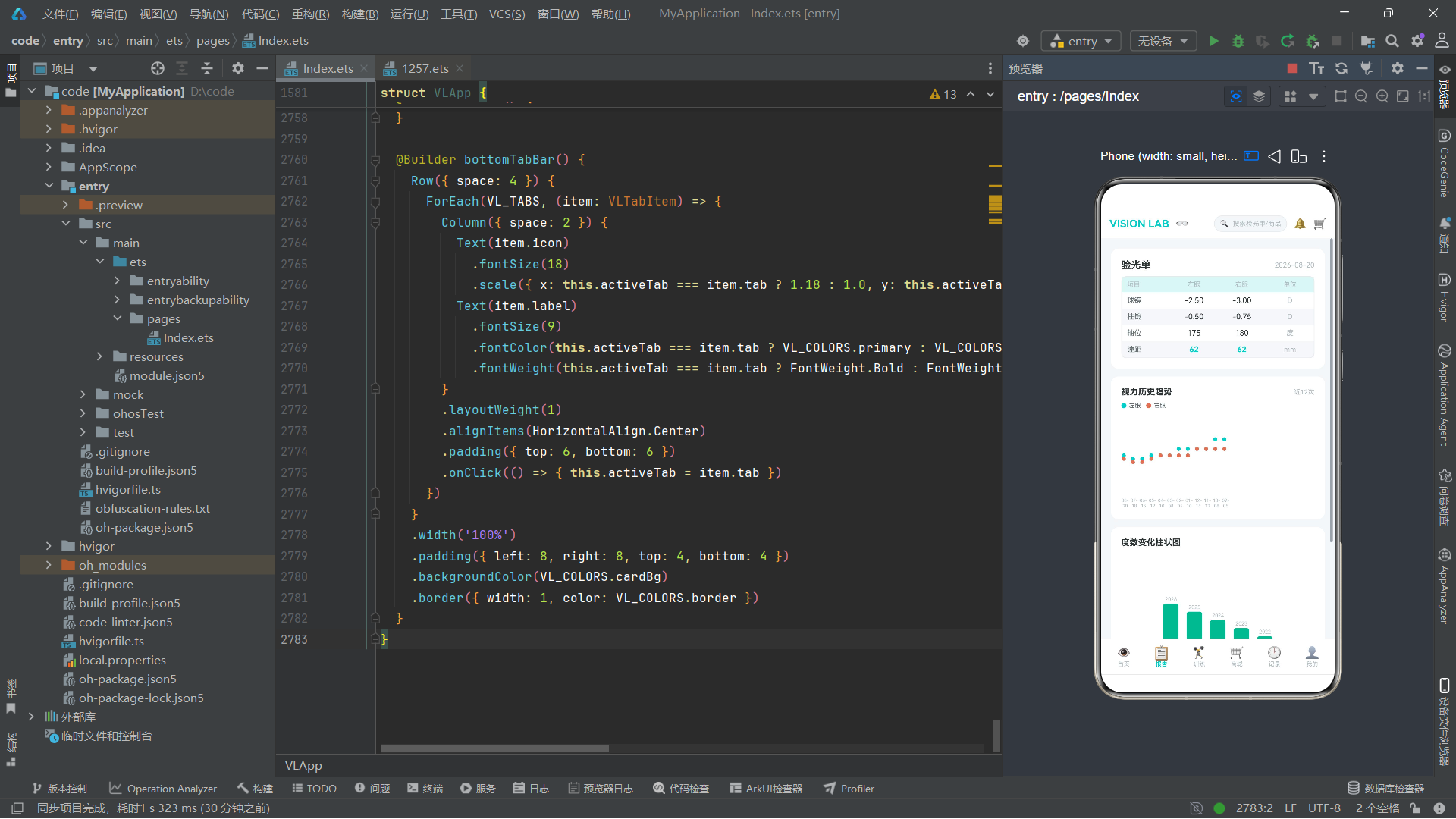
报告页是数据最密集的页面,包含验光单表格、视力历史趋势图、度数变化柱状图和医生解读。
@Builder reportTab() {
  Scroll() {
    Column({ space: 12 }) {
      Column({ space: 8 }) {
        Row({ space: 8 }) {
          Text('验光单')
            .fontSize(15).fontWeight(FontWeight.Bold)
            .fontColor(VL_COLORS.text)
          Column().layoutWeight(1)
          Text('2026-08-20')
            .fontSize(11).fontColor(VL_COLORS.textHint)
        }
        .width('100%')
        Column({ space: 0 }) {
          Row({ space: 0 }) {
            Text('项目')
              .fontSize(10).fontColor(VL_COLORS.textHint)
              .width('25%').padding({ top: 6, bottom: 6, left: 8 })
            Text('左眼')
              .fontSize(10).fontColor(VL_COLORS.textHint)
              .width('25%').textAlign(TextAlign.Center)
            Text('右眼')
              .fontSize(10).fontColor(VL_COLORS.textHint)
              .width('25%').textAlign(TextAlign.Center)
            Text('单位')
              .fontSize(10).fontColor(VL_COLORS.textHint)
              .width('25%').textAlign(TextAlign.Center)
          }
          .width('100%')
          .backgroundColor(VL_COLORS.auxBg)
          // ... 球镜、柱镜、轴位、瞳距数据行
        }
        .width('100%')
        .border({ width: 1, color: VL_COLORS.border })
        .borderRadius(8)
      }
      .width('100%')
      .padding(16)
      .backgroundColor(VL_COLORS.cardBg)
      .borderRadius(12)
验光单表格采用了四列等宽布局,每列宽度25%。表头行使用auxBg浅青色背景,数据行交替使用白色和bg浅灰色背景(通过单独设置backgroundColor实现斑马纹效果)。表格的每行是一个Row,内部4个Text组件分别设置25%宽度,数据列使用textAlign(TextAlign.Center)居中对齐。
技术要点:textAlign方法用于设置文本在Text组件内部的对齐方式,可选值包括TextAlign.Start(左对齐,默认)、TextAlign.Center(居中对齐)和TextAlign.End(右对齐)。在表格布局中,通常将标签列左对齐、数据列居中对齐,以提高可读性。
视力历史趋势图使用了ForEach遍历VL_VISION_HISTORY数组,每条记录渲染为一个Stack容器,内部放置两个Circle圆形组件分别表示左右眼的视力值,通过position绝对定位将圆点放置在Y轴对应视力值的位置。X轴标签使用第二个ForEach遍历同一数组,取date字段第5位之后的子串(即月-日部分)。
度数变化柱状图同样使用ForEach遍历VL_YEARLY_DEGREES,每年渲染为一个Column容器,内部包含一个年份标签和一个高度与度数绝对值成正比的彩色柱状条。柱状条的高度通过Math.abs(item.leftDegree) * 25计算,颜色通过vlDegreeColor函数动态映射。整个图表容器设置了height(140)和justifyContent(FlexAlign.End),使柱状条从底部向上生长。
8.8 trainTab 训练页分析
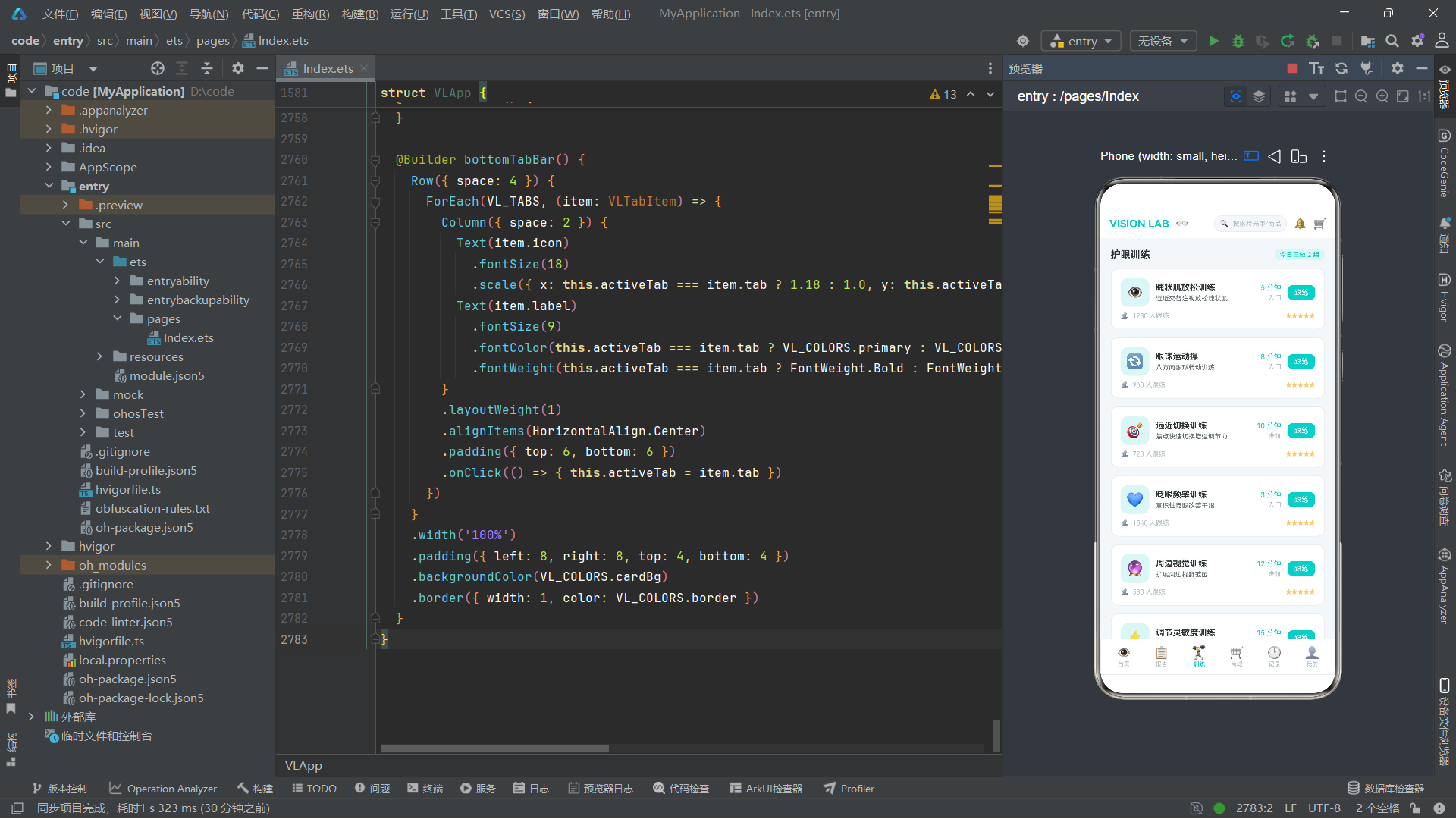
训练页包含训练课程列表、21天挑战进度和视疲劳周趋势图。
ForEach(VL_TRAIN_COURSES, (course: VLTrainCourse) => {
  Column({ space: 8 }) {
    Row({ space: 10 }) {
      Text(course.icon)
        .fontSize(22)
        .width(44).height(44)
        .textAlign(TextAlign.Center)
        .borderRadius(12)
        .backgroundColor(VL_COLORS.auxBg)
      Column({ space: 3 }) {
        Text(course.name)
          .fontSize(13).fontWeight(FontWeight.Bold).fontColor(VL_COLORS.text)
        Text(course.desc)
          .fontSize(10).fontColor(VL_COLORS.textSub)
      }
      .alignItems(HorizontalAlign.Start)
      .layoutWeight(1)
      Column({ space: 3 }) {
        Text(course.duration + ' 分钟')
          .fontSize(11).fontColor(VL_COLORS.primary)
        Text(course.difficulty)
          .fontSize(10).fontColor(VL_COLORS.textHint)
      }
      .alignItems(HorizontalAlign.End)
      Text('跟练')
        .fontSize(11).fontColor(VL_COLORS.white)
        .padding({ left: 10, right: 10, top: 5, bottom: 5 })
        .borderRadius(8).backgroundColor(VL_COLORS.primary)
        .onClick(() => { this.showTrainPlan = true })
    }
    .width('100%')
    Row({ space: 6 }) {
      Text('👥').fontSize(10)
      Text(course.followCount + ' 人跟练')
        .fontSize(10).fontColor(VL_COLORS.textHint)
      Column().layoutWeight(1)
      Text('★★★★★').fontSize(9).fontColor(VL_COLORS.warning)
    }
    .width('100%')
  }
  .width('100%')
  .padding(14)
  .backgroundColor(VL_COLORS.cardBg)
  .borderRadius(12)
  .border({ width: 1, color: VL_COLORS.border })
})
技术要点:ForEach的第二个参数(item生成器函数)中可以访问外部作用域的变量(如this.showTrainPlan),这使得列表项中的交互按钮能够直接触发父组件的状态变更。ForEach的列表项模板中使用了Column嵌套Row的混合布局:外层Column垂直排列课程信息行和底部统计行,信息行使用Row水平排列图标、名称描述列、时长难度列和跟练按钮。
21天挑战进度使用了14个固定的小方块(7+7两行),前6个已完成(显示✓和auxBg背景),第7个当前进行中(显示数字和primaryLight背景带透明度),后7个未完成(显示数字和bg背景带边框)。这种进度可视化设计简洁直观。
视疲劳周趋势图使用了ForEach遍历VL_FATIGUE_METRICS,每条记录渲染为一个Column,内部包含一个高度与dryEyeScore成正比的柱状条(高度为dryEyeScore * 4的百分比字符串)和底部的评分数字。整个图表容器设置height(90)和justifyContent(FlexAlign.End),使柱状条从底部对齐。
8.9 shopTab 商城页分析
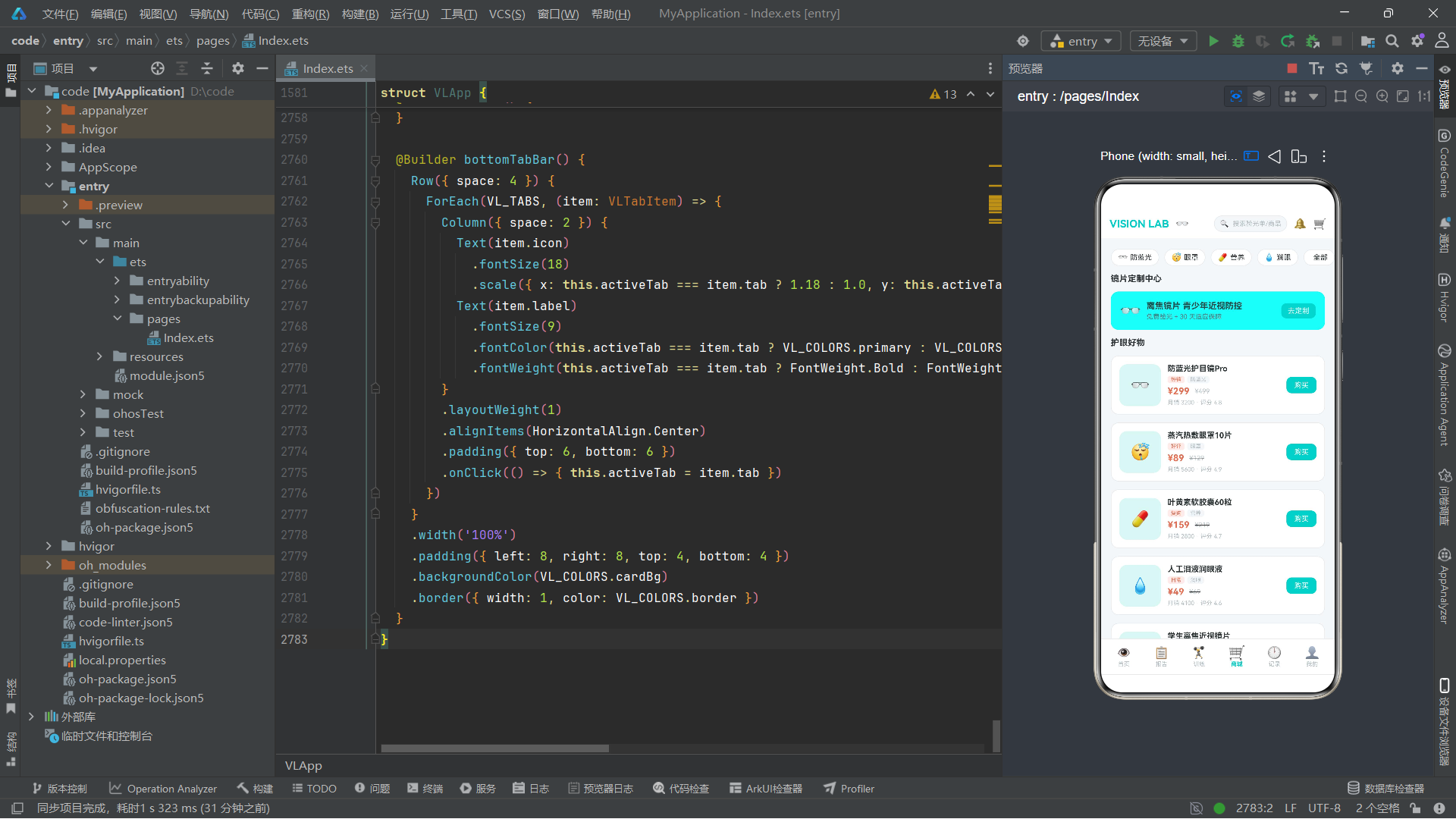
商城页包含分类筛选栏、镜片定制中心入口和商品列表。
Row({ space: 8 }) {
  ForEach(VL_SHOP_CATEGORIES, (cat: VLShopCategory) => {
    Row({ space: 4 }) {
      Text(cat.icon).fontSize(12)
      Text(cat.name)
        .fontSize(11).fontColor(VL_COLORS.text)
    }
    .padding({ left: 10, right: 10, top: 5, bottom: 5 })
    .borderRadius(14)
    .backgroundColor(VL_COLORS.cardBg)
    .border({ width: 1, color: VL_COLORS.border })
  })
}
.width('100%')
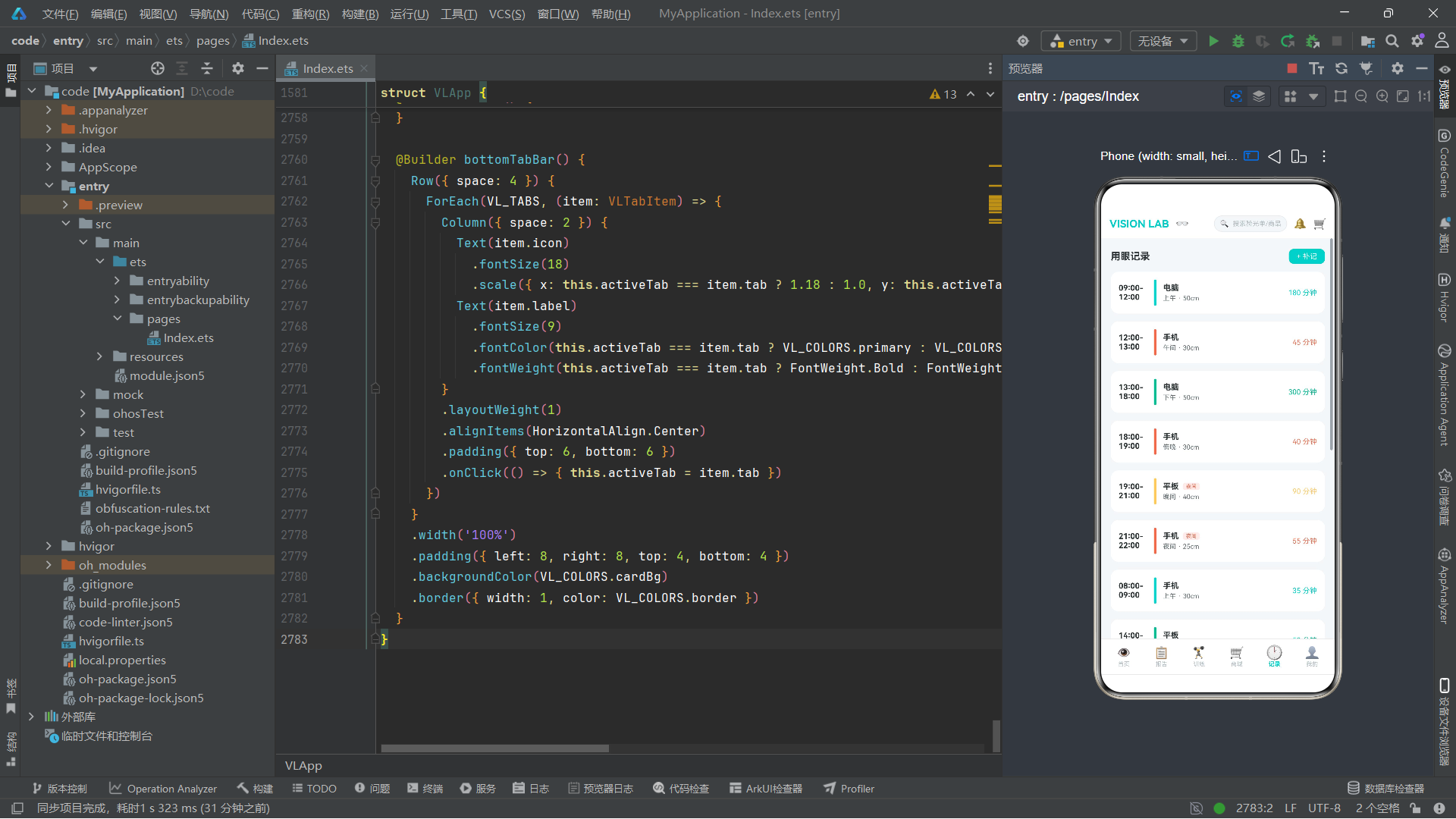
分类筛选栏使用ForEach遍历VL_SHOP_CATEGORIES数组,每个分类渲染为一个带边框的圆角胶囊形状按钮。镜片定制中心入口使用了primaryLight浅色背景和0.9透明度,以视觉上区别于普通商品卡片。
商品列表使用ForEach遍历VL_SHOP_PRODUCTS,每件商品渲染为一个Row,包含64x64的图标方块、商品信息Column(名称、标签行、价格行、销量评分行)和购买按钮。商品信息中,标签和分类使用小号字体(8号)和不同背景色的胶囊标签区分;价格行同时显示现价(14号红色粗体)和原价(10号灰色带删除线),通过decoration({ type: TextDecorationType.LineThrough })设置删除线效果。
技术要点:decoration方法用于设置文本装饰效果,TextDecorationType.LineThrough表示删除线(中划线),常用于表示原价被折扣价取代。其他选项包括TextDecorationType.None(无装饰)和TextDecorationType.Underline(下划线)。
8.10 logTab 记录页分析
记录页包含用眼记录时间线、本周屏幕时长分布柱状图和镜片档案管理。
用眼记录时间线使用ForEach遍历VL_SCREEN_SESSIONS,每条记录渲染为一个Row,左侧是时间段文本(44宽度),中间是一条4x40的彩色竖线(颜色通过vlScreenPeriodColor函数根据时段动态映射),右侧是设备信息Column和时长文本。如果记录标记为夜间使用(night为true),则在设备名旁显示红色"夜间"小标签。
本周屏幕时长分布柱状图与训练页的趋势图类似,但柱状条高度使用screenHours * 5.5的百分比计算,所有柱状条使用统一的primary青色。
镜片档案使用ForEach遍历VL_GLASSES_RECORDS,每条记录是一行Row,包含镜片名称、类型标签、度数信息和日期。底部有"删除档案"和"编辑"两个操作链接,分别触发showDeleteRecord和showEditGlasses弹窗。
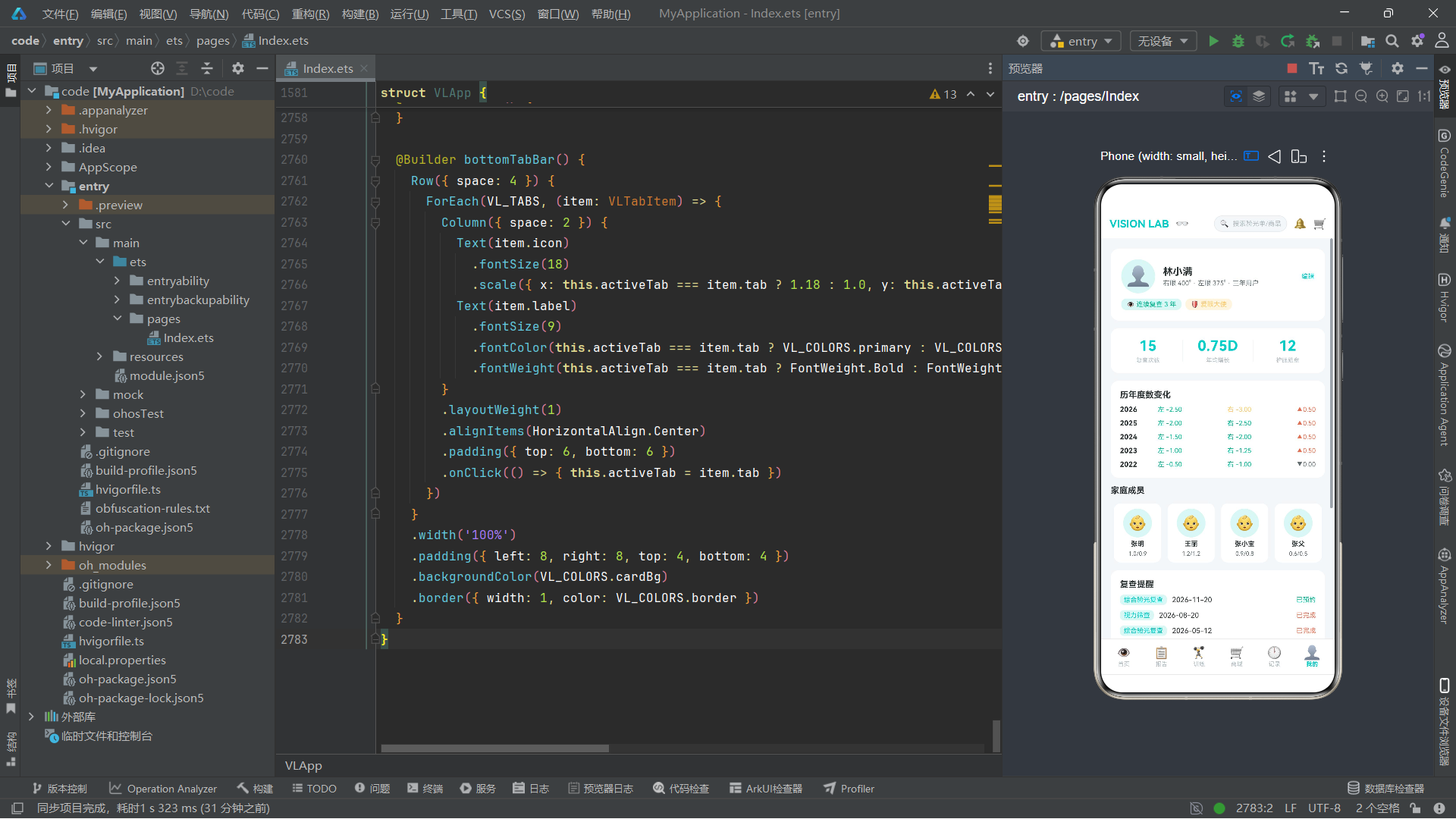
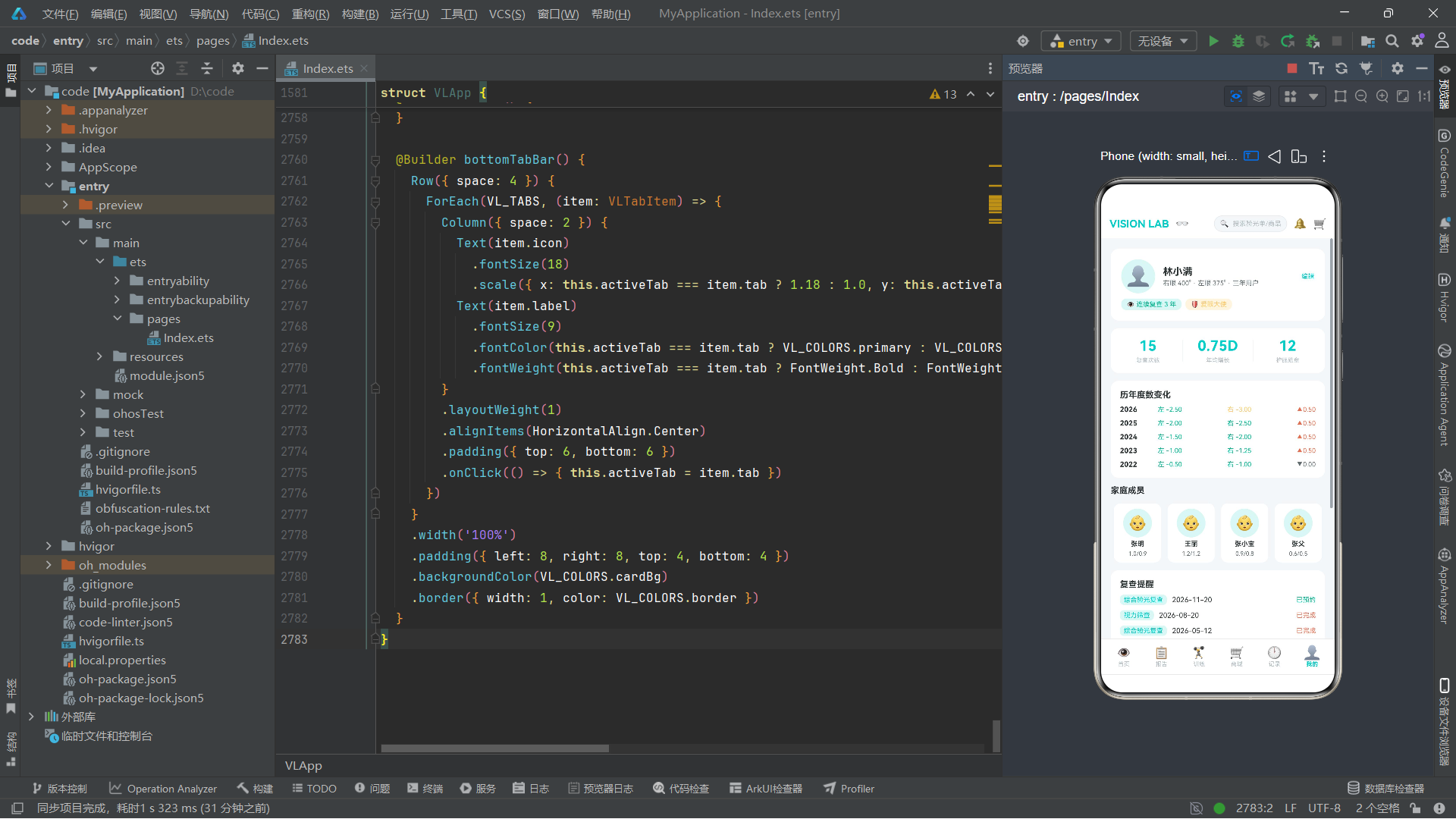
8.11 meTab 我的页分析
我的页包含用户信息卡片、统计数据行、历年度数变化列表、家庭成员横向滚动列表、复查提醒列表和护眼提醒列表。
Row({ space: 10 }) {
  Column({ space: 4 }) {
    Text('15')
      .fontSize(22).fontWeight(FontWeight.Bold).fontColor(VL_COLORS.primary)
    Text('复查次数')
      .fontSize(9).fontColor(VL_COLORS.textHint)
  }
  .layoutWeight(1)
  .alignItems(HorizontalAlign.Center)
  Column().width(1).height(34).backgroundColor(VL_COLORS.border)
  Column({ space: 4 }) {
    Text('0.75D')
      .fontSize(22).fontWeight(FontWeight.Bold).fontColor(VL_COLORS.primary)
    Text('年均增长')
      .fontSize(9).fontColor(VL_COLORS.textHint)
  }
  .layoutWeight(1)
  .alignItems(HorizontalAlign.Center)
  Column().width(1).height(34).backgroundColor(VL_COLORS.border)
  Column({ space: 4 }) {
    Text('12')
      .fontSize(22).fontWeight(FontWeight.Bold).fontColor(VL_COLORS.primary)
    Text('护眼勋章')
      .fontSize(9).fontColor(VL_COLORS.textHint)
  }
  .layoutWeight(1)
  .alignItems(HorizontalAlign.Center)
}
.width('100%')
.padding(14)
.backgroundColor(VL_COLORS.cardBg)
.borderRadius(12)
统计数据行使用了三等分布局,每列使用layoutWeight(1)等分宽度,列与列之间用1px宽34px高的border色竖线分隔。这种设计在移动端的统计概览中非常常见,简洁且信息密度高。
家庭成员列表使用了横向滚动的Scroll容器,内部Row通过ForEach遍历VL_FAMILY_MEMBERS,每个成员渲染为一个72宽度的Column卡片。Scroll设置了scrollable(ScrollDirection.Horizontal)和scrollBar(BarState.Off),前者指定水平滚动方向,后者隐藏滚动条以获得更简洁的视觉效果。
8.12 bottomTabBar 底部导航栏
@Builder bottomTabBar() {
  Row({ space: 4 }) {
    ForEach(VL_TABS, (item: VLTabItem) => {
      Column({ space: 2 }) {
        Text(item.icon)
          .fontSize(18)
          .scale({ x: this.activeTab === item.tab ? 1.18 : 1.0, y: this.activeTab === item.tab ? 1.18 : 1.0 })
        Text(item.label)
          .fontSize(9)
          .fontColor(this.activeTab === item.tab ? VL_COLORS.primary : VL_COLORS.textHint)
          .fontWeight(this.activeTab === item.tab ? FontWeight.Bold : FontWeight.Normal)
      }
      .layoutWeight(1)
      .alignItems(HorizontalAlign.Center)
      .padding({ top: 6, bottom: 6 })
      .onClick(() => { this.activeTab = item.tab })
    })
  }
  .width('100%')
  .padding({ left: 8, right: 8, top: 4, bottom: 4 })
  .backgroundColor(VL_COLORS.cardBg)
  .border({ width: 1, color: VL_COLORS.border })
}
底部导航栏使用ForEach遍历VL_TABS数组渲染6个Tab项。每个Tab项是一个Column,内部包含图标和文字标签。选中的Tab通过三元运算符进行样式区分:图标使用1.18的缩放(未选中为1.0),文字使用primary主色和Bold粗体(未选中为textHint灰色和Normal常规字重)。这种选中态放大效果为导航提供了清晰的视觉反馈。
每个Tab项设置了layoutWeight(1),使得6个Tab项在Row中等宽分布。点击时设置activeTab为对应的枚举值,触发contentArea中的条件分支重新评估,切换显示的Tab页面。
九、关键技术点总结对比
| 技术点 | 作用说明 | 本应用中的使用场景 |
|---|---|---|
| @Entry | 标记页面入口组件 | VLApp作为唯一入口 |
| @Component | 声明自定义组件 | 7个弹窗组件 + 主组件 |
| @State | 响应式状态变量 | Tab切换、弹窗显隐、动画状态 |
| @Builder | 声明UI构建函数 | header、contentArea、6个Tab、bottomTabBar |
| Column | 纵向布局容器 | 页面骨架、卡片内部排列 |
| Row | 横向布局容器 | 导航栏、表格行、统计行 |
| Stack | 堆叠布局容器 | contentArea弹窗层叠 |
| Scroll | 滚动容器 | 所有Tab页面的滚动内容 |
| ForEach | 列表渲染 | 提醒列表、商品列表、图表数据 |
| animateTo | 显式动画 | 眨眼脉冲、护眼呼吸、镜片闪光 |
| position | 绝对定位 | 弹窗位置、图表圆点 |
| layoutWeight | 弹性权重 | 空间占位、等分布局 |
| borderRadius | 圆角 | 卡片、按钮、胶囊标签 |
| ternary operator | 三元运算符 | 选中态样式切换 |
| interface | 接口定义 | 20+数据模型 |
| enum | 枚举 | VLTab导航枚举 |
| pure function | 纯函数 | 9个颜色映射和格式转换函数 |
安装DevEco Studio程序

选择目标安装目录:

设置环境变量,但是需要重启一下:

新建一个空白模板:

设置API为24的模板项目:
初始化项目,自动下载相关依赖:

完整代码:
// ============================================================
// VISION LAB 视觉检测与护眼中心 - 鸿蒙 ArkTS 单文件 UI Demo
// 场景:视力验光报告 + 视疲劳监测 + 护眼装备商城
// 风格:临床验光洁净风(浅色)
// 页面底 #F5F7FA / 卡片 #FFFFFF / 主色爱眼青 #00CEC9
// 字色光学深灰 #2D3436 / 异常警示红 #E17055 / 淡青辅助 #DFF6F5
// 视力表 E 字符号 / 验光单等宽数字 / 20/20 视标大数字
// ============================================================
// ============ 色彩令牌 ============
interface VLColorPalette {
bg: string
cardBg: string
primary: string
primaryDark: string
primaryLight: string
text: string
textSub: string
textHint: string
danger: string
warning: string
success: string
auxBg: string
border: string
white: string
chartLeft: string
chartRight: string
chipBg: string
}
const VL_COLORS: VLColorPalette = {
bg: '#F5F7FA',
cardBg: '#FFFFFF',
primary: '#00CEC9',
primaryDark: '#00A8A3',
primaryLight: '#5FFFF8',
text: '#2D3436',
textSub: '#636E72',
textHint: '#B2BEC3',
danger: '#E17055',
warning: '#FDCB6E',
success: '#00B894',
auxBg: '#DFF6F5',
border: '#E8ECEF',
white: '#FFFFFF',
chartLeft: '#00CEC9',
chartRight: '#E17055',
chipBg: '#F0F7F7'
};
// ============ 底部导航 ============
enum VLTab {
HOME = 0,
REPORT = 1,
TRAIN = 2,
SHOP = 3,
LOG = 4,
ME = 5
}
interface VLTabItem {
icon: string
label: string
tab: VLTab
}
const VL_TABS: VLTabItem[] = [
{ icon: '👁', label: '首页', tab: VLTab.HOME },
{ icon: '📋', label: '报告', tab: VLTab.REPORT },
{ icon: '🏋', label: '训练', tab: VLTab.TRAIN },
{ icon: '🛒', label: '商城', tab: VLTab.SHOP },
{ icon: '🕐', label: '记录', tab: VLTab.LOG },
{ icon: '👤', label: '我的', tab: VLTab.ME }
];
// ============ 数据模型 ============
interface VLVisionHistory {
date: string
leftNaked: string
rightNaked: string
leftCorrected: string
rightCorrected: string
leftDegree: number
rightDegree: number
}
interface VLOptometryRecord {
date: string
hospital: string
doctor: string
sphereLeft: number
cylinderLeft: number
axisLeft: number
sphereRight: number
cylinderRight: number
axisRight: number
pupilDistance: number
examType: string
}
interface VLFatigueMetric {
date: string
screenHours: number
blinkRate: number
dryEyeScore: number
breakCount: number
outdoorMinutes: number
}
interface VLTrainCourse {
id: number
name: string
duration: number
difficulty: string
icon: string
desc: string
followCount: number
}
interface VLShopProduct {
id: number
name: string
category: string
price: number
originalPrice: number
rating: number
sold: number
tag: string
icon: string
}
interface VLShopCategory {
name: string
icon: string
}
interface VLScreenSession {
time: string
device: string
duration: number
period: string
distance: string
night: boolean
}
interface VLReviewPlan {
date: string
hospital: string
type: string
doctor: string
status: string
}
interface VLDoctorSchedule {
doctor: string
title: string
specialty: string
shift: string
remaining: number
hospital: string
}
interface VLFamilyMember {
name: string
relation: string
age: number
leftNaked: string
rightNaked: string
lastCheck: string
}
interface VLGlassesRecord {
name: string
type: string
leftSphere: number
rightSphere: number
pupilDistance: number
date: string
}
interface VLReminder {
time: string
title: string
type: string
repeat: string
}
interface VLYearlyDegree {
year: string
leftDegree: number
rightDegree: number
leftChange: number
rightChange: number
}
interface VLExamItem {
name: string
desc: string
icon: string
price: number
duration: number
}
interface VLStore {
name: string
area: string
}
interface VLDateChip {
date: string
weekday: string
}
interface VLSlotChip {
label: string
available: boolean
}
interface VLDeviceChip {
name: string
icon: string
}
interface VLDistanceChip {
label: string
range: string
}
interface VLLensType {
name: string
desc: string
}
interface VLSymptomChip {
label: string
icon: string
}
// ============ 视力历史数据(12次复查) ============
const VL_VISION_HISTORY: VLVisionHistory[] = [
{ date: '2026-08-20', leftNaked: '1.0', rightNaked: '0.9', leftCorrected: '1.2', rightCorrected: '1.0', leftDegree: -2.50, rightDegree: -3.00 },
{ date: '2026-07-18', leftNaked: '0.9', rightNaked: '0.8', leftCorrected: '1.2', rightCorrected: '1.0', leftDegree: -2.25, rightDegree: -2.75 },
{ date: '2026-06-15', leftNaked: '0.9', rightNaked: '0.8', leftCorrected: '1.2', rightCorrected: '1.0', leftDegree: -2.25, rightDegree: -2.75 },
{ date: '2026-05-12', leftNaked: '1.0', rightNaked: '0.9', leftCorrected: '1.2', rightCorrected: '1.0', leftDegree: -2.00, rightDegree: -2.50 },
{ date: '2026-04-10', leftNaked: '1.0', rightNaked: '1.0', leftCorrected: '1.2', rightCorrected: '1.2', leftDegree: -2.00, rightDegree: -2.25 },
{ date: '2026-03-08', leftNaked: '1.0', rightNaked: '1.0', leftCorrected: '1.2', rightCorrected: '1.2', leftDegree: -1.75, rightDegree: -2.00 },
{ date: '2026-02-05', leftNaked: '1.2', rightNaked: '1.0', leftCorrected: '1.2', rightCorrected: '1.2', leftDegree: -1.75, rightDegree: -2.00 },
{ date: '2026-01-10', leftNaked: '1.2', rightNaked: '1.0', leftCorrected: '1.2', rightCorrected: '1.2', leftDegree: -1.50, rightDegree: -1.75 },
{ date: '2025-12-15', leftNaked: '1.2', rightNaked: '1.2', leftCorrected: '1.5', rightCorrected: '1.2', leftDegree: -1.50, rightDegree: -1.75 },
{ date: '2025-11-12', leftNaked: '1.2', rightNaked: '1.2', leftCorrected: '1.5', rightCorrected: '1.5', leftDegree: -1.25, rightDegree: -1.50 },
{ date: '2025-10-08', leftNaked: '1.5', rightNaked: '1.2', leftCorrected: '1.5', rightCorrected: '1.5', leftDegree: -1.25, rightDegree: -1.50 },
{ date: '2025-09-05', leftNaked: '1.5', rightNaked: '1.2', leftCorrected: '1.5', rightCorrected: '1.5', leftDegree: -1.00, rightDegree: -1.25 }
];
// ============ 验光单数据(6份) ============
const VL_OPTOMETRY_RECORDS: VLOptometryRecord[] = [
{ date: '2026-08-20', hospital: '明视眼科中心', doctor: '王建国', sphereLeft: -2.50, cylinderLeft: -0.50, axisLeft: 175, sphereRight: -3.00, cylinderRight: -0.75, axisRight: 180, pupilDistance: 62, examType: '电脑验光' },
{ date: '2026-05-12', hospital: '明视眼科中心', doctor: '王建国', sphereLeft: -2.00, cylinderLeft: -0.50, axisLeft: 175, sphereRight: -2.50, cylinderRight: -0.75, axisRight: 180, pupilDistance: 62, examType: '综合验光' },
{ date: '2026-02-05', hospital: '明视眼科中心', doctor: '李芳', sphereLeft: -1.75, cylinderLeft: -0.25, axisLeft: 170, sphereRight: -2.00, cylinderRight: -0.50, axisRight: 175, pupilDistance: 61, examType: '散瞳验光' },
{ date: '2025-11-12', hospital: '阳光眼科医院', doctor: '张伟', sphereLeft: -1.50, cylinderLeft: -0.25, axisLeft: 165, sphereRight: -1.75, cylinderRight: -0.50, axisRight: 170, pupilDistance: 61, examType: '电脑验光' },
{ date: '2025-08-08', hospital: '阳光眼科医院', doctor: '张伟', sphereLeft: -1.25, cylinderLeft: 0, axisLeft: 0, sphereRight: -1.50, cylinderRight: -0.25, axisRight: 165, pupilDistance: 60, examType: '综合验光' },
{ date: '2025-05-06', hospital: '明视眼科中心', doctor: '李芳', sphereLeft: -1.00, cylinderLeft: 0, axisLeft: 0, sphereRight: -1.25, cylinderRight: -0.25, axisRight: 165, pupilDistance: 60, examType: '电脑验光' }
];
// ============ 视疲劳指标(14天) ============
const VL_FATIGUE_METRICS: VLFatigueMetric[] = [
{ date: '08-20', screenHours: 8.5, blinkRate: 12, dryEyeScore: 5, breakCount: 3, outdoorMinutes: 30 },
{ date: '08-19', screenHours: 9.2, blinkRate: 10, dryEyeScore: 6, breakCount: 2, outdoorMinutes: 15 },
{ date: '08-18', screenHours: 7.8, blinkRate: 14, dryEyeScore: 4, breakCount: 4, outdoorMinutes: 45 },
{ date: '08-17', screenHours: 10.1, blinkRate: 8, dryEyeScore: 7, breakCount: 1, outdoorMinutes: 10 },
{ date: '08-16', screenHours: 6.5, blinkRate: 16, dryEyeScore: 3, breakCount: 5, outdoorMinutes: 60 },
{ date: '08-15', screenHours: 8.0, blinkRate: 13, dryEyeScore: 5, breakCount: 3, outdoorMinutes: 25 },
{ date: '08-14', screenHours: 9.5, blinkRate: 9, dryEyeScore: 6, breakCount: 2, outdoorMinutes: 20 },
{ date: '08-13', screenHours: 7.2, blinkRate: 15, dryEyeScore: 4, breakCount: 4, outdoorMinutes: 40 },
{ date: '08-12', screenHours: 8.8, blinkRate: 11, dryEyeScore: 5, breakCount: 3, outdoorMinutes: 30 },
{ date: '08-11', screenHours: 11.0, blinkRate: 7, dryEyeScore: 8, breakCount: 1, outdoorMinutes: 5 },
{ date: '08-10', screenHours: 6.0, blinkRate: 18, dryEyeScore: 2, breakCount: 6, outdoorMinutes: 80 },
{ date: '08-09', screenHours: 8.3, blinkRate: 12, dryEyeScore: 5, breakCount: 3, outdoorMinutes: 35 },
{ date: '08-08', screenHours: 9.0, blinkRate: 10, dryEyeScore: 6, breakCount: 2, outdoorMinutes: 18 },
{ date: '08-07', screenHours: 7.5, blinkRate: 14, dryEyeScore: 4, breakCount: 4, outdoorMinutes: 50 }
];
// ============ 护眼训练课程(6门) ============
const VL_TRAIN_COURSES: VLTrainCourse[] = [
{ id: 1, name: '睫状肌放松训练', duration: 5, difficulty: '入门', icon: '👁', desc: '远近交替注视放松睫状肌', followCount: 1280 },
{ id: 2, name: '眼球运动操', duration: 8, difficulty: '入门', icon: '🔄', desc: '八方向眼球转动训练', followCount: 960 },
{ id: 3, name: '远近切换训练', duration: 10, difficulty: '进阶', icon: '🎯', desc: '焦点快速切换增强调节力', followCount: 720 },
{ id: 4, name: '眨眼频率训练', duration: 3, difficulty: '入门', icon: '💙', desc: '意识性眨眼改善干眼', followCount: 1540 },
{ id: 5, name: '周边视觉训练', duration: 12, difficulty: '进阶', icon: '🔮', desc: '扩展周边视野范围', followCount: 530 },
{ id: 6, name: '调节灵敏度训练', duration: 15, difficulty: '高级', icon: '⚡', desc: '翻转拍调节灵敏度强化', followCount: 410 }
];
// ============ 商城商品(10件) ============
const VL_SHOP_PRODUCTS: VLShopProduct[] = [
{ id: 1, name: '防蓝光护目镜Pro', category: '防蓝光', price: 299, originalPrice: 499, rating: 4.8, sold: 3200, tag: '热销', icon: '👓' },
{ id: 2, name: '蒸汽热敷眼罩10片', category: '眼罩', price: 89, originalPrice: 129, rating: 4.9, sold: 5600, tag: '好评', icon: '😴' },
{ id: 3, name: '叶黄素软胶囊60粒', category: '营养', price: 159, originalPrice: 219, rating: 4.7, sold: 2800, tag: '复购', icon: '💊' },
{ id: 4, name: '人工泪液润眼液', category: '润眼', price: 49, originalPrice: 69, rating: 4.6, sold: 4100, tag: '日常', icon: '💧' },
{ id: 5, name: '学生离焦近视镜片', category: '防蓝光', price: 899, originalPrice: 1299, rating: 4.8, sold: 890, tag: '专业', icon: '🔬' },
{ id: 6, name: '变色太阳镜夹片', category: '防蓝光', price: 199, originalPrice: 299, rating: 4.5, sold: 1500, tag: '新品', icon: '🌈' },
{ id: 7, name: '蓝莓花青素片30粒', category: '营养', price: 119, originalPrice: 179, rating: 4.7, sold: 2200, tag: '护眼', icon: '🫐' },
{ id: 8, name: 'USB热敷按摩眼仪', category: '眼罩', price: 259, originalPrice: 399, rating: 4.6, sold: 1800, tag: '科技', icon: '🔋' },
{ id: 9, name: '儿童坐姿矫正器', category: '润眼', price: 79, originalPrice: 119, rating: 4.4, sold: 3400, tag: '预防', icon: '📐' },
{ id: 10, name: '黄斑区叶黄素酯饮', category: '营养', price: 189, originalPrice: 259, rating: 4.8, sold: 980, tag: '液体', icon: '🥤' }
];
// ============ 商城分类(5类) ============
const VL_SHOP_CATEGORIES: VLShopCategory[] = [
{ name: '防蓝光', icon: '👓' },
{ name: '眼罩', icon: '😴' },
{ name: '营养', icon: '💊' },
{ name: '润眼', icon: '💧' },
{ name: '全部', icon: '' }
];
// ============ 用眼时段记录(10条) ============
const VL_SCREEN_SESSIONS: VLScreenSession[] = [
{ time: '09:00-12:00', device: '电脑', duration: 180, period: '上午', distance: '50cm', night: false },
{ time: '12:00-13:00', device: '手机', duration: 45, period: '午间', distance: '30cm', night: false },
{ time: '13:00-18:00', device: '电脑', duration: 300, period: '下午', distance: '50cm', night: false },
{ time: '18:00-19:00', device: '手机', duration: 40, period: '傍晚', distance: '30cm', night: false },
{ time: '19:00-21:00', device: '平板', duration: 90, period: '晚间', distance: '40cm', night: true },
{ time: '21:00-22:00', device: '手机', duration: 55, period: '夜间', distance: '25cm', night: true },
{ time: '08:00-09:00', device: '手机', duration: 35, period: '上午', distance: '30cm', night: false },
{ time: '14:00-15:00', device: '平板', duration: 50, period: '下午', distance: '40cm', night: false },
{ time: '20:00-21:30', device: '电脑', duration: 85, period: '晚间', distance: '55cm', night: true },
{ time: '22:00-23:00', device: '手机', duration: 50, period: '夜间', distance: '25cm', night: true }
];
// ============ 复查计划(5条) ============
const VL_REVIEW_PLANS: VLReviewPlan[] = [
{ date: '2026-11-20', hospital: '明视眼科中心', type: '综合验光复查', doctor: '王建国', status: '已预约' },
{ date: '2026-08-20', hospital: '明视眼科中心', type: '视力筛查', doctor: '王建国', status: '已完成' },
{ date: '2026-05-12', hospital: '明视眼科中心', type: '综合验光复查', doctor: '王建国', status: '已完成' },
{ date: '2026-02-05', hospital: '明视眼科中心', type: '散瞳验光', doctor: '李芳', status: '已完成' },
{ date: '2025-11-12', hospital: '阳光眼科医院', type: '电脑验光', doctor: '张伟', status: '已完成' }
];
// ============ 医生排班(6位) ============
const VL_DOCTOR_SCHEDULES: VLDoctorSchedule[] = [
{ doctor: '王建国', title: '主任医师', specialty: '近视防控', shift: '周三上午', remaining: 3, hospital: '明视眼科中心' },
{ doctor: '李芳', title: '副主任医师', specialty: '儿童视光', shift: '周二下午', remaining: 5, hospital: '明视眼科中心' },
{ doctor: '张伟', title: '主任医师', specialty: '角膜塑形', shift: '周四上午', remaining: 0, hospital: '阳光眼科医院' },
{ doctor: '陈静', title: '主治医师', specialty: '干眼诊疗', shift: '周一全天', remaining: 8, hospital: '明视眼科中心' },
{ doctor: '刘洋', title: '副主任医师', specialty: '视功能训练', shift: '周五上午', remaining: 2, hospital: '阳光眼科医院' },
{ doctor: '赵敏', title: '主治医师', specialty: '老花矫正', shift: '周六上午', remaining: 6, hospital: '明视眼科中心' }
];
// ============ 家庭成员(4位) ============
const VL_FAMILY_MEMBERS: VLFamilyMember[] = [
{ name: '张明', relation: '本人', age: 32, leftNaked: '1.0', rightNaked: '0.9', lastCheck: '2026-08-20' },
{ name: '王丽', relation: '妻子', age: 30, leftNaked: '1.2', rightNaked: '1.2', lastCheck: '2026-07-15' },
{ name: '张小宝', relation: '儿子', age: 10, leftNaked: '0.9', rightNaked: '0.8', lastCheck: '2026-08-10' },
{ name: '张父', relation: '父亲', age: 62, leftNaked: '0.6', rightNaked: '0.5', lastCheck: '2026-06-01' }
];
// ============ 镜片档案(5副) ============
const VL_GLASSES_RECORDS: VLGlassesRecord[] = [
{ name: '日常防蓝光镜', type: '防蓝光', leftSphere: -2.50, rightSphere: -3.00, pupilDistance: 62, date: '2026-03-15' },
{ name: '运动近视镜', type: '离焦', leftSphere: -2.25, rightSphere: -2.75, pupilDistance: 62, date: '2025-12-20' },
{ name: '驾驶变色镜', type: '变色', leftSphere: -2.50, rightSphere: -3.00, pupilDistance: 62, date: '2025-09-10' },
{ name: '旧版防蓝光镜', type: '防蓝光', leftSphere: -2.00, rightSphere: -2.50, pupilDistance: 61, date: '2025-01-08' },
{ name: '备用近视镜', type: '普通', leftSphere: -1.75, rightSphere: -2.00, pupilDistance: 61, date: '2024-06-15' }
];
// ============ 护眼提醒(6条) ============
const VL_REMINDERS: VLReminder[] = [
{ time: '10:00', title: '远眺20秒', type: '用眼休息', repeat: '每1小时' },
{ time: '12:00', title: '眨眼训练', type: '习惯养成', repeat: '每天' },
{ time: '14:00', title: '眼保健操', type: '习惯养成', repeat: '工作日' },
{ time: '16:00', title: '远眺20秒', type: '用眼休息', repeat: '每1小时' },
{ time: '19:00', title: '热敷眼罩', type: '晚间护理', repeat: '每天' },
{ time: '21:30', title: '停止用屏', type: '睡眠护眼', repeat: '每天' }
];
// ============ 历年度数对比(5年) ============
const VL_YEARLY_DEGREES: VLYearlyDegree[] = [
{ year: '2026', leftDegree: -2.50, rightDegree: -3.00, leftChange: 0.50, rightChange: 0.50 },
{ year: '2025', leftDegree: -2.00, rightDegree: -2.50, leftChange: 0.50, rightChange: 0.50 },
{ year: '2024', leftDegree: -1.50, rightDegree: -2.00, leftChange: 0.50, rightChange: 0.75 },
{ year: '2023', leftDegree: -1.00, rightDegree: -1.25, leftChange: 0.50, rightChange: 0.25 },
{ year: '2022', leftDegree: -0.50, rightDegree: -1.00, leftChange: 0.00, rightChange: 0.00 }
];
// ============ 检查项目(4项) ============
const VL_EXAM_ITEMS: VLExamItem[] = [
{ name: '电脑验光', desc: '自动检测屈光度', icon: '💻', price: 50, duration: 5 },
{ name: '散瞳验光', desc: '精确屈光检测', icon: '💊', price: 120, duration: 30 },
{ name: '眼压测量', desc: '青光眼筛查', icon: '🌀', price: 80, duration: 10 },
{ name: '视功能检查', desc: '双眼协调评估', icon: '👁', price: 150, duration: 20 }
];
// ============ 门店配置(4家) ============
const VL_STORES: VLStore[] = [
{ name: '明视眼科中心', area: '海淀区' },
{ name: '阳光眼科医院', area: '朝阳区' },
{ name: '亮瞳视光门诊', area: '西城区' },
{ name: '清晰眼科诊所', area: '东城区' }
];
// ============ 日期配置(5天) ============
const VL_DATE_CHIPS: VLDateChip[] = [
{ date: '08-28', weekday: '周四' },
{ date: '08-29', weekday: '周五' },
{ date: '08-30', weekday: '周六' },
{ date: '08-31', weekday: '周日' },
{ date: '09-01', weekday: '周一' }
];
// ============ 时段配置(5段) ============
const VL_SLOT_CHIPS: VLSlotChip[] = [
{ label: '上午09:00', available: true },
{ label: '上午10:30', available: true },
{ label: '下午14:00', available: true },
{ label: '下午15:30', available: false },
{ label: '上午08:00', available: true }
];
// ============ 设备配置(3种) ============
const VL_DEVICE_CHIPS: VLDeviceChip[] = [
{ name: '手机', icon: '📱' },
{ name: '电脑', icon: '💻' },
{ name: '平板', icon: '📋' }
];
// ============ 距离配置(4档) ============
const VL_DISTANCE_CHIPS: VLDistanceChip[] = [
{ label: '极近', range: '<25cm' },
{ label: '偏近', range: '25-35cm' },
{ label: '适中', range: '35-55cm' },
{ label: '较远', range: '>55cm' }
];
// ============ 镜片类型(3种) ============
const VL_LENS_TYPES: VLLensType[] = [
{ name: '防蓝光', desc: '过滤有害蓝光' },
{ name: '离焦', desc: '近视防控镜片' },
{ name: '变色', desc: '遇紫外线变深色' }
];
// ============ 症状配置(5种) ============
const VL_SYMPTOM_CHIPS: VLSymptomChip[] = [
{ label: '干涩', icon: '🏜' },
{ label: '模糊', icon: '🌫' },
{ label: '胀痛', icon: '💥' },
{ label: '流泪', icon: '💧' },
{ label: '畏光', icon: '☀' }
];
// ============ 全局纯函数 ============
function vlVisionColor(value: string): string {
const num: number = parseFloat(value)
if (num >= 1.0) { return VL_COLORS.success }
if (num >= 0.7) { return VL_COLORS.warning }
return VL_COLORS.danger
}
function vlFatigueColor(score: number): string {
if (score >= 70) { return VL_COLORS.danger }
if (score >= 40) { return VL_COLORS.warning }
return VL_COLORS.success
}
function vlScreenPeriodColor(period: string): string {
if (period === '上午') { return VL_COLORS.primary }
if (period === '下午') { return VL_COLORS.success }
if (period === '晚间') { return VL_COLORS.warning }
return VL_COLORS.danger
}
function vlDegreeColor(degree: number): string {
const abs: number = Math.abs(degree)
if (abs >= 6.0) { return VL_COLORS.danger }
if (abs >= 3.0) { return VL_COLORS.warning }
return VL_COLORS.success
}
function vlBlinkColor(blink: number): string {
if (blink < 10) { return VL_COLORS.danger }
if (blink < 15) { return VL_COLORS.warning }
return VL_COLORS.success
}
function vlDryEyeColor(score: number): string {
if (score >= 7) { return VL_COLORS.danger }
if (score >= 4) { return VL_COLORS.warning }
return VL_COLORS.success
}
function vlPriceText(price: number): string {
return '¥' + price.toFixed(0)
}
function vlTrendColor(change: number): string {
if (change > 0) { return VL_COLORS.danger }
if (change < 0) { return VL_COLORS.success }
return VL_COLORS.textSub
}
function vlProgressPercent(current: number, target: number): number {
const pct: number = (current / target) * 100
if (pct > 100) { return 100 }
return pct
}
// ============ 弹框组件:预约验光 ============
@Component
struct VLBookExamForm {
onClose: () => void = () => {}
@State selectedExam: string = '电脑验光'
@State selectedStore: string = '明视眼科中心'
@State selectedDate: string = '08-28'
@State selectedSlot: string = '上午09:00'
build() {
Column() {
Column()
.width('100%').height('100%')
.backgroundColor('rgba(0,0,0,0.45)')
.onClick(() => { this.onClose() })
Column() {
Row({ space: 8 }) {
Text('预约验光')
.fontSize(18).fontWeight(FontWeight.Bold)
.fontColor(VL_COLORS.text)
Column().layoutWeight(1)
Text('X')
.fontSize(22).fontColor(VL_COLORS.textHint)
.onClick(() => { this.onClose() })
}
.width('100%')
.margin({ bottom: 16 })
Text('检查项目')
.fontSize(13).fontColor(VL_COLORS.textSub)
.width('100%').margin({ bottom: 8 })
Row({ space: 8 }) {
Column({ space: 4 }) {
Text('💻').fontSize(22)
Text('电脑验光').fontSize(11).fontColor(VL_COLORS.text)
Text('¥50').fontSize(9).fontColor(VL_COLORS.textHint)
}
.width('23%').padding({ top: 10, bottom: 10 })
.borderRadius(10)
.justifyContent(FlexAlign.Center)
.alignItems(HorizontalAlign.Center)
.backgroundColor(this.selectedExam === '电脑验光' ? VL_COLORS.auxBg : VL_COLORS.bg)
.border({ width: 1, color: this.selectedExam === '电脑验光' ? VL_COLORS.primary : VL_COLORS.border })
.onClick(() => { this.selectedExam = '电脑验光' })
Column({ space: 4 }) {
Text('💊').fontSize(22)
Text('散瞳验光').fontSize(11).fontColor(VL_COLORS.text)
Text('¥120').fontSize(9).fontColor(VL_COLORS.textHint)
}
.width('23%').padding({ top: 10, bottom: 10 })
.borderRadius(10)
.justifyContent(FlexAlign.Center)
.alignItems(HorizontalAlign.Center)
.backgroundColor(this.selectedExam === '散瞳验光' ? VL_COLORS.auxBg : VL_COLORS.bg)
.border({ width: 1, color: this.selectedExam === '散瞳验光' ? VL_COLORS.primary : VL_COLORS.border })
.onClick(() => { this.selectedExam = '散瞳验光' })
Column({ space: 4 }) {
Text('🌀').fontSize(22)
Text('眼压测量').fontSize(11).fontColor(VL_COLORS.text)
Text('¥80').fontSize(9).fontColor(VL_COLORS.textHint)
}
.width('23%').padding({ top: 10, bottom: 10 })
.borderRadius(10)
.justifyContent(FlexAlign.Center)
.alignItems(HorizontalAlign.Center)
.backgroundColor(this.selectedExam === '眼压测量' ? VL_COLORS.auxBg : VL_COLORS.bg)
.border({ width: 1, color: this.selectedExam === '眼压测量' ? VL_COLORS.primary : VL_COLORS.border })
.onClick(() => { this.selectedExam = '眼压测量' })
Column({ space: 4 }) {
Text('👁').fontSize(22)
Text('视功能').fontSize(11).fontColor(VL_COLORS.text)
Text('¥150').fontSize(9).fontColor(VL_COLORS.textHint)
}
.width('23%').padding({ top: 10, bottom: 10 })
.borderRadius(10)
.justifyContent(FlexAlign.Center)
.alignItems(HorizontalAlign.Center)
.backgroundColor(this.selectedExam === '视功能检查' ? VL_COLORS.auxBg : VL_COLORS.bg)
.border({ width: 1, color: this.selectedExam === '视功能检查' ? VL_COLORS.primary : VL_COLORS.border })
.onClick(() => { this.selectedExam = '视功能检查' })
}
.width('100%')
.margin({ bottom: 16 })
Text('门店选择')
.fontSize(13).fontColor(VL_COLORS.textSub)
.width('100%').margin({ bottom: 8 })
Row({ space: 8 }) {
Text('明视眼科')
.fontSize(10).fontColor(this.selectedStore === '明视眼科中心' ? VL_COLORS.primary : VL_COLORS.textSub)
.padding({ left: 10, right: 10, top: 6, bottom: 6 })
.borderRadius(14)
.backgroundColor(this.selectedStore === '明视眼科中心' ? VL_COLORS.auxBg : VL_COLORS.bg)
.border({ width: 1, color: this.selectedStore === '明视眼科中心' ? VL_COLORS.primary : VL_COLORS.border })
.onClick(() => { this.selectedStore = '明视眼科中心' })
Text('阳光眼科')
.fontSize(10).fontColor(this.selectedStore === '阳光眼科医院' ? VL_COLORS.primary : VL_COLORS.textSub)
.padding({ left: 10, right: 10, top: 6, bottom: 6 })
.borderRadius(14)
.backgroundColor(this.selectedStore === '阳光眼科医院' ? VL_COLORS.auxBg : VL_COLORS.bg)
.border({ width: 1, color: this.selectedStore === '阳光眼科医院' ? VL_COLORS.primary : VL_COLORS.border })
.onClick(() => { this.selectedStore = '阳光眼科医院' })
Text('亮瞳门诊')
.fontSize(10).fontColor(this.selectedStore === '亮瞳视光门诊' ? VL_COLORS.primary : VL_COLORS.textSub)
.padding({ left: 10, right: 10, top: 6, bottom: 6 })
.borderRadius(14)
.backgroundColor(this.selectedStore === '亮瞳视光门诊' ? VL_COLORS.auxBg : VL_COLORS.bg)
.border({ width: 1, color: this.selectedStore === '亮瞳视光门诊' ? VL_COLORS.primary : VL_COLORS.border })
.onClick(() => { this.selectedStore = '亮瞳视光门诊' })
Text('清晰诊所')
.fontSize(10).fontColor(this.selectedStore === '清晰眼科诊所' ? VL_COLORS.primary : VL_COLORS.textSub)
.padding({ left: 10, right: 10, top: 6, bottom: 6 })
.borderRadius(14)
.backgroundColor(this.selectedStore === '清晰眼科诊所' ? VL_COLORS.auxBg : VL_COLORS.bg)
.border({ width: 1, color: this.selectedStore === '清晰眼科诊所' ? VL_COLORS.primary : VL_COLORS.border })
.onClick(() => { this.selectedStore = '清晰眼科诊所' })
}
.width('100%')
.margin({ bottom: 16 })
Text('日期选择')
.fontSize(13).fontColor(VL_COLORS.textSub)
.width('100%').margin({ bottom: 8 })
Row({ space: 8 }) {
Column({ space: 2 }) {
Text('周四').fontSize(9).fontColor(VL_COLORS.textHint)
Text('08-28').fontSize(12).fontColor(this.selectedDate === '08-28' ? VL_COLORS.primary : VL_COLORS.text).fontWeight(FontWeight.Bold)
}
.padding({ top: 6, bottom: 6 }).borderRadius(10)
.backgroundColor(this.selectedDate === '08-28' ? VL_COLORS.auxBg : VL_COLORS.bg)
.border({ width: 1, color: this.selectedDate === '08-28' ? VL_COLORS.primary : VL_COLORS.border })
.onClick(() => { this.selectedDate = '08-28' })
Column({ space: 2 }) {
Text('周五').fontSize(9).fontColor(VL_COLORS.textHint)
Text('08-29').fontSize(12).fontColor(this.selectedDate === '08-29' ? VL_COLORS.primary : VL_COLORS.text).fontWeight(FontWeight.Bold)
}
.padding({ top: 6, bottom: 6 }).borderRadius(10)
.backgroundColor(this.selectedDate === '08-29' ? VL_COLORS.auxBg : VL_COLORS.bg)
.border({ width: 1, color: this.selectedDate === '08-29' ? VL_COLORS.primary : VL_COLORS.border })
.onClick(() => { this.selectedDate = '08-29' })
Column({ space: 2 }) {
Text('周六').fontSize(9).fontColor(VL_COLORS.textHint)
Text('08-30').fontSize(12).fontColor(this.selectedDate === '08-30' ? VL_COLORS.primary : VL_COLORS.text).fontWeight(FontWeight.Bold)
}
.padding({ top: 6, bottom: 6 }).borderRadius(10)
.backgroundColor(this.selectedDate === '08-30' ? VL_COLORS.auxBg : VL_COLORS.bg)
.border({ width: 1, color: this.selectedDate === '08-30' ? VL_COLORS.primary : VL_COLORS.border })
.onClick(() => { this.selectedDate = '08-30' })
Column({ space: 2 }) {
Text('周日').fontSize(9).fontColor(VL_COLORS.textHint)
Text('08-31').fontSize(12).fontColor(this.selectedDate === '08-31' ? VL_COLORS.primary : VL_COLORS.text).fontWeight(FontWeight.Bold)
}
.padding({ top: 6, bottom: 6 }).borderRadius(10)
.backgroundColor(this.selectedDate === '08-31' ? VL_COLORS.auxBg : VL_COLORS.bg)
.border({ width: 1, color: this.selectedDate === '08-31' ? VL_COLORS.primary : VL_COLORS.border })
.onClick(() => { this.selectedDate = '08-31' })
Column({ space: 2 }) {
Text('周一').fontSize(9).fontColor(VL_COLORS.textHint)
Text('09-01').fontSize(12).fontColor(this.selectedDate === '09-01' ? VL_COLORS.primary : VL_COLORS.text).fontWeight(FontWeight.Bold)
}
.padding({ top: 6, bottom: 6 }).borderRadius(10)
.backgroundColor(this.selectedDate === '09-01' ? VL_COLORS.auxBg : VL_COLORS.bg)
.border({ width: 1, color: this.selectedDate === '09-01' ? VL_COLORS.primary : VL_COLORS.border })
.onClick(() => { this.selectedDate = '09-01' })
}
.width('100%')
.margin({ bottom: 16 })
Text('时段选择')
.fontSize(13).fontColor(VL_COLORS.textSub)
.width('100%').margin({ bottom: 8 })
Row({ space: 8 }) {
Text('上午09:00')
.fontSize(10).fontColor(this.selectedSlot === '上午09:00' ? VL_COLORS.primary : VL_COLORS.textSub)
.padding({ left: 10, right: 10, top: 6, bottom: 6 }).borderRadius(14)
.backgroundColor(this.selectedSlot === '上午09:00' ? VL_COLORS.auxBg : VL_COLORS.bg)
.border({ width: 1, color: this.selectedSlot === '上午09:00' ? VL_COLORS.primary : VL_COLORS.border })
.onClick(() => { this.selectedSlot = '上午09:00' })
Text('上午10:30')
.fontSize(10).fontColor(this.selectedSlot === '上午10:30' ? VL_COLORS.primary : VL_COLORS.textSub)
.padding({ left: 10, right: 10, top: 6, bottom: 6 }).borderRadius(14)
.backgroundColor(this.selectedSlot === '上午10:30' ? VL_COLORS.auxBg : VL_COLORS.bg)
.border({ width: 1, color: this.selectedSlot === '上午10:30' ? VL_COLORS.primary : VL_COLORS.border })
.onClick(() => { this.selectedSlot = '上午10:30' })
Text('下午14:00')
.fontSize(10).fontColor(this.selectedSlot === '下午14:00' ? VL_COLORS.primary : VL_COLORS.textSub)
.padding({ left: 10, right: 10, top: 6, bottom: 6 }).borderRadius(14)
.backgroundColor(this.selectedSlot === '下午14:00' ? VL_COLORS.auxBg : VL_COLORS.bg)
.border({ width: 1, color: this.selectedSlot === '下午14:00' ? VL_COLORS.primary : VL_COLORS.border })
.onClick(() => { this.selectedSlot = '下午14:00' })
Text('上午08:00')
.fontSize(10).fontColor(this.selectedSlot === '上午08:00' ? VL_COLORS.primary : VL_COLORS.textSub)
.padding({ left: 10, right: 10, top: 6, bottom: 6 }).borderRadius(14)
.backgroundColor(this.selectedSlot === '上午08:00' ? VL_COLORS.auxBg : VL_COLORS.bg)
.border({ width: 1, color: this.selectedSlot === '上午08:00' ? VL_COLORS.primary : VL_COLORS.border })
.onClick(() => { this.selectedSlot = '上午08:00' })
}
.width('100%')
.margin({ bottom: 20 })
Text('确认预约')
.fontSize(15).fontColor(VL_COLORS.white)
.width('100%').textAlign(TextAlign.Center)
.padding({ top: 12, bottom: 12 }).borderRadius(12)
.backgroundColor(VL_COLORS.primary)
.onClick(() => { this.onClose() })
}
.width('86%')
.backgroundColor(VL_COLORS.cardBg)
.borderRadius(16)
.padding(20)
.position({ x: '7%', y: '6%' })
}
.width('100%').height('100%')
.position({ x: 0, y: 0 })
.zIndex(999)
}
}
// ============ 弹框组件:记录屏幕时间 ============
@Component
struct VLAddScreenForm {
onClose: () => void = () => {}
@State selectedDevice: string = '电脑'
@State duration: number = 120
@State selectedDistance: string = '适中'
@State nightUse: boolean = false
build() {
Column() {
Column()
.width('100%').height('100%')
.backgroundColor('rgba(0,0,0,0.45)')
.onClick(() => { this.onClose() })
Column() {
Row({ space: 8 }) {
Text('记录屏幕时间')
.fontSize(18).fontWeight(FontWeight.Bold)
.fontColor(VL_COLORS.text)
Column().layoutWeight(1)
Text('X')
.fontSize(22).fontColor(VL_COLORS.textHint)
.onClick(() => { this.onClose() })
}
.width('100%')
.margin({ bottom: 16 })
Text('使用设备')
.fontSize(13).fontColor(VL_COLORS.textSub)
.width('100%').margin({ bottom: 8 })
Row({ space: 8 }) {
Text('📱 手机')
.fontSize(11).fontColor(this.selectedDevice === '手机' ? VL_COLORS.primary : VL_COLORS.textSub)
.padding({ left: 12, right: 12, top: 8, bottom: 8 }).borderRadius(16)
.backgroundColor(this.selectedDevice === '手机' ? VL_COLORS.auxBg : VL_COLORS.bg)
.border({ width: 1, color: this.selectedDevice === '手机' ? VL_COLORS.primary : VL_COLORS.border })
.onClick(() => { this.selectedDevice = '手机' })
Text('💻 电脑')
.fontSize(11).fontColor(this.selectedDevice === '电脑' ? VL_COLORS.primary : VL_COLORS.textSub)
.padding({ left: 12, right: 12, top: 8, bottom: 8 }).borderRadius(16)
.backgroundColor(this.selectedDevice === '电脑' ? VL_COLORS.auxBg : VL_COLORS.bg)
.border({ width: 1, color: this.selectedDevice === '电脑' ? VL_COLORS.primary : VL_COLORS.border })
.onClick(() => { this.selectedDevice = '电脑' })
Text('📋 平板')
.fontSize(11).fontColor(this.selectedDevice === '平板' ? VL_COLORS.primary : VL_COLORS.textSub)
.padding({ left: 12, right: 12, top: 8, bottom: 8 }).borderRadius(16)
.backgroundColor(this.selectedDevice === '平板' ? VL_COLORS.auxBg : VL_COLORS.bg)
.border({ width: 1, color: this.selectedDevice === '平板' ? VL_COLORS.primary : VL_COLORS.border })
.onClick(() => { this.selectedDevice = '平板' })
}
.width('100%')
.margin({ bottom: 16 })
Text('使用时长')
.fontSize(13).fontColor(VL_COLORS.textSub)
.width('100%').margin({ bottom: 8 })
Row({ space: 16 }) {
Text('-')
.fontSize(22).fontColor(VL_COLORS.primary)
.width(40).height(40).textAlign(TextAlign.Center)
.borderRadius(20).backgroundColor(VL_COLORS.auxBg)
.onClick(() => { if (this.duration > 15) { this.duration -= 15 } })
Text(this.duration + '分钟')
.fontSize(18).fontColor(VL_COLORS.text).fontWeight(FontWeight.Bold)
Text('+')
.fontSize(22).fontColor(VL_COLORS.primary)
.width(40).height(40).textAlign(TextAlign.Center)
.borderRadius(20).backgroundColor(VL_COLORS.auxBg)
.onClick(() => { if (this.duration < 600) { this.duration += 15 } })
}
.width('100%')
.justifyContent(FlexAlign.Center)
.alignItems(HorizontalAlign.Center)
.margin({ bottom: 16 })
Text('观看距离')
.fontSize(13).fontColor(VL_COLORS.textSub)
.width('100%').margin({ bottom: 8 })
Row({ space: 8 }) {
Text('极近')
.fontSize(10).fontColor(this.selectedDistance === '极近' ? VL_COLORS.danger : VL_COLORS.textSub)
.padding({ left: 10, right: 10, top: 6, bottom: 6 }).borderRadius(14)
.backgroundColor(this.selectedDistance === '极近' ? VL_COLORS.auxBg : VL_COLORS.bg)
.border({ width: 1, color: this.selectedDistance === '极近' ? VL_COLORS.danger : VL_COLORS.border })
.onClick(() => { this.selectedDistance = '极近' })
Text('偏近')
.fontSize(10).fontColor(this.selectedDistance === '偏近' ? VL_COLORS.warning : VL_COLORS.textSub)
.padding({ left: 10, right: 10, top: 6, bottom: 6 }).borderRadius(14)
.backgroundColor(this.selectedDistance === '偏近' ? VL_COLORS.auxBg : VL_COLORS.bg)
.border({ width: 1, color: this.selectedDistance === '偏近' ? VL_COLORS.warning : VL_COLORS.border })
.onClick(() => { this.selectedDistance = '偏近' })
Text('适中')
.fontSize(10).fontColor(this.selectedDistance === '适中' ? VL_COLORS.primary : VL_COLORS.textSub)
.padding({ left: 10, right: 10, top: 6, bottom: 6 }).borderRadius(14)
.backgroundColor(this.selectedDistance === '适中' ? VL_COLORS.auxBg : VL_COLORS.bg)
.border({ width: 1, color: this.selectedDistance === '适中' ? VL_COLORS.primary : VL_COLORS.border })
.onClick(() => { this.selectedDistance = '适中' })
Text('较远')
.fontSize(10).fontColor(this.selectedDistance === '较远' ? VL_COLORS.primary : VL_COLORS.textSub)
.padding({ left: 10, right: 10, top: 6, bottom: 6 }).borderRadius(14)
.backgroundColor(this.selectedDistance === '较远' ? VL_COLORS.auxBg : VL_COLORS.bg)
.border({ width: 1, color: this.selectedDistance === '较远' ? VL_COLORS.primary : VL_COLORS.border })
.onClick(() => { this.selectedDistance = '较远' })
}
.width('100%')
.margin({ bottom: 16 })
Row({ space: 8 }) {
Text('夜间使用')
.fontSize(13).fontColor(VL_COLORS.textSub)
Column().layoutWeight(1)
Row() {
Column()
.width(18).height(18)
.borderRadius(9)
.backgroundColor(VL_COLORS.white)
.margin({ left: this.nightUse ? 22 : 4, top: 3 })
}
.width(44).height(24)
.borderRadius(12)
.backgroundColor(this.nightUse ? VL_COLORS.danger : VL_COLORS.border)
.onClick(() => { this.nightUse = !this.nightUse })
}
.width('100%')
.margin({ bottom: 20 })
Text('保存记录')
.fontSize(15).fontColor(VL_COLORS.white)
.width('100%').textAlign(TextAlign.Center)
.padding({ top: 12, bottom: 12 }).borderRadius(12)
.backgroundColor(VL_COLORS.primary)
.onClick(() => { this.onClose() })
}
.width('86%')
.backgroundColor(VL_COLORS.cardBg)
.borderRadius(16)
.padding(20)
.position({ x: '7%', y: '6%' })
}
.width('100%').height('100%')
.position({ x: 0, y: 0 })
.zIndex(999)
}
}
// ============ 弹框组件:编辑镜片档案 ============
@Component
struct VLEditGlassesForm {
onClose: () => void = () => {}
@State selectedLens: string = '防蓝光'
@State leftDegree: number = 250
@State rightDegree: number = 300
@State pupilDistance: number = 62
@State selectedDate: string = '03-15'
build() {
Column() {
Column()
.width('100%').height('100%')
.backgroundColor('rgba(0,0,0,0.45)')
.onClick(() => { this.onClose() })
Column() {
Row({ space: 8 }) {
Text('编辑镜片档案')
.fontSize(18).fontWeight(FontWeight.Bold)
.fontColor(VL_COLORS.text)
Column().layoutWeight(1)
Text('X')
.fontSize(22).fontColor(VL_COLORS.textHint)
.onClick(() => { this.onClose() })
}
.width('100%')
.margin({ bottom: 16 })
Text('镜片类型')
.fontSize(13).fontColor(VL_COLORS.textSub)
.width('100%').margin({ bottom: 8 })
Row({ space: 8 }) {
Column({ space: 4 }) {
Text('👓').fontSize(20)
Text('防蓝光').fontSize(11).fontColor(VL_COLORS.text)
Text('过滤蓝光').fontSize(9).fontColor(VL_COLORS.textHint)
}
.width('31%').padding({ top: 10, bottom: 10 }).borderRadius(10)
.justifyContent(FlexAlign.Center).alignItems(HorizontalAlign.Center)
.backgroundColor(this.selectedLens === '防蓝光' ? VL_COLORS.auxBg : VL_COLORS.bg)
.border({ width: 1, color: this.selectedLens === '防蓝光' ? VL_COLORS.primary : VL_COLORS.border })
.onClick(() => { this.selectedLens = '防蓝光' })
Column({ space: 4 }) {
Text('🔬').fontSize(20)
Text('离焦').fontSize(11).fontColor(VL_COLORS.text)
Text('近视防控').fontSize(9).fontColor(VL_COLORS.textHint)
}
.width('31%').padding({ top: 10, bottom: 10 }).borderRadius(10)
.justifyContent(FlexAlign.Center).alignItems(HorizontalAlign.Center)
.backgroundColor(this.selectedLens === '离焦' ? VL_COLORS.auxBg : VL_COLORS.bg)
.border({ width: 1, color: this.selectedLens === '离焦' ? VL_COLORS.primary : VL_COLORS.border })
.onClick(() => { this.selectedLens = '离焦' })
Column({ space: 4 }) {
Text('🌈').fontSize(20)
Text('变色').fontSize(11).fontColor(VL_COLORS.text)
Text('遇光变深').fontSize(9).fontColor(VL_COLORS.textHint)
}
.width('31%').padding({ top: 10, bottom: 10 }).borderRadius(10)
.justifyContent(FlexAlign.Center).alignItems(HorizontalAlign.Center)
.backgroundColor(this.selectedLens === '变色' ? VL_COLORS.auxBg : VL_COLORS.bg)
.border({ width: 1, color: this.selectedLens === '变色' ? VL_COLORS.primary : VL_COLORS.border })
.onClick(() => { this.selectedLens = '变色' })
}
.width('100%')
.margin({ bottom: 16 })
Text('左眼球镜度数')
.fontSize(13).fontColor(VL_COLORS.textSub)
.width('100%').margin({ bottom: 8 })
Row({ space: 16 }) {
Text('-')
.fontSize(20).fontColor(VL_COLORS.primary)
.width(36).height(36).textAlign(TextAlign.Center)
.borderRadius(18).backgroundColor(VL_COLORS.auxBg)
.onClick(() => { if (this.leftDegree > 0) { this.leftDegree -= 25 } })
Text('-' + (this.leftDegree / 100).toFixed(2) + 'D')
.fontSize(16).fontColor(VL_COLORS.text).fontWeight(FontWeight.Bold)
Text('+')
.fontSize(20).fontColor(VL_COLORS.primary)
.width(36).height(36).textAlign(TextAlign.Center)
.borderRadius(18).backgroundColor(VL_COLORS.auxBg)
.onClick(() => { if (this.leftDegree < 2000) { this.leftDegree += 25 } })
}
.width('100%')
.justifyContent(FlexAlign.Center)
.alignItems(HorizontalAlign.Center)
.margin({ bottom: 16 })
Text('右眼球镜度数')
.fontSize(13).fontColor(VL_COLORS.textSub)
.width('100%').margin({ bottom: 8 })
Row({ space: 16 }) {
Text('-')
.fontSize(20).fontColor(VL_COLORS.primary)
.width(36).height(36).textAlign(TextAlign.Center)
.borderRadius(18).backgroundColor(VL_COLORS.auxBg)
.onClick(() => { if (this.rightDegree > 0) { this.rightDegree -= 25 } })
Text('-' + (this.rightDegree / 100).toFixed(2) + 'D')
.fontSize(16).fontColor(VL_COLORS.text).fontWeight(FontWeight.Bold)
Text('+')
.fontSize(20).fontColor(VL_COLORS.primary)
.width(36).height(36).textAlign(TextAlign.Center)
.borderRadius(18).backgroundColor(VL_COLORS.auxBg)
.onClick(() => { if (this.rightDegree < 2000) { this.rightDegree += 25 } })
}
.width('100%')
.justifyContent(FlexAlign.Center)
.alignItems(HorizontalAlign.Center)
.margin({ bottom: 16 })
Text('瞳距')
.fontSize(13).fontColor(VL_COLORS.textSub)
.width('100%').margin({ bottom: 8 })
Row({ space: 16 }) {
Text('-')
.fontSize(20).fontColor(VL_COLORS.primary)
.width(36).height(36).textAlign(TextAlign.Center)
.borderRadius(18).backgroundColor(VL_COLORS.auxBg)
.onClick(() => { if (this.pupilDistance > 50) { this.pupilDistance -= 1 } })
Text(this.pupilDistance + 'mm')
.fontSize(16).fontColor(VL_COLORS.text).fontWeight(FontWeight.Bold)
Text('+')
.fontSize(20).fontColor(VL_COLORS.primary)
.width(36).height(36).textAlign(TextAlign.Center)
.borderRadius(18).backgroundColor(VL_COLORS.auxBg)
.onClick(() => { if (this.pupilDistance < 75) { this.pupilDistance += 1 } })
}
.width('100%')
.justifyContent(FlexAlign.Center)
.alignItems(HorizontalAlign.Center)
.margin({ bottom: 16 })
Text('配镜日期')
.fontSize(13).fontColor(VL_COLORS.textSub)
.width('100%').margin({ bottom: 8 })
Row({ space: 8 }) {
Text('01-08')
.fontSize(10).fontColor(this.selectedDate === '01-08' ? VL_COLORS.primary : VL_COLORS.textSub)
.padding({ left: 10, right: 10, top: 6, bottom: 6 }).borderRadius(14)
.backgroundColor(this.selectedDate === '01-08' ? VL_COLORS.auxBg : VL_COLORS.bg)
.border({ width: 1, color: this.selectedDate === '01-08' ? VL_COLORS.primary : VL_COLORS.border })
.onClick(() => { this.selectedDate = '01-08' })
Text('03-15')
.fontSize(10).fontColor(this.selectedDate === '03-15' ? VL_COLORS.primary : VL_COLORS.textSub)
.padding({ left: 10, right: 10, top: 6, bottom: 6 }).borderRadius(14)
.backgroundColor(this.selectedDate === '03-15' ? VL_COLORS.auxBg : VL_COLORS.bg)
.border({ width: 1, color: this.selectedDate === '03-15' ? VL_COLORS.primary : VL_COLORS.border })
.onClick(() => { this.selectedDate = '03-15' })
Text('06-15')
.fontSize(10).fontColor(this.selectedDate === '06-15' ? VL_COLORS.primary : VL_COLORS.textSub)
.padding({ left: 10, right: 10, top: 6, bottom: 6 }).borderRadius(14)
.backgroundColor(this.selectedDate === '06-15' ? VL_COLORS.auxBg : VL_COLORS.bg)
.border({ width: 1, color: this.selectedDate === '06-15' ? VL_COLORS.primary : VL_COLORS.border })
.onClick(() => { this.selectedDate = '06-15' })
Text('09-10')
.fontSize(10).fontColor(this.selectedDate === '09-10' ? VL_COLORS.primary : VL_COLORS.textSub)
.padding({ left: 10, right: 10, top: 6, bottom: 6 }).borderRadius(14)
.backgroundColor(this.selectedDate === '09-10' ? VL_COLORS.auxBg : VL_COLORS.bg)
.border({ width: 1, color: this.selectedDate === '09-10' ? VL_COLORS.primary : VL_COLORS.border })
.onClick(() => { this.selectedDate = '09-10' })
Text('12-20')
.fontSize(10).fontColor(this.selectedDate === '12-20' ? VL_COLORS.primary : VL_COLORS.textSub)
.padding({ left: 10, right: 10, top: 6, bottom: 6 }).borderRadius(14)
.backgroundColor(this.selectedDate === '12-20' ? VL_COLORS.auxBg : VL_COLORS.bg)
.border({ width: 1, color: this.selectedDate === '12-20' ? VL_COLORS.primary : VL_COLORS.border })
.onClick(() => { this.selectedDate = '12-20' })
}
.width('100%')
.margin({ bottom: 20 })
Text('保存档案')
.fontSize(15).fontColor(VL_COLORS.white)
.width('100%').textAlign(TextAlign.Center)
.padding({ top: 12, bottom: 12 }).borderRadius(12)
.backgroundColor(VL_COLORS.primary)
.onClick(() => { this.onClose() })
}
.width('86%')
.backgroundColor(VL_COLORS.cardBg)
.borderRadius(16)
.padding(20)
.position({ x: '7%', y: '4%' })
}
.width('100%').height('100%'
.alignItems(HorizontalAlign.Center)
.padding({ top: 6, bottom: 6 })
.onClick(() => { this.activeTab = item.tab })
})
}
.width('100%')
.padding({ left: 8, right: 8, top: 4, bottom: 4 })
.backgroundColor(VL_COLORS.cardBg)
.border({ width: 1, color: VL_COLORS.border })
}
}
十、总结
本文对VISION LAB视觉检测与护眼中心的完整源码进行了逐段逐行的深度解析。从架构层面来看,该应用采用了清晰的三层分离设计:数据层(interface定义 + const硬编码常量)、逻辑层(全局纯函数)和视图层(@Component弹窗组件 + @Entry主组件 + @Builder页面构建器)。这种分离使得各层职责明确,数据流动路径清晰可追踪。
在状态管理方面,应用通过12个@State变量集中管理了Tab切换、7个弹窗的显隐和3个动画状态。弹窗的显隐通过布尔状态变量配合if条件渲染实现,简单而有效。Tab切换通过activeTab枚举变量配合if-else条件分支实现,每次切换都会销毁旧Tab的组件树并创建新Tab的组件树。
在UI布局方面,应用大量使用了Column和Row的嵌套组合来构建复杂的信息卡片。通过layoutWeight实现弹性空间分配,通过position实现绝对定位,通过borderRadius和border实现卡片视觉效果。Stack容器在contentArea中发挥了关键作用,使弹窗能够覆盖在页面内容之上。
在动画方面,aboutToAppear生命周期中启动的3个独立animateTo动画为界面注入了持续的生命力感。通过设置不同的duration(1800ms、1400ms、900ms)和PlayMode.Alternate交替模式,实现了眨眼脉冲、护眼呼吸和镜片闪光三种节奏不同的循环动画。
在数据可视化方面,应用使用了ForEach遍历数据数组来渲染散点图、柱状图和趋势图。这些图表并非使用第三方图表库,而是通过Circle圆形组件、Column柱状条和position绝对定位等基础UI元素手工构建,体现了ArkUI的灵活性。
在颜色管理方面,通过VLColorPalette接口和VL_COLORS常量建立的色彩令牌体系,确保了整个应用色彩的一致性和可维护性。9个纯函数将数据值动态映射为颜色值,使得UI能够根据数据语义自动呈现不同的视觉反馈,这是数据驱动UI设计的典型实践。

作为“人工智能6S店”的官方数字引擎,为AI开发者与企业提供一个覆盖软硬件全栈、一站式门户。
更多推荐



 0
0 0
0- 0


 已为社区贡献33条内容

所有评论(0)