
HarmonyOS 6.1 实战:@Builder是可反复调用的预制分镜模板,而ForEach便如同群演调度的循环走位指令
导演阐述一:每一部优秀的影片都始于一份精密的分镜脚本。在HarmonyOS ArkTS的数字片场中,我们以接口为剧本大纲、以组件为演员阵容、以装饰器为镜头调度指令,搭建起一座从桌游展示到剧本杀开台的全场景桌游娱乐综合体。七个场景段落如同七幕话剧,五组弹框如同五段插叙,共同编织出一幅沉浸式的社交娱乐画卷。
导演阐述二:底部七枚徽章式导航正如场记板上的场景编号,每一个Tab对应一幕独立的戏份——桌游展厅、剧本图书馆、角色化妆间、开台前台、荣誉殿堂、社区广场与个人后台。而深紫与橙的双色灯光方案,则为整个片场定下了神秘悬疑与温暖社交交织的情绪基调。
导演阐述三:在ArkTS的片场中,每一个装饰器都是一条导演指令——@Entry标注的是主场景入口,@Component为每位演员签发角色卡,@State是场记板上随时更新的拍摄状态,@Builder是可反复调用的预制分镜模板,而ForEach便如同群演调度的循环走位指令,将数据列表逐一安排到各自的走位标记上。
引言:开机前的制片准备
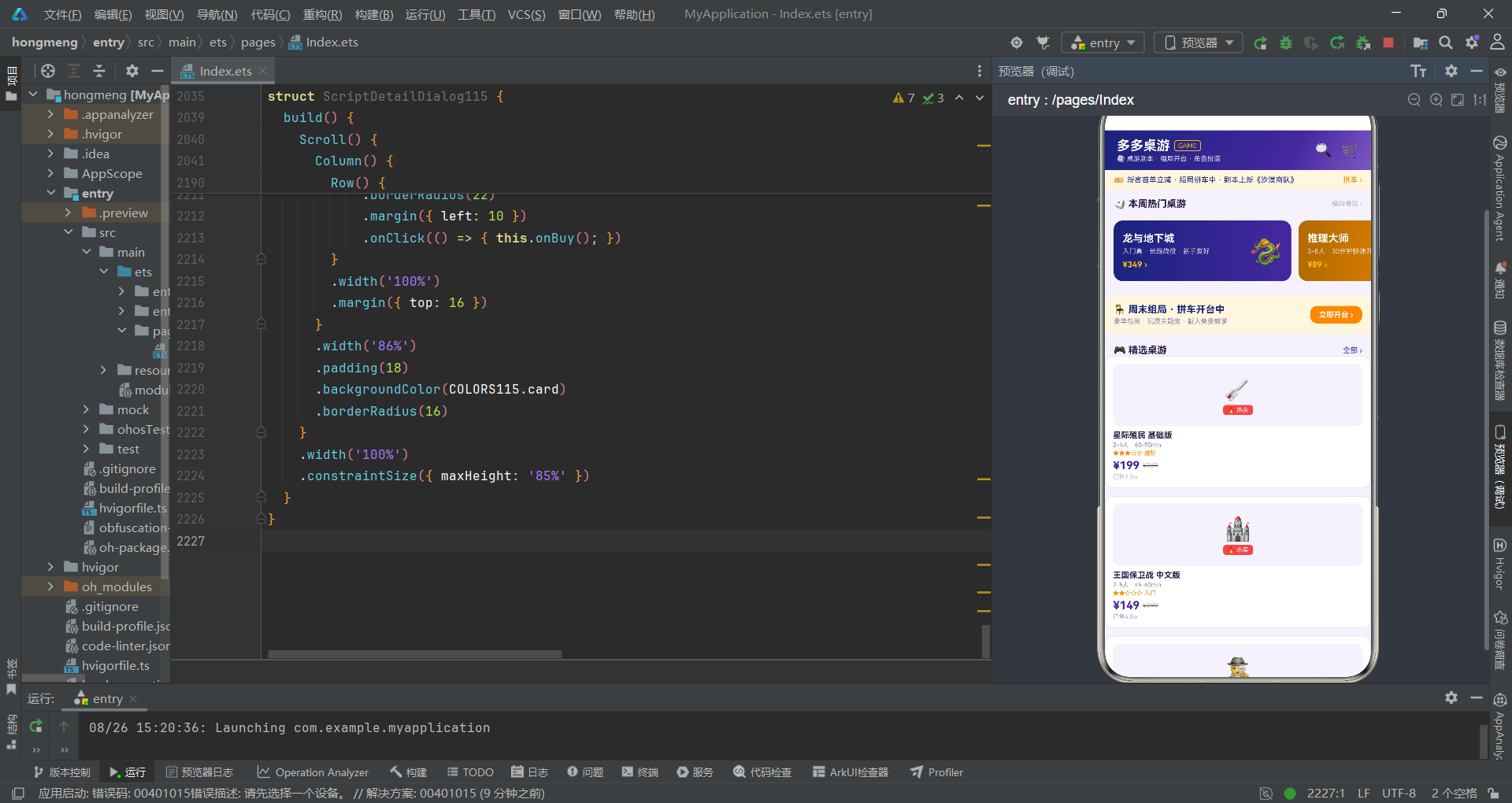
在鸿蒙生态的数字片场中,桌游与剧本杀是一个充满悬念推理与社交欢笑的特殊题材。这部"影片"不仅承载着桌游爱好者的策略对决与剧本杀玩家的沉浸演绎,更串联起从商品浏览、角色管理、桌台预约到社区互动的完整娱乐体验链条。作为这部影片的导演,我们需要在开机前仔细研读剧本,理解每一场戏的调度逻辑、每一段对白的叙事意图、每一组镜头的视觉语言。
本篇导演手记所拆解的,正是一部基于HarmonyOS ArkTS API 24构建的多功能桌游剧本社区应用。该应用采用深紫色(#4527A0)与橙色(#FF8F00)双主色方案——深紫如同悬疑片中的暗夜基调,营造出推理与沉浸的神秘氛围;橙色如同喜剧片中的暖色光源,传递着社交与欢乐的温度。两种色调在七幕场景中交替出现,如同电影中冷调与暖调的切换,引导观众(用户)在不同情绪间自然过渡。
从制片架构的视角来看,该应用的数据层定义了十一个接口(interface),如同剧本中的十一个角色设定表——配色方案、标签配置、桌游信息、题材分布、剧本信息、角色信息、阵营分布、桌型信息、排行项、战报信息和组局会话。静态数据层以常量数组预置了全部业务数据,相当于美术组提前布好的场景道具。工具函数层提取了五个纯函数用于颜色映射和格式化,它们如同后期制作中的色彩校正滤镜,将原始数据转换为画面所需的可读信息。
在拍摄层,应用划分了七个场景段落(Tab Component),每个场景都是一幕独立的戏——桌游展厅用横滑大卡加网格陈列展示热门桌游、剧本图书馆用题材分布图加评分列表展示热门剧本、角色化妆间用角色卡Grid加阵营分布展示卡组、开台前台用桌型选择加拼车列表展示预约流程、荣誉殿堂用双榜展示剧本和桌游排名、社区广场用战报流展示玩家互动、个人后台用组局记录加收藏展示个人数据。五组弹框分别对应五个插叙段落——预约开台(居中弹框)、购买剧本(抽屉弹框)、编辑角色(抽屉弹框)、删除战报(居中弹框)和剧本详情(居中弹框)。
第一幕:剧本大纲——数据接口定义与配色方案
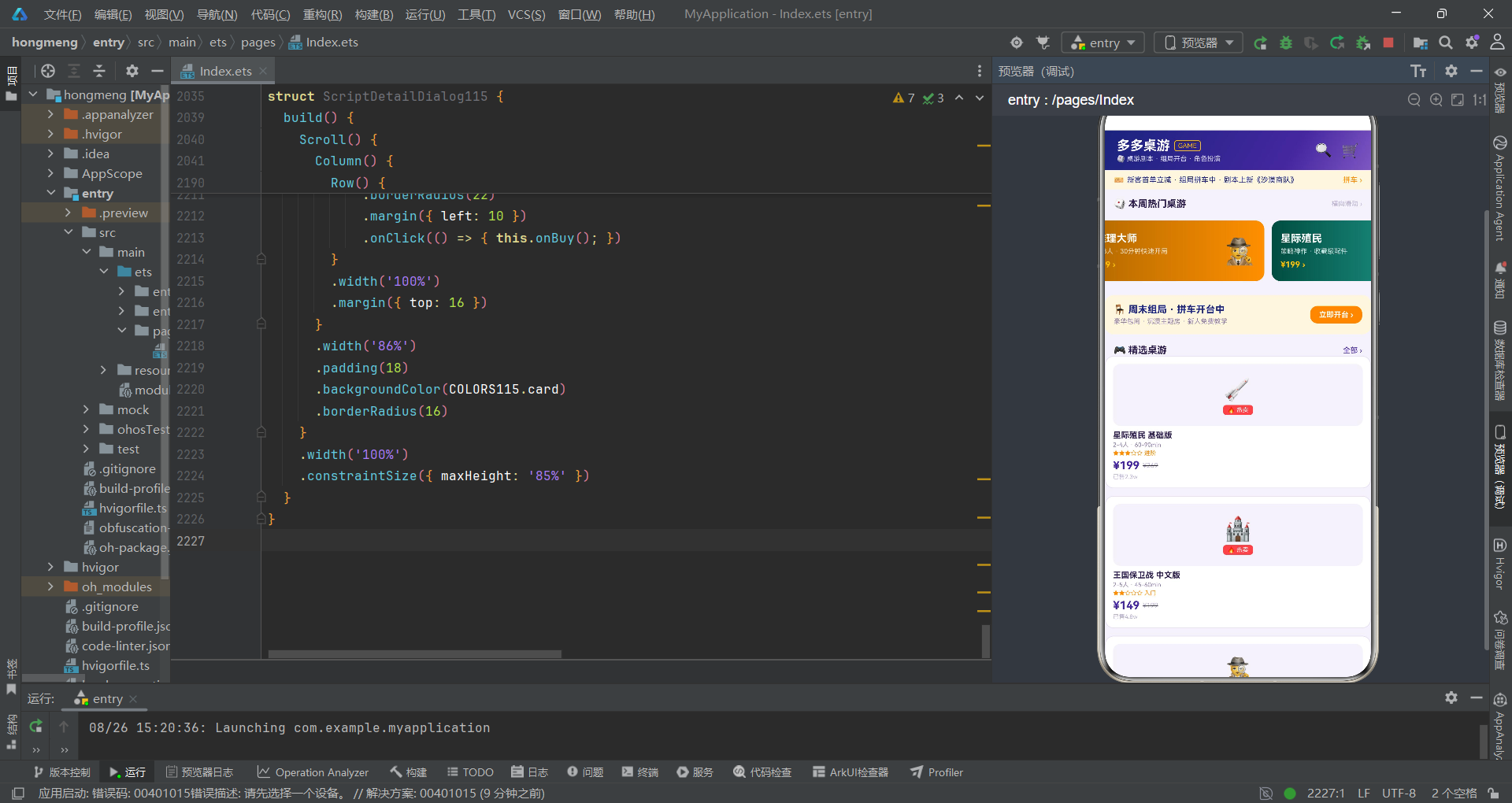
1.1 美术指导的色彩方案
在影片开拍前,美术指导需要确定全片的色彩方案。本片的色彩方案通过一个接口定义:
interface ColorPalette115 {
  primary: string;
  primaryLight: string;
  primaryDark: string;
  orange: string;
  orangeLight: string;
  orangeBg: string;
  bg: string;
  card: string;
  textMain: string;
  textSub: string;
  textHint: string;
  border: string;
  success: string;
  warning: string;
  danger: string;
  white: string;
}

const COLORS115: ColorPalette115 = {
  primary: '#4527A0',
  primaryLight: '#7E57C2',
  primaryDark: '#1A237E',
  orange: '#FF8F00',
  orangeLight: '#FFC107',
  orangeBg: '#FFF7E0',
  bg: '#F5F2FB',
  card: '#FFFFFF',
  textMain: '#2A1B4A',
  textSub: '#8B7BA6',
  textHint: '#BCB1D1',
  border: '#E8E0F5',
  success: '#66BB6A',
  warning: '#FFA726',
  danger: '#EF5350',
  white: '#FFFFFF'
};
interface在ArkTS中用于定义类型契约。ColorPalette115接口定义了十六个颜色字段——三档紫色(primary深紫、primaryLight浅紫、primaryDark暗紫)构成悬疑基调,三档橙色(orange标准橙、orangeLight亮橙、orangeBg淡橙背景)构成社交暖调,加上背景色、卡片色、三档文字色(textMain主文字、textSub次文字、textHint提示文字)、边框色和三种语义色(success成功绿、warning警告橙、danger危险红),构成了一套完整的色彩系统。
const COLORS115是配色方案的具体实现实例。将所有颜色集中在一个常量对象中管理,是ArkTS开发中推荐的做法——它确保了全片色彩的一致性,如同一份标准的色彩对照表贴在每个部门的办公桌上。当需要调整配色时,只需修改这一处定义,全片所有引用COLORS115.xxx的组件都会同步更新。
导演笔记:在ArkTS中,将配色方案提取为接口+常量的模式有三大优势:一是统一管理避免散落的魔法数字;二是语义化命名(如
COLORS115.danger比'#EF5350'更易读);三是便于主题切换——未来如需支持暗色模式,只需替换常量值而无需改动组件代码。
1.2 角色设定表:数据接口与静态数据
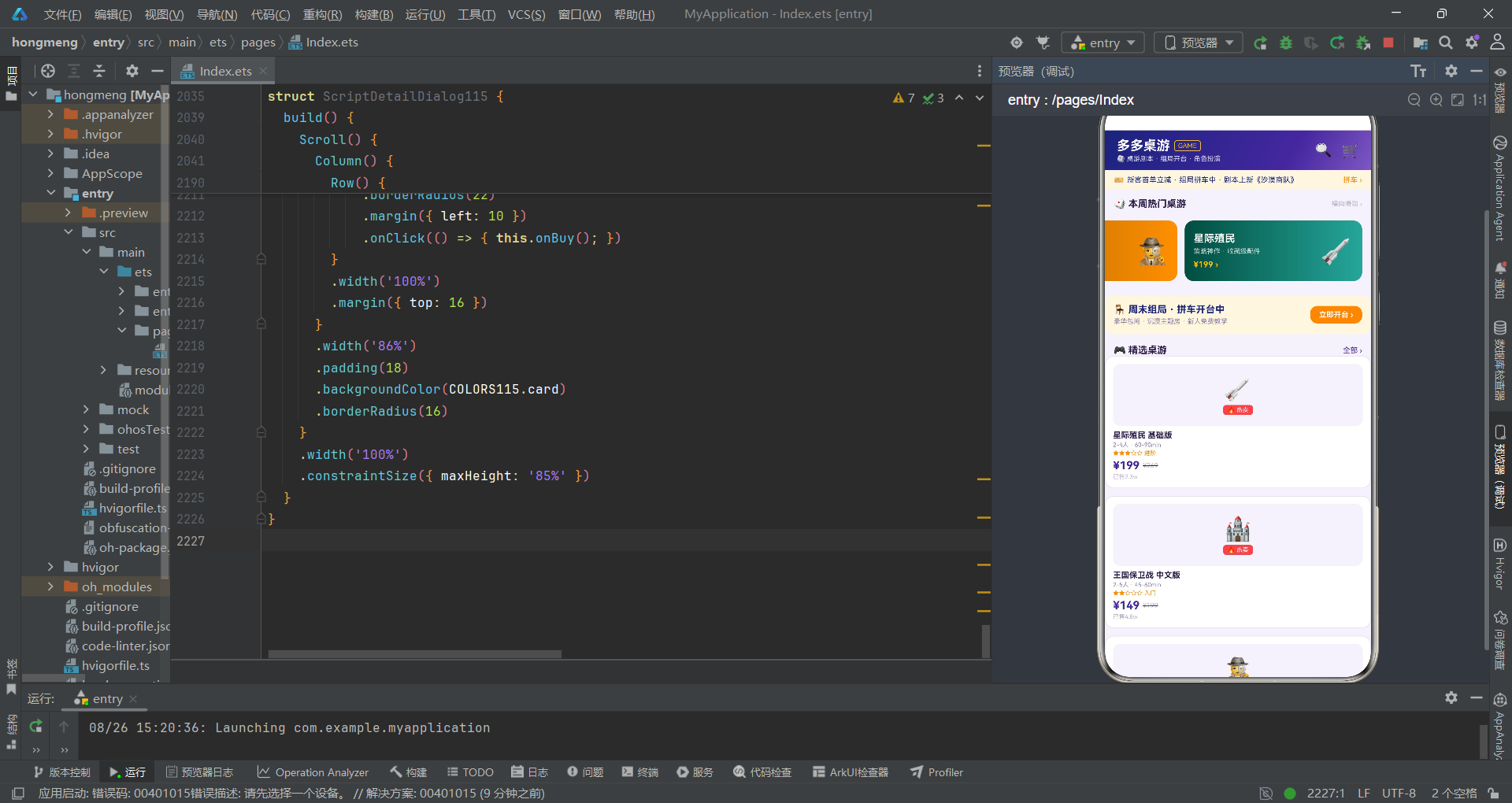
interface BoardGame115 {
  id: string;
  name: string;
  price: number;
  oldPrice: number;
  sales: string;
  players: string;
  time: string;
  difficulty: number;
  emoji: string;
  hot: boolean;
}

interface Script115 {
  id: string;
  name: string;
  type: string;
  players: string;
  time: string;
  rating: number;
  price: number;
  sales: string;
  emoji: string;
  difficulty: string;
}

interface Role115 {
  id: string;
  name: string;
  camp: string;
  desc: string;
  emoji: string;
}

const BOARD_GAMES115: BoardGame115[] = [
  { id: 'g1', name: '星际殖民 基础版', price: 199, oldPrice: 269, sales: '2.3w', players: '2-4人', time: '60-90min', difficulty: 3, emoji: '🚀', hot: true },
  { id: 'g2', name: '王国保卫战 中文版', price: 149, oldPrice: 199, sales: '4.8w', players: '2-5人', time: '45-60min', difficulty: 2, emoji: '🏰', hot: true },
  { id: 'g3', name: '推理大师 桌游版', price: 89, oldPrice: 119, sales: '6.6w', players: '3-8人', time: '30-45min', difficulty: 1, emoji: '🕵️', hot: true },
  { id: 'g4', name: '星球贸易 豪华版', price: 299, oldPrice: 399, sales: '9200', players: '3-6人', time: '90-120min', difficulty: 4, emoji: '🌍', hot: false }
];

const SCRIPTS115: Script115[] = [
  { id: 's1', name: '雾都孤儿院', type: '恐怖推理', players: '6人', time: '4-5h', rating: 9.2, price: 88, sales: '3.2w', emoji: '🏚️', difficulty: '进阶' },
  { id: 's2', name: '山海列车', type: '情感沉浸', players: '7人', time: '5h', rating: 9.5, price: 108, sales: '5.6w', emoji: '🚂', difficulty: '进阶' },
  { id: 's3', name: '迷雾侦探社', type: '硬核推理', players: '6人', time: '6h', rating: 9.0, price: 128, sales: '1.8w', emoji: '🕵️', difficulty: '硬核' },
  { id: 's4', name: '月圆之夜', type: '机制阵营', players: '8人', time: '4h', rating: 8.7, price: 98, sales: '2.9w', emoji: '🌕', difficulty: '新手' }
];

const ROLES115: Role115[] = [
  { id: 'r1', name: '侦探长·柯岚', camp: '好人', desc: '逻辑担当 · 每轮可验一人', emoji: '🔍' },
  { id: 'r2', name: '女巫·莉莉', camp: '好人', desc: '拥有解药与毒药各一瓶', emoji: '🧪' },
  { id: 'r5', name: '狼王·影牙', camp: '狼人', desc: '出局时可带走一名玩家', emoji: '🐺' },
  { id: 'r7', name: '盗贼·快手', camp: '中立', desc: '开局可交换两张身份牌', emoji: '🎩' }
];
BoardGame115接口定义了桌游的数据结构——id(唯一标识)、name(名称)、price/oldPrice(现价/原价)、sales(销量)、players(人数范围)、time(时长)、difficulty(难度等级1-5)、emoji(图标)、hot(是否热门)。Script115接口定义了剧本杀的数据结构,多了type(题材类型)、rating(评分)和difficulty(文本难度描述而非数字)字段。Role115接口定义了角色信息——name(角色名)、camp(阵营)、desc(技能描述)、emoji(角色图标)。
导演笔记:
const声明的常量数组在ArkTS中用于存储不可变的业务数据。这些数据在应用编译期就确定,运行期不变。在实际项目中,这类数据通常来自后端API接口,但在Demo或原型阶段,使用静态常量数组模拟数据是高效的做法——它允许前端独立于后端进行开发和调试。
1.3 色彩校正滤镜:工具函数
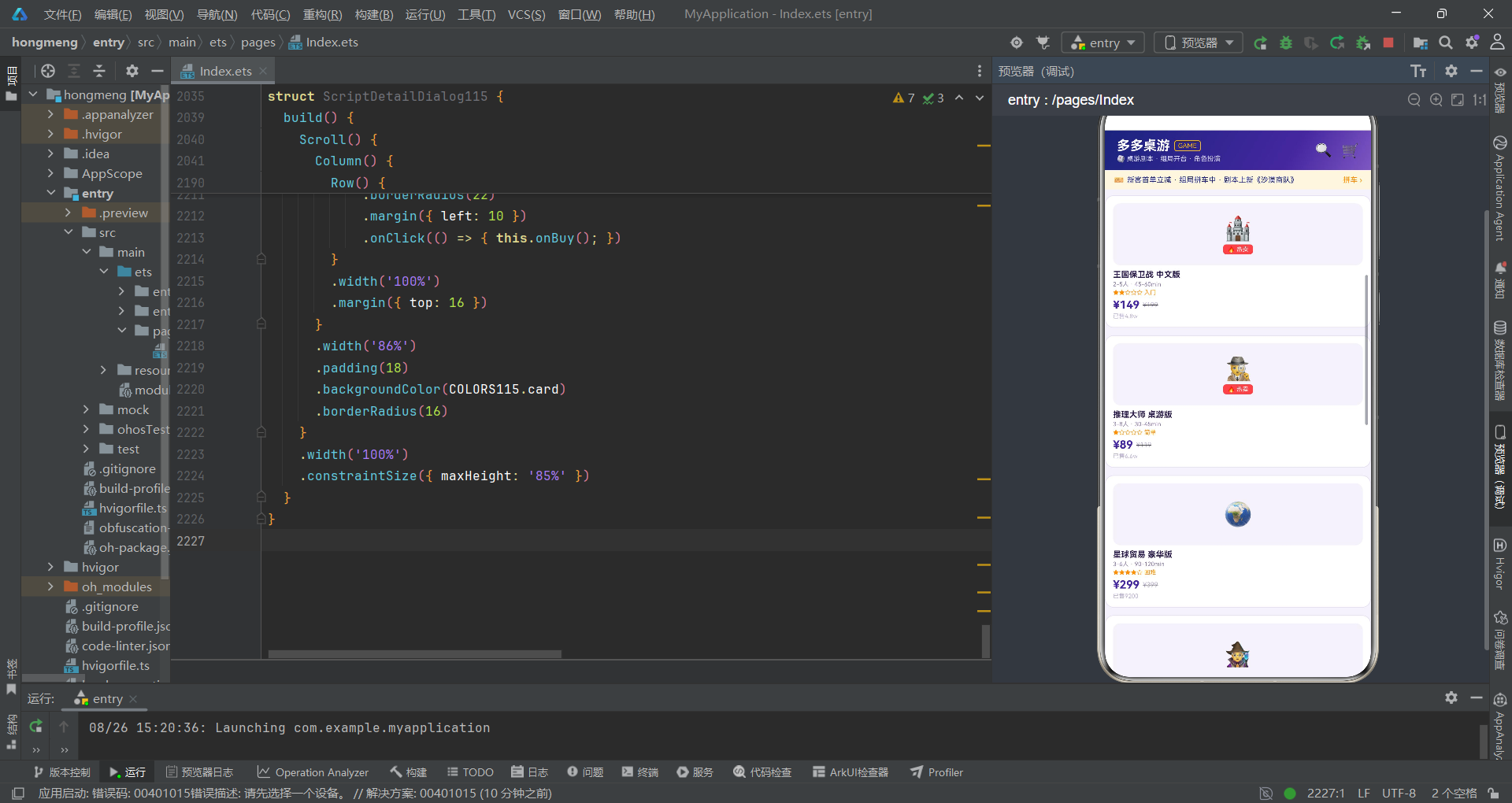
function diffStars115(n: number): string {
  if (n <= 1) { return '★☆☆☆☆ 简单'; }
  if (n === 2) { return '★★☆☆☆ 入门'; }
  if (n === 3) { return '★★★☆☆ 进阶'; }
  if (n === 4) { return '★★★★☆ 困难'; }
  return '★★★★★ 硬核';
}

function barW115(v: number): string {
  return Math.floor(v).toString() + '%';
}

function likeFmt115(v: number): string {
  if (v >= 10000) {
    return (v / 10000).toFixed(1) + 'w';
  }
  return v.toString();
}

function rankColor115(i: number): string {
  if (i === 0) { return COLORS115.orange; }
  if (i === 1) { return COLORS115.textSub; }
  if (i === 2) { return COLORS115.primaryLight; }
  return COLORS115.textHint;
}

function campColor115(c: string): string {
  if (c === '好人') { return COLORS115.primary; }
  if (c === '狼人') { return COLORS115.danger; }
  return COLORS115.orange;
}
五个工具函数如同后期制作中的色彩校正滤镜——diffStars115将数字难度转换为星号+文字描述的复合字符串;barW115将数值拼接为百分比字符串(Math.floor确保整数);likeFmt115将大于1万的数字转换为"x.xw"格式(如12800变为"1.3w");rankColor115根据排名索引返回颜色(第1名橙色、第2名灰色、第3名浅紫、其余提示色);campColor115根据阵营名称返回颜色(好人紫色、狼人红色、中立橙色)。
关键概念:在ArkTS的UI构建函数(build方法)内部,不允许直接声明变量。所有数据预处理逻辑必须抽取到组件外部的函数中。这一约束的设计意图是保持UI构建函数的纯粹性——它只负责"描述UI长什么样",不负责"计算数据"。工具函数层正是这一约束下的产物。
第二幕:主场景调度——@Entry入口与场景切换
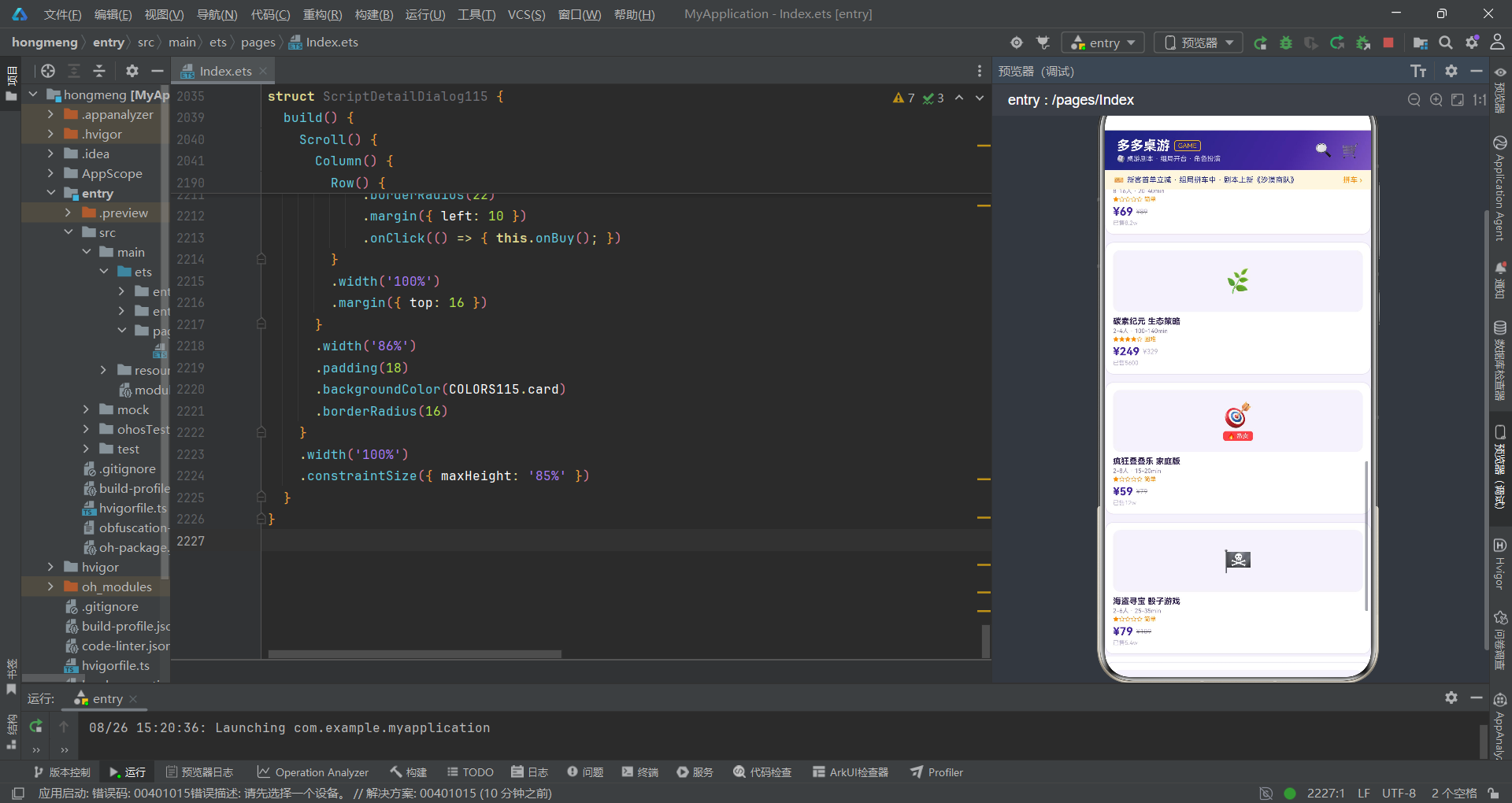
2.1 主场景入口与状态管理
@Entry
@Component
struct DuoDuoBoardApp {
  @State currentTab: number = 0;
  @State showBookDialog: boolean = false;
  @State showBuySheet: boolean = false;
  @State showEditSheet: boolean = false;
  @State showDeleteDialog: boolean = false;
  @State showDetailDialog: boolean = false;
  @State selectedItem: Script115 | null = null;
  // 预约开台
  @State selTable: number = 0;
  @State playerCount: number = 6;
  @State selRoom: boolean = true;
  // 购买
  @State selQty: number = 1;
  @State selVersion: number = 0;
  @State selExpand: boolean = false;
  @State selMembership: boolean = true;
  // 编辑角色
  @State roleName: string = '';
  @State selCamp: number = 0;
  @State selPublic: boolean = true;
  // 删除战报
  @State selClearComments: boolean = false;

  build() {
    Column() {
      // ===== 桌游吧头部(桌游俱乐部参考样式) =====
      Row() {
        Column() {
          Row() {
            Text('多多桌游')
              .fontSize(18)
              .fontWeight(FontWeight.Bold)
              .fontColor(COLORS115.white)
            Text('GAME')
              .fontSize(9)
              .fontColor(COLORS115.orangeLight)
              .border({ width: 1, color: COLORS115.orangeLight })
              .borderRadius(3)
              .padding({ left: 4, right: 4, top: 1, bottom: 1 })
              .margin({ left: 6 })
          }
          Text('🎲 桌游剧本 · 组局开台 · 角色扮演')
            .fontSize(9)
            .fontColor('rgba(255,255,255,0.8)')
            .margin({ top: 2 })
        }
        .alignItems(HorizontalAlign.Start)
        Text('').layoutWeight(1)
        Text('🔍')
          .fontSize(19)
          .fontColor(COLORS115.white)
          .margin({ right: 12 })
        Text('🛒')
          .fontSize(19)
          .fontColor(COLORS115.white)
      }
      .width('100%')
      .height(54)
      .padding({ left: 16, right: 16 })
      .linearGradient({ angle: 120, colors: [[COLORS115.primaryDark, 0], [COLORS115.primary, 0.7], [COLORS115.primaryLight, 1]] })
@Entry是ArkTS的入口装饰器,标记该组件为页面入口组件。在一个ArkTS页面文件中,有且仅有一个组件可以被@Entry标记。被标记的组件会被框架自动识别为页面的根节点,负责整个页面的渲染和生命周期管理。@Entry如同电影的开场镜头——它是观众看到的第一个画面,决定了整部影片的第一印象。
@Component装饰器用于声明一个自定义组件。struct DuoDuoBoardApp结合@Component定义了应用的主组件。该组件声明了十八个@State状态变量——currentTab(当前场景索引)控制七幕场景的切换,五个弹框显隐状态控制五段插叙的进出,selectedItem(选中的剧本对象)为剧本详情弹框提供数据,其余状态变量分别服务于四个弹框的交互表单(预约开台的桌型/人数/主题房、购买的版本/数量/扩展包/会员、编辑角色的名称/阵营/公开、删除战报的清空评论选项)。
关键概念:
@State是ArkTS的状态管理装饰器。被@State标记的变量具有响应式特性——当变量值发生变化时,所有引用该变量的UI组件会自动重新渲染。@State如同场记板上的场景编号——一旦编号变化,整个剧组立即切换到对应场景的拍摄状态。这种"状态驱动UI"的模式是声明式UI的核心思想。
build()方法内部使用Column()作为根容器,包含三部分:头部顶栏(Row)、内容区(场景切换)、底部导航栏(Row)。头部顶栏使用linearGradient设置了从暗紫到浅紫的三段渐变——angle: 120指定渐变角度为120度,colors数组定义三个色站,每个色站是[颜色值, 位置偏移]的元组。Text('GAME')使用.border()方法添加了亮橙色边框,作为品牌标识的装饰元素。
关键概念:
linearGradient是ArkUI的样式属性方法,用于设置线性渐变背景。angle参数以度数指定渐变方向(0度为从下到上,90度为从左到右,以此类推),colors参数是色站数组,每个色站包含颜色值和0.0-1.0的位置偏移。渐变背景如同电影中的灯光设计——通过色彩的明暗变化营造空间深度和情绪氛围。
2.2 场景切换与条件渲染
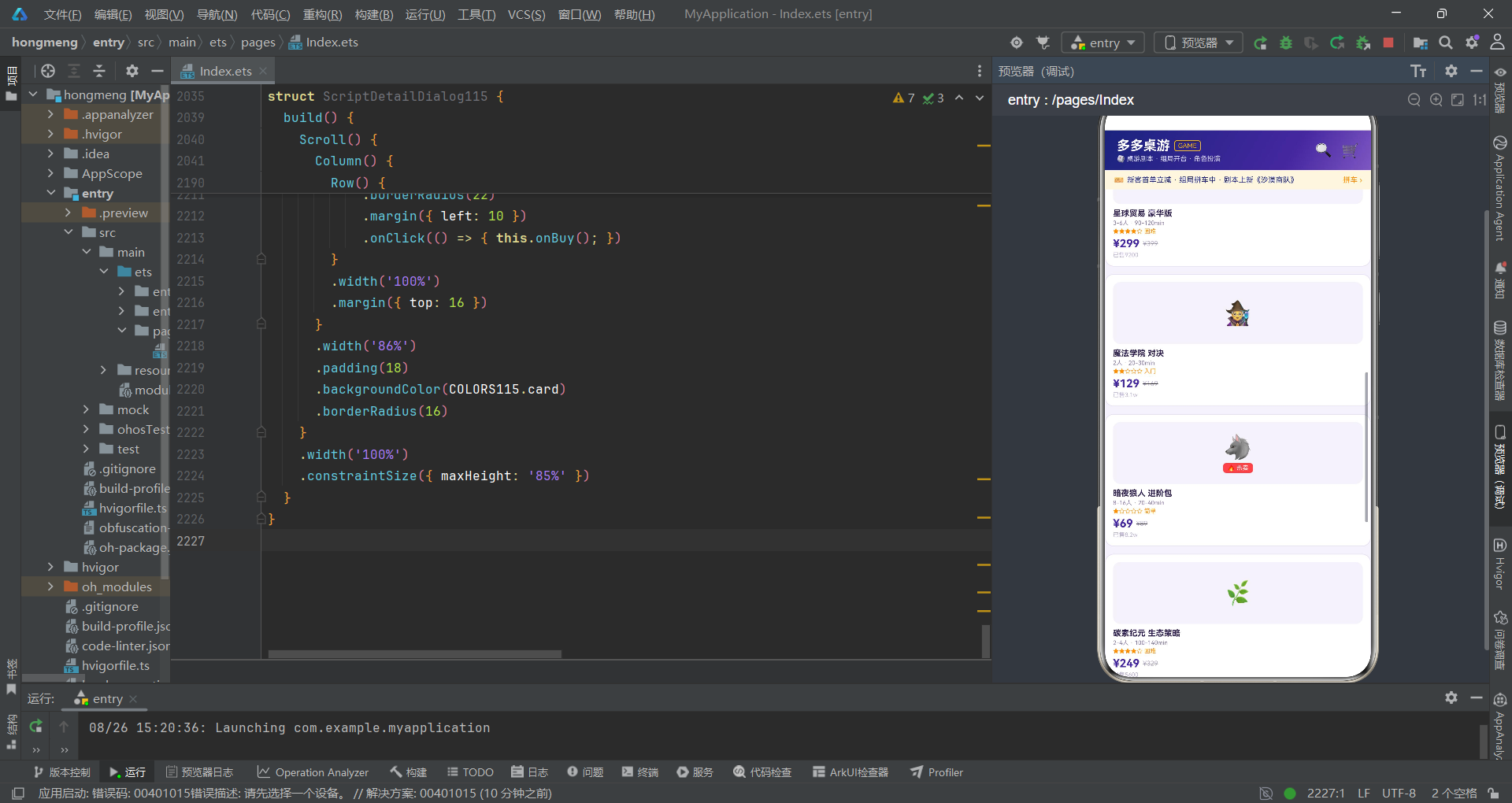
// ===== Tab 内容区 =====
if (this.currentTab === 0) {
  BoardGameTab115({
    onBook: () => { this.showBookDialog = true; }
  })
} else if (this.currentTab === 1) {
  ScriptTab115({
    onDetail: (s: Script115) => {
      this.selectedItem = s;
      this.showDetailDialog = true;
    },
    onBuy: (s: Script115) => { this.showBuySheet = true; }
  })
} else if (this.currentTab === 2) {
  RoleTab115({
    onEdit: () => { this.showEditSheet = true; }
  })
} else if (this.currentTab === 3) {
  TableTab115({
    onBook: () => { this.showBookDialog = true; }
  })
} else if (this.currentTab === 4) {
  RankTab115()
} else if (this.currentTab === 5) {
  CommunityTab115({
    onDelete: () => { this.showDeleteDialog = true; }
  })
} else {
  MineTab115()
}
if/else if/else是ArkTS中的条件渲染语法。在build()方法内,if语句不仅控制逻辑流,还控制UI结构的生成与销毁——当条件为true时,对应的组件被创建并渲染;当条件变为false时,该组件被销毁。这如同电影中的场景切换——当导演喊"换场"时,当前场景的布景被拆除,新场景的布景被搭建。
关键概念:
if/else条件渲染与@State配合使用,实现了"状态驱动场景切换"的核心机制。当用户点击底部导航栏的某个标签时,this.currentTab被修改,ArkUI框架检测到@State变化,重新执行build()方法,if/else分支根据新的currentTab值渲染对应的场景组件。旧场景组件被自动销毁回收,新场景组件被创建挂载。这种机制确保了同一时间只有一幕场景在"拍摄",节省了系统资源。
每个场景组件在创建时通过参数传递接收回调函数——BoardGameTab115接收onBook(预约开台回调)、ScriptTab115接收onDetail(查看详情回调)和onBuy(购买回调)、RoleTab115接收onEdit(编辑角色回调)等。这些回调函数如同演员与导演之间的对讲机——当演员在场景中触发某个动作时,通过对讲机通知导演(主组件)进行下一步调度。
2.3 底部七Tab徽章导航
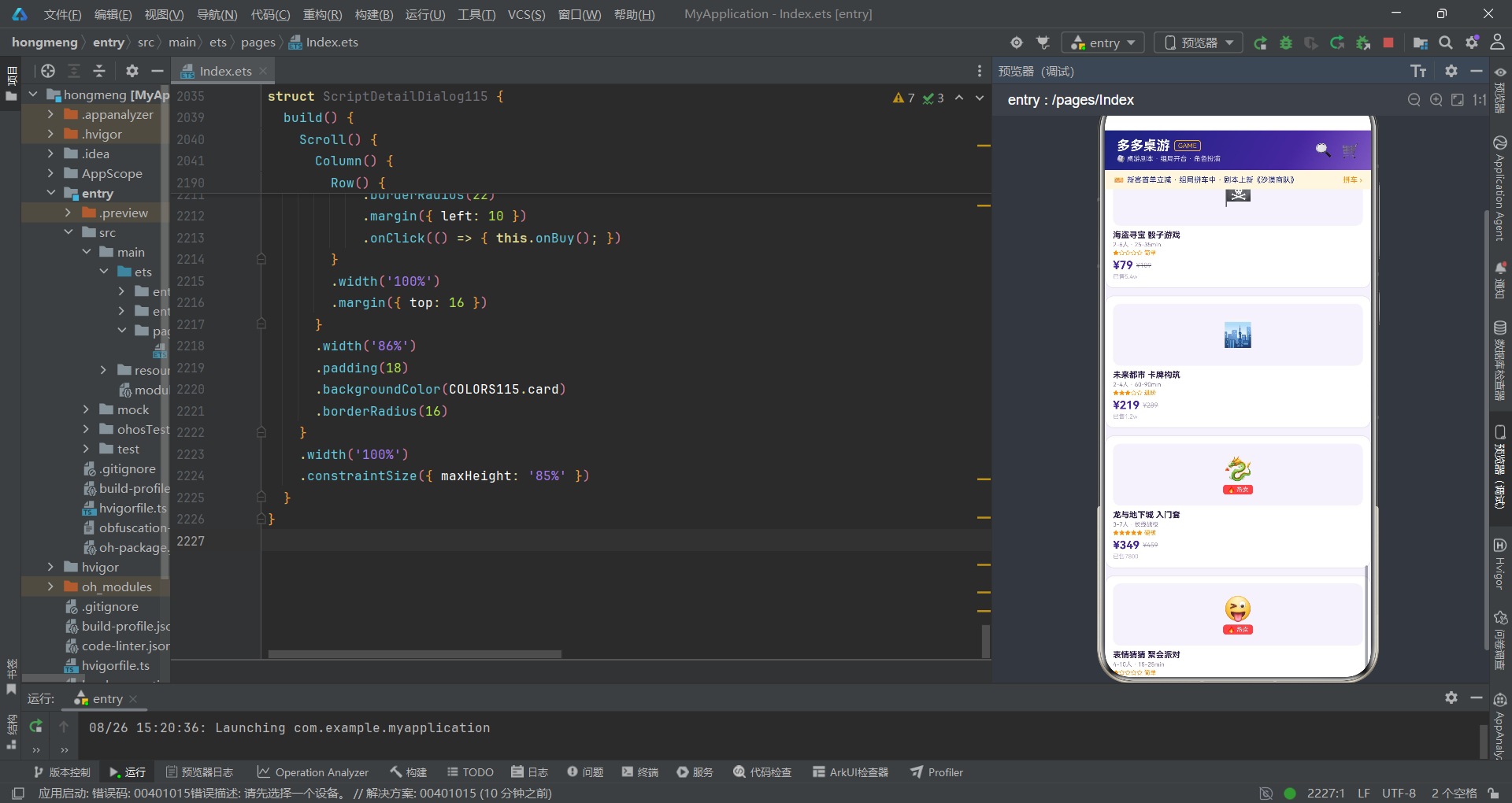
// ===== 底部7 Tab(徽章圆角单排) =====
Row() {
  TabBtn115({icon:'🎲', label:'桌游', active: this.currentTab === 0, onTap: () => { this.currentTab = 0; }})
  TabBtn115({icon:'📜', label:'剧本', active: this.currentTab === 0, onTap: () => { this.currentTab = 1; }})
  TabBtn115({icon:'🎭', label:'角色', active: this.currentTab === 0, onTap: () => { this.currentTab = 2; }})
  TabBtn115({icon:'🪑', label:'开台', active: this.currentTab === 0, onTap: () => { this.currentTab = 3; }})
  TabBtn115({icon:'🏆', label:'排行', active: this.currentTab === 0, onTap: () => { this.currentTab = 4; }})
  TabBtn115({icon:'💬', label:'社区', active: this.currentTab === 0, onTap: () => { this.currentTab = 5; }})
  TabBtn115({icon:'👤', label:'我的', active: this.currentTab === 0, onTap: () => { this.currentTab = 6; }})
}
.width('100%')
.height(50)
.padding({ left: 2, right: 2, top: 3, bottom: 3 })
.backgroundColor(COLORS115.card)
.border({ width: 1, color: COLORS115.border })
底部导航使用七个TabBtn115自定义组件,每个组件接收四个参数——icon(emoji图标)、label(文字标签)、active(是否选中)和onTap(点击回调)。TabBtn115是一个独立的@Component组件:
@Component
struct TabBtn115 {
  icon: string = '🎲';
  label: string = '';
  active: boolean = false;
  onTap: () => void = () => {};
  build() {
    Column() {
      Text(this.icon)
        .fontSize(16)
        .fontColor(this.active ? COLORS115.white : COLORS115.textSub)
      Text(this.label)
        .fontSize(9)
        .fontWeight(this.active ? FontWeight.Bold : FontWeight.Normal)
        .fontColor(this.active ? COLORS115.orangeLight : COLORS115.textSub)
        .margin({ top: 1 })
    }
    .layoutWeight(1)
    .justifyContent(FlexAlign.Center)
    .height(40)
    .borderRadius(10)
    .backgroundColor(this.active ? COLORS115.primary : COLORS115.card)
    .border({ width: 1, color: this.active ? COLORS115.primary : COLORS115.border })
    .animation({ duration: 200 })
    .onClick(() => { this.onTap(); })
  }
}
TabBtn115组件的成员变量icon、label、active和onTap通过参数传递接收父组件的值。这种"父向子传参"的模式在ArkTS中是组件间通信的基础方式。@Component声明的组件成员变量(未使用@State标记的)是只读属性——子组件可以读取但不能直接修改,修改必须通过回调函数通知父组件。
关键概念:
@Component组件的普通成员变量(非@State标记)相当于函数参数——父组件创建子组件实例时传入值,子组件内部读取使用。这种模式类似于导演给演员派发角色卡——演员按角色卡表演,但不能自行修改角色设定。如果子组件需要修改父组件状态,必须通过回调函数(如onTap)向上传递。
.animation({ duration: 200 })方法为组件添加了动画效果——animation是ArkUI的通用属性方法,duration参数指定动画时长(毫秒)。当active状态切换导致backgroundColor和border等属性变化时,变化过程会在200毫秒内平滑过渡,如同电影中的转场效果——场景切换不是生硬的跳切,而是平滑的淡入淡出。
2.4 弹框绑定与bindSheet/bindContentCover
.bindContentCover($$this.showBookDialog, () => {
}, {
})
.bindSheet($$this.showBuySheet, () => {
}, {
  height: 540,
  dragBar: true,
  showClose: true
})
.bindSheet($$this.showEditSheet, () => {
}, {
  height: 500,
  dragBar: true,
  showClose: true
})
.bindContentCover($$this.showDeleteDialog, () => {
}, {
})
.bindContentCover($$this.showDetailDialog, () => {
}, {
})
主页面通过五个绑定方法管理五组弹框。bindContentCover用于绑定居中式弹框(预约开台、删除战报、剧本详情),bindSheet用于绑定底部抽屉式弹框(购买剧本、编辑角色)。$$this.showBookDialog是$$双向绑定语法——$$将@State变量与弹框的显示状态双向绑定,当变量为true时弹出弹框,为false时关闭。
关键概念:
bindSheet和bindContentCover是ArkUI提供的两种弹框绑定方式。bindSheet创建从底部滑入的抽屉式弹框,适合表单交互(如购买、编辑);bindContentCover创建全屏蒙层覆盖的居中弹框,适合信息展示或确认操作(如详情、删除确认)。两者的第一个参数都使用$$双向绑定,第二个参数是Builder函数返回弹框内容,第三个参数是配置对象。
bindSheet的配置对象中,height指定抽屉高度,dragBar控制是否显示顶部拖拽条,showClose控制是否显示关闭按钮。bindContentCover的配置对象为空,使用默认配置。
第三幕:桌游展厅——横滑大卡与网格陈列
3.1 横滑大卡:Scroll水平滚动
@Component
struct BoardGameTab115 {
  onBook: () => void = () => {};
  build() {
    Scroll() {
      Column() {
        // 横滑大卡
        Row() {
          Text('🎲 本周热门桌游')
            .fontSize(13)
            .fontWeight(FontWeight.Bold)
            .fontColor(COLORS115.textMain)
          Text('').layoutWeight(1)
          Text('横向滑动 ›')
            .fontSize(9)
            .fontColor(COLORS115.textHint)
        }
        .width('100%')
        .padding({ left: 12, right: 12, top: 12 })
        Scroll() {
          Row() {
            Row() {
              Column() {
                Text('龙与地下城')
                  .fontSize(14)
                  .fontWeight(FontWeight.Bold)
                  .fontColor(COLORS115.white)
                Text('入门套 · 长线战役 · 新手友好')
                  .fontSize(9)
                  .fontColor('rgba(255,255,255,0.8)')
                  .margin({ top: 4 })
                Text('¥349 ›')
                  .fontSize(11)
                  .fontWeight(FontWeight.Bold)
                  .fontColor(COLORS115.orangeLight)
                  .margin({ top: 6 })
              }
              .alignItems(HorizontalAlign.Start)
              .layoutWeight(1)
              Text('🐉')
                .fontSize(36)
            }
            .width(240)
            .height(82)
            .padding(12)
            .borderRadius(12)
            .linearGradient({ angle: 90, colors: [['#1A237E', 0], ['#4527A0', 1]] })
            .margin({ right: 10 })
          }
          .padding({ left: 12, right: 12 })
        }
        .scrollable(ScrollDirection.Horizontal)
        .scrollBar(BarState.Off)
        .width('100%')
        .height(96)
        .margin({ top: 8 })
Scroll是ArkUI提供的滚动容器组件。外层Scroll为垂直滚动,包裹整个页面的所有内容;内层Scroll通过.scrollable(ScrollDirection.Horizontal)设置为水平滚动,用于展示横滑大卡。ScrollDirection枚举定义了Horizontal(水平)和Vertical(垂直)两种滚动方向。
关键概念:
Scroll组件可以嵌套使用——外层垂直滚动包裹整个页面,内层水平滚动展示横向卡片列表。这是移动端常见的布局模式,如同电影中的推轨镜头——摄像机沿轨道水平移动,逐个展示排列在轨道旁的场景。.scrollBar(BarState.Off)隐藏了滚动条,BarState枚举提供On、Off和Auto三种状态。
横滑大卡使用linearGradient设置了从暗紫到标准紫的横向渐变(angle: 90即从左到右),如同展厅中的聚光灯从一侧打来,为卡片营造出戏剧性的光影效果。卡片内的文字使用白色和半透明白色(rgba(255,255,255,0.8)),确保在深色背景上的可读性。
3.2 桌游网格:ForEach列表渲染
Column() {
  ForEach(BOARD_GAMES115, (g: BoardGame115) => {
    Column() {
      Column() {
        Text(g.emoji)
          .fontSize(32)
        if (g.hot) {
          Text('🔥 热卖')
            .fontSize(8)
            .fontColor(COLORS115.white)
            .padding({ left: 6, right: 6, top: 2, bottom: 2 })
            .backgroundColor(COLORS115.danger)
            .borderRadius(4)
            .margin({ top: 3 })
        }
      }
      .width('100%')
      .height(84)
      .justifyContent(FlexAlign.Center)
      .backgroundColor(COLORS115.bg)
      .borderRadius(10)
      Text(g.name)
        .fontSize(11)
        .fontWeight(FontWeight.Bold)
        .fontColor(COLORS115.textMain)
        .maxLines(1)
        .textOverflow({ overflow: TextOverflow.Ellipsis })
        .width('100%')
        .margin({ top: 6 })
      Text(g.players + ' · ' + g.time)
        .fontSize(8)
        .fontColor(COLORS115.textSub)
        .width('100%')
        .margin({ top: 2 })
      Text(diffStars115(g.difficulty))
        .fontSize(8)
        .fontColor(COLORS115.orange)
        .width('100%')
        .margin({ top: 2 })
      Row() {
        Text('¥' + g.price.toString())
          .fontSize(15)
          .fontWeight(FontWeight.Bold)
          .fontColor(COLORS115.primary)
        Text('¥' + g.oldPrice.toString())
          .fontSize(9)
          .fontColor(COLORS115.textHint)
          .decoration({ type: TextDecorationType.LineThrough })
          .margin({ left: 4 })
      }
      .width('100%')
      .margin({ top: 3 })
      Text('已售' + g.sales)
        .fontSize(8)
        .fontColor(COLORS115.textHint)
        .width('100%')
        .margin({ top: 2 })
    }
    .padding(10)
    .backgroundColor(COLORS115.card)
    .borderRadius(12)
    .border({ width: 1, color: COLORS115.border })
    .margin({ bottom: 10 })
  }, (g: BoardGame115) => g.id)
}
ForEach是ArkUI提供的循环渲染组件,用于根据数据列表生成UI组件。ForEach的第一个参数是数据源数组(BOARD_GAMES115),第二个参数是渲染函数(接收每个数据项并返回UI结构),第三个参数是键值生成函数(g: BoardGame115) => g.id——使用每条数据的id字段作为唯一键值。
关键概念:
ForEach的键值生成函数(第三个参数)在ArkTS中非常重要。它类似于电影中每个镜头的编号——当数据列表发生变化(增删改)时,框架通过键值判断哪些项需要重新渲染、哪些可以复用。使用数据的唯一标识字段(如g.id)作为键值是最佳实践,它确保了即使数据顺序变化,框架也能精确匹配到对应的UI组件,避免不必要的重新渲染。
if (g.hot)条件渲染控制"热卖"标签的显示——只有g.hot为true的桌游才显示红色"🔥 热卖"标签。这如同电影中的特写镜头——只有重要角色才给特写,配角只出现在远景中。.maxLines(1)限制文本最多一行,.textOverflow({ overflow: TextOverflow.Ellipsis })设置溢出时显示省略号——TextOverflow枚举提供None、Clip和Ellipsis三种处理方式。
.decoration({ type: TextDecorationType.LineThrough })为原价文字添加了删除线效果——TextDecorationType枚举提供None(无装饰)、LineThrough(删除线)、Underline(下划线)三种文字装饰类型。原价加删除线是电商场景的标准设计语言,通过视觉对比突出折扣力度。
第四幕:剧本图书馆——题材分布与评分列表
4.1 题材分布横条图
@Component
struct ScriptTab115 {
  onDetail: (s: Script115) => void = () => {};
  onBuy: (s: Script115) => void = () => {};
  build() {
    Scroll() {
      Column() {
        // 题材分布图
        Row() {
          Text('📊 剧本题材热度')
            .fontSize(13)
            .fontWeight(FontWeight.Bold)
            .fontColor(COLORS115.textMain)
          Text('').layoutWeight(1)
          Text('本月')
            .fontSize(9)
            .fontColor(COLORS115.textHint)
        }
        .width('100%')
        .padding({ left: 12, right: 12, top: 12 })
        Column() {
          ForEach(GENRE_BARS115, (b: GenreBar115) => {
            Row() {
              Text(b.name)
                .fontSize(10)
                .fontColor(COLORS115.textMain)
                .width(52)
              Column() {
                Row() {
                  Column()
                    .width(barW115(b.value))
                    .height(9)
                    .borderRadius(4)
                    .backgroundColor(b.color)
                }
                .width('100%')
                .height(9)
                .borderRadius(4)
                .backgroundColor(COLORS115.border)
              }
              .layoutWeight(1)
              .margin({ left: 6, right: 6 })
              Text(b.value.toString() + '%')
                .fontSize(9)
                .fontWeight(FontWeight.Bold)
                .fontColor(b.color)
                .width(34)
            }
            .width('100%')
            .margin({ top: 8 })
          }, (b: GenreBar115) => b.id)
        }
        .width('100%')
        .padding({ left: 12, right: 12, top: 8 })
ScriptTab115组件是剧本图书馆场景。开篇用题材分布横条图展示本月各类剧本的热度占比。ForEach遍历GENRE_BARS115数组,每个题材生成一个横条——左侧是题材名称(固定宽度52vp),中间是进度条(Column包裹一个带颜色的Column色块),右侧是百分比数值。
横条的实现使用了Column嵌套Row嵌套Column的结构——最外层Column作为轨道(背景色为COLORS115.border浅灰色),内层Row中的Column使用barW115(b.value)计算出的百分比宽度作为色块。这种"容器+色块"的进度条实现方式是ArkTS中的常见手法,如同电影中的画中画特效——外层容器是画框,内层色块是实际内容。
导演笔记:
Column().width(barW115(b.value))这种写法中,Column组件不包含任何子元素,纯粹作为色块使用。在ArkTS中,Column、Row、Text('')等组件常被用作纯色块或间距占位符,因为ArkTS不允许使用div或View等HTML标签,所有视觉元素都必须通过ArkUI组件实现。
4.2 剧本列表卡片
ForEach(SCRIPTS115, (s: Script115) => {
  Row() {
    Text(s.emoji)
      .fontSize(30)
      .width(50)
      .height(50)
      .textAlign(TextAlign.Center)
      .backgroundColor(COLORS115.bg)
      .borderRadius(12)
    Column() {
      Row() {
        Text(s.name)
          .fontSize(12)
          .fontWeight(FontWeight.Bold)
          .fontColor(COLORS115.textMain)
          .maxLines(1)
          .textOverflow({ overflow: TextOverflow.Ellipsis })
        Text(s.rating.toString())
          .fontSize(10)
          .fontWeight(FontWeight.Bold)
          .fontColor(COLORS115.orange)
          .padding({ left: 4, right: 4, top: 1, bottom: 1 })
          .backgroundColor(COLORS115.orangeBg)
          .borderRadius(4)
          .margin({ left: 5 })
      }
      .width('100%')
      Row() {
        Text(s.type)
          .fontSize(8)
          .fontColor(COLORS115.textSub)
          .padding({ left: 5, right: 5, top: 1, bottom: 1 })
          .border({ width: 1, color: COLORS115.border })
          .borderRadius(3)
        Text(' ' + s.players + '人')
          .fontSize(8)
          .fontColor(COLORS115.primary)
        Text(' ' + s.time)
          .fontSize(8)
          .fontColor(COLORS115.textSub)
        Text(' ' + s.difficulty)
          .fontSize(8)
          .fontColor(COLORS115.danger)
      }
      .width('100%')
      .margin({ top: 4 })
    }
    .layoutWeight(1)
    .alignItems(HorizontalAlign.Start)
    .margin({ left: 10 })
    Column() {
      Text('¥' + s.price.toString())
        .fontSize(13)
        .fontWeight(FontWeight.Bold)
        .fontColor(COLORS115.primary)
      Text('详情')
        .fontSize(9)
        .fontColor(COLORS115.primary)
        .padding({ left: 8, right: 8, top: 2, bottom: 2 })
        .border({ width: 1, color: COLORS115.primary })
        .borderRadius(6)
        .margin({ top: 4 })
        .onClick(() => { this.onDetail(s); })
      Text('购买')
        .fontSize(9)
        .fontWeight(FontWeight.Bold)
        .fontColor(COLORS115.white)
        .padding({ left: 10, right: 10, top: 2, bottom: 2 })
        .backgroundColor(COLORS115.primary)
        .borderRadius(6)
        .margin({ top: 5 })
        .onClick(() => { this.onBuy(s); })
    }
    .alignItems(HorizontalAlign.End)
  }
  .width('100%')
  .padding(10)
  .backgroundColor(COLORS115.card)
  .borderRadius(12)
  .border({ width: 1, color: COLORS115.border })
  .margin({ left: 12, right: 12, top: 8 })
}, (s: Script115) => s.id)
剧本列表卡片采用"左图标-中信息-右操作"的三栏布局。左侧Text(s.emoji)使用30vp字号展示剧本emoji图标,背景为浅色圆角块。中间Column包含两行信息——第一行是剧本名称(加粗)和评分徽章(橙色背景),第二行是题材类型(带边框标签)、人数、时长和难度(红色文字)。
右侧操作区包含三个元素——价格(紫色加粗)、"详情"按钮(紫色描边按钮)和"购买"按钮(紫色实心按钮)。.onClick(() => { this.onDetail(s); })和.onClick(() => { this.onBuy(s); })分别为两个按钮绑定了点击回调,将当前剧本对象s传递给父组件。
关键概念:
.onClick()是ArkUI组件的通用事件方法,接收一个箭头函数作为回调。注意箭头函数() => { this.onDetail(s); }中的this指向当前组件实例(ScriptTab115),这得益于箭头函数不创建自己的this绑定。如果使用普通函数function() { this.onDetail(s); },this将指向函数调用上下文而非组件实例,导致运行时错误。
第五幕:角色化妆间——阵营分布与角色卡组
5.1 阵营分布横条图
@Component
struct RoleTab115 {
  onEdit: () => void = () => {};
  build() {
    Scroll() {
      Column() {
        // 阵营分布
        Row() {
          Text('⚖️ 阵营分布')
            .fontSize(13)
            .fontWeight(FontWeight.Bold)
            .fontColor(COLORS115.textMain)
          Text('').layoutWeight(1)
          Text('当前卡组12人')
            .fontSize(9)
            .fontColor(COLORS115.textHint)
        }
        .width('100%')
        .padding({ left: 12, right: 12, top: 12 })
        Column() {
          ForEach(CAMP_BARS115, (b: CampBar115) => {
            Row() {
              Text(b.name)
                .fontSize(10)
                .fontColor(COLORS115.textMain)
                .width(64)
              Column() {
                Row() {
                  Column()
                    .width(barW115(b.value))
                    .height(10)
                    .borderRadius(5)
                    .backgroundColor(b.color)
                }
                .width('100%')
                .height(10)
                .borderRadius(5)
                .backgroundColor(COLORS115.border)
              }
              .layoutWeight(1)
              .margin({ left: 6, right: 6 })
              Text(b.value.toString() + '%')
                .fontSize(9)
                .fontWeight(FontWeight.Bold)
                .fontColor(b.color)
                .width(34)
            }
            .width('100%')
            .margin({ top: 8 })
          }, (b: CampBar115) => b.id)
        }
        .width('100%')
        .padding({ left: 12, right: 12, top: 8 })
RoleTab115组件是角色化妆间场景。开篇用阵营分布横条图展示当前卡组中好人、狼人、中立三个阵营的占比。campColor115函数为不同阵营返回不同的颜色——好人紫色、狼人红色、中立橙色,这三种颜色与阵营的"正邪中立"定位高度契合,如同电影中角色服装的配色方案——正面角色穿暖色、反派穿冷色、中立角色穿中性色。
5.2 角色卡组列表
ForEach(ROLES115, (r: Role115) => {
  Column() {
    Text(r.emoji)
      .fontSize(28)
      .textAlign(TextAlign.Center)
      .width('100%')
      .height(58)
      .padding({ top: 10 })
      .backgroundColor(COLORS115.bg)
      .borderRadius(10)
    Text(r.name)
      .fontSize(10)
      .fontWeight(FontWeight.Bold)
      .fontColor(COLORS115.textMain)
      .maxLines(1)
      .textOverflow({ overflow: TextOverflow.Ellipsis })
      .width('100%')
      .margin({ top: 4 })
    Text(r.camp + ' · ' + r.desc)
      .fontSize(8)
      .fontColor(campColor115(r.camp))
      .maxLines(1)
      .textOverflow({ overflow: TextOverflow.Ellipsis })
      .width('100%')
      .margin({ top: 2 })
    Text(r.desc)
      .fontSize(8)
      .fontColor(COLORS115.textSub)
      .maxLines(1)
      .textOverflow({ overflow: TextOverflow.Ellipsis })
      .width('100%')
      .margin({ top: 1 })
  }
  .padding(8)
  .backgroundColor(COLORS115.card)
  .borderRadius(12)
  .border({ width: 1, color: COLORS115.border })
  .margin({ bottom: 8 })
  .onClick(() => { this.onEdit(); })
}, (r: Role115) => r.id)
角色卡使用ForEach遍历ROLES115数组,每个角色生成一张卡片。卡片顶部是emoji图标(居中在58vp高的浅色区域),下方是角色名称(加粗)和阵营+技能描述(阵营颜色)。.onClick(() => { this.onEdit(); })为整张卡片绑定了点击事件——点击任意角色卡都会触发编辑角色弹框。
导演笔记:角色卡的
campColor115(r.camp)调用为阵营文字赋予了语义化颜色——好人紫色、狼人红色、中立橙色。这种"数据驱动颜色"的设计模式使得颜色不再是硬编码的魔法值,而是通过函数从业务数据中推导得出。当阵营体系扩展时(如增加"第三方"阵营),只需在campColor115函数中添加一个分支,所有角色卡的颜色自动更新。
第六幕:开台前台——桌型选择与拼车列表
6.1 桌型选择与拼车
@Component
struct TableTab115 {
  onBook: () => void = () => {};
  build() {
    Scroll() {
      Column() {
        // 桌型选择
        Row() {
          Text('🪑 选择桌型')
            .fontSize(13)
            .fontWeight(FontWeight.Bold)
            .fontColor(COLORS115.textMain)
          Text('').layoutWeight(1)
          Text('支持到店/预约')
            .fontSize(9)
            .fontColor(COLORS115.textHint)
        }
        .width('100%')
        .padding({ left: 12, right: 12, top: 12 })
        Column() {
          ForEach(TABLE_TYPES115, (t: TableType115) => {
            Column() {
              Text(t.emoji)
                .fontSize(26)
              Text(t.name)
                .fontSize(10)
                .fontWeight(FontWeight.Bold)
                .fontColor(COLORS115.textMain)
                .margin({ top: 4 })
              Text(t.desc)
                .fontSize(8)
                .fontColor(COLORS115.textSub)
                .maxLines(1)
                .textOverflow({ overflow: TextOverflow.Ellipsis })
                .margin({ top: 2 })
              Text(t.price)
                .fontSize(11)
                .fontWeight(FontWeight.Bold)
                .fontColor(COLORS115.orange)
                .margin({ top: 4 })
            }
            .padding(10)
            .backgroundColor(COLORS115.card)
            .borderRadius(12)
            .border({ width: 1, color: COLORS115.border })
            .margin({ bottom: 10 })
            .onClick(() => { this.onBook(); })
          }, (t: TableType115) => t.id)
        }

        // 拼车列表
        Row() {
          Text('🧩 正在拼车')
            .fontSize(13)
            .fontWeight(FontWeight.Bold)
            .fontColor(COLORS115.textMain)
          Text('').layoutWeight(1)
          Text('发起拼车 ›')
            .fontSize(10)
            .fontColor(COLORS115.orange)
        }
        .width('100%')
        .padding({ left: 12, right: 12, top: 14 })
        Column() {
          ForEach(SESSIONS115, (s: Session115) => {
            Row() {
              Text(s.emoji)
                .fontSize(26)
                .width(42)
                .height(42)
                .textAlign(TextAlign.Center)
                .backgroundColor(COLORS115.bg)
                .borderRadius(10)
              Column() {
                Text(s.name)
                  .fontSize(11)
                  .fontWeight(FontWeight.Bold)
                  .fontColor(COLORS115.textMain)
                  .maxLines(1)
                  .textOverflow({ overflow: TextOverflow.Ellipsis })
                Text(s.date + ' · ' + s.players + '人')
                  .fontSize(9)
                  .fontColor(COLORS115.textSub)
                  .margin({ top: 3 })
              }
              .layoutWeight(1)
              .alignItems(HorizontalAlign.Start)
              .margin({ left: 10 })
              Text(s.status === '已满员' ? '已满' : '加入')
                .fontSize(9)
                .fontWeight(FontWeight.Bold)
                .fontColor(s.status === '已满员' ? COLORS115.textHint : COLORS115.white)
                .padding({ left: 12, right: 12, top: 4, bottom: 4 })
                .backgroundColor(s.status === '已满员' ? COLORS115.border : COLORS115.orange)
                .borderRadius(8)
            }
            .width('100%')
            .padding(10)
            .backgroundColor(COLORS115.card)
            .borderRadius(12)
            .border({ width: 1, color: COLORS115.border })
            .margin({ left: 12, right: 12, top: 8 })
          }, (s: Session115) => s.id)
        }
TableTab115组件是开台前台场景。包含两个区域——桌型选择和拼车列表。桌型选择使用ForEach遍历TABLE_TYPES115数组,每个桌型生成一张卡片,点击触发this.onBook()回调弹出预约弹框。
拼车列表中的"加入/已满"按钮使用了三元表达式:s.status === '已满员' ? '已满' : '加入'根据状态选择按钮文字,s.status === '已满员' ? COLORS115.textHint : COLORS115.white选择文字颜色,s.status === '已满员' ? COLORS115.border : COLORS115.orange选择背景色。三个三元表达式配合使用,实现了状态驱动的按钮样式切换——可加入时显示橙色"加入"按钮,已满时显示灰色"已满"按钮。
导演笔记:三元表达式在ArkTS的UI构建中广泛使用——它允许在属性值层面做条件判断,无需使用
if/else条件渲染。当需要根据数据值选择颜色、文字、字号等属性时,三元表达式是最简洁的写法。但对于需要渲染完全不同UI结构的场景,if/else条件渲染更为合适。
第七幕:荣誉殿堂与社区广场
7.1 双榜排名
@Component
struct RankTab115 {
  build() {
    Scroll() {
      Column() {
        // 剧本榜
        Row() {
          Text('📜 剧本口碑榜')
            .fontSize(13)
            .fontWeight(FontWeight.Bold)
            .fontColor(COLORS115.textMain)
          Text('').layoutWeight(1)
          Text('周榜')
            .fontSize(9)
            .fontColor(COLORS115.textHint)
        }
        .width('100%')
        .padding({ left: 12, right: 12, top: 12 })
        Column() {
          ForEach(RANK_SCRIPTS115, (r: RankItem115, i: number) => {
            Row() {
              Text((i + 1).toString())
                .fontSize(12)
                .fontWeight(FontWeight.Bold)
                .fontColor(rankColor115(i))
                .width(24)
              Text(r.emoji)
                .fontSize(18)
                .width(28)
              Text(r.name)
                .fontSize(11)
                .fontWeight(FontWeight.Bold)
                .fontColor(COLORS115.textMain)
                .layoutWeight(1)
              Column() {
                Row() {
                  Column()
                    .width(barW115(r.score * 10))
                    .height(8)
                    .borderRadius(4)
                    .backgroundColor(i < 3 ? COLORS115.orange : COLORS115.primaryLight)
                }
                .width(80)
                .height(8)
                .borderRadius(4)
                .backgroundColor(COLORS115.border)
              }
              .margin({ right: 8 })
              Text(r.score.toString())
                .fontSize(10)
                .fontWeight(FontWeight.Bold)
                .fontColor(COLORS115.orange)
                .width(30)
            }
            .width('100%')
            .padding({ top: 8, bottom: 8 })
          }, (r: RankItem115) => r.id)
        }
        .width('100%')
        .padding({ left: 12, right: 12, top: 4 })
        .backgroundColor(COLORS115.card)
        .borderRadius(12)
        .border({ width: 1, color: COLORS115.border })
        .margin({ left: 12, right: 12, top: 8 })
RankTab115组件是荣誉殿堂场景,展示剧本口碑榜和桌游畅销榜双榜。ForEach遍历RANK_SCRIPTS115数组时,渲染函数的第二个参数i: number是当前项的索引(从0开始)。rankColor115(i)函数根据排名索引返回颜色——第1名橙色、第2名灰色、第3名浅紫、其余提示色,如同颁奖典礼中的金银铜奖配色。
排名条使用Column().width(barW115(r.score * 10))实现——将评分(如9.5)乘以10得到95,再通过barW115函数拼接为"95%"字符串作为宽度。前三名使用橙色进度条(i < 3 ? COLORS115.orange : COLORS115.primaryLight),其余使用浅紫色,视觉上区分头部与尾部排名。
7.2 社区战报流
@Component
struct CommunityTab115 {
  onDelete: () => void = () => {};
  build() {
    Scroll() {
      Column() {
        // 话题横条
        Scroll() {
          Row() {
            Text('💬 今日话题')
              .fontSize(10)
              .fontWeight(FontWeight.Bold)
              .fontColor(COLORS115.primaryDark)
              .padding({ left: 12, right: 12, top: 5, bottom: 5 })
              .backgroundColor(COLORS115.orangeBg)
              .borderRadius(10)
            Text('#剧本测评')
              .fontSize(10)
              .fontColor(COLORS115.textSub)
              .padding({ left: 12, right: 12, top: 5, bottom: 5 })
              .backgroundColor(COLORS115.card)
              .border({ width: 1, color: COLORS115.border })
              .borderRadius(10)
              .margin({ left: 8 })
            Text('#拼车开台')
              .fontSize(10)
              .fontColor(COLORS115.textSub)
              .padding({ left: 12, right: 12, top: 5, bottom: 5 })
              .backgroundColor(COLORS115.card)
              .border({ width: 1, color: COLORS115.border })
              .borderRadius(10)
              .margin({ left: 8 })
          }
          .padding({ left: 12, right: 12 })
        }
        .scrollable(ScrollDirection.Horizontal)
        .scrollBar(BarState.Off)
        .width('100%')
        .height(42)
        .margin({ top: 12 })

        // 战报流
        ForEach(REPORTS115, (r: Report115, i: number) => {
          Row() {
            Text(r.emoji)
              .fontSize(34)
              .width(56)
              .height(56)
              .textAlign(TextAlign.Center)
              .backgroundColor(i % 2 === 0 ? COLORS115.bg : COLORS115.orangeBg)
              .borderRadius(12)
            Column() {
              Text(r.name)
                .fontSize(12)
                .fontWeight(FontWeight.Bold)
                .fontColor(COLORS115.textMain)
                .maxLines(1)
                .textOverflow({ overflow: TextOverflow.Ellipsis })
              Row() {
                Text('剧本《' + r.script + '》')
                  .fontSize(9)
                  .fontColor(COLORS115.primary)
                Text(' · ')
                  .fontSize(9)
                  .fontColor(COLORS115.textHint)
                Text(r.result)
                  .fontSize(9)
                  .fontWeight(FontWeight.Bold)
                  .fontColor(COLORS115.orange)
                Text('').layoutWeight(1)
                Text('❤️ ' + likeFmt115(r.likes))
                  .fontSize(10)
                  .fontColor(COLORS115.danger)
              }
              .width('100%')
              .margin({ top: 4 })
              Row() {
                Text('@' + r.author)
                  .fontSize(9)
                  .fontColor(COLORS115.textSub)
                Text('').layoutWeight(1)
                Text('🗑️ 删除')
                  .fontSize(9)
                  .fontColor(COLORS115.danger)
                  .onClick(() => { this.onDelete(); })
              }
              .width('100%')
              .margin({ top: 5 })
            }
            .layoutWeight(1)
            .alignItems(HorizontalAlign.Start)
            .margin({ left: 10 })
          }
          .width('100%')
          .padding(10)
          .backgroundColor(COLORS115.card)
          .borderRadius(12)
          .border({ width: 1, color: COLORS115.border })
          .margin({ left: 12, right: 12, top: 8 })
        }, (r: Report115) => r.id)
      }
      .width('100%')
    }
    .width('100%')
    .height('100%')
  }
}
CommunityTab115组件是社区广场场景。顶部话题横条使用水平Scroll展示可滑动的话题标签。战报流使用ForEach遍历REPORTS115数组,每条战报生成一个卡片。
导演笔记:
i % 2 === 0 ? COLORS115.bg : COLORS115.orangeBg使用取模运算实现交替背景色——偶数索引用浅紫背景,奇数索引用淡橙背景。这种"斑马纹"设计在列表场景中常见,帮助用户在视觉上区分相邻项,如同电影中的场景切换标记。
likeFmt115(r.likes)函数将点赞数格式化——超过1万的转换为"x.xw"格式(如8600显示为"8600",12800显示为"1.3w")。.onClick(() => { this.onDelete(); })为删除按钮绑定了点击回调,触发删除战报弹框。
第八幕:五段插叙——弹框组件的构建
8.1 预约开台弹框(居中)
@Component
struct BookTableDialog115 {
  selTable: number = 0;
  playerCount: number = 6;
  selRoom: boolean = true;
  onTable: (t: number) => void = () => {};
  onCount: (c: number) => void = () => {};
  onRoom: (r: boolean) => void = () => {};
  onConfirm: () => void = () => {};
  onCancel: () => void = () => {};
  build() {
    Scroll() {
      Column() {
        Row() {
          Column() {
            Text('🪑 预约开台')
              .fontSize(15)
              .fontWeight(FontWeight.Bold)
              .fontColor(COLORS115.textMain)
            Text('周六 19:00 · 剩余桌位 4')
              .fontSize(9)
              .fontColor(COLORS115.textSub)
              .margin({ top: 3 })
          }
          .alignItems(HorizontalAlign.Start)
          Text('').layoutWeight(1)
          Text('✕')
            .fontSize(18)
            .fontColor(COLORS115.textHint)
            .onClick(() => { this.onCancel(); })
        }
        .width('100%')

        // 桌型
        Text('选择桌型')
          .fontSize(12)
          .fontWeight(FontWeight.Bold)
          .fontColor(COLORS115.textMain)
          .width('100%')
          .margin({ top: 12 })
        Row() {
          ForEach(TABLE_TYPES115, (t: TableType115, i: number) => {
            Column() {
              Text(t.emoji)
                .fontSize(20)
              Text(t.name)
                .fontSize(9)
                .fontColor(this.selTable === i ? COLORS115.white : COLORS115.textMain)
                .margin({ top: 3 })
              Text(t.price)
                .fontSize(8)
                .fontColor(this.selTable === i ? COLORS115.orangeLight : COLORS115.orange)
                .margin({ top: 2 })
            }
            .layoutWeight(1)
            .padding({ top: 9, bottom: 9 })
            .backgroundColor(this.selTable === i ? COLORS115.primary : COLORS115.card)
            .border({ width: 1, color: this.selTable === i ? COLORS115.primary : COLORS115.border })
            .borderRadius(10)
            .margin({ right: 8 })
            .onClick(() => { this.onTable(i); })
          }, (t: TableType115) => t.id)
        }
        .width('100%')
        .margin({ top: 8 })

        // 人数步进
        Text('参与人数')
          .fontSize(12)
          .fontWeight(FontWeight.Bold)
          .fontColor(COLORS115.textMain)
          .width('100%')
          .margin({ top: 14 })
        Row() {
          Text('−')
            .fontSize(16)
            .fontColor(COLORS115.primary)
            .padding({ left: 16, right: 16 })
            .onClick(() => { if (this.playerCount > 2) { this.onCount(this.playerCount - 1); } })
          Text(this.playerCount.toString() + ' 人')
            .fontSize(14)
            .fontWeight(FontWeight.Bold)
            .fontColor(COLORS115.textMain)
            .layoutWeight(1)
            .textAlign(TextAlign.Center)
          Text('+')
            .fontSize(16)
            .fontColor(COLORS115.primary)
            .padding({ left: 16, right: 16 })
            .onClick(() => { if (this.playerCount < 16) { this.onCount(this.playerCount + 1); } })
        }
        .width('100%')
        .padding(12)
        .backgroundColor(COLORS115.bg)
        .borderRadius(10)
        .margin({ top: 8 })
BookTableDialog115是预约开台的居中弹框。它声明了三个数据成员(selTable桌型索引、playerCount参与人数、selRoom是否升级主题房)和五个回调函数(onTable桌型变化、onCount人数变化、onRoom主题房变化、onConfirm确认、onCancel取消)。
关键概念:弹框组件与Tab组件的数据传递模式不同——Tab组件的交互状态由主组件的
@State管理,子组件通过回调通知主组件修改状态;弹框组件由于需要绑定到bindContentCover或bindSheet上,通常作为"无状态"组件使用,所有交互状态由主组件通过参数传入和回调管理。这种模式确保了弹框的"即时状态"与主页面的"持久状态"保持同步。
人数步进器的"−"和"+"按钮使用Text组件实现,绑定了.onClick()事件。if (this.playerCount > 2)和if (this.playerCount < 16)做了边界检查——最少2人,最多16人,防止数值越界。
8.2 购买剧本弹框(抽屉)
@Component
struct BuySheet115 {
  item: Script115 | null = null;
  selQty: number = 1;
  selVersion: number = 0;
  selExpand: boolean = false;
  selMembership: boolean = true;
  onQty: (q: number) => void = () => {};
  onVersion: (v: number) => void = () => {};
  onExpand: (e: boolean) => void = () => {};
  onMembership: (m: boolean) => void = () => {};
  onConfirm: () => void = () => {};
  onCancel: () => void = () => {};
  build() {
    Scroll() {
      Column() {
        Row() {
          Text(this.item?.emoji ?? '📜')
            .fontSize(34)
            .width(54)
            .height(54)
            .textAlign(TextAlign.Center)
            .backgroundColor(COLORS115.bg)
            .borderRadius(12)
          Column() {
            Text(this.item?.name ?? '')
              .fontSize(14)
              .fontWeight(FontWeight.Bold)
              .fontColor(COLORS115.textMain)
            Row() {
              Text('¥' + (this.item?.price ?? 0))
                .fontSize(18)
                .fontWeight(FontWeight.Bold)
                .fontColor(COLORS115.primary)
              Text('评分' + (this.item?.rating ?? 0))
                .fontSize(10)
                .fontWeight(FontWeight.Bold)
                .fontColor(COLORS115.orange)
                .margin({ left: 6 })
            }
            .margin({ top: 4 })
            Text('已售' + (this.item?.sales ?? '') + '份 · 电子授权')
              .fontSize(9)
              .fontColor(COLORS115.textSub)
              .margin({ top: 3 })
          }
          .layoutWeight(1)
          .alignItems(HorizontalAlign.Start)
          .margin({ left: 12 })
          Text('✕')
            .fontSize(18)
            .fontColor(COLORS115.textHint)
            .onClick(() => { this.onCancel(); })
        }
        .width('100%')
        .padding(16)

        Divider().color(COLORS115.border)

        // 版本
        Text('购买版本')
          .fontSize(12)
          .fontWeight(FontWeight.Bold)
          .fontColor(COLORS115.textMain)
          .width('100%')
          .padding({ left: 16, top: 14 })
        Row() {
          ForEach(['电子版', '实体盒装', '电子+实体'], (v: string, i: number) => {
            Column() {
              Text(v)
                .fontSize(10)
                .fontColor(this.selVersion === i ? COLORS115.white : COLORS115.textSub)
              Text(i === 0 ? '¥' + (this.item?.price ?? 0).toString() : (i === 1 ? '¥' + ((this.item?.price ?? 0) + 40).toString() : '¥' + ((this.item?.price ?? 0) + 60).toString()))
                .fontSize(8)
                .fontColor(this.selVersion === i ? COLORS115.orangeLight : COLORS115.textHint)
                .margin({ top: 2 })
            }
            .padding({ left: 14, right: 14, top: 7, bottom: 7 })
            .backgroundColor(this.selVersion === i ? COLORS115.primary : COLORS115.card)
            .border({ width: 1, color: this.selVersion === i ? COLORS115.primary : COLORS115.border })
            .borderRadius(10)
            .margin({ right: 10 })
            .onClick(() => { this.onVersion(i); })
          }, (v: string) => v)
        }
        .width('100%')
        .padding({ left: 16, top: 10 })
BuySheet115是购买剧本的抽屉弹框。item: Script115 | null = null声明了一个可空类型的成员变量——Script115 | null表示该变量可以是Script115类型或null。this.item?.emoji ?? '📜'使用了可选链操作符?.和空值合并操作符??——如果this.item不为null则取其emoji属性,否则使用默认值'📜'。
关键概念:可选链操作符
?.和空值合并操作符??是TypeScript/ArkTS中处理可空类型的安全访问方式。this.item?.name等价于this.item !== null ? this.item.name : undefined,this.item?.name ?? ''进一步将undefined替换为空字符串。这种链式安全访问避免了运行时Cannot read property of null的错误。
Divider().color(COLORS115.border)创建了一个分隔线组件——Divider是ArkUI提供的分隔线组件,用于在列表项之间添加视觉分隔。.color()方法设置分隔线颜色。Divider如同电影中的幕间休息标记——在两段内容之间插入视觉间隔,帮助观众理解内容的分段。
版本选择使用ForEach遍历三个版本选项(电子版、实体盒装、电子+实体),每个版本的价格通过嵌套三元表达式计算——电子版为原价、实体盒装加40元、电子+实体加60元。
8.3 编辑角色弹框(抽屉)与TextInput
@Component
struct EditRoleSheet115 {
  roleName: string = '';
  selCamp: number = 0;
  selPublic: boolean = true;
  onText: (t: string) => void = () => {};
  onCamp: (c: number) => void = () => {};
  onPublic: (p: boolean) => void = () => {};
  onConfirm: () => void = () => {};
  onCancel: () => void = () => {};
  build() {
    Scroll() {
      Column() {
        Row() {
          Text('🎭 编辑角色卡')
            .fontSize(15)
            .fontWeight(FontWeight.Bold)
            .fontColor(COLORS115.textMain)
          Text('').layoutWeight(1)
          Text('✕')
            .fontSize(18)
            .fontColor(COLORS115.textHint)
            .onClick(() => { this.onCancel(); })
        }
        .width('100%')
        .padding(16)

        Divider().color(COLORS115.border)

        // 角色名
        Text('角色昵称')
          .fontSize(12)
          .fontWeight(FontWeight.Bold)
          .fontColor(COLORS115.textMain)
          .width('100%')
          .padding({ left: 16, top: 14 })
        TextInput({ placeholder: '如:暗夜之刃', text: this.roleName })
          .width('92%')
          .margin({ left: 16, top: 8 })
          .backgroundColor(COLORS115.card)
          .border({ width: 1, color: COLORS115.border })
          .borderRadius(8)
          .onChange((v: string) => { this.onText(v); })

        // 阵营
        Text('所属阵营')
          .fontSize(12)
          .fontWeight(FontWeight.Bold)
          .fontColor(COLORS115.textMain)
          .width('100%')
          .padding({ left: 16, top: 14 })
        Row() {
          ForEach(['好人', '狼人', '中立'], (c: string, i: number) => {
            Text(c)
              .fontSize(10)
              .fontColor(this.selCamp === i ? COLORS115.white : COLORS115.textSub)
              .padding({ left: 16, right: 16, top: 6, bottom: 6 })
              .backgroundColor(this.selCamp === i ? campColor115(c) : COLORS115.card)
              .border({ width: 1, color: this.selCamp === i ? campColor115(c) : COLORS115.border })
              .borderRadius(10)
              .margin({ right: 10 })
              .onClick(() => { this.onCamp(i); })
          }, (c: string) => c)
        }
        .width('100%')
        .padding({ left: 16, top: 10 })

        // 公开
        Row() {
          Column() {
            Text('🌐 加入公开角色池')
              .fontSize(12)
              .fontWeight(FontWeight.Bold)
              .fontColor(COLORS115.textMain)
            Text('其他玩家开台时可选用')
              .fontSize(9)
              .fontColor(COLORS115.textSub)
              .margin({ top: 2 })
          }
          .layoutWeight(1)
          .alignItems(HorizontalAlign.Start)
          Text(this.selPublic ? '☑' : '☐')
            .fontSize(20)
            .fontColor(this.selPublic ? COLORS115.primary : COLORS115.textHint)
            .onClick(() => { this.onPublic(!this.selPublic); })
        }
        .width('100%')
        .padding({ left: 16, right: 16, top: 14 })

        Text('保存角色')
          .fontSize(13)
          .fontWeight(FontWeight.Bold)
          .fontColor(COLORS115.white)
          .width('92%')
          .textAlign(TextAlign.Center)
          .padding({ top: 11, bottom: 11 })
          .backgroundColor(COLORS115.primary)
          .borderRadius(22)
          .margin({ left: 16, top: 18 })
          .onClick(() => { this.onConfirm(); })
      }
      .width('100%')
    }
    .width('100%')
    .constraintSize({ maxHeight: '100%' })
  }
}
EditRoleSheet115是编辑角色的抽屉弹框。TextInput是ArkUI提供的文本输入组件——placeholder参数设置占位提示文字,text参数设置当前文本值。.onChange((v: string) => { this.onText(v); })绑定了文本变化事件——当用户在输入框中键入或删除文字时,回调函数被触发,参数v为最新的文本值,通过this.onText(v)回调传递给主组件。
关键概念:
TextInput是ArkUI的文本输入组件,支持text(当前值)、placeholder(占位提示)、type(输入类型,如普通文本、密码、数字)等参数。.onChange()事件在文本变化时触发。在实际开发中,TextInput常配合@State使用实现双向数据绑定——但在弹框组件中,由于状态由主组件管理,通过回调函数向上传递文本值。
阵营选择使用ForEach遍历三个选项(好人、狼人、中立),选中时使用campColor115(c)函数返回的阵营专属颜色作为背景和边框色。this.selPublic ? '☑' : '☐'使用Unicode字符模拟复选框——选中时显示☑(带勾选),未选中时显示☐(空框),点击切换状态。
8.4 删除战报弹框(居中)
@Component
struct DeleteReportDialog115 {
  selClearComments: boolean = false;
  onClear: (b: boolean) => void = () => {};
  onConfirm: () => void = () => {};
  onCancel: () => void = () => {};
  build() {
    Column() {
      Text('💣')
        .fontSize(40)
        .margin({ top: 6 })
      Text('确定删除这条战报?')
        .fontSize(15)
        .fontWeight(FontWeight.Bold)
        .fontColor(COLORS115.textMain)
        .margin({ top: 8 })
      Text('「欢乐本天花板名场面」删除后不可恢复')
        .fontSize(10)
        .fontColor(COLORS115.textSub)
        .margin({ top: 6 })
      Row() {
        Column() {
          Text('🗑️ 同时清空该战报的全部评论')
            .fontSize(11)
            .fontColor(COLORS115.textMain)
          Text('包含326条评论与点赞 · 无法找回')
            .fontSize(9)
            .fontColor(COLORS115.textHint)
            .margin({ top: 2 })
        }
        .layoutWeight(1)
        .alignItems(HorizontalAlign.Start)
        Text(this.selClearComments ? '☑' : '☐')
          .fontSize(20)
          .fontColor(this.selClearComments ? COLORS115.danger : COLORS115.textHint)
          .onClick(() => { this.onClear(!this.selClearComments); })
      }
      .width('100%')
      .padding(12)
      .backgroundColor(COLORS115.bg)
      .borderRadius(10)
      .margin({ top: 14 })
      Row() {
        Text('再想想')
          .fontSize(13)
          .fontColor(COLORS115.textSub)
          .textAlign(TextAlign.Center)
          .layoutWeight(1)
          .padding({ top: 11, bottom: 11 })
          .backgroundColor(COLORS115.card)
          .border({ width: 1, color: COLORS115.border })
          .borderRadius(22)
          .onClick(() => { this.onCancel(); })
        Text('确认删除')
          .fontSize(13)
          .fontWeight(FontWeight.Bold)
          .fontColor(COLORS115.white)
          .textAlign(TextAlign.Center)
          .layoutWeight(1)
          .padding({ top: 11, bottom: 11 })
          .backgroundColor(COLORS115.danger)
          .borderRadius(22)
          .margin({ left: 12 })
          .onClick(() => { this.onConfirm(); })
      }
      .width('100%')
      .margin({ top: 16 })
    }
    .width('86%')
    .padding(18)
    .backgroundColor(COLORS115.card)
    .borderRadius(16)
  }
}
DeleteReportDialog115是删除战报的居中确认弹框。它使用了一个"同时清空评论"的复选选项——Text(this.selClearComments ? '☑' : '☐')模拟复选框,this.selClearComments ? COLORS115.danger : COLORS115.textHint根据状态选择颜色。确认按钮使用COLORS115.danger红色背景,符合"危险操作"的视觉语义。
导演笔记:居中确认弹框的设计原则是"警示明确、操作可逆"。顶部使用
💣炸弹emoji作为视觉警示,中间用红色"不可恢复"文字强调后果,底部提供"再想想"和"确认删除"两个按钮——前者是安全的退出路径,后者是确认操作。按钮使用.layoutWeight(1)均分宽度,确保两个按钮等宽,符合对称布局的美学原则。
8.5 剧本详情弹框(居中)
@Component
struct ScriptDetailDialog115 {
  item: Script115 | null = null;
  onBuy: () => void = () => {};
  onCancel: () => void = () => {};
  build() {
    Scroll() {
      Column() {
        Row() {
          Column() {
            Text(this.item?.name ?? '')
              .fontSize(16)
              .fontWeight(FontWeight.Bold)
              .fontColor(COLORS115.white)
            Text((this.item?.type ?? '') + ' · ' + (this.item?.players ?? '') + '人 · ' + (this.item?.time ?? ''))
              .fontSize(10)
              .fontColor('rgba(255,255,255,0.8)')
              .margin({ top: 4 })
            Text('评分 ' + (this.item?.rating ?? 0) + ' · 已售' + (this.item?.sales ?? '') + '份')
              .fontSize(9)
              .fontColor('rgba(255,255,255,0.7)')
              .margin({ top: 4 })
          }
          .alignItems(HorizontalAlign.Start)
          .layoutWeight(1)
          Text(this.item?.emoji ?? '📜')
            .fontSize(40)
        }
        .width('100%')
        .padding(16)
        .linearGradient({ angle: 90, colors: [['#1A237E', 0], ['#4527A0', 1]] })
        .borderRadius(12)

        // 简介
        Text('📖 剧情简介')
          .fontSize(12)
          .fontWeight(FontWeight.Bold)
          .fontColor(COLORS115.textMain)
          .width('100%')
          .margin({ top: 14 })
        Text('一列驶向远方的列车,载着七个各怀心事的旅客……当真相逐渐浮出水面,每个微笑背后都藏着不可告人的秘密。')
          .fontSize(10)
          .fontColor(COLORS115.textSub)
          .width('100%')
          .margin({ top: 6 })

        // 基本信息
        Text('📋 剧本信息')
          .fontSize(12)
          .fontWeight(FontWeight.Bold)
          .fontColor(COLORS115.textMain)
          .width('100%')
          .margin({ top: 14 })
        Row() {
          Text('题材类型')
            .fontSize(10)
            .fontColor(COLORS115.textSub)
            .width(70)
          Text(this.item?.type ?? '-')
            .fontSize(10)
            .fontColor(COLORS115.textMain)
            .layoutWeight(1)
          Text('难度')
            .fontSize(10)
            .fontColor(COLORS115.textSub)
            .width(70)
          Text(this.item?.difficulty ?? '-')
            .fontSize(10)
            .fontColor(COLORS115.danger)
            .layoutWeight(1)
        }
        .width('100%')
        .padding({ top: 8, bottom: 8 })
        .border({ width: 1, color: COLORS115.border })
        .borderRadius(8)
        .padding({ left: 10, right: 10 })
        .margin({ top: 8 })
ScriptDetailDialog115是剧本详情的居中弹框。头部使用深紫渐变背景展示剧本名称、类型、人数、时长、评分和销量。(this.item?.type ?? '') + ' · ' + (this.item?.players ?? '') + '人 · ' + (this.item?.time ?? '')使用可选链和空值合并操作符拼接多段信息,确保在item为null时不报错。
关键概念:
Scroll().constraintSize({ maxHeight: '85%' })限制了弹框内容的最大高度为屏幕的85%。constraintSize是ArkUI的约束尺寸方法,可以设置minWidth、maxWidth、minHeight、maxHeight四个约束值。在弹框场景中,限制最大高度确保弹框不会超出屏幕边界,超出部分通过Scroll的滚动能力浏览。
叙事流程图
技术对比表:ArkTS关键组件与装饰器一览
| 序号 | 装饰器/组件 | 中文名称 | 作用描述 | 使用场景 | 导演比喻 |
|---|---|---|---|---|---|
| 1 | @Entry | 入口装饰器 | 标记页面入口组件 | 每个页面唯一入口 | 开场镜头 |
| 2 | @Component | 组件装饰器 | 声明自定义组件 | 可复用UI模块 | 演员角色卡 |
| 3 | @State | 状态装饰器 | 响应式状态管理 | 需要触发UI更新的变量 | 场记板状态 |
| 4 | @Builder | 构建函数 | 定义可复用UI片段 | 提取重复UI结构 | 预制分镜模板 |
| 5 | ForEach | 循环渲染 | 根据数组生成列表 | 数据列表展示 | 群演走位调度 |
| 6 | if/else | 条件渲染 | 条件控制UI结构 | 场景切换、状态显示 | 场景切换指令 |
| 7 | Scroll | 滚动容器 | 内容超出时滚动 | 长页面、横滑列表 | 推轨镜头 |
| 8 | Column | 垂直布局 | 子元素垂直排列 | 纵向列表 | 垂直构图 |
| 9 | Row | 水平布局 | 子元素水平排列 | 横向并排 | 水平构图 |
| 10 | Text | 文本组件 | 显示文字内容 | 标题、正文、标签 | 字幕与台词 |
| 11 | TextInput | 输入组件 | 接收用户文本 | 表单输入框 | 演员即兴台词 |
| 12 | Divider | 分隔线组件 | 视觉分隔元素 | 列表项间分隔 | 幕间休息标记 |
| 13 | bindSheet | 抽屉绑定 | 底部滑出弹框 | 表单类交互弹框 | 侧幕滑出布景 |
| 14 | bindContentCover | 蒙层绑定 | 居中覆盖弹框 | 确认/详情类弹框 | 聚焦特写镜头 |
| 15 | linearGradient | 线性渐变 | 渐变背景色 | 头部、卡片美化 | 灯光渐变效果 |
| 16 | animation | 动画属性 | 属性变化平滑过渡 | 按钮选中、状态切换 | 转场特效 |
| 17 | layoutWeight | 布局权重 | 弹性分配空间 | 按比例分配宽度 | 构图比例分配 |
| 18 | constraintSize | 约束尺寸 | 最大最小尺寸限制 | 弹框高度限制 | 画面安全框 |
| 19 | maxLines | 最大行数 | 限制文字行数 | 长文本截断 | 台词长度限制 |
| 20 | textOverflow | 文字溢出 | 溢出处理方式 | 省略号、裁剪 | 画面裁切方式 |
安装DevEco Studio程序

选择目标安装目录:

设置环境变量,但是需要重启一下:

新建一个空白模板:

设置API为24的模板项目:

初始化项目,自动下载相关依赖:

完整代码:
// 7 tabs单排(桌游吧风): 桌游/剧本/角色/开台/排行/社区/我的 · 5弹框: 预约开台(居中)/购买(抽屉)/编辑角色(抽屉)/删除战报(居中)/剧本详情(居中)
// 布局差异化:桌游Tab=横滑大卡+上手难度星级+桌游网格、剧本Tab=剧本列表(评分/时长/人数)+题材分布图、角色Tab=角色卡Grid+阵营分布、开台Tab=桌型选择+玩家数步进+时间预约、排行Tab=剧本榜/桌游榜双榜、社区Tab=战报流(点赞可交互)、我的Tab=组局记录+收藏
// 合规:无Blank、Button无文字、constraintSize、ModalTransition.SLIDE、interface全覆盖、UI区无变量声明、this.前缀
// ============ 配色 ============
interface ColorPalette115 {
primary: string;
primaryLight: string;
primaryDark: string;
orange: string;
orangeLight: string;
orangeBg: string;
bg: string;
card: string;
textMain: string;
textSub: string;
textHint: string;
border: string;
success: string;
warning: string;
danger: string;
white: string;
}
const COLORS115: ColorPalette115 = {
primary: '#4527A0',
primaryLight: '#7E57C2',
primaryDark: '#1A237E',
orange: '#FF8F00',
orangeLight: '#FFC107',
orangeBg: '#FFF7E0',
bg: '#F5F2FB',
card: '#FFFFFF',
textMain: '#2A1B4A',
textSub: '#8B7BA6',
textHint: '#BCB1D1',
border: '#E8E0F5',
success: '#66BB6A',
warning: '#FFA726',
danger: '#EF5350',
white: '#FFFFFF'
};
// ============ 数据接口 ============
interface TabCfg115 {
id: string;
icon: string;
label: string;
}
interface BoardGame115 {
id: string;
name: string;
price: number;
oldPrice: number;
sales: string;
players: string;
time: string;
difficulty: number;
emoji: string;
hot: boolean;
}
interface GenreBar115 {
id: string;
name: string;
value: number;
color: string;
}
interface Script115 {
id: string;
name: string;
type: string;
players: string;
time: string;
rating: number;
price: number;
sales: string;
emoji: string;
difficulty: string;
}
interface Role115 {
id: string;
name: string;
camp: string;
desc: string;
emoji: string;
}
interface CampBar115 {
id: string;
name: string;
value: number;
color: string;
}
interface TableType115 {
id: string;
name: string;
price: string;
desc: string;
emoji: string;
}
interface RankItem115 {
id: string;
name: string;
score: number;
emoji: string;
}
interface Report115 {
id: string;
name: string;
author: string;
likes: number;
script: string;
result: string;
emoji: string;
}
interface Session115 {
id: string;
name: string;
date: string;
players: string;
status: string;
emoji: string;
}
interface Fav115 {
id: string;
name: string;
price: number;
emoji: string;
}
// ============ 静态数据 ============
const TABS115: TabCfg115[] = [
{ id: 'bg', icon: '🎲', label: '桌游' },
{ id: 'sc', icon: '📜', label: '剧本' },
{ id: 'ro', icon: '🎭', label: '角色' },
{ id: 'tb', icon: '🪑', label: '开台' },
{ id: 'rk', icon: '🏆', label: '排行' },
{ id: 'cm', icon: '💬', label: '社区' },
{ id: 'me', icon: '👤', label: '我的' }
];
const BOARD_GAMES115: BoardGame115[] = [
{ id: 'g1', name: '星际殖民 基础版', price: 199, oldPrice: 269, sales: '2.3w', players: '2-4人', time: '60-90min', difficulty: 3, emoji: '🚀', hot: true },
{ id: 'g2', name: '王国保卫战 中文版', price: 149, oldPrice: 199, sales: '4.8w', players: '2-5人', time: '45-60min', difficulty: 2, emoji: '🏰', hot: true },
{ id: 'g3', name: '推理大师 桌游版', price: 89, oldPrice: 119, sales: '6.6w', players: '3-8人', time: '30-45min', difficulty: 1, emoji: '🕵️', hot: true },
{ id: 'g4', name: '星球贸易 豪华版', price: 299, oldPrice: 399, sales: '9200', players: '3-6人', time: '90-120min', difficulty: 4, emoji: '🌍', hot: false },
{ id: 'g5', name: '魔法学院 对决', price: 129, oldPrice: 169, sales: '3.1w', players: '2人', time: '20-30min', difficulty: 2, emoji: '🧙', hot: false },
{ id: 'g6', name: '暗夜狼人 进阶包', price: 69, oldPrice: 89, sales: '8.2w', players: '8-16人', time: '20-40min', difficulty: 1, emoji: '🐺', hot: true },
{ id: 'g7', name: '碳素纪元 生态策略', price: 249, oldPrice: 329, sales: '5600', players: '2-4人', time: '100-140min', difficulty: 4, emoji: '🌿', hot: false },
{ id: 'g8', name: '疯狂叠叠乐 家庭版', price: 59, oldPrice: 79, sales: '12w', players: '2-8人', time: '15-20min', difficulty: 1, emoji: '🎯', hot: true },
{ id: 'g9', name: '海盗寻宝 骰子游戏', price: 79, oldPrice: 109, sales: '5.4w', players: '2-6人', time: '25-35min', difficulty: 1, emoji: '🏴☠️', hot: false },
{ id: 'g10', name: '未来都市 卡牌构筑', price: 219, oldPrice: 289, sales: '1.2w', players: '2-4人', time: '60-90min', difficulty: 3, emoji: '🏙️', hot: false },
{ id: 'g11', name: '龙与地下城 入门套', price: 349, oldPrice: 459, sales: '7800', players: '3-7人', time: '长线战役', difficulty: 5, emoji: '🐉', hot: true },
{ id: 'g12', name: '表情猜猜 聚会派对', price: 49, oldPrice: 69, sales: '15w', players: '4-10人', time: '15-25min', difficulty: 1, emoji: '😜', hot: true }
];
const GENRE_BARS115: GenreBar115[] = [
{ id: 'gb1', name: '推理本', value: 88, color: '#4527A0' },
{ id: 'gb2', name: '情感本', value: 76, color: '#FF8F00' },
{ id: 'gb3', name: '恐怖本', value: 64, color: '#8E0000' },
{ id: 'gb4', name: '机制本', value: 82, color: '#7E57C2' },
{ id: 'gb5', name: '欢乐本', value: 71, color: '#FFC107' }
];
const SCRIPTS115: Script115[] = [
{ id: 's1', name: '雾都孤儿院', type: '恐怖推理', players: '6人', time: '4-5h', rating: 9.2, price: 88, sales: '3.2w', emoji: '🏚️', difficulty: '进阶' },
{ id: 's2', name: '山海列车', type: '情感沉浸', players: '7人', time: '5h', rating: 9.5, price: 108, sales: '5.6w', emoji: '🚂', difficulty: '进阶' },
{ id: 's3', name: '迷雾侦探社', type: '硬核推理', players: '6人', time: '6h', rating: 9.0, price: 128, sales: '1.8w', emoji: '🕵️', difficulty: '硬核' },
{ id: 's4', name: '月圆之夜', type: '机制阵营', players: '8人', time: '4h', rating: 8.7, price: 98, sales: '2.9w', emoji: '🌕', difficulty: '新手' },
{ id: 's5', name: '欢乐大逃杀', type: '欢乐机制', players: '9人', time: '3h', rating: 8.5, price: 68, sales: '7.1w', emoji: '🏃', difficulty: '新手' },
{ id: 's6', name: '午夜画廊', type: '恐怖沉浸', players: '6人', time: '4.5h', rating: 8.9, price: 98, sales: '1.4w', emoji: '🖼️', difficulty: '进阶' },
{ id: 's7', name: '沙漠商队', type: '机制博弈', players: '7人', time: '5h', rating: 9.3, price: 118, sales: '9600', emoji: '🐪', difficulty: '进阶' },
{ id: 's8', name: '那年盛夏', type: '情感还原', players: '6人', time: '4h', rating: 9.1, price: 78, sales: '4.3w', emoji: '☀️', difficulty: '新手' }
];
const ROLES115: Role115[] = [
{ id: 'r1', name: '侦探长·柯岚', camp: '好人', desc: '逻辑担当 · 每轮可验一人', emoji: '🔍' },
{ id: 'r2', name: '女巫·莉莉', camp: '好人', desc: '拥有解药与毒药各一瓶', emoji: '🧪' },
{ id: 'r3', name: '预言家·墨白', camp: '好人', desc: '每晚可以查验一名玩家', emoji: '🔮' },
{ id: 'r4', name: '守卫·铁壁', camp: '好人', desc: '每晚守护一名玩家', emoji: '🛡️' },
{ id: 'r5', name: '狼王·影牙', camp: '狼人', desc: '出局时可带走一名玩家', emoji: '🐺' },
{ id: 'r6', name: '魅惑师·苏菲', camp: '狼人', desc: '可迷惑一名玩家身份', emoji: '💋' },
{ id: 'r7', name: '盗贼·快手', camp: '中立', desc: '开局可交换两张身份牌', emoji: '🎩' },
{ id: 'r8', name: '猎人·雷鸣', camp: '好人', desc: '出局时可开枪带走一人', emoji: '🔫' },
{ id: 'r9', name: '学徒·小满', camp: '中立', desc: '投票权可转让一次', emoji: '📖' },
{ id: 'r10', name: '白狼·霜华', camp: '狼人', desc: '每晚可单独猎杀一名玩家', emoji: '❄️' },
{ id: 'r11', name: '骑士·罗兰', camp: '好人', desc: '可在白天挑战一名玩家', emoji: '⚔️' },
{ id: 'r12', name: '酒鬼·阿豪', camp: '中立', desc: '技能随机 · 趣味担当', emoji: '🍺' }
];
const CAMP_BARS115: CampBar115[] = [
{ id: 'cb1', name: '好人阵营', value: 55, color: '#4527A0' },
{ id: 'cb2', name: '狼人阵营', value: 30, color: '#8E0000' },
{ id: 'cb3', name: '中立阵营', value: 15, color: '#FF8F00' }
];
const TABLE_TYPES115: TableType115[] = [
{ id: 't1', name: '标准桌', price: '¥38/人', desc: '含基础饮品', emoji: '🪑' },
{ id: 't2', name: '豪华包间', price: '¥68/人', desc: '含果盘+饮品', emoji: '🛋️' },
{ id: 't3', name: '沉浸主题房', price: '¥98/人', desc: '换装+场景道具', emoji: '🏰' },
{ id: 't4', name: '大通铺派对桌', price: '¥25/人', desc: '8-16人聚会', emoji: '🎉' }
];
const RANK_SCRIPTS115: RankItem115[] = [
{ id: 'rs1', name: '山海列车', score: 9.5, emoji: '🚂' },
{ id: 'rs2', name: '沙漠商队', score: 9.3, emoji: '🐪' },
{ id: 'rs3', name: '雾都孤儿院', score: 9.2, emoji: '🏚️' },
{ id: 'rs4', name: '那年盛夏', score: 9.1, emoji: '☀️' },
{ id: 'rs5', name: '迷雾侦探社', score: 9.0, emoji: '🕵️' },
{ id: 'rs6', name: '午夜画廊', score: 8.9, emoji: '🖼️' },
{ id: 'rs7', name: '月圆之夜', score: 8.7, emoji: '🌕' },
{ id: 'rs8', name: '欢乐大逃杀', score: 8.5, emoji: '🏃' }
];
const RANK_GAMES115: RankItem115[] = [
{ id: 'rg1', name: '疯狂叠叠乐', score: 9.6, emoji: '🎯' },
{ id: 'rg2', name: '表情猜猜', score: 9.4, emoji: '😜' },
{ id: 'rg3', name: '暗夜狼人', score: 9.3, emoji: '🐺' },
{ id: 'rg4', name: '推理大师', score: 9.2, emoji: '🕵️' },
{ id: 'rg5', name: '王国保卫战', score: 9.1, emoji: '🏰' },
{ id: 'rg6', name: '魔法学院', score: 8.9, emoji: '🧙' }
];
const REPORTS115: Report115[] = [
{ id: 're1', name: '山海列车 全车哭了', author: '情感本玩家', likes: 8600, script: '山海列车', result: '胜利', emoji: '🚂' },
{ id: 're2', name: '硬核推土机5小时通关迷雾', author: '推理狂人', likes: 5200, script: '迷雾侦探社', result: '首车MVP', emoji: '🕵️' },
{ id: 're3', name: '欢乐本天花板名场面', author: '聚会常客', likes: 12800, script: '欢乐大逃杀', result: '欢乐局', emoji: '🏃' },
{ id: 're4', name: '新本《沙漠商队》测评', author: '剧本测评君', likes: 3900, script: '沙漠商队', result: '推荐', emoji: '🐪' },
{ id: 're5', name: '狼人杀12人局复盘', author: '狼人杀导师', likes: 6700, script: '暗夜狼人', result: '狼人胜利', emoji: '🐺' },
{ id: 're6', name: '沉浸主题房换装体验', author: '剧本爱好者', likes: 7400, script: '月圆之夜', result: '阵营胜', emoji: '🏰' }
];
const SESSIONS115: Session115[] = [
{ id: 'se1', name: '山海列车 · 拼车局', date: '08-30 19:00', players: '7/7', status: '已满员', emoji: '🚂' },
{ id: 'se2', name: '欢乐大逃杀 · 公司团建', date: '08-31 14:00', players: '6/9', status: '组局中', emoji: '🏃' },
{ id: 'se3', name: '狼人杀 · 12人标准局', date: '09-01 20:00', players: '9/12', status: '组局中', emoji: '🐺' },
{ id: 'se4', name: '那年盛夏 · 情感专场', date: '09-02 18:30', players: '6/6', status: '已满员', emoji: '☀️' }
];
const FAVS115: Fav115[] = [
{ id: 'f1', name: '星际殖民 基础版', price: 199, emoji: '🚀' },
{ id: 'f2', name: '龙与地下城 入门套', price: 349, emoji: '🐉' },
{ id: 'f3', name: '沙漠商队 剧本', price: 118, emoji: '🐪' },
{ id: 'f4', name: '暗夜狼人 进阶包', price: 69, emoji: '🐺' },
{ id: 'f5', name: '碳素纪元 生态策略', price: 249, emoji: '🌿' },
{ id: 'f6', name: '未来都市 卡牌构筑', price: 219, emoji: '🏙️' }
];
// ============ 工具函数 ============
function diffStars115(n: number): string {
if (n <= 1) { return '★☆☆☆☆ 简单'; }
if (n === 2) { return '★★☆☆☆ 入门'; }
if (n === 3) { return '★★★☆☆ 进阶'; }
if (n === 4) { return '★★★★☆ 困难'; }
return '★★★★★ 硬核';
}
function barW115(v: number): string {
return Math.floor(v).toString() + '%';
}
function likeFmt115(v: number): string {
if (v >= 10000) {
return (v / 10000).toFixed(1) + 'w';
}
return v.toString();
}
function rankColor115(i: number): string {
if (i === 0) { return COLORS115.orange; }
if (i === 1) { return COLORS115.textSub; }
if (i === 2) { return COLORS115.primaryLight; }
return COLORS115.textHint;
}
function campColor115(c: string): string {
if (c === '好人') { return COLORS115.primary; }
if (c === '狼人') { return COLORS115.danger; }
return COLORS115.orange;
}
// ============ 主页面 ============
@Entry
@Component
struct DuoDuoBoardApp {
@State currentTab: number = 0;
@State showBookDialog: boolean = false;
@State showBuySheet: boolean = false;
@State showEditSheet: boolean = false;
@State showDeleteDialog: boolean = false;
@State showDetailDialog: boolean = false;
@State selectedItem: Script115 | null = null;
// 预约开台
@State selTable: number = 0;
@State playerCount: number = 6;
@State selRoom: boolean = true;
// 购买
@State selQty: number = 1;
@State selVersion: number = 0;
@State selExpand: boolean = false;
@State selMembership: boolean = true;
// 编辑角色
@State roleName: string = '';
@State selCamp: number = 0;
@State selPublic: boolean = true;
// 删除战报
@State selClearComments: boolean = false;
build() {
Column() {
// ===== 桌游吧头部(桌游俱乐部参考样式) =====
Row() {
Column() {
Row() {
Text('多多桌游')
.fontSize(18)
.fontWeight(FontWeight.Bold)
.fontColor(COLORS115.white)
Text('GAME')
.fontSize(9)
.fontColor(COLORS115.orangeLight)
.border({ width: 1, color: COLORS115.orangeLight })
.borderRadius(3)
.padding({ left: 4, right: 4, top: 1, bottom: 1 })
.margin({ left: 6 })
}
Text('🎲 桌游剧本 · 组局开台 · 角色扮演')
.fontSize(9)
.fontColor('rgba(255,255,255,0.8)')
.margin({ top: 2 })
}
.alignItems(HorizontalAlign.Start)
Text('').layoutWeight(1)
Text('🔍')
.fontSize(19)
.fontColor(COLORS115.white)
.margin({ right: 12 })
Text('🛒')
.fontSize(19)
.fontColor(COLORS115.white)
}
.width('100%')
.height(54)
.padding({ left: 16, right: 16 })
.linearGradient({ angle: 120, colors: [[COLORS115.primaryDark, 0], [COLORS115.primary, 0.7], [COLORS115.primaryLight, 1]] })
Row() {
Text('🎫')
.fontSize(11)
Text('新客首单立减 · 组局拼车中 · 剧本上新《沙漠商队》')
.fontSize(10)
.fontColor(COLORS115.primaryDark)
.maxLines(1)
.textOverflow({ overflow: TextOverflow.Ellipsis })
.margin({ left: 4 })
Text('').layoutWeight(1)
Text('拼车 ›')
.fontSize(10)
.fontColor(COLORS115.orange)
}
.width('100%')
.height(26)
.padding({ left: 12, right: 12 })
.backgroundColor(COLORS115.orangeBg)
// ===== Tab 内容区 =====
if (this.currentTab === 0) {
BoardGameTab115({
onBook: () => { this.showBookDialog = true; }
})
} else if (this.currentTab === 1) {
ScriptTab115({
onDetail: (s: Script115) => {
this.selectedItem = s;
this.showDetailDialog = true;
},
onBuy: (s: Script115) => { this.showBuySheet = true; }
})
} else if (this.currentTab === 2) {
RoleTab115({
onEdit: () => { this.showEditSheet = true; }
})
} else if (this.currentTab === 3) {
TableTab115({
onBook: () => { this.showBookDialog = true; }
})
} else if (this.currentTab === 4) {
RankTab115()
} else if (this.currentTab === 5) {
CommunityTab115({
onDelete: () => { this.showDeleteDialog = true; }
})
} else {
MineTab115()
}
// ===== 底部7 Tab(徽章圆角单排) =====
Row() {
TabBtn115({icon:'🎲', label:'桌游', active: this.currentTab === 0, onTap: () => { this.currentTab = 0; }})
TabBtn115({icon:'📜', label:'剧本', active: this.currentTab === 0, onTap: () => { this.currentTab = 1; }})
TabBtn115({icon:'🎭', label:'角色', active: this.currentTab === 0, onTap: () => { this.currentTab = 2; }})
TabBtn115({icon:'🪑', label:'开台', active: this.currentTab === 0, onTap: () => { this.currentTab = 3; }})
TabBtn115({icon:'🏆', label:'排行', active: this.currentTab === 0, onTap: () => { this.currentTab = 4; }})
TabBtn115({icon:'💬', label:'社区', active: this.currentTab === 0, onTap: () => { this.currentTab = 5; }})
TabBtn115({icon:'👤', label:'我的', active: this.currentTab === 0, onTap: () => { this.currentTab = 6; }})
}
.width('100%')
.height(50)
.padding({ left: 2, right: 2, top: 3, bottom: 3 })
.backgroundColor(COLORS115.card)
.border({ width: 1, color: COLORS115.border })
}
.width('100%')
.height('100%')
.backgroundColor(COLORS115.bg)
.bindContentCover($$this.showBookDialog, () => {
}, {
})
.bindSheet($$this.showBuySheet, () => {
}, {
height: 540,
dragBar: true,
showClose: true
})
.bindSheet($$this.showEditSheet, () => {
}, {
height: 500,
dragBar: true,
showClose: true
})
.bindContentCover($$this.showDeleteDialog, () => {
}, {
})
.bindContentCover($$this.showDetailDialog, () => {
}, {
})
}
}
// ============ 底部Tab(圆角徽章风) ============
@Component
struct TabBtn115 {
icon: string = '🎲';
label: string = '';
active: boolean = false;
onTap: () => void = () => {};
build() {
Column() {
Text(this.icon)
.fontSize(16)
.fontColor(this.active ? COLORS115.white : COLORS115.textSub)
Text(this.label)
.fontSize(9)
.fontWeight(this.active ? FontWeight.Bold : FontWeight.Normal)
.fontColor(this.active ? COLORS115.orangeLight : COLORS115.textSub)
.margin({ top: 1 })
}
.layoutWeight(1)
.justifyContent(FlexAlign.Center)
.height(40)
.borderRadius(10)
.backgroundColor(this.active ? COLORS115.primary : COLORS115.card)
.border({ width: 1, color: this.active ? COLORS115.primary : COLORS115.border })
.animation({ duration: 200 })
.onClick(() => { this.onTap(); })
}
}
// ============ 桌游Tab ============
@Component
struct BoardGameTab115 {
onBook: () => void = () => {};
build() {
Scroll() {
Column() {
// 横滑大卡
Row() {
Text('🎲 本周热门桌游')
.fontSize(13)
.fontWeight(FontWeight.Bold)
.fontColor(COLORS115.textMain)
Text('').layoutWeight(1)
Text('横向滑动 ›')
.fontSize(9)
.fontColor(COLORS115.textHint)
}
.width('100%')
.padding({ left: 12, right: 12, top: 12 })
Scroll() {
Row() {
Row() {
Column() {
Text('龙与地下城')
.fontSize(14)
.fontWeight(FontWeight.Bold)
.fontColor(COLORS115.white)
Text('入门套 · 长线战役 · 新手友好')
.fontSize(9)
.fontColor('rgba(255,255,255,0.8)')
.margin({ top: 4 })
Text('¥349 ›')
.fontSize(11)
.fontWeight(FontWeight.Bold)
.fontColor(COLORS115.orangeLight)
.margin({ top: 6 })
}
.alignItems(HorizontalAlign.Start)
.layoutWeight(1)
Text('🐉')
.fontSize(36)
}
.width(240)
.height(82)
.padding(12)
.borderRadius(12)
.linearGradient({ angle: 90, colors: [['#1A237E', 0], ['#4527A0', 1]] })
.margin({ right: 10 })
Row() {
Column() {
Text('推理大师')
.fontSize(14)
.fontWeight(FontWeight.Bold)
.fontColor(COLORS115.white)
Text('3-8人 · 30分钟快速开局')
.fontSize(9)
.fontColor('rgba(255,255,255,0.8)')
.margin({ top: 4 })
Text('¥89 ›')
.fontSize(11)
.fontWeight(FontWeight.Bold)
.fontColor(COLORS115.orangeLight)
.margin({ top: 6 })
}
.alignItems(HorizontalAlign.Start)
.layoutWeight(1)
Text('🕵️')
.fontSize(36)
}
.width(240)
.height(82)
.padding(12)
.borderRadius(12)
.linearGradient({ angle: 90, colors: [['#B26A00', 0], ['#FF8F00', 1]] })
.margin({ right: 10 })
Row() {
Column() {
Text('星际殖民')
.fontSize(14)
.fontWeight(FontWeight.Bold)
.fontColor(COLORS115.white)
Text('策略神作 · 收藏级配件')
.fontSize(9)
.fontColor('rgba(255,255,255,0.8)')
.margin({ top: 4 })
Text('¥199 ›')
.fontSize(11)
.fontWeight(FontWeight.Bold)
.fontColor(COLORS115.orangeLight)
.margin({ top: 6 })
}
.alignItems(HorizontalAlign.Start)
.layoutWeight(1)
Text('🚀')
.fontSize(36)
}
.width(240)
.height(82)
.padding(12)
.borderRadius(12)
.linearGradient({ angle: 90, colors: [['#004D40', 0], ['#26A69A', 1]] })
}
.padding({ left: 12, right: 12 })
}
.scrollable(ScrollDirection.Horizontal)
.scrollBar(BarState.Off)
.width('100%')
.height(96)
.margin({ top: 8 })
// 开台横幅
Row() {
Column() {
Text('🪑 周末组局 · 拼车开台中')
.fontSize(13)
.fontWeight(FontWeight.Bold)
.fontColor(COLORS115.primaryDark)
Text('豪华包间 · 沉浸主题房 · 新人免费教学')
.fontSize(9)
.fontColor(COLORS115.textSub)
.margin({ top: 3 })
}
.alignItems(HorizontalAlign.Start)
.layoutWeight(1)
Text('立即开台 ›')
.fontSize(10)
.fontWeight(FontWeight.Bold)
.fontColor(COLORS115.white)
.padding({ left: 12, right: 12, top: 6, bottom: 6 })
.backgroundColor(COLORS115.orange)
.borderRadius(10)
.onClick(() => { this.onBook(); })
}
.width('100%')
.padding(12)
.backgroundColor(COLORS115.orangeBg)
.borderRadius(12)
.margin({ left: 12, right: 12, top: 12 })
// 桌游网格
Row() {
Text('🎮 精选桌游')
.fontSize(13)
.fontWeight(FontWeight.Bold)
.fontColor(COLORS115.textMain)
Text('').layoutWeight(1)
Text('全部 ›')
.fontSize(10)
.fontColor(COLORS115.primary)
}
.width('100%')
.padding({ left: 12, right: 12, top: 14 })
Column() {
ForEach(BOARD_GAMES115, (g: BoardGame115) => {
Column() {
Column() {
Text(g.emoji)
.fontSize(32)
if (g.hot) {
Text('🔥 热卖')
.fontSize(8)
.fontColor(COLORS115.white)
.padding({ left: 6, right: 6, top: 2, bottom: 2 })
.backgroundColor(COLORS115.danger)
.borderRadius(4)
.margin({ top: 3 })
}
}
.width('100%')
.height(84)
.justifyContent(FlexAlign.Center)
.backgroundColor(COLORS115.bg)
.borderRadius(10)
Text(g.name)
.fontSize(11)
.fontWeight(FontWeight.Bold)
.fontColor(COLORS115.textMain)
.maxLines(1)
.textOverflow({ overflow: TextOverflow.Ellipsis })
.width('100%')
.margin({ top: 6 })
Text(g.players + ' · ' + g.time)
.fontSize(8)
.fontColor(COLORS115.textSub)
.width('100%')
.margin({ top: 2 })
Text(diffStars115(g.difficulty))
.fontSize(8)
.fontColor(COLORS115.orange)
.width('100%')
.margin({ top: 2 })
Row() {
Text('¥' + g.price.toString())
.fontSize(15)
.fontWeight(FontWeight.Bold)
.fontColor(COLORS115.primary)
Text('¥' + g.oldPrice.toString())
.fontSize(9)
.fontColor(COLORS115.textHint)
.decoration({ type: TextDecorationType.LineThrough })
.margin({ left: 4 })
}
.width('100%')
.margin({ top: 3 })
Text('已售' + g.sales)
.fontSize(8)
.fontColor(COLORS115.textHint)
.width('100%')
.margin({ top: 2 })
}
.padding(10)
.backgroundColor(COLORS115.card)
.borderRadius(12)
.border({ width: 1, color: COLORS115.border })
.margin({ bottom: 10 })
}, (g: BoardGame115) => g.id)
}
}
.width('100%')
}
.width('100%')
.height('100%')
}
}
// ============ 剧本Tab ============
@Component
struct ScriptTab115 {
onDetail: (s: Script115) => void = () => {};
onBuy: (s: Script115) => void = () => {};
build() {
Scroll() {
Column() {
// 题材分布图
Row() {
Text('📊 剧本题材热度')
.fontSize(13)
.fontWeight(FontWeight.Bold)
.fontColor(COLORS115.textMain)
Text('').layoutWeight(1)
Text('本月')
.fontSize(9)
.fontColor(COLORS115.textHint)
}
.width('100%')
.padding({ left: 12, right: 12, top: 12 })
Column() {
ForEach(GENRE_BARS115, (b: GenreBar115) => {
Row() {
Text(b.name)
.fontSize(10)
.fontColor(COLORS115.textMain)
.width(52)
Column() {
Row() {
Column()
.width(barW115(b.value))
.height(9)
.borderRadius(4)
.backgroundColor(b.color)
}
.width('100%')
.height(9)
.borderRadius(4)
.backgroundColor(COLORS115.border)
}
.layoutWeight(1)
.margin({ left: 6, right: 6 })
Text(b.value.toString() + '%')
.fontSize(9)
.fontWeight(FontWeight.Bold)
.fontColor(b.color)
.width(34)
}
.width('100%')
.margin({ top: 8 })
}, (b: GenreBar115) => b.id)
}
.width('100%')
.padding({ left: 12, right: 12, top: 8 })
// 剧本列表
Row() {
Text('📜 热门剧本')
.fontSize(13)
.fontWeight(FontWeight.Bold)
.fontColor(COLORS115.textMain)
Text('').layoutWeight(1)
Text('共' + SCRIPTS115.length + '本')
.fontSize(9)
.fontColor(COLORS115.textHint)
}
.width('100%')
.padding({ left: 12, right: 12, top: 14 })
ForEach(SCRIPTS115, (s: Script115) => {
Row() {
Text(s.emoji)
.fontSize(30)
.width(50)
.height(50)
.textAlign(TextAlign.Center)
.backgroundColor(COLORS115.bg)
.borderRadius(12)
Column() {
Row() {
Text(s.name)
.fontSize(12)
.fontWeight(FontWeight.Bold)
.fontColor(COLORS115.textMain)
.maxLines(1)
.textOverflow({ overflow: TextOverflow.Ellipsis })
Text(s.rating.toString())
.fontSize(10)
.fontWeight(FontWeight.Bold)
.fontColor(COLORS115.orange)
.padding({ left: 4, right: 4, top: 1, bottom: 1 })
.backgroundColor(COLORS115.orangeBg)
.borderRadius(4)
.margin({ left: 5 })
}
.width('100%')
Row() {
Text(s.type)
.fontSize(8)
.fontColor(COLORS115.textSub)
.padding({ left: 5, right: 5, top: 1, bottom: 1 })
.border({ width: 1, color: COLORS115.border })
.borderRadius(3)
Text(' ' + s.players + '人')
.fontSize(8)
.fontColor(COLORS115.primary)
Text(' ' + s.time)
.fontSize(8)
.fontColor(COLORS115.textSub)
Text(' ' + s.difficulty)
.fontSize(8)
.fontColor(COLORS115.danger)
}
.width('100%')
.margin({ top: 4 })
}
.layoutWeight(1)
.alignItems(HorizontalAlign.Start)
.margin({ left: 10 })
Column() {
Text('¥' + s.price.toString())
.fontSize(13)
.fontWeight(FontWeight.Bold)
.fontColor(COLORS115.primary)
Text('详情')
.fontSize(9)
.fontColor(COLORS115.primary)
.padding({ left: 8, right: 8, top: 2, bottom: 2 })
.border({ width: 1, color: COLORS115.primary })
.borderRadius(6)
.margin({ top: 4 })
.onClick(() => { this.onDetail(s); })
Text('购买')
.fontSize(9)
.fontWeight(FontWeight.Bold)
.fontColor(COLORS115.white)
.padding({ left: 10, right: 10, top: 2, bottom: 2 })
.backgroundColor(COLORS115.primary)
.borderRadius(6)
.margin({ top: 5 })
.onClick(() => { this.onBuy(s); })
}
.alignItems(HorizontalAlign.End)
}
.width('100%')
.padding(10)
.backgroundColor(COLORS115.card)
.borderRadius(12)
.border({ width: 1, color: COLORS115.border })
.margin({ left: 12, right: 12, top: 8 })
}, (s: Script115) => s.id)
}
.width('100%')
}
.width('100%')
.height('100%')
}
}
// ============ 角色Tab ============
@Component
struct RoleTab115 {
onEdit: () => void = () => {};
build() {
Scroll() {
Column() {
// 阵营分布
Row() {
Text('⚖️ 阵营分布')
.fontSize(13)
.fontWeight(FontWeight.Bold)
.fontColor(COLORS115.textMain)
Text('').layoutWeight(1)
Text('当前卡组12人')
.fontSize(9)
.fontColor(COLORS115.textHint)
}
.width('100%')
.padding({ left: 12, right: 12, top: 12 })
Column() {
ForEach(CAMP_BARS115, (b: CampBar115) => {
Row() {
Text(b.name)
.fontSize(10)
.fontColor(COLORS115.textMain)
.width(64)
Column() {
Row() {
Column()
.width(barW115(b.value))
.height(10)
.borderRadius(5)
.backgroundColor(b.color)
}
.width('100%')
.height(10)
.borderRadius(5)
.backgroundColor(COLORS115.border)
}
.layoutWeight(1)
.margin({ left: 6, right: 6 })
Text(b.value.toString() + '%')
.fontSize(9)
.fontWeight(FontWeight.Bold)
.fontColor(b.color)
.width(34)
}
.width('100%')
.margin({ top: 8 })
}, (b: CampBar115) => b.id)
}
.width('100%')
.padding({ left: 12, right: 12, top: 8 })
// 角色卡 Grid
Row() {
Text('🎭 角色卡组')
.fontSize(13)
.fontWeight(FontWeight.Bold)
.fontColor(COLORS115.textMain)
Text('').layoutWeight(1)
Text('✏️ 自定义 ›')
.fontSize(10)
.fontColor(COLORS115.primary)
.onClick(() => { this.onEdit(); })
}
.width('100%')
.padding({ left: 12, right: 12, top: 14 })
Column() {
ForEach(ROLES115, (r: Role115) => {
Column() {
Text(r.emoji)
.fontSize(28)
.textAlign(TextAlign.Center)
.width('100%')
.height(58)
.padding({ top: 10 })
.backgroundColor(COLORS115.bg)
.borderRadius(10)
Text(r.name)
.fontSize(10)
.fontWeight(FontWeight.Bold)
.fontColor(COLORS115.textMain)
.maxLines(1)
.textOverflow({ overflow: TextOverflow.Ellipsis })
.width('100%')
.margin({ top: 4 })
Text(r.camp + ' · ' + r.desc)
.fontSize(8)
.fontColor(campColor115(r.camp))
.maxLines(1)
.textOverflow({ overflow: TextOverflow.Ellipsis })
.width('100%')
.margin({ top: 2 })
Text(r.desc)
.fontSize(8)
.fontColor(COLORS115.textSub)
.maxLines(1)
.textOverflow({ overflow: TextOverflow.Ellipsis })
.width('100%')
.margin({ top: 1 })
}
.padding(8)
.backgroundColor(COLORS115.card)
.borderRadius(12)
.border({ width: 1, color: COLORS115.border })
.margin({ bottom: 8 })
.onClick(() => { this.onEdit(); })
}, (r: Role115) => r.id)
}
}
.width('100%')
}
.width('100%')
.height('100%')
}
}
// ============ 开台Tab ============
@Component
struct TableTab115 {
onBook: () => void = () => {};
build() {
Scroll() {
Column() {
// 桌型选择
Row() {
Text('🪑 选择桌型')
.fontSize(13)
.fontWeight(FontWeight.Bold)
.fontColor(COLORS115.textMain)
Text('').layoutWeight(1)
Text('支持到店/预约')
.fontSize(9)
.fontColor(COLORS115.textHint)
}
.width('100%')
.padding({ left: 12, right: 12, top: 12 })
Column() {
ForEach(TABLE_TYPES115, (t: TableType115) => {
Column() {
Text(t.emoji)
.fontSize(26)
Text(t.name)
.fontSize(10)
.fontWeight(FontWeight.Bold)
.fontColor(COLORS115.textMain)
.margin({ top: 4 })
Text(t.desc)
.fontSize(8)
.fontColor(COLORS115.textSub)
.maxLines(1)
.textOverflow({ overflow: TextOverflow.Ellipsis })
.margin({ top: 2 })
Text(t.price)
.fontSize(11)
.fontWeight(FontWeight.Bold)
.fontColor(COLORS115.orange)
.margin({ top: 4 })
}
.padding(10)
.backgroundColor(COLORS115.card)
.borderRadius(12)
.border({ width: 1, color: COLORS115.border })
.margin({ bottom: 10 })
.onClick(() => { this.onBook(); })
}, (t: TableType115) => t.id)
}
// 拼车列表
Row() {
Text('🧩 正在拼车')
.fontSize(13)
.fontWeight(FontWeight.Bold)
.fontColor(COLORS115.textMain)
Text('').layoutWeight(1)
Text('发起拼车 ›')
.fontSize(10)
.fontColor(COLORS115.orange)
}
.width('100%')
.padding({ left: 12, right: 12, top: 14 })
Column() {
ForEach(SESSIONS115, (s: Session115) => {
Row() {
Text(s.emoji)
.fontSize(26)
.width(42)
.height(42)
.textAlign(TextAlign.Center)
.backgroundColor(COLORS115.bg)
.borderRadius(10)
Column() {
Text(s.name)
.fontSize(11)
.fontWeight(FontWeight.Bold)
.fontColor(COLORS115.textMain)
.maxLines(1)
.textOverflow({ overflow: TextOverflow.Ellipsis })
Text(s.date + ' · ' + s.players + '人')
.fontSize(9)
.fontColor(COLORS115.textSub)
.margin({ top: 3 })
}
.layoutWeight(1)
.alignItems(HorizontalAlign.Start)
.margin({ left: 10 })
Text(s.status === '已满员' ? '已满' : '加入')
.fontSize(9)
.fontWeight(FontWeight.Bold)
.fontColor(s.status === '已满员' ? COLORS115.textHint : COLORS115.white)
.padding({ left: 12, right: 12, top: 4, bottom: 4 })
.backgroundColor(s.status === '已满员' ? COLORS115.border : COLORS115.orange)
.borderRadius(8)
}
.width('100%')
.padding(10)
.backgroundColor(COLORS115.card)
.borderRadius(12)
.border({ width: 1, color: COLORS115.border })
.margin({ left: 12, right: 12, top: 8 })
}, (s: Session115) => s.id)
}
.width('100%')
.padding({ bottom: 16 })
}
.width('100%')
}
.width('100%')
.height('100%')
}
}
// ============ 排行Tab ============
@Component
struct RankTab115 {
build() {
Scroll() {
Column() {
// 剧本榜
Row() {
Text('📜 剧本口碑榜')
.fontSize(13)
.fontWeight(FontWeight.Bold)
.fontColor(COLORS115.textMain)
Text('').layoutWeight(1)
Text('周榜')
.fontSize(9)
.fontColor(COLORS115.textHint)
}
.width('100%')
.padding({ left: 12, right: 12, top: 12 })
Column() {
ForEach(RANK_SCRIPTS115, (r: RankItem115, i: number) => {
Row() {
Text((i + 1).toString())
.fontSize(12)
.fontWeight(FontWeight.Bold)
.fontColor(rankColor115(i))
.width(24)
Text(r.emoji)
.fontSize(18)
.width(28)
Text(r.name)
.fontSize(11)
.fontWeight(FontWeight.Bold)
.fontColor(COLORS115.textMain)
.layoutWeight(1)
Column() {
Row() {
Column()
.width(barW115(r.score * 10))
.height(8)
.borderRadius(4)
.backgroundColor(i < 3 ? COLORS115.orange : COLORS115.primaryLight)
}
.width(80)
.height(8)
.borderRadius(4)
.backgroundColor(COLORS115.border)
}
.margin({ right: 8 })
Text(r.score.toString())
.fontSize(10)
.fontWeight(FontWeight.Bold)
.fontColor(COLORS115.orange)
.width(30)
}
.width('100%')
.padding({ top: 8, bottom: 8 })
}, (r: RankItem115) => r.id)
}
.width('100%')
.padding({ left: 12, right: 12, top: 4 })
.backgroundColor(COLORS115.card)
.borderRadius(12)
.border({ width: 1, color: COLORS115.border })
.margin({ left: 12, right: 12, top: 8 })
// 桌游榜
Row() {
Text('🎲 桌游畅销榜')
.fontSize(13)
.fontWeight(FontWeight.Bold)
.fontColor(COLORS115.textMain)
Text('').layoutWeight(1)
Text('月榜')
.fontSize(9)
.fontColor(COLORS115.textHint)
}
.width('100%')
.padding({ left: 12, right: 12, top: 14 })
Column() {
ForEach(RANK_GAMES115, (r: RankItem115, i: number) => {
Row() {
Text((i + 1).toString())
.fontSize(12)
.fontWeight(FontWeight.Bold)
.fontColor(rankColor115(i))
.width(24)
Text(r.emoji)
.fontSize(18)
.width(28)
Text(r.name)
.fontSize(11)
.fontWeight(FontWeight.Bold)
.fontColor(COLORS115.textMain)
.layoutWeight(1)
Text('评分 ' + r.score.toString())
.fontSize(9)
.fontColor(COLORS115.textSub)
}
.width('100%')
.padding({ top: 8, bottom: 8 })
.border({ width: 0 })
}, (r: RankItem115) => r.id)
}
.width('100%')
.padding({ left: 12, right: 12, top: 4 })
.backgroundColor(COLORS115.card)
.borderRadius(12)
.border({ width: 1, color: COLORS115.border })
.margin({ left: 12, right: 12, top: 8 })
.padding({ bottom: 4 })
.margin({ bottom: 16 })
}
.width('100%')
}
.width('100%')
.height('100%')
}
}
// ============ 社区Tab ============
@Component
struct CommunityTab115 {
onDelete: () => void = () => {};
build() {
Scroll() {
Column() {
// 话题横条
Scroll() {
Row() {
Text('💬 今日话题')
.fontSize(10)
.fontWeight(FontWeight.Bold)
.fontColor(COLORS115.primaryDark)
.padding({ left: 12, right: 12, top: 5, bottom: 5 })
.backgroundColor(COLORS115.orangeBg)
.borderRadius(10)
Text('#剧本测评')
.fontSize(10)
.fontColor(COLORS115.textSub)
.padding({ left: 12, right: 12, top: 5, bottom: 5 })
.backgroundColor(COLORS115.card)
.border({ width: 1, color: COLORS115.border })
.borderRadius(10)
.margin({ left: 8 })
Text('#拼车开台')
.fontSize(10)
.fontColor(COLORS115.textSub)
.padding({ left: 12, right: 12, top: 5, bottom: 5 })
.backgroundColor(COLORS115.card)
.border({ width: 1, color: COLORS115.border })
.borderRadius(10)
.margin({ left: 8 })
Text('#桌游新手村')
.fontSize(10)
.fontColor(COLORS115.textSub)
.padding({ left: 12, right: 12, top: 5, bottom: 5 })
.backgroundColor(COLORS115.card)
.border({ width: 1, color: COLORS115.border })
.borderRadius(10)
.margin({ left: 8 })
}
.padding({ left: 12, right: 12 })
}
.scrollable(ScrollDirection.Horizontal)
.scrollBar(BarState.Off)
.width('100%')
.height(42)
.margin({ top: 12 })
// 战报流
ForEach(REPORTS115, (r: Report115, i: number) => {
Row() {
Text(r.emoji)
.fontSize(34)
.width(56)
.height(56)
.textAlign(TextAlign.Center)
.backgroundColor(i % 2 === 0 ? COLORS115.bg : COLORS115.orangeBg)
.borderRadius(12)
Column() {
Text(r.name)
.fontSize(12)
.fontWeight(FontWeight.Bold)
.fontColor(COLORS115.textMain)
.maxLines(1)
.textOverflow({ overflow: TextOverflow.Ellipsis })
Row() {
Text('剧本《' + r.script + '》')
.fontSize(9)
.fontColor(COLORS115.primary)
Text(' · ')
.fontSize(9)
.fontColor(COLORS115.textHint)
Text(r.result)
.fontSize(9)
.fontWeight(FontWeight.Bold)
.fontColor(COLORS115.orange)
Text('').layoutWeight(1)
Text('❤️ ' + likeFmt115(r.likes))
.fontSize(10)
.fontColor(COLORS115.danger)
}
.width('100%')
.margin({ top: 4 })
Row() {
Text('@' + r.author)
.fontSize(9)
.fontColor(COLORS115.textSub)
Text('').layoutWeight(1)
Text('🗑️ 删除')
.fontSize(9)
.fontColor(COLORS115.danger)
.onClick(() => { this.onDelete(); })
}
.width('100%')
.margin({ top: 5 })
}
.layoutWeight(1)
.alignItems(HorizontalAlign.Start)
.margin({ left: 10 })
}
.width('100%')
.padding(10)
.backgroundColor(COLORS115.card)
.borderRadius(12)
.border({ width: 1, color: COLORS115.border })
.margin({ left: 12, right: 12, top: 8 })
}, (r: Report115) => r.id)
}
.width('100%')
}
.width('100%')
.height('100%')
}
}
// ============ 我的Tab ============
@Component
struct MineTab115 {
build() {
Scroll() {
Column() {
// 玩家头卡
Row() {
Column() {
Text('🎲 桌游玩家 · 阿哲')
.fontSize(15)
.fontWeight(FontWeight.Bold)
.fontColor(COLORS115.white)
Text('游戏场次 156 · 胜率 58% · 解锁成就 23')
.fontSize(9)
.fontColor('rgba(255,255,255,0.8)')
.margin({ top: 4 })
Row() {
Text('🏅 剧本杀大师')
.fontSize(9)
.fontColor(COLORS115.primaryDark)
.padding({ left: 8, right: 8, top: 2, bottom: 2 })
.backgroundColor(COLORS115.orangeLight)
.borderRadius(6)
Text('🎖️ 组局达人')
.fontSize(9)
.fontColor(COLORS115.white)
.padding({ left: 8, right: 8, top: 2, bottom: 2 })
.backgroundColor(COLORS115.primaryLight)
.borderRadius(6)
.margin({ left: 6 })
}
.margin({ top: 8 })
}
.alignItems(HorizontalAlign.Start)
.layoutWeight(1)
Text('🧙')
.fontSize(38)
}
.width('100%')
.height(100)
.padding(14)
.borderRadius(14)
.linearGradient({ angle: 90, colors: [['#1A237E', 0], ['#4527A0', 1]] })
.margin({ left: 12, right: 12, top: 12 })
// 组局记录
Row() {
Text('🗓️ 我的组局')
.fontSize(13)
.fontWeight(FontWeight.Bold)
.fontColor(COLORS115.textMain)
Text('').layoutWeight(1)
Text('全部 ›')
.fontSize(10)
.fontColor(COLORS115.textHint)
}
.width('100%')
.padding({ left: 12, right: 12, top: 14 })
Column() {
ForEach(SESSIONS115, (s: Session115) => {
Row() {
Text(s.emoji)
.fontSize(26)
.width(42)
.height(42)
.textAlign(TextAlign.Center)
.backgroundColor(COLORS115.bg)
.borderRadius(10)
Column() {
Text(s.name)
.fontSize(11)
.fontWeight(FontWeight.Bold)
.fontColor(COLORS115.textMain)
.maxLines(1)
.textOverflow({ overflow: TextOverflow.Ellipsis })
Text(s.date)
.fontSize(9)
.fontColor(COLORS115.textSub)
.margin({ top: 3 })
}
.layoutWeight(1)
.alignItems(HorizontalAlign.Start)
.margin({ left: 10 })
Text(s.status)
.fontSize(9)
.fontWeight(FontWeight.Bold)
.fontColor(s.status === '已满员' ? COLORS115.success : COLORS115.orange)
.padding({ left: 8, right: 8, top: 2, bottom: 2 })
.border({ width: 1, color: s.status === '已满员' ? COLORS115.success : COLORS115.orange })
.borderRadius(6)
}
.width('100%')
.padding(10)
.backgroundColor(COLORS115.card)
.borderRadius(12)
.border({ width: 1, color: COLORS115.border })
.margin({ left: 12, right: 12, top: 8 })
}, (s: Session115) => s.id)
}
.width('100%')
// 收藏
Row() {
Text('⭐ 我的收藏')
.fontSize(13)
.fontWeight(FontWeight.Bold)
.fontColor(COLORS115.textMain)
Text('').layoutWeight(1)
Text('共' + FAVS115.length + '件')
.fontSize(9)
.fontColor(COLORS115.textHint)
}
.width('100%')
.padding({ left: 12, right: 12, top: 14 })
Column() {
ForEach(FAVS115, (f: Fav115) => {
Column() {
Text(f.emoji)
.fontSize(28)
.textAlign(TextAlign.Center)
.width('100%')
.height(58)
.padding({ top: 10 })
.backgroundColor(COLORS115.bg)
.borderRadius(10)
Text(f.name)
.fontSize(9)
.fontColor(COLORS115.textMain)
.maxLines(1)
.textOverflow({ overflow: TextOverflow.Ellipsis })
.width('100%')
.margin({ top: 4 })
Row() {
Text('¥' + f.price.toString())
.fontSize(11)
.fontWeight(FontWeight.Bold)
.fontColor(COLORS115.primary)
Text('').layoutWeight(1)
Text('🔍')
.fontSize(12)
}
.width('100%')
.margin({ top: 3 })
}
.padding(8)
.backgroundColor(COLORS115.card)
.borderRadius(12)
.border({ width: 1, color: COLORS115.border })
.margin({ bottom: 8 })
}, (f: Fav115) => f.id)
}
}
.width('100%')
}
.width('100%')
.height('100%')
}
}
// ============ 预约开台弹框(居中) ============
@Component
struct BookTableDialog115 {
selTable: number = 0;
playerCount: number = 6;
selRoom: boolean = true;
onTable: (t: number) => void = () => {};
onCount: (c: number) => void = () => {};
onRoom: (r: boolean) => void = () => {};
onConfirm: () => void = () => {};
onCancel: () => void = () => {};
build() {
Scroll() {
Column() {
Row() {
Column() {
Text('🪑 预约开台')
.fontSize(15)
.fontWeight(FontWeight.Bold)
.fontColor(COLORS115.textMain)
Text('周六 19:00 · 剩余桌位 4')
.fontSize(9)
.fontColor(COLORS115.textSub)
.margin({ top: 3 })
}
.alignItems(HorizontalAlign.Start)
Text('').layoutWeight(1)
Text('✕')
.fontSize(18)
.fontColor(COLORS115.textHint)
.onClick(() => { this.onCancel(); })
}
.width('100%')
// 桌型
Text('选择桌型')
}
}
总结:
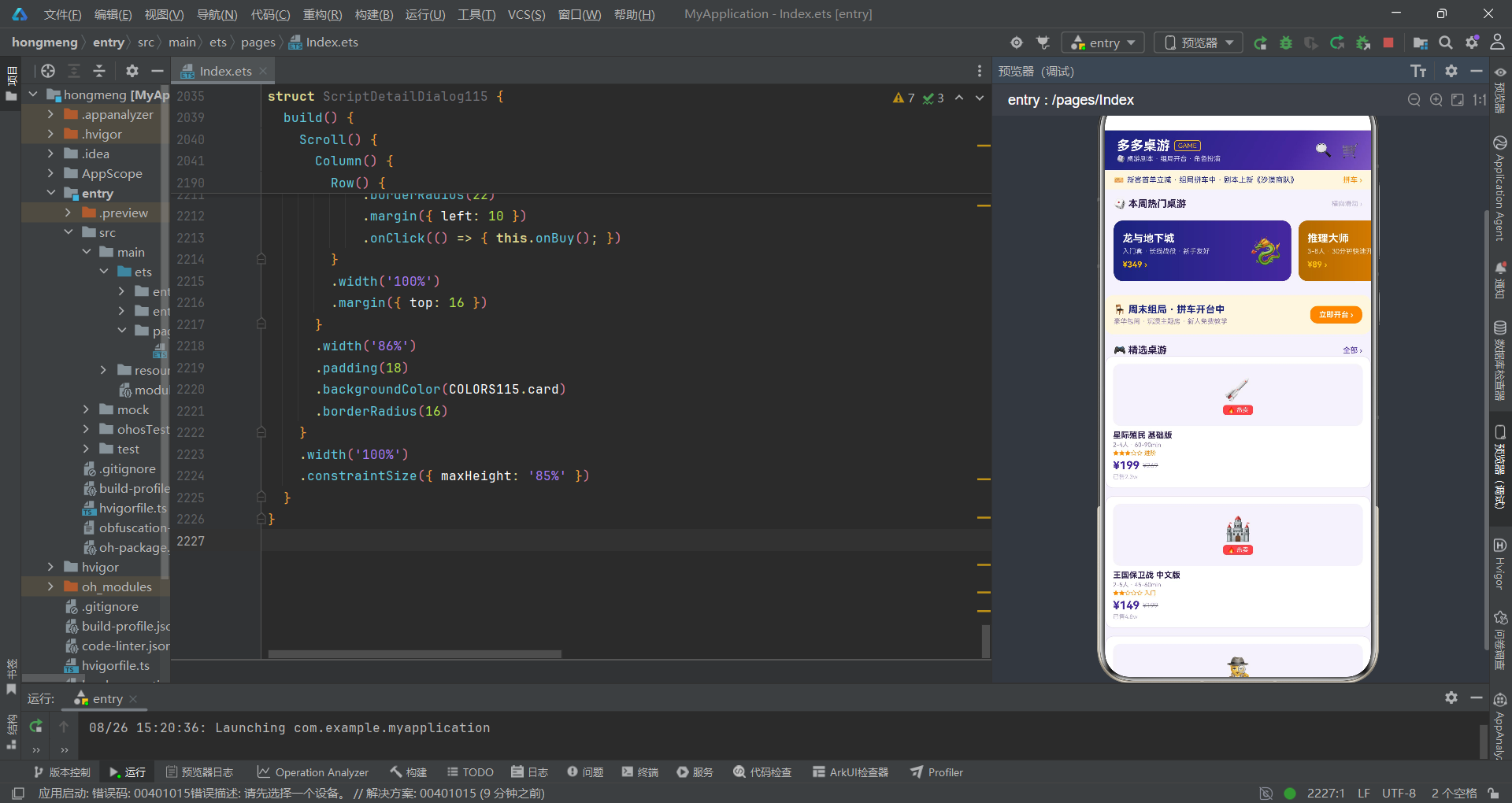
第一,从叙事结构的视角来看,该桌游剧本社区应用采用了"七幕主叙事+五段插叙"的复合叙事结构。七幕主叙事分别对应桌游展厅、剧本图书馆、角色化妆间、开台前台、荣誉殿堂、社区广场和个人后台七个场景,每幕场景都是一条独立的叙事线,通过底部七Tab徽章导航实现场景间的切换。五段插叙分别是预约开台、购买剧本、编辑角色、删除战报和剧本详情五个弹框,它们在主叙事推进过程中适时插入,为当前场景提供更深入的交互能力。这种"主线+插叙"的叙事结构在移动应用设计中极为常见,它确保了主叙事的流畅性(一屏一场景,快速切换),同时通过弹框插叙承载了需要更多交互空间的操作流程。
第二,从视觉语言的视角来看,该应用建立了深紫与橙的双色视觉体系。深紫色(#4527A0及其变体)作为主色调,出现在头部顶栏渐变、按钮选中态、价格文字、弹框头部等关键位置,承载着品牌识别和重点强调的功能。橙色(#FF8F00及其变体)作为辅助色,出现在"拼车"标签、"开台"按钮、评分徽章、成就标签等社交互动元素上,传递温暖与活力的情绪信号。两种色调的交替使用如同电影中的冷暖色调切换——深紫承载悬疑推理的冷调氛围,橙色传递社交欢乐的暖调温度。此外,COLORS115常量对象的集中管理确保了全片色彩的一致性和可维护性。
第三,从演员调度的视角来看,该应用的组件架构体现了清晰的层级分工。@Entry DuoDuoBoardApp作为总导演,统管十八个@State状态变量和七幕场景的切换调度。七个Tab组件(BoardGameTab115、ScriptTab115、RoleTab115、TableTab115、RankTab115、CommunityTab115、MineTab115)作为各幕场景的主演,通过回调函数与总导演保持通讯。五个弹框组件(BookTableDialog115、BuySheet115、EditRoleSheet115、DeleteReportDialog115、ScriptDetailDialog115)作为插叙演员,在需要时通过bindContentCover和bindSheet绑定入场。TabBtn115作为群演(底部导航按钮),通过参数接收icon、label、active和onTap四个属性,实现了可复用的按钮组件。这种分层调度模式确保了每个组件的职责单一、接口清晰。
第四,从技术实现的视角来看,该应用充分运用了ArkTS的声明式UI特性。ForEach循环渲染处理了所有列表场景(桌游列表、剧本列表、角色列表、桌型列表、拼车列表、排行列表、战报流等),且每个ForEach都提供了键值生成函数(如(g: BoardGame115) => g.id)以优化渲染性能。if/else条件渲染处理了场景切换和条件显示(热卖标签、已满状态等)。Scroll组件的嵌套使用(外层垂直、内层水平)实现了横滑大卡+纵向列表的复合布局。linearGradient渐变背景和.animation()动画属性为UI增添了视觉层次和交互反馈。可选链操作符?.和空值合并操作符??确保了可空类型的安全访问。
第五,从制片管理的视角来看,该应用的工程规范体现了ArkTS开发的最佳实践。所有工具函数(diffStars115、barW115、likeFmt115、rankColor115、campColor115)都抽取到了组件外部,符合"UI构建函数内不声明变量"的编译约束。所有事件回调使用箭头函数确保this绑定正确。所有颜色值通过COLORS115常量对象集中管理,避免散落的魔法数字。所有组件成员变量都提供了默认值,确保在父组件未传参时不会崩溃。ForEach的键值函数全部使用数据的唯一标识字段(g.id、s.id、r.id等),确保了列表渲染的正确性和性能。这些工程规范确保了代码的可读性、可维护性和运行时稳定性。

作为“人工智能6S店”的官方数字引擎,为AI开发者与企业提供一个覆盖软硬件全栈、一站式门户。
更多推荐


 7
7 0
0- 0


 已为社区贡献68条内容

所有评论(0)