
鸿蒙ArkTS深度解析:城市观鸟俱乐部应用的声明式UI架构与动效设计
技术要点:本文深入剖析了一个基于鸿蒙HarmonyOS ArkTS语言构建的城市观鸟俱乐部应用。该应用采用ArkUI声明式UI范式,以"自然手账图鉴风"为视觉主线,通过interface类型定义、@Component/@Entry/@Builder/@State等装饰器体系,以及animateTo驱动动画,完整实现了一个集观鸟社群、装备商城、鸟类图鉴收集、热点公园打卡于一体的综合性移动应用界面。本文将从数据模型设计、弹框组件架构、主入口布局、动画特效实现等多个维度进行逐段拆解分析。
一、技术背景与开发范式概述
1.1 鸿蒙HarmonyOS与ArkTS语言
鸿蒙HarmonyOS是华为推出的面向全场景的分布式操作系统,其应用开发框架提供了一套全新的声明式UI开发范式。ArkTS是在TypeScript基础上扩展而来的语言,专为鸿蒙生态定制,它在保留TypeScript静态类型检查能力的同时,增加了对声明式UI、状态管理、组件化开发的原生支持。ArkTS的核心优势在于它将UI描述与业务逻辑通过装饰器体系紧密耦合,使得开发者可以用更少的代码实现更丰富的交互效果。
在ArkTS中,开发者通过interface定义数据结构接口,通过@Component标注可复用的UI组件,通过@Entry标注应用入口组件,通过@State管理组件内部可变状态,通过@Builder定义可复用的UI构建函数。这套体系使得代码具有极高的可读性和可维护性,同时编译器能够在编译阶段进行静态检查,提前发现类型错误和逻辑问题。
1.2 ArkUI声明式UI范式
ArkUI的声明式UI范式与传统命令式UI有着本质区别。在命令式UI中,开发者需要手动操作DOM节点来更新界面;而在ArkUI中,开发者只需描述界面"应该是什么样子",框架会自动根据状态变化驱动UI更新。这种范式被称为"状态驱动UI"(State-Driven UI),其核心思想是UI = f(State),即界面是状态的函数映射。
在本应用中,这一思想得到了充分体现。例如,当用户切换底部Tab时,activeTab状态变量的变化会自动触发内容区的重新渲染;当用户点击某张鸟类图鉴卡片时,showLogForm状态变量从false变为true,弹框会自动出现在界面上方。开发者无需手动管理弹框的显示/隐藏逻辑,只需声明状态与UI的映射关系即可。
1.3 应用场景与功能概述
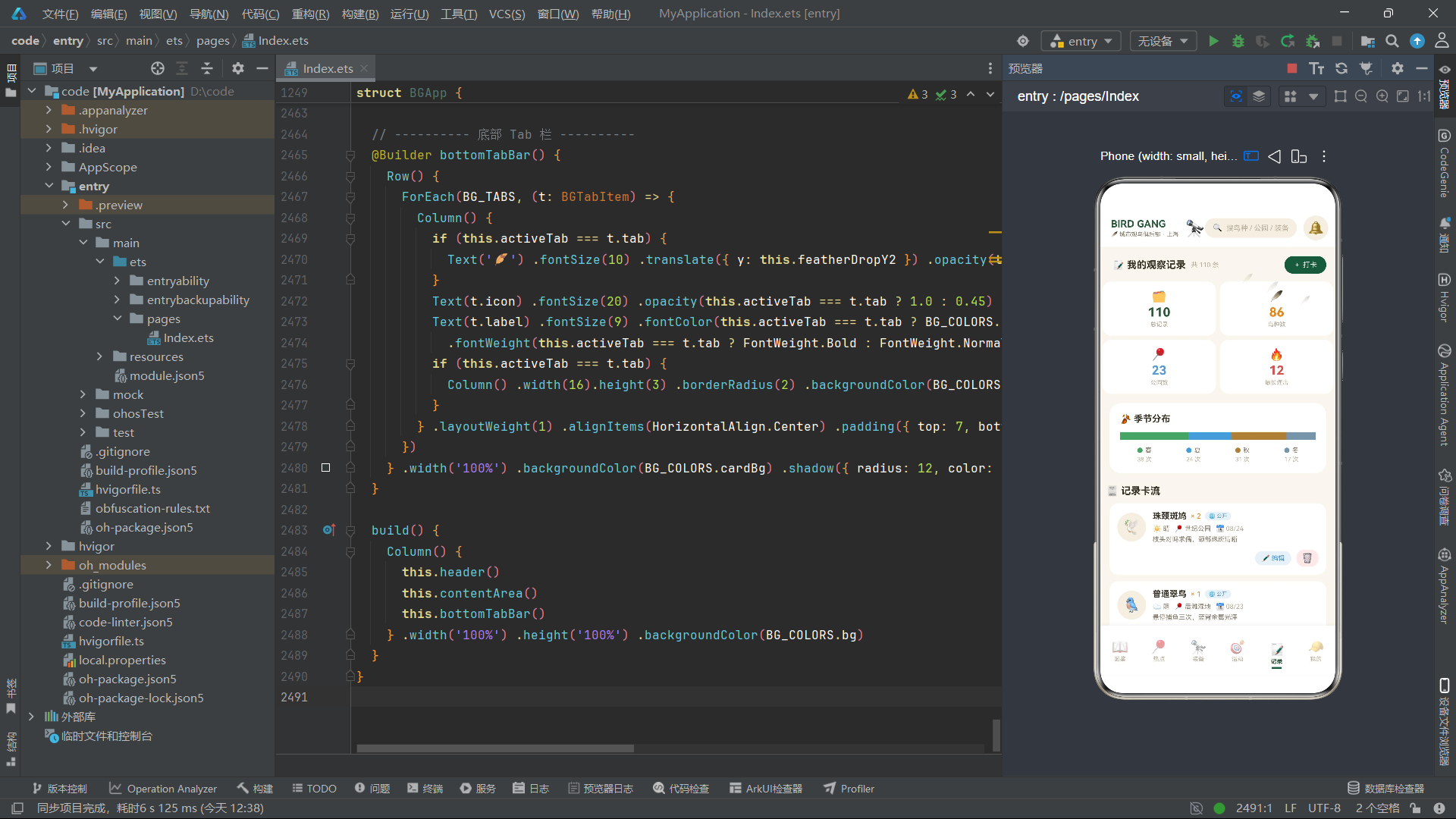
本文分析的应用是一个名为"BIRD GANG"的城市观鸟俱乐部移动端界面。该应用面向2026年上海公园观鸟热潮,将城市年轻人的观鸟社群、装备商城、鸟类图鉴收集、热点公园打卡、导赏活动等功能整合为一体。整体视觉风格采用"自然手账图鉴风",以米白色为底色,墨绿色为主色,暖橙色为强调色,营造出一种亲近自然、手账记录的温暖质感。
应用包含六个主要功能模块:图鉴(鸟类物种收集与稀有度分布)、热点(城市观鸟公园与本周新增目击)、装备(个人装备管理与装备商城)、活动(导赏活动报名)、记录(观察日志与统计)、我的(个人档案与徽章)。此外还有六个弹框组件,分别用于打卡记录、新增图鉴目标、装备入库、编辑观察笔记、删除记录确认和活动报名。应用还实现了羽毛飘落和望远镜镜头呼吸缩放两类动画特效,全部由animateTo驱动,无定时器方案。
二、类型定义与数据模型分析
2.1 调色板设计
应用首先定义了一个BGColorPalette接口,用于统一管理全部颜色资源。这种将颜色集中管理的做法是大型应用的最佳实践之一,它使得主题切换、暗色模式适配等工作变得极其简单。
interface BGColorPalette {
  bg: string
  cardBg: string
  inkGreen: string
  warmOrange: string
  kraft: string
  skyBlue: string
  textPrimary: string
  textSecondary: string
  textHint: string
  border: string
  success: string
  danger: string
  purple: string
  track: string
  white: string
  paperDark: string
}

const BG_COLORS: BGColorPalette = {
  bg: '#FAF6EE',
  cardBg: '#FFFFFF',
  inkGreen: '#2D5A3D',
  warmOrange: '#E8871E',
  kraft: '#A98143',
  skyBlue: '#5B9BD5',
  textPrimary: '#3B3428',
  textSecondary: '#8A7F6E',
  textHint: '#B8AD9A',
  border: '#EAE2D0',
  success: '#5FA36B',
  danger: '#D9534F',
  purple: '#8E6BB8',
  track: '#F0E9DA',
  white: '#FFFFFF',
  paperDark: '#F4EFE3'
}
上述代码定义了一个完整的调色板接口及其实现。interface BGColorPalette声明了16个字符串字段,分别对应背景色(bg)、卡片背景色(cardBg)、主色墨绿(inkGreen)、强调色暖橙(warmOrange)、牛皮纸棕(kraft)、天蓝点缀(skyBlue)、三级文字色(textPrimary/textSecondary/textHint)、边框色(border)、语义色(success/danger/purple)、轨道色(track)、白色(white)和牛皮纸暗色(paperDark)。这些颜色构成了"自然手账图鉴风"的视觉基调——米白底色营造手账纸质感,墨绿主色呼应林间自然氛围,暖橙强调色模拟夕阳下的羽毛光泽。
设计理念:将全部颜色集中到一个接口对象中管理,而不是在代码各处硬编码十六进制色值,这是前端工程化的基本要求。当需要适配暗色模式或进行主题切换时,只需替换这一个常量对象即可,无需全局搜索替换。这种"设计令牌"(Design Token)思想在ArkUI中同样适用。
2.2 底部Tab枚举与配置
enum BGTab {
  SPECIES = 0,
  HOTSPOTS = 1,
  GEAR = 2,
  EVENTS = 3,
  LOG = 4,
  ME = 5
}

interface BGTabItem {
  tab: BGTab
  icon: string
  label: string
}

const BG_TABS: BGTabItem[] = [
  { tab: BGTab.SPECIES, icon: '📖', label: '图鉴' },
  { tab: BGTab.HOTSPOTS, icon: '📍', label: '热点' },
  { tab: BGTab.GEAR, icon: '🔭', label: '装备' },
  { tab: BGTab.EVENTS, icon: '🎯', label: '活动' },
  { tab: BGTab.LOG, icon: '📝', label: '记录' },
  { tab: BGTab.ME, icon: '🧢', label: '我的' }
]
这里使用enum BGTab定义了六个底部Tab项的枚举值,从0到5分别对应图鉴、热点、装备、活动、记录、我的。使用枚举而非魔法数字(magic number)是编程最佳实践,它使得代码中activeTab === BGTab.SPECIES这样的条件判断具有自解释性。BGTabItem接口定义了每个Tab项的三个属性:枚举值、emoji图标和标签文字。BG_TABS数组则将六个Tab项的配置数据硬编码为一个常量数组,在底部Tab栏的构建函数中通过ForEach遍历渲染。
2.3 通用Chip元数据与各类Chip数据
应用大量使用了"Chip"(标签胶囊)组件模式,为此定义了通用的BGChipMeta接口:
interface BGChipMeta {
  label: string
  icon: string
  color: string
}

const BG_BIRD_QUICK_CHIPS: BGChipMeta[] = [
  { label: '珠颈斑鸠', icon: '🕊️', color: '#2D5A3D' },
  { label: '白头鹎', icon: '🐦', color: '#2D5A3D' },
  { label: '普通翠鸟', icon: '🐦', color: '#5B9BD5' },
  { label: '夜鹭', icon: '🦆', color: '#5B9BD5' },
  { label: '戴胜', icon: '🦜', color: '#E8871E' },
  { label: '红隼', icon: '🦅', color: '#D9534F' },
  { label: '白鹭', icon: '🦢', color: '#A98143' },
  { label: '黑水鸡', icon: '🦆', color: '#5B9BD5' }
]
BGChipMeta包含三个字段:标签文字、emoji图标、主题色。这种"三位一体"的Chip元数据设计使得同一个@Builder渲染函数可以适配多种不同语义的Chip组——鸟种快选、天气、季节、栖息地、装备品类、稀有度、集合点、打卡地点等,全部复用同一套数据结构和渲染逻辑。这是ArkUI组件化设计思想的典型体现:通过统一的数据接口实现UI的复用,而非为每种Chip类型编写独立的渲染代码。
2.4 鸟类图鉴数据模型
interface BGBirdSpecies {
  id: number
  name: string
  latin: string
  rarity: string
  habitat: string
  sightings: number
  emoji: string
  collected: boolean
}

const BG_BIRDS: BGBirdSpecies[] = [
  { id: 1, name: '珠颈斑鸠', latin: 'Spotted Dove', rarity: '常见', habitat: '林地', sightings: 128, emoji: '🕊️', collected: true },
  { id: 2, name: '白头鹎', latin: 'Light-vented Bulbul', rarity: '常见', habitat: '林地', sightings: 96, emoji: '🐦', collected: true },
  // ... 共18种鸟类
  { id: 17, name: '仙八色鸫', latin: 'Fairy Pitta', rarity: '传说', habitat: '林地', sightings: 3, emoji: '🐦', collected: false },
  { id: 18, name: '震旦鸦雀', latin: 'Reed Parrotbill', rarity: '传说', habitat: '湿地', sightings: 2, emoji: '🐦', collected: false }
]
BGBirdSpecies接口定义了鸟类物种的完整数据结构:唯一ID、中文名、拉丁学名、稀有度(常见/稀有/罕见/传说)、栖息地类型、目击次数、emoji图标、是否已收录。这个接口是整个图鉴模块的核心数据模型,18种鸟类按照稀有度从常见到传说依次排列,其中前14种已收录,后4种待解锁。collected布尔字段决定了卡片在界面上的视觉状态——已收录的卡片显示彩色背景和勾选标记,未收录的则显示灰色暗淡效果。
2.5 全局纯函数设计
应用在数据模型之后定义了一系列全局纯函数,用于将数据映射为视觉属性:
// 稀有度 → 主色
function bgRarityColor(rarity: string): string {
  if (rarity === '传说') {
    return BG_COLORS.purple
  } else if (rarity === '罕见') {
    return BG_COLORS.danger
  } else if (rarity === '稀有') {
    return BG_COLORS.warmOrange
  } else {
    return BG_COLORS.success
  }
}

// 月观察次数 → 柱状图高度
function bgMonthBarHeight(count: number): string {
  let h = count / 24 * 64
  return h.toFixed(0) + 'vp'
}

// 百分比字符串
function bgPercent(current: number, total: number): string {
  let pct = current / total * 100
  if (pct > 100) {
    pct = 100
  }
  return pct.toFixed(0) + '%'
}
这些纯函数的设计体现了"关注点分离"原则。bgRarityColor将稀有度文字映射为颜色值,bgMonthBarHeight将观察次数映射为柱状图高度(以vp为单位),bgPercent将分子分母映射为百分比字符串并做了超过100%的截断保护。将这些逻辑提取为独立函数而非内联在UI代码中,使得UI构建函数保持简洁,同时这些函数可以独立测试和复用。
技术要点:在ArkTS中,
vp(virtual pixel)是虚拟像素单位,它会根据屏幕密度自动缩放。使用vp而非px可以确保界面在不同分辨率设备上保持一致的视觉比例。toFixed(0)将浮点数截取为整数字符串,这是ArkTS中字符串拼接构建尺寸值的常用技巧。
三、核心弹框组件逐段分析
3.1 弹框1:打卡记录 BGLogSightingForm
@Component
struct BGLogSightingForm {
  onConfirm: () => void = () => {}
  onCancel: () => void = () => {}
  @State selBird: string = '珠颈斑鸠'
  @State birdCount: number = 2
  @State selSpot: string = '世纪公园'
  @State selWeather: string = '晴'
  @State noteText: string = ''
@Component装饰器标注这是一个可复用的UI组件。struct BGLogSightingForm定义了组件名。组件内部首先声明了两个回调函数属性onConfirm和onCancel,它们使用箭头函数作为默认值() => {},这种设计允许父组件通过参数传递自定义的确认和取消行为,实现了子组件与父组件之间的通信。
接下来是五个@State状态变量。@State是ArkUI中最核心的状态管理装饰器,它使得变量成为"可观察的"(observable)——当这些变量的值发生变化时,所有引用了这些变量的UI部分会自动重新渲染。selBird记录用户选择的鸟种(默认"珠颈斑鸠"),birdCount记录目击数量(默认2),selSpot记录地点(默认"世纪公园"),selWeather记录天气(默认"晴"),noteText记录备注文本(默认空字符串)。
技术要点:
@State装饰的变量只能在组件内部修改,它属于组件的"私有状态"。当需要在父子组件之间双向同步状态时,需要使用@Prop(单向同步)或@Link(双向同步)装饰器。本应用中弹框与主入口之间主要通过回调函数通信,而非状态同步,这是一种松耦合的设计选择。
3.1.1 标题构建函数
@Builder logFormTitle() {
  Row() {
    Text('📝').fontSize(18)
    Text('记录一次目击').fontSize(17).fontWeight(FontWeight.Bold)
      .fontColor(BG_COLORS.textPrimary).margin({ left: 8 })
    Column().layoutWeight(1)
    Text('✕').fontSize(15).fontColor(BG_COLORS.textHint)
      .padding({ left: 8, right: 8, top: 4, bottom: 4 })
      .onClick(() => { this.onCancel() })
  }.width('100%').padding({ left: 18, right: 12, top: 16, bottom: 12 })
}
@Builder装饰器定义了一个可复用的UI构建函数。logFormTitle构建了弹框的标题栏:使用Row容器横向排列emoji图标、标题文字、弹性占位列和关闭按钮。Column().layoutWeight(1)是一个空的列容器,通过layoutWeight(1)占据剩余空间,将关闭按钮推到右侧。Text('✕')的onClick事件调用this.onCancel(),触发父组件传入的取消回调。
这里涉及几个重要的ArkUI概念。Row是横向布局容器,它将子元素从左到右排列。Column是纵向布局容器,将子元素从上到下排列。layoutWeight是弹性布局权重,值为1表示占据父容器中所有剩余的可用空间。fontWeight(FontWeight.Bold)设置文字粗细。padding设置内边距,接受一个对象参数,可分别指定left/right/top/bottom。margin设置外边距,参数格式与padding相同。
3.1.2 鸟种Chip单元格构建函数
@Builder birdChipCell(c: BGChipMeta) {
  if (this.selBird === c.label) {
    Text(c.icon + ' ' + c.label)
      .fontSize(12).fontColor(BG_COLORS.white).backgroundColor(BG_COLORS.inkGreen)
      .padding({ left: 12, right: 12, top: 7, bottom: 7 })
      .borderRadius(14).margin({ left: 4, right: 4 })
  } else {
    Text(c.icon + ' ' + c.label)
      .fontSize(12).fontColor(BG_COLORS.textSecondary).backgroundColor(BG_COLORS.paperDark)
      .padding({ left: 12, right: 12, top: 7, bottom: 7 })
      .borderRadius(14).margin({ left: 4, right: 4 })
      .onClick(() => { this.selBird = c.label })
  }
}
birdChipCell是一个参数化的@Builder函数,接收一个BGChipMeta参数。函数内部使用if-else条件渲染:当当前选中的鸟种this.selBird等于该Chip的标签c.label时,渲染选中态(白字墨绿底);否则渲染未选中态(灰字牛皮纸暗底),并绑定onClick事件将this.selBird设为c.label。
这种"条件渲染"是ArkUI声明式UI的核心能力之一。开发者不需要手动操作DOM来切换样式,只需声明不同状态对应的UI描述,框架会自动根据状态变化重新渲染。borderRadius(14)将圆角设为14vp,使得Chip呈现胶囊形状。backgroundColor设置背景色,fontColor设置文字颜色。
3.1.3 build方法主体
build() {
  Column() {
    this.logFormTitle()
    Divider().color(BG_COLORS.border).strokeWidth(1)
    Scroll() {
      Column() {
        Text('选择鸟种').fontSize(13).fontWeight(FontWeight.Medium)
          .fontColor(BG_COLORS.textSecondary).width('100%').margin({ top: 14, left: 18 })
        Scroll() {
          Row() {
            ForEach(BG_BIRD_QUICK_CHIPS, (c: BGChipMeta) => {
              this.birdChipCell(c)
            })
          }.padding({ left: 14, right: 14 })
        }.scrollable(ScrollDirection.Horizontal).scrollBar(BarState.Off)
          .width('100%').margin({ top: 8 })

        Text('目击数量').fontSize(13)...
        Row() {
          Text('−')...onClick(() => { if (this.birdCount > 1) { this.birdCount -= 1 } })
          Column() { Text(this.birdCount.toString())...Text('只 / 群')... }
          Text('+')...onClick(() => { if (this.birdCount < 99) { this.birdCount += 1 } })
        }.justifyContent(FlexAlign.Center).width('100%').margin({ top: 10 })
        // ... 地点宫格、天气chips、备注输入等
      }.width('100%').padding({ bottom: 14 })
    }.layoutWeight(1).scrollBar(BarState.Off)

    Row() {
      Text('取消')...onClick(() => { this.onCancel() })
      Text('🪶 保存打卡')...backgroundColor(BG_COLORS.inkGreen)
        .onClick(() => { this.onConfirm() })
    }.width('100%').justifyContent(FlexAlign.Center)
      .padding({ top: 12, bottom: 6 })
  }.width('100%').constraintSize({ maxHeight: '80%' })
    .backgroundColor(BG_COLORS.cardBg).borderRadius(18).padding({ bottom: 10 })
}
build()是每个@Component必须实现的方法,它是组件UI的入口。在这个打卡记录弹框的build方法中,整体结构是一个Column纵向容器,从上到下依次是:标题栏、分割线、可滚动的内容区、底部按钮栏。
Divider是ArkUI提供的分割线组件,通过color和strokeWidth设置外观。Scroll是可滚动容器,内层Column包含所有表单字段。layoutWeight(1)让Scroll占据标题和按钮之间的全部可用空间。constraintSize({ maxHeight: '80%' })限制弹框最大高度为屏幕的80%,防止内容过多时溢出屏幕。
ForEach是ArkUI中的列表渲染组件,它接收三个参数:数据源数组、项渲染函数(可选键值生成函数)。这里ForEach(BG_BIRD_QUICK_CHIPS, (c: BGChipMeta) => { this.birdChipCell(c) })遍历鸟种Chip数组,对每个元素调用birdChipCell构建函数渲染一个Chip。Scroll外层设置了scrollable(ScrollDirection.Horizontal)使其支持横向滚动,scrollBar(BarState.Off)隐藏滚动条。
数量步进器(stepper)的设计也值得关注:减号按钮Text('−')的onClick中先判断this.birdCount > 1才执行减1操作,防止数量降至0以下;加号按钮Text('+')的onClick中判断this.birdCount < 99才执行加1操作,设置上限。这种边界保护是良好的编程习惯。
3.2 弹框2:新增图鉴目标 BGAddTargetForm
@Component
struct BGAddTargetForm {
  onConfirm: () => void = () => {}
  onCancel: () => void = () => {}
  @State selRarity: string = '稀有'
  @State selSeason: string = '夏'
  @State selHabitat: string = '林地'
  @State targetDesc: string = ''

  @Builder rarityCell(c: BGChipMeta) {
    Column() {
      Text(c.icon).fontSize(22)
      Text(c.label).fontSize(12).margin({ top: 5 })
        .fontColor(this.selRarity === c.label ? c.color : BG_COLORS.textSecondary)
        .fontWeight(this.selRarity === c.label ? FontWeight.Bold : FontWeight.Normal)
      if (this.selRarity === c.label) {
        Column().width(16).height(3).borderRadius(2)
          .backgroundColor(c.color).margin({ top: 4 })
      }
    }.layoutWeight(1).padding({ top: 12, bottom: 12 })
      .backgroundColor(this.selRarity === c.label ? bgRarityBg(c.label) : BG_COLORS.paperDark)
      .borderRadius(14).margin({ left: 3, right: 3 })
      .onClick(() => { this.selRarity = c.label })
  }
BGAddTargetForm是新增图鉴目标的弹框组件。它管理四个状态:目标稀有度(默认"稀有")、出没季节(默认"夏")、栖息地(默认"林地")、目标说明文本(默认空)。
rarityCell构建函数渲染稀有度选择宫格的单个单元格。与前面的Chip不同,这里使用Column纵向容器排列emoji图标、标签文字和选中指示条。当某项被选中时,底部会出现一个16vp宽、3vp高的彩色圆角条作为选中标记,同时背景色切换为该稀有度对应的浅色背景(通过bgRarityBg函数获取)。这种"选中指示条"的视觉设计在移动端选择器中非常常见,它比简单的变色更直观地传达"当前选中"的语义。
3.3 弹框3:装备入库 BGGearStoreForm
@Component
struct BGGearStoreForm {
  onConfirm: () => void = () => {}
  onCancel: () => void = () => {}
  @State selCategory: string = '望远镜'
  @State brandText: string = ''
  @State price: number = 1280
  @State dampProof: boolean = false
BGGearStoreForm是装备入库弹框,管理品类选择(默认"望远镜")、品牌型号文本、入手价格(默认1280)、是否存入防潮箱(默认false)。价格步进器每次增减100元,上限60000元,下限100元,保护了数据的有效范围。
特别值得注意的是防潮箱的Toggle开关组件:
Toggle({ type: ToggleType.Switch, isOn: this.dampProof })
  .selectedColor(BG_COLORS.inkGreen)
  .onChange((v: boolean) => { this.dampProof = v })
Toggle是ArkUI提供的开关组件,type参数指定开关类型(Switch为滑动开关),isOn绑定状态变量,selectedColor设置开启状态的主题色,onChange回调在开关状态变化时触发,参数v为新的布尔值。通过onChange回调更新this.dampProof,实现了开关与状态的绑定。
3.4 弹框4:编辑观察笔记 BGEditNoteForm
@Component
struct BGEditNoteForm {
  onConfirm: () => void = () => {}
  onCancel: () => void = () => {}
  recordSummary: string = '普通翠鸟 × 1 · 后滩湿地'
  @State noteText: string = ''
  @State moodScore: number = 4
  @State isPublic: boolean = true

  @Builder moodFeather(idx: number) {
    if (idx <= this.moodScore) {
      Text('🪶').fontSize(18).margin({ left: 5, right: 5 })
    } else {
      Text('🪶').fontSize(18).opacity(0.18).margin({ left: 5, right: 5 })
    }
  }
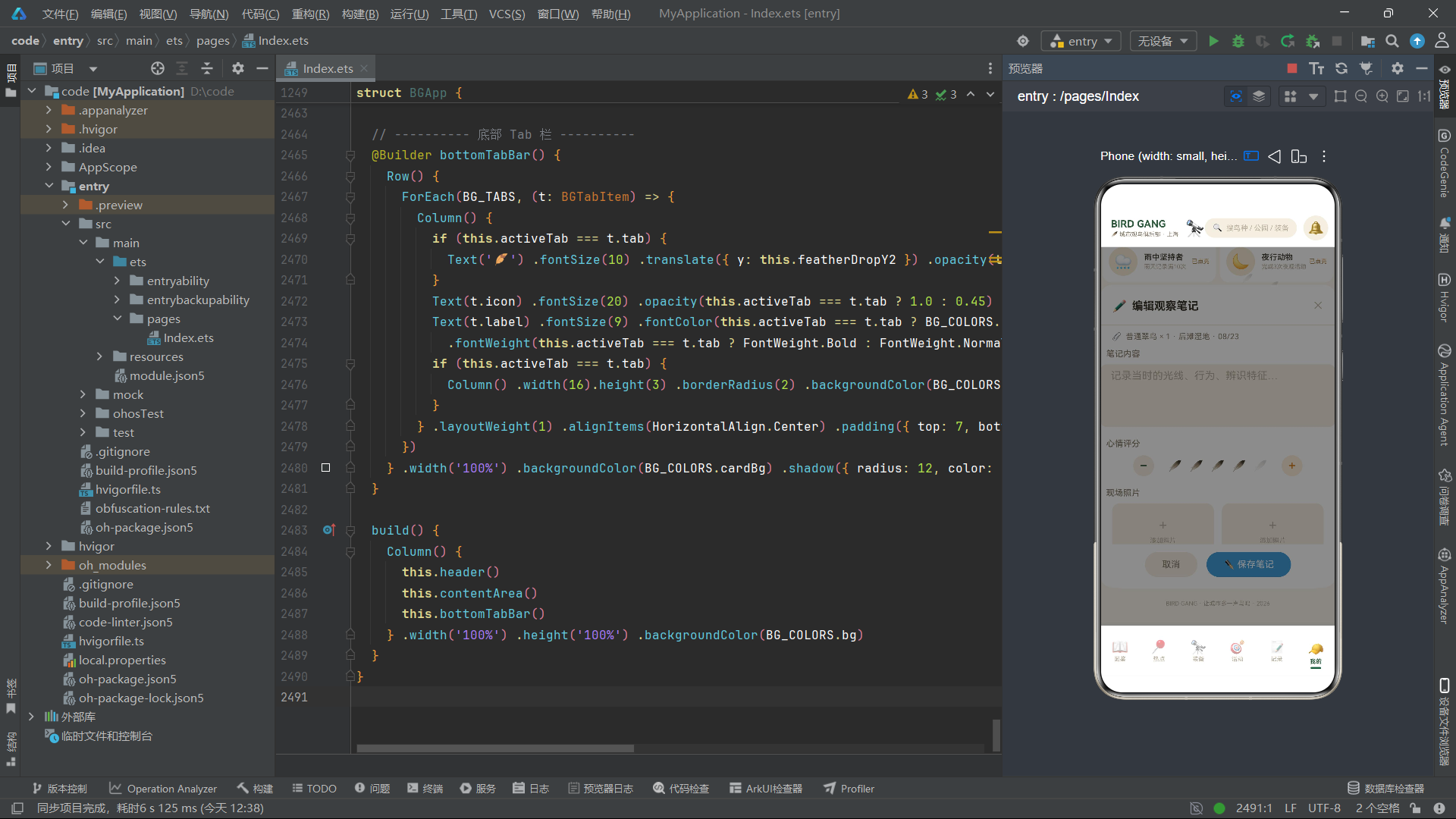
BGEditNoteForm是编辑观察笔记的弹框。除了常规的确认/取消回调和备注文本状态外,它还包含一个recordSummary属性(非@State,由父组件传入只读的记录摘要)和两个状态:心情评分(1-5,默认4)和是否公开(默认true)。
moodFeather构建函数实现了"羽毛评分"组件——5根羽毛emoji,评分范围内的羽毛正常显示,超出范围的羽毛设置opacity(0.18)使其半透明,模拟"未点亮"效果。这是一种用emoji+透明度实现星级评分的轻量级方案,无需引入图标库或自定义绘图。
3.5 弹框5:删除记录确认 BGDeleteLogForm
@Component
struct BGDeleteLogForm {
  onDelete: () => void = () => {}
  onCancel: () => void = () => {}
  recordSummary: string = '珠颈斑鸠 × 2 · 世纪公园 · 08/24'

  build() {
    Column() {
      Column() {
        Text('⚠️').fontSize(40).margin({ top: 22 })
        Text('确认删除这条记录?').fontSize(17).fontWeight(FontWeight.Bold)
          .fontColor(BG_COLORS.danger).margin({ top: 10 })
        Text('删除后目击数据将无法恢复,图鉴统计同步扣减')
          .fontSize(11).fontColor(BG_COLORS.textSecondary).margin({ top: 6 })
      }.width('100%').alignItems(HorizontalAlign.Center)

      Row() {
        Column() {
          Text('🗑️').fontSize(16)
          Text(this.recordSummary).fontSize(12).fontColor(BG_COLORS.danger)
            .fontWeight(FontWeight.Medium).margin({ top: 6 })
          Text('含现场笔记与照片').fontSize(10).fontColor(BG_COLORS.textHint)
            .margin({ top: 4 })
        }.alignItems(HorizontalAlign.Center)
        .padding({ left: 14, right: 14, top: 12, bottom: 12 })
      }.width('100%').backgroundColor('#FBE9E8').borderRadius(12)
        .margin({ top: 16, left: 20, right: 20 })

      Row() {
        Text('手滑了')...onClick(() => { this.onCancel() })
        Text('🗑️ 确认删除')...backgroundColor(BG_COLORS.danger)
          .onClick(() => { this.onDelete() })
      }.width('100%').justifyContent(FlexAlign.Center)
        .padding({ top: 22, bottom: 18 })
    }.width('82%').backgroundColor(BG_COLORS.cardBg).borderRadius(18)
      .border({ width: 1, color: '#F2C4C2' })
  }
}
BGDeleteLogForm是一个确认删除弹框,采用了红色警示风格。整体宽度设为82%(比其他弹框窄),使用红色边框#F2C4C2增强警示感。警告内容区域居中排列大号警告emoji、红色加粗标题和灰色描述文字。中间的记录摘要卡片使用浅红色背景#FBE9E8。底部双按钮中,取消按钮文字"手滑了"采用轻松语态降低用户心理压力,确认按钮使用红色背景。
3.6 弹框6:活动报名 BGEventJoinForm
@Component
struct BGEventJoinForm {
  onConfirm: () => void = () => {}
  onCancel: () => void = () => {}
  @State selEventIdx: number = 0
  @State joinCount: number = 2
  @State rentGear: boolean = true
  @State selMeetPoint: string = '二号门'

  @Builder eventOptionCell(o: BGEventOption, idx: number) {
    Column() {
      Row() {
        Text(o.label).fontSize(12)
          .fontColor(this.selEventIdx === idx ? BG_COLORS.white : BG_COLORS.textPrimary)
          .fontWeight(this.selEventIdx === idx ? FontWeight.Bold : FontWeight.Medium)
          .maxLines(1).textOverflow({ overflow: TextOverflow.Ellipsis })
        Column().layoutWeight(1)
        if (this.selEventIdx === idx) {
          Text('✓').fontSize(13).fontColor(BG_COLORS.white)
        }
      }.width('100%')
      Text(o.time).fontSize(10)
        .fontColor(this.selEventIdx === idx ? '#D9E8DC' : BG_COLORS.textHint)
        .margin({ top: 4 })
      Row() {
        Text('¥' + o.fee.toString() + ' / 人').fontSize(11)
          .fontColor(this.selEventIdx === idx ? '#F3C77B' : BG_COLORS.warmOrange)
          .fontWeight(FontWeight.Bold)
      }.margin({ top: 4 })
    }.layoutWeight(1)
      .padding({ left: 12, right: 12, top: 12, bottom: 12 })
      .backgroundColor(this.selEventIdx === idx ? BG_COLORS.inkGreen : BG_COLORS.paperDark)
      .borderRadius(14).margin({ left: 3, right: 3 })
      .onClick(() => { this.selEventIdx = idx })
  }
BGEventJoinForm是活动报名弹框,管理选中活动索引(默认0)、报名人数(默认2)、是否租赁望远镜(默认true)、集合点(默认"二号门")四个状态。eventOptionCell构建函数渲染活动选项卡片,通过this.selEventIdx === idx判断当前是否选中,选中时整张卡片变为墨绿色背景、白色文字,未选中时为牛皮纸暗色背景。maxLines(1)限制文字最多一行,textOverflow({ overflow: TextOverflow.Ellipsis })设置溢出时显示省略号,这是长文本截断的标准做法。
四、主入口组件 BGApp 深度分析
4.1 组件状态与生命周期
@Entry
@Component
struct BGApp {
  @State activeTab: BGTab = BGTab.SPECIES
  @State showLogForm: boolean = false
  @State showTargetForm: boolean = false
  @State showGearForm: boolean = false
  @State showNoteForm: boolean = false
  @State showDeleteForm: boolean = false
  @State showEventForm: boolean = false
  @State speciesFilter: string = '全部'
  @State gearFilter: string = '全部'
  @State selectedLogSummary: string = '珠颈斑鸠 × 2 · 世纪公园 · 08/24'
  @State selectedNoteSummary: string = '普通翠鸟 × 1 · 后滩湿地'
  @State featherDropY1: number = 0
  @State featherDropY2: number = 0
  @State featherOpacity1: number = 0.9
  @State featherOpacity2: number = 0.7
  @State lensScale: number = 1.0
@Entry装饰器标注BGApp为应用的入口组件,每个ArkUI应用有且仅有一个@Entry组件。主入口组件管理着全部应用级状态:当前激活的Tab(默认图鉴页)、六个弹框的显隐开关(初始全为false)、图鉴和装备的筛选条件、传递给弹框的记录摘要文本,以及四个动画状态变量(两组羽毛飘落的Y轴位移和透明度、望远镜缩放比例)。
将所有弹框开关集中在主入口管理是一种"状态提升"(State Hoisting)的设计模式。弹框组件本身不管理自己的显隐状态,而是由父组件控制。这样做的好处是:父组件可以统一管理弹框的互斥关系(如同时只显示一个弹框),并且可以在任何位置触发弹框显示。
4.2 aboutToAppear生命周期与动画启动
aboutToAppear(): void {
  this.getUIContext().animateTo({
    duration: 2400,
    iterations: -1,
    playMode: PlayMode.Alternate,
    curve: Curve.EaseOut
  }, () => {
    this.featherDropY1 = 34
    this.featherOpacity1 = 0.15
  })
  this.getUIContext().animateTo({
    duration: 1700,
    iterations: -1,
    playMode: PlayMode.Alternate,
    curve: Curve.EaseInOut
  }, () => {
    this.featherDropY2 = 22
    this.featherOpacity2 = 0.2
  })
  this.getUIContext().animateTo({
    duration: 1300,
    iterations: -1,
    playMode: PlayMode.Alternate,
    curve: Curve.EaseInOut
  }, () => {
    this.lensScale = 1.16
  })
}
aboutToAppear是ArkUI组件的生命周期回调,在组件创建后、build方法执行前调用。这里利用它来启动三个无限循环动画。
this.getUIContext().animateTo()是ArkUI提供的动画API。它接收两个参数:动画配置对象和状态修改闭包。动画配置对象包含四个关键属性:
duration:动画时长,单位毫秒(2400ms = 2.4秒)iterations:循环次数,-1表示无限循环playMode:播放模式,PlayMode.Alternate表示往返交替(先正向播放到目标值,再反向播放回初始值)curve:动画曲线,Curve.EaseOut表示先快后慢的缓出曲线,Curve.EaseInOut表示先慢后快再慢的缓入缓出曲线
第二个参数是一个闭包函数,在闭包内修改状态变量。animateTo会自动捕获这些状态变化,并为其创建从当前值到目标值的过渡动画。由于设置了iterations: -1和PlayMode.Alternate,动画会在初始值和目标值之间无限往返。
技术要点:
animateTo驱动的动画完全由ArkUI框架的渲染管线管理,不依赖JavaScript定时器(setInterval/setTimeout)。这意味着动画运行在UI线程上,不会因为JavaScript执行阻塞而卡顿。同时,当组件被销毁时,框架会自动停止关联的动画,无需手动清理。这是ArkUI动画系统相对于传统Web动画的重要优势。
4.3 静态电商风头部
@Builder header() {
  Column() {
    Row() {
      Column() {
        Text('BIRD GANG').fontSize(15).fontWeight(FontWeight.Bold)
          .fontColor(BG_COLORS.inkGreen)
        Row() {
          Text('🪶').fontSize(9)
          Text('城市观鸟俱乐部 · 上海').fontSize(9)
            .fontColor(BG_COLORS.textSecondary).margin({ left: 2 })
        }.margin({ top: 2 })
      }.alignItems(HorizontalAlign.Start)

      Text('🔭').fontSize(24).margin({ left: 10 })

      Column().layoutWeight(1)

      Row() {
        Text('🔍').fontSize(12)
        Text('搜鸟种 / 公园 / 装备').fontSize(11)
          .fontColor(BG_COLORS.textHint).margin({ left: 6 })
      }.padding({ left: 12, right: 12, top: 8, bottom: 8 })
        .backgroundColor(BG_COLORS.paperDark).borderRadius(18)
        .onClick(() => { this.speciesFilter = '全部' })

      Column() {
        Text('🔔').fontSize(20)
      }.width(38).height(38).borderRadius(19)
        .backgroundColor(BG_COLORS.paperDark)
        .justifyContent(FlexAlign.Center).alignItems(HorizontalAlign.Center)
        .margin({ left: 10 }).onClick(() => { this.activeTab = BGTab.LOG })

      Stack() {
        Text('🧢').fontSize(19)
        Column().width(8).height(8).borderRadius(4)
          .backgroundColor(BG_COLORS.warmOrange).position({ x: 27, y: 3 })
      }.width(34).height(34).margin({ left: 8 })
        .onClick(() => { this.activeTab = BGTab.ME })
    }.width('100%').padding({ left: 16, right: 14, top: 10, bottom: 10 })
  }.width('100%').backgroundColor(BG_COLORS.cardBg)
}
头部header构建函数实现了一个典型的电商风格导航栏。整体结构是一个Column包裹一个Row。Row内从左到右依次排列:品牌名+副标题(左对齐纵向列)、望远镜emoji、弹性占位列、搜索框、通知按钮、头像按钮。
这里值得特别关注的是Stack容器的使用。Stack是ArkUI中的层叠布局容器,它允许多个子元素堆叠在同一位置。在头像按钮中,Stack内放了一个emoji头像和一个8vp大小的橙色小圆点(通过position定位到右上角),模拟"有未读消息"的红点提示效果。position({ x: 27, y: 3 })使用绝对定位将小圆点放在Stack内坐标(27, 3)的位置。
4.4 弹框遮罩与挂载
@Builder modalOverlay(onClose: () => void) {
  Column().width('100%').height('100%')
    .backgroundColor('rgba(0,0,0,0.45)')
    .position({ x: 0, y: 0 }).zIndex(999).onClick(onClose)
}

@Builder logFormModal() {
  Stack() {
    this.modalOverlay(() => { this.showLogForm = false })
    BGLogSightingForm({
      onConfirm: () => { this.showLogForm = false },
      onCancel: () => { this.showLogForm = false }
    })
  }.width('100%').height('100%')
    .alignContent(Alignment.Center)
    .position({ x: 0, y: 0 }).zIndex(999)
}
modalOverlay是一个通用的弹框遮罩构建函数,接收一个onClose回调。它渲染一个全屏半透明黑色Column(rgba(0,0,0,0.45)),通过position绝对定位覆盖全屏,zIndex(999)确保其显示在所有内容之上。点击遮罩区域会触发onClose回调关闭弹框。
logFormModal是打卡记录弹框的挂载构建函数。使用Stack层叠容器,先放遮罩层,再放弹框组件BGLogSightingForm。通过alignContent(Alignment.Center)使弹框居中显示。position和zIndex确保弹框层覆盖在内容区和遮罩之上。弹框组件通过参数传递onConfirm和onCancel回调,两个回调都将showLogForm设为false以关闭弹框。
这种"遮罩+弹框"的Stack层叠模式是ArkUI实现模态弹框的标准方案。六个弹框的挂载结构完全一致,只是传入的组件和回调不同,体现了高度的代码复用性。
4.5 内容区与动画特效层
@Builder contentArea() {
  Stack() {
    if (this.activeTab === BGTab.SPECIES) {
      this.speciesContent()
    } else if (this.activeTab === BGTab.HOTSPOTS) {
      this.hotspotsContent()
    } else if (this.activeTab === BGTab.GEAR) {
      this.gearContent()
    } else if (this.activeTab === BGTab.EVENTS) {
      this.eventsContent()
    } else if (this.activeTab === BGTab.LOG) {
      this.logContent()
    } else {
      this.meContent()
    }

    Text('🪶').fontSize(18)
      .translate({ y: this.featherDropY1 })
      .opacity(this.featherOpacity1)
      .position({ x: '70%', y: '3%' })

    Text('🪶').fontSize(13)
      .translate({ y: this.featherDropY2 })
      .opacity(this.featherOpacity2)
      .position({ x: '85%', y: '9%' })

    Text('🪶').fontSize(15)
      .translate({ y: this.featherDropY1 })
      .opacity(this.featherOpacity1)
      .position({ x: '60%', y: '1%' })

    if (this.showLogForm) { this.logFormModal() }
    if (this.showTargetForm) { this.targetFormModal() }
    if (this.showGearForm) { this.gearFormModal() }
    if (this.showNoteForm) { this.noteFormModal() }
    if (this.showDeleteForm) { this.deleteFormModal() }
    if (this.showEventForm) { this.eventFormModal() }
  }.width('100%').height('100%').layoutWeight(1)
}
内容区contentArea是整个应用最核心的构建函数。它使用一个Stack容器,将四层内容堆叠在一起:
- Tab内容层:通过
if-else if-else条件判断当前activeTab的值,渲染对应的Tab内容构建函数。当activeTab变化时,ArkUI框架会自动卸载旧内容、挂载新内容。 - 羽毛动画层:三个
Text('🪶')元素分别通过position定位到不同位置,通过translate({ y: this.featherDropY1 })实现Y轴位移动画,通过opacity实现透明度变化。三根羽毛使用不同的动画状态变量(两组:dropY1/opacity1和dropY2/opacity2),使得它们的飘落节奏不同,更加自然。 - 弹框层:六个
if条件判断分别检查六个弹框开关状态,当某个开关为true时挂载对应的弹框Modal。
translate是ArkUI的变换属性,它在不影响布局的前提下对元素进行平移变换。与position不同,position改变的是元素的布局位置(会影响其他元素的布局),而translate是在布局完成后的视觉变换(不影响其他元素)。因此羽毛的position确定了其在界面上的初始位置,translate则在这个位置上叠加Y轴方向的飘落位移。
4.6 Tab1图鉴内容详解
@Builder birdCard(b: BGBirdSpecies) {
  Column() {
    Stack() {
      Column() {
        Text(b.emoji).fontSize(28)
      }.width(48).height(48).borderRadius(24)
        .backgroundColor(b.collected ? bgRarityBg(b.rarity) : BG_COLORS.paperDark)
        .justifyContent(FlexAlign.Center)

      if (b.collected) {
        Text('✓').fontSize(10).fontColor(BG_COLORS.white)
          .width(16).height(16).borderRadius(8)
          .backgroundColor(BG_COLORS.success).textAlign(TextAlign.Center)
          .position({ x: 32, y: 0 })
      }
    }.width(48).height(48).margin({ top: 10 })

    Text(b.name).fontSize(12).fontWeight(FontWeight.Medium)
      .fontColor(b.collected ? BG_COLORS.textPrimary : BG_COLORS.textHint)
      .margin({ top: 6 }).maxLines(1)

    Text(b.latin).fontSize(8).fontColor(BG_COLORS.textHint)
      .maxLines(1).margin({ top: 2 })

    Row() {
      Column().width(6).height(6).borderRadius(3)
        .backgroundColor(bgRarityColor(b.rarity))
      Text(b.rarity).fontSize(9).fontColor(bgRarityColor(b.rarity))
        .margin({ left: 4 })
    }.margin({ top: 6, bottom: 10 })

    Text('目击 ' + b.sightings.toString()).fontSize(8)
      .fontColor(BG_COLORS.textHint).margin({ bottom: 10 })
  }.layoutWeight(1).alignItems(HorizontalAlign.Center)
    .backgroundColor(b.collected ? BG_COLORS.cardBg : BG_COLORS.paperDark)
    .borderRadius(14).margin({ left: 4, right: 4, top: 8 })
    .onClick(() => { this.showLogForm = true })
}
birdCard是鸟类图鉴卡片的构建函数,接收一个BGBirdSpecies参数。卡片整体是一个Column容器,内部从上到下排列:emoji头像(带Stack层叠的勾选标记)、鸟名、拉丁学名、稀有度色标行、目击次数。
Stack层叠容器在这里用于实现"头像+勾选标记"的复合效果:底层是48vp的圆形emoji头像,当b.collected为true时,上层叠加一个16vp的绿色勾选小圆点,通过position({ x: 32, y: 0 })定位到头像右上角。当b.collected为false时,不渲染勾选标记,且头像背景变为灰色、文字变为暗淡色,清晰传达"未收录"的视觉语义。
稀有度色标行使用一个6vp的彩色圆点加上文字标签,颜色由bgRarityColor函数根据稀有度返回。这个设计简洁有效地将稀有度信息编码为颜色信号:绿色=常见、橙色=稀有、红色=罕见、紫色=传说。
技术要点:
layoutWeight(1)在卡片中设置为1,使得三张卡片在一行中平分宽度。maxLines(1)限制鸟名和拉丁名最多显示一行,防止过长的名称撑破卡片布局。textAlign(TextAlign.Center)设置文字居中对齐。这些都是ArkUI中控制文本和布局的常用属性。
4.7 图鉴进度卡片与望远镜呼吸特效
@Builder speciesContent() {
  Scroll() {
    Column() {
      Column() {
        Row() {
          Column() {
            Text('图鉴收集进度').fontSize(15).fontWeight(FontWeight.Bold)
              .fontColor(BG_COLORS.white)
            Text('已收录 86 / 120 种城市鸟').fontSize(11)
              .fontColor('#D9E8DC').margin({ top: 4 })
            Row() {
              Text('本月 +7').fontSize(10).fontColor('#F3C77B')
                .fontWeight(FontWeight.Medium)
              Text('待解锁 34 种').fontSize(10).fontColor('#D9E8DC')
                .margin({ left: 12 })
            }.margin({ top: 6 })
          }.alignItems(HorizontalAlign.Start).layoutWeight(1)

          Text('🔭').fontSize(34)
            .scale({ x: this.lensScale, y: this.lensScale })
            .margin({ right: 6 })
        }.width('100%')

        Row() {
          Column().width(bgPercent(BG_DEX_COLLECTED, BG_DEX_TOTAL))
            .height(8).backgroundColor('#F3C77B').borderRadius(4)
          Column().layoutWeight(1)
        }.width('100%').height(8)
          .backgroundColor('rgba(255,255,255,0.25)').borderRadius(4)
          .margin({ top: 14 })

        Row() {
          Column() {
            Text('86').fontSize(17).fontWeight(FontWeight.Bold)
              .fontColor(BG_COLORS.white)
            Text('已收集').fontSize(9).fontColor('#D9E8DC')
              .margin({ top: 2 })
          }.layoutWeight(1).alignItems(HorizontalAlign.Center)
          // ... 本页鸟种、完成度
        }.width('100%').margin({ top: 14 })
      }.padding(16).backgroundColor(BG_COLORS.inkGreen)
        .borderRadius(18).margin({ left: 14, right: 14, top: 12 })
      // ... 筛选条、鸟种卡片宫格、稀有度分布条等
    }.width('100%').padding({ bottom: 20 })
  }.width('100%').layoutWeight(1).scrollBar(BarState.Off)
}
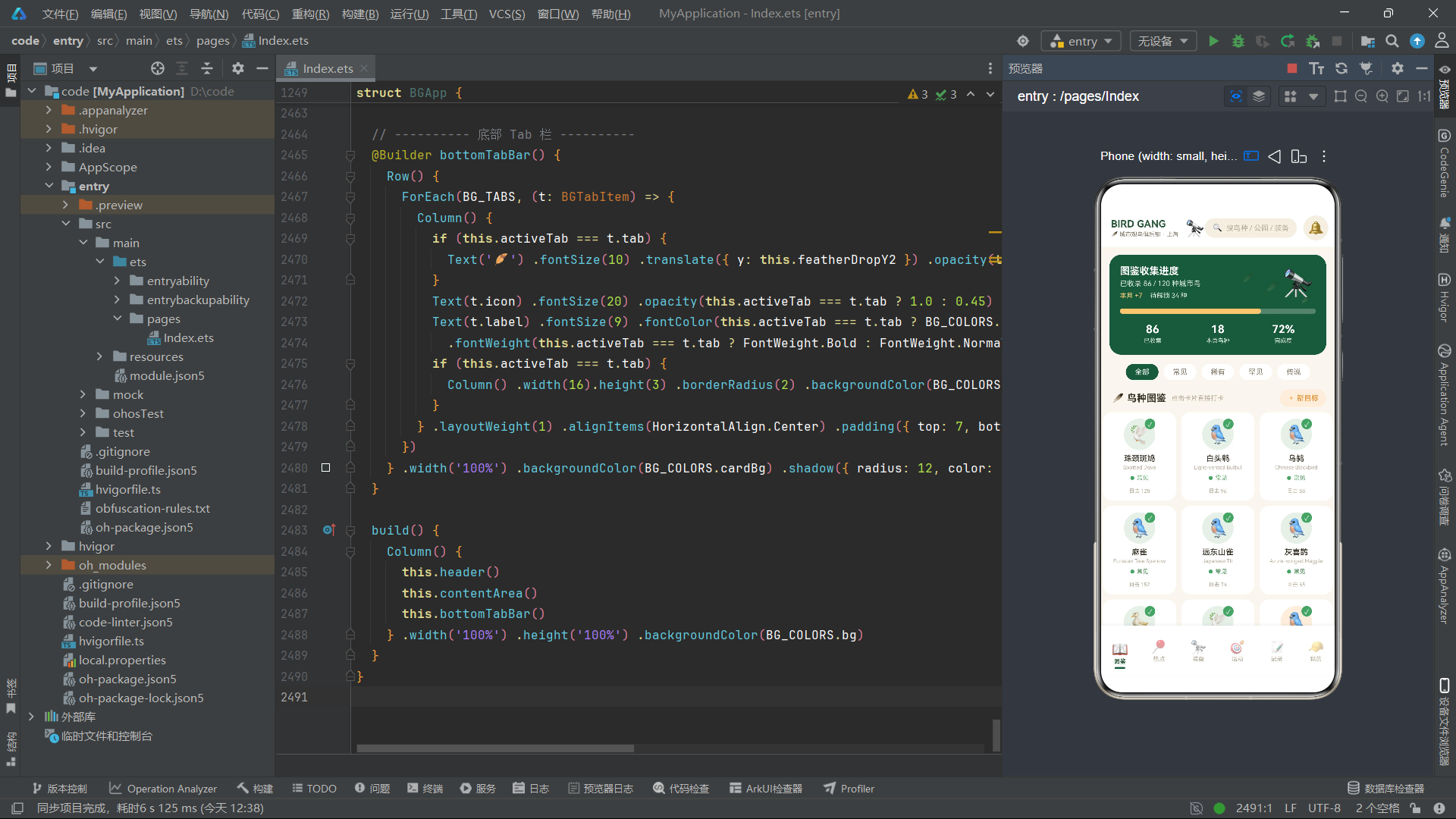
图鉴页面speciesContent是内容最丰富的Tab页。顶部是一张墨绿色背景的进度大卡,展示图鉴收集进度。卡内右侧的望远镜emoji Text('🔭')通过scale({ x: this.lensScale, y: this.lensScale })实现了呼吸缩放特效——this.lensScale在aboutToAppear中启动的动画驱动下,在1.0和1.16之间往返变化,模拟望远镜镜头一呼一吸的视觉效果。
scale是ArkUI的变换属性,它接收一个对象参数{ x, y }分别指定X轴和Y轴的缩放比例。值为1表示原始大小,1.16表示放大16%。由于X和Y同步缩放,视觉上是等比缩放,不会产生形变。
进度条使用两个Column实现:一个宽度为bgPercent(86, 120)(即72%)的彩色填充列,加上一个layoutWeight(1)的透明占位列,两者放在一个固定高度8vp、圆角4vp的容器内,容器背景为半透明白色rgba(255,255,255,0.25)。这种"填充+占位"的双列模式是ArkUI实现进度条的常见手法。
4.8 稀有度分布堆叠条
Row() {
  Column().width(BG_RARITY_SLICES[0].percent + '%').height(14)
    .backgroundColor(BG_RARITY_SLICES[0].color)
    .borderRadius({ topLeft: 7, bottomLeft: 7 })
  Column().width(BG_RARITY_SLICES[1].percent + '%').height(14)
    .backgroundColor(BG_RARITY_SLICES[1].color)
  Column().width(BG_RARITY_SLICES[2].percent + '%').height(14)
    .backgroundColor(BG_RARITY_SLICES[2].color)
  Column().width(BG_RARITY_SLICES[3].percent + '%').height(14)
    .backgroundColor(BG_RARITY_SLICES[3].color)
    .borderRadius({ topRight: 7, bottomRight: 7 })
}.width('100%').margin({ top: 12 })
稀有度分布条使用四个宽度为百分比的Column横向排列,总宽度100%,模拟堆叠条形图(Stacked Bar Chart)。最左侧的列设置左上左下圆角borderRadius({ topLeft: 7, bottomLeft: 7 }),最右侧的列设置右上右下圆角borderRadius({ topRight: 7, bottomRight: 7 }),使得整体条形图两端圆滑。borderRadius在ArkUI中既可以接收一个数字(四角统一),也可以接收一个对象分别指定四个角的圆角半径。
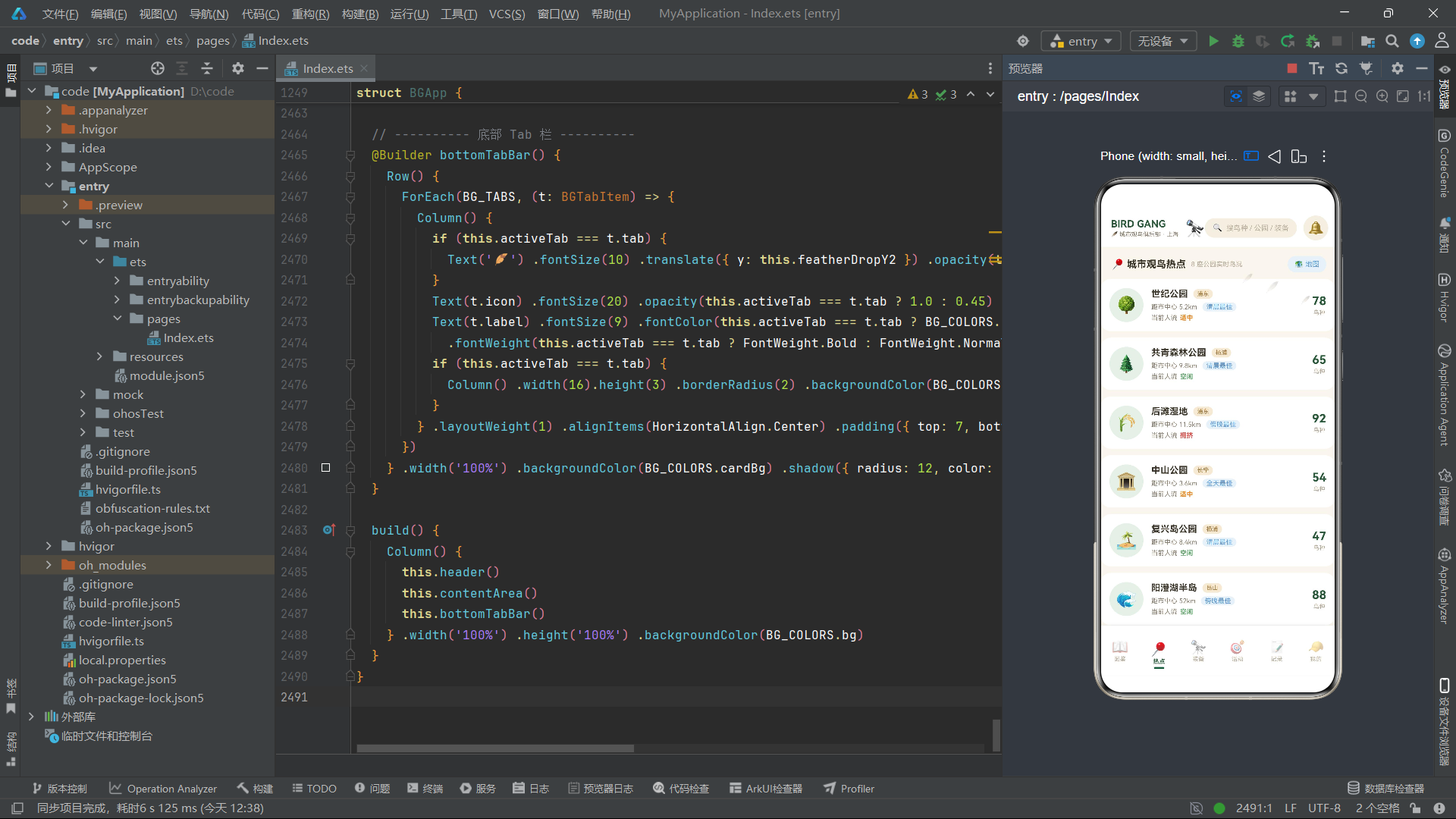
4.9 Tab2热点页面与月观察柱状图
ForEach(BG_MONTH_STATS, (m: BGMonthStat) => {
  Column() {
    Text(m.count.toString()).fontSize(8)
      .fontColor(m.isCurrent ? BG_COLORS.warmOrange : BG_COLORS.textHint)
      .margin({ bottom: 2 })
    Column().width(14).height(bgMonthBarHeight(m.count))
      .backgroundColor(m.isCurrent ? BG_COLORS.warmOrange : '#A8C3AE')
      .borderRadius(4)
    Text(m.label).fontSize(8).fontColor(BG_COLORS.textHint)
      .margin({ top: 4 })
  }.layoutWeight(1).alignItems(HorizontalAlign.Center)
})
月观察次数柱状图通过ForEach遍历12个月的数据,每个月渲染一个Column,内含数值标签、柱体和月份标签。柱体高度由bgMonthBarHeight(m.count)函数计算(count / 24 * 64,将最大24次映射为64vp高度)。当前月份(8月)的柱体和数值使用暖橙色,其余使用浅绿色#A8C3AE。layoutWeight(1)使12个月份列平分宽度,形成均匀的柱状图布局。
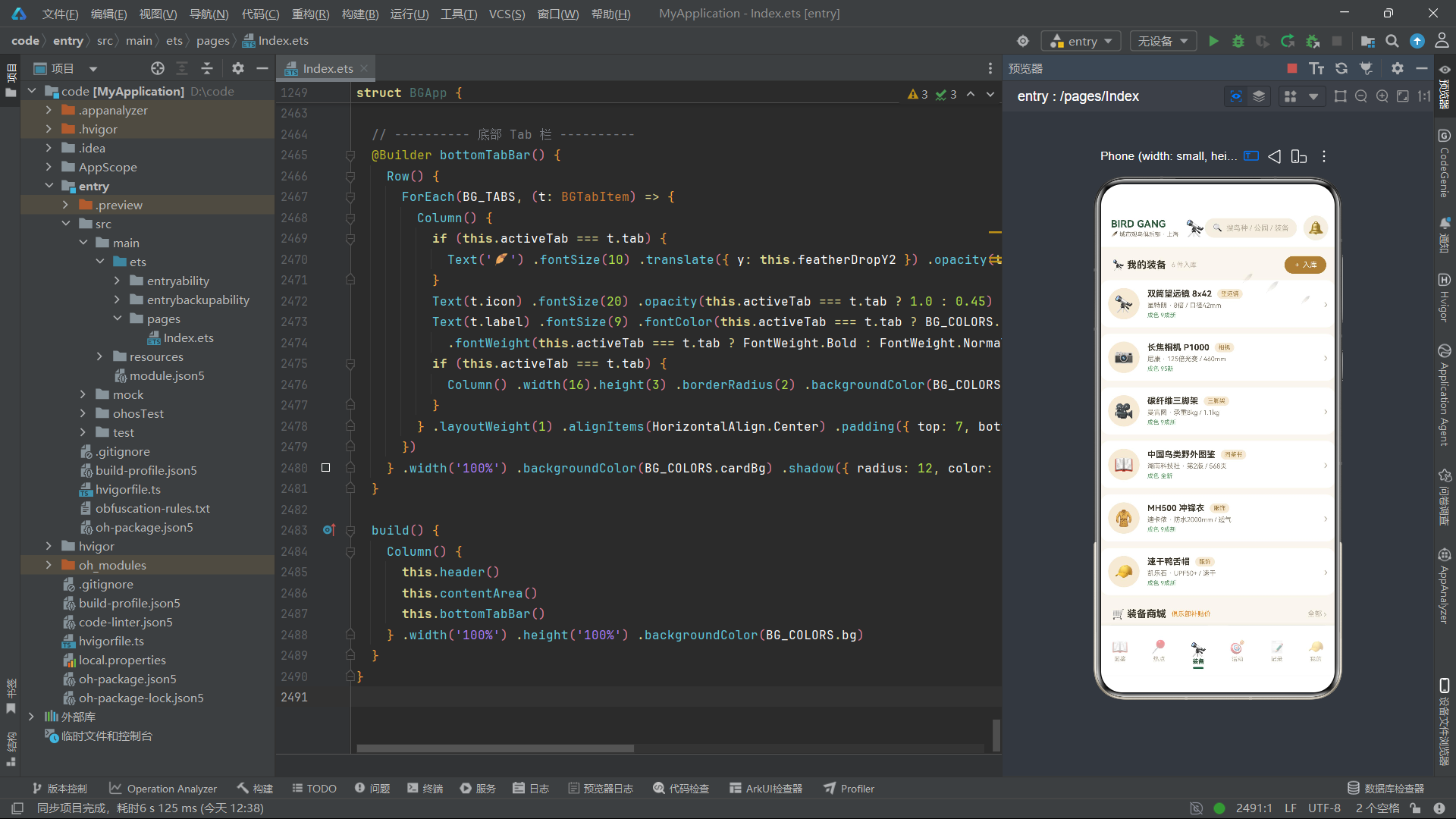
4.10 Tab3装备页面与商城卡片
@Builder gearStoreCard(g: BGGearStoreItem) {
  Column() {
    Column() {
      Text(g.emoji).fontSize(32)
    }.width('100%').height(72).justifyContent(FlexAlign.Center)
      .backgroundColor(BG_COLORS.paperDark)
      .borderRadius({ topLeft: 14, topRight: 14 })

    Column() {
      Text(g.name).fontSize(12).fontWeight(FontWeight.Bold)
        .fontColor(BG_COLORS.textPrimary).maxLines(2)

      Row() {
        Text('¥' + g.price.toString()).fontSize(13)
          .fontWeight(FontWeight.Bold).fontColor(BG_COLORS.warmOrange)
        Text('¥' + g.originalPrice.toString()).fontSize(10)
          .fontColor(BG_COLORS.textHint)
          .decoration({ type: TextDecorationType.LineThrough })
          .margin({ left: 6 })
      }.margin({ top: 6 })

      Row() {
        Text('★ ' + g.rating).fontSize(10).fontColor(BG_COLORS.kraft)
        Text('已售' + g.sold.toString()).fontSize(10)
          .fontColor(BG_COLORS.textHint).margin({ left: 8 })
      }.margin({ top: 6 })
    }.alignItems(HorizontalAlign.Start).padding(10)
  }.layoutWeight(1).backgroundColor(BG_COLORS.cardBg)
    .borderRadius(14).margin({ left: 4, right: 4, top: 8 })
    .onClick(() => { this.showGearForm = true })
}
装备商城卡片gearStoreCard采用"上图下文"的经典电商卡片布局。顶部是72vp高的emoji展示区,背景为牛皮纸暗色,仅设置上方两个角为圆角borderRadius({ topLeft: 14, topRight: 14 }),与下方内容区无缝衔接。内容区展示商品名称、价格行和评分行。
价格行中,原价使用decoration({ type: TextDecorationType.LineThrough })添加删除线效果,这是电商应用中表示折扣价的标准视觉表达。TextDecorationType.LineThrough是ArkUI文字装饰类型枚举值之一,其他可选值包括Underline(下划线)和Overline(上划线)。
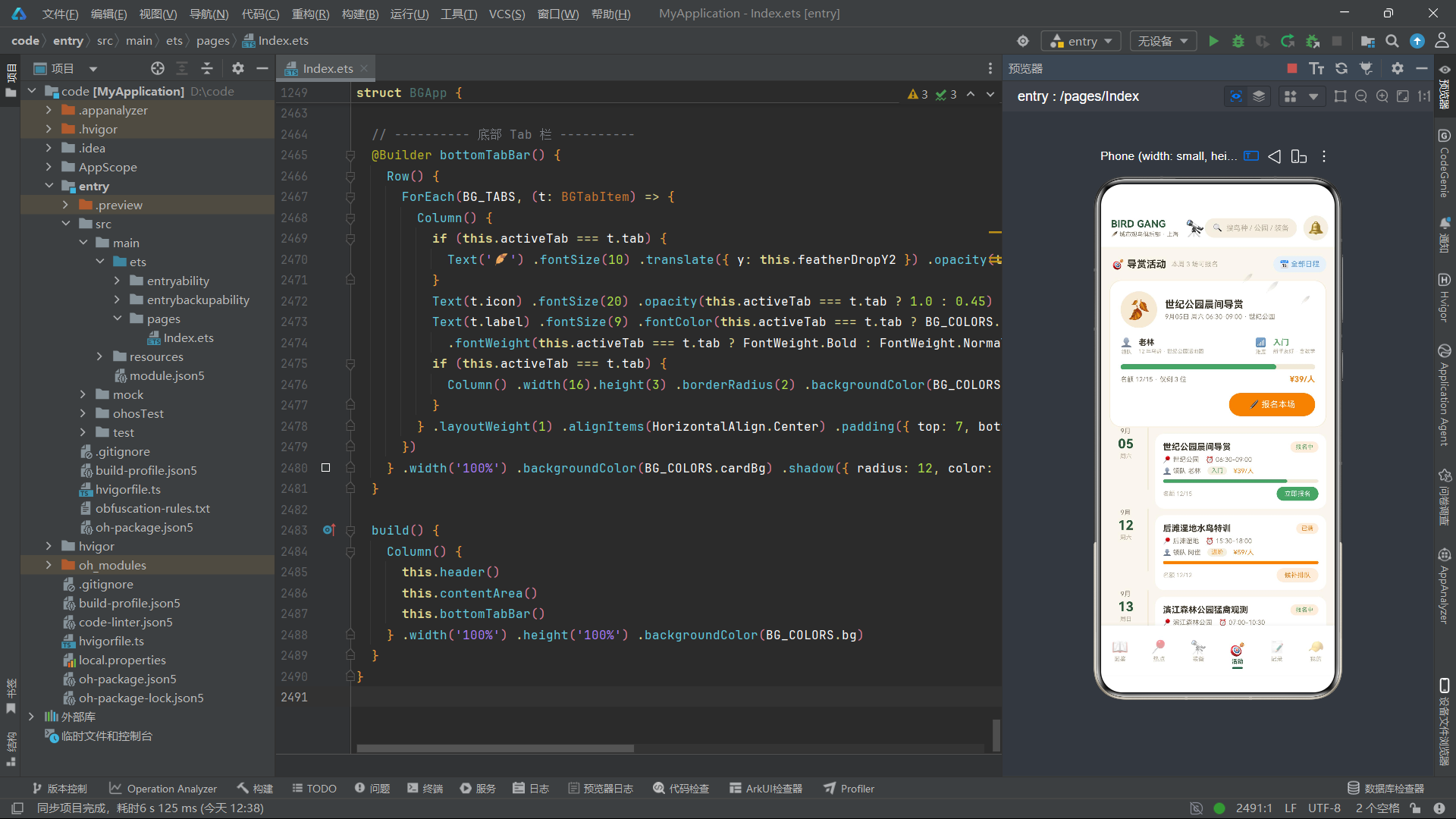
4.11 Tab4活动页面与时间线卡片
@Builder eventRow(e: BGGuideEvent) {
  Row() {
    Column() {
      Text(e.month).fontSize(10).fontColor(BG_COLORS.textSecondary)
      Text(e.day).fontSize(20).fontWeight(FontWeight.Bold)
        .fontColor(BG_COLORS.inkGreen).margin({ top: 2 })
      Text(e.weekday).fontSize(9).fontColor(BG_COLORS.textHint)
        .margin({ top: 2 })
    }.width(50).alignItems(HorizontalAlign.Center)

    Column().width(2)
      .constraintSize({ minHeight: 96 })
      .backgroundColor(BG_COLORS.track).borderRadius(1)
      .margin({ left: 8, right: 10 })

    Column() {
      // ... 活动标题、地点、领队、难度、费用、进度条、报名按钮
    }.layoutWeight(1).alignItems(HorizontalAlign.Start)
      .padding(12).backgroundColor(BG_COLORS.cardBg)
      .borderRadius(14).margin({ top: 10 })
      .onClick(() => { this.showEventForm = true })
  }.width('100%').padding({ left: 14, right: 14 })
    .alignItems(VerticalAlign.Top)
}
活动行卡片eventRow采用"日期+竖线+内容"的时间线(Timeline)布局。左侧50vp宽的日期列显示月份、日期和星期;中间一根2vp宽的竖线作为时间轴线,通过constraintSize({ minHeight: 96 })保证最小高度,使时间轴线足够长;右侧是活动详情内容区。
constraintSize是ArkUI的尺寸约束属性,它可以设置minWidth、maxWidth、minHeight、maxHeight四个约束值。这里使用minHeight: 96确保竖线至少有96vp高度,即使内容区较短也不会让时间轴看起来过短。alignItems(VerticalAlign.Top)使Row的子元素顶部对齐,确保日期列和竖线从同一水平线开始。
4.12 Tab5记录页面与统计单元格
@Builder statCell(icon: string, value: string, label: string, color: string) {
  Column() {
    Text(icon).fontSize(18)
    Text(value).fontSize(19).fontWeight(FontWeight.Bold)
      .fontColor(color).margin({ top: 3 })
    Text(label).fontSize(9).fontColor(BG_COLORS.textHint)
      .margin({ top: 2 })
  }.layoutWeight(1).alignItems(HorizontalAlign.Center)
    .padding({ top: 12, bottom: 12 }).backgroundColor(BG_COLORS.cardBg)
    .borderRadius(14).margin({ left: 3, right: 3 })
}
statCell是一个高度参数化的统计单元格构建函数,接收四个参数:图标、数值、标签和颜色。这种全参数化的设计使得同一个构建函数可以渲染不同颜色的统计卡片(总记录墨绿、鸟种数暖橙、公园数天蓝、连击红色),只需在调用时传入不同的颜色值。这是ArkUI @Builder函数实现UI复用的高级技巧——通过参数差异化实现"一函数多形态"。
4.13 Tab6我的页面与进度环
Stack() {
  Column().width(104).height(104).borderRadius(52)
    .backgroundColor('#E7F0E8')
  Column().width(82).height(82).borderRadius(41)
    .backgroundColor(BG_COLORS.cardBg)
  Column() {
    Text('72%').fontSize(21).fontWeight(FontWeight.Bold)
      .fontColor(BG_COLORS.inkGreen)
    Text('图鉴完成度').fontSize(9).fontColor(BG_COLORS.textHint)
      .margin({ top: 3 })
  }.alignItems(HorizontalAlign.Center)
}.width(104).height(104).alignContent(Alignment.Center)
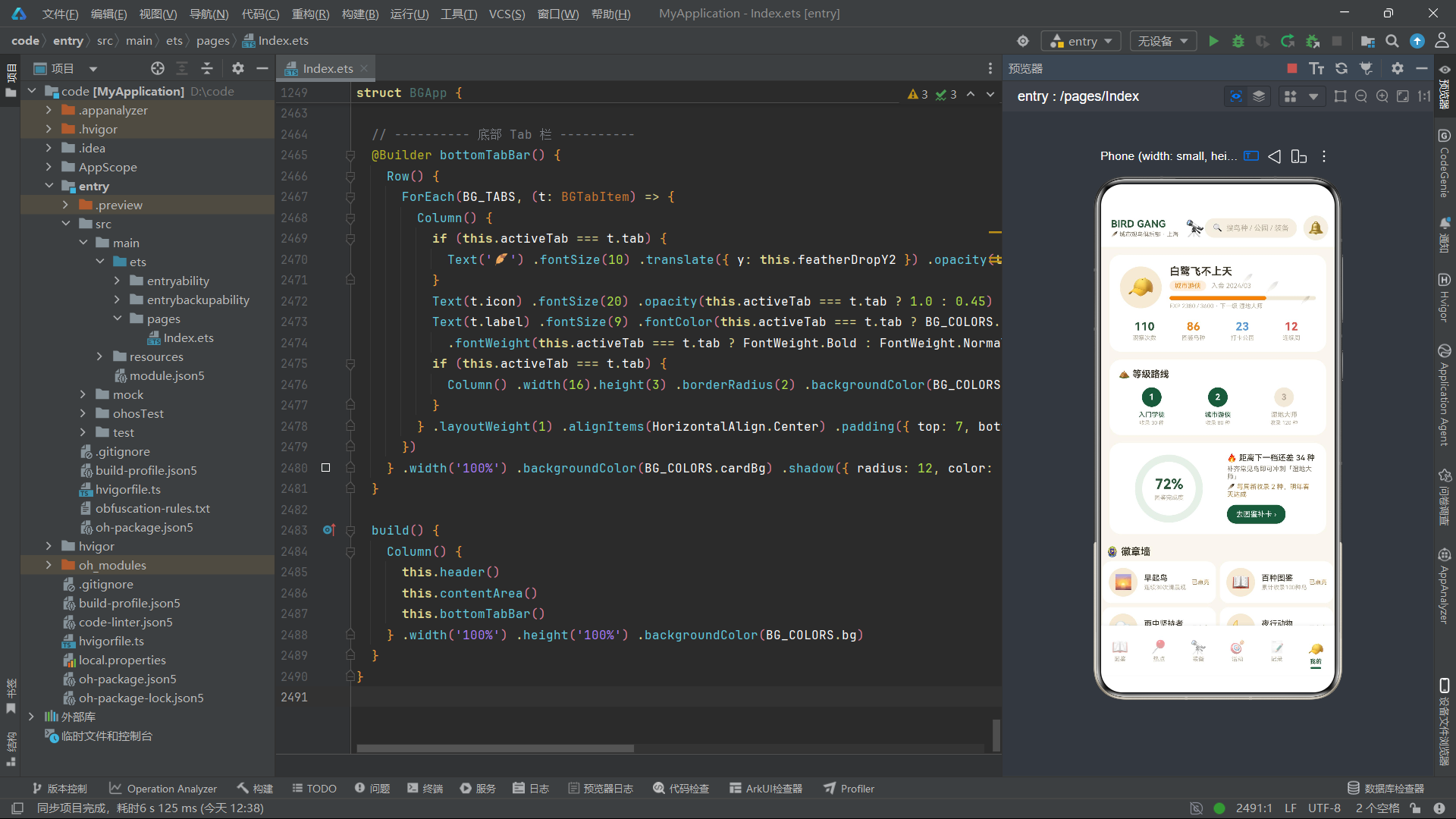
我的页面中的图鉴完成度进度环使用三层Column在Stack中层叠实现:最外层是104vp的浅绿色圆(模拟进度环背景),中间层是82vp的白色圆(模拟环的中心镂空),最内层是百分比文字。通过三层直径递减的圆形元素层叠,在不使用Canvas或自定义绘制的前提下,用纯布局模拟了进度环的视觉效果。这是一种巧妙的"纯布局图形"技巧,体现了ArkUI Stack层叠容器的灵活性。
4.14 底部Tab栏与选中特效
@Builder bottomTabBar() {
  Row() {
    ForEach(BG_TABS, (t: BGTabItem) => {
      Column() {
        if (this.activeTab === t.tab) {
          Text('🪶').fontSize(10)
            .translate({ y: this.featherDropY2 })
            .opacity(this.featherOpacity2).margin({ bottom: 2 })
        }
        Text(t.icon).fontSize(20)
          .opacity(this.activeTab === t.tab ? 1.0 : 0.45)
        Text(t.label).fontSize(9)
          .fontColor(this.activeTab === t.tab ? BG_COLORS.inkGreen : BG_COLORS.textHint)
          .fontWeight(this.activeTab === t.tab ? FontWeight.Bold : FontWeight.Normal)
          .margin({ top: 2 })
        if (this.activeTab === t.tab) {
          Column().width(16).height(3).borderRadius(2)
            .backgroundColor(BG_COLORS.inkGreen).margin({ top: 3 })
        }
      }.layoutWeight(1).alignItems(HorizontalAlign.Center)
        .padding({ top: 7, bottom: 5 })
        .onClick(() => { this.activeTab = t.tab })
    })
  }.width('100%').backgroundColor(BG_COLORS.cardBg)
    .shadow({ radius: 12, color: '#142D5A3D', offsetY: -3 })
    .padding({ top: 4, bottom: 4 })
}
底部Tab栏通过ForEach遍历BG_TABS数组渲染六个Tab项。每个Tab项是一个Column,内含图标、标签和(选中时)选中指示条。选中态有三个视觉特征:图标上方飘落的羽毛emoji(使用与全局相同的featherDropY2/featherOpacity2动画状态)、图标完全不透明(未选中时opacity为0.45)、标签文字墨绿色加粗、底部3vp高的墨绿色指示条。
shadow属性为Tab栏添加阴影效果,offsetY: -3使阴影向上偏移(因为Tab栏在底部,阴影应该投射到上方内容区)。color: '#142D5A3D'是一个8位十六进制颜色值,前两位14是Alpha通道(透明度约8%),后面6位2D5A3D是墨绿色的RGB值。8位十六进制颜色是ArkUI支持的颜色格式,它允许在一个字符串中同时指定RGB和Alpha通道。
4.15 build方法主结构
build() {
  Column() {
    this.header()
    this.contentArea()
    this.bottomTabBar()
  }.width('100%').height('100%').backgroundColor(BG_COLORS.bg)
}
入口组件的build方法极其简洁——一个Column容器从上到下依次渲染头部、内容区和底部Tab栏。width('100%')和height('100%')使应用占满整个屏幕,backgroundColor(BG_COLORS.bg)设置米白色背景。这种"头部+内容+底栏"的三段式布局是移动端应用最经典的结构。
五、技术点对比与总结
5.1 组件架构对比
| 组件名 | 职责 | 状态变量数 | 通信方式 | 特殊技术点 |
|---|---|---|---|---|
| BGLogSightingForm | 打卡记录弹框 | 5 | onConfirm/onCancel回调 | 横向Scroll+ForEach Chip |
| BGAddTargetForm | 新增图鉴目标弹框 | 4 | onConfirm/onCancel回调 | 稀有度宫格+选中指示条 |
| BGGearStoreForm | 装备入库弹框 | 4 | onConfirm/onCancel回调 | Toggle开关+价格步进器 |
| BGEditNoteForm | 编辑观察笔记弹框 | 3 | onConfirm/onCancel+只读属性 | 羽毛评分emoji+opacity |
| BGDeleteLogForm | 删除确认弹框 | 0 | onDelete/onCancel+只读属性 | 红色警示风格+静态布局 |
| BGEventJoinForm | 活动报名弹框 | 4 | onConfirm/onCancel回调 | 事件选项卡+集合点Chip |
| BGApp | 主入口组件 | 15 | 状态提升+回调 | animateTo动画+Stack层叠 |
5.2 布局容器使用对比
| 容器 | 使用场景 | 典型代码模式 | 作用 |
|---|---|---|---|
| Column | 纵向排列子元素 | Column() { Text()... Text()... } |
从上到下排列,用于卡片内部结构 |
| Row | 横向排列子元素 | Row() { Text()... Column()... } |
从左到右排列,用于标题栏、按钮行 |
| Stack | 层叠堆放子元素 | Stack() { 背景层 + 前景层 } |
遮罩+弹框、头像+红点、进度环 |
| Scroll | 可滚动区域 | Scroll() { Column() {...} } |
长内容滚动,支持横/纵方向 |
5.3 动画状态变量对比
| 状态变量 | 初始值 | 目标值 | 时长 | 曲线 | 效果 |
|---|---|---|---|---|---|
| featherDropY1 | 0 | 34 | 2400ms | EaseOut | 羽毛1飘落Y轴位移 |
| featherOpacity1 | 0.9 | 0.15 | 2400ms | EaseOut | 羽毛1透明度渐隐 |
| featherDropY2 | 0 | 22 | 1700ms | EaseInOut | 羽毛2飘落Y轴位移 |
| featherOpacity2 | 0.7 | 0.2 | 1700ms | EaseInOut | 羽毛2透明度渐隐 |
| lensScale | 1.0 | 1.16 | 1300ms | EaseInOut | 望远镜呼吸缩放 |
六、全文总结
本文深入剖析了一个基于鸿蒙HarmonyOS ArkTS语言构建的城市观鸟俱乐部应用的完整源码。该应用以"自然手账图鉴风"为视觉主线,采用米白底色、墨绿主色、暖橙强调色的配色方案,通过16个颜色令牌集中管理全部色彩资源。
在数据模型层面,应用使用interface定义了超过15个数据接口,涵盖调色板、Tab项、Chip元数据、鸟类物种、热点公园、装备商品、导赏活动、观察日志、徽章、用户档案等全部业务实体。所有数据以const常量数组硬编码,配合10余个全局纯函数将数据映射为视觉属性(如稀有度映射颜色、月观察次数映射柱高、百分比映射宽度字符串)。
在组件架构层面,应用采用"6个弹框@Component + 1个@Entry主入口"的结构。每个弹框组件通过onConfirm/onCancel回调函数与父组件通信,通过@State管理内部表单状态,通过@Builder定义可复用的UI片段(如Chip单元格、统计单元格、商品卡片等)。主入口组件通过"状态提升"模式集中管理6个弹框的显隐开关,通过if条件渲染挂载/卸载弹框,通过Stack层叠容器实现"遮罩+弹框"的模态层叠效果。
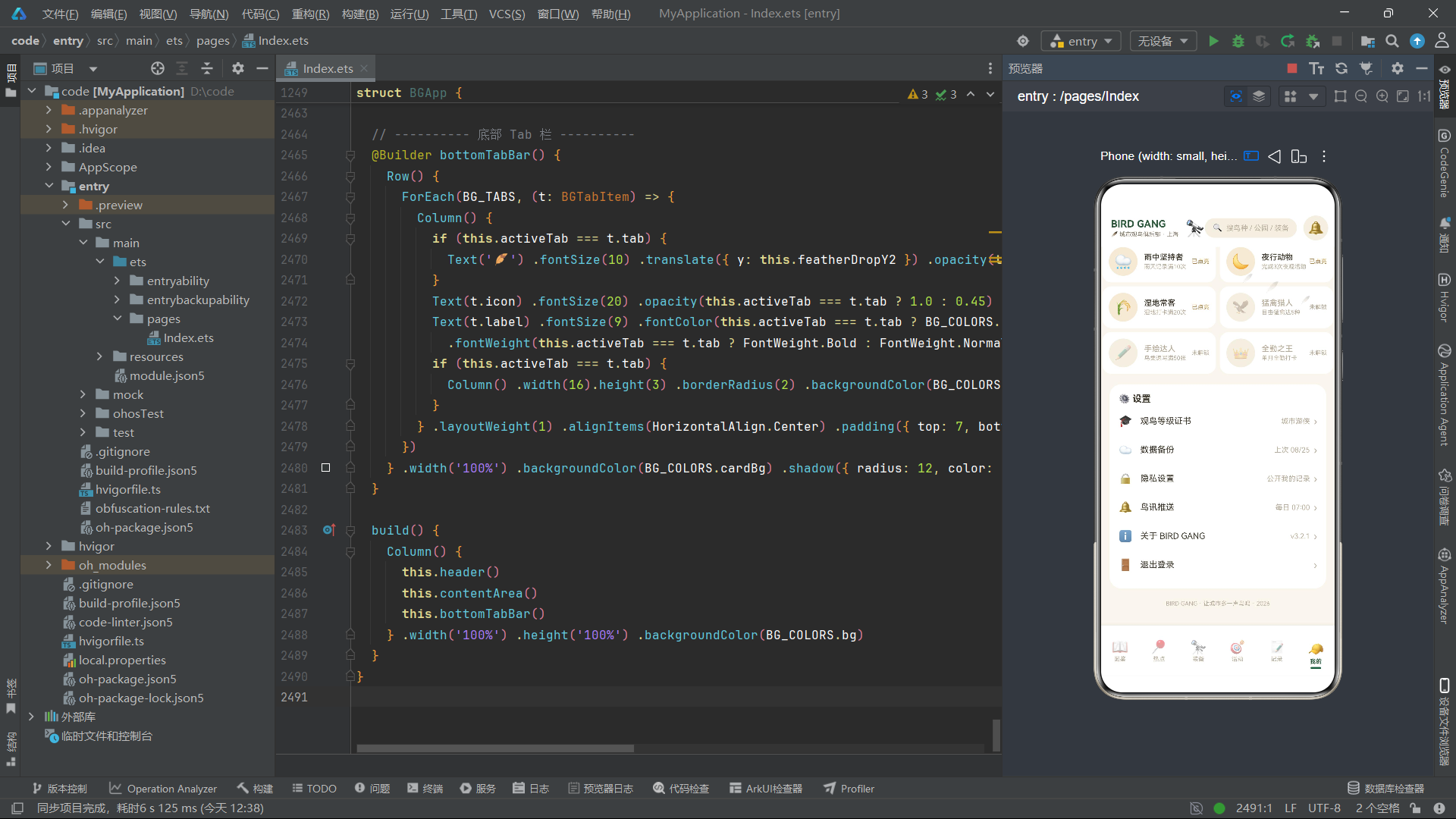
在布局技术层面,应用充分运用了ArkUI的四大布局容器:Column用于纵向排列、Row用于横向排列、Stack用于层叠堆放、Scroll用于可滚动区域。通过layoutWeight实现弹性权重分配、通过position实现绝对定位、通过constraintSize设置尺寸约束、通过borderRadius实现圆角(支持四角分别设置)、通过shadow添加投影效果。特别值得一提的是,应用通过纯布局技巧(多个直径递减的圆形Column在Stack中层叠)模拟了进度环视觉效果,无需Canvas或自定义绘制。
在动画特效层面,应用完全采用animateToAPI驱动动画,不使用任何JavaScript定时器。三个无限循环动画(两组羽毛飘落+望远镜呼吸缩放)在aboutToAppear生命周期中启动,通过修改@State变量的值驱动UI自动重绘。translate变换实现Y轴位移、opacity实现透明度变化、scale实现缩放呼吸,三种变换属性互不干扰,可以叠加使用。PlayMode.Alternate模式使动画在初始值和目标值之间往返循环,配合不同的duration和curve参数,使三组动画节奏各异,呈现自然灵动的视觉效果。
安装DevEco Studio程序

选择目标安装目录:

设置环境变量,但是需要重启一下:

新建一个空白模板:

设置API为24的模板项目:
初始化项目,自动下载相关依赖:

完整代码:
// ================================================================
// 场景:BIRD GANG 城市观鸟俱乐部
// ----------------------------------------------------------------
// 背景:2026 年上海公园观鸟热潮 —— 城市年轻人观鸟社群 + 装备商城
// + 鸟类图鉴收集 + 热点公园打卡 + 导赏活动(潮流社区电商风)
// 风格:自然手账图鉴风(浅色系,与深色场景形成反差)
// 底色 米白 #FAF6EE / 卡片白 #FFFFFF
// 主色 墨绿 #2D5A3D(林间墨绿,选中与标题)
// 强调 暖橙 #E8871E(夕阳羽橙,按钮与高亮)
// 辅助 牛皮纸棕 #A98143 / 天蓝点缀 #5B9BD5
// 元素 鸟类 emoji 图鉴卡、稀有度色标、收集进度环/条、圆角手账卡
// 特效 羽毛飘落(translate + opacity)/ 望远镜镜头呼吸缩放(scale)
// 结构 interface + const 硬编码数据 → 6 个弹框 @Component → @Entry 主结构
// ================================================================
// ============ 调色板 ============
interface BGColorPalette {
bg: string
cardBg: string
inkGreen: string
warmOrange: string
kraft: string
skyBlue: string
textPrimary: string
textSecondary: string
textHint: string
border: string
success: string
danger: string
purple: string
track: string
white: string
paperDark: string
}
const BG_COLORS: BGColorPalette = {
bg: '#FAF6EE',
cardBg: '#FFFFFF',
inkGreen: '#2D5A3D',
warmOrange: '#E8871E',
kraft: '#A98143',
skyBlue: '#5B9BD5',
textPrimary: '#3B3428',
textSecondary: '#8A7F6E',
textHint: '#B8AD9A',
border: '#EAE2D0',
success: '#5FA36B',
danger: '#D9534F',
purple: '#8E6BB8',
track: '#F0E9DA',
white: '#FFFFFF',
paperDark: '#F4EFE3'
}
// ============ 底部 Tab ============
enum BGTab {
SPECIES = 0,
HOTSPOTS = 1,
GEAR = 2,
EVENTS = 3,
LOG = 4,
ME = 5
}
interface BGTabItem {
tab: BGTab
icon: string
label: string
}
const BG_TABS: BGTabItem[] = [
{ tab: BGTab.SPECIES, icon: '📖', label: '图鉴' },
{ tab: BGTab.HOTSPOTS, icon: '📍', label: '热点' },
{ tab: BGTab.GEAR, icon: '🔭', label: '装备' },
{ tab: BGTab.EVENTS, icon: '🎯', label: '活动' },
{ tab: BGTab.LOG, icon: '📝', label: '记录' },
{ tab: BGTab.ME, icon: '🧢', label: '我的' }
]
// ============ 通用 chip 元数据 ============
interface BGChipMeta {
label: string
icon: string
color: string
}
// 打卡表单:鸟种快选 chips
const BG_BIRD_QUICK_CHIPS: BGChipMeta[] = [
{ label: '珠颈斑鸠', icon: '🕊️', color: '#2D5A3D' },
{ label: '白头鹎', icon: '🐦', color: '#2D5A3D' },
{ label: '普通翠鸟', icon: '🐦', color: '#5B9BD5' },
{ label: '夜鹭', icon: '🦆', color: '#5B9BD5' },
{ label: '戴胜', icon: '🦜', color: '#E8871E' },
{ label: '红隼', icon: '🦅', color: '#D9534F' },
{ label: '白鹭', icon: '🦢', color: '#A98143' },
{ label: '黑水鸡', icon: '🦆', color: '#5B9BD5' }
]
// 天气 chips
const BG_WEATHER_CHIPS: BGChipMeta[] = [
{ label: '晴', icon: '☀️', color: '#E8871E' },
{ label: '多云', icon: '⛅', color: '#5B9BD5' },
{ label: '阴', icon: '☁️', color: '#8A7F6E' },
{ label: '雨', icon: '🌧️', color: '#5B9BD5' },
{ label: '雾', icon: '🌫️', color: '#8A7F6E' }
]
// 季节 chips
const BG_SEASON_CHIPS: BGChipMeta[] = [
{ label: '春', icon: '🌸', color: '#5FA36B' },
{ label: '夏', icon: '🌻', color: '#5B9BD5' },
{ label: '秋', icon: '🍂', color: '#A98143' },
{ label: '冬', icon: '❄️', color: '#7C93A8' }
]
// 栖息地 chips
const BG_HABITAT_CHIPS: BGChipMeta[] = [
{ label: '林地', icon: '🌳', color: '#2D5A3D' },
{ label: '湿地', icon: '🌾', color: '#A98143' },
{ label: '草坪', icon: '🌱', color: '#5FA36B' },
{ label: '水岸', icon: '🌊', color: '#5B9BD5' }
]
// 装备品类宫格
const BG_GEAR_CATEGORY_CHIPS: BGChipMeta[] = [
{ label: '望远镜', icon: '🔭', color: '#2D5A3D' },
{ label: '相机', icon: '📷', color: '#A98143' },
{ label: '三脚架', icon: '🎥', color: '#5B9BD5' },
{ label: '图鉴书', icon: '📖', color: '#E8871E' },
{ label: '冲锋衣', icon: '🧥', color: '#8E6BB8' }
]
// 稀有度宫格
const BG_RARITY_CHIPS: BGChipMeta[] = [
{ label: '常见', icon: '🟢', color: '#5FA36B' },
{ label: '稀有', icon: '🟠', color: '#E8871E' },
{ label: '罕见', icon: '🔴', color: '#D9534F' },
{ label: '传说', icon: '🟣', color: '#8E6BB8' }
]
// 活动集合点 chips
const BG_MEET_POINT_CHIPS: BGChipMeta[] = [
{ label: '一号门', icon: '🚪', color: '#2D5A3D' },
{ label: '二号门', icon: '🚪', color: '#2D5A3D' },
{ label: '观鸟屋', icon: '🏠', color: '#A98143' },
{ label: '湖心亭', icon: '⛩️', color: '#5B9BD5' }
]
// 打卡地点宫格(热点公园精选)
const BG_SPOT_PICKS: BGChipMeta[] = [
{ label: '世纪公园', icon: '🌳', color: '#2D5A3D' },
{ label: '后滩湿地', icon: '🌾', color: '#A98143' },
{ label: '滨江森林公园', icon: '🌲', color: '#2D5A3D' },
{ label: '共青森林公园', icon: '🌳', color: '#2D5A3D' },
{ label: '中山公园', icon: '🏛️', color: '#5B9BD5' },
{ label: '复兴岛公园', icon: '🏝️', color: '#5B9BD5' }
]
// 图鉴稀有度筛选
const BG_SPECIES_FILTERS: string[] = ['全部', '常见', '稀有', '罕见', '传说']
// ============ 鸟类图鉴 ============
interface BGBirdSpecies {
id: number
name: string
latin: string
rarity: string
habitat: string
sightings: number
emoji: string
collected: boolean
}
const BG_BIRDS: BGBirdSpecies[] = [
{ id: 1, name: '珠颈斑鸠', latin: 'Spotted Dove', rarity: '常见', habitat: '林地', sightings: 128, emoji: '🕊️', collected: true },
{ id: 2, name: '白头鹎', latin: 'Light-vented Bulbul', rarity: '常见', habitat: '林地', sightings: 96, emoji: '🐦', collected: true },
{ id: 3, name: '乌鸫', latin: 'Chinese Blackbird', rarity: '常见', habitat: '草坪', sightings: 88, emoji: '🐦', collected: true },
{ id: 4, name: '麻雀', latin: 'Eurasian Tree Sparrow', rarity: '常见', habitat: '草坪', sightings: 152, emoji: '🐦', collected: true },
{ id: 5, name: '远东山雀', latin: 'Japanese Tit', rarity: '常见', habitat: '林地', sightings: 74, emoji: '🐦', collected: true },
{ id: 6, name: '灰喜鹊', latin: 'Azure-winged Magpie', rarity: '常见', habitat: '林地', sightings: 65, emoji: '🐦', collected: true },
{ id: 7, name: '黑水鸡', latin: 'Common Moorhen', rarity: '常见', habitat: '湿地', sightings: 58, emoji: '🦆', collected: true },
{ id: 8, name: '普通雨燕', latin: 'Common Swift', rarity: '常见', habitat: '水岸', sightings: 71, emoji: '🕊️', collected: true },
{ id: 9, name: '普通翠鸟', latin: 'Common Kingfisher', rarity: '稀有', habitat: '水岸', sightings: 32, emoji: '🐦', collected: true },
{ id: 10, name: '夜鹭', latin: 'Black-crowned Night Heron', rarity: '稀有', habitat: '水岸', sightings: 27, emoji: '🦆', collected: true },
{ id: 11, name: '戴胜', latin: 'Eurasian Hoopoe', rarity: '稀有', habitat: '草坪', sightings: 19, emoji: '🦜', collected: true },
{ id: 12, name: '棕背伯劳', latin: 'Long-tailed Shrike', rarity: '稀有', habitat: '林地', sightings: 23, emoji: '🐦', collected: true },
{ id: 13, name: '白鹭', latin: 'Little Egret', rarity: '稀有', habitat: '湿地', sightings: 41, emoji: '🦢', collected: true },
{ id: 14, name: '红隼', latin: 'Common Kestrel', rarity: '罕见', habitat: '草坪', sightings: 15, emoji: '🦅', collected: true },
{ id: 15, name: '黑翅鸢', latin: 'Black-winged Kite', rarity: '罕见', habitat: '湿地', sightings: 9, emoji: '🦅', collected: false },
{ id: 16, name: '鸳鸯', latin: 'Mandarin Duck', rarity: '罕见', habitat: '水岸', sightings: 7, emoji: '🦆', collected: false },
{ id: 17, name: '仙八色鸫', latin: 'Fairy Pitta', rarity: '传说', habitat: '林地', sightings: 3, emoji: '🐦', collected: false },
{ id: 18, name: '震旦鸦雀', latin: 'Reed Parrotbill', rarity: '传说', habitat: '湿地', sightings: 2, emoji: '🐦', collected: false }
]
// 图鉴稀有度分布段条
interface BGRaritySlice {
rarity: string
species: number
percent: number
color: string
}
const BG_RARITY_SLICES: BGRaritySlice[] = [
{ rarity: '常见', species: 8, percent: 46, color: '#5FA36B' },
{ rarity: '稀有', species: 6, percent: 31, color: '#E8871E' },
{ rarity: '罕见', species: 3, percent: 17, color: '#D9534F' },
{ rarity: '传说', species: 1, percent: 6, color: '#8E6BB8' }
]
const BG_DEX_TOTAL: number = 120
const BG_DEX_COLLECTED: number = 86
// ============ 观鸟热点公园 ============
interface BGHotspotPark {
id: number
name: string
district: string
distance: string
speciesCount: number
bestTime: string
crowd: string
emoji: string
}
const BG_PARKS: BGHotspotPark[] = [
{ id: 1, name: '世纪公园', district: '浦东', distance: '5.2km', speciesCount: 78, bestTime: '清晨', crowd: '适中', emoji: '🌳' },
{ id: 2, name: '共青森林公园', district: '杨浦', distance: '9.8km', speciesCount: 65, bestTime: '清晨', crowd: '空闲', emoji: '🌲' },
{ id: 3, name: '后滩湿地', district: '浦东', distance: '11.5km', speciesCount: 92, bestTime: '傍晚', crowd: '拥挤', emoji: '🌾' },
{ id: 4, name: '中山公园', district: '长宁', distance: '3.6km', speciesCount: 54, bestTime: '全天', crowd: '适中', emoji: '🏛️' },
{ id: 5, name: '复兴岛公园', district: '杨浦', distance: '8.4km', speciesCount: 47, bestTime: '清晨', crowd: '空闲', emoji: '🏝️' },
{ id: 6, name: '阳澄湖半岛', district: '昆山', distance: '52km', speciesCount: 88, bestTime: '傍晚', crowd: '空闲', emoji: '🌊' },
{ id: 7, name: '滨江森林公园', district: '浦东', distance: '21km', speciesCount: 103, bestTime: '清晨', crowd: '适中', emoji: '🌲' },
{ id: 8, name: '大宁公园', district: '静安', distance: '6.9km', speciesCount: 61, bestTime: '全天', crowd: '拥挤', emoji: '🌳' }
]
// ============ 本周新增目击 ============
interface BGWeeklySighting {
id: number
bird: string
park: string
count: number
daysAgo: string
rarity: string
emoji: string
}
const BG_WEEK_SIGHTINGS: BGWeeklySighting[] = [
{ id: 1, bird: '白琵鹭', park: '崇明东滩', count: 2, daysAgo: '1天前', rarity: '罕见', emoji: '🦢' },
{ id: 2, bird: '蓝喉蜂虎', park: '后滩湿地', count: 3, daysAgo: '2天前', rarity: '稀有', emoji: '🐦' },
{ id: 3, bird: '红头长尾山雀', park: '世纪公园', count: 6, daysAgo: '2天前', rarity: '常见', emoji: '🐦' },
{ id: 4, bird: '凤头鸊鷉', park: '阳澄湖半岛', count: 1, daysAgo: '3天前', rarity: '稀有', emoji: '🦆' },
{ id: 5, bird: '普通鵟', park: '滨江森林公园', count: 1, daysAgo: '4天前', rarity: '罕见', emoji: '🦅' },
{ id: 6, bird: '三宝鸟', park: '共青森林公园', count: 2, daysAgo: '5天前', rarity: '稀有', emoji: '🐦' }
]
// ============ 月观察次数 ============
interface BGMonthStat {
label: string
count: number
isCurrent: boolean
}
const BG_MONTH_STATS: BGMonthStat[] = [
{ label: '9月', count: 10, isCurrent: false },
{ label: '10月', count: 16, isCurrent: false },
{ label: '11月', count: 21, isCurrent: false },
{ label: '12月', count: 14, isCurrent: false },
{ label: '1月', count: 8, isCurrent: false },
{ label: '2月', count: 6, isCurrent: false },
{ label: '3月', count: 12, isCurrent: false },
{ label: '4月', count: 18, isCurrent: false },
{ label: '5月', count: 22, isCurrent: false },
{ label: '6月', count: 15, isCurrent: false },
{ label: '7月', count: 19, isCurrent: false },
{ label: '8月', count: 24, isCurrent: true }
]
// ============ 我的装备 ============
interface BGGearItem {
id: number
name: string
category: string
brand: string
spec: string
condition: string
emoji: string
}
const BG_MY_GEARS: BGGearItem[] = [
{ id: 1, name: '双筒望远镜 8x42', category: '望远镜', brand: '星特朗', spec: '8倍 / 口径42mm', condition: '9成新', emoji: '🔭' },
{ id: 2, name: '长焦相机 P1000', category: '相机', brand: '尼康', spec: '125倍光变 / 460mm', condition: '95新', emoji: '📷' },
{ id: 3, name: '碳纤维三脚架', category: '三脚架', brand: '曼富图', spec: '承重8kg / 1.1kg', condition: '9成新', emoji: '🎥' },
{ id: 4, name: '中国鸟类野外图鉴', category: '图鉴书', brand: '湖南科技社', spec: '第2版 / 568页', condition: '全新', emoji: '📖' },
{ id: 5, name: 'MH500 冲锋衣', category: '服饰', brand: '迪卡侬', spec: '防水2000mm / 透气', condition: '9成新', emoji: '🧥' },
{ id: 6, name: '速干鸭舌帽', category: '服饰', brand: '凯乐石', spec: 'UPF50+ / 速干', condition: '9成新', emoji: '🧢' }
]
// ============ 装备商城 ============
interface BGGearStoreItem {
id: number
name: string
category: string
price: number
originalPrice: number
sold: number
rating: string
emoji: string
}
const BG_GEAR_STORE: BGGearStoreItem[] = [
{ id: 1, name: '施华洛世奇 EL 8.5x42 双筒', category: '望远镜', price: 15800, originalPrice: 18800, sold: 12, rating: '4.9', emoji: '🔭' },
{ id: 2, name: '蔡司 Victory 10x42 双筒', category: '望远镜', price: 13999, originalPrice: 15999, sold: 8, rating: '4.9', emoji: '🔭' },
{ id: 3, name: '索尼 A1 + 600mm 套机', category: '相机', price: 52999, originalPrice: 55999, sold: 3, rating: '5.0', emoji: '📷' },
{ id: 4, name: '佳能 R7 + 100-500mm', category: '相机', price: 18999, originalPrice: 20500, sold: 6, rating: '4.8', emoji: '📷' },
{ id: 5, name: '中国鸟类野外图鉴 第2版', category: '图鉴书', price: 128, originalPrice: 158, sold: 326, rating: '4.9', emoji: '📖' },
{ id: 6, name: '上海城市观鸟手账手册', category: '图鉴书', price: 68, originalPrice: 88, sold: 215, rating: '4.7', emoji: '📓' },
{ id: 7, name: '迪卡侬 MH500 冲锋衣', category: '服饰', price: 499, originalPrice: 599, sold: 89, rating: '4.6', emoji: '🧥' },
{ id: 8, name: '观鸟迷彩折叠凳', category: '配件', price: 159, originalPrice: 199, sold: 142, rating: '4.8', emoji: '🪑' }
]
// ============ 装备养护提醒 ============
interface BGMaintenanceTip {
id: number
gear: string
task: string
dueIn: string
urgent: boolean
emoji: string
}
const BG_MAINTENANCE_TIPS: BGMaintenanceTip[] = [
{ id: 1, gear: '双筒望远镜', task: '镜片除霉护理', dueIn: '还剩3天', urgent: true, emoji: '🔭' },
{ id: 2, gear: '长焦相机', task: '传感器清洁', dueIn: '还剩12天', urgent: false, emoji: '📷' },
{ id: 3, gear: 'MH500 冲锋衣', task: '防水剂补涂', dueIn: '还剩20天', urgent: false, emoji: '🧥' },
{ id: 4, gear: '防潮箱', task: '湿度校准 45%RH', dueIn: '还剩25天', urgent: false, emoji: '💧' }
]
// ============ 导赏活动 ============
interface BGGuideEvent {
id: number
title: string
park: string
month: string
day: string
weekday: string
time: string
leader: string
quota: number
joined: number
difficulty: string
status: string
fee: number
}
const BG_EVENTS: BGGuideEvent[] = [
{ id: 1, title: '世纪公园晨间导赏', park: '世纪公园', month: '9月', day: '05', weekday: '周六', time: '06:30-09:00', leader: '老林', quota: 15, joined: 12, difficulty: '入门', status: '报名中', fee: 39 },
{ id: 2, title: '后滩湿地水鸟特训', park: '后滩湿地', month: '9月', day: '12', weekday: '周六', time: '15:30-18:00', leader: '阿雀', quota: 12, joined: 12, difficulty: '进阶', status: '已满', fee: 59 },
{ id: 3, title: '滨江森林公园猛禽观测', park: '滨江森林公园', month: '9月', day: '13', weekday: '周日', time: '07:00-10:30', leader: '鹰叔', quota: 20, joined: 8, difficulty: '进阶', status: '报名中', fee: 49 },
{ id: 4, title: '共青森林夜观猫头鹰', park: '共青森林公园', month: '9月', day: '20', weekday: '周六', time: '19:00-21:30', leader: '夜枭', quota: 10, joined: 6, difficulty: '挑战', status: '报名中', fee: 69 },
{ id: 5, title: '阳澄湖半岛候鸟先遣', park: '阳澄湖半岛', month: '8月', day: '22', weekday: '周六', time: '06:00-11:00', leader: '老林', quota: 18, joined: 18, difficulty: '入门', status: '已结束', fee: 79 },
{ id: 6, title: '中山公园城市鸟速写', park: '中山公园', month: '8月', day: '15', weekday: '周日', time: '09:00-11:30', leader: '小绘', quota: 16, joined: 9, difficulty: '入门', status: '已结束', fee: 29 }
]
// 活动报名弹框:可报名活动选项
interface BGEventOption {
label: string
time: string
fee: number
}
const BG_JOIN_EVENT_OPTIONS: BGEventOption[] = [
{ label: '世纪公园晨间导赏', time: '9/05 周六 06:30', fee: 39 },
{ label: '后滩湿地水鸟特训', time: '9/12 周六 15:30', fee: 59 },
{ label: '滨江猛禽观测专场', time: '9/13 周日 07:00', fee: 49 }
]
// ============ 我的观察记录 ============
interface BGSightingLog {
id: number
bird: string
emoji: string
count: number
park: string
weather: string
date: string
note: string
shared: boolean
}
const BG_LOGS: BGSightingLog[] = [
{ id: 1, bird: '珠颈斑鸠', emoji: '🕊️', count: 2, park: '世纪公园', weather: '晴', date: '08/24', note: '枝头对鸣求偶,颈部珠斑清晰', shared: true },
{ id: 2, bird: '普通翠鸟', emoji: '🐦', count: 1, park: '后滩湿地', weather: '阴', date: '08/23', note: '悬停捕鱼三次,蓝背金属光泽', shared: true },
{ id: 3, bird: '夜鹭', emoji: '🦆', count: 3, park: '后滩湿地', weather: '晴', date: '08/23', note: '傍晚集小群立于石栏,亚成鸟一只', shared: false },
{ id: 4, bird: '白鹭', emoji: '🦢', count: 5, park: '崇明东滩', weather: '多云', date: '08/22', note: '滩涂觅食,踩水惊鱼', shared: true },
{ id: 5, bird: '戴胜', emoji: '🦜', count: 1, park: '世纪公园', weather: '晴', date: '08/20', note: '草坪翻土觅食,冠羽开屏两次', shared: true },
{ id: 6, bird: '红隼', emoji: '🦅', count: 1, park: '滨江森林公园', weather: '晴', date: '08/18', note: '空中定点悬停后俯冲,姿态极帅', shared: true },
{ id: 7, bird: '黑水鸡', emoji: '🦆', count: 2, park: '世纪公园', weather: '雨', date: '08/16', note: '雨中芦苇丛边缘幼鸟跟随', shared: false },
{ id: 8, bird: '灰喜鹊', emoji: '🐦', count: 4, park: '共青森林公园', weather: '多云', date: '08/15', note: '松林间列队移动,鸣声连绵', shared: false },
{ id: 9, bird: '普通雨燕', emoji: '🕊️', count: 6, park: '滨江森林公园', weather: '晴', date: '08/14', note: '高空中绕圈飞行,镰刀形翅膀', shared: true },
{ id: 10, bird: '棕背伯劳', emoji: '🐦', count: 1, park: '中山公园', weather: '雾', date: '08/12', note: '雾天立于杉树顶,曝光极难拍', shared: false },
{ id: 11, bird: '远东山雀', emoji: '🐦', count: 3, park: '复兴岛公园', weather: '阴', date: '08/10', note: '柳树间跳跃,胸前黑色拉链纹', shared: true },
{ id: 12, bird: '黑翅鸢', emoji: '🦅', count: 1, park: '阳澄湖半岛', weather: '晴', date: '08/08', note: '悬停定住十秒,红眼线超清楚', shared: true }
]
// ============ 季节分布 ============
interface BGSeasonShare {
season: string
count: number
percent: number
color: string
}
const BG_SEASON_SHARES: BGSeasonShare[] = [
{ season: '春', count: 38, percent: 35, color: '#5FA36B' },
{ season: '夏', count: 24, percent: 22, color: '#5B9BD5' },
{ season: '秋', count: 31, percent: 28, color: '#A98143' },
{ season: '冬', count: 17, percent: 15, color: '#7C93A8' }
]
// ============ 徽章 ============
interface BGBadge {
name: string
icon: string
desc: string
earned: boolean
color: string
}
const BG_BADGES: BGBadge[] = [
{ name: '早起鸟', icon: '🌅', desc: '连续30次清晨观鸟', earned: true, color: '#E8871E' },
{ name: '百种图鉴', icon: '📖', desc: '累计收录100种鸟', earned: true, color: '#2D5A3D' },
{ name: '雨中坚持者', icon: '🌧️', desc: '雨天记录满10次', earned: true, color: '#5B9BD5' },
{ name: '夜行动物', icon: '🌙', desc: '完成3次夜观活动', earned: true, color: '#8E6BB8' },
{ name: '湿地常客', icon: '🌾', desc: '湿地打卡满20次', earned: true, color: '#A98143' },
{ name: '猛禽猎人', icon: '🦅', desc: '目击猛禽达5种', earned: false, color: '#D9534F' },
{ name: '手绘达人', icon: '✏️', desc: '鸟类速写满50张', earned: false, color: '#5FA36B' },
{ name: '全勤之王', icon: '👑', desc: '单月全勤打卡', earned: false, color: '#A98143' }
]
// ============ 设置列表 ============
interface BGSettingEntry {
label: string
icon: string
value: string
}
const BG_SETTINGS: BGSettingEntry[] = [
{ label: '观鸟等级证书', icon: '🎓', value: '城市游侠' },
{ label: '数据备份', icon: '☁️', value: '上次 08/25' },
{ label: '隐私设置', icon: '🔒', value: '公开我的记录' },
{ label: '鸟讯推送', icon: '🔔', value: '每日 07:00' },
{ label: '关于 BIRD GANG', icon: 'ℹ️', value: 'v3.2.1' },
{ label: '退出登录', icon: '🚪', value: '' }
]
// ============ 观鸟者档案 ============
interface BGMemberProfile {
nickName: string
avatar: string
levelName: string
nextLevel: string
xp: number
xpNeed: number
birdCount: number
parkCount: number
logCount: number
streak: number
joinDate: string
}
const BG_PROFILE: BGMemberProfile = {
nickName: '白鹭飞不上天',
avatar: '🧢',
levelName: '城市游侠',
nextLevel: '湿地大师',
xp: 2380,
xpNeed: 3600,
birdCount: 86,
parkCount: 23,
logCount: 110,
streak: 12,
joinDate: '2024/03'
}
// 心情评分羽毛占位(1-5)
const BG_MOOD_ITEMS: number[] = [1, 2, 3, 4, 5]
// ============ 本月图鉴新收录 ============
interface BGNewDexEntry {
id: number
bird: string
rarity: string
date: string
emoji: string
}
const BG_NEW_DEX: BGNewDexEntry[] = [
{ id: 1, bird: '鸳鸯', rarity: '罕见', date: '08/21', emoji: '🦆' },
{ id: 2, bird: '黑翅鸢', rarity: '罕见', date: '08/08', emoji: '🦅' },
{ id: 3, bird: '凤头鸊鷉', rarity: '稀有', date: '08/17', emoji: '🦆' },
{ id: 4, bird: '三宝鸟', rarity: '稀有', date: '08/14', emoji: '🐦' },
{ id: 5, bird: '蓝喉蜂虎', rarity: '稀有', date: '08/19', emoji: '🐦' },
{ id: 6, bird: '白琵鹭', rarity: '罕见', date: '08/24', emoji: '🦢' }
]
// ============ 等级路线 ============
interface BGLevelStep {
name: string
desc: string
reached: boolean
}
const BG_LEVEL_STEPS: BGLevelStep[] = [
{ name: '入门学徒', desc: '收录 30 种', reached: true },
{ name: '城市游侠', desc: '收录 80 种', reached: true },
{ name: '湿地大师', desc: '收录 120 种', reached: false }
]
// ============ 全局纯函数 ============
// 稀有度 → 主色(常见绿 / 稀有橙 / 罕见红 / 传说紫)
function bgRarityColor(rarity: string): string {
if (rarity === '传说') {
return BG_COLORS.purple
} else if (rarity === '罕见') {
return BG_COLORS.danger
} else if (rarity === '稀有') {
return BG_COLORS.warmOrange
} else {
return BG_COLORS.success
}
}
// 稀有度 → 浅底色
function bgRarityBg(rarity: string): string {
if (rarity === '传说') {
return '#F0E8F7'
} else if (rarity === '罕见') {
return '#FBE9E8'
} else if (rarity === '稀有') {
return '#FBEEDC'
} else {
return '#E7F0E8'
}
}
// 天气 → emoji
function bgWeatherEmoji(weather: string): string {
if (weather === '晴') {
return '☀️'
} else if (weather === '多云') {
return '⛅'
} else if (weather === '阴') {
return '☁️'
} else if (weather === '雨') {
return '🌧️'
} else {
return '🌫️'
}
}
// 活动状态 → 颜色(报名中绿 / 已满橙 / 已结束灰)
function bgEventStatusColor(status: string): string {
if (status === '报名中') {
return BG_COLORS.success
} else if (status === '已满') {
return BG_COLORS.warmOrange
} else {
return BG_COLORS.textHint
}
}
// 公园人流 → 颜色(空闲绿 / 适中橙 / 拥挤红)
function bgCrowdColor(crowd: string): string {
if (crowd === '拥挤') {
return BG_COLORS.danger
} else if (crowd === '适中') {
return BG_COLORS.warmOrange
} else {
return BG_COLORS.success
}
}
// 季节 → 颜色(春绿 / 夏蓝 / 秋棕 / 冬灰蓝)
function bgSeasonColor(season: string): string {
if (season === '春') {
return BG_COLORS.success
} else if (season === '夏') {
return BG_COLORS.skyBlue
} else if (season === '秋') {
return BG_COLORS.kraft
} else {
return '#7C93A8'
}
}
// 栖息地 → emoji
function bgHabitatEmoji(habitat: string): string {
if (habitat === '林地') {
return '🌳'
} else if (habitat === '湿地') {
return '🌾'
} else if (habitat === '草坪') {
return '🌱'
} else {
return '🌊'
}
}
// 月观察次数 → 柱状图高度(最大 24 次)
function bgMonthBarHeight(count: number): string {
let h = count / 24 * 64
return h.toFixed(0) + 'vp'
}
// 百分比字符串(超过 100 截断)
function bgPercent(current: number, total: number): string {
let pct = current / total * 100
if (pct > 100) {
pct = 100
}
return pct.toFixed(0) + '%'
}
// 活动难度 → 颜色(入门绿 / 进阶橙 / 挑战红)
function bgDifficultyColor(difficulty: string): string {
if (difficulty === '挑战') {
return BG_COLORS.danger
} else if (difficulty === '进阶') {
return BG_COLORS.warmOrange
} else {
return BG_COLORS.success
}
}
// ================================================================
// 弹框1:打卡记录 BGLogSightingForm
// 鸟种搜索 chips 横滑 + 数量 stepper + 地点宫格(热点公园)
// + 天气 chips + 备注 TextInput
// ================================================================
@Component
struct BGLogSightingForm {
onConfirm: () => void = () => {}
onCancel: () => void = () => {}
@State selBird: string = '珠颈斑鸠'
@State birdCount: number = 2
@State selSpot: string = '世纪公园'
@State selWeather: string = '晴'
@State noteText: string = ''
@Builder logFormTitle() {
Row() {
Text('📝').fontSize(18)
Text('记录一次目击').fontSize(17).fontWeight(FontWeight.Bold) .fontColor(BG_COLORS.textPrimary).margin({ left: 8 })
Column().layoutWeight(1)
Text('✕').fontSize(15).fontColor(BG_COLORS.textHint) .padding({ left: 8, right: 8, top: 4, bottom: 4 }) .onClick(() => { this.onCancel() })
} .width('100%') .padding({ left: 18, right: 12, top: 16, bottom: 12 })
}
@Builder birdChipCell(c: BGChipMeta) {
if (this.selBird === c.label) {
Text(c.icon + ' ' + c.label) .fontSize(12).fontColor(BG_COLORS.white).backgroundColor(BG_COLORS.inkGreen) .padding({ left: 12, right: 12, top: 7, bottom: 7 })
.borderRadius(14) .margin({ left: 4, right: 4 })
} else {
Text(c.icon + ' ' + c.label) .fontSize(12).fontColor(BG_COLORS.textSecondary).backgroundColor(BG_COLORS.paperDark)
.padding({ left: 12, right: 12, top: 7, bottom: 7 }) .borderRadius(14) .margin({ left: 4, right: 4 }) .onClick(() => { this.selBird = c.label })
}
}
@Builder spotCell(c: BGChipMeta) {
Row() {
Text(c.icon).fontSize(18)
Text(c.label).fontSize(12) .fontColor(this.selSpot === c.label ? BG_COLORS.inkGreen : BG_COLORS.textPrimary)
.fontWeight(this.selSpot === c.label ? FontWeight.Bold : FontWeight.Normal) .margin({ left: 8 }) .layoutWeight(1) .maxLines(1)
if (this.selSpot === c.label) {
Text('✓').fontSize(13).fontColor(BG_COLORS.inkGreen)
}
} .layoutWeight(1) .padding({ left: 12, right: 12, top: 12, bottom: 12 }) .backgroundColor(this.selSpot === c.label ? '#E7F0E8' : BG_COLORS.paperDark)
.borderRadius(12) .margin({ left: 3, right: 3 }) .onClick(() => { this.selSpot = c.label })
}
@Builder weatherChipCell(c: BGChipMeta) {
if (this.selWeather === c.label) {
Column() {
Text(c.icon).fontSize(20)
Text(c.label).fontSize(10).fontColor(BG_COLORS.warmOrange).margin({ top: 3 })
} .padding({ left: 14, right: 14, top: 8, bottom: 8 }) .backgroundColor('#FBEEDC') .borderRadius(12) .margin({ left: 3, right: 3 })
} else {
Column() {
Text(c.icon).fontSize(20)
Text(c.label).fontSize(10).fontColor(BG_COLORS.textSecondary).margin({ top: 3 })
} .padding({ left: 14, right: 14, top: 8, bottom: 8 }) .backgroundColor(BG_COLORS.paperDark) .borderRadius(12) .margin({ left: 3, right: 3 })
.onClick(() => { this.selWeather = c.label })
}
}
build() {
Column() {
this.logFormTitle()
Divider().color(BG_COLORS.border).strokeWidth(1)
Scroll() {
Column() {
Text('选择鸟种').fontSize(13).fontWeight(FontWeight.Medium) .fontColor(BG_COLORS.textSecondary) .width('100%').margin({ top: 14, left: 18 })
Scroll() {
Row() {
ForEach(BG_BIRD_QUICK_CHIPS, (c: BGChipMeta) => {
this.birdChipCell(c)
})
} .padding({ left: 14, right: 14 })
} .scrollable(ScrollDirection.Horizontal) .scrollBar(BarState.Off) .width('100%') .margin({ top: 8 })
Text('目击数量').fontSize(13).fontWeight(FontWeight.Medium) .fontColor(BG_COLORS.textSecondary) .width('100%').margin({ top: 18, left: 18 })
Row() {
Text('−').fontSize(22) .fontColor(this.birdCount > 1 ? BG_COLORS.inkGreen : BG_COLORS.textHint) .width(34).height(34).borderRadius(17)
.backgroundColor(BG_COLORS.paperDark) .textAlign(TextAlign.Center)
.onClick(() => {
if (this.birdCount > 1) {
this.birdCount -= 1
}
})
Column() {
Text(this.birdCount.toString()).fontSize(20).fontWeight(FontWeight.Bold) .fontColor(BG_COLORS.inkGreen)
Text('只 / 群').fontSize(9).fontColor(BG_COLORS.textHint)
} .alignItems(HorizontalAlign.Center) .margin({ left: 18, right: 18 })
Text('+').fontSize(22) .fontColor(BG_COLORS.warmOrange) .width(34).height(34).borderRadius(17) .backgroundColor('#FBEEDC') .textAlign(TextAlign.Center)
.onClick(() => {
if (this.birdCount < 99) {
this.birdCount += 1
}
})
} .justifyContent(FlexAlign.Center) .width('100%') .margin({ top: 10 })
Text('目击地点 · 热点公园').fontSize(13).fontWeight(FontWeight.Medium) .fontColor(BG_COLORS.textSecondary) .width('100%').margin({ top: 18, left: 18 })
Row() {
this.spotCell(BG_SPOT_PICKS[0])
this.spotCell(BG_SPOT_PICKS[1])
} .width('100%').margin({ top: 8 })
Row() {
this.spotCell(BG_SPOT_PICKS[2])
this.spotCell(BG_SPOT_PICKS[3])
} .width('100%').margin({ top: 6 })
Row() {
this.spotCell(BG_SPOT_PICKS[4])
this.spotCell(BG_SPOT_PICKS[5])
} .width('100%').margin({ top: 6 })
Text('当时天气').fontSize(13).fontWeight(FontWeight.Medium) .fontColor(BG_COLORS.textSecondary) .width('100%').margin({ top: 18, left: 18 })
Row() {
ForEach(BG_WEATHER_CHIPS, (c: BGChipMeta) => {
this.weatherChipCell(c)
})
} .width('100%').margin({ top: 8 })
Text('备注').fontSize(13).fontWeight(FontWeight.Medium) .fontColor(BG_COLORS.textSecondary) .width('100%').margin({ top: 18, left: 18 })
TextInput({ placeholder: '羽色、行为、亮点…(选填)' }) .placeholderColor(BG_COLORS.textHint) .fontSize(13) .width('100%') .backgroundColor(BG_COLORS.paperDark)
.borderRadius(10) .padding({ left: 12, right: 12 }) .margin({ top: 8, left: 18, right: 18 }) .onChange((v: string) => { this.noteText = v })
} .width('100%') .padding({ bottom: 14 })
} .layoutWeight(1) .scrollBar(BarState.Off)
Row() {
Text('取消').fontSize(14).fontColor(BG_COLORS.textSecondary) .padding({ left: 26, right: 26, top: 11, bottom: 11 }) .backgroundColor(BG_COLORS.paperDark)
.borderRadius(22) .onClick(() => { this.onCancel() })
Text('🪶 保存打卡').fontSize(14).fontColor(BG_COLORS.white) .padding({ left: 26, right: 26, top: 11, bottom: 11 }) .backgroundColor(BG_COLORS.inkGreen)
.borderRadius(22) .margin({ left: 14 }) .onClick(() => { this.onConfirm() })
} .width('100%') .justifyContent(FlexAlign.Center) .padding({ top: 12, bottom: 6 })
} .width('100%') .constraintSize({ maxHeight: '80%' }) .backgroundColor(BG_COLORS.cardBg) .borderRadius(18) .padding({ bottom: 10 })
}
}
// ================================================================
// 弹框2:新增图鉴目标 BGAddTargetForm
// 稀有度宫格 + 季节 chips + 栖息地 chips + 目标说明
// ================================================================
@Component
struct BGAddTargetForm {
onConfirm: () => void = () => {}
onCancel: () => void = () => {}
@State selRarity: string = '稀有'
@State selSeason: string = '夏'
@State selHabitat: string = '林地'
@State targetDesc: string = ''
@Builder rarityCell(c: BGChipMeta) {
Column() {
Text(c.icon).fontSize(22)
Text(c.label).fontSize(12).margin({ top: 5 }) .fontColor(this.selRarity === c.label ? c.color : BG_COLORS.textSecondary)
.fontWeight(this.selRarity === c.label ? FontWeight.Bold : FontWeight.Normal)
if (this.selRarity === c.label) {
Column().width(16).height(3).borderRadius(2) .backgroundColor(c.color).margin({ top: 4 })
}
} .layoutWeight(1) .padding({ top: 12, bottom: 12 }) .backgroundColor(this.selRarity === c.label ? bgRarityBg(c.label) : BG_COLORS.paperDark) .borderRadius(14)
.margin({ left: 3, right: 3 }) .onClick(() => { this.selRarity = c.label })
}
@Builder seasonCell(c: BGChipMeta) {
if (this.selSeason === c.label) {
Row() {
Text(c.icon).fontSize(15)
Text(c.label).fontSize(12).fontColor(BG_COLORS.white) .margin({ left: 5 }).fontWeight(FontWeight.Medium)
} .padding({ left: 16, right: 16, top: 8, bottom: 8 }) .backgroundColor(c.color) .borderRadius(16) .margin({ left: 4, right: 4 })
} else {
Row() {
Text(c.icon).fontSize(15)
Text(c.label).fontSize(12).fontColor(BG_COLORS.textSecondary) .margin({ left: 5 })
} .padding({ left: 16, right: 16, top: 8, bottom: 8 }) .backgroundColor(BG_COLORS.paperDark) .borderRadius(16) .margin({ left: 4, right: 4 })
.onClick(() => { this.selSeason = c.label })
}
}
@Builder habitatCell(c: BGChipMeta) {
if (this.selHabitat === c.label) {
Row() {
Text(c.icon).fontSize(15)
Text(c.label).fontSize(12).fontColor(BG_COLORS.white) .margin({ left: 5 }).fontWeight(FontWeight.Medium)
} .padding({ left: 16, right: 16, top: 8, bottom: 8 }) .backgroundColor(c.color) .borderRadius(16) .margin({ left: 4, right: 4 })
} else {
Row() {
Text(c.icon).fontSize(15)
Text(c.label).fontSize(12).fontColor(BG_COLORS.textSecondary) .margin({ left: 5 })
} .padding({ left: 16, right: 16, top: 8, bottom: 8 }) .backgroundColor(BG_COLORS.paperDark) .borderRadius(16) .margin({ left: 4, right: 4 })
.onClick(() => { this.selHabitat = c.label })
}
}
build() {
Column() {
Row() {
Text('🎯').fontSize(18)
Text('新增图鉴目标').fontSize(17).fontWeight(FontWeight.Bold) .fontColor(BG_COLORS.textPrimary).margin({ left: 8 })
Column().layoutWeight(1)
Text('✕').fontSize(15).fontColor(BG_COLORS.textHint) .padding({ left: 8, right: 8, top: 4, bottom: 4 }) .onClick(() => { this.onCancel() })
} .width('100%') .padding({ left: 18, right: 12, top: 16, bottom: 12 })
Divider().color(BG_COLORS.border).strokeWidth(1)
Scroll() {
Column() {
Text('目标稀有度').fontSize(13).fontWeight(FontWeight.Medium) .fontColor(BG_COLORS.textSecondary) .width('100%').margin({ top: 14, left: 18 })
Row() {
this.rarityCell(BG_RARITY_CHIPS[0])
this.rarityCell(BG_RARITY_CHIPS[1])
} .width('100%').margin({ top: 8 })
Row() {
this.rarityCell(BG_RARITY_CHIPS[2])
this.rarityCell(BG_RARITY_CHIPS[3])
} .width('100%').margin({ top: 6 })
Text('出没季节').fontSize(13).fontWeight(FontWeight.Medium) .fontColor(BG_COLORS.textSecondary) .width('100%').margin({ top: 20, left: 18 })
Row() {
ForEach(BG_SEASON_CHIPS, (c: BGChipMeta) => {
this.seasonCell(c)
})
} .width('100%').margin({ top: 8 })
Text('栖息地').fontSize(13).fontWeight(FontWeight.Medium) .fontColor(BG_COLORS.textSecondary) .width('100%').margin({ top: 20, left: 18 })
Row() {
ForEach(BG_HABITAT_CHIPS, (c: BGChipMeta) => {
this.habitatCell(c)
})
} .width('100%').margin({ top: 8 })
Text('目标说明').fontSize(13).fontWeight(FontWeight.Medium) .fontColor(BG_COLORS.textSecondary) .width('100%').margin({ top: 20, left: 18 })
TextArea({ placeholder: '例如:目标在后滩湿地目击仙八色鸫,清晨静候…' }) .placeholderColor(BG_COLORS.textHint) .fontSize(13) .width('100%').height(84)
.backgroundColor(BG_COLORS.paperDark) .borderRadius(10) .margin({ top: 8, left: 18, right: 18 }) .onChange((v: string) => { this.targetDesc = v })
Row() {
Text('💡 完成后图鉴完成度预计 +0.8%,可获得羽毛 ×20').fontSize(11) .fontColor(BG_COLORS.kraft)
} .width('100%') .margin({ top: 10, left: 18 })
} .width('100%') .padding({ bottom: 12 })
} .layoutWeight(1) .scrollBar(BarState.Off)
Row() {
Text('再想想').fontSize(14).fontColor(BG_COLORS.textSecondary) .padding({ left: 24, right: 24, top: 11, bottom: 11 }) .backgroundColor(BG_COLORS.paperDark)
.borderRadius(22) .onClick(() => { this.onCancel() })
Text('🎯 立下目标').fontSize(14).fontColor(BG_COLORS.white) .padding({ left: 24, right: 24, top: 11, bottom: 11 }) .backgroundColor(BG_COLORS.warmOrange)
.borderRadius(22) .margin({ left: 14 }) .onClick(() => { this.onConfirm() })
} .width('100%') .justifyContent(FlexAlign.Center) .padding({ top: 12, bottom: 6 })
} .width('100%') .constraintSize({ maxHeight: '80%' }) .backgroundColor(BG_COLORS.cardBg) .borderRadius(18) .padding({ bottom: 10 })
}
}
// ================================================================
// 弹框3:装备入库 BGGearStoreForm
// 品类宫格 + 品牌 TextInput + 价格 stepper + 防潮箱 toggle
// ================================================================
@Component
struct BGGearStoreForm {
onConfirm: () => void = () => {}
onCancel: () => void = () => {}
@State selCategory: string = '望远镜'
@State brandText: string = ''
@State price: number = 1280
@State dampProof: boolean = false
@Builder categoryCell(c: BGChipMeta) {
Column() {
Text(c.icon).fontSize(22)
Text(c.label).fontSize(11).margin({ top: 5 }) .fontColor(this.selCategory === c.label ? c.color : BG_COLORS.textSecondary)
.fontWeight(this.selCategory === c.label ? FontWeight.Bold : FontWeight.Normal)
} .layoutWeight(1) .padding({ top: 12, bottom: 12 }) .backgroundColor(this.selCategory === c.label ? '#E7F0E8' : BG_COLORS.paperDark) .borderRadius(14)
.margin({ left: 3, right: 3 }) .onClick(() => { this.selCategory = c.label })
}
build() {
Column() {
Row() {
Text('🎒').fontSize(18)
Text('装备入库').fontSize(17).fontWeight(FontWeight.Bold) .fontColor(BG_COLORS.textPrimary).margin({ left: 8 })
Column().layoutWeight(1)
Text('✕').fontSize(15).fontColor(BG_COLORS.textHint) .padding({ left: 8, right: 8, top: 4, bottom: 4 }) .onClick(() => { this.onCancel() })
} .width('100%') .padding({ left: 18, right: 12, top: 16, bottom: 12 })
Divider().color(BG_COLORS.border).strokeWidth(1)
Scroll() {
Column() {
Text('装备品类').fontSize(13).fontWeight(FontWeight.Medium) .fontColor(BG_COLORS.textSecondary) .width('100%').margin({ top: 14, left: 18 })
Row() {
ForEach(BG_GEAR_CATEGORY_CHIPS, (c: BGChipMeta) => {
this.categoryCell(c)
})
} .width('100%').margin({ top: 8 })
Text('品牌 / 型号').fontSize(13).fontWeight(FontWeight.Medium) .fontColor(BG_COLORS.textSecondary) .width('100%').margin({ top: 20, left: 18 })
TextInput({ placeholder: '如:星特朗 Nature DX 8x42' }) .placeholderColor(BG_COLORS.textHint) .fontSize(13) .width('100%') .backgroundColor(BG_COLORS.paperDark)
.borderRadius(10) .padding({ left: 12, right: 12 }) .margin({ top: 8, left: 18, right: 18 }) .onChange((v: string) => { this.brandText = v })
Text('入手价格').fontSize(13).fontWeight(FontWeight.Medium) .fontColor(BG_COLORS.textSecondary) .width('100%').margin({ top: 20, left: 18 })
Row() {
Text('−').fontSize(20) .fontColor(this.price > 100 ? BG_COLORS.inkGreen : BG_COLORS.textHint) .width(32).height(32).borderRadius(16)
.backgroundColor(BG_COLORS.paperDark) .textAlign(TextAlign.Center)
.onClick(() => {
if (this.price > 100) {
this.price -= 100
}
})
Row() {
Text('¥').fontSize(13).fontColor(BG_COLORS.kraft)
Text(this.price.toString()).fontSize(22).fontWeight(FontWeight.Bold) .fontColor(BG_COLORS.inkGreen).margin({ left: 4 })
} .alignItems(VerticalAlign.Bottom) .margin({ left: 20, right: 20 })
Text('+').fontSize(20) .fontColor(BG_COLORS.warmOrange) .width(32).height(32).borderRadius(16) .backgroundColor('#FBEEDC') .textAlign(TextAlign.Center)
.onClick(() => {
if (this.price < 60000) {
this.price += 100
}
})
} .justifyContent(FlexAlign.Center) .width('100%') .margin({ top: 10 })
Row() {
Column() {
Text('💧').fontSize(20)
} .width(44).height(44).borderRadius(12) .backgroundColor(this.dampProof ? '#E7F0E8' : BG_COLORS.paperDark) .justifyContent(FlexAlign.Center)
.alignItems(HorizontalAlign.Center)
Column() {
Text('存入防潮箱').fontSize(13).fontWeight(FontWeight.Medium) .fontColor(BG_COLORS.textPrimary)
Text('湿度恒定 45%RH,保护镜片镀膜').fontSize(10) .fontColor(BG_COLORS.textHint).margin({ top: 2 })
} .alignItems(HorizontalAlign.Start) .layoutWeight(1) .margin({ left: 12 })
Toggle({ type: ToggleType.Switch, isOn: this.dampProof }) .selectedColor(BG_COLORS.inkGreen) .onChange((v: boolean) => { this.dampProof = v })
} .width('100%') .padding({ left: 14, right: 14, top: 12, bottom: 12 }) .backgroundColor(BG_COLORS.cardBg) .borderRadius(14)
.border({ width: 1, color: BG_COLORS.border }) .margin({ top: 20, left: 18, right: 18 })
Row() {
Text('入库后自动生成养护计划,按品类提醒保养').fontSize(11) .fontColor(BG_COLORS.textHint)
} .width('100%') .margin({ top: 10, left: 18 })
} .width('100%') .padding({ bottom: 12 })
} .layoutWeight(1) .scrollBar(BarState.Off)
Row() {
Text('取消').fontSize(14).fontColor(BG_COLORS.textSecondary) .padding({ left: 26, right: 26, top: 11, bottom: 11 }) .backgroundColor(BG_COLORS.paperDark)
.borderRadius(22) .onClick(() => { this.onCancel() })
Text('📦 入库').fontSize(14).fontColor(BG_COLORS.white) .padding({ left: 26, right: 26, top: 11, bottom: 11 }) .backgroundColor(BG_COLORS.kraft) .borderRadius(22)
.margin({ left: 14 }) .onClick(() => { this.onConfirm() })
} .width('100%') .justifyContent(FlexAlign.Center) .padding({ top: 12, bottom: 6 })
} .width('100%') .constraintSize({ maxHeight: '80%' }) .backgroundColor(BG_COLORS.cardBg) .borderRadius(18) .padding({ bottom: 10 })
}
}
// ================================================================
// 弹框4:编辑观察笔记 BGEditNoteForm
// 文字 TextArea + 心情评分(1-5 羽毛 stepper)+ 照片占位 + 公开 toggle
// ================================================================
@Component
struct BGEditNoteForm {
onConfirm: () => void = () => {}
onCancel: () => void = () => {}
recordSummary: string = '普通翠鸟 × 1 · 后滩湿地'
@State noteText: string = ''
@State moodScore: number = 4
@State isPublic: boolean = true
@Builder moodFeather(idx: number) {
if (idx <= this.moodScore) {
Text('🪶').fontSize(18) .margin({ left: 5, right: 5 })
} else {
Text('🪶').fontSize(18) .opacity(0.18) .margin({ left: 5, right: 5 })
}
}
build() {
Column() {
Row() {
Text('✏️').fontSize(18)
Text('编辑观察笔记').fontSize(17).fontWeight(FontWeight.Bold) .fontColor(BG_COLORS.textPrimary).margin({ left: 8 })
Column().layoutWeight(1)
Text('✕').fontSize(15).fontColor(BG_COLORS.textHint) .padding({ left: 8, right: 8, top: 4, bottom: 4 }) .onClick(() => { this.onCancel() })
} .width('100%') .padding({ left: 18, right: 12, top: 16, bottom: 12 })
Divider().color(BG_COLORS.border).strokeWidth(1)
Row() {
Text('📎').fontSize(12).fontColor(BG_COLORS.kraft)
Text(this.recordSummary).fontSize(12).fontColor(BG_COLORS.textSecondary) .margin({ left: 6 })
} .width('100%') .padding({ left: 18, right: 18, top: 10 })
Scroll() {
Column() {
Text('笔记内容').fontSize(13).fontWeight(FontWeight.Medium) .fontColor(BG_COLORS.textSecondary) .width('100%').margin({ top: 12, left: 18 })
TextArea({ placeholder: '记录当时的光线、行为、辨识特征…' }) .placeholderColor(BG_COLORS.textHint) .fontSize(13) .width('100%').height(96)
.backgroundColor(BG_COLORS.paperDark) .borderRadius(10) .margin({ top: 8, left: 18, right: 18 }) .onChange((v: string) => { this.noteText = v })
Text('心情评分').fontSize(13).fontWeight(FontWeight.Medium) .fontColor(BG_COLORS.textSecondary) .width('100%').margin({ top: 18, left: 18 })
Row() {
Text('−').fontSize(20) .fontColor(this.moodScore > 1 ? BG_COLORS.inkGreen : BG_COLORS.textHint) .width(32).height(32).borderRadius(16)
.backgroundColor(BG_COLORS.paperDark) .textAlign(TextAlign.Center)
.onClick(() => {
if (this.moodScore > 1) {
this.moodScore -= 1
}
})
Row() {
this.moodFeather(1)
this.moodFeather(2)
this.moodFeather(3)
this.moodFeather(4)
this.moodFeather(5)
} .margin({ left: 16, right: 16 })
Text('+').fontSize(20) .fontColor(BG_COLORS.warmOrange) .width(32).height(32).borderRadius(16) .backgroundColor('#FBEEDC') .textAlign(TextAlign.Center)
.onClick(() => {
if (this.moodScore < 5) {
this.moodScore += 1
}
})
} .justifyContent(FlexAlign.Center) .width('100%') .margin({ top: 10 })
Text('现场照片').fontSize(13).fontWeight(FontWeight.Medium) .fontColor(BG_COLORS.textSecondary) .width('100%').margin({ top: 18, left: 18 })
Row() {
Column() {
Text('+').fontSize(22).fontColor(BG_COLORS.textHint)
Text('添加照片').fontSize(10).fontColor(BG_COLORS.textHint).margin({ top: 4 })
} .layoutWeight(1).height(84) .backgroundColor(BG_COLORS.paperDark) .borderRadius(12) .justifyContent(FlexAlign.Center) .alignItems(HorizontalAlign.Center)
.margin({ left: 18, right: 6 }) .onClick(() => { this.noteText = this.noteText })
Column() {
Text('+').fontSize(22).fontColor(BG_COLORS.textHint)
Text('添加照片').fontSize(10).fontColor(BG_COLORS.textHint).margin({ top: 4 })
} .layoutWeight(1).height(84) .backgroundColor(BG_COLORS.paperDark) .borderRadius(12) .justifyContent(FlexAlign.Center) .alignItems(HorizontalAlign.Center)
.margin({ left: 6, right: 18 }) .onClick(() => { this.noteText = this.noteText })
} .width('100%') .margin({ top: 8 })
Row() {
Column() {
Text('🌐').fontSize(20)
} .width(44).height(44).borderRadius(12) .backgroundColor(this.isPublic ? '#E7F0E8' : BG_COLORS.paperDark) .justifyContent(FlexAlign.Center)
.alignItems(HorizontalAlign.Center)
Column() {
Text('公开到观鸟圈').fontSize(13).fontWeight(FontWeight.Medium) .fontColor(BG_COLORS.textPrimary)
Text('关闭后仅自己可见').fontSize(10) .fontColor(BG_COLORS.textHint).margin({ top: 2 })
} .alignItems(HorizontalAlign.Start) .layoutWeight(1) .margin({ left: 12 })
Toggle({ type: ToggleType.Switch, isOn: this.isPublic }) .selectedColor(BG_COLORS.warmOrange) .onChange((v: boolean) => { this.isPublic = v })
} .width('100%') .padding({ left: 14, right: 14, top: 12, bottom: 12 }) .backgroundColor(BG_COLORS.cardBg) .borderRadius(14)
.border({ width: 1, color: BG_COLORS.border }) .margin({ top: 20, left: 18, right: 18 })
} .width('100%') .padding({ bottom: 12 })
} .layoutWeight(1) .scrollBar(BarState.Off)
Row() {
Text('取消').fontSize(14).fontColor(BG_COLORS.textSecondary) .padding({ left: 26, right: 26, top: 11, bottom: 11 }) .backgroundColor(BG_COLORS.paperDark)
.borderRadius(22) .onClick(() => { this.onCancel() })
Text('✒️ 保存笔记').fontSize(14).fontColor(BG_COLORS.white) .padding({ left: 26, right: 26, top: 11, bottom: 11 }) .backgroundColor(BG_COLORS.skyBlue)
.borderRadius(22) .margin({ left: 14 }) .onClick(() => { this.onConfirm() })
} .width('100%') .justifyContent(FlexAlign.Center) .padding({ top: 12, bottom: 6 })
} .width('100%') .constraintSize({ maxHeight: '80%' }) .backgroundColor(BG_COLORS.cardBg) .borderRadius(18) .padding({ bottom: 10 })
}
}
// ================================================================
// 弹框5:删除记录确认 BGDeleteLogForm(红色警示风格 + 双按钮)
// ================================================================
@Component
struct BGDeleteLogForm {
onDelete: () => void = () => {}
onCancel: () => void = () => {}
recordSummary: string = '珠颈斑鸠 × 2 · 世纪公园 · 08/24'
build() {
Column() {
Column() {
Text('⚠️').fontSize(40).margin({ top: 22 })
Text('确认删除这条记录?').fontSize(17).fontWeight(FontWeight.Bold) .fontColor(BG_COLORS.danger) .margin({ top: 10 })
Text('删除后目击数据将无法恢复,图鉴统计同步扣减').fontSize(11) .fontColor(BG_COLORS.textSecondary) .margin({ top: 6 })
} .width('100%') .alignItems(HorizontalAlign.Center)
Row() {
Column() {
Text('🗑️').fontSize(16)
Text(this.recordSummary).fontSize(12).fontColor(BG_COLORS.danger) .fontWeight(FontWeight.Medium).margin({ top: 6 })
Text('含现场笔记与照片').fontSize(10) .fontColor(BG_COLORS.textHint).margin({ top: 4 })
} .alignItems(HorizontalAlign.Center) .padding({ left: 14, right: 14, top: 12, bottom: 12 })
} .width('100%') .backgroundColor('#FBE9E8') .borderRadius(12) .margin({ top: 16, left: 20, right: 20 })
Row() {
Text('手滑了').fontSize(14).fontColor(BG_COLORS.textSecondary) .padding({ left: 28, right: 28, top: 11, bottom: 11 }) .backgroundColor(BG_COLORS.paperDark)
.borderRadius(22) .onClick(() => { this.onCancel() })
Text('🗑️ 确认删除').fontSize(14).fontColor(BG_COLORS.white) .padding({ left: 24, right: 24, top: 11, bottom: 11 }) .backgroundColor(BG_COLORS.danger)
.borderRadius(22) .margin({ left: 12 }) .onClick(() => { this.onDelete() })
} .width('100%') .justifyContent(FlexAlign.Center) .padding({ top: 22, bottom: 18 })
} .width('82%') .backgroundColor(BG_COLORS.cardBg) .borderRadius(18) .border({ width: 1, color: '#F2C4C2' })
}
}
// ================================================================
// 弹框6:活动报名 BGEventJoinForm
// 活动选择 + 人数 stepper + 装备租赁 toggle + 集合点 chips
// + 天气免责声明行
// ================================================================
@Component
struct BGEventJoinForm {
onConfirm: () => void = () => {}
onCancel: () => void = () => {}
@State selEventIdx: number = 0
@State joinCount: number = 2
@State rentGear: boolean = true
@State selMeetPoint: string = '二号门'
@Builder eventOptionCell(o: BGEventOption, idx: number) {
Column() {
Row() {
Text(o.label).fontSize(12) .fontColor(this.selEventIdx === idx ? BG_COLORS.white : BG_COLORS.textPrimary)
.fontWeight(this.selEventIdx === idx ? FontWeight.Bold : FontWeight.Medium) .maxLines(1) .textOverflow({ overflow: TextOverflow.Ellipsis })
Column().layoutWeight(1)
if (this.selEventIdx === idx) {
Text('✓').fontSize(13).fontColor(BG_COLORS.white)
}
} .width('100%')
Text(o.time).fontSize(10) .fontColor(this.selEventIdx === idx ? '#D9E8DC' : BG_COLORS.textHint) .margin({ top: 4 })
Row() {
Text('¥' + o.fee.toString() + ' / 人').fontSize(11) .fontColor(this.selEventIdx === idx ? '#F3C77B' : BG_COLORS.warmOrange) .fontWeight(FontWeight.Bold)
} .margin({ top: 4 })
} .layoutWeight(1) .padding({ left: 12, right: 12, top: 12, bottom: 12 }) .backgroundColor(this.selEventIdx === idx ? BG_COLORS.inkGreen : BG_COLORS.paperDark)
.borderRadius(14) .margin({ left: 3, right: 3 }) .onClick(() => { this.selEventIdx = idx })
}
@Builder meetPointCell(c: BGChipMeta) {
if (this.selMeetPoint === c.label) {
Row() {
Text(c.icon).fontSize(14)
Text(c.label).fontSize(12).fontColor(BG_COLORS.white) .margin({ left: 5 }).fontWeight(FontWeight.Medium)
} .padding({ left: 14, right: 14, top: 9, bottom: 9 }) .backgroundColor(BG_COLORS.inkGreen) .borderRadius(16) .margin({ left: 3, right: 3 })
} else {
Row() {
Text(c.icon).fontSize(14)
Text(c.label).fontSize(12).fontColor(BG_COLORS.textSecondary) .margin({ left: 5 })
} .padding({ left: 14, right: 14, top: 9, bottom: 9 }) .backgroundColor(BG_COLORS.paperDark) .borderRadius(16) .margin({ left: 3, right: 3 })
.onClick(() => { this.selMeetPoint = c.label })
}
}
build() {
Column() {
Row() {
Text('🖊️').fontSize(18)
Text('活动报名').fontSize(17).fontWeight(FontWeight.Bold) .fontColor(BG_COLORS.textPrimary).margin({ left: 8 })
Column().layoutWeight(1)
Text('✕').fontSize(15).fontColor(BG_COLORS.textHint) .padding({ left: 8, right: 8, top: 4, bottom: 4 }) .onClick(() => { this.onCancel() })
} .width('100%') .padding({ left: 18, right: 12, top: 16, bottom: 12 })
Divider().color(BG_COLORS.border).strokeWidth(1)
Scroll() {
Column() {
Text('选择活动').fontSize(13).fontWeight(FontWeight.Medium) .fontColor(BG_COLORS.textSecondary) .width('100%').margin({ top: 14, left: 18 })
Row() {
this.eventOptionCell(BG_JOIN_EVENT_OPTIONS[0], 0)
this.eventOptionCell(BG_JOIN_EVENT_OPTIONS[1], 1)
this.eventOptionCell(BG_JOIN_EVENT_OPTIONS[2], 2)
} .width('100%').margin({ top: 8 })
Text('报名人数').fontSize(13).fontWeight(FontWeight.Medium) .fontColor(BG_COLORS.textSecondary) .width('100%').margin({ top: 20, left: 18 })
Row() {
Text('−').fontSize(20) .fontColor(this.joinCount > 1 ? BG_COLORS.inkGreen : BG_COLORS.textHint) .width(32).height(32).borderRadius(16)
.backgroundColor(BG_COLORS.paperDark) .textAlign(TextAlign.Center)
.onClick(() => {
if (this.joinCount > 1) {
this.joinCount -= 1
}
})
Column() {
Text(this.joinCount.toString() + ' 人').fontSize(18).fontWeight(FontWeight.Bold) .fontColor(BG_COLORS.inkGreen)
Text('含同行观鸟搭子').fontSize(9).fontColor(BG_COLORS.textHint)
} .alignItems(HorizontalAlign.Center) .margin({ left: 20, right: 20 })
Text('+').fontSize(20) .fontColor(BG_COLORS.warmOrange) .width(32).height(32).borderRadius(16) .backgroundColor('#FBEEDC') .textAlign(TextAlign.Center)
.onClick(() => {
if (this.joinCount < 6) {
this.joinCount += 1
}
})
} .justifyContent(FlexAlign.Center) .width('100%') .margin({ top: 10 })
Row() {
Column() {
Text('🔭').fontSize(20)
} .width(44).height(44).borderRadius(12) .backgroundColor(this.rentGear ? '#FBEEDC' : BG_COLORS.paperDark) .justifyContent(FlexAlign.Center)
.alignItems(HorizontalAlign.Center)
Column() {
Text('租赁俱乐部望远镜').fontSize(13).fontWeight(FontWeight.Medium) .fontColor(BG_COLORS.textPrimary)
Text('8x42 双筒 · 每人 +¥20 · 现场领取').fontSize(10) .fontColor(BG_COLORS.textHint).margin({ top: 2 })
} .alignItems(HorizontalAlign.Start) .layoutWeight(1) .margin({ left: 12 })
Toggle({ type: ToggleType.Switch, isOn: this.rentGear }) .selectedColor(BG_COLORS.warmOrange) .onChange((v: boolean) => { this.rentGear = v })
} .width('100%') .padding({ left: 14, right: 14, top: 12, bottom: 12 }) .backgroundColor(BG_COLORS.cardBg) .borderRadius(14)
.border({ width: 1, color: BG_COLORS.border }) .margin({ top: 20, left: 18, right: 18 })
Text('集合点').fontSize(13).fontWeight(FontWeight.Medium) .fontColor(BG_COLORS.textSecondary) .width('100%').margin({ top: 18, left: 18 })
Row() {
ForEach(BG_MEET_POINT_CHIPS, (c: BGChipMeta) => {
this.meetPointCell(c)
})
} .width('100%').margin({ top: 8 })
Row() {
Text('🎯') .fontSize(24)
Column() {
Text('仙八色鸫 · 你的传说目标') .fontSize(14) .fontWeight(FontWeight.Bold) .fontColor(BG_COLORS.textPrimary)
Text('林地 · 全年上海仅 3 笔记录,下一个可能就是你') .fontSize(10) .fontColor(BG_COLORS.textSecondary) .margin({ top: 4 })
} .alignItems(HorizontalAlign.Start) .layoutWeight(1) .margin({ left: 12 })
Column() {
this.header()
this.contentArea()
this.bottomTabBar()
} .width('100%') .height('100%') .backgroundColor(BG_COLORS.bg)
}
}
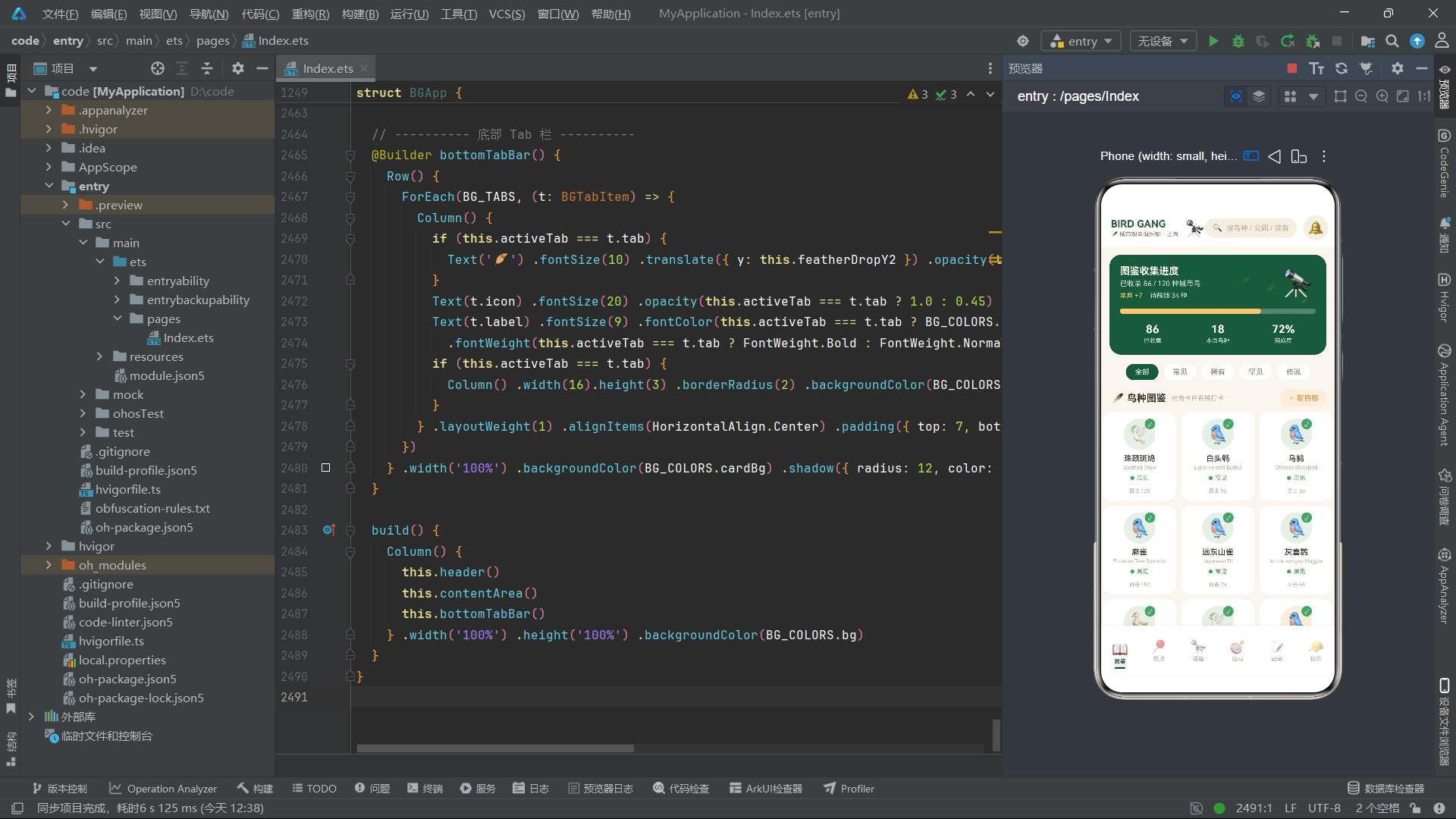
在交互设计层面,应用实现了Tab切换、Chip选择、步进器增减、Toggle开关、TextInput输入、点击弹框、条件渲染等全部常见移动端交互模式。ForEach组件用于列表渲染,支持遍历数组生成重复的UI结构。条件渲染(if-else)实现了选中态/未选中态的UI切换。onClick事件绑定实现了用户交互响应。
整体而言,该应用源码充分展现了ArkUI声明式UI范式的核心优势:通过状态驱动UI自动更新、通过装饰器体系实现组件化和状态管理、通过链式属性调用实现样式设置、通过布局容器组合实现复杂界面结构。代码结构清晰、复用性高、可维护性强,是学习鸿蒙ArkTS应用开发的优秀实践参考。

作为“人工智能6S店”的官方数字引擎,为AI开发者与企业提供一个覆盖软硬件全栈、一站式门户。
更多推荐



 0
0 0
0- 0


 已为社区贡献33条内容

所有评论(0)