
基于 HarmonyOS API 24 的乡村赶集电商应用开发实践:HarmonyOS 6.1.1 ArkTS 声明式 UI 构建多场景乡村服务平台,深度解析 HarmonyOS ArkTS API
技术引言
在万物互联时代,鸿蒙操作系统以其分布式能力和声明式 UI 框架正在重塑移动应用的开发范式。HarmonyOS 6.1.1 作为鸿蒙生态的重要里程碑,带来了更加完善的 ArkTS 语言体系和 ArkUI 声明式组件框架,为开发者提供了从底层系统服务到上层 UI 渲染的全栈能力。HarmonyOS ArkTS API 24 在组件复用、状态管理、动画系统和布局引擎方面进行了深度优化,尤其强化了条件渲染、ForEach 列表渲染、@Builder 装饰器函数化构建以及线性渐变、层叠布局等视觉表达能力,使得复杂业务场景的 UI 实现变得更加高效和直观。
本文将以一个完整的乡村赶集电商应用为例,基于 HarmonyOS API 24 的 ArkTS 语言规范,深入剖析从数据模型定义、色彩体系设计、多 Tab 页面架构、自定义底部导航栏、五种业务弹框体系到柱状图可视化、进度条组件、Flex 换行布局等核心技术的实现细节。该应用涵盖赶集班车预订、产地直供电商、邻里拼单团购、进村货运物流、乡村文旅推荐五大业务场景,全面展示了 ArkTS 在复杂业务系统中的工程实践能力。通过对每一个代码段的逐行解读,读者将系统掌握鸿蒙声明式 UI 的设计哲学和编码模式,为构建高质量的鸿蒙原生应用奠定坚实基础。
一、色彩体系与 ColorPalette 接口设计
interface ColorPalette {
  primary: string;
  primaryLight: string;
  primaryDark: string;
  accent: string;
  accentLight: string;
  gold: string;
  goldLight: string;
  bg: string;
  cardBg: string;
  textPrimary: string;
  textSecondary: string;
  textHint: string;
  border: string;
  success: string;
  warning: string;
  danger: string;
  white: string;
}
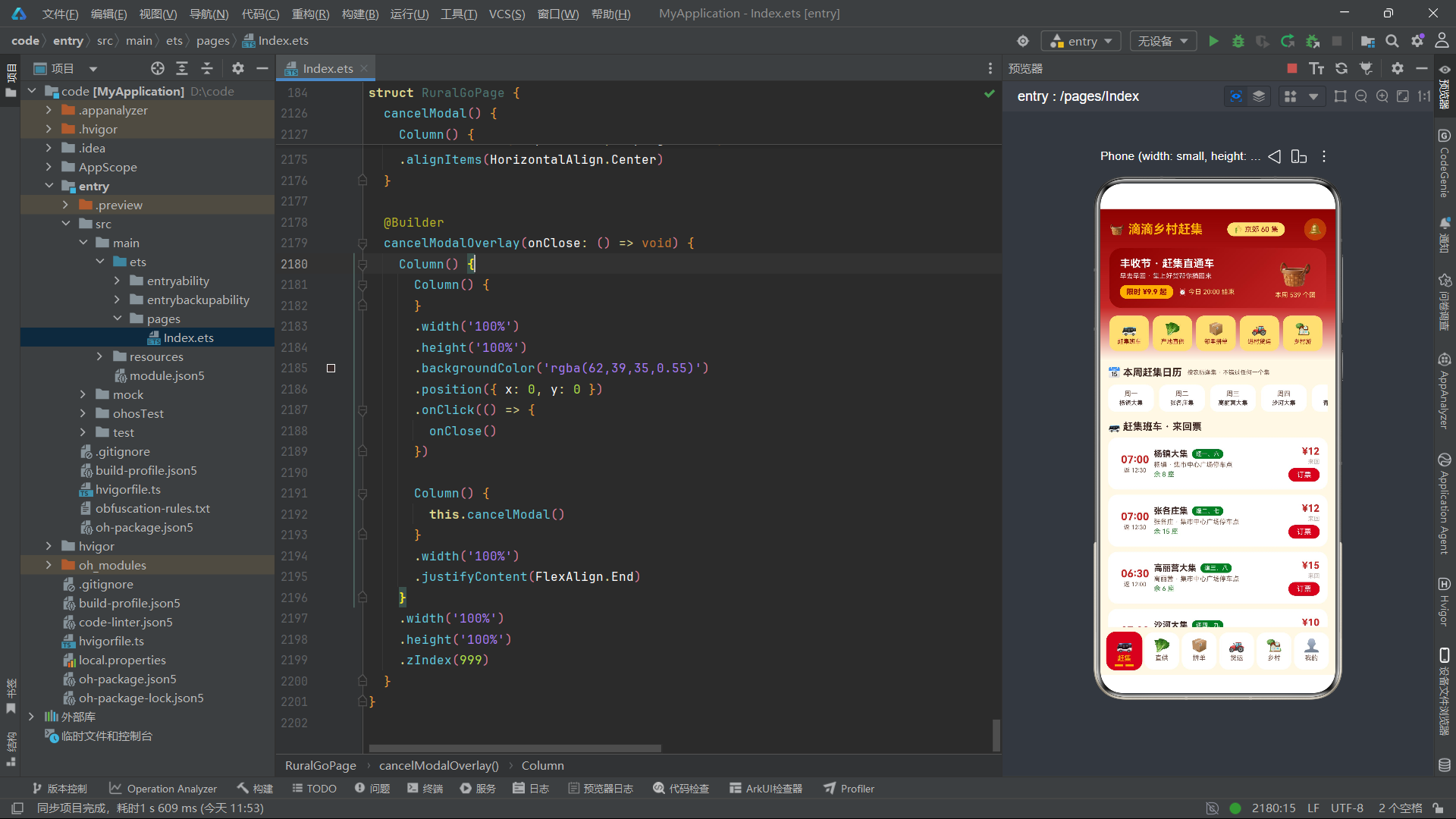
在 HarmonyOS ArkTS 开发中,类型系统是构建可靠应用的基石。这里通过 interface 关键字定义了一个名为 ColorPalette 的色彩调色板接口,将应用中所有颜色值统一归纳为 17 个语义化字段。这种设计模式的核心优势在于:首先,它实现了色彩令牌化,所有 UI 组件引用统一常量而非散落的魔法字符串,当需要适配深色模式或主题切换时只需替换一处常量定义即可全局生效;其次,ArkTS 的接口类型在编译期进行严格类型检查,任何拼写错误或类型不匹配都会在编译阶段暴露,大幅降低了运行时风险。接口中 primary 表示主色(丰收红)、accent 表示强调色(田园绿)、gold 表示点缀金,三色体系呼应了中国红、麦穗金、田园绿的丰收节视觉主题,体现了电商大促风格与传统乡村文化的融合。
二、色彩常量实例化
const COLORS: ColorPalette = {
  primary: '#C62828',
  primaryLight: '#EF9A9A',
  primaryDark: '#8E0000',
  accent: '#2E7D32',
  accentLight: '#C8E6C9',
  gold: '#FFB300',
  goldLight: '#FFE082',
  bg: '#FFF8E7',
  cardBg: '#FFFFFF',
  textPrimary: '#3E2723',
  textSecondary: '#795548',
  textHint: '#BCAAA4',
  border: '#F3E5C0',
  success: '#2E7D32',
  warning: '#FF8F00',
  danger: '#D32F2F',
  white: '#FFFFFF'
};
这里将之前定义的 ColorPalette 接口实例化为全局常量 COLORS,使用 const 关键字声明确保引用不可变。在 HarmonyOS ArkTS API 24 中,全局常量的使用需要特别注意作用域规则——该常量定义在组件结构体之外,属于模块级变量,所有组件均可直接引用。颜色值采用十六进制 #RRGGBB 格式,这是 ArkUI 渲染引擎原生支持的颜色编码标准。值得注意的是,颜色体系的设计遵循了 Material Design 的色阶理念:primaryDark(#8E0000)用于顶部导航栏渐变起始色,primary(#C62828)用于按钮和强调元素,primaryLight 用于浅色背景,形成从深到浅的视觉层次。textPrimary、textSecondary、textHint 三级文字色阶则确保了信息层级的清晰传达,这在赶集班车列表、拼单进度等密集信息场景中尤为关键。
三、数据模型接口体系
interface FairShuttle {
  id: number;
  town: string;
  weekday: string;
  departTime: string;
  returnTime: string;
  price: number;
  seatsLeft: number;
  marketName: string;
}

interface ProduceItem {
  id: number;
  name: string;
  emoji: string;
  origin: string;
  price: number;
  unit: string;
  sold: number;
  stock: number;
  desc: string;
}

interface GroupBuyItem {
  id: number;
  title: string;
  emoji: string;
  leader: string;
  village: string;
  price: number;
  originPrice: number;
  joined: number;
  target: number;
  status: string;
  endTime: string;
}
在 ArkTS 的类型系统中,接口是定义数据模型的首选方式。这里定义了三个核心业务实体接口:FairShuttle 描述赶集班车信息,包含发车时间、返程时间、票价、剩余座位等字段;ProduceItem 描述产地直供农产品,包含产地、单价、销量、库存和描述;GroupBuyItem 描述拼单团购商品,包含团长信息、拼单价格、原价、已参团人数、目标人数和状态。这种强类型的数据模型设计带来了显著的工程优势:在 ForEach 渲染列表时,IDE 能够提供完整的字段自动补全;在访问对象属性时,编译器会检查字段是否存在,避免因拼写错误导致的运行时 undefined 问题。GroupBuyItem 中的 status 字段使用 string 类型而非联合类型,这在实际项目中可根据需要进一步细化为 '拼单中' | '已成团' | '已取消' 的字面量联合类型以获得更强的类型安全。
四、货运班线与乡村文旅数据模型
interface FreightLine {
  id: number;
  route: string;
  stops: string;
  departTime: string;
  truckType: string;
  price: number;
  load: number;
}

interface VillageItem {
  id: number;
  name: string;
  emoji: string;
  region: string;
  distance: number;
  season: string;
  highlights: string;
  rating: number;
}

interface AddrItem {
  id: number;
  name: string;
  phone: string;
  village: string;
  tag: string;
}
继续扩展数据模型体系,FreightLine 描述进村货运班线,包含路线、停靠站数、车型、载重吨位等物流信息;VillageItem 描述乡村文旅资源,包含区域、距离、季节推荐、亮点和评分;AddrItem 描述用户取货地址,包含收货人、电话、村庄和标签。这三个接口共同构成了应用的物流配送和文旅推荐数据基础。在 HarmonyOS ArkTS API 24 中,接口的属性类型选择需要谨慎:price 使用 number 类型便于计算和格式化,rating 使用 number 类型支持小数评分,distance 使用 number 类型便于距离排序。所有接口都包含 id: number 作为唯一标识,这在 ForEach 的 keyGenerator 函数中至关重要,因为 ArkUI 的 diff 算法依赖 key 来高效更新列表项,避免不必要的组件重建。
五、赶集班车数据源
const FAIR_SHUTTLES: FairShuttle[] = [
  { id: 1, town: '杨镇', weekday: '逢一、六', departTime: '07:00', returnTime: '12:30', price: 12, seatsLeft: 8, marketName: '杨镇大集' },
  { id: 2, town: '张各庄', weekday: '逢二、七', departTime: '07:00', returnTime: '12:30', price: 12, seatsLeft: 15, marketName: '张各庄集' },
  { id: 3, town: '高丽营', weekday: '逢三、八', departTime: '06:30', returnTime: '12:00', price: 15, seatsLeft: 6, marketName: '高丽营大集' },
  // ...更多班次数据
];
这里定义了赶集班车数据源数组 FAIR_SHUTTLES,类型标注为 FairShuttle[],确保每个元素都符合接口规范。数据涵盖了京郊十个乡镇的大集信息,采用中国传统的"逢集"日期标注方式(如"逢一、六"表示每月逢农历一、六的日子有集),这体现了应用对乡村传统文化的尊重和适配。在实际鸿蒙应用开发中,这类数据通常通过 HTTP 请求从后端服务获取,但在本示例中采用静态常量数组方式模拟数据源,便于聚焦 UI 渲染逻辑的讲解。值得注意的是,seatsLeft 字段的值范围从 4 到 22 不等,在 UI 渲染时将根据该值动态决定文字颜色——低于 6 时显示红色警示,表示座位紧张,这正是声明式 UI 数据驱动视图的典型体现。
六、主组件结构与 @Entry 装饰器
@Entry
@Component
struct RuralGoPage {
  @State currentTab: number = 0
  @State showShuttleModal: boolean = false
  @State showProduceModal: boolean = false
  @State showGroupModal: boolean = false
  @State showAddrModal: boolean = false
  @State showCancelModal: boolean = false
  // ...
}
这是整个应用的核心入口。@Entry 装饰器标记该组件为页面入口组件,鸿蒙系统会在应用启动时自动加载并渲染该组件。@Component 装饰器声明这是一个自定义组件,可以被其他组件引用或在页面中独立使用。struct 关键字定义组件结构体,与传统的 class 不同,ArkTS 组件采用 struct 语法,这是鸿蒙声明式 UI 框架的约定。组件内部使用 @State 装饰器定义响应式状态变量,当这些变量的值发生变化时,ArkUI 框架会自动触发依赖该状态的 UI 组件重新渲染。这里定义了五个布尔状态变量控制五种弹框的显示与隐藏,以及 currentTab 控制当前选中的 Tab 页面索引。@State 变量的初始值在组件创建时设定,后续通过赋值操作触发 UI 更新,这是 ArkTS 状态管理最基础也最重要的机制。
七、选中项状态与业务数据状态
@State selectedShuttle: FairShuttle | null = null
@State selectedProduce: ProduceItem | null = null
@State selectedGroup: GroupBuyItem | null = null
@State selectedGroupName: string = ''
@State shuttlePeople: number = 2
@State produceSpec: string = '5 斤装'
@State produceCount: number = 1
@State groupCount: number = 1
@State addrName: string = ''
@State addrPhone: string = ''
@State addrVillage: string = ''
@State myPoints: number = 860
@State myOrders: number = 23
@State myGroups: GroupBuyItem[] = GROUP_BUYS.slice(0, 3)
这段状态定义体现了 ArkTS 状态管理的进阶用法。首先,selectedShuttle、selectedProduce、selectedGroup 三个变量使用了联合类型 FairShuttle | null,初始值为 null,当用户点击列表项时赋值为对应的业务对象,弹框据此条件渲染内容。这种 nullable 模式在 ArkTS 中非常常见,它避免了使用空对象占位带来的语义模糊。其次,shuttlePeople、produceCount、groupCount 等数字状态用于弹框内的数量选择器,用户点击加减按钮时更新这些值,UI 上的价格合计会实时联动刷新。最后,myGroups: GroupBuyItem[] 使用数组类型作为状态变量,通过 GROUP_BUYS.slice(0, 3) 截取前三条作为"我的跟团"数据,后续取消操作会修改这个数组并触发列表重渲染。
八、私有属性与 Tab 配置
private tabNames: string[] = ['赶集', '直供', '拼单', '货运', '乡村', '我的']
private tabIcons: string[] = ['🚌', '🥬', '📦', '🚜', '🏡', '👤']
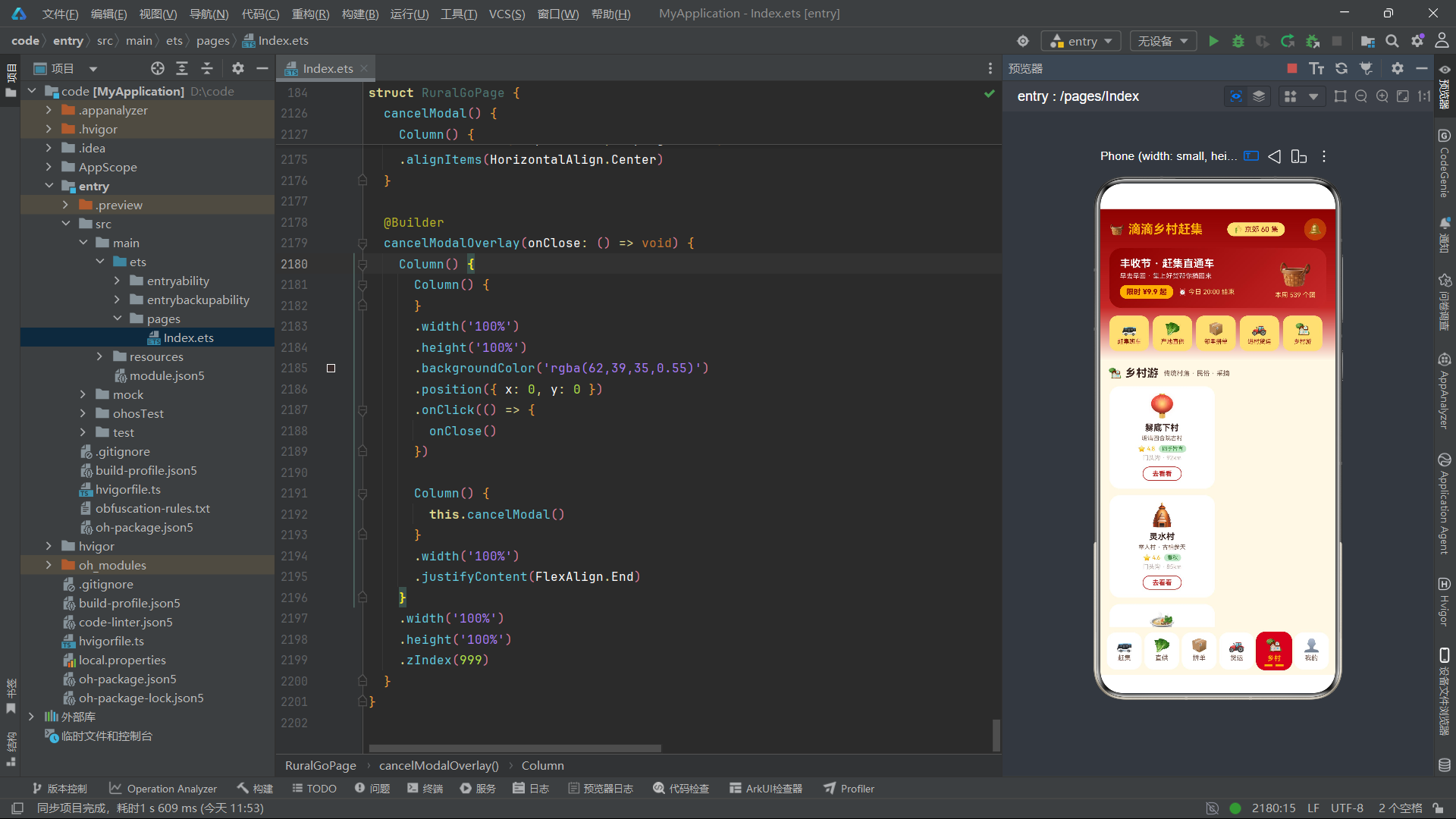
在 ArkTS 组件中,private 关键字定义的属性不会触发响应式更新,适用于不需要参与 UI 驱动的静态配置数据。这里定义了两个并行数组:tabNames 存储 Tab 标签文字,tabIcons 存储 Tab 对应的 Emoji 图标。使用 Emoji 作为图标是一种轻量化的方案,无需引入图片资源即可实现视觉化表达,在 HarmonyOS 系统字体支持下渲染效果良好。两个数组通过相同的索引位置建立对应关系——索引 0 对应"赶集"和"🚌",索引 1 对应"直供"和"🥬",以此类推。在底部导航栏的 ForEach 渲染中,通过遍历 tabIcons 数组并同时访问 tabNames[idx] 来获取对应标签,这种设计简洁高效。在实际工程中,也可以将名称和图标合并为单个对象数组以获得更好的可维护性。
九、计算辅助方法
maxFair(): number {
  let m: number = 0
  WEEK_FAIR.forEach((v: number) => {
    if (v > m) {
      m = v
    }
  })
  return m
}

fairBarHeight(v: number): number {
  return Math.round(v / this.maxFair() * 92)
}

produceTotal(): number {
  if (this.selectedProduce === null) {
    return 0
  }
  const unitPrice = this.selectedProduce.price * (this.produceSpec === '5 斤装' ? 5 : 10)
  return Math.round(unitPrice * this.produceCount * 10) / 10
}
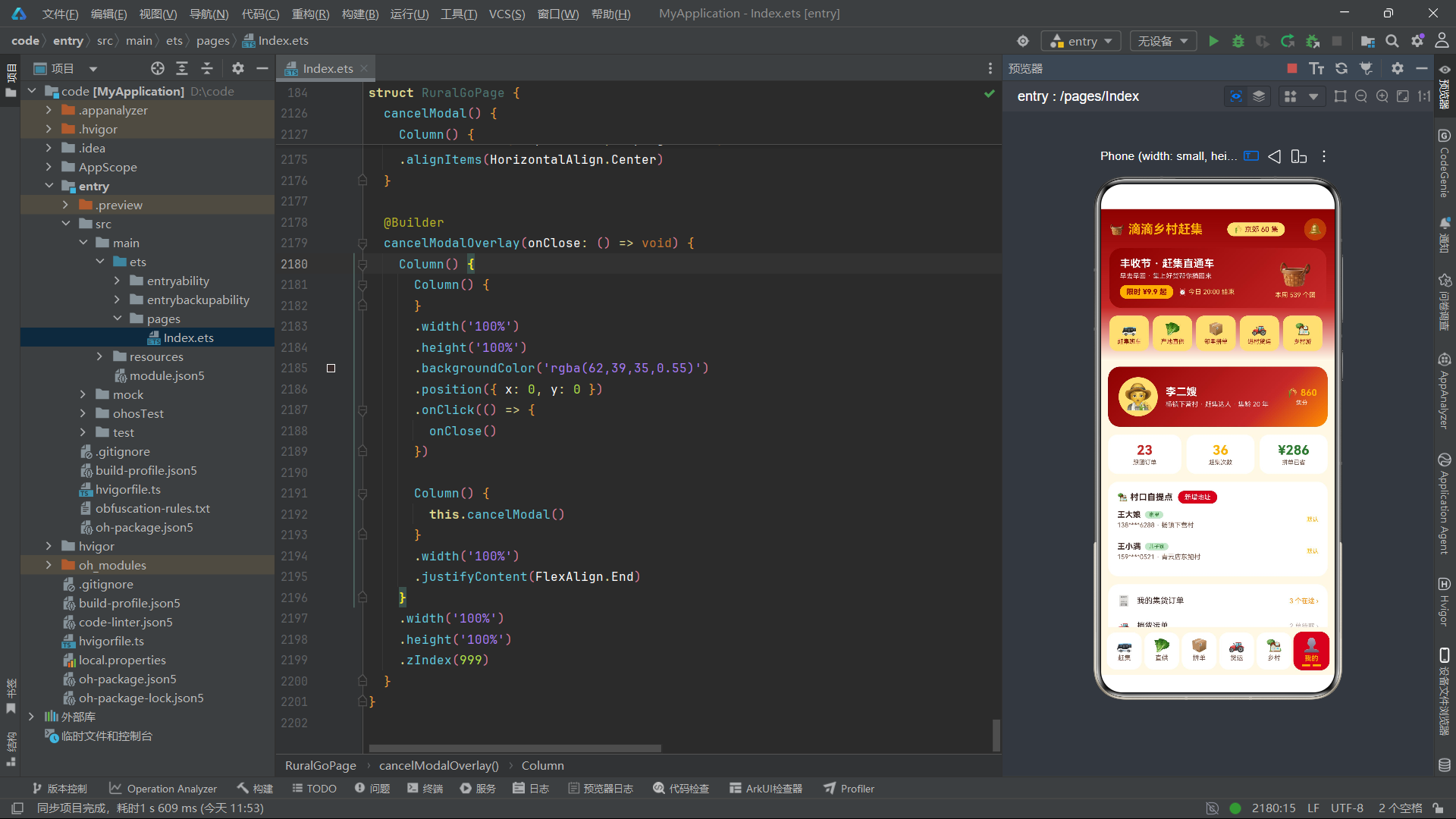
这三个辅助方法展示了 ArkTS 组件中业务逻辑计算的常见模式。maxFair() 遍历本周赶集客流数据数组,找出最大值用于柱状图的归一化计算。fairBarHeight() 根据传入的客流值与最大值的比例,计算柱状图的高度(最大 92 像素),使用 Math.round 确保返回整数像素值,避免亚像素渲染导致的边缘模糊。produceTotal() 计算产地直供商品的订单总价,它综合考量了单价、规格(5斤装或10斤装)和购买份数三个因素,并通过 Math.round(x * 10) / 10 的技巧实现保留一位小数的效果。这些方法虽不使用 @State 装饰器,但它们在 build() 方法或 @Builder 函数中被调用时,能够自动读取当前状态值并返回计算结果,是声明式 UI 数据驱动渲染的重要补充。
十、build 方法与 Stack 层叠布局架构
build() {
  Stack() {
    Column() {
      this.headerBar()
      Scroll() {
        Column() {
          if (this.currentTab === 0) {
            this.fairTab()
          } else if (this.currentTab === 1) {
            this.produceTab()
          } else if (this.currentTab === 2) {
            this.groupTab()
          } else if (this.currentTab === 3) {
            this.freightTab()
          } else if (this.currentTab === 4) {
            this.villageTab()
          } else {
            this.mineTab()
          }
        }
        .width('100%')
        .padding({ left: 12, right: 12, top: 10, bottom: 14 })
      }
      .layoutWeight(1)
      .width('100%')
      .align(Alignment.Top)

      this.redTagTabBar()
    }
    .width('100%')
    .height('100%')

    if (this.showShuttleModal) {
      this.shuttleModalOverlay(() => {
        this.showShuttleModal = false
      })
    }
    // ...其他弹框条件渲染
  }
  .width('100%')
  .height('100%')
  .backgroundColor(COLORS.bg)
}
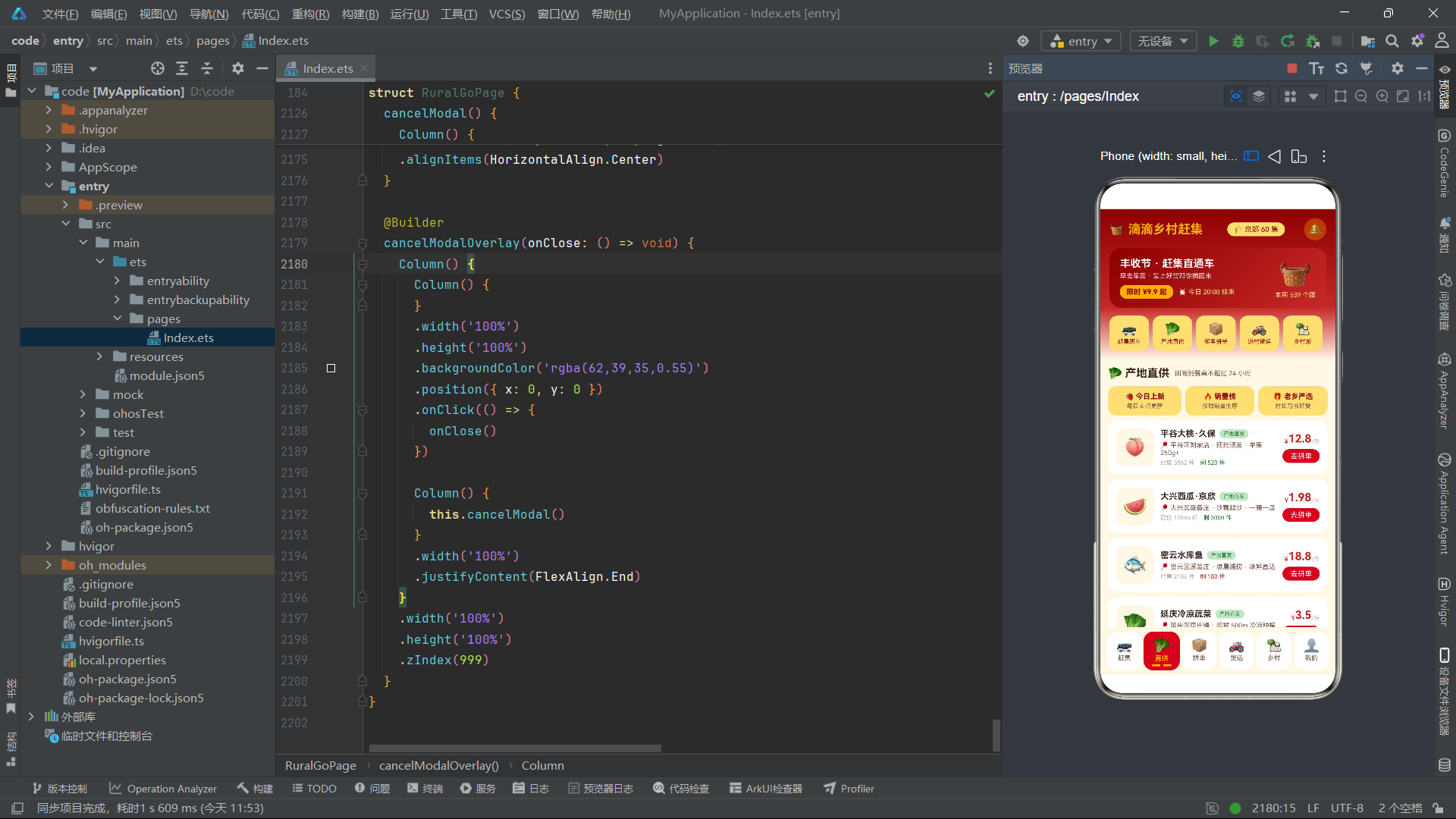
build() 是每个 ArkTS 组件必须实现的方法,它以声明式语法描述组件的 UI 结构。这里采用 Stack 作为根容器,Stack 是层叠布局容器,子元素按声明顺序从底层到顶层堆叠。第一层是 Column 纵向布局,包含三部分:顶部 headerBar()、中间可滚动的 Scroll 区域和底部 redTagTabBar()。Scroll 内部使用 if-else 条件渲染根据 currentTab 的值决定渲染哪个 Tab 页面的 @Builder 函数,这是 ArkTS 条件渲染的标准用法。第二层是五个弹框组件,每个弹框都用 if 条件包裹——当对应的 boolean 状态为 true 时渲染弹框覆盖层,为 false 时不渲染。Stack 的层叠特性确保弹框始终显示在主内容之上,结合 zIndex(999) 实现了模态遮罩效果。layoutWeight(1) 让 Scroll 区域占据 headerBar 和 tabBar 之间的所有剩余空间,这是 Flex 布局权重的典型应用。
十一、headerBar 顶部导航栏与线性渐变
@Builder
headerBar() {
  Column() {
    Row() {
      Text('🧺 滴滴乡村赶集')
        .fontSize(19)
        .fontWeight(FontWeight.Bold)
        .fontColor(COLORS.gold)
      Row() {
        Text('🌾 京郊 60 集')
          .fontSize(11)
          .fontColor(COLORS.primaryDark)
      }
      .padding({ left: 10, right: 10, top: 4, bottom: 4 })
      .backgroundColor(COLORS.goldLight)
      .borderRadius(12)
      .margin({ left: 8 })
      // ...
    }
    .width('100%')
    .justifyContent(FlexAlign.SpaceBetween)
    // ...
  }
  .width('100%')
  .padding({ left: 14, right: 14, bottom: 14 })
  .linearGradient({
    angle: 180,
    colors: [['#8E0000', 0], ['#C62828', 0.65], ['#FFF8E7', 1]]
  })
}
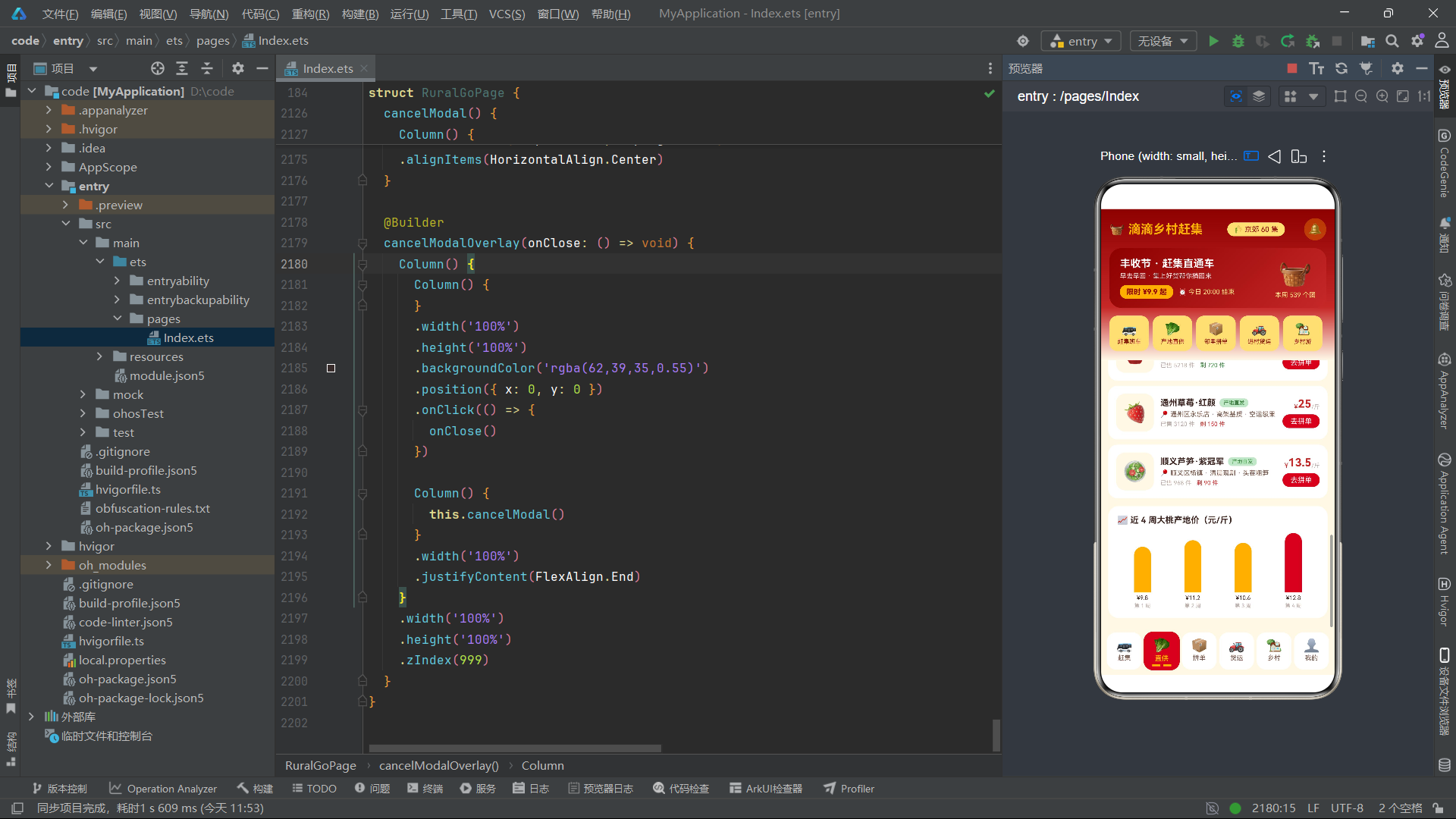
@Builder 装饰器是 ArkTS 中定义可复用 UI 片段的核心机制,它允许开发者将复杂的 UI 结构抽取为独立的构建函数,在 build() 方法或其他 @Builder 中通过 this.xxx() 调用。headerBar() 构建了应用的顶部导航区域,包含标题行和促销信息卡片。该组件的视觉亮点在于 linearGradient 线性渐变属性的使用:angle: 180 定义渐变方向为从上到下,colors 数组定义了三个颜色断点——顶部深红 #8E0000(0%)、中间主红 #C62828(65%)、底部暖白 #FFF8E7(100%),营造出从深色品牌色到浅色背景的平滑过渡效果。FlexAlign.SpaceBetween 让标题行中的元素两端对齐分布。borderRadius(12) 和 padding 属性共同塑造了圆角卡片标签的视觉形态,这是电商大促页面常见的标签设计语言。
十二、红纸签式底部 Tab 导航栏
@Builder
redTagTabBar() {
  Row() {
    ForEach(this.tabIcons, (icon: string, idx: number) => {
      Column() {
        Text(icon)
          .fontSize(20)
        Text(this.tabNames[idx])
          .fontSize(10)
          .fontWeight(this.currentTab === idx ? FontWeight.Bold : FontWeight.Normal)
          .fontColor(this.currentTab === idx ? COLORS.gold : COLORS.textSecondary)
          .margin({ top: 2 })
        Row() {
          Rect()
            .width(12)
            .height(3)
            .borderRadius(2)
            .fill(this.currentTab === idx ? COLORS.gold : 'rgba(0,0,0,0)')
          Rect()
            .width(12)
            .height(3)
            .borderRadius(2)
            .fill(this.currentTab === idx ? COLORS.gold : 'rgba(0,0,0,0)')
            .margin({ left: 4 })
        }
        .margin({ top: 3 })
      }
      .layoutWeight(1)
      .padding({ top: 8, bottom: 6 })
      .borderRadius(14)
      .backgroundColor(this.currentTab === idx ? COLORS.primary : COLORS.white)
      .scale({ x: this.currentTab === idx ? 1.04 : 1, y: this.currentTab === idx ? 1.04 : 1 })
      .animation({ duration: 200, curve: Curve.EaseOut })
      .onClick(() => {
        this.currentTab = idx
      })
    }, (icon: string, idx: number) => icon + idx.toString())
  }
  .width('100%')
  .padding({ left: 8, right: 8, top: 8, bottom: 8 })
  .backgroundColor(COLORS.bg)
}
这是整个应用最具设计感的组件之一。底部导航栏采用"红纸签式"设计语言——选中的 Tab 显示为红色背景配金色文字和金色底部双须装饰,未选中的 Tab 为白色背景配灰色文字。ForEach 遍历 tabIcons 数组渲染六个 Tab 项,每项包含图标、文字和底部双须装饰(由两个 Rect 矩形组成)。选中态通过三元表达式动态切换 fontWeight、fontColor、backgroundColor 等属性。scale 属性实现选中项 1.04 倍的微放大效果,配合 animation 属性的 200 毫秒 EaseOut 缓动曲线,形成了流畅的触感反馈动画。onClick 回调中直接赋值 this.currentTab = idx,ArkUI 框架自动检测到状态变化并重新渲染整个 Tab 栏。ForEach 的第三个参数是 keyGenerator 函数,返回 icon + idx.toString() 作为唯一 key,确保列表项的高效 diff 更新。'rgba(0,0,0,0)' 透明色用于未选中时隐藏底部装饰须,是一种巧妙的视觉控制技巧。
十三、赶集班车列表与条件色彩
ForEach(FAIR_SHUTTLES, (s: FairShuttle) => {
  Row() {
    Column() {
      Text(s.departTime)
        .fontSize(16)
        .fontWeight(FontWeight.Bold)
        .fontColor(COLORS.primary)
      Text('返 ' + s.returnTime)
        .fontSize(9)
        .fontColor(COLORS.textSecondary)
        .margin({ top: 2 })
    }
    .alignItems(HorizontalAlign.Center)
    .width(58)
    // ...中间信息和右侧价格按钮
  }
  .width('100%')
  .padding(12)
  .backgroundColor(COLORS.white)
  .borderRadius(14)
  .margin({ bottom: 8 })
  .onClick(() => {
    this.selectedShuttle = s
    this.shuttlePeople = 2
    this.showShuttleModal = true
  })
}, (s: FairShuttle) => s.id.toString())
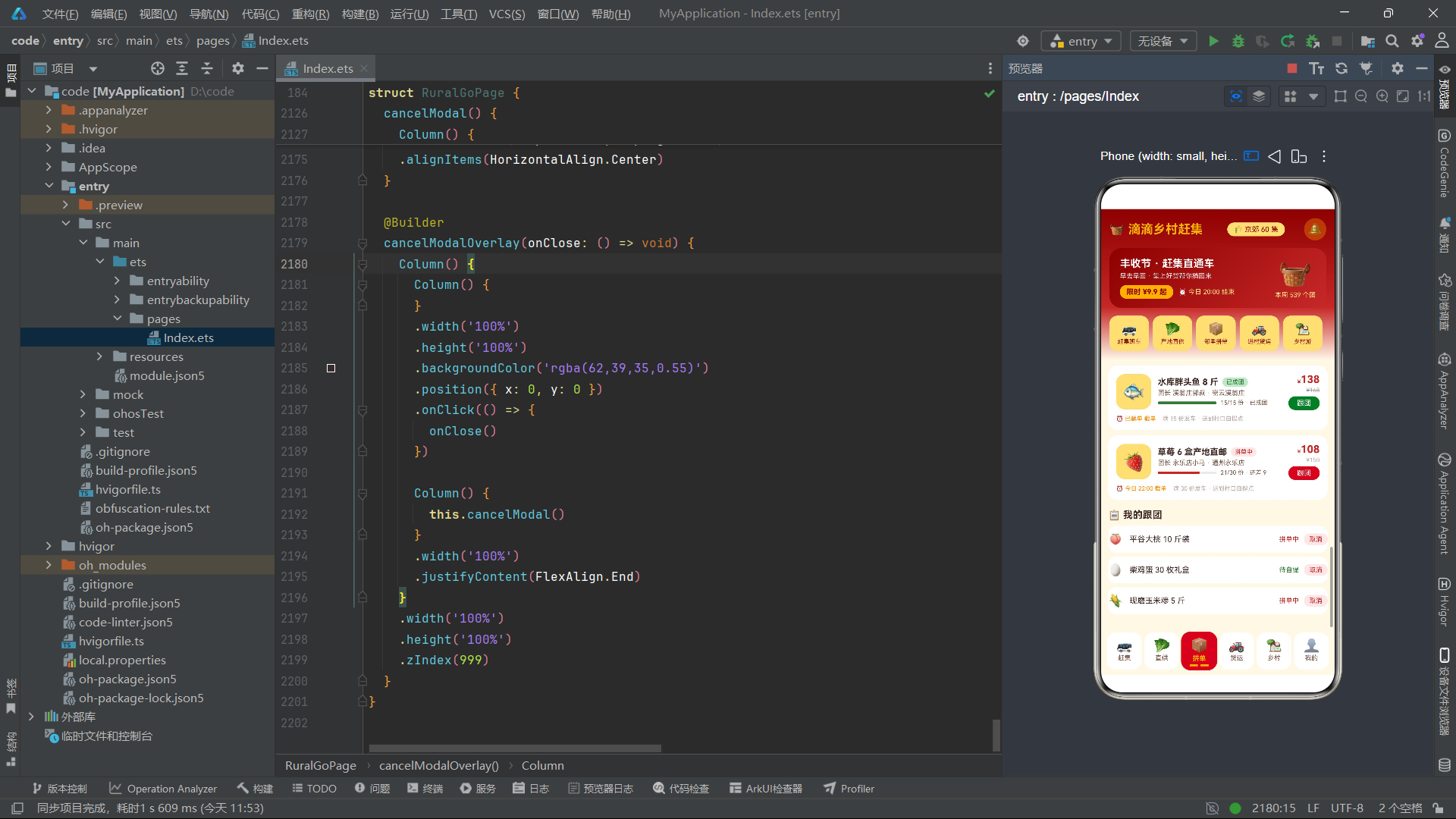
这段代码渲染赶集班车列表,是 ArkTS ForEach 列表渲染的经典示例。ForEach 的第一个参数是数据源数组,第二个参数是 itemGenerator 回调函数(定义每个列表项的 UI 结构),第三个参数是 keyGenerator 函数(返回 s.id.toString() 作为唯一标识)。每个班车卡片采用 Row 横向布局,左侧显示发车时间和返程时间,中间显示集市名称、日期标签和剩余座位数,右侧显示价格和订票按钮。列表项的 onClick 回调将点击的班车数据赋值给 selectedShuttle 状态,同时重置乘车人数为默认值 2,然后打开班车预订弹框。这种"点击列表项 -> 传递选中数据 -> 打开弹框"的模式在 ArkTS 电商应用中极为常见。在剩余座位的显示上,使用了条件表达式 s.seatsLeft < 6 ? COLORS.danger : COLORS.success,当座位少于 6 个时文字变红警示用户尽快预订,这是数据驱动视觉的典型实践。
十四、柱状图可视化实现
Row() {
  ForEach(WEEK_FAIR, (v: number, idx: number) => {
    Column() {
      Column() {
      }
      .width(16)
      .height(this.fairBarHeight(v))
      .borderRadius({ topLeft: 8, topRight: 8 })
      .backgroundColor(idx >= 5 ? COLORS.primary : COLORS.gold)

      Text(this.weekLabel(idx))
        .fontSize(9)
        .fontColor(COLORS.textSecondary)
        .margin({ top: 4 })
    }
    .layoutWeight(1)
    .alignItems(HorizontalAlign.Center)
  }, (v: number, idx: number) => idx.toString())
}
.width('100%')
.padding({ top: 14, bottom: 12 })
.backgroundColor(COLORS.white)
.borderRadius(16)
.alignItems(VerticalAlign.Bottom)
这段代码实现了本周赶集客流的柱状图可视化,完全使用 ArkTS 原生组件构建,无需引入任何图表库。核心思路是:外层 Row 横向排列七个 Column,每个 Column 内部包含一个作为"柱子"的空 Column 和底部的星期标签。柱子的高度通过 this.fairBarHeight(v) 方法动态计算,该方法将客流值归一化到 0-92 像素范围。柱子的圆角通过 borderRadius({ topLeft: 8, topRight: 8 }) 仅设置顶部圆角,模拟柱状图的圆顶效果。颜色使用条件表达式 idx >= 5 ? COLORS.primary : COLORS.gold——周六和周日(索引 5、6)的柱子显示为红色表示周末客流高峰,工作日为金色。外层 Row 设置 alignItems(VerticalAlign.Bottom) 确保所有柱子底部对齐,这是柱状图正确的视觉呈现方式。layoutWeight(1) 让七根柱子等宽分布,整个图表响应式适配屏幕宽度。
十五、产地直供 Tab 与商品卡片
ForEach(PRODUCES, (p: ProduceItem) => {
  Row() {
    Column() {
      Text(p.emoji)
        .fontSize(30)
    }
    .width(58)
    .height(58)
    .justifyContent(FlexAlign.Center)
    .backgroundColor(COLORS.bg)
    .borderRadius(14)

    Column() {
      Row() {
        Text(p.name)
          .fontSize(13)
          .fontWeight(FontWeight.Bold)
          .fontColor(COLORS.textPrimary)
        Text('产地直发')
          .fontSize(8)
          .fontColor(COLORS.accent)
          .padding({ left: 6, right: 6, top: 2, bottom: 2 })
          .backgroundColor(COLORS.accentLight)
          .borderRadius(6)
          .margin({ left: 6 })
      }
      .alignItems(VerticalAlign.Center)
      // ...产地描述、销量库存
    }
    .alignItems(HorizontalAlign.Start)
    .layoutWeight(1)
    .margin({ left: 10 })
    // ...右侧价格和拼单按钮
  }
  .width('100%')
  .padding(12)
  .backgroundColor(COLORS.white)
  .borderRadius(14)
  .margin({ top: 8 })
  .onClick(() => {
    this.selectedProduce = p
    this.produceCount = 1
    this.produceSpec = '5 斤装'
    this.showProduceModal = true
  })
}, (p: ProduceItem) => p.id.toString())
产地直供 Tab 渲染农产品列表,每个商品卡片包含 Emoji 图标区、商品信息区和价格操作区三部分。左侧的 Emoji 图标使用一个固定 58x58 像素的 Column 容器,设置浅色背景和圆角,形成图标占位框的效果。中间的商品信息区使用 layoutWeight(1) 占据剩余空间,包含商品名称、"产地直发"标签、产地描述以及销量和库存信息。库存的颜色同样采用条件表达式 p.stock < 200 ? COLORS.danger : COLORS.success,库存低于 200 件时显示红色提示库存紧张。整个卡片的 onClick 将选中的商品数据赋值给状态变量,重置购买份数和规格为默认值,然后打开产品详情弹框。这种将数据流从列表传递到弹框的模式是 ArkTS 状态管理的核心实践,通过 @State 变量作为中间桥梁实现了组件间的数据通信。
十六、拼单团购与 Progress 进度条组件
Row() {
  Progress({ value: g.joined, total: g.target, type: ProgressType.Linear })
    .width(90)
    .color(g.joined >= g.target ? COLORS.accent : COLORS.primary)
  Text(g.joined + '/' + g.target + ' 份' + (g.joined >= g.target ? ' · 已成团' : ' · 还差 ' + (g.target - g.joined)))
    .fontSize(9)
    .fontColor(COLORS.textSecondary)
    .margin({ left: 6 })
}
.alignItems(VerticalAlign.Center)
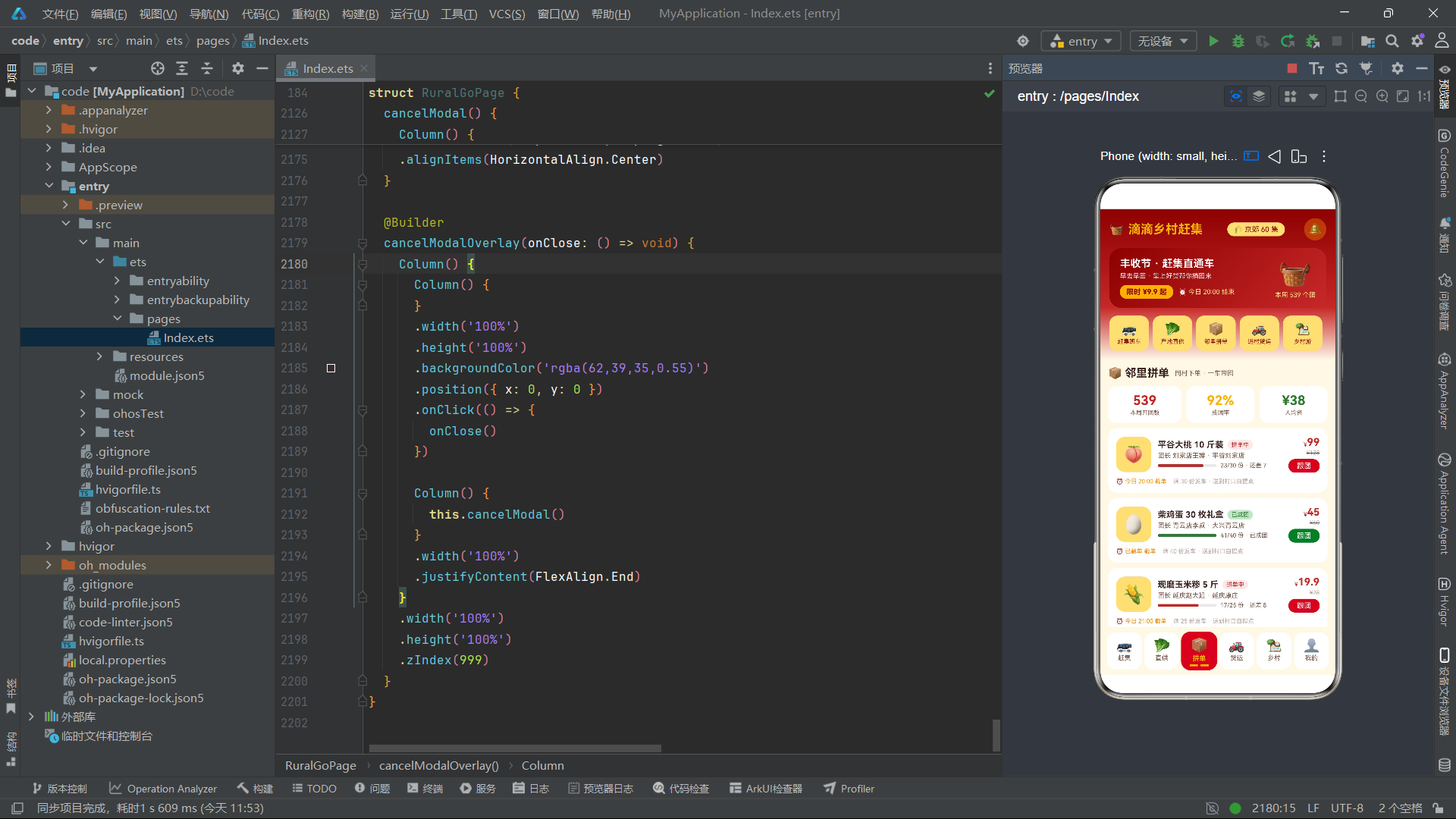
拼单团购 Tab 的核心亮点是使用了 HarmonyOS ArkTS API 24 内置的 Progress 组件来展示拼单进度。Progress 组件接收三个参数:value 表示当前值(已参团人数),total 表示目标值,type 设置为 ProgressType.Linear 表示线性进度条样式。进度条颜色根据 g.joined >= g.target 条件动态切换——已成团时显示绿色(COLORS.accent),拼单中显示红色(COLORS.primary),这种视觉语义化设计让用户一目了然地了解拼单状态。进度条旁边的文字使用复杂的条件表达式,动态显示"已成团"或"还差 N 份",将数据驱动的文字描述与进度条视觉形成双重信息传达。此外,原价使用 TextDecorationType.LineThrough 删除线效果,这是 ArkTS 文本装饰属性的典型应用,在电商场景中广泛用于展示折扣前的原价。
十七、进村货运班线与双卡片渐变
Row() {
  Column() {
    Text('📦 快递进村')
      .fontSize(12)
      .fontWeight(FontWeight.Bold)
      .fontColor(COLORS.white)
    Text('网购包裹送到村口自提点')
      .fontSize(9)
      .fontColor('rgba(255,255,255,0.9)')
      .margin({ top: 3 })
  }
  .layoutWeight(1)
  .alignItems(HorizontalAlign.Start)
  .padding(12)
  .borderRadius(14)
  .linearGradient({
    angle: 135,
    colors: [['#8E0000', 0], ['#C62828', 1]]
  })

  Column() {
    Text('🌾 农产品出村')
      .fontSize(12)
      .fontWeight(FontWeight.Bold)
      .fontColor(COLORS.white)
    Text('大桃小米蜂蜜当天进城')
      .fontSize(9)
      .fontColor('rgba(255,255,255,0.9)')
      .margin({ top: 3 })
  }
  .layoutWeight(1)
  .alignItems(HorizontalAlign.Start)
  .padding(12)
  .borderRadius(14)
  .margin({ left: 8 })
  .linearGradient({
    angle: 135,
    colors: [['#1B5E20', 0], ['#2E7D32', 1]]
  })
}
.width('100%')
.margin({ top: 10 })
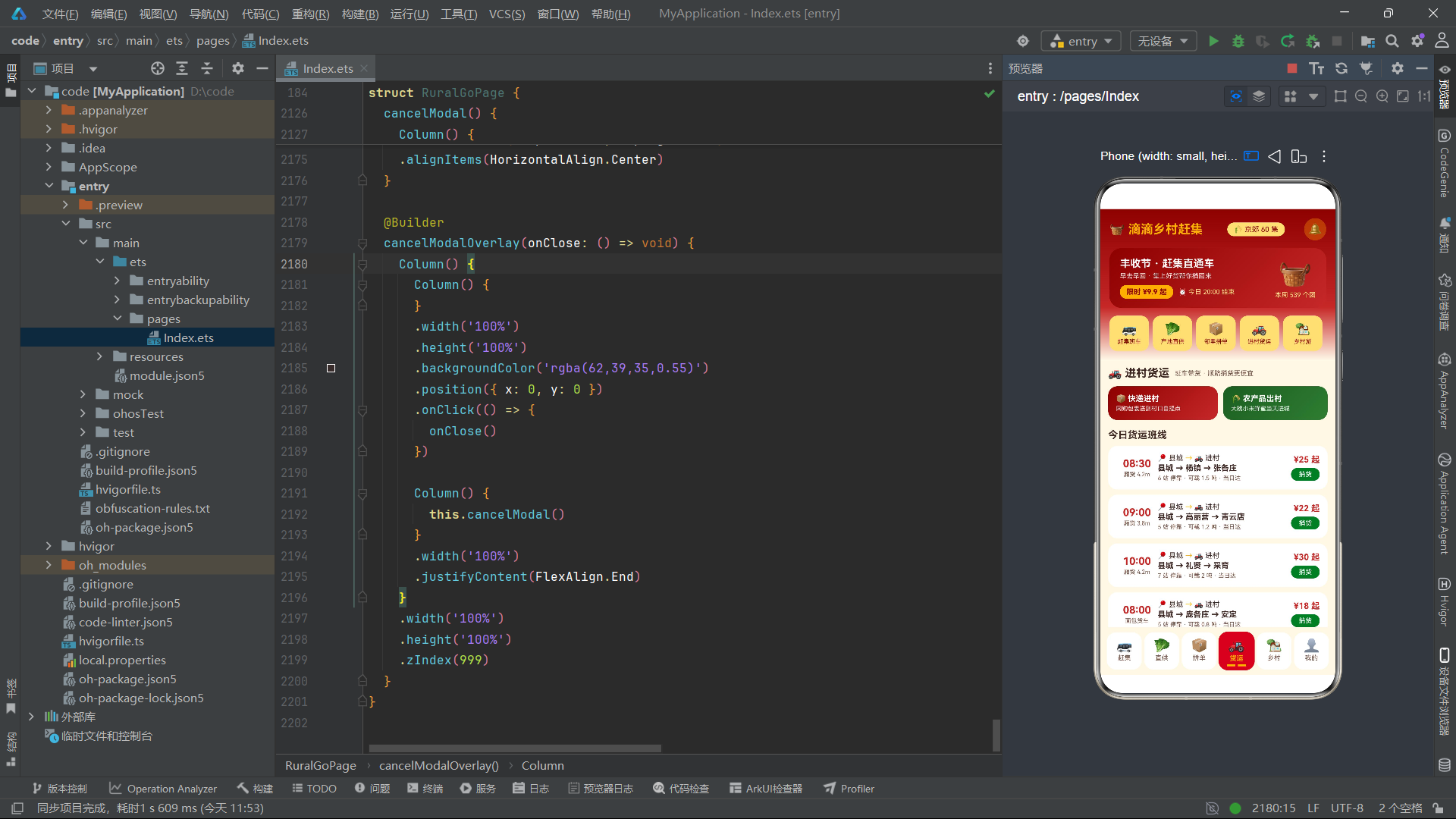
货运 Tab 顶部设计了两个对置的渐变卡片,分别代表"快递进村"和"农产品出村"两个物流方向。两个卡片使用 layoutWeight(1) 等宽分布,中间通过 margin({ left: 8 }) 设置间距。左侧卡片使用红色系渐变(#8E0000 到 #C62828),呼应应用主色调;右侧卡片使用绿色系渐变(#1B5E20 到 #2E7D32),呼应田园绿强调色。linearGradient 的 angle: 135 定义了从左上到右下的对角线渐变方向,比垂直渐变更具立体感。文字颜色使用 rgba(255,255,255,0.9) 半透明白色,在渐变背景上既有良好的对比度又不会过于刺眼。这种双色对置卡片设计在鸿蒙应用中常用于展示两个并列的业务入口或功能分类,视觉上醒目且信息层次清晰。
十八、乡村文旅 Flex 换行布局
Flex({ wrap: FlexWrap.Wrap }) {
  ForEach(VILLAGES, (v: VillageItem) => {
    Column() {
      Text(v.emoji)
        .fontSize(34)
        .margin({ top: 10 })
      Text(v.name)
        .fontSize(13)
        .fontWeight(FontWeight.Bold)
        .fontColor(COLORS.textPrimary)
        .margin({ top: 6 })
      Text(v.highlights)
        .fontSize(9)
        .fontColor(COLORS.textSecondary)
        .margin({ top: 3 })
      // ...评分和季节标签
      Text('去看看')
        .fontSize(10)
        .fontColor(COLORS.primary)
        .fontWeight(FontWeight.Bold)
        .padding({ left: 14, right: 14, top: 4, bottom: 4 })
        .borderRadius(12)
        .border({ width: 1, color: COLORS.primary })
        .margin({ top: 8, bottom: 12 })
    }
    .width('48%')
    .alignItems(HorizontalAlign.Center)
    .backgroundColor(COLORS.white)
    .borderRadius(16)
    .margin({ right: 6, bottom: 10, left: 2 })
  }, (v: VillageItem) => v.id.toString())
}
.width('100%')
.margin({ top: 10 })
乡村文旅 Tab 使用 Flex 容器配合 FlexWrap.Wrap 实现换行流式布局,这是实现两列网格卡片列表的经典方案。每个乡村卡片宽度设置为 48%,这样一行可以放下两张卡片,剩余 4% 的空间通过 margin 分配为间距。FlexWrap.Wrap 确保超出容器宽度的子元素自动换行到下一行,无需手动计算行数和列数。每张卡片包含 Emoji 图标、村庄名称、亮点描述、评分(星级 + 数字)、适宜季节标签和"去看看"按钮。评分中的星星使用 ⭐ Emoji 配合金色文字,季节标签使用绿色文字配浅绿背景的圆角标签。"去看看"按钮使用 border 属性而非 backgroundColor,形成描边按钮效果,与实心按钮形成视觉对比。border({ width: 1, color: COLORS.primary }) 定义了 1 像素宽的红色描边,这是 ArkTS 边框属性的标准化用法。
十九、个人中心与用户信息卡片
@Builder
mineTab() {
Column() {
Row() {
Column() {
Text('🧑🌾')
.fontSize(38)
}
.width(60)
.height(60)
.justifyContent(FlexAlign.Center)
.backgroundColor(COLORS.goldLight)
.borderRadius(30)
Column() {
Text('李二嫂')
.fontSize(16)
.fontWeight(FontWeight.Bold)
.fontColor(COLORS.white)
Text('杨镇下营村 · 赶集达人 · 集龄 20 年')
.fontSize(10)
.fontColor('rgba(255,255,255,0.9)')
.margin({ top: 4 })
}
.alignItems(HorizontalAlign.Start)
.layoutWeight(1)
.margin({ left: 12 })
Column() {
Text('🌾 ' + this.myPoints.toString())
.fontSize(14)
.fontWeight(FontWeight.Bold)
.fontColor(COLORS.gold)
Text('集分')
.fontSize(9)
.fontColor('rgba(255,255,255,0.85)')
.margin({ top: 2 })
}
.alignItems(HorizontalAlign.Center)
}
.width('100%')
.padding(16)
.borderRadius(18)
.linearGradient({
angle: 135,
colors: [['#8E0000', 0], ['#C62828', 0.7], ['#FF8F00', 1]]
})
// ...统计数据和地址列表
}
}
个人中心 Tab 的用户信息卡片展示了多色渐变的进阶用法。linearGradient 定义了三个颜色断点的对角线渐变:从深红(#8E0000)到主红(#C62828)再到橙色(#FF8F00),营造出从深到亮的暖色调渐变效果,象征着丰收的温暖。用户头像使用 60x60 的圆形容器(borderRadius(30) 实现圆形),背景为浅金色,内含 Emoji 表情。用户名和标签信息为白色文字,在渐变背景上具有良好的可读性。右侧显示集分(积分),使用金色文字突出显示。this.myPoints.toString() 将数字状态转换为字符串用于 Text 组件显示,这是 ArkTS 中数字到字符串的显式转换。用户信息卡片下方的三个统计卡片(跟团订单、赶集次数、拼单已省)使用白色背景圆角卡片,与渐变背景形成层次对比。
二十、模态弹框体系与 Overlay 遮罩层
@Builder
shuttleModalOverlay(onClose: () => void) {
  Column() {
    Column() {
    }
    .width('100%')
    .height('100%')
    .backgroundColor('rgba(62,39,35,0.55)')
    .position({ x: 0, y: 0 })
    .onClick(() => {
      onClose()
    })

    Column() {
      this.shuttleModal()
    }
    .width('100%')
    .justifyContent(FlexAlign.End)
  }
  .width('100%')
  .height('100%')
  .zIndex(999)
}
这段代码定义了弹框的遮罩层和容器结构,是 ArkTS 实现模态弹框的标准模式。外层 Column 占满全屏(width('100%') 和 height('100%')),zIndex(999) 确保弹框层级高于页面内容。内部包含两个子元素:第一个是遮罩层——一个空 Column,设置半透明深棕色背景 rgba(62,39,35,0.55),通过 position({ x: 0, y: 0 }) 定位到屏幕左上角,覆盖整个屏幕。遮罩层的 onClick 回调调用 onClose() 闭包函数关闭弹框,实现了点击遮罩关闭弹框的常见交互。第二个子元素包裹实际的弹框内容 this.shuttleModal(),设置 justifyContent(FlexAlign.End) 让弹框内容靠底部排列,模拟从底部滑出的效果。onClose: () => void 作为参数传入的闭包函数是 ArkTS 中跨组件通信的常见模式——父组件通过传递回调函数给子 Builder,子组件在特定事件时调用该回调,实现状态的反向流动。
二十一、班车预订弹框与数量选择器
Row() {
  Text('乘车人数')
    .fontSize(12)
    .fontColor(COLORS.textPrimary)
    .layoutWeight(1)
  Text('-')
    .fontSize(16)
    .fontColor(this.shuttlePeople > 1 ? COLORS.primary : COLORS.textHint)
    .padding({ left: 14, right: 14 })
    .onClick(() => {
      if (this.shuttlePeople > 1) {
        this.shuttlePeople -= 1
      }
    })
  Text(this.shuttlePeople.toString() + ' 人')
    .fontSize(13)
    .fontWeight(FontWeight.Bold)
    .fontColor(COLORS.textPrimary)
  Text('+')
    .fontSize(16)
    .fontColor(COLORS.primary)
    .padding({ left: 14, right: 14 })
    .onClick(() => {
      if (this.shuttlePeople < 6) {
        this.shuttlePeople += 1
      }
    })
}
这是弹框内数量选择器的实现,是电商应用中最常见的交互组件之一。减号按钮的 fontColor 使用条件表达式 this.shuttlePeople > 1 ? COLORS.primary : COLORS.textHint——当人数已经是最小值 1 时显示灰色表示不可再减,否则显示红色表示可操作。加号按钮始终显示红色,但 onClick 回调中通过 if (this.shuttlePeople < 6) 限制最大值为 6 人。每次点击加减按钮时,this.shuttlePeople 状态变量更新,ArkUI 框架自动重新渲染依赖该状态的组件:数字显示更新、减号按钮颜色更新、底部"往返合计"金额更新。这种状态驱动的联动刷新是声明式 UI 框架的核心优势——开发者只需关注状态变化逻辑,UI 同步更新由框架自动完成。价格合计通过 this.selectedShuttle.price * this.shuttlePeople 实时计算,反映了 ArkTS 中方法调用与状态读取的紧密结合。
二十二、地址新增弹框与 TextInput 输入组件
Text('收货人姓名')
  .fontSize(11)
  .fontColor(COLORS.textSecondary)
  .width('100%')
TextInput({ placeholder: '如:张大爷' })
  .fontSize(12)
  .height(40)
  .backgroundColor(COLORS.bg)
  .borderRadius(10)
  .margin({ top: 6 })
  .onChange((v: string) => {
    this.addrName = v
  })
地址新增弹框使用了 ArkTS 的 TextInput 组件来接收用户输入。TextInput 通过 placeholder 参数设置占位提示文字,引导用户输入正确格式的内容。onChange 回调在用户输入时实时触发,参数 v: string 携带当前输入值,回调体内将其赋值给 this.addrName 状态变量。这种实时双向绑定模式确保了用户输入与组件状态的同步。三个 TextInput 分别绑定 addrName、addrPhone、addrVillage 三个状态变量,收集收货人姓名、联系电话和村庄地址。保存按钮的 onClick 回调中,使用 this.addrList.unshift() 方法将新地址插入到地址列表数组的头部(最新的显示在最前),新地址对象的字段使用空值检查 this.addrName === '' ? '新地址' : this.addrName 确保空输入时有默认值。unshift 操作修改了 @State 数组变量,ArkUI 框架检测到数组引用变化后自动触发地址列表的 ForEach 重新渲染。
二十三、取消拼单与不可变状态更新
cancelMyGroup(): void {
  const next: GroupBuyItem[] = []
  this.myGroups.forEach((g: GroupBuyItem) => {
    if (g.title === this.selectedGroupName) {
      next.push({
        id: g.id,
        title: g.title,
        emoji: g.emoji,
        leader: g.leader,
        village: g.village,
        price: g.price,
        originPrice: g.originPrice,
        joined: g.joined,
        target: g.target,
        status: '已取消',
        endTime: g.endTime
      })
    } else {
      next.push(g)
    }
  })
  this.myGroups = next
  this.showCancelModal = false
}
cancelMyGroup() 方法展示了 ArkTS 中数组状态的不可变更新模式。该方法不直接修改原数组中的对象(如 this.myGroups[0].status = '已取消'),而是创建一个全新的数组 next,遍历原数组将每个元素复制到新数组中——对于匹配选中名称的拼单项,创建一个新对象并将 status 改为 '已取消',其他项原样推入。最后将整个新数组赋值给 this.myGroups,触发 ArkUI 框架的 diff 检测和列表重渲染。这种不可变更新模式虽然代码量略多,但具有显著优势:它避免了直接修改状态对象可能导致的引用追踪失效问题,确保 ArkUI 的状态管理系统能够准确检测到变化并触发正确的 UI 更新。在 HarmonyOS ArkTS API 24 中,@State 数组变量需要整体替换才能可靠触发响应式更新,直接修改数组元素的属性不会自动触发渲染,因此不可变更新模式是推荐的最佳实践。
二十四、取消确认弹框与双按钮交互
@Builder
cancelModal() {
  Column() {
    Text('⚠️')
      .fontSize(34)
      .margin({ top: 22 })
    Text('取消跟团')
      .fontSize(16)
      .fontWeight(FontWeight.Bold)
      .fontColor(COLORS.textPrimary)
      .margin({ top: 8 })
    Text('「' + this.selectedGroupName + '」取消后不可恢复,已成团商品需联系团长协商退款。')
      .fontSize(11)
      .fontColor(COLORS.textSecondary)
      .textAlign(TextAlign.Center)
      .margin({ top: 8 })
      .padding({ left: 24, right: 24 })

    Row() {
      Text('再想想')
        .fontSize(13)
        .fontColor(COLORS.textSecondary)
        .layoutWeight(1)
        .textAlign(TextAlign.Center)
        .padding({ top: 11, bottom: 11 })
        .backgroundColor(COLORS.bg)
        .borderRadius(14)
        .onClick(() => {
          this.showCancelModal = false
        })
      Text('确认取消')
        .fontSize(13)
        .fontWeight(FontWeight.Bold)
        .fontColor(COLORS.white)
        .layoutWeight(1)
        .textAlign(TextAlign.Center)
        .padding({ top: 11, bottom: 11 })
        .backgroundColor(COLORS.danger)
        .borderRadius(14)
        .margin({ left: 10 })
        .onClick(() => {
          this.cancelMyGroup()
        })
    }
    .width('86%')
    .margin({ top: 18, bottom: 22 })
  }
}
取消确认弹框是一个典型的二次确认对话框,采用居中式设计而非底部弹出式。顶部使用 ⚠️ 警示图标,接着是标题"取消跟团"和详细说明文字。说明文字中通过 this.selectedGroupName 动态插入用户选中的拼单名称,使用 textAlign(TextAlign.Center) 居中显示,padding({ left: 24, right: 24 }) 确保文字在两侧留有足够间距。底部双按钮采用 Row 等分布局:左侧"再想想"按钮为浅色背景表示取消操作,右侧"确认取消"按钮为红色背景(COLORS.danger)表示危险操作,两个按钮都使用 layoutWeight(1) 等宽分布。"再想想"按钮直接关闭弹框不做任何操作,"确认取消"按钮调用 this.cancelMyGroup() 执行取消逻辑。这种双按钮设计在 ArkTS 应用中广泛用于删除、取消、退出等需要用户确认的敏感操作场景。
业务架构流程图
该流程图展示了应用的核心业务导航路径。用户启动应用后进入主页面,页面由顶部导航栏、内容区域和底部 Tab 栏三部分组成。内容区域根据 currentTab 的值条件渲染六个 Tab 页面之一。每个 Tab 页面的列表项点击事件会触发对应弹框的显示,弹框通过 Stack 层叠布局覆盖在主内容之上,用户完成操作后关闭弹框返回列表页面。整个交互流程体现了 ArkTS 条件渲染和状态驱动弹框管理的核心设计思想。
弹框状态管理流程图
该流程图展示了弹框体系中状态层、数据层和渲染层之间的关系。五个布尔状态变量控制五种弹框的显示与隐藏,每个弹框渲染时从对应的选中数据状态中读取内容。地址新增弹框在保存时向 addrList 数组添加新元素,取消确认弹框在确认时更新 myGroups 数组中对应项的状态。这种分层架构确保了数据流向的清晰可追踪。
Tab 切换与渲染更新流程
该流程图详细展示了 Tab 切换的完整内部流程。当用户点击底部 Tab 栏的某个项时,onClick 回调将 currentTab 赋值为对应索引。ArkUI 框架的响应式系统检测到 @State 变量变化后,自动触发 build() 方法的重新执行。在 build() 内部,if-else 条件渲染链根据新的 currentTab 值选择渲染对应的 @Builder 函数,同时 Tab 栏的选中态样式(背景色、文字颜色、缩放比例)也同步更新,配合 animation 属性实现平滑的过渡动画。整个过程完全由数据驱动,开发者无需手动操作 DOM 或调用重绘方法。
对比表格
表格一:五种弹框功能对比
| 弹框名称 | 触发方式 | 状态变量 | 选中数据 | 核心交互 | 关闭方式 |
|---|---|---|---|---|---|
| 班车预订弹框 | 点击班车卡片 | showShuttleModal | selectedShuttle | 人数加减、上车点选择 | 确认订票/点击遮罩 |
| 产品详情弹框 | 点击商品卡片 | showProduceModal | selectedProduce | 规格选择、份数加减 | 加入拼单/点击遮罩 |
| 参与拼单弹框 | 点击拼单卡片 | showGroupModal | selectedGroup | 份数加减、自提点确认 | 确认跟团/点击遮罩 |
| 地址新增弹框 | 点击新增地址 | showAddrModal | addrName/addrPhone/addrVillage | 文本输入 | 保存地址/点击遮罩 |
| 取消确认弹框 | 点击取消拼单 | showCancelModal | selectedGroupName | 二次确认 | 再想想/确认取消 |
表格二:六大 Tab 页面技术特性对比
| Tab名称 | 索引 | 布局容器 | 核心组件 | 数据源 | 可视化元素 |
|---|---|---|---|---|---|
| 赶集 | 0 | Column+Scroll | ForEach+条件色彩 | FAIR_SHUTTLES | 柱状图客流图 |
| 直供 | 1 | Column+Scroll | ForEach+Emoji图标 | PRODUCES | 价格趋势柱状图 |
| 拼单 | 2 | Column+Scroll | ForEach+Progress进度条 | GROUP_BUYS | 线性进度条 |
| 货运 | 3 | Column+Scroll | ForEach+渐变卡片 | FREIGHT_LINES | 双色渐变入口卡片 |
| 乡村 | 4 | Flex+Wrap | ForEach+两列网格 | VILLAGES | 评分星级+季节标签 |
| 我的 | 5 | Column+Scroll | ForEach+TextInput | addrList/myGroups | 三色渐变用户卡片 |
表格三:ArkTS 状态管理装饰器对比
| 装饰器 | 作用范围 | 触发更新 | 典型场景 | 数据流向 | 本项目使用情况 |
|---|---|---|---|---|---|
| @State | 组件内部 | 值变化时触发 | 当前组件UI状态 | 单向驱动UI | currentTab、弹框状态 |
| @Prop | 父到子 | 父组件更新时 | 子组件接收数据 | 父到子单向 | 未使用(单组件架构) |
| @Link | 父到子双向 | 双向同步 | 父子组件共享状态 | 双向同步 | 未使用(单组件架构) |
| @Builder | 组件内部 | 被调用时执行 | UI片段复用 | 无数据流 | headerBar、fairTab等 |
| @Provide | 祖先到后代 | 值变化时触发 | 跨层级传递 | 祖先到后代 | 未使用 |
| @Consume | 后代接收 | 值变化时触发 | 跨层级接收 | 后代接收 | 未使用 |
表格四:布局容器特性对比
| 容器 | 排列方向 | 换行支持 | 权重分配 | 本项目应用场景 |
|---|---|---|---|---|
| Column | 垂直 | 不支持 | layoutWeight | 弹框内容、Tab页面根容器 |
| Row | 水平 | 不支持 | layoutWeight | 卡片行布局、按钮组 |
| Stack | 层叠 | 不支持 | 不支持 | 弹框遮罩层、根容器 |
| Scroll | 可滚动 | 不支持 | 子容器 | Tab内容区域滚动 |
| Flex | 水平/垂直 | 支持(FlexWrap) | layoutWeight | 乡村文旅两列网格 |
安装DevEco Studio程序

选择目标安装目录:

设置环境变量,但是需要重启一下:

新建一个空白模板:

设置API为24的模板项目:
初始化项目,自动下载相关依赖:

完整代码:
// ============================================================
// 场景:赶集班车 + 产地直供 + 拼单团购 + 乡村货运 + 乡村文旅
// 风格:丰收红金电商大促风(中国红 + 麦穗金 + 田园绿)
// Tab 样式:红纸签式(选中红底金字 + 底部金色双短须)
// 弹框:预订赶集班车 / 产品详情 / 参与拼单 / 新增取货地址 / 取消拼单
// ============================================================
interface ColorPalette {
primary: string;
primaryLight: string;
primaryDark: string;
accent: string;
accentLight: string;
gold: string;
goldLight: string;
bg: string;
cardBg: string;
textPrimary: string;
textSecondary: string;
textHint: string;
border: string;
success: string;
warning: string;
danger: string;
white: string;
}
const COLORS: ColorPalette = {
primary: '#C62828',
primaryLight: '#EF9A9A',
primaryDark: '#8E0000',
accent: '#2E7D32',
accentLight: '#C8E6C9',
gold: '#FFB300',
goldLight: '#FFE082',
bg: '#FFF8E7',
cardBg: '#FFFFFF',
textPrimary: '#3E2723',
textSecondary: '#795548',
textHint: '#BCAAA4',
border: '#F3E5C0',
success: '#2E7D32',
warning: '#FF8F00',
danger: '#D32F2F',
white: '#FFFFFF'
};
interface FairShuttle {
id: number;
town: string;
weekday: string;
departTime: string;
returnTime: string;
price: number;
seatsLeft: number;
marketName: string;
}
interface ProduceItem {
id: number;
name: string;
emoji: string;
origin: string;
price: number;
unit: string;
sold: number;
stock: number;
desc: string;
}
interface GroupBuyItem {
id: number;
title: string;
emoji: string;
leader: string;
village: string;
price: number;
originPrice: number;
joined: number;
target: number;
status: string;
endTime: string;
}
interface FreightLine {
id: number;
route: string;
stops: string;
departTime: string;
truckType: string;
price: number;
load: number;
}
interface VillageItem {
id: number;
name: string;
emoji: string;
region: string;
distance: number;
season: string;
highlights: string;
rating: number;
}
interface AddrItem {
id: number;
name: string;
phone: string;
village: string;
tag: string;
}
const FAIR_SHUTTLES: FairShuttle[] = [
{ id: 1, town: '杨镇', weekday: '逢一、六', departTime: '07:00', returnTime: '12:30', price: 12, seatsLeft: 8, marketName: '杨镇大集' },
{ id: 2, town: '张各庄', weekday: '逢二、七', departTime: '07:00', returnTime: '12:30', price: 12, seatsLeft: 15, marketName: '张各庄集' },
{ id: 3, town: '高丽营', weekday: '逢三、八', departTime: '06:30', returnTime: '12:00', price: 15, seatsLeft: 6, marketName: '高丽营大集' },
{ id: 4, town: '沙河', weekday: '逢四、九', departTime: '07:00', returnTime: '13:00', price: 10, seatsLeft: 22, marketName: '沙河大集' },
{ id: 5, town: '青云店', weekday: '逢五、十', departTime: '06:30', returnTime: '12:30', price: 13, seatsLeft: 11, marketName: '青云店集' },
{ id: 6, town: '采育', weekday: '逢一、六', departTime: '07:00', returnTime: '13:00', price: 16, seatsLeft: 4, marketName: '采育大集' },
{ id: 7, town: '礼贤', weekday: '逢二、七', departTime: '06:30', returnTime: '12:00', price: 16, seatsLeft: 9, marketName: '礼贤集' },
{ id: 8, town: '魏善庄', weekday: '逢三、八', departTime: '07:00', returnTime: '12:30', price: 14, seatsLeft: 18, marketName: '魏善庄集' },
{ id: 9, town: '安定', weekday: '逢四、九', departTime: '06:30', returnTime: '12:00', price: 15, seatsLeft: 7, marketName: '安定大集' },
{ id: 10, town: '庞各庄', weekday: '逢五、十', departTime: '07:00', returnTime: '12:30', price: 13, seatsLeft: 13, marketName: '庞各庄西瓜集' }
];
const PRODUCES: ProduceItem[] = [
{ id: 1, name: '平谷大桃·久保', emoji: '🍑', origin: '平谷区刘家店', price: 12.8, unit: '斤', sold: 3862, stock: 520, desc: '现摘现发 · 单果 250g+' },
{ id: 2, name: '大兴西瓜·京欣', emoji: '🍉', origin: '大兴区庞各庄', price: 1.98, unit: '斤', sold: 12864, stock: 3000, desc: '沙瓤起沙 · 一藤一瓜' },
{ id: 3, name: '密云水库鱼', emoji: '🐟', origin: '密云区溪翁庄', price: 18.8, unit: '斤', sold: 2106, stock: 180, desc: '凌晨捕捞 · 冰鲜直达' },
{ id: 4, name: '延庆冷凉蔬菜', emoji: '🥬', origin: '延庆区康庄镇', price: 3.5, unit: '斤', sold: 8652, stock: 1500, desc: '海拔 500m 冷凉种植' },
{ id: 5, name: '怀柔板栗·燕山', emoji: '🌰', origin: '怀柔区渤海镇', price: 9.9, unit: '斤', sold: 6420, stock: 860, desc: '油栗香甜 · 机械脱壳' },
{ id: 6, name: '房山蜂蜜·荆条', emoji: '🍯', origin: '房山区霞云岭', price: 45, unit: '斤', sold: 1846, stock: 240, desc: '高山荆条 · 波美 42' },
{ id: 7, name: '门头沟京白梨', emoji: '🍐', origin: '门头沟军庄镇', price: 15.8, unit: '斤', sold: 2634, stock: 310, desc: '贡梨老树 · 后熟软糯' },
{ id: 8, name: '昌平苹果·王林', emoji: '🍎', origin: '昌平区十三陵', price: 11.8, unit: '斤', sold: 5218, stock: 720, desc: '山地果园 · 脆甜多汁' },
{ id: 9, name: '通州草莓·红颜', emoji: '🍓', origin: '通州区永乐店', price: 25, unit: '斤', sold: 3120, stock: 150, desc: '高架基质 · 空运级果' },
{ id: 10, name: '顺义芦笋·紫冠军', emoji: '🥗', origin: '顺义区杨镇', price: 13.5, unit: '斤', sold: 968, stock: 90, desc: '清晨现割 · 头茬粗笋' }
];
const GROUP_BUYS: GroupBuyItem[] = [
{ id: 1, title: '平谷大桃 10 斤装', emoji: '🍑', leader: '刘家店王婶', village: '平谷刘家店', price: 99, originPrice: 128, joined: 23, target: 30, status: '拼单中', endTime: '今日 20:00' },
{ id: 2, title: '柴鸡蛋 30 枚礼盒', emoji: '🥚', leader: '青云店李叔', village: '大兴青云店', price: 45, originPrice: 60, joined: 41, target: 40, status: '已成团', endTime: '已截单' },
{ id: 3, title: '现磨玉米糁 5 斤', emoji: '🌽', leader: '延庆赵大姐', village: '延庆康庄', price: 19.9, originPrice: 28, joined: 17, target: 25, status: '拼单中', endTime: '今日 21:00' },
{ id: 4, title: '红薯粉条 10 斤', emoji: '🍠', leader: '礼贤孙哥', village: '大兴礼贤', price: 68, originPrice: 88, joined: 12, target: 20, status: '拼单中', endTime: '明日 10:00' },
{ id: 5, title: '自榨花生油 5L', emoji: '🫒', leader: '高丽营钱婶', village: '顺义高丽营', price: 118, originPrice: 145, joined: 28, target: 30, status: '拼单中', endTime: '今日 19:00' },
{ id: 6, title: '手工黄酱 2 斤坛装', emoji: '🫙', leader: '庞各庄周叔', village: '大兴庞各庄', price: 26, originPrice: 35, joined: 34, target: 35, status: '已成团', endTime: '已截单' },
{ id: 7, title: '山地小米 10 斤', emoji: '🌾', leader: '霞云岭陈姐', village: '房山霞云岭', price: 79, originPrice: 99, joined: 9, target: 15, status: '拼单中', endTime: '明日 12:00' },
{ id: 8, title: '蜂蜜+蜂巢组合', emoji: '🍯', leader: '霞云岭杨伯', village: '房山霞云岭', price: 128, originPrice: 168, joined: 6, target: 12, status: '拼单中', endTime: '明日 18:00' },
{ id: 9, title: '水库胖头鱼 8 斤', emoji: '🐟', leader: '溪翁庄郭叔', village: '密云溪翁庄', price: 138, originPrice: 168, joined: 15, target: 15, status: '已成团', endTime: '已截单' },
{ id: 10, title: '草莓 6 盒产地直邮', emoji: '🍓', leader: '永乐店小马', village: '通州永乐店', price: 108, originPrice: 150, joined: 21, target: 30, status: '拼单中', endTime: '今日 22:00' }
];
const FREIGHT_LINES: FreightLine[] = [
{ id: 1, route: '县城 → 杨镇 → 张各庄', stops: '6 站', departTime: '08:30', truckType: '厢货 4.2m', price: 25, load: 1.5 },
{ id: 2, route: '县城 → 高丽营 → 青云店', stops: '5 站', departTime: '09:00', truckType: '厢货 3.8m', price: 22, load: 1.2 },
{ id: 3, route: '县城 → 礼贤 → 采育', stops: '7 站', departTime: '10:00', truckType: '厢货 4.2m', price: 30, load: 2 },
{ id: 4, route: '县城 → 庞各庄 → 安定', stops: '5 站', departTime: '08:00', truckType: '面包货车', price: 18, load: 0.8 },
{ id: 5, route: '县城 → 魏善庄 → 黄村', stops: '4 站', departTime: '11:00', truckType: '厢货 5.2m', price: 35, load: 3 },
{ id: 6, route: '县城 → 康庄 → 张山营', stops: '6 站', departTime: '09:30', truckType: '厢货 3.8m', price: 28, load: 1.2 },
{ id: 7, route: '县城 → 渤海镇 → 九渡河', stops: '5 站', departTime: '08:00', truckType: '面包货车', price: 26, load: 0.8 },
{ id: 8, route: '县城 → 十三陵 → 南口', stops: '5 站', departTime: '13:00', truckType: '厢货 4.2m', price: 24, load: 1.5 },
{ id: 9, route: '县城 → 永乐店 → 漷县', stops: '4 站', departTime: '14:00', truckType: '面包货车', price: 20, load: 0.8 },
{ id: 10, route: '县城 → 溪翁庄 → 太师屯', stops: '6 站', departTime: '10:30', truckType: '厢货 3.8m', price: 32, load: 1.2 }
];
const VILLAGES: VillageItem[] = [
{ id: 1, name: '爨底下村', emoji: '🏮', region: '门头沟', distance: 92, season: '四季皆宜', highlights: '明清四合院古村', rating: 4.8 },
{ id: 2, name: '灵水村', emoji: '🛕', region: '门头沟', distance: 85, season: '春秋', highlights: '举人村 · 古柏参天', rating: 4.6 },
{ id: 3, name: '柳沟村', emoji: '🍲', region: '延庆', distance: 82, season: '秋冬', highlights: '火盆锅豆腐宴', rating: 4.7 },
{ id: 4, name: '香屯村', emoji: '🌿', region: '延庆', distance: 75, season: '春夏', highlights: '长城脚下野趣徒步', rating: 4.5 },
{ id: 5, name: '玻璃台村', emoji: '⛰️', region: '平谷', distance: 98, season: '夏', highlights: '高山玻璃栈道', rating: 4.6 },
{ id: 6, name: '挂甲峪村', emoji: '🍒', region: '平谷', distance: 88, season: '春', highlights: '大桃采摘民俗院', rating: 4.5 },
{ id: 7, name: '古北口村', emoji: '🏯', region: '密云', distance: 118, season: '四季皆宜', highlights: '司马台长城脚下', rating: 4.8 },
{ id: 8, name: '黑山寺村', emoji: '🛕', region: '密云', distance: 105, season: '夏', highlights: '千年古刹禅意', rating: 4.4 },
{ id: 9, name: '水峪村', emoji: '🪨', region: '房山', distance: 72, season: '秋', highlights: '石板房古村晒秋', rating: 4.6 },
{ id: 10, name: '芦庄村', emoji: '🦆', region: '怀柔', distance: 68, season: '夏', highlights: '虹鳟鱼·雁栖湖畔', rating: 4.5 }
];
const WEEK_FAIR: number[] = [42, 38, 56, 48, 62, 105, 88];
const FAIR_DAYS: string[] = ['杨镇大集', '张各庄集', '高丽营大集', '沙河大集', '青云店集', '采育大集', '礼贤集'];
@Entry
@Component
struct RuralGoPage {
@State currentTab: number = 0
@State showShuttleModal: boolean = false
@State showProduceModal: boolean = false
@State showGroupModal: boolean = false
@State showAddrModal: boolean = false
@State showCancelModal: boolean = false
@State selectedShuttle: FairShuttle | null = null
@State selectedProduce: ProduceItem | null = null
@State selectedGroup: GroupBuyItem | null = null
@State selectedGroupName: string = ''
@State shuttlePeople: number = 2
@State produceSpec: string = '5 斤装'
@State produceCount: number = 1
@State groupCount: number = 1
@State addrName: string = ''
@State addrPhone: string = ''
@State addrVillage: string = ''
@State myPoints: number = 860
@State myOrders: number = 23
@State myGroups: GroupBuyItem[] = GROUP_BUYS.slice(0, 3)
@State addrList: AddrItem[] = [
{ id: 1, name: '王大娘', phone: '138****6288', village: '杨镇下营村', tag: '家里' },
{ id: 2, name: '王小满', phone: '159****0521', village: '青云店东鲍村', tag: '儿子家' }
]
private tabNames: string[] = ['赶集', '直供', '拼单', '货运', '乡村', '我的']
private tabIcons: string[] = ['🚌', '🥬', '📦', '🚜', '🏡', '👤']
maxFair(): number {
let m: number = 0
WEEK_FAIR.forEach((v: number) => {
if (v > m) {
m = v
}
})
return m
}
fairBarHeight(v: number): number {
return Math.round(v / this.maxFair() * 92)
}
produceTotal(): number {
if (this.selectedProduce === null) {
return 0
}
const unitPrice = this.selectedProduce.price * (this.produceSpec === '5 斤装' ? 5 : 10)
return Math.round(unitPrice * this.produceCount * 10) / 10
}
groupTotal(): number {
if (this.selectedGroup === null) {
return 0
}
return this.selectedGroup.price * this.groupCount
}
producePriceOf(): number {
if (this.selectedProduce === null) {
return 0
}
return this.selectedProduce.price * (this.produceSpec === '5 斤装' ? 5 : 10)
}
build() {
Stack() {
Column() {
this.headerBar()
Scroll() {
Column() {
if (this.currentTab === 0) {
this.fairTab()
} else if (this.currentTab === 1) {
this.produceTab()
} else if (this.currentTab === 2) {
this.groupTab()
} else if (this.currentTab === 3) {
this.freightTab()
} else if (this.currentTab === 4) {
this.villageTab()
} else {
this.mineTab()
}
}
.width('100%')
.padding({ left: 12, right: 12, top: 10, bottom: 14 })
}
.layoutWeight(1)
.width('100%')
.align(Alignment.Top)
this.redTagTabBar()
}
.width('100%')
.height('100%')
if (this.showShuttleModal) {
this.shuttleModalOverlay(() => {
this.showShuttleModal = false
})
}
if (this.showProduceModal) {
this.produceModalOverlay(() => {
this.showProduceModal = false
})
}
if (this.showGroupModal) {
this.groupModalOverlay(() => {
this.showGroupModal = false
})
}
if (this.showAddrModal) {
this.addrModalOverlay(() => {
this.showAddrModal = false
})
}
if (this.showCancelModal) {
this.cancelModalOverlay(() => {
this.showCancelModal = false
})
}
}
.width('100%')
.height('100%')
.backgroundColor(COLORS.bg)
}
@Builder
headerBar() {
Column() {
Row() {
Text('🧺 滴滴乡村赶集')
.fontSize(19)
.fontWeight(FontWeight.Bold)
.fontColor(COLORS.gold)
Row() {
Text('🌾 京郊 60 集')
.fontSize(11)
.fontColor(COLORS.primaryDark)
}
.padding({ left: 10, right: 10, top: 4, bottom: 4 })
.backgroundColor(COLORS.goldLight)
.borderRadius(12)
.margin({ left: 8 })
Row() {
Text('🔔')
.fontSize(17)
}
.width(34)
.height(34)
.justifyContent(FlexAlign.Center)
.backgroundColor('rgba(255,179,0,0.3)')
.borderRadius(17)
}
.width('100%')
.justifyContent(FlexAlign.SpaceBetween)
.alignItems(VerticalAlign.Center)
.padding({ top: 14, bottom: 12 })
Row() {
Column() {
Text('丰收节 · 赶集直通车')
.fontSize(16)
.fontWeight(FontWeight.Bold)
.fontColor(COLORS.white)
Text('早去早回 · 集上好货帮你捎回来')
.fontSize(10)
.fontColor('rgba(255,255,255,0.9)')
.margin({ top: 4 })
Row() {
Text('限时 ¥9.9 起')
.fontSize(11)
.fontWeight(FontWeight.Bold)
.fontColor(COLORS.primaryDark)
.padding({ left: 10, right: 10, top: 4, bottom: 4 })
.backgroundColor(COLORS.gold)
.borderRadius(10)
Text('⏰ 今日 20:00 结束')
.fontSize(10)
.fontColor(COLORS.goldLight)
.margin({ left: 8 })
}
.alignItems(VerticalAlign.Center)
.margin({ top: 8 })
}
.alignItems(HorizontalAlign.Start)
Column() {
Text('🧺')
.fontSize(42)
Text('本周 539 个团')
.fontSize(10)
.fontColor(COLORS.goldLight)
.margin({ top: 2 })
}
.alignItems(HorizontalAlign.Center)
}
.width('100%')
.justifyContent(FlexAlign.SpaceBetween)
.alignItems(VerticalAlign.Center)
.padding({ left: 16, right: 16, top: 14, bottom: 14 })
.borderRadius(18)
.linearGradient({
angle: 135,
colors: [['#8E0000', 0], ['#C62828', 1]]
})
Row() {
ForEach(['🚌 赶集班车', '🥬 产地直供', '📦 邻里拼单', '🚜 进村货运', '🏡 乡村游'], (c: string) => {
Column() {
Text(c.split(' ')[0])
.fontSize(19)
Text(c.split(' ')[1])
.fontSize(9)
.fontColor(COLORS.primaryDark)
.margin({ top: 3 })
}
.layoutWeight(1)
.padding({ top: 9, bottom: 9 })
.margin({ right: 6 })
.alignItems(HorizontalAlign.Center)
.backgroundColor(COLORS.goldLight)
.borderRadius(12)
}, (c: string) => c)
}
.width('100%')
.margin({ top: 12 })
}
.width('100%')
.padding({ left: 14, right: 14, bottom: 14 })
.linearGradient({
angle: 180,
colors: [['#8E0000', 0], ['#C62828', 0.65], ['#FFF8E7', 1]]
})
}
@Builder
redTagTabBar() {
Row() {
ForEach(this.tabIcons, (icon: string, idx: number) => {
Column() {
Text(icon)
.fontSize(20)
Text(this.tabNames[idx])
.fontSize(10)
.fontWeight(this.currentTab === idx ? FontWeight.Bold : FontWeight.Normal)
.fontColor(this.currentTab === idx ? COLORS.gold : COLORS.textSecondary)
.margin({ top: 2 })
Row() {
Rect()
.width(12)
.height(3)
.borderRadius(2)
.fill(this.currentTab === idx ? COLORS.gold : 'rgba(0,0,0,0)')
Rect()
.width(12)
.height(3)
.borderRadius(2)
.fill(this.currentTab === idx ? COLORS.gold : 'rgba(0,0,0,0)')
.margin({ left: 4 })
}
.margin({ top: 3 })
}
.layoutWeight(1)
.padding({ top: 8, bottom: 6 })
.margin({ left: 2, right: 2 })
.alignItems(HorizontalAlign.Center)
.borderRadius(14)
.backgroundColor(this.currentTab === idx ? COLORS.primary : COLORS.white)
.scale({ x: this.currentTab === idx ? 1.04 : 1, y: this.currentTab === idx ? 1.04 : 1 })
.animation({ duration: 200, curve: Curve.EaseOut })
.onClick(() => {
this.currentTab = idx
})
}, (icon: string, idx: number) => icon + idx.toString())
}
.width('100%')
.padding({ left: 8, right: 8, top: 8, bottom: 8 })
.backgroundColor(COLORS.bg)
}
@Builder
fairTab() {
Column() {
Row() {
Text('📅 本周赶集日历')
.fontSize(15)
.fontWeight(FontWeight.Bold)
.fontColor(COLORS.textPrimary)
Text('按农历逢集 · 不错过任何一个集')
.fontSize(9)
.fontColor(COLORS.textSecondary)
.margin({ left: 8 })
}
.width('100%')
.alignItems(VerticalAlign.Center)
Scroll() {
Row() {
ForEach(FAIR_DAYS, (d: string, idx: number) => {
Column() {
Text('周' + this.weekLabel(idx))
.fontSize(10)
.fontColor(idx === 5 || idx === 6 ? COLORS.primary : COLORS.textSecondary)
Text(d)
.fontSize(9)
.fontColor(COLORS.textPrimary)
.margin({ top: 3 })
}
.width(70)
.padding({ top: 8, bottom: 8 })
.margin({ right: 8 })
.alignItems(HorizontalAlign.Center)
.backgroundColor(idx === 5 || idx === 6 ? COLORS.goldLight : COLORS.white)
.borderRadius(12)
}, (d: string, idx: number) => d + idx.toString())
}
}
.scrollable(ScrollDirection.Horizontal)
.width('100%')
.margin({ top: 10 })
Text('🚌 赶集班车 · 来回票')
.fontSize(15)
.fontWeight(FontWeight.Bold)
.fontColor(COLORS.textPrimary)
.width('100%')
.margin({ top: 14, bottom: 8 })
ForEach(FAIR_SHUTTLES, (s: FairShuttle) => {
Row() {
Column() {
Text(s.departTime)
.fontSize(16)
.fontWeight(FontWeight.Bold)
.fontColor(COLORS.primary)
Text('返 ' + s.returnTime)
.fontSize(9)
.fontColor(COLORS.textSecondary)
.margin({ top: 2 })
}
.alignItems(HorizontalAlign.Center)
.width(58)
Column() {
Row() {
Text(s.marketName)
.fontSize(13)
.fontWeight(FontWeight.Bold)
.fontColor(COLORS.textPrimary)
Text(s.weekday)
.fontSize(9)
.fontColor(COLORS.white)
.padding({ left: 6, right: 6, top: 2, bottom: 2 })
.backgroundColor(COLORS.accent)
.borderRadius(8)
.margin({ left: 6 })
}
.alignItems(VerticalAlign.Center)
Text(s.town + ' · 集市中心广场停车点')
.fontSize(10)
.fontColor(COLORS.textSecondary)
.margin({ top: 3 })
Text('余 ' + s.seatsLeft + ' 座')
.fontSize(10)
.fontColor(s.seatsLeft < 6 ? COLORS.danger : COLORS.success)
.margin({ top: 3 })
}
.alignItems(HorizontalAlign.Start)
.layoutWeight(1)
Column() {
Text('¥' + s.price)
.fontSize(15)
.fontWeight(FontWeight.Bold)
.fontColor(COLORS.primary)
Text('来回')
.fontSize(9)
.fontColor(COLORS.textHint)
.margin({ top: 2 })
Text('订票')
.fontSize(11)
.fontColor(COLORS.white)
.padding({ left: 13, right: 13, top: 4, bottom: 4 })
.backgroundColor(COLORS.primary)
.borderRadius(12)
.margin({ top: 4 })
}
.alignItems(HorizontalAlign.End)
}
.width('100%')
.padding(12)
.backgroundColor(COLORS.white)
.borderRadius(14)
.margin({ bottom: 8 })
.alignItems(VerticalAlign.Center)
.onClick(() => {
this.selectedShuttle = s
this.shuttlePeople = 2
this.showShuttleModal = true
})
}, (s: FairShuttle) => s.id.toString())
Text('本周赶集客流(百人)')
.fontSize(15)
.fontWeight(FontWeight.Bold)
.fontColor(COLORS.textPrimary)
.width('100%')
.margin({ top: 10, bottom: 8 })
Row() {
ForEach(WEEK_FAIR, (v: number, idx: number) => {
Column() {
Column() {
}
.width(16)
.height(this.fairBarHeight(v))
.borderRadius({ topLeft: 8, topRight: 8 })
.backgroundColor(idx >= 5 ? COLORS.primary : COLORS.gold)
Text(this.weekLabel(idx))
.fontSize(9)
.fontColor(COLORS.textSecondary)
.margin({ top: 4 })
}
.layoutWeight(1)
.alignItems(HorizontalAlign.Center)
}, (v: number, idx: number) => idx.toString())
}
.width('100%')
.padding({ top: 14, bottom: 12 })
.backgroundColor(COLORS.white)
.borderRadius(16)
.alignItems(VerticalAlign.Bottom)
}
.width('100%')
}
weekLabel(idx: number): string {
const labels: string[] = ['一', '二', '三', '四', '五', '六', '日']
return labels[idx]
}
@Builder
produceTab() {
Column() {
Row() {
Text('🥬 产地直供')
.fontSize(17)
.fontWeight(FontWeight.Bold)
.fontColor(COLORS.textPrimary)
Text('田间到餐桌不超过 24 小时')
.fontSize(10)
.fontColor(COLORS.textSecondary)
.margin({ left: 8 })
}
.width('100%')
.alignItems(VerticalAlign.Center)
Row() {
ForEach(['🍓 今日上新', '🔥 销量榜', '🎁 老乡严选'], (t: string, idx: number) => {
Column() {
Text(t)
.fontSize(11)
.fontWeight(FontWeight.Bold)
.fontColor(COLORS.primaryDark)
Text(idx === 0 ? '每日 6 点更新' : idx === 1 ? '按周销量排序' : '村长背书好货')
.fontSize(9)
.fontColor(COLORS.textSecondary)
.margin({ top: 3 })
}
.layoutWeight(1)
.alignItems(HorizontalAlign.Center)
.padding({ top: 9, bottom: 9 })
.backgroundColor(COLORS.goldLight)
.borderRadius(12)
.margin({ left: idx === 0 ? 0 : 6 })
}, (t: string) => t)
}
.width('100%')
.margin({ top: 10 })
ForEach(PRODUCES, (p: ProduceItem) => {
Row() {
Column() {
Text(p.emoji)
.fontSize(30)
}
.width(58)
.height(58)
.justifyContent(FlexAlign.Center)
.backgroundColor(COLORS.bg)
.borderRadius(14)
Column() {
Row() {
Text(p.name)
.fontSize(13)
.fontWeight(FontWeight.Bold)
.fontColor(COLORS.textPrimary)
Text('产地直发')
.fontSize(8)
.fontColor(COLORS.accent)
.padding({ left: 6, right: 6, top: 2, bottom: 2 })
.backgroundColor(COLORS.accentLight)
.borderRadius(6)
.margin({ left: 6 })
}
.alignItems(VerticalAlign.Center)
Text('📍 ' + p.origin + ' · ' + p.desc)
.fontSize(10)
.fontColor(COLORS.textSecondary)
.margin({ top: 4 })
Row() {
Text('已售 ' + p.sold + ' 件')
.fontSize(9)
.fontColor(COLORS.textHint)
Text('剩 ' + p.stock + ' 件')
.fontSize(9)
.fontColor(p.stock < 200 ? COLORS.danger : COLORS.success)
.margin({ left: 8 })
}
.alignItems(VerticalAlign.Center)
.margin({ top: 4 })
}
.alignItems(HorizontalAlign.Start)
.layoutWeight(1)
.margin({ left: 10 })
Column() {
Row() {
Text('¥')
.fontSize(10)
.fontColor(COLORS.primary)
Text(p.price.toString())
.fontSize(17)
.fontWeight(FontWeight.Bold)
.fontColor(COLORS.primary)
Text('/' + p.unit)
.fontSize(9)
.fontColor(COLORS.textHint)
}
.alignItems(VerticalAlign.Bottom)
Text('去拼单')
.fontSize(11)
.fontColor(COLORS.white)
.padding({ left: 12, right: 12, top: 4, bottom: 4 })
.backgroundColor(COLORS.primary)
.borderRadius(12)
.margin({ top: 6 })
}
.alignItems(HorizontalAlign.End)
}
.width('100%')
.padding(12)
.backgroundColor(COLORS.white)
.borderRadius(14)
.margin({ top: 8 })
.alignItems(VerticalAlign.Center)
.onClick(() => {
this.selectedProduce = p
this.produceCount = 1
this.produceSpec = '5 斤装'
this.showProduceModal = true
})
}, (p: ProduceItem) => p.id.toString())
Column() {
Text('📈 近 4 周大桃产地价(元/斤)')
.fontSize(13)
.fontWeight(FontWeight.Bold)
.fontColor(COLORS.textPrimary)
.width('100%')
Row() {
ForEach([9.8, 11.2, 10.6, 12.8], (v: number, idx: number) => {
Column() {
Column() {
}
.width(26)
.height(Math.round(v / 14 * 100))
.borderRadius({ topLeft: 13, topRight: 13 })
.backgroundColor(idx === 3 ? COLORS.primary : COLORS.gold)
Text('¥' + v.toString())
.fontSize(9)
.fontColor(COLORS.textPrimary)
.margin({ top: 3 })
Text('第 ' + (idx + 1).toString() + ' 周')
.fontSize(8)
.fontColor(COLORS.textHint)
.margin({ top: 2 })
}
.layoutWeight(1)
.alignItems(HorizontalAlign.Center)
}, (v: number, idx: number) => idx.toString())
}
.width('100%')
.margin({ top: 12 })
.alignItems(VerticalAlign.Bottom)
}
.width('100%')
.padding(14)
.backgroundColor(COLORS.white)
.borderRadius(16)
.margin({ top: 12 })
.alignItems(HorizontalAlign.Start)
}
.width('100%')
}
@Builder
groupTab() {
Column() {
Row() {
Text('📦 邻里拼单')
.fontSize(17)
.fontWeight(FontWeight.Bold)
.fontColor(COLORS.textPrimary)
Text('同村下单 · 一车带回')
.fontSize(10)
.fontColor(COLORS.textSecondary)
.margin({ left: 8 })
}
.width('100%')
.alignItems(VerticalAlign.Center)
Row() {
Column() {
Text('539')
.fontSize(20)
.fontWeight(FontWeight.Bold)
.fontColor(COLORS.primary)
Text('本周开团数')
.fontSize(9)
.fontColor(COLORS.textSecondary)
.margin({ top: 2 })
}
.layoutWeight(1)
.alignItems(HorizontalAlign.Center)
.padding({ top: 10, bottom: 10 })
.backgroundColor(COLORS.white)
.borderRadius(12)
Column() {
Text('92%')
.fontSize(20)
.fontWeight(FontWeight.Bold)
.fontColor(COLORS.gold)
Text('成团率')
.fontSize(9)
.fontColor(COLORS.textSecondary)
.margin({ top: 2 })
}
.layoutWeight(1)
.alignItems(HorizontalAlign.Center)
.padding({ top: 10, bottom: 10 })
.backgroundColor(COLORS.white)
.borderRadius(12)
.margin({ left: 8 })
Column() {
Text('¥38')
.fontSize(20)
.fontWeight(FontWeight.Bold)
.fontColor(COLORS.accent)
Text('人均省')
.fontSize(9)
.fontColor(COLORS.textSecondary)
.margin({ top: 2 })
}
.layoutWeight(1)
.alignItems(HorizontalAlign.Center)
.padding({ top: 10, bottom: 10 })
.backgroundColor(COLORS.white)
.borderRadius(12)
.margin({ left: 8 })
}
.width('100%')
.margin({ top: 10 })
ForEach(GROUP_BUYS, (g: GroupBuyItem) => {
Column() {
Row() {
Column() {
Text(g.emoji)
.fontSize(28)
}
.width(54)
.height(54)
.justifyContent(FlexAlign.Center)
.backgroundColor(COLORS.goldLight)
.borderRadius(14)
Column() {
Row() {
Text(g.title)
.fontSize(13)
.fontWeight(FontWeight.Bold)
.fontColor(COLORS.textPrimary)
Text(g.status)
.fontSize(9)
.fontColor(g.status === '已成团' ? COLORS.accent : COLORS.primary)
.padding({ left: 6, right: 6, top: 2, bottom: 2 })
.backgroundColor(g.status === '已成团' ? COLORS.accentLight : '#FDE8E8')
.borderRadius(8)
.margin({ left: 6 })
}
.alignItems(VerticalAlign.Center)
Text('团长 ' + g.leader + ' · ' + g.village)
.fontSize(10)
.fontColor(COLORS.textSecondary)
.margin({ top: 3 })
Row() {
Progress({ value: g.joined, total: g.target, type: ProgressType.Linear })
.width(90)
.color(g.joined >= g.target ? COLORS.accent : COLORS.primary)
Text(g.joined + '/' + g.target + ' 份' + (g.joined >= g.target ? ' · 已成团' : ' · 还差 ' + (g.target - g.joined)))
.fontSize(9)
.fontColor(COLORS.textSecondary)
.margin({ left: 6 })
}
.alignItems(VerticalAlign.Center)
.margin({ top: 4 })
}
.alignItems(HorizontalAlign.Start)
.layoutWeight(1)
.margin({ left: 10 })
Column() {
Row() {
Text('¥')
.fontSize(9)
.fontColor(COLORS.primary)
Text(g.price.toString())
.fontSize(16)
.fontWeight(FontWeight.Bold)
.fontColor(COLORS.primary)
}
.alignItems(VerticalAlign.Bottom)
Text('¥' + g.originPrice)
.fontSize(9)
.fontColor(COLORS.textHint)
.decoration({ type: TextDecorationType.LineThrough })
.margin({ top: 2 })
Text('跟团')
.fontSize(11)
.fontColor(COLORS.white)
.padding({ left: 13, right: 13, top: 4, bottom: 4 })
.backgroundColor(g.status === '已成团' ? COLORS.accent : COLORS.primary)
.borderRadius(12)
.margin({ top: 4 })
}
.alignItems(HorizontalAlign.End)
}
.width('100%')
.alignItems(VerticalAlign.Center)
Row() {
Text('⏰ ' + g.endTime + ' 截单')
.fontSize(9)
.fontColor(COLORS.warning)
Text('满 ' + g.target + ' 份发车 · 送到村口自提点')
.fontSize(9)
.fontColor(COLORS.textHint)
.margin({ left: 10 })
}
.width('100%')
.alignItems(VerticalAlign.Center)
.margin({ top: 8 })
}
.width('100%')
.padding(12)
.backgroundColor(COLORS.white)
.borderRadius(14)
.margin({ top: 8 })
.onClick(() => {
this.selectedGroup = g
this.groupCount = 1
this.showGroupModal = true
})
}, (g: GroupBuyItem) => g.id.toString() + g.status)
Text('📋 我的跟团')
.fontSize(15)
.fontWeight(FontWeight.Bold)
.fontColor(COLORS.textPrimary)
.width('100%')
.margin({ top: 14, bottom: 8 })
ForEach(this.myGroups, (g: GroupBuyItem) => {
Row() {
Text(g.emoji)
.fontSize(18)
Text(g.title)
.fontSize(12)
.fontColor(COLORS.textPrimary)
.layoutWeight(1)
.margin({ left: 10 })
Text(g.status === '已成团' ? '待自提' : '拼单中')
.fontSize(10)
.fontColor(g.status === '已成团' ? COLORS.accent : COLORS.primary)
Text('取消')
.fontSize(10)
.fontColor(COLORS.danger)
.padding({ left: 8, right: 8, top: 3, bottom: 3 })
.backgroundColor('#FDE8E8')
.borderRadius(8)
.margin({ left: 8 })
.onClick(() => {
this.selectedGroupName = g.title
this.showCancelModal = true
})
}
.width('100%')
.alignItems(VerticalAlign.Center)
.padding({ top: 10, bottom: 10 })
.backgroundColor(COLORS.white)
.borderRadius(12)
.margin({ bottom: 6 })
}, (g: GroupBuyItem) => 'my-' + g.id.toString() + g.status)
}
.width('100%')
}
@Builder
freightTab() {
Column() {
Row() {
Text('🚜 进村货运')
.fontSize(17)
.fontWeight(FontWeight.Bold)
.fontColor(COLORS.textPrimary)
Text('班车带货 · 顺路捎货更便宜')
.fontSize(10)
.fontColor(COLORS.textSecondary)
.margin({ left: 8 })
}
.width('100%')
.alignItems(VerticalAlign.Center)
Row() {
Column() {
Text('📦 快递进村')
.fontSize(12)
.fontWeight(FontWeight.Bold)
.fontColor(COLORS.white)
Text('网购包裹送到村口自提点')
.fontSize(9)
.fontColor('rgba(255,255,255,0.9)')
.margin({ top: 3 })
}
.layoutWeight(1)
.alignItems(HorizontalAlign.Start)
.padding(12)
.borderRadius(14)
.linearGradient({
angle: 135,
colors: [['#8E0000', 0], ['#C62828', 1]]
})
Column() {
Text('🌾 农产品出村')
.fontSize(12)
.fontWeight(FontWeight.Bold)
.fontColor(COLORS.white)
Text('大桃小米蜂蜜当天进城')
.fontSize(9)
.fontColor('rgba(255,255,255,0.9)')
.margin({ top: 3 })
}
.layoutWeight(1)
.alignItems(HorizontalAlign.Start)
.padding(12)
.borderRadius(14)
.margin({ left: 8 })
.linearGradient({
angle: 135,
colors: [['#1B5E20', 0], ['#2E7D32', 1]]
})
}
.width('100%')
.margin({ top: 10 })
Text('今日货运班线')
.fontSize(15)
.fontWeight(FontWeight.Bold)
.fontColor(COLORS.textPrimary)
.width('100%')
.margin({ top: 14, bottom: 8 })
ForEach(FREIGHT_LINES, (f: FreightLine) => {
Column() {
Row() {
Column() {
Text(f.departTime)
.fontSize(16)
.fontWeight(FontWeight.Bold)
.fontColor(COLORS.primary)
Text(f.truckType)
.fontSize(9)
.fontColor(COLORS.textSecondary)
.margin({ top: 2 })
}
.alignItems(HorizontalAlign.Center)
.width(64)
Column() {
Row() {
Text('📍 县城')
.fontSize(11)
.fontColor(COLORS.textPrimary)
Text(' → ')
.fontSize(11)
.fontColor(COLORS.gold)
Text('🚜 进村')
.fontSize(11)
.fontColor(COLORS.textPrimary)
}
.alignItems(VerticalAlign.Center)
Text(f.route)
.fontSize(12)
.fontWeight(FontWeight.Bold)
.fontColor(COLORS.textPrimary)
.margin({ top: 2 })
Text(f.stops + ' 停靠 · 可载 ' + f.load + ' 吨 · 当日达')
.fontSize(9)
.fontColor(COLORS.textSecondary)
.margin({ top: 3 })
}
.alignItems(HorizontalAlign.Start)
.layoutWeight(1)
Column() {
Text('¥' + f.price + ' 起')
.fontSize(13)
.fontWeight(FontWeight.Bold)
.fontColor(COLORS.primary)
Text('捎货')
.fontSize(10)
.fontColor(COLORS.white)
.padding({ left: 12, right: 12, top: 4, bottom: 4 })
.backgroundColor(COLORS.accent)
.borderRadius(12)
.margin({ top: 5 })
}
.alignItems(HorizontalAlign.End)
}
.width('100%')
.alignItems(VerticalAlign.Center)
}
.width('100%')
.padding(12)
.backgroundColor(COLORS.white)
.borderRadius(14)
.margin({ bottom: 8 })
}, (f: FreightLine) => f.id.toString())
Column() {
Text('💡 捎货小贴士')
.fontSize(13)
.fontWeight(FontWeight.Bold)
.fontColor(COLORS.textPrimary)
Text('· 易碎品请自备包装,司机免费帮忙装卸')
.fontSize(10)
.fontColor(COLORS.textSecondary)
.margin({ top: 6 })
Text('· 单件不超 30kg,超大件请选专车')
.fontSize(10)
.fontColor(COLORS.textSecondary)
.margin({ top: 4 })
Text('· 老乡捎带免费,平台只收 1 元保险费')
.fontSize(10)
.fontColor(COLORS.textSecondary)
.margin({ top: 4 })
}
.width('100%')
.padding(14)
.backgroundColor(COLORS.goldLight)
.borderRadius(16)
.margin({ top: 6 })
.alignItems(HorizontalAlign.Start)
}
.width('100%')
}
@Builder
villageTab() {
Column() {
Row() {
Text('🏡 乡村游')
.fontSize(17)
.fontWeight(FontWeight.Bold)
.fontColor(COLORS.textPrimary)
Text('传统村落 · 民俗 · 采摘')
.fontSize(10)
.fontColor(COLORS.textSecondary)
.margin({ left: 8 })
}
.width('100%')
.alignItems(VerticalAlign.Center)
Flex({ wrap: FlexWrap.Wrap }) {
ForEach(VILLAGES, (v: VillageItem) => {
Column() {
Text(v.emoji)
.fontSize(34)
.margin({ top: 10 })
Text(v.name)
.fontSize(13)
.fontWeight(FontWeight.Bold)
.fontColor(COLORS.textPrimary)
.margin({ top: 6 })
Text(v.highlights)
.fontSize(9)
.fontColor(COLORS.textSecondary)
.margin({ top: 3 })
Row() {
Text('⭐ ' + v.rating.toString())
.fontSize(9)
.fontColor(COLORS.gold)
Text(v.season)
.fontSize(8)
.fontColor(COLORS.accent)
.padding({ left: 5, right: 5, top: 1, bottom: 1 })
.backgroundColor(COLORS.accentLight)
.borderRadius(6)
.margin({ left: 6 })
}
.alignItems(VerticalAlign.Center)
.margin({ top: 5 })
Text(v.region + ' · ' + v.distance + 'km')
.fontSize(9)
.fontColor(COLORS.textHint)
.margin({ top: 3 })
Text('去看看')
.fontSize(10)
.fontColor(COLORS.primary)
.fontWeight(FontWeight.Bold)
.padding({ left: 14, right: 14, top: 4, bottom: 4 })
.borderRadius(12)
.border({ width: 1, color: COLORS.primary })
.margin({ top: 8, bottom: 12 })
}
.width('48%')
.alignItems(HorizontalAlign.Center)
.backgroundColor(COLORS.white)
.borderRadius(16)
.margin({ right: 6, bottom: 10, left: 2 })
.onClick(() => {
this.showShuttleModal = true
})
}, (v: VillageItem) => v.id.toString())
}
.width('100%')
.margin({ top: 10 })
}
.width('100%')
}
@Builder
mineTab() {
Column() {
Row() {
Column() {
Text('🧑🌾')
.fontSize(38)
}
.width(60)
.height(60)
.justifyContent(FlexAlign.Center)
.backgroundColor(COLORS.goldLight)
.borderRadius(30)
Column() {
Text('李二嫂')
.fontSize(16)
.fontWeight(FontWeight.Bold)
.fontColor(COLORS.white)
Text('杨镇下营村 · 赶集达人 · 集龄 20 年')
.fontSize(10)
.fontColor('rgba(255,255,255,0.9)')
.margin({ top: 4 })
}
.alignItems(HorizontalAlign.Start)
.layoutWeight(1)
.margin({ left: 12 })
Column() {
Text('🌾 ' + this.myPoints.toString())
.fontSize(14)
.fontWeight(FontWeight.Bold)
.fontColor(COLORS.gold)
Text('集分')
.fontSize(9)
.fontColor('rgba(255,255,255,0.85)')
.margin({ top: 2 })
}
.alignItems(HorizontalAlign.Center)
}
.width('100%')
.padding(16)
.borderRadius(18)
.alignItems(VerticalAlign.Center)
.linearGradient({
angle: 135,
colors: [['#8E0000', 0], ['#C62828', 0.7], ['#FF8F00', 1]]
})
Row() {
Column() {
Text(this.myOrders.toString())
.fontSize(20)
.fontWeight(FontWeight.Bold)
.fontColor(COLORS.primary)
Text('跟团订单')
.fontSize(9)
.fontColor(COLORS.textSecondary)
.margin({ top: 2 })
}
.layoutWeight(1)
.alignItems(HorizontalAlign.Center)
.padding({ top: 12, bottom: 12 })
.backgroundColor(COLORS.white)
.borderRadius(14)
Column() {
Text('36')
.fontSize(20)
.fontWeight(FontWeight.Bold)
.fontColor(COLORS.gold)
Text('赶集次数')
.fontSize(9)
.fontColor(COLORS.textSecondary)
.margin({ top: 2 })
}
.layoutWeight(1)
.alignItems(HorizontalAlign.Center)
.padding({ top: 12, bottom: 12 })
.backgroundColor(COLORS.white)
.borderRadius(14)
.margin({ left: 8 })
Column() {
Text('¥286')
.fontSize(20)
.fontWeight(FontWeight.Bold)
.fontColor(COLORS.accent)
Text('拼单已省')
.fontSize(9)
.fontColor(COLORS.textSecondary)
.margin({ top: 2 })
}
.layoutWeight(1)
.alignItems(HorizontalAlign.Center)
.padding({ top: 12, bottom: 12 })
.backgroundColor(COLORS.white)
.borderRadius(14)
.margin({ left: 8 })
}
.width('100%')
.margin({ top: 12 })
Column() {
Row() {
Text('🏡 村口自提点')
.fontSize(13)
.fontWeight(FontWeight.Bold)
.fontColor(COLORS.textPrimary)
Text('新增地址')
.fontSize(10)
.fontColor(COLORS.white)
.padding({ left: 10, right: 10, top: 4, bottom: 4 })
.backgroundColor(COLORS.primary)
.borderRadius(10)
.margin({ left: 8 })
.onClick(() => {
this.addrName = ''
this.addrPhone = ''
this.addrVillage = ''
this.showAddrModal = true
})
}
.width('100%')
.alignItems(VerticalAlign.Center)
ForEach(this.addrList, (a: AddrItem) => {
Row() {
Column() {
Row() {
Text(a.name)
.fontSize(12)
.fontWeight(FontWeight.Bold)
.fontColor(COLORS.textPrimary)
Text(a.tag)
.fontSize(8)
.fontColor(COLORS.accent)
.padding({ left: 6, right: 6, top: 1, bottom: 1 })
.backgroundColor(COLORS.accentLight)
.borderRadius(6)
.margin({ left: 6 })
}
.alignItems(VerticalAlign.Center)
Text(a.phone + ' · ' + a.village)
.fontSize(10)
.fontColor(COLORS.textSecondary)
.margin({ top: 3 })
}
.alignItems(HorizontalAlign.Start)
.layoutWeight(1)
Text('默认')
.fontSize(9)
.fontColor(COLORS.gold)
}
.width('100%')
.alignItems(VerticalAlign.Center)
.padding({ top: 10, bottom: 10 })
}, (a: AddrItem) => a.id.toString())
}
.width('100%')
.padding(14)
.backgroundColor(COLORS.white)
.borderRadius(16)
.margin({ top: 12 })
.alignItems(HorizontalAlign.Start)
Column() {
Row() {
Text('🧾')
.fontSize(16)
Text('我的集货订单')
.fontSize(12)
.fontColor(COLORS.textPrimary)
.layoutWeight(1)
.margin({ left: 10 })
Text('3 个在途 ›')
.fontSize(10)
.fontColor(COLORS.warning)
}
.width('100%')
.alignItems(VerticalAlign.Center)
.padding({ top: 10, bottom: 10 })
Row() {
Text('🚜')
.fontSize(16)
Text('捎货运单')
.fontSize(12)
.fontColor(COLORS.textPrimary)
.layoutWeight(1)
.margin({ left: 10 })
Text('2 单待取 ›')
.fontSize(10)
.fontColor(COLORS.textHint)
}
.width('100%')
.alignItems(VerticalAlign.Center)
.padding({ top: 10, bottom: 10 })
Row() {
Text('📞')
.fontSize(16)
Text('村小二服务热线')
.fontSize(12)
.fontColor(COLORS.textPrimary)
.layoutWeight(1)
.margin({ left: 10 })
Text('400-860-5288 ›')
.fontSize(10)
.fontColor(COLORS.textHint)
}
.width('100%')
.alignItems(VerticalAlign.Center)
.padding({ top: 10, bottom: 10 })
}
.width('100%')
.padding({ left: 14, right: 14, top: 6, bottom: 6 })
.backgroundColor(COLORS.white)
.borderRadius(16)
.margin({ top: 12 })
}
.width('100%')
}
cancelMyGroup(): void {
const next: GroupBuyItem[] = []
this.myGroups.forEach((g: GroupBuyItem) => {
if (g.title === this.selectedGroupName) {
next.push({
id: g.id,
title: g.title,
emoji: g.emoji,
leader: g.leader,
village: g.village,
price: g.price,
originPrice: g.originPrice,
joined: g.joined,
target: g.target,
status: '已取消',
endTime: g.endTime
})
} else {
next.push(g)
}
})
this.myGroups = next
this.showCancelModal = false
}
@Builder
shuttleModal() {
Column() {
Text('🚌 预订赶集班车')
.fontSize(16)
.fontWeight(FontWeight.Bold)
.fontColor(COLORS.textPrimary)
.margin({ top: 18 })
if (this.selectedShuttle !== null) {
Row() {
Column() {
Text(this.selectedShuttle.marketName)
.fontSize(14)
.fontWeight(FontWeight.Bold)
.fontColor(COLORS.textPrimary)
Text(this.selectedShuttle.weekday + ' · ' + this.selectedShuttle.departTime + ' 去 · ' + this.selectedShuttle.returnTime + ' 回')
.fontSize(10)
.fontColor(COLORS.textSecondary)
.margin({ top: 3 })
}
.alignItems(HorizontalAlign.Start)
.layoutWeight(1)
Text('¥' + this.selectedShuttle.price + '/人')
.fontSize(14)
.fontWeight(FontWeight.Bold)
.fontColor(COLORS.primary)
}
.width('92%')
.alignItems(VerticalAlign.Center)
.padding(12)
.backgroundColor(COLORS.goldLight)
.borderRadius(14)
.margin({ top: 12 })
Row() {
Text('乘车人数')
.fontSize(12)
.fontColor(COLORS.textPrimary)
.layoutWeight(1)
Text('-')
.fontSize(16)
.fontColor(this.shuttlePeople > 1 ? COLORS.primary : COLORS.textHint)
.padding({ left: 14, right: 14 })
.onClick(() => {
if (this.shuttlePeople > 1) {
this.shuttlePeople -= 1
}
})
Text(this.shuttlePeople.toString() + ' 人')
.fontSize(13)
.fontWeight(FontWeight.Bold)
.fontColor(COLORS.textPrimary)
Text('+')
.fontSize(16)
.fontColor(COLORS.primary)
.padding({ left: 14, right: 14 })
.onClick(() => {
if (this.shuttlePeople < 6) {
this.shuttlePeople += 1
}
})
}
.width('92%')
.alignItems(VerticalAlign.Center)
.margin({ top: 14 })
Column() {
Text('上车点')
.fontSize(11)
.fontColor(COLORS.textSecondary)
.width('100%')
ForEach(['县城汽车站 3 号站台', '东关农贸北门', '火车站广场东侧'], (p: string) => {
Row() {
Text('📍')
.fontSize(13)
Text(p)
.fontSize(12)
.fontColor(COLORS.textPrimary)
.margin({ left: 8 })
.layoutWeight(1)
if (p === '县城汽车站 3 号站台') {
Text('推荐')
.fontSize(8)
.fontColor(COLORS.white)
.padding({ left: 6, right: 6, top: 2, bottom: 2 })
.backgroundColor(COLORS.accent)
.borderRadius(6)
}
}
.width('100%')
.alignItems(VerticalAlign.Center)
.padding({ top: 9, bottom: 9 })
}, (p: string) => p)
}
.width('92%')
.padding(12)
.backgroundColor(COLORS.bg)
.borderRadius(14)
.margin({ top: 12 })
.alignItems(HorizontalAlign.Start)
Row() {
Text('往返合计')
.fontSize(12)
.fontColor(COLORS.textSecondary)
Text('¥' + (this.selectedShuttle.price * this.shuttlePeople).toString())
.fontSize(20)
.fontWeight(FontWeight.Bold)
.fontColor(COLORS.danger)
.margin({ left: 10 })
}
.alignItems(VerticalAlign.Bottom)
.margin({ top: 14 })
Text('确认订票')
.fontSize(14)
.fontWeight(FontWeight.Bold)
.fontColor(COLORS.white)
.width('90%')
.textAlign(TextAlign.Center)
.padding({ top: 12, bottom: 12 })
.backgroundColor(COLORS.primary)
.borderRadius(16)
.margin({ top: 14, bottom: 20 })
.onClick(() => {
this.showShuttleModal = false
})
}
}
.width('100%')
.backgroundColor(COLORS.white)
.borderRadius({ topLeft: 22, topRight: 22 })
.alignItems(HorizontalAlign.Center)
}
@Builder
shuttleModalOverlay(onClose: () => void) {
Column() {
Column() {
}
.width('100%')
.height('100%')
.backgroundColor('rgba(62,39,35,0.55)')
.position({ x: 0, y: 0 })
.onClick(() => {
onClose()
})
Column() {
this.shuttleModal()
}
.width('100%')
.justifyContent(FlexAlign.End)
}
.width('100%')
.height('100%')
.zIndex(999)
}
@Builder
produceModal() {
Column() {
if (this.selectedProduce !== null) {
Column() {
Text(this.selectedProduce.emoji)
.fontSize(46)
Text(this.selectedProduce.name)
.fontSize(17)
.fontWeight(FontWeight.Bold)
.fontColor(COLORS.white)
.margin({ top: 6 })
Text('📍 ' + this.selectedProduce.origin + ' · ' + this.selectedProduce.desc)
.fontSize(11)
.fontColor('rgba(255,255,255,0.9)')
.margin({ top: 4 })
}
.width('100%')
.padding({ top: 24, bottom: 20 })
.alignItems(HorizontalAlign.Center)
.linearGradient({
angle: 135,
colors: [['#1B5E20', 0], ['#2E7D32', 1]]
})
.borderRadius({ topLeft: 22, topRight: 22 })
Row() {
Column() {
Text('¥' + this.selectedProduce.price.toString())
.fontSize(16)
.fontWeight(FontWeight.Bold)
.fontColor(COLORS.primary)
Text('每斤单价')
.fontSize(9)
.fontColor(COLORS.textSecondary)
.margin({ top: 2 })
}
.layoutWeight(1)
.alignItems(HorizontalAlign.Center)
Column() {
Text(this.selectedProduce.sold.toString())
.fontSize(16)
.fontWeight(FontWeight.Bold)
.fontColor(COLORS.accent)
Text('累计销量')
.fontSize(9)
.fontColor(COLORS.textSecondary)
.margin({ top: 2 })
}
.layoutWeight(1)
.alignItems(HorizontalAlign.Center)
Column() {
Text(this.selectedProduce.stock.toString() + ' 件')
.fontSize(16)
.fontWeight(FontWeight.Bold)
.fontColor(COLORS.gold)
Text('剩余库存')
.fontSize(9)
.fontColor(COLORS.textSecondary)
.margin({ top: 2 })
}
.layoutWeight(1)
.alignItems(HorizontalAlign.Center)
}
.width('92%')
.padding({ top: 12, bottom: 12 })
.backgroundColor(COLORS.bg)
.borderRadius(14)
.margin({ top: 14 })
Text('选择规格')
.fontSize(11)
.fontColor(COLORS.textSecondary)
.width('92%')
.margin({ top: 12 })
Row() {
ForEach(['5 斤装', '10 斤装'], (s: string) => {
Column() {
Text(s)
.fontSize(12)
.fontWeight(FontWeight.Bold)
.fontColor(this.produceSpec === s ? COLORS.white : COLORS.textPrimary)
}
.padding({ left: 18, right: 18, top: 8, bottom: 8 })
.backgroundColor(this.produceSpec === s ? COLORS.primary : COLORS.bg)
.borderRadius(12)
.margin({ right: 8 })
.onClick(() => {
this.produceSpec = s
})
}, (s: string) => s + this.produceSpec)
}
.width('92%')
.margin({ top: 8 })
Row() {
Text('购买份数')
.fontSize(12)
.fontColor(COLORS.textPrimary)
.layoutWeight(1)
Text('-')
.fontSize(16)
.fontColor(this.produceCount > 1 ? COLORS.primary : COLORS.textHint)
.padding({ left: 14, right: 14 })
.onClick(() => {
if (this.produceCount > 1) {
this.produceCount -= 1
}
})
Text(this.produceCount.toString() + ' 份')
.fontSize(13)
.fontWeight(FontWeight.Bold)
.fontColor(COLORS.textPrimary)
Text('+')
.fontSize(16)
.fontColor(COLORS.primary)
.padding({ left: 14, right: 14 })
.onClick(() => {
if (this.produceCount < 10) {
this.produceCount += 1
}
})
}
.width('92%')
.alignItems(VerticalAlign.Center)
.margin({ top: 14 })
Row() {
Text('合计')
.fontSize(12)
.fontColor(COLORS.textSecondary)
Text('¥' + this.produceTotal().toString())
.fontSize(20)
.fontWeight(FontWeight.Bold)
.fontColor(COLORS.danger)
.margin({ left: 10 })
Text('(自提点免运费)')
.fontSize(9)
.fontColor(COLORS.textHint)
.margin({ left: 6 })
}
.alignItems(VerticalAlign.Bottom)
.margin({ top: 14 })
Text('加入拼单')
.fontSize(14)
.fontWeight(FontWeight.Bold)
.fontColor(COLORS.white)
.width('90%')
.textAlign(TextAlign.Center)
.padding({ top: 12, bottom: 12 })
.backgroundColor(COLORS.accent)
.borderRadius(16)
.margin({ top: 14, bottom: 20 })
.onClick(() => {
this.showProduceModal = false
})
}
}
.width('100%')
.backgroundColor(COLORS.white)
.alignItems(HorizontalAlign.Center)
}
@Builder
produceModalOverlay(onClose: () => void) {
Column() {
Column() {
}
.width('100%')
.height('100%')
.backgroundColor('rgba(62,39,35,0.55)')
.position({ x: 0, y: 0 })
.onClick(() => {
onClose()
})
Column() {
this.produceModal()
}
.width('100%')
.justifyContent(FlexAlign.End)
}
.width('100%')
.height('100%')
.zIndex(999)
}
@Builder
groupModal() {
Column() {
if (this.selectedGroup !== null) {
Text('📦 参与拼单')
.fontSize(16)
.fontWeight(FontWeight.Bold)
.fontColor(COLORS.textPrimary)
.margin({ top: 18 })
Row() {
Text(this.selectedGroup.emoji)
.fontSize(30)
Column() {
Text(this.selectedGroup.title)
.fontSize(14)
.fontWeight(FontWeight.Bold)
.fontColor(COLORS.textPrimary)
Text('团长 ' + this.selectedGroup.leader + ' · ' + this.selectedGroup.village)
.fontSize(10)
.fontColor(COLORS.textSecondary)
.margin({ top: 3 })
Text('⏰ ' + this.selectedGroup.endTime + ' 截单 · 满 ' + this.selectedGroup.target + ' 份发车')
.fontSize(10)
.fontColor(COLORS.warning)
.margin({ top: 3 })
}
.alignItems(HorizontalAlign.Start)
.layoutWeight(1)
.margin({ left: 12 })
}
.width('92%')
.alignItems(VerticalAlign.Center)
.padding(12)
.backgroundColor(COLORS.goldLight)
.borderRadius(14)
.margin({ top: 12 })
Row() {
Text('份数')
.fontSize(12)
.fontColor(COLORS.textPrimary)
.layoutWeight(1)
Text('-')
.fontSize(16)
.fontColor(this.groupCount > 1 ? COLORS.primary : COLORS.textHint)
.padding({ left: 14, right: 14 })
.onClick(() => {
if (this.groupCount > 1) {
this.groupCount -= 1
}
})
Text(this.groupCount.toString() + ' 份')
.fontSize(13)
.fontWeight(FontWeight.Bold)
.fontColor(COLORS.textPrimary)
Text('+')
.fontSize(16)
.fontColor(COLORS.primary)
.padding({ left: 14, right: 14 })
.onClick(() => {
if (this.groupCount < 5) {
this.groupCount += 1
}
})
}
.width('92%')
.alignItems(VerticalAlign.Center)
.margin({ top: 14 })
Column() {
Text('送到自提点')
.fontSize(11)
.fontColor(COLORS.textSecondary)
.width('100%')
Row() {
Text('🏡 杨镇下营村 · 村口小卖部')
.fontSize(12)
.fontColor(COLORS.textPrimary)
.layoutWeight(1)
Text('默认')
.fontSize(9)
.fontColor(COLORS.gold)
}
.width('100%')
.alignItems(VerticalAlign.Center)
.margin({ top: 8 })
Row() {
Text('📱 提货短信将发送至 138****6288')
.fontSize(9)
.fontColor(COLORS.textHint)
}
.width('100%')
.margin({ top: 6 })
}
.width('92%')
.padding(12)
.backgroundColor(COLORS.bg)
.borderRadius(14)
.margin({ top: 12 })
.alignItems(HorizontalAlign.Start)
Row() {
Text('应付')
.fontSize(12)
.fontColor(COLORS.textSecondary)
Text('¥' + this.groupTotal().toString())
.fontSize(20)
.fontWeight(FontWeight.Bold)
.fontColor(COLORS.danger)
.margin({ left: 10 })
Text('(省 ¥' + ((this.selectedGroup.originPrice - this.selectedGroup.price) * this.groupCount).toString() + ')')
.fontSize(9)
.fontColor(COLORS.accent)
.margin({ left: 6 })
}
.alignItems(VerticalAlign.Bottom)
.margin({ top: 14 })
Text('确认跟团')
.fontSize(14)
.fontWeight(FontWeight.Bold)
.fontColor(COLORS.white)
.width('90%')
.textAlign(TextAlign.Center)
.padding({ top: 12, bottom: 12 })
.backgroundColor(COLORS.primary)
.borderRadius(16)
.margin({ top: 14, bottom: 20 })
.onClick(() => {
this.showGroupModal = false
})
}
}
.width('100%')
.backgroundColor(COLORS.white)
.borderRadius({ topLeft: 22, topRight: 22 })
.alignItems(HorizontalAlign.Center)
}
@Builder
groupModalOverlay(onClose: () => void) {
Column() {
Column() {
}
.width('100%')
.height('100%')
.backgroundColor('rgba(62,39,35,0.55)')
.position({ x: 0, y: 0 })
.onClick(() => {
onClose()
})
Column() {
this.groupModal()
}
.width('100%')
.justifyContent(FlexAlign.End)
}
.width('100%')
.height('100%')
.zIndex(999)
}
@Builder
addrModal() {
Column() {
Text('🏡 新增取货地址')
.fontSize(16)
.fontWeight(FontWeight.Bold)
.fontColor(COLORS.textPrimary)
.margin({ top: 18 })
Column() {
Text('收货人姓名')
.fontSize(11)
.fontColor(COLORS.textSecondary)
.width('100%')
TextInput({ placeholder: '如:张大爷' })
.fontSize(12)
.height(40)
.backgroundColor(COLORS.bg)
.borderRadius(10)
.margin({ top: 6 })
.onChange((v: string) => {
this.addrName = v
})
Text('联系电话')
.fontSize(11)
.fontColor(COLORS.textSecondary)
.width('100%')
.margin({ top: 12 })
TextInput({ placeholder: '用于到货通知短信' })
.fontSize(12)
.height(40)
.backgroundColor(COLORS.bg)
.borderRadius(10)
.margin({ top: 6 })
.onChange((v: string) => {
this.addrPhone = v
})
Text('村庄 / 自提点')
.fontSize(11)
.fontColor(COLORS.textSecondary)
.width('100%')
.margin({ top: 12 })
TextInput({ placeholder: '如:青云店东鲍村村口小卖部' })
.fontSize(12)
.height(40)
.backgroundColor(COLORS.bg)
.borderRadius(10)
.margin({ top: 6 })
.onChange((v: string) => {
this.addrVillage = v
})
}
.width('92%')
.padding(14)
.backgroundColor(COLORS.white)
.borderRadius(14)
.margin({ top: 14 })
.alignItems(HorizontalAlign.Start)
Text('保存地址')
.fontSize(14)
.fontWeight(FontWeight.Bold)
.fontColor(COLORS.white)
.width('90%')
.textAlign(TextAlign.Center)
.padding({ top: 12, bottom: 12 })
.backgroundColor(COLORS.primary)
.borderRadius(16)
.margin({ top: 16, bottom: 20 })
.onClick(() => {
this.addrList.unshift({
id: this.addrList.length + 1,
name: this.addrName === '' ? '新地址' : this.addrName,
phone: this.addrPhone === '' ? '未填写' : this.addrPhone,
village: this.addrVillage === '' ? '待补充' : this.addrVillage,
tag: '新加'
})
this.showAddrModal = false
})
}
.width('100%')
.backgroundColor(COLORS.white)
.borderRadius({ topLeft: 22, topRight: 22 })
.alignItems(HorizontalAlign.Center)
}
@Builder
addrModalOverlay(onClose: () => void) {
Column() {
Column() {
}
.width('100%')
.height('100%')
.backgroundColor('rgba(62,39,35,0.55)')
.position({ x: 0, y: 0 })
.onClick(() => {
onClose()
})
Column() {
this.addrModal()
}
.width('100%')
.justifyContent(FlexAlign.End)
}
.width('100%')
.height('100%')
.zIndex(999)
}
@Builder
cancelModal() {
Column() {
Text('⚠️')
.fontSize(34)
.margin({ top: 22 })
Text('取消跟团')
.fontSize(16)
.fontWeight(FontWeight.Bold)
.fontColor(COLORS.textPrimary)
.margin({ top: 8 })
Text('「' + this.selectedGroupName + '」取消后不可恢复,已成团商品需联系团长协商退款。')
.fontSize(11)
.fontColor(COLORS.textSecondary)
.textAlign(TextAlign.Center)
.margin({ top: 8 })
.padding({ left: 24, right: 24 })
Row() {
Text('再想想')
.fontSize(13)
.fontColor(COLORS.textSecondary)
.layoutWeight(1)
.textAlign(TextAlign.Center)
.padding({ top: 11, bottom: 11 })
.backgroundColor(COLORS.bg)
.borderRadius(14)
.onClick(() => {
this.showCancelModal = false
})
Text('确认取消')
.fontSize(13)
.fontWeight(FontWeight.Bold)
.fontColor(COLORS.white)
.layoutWeight(1)
.textAlign(TextAlign.Center)
.padding({ top: 11, bottom: 11 })
.backgroundColor(COLORS.danger)
.borderRadius(14)
.margin({ left: 10 })
.onClick(() => {
this.cancelMyGroup()
})
}
.width('86%')
.margin({ top: 18, bottom: 22 })
}
.width('100%')
.backgroundColor(COLORS.white)
.borderRadius({ topLeft: 22, topRight: 22 })
.alignItems(HorizontalAlign.Center)
}
@Builder
cancelModalOverlay(onClose: () => void) {
Column() {
Column() {
}
.width('100%')
.height('100%')
.backgroundColor('rgba(62,39,35,0.55)')
.position({ x: 0, y: 0 })
.onClick(() => {
onClose()
})
Column() {
this.cancelModal()
}
.width('100%')
.justifyContent(FlexAlign.End)
}
.width('100%')
.height('100%')
.zIndex(999)
}
}
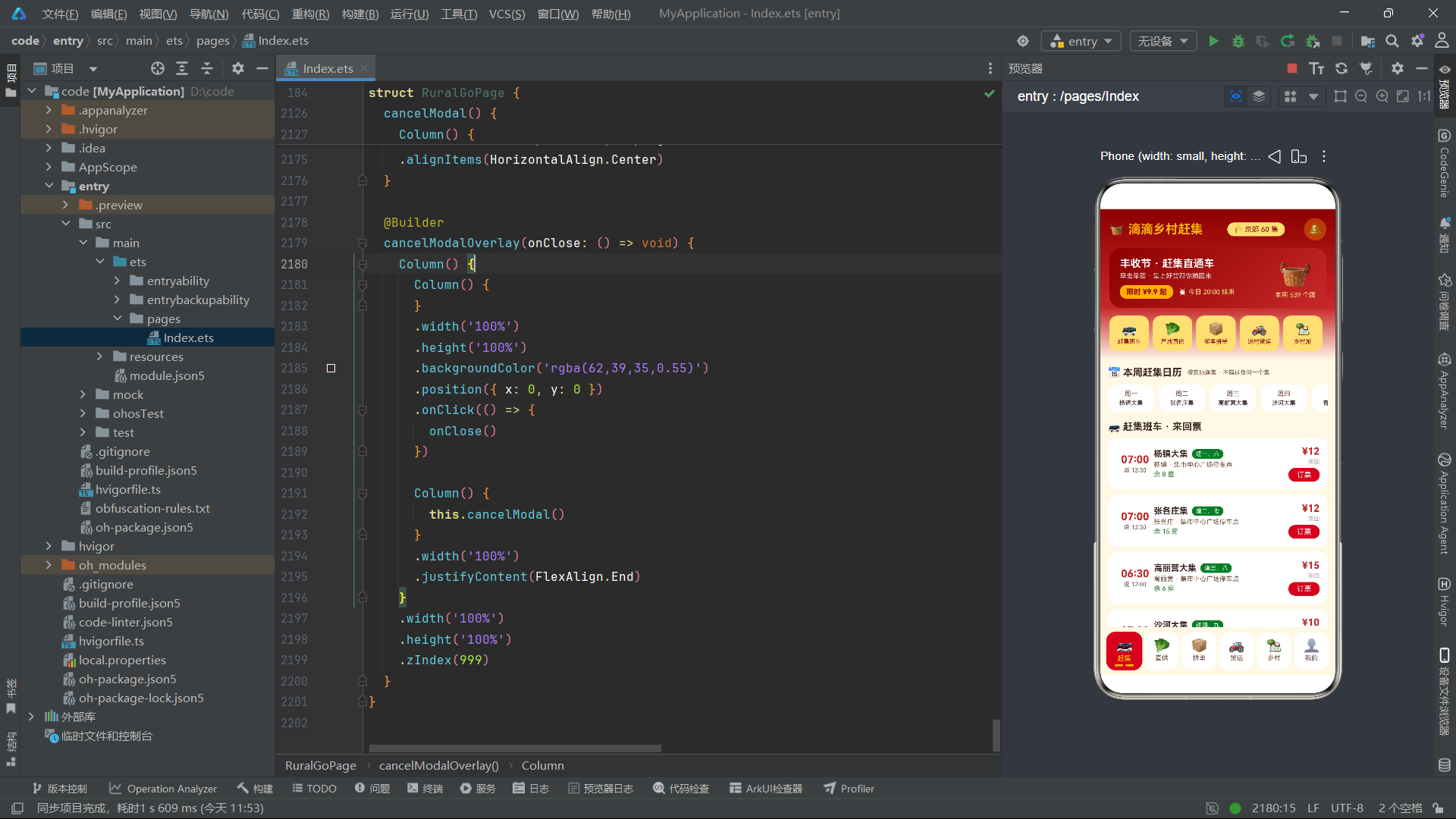
总结
本文以一个完整的乡村赶集电商应用为案例,系统性地剖析了基于 HarmonyOS 6.1.1 和 HarmonyOS ArkTS API 24 构建复杂业务应用的全部技术细节。从宏观架构层面看,该应用采用了单组件多页面的设计模式——通过 @Entry @Component 定义一个主页面组件,内部使用 if-else 条件渲染配合 currentTab 状态变量实现六个 Tab 页面的切换,这种模式在中小型应用中具有开发效率高、状态共享便捷的优势。从微观实现层面看,应用涵盖了 ArkTS 声明式 UI 的所有核心能力:@State 状态管理实现了数据到视图的自动驱动;@Builder 装饰器将复杂 UI 抽取为可复用的构建函数,提升了代码的可读性和可维护性;ForEach 组件配合 keyGenerator 函数实现了高效的列表渲染和 diff 更新;Stack 层叠布局配合条件渲染实现了五种模态弹框的显示与隐藏管理;linearGradient 线性渐变属性赋予了 UI 丰富的视觉层次;Progress 进度条、TextInput 输入框、Flex 换行布局等内置组件覆盖了电商场景的常见交互需求。
在状态管理方面,应用通过五个布尔状态变量控制弹框显隐,通过三个可空类型变量(FairShuttle | null)传递选中数据到弹框,通过数组状态变量管理动态地址列表和拼单列表。特别是 cancelMyGroup() 方法中的不可变数组更新模式,展示了 ArkTS 中正确触发响应式更新的最佳实践。在动画与交互方面,底部 Tab 栏的 scale 缩放和 animation 缓动实现了流畅的选中态过渡,条件色彩表达式根据数据动态切换文字和背景颜色,柱状图通过纯组件方式实现无需引入第三方图表库。

作为“人工智能6S店”的官方数字引擎,为AI开发者与企业提供一个覆盖软硬件全栈、一站式门户。
更多推荐
 4
4 0
0- 0


 已为社区贡献2条内容

所有评论(0)