
基于HarmonyOS ArkTS API 24主组件DuoDuoFigureApp使用$$this.showBuySheet双向绑定语法配合bindSheet实现底部弹出面板
引言
潮玩手办(Figure)作为二次元文化衍生品市场的重要组成,涵盖了从PVC手办、树脂雕像到机甲模型、可动人偶等多元品类。在移动端构建一个集商城购物、定制服务、晒物分享、交换交易和社区交流于一体的手办生态平台,需要解决商品展示的信息密度、定制流程的多步骤交互、瀑布流布局的性能优化以及组件化架构的模块复用等核心技术问题。本文将深入剖析一个名为"多多潮玩手办"的HarmonyOS ArkTS应用,该应用以工业灰白调为设计主题,采用手办灰白(#455A64)与限定金(#FFB300)的双色搭配方案,底色使用淡灰白(#ECEFF1),构建出一个专业且富有质感的潮玩手办交易平台。
从技术架构角度来看,该应用采用了与前述应用不同的组件化策略。首先,应用引入了集中式色彩管理机制——通过ColorPalette82接口定义包含十五个色彩属性的色彩调色板,再通过COLORS82常量实例化统一管理所有颜色值。这一设计使得整个应用的配色方案集中维护,修改主题色只需更改一处常量。其次,应用大量使用export struct导出独立组件,将购买弹窗、取消订单弹窗、编辑晒物弹窗和删除收藏弹窗定义为可导出的独立组件,在主组件中通过@Builder方法引用,实现了UI组件的高度模块化。
在API使用层面,该应用展现了HarmonyOS API 12+的新特性。主组件DuoDuoFigureApp使用$$this.showBuySheet双向绑定语法配合bindSheet实现底部弹出面板,使用SheetSize.LARGE设定面板尺寸,并通过detents属性定义可拖拽的尺寸档位。同时,bindContentCover配合$$this.showCancelDialog实现全屏覆盖弹窗。这些新API的使用使得弹窗交互更加原生化和流畅。此外,应用的晒物Tab采用了瀑布流布局——通过filter方法将数据按奇偶索引分割为左右两列,每列独立渲染,实现了不等高的瀑布流视觉效果。
一、色彩管理体系:集中式色彩调色板设计
该应用最显著的架构特征是引入了集中式色彩管理机制。通过接口定义和常量实例化,将整个应用的配色方案统一管理,这是企业级前端开发中的最佳实践。
interface ColorPalette82 {
  primary: string
  primaryLight: string
  primaryDark: string
  accent: string
  bg: string
  cardBg: string
  textPrimary: string
  textSecondary: string
  textHint: string
  border: string
  white: string
  success: string
  warning: string
  danger: string
}

const COLORS82: ColorPalette82 = {
  primary: '#455A64',
  primaryLight: '#78909C',
  primaryDark: '#263238',
  accent: '#FFB300',
  bg: '#ECEFF1',
  cardBg: '#FFFFFF',
  textPrimary: '#263238',
  textSecondary: '#607D8B',
  textHint: '#B0BEC5',
  border: '#CFD8DC',
  white: '#FFFFFF',
  success: '#43A047',
  warning: '#FB8C00',
  danger: '#E53935'
}
ColorPalette82接口定义了十五个语义化色彩属性,涵盖了主色调(primary/primaryLight/primaryDark)、强调色(accent)、背景色(bg/cardBg)、文本色(textPrimary/textSecondary/textHint)、边框色(border)、纯白色(white)和功能色(success/warning/danger)四大类。每个属性名都具有明确的语义含义,开发者在使用时无需记忆具体的十六进制色值,只需通过COLORS82.textPrimary或COLORS82.accent等方式引用。
COLORS82常量实例化了灰白工业色调色板。主色#455A64是Blue Grey 600色值,营造出沉稳的工业质感;强调色#FFB300是Amber 700色值,用于价格、按钮和操作入口的视觉引导。文本色分为三个层级——textPrimary(#263238,Blue Grey 900)用于标题和重要文字,textSecondary(#607D8B,Blue Grey 500)用于描述和次要文字,textHint(#B0BEC5,Blue Grey 200)用于占位符和禁用状态。这种三层文本色体系确保了信息层级的清晰表达。
二、商品数据模型:手办实体定义
该应用定义了十四个接口类型,覆盖了手办交易的全业务场景。其中FigureItem82是核心商品实体,包含了手办的所有展示和交易属性。
interface FigureItem82 {
  id: number
  name: string
  series: string
  scale: string
  brand: string
  price: number
  originalPrice: number
  stock: number
  sales: number
  tag: string
  color: string
  image: string
  rating: number
  desc: string
}

interface CustomRequest82 {
  id: number
  title: string
  type: string
  budget: string
  status: string
  deadline: string
  desc: string
  color: string
  proposals: number
}

interface CustomStep82 {
  step: number
  title: string
  desc: string
  icon: string
  color: string
}

interface ShowItem82 {
  id: number
  user: string
  avatar: string
  figure: string
  image: string
  likes: number
  comments: number
  shares: number
  tag: string
  desc: string
  time: string
}

interface SpecOption82 {
  id: number
  name: string
  price: number
  stock: number
}
FigureItem82定义了手办商品的完整数据结构。scale字段存储比例信息(如"1/7"、“1/6”),这是手办领域特有的规格标识——比例越大,手办尺寸越大、价格越高。brand字段存储品牌信息(如"Good Smile"、“Hot Toys”),品牌是手办价值的重要决定因素。tag字段存储单品标签(如"新品"、“热销”、“限定”、“高端”),用于在卡片上显示状态徽章。
CustomRequest82定义了定制需求大厅中的需求信息,budget采用字符串格式存储预算区间(如"2000-5000"),proposals字段记录已收到的报价数量。CustomStep82定义了定制流程的五个步骤,每个步骤携带独立的图标和颜色。ShowItem82定义了晒物社区中的展示内容,包含用户头像、手办名称、图片、点赞数、评论数等社交属性。SpecOption82定义了商品规格选项,price字段存储的是加价金额而非总价,前端通过基础价加加价计算最终价格。
三、弹窗组件:模块化导出与独立构建
该应用将四个弹窗组件定义为export struct,实现了真正的组件模块化。每个弹窗组件接收属性参数和回调函数,通过@Builder方法在主组件中引用。
@Component
export struct FigureBuySheet82 {
  @State figureName: string = ''
  @State selectedSpec: number = 1
  @State quantity: number = 1
  @State deliveryType: number = 0
  @State remark: string = ''
  basePrice: number = 688
  onConfirm: () => void = () => {}
  onClose: () => void = () => {}

  build() {
    Column() {
      // 拖拽指示器
      Column()
        .width(40)
        .height(4)
        .borderRadius(2)
        .backgroundColor(COLORS82.border)
        .margin({ top: 12, bottom: 16 })

      // 标题
      Row() {
        Text('购买手办')
          .fontSize(20)
          .fontWeight(FontWeight.Bold)
          .fontColor(COLORS82.textPrimary)
        Text('').layoutWeight(1)
        Text('✕')
          .fontSize(22)
          .fontColor(COLORS82.textHint)
          .onClick(() => { this.onClose() })
      }
      .width('100%')
      .padding({ left: 20, right: 20 })
      .margin({ bottom: 16 })

      // 商品信息
      Row() {
        Text('🎮')
          .fontSize(40)
          .width(64)
          .height(64)
          .textAlign(TextAlign.Center)
          .backgroundColor(COLORS82.bg)
          .borderRadius(12)
        Column() {
          Text(this.figureName)
            .fontSize(15)
            .fontWeight(FontWeight.Bold)
            .fontColor(COLORS82.textPrimary)
          Text('¥' + (this.basePrice + (SPECS_82[this.selectedSpec - 1].price * this.quantity)).toString())
            .fontSize(18)
            .fontWeight(FontWeight.Bold)
            .fontColor(COLORS82.accent)
            .margin({ top: 4 })
        }
        .alignItems(HorizontalAlign.Start)
        .margin({ left: 12 })
        .layoutWeight(1)
      }
      .width('100%')
      .padding({ left: 20, right: 20 })
      .margin({ bottom: 20 })

      // 规格选择
      Column() {
        Text('选择规格')
          .fontSize(14)
          .fontWeight(FontWeight.Medium)
          .fontColor(COLORS82.textSecondary)
          .margin({ bottom: 10 })

        ForEach(SPECS_82, (spec: SpecOption82) => {
          Row() {
            Column() {
              Text(spec.name)
                .fontSize(14)
                .fontColor(this.selectedSpec === spec.id ? COLORS82.white : COLORS82.textPrimary)
              Text(spec.price > 0 ? '+¥' + spec.price.toString() : '基础价')
                .fontSize(12)
                .fontColor(this.selectedSpec === spec.id ? COLORS82.white : COLORS82.textSecondary)
                .margin({ top: 2 })
            }
            .alignItems(HorizontalAlign.Start)
            Text('').layoutWeight(1)
            Text('库存' + spec.stock.toString())
              .fontSize(12)
              .fontColor(this.selectedSpec === spec.id ? COLORS82.white : COLORS82.textHint)
          }
          .width('100%')
          .padding(12)
          .borderRadius(10)
          .backgroundColor(this.selectedSpec === spec.id ? COLORS82.primary : COLORS82.bg)
          .margin({ bottom: 8 })
          .onClick(() => { this.selectedSpec = spec.id })
        }, (spec: SpecOption82) => spec.id.toString())
      }
      .padding({ left: 20, right: 20 })
      .margin({ bottom: 16 })

      // 配送方式
      Column() {
        Text('配送方式')
          .fontSize(14)
          .fontWeight(FontWeight.Medium)
          .fontColor(COLORS82.textSecondary)
          .margin({ bottom: 10 })
        Row() {
          ForEach(['快递', '同城闪送', '自提'], (item: string, index: number) => {
            Text(item)
              .fontSize(13)
              .fontColor(this.deliveryType === index ? COLORS82.white : COLORS82.textPrimary)
              .padding({ left: 16, right: 16, top: 8, bottom: 8 })
              .borderRadius(20)
              .backgroundColor(this.deliveryType === index ? COLORS82.primary : COLORS82.bg)
              .margin({ right: 8 })
              .onClick(() => { this.deliveryType = index })
          }, (item: string) => item)
        }
      }
      .padding({ left: 20, right: 20 })
      .margin({ bottom: 16 })

      // 数量
      Row() {
        Text('购买数量')
          .fontSize(14)
          .fontColor(COLORS82.textSecondary)
        Text('').layoutWeight(1)
        Row() {
          Text('−')
            .fontSize(18)
            .fontColor(COLORS82.textPrimary)
            .width(36)
            .height(36)
            .textAlign(TextAlign.Center)
            .backgroundColor(COLORS82.bg)
            .borderRadius({ topLeft: 8, bottomLeft: 8 })
            .onClick(() => { if (this.quantity > 1) { this.quantity-- } })
          Text(this.quantity.toString())
            .fontSize(15)
            .fontColor(COLORS82.textPrimary)
            .width(50)
            .height(36)
            .textAlign(TextAlign.Center)
            .backgroundColor(COLORS82.white)
          Text('+')
            .fontSize(18)
            .fontColor(COLORS82.textPrimary)
            .width(36)
            .height(36)
            .textAlign(TextAlign.Center)
            .backgroundColor(COLORS82.bg)
            .borderRadius({ topRight: 8, bottomRight: 8 })
            .onClick(() => { if (this.quantity < 10) { this.quantity++ } })
        }
      }
      .padding({ left: 20, right: 20 })
      .margin({ bottom: 16 })

      // 备注
      TextInput({ text: this.remark, placeholder: '选填:备注信息(如验货要求等)' })
        .fontSize(14)
        .height(44)
        .backgroundColor(COLORS82.bg)
        .borderRadius(10)
        .padding({ left: 12, right: 12 })
        .margin({ left: 20, right: 20, bottom: 20 })
        .onChange((val: string) => { this.remark = val })

      // 确认按钮
      Button() {
        Text('确认购买')
          .fontSize(16)
          .fontColor(COLORS82.white)
          .fontWeight(FontWeight.Bold)
      }
      .width('90%')
      .height(48)
      .backgroundColor(COLORS82.accent)
      .borderRadius(24)
      .margin({ bottom: 20 })
      .onClick(() => { this.onConfirm() })
    }
    .width('100%')
    .backgroundColor(COLORS82.cardBg)
    .borderRadius({ topLeft: 24, topRight: 24 })
  }
}
FigureBuySheet82是购买手办的底部弹出面板组件,顶部设有拖拽指示器(40x4的圆角条),这是HarmonyOS底部面板的标准交互元素。商品信息区域展示手办名称和动态计算的总价——(this.basePrice + (SPECS_82[this.selectedSpec - 1].price * this.quantity)),即基础价加上所选规格的加价再乘以数量。这种实时价格计算方式让用户在调整规格和数量时能立即看到价格变化。
规格选择区域使用ForEach遍历SPECS_82数组,每个规格项展示名称、加价金额和库存。选中项使用主色COLORS82.primary作为背景配合白色文字,未选中项使用背景色COLORS82.bg配合深色文字。加价金额通过spec.price > 0 ? '+¥' + spec.price.toString() : '基础价'的三元判断显示——有加价时显示"+¥200",无加价时显示"基础价"。
配送方式使用胶囊式按钮组,三个选项水平排列,选中项使用主色背景。数量控制器的加减按钮使用borderRadius的定向圆角实现左圆角和右圆角的分别设置——减号按钮设置borderRadius({ topLeft: 8, bottomLeft: 8 }),加号按钮设置borderRadius({ topRight: 8, bottomRight: 8 }),中间数字区域使用白色背景无圆角,形成一个完整的圆角矩形控件。
@Component
export struct EditShowSheet82 {
  @State showTitle: string = ''
  @State showFigure: string = ''
  @State showDesc: string = ''
  @State selectedTag: number = 0
  @State allowComment: boolean = true
  onConfirm: () => void = () => {}
  onClose: () => void = () => {}

  build() {
    Column() {
      // 图片选择区域
      Row() {
        Column() {
          Text('📷')
            .fontSize(28)
          Text('添加图片')
            .fontSize(12)
            .fontColor(COLORS82.textHint)
            .margin({ top: 4 })
        }
        .width(80)
        .height(80)
        .justifyContent(FlexAlign.Center)
        .backgroundColor(COLORS82.bg)
        .borderRadius(12)
        .border({ width: 1, color: COLORS82.border, style: BorderStyle.Dashed })
        .margin({ right: 8 })
        Column() {
          Text('🖼️')
            .fontSize(28)
        }
        .width(80)
        .height(80)
        .justifyContent(FlexAlign.Center)
        .backgroundColor(COLORS82.bg)
        .borderRadius(12)
        .border({ width: 1, color: COLORS82.border, style: BorderStyle.Dashed })
      }

      // 手办名称
      TextInput({ text: this.showFigure, placeholder: '手办名称(如:绫波丽决战ver)' })
        .fontSize(14)
        .height(44)
        .backgroundColor(COLORS82.bg)
        .borderRadius(10)

      // 标签选择
      Column() {
        Text('选择标签')
          .fontSize(14)
          .fontColor(COLORS82.textSecondary)
          .margin({ bottom: 8 })
        Flex({ wrap: FlexWrap.Wrap }) {
          ForEach(TAGS_82, (tag: string, index: number) => {
            Text(tag)
              .fontSize(12)
              .fontColor(this.selectedTag === index ? COLORS82.white : COLORS82.textSecondary)
              .padding({ left: 12, right: 12, top: 6, bottom: 6 })
              .borderRadius(16)
              .backgroundColor(this.selectedTag === index ? COLORS82.primary : COLORS82.bg)
              .margin({ right: 8, bottom: 8 })
              .onClick(() => { this.selectedTag = index })
          }, (tag: string) => tag)
        }
      }

      // 允许评论开关
      Row() {
        Text('允许评论')
          .fontSize(14)
          .fontColor(COLORS82.textPrimary)
        Text('').layoutWeight(1)
        Toggle({ type: ToggleType.Switch, isOn: this.allowComment })
          .selectedColor(COLORS82.accent)
          .onChange((val: boolean) => { this.allowComment = val })
      }

      Button() {
        Text('发布')
          .fontSize(16)
          .fontColor(COLORS82.white)
          .fontWeight(FontWeight.Bold)
      }
      .width('90%')
      .height(48)
      .backgroundColor(COLORS82.primary)
      .borderRadius(24)
      .onClick(() => { this.onConfirm() })
    }
    .backgroundColor(COLORS82.cardBg)
    .borderRadius({ topLeft: 24, topRight: 24 })
  }
}
EditShowSheet82是发布晒物的弹窗组件,其中包含一个图片上传区域,使用BorderStyle.Dashed虚线边框标识可上传区域,这是移动端上传交互的常见视觉语言。标签选择区域使用Flex({ wrap: FlexWrap.Wrap })实现自动换行的标签列表,通过selectedTag索引值控制选中状态。
该组件引入了Toggle开关组件,用于控制"允许评论"设置。Toggle({ type: ToggleType.Switch, isOn: this.allowComment })创建了一个Switch类型的开关,selectedColor(COLORS82.accent)设置开关开启时的滑轨颜色为限定金色。onChange回调接收布尔值参数,更新allowComment状态。这是该应用中唯一使用Toggle组件的场景,展示了ArkTS表单组件的多样性。
四、主入口组件:bindSheet与bindContentCover新API
主入口组件DuoDuoFigureApp采用了HarmonyOS API 12+的新弹窗API,通过$$双向绑定语法和@Builder方法引用实现原生弹窗交互。
@Entry
@Component
struct DuoDuoFigureApp {
  @State currentTab: number = 0
  @State showBuySheet: boolean = false
  @State showCancelDialog: boolean = false
  @State showEditSheet: boolean = false
  @State showDeleteDialog: boolean = false
  @State selectedFigure: string = ''

  @Builder
  buySheetBuilder() {
    FigureBuySheet82({
      figureName: this.selectedFigure,
      basePrice: 688,
      onConfirm: () => { this.showBuySheet = false },
      onClose: () => { this.showBuySheet = false }
    })
  }

  @Builder
  editSheetBuilder() {
    EditShowSheet82({
      onConfirm: () => { this.showEditSheet = false },
      onClose: () => { this.showEditSheet = false }
    })
  }

  @Builder
  cancelDialogBuilder() {
    CancelOrderDialog82({
      orderNo: 'DD820001',
      onConfirm: () => { this.showCancelDialog = false },
      onClose: () => { this.showCancelDialog = false }
    })
  }

  @Builder
  deleteDialogBuilder() {
    DeleteFavoriteDialog82({
      figureName: this.selectedFigure,
      onConfirm: () => { this.showDeleteDialog = false },
      onClose: () => { this.showDeleteDialog = false }
    })
  }

  build() {
    Column() {
      if (this.currentTab === 0) {
        ShopTab82()
      } else if (this.currentTab === 1) {
        CustomTab82()
      } else if (this.currentTab === 2) {
        ShowTab82()
      } else if (this.currentTab === 3) {
        TradeTab82()
      } else if (this.currentTab === 4) {
        CommunityTab82()
      } else {
        ProfileTab82()
      }

      // 底部Tab栏
      Row() {
        ForEach(TABS_82, (tab: TabItem82, index: number) => {
          Column() {
            Text(tab.icon)
              .fontSize(22)
            Text(tab.name)
              .fontSize(11)
              .fontColor(this.currentTab === index ? COLORS82.accent : COLORS82.textHint)
              .margin({ top: 2 })
          }
          .layoutWeight(1)
          .height(56)
          .justifyContent(FlexAlign.Center)
          .onClick(() => { this.currentTab = index })
        }, (tab: TabItem82) => tab.name)
      }
      .width('100%')
      .height(64)
      .backgroundColor(COLORS82.cardBg)
      .border({ width: 1, color: COLORS82.border, style: BorderStyle.Solid })
    }
    .width('100%')
    .height('100%')

    .bindSheet($$this.showBuySheet, this.buySheetBuilder, {
      height: SheetSize.LARGE,
      detents: [SheetSize.LARGE],
      backgroundColor: COLORS82.bg,
      blurStyle: BlurStyle.NONE
    })

    .bindSheet($$this.showEditSheet, this.editSheetBuilder, {
      height: SheetSize.LARGE,
      detents: [SheetSize.LARGE],
      backgroundColor: COLORS82.bg,
      blurStyle: BlurStyle.NONE
    })

    .bindContentCover($$this.showCancelDialog, this.cancelDialogBuilder, {
    })

    .bindContentCover($$this.showDeleteDialog, this.deleteDialogBuilder, {
    })
  }
}
该组件的核心技术亮点在于bindSheet和bindContentCover的使用方式。$$this.showBuySheet使用$$双向绑定语法——当showBuySheet为true时弹窗自动弹出,当用户拖拽关闭弹窗时框架自动将showBuySheet设为false。相比手动管理show属性的旧方式,$$语法实现了状态与弹窗显示的自动同步。
bindSheet的第三个参数是SheetOptions配置对象,包含height(面板高度)、detents(可拖拽尺寸档位数组)、backgroundColor(面板背景色)和blurStyle(模糊效果)四个属性。SheetSize.LARGE表示大尺寸面板,detents: [SheetSize.LARGE]定义了只有一个档位的拖拽行为。blurStyle: BlurStyle.NONE禁用了背景模糊效果。
bindContentCover的配置相对简单,第三个参数为空对象{},使用默认配置实现全屏覆盖弹窗。Tab切换使用if-else if-else链式条件判断,底部Tab栏的选中色使用COLORS82.accent(限定金色),与商城主题的工业灰形成对比。
五、商城Tab:分类网格与双列手办列表
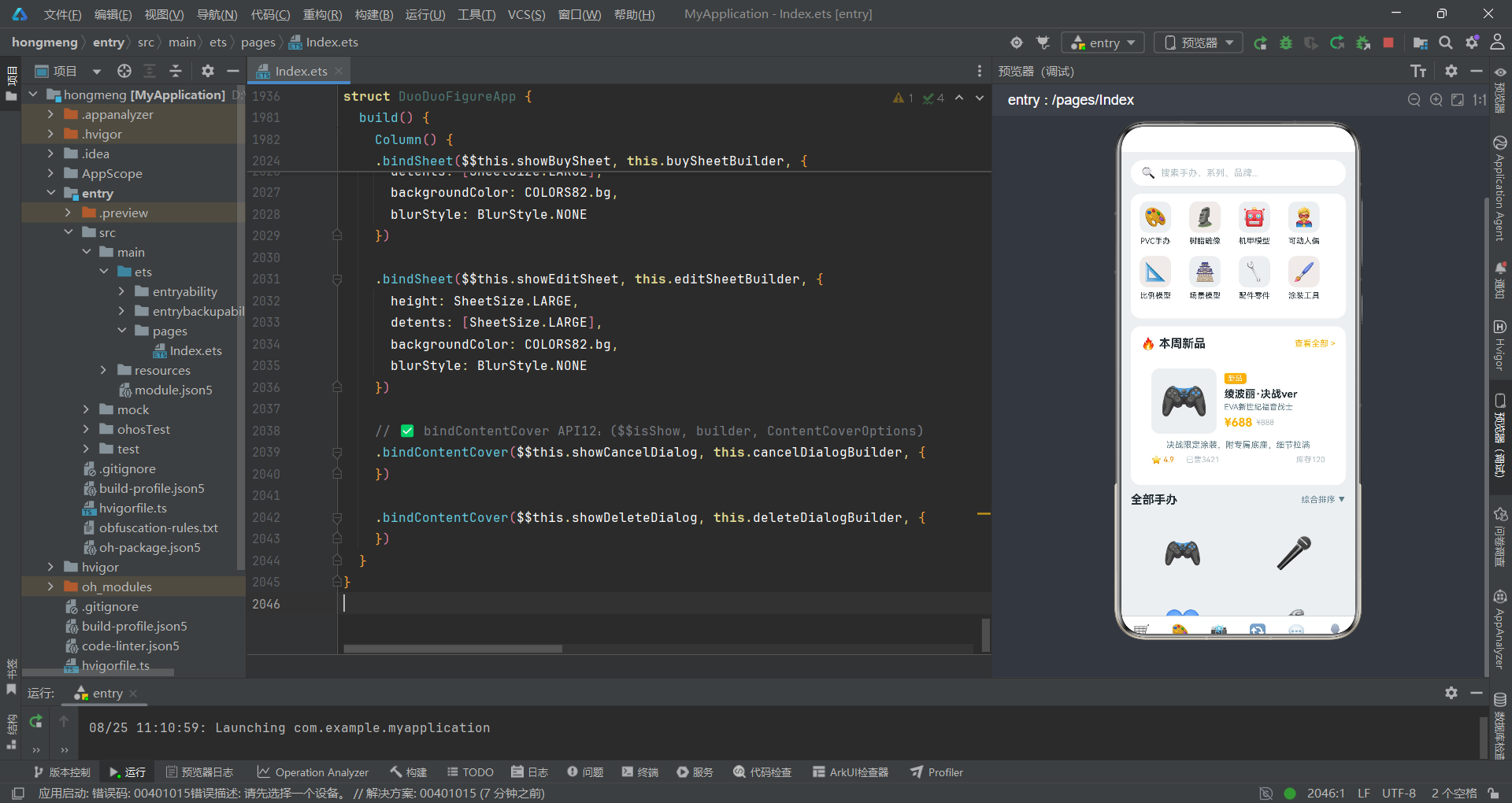
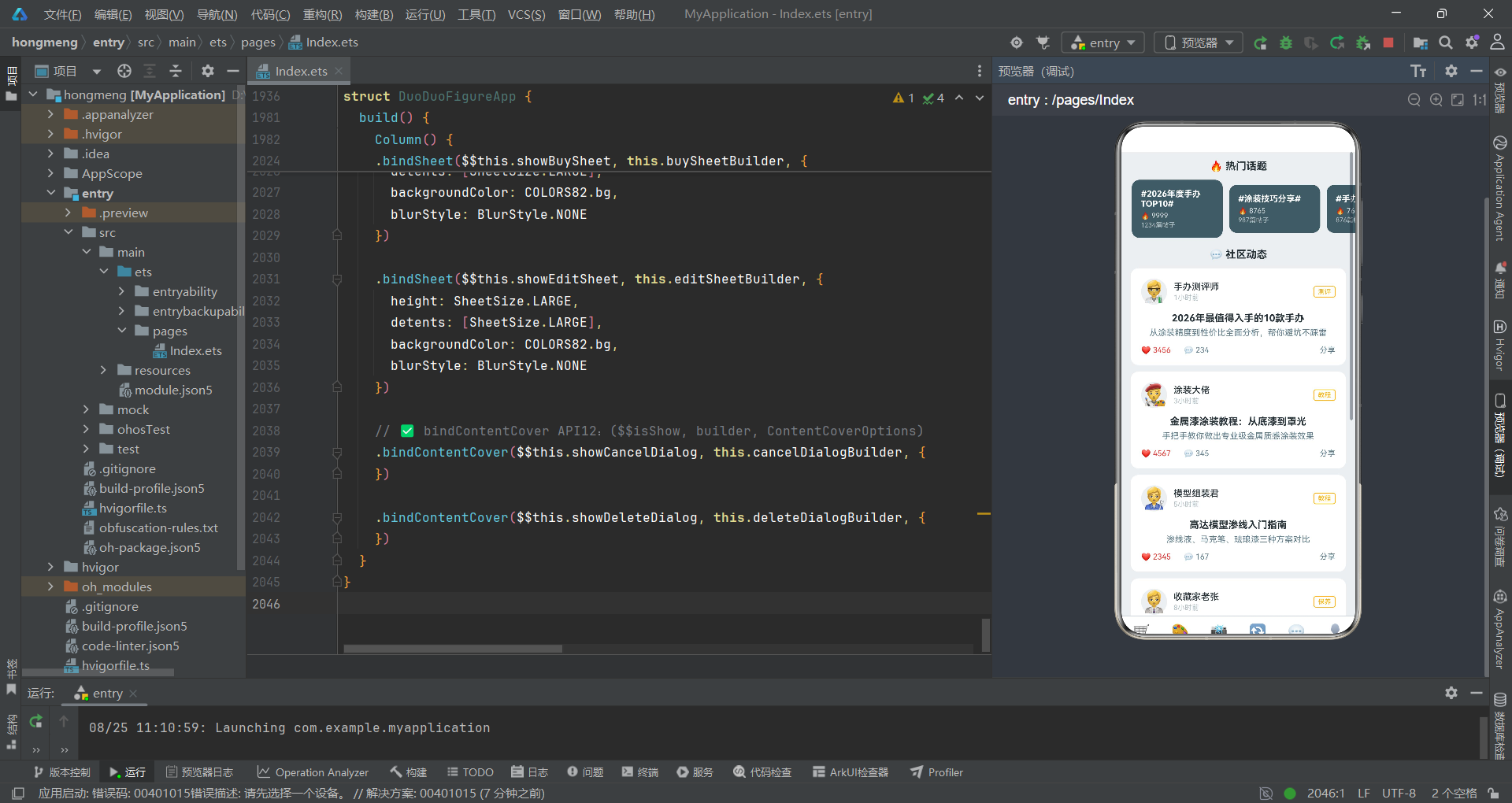
商城Tab是应用的首屏,包含搜索栏、分类网格、新品大卡和双列手办列表四个区域。
@Component
export struct ShopTab82 {
  build() {
    Column() {
      // 搜索栏
      Row() {
        Text('🔍')
          .fontSize(18)
          .margin({ right: 8 })
        Text('搜索手办、系列、品牌...')
          .fontSize(14)
          .fontColor(COLORS82.textHint)
          .layoutWeight(1)
      }
      .width('92%')
      .height(40)
      .backgroundColor(COLORS82.cardBg)
      .borderRadius(20)
      .padding({ left: 16, right: 16 })
      .margin({ top: 12, bottom: 12 })

      Scroll() {
        Column() {
          // 分类网格
          Flex({ wrap: FlexWrap.Wrap }) {
            ForEach(CATS_82, (cat: Category82) => {
              Column() {
                Text(cat.icon)
                  .fontSize(28)
                  .width(48)
                  .height(48)
                  .textAlign(TextAlign.Center)
                  .borderRadius(12)
                  .backgroundColor(cat.bg)
                Text(cat.name)
                  .fontSize(12)
                  .fontColor(COLORS82.textPrimary)
                  .margin({ top: 6 })
              }
              .width('23%')
              .margin({ bottom: 16 })
            }, (cat: Category82) => cat.id.toString())
          }
          .width('92%')
          .backgroundColor(COLORS82.cardBg)
          .borderRadius(16)

          // 新品大卡
          Column() {
            Row() {
              Text('🔥 本周新品')
                .fontSize(18)
                .fontWeight(FontWeight.Bold)
                .fontColor(COLORS82.textPrimary)
              Text('').layoutWeight(1)
              Text('查看全部 >')
                .fontSize(13)
                .fontColor(COLORS82.accent)
            }

            Column() {
              Row() {
                Text(FIGURES_82[0].image)
                  .fontSize(60)
                  .width(100)
                  .height(100)
                  .textAlign(TextAlign.Center)
                  .backgroundColor(COLORS82.bg)
                  .borderRadius(12)
                Column() {
                  Text(FIGURES_82[0].tag)
                    .fontSize(11)
                    .fontColor(COLORS82.white)
                    .backgroundColor(COLORS82.accent)
                    .borderRadius(4)
                    .padding({ left: 6, right: 6, top: 2, bottom: 2 })
                  Text(FIGURES_82[0].name)
                    .fontSize(16)
                    .fontWeight(FontWeight.Bold)
                    .fontColor(COLORS82.textPrimary)
                    .margin({ top: 6 })
                  Text(FIGURES_82[0].series)
                    .fontSize(12)
                    .fontColor(COLORS82.textSecondary)
                    .margin({ top: 4 })
                  Row() {
                    Text('¥' + FIGURES_82[0].price.toString())
                      .fontSize(18)
                      .fontWeight(FontWeight.Bold)
                      .fontColor(COLORS82.accent)
                    Text('¥' + FIGURES_82[0].originalPrice.toString())
                      .fontSize(12)
                      .fontColor(COLORS82.textHint)
                      .decoration({ type: TextDecorationType.LineThrough })
                      .margin({ left: 6 })
                  }
                  .margin({ top: 6 })
                }
                .alignItems(HorizontalAlign.Start)
                .margin({ left: 12 })
                .layoutWeight(1)
              }
              Text(FIGURES_82[0].desc)
                .fontSize(13)
                .fontColor(COLORS82.textSecondary)
                .margin({ top: 10 })
              Row() {
                Text('⭐ ' + FIGURES_82[0].rating.toString())
                  .fontSize(12)
                  .fontColor(COLORS82.warning)
                Text('  已售' + FIGURES_82[0].sales.toString())
                  .fontSize(12)
                  .fontColor(COLORS82.textHint)
                  .margin({ left: 12 })
                Text('').layoutWeight(1)
                Text('库存' + FIGURES_82[0].stock.toString())
                  .fontSize(12)
                  .fontColor(COLORS82.textHint)
              }
              .margin({ top: 8 })
            }
            .padding(16)
            .backgroundColor(COLORS82.cardBg)
            .borderRadius(16)
          }

          // 双列手办列表
          Row() {
            Text('全部手办')
              .fontSize(18)
              .fontWeight(FontWeight.Bold)
              .fontColor(COLORS82.textPrimary)
            Text('').layoutWeight(1)
            Text('综合排序 ▼')
              .fontSize(13)
              .fontColor(COLORS82.textSecondary)
          }
          .width('92%')

          // 瀑布流双列
          Row() {
            // 左列
            Column() {
              ForEach(FIGURES_82.filter((_: FigureItem82, i: number) => i % 2 === 0), (fig: FigureItem82) => {
                Column() {
                  Text(fig.image)
                    .fontSize(48)
                    .width('100%')
                    .height(120)
                    .textAlign(TextAlign.Center)
                    .backgroundColor(COLORS82.bg)
                    .borderRadius({ topLeft: 12, topRight: 12 })
                  Column() {
                    Text(fig.tag)
                      .fontSize(10)
                      .fontColor(COLORS82.white)
                      .backgroundColor(fig.color)
                      .borderRadius(4)
                      .padding({ left: 6, right: 6, top: 2, bottom: 2 })
                    Text(fig.name)
                      .fontSize(14)
                      .fontWeight(FontWeight.Bold)
                      .fontColor(COLORS82.textPrimary)
                      .margin({ top: 6 })
                      .maxLines(2)
                    Text(fig.scale + ' · ' + fig.brand)
                      .fontSize(11)
                      .fontColor(COLORS82.textSecondary)
                      .margin({ top: 4 })
                    Row() {
                      Text('¥' + fig.price.toString())
                        .fontSize(16)
                        .fontWeight(FontWeight.Bold)
                        .fontColor(COLORS82.accent)
                      Text('').layoutWeight(1)
                      Text('⭐' + fig.rating.toString())
                        .fontSize(11)
                        .fontColor(COLORS82.warning)
                    }
                    .margin({ top: 6 })
                  }
                  .padding(10)
                }
                .layoutWeight(1)
                .backgroundColor(COLORS82.cardBg)
                .borderRadius(12)
                .margin({ right: 6, bottom: 12 })
              }, (fig: FigureItem82) => fig.id.toString())
            }
            .layoutWeight(1)

            // 右列
            Column() {
              ForEach(FIGURES_82.filter((_: FigureItem82, i: number) => i % 2 === 1), (fig: FigureItem82) => {
                Column() {
                  Text(fig.image)
                    .fontSize(48)
                    .width('100%')
                    .height(120)
                    .textAlign(TextAlign.Center)
                    .backgroundColor(COLORS82.bg)
                    .borderRadius({ topLeft: 12, topRight: 12 })
                  Column() {
                    Text(fig.tag)
                      .fontSize(10)
                      .fontColor(COLORS82.white)
                      .backgroundColor(fig.color)
                      .borderRadius(4)
                    Text(fig.name)
                      .fontSize(14)
                      .fontWeight(FontWeight.Bold)
                      .fontColor(COLORS82.textPrimary)
                      .margin({ top: 6 })
                      .maxLines(2)
                    Text(fig.scale + ' · ' + fig.brand)
                      .fontSize(11)
                      .fontColor(COLORS82.textSecondary)
                      .margin({ top: 4 })
                    Row() {
                      Text('¥' + fig.price.toString())
                        .fontSize(16)
                        .fontWeight(FontWeight.Bold)
                        .fontColor(COLORS82.accent)
                      Text('').layoutWeight(1)
                      Text('⭐' + fig.rating.toString())
                        .fontSize(11)
                        .fontColor(COLORS82.warning)
                    }
                    .margin({ top: 6 })
                  }
                  .padding(10)
                }
                .layoutWeight(1)
                .backgroundColor(COLORS82.cardBg)
                .borderRadius(12)
                .margin({ left: 6, bottom: 12 })
              }, (fig: FigureItem82) => fig.id.toString())
            }
            .layoutWeight(1)
          }
          .width('92%')
        }
        .padding({ bottom: 100 })
      }
      .layoutWeight(1)
      .scrollable(ScrollDirection.Vertical)
    }
    .backgroundColor(COLORS82.bg)
  }
}
分类网格使用Flex({ wrap: FlexWrap.Wrap })配合width('23%')实现每行四列的自动换行布局。每个分类项使用cat.bg作为图标背景色,与分类主题色形成淡色系搭配。新品大卡直接引用FIGURES_82[0]的数据,标签使用COLORS82.accent金色背景,价格区域并排展示现价和原价删除线。
双列手办列表的瀑布流实现是该组件的技术亮点。通过FIGURES_82.filter((_: FigureItem82, i: number) => i % 2 === 0)和i % 2 === 1两个过滤条件,将数据数组按奇偶索引分割为左右两列。左列margin({ right: 6 })右侧留6px间距,右列margin({ left: 6 })左侧留6px间距,形成12px的列间距。每列使用layoutWeight(1)等分宽度,每张卡片使用layoutWeight(1)占满列宽。这种基于filter+ForEach的瀑布流实现方式简洁高效,无需第三方组件即可实现不等高列表布局。
六、定制Tab:流程步骤与需求大厅
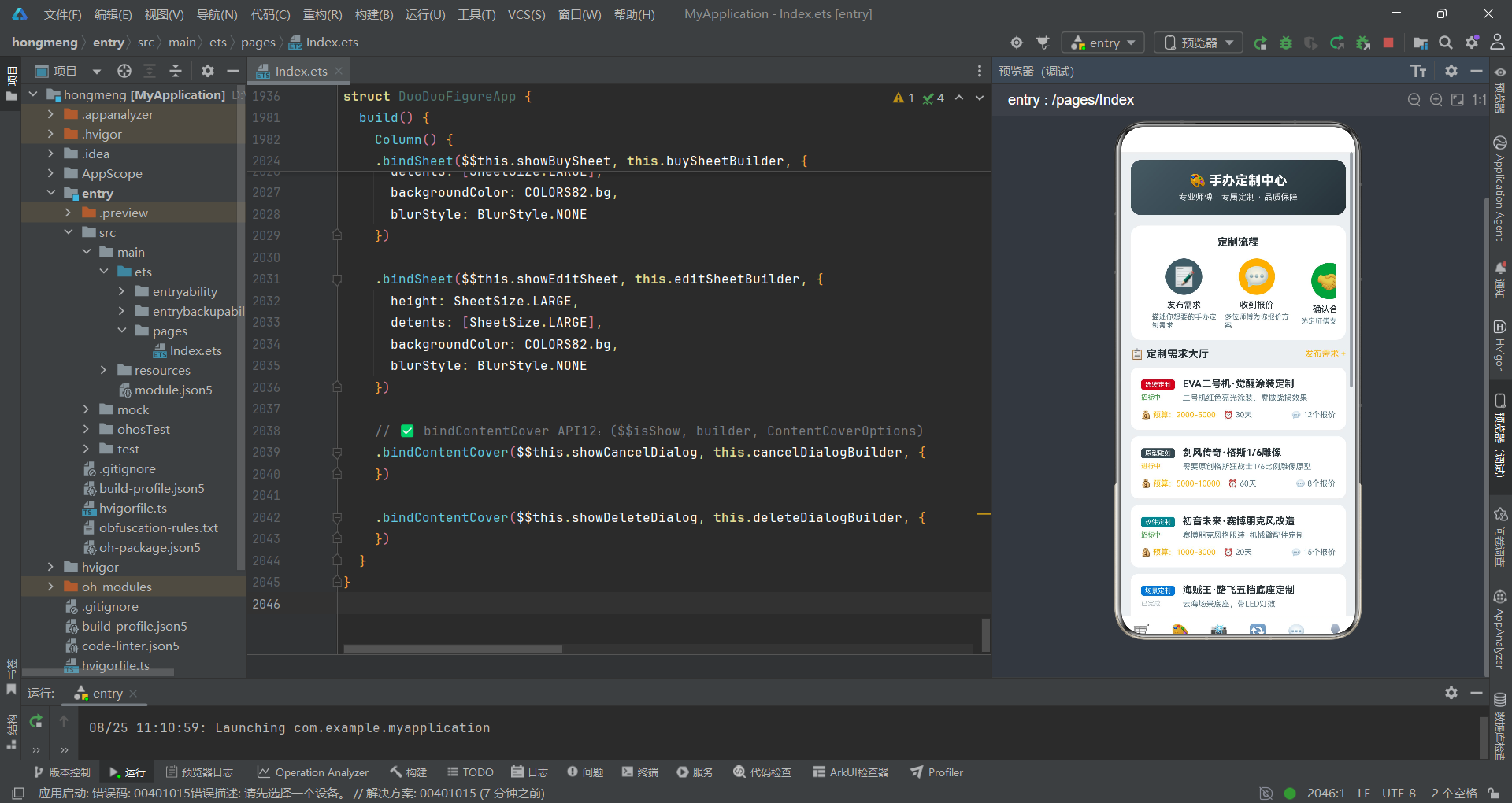
定制Tab是手办定制服务的核心模块,包含定制流程横滑、需求大厅列表和精品案例展示三个区域。
@Component
export struct CustomTab82 {
  build() {
    Column() {
      Scroll() {
        Column() {
          // 头部横幅
          Column() {
            Text('🎨 手办定制中心')
              .fontSize(20)
              .fontWeight(FontWeight.Bold)
              .fontColor(COLORS82.white)
            Text('专业师傅 · 专属定制 · 品质保障')
              .fontSize(13)
              .fontColor('rgba(255,255,255,0.85)')
              .margin({ top: 6 })
          }
          .width('92%')
          .padding(20)
          .borderRadius(16)
          .linearGradient({ angle: 135, colors: [[COLORS82.primary, 0], [COLORS82.primaryDark, 1]] })

          // 定制流程
          Column() {
            Text('定制流程')
              .fontSize(16)
              .fontWeight(FontWeight.Bold)
              .fontColor(COLORS82.textPrimary)
              .margin({ bottom: 16 })

            Scroll() {
              Row() {
                ForEach(CUSTOM_STEPS_82, (step: CustomStep82) => {
                  Column() {
                    Text(step.icon)
                      .fontSize(32)
                      .width(56)
                      .height(56)
                      .textAlign(TextAlign.Center)
                      .borderRadius(28)
                      .backgroundColor(step.color)
                    Text(step.title)
                      .fontSize(13)
                      .fontWeight(FontWeight.Medium)
                      .fontColor(COLORS82.textPrimary)
                      .margin({ top: 8 })
                    Text(step.desc)
                      .fontSize(11)
                      .fontColor(COLORS82.textSecondary)
                      .margin({ top: 4 })
                      .maxLines(2)
                  }
                  .width(100)
                  .margin({ right: 12 })
                }, (step: CustomStep82) => step.step.toString())
              }
              .padding({ left: 16, right: 16 })
            }
            .scrollable(ScrollDirection.Horizontal)
            .scrollBar(BarState.Off)
          }
          .backgroundColor(COLORS82.cardBg)
          .borderRadius(16)

          // 定制需求列表
          Row() {
            Text('📋 定制需求大厅')
              .fontSize(16)
              .fontWeight(FontWeight.Bold)
              .fontColor(COLORS82.textPrimary)
            Text('').layoutWeight(1)
            Text('发布需求 +')
              .fontSize(13)
              .fontColor(COLORS82.accent)
          }

          ForEach(CUSTOM_REQUESTS_82, (req: CustomRequest82) => {
            Column() {
              Row() {
                Column() {
                  Text(req.type)
                    .fontSize(10)
                    .fontColor(COLORS82.white)
                    .backgroundColor(req.color)
                    .borderRadius(4)
                    .padding({ left: 6, right: 6, top: 2, bottom: 2 })
                  Text(req.status)
                    .fontSize(10)
                    .fontColor(req.status === '招标中' ? COLORS82.success :
                      (req.status === '进行中' ? COLORS82.accent : COLORS82.textHint))
                    .margin({ top: 6 })
                }
                .alignItems(HorizontalAlign.Start)
                Column() {
                  Text(req.title)
                    .fontSize(15)
                    .fontWeight(FontWeight.Bold)
                    .fontColor(COLORS82.textPrimary)
                    .maxLines(2)
                  Text(req.desc)
                    .fontSize(12)
                    .fontColor(COLORS82.textSecondary)
                    .margin({ top: 6 })
                    .maxLines(2)
                }
                .alignItems(HorizontalAlign.Start)
                .margin({ left: 12 })
                .layoutWeight(1)
              }

              Row() {
                Text('💰 预算:' + req.budget)
                  .fontSize(12)
                  .fontColor(COLORS82.accent)
                Text('⏰ ' + req.deadline)
                  .fontSize(12)
                  .fontColor(COLORS82.textSecondary)
                  .margin({ left: 12 })
                Text('').layoutWeight(1)
                Text('💬 ' + req.proposals.toString() + '个报价')
                  .fontSize(12)
                  .fontColor(COLORS82.textSecondary)
              }
              .margin({ top: 12 })
            }
            .width('92%')
            .padding(16)
            .backgroundColor(COLORS82.cardBg)
            .borderRadius(12)
            .margin({ bottom: 10 })
          }, (req: CustomRequest82) => req.id.toString())

          // 案例展示
          Text('🏆 精品案例')
            .fontSize(16)
            .fontWeight(FontWeight.Bold)
            .fontColor(COLORS82.textPrimary)
            .margin({ top: 8, bottom: 12 })

          ForEach(SHOW_ITEMS_82.slice(0, 3), (item: ShowItem82) => {
            Row() {
              Text(item.image)
                .fontSize(36)
                .width(60)
                .height(60)
                .textAlign(TextAlign.Center)
                .backgroundColor(COLORS82.bg)
                .borderRadius(10)
              Column() {
                Text(item.figure)
                  .fontSize(14)
                  .fontWeight(FontWeight.Bold)
                  .fontColor(COLORS82.textPrimary)
                Text(item.desc)
                  .fontSize(12)
                  .fontColor(COLORS82.textSecondary)
                  .margin({ top: 4 })
                  .maxLines(2)
                Row() {
                  Text('❤️ ' + item.likes.toString())
                    .fontSize(11)
                    .fontColor(COLORS82.danger)
                  Text('💬 ' + item.comments.toString())
                    .fontSize(11)
                    .fontColor(COLORS82.textSecondary)
                    .margin({ left: 12 })
                }
                .margin({ top: 6 })
              }
              .alignItems(HorizontalAlign.Start)
              .margin({ left: 12 })
              .layoutWeight(1)
            }
            .width('92%')
            .padding(14)
            .backgroundColor(COLORS82.cardBg)
            .borderRadius(12)
            .margin({ bottom: 10 })
          }, (item: ShowItem82) => item.id.toString())
        }
        .padding({ bottom: 100 })
      }
      .scrollable(ScrollDirection.Vertical)
    }
    .backgroundColor(COLORS82.bg)
  }
}
头部横幅使用135度渐变从主色COLORS82.primary过渡到深色COLORS82.primaryDark,白底文字配合渐变背景营造出专业定制服务的品质感。定制流程区域使用横向滚动展示五个步骤,每个步骤包含图标(圆形背景56x56)、标题和描述。scrollBar(BarState.Off)隐藏了滚动条,使横向滚动更加流畅自然。
定制需求大厅列表项采用左右布局——左侧显示定制类型标签和状态文字,右侧显示需求标题和描述。状态颜色使用嵌套三元运算符:req.status === '招标中' ? COLORS82.success : (req.status === '进行中' ? COLORS82.accent : COLORS82.textHint),将"招标中"映射为绿色、"进行中"映射为金色、其他状态映射为灰色。底部信息行展示预算、工期和报价数,预算使用金色突出显示。
精品案例区域使用SHOW_ITEMS_82.slice(0, 3)截取前三条晒物数据作为案例展示,slice方法的使用避免了为案例单独定义数据源。每个案例项展示手办图片、名称、描述、点赞数和评论数,为用户提供定制参考。
手办交易流程图
以下流程图展示了从浏览手办到完成购买的完整交易流程:
七、晒物Tab:瀑布流布局与标签筛选
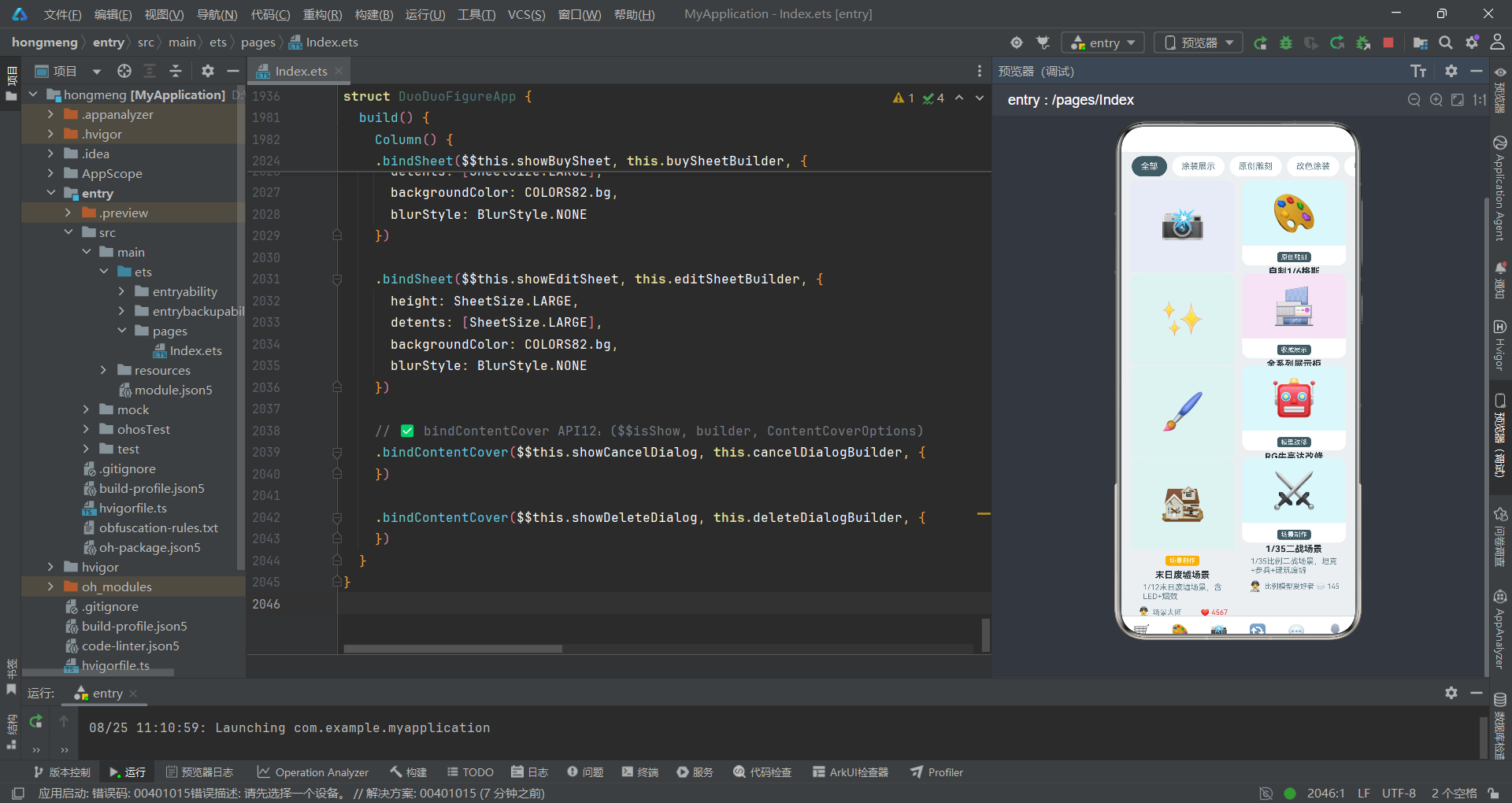
晒物Tab采用瀑布流布局展示用户晒出的手办内容,支持标签筛选功能。
@Component
export struct ShowTab82 {
  build() {
    Column() {
      // 顶部标签
      Scroll() {
        Row() {
          ForEach(TAGS_82, (tag: string, index: number) => {
            Text(tag)
              .fontSize(13)
              .fontColor(index === 0 ? COLORS82.white : COLORS82.textSecondary)
              .padding({ left: 14, right: 14, top: 8, bottom: 8 })
              .borderRadius(18)
              .backgroundColor(index === 0 ? COLORS82.primary : COLORS82.cardBg)
              .margin({ right: 8 })
          }, (tag: string) => tag)
        }
        .padding({ left: 16, right: 16 })
      }
      .scrollable(ScrollDirection.Horizontal)
      .scrollBar(BarState.Off)
      .height(44)

      // 瀑布流列表
      Scroll() {
        Column() {
          Row() {
            // 左列
            Column() {
              ForEach(SHOW_ITEMS_82.filter((_: ShowItem82, i: number) => i % 2 === 0), (item: ShowItem82) => {
                Column() {
                  Text(item.image)
                    .fontSize(56)
                    .width('100%')
                    .height(140)
                    .textAlign(TextAlign.Center)
                    .backgroundColor(item.tag === '涂装展示' ? '#E8EAF6' :
                      (item.tag === '原创雕刻' ? '#FFF3E0' : '#E0F2F1'))
                    .borderRadius({ topLeft: 12, topRight: 12 })
                  Column() {
                    Text(item.tag)
                      .fontSize(10)
                      .fontColor(COLORS82.white)
                      .backgroundColor(COLORS82.accent)
                      .borderRadius(4)
                    Text(item.figure)
                      .fontSize(14)
                      .fontWeight(FontWeight.Bold)
                      .fontColor(COLORS82.textPrimary)
                      .margin({ top: 6 })
                      .maxLines(2)
                    Text(item.desc)
                      .fontSize(12)
                      .fontColor(COLORS82.textSecondary)
                      .margin({ top: 4 })
                      .maxLines(2)
                    Row() {
                      Text(item.avatar)
                        .fontSize(16)
                      Text(item.user)
                        .fontSize(11)
                        .fontColor(COLORS82.textSecondary)
                        .margin({ left: 4 })
                      Text('').layoutWeight(1)
                      Text('❤️ ' + item.likes.toString())
                        .fontSize(11)
                        .fontColor(COLORS82.danger)
                    }
                    .margin({ top: 8 })
                  }
                  .padding(10)
                }
                .layoutWeight(1)
                .backgroundColor(COLORS82.cardBg)
                .borderRadius(12)
                .margin({ right: 6, bottom: 12 })
              }, (item: ShowItem82) => item.id.toString())
            }
            .layoutWeight(1)

            // 右列
            Column() {
              ForEach(SHOW_ITEMS_82.filter((_: ShowItem82, i: number) => i % 2 === 1), (item: ShowItem82) => {
                Column() {
                  Text(item.image)
                    .fontSize(56)
                    .width('100%')
                    .height(100)
                    .textAlign(TextAlign.Center)
                    .backgroundColor(item.tag === '收藏展示' ? '#F3E5F5' : '#E0F7FA')
                    .borderRadius({ topLeft: 12, topRight: 12 })
                  Column() {
                    Text(item.tag)
                      .fontSize(10)
                      .fontColor(COLORS82.white)
                      .backgroundColor(COLORS82.primary)
                      .borderRadius(4)
                    Text(item.figure)
                      .fontSize(14)
                      .fontWeight(FontWeight.Bold)
                      .fontColor(COLORS82.textPrimary)
                      .margin({ top: 6 })
                      .maxLines(2)
                    Text(item.desc)
                      .fontSize(12)
                      .fontColor(COLORS82.textSecondary)
                      .margin({ top: 4 })
                      .maxLines(2)
                    Row() {
                      Text(item.avatar)
                        .fontSize(16)
                      Text(item.user)
                        .fontSize(11)
                        .fontColor(COLORS82.textSecondary)
                        .margin({ left: 4 })
                      Text('').layoutWeight(1)
                      Text('💬 ' + item.comments.toString())
                        .fontSize(11)
                        .fontColor(COLORS82.textSecondary)
                    }
                    .margin({ top: 8 })
                  }
                  .padding(10)
                }
                .layoutWeight(1)
                .backgroundColor(COLORS82.cardBg)
                .borderRadius(12)
                .margin({ left: 6, bottom: 12 })
              }, (item: ShowItem82) => item.id.toString())
            }
            .layoutWeight(1)
          }
          .width('92%')
        }
        .padding({ bottom: 100 })
      }
      .layoutWeight(1)
      .scrollable(ScrollDirection.Vertical)
    }
    .backgroundColor(COLORS82.bg)
  }
}
顶部标签栏使用横向滚动展示标签筛选选项,首个标签"全部"默认选中,使用主色背景和白色文字。scrollBar(BarState.Off)隐藏滚动条,使标签栏更加整洁。
瀑布流列表的图片区域高度在左右两列中不同——左列图片高度140px,右列图片高度100px,这种不等高设计正是瀑布流布局的视觉特征。图片背景色根据标签类型动态变化——左列使用item.tag === '涂装展示' ? '#E8EAF6' : (item.tag === '原创雕刻' ? '#FFF3E0' : '#E0F2F1')的三元嵌套判断,右列使用item.tag === '收藏展示' ? '#F3E5F5' : '#E0F7FA'的二元判断,使不同类型的晒物内容具有不同的视觉氛围。
左右两列的标签背景色也不同——左列使用COLORS82.accent金色,右列使用COLORS82.primary灰色,这种差异化设计增强了瀑布流的视觉层次感。左列底部显示点赞数(红色),右列底部显示评论数(灰色),两列的互动数据展示重点不同。
八、交换Tab:交易类型与卖价展示
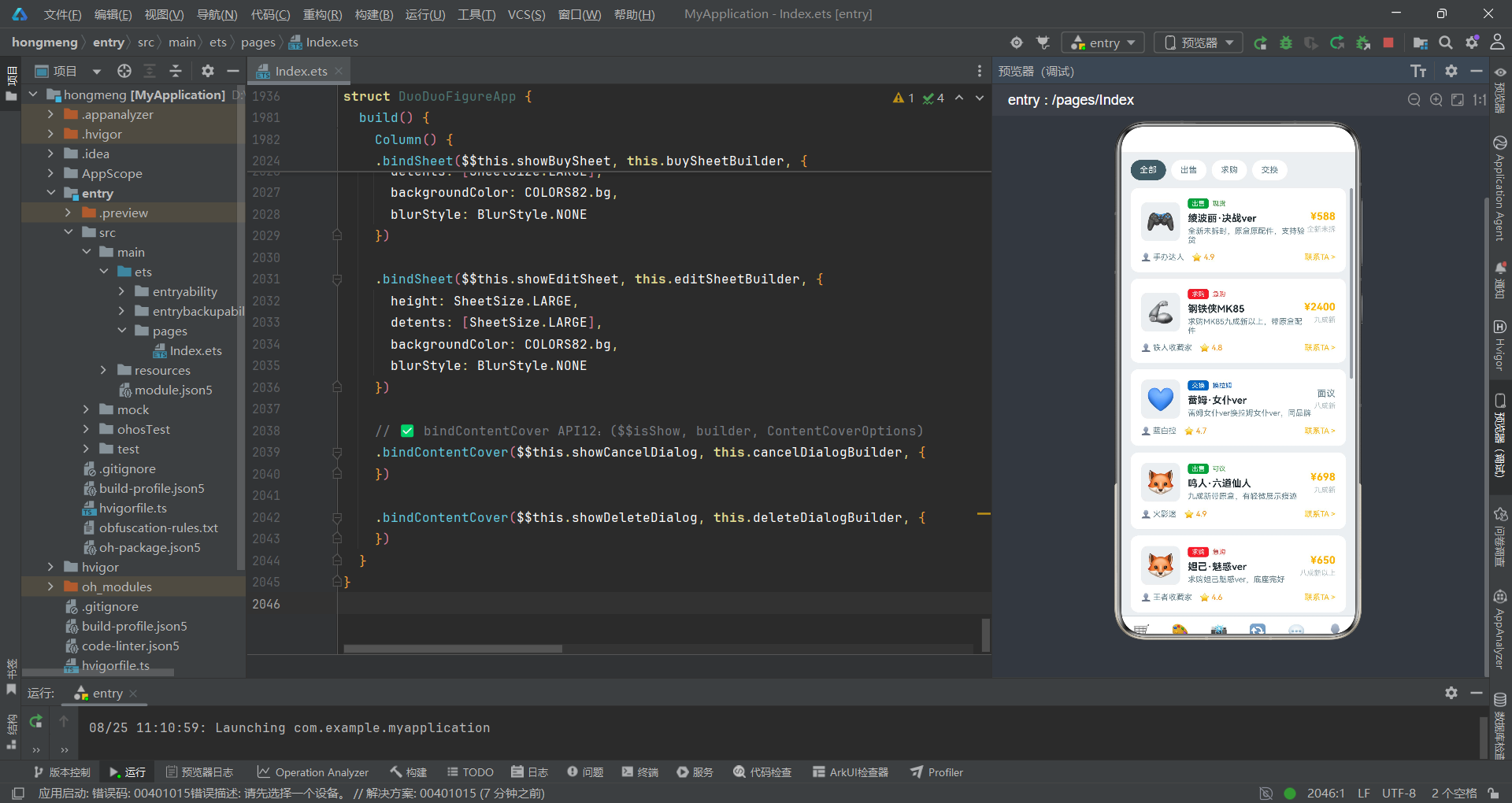
交换Tab支持出售、求购和交换三种交易类型,通过类型筛选和交易记录两个区域管理手办的二手交易。
@Component
export struct TradeTab82 {
  build() {
    Column() {
      // 类型筛选
      Row() {
        ForEach(['全部', '出售', '求购', '交换'], (type: string, index: number) => {
          Text(type)
            .fontSize(13)
            .fontColor(index === 0 ? COLORS82.white : COLORS82.textSecondary)
            .padding({ left: 14, right: 14, top: 8, bottom: 8 })
            .borderRadius(18)
            .backgroundColor(index === 0 ? COLORS82.primary : COLORS82.cardBg)
            .margin({ right: 8 })
        }, (type: string) => type)
      }
      .width('92%')

      Scroll() {
        Column() {
          ForEach(TRADE_ITEMS_82, (item: TradeItem82) => {
            Column() {
              Row() {
                Text(item.image)
                  .fontSize(36)
                  .width(60)
                  .height(60)
                  .textAlign(TextAlign.Center)
                  .backgroundColor(COLORS82.bg)
                  .borderRadius(10)
                Column() {
                  Row() {
                    Text(item.type)
                      .fontSize(10)
                      .fontColor(COLORS82.white)
                      .backgroundColor(item.color)
                      .borderRadius(4)
                    Text(item.tag)
                      .fontSize(10)
                      .fontColor(item.color)
                      .margin({ left: 6 })
                  }
                  Text(item.figure)
                    .fontSize(15)
                    .fontWeight(FontWeight.Bold)
                    .fontColor(COLORS82.textPrimary)
                    .margin({ top: 6 })
                  Text(item.desc)
                    .fontSize(12)
                    .fontColor(COLORS82.textSecondary)
                    .margin({ top: 4 })
                    .maxLines(2)
                }
                .alignItems(HorizontalAlign.Start)
                .margin({ left: 12 })
                .layoutWeight(1)
                // 价格
                Column() {
                  if (item.price > 0) {
                    Text('¥' + item.price.toString())
                      .fontSize(16)
                      .fontWeight(FontWeight.Bold)
                      .fontColor(COLORS82.accent)
                  } else {
                    Text('面议')
                      .fontSize(14)
                      .fontColor(COLORS82.textSecondary)
                  }
                  Text(item.condition)
                    .fontSize(11)
                    .fontColor(COLORS82.textHint)
                    .margin({ top: 4 })
                }
                .alignItems(HorizontalAlign.End)
              }

              // 卖家信息
              Row() {
                Text('👤 ' + item.seller)
                  .fontSize(12)
                  .fontColor(COLORS82.textSecondary)
                Text('⭐ ' + item.rating.toString())
                  .fontSize(12)
                  .fontColor(COLORS82.warning)
                  .margin({ left: 12 })
                Text('').layoutWeight(1)
                Text('联系TA >')
                  .fontSize(12)
                  .fontColor(COLORS82.accent)
              }
              .margin({ top: 12 })
            }
            .width('92%')
            .padding(16)
            .backgroundColor(COLORS82.cardBg)
            .borderRadius(12)
            .margin({ bottom: 10 })
          }, (item: TradeItem82) => item.id.toString())

          // 交易记录
          Text('📊 最近交易')
            .fontSize(16)
            .fontWeight(FontWeight.Bold)
            .fontColor(COLORS82.textPrimary)
            .margin({ top: 8, bottom: 12 })

          ForEach(TRADE_ITEMS_82.slice(0, 4), (item: TradeItem82, index: number) => {
            Row() {
              Text(item.image)
                .fontSize(24)
                .width(40)
                .height(40)
                .textAlign(TextAlign.Center)
                .backgroundColor(COLORS82.bg)
                .borderRadius(8)
              Column() {
                Text(item.figure)
                  .fontSize(13)
                  .fontColor(COLORS82.textPrimary)
                  .maxLines(1)
                Text(item.type + ' · ' + item.condition)
                  .fontSize(11)
                  .fontColor(COLORS82.textSecondary)
                  .margin({ top: 2 })
              }
              .alignItems(HorizontalAlign.Start)
              .margin({ left: 10 })
              .layoutWeight(1)
              Text(item.price > 0 ? '¥' + item.price.toString() : '面议')
                .fontSize(14)
                .fontWeight(FontWeight.Bold)
                .fontColor(COLORS82.accent)
              Text('✓')
                .fontSize(16)
                .fontColor(COLORS82.success)
                .margin({ left: 10 })
            }
            .width('92%')
            .padding(12)
            .backgroundColor(COLORS82.cardBg)
            .borderRadius(10)
            .margin({ bottom: 8 })
          }, (item: TradeItem82, index: number) => index.toString())
        }
        .padding({ bottom: 100 })
      }
      .scrollable(ScrollDirection.Vertical)
    }
    .backgroundColor(COLORS82.bg)
  }
}
交易列表项的价格展示使用了if (item.price > 0)条件判断——当价格大于0时显示具体金额(金色),当价格为0时(交换类型)显示"面议"文字(灰色)。这种条件渲染使得出售/求购和交换两种交易类型在价格展示上自然区分。交易记录列表使用TRADE_ITEMS_82.slice(0, 4)截取前四条数据,每条记录右侧显示绿色勾选标记✓标识交易已完成。
九、社区Tab:热门话题与动态列表
社区Tab包含热门话题横滑卡片和社区动态信息流两个区域。
@Component
export struct CommunityTab82 {
  build() {
    Column() {
      Scroll() {
        Column() {
          // 热门话题
          Text('🔥 热门话题')
            .fontSize(16)
            .fontWeight(FontWeight.Bold)
            .fontColor(COLORS82.textPrimary)

          Scroll() {
            Row() {
              ForEach(TOPICS_82, (topic: TopicItem82) => {
                Column() {
                  Text(topic.title)
                    .fontSize(13)
                    .fontWeight(FontWeight.Bold)
                    .fontColor(COLORS82.white)
                  Text('🔥 ' + topic.hot.toString())
                    .fontSize(11)
                    .fontColor('rgba(255,255,255,0.8)')
                    .margin({ top: 4 })
                  Text(topic.posts.toString() + '篇帖子')
                    .fontSize(10)
                    .fontColor('rgba(255,255,255,0.6)')
                    .margin({ top: 2 })
                }
                .alignItems(HorizontalAlign.Start)
                .width(140)
                .padding(14)
                .borderRadius(12)
                .backgroundColor(COLORS82.primary)
                .margin({ right: 10 })
              }, (topic: TopicItem82) => topic.id.toString())
            }
          }
          .scrollable(ScrollDirection.Horizontal)
          .scrollBar(BarState.Off)

          // 社区动态
          Text('💬 社区动态')
            .fontSize(16)
            .fontWeight(FontWeight.Bold)
            .fontColor(COLORS82.textPrimary)

          ForEach(POSTS_82, (post: PostItem82) => {
            Column() {
              Row() {
                Text(post.avatar)
                  .fontSize(32)
                  .width(40)
                  .height(40)
                  .textAlign(TextAlign.Center)
                  .backgroundColor(COLORS82.bg)
                  .borderRadius(20)
                Column() {
                  Text(post.user)
                    .fontSize(14)
                    .fontWeight(FontWeight.Medium)
                    .fontColor(COLORS82.textPrimary)
                  Text(post.time)
                    .fontSize(11)
                    .fontColor(COLORS82.textHint)
                    .margin({ top: 2 })
                }
                .alignItems(HorizontalAlign.Start)
                .margin({ left: 10 })
                .layoutWeight(1)
                Text(post.tag)
                  .fontSize(10)
                  .fontColor(COLORS82.accent)
                  .border({ width: 1, color: COLORS82.accent })
                  .borderRadius(4)
                  .padding({ left: 6, right: 6, top: 2, bottom: 2 })
              }

              Text(post.title)
                .fontSize(15)
                .fontWeight(FontWeight.Bold)
                .fontColor(COLORS82.textPrimary)
                .margin({ top: 12 })

              Text(post.content)
                .fontSize(13)
                .fontColor(COLORS82.textSecondary)
                .margin({ top: 6 })
                .maxLines(3)

              Row() {
                Text('❤️ ' + post.likes.toString())
                  .fontSize(12)
                  .fontColor(COLORS82.danger)
                Text('💬 ' + post.comments.toString())
                  .fontSize(12)
                  .fontColor(COLORS82.textSecondary)
                  .margin({ left: 20 })
                Text('').layoutWeight(1)
                Text('分享')
                  .fontSize(12)
                  .fontColor(COLORS82.textSecondary)
              }
              .margin({ top: 12 })
            }
            .width('92%')
            .padding(16)
            .backgroundColor(COLORS82.cardBg)
            .borderRadius(12)
            .margin({ bottom: 10 })
          }, (post: PostItem82) => post.id.toString())
        }
        .padding({ bottom: 100 })
      }
      .scrollable(ScrollDirection.Vertical)
    }
    .backgroundColor(COLORS82.bg)
  }
}
热门话题区使用横向滚动展示话题卡片,每张卡片使用COLORS82.primary主色作为背景,白色文字配合半透明层级展示热度值和帖子数。scrollBar(BarState.Off)确保横向滚动时无滚动条干扰。
社区动态列表中的标签设计独特——使用border({ width: 1, color: COLORS82.accent })金色边框配合透明背景和金色文字,形成"描边标签"效果,与热门话题的实色背景标签形成对比。每条动态包含头像、用户名、时间、标签、标题、内容和互动按钮,信息层次分明。
十、我的Tab:消费柱状图与地址管理
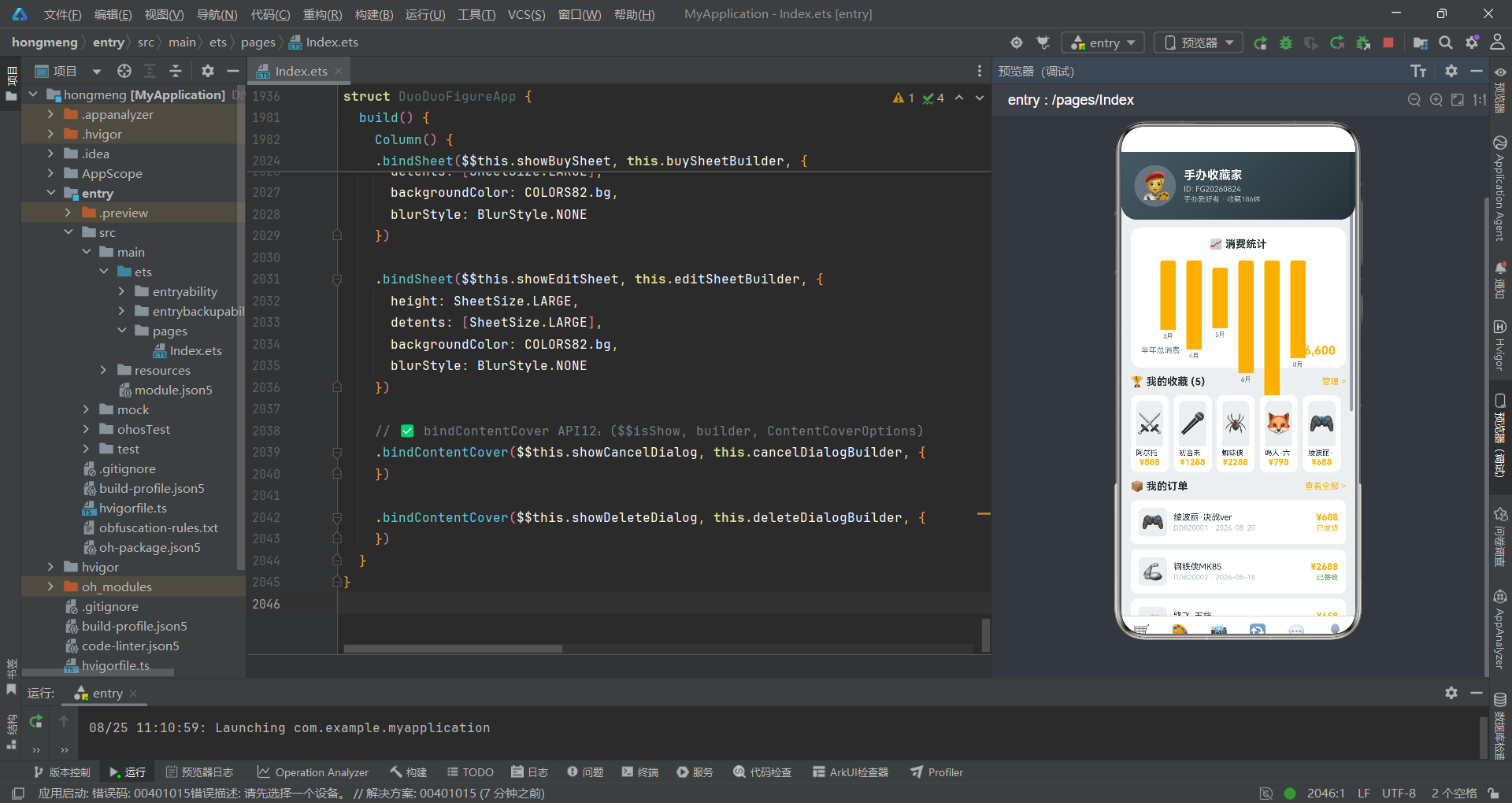
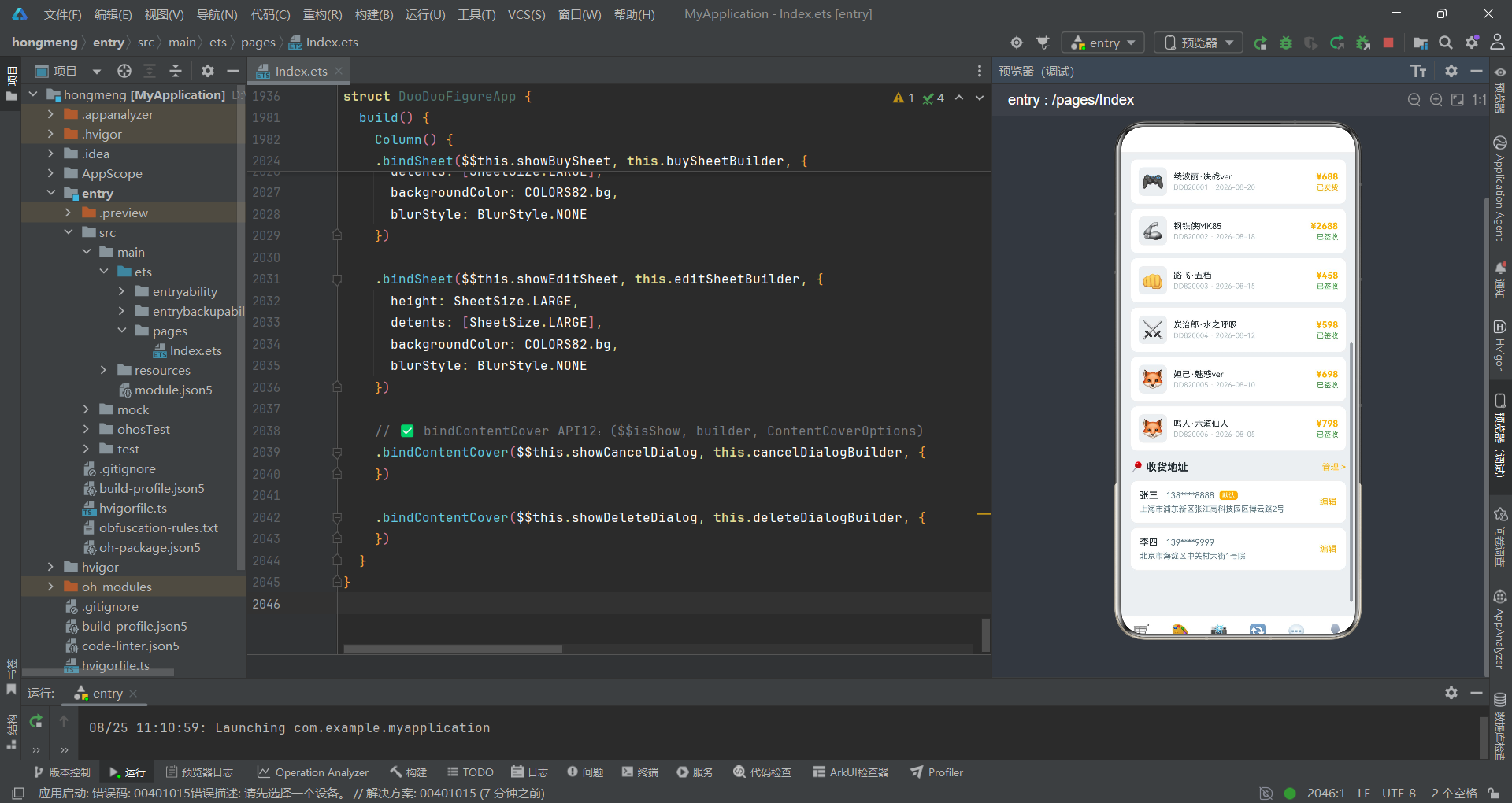
个人中心Tab集成了渐变头部、消费统计柱状图、收藏列表、订单管理和地址管理五大模块。
@Component
export struct ProfileTab82 {
build() {
Column() {
Scroll() {
Column() {
// 渐变头部
Column() {
Row() {
Text('🧑🎨')
.fontSize(40)
.width(64)
.height(64)
.textAlign(TextAlign.Center)
.borderRadius(32)
.backgroundColor('rgba(255,255,255,0.2)')
Column() {
Text('手办收藏家')
.fontSize(18)
.fontWeight(FontWeight.Bold)
.fontColor(COLORS82.white)
Text('ID: FG20260824')
.fontSize(12)
.fontColor('rgba(255,255,255,0.7)')
.margin({ top: 4 })
Text('手办爱好者 · 收藏186体')
.fontSize(11)
.fontColor('rgba(255,255,255,0.6)')
.margin({ top: 2 })
}
.alignItems(HorizontalAlign.Start)
.margin({ left: 12 })
}
}
.linearGradient({ angle: 135, colors: [[COLORS82.primary, 0], [COLORS82.primaryDark, 1]] })
.borderRadius({ bottomLeft: 24, bottomRight: 24 })
// 消费柱状图
Column() {
Text('📈 消费统计')
.fontSize(16)
.fontWeight(FontWeight.Bold)
.fontColor(COLORS82.textPrimary)
.margin({ bottom: 16 })
Row() {
ForEach(BAR_DATA_82, (bar: BarData82) => {
Column() {
Column()
.width(24)
.height(bar.value / 30)
.backgroundColor(COLORS82.accent)
.borderRadius({ topLeft: 4, topRight: 4 })
Text(bar.month)
.fontSize(10)
.fontColor(COLORS82.textSecondary)
.margin({ top: 4 })
}
.margin({ right: 16 })
}, (bar: BarData82) => bar.month)
}
.height(120)
.alignItems(VerticalAlign.Bottom)
Row() {
Text('半年总消费')
.fontSize(12)
.fontColor(COLORS82.textSecondary)
Text('').layoutWeight(1)
Text('¥26,600')
.fontSize(18)
.fontWeight(FontWeight.Bold)
.fontColor(COLORS82.accent)
}
}
.backgroundColor(COLORS82.cardBg)
.borderRadius(16)
// 收藏列表
Row() {
Text('🏆 我的收藏 (' + FAVORITES_82.length.toString() + ')')
.fontSize(16)
.fontWeight(FontWeight.Bold)
.fontColor(COLORS82.textPrimary)
Text('').layoutWeight(1)
Text('管理 >')
.fontSize(13)
.fontColor(COLORS82.accent)
}
Row() {
ForEach(FAVORITES_82, (fav: FavoriteItem82) => {
Column() {
Text(fav.image)
.fontSize(32)
.width('100%')
.height(70)
.textAlign(TextAlign.Center)
.backgroundColor(COLORS82.bg)
.borderRadius({ topLeft: 10, topRight: 10 })
Text(fav.figure)
.fontSize(11)
.fontColor(COLORS82.textPrimary)
.maxLines(1)
.margin({ top: 4 })
Text('¥' + fav.price.toString())
.fontSize(13)
.fontWeight(FontWeight.Bold)
.fontColor(COLORS82.accent)
}
.layoutWeight(1)
.backgroundColor(COLORS82.cardBg)
.borderRadius(10)
.margin({ right: 8 })
.padding(8)
}, (fav: FavoriteItem82) => fav.id.toString())
}
// 订单列表
ForEach(ORDERS_82, (order: OrderItem82) => {
Row() {
Text(order.image)
.fontSize(28)
.width(44)
.height(44)
.textAlign(TextAlign.Center)
.backgroundColor(COLORS82.bg)
.borderRadius(8)
Column() {
Text(order.figure)
.fontSize(13)
.fontColor(COLORS82.textPrimary)
.maxLines(1)
Text(order.orderNo + ' · ' + order.date)
.fontSize(11)
.fontColor(COLORS82.textHint)
.margin({ top: 2 })
}
.alignItems(HorizontalAlign.Start)
.margin({ left: 10 })
.layoutWeight(1)
Column() {
Text('¥' + order.price.toString())
.fontSize(14)
.fontWeight(FontWeight.Bold)
.fontColor(COLORS82.accent)
Text(order.status)
.fontSize(11)
.fontColor(order.status === '已发货' ? COLORS82.accent : COLORS82.success)
.margin({ top: 2 })
}
.alignItems(HorizontalAlign.End)
}
.padding(12)
.backgroundColor(COLORS82.cardBg)
.borderRadius(10)
.margin({ bottom: 8 })
}, (order: OrderItem82) => order.id.toString())
// 收货地址
ForEach(ADDRESSES_82, (addr: AddressItem82) => {
Row() {
Column() {
Row() {
Text(addr.name)
.fontSize(14)
.fontWeight(FontWeight.Medium)
.fontColor(COLORS82.textPrimary)
Text(addr.phone)
.fontSize(13)
.fontColor(COLORS82.textSecondary)
.margin({ left: 12 })
if (addr.isDefault) {
Text('默认')
.fontSize(10)
.fontColor(COLORS82.white)
.backgroundColor(COLORS82.accent)
.borderRadius(4)
.padding({ left: 4, right: 4, top: 1, bottom: 1 })
.margin({ left: 8 })
}
}
Text(addr.address)
.fontSize(12)
.fontColor(COLORS82.textSecondary)
.margin({ top: 6 })
}
.alignItems(HorizontalAlign.Start)
.layoutWeight(1)
Text('编辑')
.fontSize(13)
.fontColor(COLORS82.accent)
}
.padding(14)
.backgroundColor(COLORS82.cardBg)
.borderRadius(10)
.margin({ bottom: 8 })
}, (addr: AddressItem82) => addr.id.toString())
}
.padding({ bottom: 100 })
}
.scrollable(ScrollDirection.Vertical)
}
.backgroundColor(COLORS82.bg)
}
}
渐变头部使用135度渐变从主色过渡到深色,底部使用borderRadius({ bottomLeft: 24, bottomRight: 24 })实现底部圆角,这是该应用独有的设计细节,使头部与内容区的过渡更加柔和。
消费柱状图通过ForEach遍历BAR_DATA_82数组,每根柱子高度通过bar.value / 30计算。所有柱子统一使用COLORS82.accent金色,父级Row设置alignItems(VerticalAlign.Bottom)确保底部对齐。柱状图下方显示半年总消费"¥26,600",使用金色大字号突出。
收藏列表使用横向排列的卡片布局,每张卡片使用layoutWeight(1)等分宽度,展示手办图片、名称和价格。收藏数量通过FAVORITES_82.length.toString()动态计算并在标题中显示。
订单列表的状态颜色使用三元运算符:order.status === '已发货' ? COLORS82.accent : COLORS82.success——"已发货"显示金色,"已签收"显示绿色。地址管理模块中默认地址标签使用金色背景,非默认地址不显示标签。
技术点对比表格
| 技术维度 | 商城Tab | 定制Tab | 晒物Tab | 交换Tab | 社区Tab | 我的Tab |
|---|---|---|---|---|---|---|
| 主布局方式 | Flex分类+瀑布流双列 | 横滑流程+需求列表 | 标签筛选+瀑布流双列 | 类型筛选+交易列表 | 横滑话题+动态列表 | 渐变头部+柱状图+多列表 |
| 核心数据结构 | FigureItem82+Category82 | CustomRequest82+CustomStep82 | ShowItem82 | TradeItem82 | PostItem82+TopicItem82 | BarData82+OrderItem82+AddressItem82 |
| 瀑布流实现 | filter奇偶分割 | 无 | filter奇偶分割+不等高 | 无 | 无 | 无 |
| 价格展示 | 现价+原价删除线 | 预算区间字符串 | 无 | 条件渲染价格/面议 | 无 | 订单金额+状态色 |
| 色彩引用方式 | COLORS82集中管理 | COLORS82集中管理 | COLORS82+动态背景色 | COLORS82集中管理 | COLORS82+描边标签 | COLORS82集中管理 |
| 弹窗交互 | 无独立弹窗 | 无独立弹窗 | 无独立弹窗 | 无独立弹窗 | 无独立弹窗 | 通过父组件bindSheet/bindContentCover |
| 特色组件 | Flex自动换行分类 | Scroll横向流程+scrollBar隐藏 | 不等高图片+差异化标签 | if条件价格渲染 | 描边标签border | Toggle开关+borderRadius底部圆角 |
安装DevEco Studio程序

选择目标安装目录:

设置环境变量,但是需要重启一下:

新建一个空白模板:

设置API为24的模板项目:

初始化项目,自动下载相关依赖:

完整代码:
// 主题:手办灰白 #455A64 × 限定金 #FFB300,底色 #ECEFF1(工业灰白调)
// 布局差异:分类网格+新品大卡+双列手办 / 定制需求横滑+定制流程+案例展示 / 晒物瀑布流+热门标签 / 交换列表+交易记录 / 社区动态+热门话题 / 渐变头+消费柱状图+手办收藏+订单+地址
// ============ 类型定义 ============
interface FigureItem82 {
id: number
name: string
series: string
scale: string
brand: string
price: number
originalPrice: number
stock: number
sales: number
tag: string
color: string
image: string
rating: number
desc: string
}
interface Category82 {
id: number
name: string
icon: string
color: string
bg: string
}
interface CustomRequest82 {
id: number
title: string
type: string
budget: string
status: string
deadline: string
desc: string
color: string
proposals: number
}
interface CustomStep82 {
step: number
title: string
desc: string
icon: string
color: string
}
interface ShowItem82 {
id: number
user: string
avatar: string
figure: string
image: string
likes: number
comments: number
shares: number
tag: string
desc: string
time: string
}
interface TradeItem82 {
id: number
figure: string
type: string
price: number
condition: string
seller: string
rating: number
image: string
tag: string
color: string
desc: string
}
interface PostItem82 {
id: number
user: string
avatar: string
title: string
content: string
likes: number
comments: number
time: string
tag: string
}
interface TopicItem82 {
id: number
title: string
hot: number
posts: number
tag: string
}
interface OrderItem82 {
id: number
figure: string
orderNo: string
date: string
price: number
status: string
image: string
}
interface FavoriteItem82 {
id: number
figure: string
price: number
tag: string
image: string
}
interface AddressItem82 {
id: number
name: string
phone: string
address: string
isDefault: boolean
}
interface BarData82 {
month: string
value: number
}
interface SpecOption82 {
id: number
name: string
price: number
stock: number
}
interface ColorPalette82 {
primary: string
primaryLight: string
primaryDark: string
accent: string
bg: string
cardBg: string
textPrimary: string
textSecondary: string
textHint: string
border: string
white: string
success: string
warning: string
danger: string
}
// ============ 主题色 ============
const COLORS82: ColorPalette82 = {
primary: '#455A64',
primaryLight: '#78909C',
primaryDark: '#263238',
accent: '#FFB300',
bg: '#ECEFF1',
cardBg: '#FFFFFF',
textPrimary: '#263238',
textSecondary: '#607D8B',
textHint: '#B0BEC5',
border: '#CFD8DC',
white: '#FFFFFF',
success: '#43A047',
warning: '#FB8C00',
danger: '#E53935'
}
// ============ 静态数据 ============
const CATS_82: Category82[] = [
{ id: 1, name: 'PVC手办', icon: '🎨', color: '#455A64', bg: '#ECEFF1' },
{ id: 2, name: '树脂雕像', icon: '🗿', color: '#5D4037', bg: '#EFEBE9' },
{ id: 3, name: '机甲模型', icon: '🤖', color: '#37474F', bg: '#ECEFF1' },
{ id: 4, name: '可动人偶', icon: '🦸', color: '#455A64', bg: '#ECEFF1' },
{ id: 5, name: '比例模型', icon: '📐', color: '#5D4037', bg: '#EFEBE9' },
{ id: 6, name: '场景模型', icon: '🏯', color: '#37474F', bg: '#ECEFF1' },
{ id: 7, name: '配件零件', icon: '🔧', color: '#455A64', bg: '#ECEFF1' },
{ id: 8, name: '涂装工具', icon: '🖌️', color: '#5D4037', bg: '#EFEBE9' }
]
const FIGURES_82: FigureItem82[] = [
{ id: 1, name: '绫波丽·决战ver', series: 'EVA新世纪福音战士', scale: '1/7', brand: 'Good Smile', price: 688, originalPrice: 888, stock: 120, sales: 3421, tag: '新品', color: '#455A64', image: '🎮', rating: 4.9, desc: '决战限定涂装,附专属底座,细节拉满' },
{ id: 2, name: '初音未来·魔法少女', series: 'VOCALOID', scale: '1/4', brand: 'FREEing', price: 1288, originalPrice: 1588, stock: 50, sales: 2156, tag: '热销', color: '#3949AB', image: '🎤', rating: 4.8, desc: '超大比例,魔法杖LED发光组件' },
{ id: 3, name: '蕾姆·女仆ver', series: 'Re:从零开始的异世界生活', scale: '1/7', brand: 'Kotobukiya', price: 758, originalPrice: 958, stock: 80, sales: 1987, tag: '限时', color: '#5C6BC0', image: '💙', rating: 4.7, desc: '女仆装可替换,蓝色系涂装精致' },
{ id: 4, name: '钢铁侠MK85', series: '复仇者联盟', scale: '1/6', brand: 'Hot Toys', price: 2688, originalPrice: 2988, stock: 30, sales: 1234, tag: '高端', color: '#C62828', image: '🦾', rating: 5.0, desc: '合金骨架,LED眼+掌心炮发光' },
{ id: 5, name: '蜘蛛侠·远征ver', series: 'MCU蜘蛛侠', scale: '1/6', brand: 'Hot Toys', price: 2288, originalPrice: 2588, stock: 40, sales: 1567, tag: '热销', color: '#1565C0', image: '🕷️', rating: 4.9, desc: '战衣纹理精细,多种手型替换' },
{ id: 6, name: '炭治郎·水之呼吸', series: '鬼灭之刃', scale: '1/8', brand: 'Aniplex', price: 598, originalPrice: 798, stock: 100, sales: 2876, tag: '新品', color: '#1B5E20', image: '⚔️', rating: 4.8, desc: '水之呼吸特效件,动态姿势张力十足' },
{ id: 7, name: '妲己·魅惑ver', series: '王者荣耀', scale: '1/7', brand: '原创力', price: 698, originalPrice: 888, stock: 60, sales: 1987, tag: '限定', color: '#6A1B9A', image: '🦊', rating: 4.7, desc: '王者限定,九尾特效底座' },
{ id: 8, name: '路飞·五档', series: '海贼王', scale: '1/8', brand: 'MegaHouse', price: 458, originalPrice: 588, stock: 150, sales: 3421, tag: '热销', color: '#E65100', image: '👊', rating: 4.9, desc: '五档觉醒形态,白色头发可动眼球' },
{ id: 9, name: '阿尔托莉雅·誓约胜利', series: 'Fate/stay night', scale: '1/7', brand: 'Good Smile', price: 888, originalPrice: 1088, stock: 70, sales: 1678, tag: '经典', color: '#1565C0', image: '⚔️', rating: 5.0, desc: '誓约胜利之剑特效件,金色涂装' },
{ id: 10, name: '鸣人·六道仙人', series: '火影忍者', scale: '1/6', brand: 'MegaHouse', price: 798, originalPrice: 998, stock: 90, sales: 2345, tag: '新品', color: '#E65100', image: '🦊', rating: 4.8, desc: '六道仙术模式,求道玉特效件' }
]
const CUSTOM_REQUESTS_82: CustomRequest82[] = [
{ id: 1, title: 'EVA二号机·觉醒涂装定制', type: '涂装定制', budget: '2000-5000', status: '招标中', deadline: '30天', desc: '二号机红色亮光涂装,需做战损效果', color: '#C62828', proposals: 12 },
{ id: 2, title: '剑风传奇·格斯1/6雕像', type: '原型雕刻', budget: '5000-10000', status: '进行中', deadline: '60天', desc: '需要原创格斯狂战士1/6比例雕像原型', color: '#37474F', proposals: 8 },
{ id: 3, title: '初音未来·赛博朋克风改造', type: '改件定制', budget: '1000-3000', status: '招标中', deadline: '20天', desc: '赛博朋克风格服装+机械臂配件定制', color: '#00838F', proposals: 15 },
{ id: 4, title: '海贼王·路飞五档底座定制', type: '场景定制', budget: '800-2000', status: '已完成', deadline: '15天', desc: '云海场景底座,带LED灯效', color: '#1976D2', proposals: 6 },
{ id: 5, title: '鬼灭之刃·柱联合场景', type: '场景定制', budget: '3000-8000', status: '招标中', deadline: '45天', desc: '九柱联合场景1/8比例,需要涂装+底座', color: '#5D4037', proposals: 10 },
{ id: 6, title: 'Fate·Saber礼装定制', type: '涂装定制', budget: '1500-4000', status: '进行中', deadline: '25天', desc: '蓝色礼服版涂装改造,附光效底座', color: '#1565C0', proposals: 9 }
]
const CUSTOM_STEPS_82: CustomStep82[] = [
{ step: 1, title: '发布需求', desc: '描述你想要的手办定制需求', icon: '📝', color: '#455A64' },
{ step: 2, title: '收到报价', desc: '多位师傅为你报价方案', icon: '💬', color: '#FFB300' },
{ step: 3, title: '确认合作', desc: '选定师傅支付定金', icon: '🤝', color: '#43A047' },
{ step: 4, title: '制作进度', desc: '实时查看定制进度', icon: '🔨', color: '#1976D2' },
{ step: 5, title: '验收收货', desc: '确认成品支付尾款', icon: '✅', color: '#FF8F00' }
]
const SHOW_ITEMS_82: ShowItem82[] = [
{ id: 1, user: '手办君', avatar: '🧑🎨', figure: '绫波丽决战ver', image: '📸', likes: 2341, comments: 156, shares: 89, tag: '涂装展示', desc: '终于到了!决战ver涂装太绝了,眼睛反光效果好评', time: '2小时前' },
{ id: 2, user: '模型师小K', avatar: '👨🎨', figure: '自制1/6格斯', image: '🎨', likes: 4567, comments: 234, shares: 167, tag: '原创雕刻', desc: '耗时3个月原创雕刻格斯狂战士,求点评', time: '5小时前' },
{ id: 3, user: 'EVA爱好者', avatar: '🧑🔬', figure: '初号机改色', image: '✨', likes: 3421, comments: 198, shares: 123, tag: '改色涂装', desc: '紫色金属漆改色完成,附LED灯组', time: '8小时前' },
{ id: 4, user: '手办收藏家', avatar: '🧑💼', figure: '全系列展示柜', image: '🏬', likes: 5678, comments: 345, shares: 234, tag: '收藏展示', desc: '入手3年收藏全展示,共计186体手办', time: '12小时前' },
{ id: 5, user: '涂装新手', avatar: '👩🎨', figure: '第一次涂装尝试', image: '🖌️', likes: 1234, comments: 89, shares: 45, tag: '新手作品', desc: '第一次尝试涂装,虽然粗糙但是很开心', time: '1天前' },
{ id: 6, user: '机甲迷', avatar: '🧑⚙️', figure: 'RG牛高达改修', image: '🤖', likes: 3456, comments: 167, shares: 134, tag: '模型改修', desc: 'RG牛高达追加金属细节+水贴+渗线', time: '2天前' },
{ id: 7, user: '场景大师', avatar: '👨🏭', figure: '末日废墟场景', image: '🏚️', likes: 4567, comments: 234, shares: 189, tag: '场景制作', desc: '1/12末日废墟场景,含LED+烟效', time: '3天前' },
{ id: 8, user: '比例模型爱好者', avatar: '🧑🏭', figure: '1/35二战场景', image: '⚔️', likes: 2345, comments: 145, shares: 78, tag: '场景制作', desc: '1/35比例二战场景,坦克+步兵+建筑废墟', time: '3天前' }
]
const TRADE_ITEMS_82: TradeItem82[] = [
{ id: 1, figure: '绫波丽·决战ver', type: '出售', price: 588, condition: '全新未拆', seller: '手办达人', rating: 4.9, image: '🎮', tag: '现货', color: '#43A047', desc: '全新未拆封,原盒原配件,支持验货' },
{ id: 2, figure: '钢铁侠MK85', type: '求购', price: 2400, condition: '九成新', seller: '铁人收藏家', rating: 4.8, image: '🦾', tag: '急购', color: '#E53935', desc: '求购MK85九成新以上,带原盒配件' },
{ id: 3, figure: '蕾姆·女仆ver', type: '交换', price: 0, condition: '八成新', seller: '蓝白控', rating: 4.7, image: '💙', tag: '换拉姆', color: '#1565C0', desc: '蕾姆女仆ver换拉姆女仆ver,同品牌' },
{ id: 4, figure: '鸣人·六道仙人', type: '出售', price: 698, condition: '九成新', seller: '火影迷', rating: 4.9, image: '🦊', tag: '可议', color: '#43A047', desc: '九成新带原盒,有轻微展示痕迹' },
{ id: 5, figure: '妲己·魅惑ver', type: '求购', price: 650, condition: '八成新以上', seller: '王者收藏家', rating: 4.6, image: '🦊', tag: '急购', color: '#E53935', desc: '求购妲己魅惑ver,底座完好' },
{ id: 6, figure: '初音未来·魔法少女', type: '交换', price: 0, condition: '全新', seller: 'V家爱好者', rating: 4.8, image: '🎤', tag: '换巡音', color: '#1976D2', desc: '全新未拆换巡音魔法少女ver' },
{ id: 7, figure: '炭治郎·水之呼吸', type: '出售', price: 498, condition: '九成新', seller: '鬼灭粉', rating: 4.7, image: '⚔️', tag: '可议', color: '#43A047', desc: '九成新带特效件,原盒完好' },
{ id: 8, figure: '路飞·五档', type: '出售', price: 398, condition: '全新未拆', seller: '海贼王迷', rating: 4.9, image: '👊', tag: '现货', color: '#43A047', desc: '全新未拆封,大量现货可发' }
]
const POSTS_82: PostItem82[] = [
{ id: 1, user: '手办测评师', avatar: '🧑🔬', title: '2026年最值得入手的10款手办', content: '从涂装精度到性价比全面分析,帮你避坑不踩雷', likes: 3456, comments: 234, time: '1小时前', tag: '测评' },
{ id: 2, user: '涂装大佬', avatar: '👨🎨', title: '金属漆涂装教程:从底漆到罩光', content: '手把手教你做出专业级金属质感涂装效果', likes: 4567, comments: 345, time: '3小时前', tag: '教程' },
{ id: 3, user: '模型组装君', avatar: '🧑🔧', title: '高达模型渗线入门指南', content: '渗线液、马克笔、珐琅漆三种方案对比', likes: 2345, comments: 167, time: '5小时前', tag: '教程' },
{ id: 4, user: '收藏家老张', avatar: '🧑💼', title: '手办保养终极指南:防黄防尘防潮', content: '10年收藏经验总结,让你的手办永葆青春', likes: 5678, comments: 456, time: '8小时前', tag: '保养' },
{ id: 5, user: '价格情报员', avatar: '🧑📊', title: '本周手办涨跌行情分析', content: 'EVA系列涨20%,火影系列跌5%,入手时机分析', likes: 3456, comments: 234, time: '12小时前', tag: '行情' },
{ id: 6, user: '展会展讯', avatar: '🧑🎤', title: '2026上海手办模型展攻略', content: '展区分布、限定品清单、签售时间全汇总', likes: 6789, comments: 567, time: '1天前', tag: '展讯' }
]
const TOPICS_82: TopicItem82[] = [
{ id: 1, title: '#2026年度手办TOP10#', hot: 9999, posts: 1234, tag: '热门' },
{ id: 2, title: '#涂装技巧分享#', hot: 8765, posts: 987, tag: '教程' },
{ id: 3, title: '#手办收藏展示#', hot: 7654, posts: 876, tag: '展示' },
{ id: 4, title: '#模型改修日记#', hot: 6543, posts: 765, tag: '改修' },
{ id: 5, title: '#手办交易行情#', hot: 5432, posts: 654, tag: '行情' },
{ id: 6, title: '#WF展限定品讨论#', hot: 4321, posts: 543, tag: '展会' }
]
const ORDERS_82: OrderItem82[] = [
{ id: 1, figure: '绫波丽·决战ver', orderNo: 'DD820001', date: '2026-08-20', price: 688, status: '已发货', image: '🎮' },
{ id: 2, figure: '钢铁侠MK85', orderNo: 'DD820002', date: '2026-08-18', price: 2688, status: '已签收', image: '🦾' },
{ id: 3, figure: '路飞·五档', orderNo: 'DD820003', date: '2026-08-15', price: 458, status: '已签收', image: '👊' },
{ id: 4, figure: '炭治郎·水之呼吸', orderNo: 'DD820004', date: '2026-08-12', price: 598, status: '已签收', image: '⚔️' },
{ id: 5, figure: '妲己·魅惑ver', orderNo: 'DD820005', date: '2026-08-10', price: 698, status: '已签收', image: '🦊' },
{ id: 6, figure: '鸣人·六道仙人', orderNo: 'DD820006', date: '2026-08-05', price: 798, status: '已签收', image: '🦊' }
]
const FAVORITES_82: FavoriteItem82[] = [
{ id: 1, figure: '阿尔托莉雅·誓约胜利', price: 888, tag: '经典', image: '⚔️' },
{ id: 2, figure: '初音未来·魔法少女', price: 1288, tag: '热销', image: '🎤' },
{ id: 3, figure: '蜘蛛侠·远征ver', price: 2288, tag: '高端', image: '🕷️' },
{ id: 4, figure: '鸣人·六道仙人', price: 798, tag: '新品', image: '🦊' },
{ id: 5, figure: '绫波丽·决战ver', price: 688, tag: '新品', image: '🎮' }
]
const ADDRESSES_82: AddressItem82[] = [
{ id: 1, name: '张三', phone: '138****8888', address: '上海市浦东新区张江高科技园区博云路2号', isDefault: true },
{ id: 2, name: '李四', phone: '139****9999', address: '北京市海淀区中关村大街1号院', isDefault: false }
]
const BAR_DATA_82: BarData82[] = [
{ month: '3月', value: 3200 },
{ month: '4月', value: 4100 },
{ month: '5月', value: 2800 },
{ month: '6月', value: 5200 },
{ month: '7月', value: 6800 },
{ month: '8月', value: 4500 }
]
const SPECS_82: SpecOption82[] = [
{ id: 1, name: '标准版', price: 0, stock: 120 },
{ id: 2, name: '限定版(含底座)', price: 200, stock: 50 },
{ id: 3, name: '豪华版(含底座+LED)', price: 500, stock: 20 }
]
const TAGS_82: string[] = ['全部', '涂装展示', '原创雕刻', '改色涂装', '收藏展示', '场景制作', '新手作品', '模型改修']
// ============ 弹框组件 ============
@Component
export struct FigureBuySheet82 {
@State figureName: string = ''
@State selectedSpec: number = 1
@State quantity: number = 1
@State deliveryType: number = 0
@State remark: string = ''
basePrice: number = 688
onConfirm: () => void = () => {}
onClose: () => void = () => {}
build() {
Column() {
// 拖拽指示器
Column()
.width(40)
.height(4)
.borderRadius(2)
.backgroundColor(COLORS82.border)
.margin({ top: 12, bottom: 16 })
// 标题
Row() {
Text('购买手办')
.fontSize(20)
.fontWeight(FontWeight.Bold)
.fontColor(COLORS82.textPrimary)
Text('').layoutWeight(1)
Text('✕')
.fontSize(22)
.fontColor(COLORS82.textHint)
.onClick(() => { this.onClose() })
}
.width('100%')
.padding({ left: 20, right: 20 })
.margin({ bottom: 16 })
// 商品信息
Row() {
Text('🎮')
.fontSize(40)
.width(64)
.height(64)
.textAlign(TextAlign.Center)
.backgroundColor(COLORS82.bg)
.borderRadius(12)
Column() {
Text(this.figureName)
.fontSize(15)
.fontWeight(FontWeight.Bold)
.fontColor(COLORS82.textPrimary)
Text('¥' + (this.basePrice + (SPECS_82[this.selectedSpec - 1].price * this.quantity)).toString())
.fontSize(18)
.fontWeight(FontWeight.Bold)
.fontColor(COLORS82.accent)
.margin({ top: 4 })
}
.alignItems(HorizontalAlign.Start)
.margin({ left: 12 })
.layoutWeight(1)
}
.width('100%')
.padding({ left: 20, right: 20 })
.margin({ bottom: 20 })
// 规格选择
Column() {
Text('选择规格')
.fontSize(14)
.fontWeight(FontWeight.Medium)
.fontColor(COLORS82.textSecondary)
.margin({ bottom: 10 })
ForEach(SPECS_82, (spec: SpecOption82) => {
Row() {
Column() {
Text(spec.name)
.fontSize(14)
.fontColor(this.selectedSpec === spec.id ? COLORS82.white : COLORS82.textPrimary)
Text(spec.price > 0 ? '+¥' + spec.price.toString() : '基础价')
.fontSize(12)
.fontColor(this.selectedSpec === spec.id ? COLORS82.white : COLORS82.textSecondary)
.margin({ top: 2 })
}
.alignItems(HorizontalAlign.Start)
Text('').layoutWeight(1)
Text('库存' + spec.stock.toString())
.fontSize(12)
.fontColor(this.selectedSpec === spec.id ? COLORS82.white : COLORS82.textHint)
}
.width('100%')
.padding(12)
.borderRadius(10)
.backgroundColor(this.selectedSpec === spec.id ? COLORS82.primary : COLORS82.bg)
.margin({ bottom: 8 })
.onClick(() => { this.selectedSpec = spec.id })
}, (spec: SpecOption82) => spec.id.toString())
}
.width('100%')
.padding({ left: 20, right: 20 })
.margin({ bottom: 16 })
// 配送方式
Column() {
Text('配送方式')
.fontSize(14)
.fontWeight(FontWeight.Medium)
.fontColor(COLORS82.textSecondary)
.margin({ bottom: 10 })
Row() {
ForEach(['快递', '同城闪送', '自提'], (item: string, index: number) => {
Text(item)
.fontSize(13)
.fontColor(this.deliveryType === index ? COLORS82.white : COLORS82.textPrimary)
.padding({ left: 16, right: 16, top: 8, bottom: 8 })
.borderRadius(20)
.backgroundColor(this.deliveryType === index ? COLORS82.primary : COLORS82.bg)
.margin({ right: 8 })
.onClick(() => { this.deliveryType = index })
}, (item: string) => item)
}
}
.width('100%')
.padding({ left: 20, right: 20 })
.margin({ bottom: 16 })
// 数量
Row() {
Text('购买数量')
.fontSize(14)
.fontColor(COLORS82.textSecondary)
Text('').layoutWeight(1)
Row() {
Text('−')
.fontSize(18)
.fontColor(COLORS82.textPrimary)
.width(36)
.height(36)
.textAlign(TextAlign.Center)
.backgroundColor(COLORS82.bg)
.borderRadius({ topLeft: 8, bottomLeft: 8 })
.onClick(() => { if (this.quantity > 1) { this.quantity-- } })
Text(this.quantity.toString())
.fontSize(15)
.fontColor(COLORS82.textPrimary)
.width(50)
.height(36)
.textAlign(TextAlign.Center)
.backgroundColor(COLORS82.white)
Text('+')
.fontSize(18)
.fontColor(COLORS82.textPrimary)
.width(36)
.height(36)
.textAlign(TextAlign.Center)
.backgroundColor(COLORS82.bg)
.borderRadius({ topRight: 8, bottomRight: 8 })
.onClick(() => { if (this.quantity < 10) { this.quantity++ } })
}
}
.width('100%')
.padding({ left: 20, right: 20 })
.margin({ bottom: 16 })
// 备注
TextInput({ text: this.remark, placeholder: '选填:备注信息(如验货要求等)' })
.fontSize(14)
.height(44)
.backgroundColor(COLORS82.bg)
.borderRadius(10)
.padding({ left: 12, right: 12 })
.margin({ left: 20, right: 20, bottom: 20 })
.onChange((val: string) => { this.remark = val })
// 确认按钮
Button() {
Text('确认购买')
.fontSize(16)
.fontColor(COLORS82.white)
.fontWeight(FontWeight.Bold)
}
.width('90%')
.height(48)
.backgroundColor(COLORS82.accent)
.borderRadius(24)
.margin({ bottom: 20 })
.onClick(() => { this.onConfirm() })
}
.width('100%')
.backgroundColor(COLORS82.cardBg)
.borderRadius({ topLeft: 24, topRight: 24 })
}
}
@Component
export struct CancelOrderDialog82 {
orderNo: string = ''
onConfirm: () => void = () => {}
onClose: () => void = () => {}
build() {
Column() {
Text('取消订单')
.fontSize(18)
.fontWeight(FontWeight.Bold)
.fontColor(COLORS82.textPrimary)
.margin({ bottom: 12 })
Text('确认取消订单 ' + this.orderNo + ' ?取消后无法恢复,优惠券将退回。')
.fontSize(14)
.fontColor(COLORS82.textSecondary)
.textAlign(TextAlign.Center)
.margin({ bottom: 24, left: 20, right: 20 })
Row() {
Button() {
Text('再想想')
.fontSize(15)
.fontColor(COLORS82.textSecondary)
}
.layoutWeight(1)
.height(44)
.backgroundColor(COLORS82.bg)
.borderRadius(22)
.margin({ right: 8 })
.onClick(() => { this.onClose() })
Button() {
Text('确认取消')
.fontSize(15)
.fontColor(COLORS82.white)
}
.layoutWeight(1)
.height(44)
.backgroundColor(COLORS82.danger)
.borderRadius(22)
.onClick(() => { this.onConfirm() })
}
.width('100%')
}
.width('80%')
.padding(24)
.backgroundColor(COLORS82.cardBg)
.borderRadius(20)
}
}
@Component
export struct EditShowSheet82 {
@State showTitle: string = ''
@State showFigure: string = ''
@State showDesc: string = ''
@State selectedTag: number = 0
@State allowComment: boolean = true
onConfirm: () => void = () => {}
onClose: () => void = () => {}
build() {
Column() {
Column()
.width(40)
.height(4)
.borderRadius(2)
.backgroundColor(COLORS82.border)
.margin({ top: 12, bottom: 16 })
Row() {
Text('发布晒物')
.fontSize(20)
.fontWeight(FontWeight.Bold)
.fontColor(COLORS82.textPrimary)
Text('').layoutWeight(1)
Text('✕')
.fontSize(22)
.fontColor(COLORS82.textHint)
.onClick(() => { this.onClose() })
}
.width('100%')
.padding({ left: 20, right: 20 })
.margin({ bottom: 16 })
// 图片选择区域
Row() {
Column() {
Text('📷')
.fontSize(28)
Text('添加图片')
.fontSize(12)
.fontColor(COLORS82.textHint)
.margin({ top: 4 })
}
.width(80)
.height(80)
.justifyContent(FlexAlign.Center)
.backgroundColor(COLORS82.bg)
.borderRadius(12)
.border({ width: 1, color: COLORS82.border, style: BorderStyle.Dashed })
.margin({ right: 8 })
Column() {
Text('🖼️')
.fontSize(28)
}
.width(80)
.height(80)
.justifyContent(FlexAlign.Center)
.backgroundColor(COLORS82.bg)
.borderRadius(12)
.border({ width: 1, color: COLORS82.border, style: BorderStyle.Dashed })
}
.width('100%')
.padding({ left: 20, right: 20 })
.margin({ bottom: 16 })
// 手办名称
TextInput({ text: this.showFigure, placeholder: '手办名称(如:绫波丽决战ver)' })
.fontSize(14)
.height(44)
.backgroundColor(COLORS82.bg)
.borderRadius(10)
.padding({ left: 12, right: 12 })
.margin({ left: 20, right: 20, bottom: 12 })
.onChange((val: string) => { this.showFigure = val })
// 标题
TextInput({ text: this.showTitle, placeholder: '标题(如:终于入手了!涂装太绝)' })
.fontSize(14)
.height(44)
.backgroundColor(COLORS82.bg)
.borderRadius(10)
.padding({ left: 12, right: 12 })
.margin({ left: 20, right: 20, bottom: 12 })
.onChange((val: string) => { this.showTitle = val })
// 描述
TextArea({ text: this.showDesc, placeholder: '详细描述你的手办展示内容...' })
.fontSize(14)
.height(80)
.backgroundColor(COLORS82.bg)
.borderRadius(10)
.padding({ left: 12, right: 12, top: 8, bottom: 8 })
.margin({ left: 20, right: 20, bottom: 12 })
.onChange((val: string) => { this.showDesc = val })
// 标签选择
Column() {
Text('选择标签')
.fontSize(14)
.fontColor(COLORS82.textSecondary)
.margin({ bottom: 8 })
Flex({ wrap: FlexWrap.Wrap }) {
ForEach(TAGS_82, (tag: string, index: number) => {
Text(tag)
.fontSize(12)
.fontColor(this.selectedTag === index ? COLORS82.white : COLORS82.textSecondary)
.padding({ left: 12, right: 12, top: 6, bottom: 6 })
.borderRadius(16)
.backgroundColor(this.selectedTag === index ? COLORS82.primary : COLORS82.bg)
.margin({ right: 8, bottom: 8 })
.onClick(() => { this.selectedTag = index })
}, (tag: string) => tag)
}
.width('100%')
}
.width('100%')
.padding({ left: 20, right: 20 })
.margin({ bottom: 16 })
// 允许评论
Row() {
Text('允许评论')
.fontSize(14)
.fontColor(COLORS82.textPrimary)
Text('').layoutWeight(1)
Toggle({ type: ToggleType.Switch, isOn: this.allowComment })
.selectedColor(COLORS82.accent)
.onChange((val: boolean) => { this.allowComment = val })
}
.width('100%')
.padding({ left: 20, right: 20 })
.margin({ bottom: 20 })
// 发布按钮
Button() {
Text('发布')
.fontSize(16)
.fontColor(COLORS82.white)
.fontWeight(FontWeight.Bold)
}
.width('90%')
.height(48)
.backgroundColor(COLORS82.primary)
.borderRadius(24)
.margin({ bottom: 20 })
.onClick(() => { this.onConfirm() })
}
.width('100%')
.backgroundColor(COLORS82.cardBg)
.borderRadius({ topLeft: 24, topRight: 24 })
}
}
@Component
export struct DeleteFavoriteDialog82 {
figureName: string = ''
onConfirm: () => void = () => {}
onClose: () => void = () => {}
build() {
Column() {
Text('删除收藏')
.fontSize(18)
.fontWeight(FontWeight.Bold)
.fontColor(COLORS82.textPrimary)
.margin({ bottom: 12 })
Text('确认将 ' + this.figureName + ' 从收藏夹移除?')
.fontSize(14)
.fontColor(COLORS82.textSecondary)
.textAlign(TextAlign.Center)
.margin({ bottom: 24, left: 20, right: 20 })
Row() {
Button() {
Text('取消')
.fontSize(15)
.fontColor(COLORS82.textSecondary)
}
.layoutWeight(1)
.height(44)
.backgroundColor(COLORS82.bg)
.borderRadius(22)
.margin({ right: 8 })
.onClick(() => { this.onClose() })
Button() {
Text('删除')
.fontSize(15)
.fontColor(COLORS82.white)
}
.layoutWeight(1)
.height(44)
.backgroundColor(COLORS82.danger)
.borderRadius(22)
.onClick(() => { this.onConfirm() })
}
.width('100%')
}
.width('80%')
.padding(24)
.backgroundColor(COLORS82.cardBg)
.borderRadius(20)
}
}
// ============ Tab组件 ============
@Component
export struct ShopTab82 {
build() {
Column() {
// 搜索栏
Row() {
Text('🔍')
.fontSize(18)
.margin({ right: 8 })
Text('搜索手办、系列、品牌...')
.fontSize(14)
.fontColor(COLORS82.textHint)
.layoutWeight(1)
}
.width('92%')
.height(40)
.backgroundColor(COLORS82.cardBg)
.borderRadius(20)
.padding({ left: 16, right: 16 })
.margin({ top: 12, bottom: 12 })
Scroll() {
Column() {
// 分类网格
Flex({ wrap: FlexWrap.Wrap }) {
ForEach(CATS_82, (cat: Category82) => {
Column() {
Text(cat.icon)
.fontSize(28)
.width(48)
.height(48)
.textAlign(TextAlign.Center)
.borderRadius(12)
.backgroundColor(cat.bg)
Text(cat.name)
.fontSize(12)
.fontColor(COLORS82.textPrimary)
.margin({ top: 6 })
}
.width('23%')
.margin({ bottom: 16 })
}, (cat: Category82) => cat.id.toString())
}
.width('92%')
.padding({ top: 12, bottom: 12 })
.backgroundColor(COLORS82.cardBg)
.borderRadius(16)
.margin({ bottom: 12 })
// 新品大卡
Column() {
Row() {
Text('🔥 本周新品')
.fontSize(18)
.fontWeight(FontWeight.Bold)
.fontColor(COLORS82.textPrimary)
Text('').layoutWeight(1)
Text('查看全部 >')
.fontSize(13)
.fontColor(COLORS82.accent)
}
.width('100%')
.margin({ bottom: 12 })
// 新品大卡片
Column() {
Row() {
Text(FIGURES_82[0].image)
.fontSize(60)
.width(100)
.height(100)
.textAlign(TextAlign.Center)
.backgroundColor(COLORS82.bg)
.borderRadius(12)
Column() {
Text(FIGURES_82[0].tag)
.fontSize(11)
.fontColor(COLORS82.white)
.backgroundColor(COLORS82.accent)
.borderRadius(4)
.padding({ left: 6, right: 6, top: 2, bottom: 2 })
Text(FIGURES_82[0].name)
.fontSize(16)
.fontWeight(FontWeight.Bold)
.fontColor(COLORS82.textPrimary)
.margin({ top: 6 })
Text(FIGURES_82[0].series)
.fontSize(12)
.fontColor(COLORS82.textSecondary)
.margin({ top: 4 })
Row() {
Text('¥' + FIGURES_82[0].price.toString())
.fontSize(18)
.fontWeight(FontWeight.Bold)
.fontColor(COLORS82.accent)
Text('¥' + FIGURES_82[0].originalPrice.toString())
.fontSize(12)
.fontColor(COLORS82.textHint)
.decoration({ type: TextDecorationType.LineThrough })
.margin({ left: 6 })
}
.margin({ top: 6 })
}
.alignItems(HorizontalAlign.Start)
.margin({ left: 12 })
.layoutWeight(1)
}
Text(FIGURES_82[0].desc)
.fontSize(13)
.fontColor(COLORS82.textSecondary)
.margin({ top: 10 })
Row() {
Text('⭐ ' + FIGURES_82[0].rating.toString())
.fontSize(12)
.fontColor(COLORS82.warning)
Text(' 已售' + FIGURES_82[0].sales.toString())
.fontSize(12)
.fontColor(COLORS82.textHint)
.margin({ left: 12 })
Text('').layoutWeight(1)
Text('库存' + FIGURES_82[0].stock.toString())
.fontSize(12)
.fontColor(COLORS82.textHint)
}
.width('100%')
.margin({ top: 8 })
}
.width('100%')
.padding(16)
.backgroundColor(COLORS82.cardBg)
.borderRadius(16)
}
.width('92%')
.padding(16)
.backgroundColor(COLORS82.cardBg)
.borderRadius(16)
.margin({ bottom: 12 })
// 双列手办列表
Row() {
Text('全部手办')
.fontSize(18)
.fontWeight(FontWeight.Bold)
.fontColor(COLORS82.textPrimary)
Text('').layoutWeight(1)
Text('综合排序 ▼')
.fontSize(13)
.fontColor(COLORS82.textSecondary)
}
.width('92%')
.margin({ bottom: 12 })
// 双列网格
Row() {
// 左列
Column() {
ForEach(FIGURES_82.filter((_: FigureItem82, i: number) => i % 2 === 0), (fig: FigureItem82) => {
Column() {
Text(fig.image)
.fontSize(48)
.width('100%')
.height(120)
.textAlign(TextAlign.Center)
.backgroundColor(COLORS82.bg)
.borderRadius({ topLeft: 12, topRight: 12 })
Column() {
Text(fig.tag)
.fontSize(10)
.fontColor(COLORS82.white)
.backgroundColor(fig.color)
.borderRadius(4)
.padding({ left: 6, right: 6, top: 2, bottom: 2 })
Text(fig.name)
.fontSize(14)
.fontWeight(FontWeight.Bold)
.fontColor(COLORS82.textPrimary)
.margin({ top: 6 })
.maxLines(2)
Text(fig.scale + ' · ' + fig.brand)
.fontSize(11)
.fontColor(COLORS82.textSecondary)
.margin({ top: 4 })
Row() {
Text('¥' + fig.price.toString())
.fontSize(16)
.fontWeight(FontWeight.Bold)
.fontColor(COLORS82.accent)
Text('').layoutWeight(1)
Text('⭐' + fig.rating.toString())
.fontSize(11)
.fontColor(COLORS82.warning)
}
.width('100%')
.margin({ top: 6 })
}
.width('100%')
.padding(10)
}
.layoutWeight(1)
.backgroundColor(COLORS82.cardBg)
.borderRadius(12)
.margin({ right: 6, bottom: 12 })
}, (fig: FigureItem82) => fig.id.toString())
}
.layoutWeight(1)
// 右列
Column() {
ForEach(FIGURES_82.filter((_: FigureItem82, i: number) => i % 2 === 1), (fig: FigureItem82) => {
Column() {
Text(fig.image)
.fontSize(48)
.width('100%')
.height(120)
.textAlign(TextAlign.Center)
.backgroundColor(COLORS82.bg)
.borderRadius({ topLeft: 12, topRight: 12 })
Column() {
Text(fig.tag)
.fontSize(10)
.fontColor(COLORS82.white)
.backgroundColor(fig.color)
.borderRadius(4)
.padding({ left: 6, right: 6, top: 2, bottom: 2 })
Text(fig.name)
.fontSize(14)
.fontWeight(FontWeight.Bold)
.fontColor(COLORS82.textPrimary)
.margin({ top: 6 })
.maxLines(2)
Text(fig.scale + ' · ' + fig.brand)
.fontSize(11)
.fontColor(COLORS82.textSecondary)
.margin({ top: 4 })
Row() {
Text('¥' + fig.price.toString())
.fontSize(16)
.fontWeight(FontWeight.Bold)
.fontColor(COLORS82.accent)
Text('').layoutWeight(1)
Text('⭐' + fig.rating.toString())
.fontSize(11)
.fontColor(COLORS82.warning)
}
.width('100%')
.margin({ top: 6 })
}
.width('100%')
.padding(10)
}
.layoutWeight(1)
.backgroundColor(COLORS82.cardBg)
.borderRadius(12)
.margin({ left: 6, bottom: 12 })
}, (fig: FigureItem82) => fig.id.toString())
}
.layoutWeight(1)
}
.width('92%')
}
.width('100%')
.padding({ bottom: 100 })
}
.layoutWeight(1)
.scrollable(ScrollDirection.Vertical)
}
.width('100%')
.height('100%')
.backgroundColor(COLORS82.bg)
}
}
@Component
export struct CustomTab82 {
build() {
Column() {
Scroll() {
Column() {
// 头部横幅
Column() {
Text('🎨 手办定制中心')
.fontSize(20)
.fontWeight(FontWeight.Bold)
.fontColor(COLORS82.white)
Text('专业师傅 · 专属定制 · 品质保障')
.fontSize(13)
.fontColor('rgba(255,255,255,0.85)')
.margin({ top: 6 })
}
.width('92%')
.padding(20)
.borderRadius(16)
.linearGradient({ angle: 135, colors: [[COLORS82.primary, 0], [COLORS82.primaryDark, 1]] })
.margin({ top: 12, bottom: 16 })
// 定制流程
Column() {
Text('定制流程')
.fontSize(16)
.fontWeight(FontWeight.Bold)
.fontColor(COLORS82.textPrimary)
.margin({ bottom: 16 })
// 横滑流程
Scroll() {
Row() {
ForEach(CUSTOM_STEPS_82, (step: CustomStep82) => {
Column() {
Text(step.icon)
.fontSize(32)
.width(56)
.height(56)
.textAlign(TextAlign.Center)
.borderRadius(28)
.backgroundColor(step.color)
Text(step.title)
.fontSize(13)
.fontWeight(FontWeight.Medium)
.fontColor(COLORS82.textPrimary)
.margin({ top: 8 })
Text(step.desc)
.fontSize(11)
.fontColor(COLORS82.textSecondary)
.margin({ top: 4 })
.maxLines(2)
}
.width(100)
.margin({ right: 12 })
}, (step: CustomStep82) => step.step.toString())
}
.padding({ left: 16, right: 16 })
}
.scrollable(ScrollDirection.Horizontal)
.scrollBar(BarState.Off)
}
.width('92%')
.padding(16)
.backgroundColor(COLORS82.cardBg)
.borderRadius(16)
.margin({ bottom: 12 })
// 定制需求列表
Row() {
Text('📋 定制需求大厅')
.fontSize(16)
.fontWeight(FontWeight.Bold)
.fontColor(COLORS82.textPrimary)
Text('').layoutWeight(1)
Text('发布需求 +')
.fontSize(13)
.fontColor(COLORS82.accent)
}
.width('92%')
.margin({ bottom: 12 })
ForEach(CUSTOM_REQUESTS_82, (req: CustomRequest82) => {
Column() {
Row() {
Column() {
Text(req.type)
.fontSize(10)
.fontColor(COLORS82.white)
.backgroundColor(req.color)
.borderRadius(4)
.padding({ left: 6, right: 6, top: 2, bottom: 2 })
Text(req.status)
.fontSize(10)
.fontColor(req.status === '招标中' ? COLORS82.success : (req.status === '进行中' ? COLORS82.accent : COLORS82.textHint))
.margin({ top: 6 })
}
.alignItems(HorizontalAlign.Start)
Column() {
Text(req.title)
.fontSize(15)
.fontWeight(FontWeight.Bold)
.fontColor(COLORS82.textPrimary)
.maxLines(2)
Text(req.desc)
.fontSize(12)
.fontColor(COLORS82.textSecondary)
.margin({ top: 6 })
.maxLines(2)
}
.alignItems(HorizontalAlign.Start)
.margin({ left: 12 })
.layoutWeight(1)
}
.width('100%')
Row() {
Text('💰 预算:' + req.budget)
.fontSize(12)
.fontColor(COLORS82.accent)
Text('⏰ ' + req.deadline)
.fontSize(12)
.fontColor(COLORS82.textSecondary)
.margin({ left: 12 })
Text('').layoutWeight(1)
Text('💬 ' + req.proposals.toString() + '个报价')
.fontSize(12)
.fontColor(COLORS82.textSecondary)
}
.width('100%')
.margin({ top: 12 })
}
.width('92%')
.padding(16)
.backgroundColor(COLORS82.cardBg)
.borderRadius(12)
.margin({ bottom: 10 })
}, (req: CustomRequest82) => req.id.toString())
// 案例展示
Text('🏆 精品案例')
.fontSize(16)
.fontWeight(FontWeight.Bold)
.fontColor(COLORS82.textPrimary)
.margin({ top: 8, bottom: 12 })
ForEach(SHOW_ITEMS_82.slice(0, 3), (item: ShowItem82) => {
Row() {
Text(item.image)
.fontSize(36)
.width(60)
.height(60)
.textAlign(TextAlign.Center)
.backgroundColor(COLORS82.bg)
.borderRadius(10)
Column() {
Text(item.figure)
.fontSize(14)
.fontWeight(FontWeight.Bold)
.fontColor(COLORS82.textPrimary)
Text(item.desc)
.fontSize(12)
.fontColor(COLORS82.textSecondary)
.margin({ top: 4 })
.maxLines(2)
Row() {
Text('❤️ ' + item.likes.toString())
.fontSize(11)
.fontColor(COLORS82.danger)
Text('💬 ' + item.comments.toString())
.fontSize(11)
.fontColor(COLORS82.textSecondary)
.margin({ left: 12 })
}
.margin({ top: 6 })
}
.alignItems(HorizontalAlign.Start)
.margin({ left: 12 })
.layoutWeight(1)
}
.width('92%')
.padding(14)
.backgroundColor(COLORS82.cardBg)
.borderRadius(12)
.margin({ bottom: 10 })
}, (item: ShowItem82) => item.id.toString())
}
.width('100%')
.padding({ bottom: 100 })
}
.layoutWeight(1)
.scrollable(ScrollDirection.Vertical)
}
.width('100%')
.height('100%')
.backgroundColor(COLORS82.bg)
}
}
@Component
export struct ShowTab82 {
build() {
Column() {
// 顶部标签
Scroll() {
Row() {
ForEach(TAGS_82, (tag: string, index: number) => {
Text(tag)
.fontSize(13)
.fontColor(index === 0 ? COLORS82.white : COLORS82.textSecondary)
.padding({ left: 14, right: 14, top: 8, bottom: 8 })
.borderRadius(18)
.backgroundColor(index === 0 ? COLORS82.primary : COLORS82.cardBg)
.margin({ right: 8 })
}, (tag: string) => tag)
}
.padding({ left: 16, right: 16 })
}
.scrollable(ScrollDirection.Horizontal)
.scrollBar(BarState.Off)
.height(44)
.width('100%')
// 瀑布流列表
Scroll() {
Column() {
Row() {
// 左列
Column() {
ForEach(SHOW_ITEMS_82.filter((_: ShowItem82, i: number) => i % 2 === 0), (item: ShowItem82) => {
Column() {
Text(item.image)
.fontSize(56)
.width('100%')
.height(140)
.textAlign(TextAlign.Center)
.backgroundColor(item.tag === '涂装展示' ? '#E8EAF6' : (item.tag === '原创雕刻' ? '#FFF3E0' : '#E0F2F1'))
.borderRadius({ topLeft: 12, topRight: 12 })
Column() {
Text(item.tag)
.fontSize(10)
.fontColor(COLORS82.white)
.backgroundColor(COLORS82.accent)
.borderRadius(4)
.padding({ left: 6, right: 6, top: 2, bottom: 2 })
Text(item.figure)
.fontSize(14)
.fontWeight(FontWeight.Bold)
.fontColor(COLORS82.textPrimary)
.margin({ top: 6 })
.maxLines(2)
Text(item.desc)
.fontSize(12)
.fontColor(COLORS82.textSecondary)
.margin({ top: 4 })
.maxLines(2)
Row() {
Text(item.avatar)
.fontSize(16)
Text(item.user)
.fontSize(11)
.fontColor(COLORS82.textSecondary)
.margin({ left: 4 })
Text('').layoutWeight(1)
Text('❤️ ' + item.likes.toString())
.fontSize(11)
.fontColor(COLORS82.danger)
}
.width('100%')
.margin({ top: 8 })
}
.width('100%')
.padding(10)
}
.layoutWeight(1)
.backgroundColor(COLORS82.cardBg)
.borderRadius(12)
.margin({ right: 6, bottom: 12 })
}, (item: ShowItem82) => item.id.toString())
}
.layoutWeight(1)
// 右列
Column() {
ForEach(SHOW_ITEMS_82.filter((_: ShowItem82, i: number) => i % 2 === 1), (item: ShowItem82) => {
Column() {
Text(item.image)
.fontSize(56)
.width('100%')
.height(100)
.textAlign(TextAlign.Center)
.backgroundColor(item.tag === '收藏展示' ? '#F3E5F5' : '#E0F7FA')
.borderRadius({ topLeft: 12, topRight: 12 })
Column() {
Text(item.tag)
.fontSize(10)
.fontColor(COLORS82.white)
.backgroundColor(COLORS82.primary)
.borderRadius(4)
.padding({ left: 6, right: 6, top: 2, bottom: 2 })
Text(item.figure)
.fontSize(14)
.fontWeight(FontWeight.Bold)
.fontColor(COLORS82.textPrimary)
.margin({ top: 6 })
.maxLines(2)
Text(item.desc)
.fontSize(12)
.fontColor(COLORS82.textSecondary)
.margin({ top: 4 })
.maxLines(2)
Row() {
Text(item.avatar)
.fontSize(16)
Text(item.user)
.fontSize(11)
.fontColor(COLORS82.textSecondary)
.margin({ left: 4 })
Text('').layoutWeight(1)
Text('💬 ' + item.comments.toString())
.fontSize(11)
.fontColor(COLORS82.textSecondary)
}
.width('100%')
.margin({ top: 8 })
}
.width('100%')
.padding(10)
}
.layoutWeight(1)
.backgroundColor(COLORS82.cardBg)
.borderRadius(12)
.margin({ left: 6, bottom: 12 })
}, (item: ShowItem82) => item.id.toString())
}
.layoutWeight(1)
}
.width('92%')
}
.width('100%')
.padding({ bottom: 100 })
}
.layoutWeight(1)
.scrollable(ScrollDirection.Vertical)
}
.width('100%')
.height('100%')
.backgroundColor(COLORS82.bg)
}
}
@Component
export struct TradeTab82 {
build() {
Column() {
// 类型筛选
Row() {
ForEach(['全部', '出售', '求购', '交换'], (type: string, index: number) => {
Text(type)
.fontSize(13)
.fontColor(index === 0 ? COLORS82.white : COLORS82.textSecondary)
.padding({ left: 14, right: 14, top: 8, bottom: 8 })
.borderRadius(18)
.backgroundColor(index === 0 ? COLORS82.primary : COLORS82.cardBg)
.margin({ right: 8 })
}, (type: string) => type)
}
.width('92%')
.margin({ top: 12, bottom: 12 })
Scroll() {
Column() {
// 交易列表
ForEach(TRADE_ITEMS_82, (item: TradeItem82) => {
Column() {
Row() {
Text(item.image)
.fontSize(36)
.width(60)
.height(60)
.textAlign(TextAlign.Center)
.backgroundColor(COLORS82.bg)
.borderRadius(10)
Column() {
Row() {
Text(item.type)
.fontSize(10)
.fontColor(COLORS82.white)
.backgroundColor(item.color)
.borderRadius(4)
.padding({ left: 6, right: 6, top: 2, bottom: 2 })
Text(item.tag)
.fontSize(10)
.fontColor(item.color)
.margin({ left: 6 })
}
Text(item.figure)
.fontSize(15)
.fontWeight(FontWeight.Bold)
.fontColor(COLORS82.textPrimary)
.margin({ top: 6 })
Text(item.desc)
.fontSize(12)
.fontColor(COLORS82.textSecondary)
.margin({ top: 4 })
.maxLines(2)
}
.alignItems(HorizontalAlign.Start)
.margin({ left: 12 })
.layoutWeight(1)
// 价格
Column() {
if (item.price > 0) {
Text('¥' + item.price.toString())
.fontSize(16)
.fontWeight(FontWeight.Bold)
.fontColor(COLORS82.accent)
} else {
Text('面议')
.fontSize(14)
.fontColor(COLORS82.textSecondary)
}
Text(item.condition)
.fontSize(11)
.fontColor(COLORS82.textHint)
.margin({ top: 4 })
}
.alignItems(HorizontalAlign.End)
}
.width('100%')
// 卖家信息
Row() {
Text('👤 ' + item.seller)
.fontSize(12)
.fontColor(COLORS82.textSecondary)
Text('⭐ ' + item.rating.toString())
.fontSize(12)
.fontColor(COLORS82.warning)
.margin({ left: 12 })
Text('').layoutWeight(1)
Text('联系TA >')
.fontSize(12)
.fontColor(COLORS82.accent)
}
.width('100%')
.margin({ top: 12 })
}
.width('92%')
.padding(16)
.backgroundColor(COLORS82.cardBg)
.borderRadius(12)
.margin({ bottom: 10 })
}, (item: TradeItem82) => item.id.toString())
// 交易记录
Text('📊 最近交易')
.fontSize(16)
.fontWeight(FontWeight.Bold)
.fontColor(COLORS82.textPrimary)
.margin({ top: 8, bottom: 12 })
ForEach(TRADE_ITEMS_82.slice(0, 4), (item: TradeItem82) => {
Row() {
Text(item.image)
.fontSize(24)
.width(40)
.height(40)
.textAlign(TextAlign.Center)
.backgroundColor(COLORS82.bg)
.borderRadius(8)
Column() {
Text(item.figure)
.fontSize(13)
.fontColor(COLORS82.textPrimary)
.maxLines(1)
Text(item.type + ' · ' + item.condition)
.fontSize(11)
.fontColor(COLORS82.textSecondary)
.margin({ top: 2 })
}
.alignItems(HorizontalAlign.Start)
.margin({ left: 10 })
.layoutWeight(1)
Text(item.price > 0 ? '¥' + item.price.toString() : '面议')
.fontSize(14)
.fontWeight(FontWeight.Bold)
.fontColor(COLORS82.accent)
Text('✓')
.fontSize(16)
.fontColor(COLORS82.success)
.margin({ left: 10 })
}
.width('92%')
.padding(12)
.backgroundColor(COLORS82.cardBg)
.borderRadius(10)
.margin({ bottom: 8 })
}, (item: TradeItem82, index: number) => index.toString())
}
.width('100%')
.padding({ bottom: 100 })
}
.layoutWeight(1)
.scrollable(ScrollDirection.Vertical)
}
.width('100%')
.height('100%')
.backgroundColor(COLORS82.bg)
}
}
@Component
export struct CommunityTab82 {
build() {
Column() {
Scroll() {
Column() {
// 热门话题横滑
Text('🔥 热门话题')
.fontSize(16)
.fontWeight(FontWeight.Bold)
.fontColor(COLORS82.textPrimary)
.margin({ top: 12, bottom: 12 })
Scroll() {
Row() {
ForEach(TOPICS_82, (topic: TopicItem82) => {
Column() {
Text(topic.title)
.fontSize(13)
.fontWeight(FontWeight.Bold)
.fontColor(COLORS82.white)
Text('🔥 ' + topic.hot.toString())
.fontSize(11)
.fontColor('rgba(255,255,255,0.8)')
.margin({ top: 4 })
Text(topic.posts.toString() + '篇帖子')
.fontSize(10)
.fontColor('rgba(255,255,255,0.6)')
.margin({ top: 2 })
}
.alignItems(HorizontalAlign.Start)
.width(140)
.padding(14)
.borderRadius(12)
.backgroundColor(COLORS82.primary)
.margin({ right: 10 })
}, (topic: TopicItem82) => topic.id.toString())
}
.padding({ left: 16, right: 16 })
}
.scrollable(ScrollDirection.Horizontal)
.scrollBar(BarState.Off)
.margin({ bottom: 16 })
// 社区动态列表
Text('💬 社区动态')
.fontSize(16)
.fontWeight(FontWeight.Bold)
.fontColor(COLORS82.textPrimary)
.margin({ bottom: 12 })
ForEach(POSTS_82, (post: PostItem82) => {
Column() {
Row() {
Text(post.avatar)
.fontSize(32)
.width(40)
.height(40)
.textAlign(TextAlign.Center)
.backgroundColor(COLORS82.bg)
.borderRadius(20)
Column() {
Text(post.user)
.fontSize(14)
.fontWeight(FontWeight.Medium)
.fontColor(COLORS82.textPrimary)
Text(post.time)
.fontSize(11)
.fontColor(COLORS82.textHint)
.margin({ top: 2 })
}
.alignItems(HorizontalAlign.Start)
.margin({ left: 10 })
.layoutWeight(1)
Text(post.tag)
.fontSize(10)
.fontColor(COLORS82.accent)
.border({ width: 1, color: COLORS82.accent })
.borderRadius(4)
.padding({ left: 6, right: 6, top: 2, bottom: 2 })
}
.width('100%')
Text(post.title)
.fontSize(15)
.fontWeight(FontWeight.Bold)
.fontColor(COLORS82.textPrimary)
.margin({ top: 12 })
Text(post.content)
.fontSize(13)
.fontColor(COLORS82.textSecondary)
.margin({ top: 6 })
.maxLines(3)
Row() {
Text('❤️ ' + post.likes.toString())
.fontSize(12)
.fontColor(COLORS82.danger)
Text('💬 ' + post.comments.toString())
.fontSize(12)
.fontColor(COLORS82.textSecondary)
.margin({ left: 20 })
Text('').layoutWeight(1)
Text('分享')
.fontSize(12)
.fontColor(COLORS82.textSecondary)
}
.width('100%')
.margin({ top: 12 })
}
.width('92%')
.padding(16)
.backgroundColor(COLORS82.cardBg)
.borderRadius(12)
.margin({ bottom: 10 })
}, (post: PostItem82) => post.id.toString())
}
.width('100%')
.padding({ bottom: 100 })
}
.layoutWeight(1)
.scrollable(ScrollDirection.Vertical)
}
.width('100%')
.height('100%')
.backgroundColor(COLORS82.bg)
}
}
@Component
export struct ProfileTab82 {
build() {
Column() {
Scroll() {
Column() {
// 渐变头部
Column() {
Row() {
Text('🧑🎨')
.fontSize(40)
.width(64)
.height(64)
.textAlign(TextAlign.Center)
.borderRadius(32)
.backgroundColor('rgba(255,255,255,0.2)')
Column() {
Text('手办收藏家')
.fontSize(18)
.fontWeight(FontWeight.Bold)
.fontColor(COLORS82.white)
Text('ID: FG20260824')
.fontSize(12)
.fontColor('rgba(255,255,255,0.7)')
.margin({ top: 4 })
Text('手办爱好者 · 收藏186体')
.fontSize(11)
.fontColor('rgba(255,255,255,0.6)')
.margin({ top: 2 })
}
.alignItems(HorizontalAlign.Start)
.margin({ left: 12 })
}
.width('100%')
.padding(20)
}
.width('100%')
.linearGradient({ angle: 135, colors: [[COLORS82.primary, 0], [COLORS82.primaryDark, 1]] })
.borderRadius({ bottomLeft: 24, bottomRight: 24 })
// 消费统计柱状图
Column() {
Text('📈 消费统计')
.fontSize(16)
.fontWeight(FontWeight.Bold)
.fontColor(COLORS82.textPrimary)
.margin({ bottom: 16 })
// 柱状图
Row() {
ForEach(BAR_DATA_82, (bar: BarData82) => {
Column() {
Column()
.width(24)
.height(bar.value / 30)
.backgroundColor(COLORS82.accent)
.borderRadius({ topLeft: 4, topRight: 4 })
Text(bar.month)
.fontSize(10)
.fontColor(COLORS82.textSecondary)
.margin({ top: 4 })
}
.margin({ right: 16 })
}, (bar: BarData82) => bar.month)
}
.height(120)
.alignItems(VerticalAlign.Bottom)
.margin({ bottom: 8 })
Row() {
Text('半年总消费')
.fontSize(12)
.fontColor(COLORS82.textSecondary)
Text('').layoutWeight(1)
Text('¥26,600')
.fontSize(18)
.fontWeight(FontWeight.Bold)
.fontColor(COLORS82.accent)
}
.width('100%')
}
.width('92%')
.padding(16)
.backgroundColor(COLORS82.cardBg)
.borderRadius(16)
.margin({ top: 12, bottom: 12 })
// 手办收藏
Row() {
Text('🏆 我的收藏 (' + FAVORITES_82.length.toString() + ')')
.fontSize(16)
.fontWeight(FontWeight.Bold)
.fontColor(COLORS82.textPrimary)
Text('').layoutWeight(1)
Text('管理 >')
.fontSize(13)
.fontColor(COLORS82.accent)
}
.width('92%')
.margin({ bottom: 12 })
// 收藏列表
Row() {
ForEach(FAVORITES_82, (fav: FavoriteItem82) => {
Column() {
Text(fav.image)
.fontSize(32)
.width('100%')
.height(70)
.textAlign(TextAlign.Center)
.backgroundColor(COLORS82.bg)
.borderRadius({ topLeft: 10, topRight: 10 })
Text(fav.figure)
.fontSize(11)
.fontColor(COLORS82.textPrimary)
.maxLines(1)
.margin({ top: 4 })
Text('¥' + fav.price.toString())
.fontSize(13)
.fontWeight(FontWeight.Bold)
.fontColor(COLORS82.accent)
}
.layoutWeight(1)
.backgroundColor(COLORS82.cardBg)
.borderRadius(10)
.margin({ right: 8 })
.padding(8)
}, (fav: FavoriteItem82) => fav.id.toString())
}
.width('92%')
.margin({ bottom: 12 })
// 我的订单
Row() {
Text('📦 我的订单')
.fontSize(16)
.fontWeight(FontWeight.Bold)
.fontColor(COLORS82.textPrimary)
Text('').layoutWeight(1)
Text('查看全部 >')
.fontSize(13)
.fontColor(COLORS82.accent)
}
.width('92%')
.margin({ bottom: 12 })
ForEach(ORDERS_82, (order: OrderItem82) => {
Row() {
Text(order.image)
.fontSize(28)
.width(44)
.height(44)
.textAlign(TextAlign.Center)
.backgroundColor(COLORS82.bg)
.borderRadius(8)
Column() {
Text(order.figure)
.fontSize(13)
.fontColor(COLORS82.textPrimary)
.maxLines(1)
Text(order.orderNo + ' · ' + order.date)
.fontSize(11)
.fontColor(COLORS82.textHint)
.margin({ top: 2 })
}
.alignItems(HorizontalAlign.Start)
.margin({ left: 10 })
.layoutWeight(1)
Column() {
Text('¥' + order.price.toString())
.fontSize(14)
.fontWeight(FontWeight.Bold)
.fontColor(COLORS82.accent)
Text(order.status)
.fontSize(11)
.fontColor(order.status === '已发货' ? COLORS82.accent : COLORS82.success)
.margin({ top: 2 })
}
.alignItems(HorizontalAlign.End)
}
.width('92%')
.padding(12)
.backgroundColor(COLORS82.cardBg)
.borderRadius(10)
.margin({ bottom: 8 })
}, (order: OrderItem82) => order.id.toString())
// 收货地址
Row() {
Text('📍 收货地址')
.fontSize(16)
.fontWeight(FontWeight.Bold)
.fontColor(COLORS82.textPrimary)
Text('').layoutWeight(1)
Text('管理 >')
.fontSize(13)
.fontColor(COLORS82.accent)
}
.width('92%')
.margin({ top: 8, bottom: 12 })
ForEach(ADDRESSES_82, (addr: AddressItem82) => {
Row() {
Column() {
Row() {
Text(addr.name)
.fontSize(14)
.fontWeight(FontWeight.Medium)
.fontColor(COLORS82.textPrimary)
Text(addr.phone)
.fontSize(13)
.fontColor(COLORS82.textSecondary)
.margin({ left: 12 })
if (addr.isDefault) {
Text('默认')
.fontSize(10)
.fontColor(COLORS82.white)
.backgroundColor(COLORS82.accent)
.borderRadius(4)
.padding({ left: 4, right: 4, top: 1, bottom: 1 })
.margin({ left: 8 })
}
}
Text(addr.address)
.fontSize(12)
.fontColor(COLORS82.textSecondary)
.margin({ top: 6 })
}
.alignItems(HorizontalAlign.Start)
.layoutWeight(1)
Text('编辑')
.fontSize(13)
.fontColor(COLORS82.accent)
}
.width('92%')
.padding(14)
.backgroundColor(COLORS82.cardBg)
.borderRadius(10)
.margin({ bottom: 8 })
}, (addr: AddressItem82) => addr.id.toString())
}
.width('100%')
.padding({ bottom: 100 })
}
.layoutWeight(1)
.scrollable(ScrollDirection.Vertical)
}
.width('100%')
.height('100%')
.backgroundColor(COLORS82.bg)
}
}
// ============ 底部Tab定义 ============
interface TabItem82 {
name: string
icon: string
}
const TABS_82: TabItem82[] = [
{ name: '商城', icon: '🛒' },
{ name: '定制', icon: '🎨' },
{ name: '晒物', icon: '📸' },
{ name: '交换', icon: '🔄' },
{ name: '社区', icon: '💬' },
{ name: '我的', icon: '👤' }
]
// ============ 主组件 ============
// ============ 主组件 ============
@Entry
@Component
struct DuoDuoFigureApp {
@State currentTab: number = 0
@State showBuySheet: boolean = false
@State showCancelDialog: boolean = false
@State showEditSheet: boolean = false
@State showDeleteDialog: boolean = false
@State selectedFigure: string = ''
// ✅ 定义@Builder,bindSheet / bindContentCover 直接引用
@Builder
buySheetBuilder() {
FigureBuySheet82({
figureName: this.selectedFigure,
basePrice: 688,
onConfirm: () => { this.showBuySheet = false },
onClose: () => { this.showBuySheet = false }
})
}
@Builder
editSheetBuilder() {
EditShowSheet82({
onConfirm: () => { this.showEditSheet = false },
onClose: () => { this.showEditSheet = false }
})
}
@Builder
cancelDialogBuilder() {
CancelOrderDialog82({
orderNo: 'DD820001',
onConfirm: () => { this.showCancelDialog = false },
onClose: () => { this.showCancelDialog = false }
})
}
@Builder
deleteDialogBuilder() {
DeleteFavoriteDialog82({
figureName: this.selectedFigure,
onConfirm: () => { this.showDeleteDialog = false },
onClose: () => { this.showDeleteDialog = false }
})
}
build() {
Column() {
// 内容区域
if (this.currentTab === 0) {
ShopTab82()
} else if (this.currentTab === 1) {
CustomTab82()
} else if (this.currentTab === 2) {
ShowTab82()
} else if (this.currentTab === 3) {
TradeTab82()
} else if (this.currentTab === 4) {
CommunityTab82()
} else {
ProfileTab82()
}
// 底部Tab栏
Row() {
ForEach(TABS_82, (tab: TabItem82, index: number) => {
Column() {
Text(tab.icon)
.fontSize(22)
Text(tab.name)
.fontSize(11)
.fontColor(this.currentTab === index ? COLORS82.accent : COLORS82.textHint)
.margin({ top: 2 })
}
.layoutWeight(1)
.height(56)
.justifyContent(FlexAlign.Center)
.onClick(() => { this.currentTab = index })
}, (tab: TabItem82) => tab.name)
}
.width('100%')
.height(64)
.backgroundColor(COLORS82.cardBg)
.border({ width: 1, color: COLORS82.border, style: BorderStyle.Solid })
}
.width('100%')
.height('100%')
// ✅ bindSheet 新版API12写法:$$状态, @Builder引用, SheetOptions
.bindSheet($$this.showBuySheet, this.buySheetBuilder, {
height: SheetSize.LARGE,
detents: [SheetSize.LARGE],
backgroundColor: COLORS82.bg,
blurStyle: BlurStyle.NONE
})
.bindSheet($$this.showEditSheet, this.editSheetBuilder, {
height: SheetSize.LARGE,
detents: [SheetSize.LARGE],
backgroundColor: COLORS82.bg,
blurStyle: BlurStyle.NONE
})
// ✅ bindContentCover API12:($$isShow, builder, ContentCoverOptions)
.bindContentCover($$this.showCancelDialog, this.cancelDialogBuilder, {
})
.bindContentCover($$this.showDeleteDialog, this.deleteDialogBuilder, {
})
}
}
总结
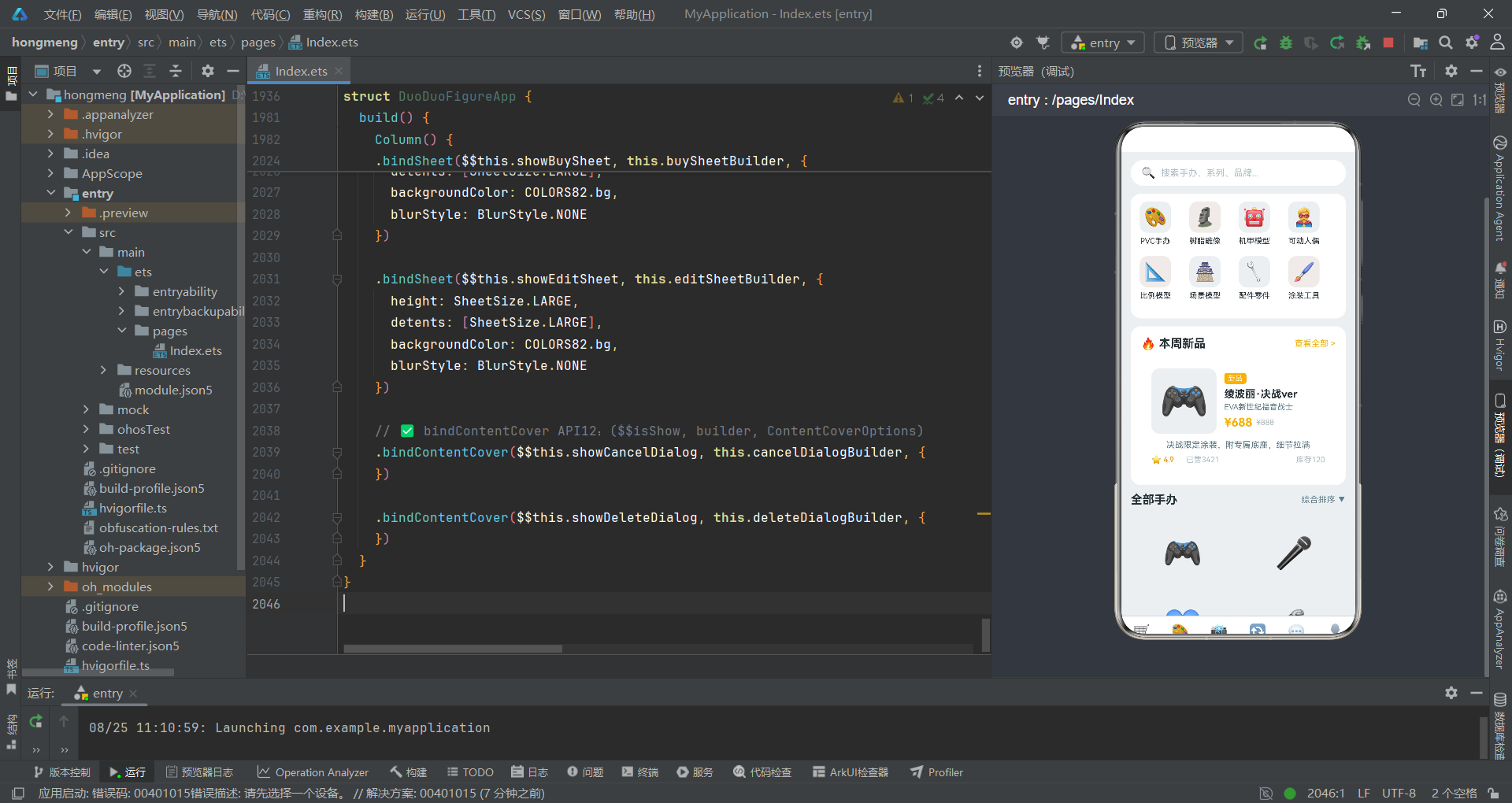
本文详细解析了一个基于HarmonyOS ArkTS的潮玩手办商城与定制交易平台,该应用以"多多潮玩手办"为品牌名,覆盖了商城购物、定制服务、晒物分享、交换交易、社区交流和个人管理六大功能模块。从集中式色彩管理体系到模块化弹窗组件导出,从bindSheet新API的双向绑定到瀑布流布局的filter实现,从定制流程的横滑展示到消费柱状图的数据可视化,整个应用展现了HarmonyOS平台上电商类应用的高级技术实践。
在架构设计上,该应用最具创新性的是引入了ColorPalette82接口和COLORS82常量构成的集中式色彩管理机制。这一设计将十五个语义化色彩属性集中定义,所有组件统一引用COLORS82.xxx而非硬编码色值,使得主题切换只需修改一处常量。同时,四个弹窗组件使用export struct导出为独立模块,在主组件中通过@Builder方法引用,配合$$this.showBuySheet双向绑定语法和bindSheet/bindContentCover新API实现了原生级别的弹窗交互体验。SheetSize.LARGE、detents、blurStyle等配置项的运用,使得底部面板的尺寸和拖拽行为精确可控。
在UI实现层面,瀑布流布局是该应用的技术亮点。通过filter((_, i) => i % 2 === 0)和i % 2 === 1将数据按奇偶索引分割为左右两列,每列独立渲染并使用不同的图片高度和背景色,实现了不等高的瀑布流视觉效果。定制流程区域使用横向Scroll配合scrollBar(BarState.Off)隐藏滚动条,使流程步骤的展示更加流畅。EditShowSheet82组件中的Toggle开关和BorderStyle.Dashed虚线边框图片上传区域,展示了ArkTS表单组件的丰富表现力。ProfileTab82中渐变头部的底部圆角设计(borderRadius({ bottomLeft: 24, bottomRight: 24 }))和消费柱状图的金色统一配色,进一步提升了视觉品质。整体而言,该应用为HarmonyOS平台上的电商和社区类应用开发提供了从色彩管理到组件架构、从数据渲染到交互设计的全方位技术参考。

作为“人工智能6S店”的官方数字引擎,为AI开发者与企业提供一个覆盖软硬件全栈、一站式门户。
更多推荐
 9
9 0
0- 0


 已为社区贡献71条内容

所有评论(0)