
HarmonyOS ArkTS API 24使用bindContentCover配合$$this.showCancelDialog实现全屏覆盖弹窗,使用使得弹窗交互更加原生化和流畅
引言
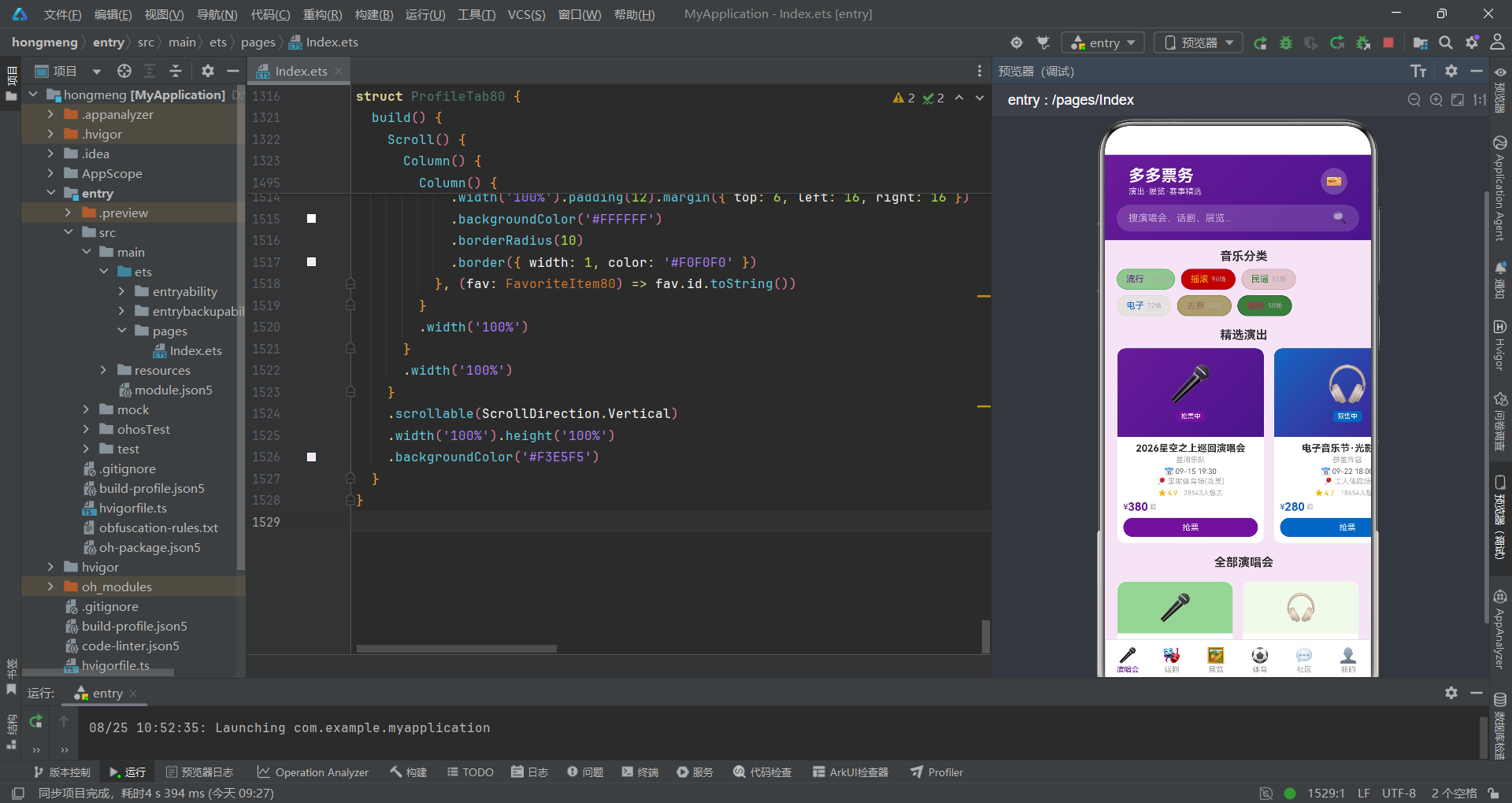
在移动互联网时代,演出票务应用是连接观众与文化艺术活动的重要桥梁。一个优秀的票务应用不仅需要承载演唱会、话剧、展览、体育赛事等多种业务场景,还需要在有限的移动端屏幕上呈现丰富的信息层级和流畅的交互体验。本文将深入剖析一个名为"多多票务"的HarmonyOS ArkTS应用,该应用以舞台梦幻紫调为设计主题,采用票务紫(#6A1B9A)与舞台金(#FFB300)的双色搭配方案,底色使用淡紫(#F3E5F5),构建出一个视觉风格统一、业务功能完整的票务生态平台。
从技术架构角度来看,该应用采用了HarmonyOS ArkTS声明式UI开发范式,基于@Entry和@Component装饰器构建组件化体系。整个应用由一个主入口组件DuoDuoTicketApp和六个子Tab组件构成,分别对应演唱会、话剧、展览、体育、社区和我的六大功能模块。主组件通过@State装饰器管理当前选中的Tab索引、弹窗显示状态、选中演出ID、票档选择、购买数量等十余项响应式状态变量,实现了父子组件间的数据传递与事件回调。
在业务设计层面,该应用涵盖了从演出浏览、分类筛选、购票选座到订单管理、观演人维护、收藏管理的完整业务闭环。购票流程通过底部弹出的buildBuySheet构建器实现,包含票档选择、观演人选择、购买数量调节、出票方式选择和价格汇总五个步骤。退票、编辑观演人、删除收藏等操作则通过bindContentCover全屏覆盖弹窗实现二次确认,确保关键操作的安全性与用户体验的一致性。
一、类型定义体系:构建票务数据模型
在ArkTS中,接口(interface)是定义数据结构的核心手段。该应用定义了十三个接口类型,覆盖了票务业务的各个实体领域。每个接口都以数字后缀"80"结尾,这种命名约定既避免了跨文件命名冲突,又体现了模块化开发中命名空间隔离的意识。
interface ConcertItem80 {
  id: number
  name: string
  artist: string
  date: string
  venue: string
  city: string
  priceFrom: number
  priceTo: number
  rating: number
  wants: number
  tags: string[]
  color: string
  status: string
  poster: string
}

interface DramaItem80 {
  id: number
  name: string
  type: string
  date: string
  venue: string
  duration: string
  priceFrom: number
  originalPrice: number
  rating: number
  reviews: number
  tags: string[]
  color: string
  discount: string
  desc: string
}

interface SportEvent80 {
  id: number
  name: string
  type: string
  date: string
  venue: string
  city: string
  priceFrom: number
  status: string
  homeTeam: string
  awayTeam: string
  round: string
  color: string
  capacity: number
  sold: number
}
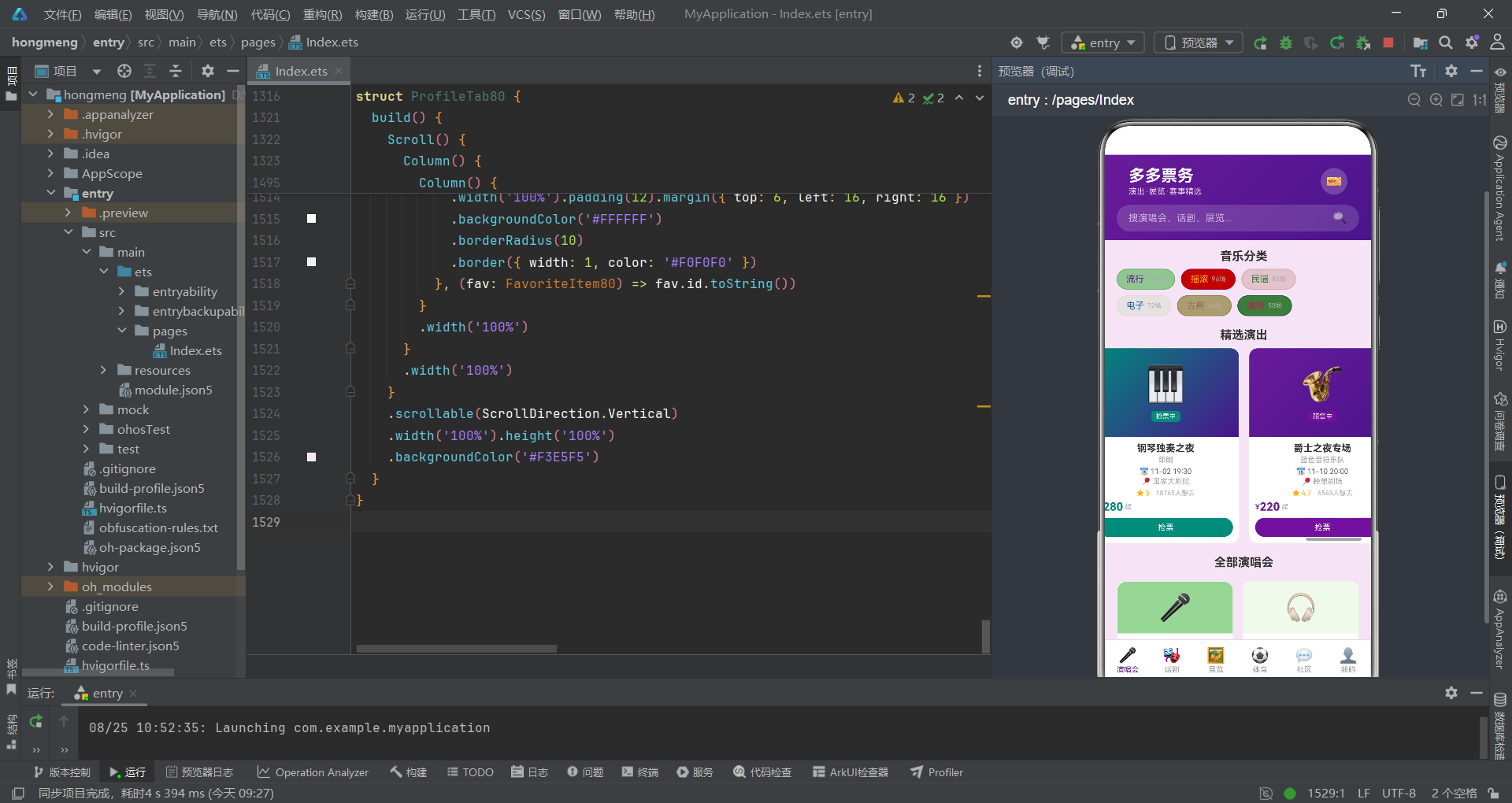
上述代码展示了三个核心业务实体的类型定义。ConcertItem80定义了演唱会信息结构,包含演出名称、艺人、日期、场馆、城市、价格区间、评分、想看人数、标签数组、主题色、售票状态和海报emoji等字段。DramaItem80在演唱会基础上增加了演出时长、原价和折扣信息,用于支持限时折扣场景下的价格对比展示。SportEvent80则针对体育赛事的特殊性,设计了主队、客队、轮次和座位容量等专属字段。
这些接口设计体现了业务建模的精细化思维。例如,priceFrom和priceTo两个字段共同描述价格区间,而非使用单一价格字段,这使得前端能够展示"380-1880元"这样的区间信息。tags采用字符串数组而非单个标签字段,支持一场演出同时属于多个分类标签。color字段将主题色直接绑定到数据模型上,使得每条数据都能携带自己的视觉标识,实现数据驱动的UI配色方案。
二、静态数据层:模拟真实业务数据源
该应用采用静态常量数组作为数据源,这是原型开发阶段常见的策略。通过在文件顶部定义const数组,开发者可以快速模拟后端API返回的数据结构,专注于UI层的开发与调试。
const CONCERT_TAGS_80: ConcertTag80[] = [
  { label: '流行', color: '#6A1B9A', count: 128 },
  { label: '摇滚', color: '#FFB300', count: 96 },
  { label: '民谣', color: '#2E7D32', count: 85 },
  { label: '电子', color: '#1565C0', count: 72 },
  { label: '古典', color: '#8D6E63', count: 64 },
  { label: '嘻哈', color: '#C2185B', count: 58 }
]

const CONCERTS_80: ConcertItem80[] = [
  { id: 1, name: '2026星空之上巡回演唱会', artist: '星河乐队', date: '09-15 19:30', venue: '国家体育场(鸟巢)', city: '北京', priceFrom: 380, priceTo: 1880, rating: 4.9, wants: 28543, tags: ['热门', '巡演'], color: '#6A1B9A', status: '抢票中', poster: '🎤' },
  { id: 2, name: '电子音乐节·光影之夜', artist: '群星阵容', date: '09-22 18:00', venue: '工人体院场', city: '北京', priceFrom: 280, priceTo: 1280, rating: 4.7, wants: 18654, tags: ['音乐节', '群星'], color: '#1565C0', status: '预售中', poster: '🎧' },
  { id: 3, name: '民谣诗歌专场', artist: '老狼×朴树', date: '10-05 19:30', venue: '工人体育馆', city: '北京', priceFrom: 280, priceTo: 880, rating: 4.8, wants: 12345, tags: ['民谣', '文艺'], color: '#2E7D32', status: '即将开票', poster: '🎸' }
]

const TICKET_TIERS_80: TicketTier80[] = [
  { id: 1, name: '看台票', price: 380, available: true, color: '#8D6E63' },
  { id: 2, name: '内场票', price: 680, available: true, color: '#1565C0' },
  { id: 3, name: 'VIP票', price: 980, available: false, color: '#FFB300' },
  { id: 4, name: 'VVIP票', price: 1880, available: true, color: '#C2185B' }
]
CONCERT_TAGS_80定义了音乐分类标签数据,每个标签携带独立的颜色值和演出场次数,这使得前端的Flex布局能够根据数据动态渲染不同色彩的标签胶囊。CONCERTS_80数组包含了八组演唱会数据,覆盖了流行、电子、民谣、古典、嘻哈、摇滚、钢琴、爵士等多种音乐类型,每条数据的color字段都经过精心配色,确保在UI渲染时呈现差异化的视觉风格。
TICKET_TIERS_80定义了票档层级数据,包含看台票、内场票、VIP票和VVIP票四个等级。其中available布尔字段标识该票档是否可选,当某票档售罄时,前端会显示"售罄"标签并禁用选择。这种将可用性信息直接编码到数据模型中的设计,简化了前端的状态管理逻辑。
三、主入口组件:状态管理与Tab路由架构
主入口组件DuoDuoTicketApp是整个应用的骨架,承担着状态管理、Tab路由和弹窗调度三大核心职责。通过@State装饰器声明的状态变量,实现了ArkUI框架的响应式数据绑定机制。
@Entry
@Component
struct DuoDuoTicketApp {
  @State currentTab: number = 0
  @State showBuyDialog: boolean = false
  @State showCancelDialog: boolean = false
  @State showEditViewerDialog: boolean = false
  @State showDeleteFavDialog: boolean = false
  @State selectedShowId: number = 0
  @State selectedTierId: number = 1
  @State buyQuantity: number = 1
  @State deliveryMethod: number = 0
  @State selectedViewerId: number = 1
  @State editViewerName: string = ''
  @State editViewerIdCard: string = ''
  @State editViewerPhone: string = ''
  @State cancelTargetId: number = 0

  private tabs: string[] = ['演唱会', '话剧', '展览', '体育', '社区', '我的']
  private deliveryOptions: string[] = ['电子票(免费)', '邮寄送票 ¥15', '自取网点免费']

  build() {
    Column() {
      // 顶部头部(渐变背景)
      Column() {
        Row() {
          Column() {
            Text('多多票务')
              .fontSize(22)
              .fontColor('#FFFFFF')
              .fontWeight(FontWeight.Bold)
            Text('演出·展览·赛事精选')
              .fontSize(11)
              .fontColor('rgba(255,255,255,0.8)')
              .margin({ top: 2 })
          }
          .alignItems(HorizontalAlign.Start)
          .layoutWeight(1)
          Row() {
            Text('🎫').fontSize(18).fontColor('#FFFFFF')
          }
          .width(36).height(36).justifyContent(FlexAlign.Center)
          .backgroundColor('rgba(255,255,255,0.2)')
          .borderRadius(18)
        }
        .width('100%').height(56).padding({ left: 16, right: 16 })
        .alignItems(VerticalAlign.Center)
      }
      .width('100%')
      .linearGradient({ angle: 135, colors: [['#6A1B9A', 0], ['#4A148C', 1]] })
      .padding({ top: 8, bottom: 12, left: 16, right: 16 })
    }
    .width('100%').height('100%')
    .backgroundColor('#F3E5F5')
    .bindContentCover(this.showCancelDialog, this.buildCancelCover())
    .bindContentCover(this.showDeleteFavDialog, this.buildDeleteFavCover())
  }
}
在状态管理方面,currentTab变量控制当前显示的Tab页面,通过简单的if条件判断实现页面切换,而非使用路由导航。这种方式在单页面应用中非常高效,避免了页面跳转的开销。showBuyDialog、showCancelDialog等布尔状态变量控制各类弹窗的显示与隐藏,通过bindContentCover修饰符绑定到组件根节点上,实现全屏覆盖弹窗效果。
在Tab内容区的路由实现上,每个Tab通过条件渲染触发对应的子组件,并通过回调函数实现子组件向父组件的事件传递。例如,当用户在演唱会Tab点击"抢票"按钮时,子组件ConcertTab80调用onBuy回调,父组件接收到演出ID后设置selectedShowId并打开购票弹窗。这种回调驱动的通信模式是ArkTS组件间通信的标准做法。
顶部头部使用了linearGradient实现135度角渐变效果,从票务紫#6A1B9A过渡到深紫#4A148C,营造出舞台灯光般的氛围。搜索栏使用半透明白色背景配合borderRadius实现圆角搜索框,视觉层次清晰。
四、底部Tab栏与图标系统
底部Tab栏是移动应用导航的核心元素。该应用通过ForEach循环渲染六个Tab项,每个项包含图标和文字标签,点击切换currentTab状态。
Row() {
  ForEach(this.tabs, (tab: string, idx: number) => {
    Column() {
      Text(this.getTabIcon(idx))
        .fontSize(20)
        .fontColor(this.currentTab === idx ? '#6A1B9A' : '#999999')
      Text(tab)
        .fontSize(10)
        .fontColor(this.currentTab === idx ? '#6A1B9A' : '#999999')
        .margin({ top: 2 })
    }
    .layoutWeight(1)
    .height(56)
    .justifyContent(FlexAlign.Center)
    .onClick(() => {
      this.currentTab = idx
    })
  }, (tab: string) => tab)
}
.width('100%')
.height(56)
.backgroundColor('#FFFFFF')
.border({ width: 1, color: '#E0E0E0' })

private getTabIcon(idx: number): string {
  const icons: string[] = ['🎤', '🎭', '🖼️', '⚽', '💬', '👤']
  return idx < icons.length ? icons[idx] : '📋'
}
Tab栏采用layoutWeight(1)实现等分布局,每个Tab占据相等的宽度。选中状态通过currentTab === idx条件判断动态切换字体颜色——选中时显示票务紫#6A1B9A,未选中时显示灰色#999999。getTabIcon方法使用Emoji字符作为图标,无需引入图片资源,既减小了应用体积,又保证了跨平台的一致显示效果。
ForEach的第三个参数是键值生成函数(tab: string) => tab,用于框架的列表项唯一标识。在ArkTS中,正确设置键值函数可以提升列表渲染性能,特别是在数据更新时避免不必要的组件重建。
五、购票弹窗:多步骤交互流程
购票弹窗是票务应用的核心交互组件,通过@Builder装饰器定义为buildBuySheet方法。该弹窗集成了票档选择、观演人选择、数量调节、出票方式和价格汇总五个功能模块。
@Builder
buildBuySheet() {
  Column() {
    Row() {
      Text('购票选座').fontSize(18).fontWeight(FontWeight.Bold).fontColor('#333333')
      Text('').layoutWeight(1)
      Text('✕').fontSize(20).fontColor('#999999').onClick(() => { this.showBuyDialog = false })
    }
    .width('100%').padding(16)

    Scroll() {
      Column() {
        // 票档选择
        Text('选择票档').fontSize(14).fontWeight(FontWeight.Bold).fontColor('#333333')
        Column() {
          ForEach(TICKET_TIERS_80, (tier: TicketTier80) => {
            Row() {
              Radio({ value: tier.id.toString(), group: 'tier' })
                .checked(this.selectedTierId === tier.id)
                .onChange((checked: boolean) => {
                  if (checked && tier.available) {
                    this.selectedTierId = tier.id
                  }
                })
              Column() {
                Text(tier.name).fontSize(13).fontColor(tier.available ? '#333333' : '#CCCCCC')
                Text(tier.available ? '¥' + tier.price + '/张' : '已售罄')
                  .fontSize(11)
                  .fontColor(tier.available ? tier.color : '#FF5252')
                  .margin({ top: 2 })
              }
              .margin({ left: 8 })
              .layoutWeight(1)
              Text('').layoutWeight(1)
              Text(tier.available ? '可选' : '售罄')
                .fontSize(10)
                .fontColor(tier.available ? '#4CAF50' : '#FF5252')
            }
            .width('100%').padding(10).margin({ top: 4 })
            .borderRadius(10)
            .backgroundColor(this.selectedTierId === tier.id ? '#F3E5F5' : '#F5F5F5')
            .border({ width: 1, color: this.selectedTierId === tier.id ? '#6A1B9A' : '#EEEEEE' })
          }, (tier: TicketTier80) => tier.id.toString())
        }

        // 观演人选择
        Text('观演人').fontSize(14).fontWeight(FontWeight.Bold).fontColor('#333333').margin({ top: 16 })
        Row() {
          ForEach(VIEWERS_80, (viewer: ViewerItem80) => {
            Column() {
              Text(viewer.name)
                .fontSize(12)
                .fontColor(this.selectedViewerId === viewer.id ? '#FFFFFF' : '#666666')
              Text(viewer.phone)
                .fontSize(9)
                .fontColor(this.selectedViewerId === viewer.id ? 'rgba(255,255,255,0.8)' : '#AAAAAA')
                .margin({ top: 2 })
            }
            .padding(8).margin({ right: 8 })
            .borderRadius(10)
            .backgroundColor(this.selectedViewerId === viewer.id ? '#6A1B9A' : '#F5F5F5')
            .onClick(() => { this.selectedViewerId = viewer.id })
          }, (viewer: ViewerItem80) => viewer.id.toString())
        }

        // 价格汇总
        Row() {
          Text('合计').fontSize(13).fontColor('#666666')
          Text('').layoutWeight(1)
          Text('¥' + this.getTotalPrice()).fontSize(20).fontColor('#FFB300').fontWeight(FontWeight.Bold)
        }
        .width('100%').margin({ top: 20, bottom: 12 })
      }
    }
    .constraintSize({ maxHeight: '55%' })

    Row() {
      Button() {
        Text('确认购票').fontSize(16).fontColor('#FFFFFF').fontWeight(FontWeight.Medium)
      }
      .layoutWeight(1).height(48)
      .backgroundColor('#6A1B9A')
      .borderRadius(24)
      .onClick(() => { this.showBuyDialog = false })
    }
    .width('100%').padding(16)
  }
  .width('100%')
}

private getTotalPrice(): number {
  let tier: TicketTier80 | undefined = TICKET_TIERS_80.find((t: TicketTier80) => t.id === this.selectedTierId)
  let tierPrice: number = tier ? tier.price : 0
  return tierPrice * this.buyQuantity
}
票档选择部分使用Radio组件实现单选效果,通过group: 'tier'将四个Radio归为同一组,确保互斥选择。onChange回调中加入了tier.available判断,防止用户选中已售罄的票档。选中状态通过backgroundColor和border的双重变化提供视觉反馈——选中项显示淡紫背景和紫色边框,未选中项显示灰色背景。
观演人选择采用横向排列的卡片式布局,选中项使用紫色背景配合白色文字,未选中项使用灰色背景配合深色文字。这种设计比传统的下拉选择器更加直观,用户可以在一眼之内看到所有可选的观演人信息。
getTotalPrice方法通过find函数从票档数组中查找当前选中的票档,计算单价乘以数量的总价。这里使用了TypeScript的可选链和空值合并模式,确保在未找到票档时返回0而非抛出异常。价格汇总区域使用舞台金色#FFB300和20号大字号突出显示,引导用户关注最终价格。
六、演唱会Tab:分类标签与双列网格布局
演唱会Tab是应用的首屏页面,包含分类标签、精选大卡轮播和双列演唱会列表三个核心区域。
@Component
struct ConcertTab80 {
  onBuy: (id: number) => void = () => {}

  build() {
    Scroll() {
      Column() {
        // 分类标签
        Text('音乐分类').fontSize(16).fontWeight(FontWeight.Bold).fontColor('#333333').margin({ left: 16, top: 12 })
        Flex({ wrap: FlexWrap.Wrap }) {
          ForEach(CONCERT_TAGS_80, (tag: ConcertTag80) => {
            Row() {
              Text(tag.label).fontSize(12).fontColor(tag.color)
              Text(tag.count + '场').fontSize(9).fontColor('#AAAAAA').margin({ left: 4 })
            }
            .padding({ left: 12, right: 12, top: 6, bottom: 6 })
            .margin({ right: 8, top: 8 })
            .backgroundColor(tag.color + '15')
            .borderRadius(16)
            .border({ width: 1, color: tag.color + '30' })
          }, (tag: ConcertTag80) => tag.label)
        }
        .width('100%').padding({ left: 16, right: 16 })

        // 精选大卡轮播
        Text('精选演出').fontSize(16).fontWeight(FontWeight.Bold).fontColor('#333333').margin({ left: 16, top: 16 })
        Scroll() {
          Row() {
            ForEach(CONCERTS_80, (concert: ConcertItem80) => {
              Column() {
                Column() {
                  Text(concert.poster).fontSize(48)
                  Text(concert.status)
                    .fontSize(9).fontColor('#FFFFFF')
                    .backgroundColor(concert.color)
                    .padding({ left: 6, right: 6, top: 2, bottom: 2 })
                    .borderRadius(4).margin({ top: 8 })
                }
                .width(200).height(120)
                .linearGradient({ angle: 135, colors: [[concert.color, 0], [this.darken(concert.color), 1]] })
                .borderRadius({ topLeft: 12, topRight: 12 })
                .justifyContent(FlexAlign.Center)

                Column() {
                  Text(concert.name).fontSize(13).fontColor('#333333').fontWeight(FontWeight.Bold).maxLines(2)
                  Text(concert.artist).fontSize(10).fontColor('#AAAAAA').margin({ top: 2 })
                  Row() {
                    Text('📅').fontSize(10)
                    Text(concert.date).fontSize(10).fontColor('#666666').margin({ left: 2 })
                  }.margin({ top: 4 })
                  Row() {
                    Text('📍').fontSize(10)
                    Text(concert.venue).fontSize(10).fontColor('#AAAAAA').margin({ left: 2 }).maxLines(1)
                  }.margin({ top: 2 })
                  Row() {
                    Text('★').fontSize(10).fontColor('#FFB300')
                    Text(concert.rating.toString()).fontSize(10).fontColor('#FFB300').margin({ left: 2 })
                    Text(concert.wants + '人想去').fontSize(9).fontColor('#AAAAAA').margin({ left: 8 })
                  }.margin({ top: 4 })
                  Row() {
                    Text('¥').fontSize(11).fontColor(concert.color)
                    Text(concert.priceFrom.toString()).fontSize(15).fontColor(concert.color).fontWeight(FontWeight.Bold)
                    Text('起').fontSize(9).fontColor('#AAAAAA').margin({ left: 2 })
                  }.margin({ top: 4 })

                  Button() {
                    Text('抢票').fontSize(11).fontColor('#FFFFFF')
                  }
                  .width('100%').height(26).margin({ top: 6 })
                  .backgroundColor(concert.color)
                  .borderRadius(13)
                  .onClick(() => { this.onBuy(concert.id) })
                }
                .padding(8)
              }
              .width(200).margin({ right: 12 })
              .backgroundColor('#FFFFFF')
              .borderRadius(12)
              .border({ width: 1, color: '#F0F0F0' })
            }, (concert: ConcertItem80) => concert.id.toString())
          }
          .padding({ left: 16, right: 16 })
        }
        .scrollable(ScrollDirection.Horizontal)

        // 双列演唱会
        Text('全部演唱会').fontSize(16).fontWeight(FontWeight.Bold).fontColor('#333333').margin({ left: 16, top: 16 })
        Grid() {
          ForEach(CONCERTS_80, (concert: ConcertItem80) => {
            GridItem() {
              Column() {
                Column() {
                  Text(concert.poster).fontSize(36)
                }
                .width('100%').height(70)
                .backgroundColor(concert.color + '20')
                .borderRadius({ topLeft: 12, topRight: 12 })
                .justifyContent(FlexAlign.Center)

                Column() {
                  Text(concert.name).fontSize(12).fontColor('#333333').fontWeight(FontWeight.Bold).maxLines(2)
                  Text(concert.artist).fontSize(9).fontColor('#AAAAAA').margin({ top: 2 })

                  Flex({ wrap: FlexWrap.Wrap }) {
                    ForEach(concert.tags, (tag: string) => {
                      Text(tag).fontSize(9).fontColor(concert.color)
                        .backgroundColor(concert.color + '15')
                        .padding({ left: 4, right: 4, top: 1, bottom: 1 })
                        .borderRadius(4).margin({ right: 4, top: 4 })
                    }, (tag: string) => tag)
                  }

                  Row() {
                    Text('📅').fontSize(9)
                    Text(concert.date).fontSize(9).fontColor('#666666').margin({ left: 2 })
                  }.margin({ top: 4 })
                  Row() {
                    Text('📍').fontSize(9)
                    Text(concert.city).fontSize(9).fontColor('#AAAAAA').margin({ left: 2 })
                    Text('').layoutWeight(1)
                    Text('¥' + concert.priceFrom).fontSize(14).fontColor(concert.color).fontWeight(FontWeight.Bold)
                  }.width('100%').margin({ top: 4 })

                  Button() {
                    Text(concert.status).fontSize(11).fontColor('#FFFFFF')
                  }
                  .width('100%').height(26).margin({ top: 6 })
                  .backgroundColor(concert.color)
                  .borderRadius(13)
                  .onClick(() => { this.onBuy(concert.id) })
                }
                .padding(8)
              }
              .backgroundColor('#FFFFFF')
              .borderRadius(12)
              .border({ width: 1, color: '#F0F0F0' })
            }
          }, (concert: ConcertItem80) => concert.id.toString())
        }
        .columnsTemplate('1fr 1fr')
        .rowsGap(12).columnsGap(12)
        .padding(16)
      }
    }
    .scrollable(ScrollDirection.Vertical)
    .width('100%').height('100%')
    .backgroundColor('#F3E5F5')
  }

  private darken(color: string): string {
    return '#4A148C'
  }
}
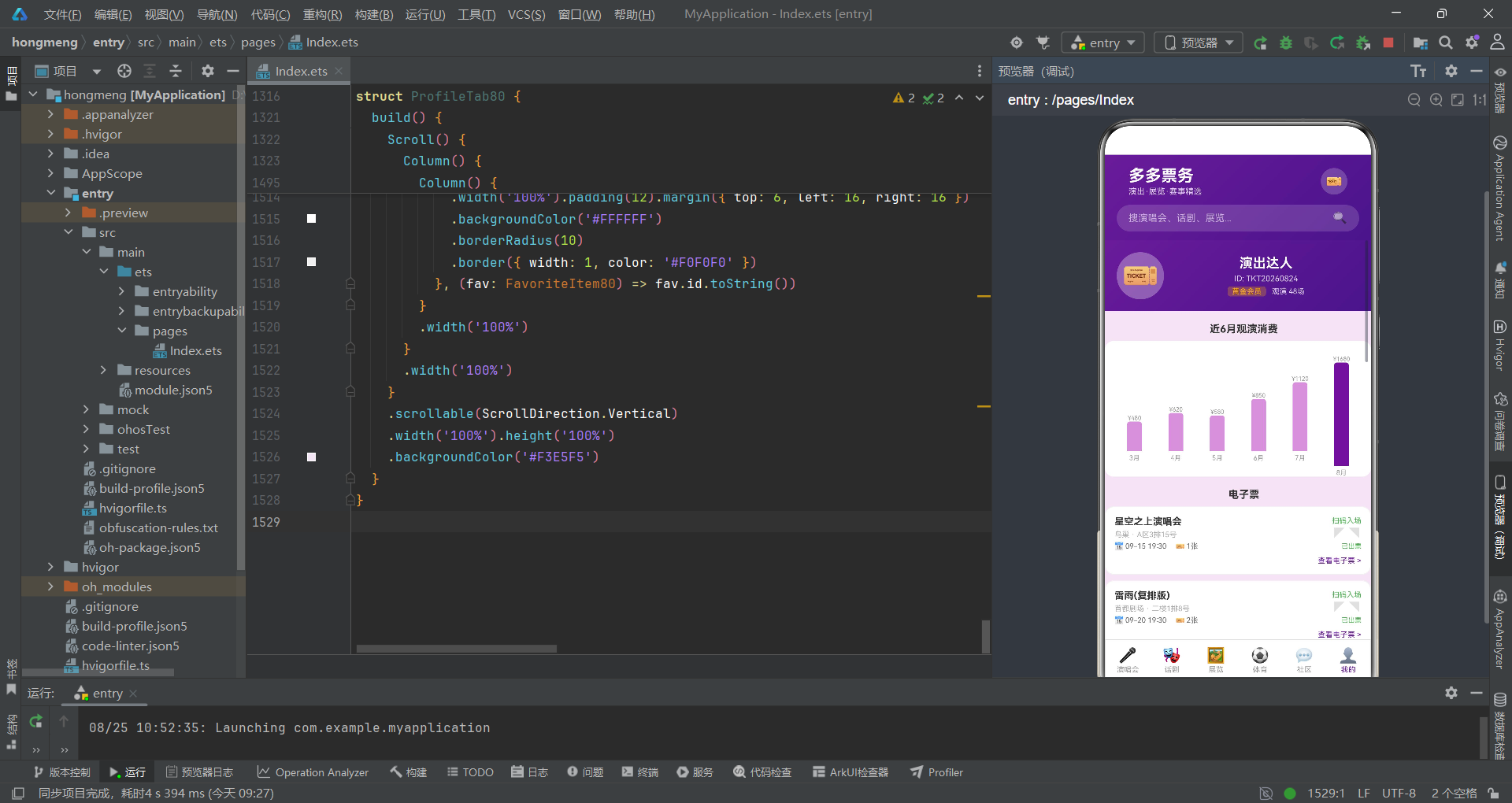
分类标签区域使用Flex({ wrap: FlexWrap.Wrap })实现自动换行的标签布局。每个标签的背景色采用tag.color + '15'的拼接方式——在十六进制颜色后附加透明度后缀"15"(约8%不透明度),创造出淡淡的色彩底色效果。边框则使用tag.color + '30'(约19%不透明度),形成比背景稍深的边线。这种通过字符串拼接实现动态透明度的技巧,是ArkTS中数据驱动配色的重要手段。
精选大卡轮播通过Scroll + Row + scrollable(ScrollDirection.Horizontal)实现横向滑动列表。每张卡片宽度固定为200px,顶部使用linearGradient渲染演出专属色的渐变背景,中部展示海报Emoji和售票状态标签,底部排列名称、艺人、日期、场馆、评分、价格和抢票按钮。
双列演唱会列表使用Grid组件配合columnsTemplate('1fr 1fr')实现两列等宽布局。与横向轮播不同,Grid布局自动处理换行和间距,通过rowsGap和columnsGap分别控制行间距和列间距。每张卡片顶部的海报区域使用concert.color + '20'作为背景色(约13%不透明度),与卡片整体的白底形成柔和的层次感。
darken方法是一个简化的颜色加深函数,固定返回深紫色#4A148C。在实际项目中,可以通过解析十六进制颜色值并降低RGB通道亮度来实现真正的颜色加深算法。
七、话剧Tab:限时折扣与列表布局
话剧Tab在布局上与演唱会Tab有所不同,增加了限时折扣横条和水平排列的演出列表卡片。
@Component
struct DramaTab80 {
  onBuy: (id: number) => void = () => {}

  build() {
    Scroll() {
      Column() {
        // 限时折扣横条
        Row() {
          Column() {
            Text('⚡ 限时折扣').fontSize(14).fontWeight(FontWeight.Bold).fontColor('#FFFFFF')
            Text('经典话剧 全场低至5.6折').fontSize(10).fontColor('rgba(255,255,255,0.8)').margin({ top: 2 })
          }
          .alignItems(HorizontalAlign.Start)
          .layoutWeight(1)
          Text('距结束 03:45:21')
            .fontSize(10).fontColor('#FFFFFF')
            .backgroundColor('rgba(255,255,255,0.25)')
            .padding({ left: 8, right: 8, top: 2, bottom: 2 })
            .borderRadius(10)
        }
        .width('100%').padding(12).margin({ left: 16, right: 16, top: 12 })
        .linearGradient({ angle: 90, colors: [['#FFB300', 0], ['#FF8F00', 1]] })
        .borderRadius(12)

        // 话剧列表
        Text('全部话剧').fontSize(16).fontWeight(FontWeight.Bold).fontColor('#333333').margin({ left: 16, top: 16 })
        Column() {
          ForEach(DRAMAS_80, (drama: DramaItem80) => {
            Row() {
              Column() {
                Text('🎭').fontSize(32)
              }
              .width(80).height(80)
              .backgroundColor(drama.color + '20')
              .borderRadius(12)
              .justifyContent(FlexAlign.Center)

              Column() {
                Row() {
                  Text(drama.name).fontSize(13).fontColor('#333333').fontWeight(FontWeight.Bold).maxLines(1).layoutWeight(1)
                  Text(drama.discount).fontSize(9).fontColor('#FFFFFF')
                    .backgroundColor('#FF5252')
                    .padding({ left: 4, right: 4, top: 1, bottom: 1 })
                    .borderRadius(4)
                }
                Text(drama.type + ' · ' + drama.duration + ' · ' + drama.venue).fontSize(10).fontColor('#AAAAAA').margin({ top: 2 })
                Text(drama.desc).fontSize(10).fontColor('#999999').margin({ top: 4 }).maxLines(2)

                Row() {
                  Text('★').fontSize(10).fontColor('#FFB300')
                  Text(drama.rating.toString()).fontSize(10).fontColor('#FFB300').margin({ left: 2 })
                  Text(drama.reviews + '条评价').fontSize(9).fontColor('#AAAAAA').margin({ left: 8 })
                  Text('📅').fontSize(10).margin({ left: 8 })
                  Text(drama.date).fontSize(9).fontColor('#666666').margin({ left: 2 })
                  Text('').layoutWeight(1)
                  Text('¥').fontSize(11).fontColor(drama.color)
                  Text(drama.priceFrom.toString()).fontSize(15).fontColor(drama.color).fontWeight(FontWeight.Bold)
                  Text('¥' + drama.originalPrice).fontSize(10).fontColor('#CCCCCC')
                    .decoration({ type: TextDecorationType.LineThrough }).margin({ left: 4 })
                }
                .width('100%').margin({ top: 4 })

                Button() {
                  Text('购票').fontSize(11).fontColor('#FFFFFF')
                }
                .height(28).margin({ top: 6 })
                .backgroundColor(drama.color)
                .borderRadius(14)
                .onClick(() => { this.onBuy(drama.id) })
              }
              .margin({ left: 10 })
              .layoutWeight(1)
            }
            .width('100%').padding(10).margin({ top: 8, left: 16, right: 16 })
            .backgroundColor('#FFFFFF')
            .borderRadius(12)
            .border({ width: 1, color: '#F0F0F0' })
          }, (drama: DramaItem80) => drama.id.toString())
        }
      }
    }
    .scrollable(ScrollDirection.Vertical)
    .width('100%').height('100%')
    .backgroundColor('#F3E5F5')
  }
}
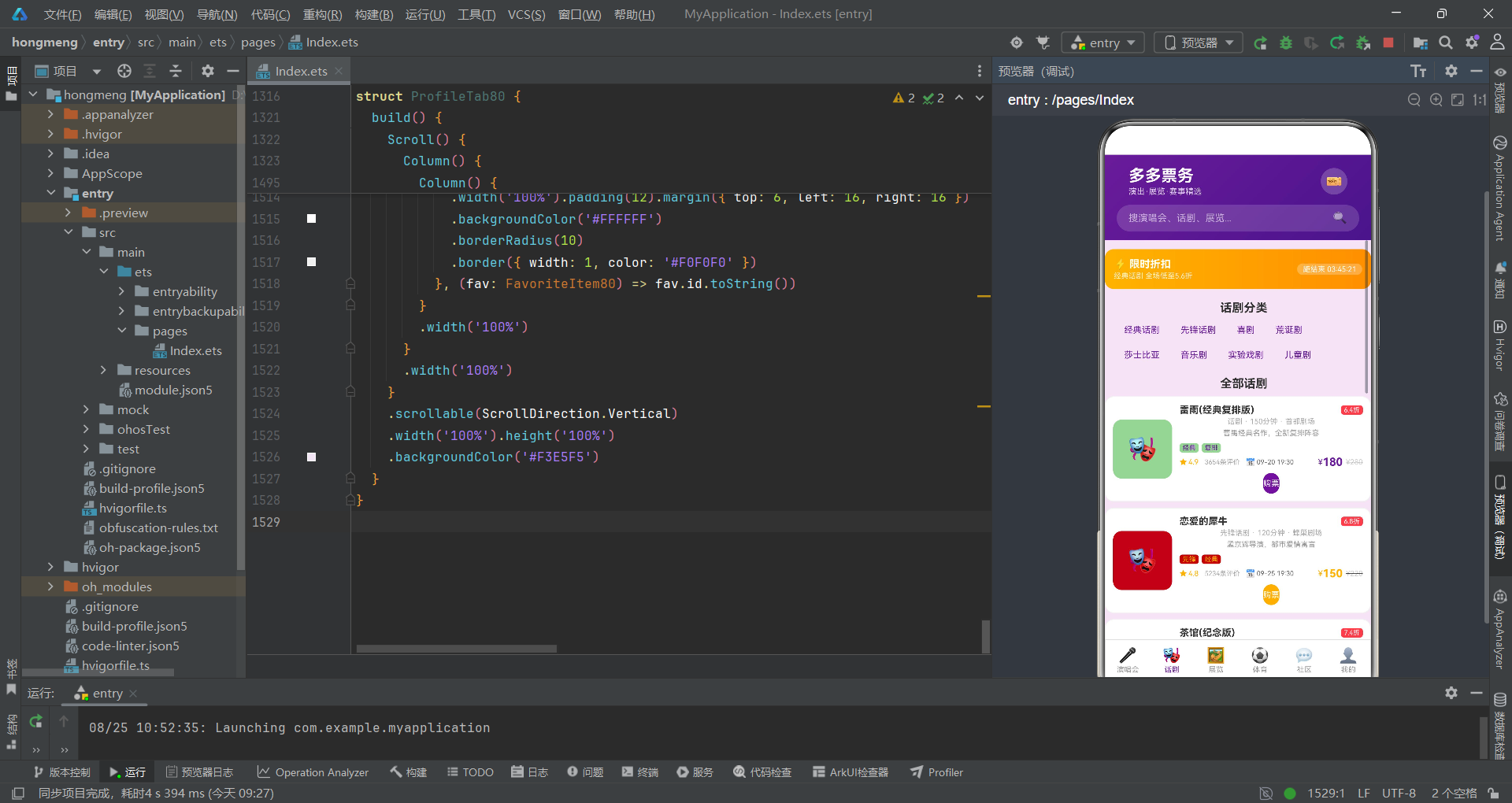
限时折扣横条使用90度角水平渐变,从舞台金#FFB300过渡到深橙#FF8F00,与页面整体的紫色基调形成对比,吸引用户关注促销信息。右侧的倒计时标签使用半透明白色背景,营造紧迫感。
话剧列表项采用左右布局——左侧80x80的Emoji图标区域使用drama.color + '20'作为背景色,右侧的信息区域使用layoutWeight(1)占据剩余空间。折扣标签使用红色#FF5252背景和白色文字,与限时折扣横条形成色彩呼应。原价使用TextDecorationType.LineThrough添加删除线效果,与折扣价形成价格对比。
八、体育Tab:对阵展示与上座率进度条
体育Tab的核心特色是对阵双方展示和上座率进度条,这两个组件是体育赛事场景的专属设计。
@Component
struct SportTab80 {
  onBuy: (id: number) => void = () => {}

  build() {
    Scroll() {
      Column() {
        Column() {
          ForEach(SPORT_EVENTS_80, (event: SportEvent80) => {
            Column() {
              Row() {
                Column() {
                  Text('⚽').fontSize(28)
                }
                .width(48).height(48).borderRadius(12)
                .backgroundColor(event.color + '20')
                .justifyContent(FlexAlign.Center)

                Column() {
                  Text(event.name).fontSize(13).fontColor('#333333').fontWeight(FontWeight.Bold)
                  Text(event.type + ' · ' + event.round).fontSize(10).fontColor('#AAAAAA').margin({ top: 2 })
                  Row() {
                    Text('📅').fontSize(10)
                    Text(event.date).fontSize(10).fontColor('#666666').margin({ left: 2 })
                    Text('📍').fontSize(10).margin({ left: 12 })
                    Text(event.venue).fontSize(10).fontColor('#AAAAAA').margin({ left: 2 }).maxLines(1)
                  }.margin({ top: 4 })
                }
                .margin({ left: 10 })
                .layoutWeight(1)
                Text(event.status).fontSize(10)
                  .fontColor(event.status === '售票中' ? '#4CAF50' : (event.status === '预售中' ? '#FF9800' : '#2196F3'))
              }

              // 对阵双方
              Row() {
                Column() {
                  Text(event.homeTeam).fontSize(12).fontColor('#333333').fontWeight(FontWeight.Medium)
                }
                .layoutWeight(2).alignItems(HorizontalAlign.Center)
                Text('VS').fontSize(14).fontColor('#FF6F00').fontWeight(FontWeight.Bold)
                Column() {
                  Text(event.awayTeam).fontSize(12).fontColor('#333333').fontWeight(FontWeight.Medium)
                }
                .layoutWeight(2).alignItems(HorizontalAlign.Center)
              }
              .padding({ top: 8, bottom: 8 })
              .backgroundColor('#F5F5F5')
              .borderRadius(8)

              // 上座率进度
              Row() {
                Text('上座率').fontSize(10).fontColor('#666666')
                Text((event.sold / event.capacity * 100).toFixed(0) + '%').fontSize(10).fontColor(event.color).margin({ left: 4 })
                Text(event.sold + '/' + event.capacity).fontSize(9).fontColor('#AAAAAA').margin({ left: 8 })
                Text('').layoutWeight(1)
                Text('¥' + event.priceFrom + '起').fontSize(11).fontColor(event.color).fontWeight(FontWeight.Bold)
              }
              Row() {
                Column() {}
                .layoutWeight(event.sold).height(5)
                .backgroundColor(event.color)
                .borderRadius({ topLeft: 3, bottomLeft: 3 })
                Column() {}
                .layoutWeight(event.capacity - event.sold).height(5)
                .backgroundColor('#E0E0E0')
                .borderRadius({ topRight: 3, bottomRight: 3 })
              }

              // 座位图模拟
              Row() {
                Text('座位图').fontSize(10).fontColor('#666666')
                Text('').layoutWeight(1)
                ForEach([0, 1, 2, 3, 4, 5, 6, 7], (idx: number) => {
                  Column() {}
                  .width(14).height(14).margin({ left: 2 })
                  .backgroundColor(idx < 5 ? event.color : '#E0E0E0')
                  .borderRadius(3)
                }, (idx: number) => idx.toString())
              }

              Button() {
                Text(event.status === '即将开票' ? '预选' : '购票').fontSize(12).fontColor('#FFFFFF')
              }
              .width('100%').height(32).margin({ top: 8 })
              .backgroundColor(event.color)
              .borderRadius(16)
              .onClick(() => { this.onBuy(event.id) })
            }
            .width('100%').padding(12).margin({ top: 8, left: 16, right: 16 })
            .backgroundColor('#FFFFFF')
            .borderRadius(12)
            .border({ width: 1, color: '#F0F0F0' })
          }, (event: SportEvent80) => event.id.toString())
        }
      }
    }
    .scrollable(ScrollDirection.Vertical)
    .width('100%').height('100%')
    .backgroundColor('#F3E5F5')
  }
}
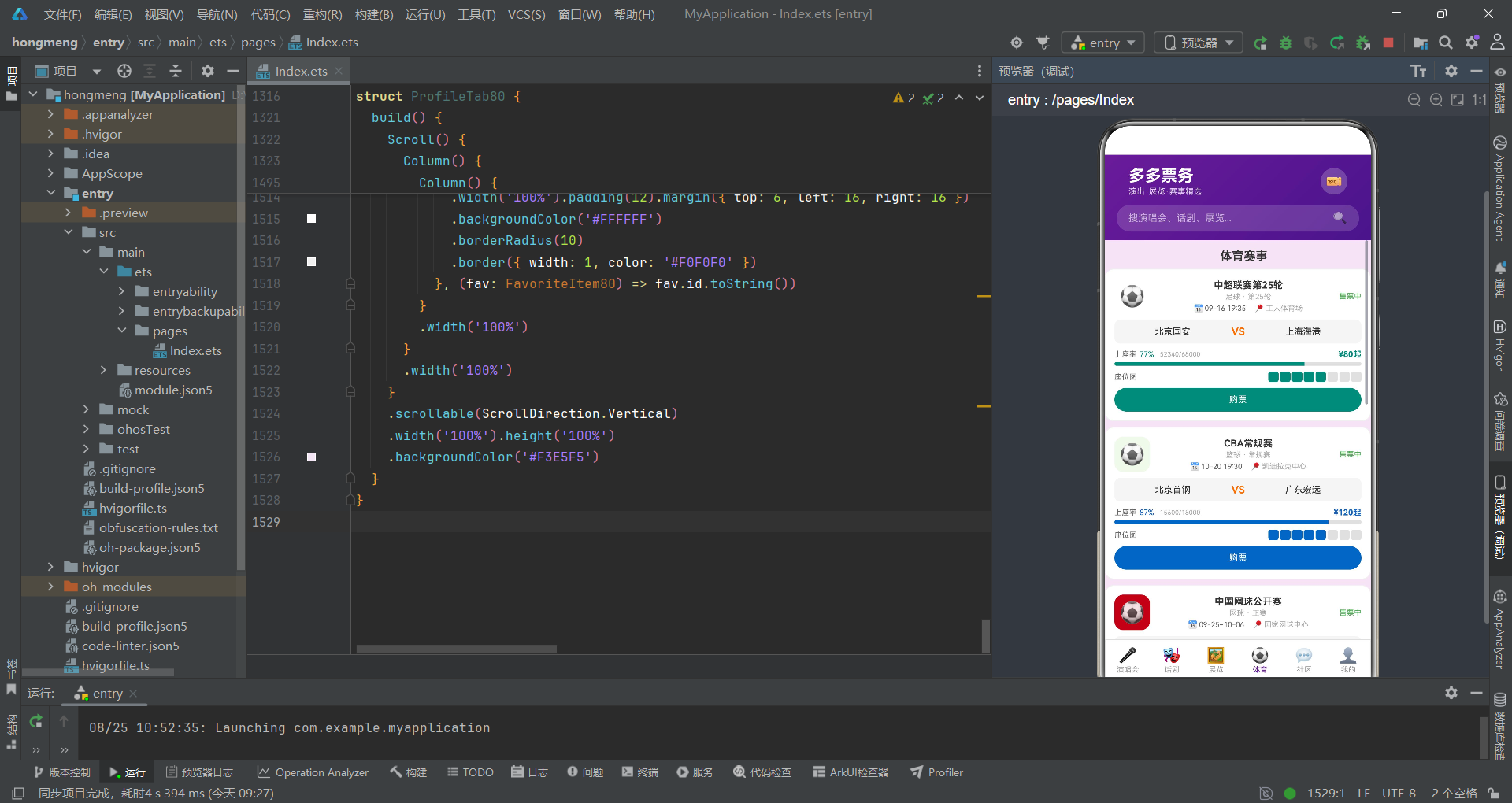
对阵双方展示使用三栏布局——主队和客队各占layoutWeight(2),中间的"VS"文字使用橙色#FF6F00加粗显示。整个对阵区域使用灰色背景和圆角,形成独立的视觉模块。
上座率进度条是该组件的技术亮点。通过两个Column组件分别使用layoutWeight(event.sold)和layoutWeight(event.capacity - event.sold),实现了按比例分割的进度条效果。已售部分使用赛事主题色,未售部分使用灰色,圆角方向通过borderRadius的定向设置实现左圆角和右圆角的分别处理。这种利用layoutWeight实现进度条的方式是ArkTS中数据驱动布局的经典案例。
座位图模拟使用八个小方块代表座位区域,通过idx < 5的条件判断将前五个方块染为主题色,后三个染为灰色,模拟座位售出情况。这种视觉化的座位展示方式让用户直观了解余票情况。
九、我的Tab:渐变头部与消费柱状图
个人中心Tab集成了渐变头部、消费柱状图、电子票、订单列表、观演人管理和收藏列表六大模块,是信息密度最高的页面。
@Component
struct ProfileTab80 {
  onEditViewer: () => void = () => {}
  onCancelOrder: (id: number) => void = () => {}
  onDeleteFav: (id: number) => void = () => {}

  build() {
    Scroll() {
      Column() {
        // 渐变头部
        Column() {
          Row() {
            Column() {
              Text('🎫').fontSize(40)
            }
            .width(64).height(64).borderRadius(32)
            .backgroundColor('rgba(255,255,255,0.3)')
            .justifyContent(FlexAlign.Center)

            Column() {
              Text('演出达人').fontSize(18).fontColor('#FFFFFF').fontWeight(FontWeight.Bold)
              Text('ID: TKT20260824').fontSize(11).fontColor('rgba(255,255,255,0.8)').margin({ top: 4 })
              Row() {
                Text('黄金会员').fontSize(10).fontColor('#FFB300')
                  .backgroundColor('rgba(255,193,7,0.25)')
                  .padding({ left: 6, right: 6, top: 1, bottom: 1 })
                  .borderRadius(4)
                Text('观演 48场').fontSize(10).fontColor('rgba(255,255,255,0.8)').margin({ left: 8 })
              }.margin({ top: 4 })
            }
            .margin({ left: 12 })
            .layoutWeight(1)
          }
        }
        .linearGradient({ angle: 135, colors: [['#6A1B9A', 0], ['#4A148C', 1]] })

        // 消费柱状图
        Text('近6月观演消费').fontSize(14).fontWeight(FontWeight.Bold).fontColor('#333333').margin({ left: 16, top: 16 })
        Column() {
          Row() {
            ForEach(BAR_DATA_80, (bar: BarData80) => {
              Column() {
                Text('¥' + bar.value).fontSize(8).fontColor('#999999')
                Column() {}
                .width(20).height(bar.value / 12)
                .backgroundColor(bar.color)
                .borderRadius({ topLeft: 4, topRight: 4 })
                Text(bar.label).fontSize(9).fontColor('#999999').margin({ top: 4 })
              }
              .layoutWeight(1)
              .alignItems(HorizontalAlign.Center)
            }, (bar: BarData80) => bar.label)
          }
          .height(160)
          .alignItems(VerticalAlign.Bottom)
        }

        // 电子票
        Text('电子票').fontSize(14).fontWeight(FontWeight.Bold).fontColor('#333333').margin({ left: 16, top: 16 })
        Column() {
          ForEach(ORDERS_80, (order: OrderItem80) => {
            if (order.status === '已出票' || order.status === '待入场') {
              Column() {
                Row() {
                  Column() {
                    Text(order.show).fontSize(13).fontColor('#333333').fontWeight(FontWeight.Bold)
                    Text(order.venue + ' · ' + order.seat).fontSize(10).fontColor('#AAAAAA').margin({ top: 4 })
                    Row() {
                      Text('📅').fontSize(10)
                      Text(order.date + ' 19:30').fontSize(10).fontColor('#666666').margin({ left: 2 })
                      Text('🎫').fontSize(10).margin({ left: 12 })
                      Text(order.quantity + '张').fontSize(10).fontColor('#666666').margin({ left: 2 })
                    }.margin({ top: 4 })
                  }
                  .alignItems(HorizontalAlign.Start)
                  .layoutWeight(1)
                  Column() {
                    Text('扫码入场').fontSize(10).fontColor(order.color)
                    Text('◤◥').fontSize(20).fontColor('#E0E0E0')
                    Text(order.status).fontSize(9).fontColor(order.color)
                  }
                  .alignItems(HorizontalAlign.End)
                }
                Row() {
                  Text('').layoutWeight(1)
                  Text('查看电子票 >').fontSize(10).fontColor('#6A1B9A')
                }.margin({ top: 8 })
              }
              .backgroundColor('#FFFFFF')
              .borderRadius(12)
              .border({ width: 1, color: '#F0F0F0' })
            }
          }, (order: OrderItem80) => order.id.toString())
        }

        // 订单列表
        Column() {
          ForEach(ORDERS_80, (order: OrderItem80) => {
            Column() {
              Row() {
                Text(order.show).fontSize(13).fontColor('#333333').fontWeight(FontWeight.Medium).maxLines(1).layoutWeight(1)
                Text(order.status).fontSize(11).fontColor(order.color)
              }
              Row() {
                Text(order.venue + ' · ' + order.seat).fontSize(10).fontColor('#AAAAAA')
                Text('').layoutWeight(1)
                Text('¥' + order.amount).fontSize(14).fontColor('#FFB300').fontWeight(FontWeight.Bold)
              }.margin({ top: 4 })
              Row() {
                Text(order.date + ' · ' + order.quantity + '张').fontSize(10).fontColor('#AAAAAA')
                Text('').layoutWeight(1)
                if (order.status === '待出票' || order.status === '待入场') {
                  Text('退票').fontSize(10).fontColor('#FF5252').onClick(() => { this.onCancelOrder(order.id) })
                }
              }.margin({ top: 4 })
            }
            .backgroundColor('#FFFFFF')
            .borderRadius(10)
            .border({ width: 1, color: '#F0F0F0' })
          }, (order: OrderItem80) => order.id.toString())
        }
      }
    }
    .scrollable(ScrollDirection.Vertical)
    .backgroundColor('#F3E5F5')
  }
}
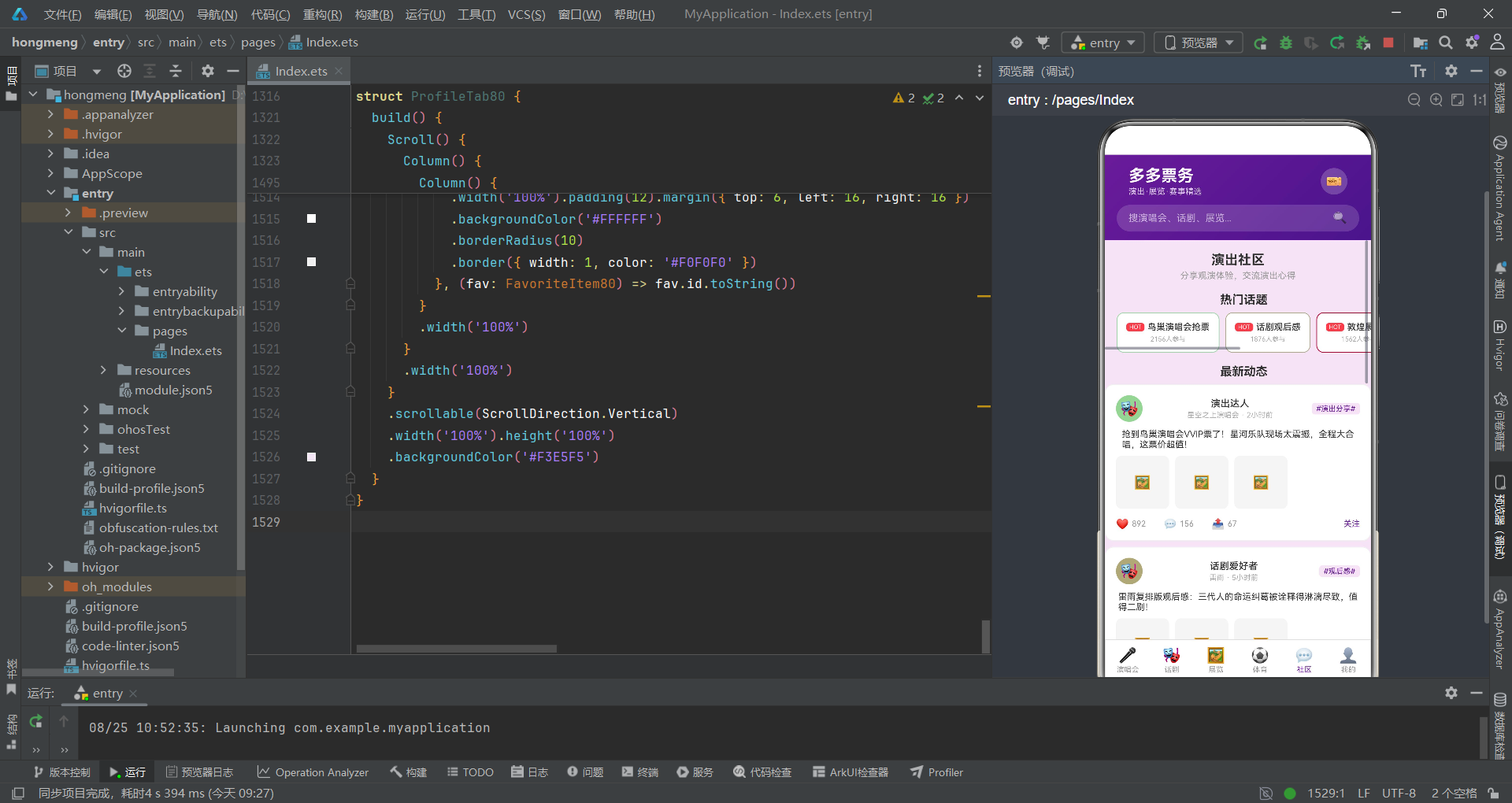
渐变头部采用与顶部导航一致的135度紫色渐变,用户头像区域使用半透明白色背景配合圆形裁剪。会员标签使用rgba(255,193,7,0.25)半透明金色背景,营造出VIP的尊贵感。
消费柱状图是该页面的技术亮点。通过ForEach遍历BAR_DATA_80数组,每个月份渲染一个Column容器,内含数值文本、柱状条和月份标签。柱状条的高度通过bar.value / 12计算得出——将原始数值除以12作为像素高度,使得最大值1680对应约140px的高度。父级Row设置alignItems(VerticalAlign.Bottom)确保所有柱子底部对齐。8月份数据使用主色#6A1B9A而其他月份使用浅紫#CE93D8,突出最新月份的数据。
电子票模块通过if条件筛选仅展示状态为"已出票"或"待入场"的订单。票面右侧的"扫码入场"区域和撕票线模拟(◤◥字符)增强了电子票的拟物化设计感。订单列表中的退票操作通过onClick触发onCancelOrder回调,在父组件中弹出退票确认弹窗。
购票流程图
以下流程图展示了从浏览演出到完成购票的完整交互流程:
十、社区Tab:动态信息流与互动
社区Tab是用户交流演出体验的社交模块,包含热门话题横滑和最新动态信息流两个区域。
@Component
struct CommunityTab80 {
  build() {
    Scroll() {
      Column() {
        Column() {
          Text('演出社区').fontSize(18).fontWeight(FontWeight.Bold).fontColor('#333333')
          Text('分享观演体验,交流演出心得').fontSize(12).fontColor('#999999').margin({ top: 4 })
        }
        .alignItems(HorizontalAlign.Center)

        // 热门话题
        Text('热门话题').fontSize(16).fontWeight(FontWeight.Bold).fontColor('#333333').margin({ left: 16 })
        Scroll() {
          Row() {
            ForEach(TOPICS_80, (topic: TopicItem80) => {
              Column() {
                Row() {
                  if (topic.hot) {
                    Text('HOT').fontSize(8).fontColor('#FFFFFF')
                      .backgroundColor('#FF5252')
                      .padding({ left: 4, right: 4, top: 1, bottom: 1 })
                      .borderRadius(4)
                  }
                  Text(topic.title).fontSize(12).fontColor('#333333').fontWeight(FontWeight.Medium)
                    .margin({ left: topic.hot ? 4 : 0 })
                }
                Text(topic.posts + '人参与').fontSize(9).fontColor('#AAAAAA').margin({ top: 4 })
              }
              .padding(12).margin({ right: 8 })
              .backgroundColor('#FFFFFF')
              .borderRadius(10)
              .border({ width: 1, color: topic.color + '30' })
            }, (topic: TopicItem80) => topic.id.toString())
          }
        }
        .scrollable(ScrollDirection.Horizontal)

        // 最新动态
        Text('最新动态').fontSize(16).fontWeight(FontWeight.Bold).fontColor('#333333').margin({ left: 16, top: 16 })
        Column() {
          ForEach(POSTS_80, (post: CommunityPost80) => {
            Column() {
              Row() {
                Column() {
                  Text('🎭').fontSize(20)
                }
                .width(36).height(36).borderRadius(18)
                .backgroundColor(post.avatarColor + '20')

                Column() {
                  Text(post.author).fontSize(13).fontColor('#333333').fontWeight(FontWeight.Medium)
                  Text(post.show + ' · ' + post.timeAgo).fontSize(10).fontColor('#AAAAAA').margin({ top: 2 })
                }
                .margin({ left: 8 })
                .layoutWeight(1)
                Text(post.topic).fontSize(10).fontColor('#6A1B9A')
                  .backgroundColor('#F3E5F5')
                  .padding({ left: 6, right: 6, top: 2, bottom: 2 })
                  .borderRadius(4)
              }

              Text(post.content).fontSize(12).fontColor('#333333').margin({ top: 10 })

              if (post.images > 0) {
                Row() {
                  ForEach([0, 1, 2], (idx: number) => {
                    if (idx < post.images) {
                      Column() {
                        Text('🖼️').fontSize(18)
                      }
                      .width(72).height(72).margin({ right: 8, top: 8 })
                      .backgroundColor('#F5F5F5')
                      .borderRadius(8)
                    }
                  }, (idx: number) => idx.toString())
                }
              }

              Row() {
                Row() {
                  Text('❤').fontSize(14).fontColor('#E91E63')
                  Text(post.likes.toString()).fontSize(11).fontColor('#999999').margin({ left: 4 })
                }
                Row() {
                  Text('💬').fontSize(14).fontColor('#999999')
                  Text(post.comments.toString()).fontSize(11).fontColor('#999999').margin({ left: 4 })
                }.margin({ left: 24 })
                Row() {
                  Text('📤').fontSize(14).fontColor('#999999')
                  Text(post.shares.toString()).fontSize(11).fontColor('#999999').margin({ left: 4 })
                }.margin({ left: 24 })
                Text('').layoutWeight(1)
                Text('关注').fontSize(11).fontColor('#6A1B9A')
              }.margin({ top: 12 })
            }
            .backgroundColor('#FFFFFF')
            .borderRadius(12)
            .border({ width: 1, color: '#F0F0F0' })
          }, (post: CommunityPost80) => post.id.toString())
        }
      }
    }
    .scrollable(ScrollDirection.Vertical)
    .backgroundColor('#F3E5F5')
  }
}
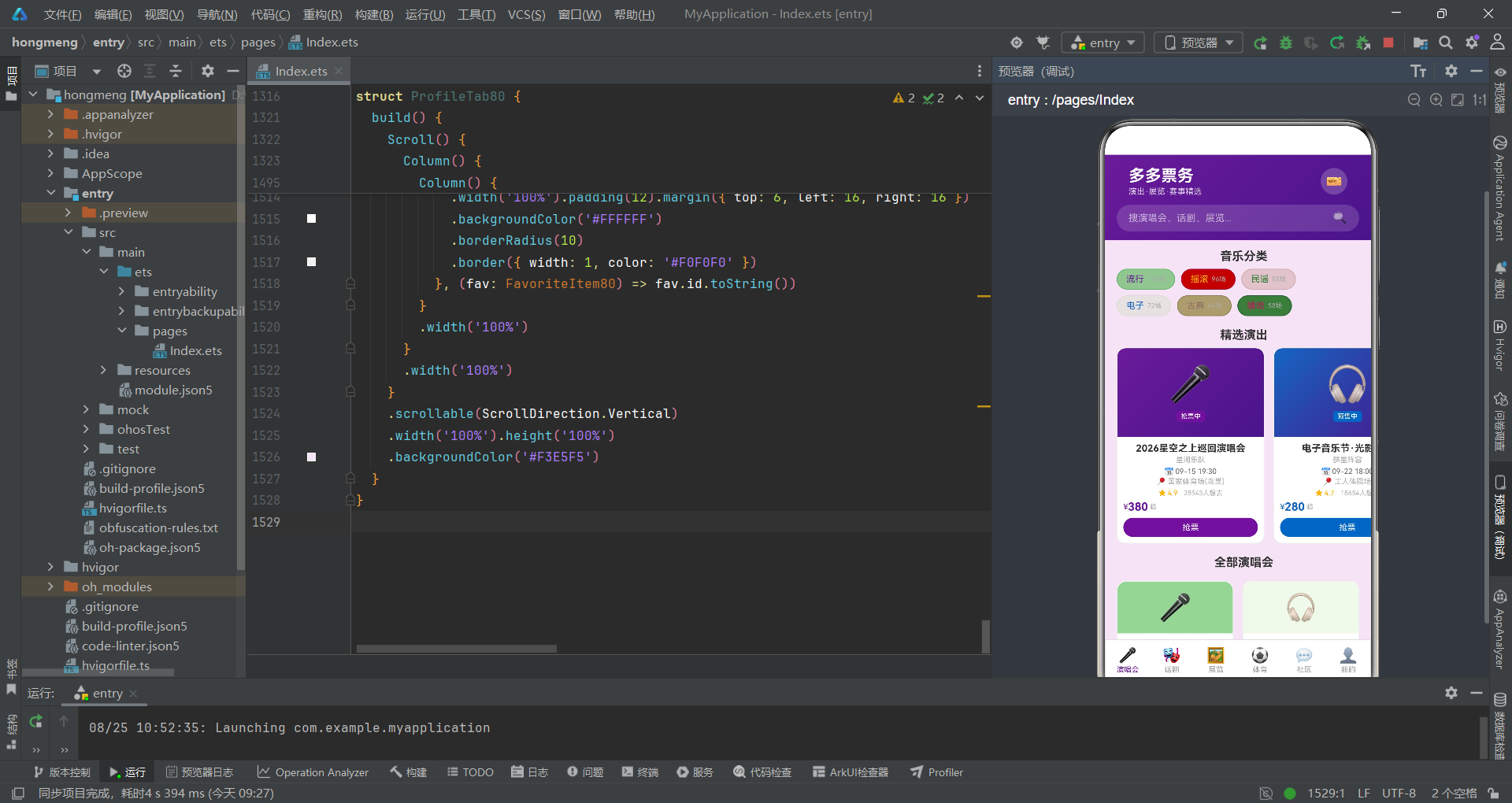
热门话题区使用横向Scroll容器展示话题卡片,热门话题通过topic.hot条件渲染"HOT"红色标签。话题卡片的边框颜色使用topic.color + '30',与话题主题色保持视觉关联。
动态信息流中每条帖子包含头像、作者名、关联演出、发布时间、话题标签、正文内容、图片预览和互动按钮(点赞、评论、分享、关注)。图片区域通过if (post.images > 0)条件渲染,内部使用嵌套的ForEach和if判断生成最多三张图片预览。互动按钮区域将点赞、评论、分享水平排列,"关注"按钮使用主题紫色突出显示。
十一、展览Tab:分类网格与展评模块
展览Tab采用四列分类网格和列表展示结合的方式,还引入了展评模块,丰富了展览内容的展示维度。
@Component
struct ExhibitionTab80 {
  onBuy: (id: number) => void = () => {}

  build() {
    Scroll() {
      Column() {
        // 展览分类网格
        Text('展览分类').fontSize(16).fontWeight(FontWeight.Bold).fontColor('#333333').margin({ left: 16, top: 12 })
        Grid() {
          ForEach(EXHIBITION_CATS_80, (cat: ExhibitionCat80) => {
            GridItem() {
              Column() {
                Text(cat.icon).fontSize(26)
                Text(cat.label).fontSize(11).fontColor('#333333').margin({ top: 4 })
                Text(cat.count + '个').fontSize(9).fontColor('#AAAAAA')
              }
              .width('100%').padding({ top: 10, bottom: 10 })
              .backgroundColor(cat.bg)
              .borderRadius(12)
              .alignItems(HorizontalAlign.Center)
            }
          }, (cat: ExhibitionCat80) => cat.label)
        }
        .columnsTemplate('4fr 4fr 4fr 4fr')
        .rowsGap(8).columnsGap(8)
        .padding(16)
        .height(210)

        // 展览列表
        Text('热门展览').fontSize(16).fontWeight(FontWeight.Bold).fontColor('#333333').margin({ left: 16, top: 8 })
        Column() {
          ForEach(EXHIBITIONS_80, (exh: ExhibitionItem80) => {
            Column() {
              Row() {
                Column() {
                  Text('🖼️').fontSize(32)
                }
                .width(80).height(80)
                .backgroundColor(exh.color + '20')
                .borderRadius(12)

                Column() {
                  Row() {
                    Text(exh.name).fontSize(13).fontColor('#333333').fontWeight(FontWeight.Bold).maxLines(1).layoutWeight(1)
                    ForEach([0, 1, 2, 3, 4], (idx: number) => {
                      Text(idx < exh.hotLevel ? '🔥' : '').fontSize(8).margin({ left: 2 })
                    }, (idx: number) => idx.toString())
                  }
                  Text(exh.type + ' · ' + exh.venue + ' · ' + exh.area).fontSize(10).fontColor('#AAAAAA').margin({ top: 2 })
                  Text(exh.desc).fontSize(10).fontColor('#999999').margin({ top: 4 }).maxLines(2)
                  Text('展期:' + exh.date).fontSize(10).fontColor('#666666').margin({ top: 4 })

                  Row() {
                    Text('★').fontSize(10).fontColor('#FFB300')
                    Text(exh.rating.toString()).fontSize(10).fontColor('#FFB300').margin({ left: 2 })
                    Text(exh.visitors + '人参观').fontSize(9).fontColor('#AAAAAA').margin({ left: 8 })
                    Text('').layoutWeight(1)
                    Text('¥').fontSize(11).fontColor(exh.color)
                    Text(exh.price.toString()).fontSize(15).fontColor(exh.color).fontWeight(FontWeight.Bold)
                    Text('¥' + exh.originalPrice).fontSize(10).fontColor('#CCCCCC')
                      .decoration({ type: TextDecorationType.LineThrough }).margin({ left: 4 })
                  }

                  Button() {
                    Text('购票参观').fontSize(11).fontColor('#FFFFFF')
                  }
                  .height(28).margin({ top: 6 })
                  .backgroundColor(exh.color)
                  .borderRadius(14)
                  .onClick(() => { this.onBuy(exh.id) })
                }
                .margin({ left: 10 })
                .layoutWeight(1)
              }
            }
            .backgroundColor('#FFFFFF')
            .borderRadius(12)
            .border({ width: 1, color: '#F0F0F0' })
          }, (exh: ExhibitionItem80) => exh.id.toString())
        }

        // 展评
        Text('观众展评').fontSize(16).fontWeight(FontWeight.Bold).fontColor('#333333').margin({ left: 16, top: 16 })
        Column() {
          ForEach(REVIEWS_80, (review: ReviewItem80) => {
            Column() {
              Row() {
                Column() {
                  Text('👤').fontSize(18)
                }
                .width(32).height(32).borderRadius(16)
                .backgroundColor(review.avatarColor + '20')

                Column() {
                  Text(review.author).fontSize(12).fontColor('#333333').fontWeight(FontWeight.Medium)
                  Row() {
                    ForEach([0, 1, 2, 3, 4], (idx: number) => {
                      Text(idx < review.rating ? '★' : '☆').fontSize(10).fontColor('#FFB300').margin({ left: 2 })
                    }, (idx: number) => idx.toString())
                    Text(review.date).fontSize(9).fontColor('#AAAAAA').margin({ left: 8 })
                  }.margin({ top: 2 })
                }
                .margin({ left: 8 })
                .layoutWeight(1)
              }
              Text(review.content).fontSize(11).fontColor('#666666').margin({ top: 8 })
            }
            .backgroundColor('#FFFFFF')
            .borderRadius(10)
            .border({ width: 1, color: '#F0F0F0' })
          }, (review: ReviewItem80) => review.id.toString())
        }
      }
    }
    .scrollable(ScrollDirection.Vertical)
    .backgroundColor('#F3E5F5')
  }
}
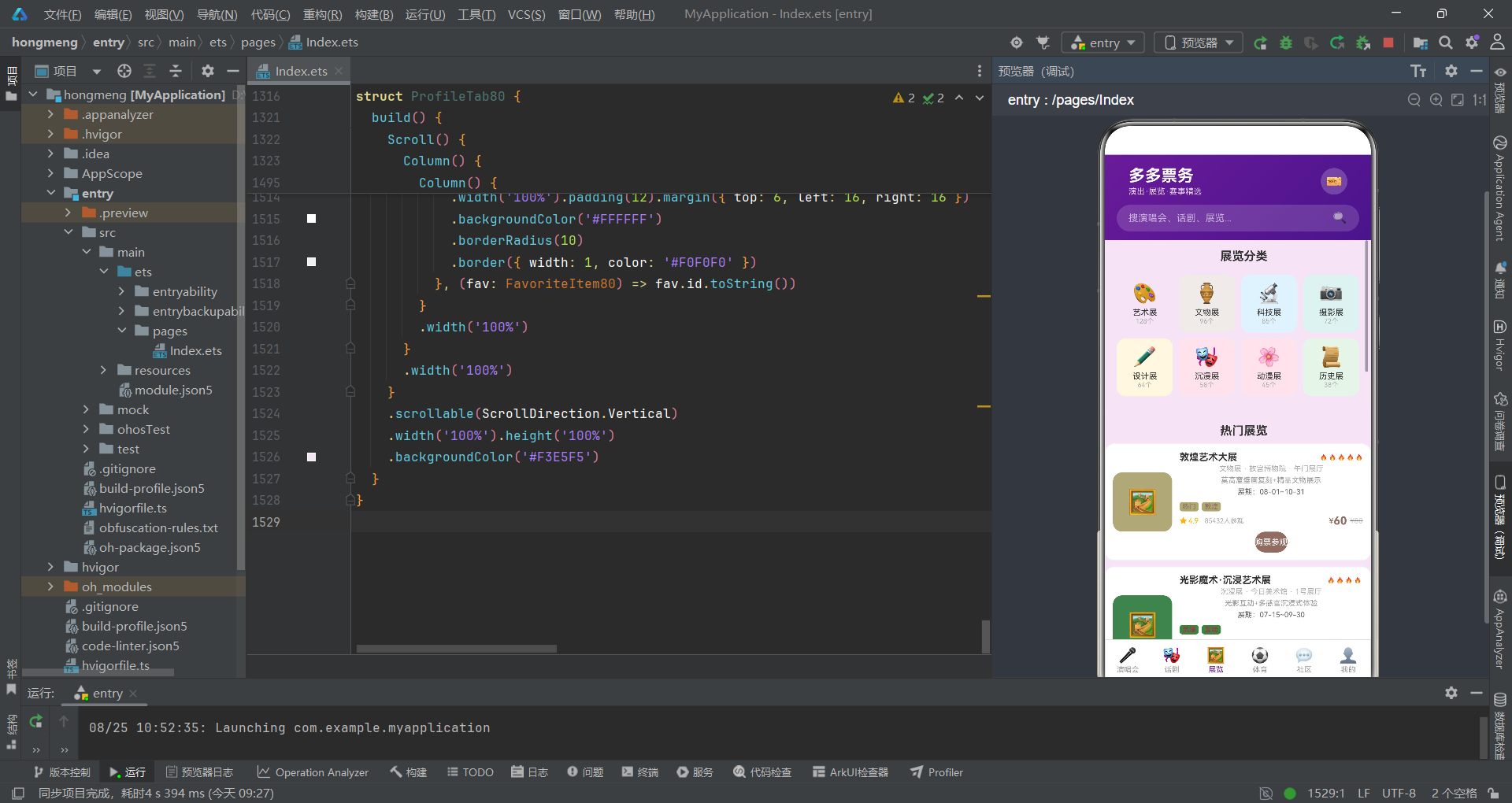
展览分类网格使用columnsTemplate('4fr 4fr 4fr 4fr')实现四列等宽布局,每个分类项使用独立的背景色cat.bg,形成色彩丰富的分类入口。height(210)固定网格高度,配合两行布局确保视觉整齐。
展览列表项中的热度等级使用ForEach遍历0-4的数组,通过idx < exh.hotLevel判断渲染火焰Emoji,实现1-5级的热度可视化。展评模块中的星级评分采用类似逻辑——idx < review.rating判断渲染实心星★还是空心星☆,实现了直观的评分展示。
十二、弹窗组件:退票确认与编辑观演人
除了购票弹窗外,应用还定义了退票确认弹窗、编辑观演人弹窗和删除收藏确认弹窗,均通过@Builder和bindContentCover实现。
@Builder
buildCancelCover() {
  Column() {
    Column() {
      Text('退票申请').fontSize(18).fontWeight(FontWeight.Bold).fontColor('#333333')
      Text('确认申请退票?退票将收取手续费,详情请查看退票政策')
        .fontSize(13).fontColor('#999999').margin({ top: 12 }).textAlign(TextAlign.Center)
      Row() {
        Button() { Text('再想想').fontSize(14).fontColor('#666666') }
        .layoutWeight(1).height(44).backgroundColor('#F5F5F5').borderRadius(22).margin({ right: 12 })
        .onClick(() => { this.showCancelDialog = false })
        Button() { Text('确认退票').fontSize(14).fontColor('#FFFFFF') }
        .layoutWeight(1).height(44).backgroundColor('#FF5252').borderRadius(22)
        .onClick(() => { this.showCancelDialog = false })
      }.margin({ top: 24 })
    }
    .width('80%').padding(24).backgroundColor('#FFFFFF').borderRadius(20)
  }
  .width('100%').height('100%')
  .justifyContent(FlexAlign.Center)
  .alignItems(HorizontalAlign.Center)
  .backgroundColor('rgba(0,0,0,0.5)')
}

@Builder
buildEditViewerSheet() {
  Column() {
    Row() {
      Text('编辑观演人').fontSize(18).fontWeight(FontWeight.Bold).fontColor('#333333')
      Text('').layoutWeight(1)
      Text('✕').fontSize(20).fontColor('#999999').onClick(() => { this.showEditViewerDialog = false })
    }
    .width('100%').padding(16)

    Scroll() {
      Column() {
        Text('姓名').fontSize(14).fontColor('#666666').margin({ top: 8 })
        TextInput({ text: this.editViewerName, placeholder: '请输入观演人姓名' })
          .width('100%').height(44).margin({ top: 8 })
          .borderRadius(10).backgroundColor('#F5F5F5')
          .onChange((val: string) => { this.editViewerName = val })

        Text('身份证号').fontSize(14).fontColor('#666666').margin({ top: 12 })
        TextInput({ text: this.editViewerIdCard, placeholder: '请输入身份证号码' })
          .width('100%').height(44).margin({ top: 8 })
          .borderRadius(10).backgroundColor('#F5F5F5')
          .onChange((val: string) => { this.editViewerIdCard = val })

        Text('手机号').fontSize(14).fontColor('#666666').margin({ top: 12 })
        TextInput({ text: this.editViewerPhone, placeholder: '请输入手机号码' })
          .width('100%').height(44).margin({ top: 8 })
          .borderRadius(10).backgroundColor('#F5F5F5')
          .type(InputType.PhoneNumber)
          .onChange((val: string) => { this.editViewerPhone = val })

        Text('已添加观演人').fontSize(14).fontColor('#666666').margin({ top: 16 })
        Column() {
          ForEach(VIEWERS_80, (viewer: ViewerItem80) => {
            Row() {
              Column() {
                Text(viewer.name).fontSize(13).fontColor('#333333')
                Text(viewer.idCard).fontSize(10).fontColor('#AAAAAA').margin({ top: 4 })
                Text(viewer.phone).fontSize(10).fontColor('#AAAAAA').margin({ top: 2 })
              }
              .alignItems(HorizontalAlign.Start)
              .layoutWeight(1)
              if (viewer.isDefault) {
                Text('默认').fontSize(9).fontColor('#6A1B9A')
                  .backgroundColor('#F3E5F5')
                  .padding({ left: 4, right: 4, top: 1, bottom: 1 })
                  .borderRadius(4)
              }
            }
            .backgroundColor('#FFFFFF')
            .borderRadius(8)
            .border({ width: 1, color: '#F0F0F0' })
          }, (viewer: ViewerItem80) => viewer.id.toString())
        }
      }
    }
    .constraintSize({ maxHeight: '50%' })

    Row() {
      Button() {
        Text('保存观演人').fontSize(16).fontColor('#FFFFFF').fontWeight(FontWeight.Medium)
      }
      .layoutWeight(1).height(48)
      .backgroundColor('#6A1B9A')
      .borderRadius(24)
      .onClick(() => { this.showEditViewerDialog = false })
    }
    .width('100%').padding(16)
  }
  .width('100%')
}
退票确认弹窗使用rgba(0,0,0,0.5)半透明黑色遮罩覆盖全屏,中央卡片使用80%宽度、白色背景和20px圆角。按钮区域采用双按钮布局——"再想想"使用灰色背景,"确认退票"使用红色#FF5252背景,通过颜色差异引导用户谨慎操作。
编辑观演人弹窗包含三个TextInput输入框,分别对应姓名、身份证号和手机号。手机号输入框特别设置了.type(InputType.PhoneNumber),调起数字键盘提升输入效率。已添加观演人列表在表单下方展示,默认观演人通过"默认"标签标记。整个表单区域包裹在Scroll容器中并设置constraintSize({ maxHeight: '50%' }),防止内容过多时溢出屏幕。
技术点对比表格
| 技术维度 | 演唱会Tab | 话剧Tab | 展览Tab | 体育Tab | 社区Tab | 我的Tab |
|---|---|---|---|---|---|---|
| 主布局方式 | 横向轮播+双列Grid | 限时横条+纵向列表 | 四列Grid+纵向列表 | 纵向列表+对阵展示 | 横向话题+纵向信息流 | 渐变头部+多模块纵向 |
| 核心数据结构 | ConcertItem80 | DramaItem80 | ExhibitionItem80 | SportEvent80 | CommunityPost80 | OrderItem80+BarData80 |
| 价格展示 | 起步价 | 折扣价+原价删除线 | 折扣价+原价删除线 | 起步价 | 无 | 金额+退票入口 |
| 交互回调 | onBuy(id) | onBuy(id) | onBuy(id) | onBuy(id) | 无 | onEditViewer/onCancelOrder/onDeleteFav |
| 视觉特色 | 渐变大卡海报 | 限时折扣横条 | 热度火焰评级 | 上座率进度条+座位模拟 | 图片预览+互动按钮 | 柱状图+电子票 |
| 状态管理 | 无独立状态 | 无独立状态 | 无独立状态 | 无独立状态 | 无独立状态 | 通过回调触发父组件状态 |
| 列表渲染键值 | id.toString() | id.toString() | id.toString() | id.toString() | id.toString() | id.toString() |
安装DevEco Studio程序

选择目标安装目录:

设置环境变量,但是需要重启一下:

新建一个空白模板:

设置API为24的模板项目:

初始化项目,自动下载相关依赖:

完整代码:
// 主题:票务紫 #6A1B9A × 舞台金 #FFB300,底色 #F3E5F5(舞台梦幻紫调)
// 布局差异:分类标签+精选大卡+双列演唱会 / 话剧分类+限时折扣+话剧列表 / 展览网格+展览列表+展评 / 赛事列表+座位模拟+进度 / 演出动态+热门话题 / 渐变头+消费柱状图+电子票+订单+收藏
// ============ 类型定义 ============
interface ConcertItem80 {
id: number
name: string
artist: string
date: string
venue: string
city: string
priceFrom: number
priceTo: number
rating: number
wants: number
tags: string[]
color: string
status: string
poster: string
}
interface ConcertTag80 {
label: string
color: string
count: number
}
interface DramaItem80 {
id: number
name: string
type: string
date: string
venue: string
duration: string
priceFrom: number
originalPrice: number
rating: number
reviews: number
tags: string[]
color: string
discount: string
desc: string
}
interface ExhibitionItem80 {
id: number
name: string
type: string
date: string
venue: string
area: string
price: number
originalPrice: number
rating: number
visitors: number
tags: string[]
color: string
desc: string
hotLevel: number
}
interface ExhibitionCat80 {
label: string
icon: string
color: string
bg: string
count: number
}
interface SportEvent80 {
id: number
name: string
type: string
date: string
venue: string
city: string
priceFrom: number
status: string
homeTeam: string
awayTeam: string
round: string
color: string
capacity: number
sold: number
}
interface CommunityPost80 {
id: number
author: string
avatarColor: string
content: string
likes: number
comments: number
shares: number
images: number
timeAgo: string
topic: string
show: string
}
interface TopicItem80 {
id: number
title: string
posts: number
hot: boolean
color: string
}
interface OrderItem80 {
id: number
show: string
date: string
amount: number
quantity: number
status: string
venue: string
seat: string
color: string
}
interface FavoriteItem80 {
id: number
name: string
type: string
date: string
color: string
}
interface ViewerItem80 {
id: number
name: string
idCard: string
phone: string
isDefault: boolean
}
interface BarData80 {
label: string
value: number
color: string
}
interface TicketTier80 {
id: number
name: string
price: number
available: boolean
color: string
}
interface ReviewItem80 {
id: number
author: string
rating: number
content: string
date: string
avatarColor: string
}
// ============ 静态数据 ============
const CONCERT_TAGS_80: ConcertTag80[] = [
{ label: '流行', color: '#6A1B9A', count: 128 },
{ label: '摇滚', color: '#FFB300', count: 96 },
{ label: '民谣', color: '#2E7D32', count: 85 },
{ label: '电子', color: '#1565C0', count: 72 },
{ label: '古典', color: '#8D6E63', count: 64 },
{ label: '嘻哈', color: '#C2185B', count: 58 }
]
const CONCERTS_80: ConcertItem80[] = [
{ id: 1, name: '2026星空之上巡回演唱会', artist: '星河乐队', date: '09-15 19:30', venue: '国家体育场(鸟巢)', city: '北京', priceFrom: 380, priceTo: 1880, rating: 4.9, wants: 28543, tags: ['热门', '巡演'], color: '#6A1B9A', status: '抢票中', poster: '🎤' },
{ id: 2, name: '电子音乐节·光影之夜', artist: '群星阵容', date: '09-22 18:00', venue: '工人体院场', city: '北京', priceFrom: 280, priceTo: 1280, rating: 4.7, wants: 18654, tags: ['音乐节', '群星'], color: '#1565C0', status: '预售中', poster: '🎧' },
{ id: 3, name: '民谣诗歌专场', artist: '老狼×朴树', date: '10-05 19:30', venue: '工人体育馆', city: '北京', priceFrom: 280, priceTo: 880, rating: 4.8, wants: 12345, tags: ['民谣', '文艺'], color: '#2E7D32', status: '即将开票', poster: '🎸' },
{ id: 4, name: '古典之夜交响音乐会', artist: '国家交响乐团', date: '09-28 19:30', venue: '国家大剧院', city: '北京', priceFrom: 180, priceTo: 980, rating: 4.9, wants: 8543, tags: ['古典', '高雅'], color: '#8D6E63', status: '抢票中', poster: '🎻' },
{ id: 5, name: '说唱新世代巡回Live', artist: 'GAI×那吾克热', date: '10-12 20:00', venue: '凯迪拉克中心', city: '北京', priceFrom: 380, priceTo: 1580, rating: 4.6, wants: 15623, tags: ['嘻哈', 'Live'], color: '#C2185B', status: '预售中', poster: '🎤' },
{ id: 6, name: '摇滚狂欢音乐节', artist: '万能青年旅店×新裤子', date: '10-20 16:00', venue: '朝阳公园', city: '北京', priceFrom: 320, priceTo: 1380, rating: 4.8, wants: 22456, tags: ['摇滚', '音乐节'], color: '#FFB300', status: '即将开票', poster: '🤘' },
{ id: 7, name: '钢琴独奏之夜', artist: '郎朗', date: '11-02 19:30', venue: '国家大剧院', city: '北京', priceFrom: 280, priceTo: 1880, rating: 5.0, wants: 18765, tags: ['钢琴', '大师'], color: '#00897B', status: '抢票中', poster: '🎹' },
{ id: 8, name: '爵士之夜专场', artist: '蓝色音符乐队', date: '11-10 20:00', venue: '蜂巢剧场', city: '北京', priceFrom: 220, priceTo: 680, rating: 4.7, wants: 6543, tags: ['爵士', '小众'], color: '#6A1B9A', status: '预售中', poster: '🎷' }
]
const DRAMAS_80: DramaItem80[] = [
{ id: 1, name: '雷雨(经典复排版)', type: '话剧', date: '09-20 19:30', venue: '首都剧场', duration: '150分钟', priceFrom: 180, originalPrice: 280, rating: 4.9, reviews: 3654, tags: ['经典', '复排'], color: '#6A1B9A', discount: '6.4折', desc: '曹禺经典名作,全新复排阵容' },
{ id: 2, name: '恋爱的犀牛', type: '先锋话剧', date: '09-25 19:30', venue: '蜂巢剧场', duration: '120分钟', priceFrom: 150, originalPrice: 220, rating: 4.8, reviews: 5234, tags: ['先锋', '经典'], color: '#FFB300', discount: '6.8折', desc: '孟京辉导演,都市爱情寓言' },
{ id: 3, name: '茶馆(纪念版)', type: '话剧', date: '10-01 19:30', venue: '首都剧场', duration: '180分钟', priceFrom: 280, originalPrice: 380, rating: 5.0, reviews: 4156, tags: ['经典', '老舍'], color: '#8D6E63', discount: '7.4折', desc: '老舍经典,北京人艺纪念版' },
{ id: 4, name: '等待戈多', type: '荒诞剧', date: '10-08 19:30', venue: '蜂巢剧场', duration: '130分钟', priceFrom: 120, originalPrice: 180, rating: 4.6, reviews: 2345, tags: ['荒诞', '小众'], color: '#2E7D32', discount: '6.7折', desc: '贝克特经典荒诞剧,全新解读' },
{ id: 5, name: '暗恋桃花源', type: '话剧', date: '10-15 19:30', venue: '保利剧院', duration: '150分钟', priceFrom: 200, originalPrice: 320, rating: 4.9, reviews: 4876, tags: ['经典', '赖声川'], color: '#C2185B', discount: '6.3折', desc: '赖声川经典,悲喜交错双重叙事' },
{ id: 6, name: '乌龙山伯爵(开心麻花)', type: '喜剧', date: '10-22 19:30', venue: '地质礼堂', duration: '120分钟', priceFrom: 100, originalPrice: 180, rating: 4.7, reviews: 6234, tags: ['喜剧', '麻花'], color: '#FF6F00', discount: '5.6折', desc: '开心麻花经典爆笑喜剧' },
{ id: 7, name: '白鹿原', type: '话剧', date: '11-01 18:30', venue: '国家话剧院', duration: '180分钟', priceFrom: 280, originalPrice: 480, rating: 4.8, reviews: 3567, tags: ['史诗', '经典'], color: '#6D4C41', discount: '5.8折', desc: '陈忠实巨著改编,陕味史诗' },
{ id: 8, name: '仲夏夜之梦', type: '莎士比亚', date: '11-10 19:30', venue: '保利剧院', duration: '140分钟', priceFrom: 180, originalPrice: 280, rating: 4.7, reviews: 2876, tags: ['莎翁', '经典'], color: '#1565C0', discount: '6.4折', desc: '莎士比亚浪漫喜剧全新演绎' }
]
const EXHIBITION_CATS_80: ExhibitionCat80[] = [
{ label: '艺术展', icon: '🎨', color: '#6A1B9A', bg: '#F3E5F5', count: 128 },
{ label: '文物展', icon: '🏺', color: '#8D6E63', bg: '#EFEBE9', count: 96 },
{ label: '科技展', icon: '🔬', color: '#1565C0', bg: '#E3F2FD', count: 85 },
{ label: '摄影展', icon: '📷', color: '#00897B', bg: '#E0F2F1', count: 72 },
{ label: '设计展', icon: '✏️', color: '#FFB300', bg: '#FFF8E1', count: 64 },
{ label: '沉浸展', icon: '🎭', color: '#C2185B', bg: '#FCE4EC', count: 58 },
{ label: '动漫展', icon: '🌸', color: '#E91E63', bg: '#FCE4EC', count: 45 },
{ label: '历史展', icon: '📜', color: '#2E7D32', bg: '#E8F5E9', count: 38 }
]
const EXHIBITIONS_80: ExhibitionItem80[] = [
{ id: 1, name: '敦煌艺术大展', type: '文物展', date: '08-01~10-31', venue: '故宫博物院', area: '午门展厅', price: 60, originalPrice: 80, rating: 4.9, visitors: 85432, tags: ['热门', '敦煌'], color: '#8D6E63', desc: '莫高窟壁画复刻+精品文物展示', hotLevel: 5 },
{ id: 2, name: '光影魔术·沉浸艺术展', type: '沉浸展', date: '07-15~09-30', venue: '今日美术馆', area: '1号展厅', price: 88, originalPrice: 128, rating: 4.7, visitors: 36543, tags: ['沉浸', '互动'], color: '#C2185B', desc: '光影互动+多感官沉浸式体验', hotLevel: 4 },
{ id: 3, name: '摄影大师作品展', type: '摄影展', date: '08-10~10-10', venue: '中国美术馆', area: '3号展厅', price: 30, originalPrice: 50, rating: 4.6, visitors: 12543, tags: ['摄影', '艺术'], color: '#00897B', desc: '国际摄影大师经典作品集合', hotLevel: 3 },
{ id: 4, name: '未来科技体验展', type: '科技展', date: '09-01~11-30', venue: '科技馆', area: 'B1展厅', price: 45, originalPrice: 68, rating: 4.5, visitors: 23456, tags: ['科技', '互动'], color: '#1565C0', desc: 'AI+VR+机器人前沿科技展示', hotLevel: 4 },
{ id: 5, name: '当代艺术双年展', type: '艺术展', date: '09-15~12-15', venue: '798艺术区', area: '多个展厅', price: 50, originalPrice: 80, rating: 4.7, visitors: 28765, tags: ['当代', '艺术'], color: '#6A1B9A', desc: '50位艺术家作品,当代艺术盛宴', hotLevel: 4 },
{ id: 6, name: '古埃及文明展', type: '文物展', date: '10-01~12-31', venue: '国家博物馆', area: '北馆展厅', price: 80, originalPrice: 120, rating: 4.9, visitors: 45678, tags: ['古埃及', '文明'], color: '#FFB300', desc: '200件古埃及文物首次来华', hotLevel: 5 }
]
const SPORT_EVENTS_80: SportEvent80[] = [
{ id: 1, name: '中超联赛第25轮', type: '足球', date: '09-16 19:35', venue: '工人体育场', city: '北京', priceFrom: 80, status: '售票中', homeTeam: '北京国安', awayTeam: '上海海港', round: '第25轮', color: '#00897B', capacity: 68000, sold: 52340 },
{ id: 2, name: 'CBA常规赛', type: '篮球', date: '10-20 19:30', venue: '凯迪拉克中心', city: '北京', priceFrom: 120, status: '售票中', homeTeam: '北京首钢', awayTeam: '广东宏远', round: '常规赛', color: '#1565C0', capacity: 18000, sold: 15600 },
{ id: 3, name: '中国网球公开赛', type: '网球', date: '09-25~10-06', venue: '国家网球中心', city: '北京', priceFrom: 100, status: '售票中', homeTeam: '男子/女子', awayTeam: 'ATP/WTA', round: '正赛', color: '#FFB300', capacity: 15000, sold: 11200 },
{ id: 4, name: 'NFL伦敦赛中国行', type: '橄榄球', date: '11-05 20:00', venue: '鸟巢', city: '北京', priceFrom: 380, status: '即将开票', homeTeam: '待定', awayTeam: '待定', round: '表演赛', color: '#C2185B', capacity: 70000, sold: 0 },
{ id: 5, name: '乒乓超级联赛', type: '乒乓球', date: '10-15 14:00', venue: '体育总局体育馆', city: '北京', priceFrom: 50, status: '售票中', homeTeam: '北京队', awayTeam: '山东队', round: '季后赛', color: '#6A1B9A', capacity: 8000, sold: 6200 },
{ id: 6, name: '冰球联赛常规赛', type: '冰球', date: '11-10 19:00', venue: '国家体育馆', city: '北京', priceFrom: 80, status: '预售中', homeTeam: '昆仑鸿星', awayTeam: '斯巴达克', round: '常规赛', color: '#0277BD', capacity: 18000, sold: 8400 }
]
const POSTS_80: CommunityPost80[] = [
{ id: 1, author: '演出达人', avatarColor: '#6A1B9A', content: '抢到鸟巢演唱会VVIP票了!星河乐队现场太震撼,全程大合唱,这票价超值!', likes: 892, comments: 156, shares: 67, images: 5, timeAgo: '2小时前', topic: '#演出分享#', show: '星空之上演唱会' },
{ id: 2, author: '话剧爱好者', avatarColor: '#8D6E63', content: '雷雨复排版观后感:三代人的命运纠葛被诠释得淋漓尽致,值得二刷!', likes: 534, comments: 89, shares: 23, images: 3, timeAgo: '5小时前', topic: '#观后感#', show: '雷雨' },
{ id: 3, author: '展览控', avatarColor: '#C2185B', content: '敦煌艺术大展太震撼了!壁画复刻+VR体验,身临其境感受千年文明~', likes: 768, comments: 134, shares: 45, images: 6, timeAgo: '8小时前', topic: '#展览分享#', show: '敦煌艺术大展' },
{ id: 4, author: '球迷小王', avatarColor: '#00897B', content: '国安vs海港现场氛围炸裂!工体5万人齐唱队歌,这就是足球的魅力!', likes: 945, comments: 187, shares: 78, images: 4, timeAgo: '12小时前', topic: '#现场分享#', show: '中超联赛' },
{ id: 5, author: '音乐节老炮', avatarColor: '#FFB300', content: '光影之夜电音节攻略:舞台布局、DJ时间表、停车指南,一文搞定!', likes: 678, comments: 123, shares: 89, images: 3, timeAgo: '1天前', topic: '#攻略分享#', show: '电子音乐节' },
{ id: 6, author: '古典乐迷', avatarColor: '#00897B', content: '郎朗钢琴独奏会观后:技术登峰造极,情感层次丰富,最高雅的艺术享受', likes: 456, comments: 78, shares: 34, images: 2, timeAgo: '2天前', topic: '#观后感#', show: '钢琴独奏之夜' }
]
const TOPICS_80: TopicItem80[] = [
{ id: 1, title: '鸟巢演唱会抢票', posts: 2156, hot: true, color: '#6A1B9A' },
{ id: 2, title: '话剧观后感', posts: 1876, hot: true, color: '#8D6E63' },
{ id: 3, title: '敦煌展攻略', posts: 1562, hot: true, color: '#FFB300' },
{ id: 4, title: '中超观赛指南', posts: 854, hot: false, color: '#00897B' },
{ id: 5, title: '音乐节阵容', posts: 654, hot: false, color: '#1565C0' },
{ id: 6, title: '退票政策', posts: 432, hot: false, color: '#C2185B' }
]
const ORDERS_80: OrderItem80[] = [
{ id: 1, show: '星空之上演唱会', date: '09-15', amount: 1880, quantity: 1, status: '已出票', venue: '鸟巢', seat: 'A区3排15号', color: '#4CAF50' },
{ id: 2, show: '雷雨(复排版)', date: '09-20', amount: 280, quantity: 2, status: '已出票', venue: '首都剧场', seat: '二楼1排8号', color: '#4CAF50' },
{ id: 3, show: '敦煌艺术大展', date: '09-01', amount: 60, quantity: 1, status: '已使用', venue: '故宫博物院', seat: '通票', color: '#9E9E9E' },
{ id: 4, show: '中超联赛', date: '09-16', amount: 160, quantity: 2, status: '待入场', venue: '工体', seat: '北看台24排', color: '#FF9800' },
{ id: 5, show: '钢琴独奏之夜', date: '11-02', amount: 880, quantity: 1, status: '待出票', venue: '国家大剧院', seat: '待分配', color: '#2196F3' },
{ id: 6, show: '光影魔术展', date: '09-15', amount: 88, quantity: 2, status: '已使用', venue: '今日美术馆', seat: '通票', color: '#9E9E9E' }
]
const FAVORITES_80: FavoriteItem80[] = [
{ id: 1, name: '摇滚狂欢音乐节', type: '演唱会', date: '10-20', color: '#FFB300' },
{ id: 2, name: '茶馆(纪念版)', type: '话剧', date: '10-01', color: '#8D6E63' },
{ id: 3, name: '古埃及文明展', type: '展览', date: '10-01', color: '#FFB300' },
{ id: 4, name: 'CBA常规赛', type: '体育', date: '10-20', color: '#1565C0' },
{ id: 5, name: '说唱新世代Live', type: '演唱会', date: '10-12', color: '#C2185B' }
]
const VIEWERS_80: ViewerItem80[] = [
{ id: 1, name: '张文娱', idCard: '110***********1234', phone: '138****8888', isDefault: true },
{ id: 2, name: '李观众', idCard: '110***********5678', phone: '139****6666', isDefault: false }
]
const BAR_DATA_80: BarData80[] = [
{ label: '3月', value: 480, color: '#CE93D8' },
{ label: '4月', value: 620, color: '#CE93D8' },
{ label: '5月', value: 580, color: '#CE93D8' },
{ label: '6月', value: 850, color: '#CE93D8' },
{ label: '7月', value: 1120, color: '#CE93D8' },
{ label: '8月', value: 1680, color: '#6A1B9A' }
]
const TICKET_TIERS_80: TicketTier80[] = [
{ id: 1, name: '看台票', price: 380, available: true, color: '#8D6E63' },
{ id: 2, name: '内场票', price: 680, available: true, color: '#1565C0' },
{ id: 3, name: 'VIP票', price: 980, available: false, color: '#FFB300' },
{ id: 4, name: 'VVIP票', price: 1880, available: true, color: '#C2185B' }
]
const REVIEWS_80: ReviewItem80[] = [
{ id: 1, author: '演出达人', rating: 5, content: '现场氛围太好,全程大合唱超燃!', date: '2天前', avatarColor: '#6A1B9A' },
{ id: 2, author: '音乐爱好者', rating: 5, content: '舞美灯光音效都是顶级,值回票价', date: '3天前', avatarColor: '#1565C0' },
{ id: 3, author: '路人甲', rating: 4, content: '整体不错但内场有点挤,建议选看台', date: '5天前', avatarColor: '#00897B' },
{ id: 4, author: '追星族', rating: 5, content: '安可环节太惊喜了!下次还来!', date: '1周前', avatarColor: '#FFB300' }
]
// ============ 主入口组件 ============
@Entry
@Component
struct DuoDuoTicketApp {
@State currentTab: number = 0
@State showBuyDialog: boolean = false
@State showCancelDialog: boolean = false
@State showEditViewerDialog: boolean = false
@State showDeleteFavDialog: boolean = false
@State selectedShowId: number = 0
@State selectedTierId: number = 1
@State buyQuantity: number = 1
@State deliveryMethod: number = 0
@State selectedViewerId: number = 1
@State editViewerName: string = ''
@State editViewerIdCard: string = ''
@State editViewerPhone: string = ''
@State cancelTargetId: number = 0
private tabs: string[] = ['演唱会', '话剧', '展览', '体育', '社区', '我的']
private deliveryOptions: string[] = ['电子票(免费)', '邮寄送票 ¥15', '自取网点免费']
build() {
Column() {
// ====== 顶部头部 ======
Column() {
Row() {
Column() {
Text('多多票务')
.fontSize(22)
.fontColor('#FFFFFF')
.fontWeight(FontWeight.Bold)
Text('演出·展览·赛事精选')
.fontSize(11)
.fontColor('rgba(255,255,255,0.8)')
.margin({ top: 2 })
}
.alignItems(HorizontalAlign.Start)
.layoutWeight(1)
Row() {
Text('🎫').fontSize(18).fontColor('#FFFFFF')
}
.width(36).height(36).justifyContent(FlexAlign.Center)
.backgroundColor('rgba(255,255,255,0.2)')
.borderRadius(18)
}
.width('100%').height(56).padding({ left: 16, right: 16 })
.alignItems(VerticalAlign.Center)
Row() {
Text('搜演唱会、话剧、展览...').fontSize(13).fontColor('rgba(255,255,255,0.6)').layoutWeight(1)
Text('🔍').fontSize(16).fontColor('rgba(255,255,255,0.6)')
}
.width('100%').height(36).margin({ top: 4 })
.padding({ left: 16, right: 16 })
.backgroundColor('rgba(255,255,255,0.15)')
.borderRadius(20)
.alignItems(VerticalAlign.Center)
}
.width('100%')
.linearGradient({ angle: 135, colors: [['#6A1B9A', 0], ['#4A148C', 1]] })
.padding({ top: 8, bottom: 12, left: 16, right: 16 })
// ====== Tab内容区 ======
Stack({ alignContent: Alignment.TopStart }) {
Column() {
if (this.currentTab === 0) {
ConcertTab80({
onBuy: (id: number) => {
this.selectedShowId = id
this.showBuyDialog = true
}
})
}
if (this.currentTab === 1) {
DramaTab80({
onBuy: (id: number) => {
this.selectedShowId = id
this.showBuyDialog = true
}
})
}
if (this.currentTab === 2) {
ExhibitionTab80({
onBuy: (id: number) => {
this.selectedShowId = id
this.showBuyDialog = true
}
})
}
if (this.currentTab === 3) {
SportTab80({
onBuy: (id: number) => {
this.selectedShowId = id
this.showBuyDialog = true
}
})
}
if (this.currentTab === 4) {
CommunityTab80()
}
if (this.currentTab === 5) {
ProfileTab80({
onEditViewer: () => {
this.showEditViewerDialog = true
}, onCancelOrder: (id: number) => {
this.cancelTargetId = id
this.showCancelDialog = true
}, onDeleteFav: (id: number) => {
this.cancelTargetId = id
this.showDeleteFavDialog = true
}
})
}
}
.width('100%').height('100%')
}
.layoutWeight(1)
.width('100%')
// ====== 底部Tab栏 ======
Row() {
ForEach(this.tabs, (tab: string, idx: number) => {
Column() {
Text(this.getTabIcon(idx))
.fontSize(20)
.fontColor(this.currentTab === idx ? '#6A1B9A' : '#999999')
Text(tab)
.fontSize(10)
.fontColor(this.currentTab === idx ? '#6A1B9A' : '#999999')
.margin({ top: 2 })
}
.layoutWeight(1)
.height(56)
.justifyContent(FlexAlign.Center)
.onClick(() => {
this.currentTab = idx
})
}, (tab: string) => tab)
}
.width('100%')
.height(56)
.backgroundColor('#FFFFFF')
.border({ width: 1, color: '#E0E0E0' })
}
.width('100%').height('100%')
.backgroundColor('#F3E5F5')
.bindContentCover(this.showCancelDialog, this.buildCancelCover())
.bindContentCover(this.showDeleteFavDialog, this.buildDeleteFavCover())
}
private getTabIcon(idx: number): string {
const icons: string[] = ['🎤', '🎭', '🖼️', '⚽', '💬', '👤']
return idx < icons.length ? icons[idx] : '📋'
}
@Builder
buildBuySheet() {
Column() {
Row() {
Text('购票选座').fontSize(18).fontWeight(FontWeight.Bold).fontColor('#333333')
Text('').layoutWeight(1)
Text('✕').fontSize(20).fontColor('#999999').onClick(() => { this.showBuyDialog = false })
}
.width('100%').padding(16)
Scroll() {
Column() {
// 票档选择
Text('选择票档').fontSize(14).fontWeight(FontWeight.Bold).fontColor('#333333')
Column() {
ForEach(TICKET_TIERS_80, (tier: TicketTier80) => {
Row() {
Radio({ value: tier.id.toString(), group: 'tier' })
.checked(this.selectedTierId === tier.id)
.onChange((checked: boolean) => { if (checked && tier.available) { this.selectedTierId = tier.id } })
Column() {
Text(tier.name).fontSize(13).fontColor(tier.available ? '#333333' : '#CCCCCC')
Text(tier.available ? '¥' + tier.price + '/张' : '已售罄').fontSize(11).fontColor(tier.available ? tier.color : '#FF5252').margin({ top: 2 })
}
.margin({ left: 8 })
.layoutWeight(1)
Text('').layoutWeight(1)
Text(tier.available ? '可选' : '售罄').fontSize(10).fontColor(tier.available ? '#4CAF50' : '#FF5252')
}
.width('100%').padding(10).margin({ top: 4 })
.borderRadius(10)
.backgroundColor(this.selectedTierId === tier.id ? '#F3E5F5' : '#F5F5F5')
.border({ width: 1, color: this.selectedTierId === tier.id ? '#6A1B9A' : '#EEEEEE' })
}, (tier: TicketTier80) => tier.id.toString())
}
.width('100%').margin({ top: 8 })
// 观演人
Text('观演人').fontSize(14).fontWeight(FontWeight.Bold).fontColor('#333333').margin({ top: 16 })
Row() {
ForEach(VIEWERS_80, (viewer: ViewerItem80) => {
Column() {
Text(viewer.name).fontSize(12).fontColor(this.selectedViewerId === viewer.id ? '#FFFFFF' : '#666666')
Text(viewer.phone).fontSize(9).fontColor(this.selectedViewerId === viewer.id ? 'rgba(255,255,255,0.8)' : '#AAAAAA').margin({ top: 2 })
}
.padding(8).margin({ right: 8 })
.borderRadius(10)
.backgroundColor(this.selectedViewerId === viewer.id ? '#6A1B9A' : '#F5F5F5')
.onClick(() => { this.selectedViewerId = viewer.id })
}, (viewer: ViewerItem80) => viewer.id.toString())
}
.width('100%').margin({ top: 8 })
// 数量
Row() {
Text('购买数量').fontSize(14).fontColor('#333333')
Text('').layoutWeight(1)
Row() {
Button() { Text('-').fontSize(16).fontColor('#666666') }
.width(32).height(32).backgroundColor('#F5F5F5').borderRadius(16)
.onClick(() => { if (this.buyQuantity > 1) { this.buyQuantity-- } })
Text(this.buyQuantity.toString()).fontSize(14).fontColor('#333333').width(40).textAlign(TextAlign.Center)
Button() { Text('+').fontSize(16).fontColor('#666666') }
.width(32).height(32).backgroundColor('#F5F5F5').borderRadius(16)
.onClick(() => { if (this.buyQuantity < 4) { this.buyQuantity++ } })
}
}
.width('100%').margin({ top: 16 })
// 配送方式
Text('出票方式').fontSize(14).fontWeight(FontWeight.Bold).fontColor('#333333').margin({ top: 16 })
Column() {
ForEach(this.deliveryOptions, (opt: string, idx: number) => {
Row() {
Radio({ value: idx.toString(), group: 'delivery' })
.checked(this.deliveryMethod === idx)
.onChange((checked: boolean) => { if (checked) { this.deliveryMethod = idx } })
Text(opt).fontSize(12).fontColor('#333333').margin({ left: 8 })
Text('').layoutWeight(1)
Text(this.deliveryMethod === idx ? '✓' : '').fontSize(14).fontColor('#6A1B9A')
}
.width('100%').padding(10).margin({ top: 4 })
.borderRadius(8)
.backgroundColor(this.deliveryMethod === idx ? '#F3E5F5' : '#F5F5F5')
}, (opt: string, idx: number) => idx.toString())
}
.width('100%')
// 价格汇总
Row() {
Text('合计').fontSize(13).fontColor('#666666')
Text('').layoutWeight(1)
Text('¥' + this.getTotalPrice()).fontSize(20).fontColor('#FFB300').fontWeight(FontWeight.Bold)
}
.width('100%').margin({ top: 20, bottom: 12 })
}
.width('100%').padding({ left: 16, right: 16, bottom: 16 })
}
.constraintSize({ maxHeight: '55%' })
Row() {
Button() {
Text('确认购票').fontSize(16).fontColor('#FFFFFF').fontWeight(FontWeight.Medium)
}
.layoutWeight(1).height(48)
.backgroundColor('#6A1B9A')
.borderRadius(24)
.onClick(() => { this.showBuyDialog = false })
}
.width('100%').padding(16)
}
.width('100%')
}
@Builder
buildCancelCover() {
Column() {
Column() {
Text('退票申请').fontSize(18).fontWeight(FontWeight.Bold).fontColor('#333333')
Text('确认申请退票?退票将收取手续费,详情请查看退票政策').fontSize(13).fontColor('#999999').margin({ top: 12 }).textAlign(TextAlign.Center)
Row() {
Button() { Text('再想想').fontSize(14).fontColor('#666666') }
.layoutWeight(1).height(44).backgroundColor('#F5F5F5').borderRadius(22).margin({ right: 12 })
.onClick(() => { this.showCancelDialog = false })
Button() { Text('确认退票').fontSize(14).fontColor('#FFFFFF') }
.layoutWeight(1).height(44).backgroundColor('#FF5252').borderRadius(22)
.onClick(() => { this.showCancelDialog = false })
}
.width('100%').margin({ top: 24 })
}
.width('80%').padding(24).backgroundColor('#FFFFFF').borderRadius(20)
}
.width('100%').height('100%')
.justifyContent(FlexAlign.Center)
.alignItems(HorizontalAlign.Center)
.backgroundColor('rgba(0,0,0,0.5)')
}
@Builder
buildEditViewerSheet() {
Column() {
Row() {
Text('编辑观演人').fontSize(18).fontWeight(FontWeight.Bold).fontColor('#333333')
Text('').layoutWeight(1)
Text('✕').fontSize(20).fontColor('#999999').onClick(() => { this.showEditViewerDialog = false })
}
.width('100%').padding(16)
Scroll() {
Column() {
Text('姓名').fontSize(14).fontColor('#666666').margin({ top: 8 })
TextInput({ text: this.editViewerName, placeholder: '请输入观演人姓名' })
.width('100%').height(44).margin({ top: 8 })
.borderRadius(10).backgroundColor('#F5F5F5')
.onChange((val: string) => { this.editViewerName = val })
Text('身份证号').fontSize(14).fontColor('#666666').margin({ top: 12 })
TextInput({ text: this.editViewerIdCard, placeholder: '请输入身份证号码' })
.width('100%').height(44).margin({ top: 8 })
.borderRadius(10).backgroundColor('#F5F5F5')
.onChange((val: string) => { this.editViewerIdCard = val })
Text('手机号').fontSize(14).fontColor('#666666').margin({ top: 12 })
TextInput({ text: this.editViewerPhone, placeholder: '请输入手机号码' })
.width('100%').height(44).margin({ top: 8 })
.borderRadius(10).backgroundColor('#F5F5F5')
.type(InputType.PhoneNumber)
.onChange((val: string) => { this.editViewerPhone = val })
Text('已添加观演人').fontSize(14).fontColor('#666666').margin({ top: 16 })
Column() {
ForEach(VIEWERS_80, (viewer: ViewerItem80) => {
Row() {
Column() {
Text(viewer.name).fontSize(13).fontColor('#333333')
Text(viewer.idCard).fontSize(10).fontColor('#AAAAAA').margin({ top: 4 })
Text(viewer.phone).fontSize(10).fontColor('#AAAAAA').margin({ top: 2 })
}
.alignItems(HorizontalAlign.Start)
.layoutWeight(1)
if (viewer.isDefault) {
Text('默认').fontSize(9).fontColor('#6A1B9A').backgroundColor('#F3E5F5').padding({ left: 4, right: 4, top: 1, bottom: 1 }).borderRadius(4)
}
}
.width('100%').padding(10).margin({ top: 6 })
.backgroundColor('#FFFFFF')
.borderRadius(8)
.border({ width: 1, color: '#F0F0F0' })
}, (viewer: ViewerItem80) => viewer.id.toString())
}
.width('100%')
}
.width('100%').padding({ left: 16, right: 16, bottom: 16 })
}
.constraintSize({ maxHeight: '50%' })
Row() {
Button() {
Text('保存观演人').fontSize(16).fontColor('#FFFFFF').fontWeight(FontWeight.Medium)
}
.layoutWeight(1).height(48)
.backgroundColor('#6A1B9A')
.borderRadius(24)
.onClick(() => { this.showEditViewerDialog = false })
}
.width('100%').padding(16)
}
.width('100%')
}
@Builder
buildDeleteFavCover() {
Column() {
Column() {
Text('删除收藏').fontSize(18).fontWeight(FontWeight.Bold).fontColor('#333333')
Text('确认从收藏中移除?').fontSize(13).fontColor('#999999').margin({ top: 12 })
Row() {
Button() { Text('取消').fontSize(14).fontColor('#666666') }
.layoutWeight(1).height(44).backgroundColor('#F5F5F5').borderRadius(22).margin({ right: 12 })
.onClick(() => { this.showDeleteFavDialog = false })
Button() { Text('删除').fontSize(14).fontColor('#FFFFFF') }
.layoutWeight(1).height(44).backgroundColor('#FF5252').borderRadius(22)
.onClick(() => { this.showDeleteFavDialog = false })
}
.width('100%').margin({ top: 24 })
}
.width('80%').padding(24).backgroundColor('#FFFFFF').borderRadius(20)
}
.width('100%').height('100%')
.justifyContent(FlexAlign.Center)
.alignItems(HorizontalAlign.Center)
.backgroundColor('rgba(0,0,0,0.5)')
}
private getTotalPrice(): number {
let tier: TicketTier80 | undefined = TICKET_TIERS_80.find((t: TicketTier80) => t.id === this.selectedTierId)
let tierPrice: number = tier ? tier.price : 0
return tierPrice * this.buyQuantity
}
}
// ============ 演唱会Tab ============
@Component
struct ConcertTab80 {
onBuy: (id: number) => void = () => {}
build() {
Scroll() {
Column() {
// 分类标签
Text('音乐分类').fontSize(16).fontWeight(FontWeight.Bold).fontColor('#333333').margin({ left: 16, top: 12 })
Flex({ wrap: FlexWrap.Wrap }) {
ForEach(CONCERT_TAGS_80, (tag: ConcertTag80) => {
Row() {
Text(tag.label).fontSize(12).fontColor(tag.color)
Text(tag.count + '场').fontSize(9).fontColor('#AAAAAA').margin({ left: 4 })
}
.padding({ left: 12, right: 12, top: 6, bottom: 6 })
.margin({ right: 8, top: 8 })
.backgroundColor(tag.color + '15')
.borderRadius(16)
.border({ width: 1, color: tag.color + '30' })
}, (tag: ConcertTag80) => tag.label)
}
.width('100%').padding({ left: 16, right: 16 })
// 精选大卡轮播
Text('精选演出').fontSize(16).fontWeight(FontWeight.Bold).fontColor('#333333').margin({ left: 16, top: 16 })
Scroll() {
Row() {
ForEach(CONCERTS_80, (concert: ConcertItem80) => {
Column() {
Column() {
Text(concert.poster).fontSize(48)
Text(concert.status).fontSize(9).fontColor('#FFFFFF').backgroundColor(concert.color).padding({ left: 6, right: 6, top: 2, bottom: 2 }).borderRadius(4).margin({ top: 8 })
}
.width(200).height(120)
.linearGradient({ angle: 135, colors: [[concert.color, 0], [this.darken(concert.color), 1]] })
.borderRadius({ topLeft: 12, topRight: 12 })
.justifyContent(FlexAlign.Center)
Column() {
Text(concert.name).fontSize(13).fontColor('#333333').fontWeight(FontWeight.Bold).maxLines(2)
Text(concert.artist).fontSize(10).fontColor('#AAAAAA').margin({ top: 2 })
Row() {
Text('📅').fontSize(10)
Text(concert.date).fontSize(10).fontColor('#666666').margin({ left: 2 })
}
.margin({ top: 4 })
Row() {
Text('📍').fontSize(10)
Text(concert.venue).fontSize(10).fontColor('#AAAAAA').margin({ left: 2 }).maxLines(1)
}
.margin({ top: 2 })
Row() {
Text('★').fontSize(10).fontColor('#FFB300')
Text(concert.rating.toString()).fontSize(10).fontColor('#FFB300').margin({ left: 2 })
Text(concert.wants + '人想去').fontSize(9).fontColor('#AAAAAA').margin({ left: 8 })
}
.margin({ top: 4 })
Row() {
Text('¥').fontSize(11).fontColor(concert.color)
Text(concert.priceFrom.toString()).fontSize(15).fontColor(concert.color).fontWeight(FontWeight.Bold)
Text('起').fontSize(9).fontColor('#AAAAAA').margin({ left: 2 })
Text('').layoutWeight(1)
}
.margin({ top: 4 })
Button() {
Text('抢票').fontSize(11).fontColor('#FFFFFF')
}
.width('100%').height(26).margin({ top: 6 })
.backgroundColor(concert.color)
.borderRadius(13)
.onClick(() => { this.onBuy(concert.id) })
}
.padding(8)
}
.width(200).margin({ right: 12 })
.backgroundColor('#FFFFFF')
.borderRadius(12)
.border({ width: 1, color: '#F0F0F0' })
}, (concert: ConcertItem80) => concert.id.toString())
}
.padding({ left: 16, right: 16 })
}
.scrollable(ScrollDirection.Horizontal)
.width('100%').margin({ top: 8 })
// 双列演唱会
Text('全部演唱会').fontSize(16).fontWeight(FontWeight.Bold).fontColor('#333333').margin({ left: 16, top: 16 })
Grid() {
ForEach(CONCERTS_80, (concert: ConcertItem80) => {
GridItem() {
Column() {
Column() {
Text(concert.poster).fontSize(36)
}
.width('100%').height(70)
.backgroundColor(concert.color + '20')
.borderRadius({ topLeft: 12, topRight: 12 })
.justifyContent(FlexAlign.Center)
Column() {
Text(concert.name).fontSize(12).fontColor('#333333').fontWeight(FontWeight.Bold).maxLines(2)
Text(concert.artist).fontSize(9).fontColor('#AAAAAA').margin({ top: 2 })
Flex({ wrap: FlexWrap.Wrap }) {
ForEach(concert.tags, (tag: string) => {
Text(tag).fontSize(9).fontColor(concert.color).backgroundColor(concert.color + '15').padding({ left: 4, right: 4, top: 1, bottom: 1 }).borderRadius(4).margin({ right: 4, top: 4 })
}, (tag: string) => tag)
}
.margin({ top: 4 })
Row() {
Text('📅').fontSize(9)
Text(concert.date).fontSize(9).fontColor('#666666').margin({ left: 2 })
}
.margin({ top: 4 })
Row() {
Text('📍').fontSize(9)
Text(concert.city).fontSize(9).fontColor('#AAAAAA').margin({ left: 2 })
Text('').layoutWeight(1)
Text('¥' + concert.priceFrom).fontSize(14).fontColor(concert.color).fontWeight(FontWeight.Bold)
}
.width('100%').margin({ top: 4 })
Button() {
Text(concert.status).fontSize(11).fontColor('#FFFFFF')
}
.width('100%').height(26).margin({ top: 6 })
.backgroundColor(concert.color)
.borderRadius(13)
.onClick(() => { this.onBuy(concert.id) })
}
.padding(8)
}
.backgroundColor('#FFFFFF')
.borderRadius(12)
.border({ width: 1, color: '#F0F0F0' })
}
}, (concert: ConcertItem80) => concert.id.toString())
}
.columnsTemplate('1fr 1fr')
.rowsGap(12).columnsGap(12)
.padding(16)
}
.width('100%')
}
.scrollable(ScrollDirection.Vertical)
.width('100%').height('100%')
.backgroundColor('#F3E5F5')
}
private darken(color: string): string {
return '#4A148C'
}
}
// ============ 话剧Tab ============
@Component
struct DramaTab80 {
onBuy: (id: number) => void = () => {}
}
总结
本文详细解析了一个基于HarmonyOS ArkTS的多场景票务应用,该应用以"多多票务"为品牌名,覆盖了演唱会、话剧、展览、体育赛事、社区和个人中心六大功能模块。从类型定义到静态数据层,从主入口组件的状态管理到各Tab子组件的布局实现,从购票弹窗的多步骤交互到退票确认弹窗的安全设计,整个应用展现了一个完整的票务生态系统的技术实现。
在架构设计上,应用采用了"主组件状态管理+子组件事件回调"的经典模式。主组件DuoDuoTicketApp通过十三个@State变量集中管理弹窗状态、选中项和表单数据,子组件通过onBuy、onCancelOrder、onDeleteFav等回调函数将用户操作上报给父组件处理。这种设计模式既保证了状态的一致性,又实现了组件间的松耦合。在UI层面,应用大量运用了linearGradient渐变背景、layoutWeight比例布局、Flex自动换行、Grid多列网格和Scroll滚动容器等ArkTS声明式UI能力,构建出层次丰富、交互流畅的移动端界面。
在技术细节方面,该应用展示了多个值得借鉴的实践技巧。例如通过颜色字符串拼接透明度后缀(color + '15')实现数据驱动的动态配色,通过layoutWeight比例分割实现进度条效果,通过TextDecorationType.LineThrough实现价格删除线,通过ForEach+条件判断实现星级评分和热度等级的可视化。这些技巧虽然实现简洁,但在实际开发中能显著提升UI的表达力和数据的可视化效果。整体而言,该应用为HarmonyOS平台上的票务类应用开发提供了丰富的参考范例。

作为“人工智能6S店”的官方数字引擎,为AI开发者与企业提供一个覆盖软硬件全栈、一站式门户。
更多推荐

 1
1 0
0- 0


 已为社区贡献71条内容

所有评论(0)