
天气粒子动画:粒子系统与多模式天气的鸿蒙实现
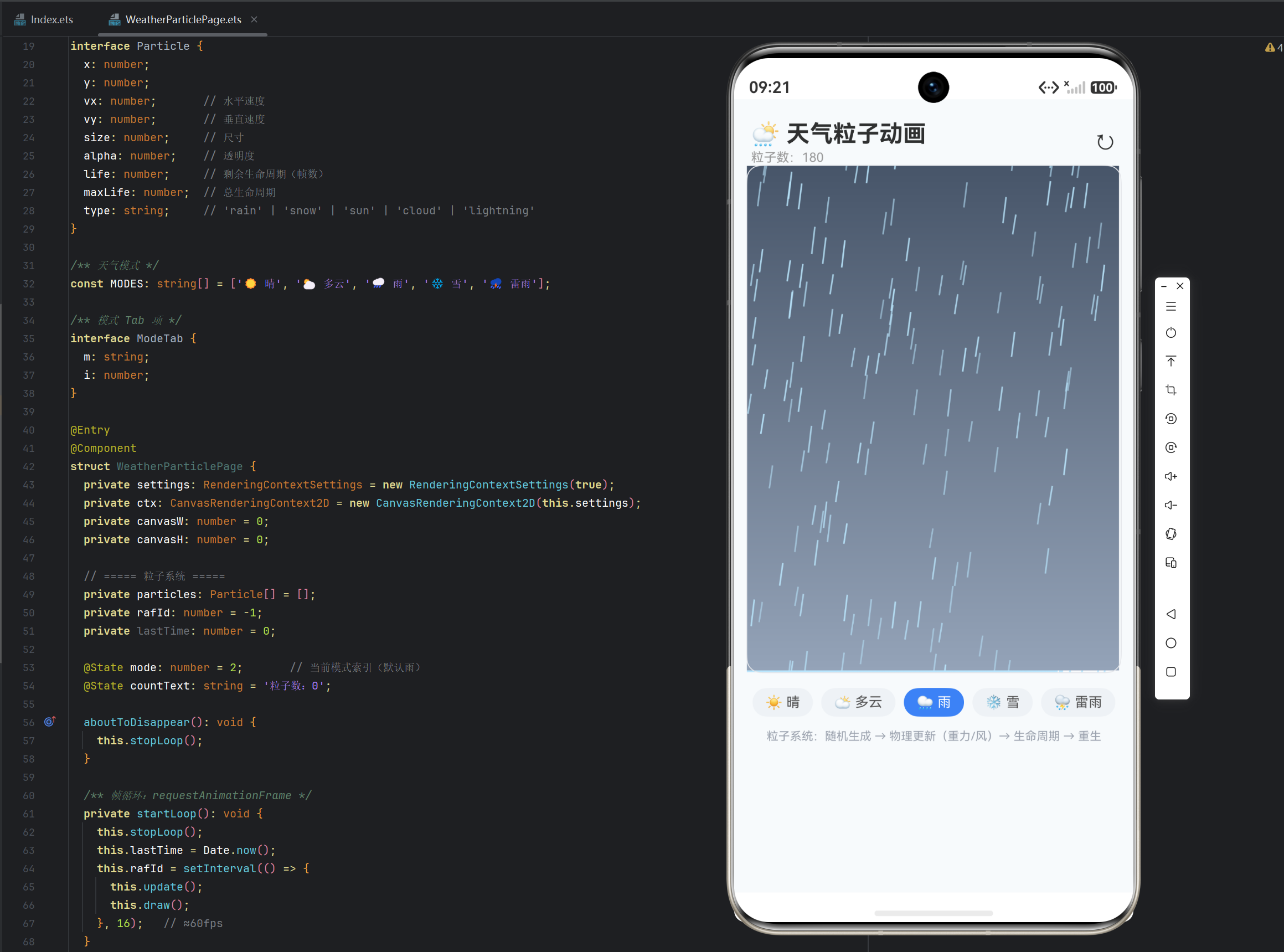
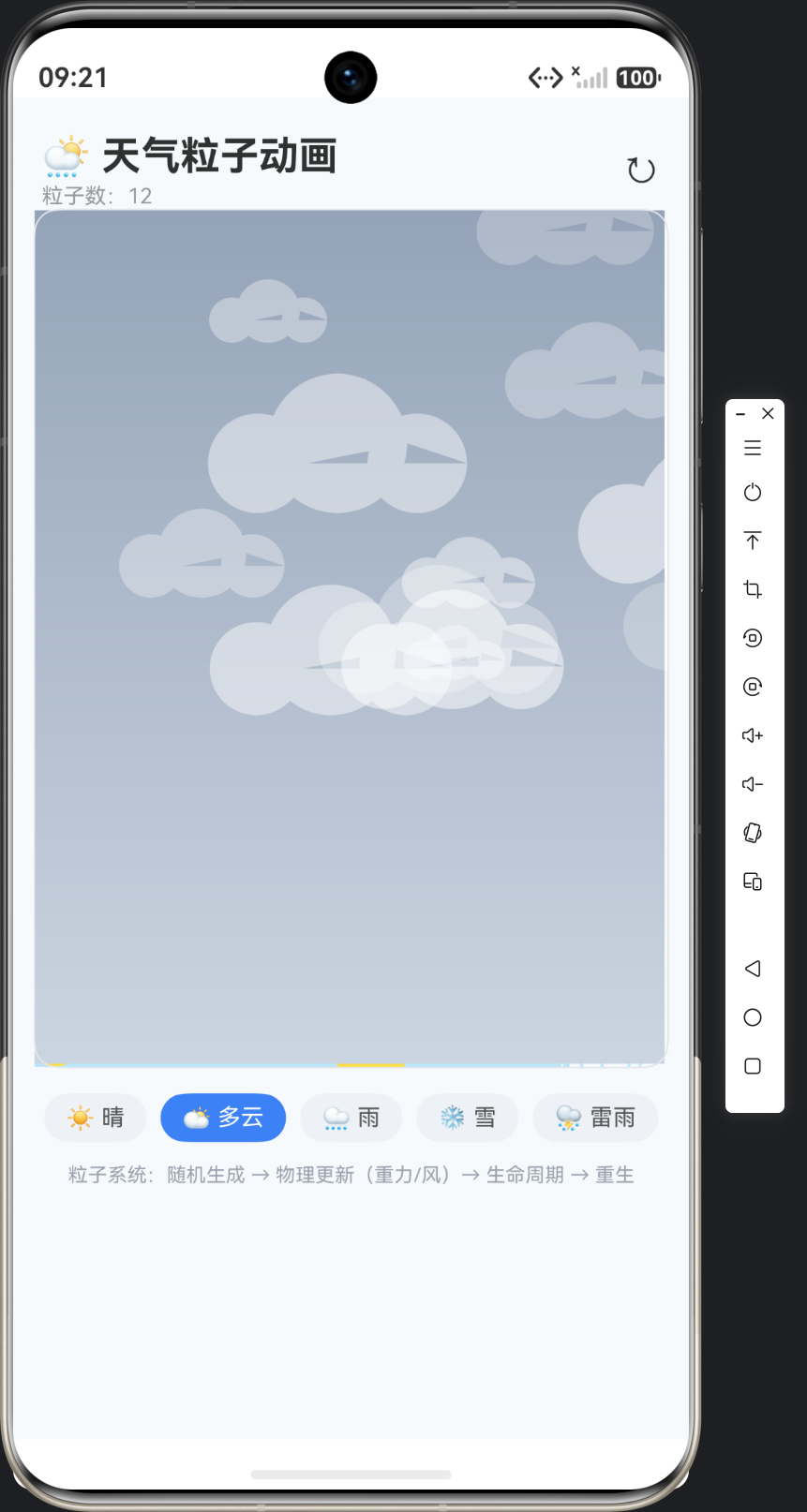
实例:天气粒子动画(Weather Particle)|技术:粒子对象池、帧循环、物理模拟(重力/风)、多模式生成、生命周期管理
一、为什么选天气粒子动画
1.1 从"静态粒子"到"多模式粒子系统"
25 粒子特效是第一个粒子应用(星空/烟花)。天气粒子动画把它升级为多模式粒子系统:
- 晴:漂浮光斑(慢速随机游走);
- 多云:灰白云团(水平漂移);
- 雨:雨丝(重力加速 + 斜风);
- 雪:雪花(慢速飘落 + 摇摆);
- 雷雨:雨丝 + 随机闪电(全屏闪烁)。
五种模式共用一套粒子引擎(生成/更新/绘制/重生),差异只在粒子的生成参数与绘制形态——这是"引擎 + 配置"架构的经典示范:同样的循环,不同的配方。
1.2 技术要点一览
| 技术点 | 用途 |
|---|---|
| 粒子对象池 | 数量稳定、复用避免 GC |
| 帧循环 | 60fps 动画(16ms interval) |
| 物理模拟 | vy 重力、vx 风力、速度向量 |
| 生命周期 | life/maxLife,到期重生 |
| 多模式生成 | switch 分发 spawnParticle |
| 背景渐变 | createLinearGradient 按模式配色 |
| 随机闪电 | 低概率粒子 + 锯齿绘制 + 全屏闪烁 |
二、粒子系统设计
2.1 粒子数据结构
interface Particle {
  x: number;
  y: number;
  vx: number;       // 水平速度
  vy: number;       // 垂直速度
  size: number;     // 尺寸
  alpha: number;    // 透明度
  life: number;     // 剩余生命周期(帧数)
  maxLife: number;  // 总生命周期
  type: string;     // 'rain' | 'snow' | 'sun' | 'cloud' | 'lightning'
}
一个接口覆盖所有天气:位置、速度、尺寸、透明度、生命周期是粒子的通用属性;type 标记种类,绘制时分发。同构接口 + 类型分发——五种天气共享结构,绘制按 type 分支。
2.2 模式与数量配置
const MODES: string[] = ['☀️ 晴', '🌥️ 多云', '🌧️ 雨', '❄️ 雪', '⛈️ 雷雨'];

private targetCount(): number {
  const map: number[] = [40, 12, 180, 150, 220];
  return map[this.mode] ?? 100;
}
每种天气的目标粒子数:晴 40(光斑稀疏)、多云 12(云团少而大)、雨 180(密集雨丝)、雪 150、雷雨 220(雨+闪电最密)。粒子数 = 视觉密度的核心参数。
三、生成工厂:按模式分发 ★核心方法
private spawnParticle(initial: boolean): Particle {
  const w = this.canvasW > 0 ? this.canvasW : 360;
  const h = this.canvasH > 0 ? this.canvasH : 640;
  switch (this.mode) {
    case 0: return this.spawnSun(w, h);
    case 1: return this.spawnCloud(w, h);
    case 2: return this.spawnRain(w, h, initial);
    case 3: return this.spawnSnow(w, h, initial);
    default: return this.spawnLightning(w, h);
  }
}
生成工厂:根据当前模式调用对应的 spawn 方法。initial 参数区分"初始化时均匀分布"与"运行中从顶部生成"——雨的初始化粒子散布全屏(避免开局空白),后续粒子从顶部落下。
3.1 晴:漂浮光斑
private spawnSun(w: number, h: number): Particle {
  return {
    x: Math.random() * w, y: Math.random() * h,
    vx: (Math.random() - 0.5) * 0.3, vy: (Math.random() - 0.5) * 0.3,
    size: 6 + Math.random() * 10, alpha: 0.15 + Math.random() * 0.3,
    life: 120 + Math.random() * 120, maxLife: 240,
    type: 'sun',
  };
}
晴的"光斑":速度极慢(±0.15)、随机方向漂移;尺寸 6~16 随机;透明度低(0.15~0.45)——柔和的光点。慢速 + 半透明 = 宁静感。
3.2 雨:重力雨丝
private spawnRain(w: number, h: number, initial: boolean): Particle {
  return {
    x: Math.random() * w,
    y: initial ? Math.random() * h : -20,   // 新粒子从顶部
    vx: -1.5,                 // 风向左吹
    vy: 9 + Math.random() * 4, // 高速下落
    size: 1.5, alpha: 0.5 + Math.random() * 0.4,
    life: 200, maxLife: 200,
    type: 'rain',
  };
}
雨的物理:vy 9~13(高速下落,模拟重力),vx -1.5(固定斜风)。雨丝 = 高速度 + 小尺寸 + 半透明。initial 参数:首次生成均匀分布全屏,之后从 y=-20 顶部生成(出生在屏幕外,落下时已"成形")。
3.3 雪:慢速摇摆
private spawnSnow(w: number, h: number, initial: boolean): Particle {
  return {
    x: Math.random() * w,
    y: initial ? Math.random() * h : -10,
    vx: (Math.random() - 0.5) * 0.8,  // 随机横风(摇摆感)
    vy: 1.2 + Math.random() * 0.8,    // 慢速下落
    size: 2 + Math.random() * 3,
    alpha: 0.6 + Math.random() * 0.4,
    life: 400 + Math.random() * 200, maxLife: 600,
    type: 'snow',
  };
}
雪的物理:vy 1.2~2(极慢,雨的 1/6),vx 随机(±0.4 摆动)。慢速 + 横风随机 = 雪花飘落感。生命周期长(400~600 帧)——雪落得慢,给足寿命。
3.4 雷雨:雨 + 随机闪电
private spawnLightning(w: number, h: number): Particle {
  const isFlash = Math.random() < 0.02;   // 2% 概率闪电
  return {
    x: Math.random() * w,
    y: -20,
    vx: -2, vy: 10 + Math.random() * 5,
    size: isFlash ? 8 : 1.5,
    alpha: isFlash ? 0.9 : 0.5,
    life: isFlash ? 8 : 200, maxLife: 200,
    type: isFlash ? 'lightning' : 'rain',
  };
}
闪电的"特殊粒子":2% 概率生成闪电粒子——type=‘lightning’、寿命极短(8 帧,闪烁即逝)、尺寸大。用低概率 + 短寿命实现"偶尔打闪",不需要单独的事件系统——闪电就是"稀有粒子"。
四、更新循环:物理 + 生命周期
private update(): void {
  const w = this.canvasW > 0 ? this.canvasW : 360;
  const h = this.canvasH > 0 ? this.canvasH : 640;
  const alive: Particle[] = [];
  for (const p of this.particles) {
    p.life--;
    p.x += p.vx;   // 位置 = 速度 × 帧
    p.y += p.vy;
    // 生命周期结束或出界 → 重生
    if (p.life <= 0 || p.y > h + 30 || p.x < -50 || p.x > w + 50) {
      alive.push(this.spawnParticle(false));
      continue;
    }
    alive.push(p);
  }
  this.particles = alive;
  this.countText = `粒子数:${alive.length}`;
}
粒子更新三件事:① 生命递减;② 位置 += 速度(每帧一格的积分,速度单位是"像素/帧");③ 死亡判定——寿命耗尽或出界(预留 30px 边缘)则重生(不是删除,是换新粒子)。
“重生 vs 删除”:删除会让粒子数逐步减少直到 0(需要外部补充);重生在循环内自给自足——粒子数恒等于 targetCount(大约,因为出界判定有随机性)。这是"粒子对象池"的简化版:没有真正的对象复用,但"死亡即重生"维持了数量稳定。
countText 更新:实时粒子数显示(@State)——用户能看到粒子系统的"呼吸"。
五、帧循环
private startLoop(): void {
  this.stopLoop();
  this.lastTime = Date.now();
  this.rafId = setInterval(() => {
    this.update();
    this.draw();
  }, 16);   // ≈60fps
}
16ms interval ≈ 60fps:每帧"更新 + 绘制"。与 34 贪吃蛇的 150ms 步进不同——天气动画需要流畅的视觉,用高帧率。setInterval 的 16ms 是近似 60fps(实际受系统调度影响),严格 60fps 应 requestAnimationFrame(@kit.ArkUI 的 rAF 需组件绑定,教学用 interval 近似)。
六、绘制:背景渐变 + 类型分发
private drawBackground(w: number, h: number): void {
  const grad = this.ctx.createLinearGradient(0, 0, 0, h);
  switch (this.mode) {
    case 0: grad.addColorStop(0, '#38BDF8'); grad.addColorStop(1, '#E0F2FE'); break;  // 晴:亮蓝
    case 1: grad.addColorStop(0, '#94A3B8'); grad.addColorStop(1, '#CBD5E1'); break;  // 多云:灰蓝
    case 2: grad.addColorStop(0, '#475569'); grad.addColorStop(1, '#94A3B8'); break;  // 雨:深灰
    case 3: grad.addColorStop(0, '#E2E8F0'); grad.addColorStop(1, '#F8FAFC'); break;  // 雪:浅白
    default: grad.addColorStop(0, '#334155'); grad.addColorStop(1, '#64748B'); break; // 雷雨:暗灰
  }
  this.ctx.fillStyle = grad;
  this.ctx.fillRect(0, 0, w, h);
}
按模式配背景:晴亮蓝、多云灰蓝、雨深灰、雪浅白、雷雨暗灰——背景本身就是天气氛围的一半,粒子负责动感,背景负责基调。
6.1 雨丝绘制
private drawRain(p: Particle): void {
  this.ctx.strokeStyle = `rgba(186, 230, 253, ${p.alpha})`;
  this.ctx.lineWidth = p.size;
  this.ctx.beginPath();
  this.ctx.moveTo(p.x, p.y);
  this.ctx.lineTo(p.x + p.vx * 2, p.y + p.vy * 2);   // 沿速度方向画线
  this.ctx.stroke();
}
雨丝 = 沿速度方向的短线:从 (x,y) 到 (x+vx2, y+vy2)——线的方向与速度一致,雨滴有"下落轨迹"感。
6.2 雪花绘制
private drawSnow(p: Particle): void {
  this.ctx.fillStyle = `rgba(255, 255, 255, ${p.alpha})`;
  this.ctx.beginPath();
  this.ctx.arc(p.x, p.y, p.size, 0, Math.PI * 2);
  this.ctx.fill();
}
雪花 = 白色圆(简化,真实雪花有六角结构——教学用圆点,深度扩展给六角画法)。
6.3 云团绘制
private drawCloud(p: Particle): void {
  this.ctx.fillStyle = `rgba(255, 255, 255, ${p.alpha})`;
  this.ctx.beginPath();
  // 云团:三个圆叠加
  this.ctx.arc(p.x, p.y, p.size * 0.7, 0, Math.PI * 2);
  this.ctx.arc(p.x - p.size * 0.8, p.y + p.size * 0.2, p.size * 0.5, 0, Math.PI * 2);
  this.ctx.arc(p.x + p.size * 0.8, p.y + p.size * 0.2, p.size * 0.5, 0, Math.PI * 2);
  this.ctx.fill();
}
三圆叠云:一个大圆 + 左右两个小圆,三个半透明圆叠加出"云团"轮廓——几何拼合绘制,无需图片素材。
6.4 闪电绘制
private drawLightning(p: Particle): void {
  if (p.life > p.maxLife - 4) {
    // 闪烁:整个画布闪白
    this.ctx.fillStyle = 'rgba(255, 255, 255, 0.25)';
    this.ctx.fillRect(0, 0, this.canvasW, this.canvasH);
  }
  this.ctx.strokeStyle = 'rgba(253, 224, 71, 0.9)';
  this.ctx.lineWidth = 2;
  this.ctx.beginPath();
  this.ctx.moveTo(p.x, p.y);
  for (let i = 1; i <= 5; i++) {
    this.ctx.lineTo(p.x + (Math.random() - 0.5) * 30, p.y + i * 12);   // 锯齿
  }
  this.ctx.stroke();
}
闪电两层效果:① 全屏闪白——生命前 4 帧覆盖半透明白色矩形(模拟雷光);② 锯齿线——5 段横向随机偏移的折线(闪电的经典形状)。每次重绘随机锯齿,闪电形状闪烁变化。
七、模式切换
private switchMode(idx: number): void {
  this.mode = idx;
  this.particles = [];   // 清空旧粒子
  this.countText = '';
  for (let i = 0; i < this.targetCount(); i++) {
    this.particles.push(this.spawnParticle(true));
  }
  this.startLoop();
}
切模式 = 清空 + 重建 + 重启循环。清空避免新旧天气粒子混杂(雨的粒子瞬间变雪花很突兀);首波粒子 initial=true 均匀分布(开局即完整画面)。
八、技术要点对照表
| 技术点 | 实现方式 | 生产价值 |
|---|---|---|
| 粒子接口 | 统一 Particle + type 分发 | 一引擎多模式 |
| 生成工厂 | switch 分发 spawn* | 模式可扩展 |
| 物理模拟 | vx/vy 每帧积分 | 重力/风真实感 |
| 生命周期 | life-- 到期重生 | 粒子自循环 |
| 出界重生 | 边界 + 边缘余量 | 画面不空洞 |
| 背景渐变 | createLinearGradient | 氛围基调 |
| 随机闪电 | 2% 概率 + 短寿命 | 稀有事件粒子化 |
| 高帧率 | 16ms interval | 流畅动画 |
九、文章小结
本篇完成了天气粒子动画的引擎层:统一粒子接口 + 生成工厂(五种天气各自 spawn)、物理模拟(速度向量每帧积分)、生命周期与出界重生(粒子自循环)、背景渐变 + 类型分发绘制。这套"引擎 + 配置"架构的精髓是:粒子系统只写一遍,天气差异全部收敛到 spawn 参数与绘制分支——新增一种天气(如雾)只需加一个 spawn 方法和一个绘制分支。
下一篇《页面 UI 与交互实现》将搭建:天气画布、模式切换 Tab、粒子数实时显示、说明文案。
十、深度扩展
1. 六角雪花
真实雪花是六角形。绘制:
private drawSnowflake(p: Particle): void {
  this.ctx.save();
  this.ctx.translate(p.x, p.y);
  this.ctx.strokeStyle = `rgba(255,255,255,${p.alpha})`;
  this.ctx.lineWidth = 1;
  for (let i = 0; i < 6; i++) {
    this.ctx.rotate(Math.PI / 3);
    this.ctx.beginPath();
    this.ctx.moveTo(0, 0);
    this.ctx.lineTo(0, p.size * 2);
    this.ctx.stroke();
  }
  this.ctx.restore();
}
save/translate/rotate/restore 变换绘制六个分支——几何变换 + 循环画复杂形状。
2. 重力加速度
本实例速度恒定(vy 不随时间变)。真实重力是加速度:
p.vy += 0.3; // 每帧加速(重力)
雨滴越落越快,更真实。恒速 vs 加速:恒速省事视觉稳定,加速更物理。教学用恒速,注释说明升级路径。
3. 性能:粒子数与帧率
220 粒子 × 60fps = 13200 次绘制/秒,Canvas 2D 无压力。若上千粒子,优化:
- 减少 clearRect 面积(只清变化区);
- 用离屏 Canvas 缓存背景(背景渐变每帧重画浪费);
- 降帧率(雷雨 30fps 足够)。
先看帧率再优化——除非卡顿,别提前优化。
4. FAQ
Q1:为什么用 setInterval(16) 而不是 requestAnimationFrame?
A:rAF 在 ArkTS Canvas 组件上需绑定组件生命周期(onAppear 后可用),实现稍繁;16ms interval 教学直观。生产追求 60fps 精确对齐用 rAF。
Q2:粒子数为什么不是严格的 targetCount?
A:出界判定有随机性(闪电寿命 8 帧提前死、云慢飘延迟出界),重生时机不同步导致实时数量在目标值附近波动。近似稳定即可,countText 显示真实值。
Q3:切模式时清空粒子会不会闪一下空白?
A:switchMode 里清空后立即生成首波(同步循环),再启动帧循环——清空与重建在同一同步代码块,中间没有渲染机会,用户看不到空白帧。
Q4:闪电的锯齿每次重绘都变,会不会闪得太乱?
A:闪电生命仅 8 帧(约 0.13 秒),每次重绘变锯齿 = "闪烁"效果,正合适。若要不规则抖动更剧烈,可加横向偏移范围。
Q5:背景渐变每帧重画浪费吗?
A:createLinearGradient + fillRect 每帧执行,开销小(两次颜色插值 + 一次填充)。粒子多时可缓存背景(离屏 canvas 画一次,draw 里 drawImage 贴回)。教学直绘,扩展留缓存。
十一、下篇预告
下一篇《页面 UI 与交互实现》将完成:天气画布(94% 宽 + 480 高)、模式切换 Tab(五胶囊)、粒子数实时显示、底部说明文案——并演示"晴→雨→雪"切换时粒子系统的平滑重建。

作为“人工智能6S店”的官方数字引擎,为AI开发者与企业提供一个覆盖软硬件全栈、一站式门户。
更多推荐

 7
7 0
0- 0


 已为社区贡献21条内容

所有评论(0)