
鸿蒙多端协同高级架构设计:跨设备UI状态同步/事件总线/分布式ViewModel/MVVM协同模式
·
一、前置思考
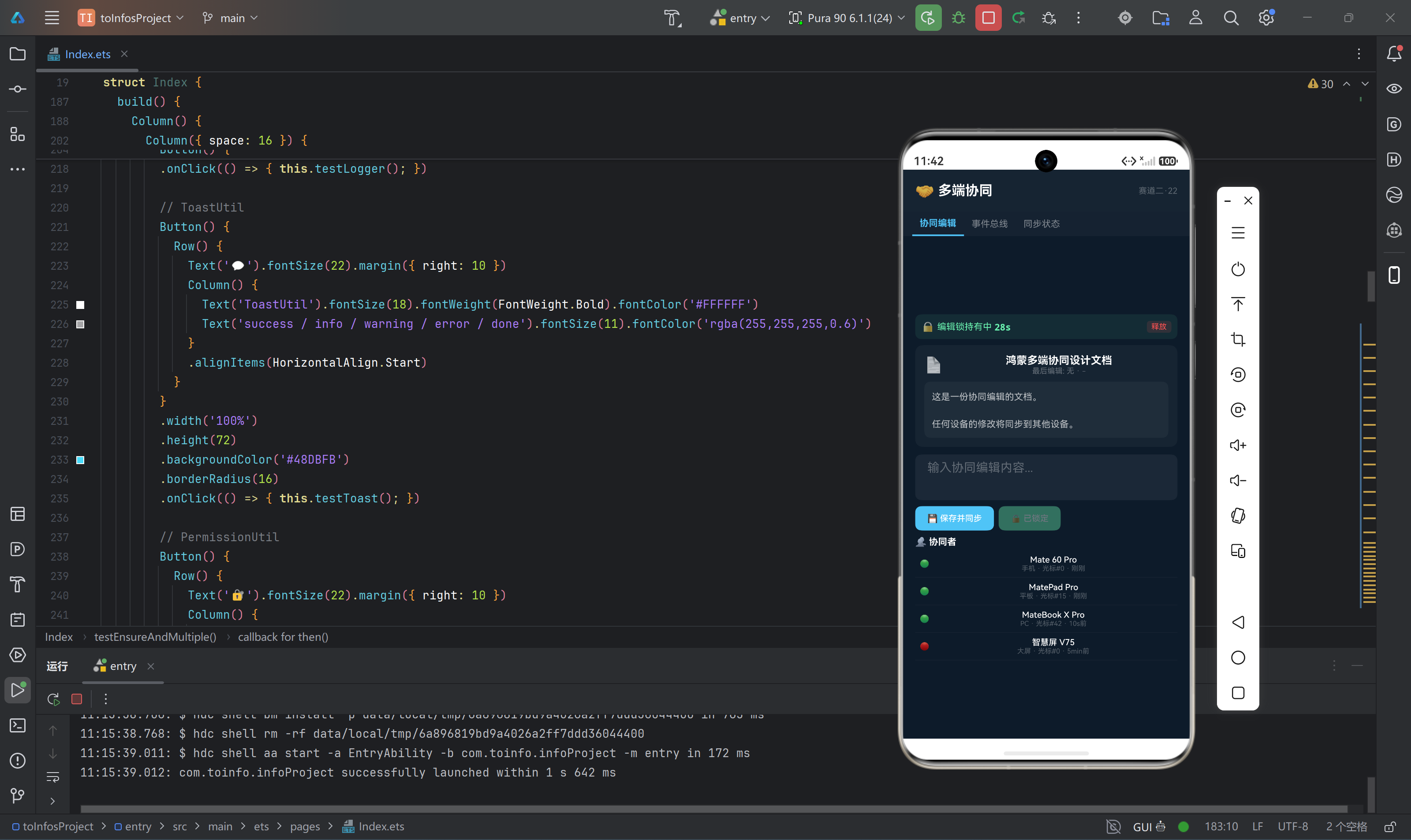
多端协同是鸿蒙"1+8+N"战略的核心——手机编辑,平板预览,PC完成复杂操作,智慧屏展示最终成果。但"协同"≠"投影",真正的多端协同要求:各端拥有自己的UI(适配屏幕大小),但共享同一份业务逻辑和数据状态。
本文聚焦:
- 跨设备UI状态同步的架构选择(集中式 vs 对等式 vs 混合)
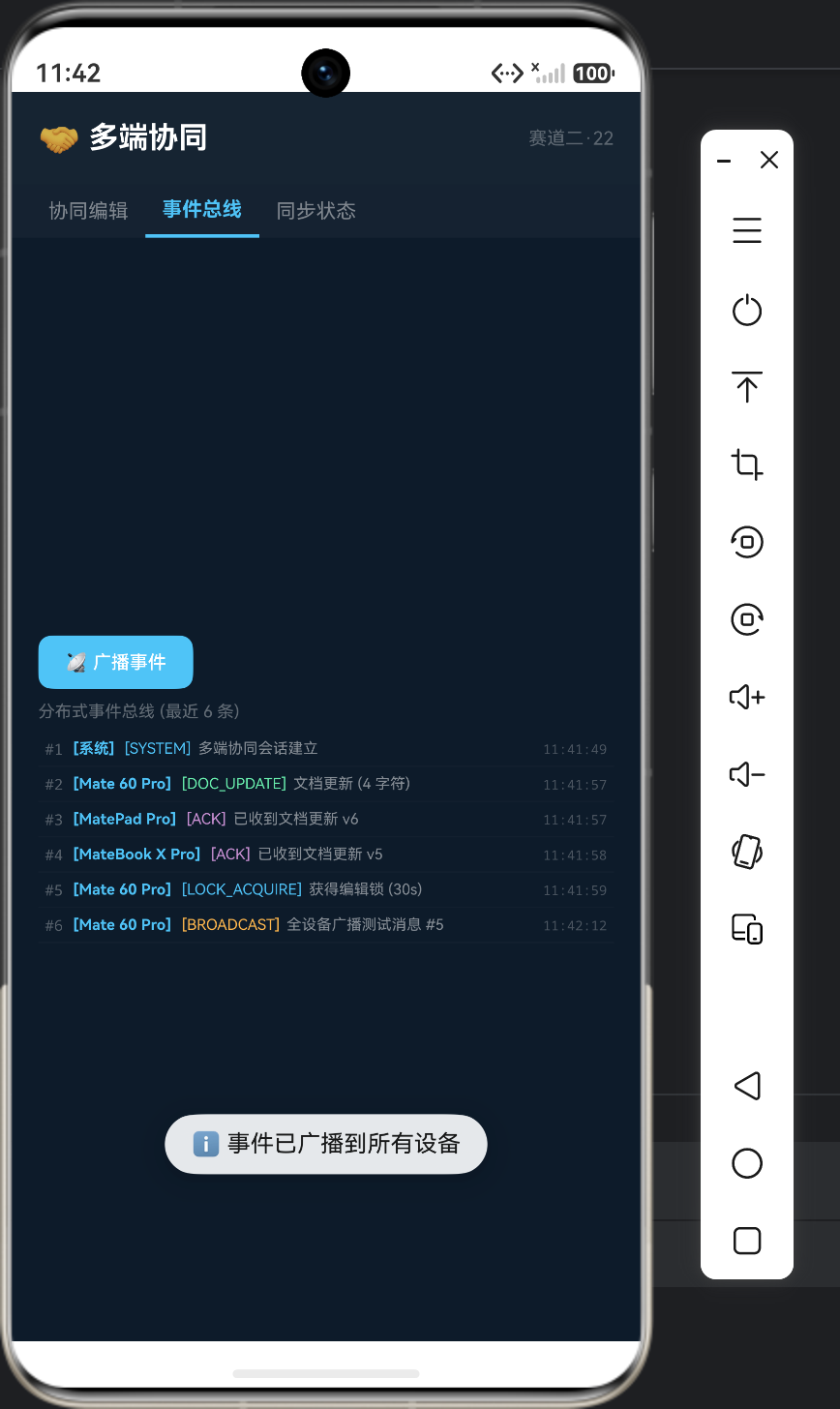
- 分布式事件总线实现跨设备UI事件传递
- 分布式ViewModel:一套业务逻辑,多端UI共享
- 协同编辑的锁机制与操作队列
真实痛点场景:
- 状态不同步:手机端修改了数据,平板端屏幕显示的还是旧数据
- 协同冲突:两端同时修改,导致数据被覆盖
- UI不匹配:手机和平板的UI完全不同,但业务逻辑共享
- 操作乱序:手机端先操作但网络延迟,平板收消息顺序错误
二、核心原理
2.1 多端协同架构对比
┌──────────────────────────────────────────────────────┐
│        方案A: 集中式 (Star Topology)                   │
│                                                      │
│              ┌─────────┐                            │
│              │ Host设备 │ ← 中心节点,持有ViewModel    │
│              └────┬────┘                            │
│          ┌────────┼────────┐                        │
│    ┌─────┴────┐ ┌─┴──────┐ ┌─────┴────┐            │
│    │ 手机UI   │ │平板UI  │ │ PC UI    │            │
│    └──────────┘ └────────┘ └──────────┘            │
│                                                      │
│  优点: 一致性强  缺点: Host离线全挂                      │
├──────────────────────────────────────────────────────┤
│        方案B: 对等式 (P2P)                             │
│                                                      │
│   ┌──────────┐    ┌──────────┐    ┌──────────┐      │
│   │ 手机VM   │◄──►│ 平板VM   │◄──►│ PC VM    │      │
│   │ + UI     │    │ + UI     │    │ + UI     │      │
│   └──────────┘    └──────────┘    └──────────┘      │
│                                                      │
│  优点: 无单点故障  缺点: 一致性冲突多                    │
├──────────────────────────────────────────────────────┤
│        方案C: 混合式 (Hybrid) ◄── 鸿蒙推荐              │
│                                                      │
│   本地优先 + CRDT同步 + 版本向量冲突解决                │
│   distributedKVStore (数据) + EventBus (事件)          │
└──────────────────────────────────────────────────────┘
2.2 分布式ViewModel设计
// 分布式 ViewModel 基类
abstract class DistributedViewModel {
  protected kvStore: distributedKVStore.SingleKVStore | null = null;
  protected isPrimary: boolean = false;
  protected deviceId: string = '';

  // 初始化分布式状态
  async init(deviceId: string, storeName: string): Promise<void> {
    this.deviceId = deviceId;
    const kvManager: distributedKVStore.KVManager =
      distributedKVStore.createKVManager({ bundleName: 'com.example.app' });

    this.kvStore = await kvManager.getKVStore(storeName, {
      createIfMissing: true,
      encrypt: true,
      kvStoreType: distributedKVStore.KVStoreType.DEVICE_COLLABORATION,
      securityLevel: distributedKVStore.SecurityLevel.S2
    });

    // 监听远端状态变化
    this.kvStore.on('dataChange',
      distributedKVStore.SubscribeType.SUBSCRIBE_TYPE_ALL,
      (data: distributedKVStore.ChangeNotification) => {
        this.onRemoteStateChanged(data);
      }
    );
  }

  // 子类实现:远端状态变化时的UI更新逻辑
  abstract onRemoteStateChanged(data: distributedKVStore.ChangeNotification): void;

  // 更新状态并同步
  async updateAndSync(key: string, value: string): Promise<void> {
    if (this.kvStore === null) return;

    // 本地原子更新
    await this.kvStore.put(key, value);

    // 触发增量同步
    await this.kvStore.sync([], distributedKVStore.SyncMode.PUSH_PULL);
  }
}

// 具体ViewModel示例:协同文档编辑器
class CollaborativeDocViewModel extends DistributedViewModel {
  private content: string = '';
  private cursorPosition: number = 0;
  private collaborators: Map<string, CursorInfo> = new Map();

  // 本地修改文档
  async editContent(newContent: string, cursorPos: number): Promise<void> {
    this.content = newContent;
    this.cursorPosition = cursorPos;

    // 将变更同步到其他设备
    await this.updateAndSync('doc:content', newContent);
    await this.updateAndSync('doc:cursor:' + this.deviceId,
      this.serializeCursor(cursorPos));
  }

  // 远端状态变化回调
  onRemoteStateChanged(data: distributedKVStore.ChangeNotification): void {
    const updateEntries: distributedKVStore.Entry[] =
      data.updateEntries as distributedKVStore.Entry[];

    for (let i: number = 0; i < updateEntries.length; i++) {
      const entry: distributedKVStore.Entry = updateEntries[i];
      if (entry.key === 'doc:content') {
        this.content = entry.value.value as string;
        this.triggerUICallback('onContentChanged', this.content);
      } else if ((entry.key as string).startsWith('doc:cursor:')) {
        const deviceId: string = (entry.key as string).slice('doc:cursor:'.length);
        const cursorInfo: CursorInfo = this.deserializeCursor(entry.value.value as string);
        this.collaborators.set(deviceId, cursorInfo);
        this.triggerUICallback('onRemoteCursorMoved', deviceId, cursorInfo);
      }
    }
  }

  private serializeCursor(pos: number): string {
    return JSON.stringify({ position: pos, timestamp: Date.now() });
  }

  private deserializeCursor(json: string): CursorInfo {
    const obj: Record<string, number> = JSON.parse(json) as Record<string, number>;
    return { position: obj['position'], timestamp: obj['timestamp'] };
  }
}

interface CursorInfo {
  position: number;
  timestamp: number;
}
2.3 分布式事件总线
// 跨设备事件总线
class DistributedEventBus {
  private static instance: DistributedEventBus;
  private listeners: Map<string, EventCallback[]> = new Map();
  private kvStore: distributedKVStore.SingleKVStore | null = null;

  static getInstance(): DistributedEventBus {
    if (DistributedEventBus.instance === undefined) {
      DistributedEventBus.instance = new DistributedEventBus();
    }
    return DistributedEventBus.instance;
  }

  async init(kvStore: distributedKVStore.SingleKVStore): Promise<void> {
    this.kvStore = kvStore;
    // 监听事件通道
    this.kvStore.on('dataChange',
      distributedKVStore.SubscribeType.SUBSCRIBE_TYPE_REMOTE,
      (data: distributedKVStore.ChangeNotification) => {
        const insertEntries: distributedKVStore.Entry[] =
          data.insertEntries as distributedKVStore.Entry[];
        for (let i: number = 0; i < insertEntries.length; i++) {
          const entry: distributedKVStore.Entry = insertEntries[i];
          if ((entry.key as string).startsWith('event:')) {
            this.dispatchEvent(entry.key as string, entry.value.value as string);
          }
        }
      }
    );
  }

  // 发送跨设备事件
  async emit(eventName: string, payload: string): Promise<void> {
    if (this.kvStore === null) return;

    const eventKey: string = 'event:' + eventName + ':' + Date.now();
    await this.kvStore.put(eventKey, payload);
    await this.kvStore.sync([], distributedKVStore.SyncMode.PUSH_PULL);

    // 清理事件(5秒后自动删除)
    setTimeout(async () => {
      if (this.kvStore !== null) {
        await this.kvStore.delete(eventKey);
      }
    }, 5000);
  }

  // 订阅事件
  on(eventName: string, callback: EventCallback): void {
    let callbacks: EventCallback[] | undefined =
      this.listeners.get(eventName);
    if (callbacks === undefined) {
      callbacks = [];
      this.listeners.set(eventName, callbacks);
    }
    callbacks.push(callback);
  }

  private dispatchEvent(key: string, payload: string): void {
    // 解析事件名: "event:click:timestamp"
    const parts: string[] = key.split(':');
    const eventName: string = parts[1];

    const callbacks: EventCallback[] | undefined =
      this.listeners.get(eventName);
    if (callbacks !== undefined) {
      for (let i: number = 0; i < callbacks.length; i++) {
        callbacks[i](eventName, payload);
      }
    }
  }
}

type EventCallback = (eventName: string, payload: string) => void;
三、协同编辑锁机制
class CollaborativeLockManager {
  private readonly LOCK_TIMEOUT_MS: number = 30000; // 锁过期30秒
  private currentLock: LockInfo | null = null;
  private lockQueue: LockRequest[] = [];

  // 请求编辑锁
  async acquireLock(sectionId: string, deviceId: string): Promise<boolean> {
    // 检查是否有人持有锁
    const lockKey: string = 'lock:' + sectionId;
    const existingLock: LockInfo | null =
      await this.getExistingLock(lockKey);

    if (existingLock !== null) {
      // 锁过期
      if (Date.now() - existingLock.timestamp > this.LOCK_TIMEOUT_MS) {
        await this.releaseForce(lockKey);
      } else {
        // 排队等待
        return new Promise<boolean>((resolve) => {
          this.lockQueue.push({
            sectionId: sectionId,
            deviceId: deviceId,
            resolve: resolve
          });
        });
      }
    }

    // 获取锁
    this.currentLock = {
      sectionId: sectionId,
      deviceId: deviceId,
      timestamp: Date.now()
    };
    await this.setLock(lockKey, this.currentLock);
    return true;
  }

  // 释放锁
  async releaseLock(sectionId: string): Promise<void> {
    const lockKey: string = 'lock:' + sectionId;
    await this.deleteLock(lockKey);
    this.currentLock = null;

    // 通知队列中的下一个等待者
    if (this.lockQueue.length > 0) {
      const next: LockRequest | undefined = this.lockQueue.shift();
      if (next !== undefined) {
        next.resolve(true);
      }
    }
  }
}

interface LockInfo {
  sectionId: string;
  deviceId: string;
  timestamp: number;
}

interface LockRequest {
  sectionId: string;
  deviceId: string;
  resolve: (value: boolean) => void;
}
四、避坑速查
| 坑 | 现象 | 原因 | 解决 |
|---|---|---|---|
| 事件延迟大 | 操作后2-3秒其他端才响应 | KVStore同步有最小间隔 | 高频事件走软总线消息通道而非KVStore |
| 事件风暴 | 快速连续操作导致内存溢出 | 每次操作产生新key且未删除 | 事件添加TTL,过期自动删除;合并短时间重复事件 |
| 锁未释放 | 其他端永远无法编辑 | 应用崩溃时锁未释放 | 锁带过期时间(30s),心跳续期 |
| ViewModel泄露 | 页面关闭后数据仍在同步 | 未取消KVStore订阅 | onDestroy中unsubscribe + close kvStore |
| 不同端UI错乱 | 平板显示手机端UI | 未做设备类型适配 | ViewModel返回设备无关数据,UI层自行适配 |
| 操作回退 | 编辑文本5秒后回退 | 两端的CRDT合并使用了旧时间戳 | 确保所有设备时钟同步(NTP),误差<100ms |
| 连接数上限 | 第7个设备连不进来 | 单组协同上限6设备 | 拆分为子组,每组6人以内 |
五、总结
多端协同的架构核心是**“数据统一、UI独立”**:
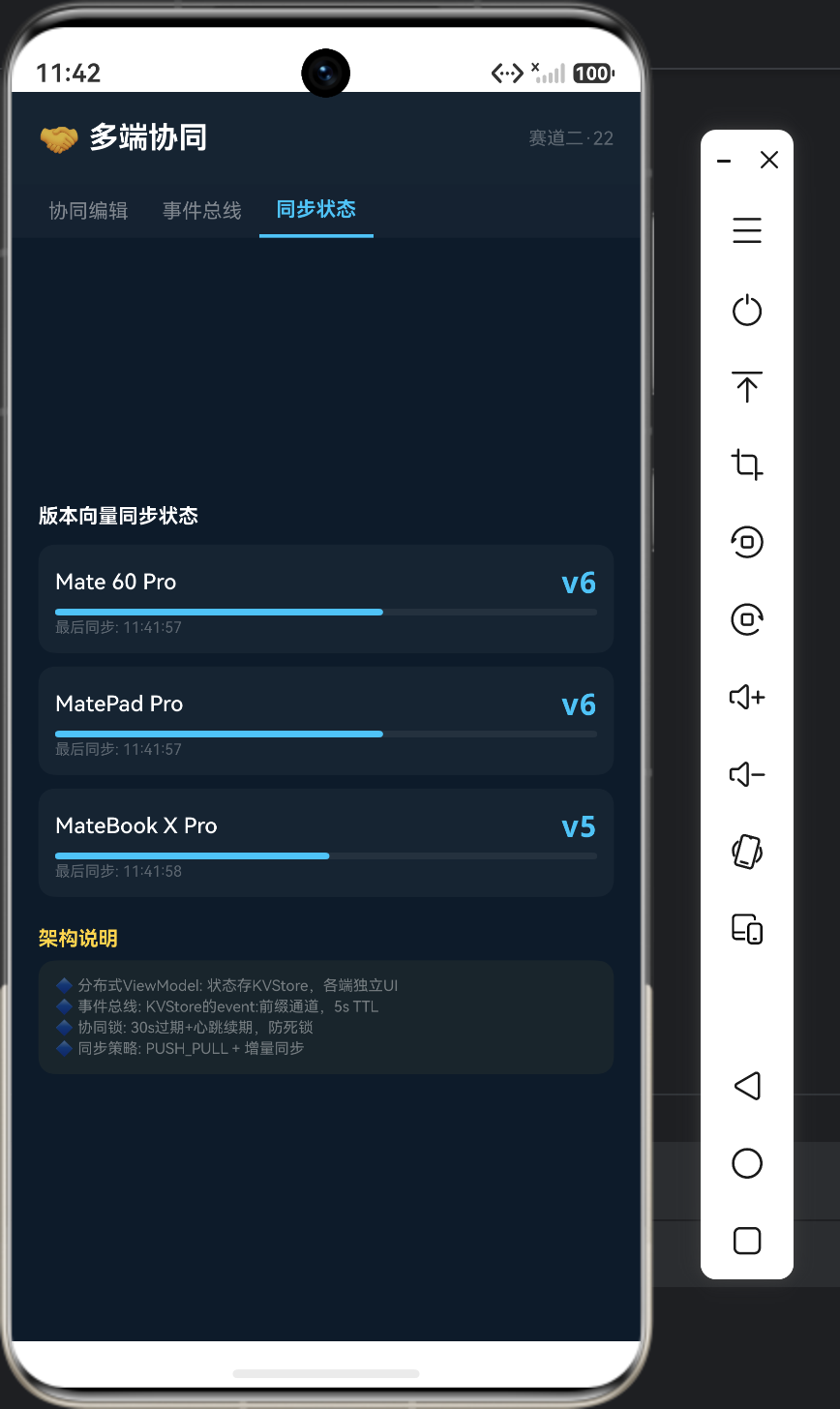
- 分布式ViewModel:状态用KVStore同步,各端独立UI渲染
- 事件总线:KVStore的event:前缀做通道,5秒TTL防泄漏
- 协同锁:30秒过期+心跳续期,防止死锁

作为“人工智能6S店”的官方数字引擎,为AI开发者与企业提供一个覆盖软硬件全栈、一站式门户。
更多推荐
 5
5 0
0- 0


 已为社区贡献25条内容

所有评论(0)