
鸿蒙分布式文件系统高级实战:跨设备文件访问/原子操作/并发控制/性能优化方案
·
一、前置思考
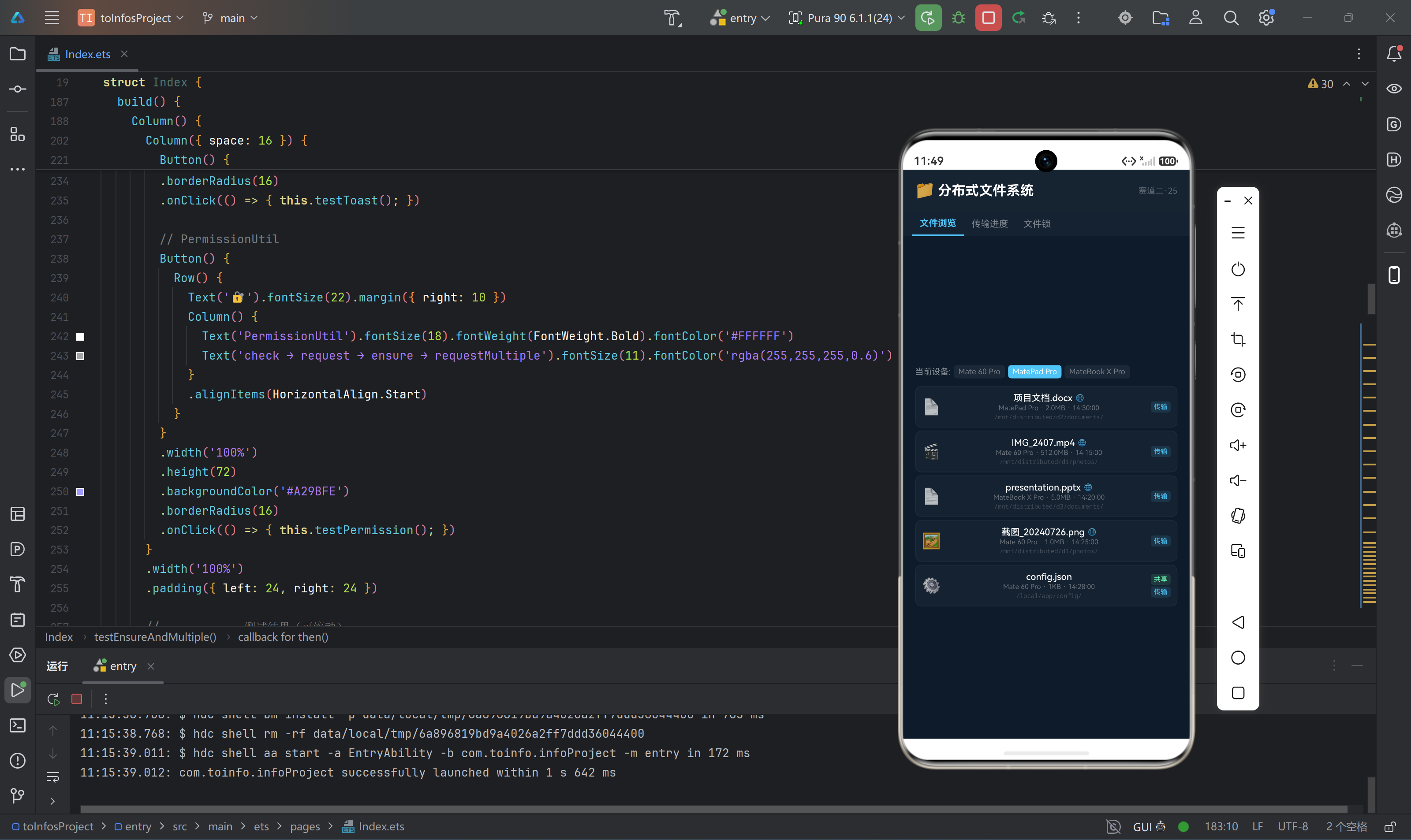
在分布式场景下,文件访问面临独特挑战:手机上的应用需要读取平板上的照片,PC需要访问手机上的文档。鸿蒙的分布式文件系统(Distributed File System)提供了透明的跨设备文件访问能力,让开发者像操作本地文件一样操作远程设备上的文件。
本文聚焦:
- distributedFileSystem的核心架构与挂载机制
- 跨设备文件共享的权限与安全控制
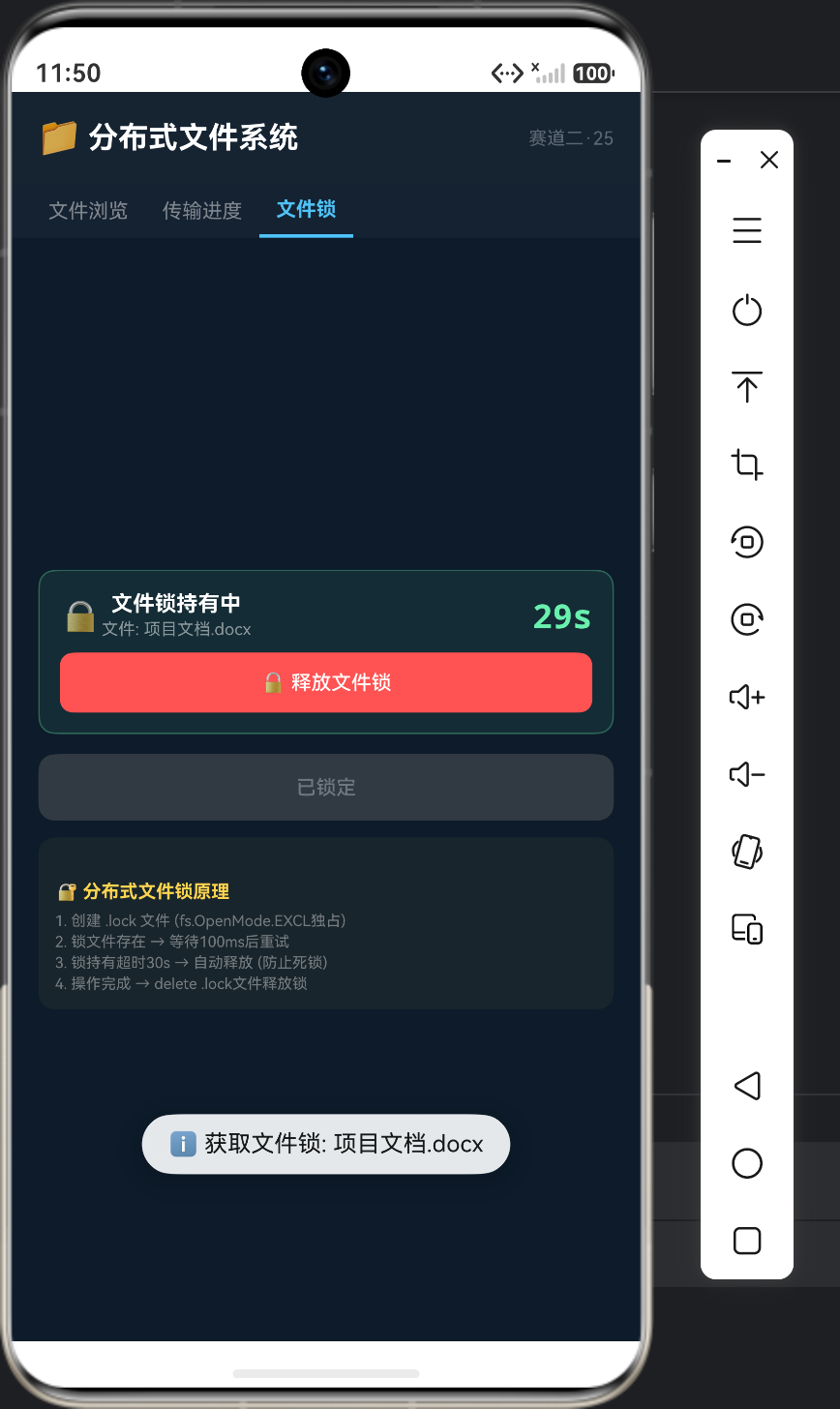
- 分布式文件并发读写的锁策略
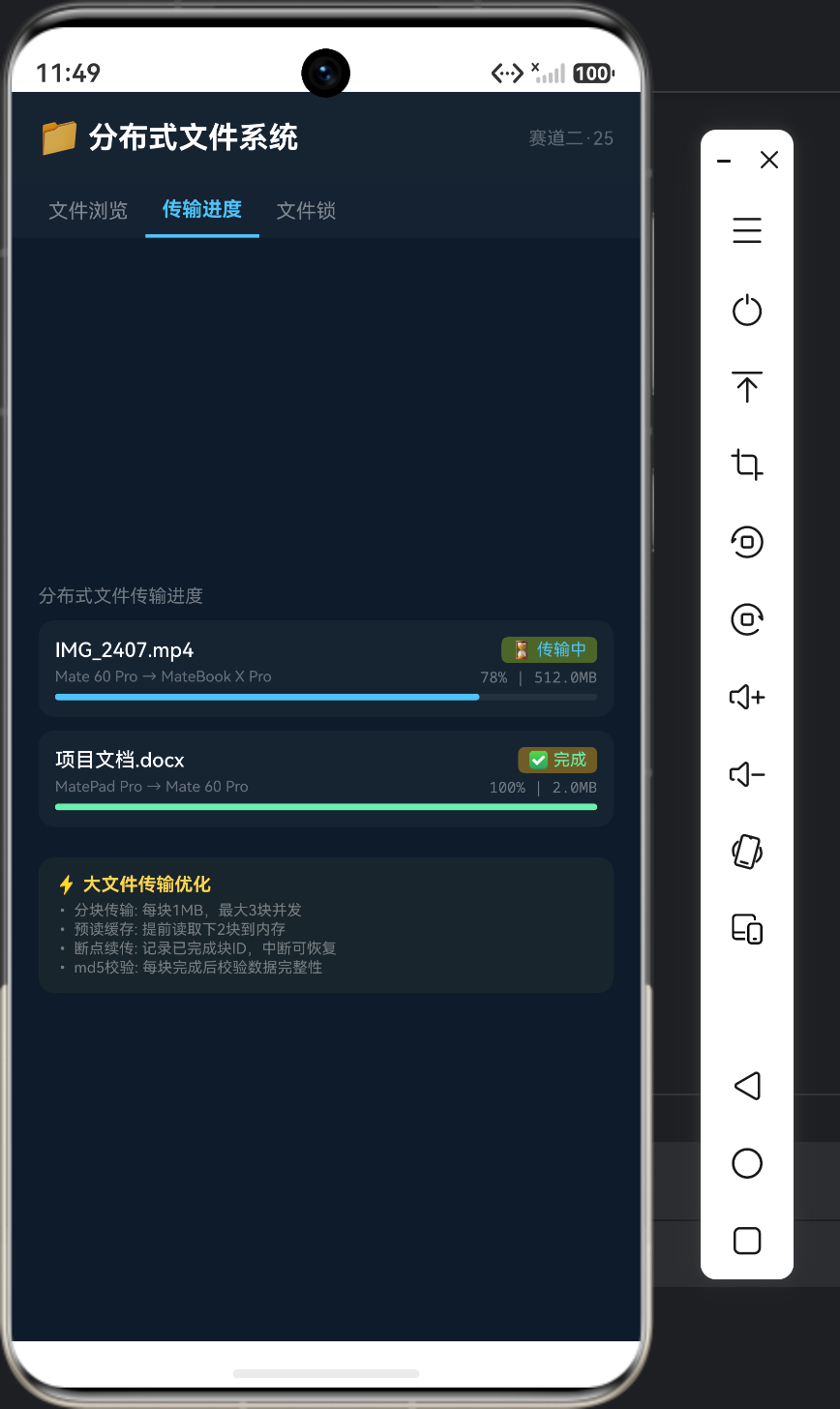
- 大文件传输的性能优化方案
真实痛点场景:
- 文件路径不对:用本地路径访问分布式文件报FileNotFound
- 权限拒绝:明明有文件权限,但访问远程文件被拒绝
- 文件不一致:两端同时写了同一个文件,最终文件损坏
- 大文件传输慢:几百兆的视频文件传输遥遥无期
二、核心原理
2.1 分布式文件系统架构
┌──────────────────────────────────────────┐
│             应用层                         │
│    file.openSync(distributedPath)         │
├──────────────────────────────────────────┤
│      DistributedFileSystem (DFS)         │
│  ┌────────────────────────────────────┐  │
│  │     虚拟文件系统 (VFS) 层          │  │
│  │   /mnt/distributed/{deviceId}/     │  │
│  │     ├── photos/                    │  │
│  │     ├── documents/                 │  │
│  │     └── downloads/                 │  │
│  └────────────────────────────────────┘  │
├──────────────────────────────────────────┤
│           同步引擎 (Sync Engine)          │
│  ├── 变更检测 (inotify)                  │
│  ├── 增量传输 (rsync-like)               │
│  ├── 冲突解决 (rename策略)               │
│  └── 预取缓存 (预读128KB)                │
├──────────────────────────────────────────┤
│           软总线 (DSoftBus)               │
└──────────────────────────────────────────┘
2.2 文件路径规则
// 鸿蒙分布式文件系统路径格式
// /mnt/distributed/{deviceId}/el2/distributedfiles/{relativePath}

// 获取分布式文件系统的根目录
import { distributedFileSys } from '@kit.CoreFileKit';

async function getDistributedRoot(deviceId: string): Promise<string> {
  const dfs: distributedFileSys.DistributedFileSystem =
    distributedFileSys.getDistributedFileSystem();

  // 获取分布式文件根路径
  const rootPath: string = await dfs.getRoot();
  // 返回: /mnt/distributed/
  return rootPath;
}

// 构建远程文件路径
function buildRemotePath(deviceId: string, relativePath: string): string {
  return '/mnt/distributed/' + deviceId + '/el2/distributedfiles/' + relativePath;
}
2.3 文件操作API
import { fileIo as fs } from '@kit.CoreFileKit';

class DistributedFileManager {
  // 复制文件到分布式路径(共享给其他设备)
  async shareFile(localPath: string, remoteDeviceId: string): Promise<string> {
    const distPath: string = '/mnt/distributed/' + remoteDeviceId +
      '/el2/distributedfiles/shared/' + this.getFileName(localPath);

    // 确保目录存在
    await fs.mkdir(this.getParentPath(distPath), true);

    // 复制文件
    await fs.copyFile(localPath, distPath, 0);

    return distPath;
  }

  // 读取远程文件
  async readRemoteFile(deviceId: string, relativePath: string): Promise<string> {
    const remotePath: string = '/mnt/distributed/' + deviceId +
      '/el2/distributedfiles/' + relativePath;

    const fd: number = await fs.open(remotePath, fs.OpenMode.READ_ONLY);
    const stat: fs.Stat = await fs.stat(fd);
    const buffer: ArrayBuffer = new ArrayBuffer(stat.size);
    await fs.read(fd, buffer);
    await fs.close(fd);

    const decoder: util.TextDecoder = new util.TextDecoder();
    const uint8: Uint8Array = new Uint8Array(buffer);
    return decoder.decodeWithStream(uint8, undefined);
  }

  // 列出远程目录
  async listRemoteFiles(deviceId: string): Promise<string[]> {
    const dirPath: string = '/mnt/distributed/' + deviceId +
      '/el2/distributedfiles/';
    const files: string[] = await fs.listFile(dirPath);
    return files;
  }

  // 删除远程文件
  async deleteRemoteFile(deviceId: string, relativePath: string): Promise<void> {
    const remotePath: string = '/mnt/distributed/' + deviceId +
      '/el2/distributedfiles/' + relativePath;
    await fs.unlink(remotePath);
  }

  private getFileName(path: string): string {
    const idx: number = path.lastIndexOf('/');
    return idx >= 0 ? path.slice(idx + 1) : path;
  }

  private getParentPath(path: string): string {
    const idx: number = path.lastIndexOf('/');
    return idx >= 0 ? path.slice(0, idx) : path;
  }
}
2.4 分布式文件锁
多设备同时操作同一文件时需要使用文件锁:
class DistributedFileLock {
  private readonly LOCK_RETRY_MS: number = 100;
  private readonly LOCK_TIMEOUT_MS: number = 10000;

  // 获取排他锁
  async acquireExclusiveLock(filePath: string, timeoutMs: number): Promise<boolean> {
    const startTime: number = Date.now();

    while (Date.now() - startTime < timeoutMs) {
      const lockPath: string = filePath + '.lock';

      try {
        // 尝试创建锁文件(利用写独占)
        const fd: number = await fs.open(lockPath,
          fs.OpenMode.CREATE | fs.OpenMode.WRITE_ONLY, fs.ModeFlags.EXCL);
        await fs.close(fd);
        return true;
      } catch (e) {
        // 锁文件已存在,等待后重试
        await this.sleep(this.LOCK_RETRY_MS);
      }
    }
    return false; // 超时
  }

  // 释放排他锁
  async releaseLock(filePath: string): Promise<void> {
    const lockPath: string = filePath + '.lock';
    try {
      await fs.unlink(lockPath);
    } catch (e) {
      // 锁文件已被删除,忽略
    }
  }

  private sleep(ms: number): Promise<void> {
    return new Promise<void>((resolve) => {
      setTimeout(() => { resolve(); }, ms);
    });
  }
}
三、大文件传输优化
class LargeFileTransferOptimizer {
  private readonly CHUNK_SIZE: number = 1024 * 1024; // 1MB per chunk
  private readonly MAX_CONCURRENT: number = 3;        // 3个并发块

  async transferLargeFile(
    sourcePath: string,
    destPath: string,
    onProgress: (percent: number) => void
  ): Promise<void> {
    const statResult: fs.Stat = await fs.stat(sourcePath);
    const totalSize: number = statResult.size;
    const totalChunks: number = Math.ceil(totalSize / this.CHUNK_SIZE);

    let completedChunks: number = 0;

    // 并发传输分块
    const chunkIds: number[] = [];
    for (let i: number = 0; i < totalChunks; i++) {
      chunkIds.push(i);
    }

    // 分批并发
    for (let batchStart: number = 0; batchStart < chunkIds.length;
         batchStart += this.MAX_CONCURRENT) {
      const batchEnd: number = Math.min(
        batchStart + this.MAX_CONCURRENT, chunkIds.length);
      const batch: number[] = chunkIds.slice(batchStart, batchEnd);

      const promises: Promise<void>[] = [];
      for (let j: number = 0; j < batch.length; j++) {
        const chunkId: number = batch[j];
        promises.push(this.transferChunk(
          sourcePath, destPath, chunkId, this.CHUNK_SIZE, totalSize));
      }

      await Promise.all(promises);
      completedChunks += batch.length;
      onProgress(Math.round((completedChunks / totalChunks) * 100));
    }
  }

  private async transferChunk(
    sourcePath: string, destPath: string,
    chunkId: number, chunkSize: number, totalSize: number
  ): Promise<void> {
    const offset: number = chunkId * chunkSize;
    const actualSize: number = Math.min(chunkSize, totalSize - offset);

    const buffer: ArrayBuffer = new ArrayBuffer(actualSize);
    const srcFd: number = await fs.open(sourcePath, fs.OpenMode.READ_ONLY);
    await fs.lseek(srcFd, offset, fs.SeekMode.SEEK_SET);
    await fs.read(srcFd, buffer);
    await fs.close(srcFd);

    const dstFd: number = await fs.open(destPath,
      fs.OpenMode.WRITE_ONLY | fs.OpenMode.CREATE);
    await fs.lseek(dstFd, offset, fs.SeekMode.SEEK_SET);
    await fs.write(dstFd, buffer);
    await fs.close(dstFd);
  }
}
四、避坑速查
| 坑 | 现象 | 原因 | 解决 |
|---|---|---|---|
| 路径错误 | FileNotFound | 未使用分布式路径 | 路径前缀必须/mnt/distributed/{deviceId}/ |
| 权限拒绝 | EACCES | 未声明ohos.permission.DISTRIBUTED_DATASYNC | module.json5添加权限 |
| 文件不存在 | 远端文件存在但本地读不到 | 远端未将文件放入distributedfiles目录 | 将共享文件放到el2/distributedfiles/下 |
| 大文件OOM | 传输大文件时内存溢出 | 一次性读取整个文件 | 分块传输,每块1MB |
| 文件锁死锁 | 文件无法被删除 | 异常时未释放锁文件 | 锁文件带超时自动清理机制 |
| 同步延迟 | 文件修改后3-5秒才同步 | DFS的缓存刷新间隔 | 关键操作后主动调用fsync |
| 并发写入覆盖 | 多设备写入后只有最后一条 | 无锁并发写 | 使用分布式文件锁 |
五、总结
分布式文件系统让跨设备文件访问如本地文件:
- 路径:
/mnt/distributed/{deviceId}/... - 权限:ohos.permission.DISTRIBUTED_DATASYNC
- 文件锁:利用EXCL创建锁文件实现分布式锁
- 大文件:分块并发传输,每块1MB

作为“人工智能6S店”的官方数字引擎,为AI开发者与企业提供一个覆盖软硬件全栈、一站式门户。
更多推荐

 7
7 0
0- 0


 已为社区贡献58条内容

所有评论(0)