
HarmonyOs应用《日记本》开发第21篇 - 列表渲染与 ForEach 循环
·
本篇深入分析鸿蒙 ArkUI 中的列表渲染机制,重点讲解 ForEach 和 LazyForEach 的使用方法与性能差异。
一、ForEach 基本用法
1.1 基本语法
ForEach(
  arr: Array,
  itemGenerator: (item: any, index?: number) => void,
  keyGenerator?: (item: any, index?: number) => string
)
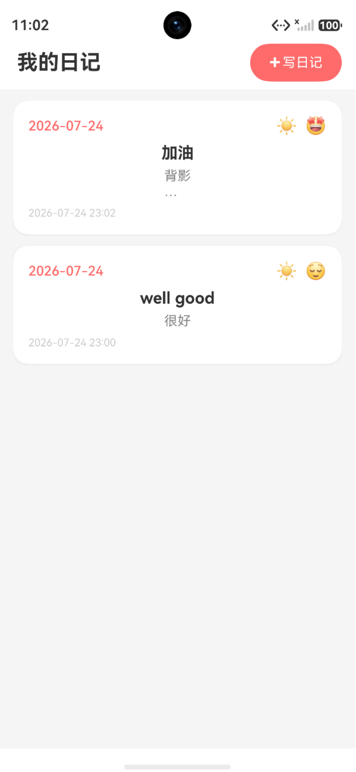
1.2 日记列表中的应用
List({ space: 12 }) {
  ForEach(
    this.diaries,                              // 数据源
    (diary: DiaryInfo, index: number) => {     // 子项生成器
      ListItem() {
        this.DiaryCard(diary)
      }
    },
    (diary: DiaryInfo) => diary.id             // 键值生成器
  )
}
1.3 三个参数详解
| 参数 | 说明 | 必填 |
|---|---|---|
| 数据源 | 需要遍历的数组 | 是 |
| itemGenerator | 生成每个子项 UI 的函数 | 是 |
| keyGenerator | 生成唯一键值的函数 | 推荐 |
二、键值生成器的重要性
2.1 键值的作用
键值生成器是 ForEach 性能优化的关键。它帮助框架的 Diff 算法识别哪些项发生了变化:
// ✅ 正确:使用唯一 id 作为键值
ForEach(this.diaries, (diary: DiaryInfo) => {
  ListItem() { this.DiaryCard(diary) }
}, (diary: DiaryInfo) => diary.id)

// ❌ 错误:使用 index 作为键值(不推荐)
ForEach(this.diaries, (diary: DiaryInfo, index: number) => {
  ListItem() { this.DiaryCard(diary) }
}, (diary: DiaryInfo, index: number) => index.toString())
2.2 键值对性能的影响
数据更新:在列表头部插入新日记

使用 index 作为键值:
┌───┬───┬───┬───┐     ┌───┬───┬───┬───┬───┐
│ A │ B │ C │ D │  →  │ N │ A │ B │ C │ D │
│ 0 │ 1 │ 2 │ 3 │     │ 0 │ 1 │ 2 │ 3 │ 4 │
└───┴───┴───┴───┘     └───┴───┴───┴───┴───┘
所有项的 key 都变了!框架重新渲染全部5项

使用 id 作为键值:
┌───┬───┬───┬───┐     ┌───┬───┬───┬───┬───┐
│ A │ B │ C │ D │  →  │ N │ A │ B │ C │ D │
│a1 │b2 │c3 │d4 │     │n5 │a1 │b2 │c3 │d4 │
└───┴───┴───┴───┘     └───┴───┴───┴───┴───┘
只有 N 是新的!框架只渲染1项,其余复用
三、ForEach 常见场景
3.1 简单数组遍历
@State colors: string[] = ['#FF0000', '#00FF00', '#0000FF', '#FFFF00']

Row() {
  ForEach(this.colors, (color: string) => {
    Circle()
      .width(40)
      .height(40)
      .fill(color)
  }, (color: string) => color)
}
3.2 天气标签列表
@State weatherList: WeatherItem[] = [
  { label: '☀️ 晴', value: Weather.SUNNY },
  { label: '☁️ 阴', value: Weather.CLOUDY },
  { label: '🌧️ 雨', value: Weather.RAINY },
  { label: '⛅ 多云', value: Weather.PARTLY_CLOUDY },
  { label: '🌨️ 雪', value: Weather.SNOWY }
]

Flex({ wrap: FlexWrap.Wrap }) {
  ForEach(this.weatherList, (item: WeatherItem, index: number) => {
    Text(item.label)
      .fontSize(16)
      .padding(8)
      .margin(4)
      .borderRadius(20)
      .backgroundColor(
        this.selectedWeather === item.value ? '#007DFF' : '#F5F5F5'
      )
      .onClick(() => {
        this.selectedWeather = item.value
      })
  }, (item: WeatherItem) => item.value.toString())
}
3.3 嵌套 ForEach
// 日记按月分组
ForEach(this.groupedDiaries, (monthGroup: MonthGroup) => {
  // 月份标题
  Text(monthGroup.month)
    .fontSize(18)
    .fontWeight(FontWeight.Bold)

  // 该月下的日记列表
  ForEach(monthGroup.diaries, (diary: DiaryInfo) => {
    ListItem() {
      this.DiaryCard(diary)
    }
  }, (diary: DiaryInfo) => diary.id)
}, (monthGroup: MonthGroup) => monthGroup.month)
四、LazyForEach 懒加载
4.1 为什么需要懒加载
当日记数量很大时(如数百上千条),ForEach 会一次性创建所有列表项,导致:
- 内存占用高
- 首次渲染慢
- 滑动卡顿
LazyForEach 只渲染可视区域内的项,按需加载:
// 实现 IDataSource 接口
class DiaryDataSource implements IDataSource {
  private diaries: DiaryInfo[] = []
  private listeners: DataChangeListener[] = []

  totalCount(): number {
    return this.diaries.length
  }

  getData(index: number): DiaryInfo {
    return this.diaries[index]
  }

  registerDataChangeListener(listener: DataChangeListener): void {
    this.listeners.push(listener)
  }

  unregisterDataChangeListener(listener: DataChangeListener): void {
    const pos = this.listeners.indexOf(listener)
    if (pos >= 0) {
      this.listeners.splice(pos, 1)
    }
  }

  setData(diaries: DiaryInfo[]): void {
    this.diaries = diaries
    this.notifyDataReload()
  }

  notifyDataReload(): void {
    this.listeners.forEach(listener => {
      listener.onDataReloaded()
    })
  }
}
4.2 使用 LazyForEach
@State diaryDataSource: DiaryDataSource = new DiaryDataSource()

List({ space: 12 }) {
  LazyForEach(this.diaryDataSource, (diary: DiaryInfo) => {
    ListItem() {
      this.DiaryCard(diary)
    }
  }, (diary: DiaryInfo) => diary.id)
}
4.3 ForEach vs LazyForEach
| 特性 | ForEach | LazyForEach |
|---|---|---|
| 渲染策略 | 一次性渲染全部 | 按需渲染可见项 |
| 数据源 | 普通数组 | IDataSource 接口 |
| 适用场景 | 少量数据(<100项) | 大量数据(>100项) |
| 内存占用 | 高 | 低 |
| 滑动性能 | 可能卡顿 | 流畅 |
| 实现复杂度 | 简单 | 需要实现接口 |
五、列表项动画
5.1 添加/删除动画
List() {
  ForEach(this.diaries, (diary: DiaryInfo) => {
    ListItem() {
      this.DiaryCard(diary)
    }
    .transition({
      type: TransitionType.Insert,
      translate: { x: 300 }
    })
    .transition({
      type: TransitionType.Delete,
      translate: { x: -300 }
    })
  }, (diary: DiaryInfo) => diary.id)
}
.animation({ duration: 300, curve: Curve.EaseOut })
六、条件渲染与 ForEach 配合
if (this.diaries.length === 0) {
  // 空状态
  Column() {
    Text('暂无日记')
  }
} else {
  List() {
    ForEach(this.diaries, (diary: DiaryInfo) => {
      ListItem() {
        this.DiaryCard(diary)
      }
    }, (diary: DiaryInfo) => diary.id)
  }
}
七、列表项的事件处理
7.1 点击事件
ForEach(this.diaries, (diary: DiaryInfo) => {
  ListItem() {
    this.DiaryCard(diary)
  }
  .onClick(() => {
    this.goToDetail(diary.id)
  })
}, (diary: DiaryInfo) => diary.id)
7.2 长按事件
ForEach(this.diaries, (diary: DiaryInfo) => {
  ListItem() {
    this.DiaryCard(diary)
  }
  .onClick(() => {
    this.goToDetail(diary.id)
  })
  .gesture(
    LongPressGesture()
      .onAction(() => {
        this.showDeleteConfirm(diary.id)
      })
  )
}, (diary: DiaryInfo) => diary.id)
7.3 滑动删除
ForEach(this.diaries, (diary: DiaryInfo) => {
  ListItem() {
    this.DiaryCard(diary)
  }
  .swipeAction({
    end: {
      builder: () => {
        Button('删除')
          .backgroundColor('#FF3B30')
          .onClick(() => {
            this.deleteDiary(diary.id)
          })
      }
    }
  })
}, (diary: DiaryInfo) => diary.id)
八、总结
列表渲染的核心要点:
- 键值必填:始终提供唯一的键值生成器,确保 Diff 算法高效工作
- 性能选择:少量数据用
ForEach,大量数据用LazyForEach - 嵌套渲染:支持 ForEach 嵌套实现分组列表
- 事件绑定:在 ListItem 上绑定点击、长按、滑动等交互
- 动画支持:通过
transition实现列表项的增删动画 - 条件配合:与
if-else配合处理空状态
ForEach 是 ArkUI 中最常用的渲染指令,理解其原理和最佳实践对开发高质量列表页面至关重要。

作为“人工智能6S店”的官方数字引擎,为AI开发者与企业提供一个覆盖软硬件全栈、一站式门户。
更多推荐



 12
12 0
0- 0


 已为社区贡献15条内容

所有评论(0)