
鸿蒙新特性:@ohos.geoLocationManager 位置服务实验室实战 —— 单次定位、持续追踪与坐标可视化
引言
定位是移动应用中最具场景价值的能力之一。无论是地图导航、轨迹记录、位置签到还是周边推荐,都依赖设备的位置服务。HarmonyOS NEXT 通过 @ohos.geoLocationManager 模块将位置获取、持续追踪、开关检测等能力统一封装,提供了一套简洁而强大的位置服务 API。
@ohos.geoLocationManager 属于 @kit.LocationKit,与 Android 的 LocationManager 和 iOS 的 CLLocationManager 定位类似,但在 API 设计上更加清晰。它提供两种定位模式:单次定位(getCurrentLocation)返回一次性 Promise 结果,持续追踪(on('locationChange'))通过回调持续推送位置更新。两种模式覆盖了从"签到打卡"到"跑步记录"的全部定位场景。
本文将深入讲解 @ohos.geoLocationManager 的定位模式、Location 数据结构、权限模型、开关检测和实战代码,并构建一个"位置服务实验室"Demo,让你在一个页面中完整体验单次定位、持续追踪和坐标可视化。
一、API 架构:双模式定位与位置数据结构
1.1 核心设计理念
@ohos.geoLocationManager 的核心能力围绕四个字展开:检、取、追、停。
- 检:通过
isLocationEnabled()检查系统定位开关状态(同步,无需权限) - 取:通过
getCurrentLocation(request)获取单次定位结果(Promise),通过getLastLocation()获取缓存的上次位置(同步) - 追:通过
on('locationChange', request, callback)订阅持续位置更新 - 停:通过
off('locationChange', callback)取消订阅
这套双模式设计意味着开发者不需要自己实现"定时轮询",只需选择合适的模式:
- 签到、搜索周边:用
getCurrentLocation(),一次请求,拿到结果就结束 - 跑步、导航、轨迹记录:用
on('locationChange'),持续接收位置更新
1.2 Location —— 位置数据载体
Location 是所有位置操作的统一数据返回类型:
interface Location {
  latitude: number;   // 纬度,范围 [-90, 90]
  longitude: number;  // 经度,范围 [-180, 180]
  altitude: number;   // 海拔高度,单位米
  accuracy: number;   // 水平精度,单位米(越小越精确)
  speed: number;      // 速度,单位 m/s
  direction: number;  // 方向角度,0-360,0 为正北
  timeStamp: number;  // 定位时间戳(Unix 毫秒)
}
生产环境使用中需要注意:
accuracy是衡量定位质量的核心指标。GPS 定位精度通常在 5-30 米,WiFi 定位约 30-100 米,基站定位可达数百米altitude在某些定位模式下可能为 0(如纯 GPS 无高度修正)speed和direction在静止状态下可能为 0
1.3 CurrentLocationRequest —— 单次定位配置
interface CurrentLocationRequest {
  timeoutMs?: number;        // 超时时间(毫秒),超时后 reject
}
在 Demo 中,最小配置只需要 timeoutMs:
const request: geoLocationManager.CurrentLocationRequest = {
  timeoutMs: 10000
};
1.4 LocationRequest —— 持续追踪配置
interface LocationRequest {
  timeInterval?: number;      // 位置更新间隔(秒),默认 1
  distanceInterval?: number;  // 位置更新距离间隔(米),默认 0 表示无距离过滤
}
二、核心 API 详解
2.1 isLocationEnabled() —— 检查定位开关
function isLocationEnabled(): boolean;
同步方法,立即返回系统定位服务是否开启。注意:此方法检查的是系统级的定位开关,不是应用级权限。即使返回 true,如果未获取用户权限授权,getCurrentLocation() 依然会失败。
try {
  const enabled = geoLocationManager.isLocationEnabled();
  if (enabled) {
    // 定位已开启,可以继续
  } else {
    // 提示用户开启定位
  }
} catch (e) {
  // 检测失败
}
2.2 getCurrentLocation() —— 单次定位
function getCurrentLocation(request: CurrentLocationRequest): Promise<Location>;
发起一次定位请求,返回 Promise。这是最常用的定位方式——请求发出后,系统根据当前环境选择最优的定位源(GPS、WiFi、基站)进行定位,返回结果后结束。
const request: geoLocationManager.CurrentLocationRequest = {
  timeoutMs: 10000
};

geoLocationManager.getCurrentLocation(request).then((loc: geoLocationManager.Location) => {
  console.log('纬度:', loc.latitude.toFixed(6));
  console.log('经度:', loc.longitude.toFixed(6));
  console.log('精度:', loc.accuracy.toFixed(1), 'm');
}).catch((e: Error) => {
  console.error('定位失败:', e.message);
});
定位失败的可能原因:
- 系统定位开关未开启
- 应用未获取位置权限
- 超时(timeoutMs 内无法获取有效位置)
- 设备硬件不支持(如纯 WiFi 平板无 GPS 芯片)
2.3 getLastLocation() —— 获取上次位置
function getLastLocation(): Location;
同步方法,返回系统缓存的上一次定位结果。不需要发起新的定位请求,直接返回缓存值。在应用初始化时调用,可以快速获取一个粗略位置作为初始值:
try {
  const loc = geoLocationManager.getLastLocation();
  if (loc) {
    // 使用缓存位置作为初始显示
    this.updateDisplay(loc);
  }
} catch (e) {
  // 无缓存位置可用
}
2.4 on(‘locationChange’) / off(‘locationChange’) —— 持续追踪
function on(type: 'locationChange', request: LocationRequest, callback: Callback<Location>): void;
function off(type: 'locationChange', callback?: Callback<Location>): void;
订阅持续位置更新。系统按照 LocationRequest 中配置的时间间隔和距离间隔推送位置数据。组件销毁时必须调用 off() 取消订阅:
// 订阅
const request: geoLocationManager.LocationRequest = {
  timeInterval: 5,       // 每 5 秒更新一次
  distanceInterval: 0    // 不进行距离过滤
};

this.locCallback = (loc: geoLocationManager.Location) => {
  this.updateDisplay(loc);
  this.addRecord(loc);
};

geoLocationManager.on('locationChange', request, this.locCallback);

// 取消订阅(在 aboutToDisappear 中调用)
geoLocationManager.off('locationChange', this.locCallback);
三、权限模型
@ohos.geoLocationManager 的核心定位方法需要 ohos.permission.LOCATION(精确定位)或 ohos.permission.APPROXIMATELY_LOCATION(大致定位)权限,均为 user_grant 级别,需要通过 atManager.requestPermissionsFromUser() 动态申请。
在 module.json5 中声明:
{
  "module": {
    "requestPermissions": [
      {
        "name": "ohos.permission.LOCATION",
        "reason": "$string:location_reason",
        "usedScene": {
          "abilities": ["EntryAbility"],
          "when": "inuse"
        }
      },
      {
        "name": "ohos.permission.APPROXIMATELY_LOCATION",
        "reason": "$string:approx_location_reason",
        "usedScene": {
          "abilities": ["EntryAbility"],
          "when": "inuse"
        }
      }
    ]
  }
}
注意:isLocationEnabled() 和 getLastLocation() 是例外,它们不需要权限即可调用。isLocationEnabled() 检查的是系统开关而非应用权限。
四、实战 Demo:位置服务实验室
本节构建一个完整的位置服务调试工具,在一个页面中覆盖定位状态检测、单次定位、持续追踪和坐标可视化。
4.1 页面设计
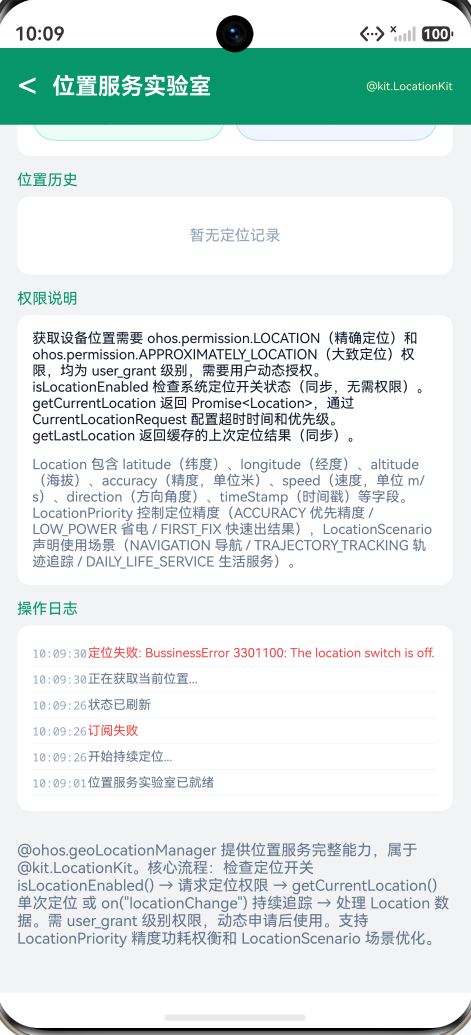
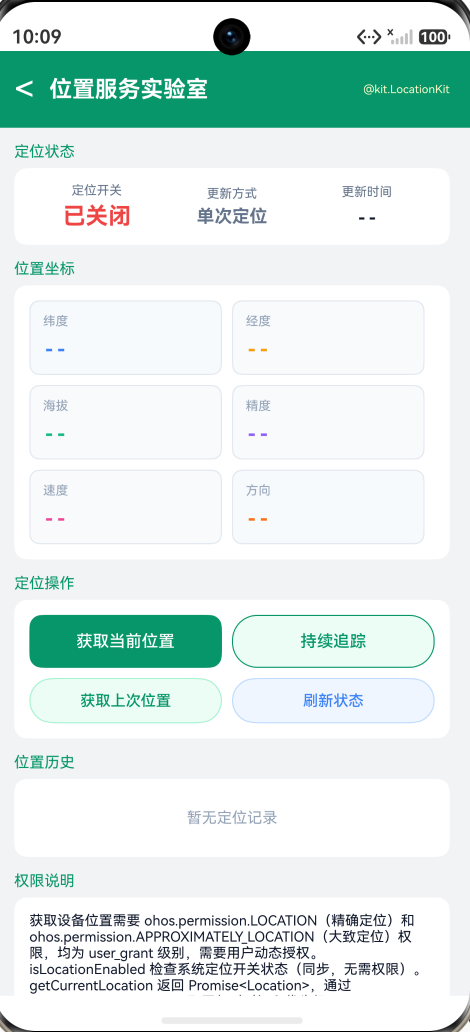
页面分为五个功能区域:
-
定位状态面板:三栏展示定位开关状态(已开启/已关闭)、更新方式(单次定位/持续追踪)、最近更新时间
-
位置坐标面板:六格卡片网格展示纬度和经度(最重要)、海拔和精度、速度和方向角度
-
定位操作区:获取当前位置按钮(带 Loading 状态)、持续追踪 Toggle 开关(启动/停止)、获取上次位置、刷新状态
-
位置历史列表:展示最近 10 条定位记录,每条显示序号、完整经纬度坐标、精度和时间戳
-
操作日志:记录每次操作的实时日志流
4.2 核心实现
单次定位 —— 使用 getCurrentLocation() + Promise:
private getCurrentLocation(): void {
  this.loading = true;
  this.addLog('正在获取当前位置...', 'system');
  const request: geoLocationManager.CurrentLocationRequest = {
    timeoutMs: 10000
  };
  geoLocationManager.getCurrentLocation(request).then((loc: geoLocationManager.Location) => {
    this.loading = false;
    this.updateDisplay(loc);
    this.addRecord(loc);
    this.addLog('定位成功 (' + loc.accuracy.toFixed(1) + 'm 精度)', 'success');
  }).catch((e: Error) => {
    this.loading = false;
    this.addLog('定位失败: ' + e.message, 'error');
  });
}
持续追踪 —— 使用 on('locationChange') 订阅 + off('locationChange') 取消:
private startTracking(): void {
  this.addLog('开始持续定位...', 'system');
  this.locCallback = (loc: geoLocationManager.Location) => {
    this.updateDisplay(loc);
    this.addRecord(loc);
  };
  const request: geoLocationManager.LocationRequest = {
    timeInterval: 5,
    distanceInterval: 0
  };
  try {
    geoLocationManager.on('locationChange', request, this.locCallback);
  } catch (e) {
    this.addLog('订阅失败', 'error');
  }
}

private stopTracking(): void {
  this.addLog('停止持续定位', 'system');
  if (this.locCallback !== null) {
    try {
      geoLocationManager.off('locationChange', this.locCallback);
    } catch (e) {
      // ignore
    }
    this.locCallback = null;
  }
}
更新显示 —— 将 Location 对象映射到 UI 展示字段:
private updateDisplay(loc: geoLocationManager.Location): void {
  this.latitude = loc.latitude.toFixed(6);
  this.longitude = loc.longitude.toFixed(6);
  this.altitude = loc.altitude.toFixed(1) + ' m';
  this.accuracy = loc.accuracy.toFixed(1) + ' m';
  this.speed = loc.speed.toFixed(2) + ' m/s';
  this.heading = loc.direction.toFixed(1) + '°';
  const d = new Date(loc.timeStamp);
  this.lastTime = d.getHours().toString().padStart(2, '0') + ':' +
    d.getMinutes().toString().padStart(2, '0') + ':' +
    d.getSeconds().toString().padStart(2, '0');
}
生命周期管理 —— aboutToDisappear() 中取消订阅防止内存泄漏:
aboutToDisappear(): void {
  if (this.locCallback !== null) {
    try {
      geoLocationManager.off('locationChange', this.locCallback);
    } catch (e) {
      // ignore
    }
    this.locCallback = null;
  }
}
4.3 交互方式
Demo 提供四个核心交互点:
-
获取当前位置:点击按钮触发
getCurrentLocation(),启动单次定位请求。按钮显示 Loading 状态并禁用防止重复点击。坐标立即更新到六格面板中。 -
持续追踪:点击 Toggle 开关
on或off位置变化订阅。开启后坐标实时刷新,位置历史自动追加新记录。关闭后停止推送,节约电量。 -
获取上次位置:调用
getLastLocation()读取系统缓存的最近一次定位结果,无需等待新的定位流程。 -
刷新状态:重新检查
isLocationEnabled()结果,同步更新顶部状态面板。
五、ArkTS 严格模式注意事项
5.1 保留名称冲突
在 ArkTS 严格模式下,@Component 中不能使用 direction 作为属性名——它与 CommonAttribute.direction() 方法冲突:
// 错误:direction 是保留名称
@State direction: string = '--';

// 正确:使用替代名称
@State heading: string = '--';
这一约束与之前遇到的 activeCount 问题相同。当编译报错 “Property ‘xxx’ in type ‘YourComponent’ is not assignable to” 时,通常意味着该名称已被基类占用。
5.2 枚举类型的正确访问
geoLocationManager 下的枚举名称可能与预期不同:
// 正确的枚举名称
geoLocationManager.LocatingPriority   // 不是 LocationPriority
当编译器提示 “Did you mean ‘LocatingPriority’?” 时,直接采用提示的名称即可。
5.3 可选字段的省略策略
CurrentLocationRequest 和 LocationRequest 中的部分字段(如 priority、scenario)在当前 SDK 版本中可能尚未完全暴露枚举值。遇到枚举不存在的编译错误时,直接省略这些可选字段是安全的处理方式,系统会使用默认值。
六、实际应用场景
6.1 签到打卡功能
private checkIn(): void {
  const request: geoLocationManager.CurrentLocationRequest = {
    timeoutMs: 8000
  };
  geoLocationManager.getCurrentLocation(request).then((loc) => {
    if (loc.accuracy > 50) {
      // 精度不足,提示用户到开阔区域
      return;
    }
    // 提交签到数据(经纬度 + 时间戳)
    this.submitCheckIn(loc.latitude, loc.longitude, loc.timeStamp);
  }).catch(() => {
    // 定位失败降级方案:手动选择位置
    this.showManualLocationPicker();
  });
}
6.2 跑步轨迹记录
private trackPoints: Array<{lat: number, lng: number, time: number}> = [];

private startRun(): void {
  const request: geoLocationManager.LocationRequest = {
    timeInterval: 3,
    distanceInterval: 5
  };
  this.trackCallback = (loc: geoLocationManager.Location) => {
    this.trackPoints.push({lat: loc.latitude, lng: loc.longitude, time: loc.timeStamp});
  };
  geoLocationManager.on('locationChange', request, this.trackCallback);
}

private stopRun(): void {
  geoLocationManager.off('locationChange', this.trackCallback);
  // 将 trackPoints 渲染为地图轨迹
  this.renderTrack(this.trackPoints);
}
6.3 静默后台定位
对于需要在后台持续获取位置的应用(如物流配送、运动健康),需要申请后台定位权限并配合后台任务管理使用。HarmonyOS 对后台定位有严格限制以保护用户隐私,建议仅在确实需要时使用:
// 后台定位需要在 ability 中声明 backgroundModes: ['location']
// 并在 requestPermissions 中声明 ohos.permission.LOCATION_IN_BACKGROUND
七、总结
@ohos.geoLocationManager 是 HarmonyOS NEXT 中获取设备位置的标准模块。通过本文的学习,你应该已经掌握:
- 双模式定位:
getCurrentLocation()单次请求(Promise 模式)适合签到、搜索等一次性场景;on('locationChange')持续追踪(回调模式)适合导航、跑步等持续性场景 - Location 数据结构:包含 latitude、longitude、altitude、accuracy、speed、direction、timeStamp 七个关键字段,其中 accuracy 是定位质量的衡量指标
- 开关检测:
isLocationEnabled()同步检查系统定位开关,无需权限 - 缓存位置:
getLastLocation()同步读取系统缓存的上次定位结果,适合快速获取初始值 - 权限要求:定位操作需要
ohos.permission.LOCATION权限(user_grant 级别),必须动态申请 - 生命周期管理:持续追踪必须在组件销毁时调用
off()取消订阅,避免内存泄漏和电量浪费
@ohos.geoLocationManager 的最佳使用模式可以总结为:
先检查开关,再请求权限,选择合适的定位模式,用后及时取消,精度不足时降级处理。
位置是用户最敏感的隐私数据之一。优秀的定位策略应当遵循最小权限原则——能用大致定位就不用精确定位,能单次获取就不持续追踪,能在前台完成就不申请后台权限。在功能需求和用户隐私之间找到恰当的平衡点,是每位开发者都需要思考的课题。
@ohos.geoLocationManager 属于 @kit.LocationKit,与 Android 的 LocationManager 和 iOS 的 CLLocationManager 定位一致。它的 API 体积小巧但功能完整:单次定位 + 持续追踪 + 缓存读取 + 开关检测——对于绝大多数移动应用的定位需求来说已经足够。

作为“人工智能6S店”的官方数字引擎,为AI开发者与企业提供一个覆盖软硬件全栈、一站式门户。
更多推荐


 8
8 0
0- 0


 已为社区贡献281条内容

所有评论(0)