
网络请求封装 - 鸿蒙FlutterAPI客户端构建场景
概述
在实际项目中,直接使用http包发送网络请求会导致代码重复、错误处理不一致、难以维护等问题。将网络请求封装为统一的API客户端是最佳实践,可以提高代码复用性、统一错误处理、便于维护和扩展。
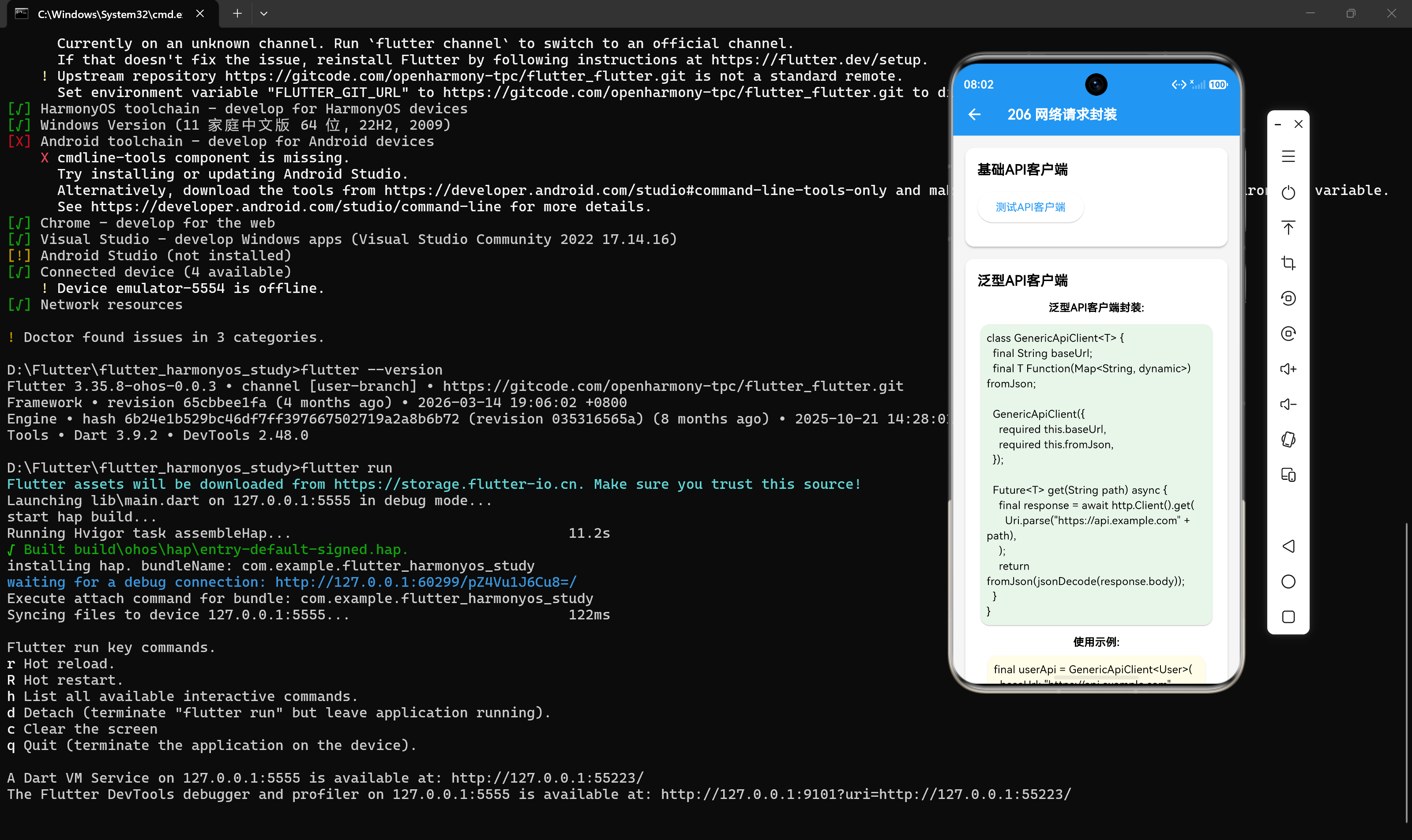
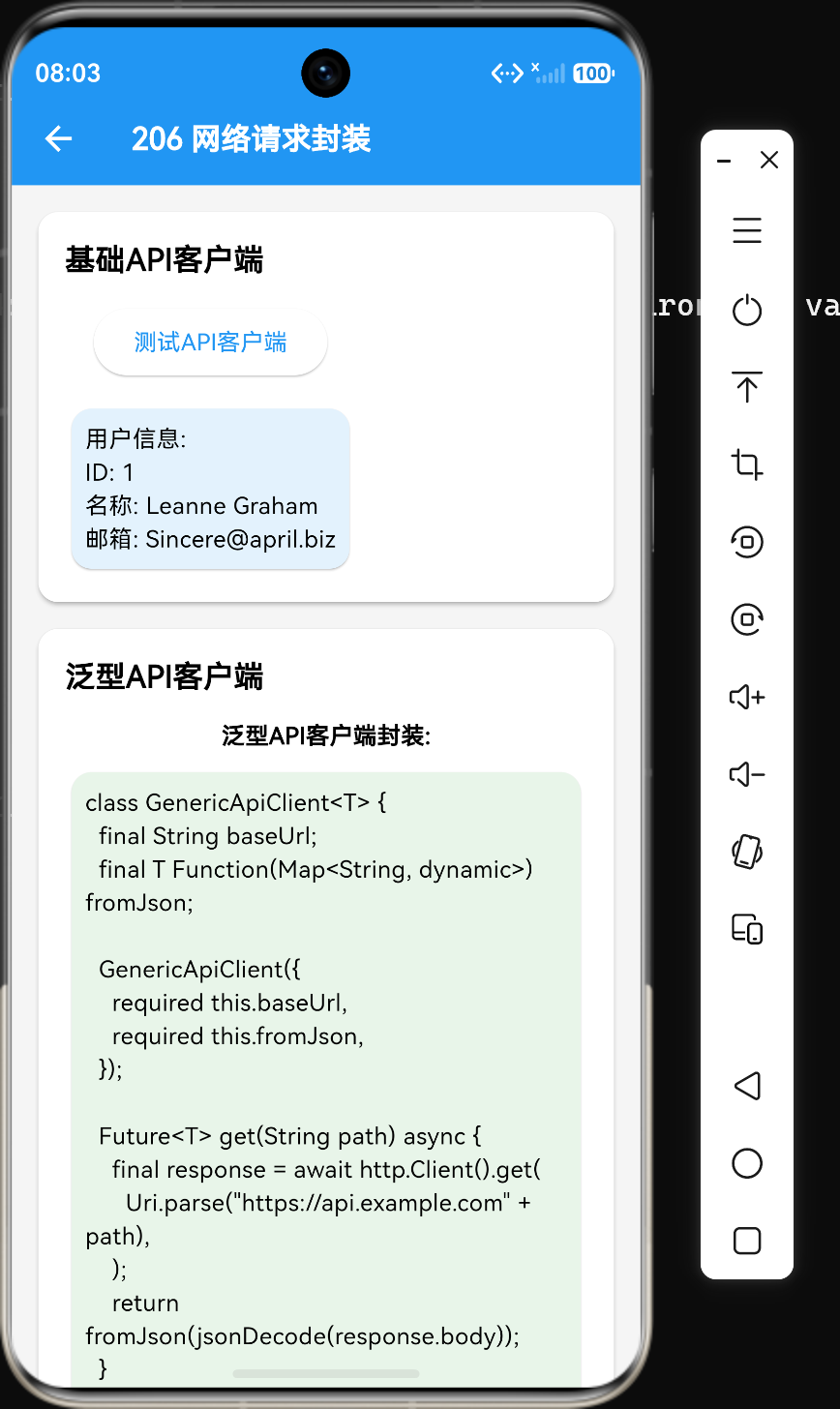
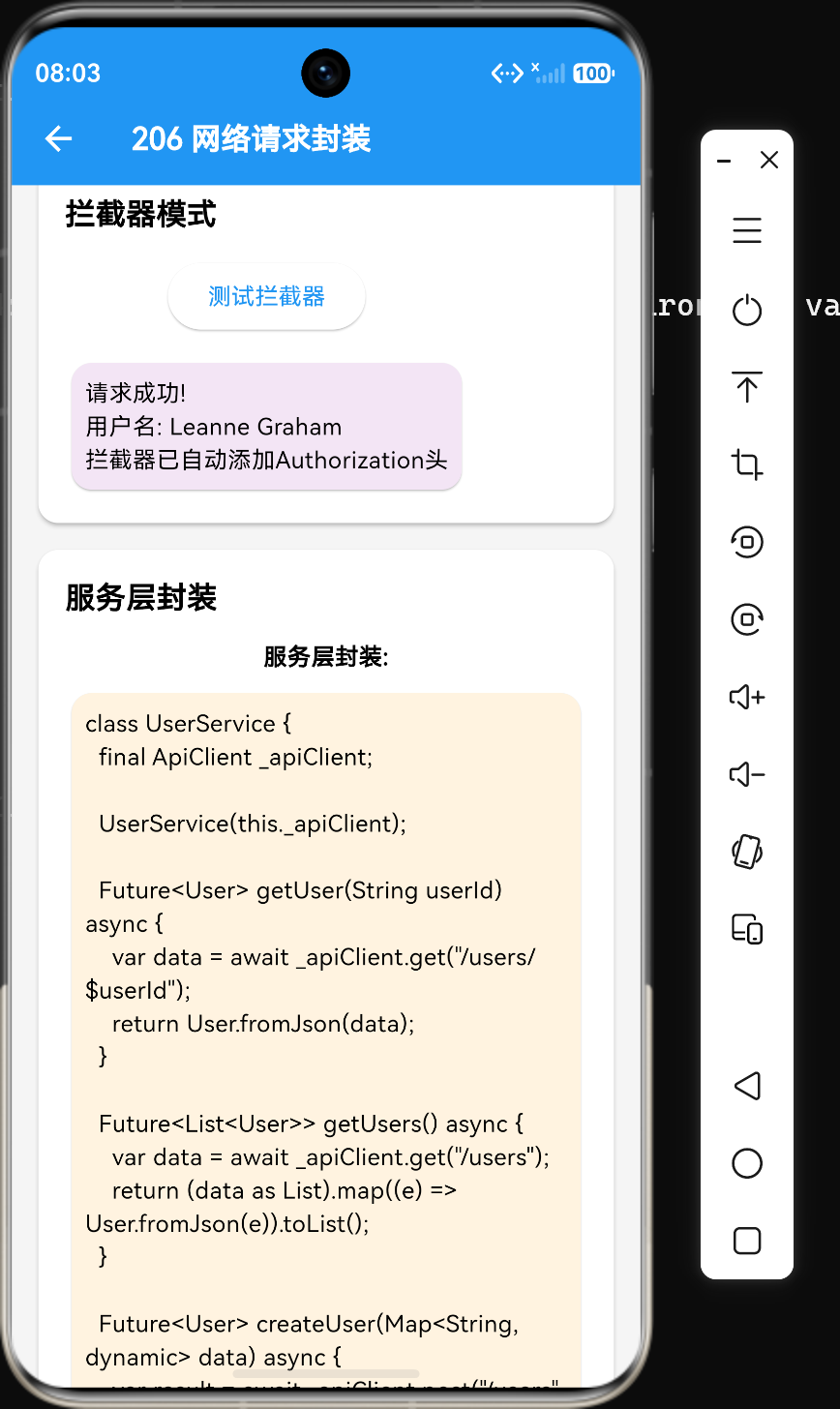
本章将详细介绍网络请求的封装方法,包括基础API客户端封装、泛型API客户端、拦截器模式、服务层封装以及封装的最佳实践。
1. 封装的必要性
在未封装的情况下,每个网络请求都需要重复编写以下代码:
final response = await http.get(Uri.parse('https://api.example.com/users/1'));
if (response.statusCode == 200) {
  return jsonDecode(response.body);
} else {
  throw Exception('请求失败');
}
这种方式存在以下问题:
- 代码重复:每个请求都需要编写相同的请求头、状态码检查、JSON解析代码
- 错误处理不一致:不同地方的错误处理逻辑可能不同
- 难以维护:修改基础配置(如BaseUrl、超时时间)需要修改所有请求
- 类型不安全:返回的是
dynamic类型,需要手动转换 - 扩展性差:难以添加统一的日志、拦截器等功能
2. 基础API客户端封装
基础API客户端封装将通用的请求逻辑集中到一个类中。
2.1 基础封装实现
import 'package:http/http.dart' as http;
import 'dart:convert';

class ApiClient {
  final String baseUrl;
  final String? token;
  final Duration timeout;

  ApiClient({
    required this.baseUrl,
    this.token,
    this.timeout = const Duration(seconds: 30),
  });

  Map<String, String> _buildHeaders({bool requireAuth = true}) {
    Map<String, String> headers = {
      'Content-Type': 'application/json',
      'Accept': 'application/json',
    };

    if (requireAuth && token != null) {
      headers['Authorization'] = 'Bearer $token';
    }

    return headers;
  }

  Future<dynamic> get(String path, {Map<String, String>? query}) async {
    Uri uri = Uri.parse('$baseUrl$path');
    if (query != null) {
      uri = uri.replace(queryParameters: query);
    }

    final response = await http.get(uri, headers: _buildHeaders());
    return _handleResponse(response);
  }

  Future<dynamic> post(String path, Map<String, dynamic> body) async {
    final response = await http.post(
      Uri.parse('$baseUrl$path'),
      headers: _buildHeaders(),
      body: jsonEncode(body),
    );
    return _handleResponse(response);
  }

  Future<dynamic> put(String path, Map<String, dynamic> body) async {
    final response = await http.put(
      Uri.parse('$baseUrl$path'),
      headers: _buildHeaders(),
      body: jsonEncode(body),
    );
    return _handleResponse(response);
  }

  Future<dynamic> delete(String path) async {
    final response = await http.delete(
      Uri.parse('$baseUrl$path'),
      headers: _buildHeaders(),
    );
    return _handleResponse(response);
  }

  dynamic _handleResponse(http.Response response) {
    if (response.statusCode >= 200 && response.statusCode < 300) {
      return jsonDecode(response.body);
    } else {
      throw Exception('HTTP Error: ${response.statusCode}');
    }
  }
}
2.2 使用基础API客户端
final apiClient = ApiClient(
  baseUrl: 'https://api.example.com',
  token: 'your_token',
);

// GET请求
var user = await apiClient.get('/users/1');

// GET请求带参数
var users = await apiClient.get('/users', query: {'page': '1', 'pageSize': '10'});

// POST请求
var result = await apiClient.post('/users', {'name': 'John', 'email': 'john@example.com'});

// PUT请求
var updatedUser = await apiClient.put('/users/1', {'name': 'John Updated'});

// DELETE请求
await apiClient.delete('/users/1');
3. 泛型API客户端
基础API客户端返回的是dynamic类型,需要手动转换。使用泛型可以实现类型安全。
3.1 泛型封装实现
class GenericApiClient<T> {
  final String baseUrl;
  final T Function(Map<String, dynamic>) fromJson;

  GenericApiClient({
    required this.baseUrl,
    required this.fromJson,
  });

  Future<T> get(String path) async {
    final response = await http.get(Uri.parse('$baseUrl$path'));
    return fromJson(jsonDecode(response.body));
  }

  Future<T> post(String path, Map<String, dynamic> body) async {
    final response = await http.post(
      Uri.parse('$baseUrl$path'),
      headers: {'Content-Type': 'application/json'},
      body: jsonEncode(body),
    );
    return fromJson(jsonDecode(response.body));
  }
}
3.2 使用泛型API客户端
class User {
  final int id;
  final String name;
  final String email;

  User({required this.id, required this.name, required this.email});

  factory User.fromJson(Map<String, dynamic> json) {
    return User(
      id: json['id'],
      name: json['name'],
      email: json['email'],
    );
  }
}

// 创建用户API客户端
final userApi = GenericApiClient<User>(
  baseUrl: 'https://api.example.com',
  fromJson: User.fromJson,
);

// 使用
User user = await userApi.get('/users/1');
print(user.name); // 类型安全,不需要转换
4. 拦截器模式
拦截器模式可以在请求发送前和响应返回后进行统一处理。
4.1 自定义拦截器
class ApiInterceptor extends http.BaseClient {
final http.Client _client = http.Client();
final String _token;
ApiInterceptor(this._token);
Future<http.StreamedResponse> send(http.BaseRequest request) {
// 请求前处理
request.headers['Authorization'] = 'Bearer $_token';
request.headers['Content-Type'] = 'application/json';
request.headers['X-Request-Id'] = '${DateTime.now().millisecondsSinceEpoch}';
print('Request: ${request.method} ${request.url}');
return _client.send(request).then((response) {
// 响应后处理
print('Response: ${response.statusCode} ${request.url}');
return response;
});
}
}
4.2 使用拦截器
final client = ApiInterceptor('your_token');

// 使用自定义客户端
final response = await client.get(Uri.parse('https://api.example.com/users/1'));
4.3 多个拦截器组合
class LogInterceptor extends http.BaseClient {
final http.Client _client;
LogInterceptor(this._client);
Future<http.StreamedResponse> send(http.BaseRequest request) {
print('${DateTime.now()} - ${request.method} ${request.url}');
return _client.send(request);
}
}
class AuthInterceptor extends http.BaseClient {
final http.Client _client;
final String _token;
AuthInterceptor(this._client, this._token);
Future<http.StreamedResponse> send(http.BaseRequest request) {
request.headers['Authorization'] = 'Bearer $_token';
return _client.send(request);
}
}
// 组合使用
final client = LogInterceptor(AuthInterceptor(http.Client(), 'your_token'));
5. 服务层封装
服务层封装将业务逻辑与API调用分离,提供更高级别的接口。
5.1 服务层实现
class UserService {
  final ApiClient _apiClient;

  UserService(this._apiClient);

  Future<User> getUser(String userId) async {
    var data = await _apiClient.get('/users/$userId');
    return User.fromJson(data);
  }

  Future<List<User>> getUsers({int page = 1, int pageSize = 10}) async {
    var data = await _apiClient.get('/users', query: {
      'page': page.toString(),
      'pageSize': pageSize.toString(),
    });
    return (data as List).map((e) => User.fromJson(e)).toList();
  }

  Future<User> createUser(Map<String, dynamic> data) async {
    var result = await _apiClient.post('/users', data);
    return User.fromJson(result);
  }

  Future<User> updateUser(String userId, Map<String, dynamic> data) async {
    var result = await _apiClient.put('/users/$userId', data);
    return User.fromJson(result);
  }

  Future<void> deleteUser(String userId) async {
    await _apiClient.delete('/users/$userId');
  }
}
5.2 使用服务层
final apiClient = ApiClient(baseUrl: 'https://api.example.com');
final userService = UserService(apiClient);

// 获取用户
User user = await userService.getUser('1');

// 获取用户列表
List<User> users = await userService.getUsers(page: 1, pageSize: 10);

// 创建用户
User newUser = await userService.createUser({
  'name': 'John',
  'email': 'john@example.com',
});
6. 完整的分层架构
一个完整的网络请求架构通常包含以下层次:
UI层 (Widgets)
    ↓
Repository层 (数据仓库) - 管理数据来源,统一数据访问接口
    ↓
Service层 (业务服务) - 封装业务逻辑,调用API
    ↓
ApiClient层 (HTTP封装) - 封装HTTP请求,统一配置
    ↓
网络层 (http包) - 底层网络通信
6.1 Repository层
Repository层管理数据来源,可以从网络、本地数据库等获取数据。
class UserRepository {
  final UserService _userService;
  final UserDao _userDao;

  UserRepository(this._userService, this._userDao);

  Future<User> getUser(String userId) async {
    // 先从本地获取
    User? localUser = await _userDao.getUser(userId);
    if (localUser != null) {
      return localUser;
    }

    // 再从网络获取
    User remoteUser = await _userService.getUser(userId);

    // 保存到本地
    await _userDao.saveUser(remoteUser);

    return remoteUser;
  }
}
7. 封装最佳实践
7.1 封装BaseUrl和通用请求头
将BaseUrl和通用请求头封装到ApiClient中,避免硬编码。
7.2 统一处理响应和错误
在ApiClient中统一处理HTTP响应和错误,确保所有请求的错误处理一致。
7.3 使用泛型支持类型安全
使用泛型API客户端,避免dynamic类型,提高代码类型安全性。
7.4 使用拦截器统一处理请求
使用拦截器模式处理日志、认证、请求追踪等通用逻辑。
7.5 分层设计
采用ApiClient -> Service -> Repository的分层架构,分离关注点。
7.6 支持请求超时配置
为ApiClient添加超时配置,避免请求无限等待。
Future<dynamic> get(String path) async {
  final response = await http.get(uri, headers: headers).timeout(timeout);
  return _handleResponse(response);
}
7.7 提供请求取消机制
使用CancelToken或Completer实现请求取消。
class CancelableApiClient {
  final Map<String, http.Client> _clients = {};

  Future<dynamic> get(String path, {String? cancelToken}) async {
    http.Client client = http.Client();
    if (cancelToken != null) {
      _clients[cancelToken] = client;
    }

    try {
      final response = await client.get(Uri.parse(path));
      return jsonDecode(response.body);
    } finally {
      if (cancelToken != null) {
        _clients.remove(cancelToken);
      }
    }
  }

  void cancel(String cancelToken) {
    _clients[cancelToken]?.close();
    _clients.remove(cancelToken);
  }
}
7.8 添加日志记录
在ApiClient中添加日志记录,便于调试和问题排查。
void _logRequest(String method, String url, [Map<String, dynamic>? body]) {
  print('[$method] $url');
  if (body != null) {
    print('Request Body: $body');
  }
}

void _logResponse(int statusCode, String url) {
  print('[$statusCode] $url');
}
8. 实践示例:完整的API客户端
import 'package:http/http.dart' as http;
import 'dart:convert';

enum ApiErrorType {
  network,
  unauthorized,
  server,
  unknown,
}

class ApiException implements Exception {
  final ApiErrorType type;
  final String message;
  final int? statusCode;

  ApiException({
    required this.type,
    required this.message,
    this.statusCode,
  });
}

class ApiClient {
  final String baseUrl;
  final String? token;
  final Duration timeout;

  ApiClient({
    required this.baseUrl,
    this.token,
    this.timeout = const Duration(seconds: 30),
  });

  Map<String, String> _buildHeaders({bool requireAuth = true}) {
    return {
      'Content-Type': 'application/json',
      'Accept': 'application/json',
      if (requireAuth && token != null) 'Authorization': 'Bearer $token',
    };
  }

  Future<dynamic> get(String path, {Map<String, String>? query}) async {
    Uri uri = Uri.parse('$baseUrl$path');
    if (query != null) {
      uri = uri.replace(queryParameters: query);
    }

    _logRequest('GET', uri.toString());

    try {
      final response = await http.get(uri, headers: _buildHeaders()).timeout(timeout);
      _logResponse(response.statusCode, uri.toString());
      return _handleResponse(response);
    } catch (e) {
      throw ApiException(type: ApiErrorType.network, message: e.toString());
    }
  }

  Future<dynamic> post(String path, Map<String, dynamic> body) async {
    Uri uri = Uri.parse('$baseUrl$path');
    _logRequest('POST', uri.toString(), body);

    try {
      final response = await http.post(
        uri,
        headers: _buildHeaders(),
        body: jsonEncode(body),
      ).timeout(timeout);
      _logResponse(response.statusCode, uri.toString());
      return _handleResponse(response);
    } catch (e) {
      throw ApiException(type: ApiErrorType.network, message: e.toString());
    }
  }

  dynamic _handleResponse(http.Response response) {
    if (response.statusCode >= 200 && response.statusCode < 300) {
      return jsonDecode(response.body);
    } else if (response.statusCode == 401) {
      throw ApiException(
        type: ApiErrorType.unauthorized,
        message: '未授权',
        statusCode: response.statusCode,
      );
    } else if (response.statusCode >= 500) {
      throw ApiException(
        type: ApiErrorType.server,
        message: '服务器错误',
        statusCode: response.statusCode,
      );
    } else {
      throw ApiException(
        type: ApiErrorType.unknown,
        message: '未知错误',
        statusCode: response.statusCode,
      );
    }
  }

  void _logRequest(String method, String url, [Map<String, dynamic>? body]) {
    print('[$method] $url');
    if (body != null) {
      print('Request: $body');
    }
  }

  void _logResponse(int statusCode, String url) {
    print('[$statusCode] $url');
  }
}

class UserService {
  final ApiClient _apiClient;

  UserService(this._apiClient);

  Future<User> getUser(String userId) async {
    var data = await _apiClient.get('/users/$userId');
    return User.fromJson(data);
  }

  Future<List<User>> getUsers() async {
    var data = await _apiClient.get('/users');
    return (data as List).map((e) => User.fromJson(e)).toList();
  }
}

class User {
  final int id;
  final String name;
  final String email;

  User({required this.id, required this.name, required this.email});

  factory User.fromJson(Map<String, dynamic> json) {
    return User(
      id: json['id'],
      name: json['name'],
      email: json['email'],
    );
  }
}
9. 第三方HTTP库推荐
除了原生http包,以下第三方库也提供了更强大的封装功能:
9.1 Dio
Dio是Flutter中最流行的HTTP库,提供了拦截器、请求取消、文件上传下载等功能。
import 'package:dio/dio.dart';

final dio = Dio(BaseOptions(baseUrl: 'https://api.example.com'));

// 添加拦截器
dio.interceptors.add(InterceptorsWrapper(
  onRequest: (options, handler) {
    options.headers['Authorization'] = 'Bearer token';
    return handler.next(options);
  },
  onResponse: (response, handler) {
    return handler.next(response);
  },
  onError: (DioException e, handler) {
    return handler.next(e);
  },
));

// 发送请求
Response response = await dio.get('/users/1');
9.2 Chopper
Chopper是一个基于http包的类型安全HTTP客户端生成器。
import 'package:chopper/chopper.dart';
(baseUrl: '/users')
abstract class UserApi extends ChopperService {
(path: '/{id}')
Future<Response<User>> getUser(('id') String id);
()
Future<Response<List<User>>> getUsers();
}
10. 总结
网络请求封装是提高代码质量和可维护性的重要手段:
- 基础封装:将通用请求逻辑集中到ApiClient中
- 泛型支持:使用泛型实现类型安全的API调用
- 拦截器模式:在请求前后进行统一处理
- 服务层:分离业务逻辑与API调用
- 分层架构:采用Repository -> Service -> ApiClient的分层设计
通过合理的封装,可以使网络请求代码更加简洁、安全、易于维护。
参考资源

作为“人工智能6S店”的官方数字引擎,为AI开发者与企业提供一个覆盖软硬件全栈、一站式门户。
更多推荐


 7
7 0
0- 0


 已为社区贡献45条内容

所有评论(0)