
鸿蒙原生 ArkTS 布局方式之 Tabs + List + Grid 复杂首页实战指南
本文基于 HarmonyOS 6.1.1 (API 24) 最新特性,深入讲解如何使用 Tabs + List + Grid 组合构建高性能、高交互性的复杂首页。
项目演示
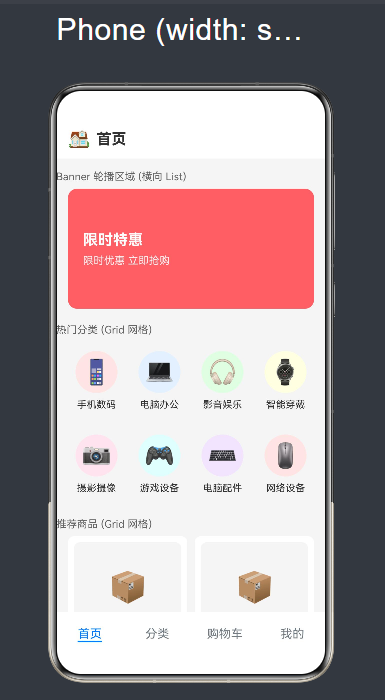
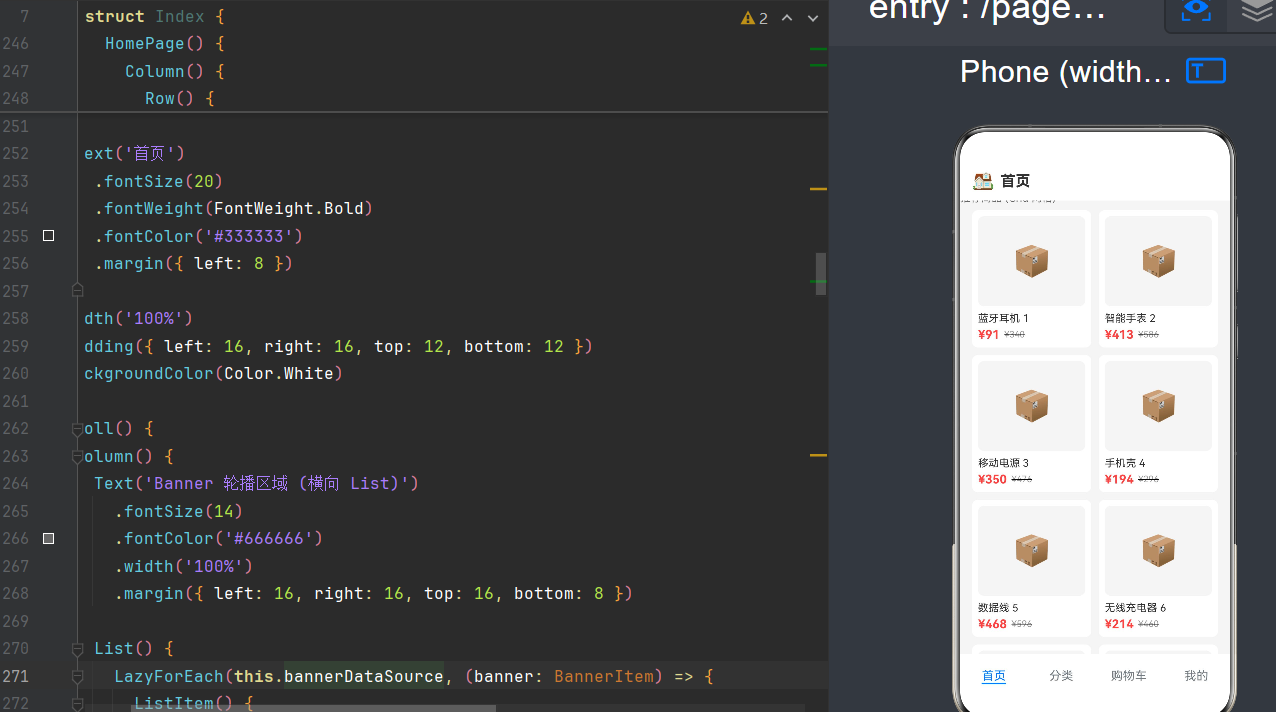
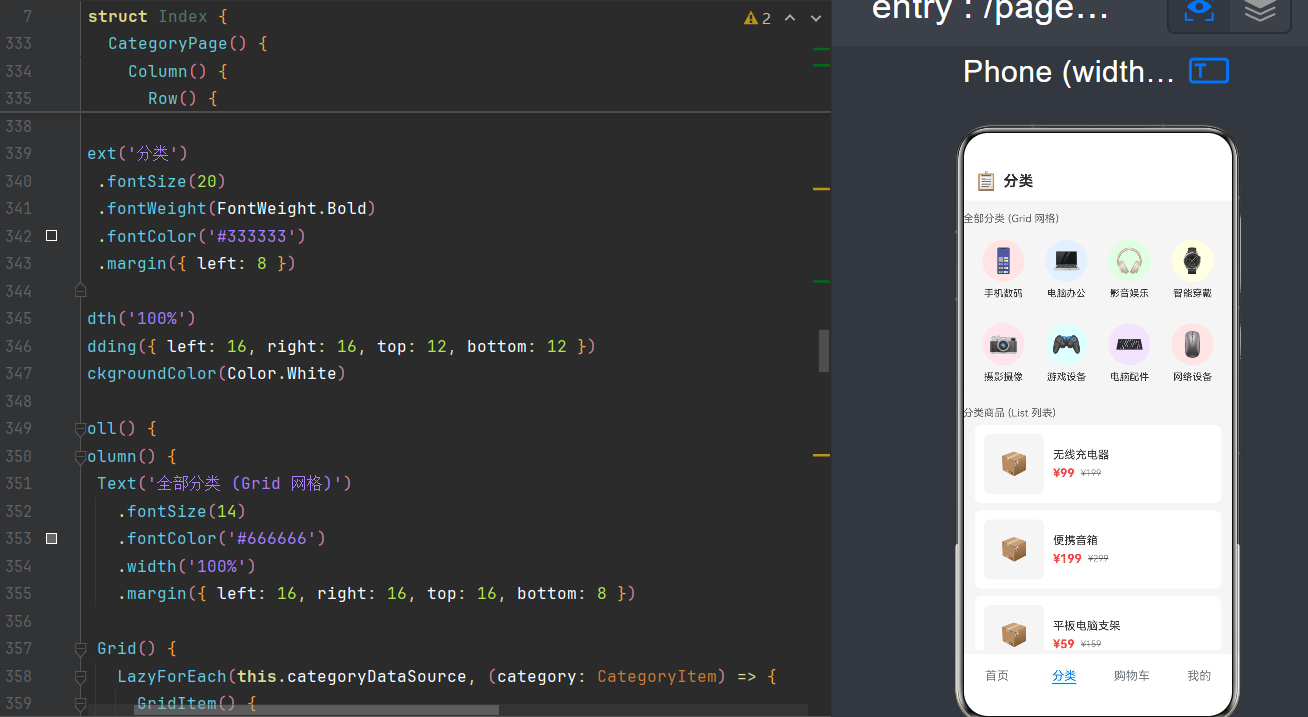
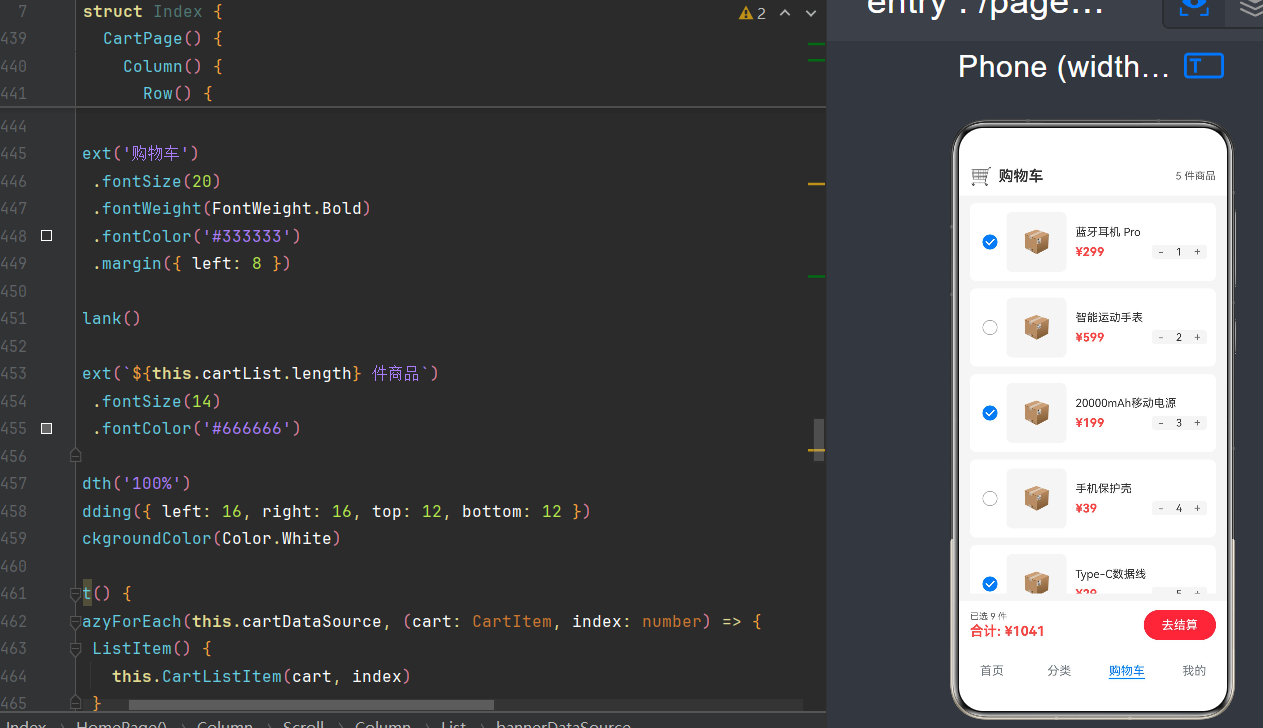
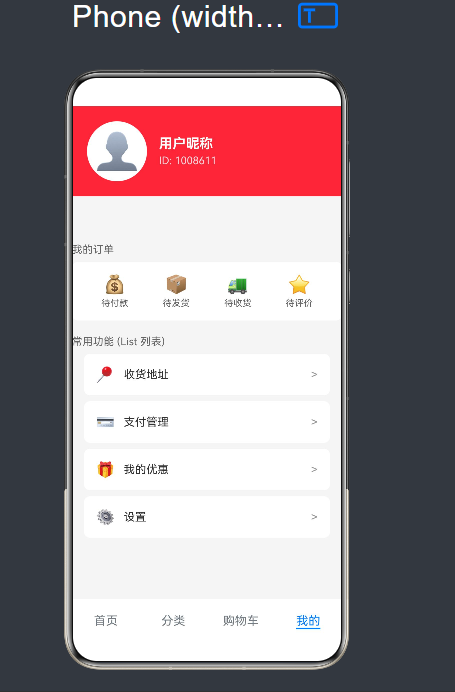
目录
- 一、引言:为什么需要复杂布局
- 二、核心组件基础
- 三、LazyForEach 与 DataSource 深度解析
- 四、实战:电商首页完整实现
- 五、API 24 新特性应用
- 六、性能优化与最佳实践
- 七、常见问题与解决方案
- 八、总结与展望
一、引言:为什么需要复杂布局
在移动应用开发中,首页是用户进入应用后看到的第一个界面,其重要性不言而喻。一个优秀的首页应该具备以下特点:
- 信息密度高:能够在有限屏幕空间展示尽可能多的内容
- 交互流畅:支持多种手势操作,如滑动、点击、长按等
- 视觉层次清晰:通过不同的布局方式区分内容优先级
- 性能优异:即使内容丰富,也能保持流畅的滚动和动画效果
在 HarmonyOS 生态中,ArkUI 框架提供了丰富的布局组件来满足这些需求。其中,Tabs、List 和 Grid 是构建复杂首页的三大核心组件:
- Tabs:用于底部导航或顶部选项卡,实现多页面切换
- List:用于线性排列的列表内容,支持横向和纵向滚动
- Grid:用于网格排列的内容,适合展示商品、分类等
这三个组件的组合可以说是"黄金搭档"——Tabs 负责页面级导航,List 和 Grid 负责页面内的内容展示。
1.1 布局架构概览
我们要实现的首页采用经典的电商 App 布局:
┌─────────────────────────────────────────────┐
│  顶部状态栏                                    │
├─────────────────────────────────────────────┤
│  🔍 搜索栏                                    │
├─────────────────────────────────────────────┤
│  Banner 轮播(横向 List)                     │
├─────────────────────────────────────────────┤
│  ┌────┬────┬────┬────┐                       │
│  │分类│分类│分类│分类│  ← Grid 4列            │
│  └────┴────┴────┴────┘                       │
├─────────────────────────────────────────────┤
│  "为你推荐" 标题                               │
├─────────────────────────────────────────────┤
│  ┌──────────┬──────────┐                     │
│  │  商品 1  │  商品 2  │ ← Grid 2列           │
│  ├──────────┼──────────┤                     │
│  │  商品 3  │  商品 4  │                     │
│  └──────────┴──────────┘                     │
├─────────────────────────────────────────────┤
│ 🏠首页 │ 📋分类 │ 🛒购物车 │ 👤我的│          │
└─────────────────────────────────────────────┘
             Tabs 底部导航
1.2 技术栈说明
| 技术 | 说明 |
|---|---|
| ArkTS | HarmonyOS 官方推荐的应用开发语言,基于 TypeScript 扩展 |
| ArkUI | HarmonyOS 声明式 UI 框架,采用组件化设计 |
| @State | 状态管理装饰器,实现响应式数据驱动 |
| LazyForEach | 懒加载迭代器,用于大数据集的高效渲染 |
| IDataSource | 数据源接口,LazyForEach 的必需依赖 |
1.3 API 版本说明
本文示例代码基于 HarmonyOS 6.1.1 (API 24) 开发,相比之前的版本,API 24 在以下方面进行了重要增强:
- Tabs 组件支持嵌套滚动
- 动态布局容器(Dynamic Layout Container)
- 更完善的 IDataSource 接口
- 性能监控与优化工具
二、核心组件基础
2.1 Tabs 选项卡组件
Tabs 是实现多页面切换的容器组件,每个 Tab 对应一个 TabContent。
2.1.1 基础用法
Tabs({ index: 0 }) {
    TabContent() {
        Text('首页')
            .fontSize(30)
            .fontWeight(FontWeight.Bold)
    }
    .tabBar('首页')

    TabContent() {
        Text('分类')
            .fontSize(30)
            .fontWeight(FontWeight.Bold)
    }
    .tabBar('分类')
}
2.1.2 关键属性
| 属性 | 类型 | 默认值 | 说明 |
|---|---|---|---|
index | number | 0 | 当前选中的 Tab 索引 |
barPosition | BarPosition | End | TabBar 位置 |
barHeight | Length | 56 | TabBar 高度 |
barBackgroundColor | ResourceColor | - | TabBar 背景色 |
animationDuration | number | 300 | 切换动画时长(ms) |
onChange | Callback<number> | - | Tab 切换回调 |
2.1.3 状态绑定
@State currentTabIndex: number = 0;

build() {
    Tabs({ index: this.currentTabIndex }) {
        TabContent() { /* ... */ }.tabBar('首页')
        TabContent() { /* ... */ }.tabBar('分类')
        TabContent() { /* ... */ }.tabBar('购物车')
        TabContent() { /* ... */ }.tabBar('我的')
    }
    .onChange((index: number) => {
        this.currentTabIndex = index;
    })
}
2.2 List 列表组件
List 是用于展示线性排列内容的容器组件,支持横向和纵向滚动。
2.2.1 横向 List 实现 Banner
List() {
    LazyForEach(this.bannerDataSource, (item: BannerItem) => {
        ListItem() {
            Row() {
                Column() {
                    Text(item.title)
                        .fontSize(24)
                        .fontWeight(FontWeight.Bold)
                        .fontColor(Color.White)
                }
                .alignItems(HorizontalAlign.Start)
                .padding({ left: 24, right: 24 })
            }
            .width('100%')
            .height('100%')
            .backgroundColor(item.color)
            .borderRadius(12)
        }
    }, (item: BannerItem) => item.id)
}
.listDirection(Axis.Horizontal)
.width('100%')
.height(160)
.padding({ left: 16, right: 16 })
.scrollBar(BarState.Off)
.edgeEffect(EdgeEffect.Spring)
2.2.2 关键属性
| 属性 | 类型 | 默认值 | 说明 |
|---|---|---|---|
listDirection | Axis | Vertical | 列表方向 |
scrollBar | BarState | Auto | 滚动条状态 |
edgeEffect | EdgeEffect | Spring | 边缘效果 |
divider | DividerStyle | - | 分割线样式 |
cachedCount | number | 1 | 缓存数量 |
2.3 Grid 网格组件
Grid 用于展示网格排列的内容,非常适合分类入口、商品展示等场景。
2.3.1 基础用法
Grid() {
    GridItem() {
        Text('商品 1').fontSize(16)
    }
    GridItem() {
        Text('商品 2').fontSize(16)
    }
    GridItem() {
        Text('商品 3').fontSize(16)
    }
    GridItem() {
        Text('商品 4').fontSize(16)
    }
}
.columnsTemplate('1fr 1fr')
.rowsGap(10)
.columnsGap(10)
.width('100%')
.padding(16)
2.3.2 columnsTemplate 高级用法
// 四列等宽
.columnsTemplate('1fr 1fr 1fr 1fr')

// 两列不等宽(3:7)
.columnsTemplate('0.3fr 0.7fr')

// 固定宽度 + 自适应
.columnsTemplate('100px 1fr 100px')
三、LazyForEach 与 DataSource 深度解析
LazyForEach 是 ArkUI 中用于大数据集高效渲染的核心机制,能够按需创建组件,避免一次性渲染所有数据。
3.1 IDataSource 接口规范
interface IDataSource {
    /** 获取数据总数 */
    totalCount(): number;

    /** 获取指定位置的数据 */
    getData(index: number): Object;

    /** 注册数据变化监听器 */
    registerDataChangeListener(listener: DataChangeListener): void;

    /** 注销数据变化监听器 */
    unregisterDataChangeListener(listener: DataChangeListener): void;
}
3.2 DataChangeListener 接口
interface DataChangeListener {
    /** 数据重新加载 */
    onDataReloaded(): void;

    /** 指定位置数据新增 */
    onDataAdd(index: number): void;

    /** 指定位置数据变化 */
    onDataChange(index: number): void;

    /** 指定位置数据删除 */
    onDataDelete(index: number): void;

    /** 数据位置移动 */
    onDataMove(from: number, to: number): void;
}
3.3 完整 DataSource 实现
export class BannerDataSource implements IDataSource {
    private dataList: BannerItem[] = [];
    private listeners: DataChangeListener[] = [];

    constructor(dataList: BannerItem[]) {
        this.dataList = dataList;
    }

    totalCount(): number {
        return this.dataList.length;
    }

    getData(index: number): BannerItem {
        return this.dataList[index];
    }

    registerDataChangeListener(listener: DataChangeListener): void {
        if (this.listeners.indexOf(listener) < 0) {
            this.listeners.push(listener);
        }
    }

    unregisterDataChangeListener(listener: DataChangeListener): void {
        const pos = this.listeners.indexOf(listener);
        if (pos >= 0) {
            this.listeners.splice(pos, 1);
        }
    }

    // 通知方法
    notifyDataReload(): void {
        for (let i = 0; i < this.listeners.length; i++) {
            this.listeners[i].onDataReloaded();
        }
    }

    notifyDataAdd(index: number): void {
        for (let i = 0; i < this.listeners.length; i++) {
            this.listeners[i].onDataAdd(index);
        }
    }

    notifyDataChange(index: number): void {
        for (let i = 0; i < this.listeners.length; i++) {
            this.listeners[i].onDataChange(index);
        }
    }

    notifyDataDelete(index: number): void {
        for (let i = 0; i < this.listeners.length; i++) {
            this.listeners[i].onDataDelete(index);
        }
    }

    notifyDataMove(from: number, to: number): void {
        for (let i = 0; i < this.listeners.length; i++) {
            this.listeners[i].onDataMove(from, to);
        }
    }
}
3.4 DataSource 动态更新
// 添加数据
addItem(item: BannerItem): void {
    this.dataList.push(item);
    this.notifyDataAdd(this.dataList.length - 1);
}

// 删除数据
removeItem(index: number): void {
    this.dataList.splice(index, 1);
    this.notifyDataDelete(index);
}

// 更新数据
updateItem(index: number, item: BannerItem): void {
    this.dataList[index] = item;
    this.notifyDataChange(index);
}
四、实战:电商首页完整实现
4.1 数据模型
// DataModels.ets

export class BannerItem {
    id: string;
    title: string;
    subtitle: string;
    imageUrl: string;
    color: string;
    jumpUrl: string;

    constructor(id: string, title: string, subtitle: string,
                imageUrl: string, color: string, jumpUrl: string) {
        this.id = id;
        this.title = title;
        this.subtitle = subtitle;
        this.imageUrl = imageUrl;
        this.color = color;
        this.jumpUrl = jumpUrl;
    }
}

export class CategoryItem {
    id: string;
    name: string;
    icon: string;
    color: string;
    count: number;

    constructor(id: string, name: string, icon: string,
                color: string, count: number) {
        this.id = id;
        this.name = name;
        this.icon = icon;
        this.color = color;
        this.count = count;
    }
}

export class ProductItem {
    id: string;
    name: string;
    description: string;
    price: number;
    originalPrice: number;
    imageUrl: string;
    salesCount: number;
    rating: number;
    tags: string[];

    constructor(id: string, name: string, description: string,
                price: number, originalPrice: number, imageUrl: string,
                salesCount: number, rating: number, tags: string[]) {
        this.id = id;
        this.name = name;
        this.description = description;
        this.price = price;
        this.originalPrice = originalPrice;
        this.imageUrl = imageUrl;
        this.salesCount = salesCount;
        this.rating = rating;
        this.tags = tags;
    }
}

export class CartItem {
    id: string;
    productId: string;
    productName: string;
    price: number;
    quantity: number;
    imageUrl: string;
    selected: boolean;
    maxQuantity: number;

    constructor(id: string, productId: string, productName: string,
                price: number, quantity: number, imageUrl: string,
                selected: boolean, maxQuantity: number = 99) {
        this.id = id;
        this.productId = productId;
        this.productName = productName;
        this.price = price;
        this.quantity = quantity;
        this.imageUrl = imageUrl;
        this.selected = selected;
        this.maxQuantity = maxQuantity;
    }
}
4.2 数据生成器
// 生成 Banner 数据
export function generateBannerData(): BannerItem[] {
    const colors = ['#FF6B6B', '#4ECDC4', '#45B7D1', '#96CEB4', '#FFEAA7'];
    const titles = ['限时特惠', '新品上市', '品牌专区', '满减活动', '会员专享'];
    const subtitles = ['爆款商品低至 5 折', '抢先体验', '大牌正品', '满199减50', '积分翻倍'];
    const banners: BannerItem[] = [];

    for (let i = 0; i < 5; i++) {
        banners.push(new BannerItem(
            `banner_${i}`, titles[i], subtitles[i], '', colors[i], `jump_${i}`
        ));
    }
    return banners;
}

// 生成分类数据
export function generateCategoryData(): CategoryItem[] {
    const icons = ['📱', '💻', '🎧', '⌚', '📷', '🎮', '👟', '🎒'];
    const names = ['手机数码', '电脑办公', '影音娱乐', '智能穿戴',
                   '摄影摄像', '游戏设备', '运动户外', '箱包配饰'];
    const colors = ['#FFE5E5', '#E5F0FF', '#E5FFE5', '#FFFFE5',
                    '#FFE5F0', '#E5FFFF', '#F0E5FF', '#FFF5E5'];
    const categories: CategoryItem[] = [];

    for (let i = 0; i < 8; i++) {
        categories.push(new CategoryItem(
            `cat_${i}`, names[i], icons[i], colors[i], Math.floor(Math.random() * 1000)
        ));
    }
    return categories;
}

// 生成商品数据
export function generateProductData(count: number, category: string): ProductItem[] {
    const products: ProductItem[] = [];
    const names = ['蓝牙耳机 Pro', '智能手表 S3', '便携充电器', '蓝牙音箱'];
    const descs = ['高品质音效', '健康监测', '快充技术', '360°环绕声'];
    const tags = [['新品'], ['限时优惠'], ['爆款'], ['会员价']];

    for (let i = 0; i < count; i++) {
        const price = Math.floor(Math.random() * 800 + 100);
        products.push(new ProductItem(
            `${category}_${i}`, names[i % names.length] + ` ${i+1}`,
            descs[i % descs.length], price, price + 100, '',
            Math.floor(Math.random() * 10000), 4.5, tags[i % tags.length]
        ));
    }
    return products;
}
4.3 完整首页实现
// Index.ets
import { BannerItem, ProductItem, CategoryItem, CartItem } from './DataModels';
import { BannerDataSource, ProductDataSource, CategoryDataSource, CartDataSource } from './DataModels';
import { generateBannerData, generateProductData, generateCategoryData, generateCartData } from './DataModels';
@Entry
@Component
struct Index {
// 状态
@State currentTabIndex: number = 0;
@State bannerList: BannerItem[] = [];
@State productList: ProductItem[] = [];
@State categoryList: CategoryItem[] = [];
@State cartList: CartItem[] = [];
@State cartTotalPrice: number = 0;
@State cartSelectedCount: number = 0;
// 数据源
private bannerDataSource: BannerDataSource = new BannerDataSource([]);
private productDataSource: ProductDataSource = new ProductDataSource([]);
private categoryDataSource: CategoryDataSource = new CategoryDataSource([]);
private cartDataSource: CartDataSource = new CartDataSource([]);
aboutToAppear(): void {
this.initData();
}
private initData(): void {
this.bannerList = generateBannerData();
this.productList = generateProductData(20, 'recommend');
this.categoryList = generateCategoryData();
this.cartList = generateCartData();
this.bannerDataSource = new BannerDataSource(this.bannerList);
this.productDataSource = new ProductDataSource(this.productList);
this.categoryDataSource = new CategoryDataSource(this.categoryList);
this.cartDataSource = new CartDataSource(this.cartList);
this.calculateCartTotal();
}
private calculateCartTotal(): void {
let total = 0;
let count = 0;
for (let i = 0; i < this.cartList.length; i++) {
const item = this.cartList[i];
if (item.selected) {
total += item.price * item.quantity;
count += item.quantity;
}
}
this.cartTotalPrice = total;
this.cartSelectedCount = count;
}
// ========== Builder ==========
@Builder
BannerItemBuilder(banner: BannerItem) {
Row() {
Column() {
Text(banner.title)
.fontSize(22)
.fontWeight(FontWeight.Bold)
.fontColor(Color.White)
.margin({ bottom: 6 })
Text(banner.subtitle)
.fontSize(14)
.fontColor(Color.White)
.opacity(0.9)
}
.alignItems(HorizontalAlign.Start)
.padding({ left: 20, right: 20 })
}
.width('100%')
.height('100%')
.backgroundColor(banner.color)
.borderRadius(12)
.shadow({ radius: 8, color: '#20000000', offsetX: 0, offsetY: 4 })
}
@Builder
CategoryItemBuilder(category: CategoryItem) {
Column() {
Column() {
Text(category.icon).fontSize(28)
}
.width(52)
.height(52)
.backgroundColor(category.color)
.borderRadius(26)
.justifyContent(FlexAlign.Center)
.alignItems(HorizontalAlign.Center)
.margin({ bottom: 8 })
Text(category.name)
.fontSize(13)
.fontColor('#333333')
.maxLines(1)
}
.width('100%')
.justifyContent(FlexAlign.Center)
.alignItems(HorizontalAlign.Center)
.padding({ top: 12, bottom: 12 })
}
@Builder
ProductCardBuilder(product: ProductItem) {
Column() {
Column() {
Text('📦').fontSize(48)
}
.width('100%')
.height(140)
.backgroundColor('#F5F5F5')
.borderRadius({ topLeft: 8, topRight: 8 })
.justifyContent(FlexAlign.Center)
.alignItems(HorizontalAlign.Center)
Column() {
Text(product.name)
.fontSize(14)
.fontColor('#333333')
.maxLines(2)
.textOverflow({ overflow: TextOverflow.Ellipsis })
.width('100%')
.margin({ bottom: 4 })
Row() {
Text('¥').fontSize(12).fontColor('#FF4444')
Text(product.price.toString())
.fontSize(18).fontColor('#FF4444')
.fontWeight(FontWeight.Bold)
Text(`¥${product.originalPrice}`)
.fontSize(12).fontColor('#CCCCCC')
.decoration({ type: TextDecorationType.LineThrough })
.margin({ left: 6 })
}
.width('100%')
}
.width('100%')
.padding(8)
}
.width('100%')
.backgroundColor(Color.White)
.borderRadius(8)
.shadow({ radius: 4, color: '#10000000', offsetX: 0, offsetY: 2 })
}
@Builder
HomePage() {
Column() {
Row() {
Text('🏠').fontSize(20)
Text('首页')
.fontSize(20)
.fontWeight(FontWeight.Bold)
.fontColor('#333333')
.margin({ left: 8 })
}
.width('100%')
.padding({ left: 16, right: 16, top: 12, bottom: 12 })
.backgroundColor(Color.White)
Scroll() {
Column() {
Text('🔥 热门活动')
.fontSize(14)
.fontColor('#666666')
.width('100%')
.margin({ left: 16, right: 16, top: 16, bottom: 8 })
List() {
LazyForEach(this.bannerDataSource, (banner: BannerItem) => {
ListItem() {
this.BannerItemBuilder(banner)
}
}, (banner: BannerItem) => banner.id)
}
.listDirection(Axis.Horizontal)
.width('100%')
.height(160)
.padding({ left: 16, right: 16 })
.scrollBar(BarState.Off)
.edgeEffect(EdgeEffect.Spring)
Text('📂 全部分类')
.fontSize(14)
.fontColor('#666666')
.width('100%')
.margin({ left: 16, right: 16, top: 20, bottom: 8 })
Grid() {
LazyForEach(this.categoryDataSource, (category: CategoryItem) => {
GridItem() {
this.CategoryItemBuilder(category)
}
}, (category: CategoryItem) => category.id)
}
.columnsTemplate('1fr 1fr 1fr 1fr')
.rowsGap(8)
.columnsGap(8)
.width('100%')
.padding({ left: 16, right: 16 })
Text('⭐ 为你推荐')
.fontSize(14)
.fontColor('#666666')
.width('100%')
.margin({ left: 16, right: 16, top: 20, bottom: 8 })
Grid() {
LazyForEach(this.productDataSource, (product: ProductItem) => {
GridItem() {
this.ProductCardBuilder(product)
}
}, (product: ProductItem) => product.id)
}
.columnsTemplate('1fr 1fr')
.rowsGap(10)
.columnsGap(10)
.width('100%')
.padding({ left: 16, right: 16, bottom: 20 })
}
}
.scrollBar(BarState.Off)
.edgeEffect(EdgeEffect.Spring)
.layoutWeight(1)
}
.width('100%')
.height('100%')
.backgroundColor('#F5F5F5')
}
@Builder
CategoryPage() {
Column() {
Row() {
Text('📋').fontSize(20)
Text('分类')
.fontSize(20)
.fontWeight(FontWeight.Bold)
.fontColor('#333333')
.margin({ left: 8 })
}
.width('100%')
.padding({ left: 16, right: 16, top: 12, bottom: 12 })
.backgroundColor(Color.White)
Scroll() {
Column() {
Text('全部分类')
.fontSize(14)
.fontColor('#666666')
.width('100%')
.margin({ left: 16, right: 16, top: 16, bottom: 8 })
Grid() {
LazyForEach(this.categoryDataSource, (category: CategoryItem) => {
GridItem() {
this.CategoryItemBuilder(category)
}
}, (category: CategoryItem) => category.id)
}
.columnsTemplate('1fr 1fr 1fr 1fr')
.rowsGap(8)
.columnsGap(8)
.width('100%')
.padding({ left: 16, right: 16 })
Text('热门商品')
.fontSize(14)
.fontColor('#666666')
.width('100%')
.margin({ left: 16, right: 16, top: 20, bottom: 8 })
List() {
LazyForEach(this.productDataSource, (product: ProductItem) => {
ListItem() {
Row() {
Column() {
Text('📦').fontSize(36)
}
.width(100)
.height(100)
.backgroundColor('#F5F5F5')
.borderRadius(8)
.justifyContent(FlexAlign.Center)
.alignItems(HorizontalAlign.Center)
.margin({ right: 12 })
Column() {
Text(product.name)
.fontSize(16)
.fontWeight(FontWeight.Medium)
.fontColor('#333333')
.width('100%')
.margin({ bottom: 6 })
Text(product.description)
.fontSize(12)
.fontColor('#999999')
.maxLines(1)
.width('100%')
.margin({ bottom: 8 })
Row() {
Text(`¥${product.price}`)
.fontSize(18)
.fontColor('#FF4444')
.fontWeight(FontWeight.Bold)
Text(`¥${product.originalPrice}`)
.fontSize(12)
.fontColor('#CCCCCC')
.decoration({ type: TextDecorationType.LineThrough })
.margin({ left: 8 })
}
}
.layoutWeight(1)
.alignItems(HorizontalAlign.Start)
}
.width('100%')
.padding(12)
.backgroundColor(Color.White)
.borderRadius(8)
.margin({ bottom: 10 })
}
}, (product: ProductItem) => product.id)
}
.width('100%')
.height(320)
.padding({ left: 16, right: 16, bottom: 20 })
.scrollBar(BarState.Off)
}
}
.scrollBar(BarState.Off)
.edgeEffect(EdgeEffect.Spring)
.layoutWeight(1)
}
.width('100%')
.height('100%')
.backgroundColor('#F5F5F5')
}
@Builder
CartPage() {
Column() {
Row() {
Text('🛒').fontSize(20)
Text('购物车')
.fontSize(20)
.fontWeight(FontWeight.Bold)
.fontColor('#333333')
.margin({ left: 8 })
Blank()
Text(`${this.cartList.length} 件商品`)
.fontSize(14)
.fontColor('#666666')
}
.width('100%')
.padding({ left: 16, right: 16, top: 12, bottom: 12 })
.backgroundColor(Color.White)
List() {
LazyForEach(this.cartDataSource, (item: CartItem) => {
ListItem() {
Row() {
Checkbox()
.select(item.selected)
.onChange((checked: boolean) => {
item.selected = checked;
this.calculateCartTotal();
})
.width(22)
.height(22)
.margin({ right: 12 })
Column() {
Text('📦').fontSize(32)
}
.width(80)
.height(80)
.backgroundColor('#F5F5F5')
.borderRadius(8)
.justifyContent(FlexAlign.Center)
.alignItems(HorizontalAlign.Center)
.margin({ right: 12 })
Column() {
Text(item.productName)
.fontSize(15)
.fontColor('#333333')
.width('100%')
.margin({ bottom: 8 })
Row() {
Text(`¥${item.price}`)
.fontSize(18)
.fontColor('#FF4444')
.fontWeight(FontWeight.Bold)
Blank()
Row() {
Text('-').fontSize(16).fontColor('#666666')
.padding({ left: 10, right: 10 })
.onClick(() => {
if (item.quantity > 1) {
item.quantity--;
this.calculateCartTotal();
}
})
Text(`${item.quantity}`)
.fontSize(14).fontColor('#333333')
.padding({ left: 12, right: 12 })
Text('+').fontSize(16).fontColor('#666666')
.padding({ left: 10, right: 10 })
.onClick(() => {
if (item.quantity < item.maxQuantity) {
item.quantity++;
this.calculateCartTotal();
}
})
}
.alignItems(VerticalAlign.Center)
.backgroundColor('#F5F5F5')
.borderRadius(4)
}
.width('100%')
.alignItems(VerticalAlign.Center)
}
.layoutWeight(1)
.alignItems(HorizontalAlign.Start)
}
.width('100%')
.padding(12)
.backgroundColor(Color.White)
.borderRadius(8)
.margin({ bottom: 10 })
}
}, (item: CartItem) => item.id)
}
.width('100%')
.layoutWeight(1)
.padding({ left: 16, right: 16, top: 10, bottom: 10 })
.scrollBar(BarState.Off)
Row() {
Column() {
Text(`已选 ${this.cartSelectedCount} 件`)
.fontSize(12).fontColor('#666666')
Text(`合计: ¥${this.cartTotalPrice}`)
.fontSize(18).fontColor('#FF4444')
.fontWeight(FontWeight.Bold)
.margin({ top: 2 })
}
.alignItems(HorizontalAlign.Start)
Blank()
Button('去结算')
.fontSize(16).fontColor(Color.White)
.backgroundColor('#FF4444')
.borderRadius(20)
.height(40)
.padding({ left: 28, right: 28 })
}
.width('100%')
.padding({ left: 16, right: 16, top: 12, bottom: 12 })
.backgroundColor(Color.White)
.alignItems(VerticalAlign.Center)
}
.width('100%')
.height('100%')
.backgroundColor('#F5F5F5')
}
@Builder
MinePage() {
Column() {
Column() {
Row() {
Column() {
Text('👤').fontSize(40)
}
.width(80).height(80)
.backgroundColor(Color.White)
.borderRadius(40)
.justifyContent(FlexAlign.Center)
.alignItems(HorizontalAlign.Center)
.margin({ right: 16 })
Column() {
Text('用户昵称')
.fontSize(20)
.fontWeight(FontWeight.Bold)
.fontColor(Color.White)
.margin({ bottom: 4 })
Text('ID: 1008611')
.fontSize(14)
.fontColor(Color.White)
.opacity(0.8)
}
.alignItems(HorizontalAlign.Start)
}
.width('100%')
.padding(20)
.alignItems(VerticalAlign.Center)
}
.width('100%')
.backgroundColor('#FF4444')
Scroll() {
Column() {
Text('我的订单')
.fontSize(14).fontColor('#666666')
.width('100%')
.margin({ left: 16, right: 16, top: 16, bottom: 8 })
Row() {
Column() {
Text('💰').fontSize(24)
Text('待付款')
.fontSize(12).fontColor('#666666')
.margin({ top: 4 })
}
.layoutWeight(1).alignItems(HorizontalAlign.Center)
Column() {
Text('📦').fontSize(24)
Text('待发货')
.fontSize(12).fontColor('#666666')
.margin({ top: 4 })
}
.layoutWeight(1).alignItems(HorizontalAlign.Center)
Column() {
Text('🚚').fontSize(24)
Text('待收货')
.fontSize(12).fontColor('#666666')
.margin({ top: 4 })
}
.layoutWeight(1).alignItems(HorizontalAlign.Center)
Column() {
Text('⭐').fontSize(24)
Text('待评价')
.fontSize(12).fontColor('#666666')
.margin({ top: 4 })
}
.layoutWeight(1).alignItems(HorizontalAlign.Center)
}
.width('100%')
.padding(16)
.backgroundColor(Color.White)
.borderRadius(8)
.margin({ left: 16, right: 16 })
Text('常用功能')
.fontSize(14).fontColor('#666666')
.width('100%')
.margin({ left: 16, right: 16, top: 20, bottom: 8 })
List() {
ListItem() {
Row() {
Text('📍').fontSize(20).margin({ right: 12 })
Text('收货地址').fontSize(15).fontColor('#333333')
Blank()
Text('>').fontSize(16).fontColor('#CCCCCC')
}
.width('100%').padding(16)
.backgroundColor(Color.White).borderRadius(8)
}
ListItem() {
Row() {
Text('💳').fontSize(20).margin({ right: 12 })
Text('支付管理').fontSize(15).fontColor('#333333')
Blank()
Text('>').fontSize(16).fontColor('#CCCCCC')
}
.width('100%').padding(16)
.backgroundColor(Color.White).borderRadius(8)
}
ListItem() {
Row() {
Text('🎁').fontSize(20).margin({ right: 12 })
Text('我的优惠').fontSize(15).fontColor('#333333')
Blank()
Text('>').fontSize(16).fontColor('#CCCCCC')
}
.width('100%').padding(16)
.backgroundColor(Color.White).borderRadius(8)
}
ListItem() {
Row() {
Text('⚙️').fontSize(20).margin({ right: 12 })
Text('设置').fontSize(15).fontColor('#333333')
Blank()
Text('>').fontSize(16).fontColor('#CCCCCC')
}
.width('100%').padding(16)
.backgroundColor(Color.White).borderRadius(8)
}
}
.width('100%')
.height(280)
.padding({ left: 16, right: 16, bottom: 20 })
.scrollBar(BarState.Off)
}
}
.scrollBar(BarState.Off)
.layoutWeight(1)
}
.width('100%')
.height('100%')
.backgroundColor('#F5F5F5')
}
build() {
Column() {
Tabs({ index: this.currentTabIndex }) {
TabContent() {
this.HomePage()
}
.tabBar('首页')
TabContent() {
this.CategoryPage()
}
.tabBar('分类')
TabContent() {
this.CartPage()
}
.tabBar('购物车')
TabContent() {
this.MinePage()
}
.tabBar('我的')
}
.width('100%')
.layoutWeight(1)
.onChange((index: number) => {
this.currentTabIndex = index;
})
.barHeight(56)
.barBackgroundColor(Color.White)
.animationDuration(300)
}
.width('100%')
.height('100%')
.backgroundColor('#F5F5F5')
}
}
五、API 24 新特性应用
5.1 Tabs 嵌套滚动支持
在 API 24 中,Tabs 的 TabContent 内部包含可滚动组件时,滚动体验更加流畅。
Scroll() {
    Column() {
        // 内容
    }
}
.nestedScroll({
    scrollForward: NestedScrollMode.PARENT_FIRST,
    scrollBackward: NestedScrollMode.SELF_FIRST
})
5.2 动态布局容器
API 24 允许在运行时切换布局算法,而不需要重建组件:
@State layoutMode: number = 0;

switchLayout() {
    this.layoutMode = (this.layoutMode + 1) % 3;
}

// 使用不同的布局算法
// GridLayoutAlgorithm - 网格布局
// ListLayoutAlgorithm - 列表布局
// WaterFallLayoutAlgorithm - 瀑布流布局
5.3 性能优化
API 24 提供了更多性能监控工具:
// 监控组件渲染耗时
aboutToAppear() {
    console.info('Component render start');
}

aboutToDisappear() {
    console.info('Component render end');
}
六、性能优化与最佳实践
6.1 LazyForEach 使用规范
- 必须使用唯一 Key:每个数据项的 key 必须唯一且稳定
- 避免在 Builder 中修改数据:数据变更应在 DataSource 中进行
- 合理设置缓存数量:使用
cachedCount预加载邻近数据
List() {
    LazyForEach(this.dataSource, (item: Item) => {
        ListItem() { /* 内容 */ }
    }, (item: Item) => item.id)  // 唯一 Key
}
.cachedCount(3)  // 缓存邻近 3 项
6.2 组件渲染优化
- 使用 @Builder 抽取公共组件:减少重复代码,提高可维护性
- 控制组件层级:过深的组件层级会影响渲染性能
- 避免过度渲染:合理使用 @State 和 @Prop
6.3 内存管理
- 及时注销监听器:避免内存泄漏
- 合理释放资源:在 aboutToDisappear 中释放资源
- 避免大对象引用:及时清理不再使用的大对象
七、常见问题与解决方案
7.1 LazyForEach 不更新
问题:调用 notifyDataChange 后界面没有更新。
解决方案:
- 检查 notifyDataChange 的参数是否正确
- 确认数据源中的数据确实已更新
- 检查 Builder 方法是否正确引用了数据
7.2 Tabs 切换闪烁
问题:切换 Tab 时出现闪烁现象。
解决方案:
- 使用
animationDuration设置合理的动画时长 - 确保 TabContent 中的组件没有耗时操作
- 考虑使用懒加载方式初始化 Tab
7.3 List 滚动卡顿
问题:List 滚动时出现卡顿。
解决方案:
- 使用 LazyForEach 替代 ForEach
- 减少每个 ListItem 的复杂度
- 使用
cachedCount预加载邻近数据 - 检查是否有过多的日志输出
八、总结与展望
本文详细介绍了如何使用 Tabs + List + Grid 组合构建复杂的电商首页。通过实际案例,我们学习了:
- 组件基础:Tabs、List、Grid 的核心用法
- 懒加载机制:LazyForEach 与 IDataSource 的配合
- 实战开发:完整的电商首页实现
- API 24 新特性:嵌套滚动、动态布局等
- 性能优化:最佳实践和注意事项
8.1 核心要点回顾
| 要点 | 说明 |
|---|---|
| Tabs 容器 | 用于页面级导航,支持多种配置 |
| List 组件 | 线性排列,支持横向/纵向滚动 |
| Grid 组件 | 网格排列,灵活的 columnsTemplate |
| LazyForEach | 按需渲染,性能优异 |
| IDataSource | 数据源接口,必须正确实现 |
| @Builder | 组件抽取,代码复用 |
8.2 进阶方向
- 动画效果:结合 animateTo 实现流畅动画
- 网络请求:整合 HTTP Kit 获取真实数据
- 本地存储:使用 Preferences 缓存数据
- 多设备适配:响应式布局适配不同屏幕
- 深色模式:支持系统深色模式
- 无障碍:添加无障碍属性支持
8.3 展望
随着 HarmonyOS 的不断发展,UI 开发将变得更加强大和便捷。未来可以期待:
- 更智能的布局系统
- 更强大的动画能力
- 更好的跨设备体验
- 更完善的开发工具
附录
A. 完整项目结构
entry/src/main/ets/
├── pages/
│   ├── Index.ets          # 主页面
│   └── DataModels.ets     # 数据模型
├── resources/
│   ├── base/
│   │   ├── element/       # 元素资源
│   │   └── media/         # 图片资源
│   └── en_US/             # 英文资源
│       └── element/
└── module.json5           # 模块配置
B. 运行环境
- DevEco Studio: 6.1.1 Beta1 或更高版本
- HarmonyOS SDK: 6.1.1 (API 24)
- 运行设备: HarmonyOS 手机或模拟器
C. 参考资料
写在最后
感谢阅读本文!希望这份实战指南能够帮助你掌握 HarmonyOS ArkUI 的复杂布局开发。如果有任何问题或建议,欢迎留言交流。让我们一起探索鸿蒙生态的无限可能!

作为“人工智能6S店”的官方数字引擎,为AI开发者与企业提供一个覆盖软硬件全栈、一站式门户。
更多推荐
 5
5 0
0- 0


 已为社区贡献19条内容

所有评论(0)