
HarmonyOS ArkUI Menu 与 ContextMenu:点击菜单与长按上下文菜单
系列:鸿蒙 HarmonyOS 6.1 新特性实战 · 第 44 篇
ArkUI 提供两种菜单绑定方式:bindMenu 用于点击触发的下拉菜单,bindContextMenu 用于长按或右键触发的上下文菜单。两者均支持简单数组配置和自定义 @Builder 布局两种写法,满足从快速原型到精细定制的不同需求。本篇通过操作日志区域直观记录每次菜单点击事件。
运行效果
初始状态(两个按钮 + 长按区域 + 操作日志): 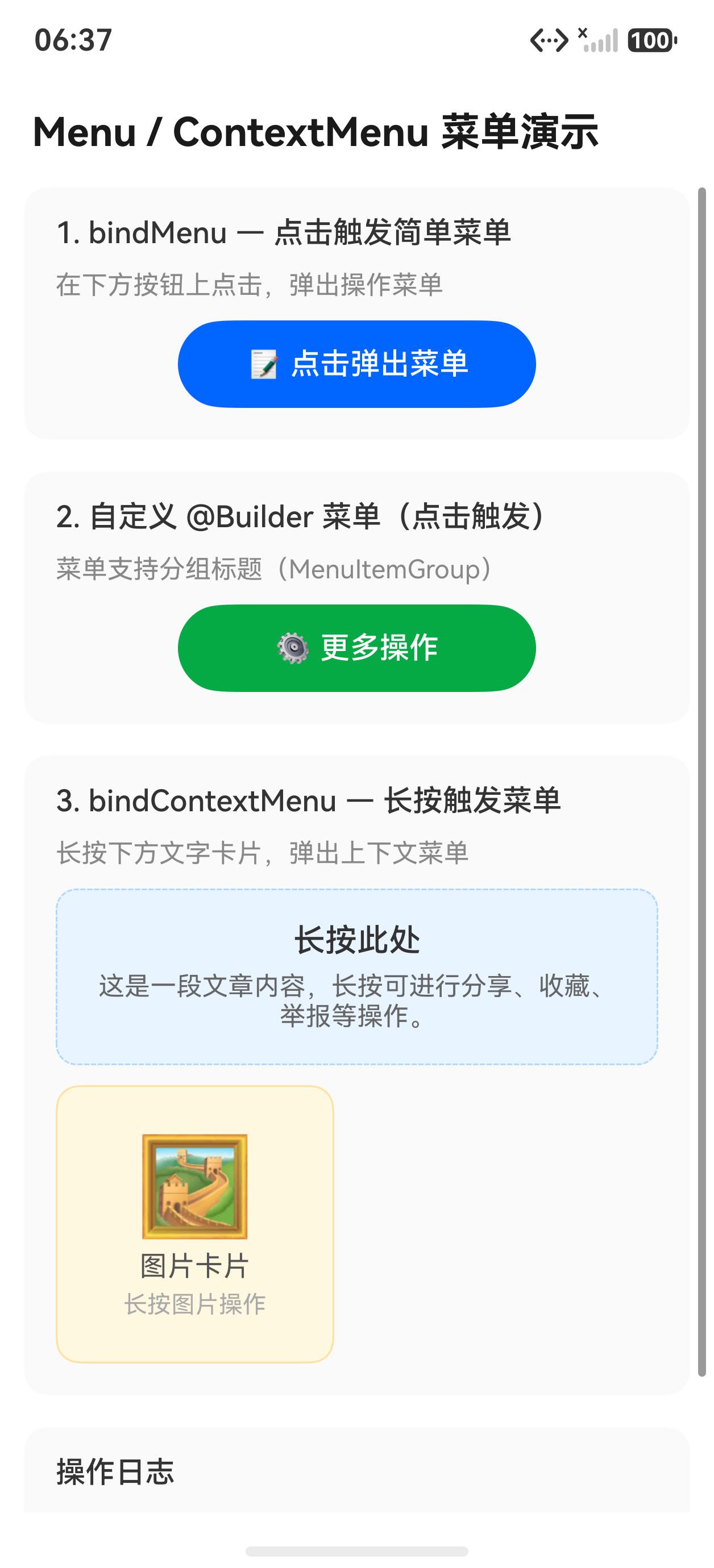
菜单弹出展示(自定义菜单含分组标题): 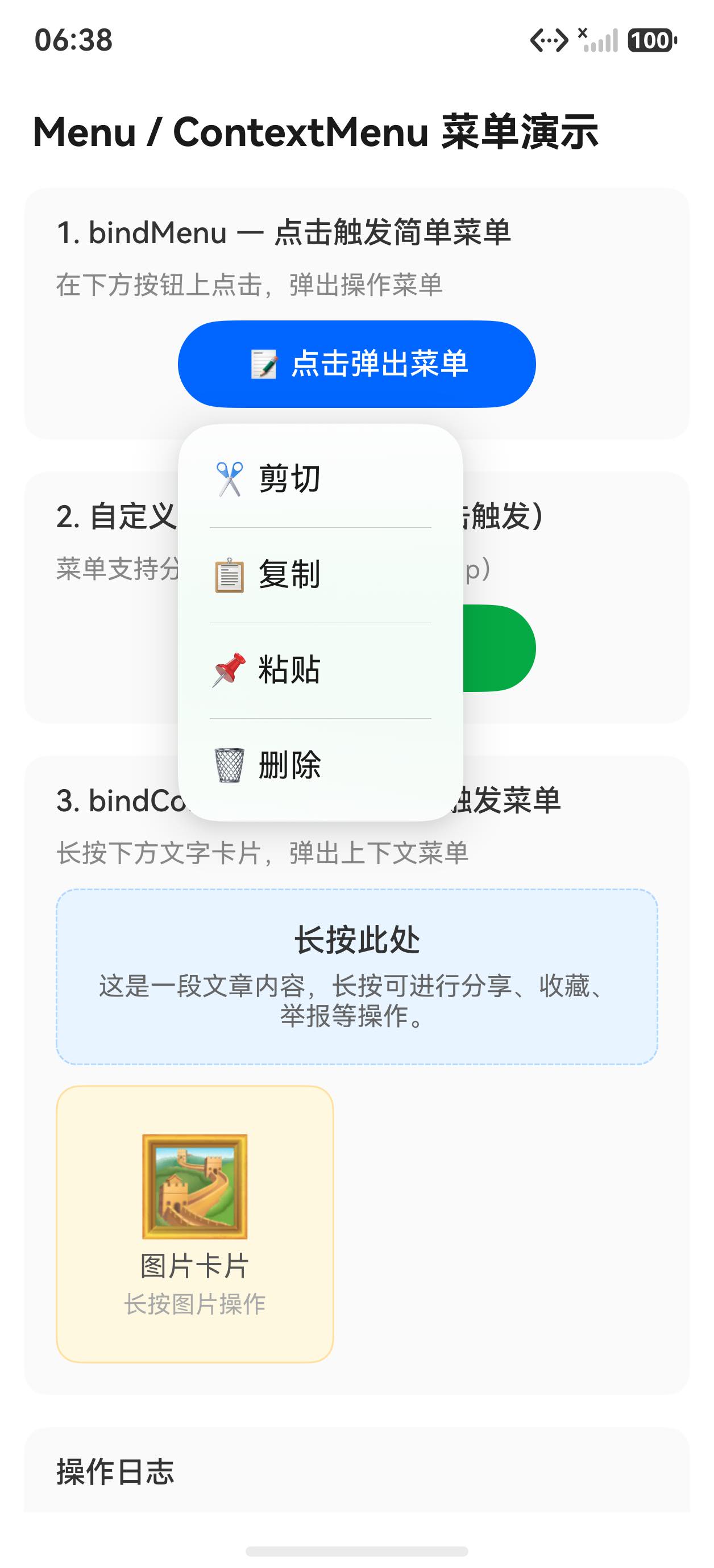
bindMenu:数组写法
最简写法是直接传入 MenuItem[] 数组,每项包含 value(显示文字)和 action(点击回调)。适合菜单项固定、结构简单的场景。
Button('点击菜单')
  .bindMenu([
    { value: '复制', action: () => { this.addLog('执行:复制') } },
    { value: '粘贴', action: () => { this.addLog('执行:粘贴') } },
    { value: '删除', action: () => { this.addLog('执行:删除') } },
  ])
数组写法无需额外定义组件,代码最为简洁。菜单点击后自动关闭,无需手动处理。
bindMenu:自定义 @Builder
当需要分组标题、图标或自定义样式时,改用 @Builder 函数构建 Menu:
@Builder customMenuBuilder() {
  Menu() {
    MenuItem({ content: '分享' })
      .onClick(() => { this.addLog('点击了:分享') })
    MenuItem({ content: '收藏' })
      .onClick(() => { this.addLog('点击了:收藏') })
    MenuItemGroup({ header: '更多操作' }) {
      MenuItem({ content: '举报' })
        .onClick(() => { this.addLog('点击了:举报') })
      MenuItem({ content: '屏蔽此内容' })
        .onClick(() => { this.addLog('点击了:屏蔽此内容') })
    }
  }
}

// 绑定到按钮
Button('更多操作').bindMenu(this.customMenuBuilder)
MenuItemGroup 接受 header 参数作为分组标题,内部嵌套 MenuItem,系统会自动渲染分割线与标题样式。
bindContextMenu:长按上下文菜单
bindContextMenu 接受两个参数:@Builder 函数和触发类型(ResponseType.LongPress 或 ResponseType.RightClick):
Text('长按此区域唤出菜单')
  .width('100%')
  .padding(20)
  .textAlign(TextAlign.Center)
  .fontSize(14)
  .fontColor('#666666')
  .backgroundColor('#f0f4ff')
  .borderRadius(8)
  .bindContextMenu(this.customMenuBuilder, ResponseType.LongPress)
在触控屏设备上使用 LongPress;在鼠标/触控板场景下也可同时支持 RightClick。
MenuItem 图标配置
MenuItem 支持 startIcon 和 endIcon 参数,用于在菜单项前后添加图标:
@Builder iconMenuBuilder() {
  Menu() {
    MenuItem({
      startIcon: $r('app.media.icon_share'),
      content: '分享',
      endIcon: $r('app.media.icon_arrow')
    })
    .onClick(() => { this.addLog('点击了:分享') })

    MenuItem({
      startIcon: $r('app.media.icon_star'),
      content: '收藏'
    })
    .onClick(() => { this.addLog('点击了:收藏') })
  }
}
操作日志区域
使用滚动列表记录每次菜单操作,帮助调试和演示:
@State logs: string[] = []

addLog(msg: string): void {
  const time = new Date().toLocaleTimeString()
  this.logs = [`[${time}] ${msg}`, ...this.logs].slice(0, 20)
}

// 日志渲染
Column({ space: 0 }) {
  Row() {
    Text('操作日志').fontSize(13).fontColor('#999999').layoutWeight(1)
    Text('清空').fontSize(13).fontColor('#0066ff')
      .onClick(() => { this.logs = [] })
  }
  .padding({ left: 12, right: 12, top: 10, bottom: 8 })

  if (this.logs.length === 0) {
    Text('暂无操作记录').fontSize(13).fontColor('#cccccc')
      .padding(16).width('100%').textAlign(TextAlign.Center)
  } else {
    List() {
      ForEach(this.logs, (log: string) => {
        ListItem() {
          Text(log).fontSize(12).fontColor('#444444')
            .padding({ left: 12, right: 12, top: 6, bottom: 6 })
        }
      })
    }
    .divider({ strokeWidth: 0.5, color: '#f0f0f0' })
  }
}
.backgroundColor('#ffffff')
.borderRadius(8)
完整代码
@Entry
@Component
struct MenuContextMenuPage {
  @State logs: string[] = []

  addLog(msg: string): void {
    const now = new Date()
    const time = `${now.getHours()}:${String(now.getMinutes()).padStart(2, '0')}:${String(now.getSeconds()).padStart(2, '0')}`
    this.logs = [`[${time}] ${msg}`, ...this.logs].slice(0, 20)
  }

  @Builder simpleMenuBuilder() {
    Menu() {
      MenuItem({ content: '分享' }).onClick(() => { this.addLog('点击了:分享') })
      MenuItem({ content: '收藏' }).onClick(() => { this.addLog('点击了:收藏') })
      MenuItemGroup({ header: '更多操作' }) {
        MenuItem({ content: '举报' }).onClick(() => { this.addLog('点击了:举报') })
        MenuItem({ content: '屏蔽此内容' }).onClick(() => { this.addLog('点击了:屏蔽此内容') })
      }
    }
  }

  build() {
    Column({ space: 16 }) {
      Text('菜单组件演示').fontSize(18).fontWeight(FontWeight.Bold).fontColor('#333333')
        .width('100%').padding({ left: 16 })

      // 数组写法菜单
      Column({ space: 8 }) {
        Text('bindMenu 数组写法').fontSize(13).fontColor('#999999')
        Button('点击菜单(数组写法)')
          .width('100%')
          .bindMenu([
            { value: '复制', action: () => { this.addLog('执行:复制') } },
            { value: '粘贴', action: () => { this.addLog('执行:粘贴') } },
            { value: '删除', action: () => { this.addLog('执行:删除') } },
          ])
      }
      .padding({ left: 16, right: 16 })
      .alignItems(HorizontalAlign.Start)

      // 自定义 Builder 菜单
      Column({ space: 8 }) {
        Text('bindMenu 自定义 Builder').fontSize(13).fontColor('#999999')
        Button('更多操作(含分组标题)')
          .width('100%')
          .bindMenu(this.simpleMenuBuilder)
      }
      .padding({ left: 16, right: 16 })
      .alignItems(HorizontalAlign.Start)

      // 长按上下文菜单
      Column({ space: 8 }) {
        Text('bindContextMenu 长按触发').fontSize(13).fontColor('#999999')
        Text('长按此区域唤出菜单')
          .width('100%')
          .padding(20)
          .textAlign(TextAlign.Center)
          .fontSize(14)
          .fontColor('#0066ff')
          .backgroundColor('#f0f4ff')
          .borderRadius(8)
          .bindContextMenu(this.simpleMenuBuilder, ResponseType.LongPress)
      }
      .padding({ left: 16, right: 16 })
      .alignItems(HorizontalAlign.Start)

      Divider().strokeWidth(1).color('#eeeeee').margin({ left: 16, right: 16 })

      // 操作日志
      Column({ space: 0 }) {
        Row() {
          Text('操作日志').fontSize(13).fontColor('#999999').layoutWeight(1)
          Text('清空').fontSize(13).fontColor('#0066ff')
            .onClick(() => { this.logs = [] })
        }
        .padding({ left: 12, right: 12, top: 10, bottom: 8 })

        if (this.logs.length === 0) {
          Text('暂无操作记录').fontSize(13).fontColor('#cccccc')
            .padding(16).width('100%').textAlign(TextAlign.Center)
        } else {
          List() {
            ForEach(this.logs, (log: string) => {
              ListItem() {
                Text(log)
                  .fontSize(12)
                  .fontColor('#444444')
                  .width('100%')
                  .padding({ left: 12, right: 12, top: 6, bottom: 6 })
              }
            })
          }
          .width('100%')
          .divider({ strokeWidth: 0.5, color: '#f0f0f0' })
        }
      }
      .width('100%')
      .backgroundColor('#ffffff')
      .borderRadius(8)
      .margin({ left: 16, right: 16 })
      .layoutWeight(1)
    }
    .width('100%')
    .height('100%')
    .backgroundColor('#f8f8f8')
    .padding({ top: 20, bottom: 20 })
  }
}
API 速查
| 属性/方法 | 说明 |
|---|---|
.bindMenu([{ value, action }]) |
数组写法,点击触发简单菜单 |
.bindMenu(builder) |
自定义 Builder,支持复杂布局 |
.bindContextMenu(builder, type) |
长按/右键触发上下文菜单 |
ResponseType.LongPress |
长按触发类型 |
ResponseType.RightClick |
右键触发类型 |
Menu() |
菜单容器组件 |
MenuItem({ startIcon, content, endIcon }) |
单个菜单项,支持前后图标 |
MenuItemGroup({ header }) |
带标题的菜单分组 |
@Builder |
装饰器,定义可复用 UI 构建函数 |
小结
- 数组写法
{ value, action }最简洁,适合固定的三到五项操作;超过五项或需要分组时改用@Builder @Builder函数绑定给bindMenu时写this.builderFn,不加括号(否则会立即执行)bindContextMenu第二个参数决定触发方式,触控设备用LongPress,支持鼠标的场景可叠加RightClick- 菜单点击后系统自动关闭,无需在回调中手动处理关闭逻辑
MenuItemGroup的header文字由系统统一渲染样式,保持与系统 UI 风格一致MenuItem的onClick在菜单关闭前触发,回调中的状态更新会正常生效
上一篇:Marquee 跑马灯与 Gauge 仪表盘 | 下一篇:Toast、AlertDialog 与 CustomDialog 弹窗全解

作为“人工智能6S店”的官方数字引擎,为AI开发者与企业提供一个覆盖软硬件全栈、一站式门户。
更多推荐
 6
6 0
0- 0


 已为社区贡献10条内容

所有评论(0)