
HarmonyOS ArkTS API 24实现构建智能菜谱管理器:底部四 Tab 各有列表架构、四类弹框交互
前言
菜谱管理应用与设备管理等工具类应用的交互模型存在本质差异:设备管理的核心诉求是"状态监控与远程控制",而菜谱管理的核心诉求是"内容结构化展示与流程化引导"。一道菜谱包含名称、分类、餐时、难度、烹饪时长、热量、份数、评分等 8 个元数据字段,以及配料清单(平均 5 项)和步骤清单(平均 4 步)两个嵌套列表。这种"元数据 + 双层嵌套列表"的数据结构,要求开发者在 ArkTS 类型系统中合理设计嵌套数组字段,并在详情弹框中以不同视觉层级展示这两类列表。
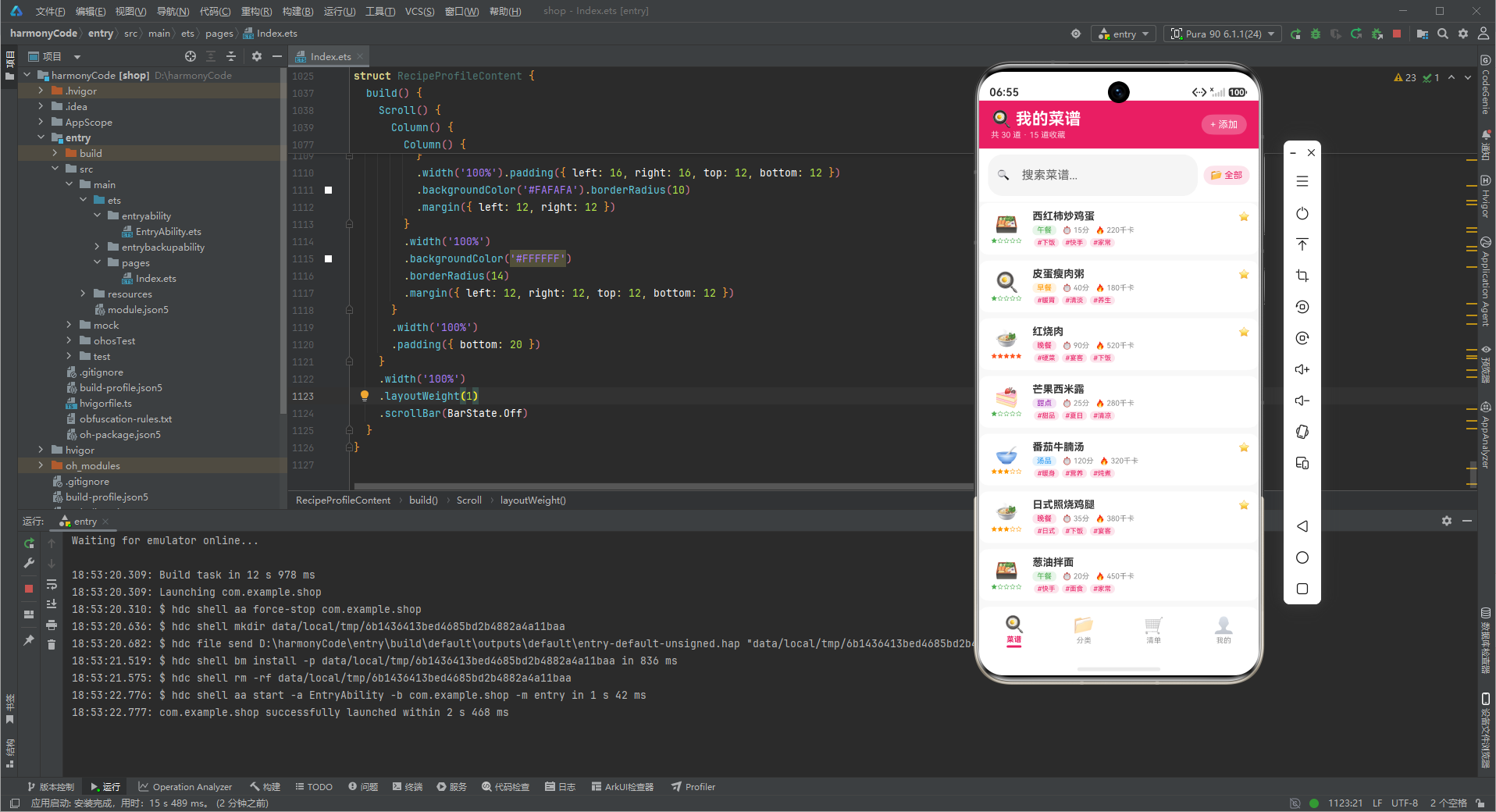
本文以"智能菜谱管理器"为例,聚焦三个核心设计挑战:如何在 ArkTS 强类型约束下定义包含嵌套数组的数据模型;如何设计 4 类弹框(新增/编辑/删除确认/详情)处理菜谱这种内容密集型对象;以及如何在底部四个 Tab(菜谱/分类/清单/我的)中各自维护独立的列表渲染与状态管理。
一、类型系统的前置设计:嵌套数组字段的接口定义
菜谱数据模型中最关键的设计是配料清单(ingredients)和步骤清单(steps)两个 string[] 数组字段。ArkTS 对数组字段的类型约束相对宽松——string[] 是合法类型,无需额外定义元素接口。但配置映射表(分类配置、难度配置)仍需先定义 interface。
// 配置映射的接口前置定义
interface CategoryMeta {
  label: string
  icon: string
  color: string
  bg: string
}

interface DifficultyMeta {
  label: string
  stars: number
  color: string
}

interface MealTimeMeta {
  label: string
  icon: string
}

interface CartItemMeta {
  name: string
  checked: boolean
  category: string
}

// 菜谱模型:配料与步骤使用 string[] 嵌套
@Observed
export class RecipeItem {
  id: number = 0
  name: string = ''
  category: string = ''
  mealTime: string = ''
  difficulty: string = '简单'
  cookingTime: number = 0
  calories: number = 0
  servings: number = 0
  isFavorite: boolean = false
  rating: number = 0
  ingredients: string[] = []      // 配料清单(嵌套数组)
  steps: string[] = []            // 步骤清单(嵌套数组)
  tags: string[] = []             // 标签数组
  createdAt: string = ''
  lastCooked: string = ''
}
配料清单使用 string[] 而非对象数组(如 { name: string, amount: string }[]),核心考量是"原型阶段的写死数据足够简单"——配料项在列表中以"西红柿 2个"这种"名称+用量"合并字符串展示,不需要独立操作某个配料的用量字段。如果用对象数组,每个配料项的 amount 字段需要单独编辑,在静态原型中会增加不必要的复杂度。生产化时若需实现"按用量缩放配方"(如 2 人份 → 4 人份自动翻倍用量),则应升级为对象数组以便程序化计算。
二、底部四 Tab 各自独立列表的路由架构
本应用底部四个 Tab 中,菜谱列表、分类概览、购物清单三个 Tab 各自包含独立的列表渲染,我的页面包含统计卡片。这与 4.ets 的设备管理器架构一致,但列表分布更密集。
// 四个 Tab 的枚举路由
enum RecipeTab {
  RECIPES = 0,
  CATEGORIES = 1,
  CART = 2,
  PROFILE = 3
}

@Entry
@Component
struct RecipeManagerApp {
  @State activeTab: RecipeTab = RecipeTab.RECIPES

  @Builder contentArea() {
    Column() {
      if (this.activeTab === RecipeTab.RECIPES) {
        RecipeListContent()          // 30 道菜谱列表
      } else if (this.activeTab === RecipeTab.CATEGORIES) {
        CategoryOverviewContent()    // 6 分类卡片列表
      } else if (this.activeTab === RecipeTab.CART) {
        ShoppingCartContent()        // 12 项购物清单
      } else {
        RecipeProfileContent()       // 统计卡片
      }
    }
    .layoutWeight(1)
  }
}
四个 Tab 各自维护独立列表的关键收益是"状态隔离":菜谱列表的搜索关键字、分类筛选状态、弹框显隐状态,与购物清单的勾选计数状态完全隔离,互不污染。如果所有列表放在同一个 Component 中,任意状态变更都会触发全量重绘,既影响性能也增加调试难度。将每个 Tab 的内容抽离为独立 struct(RecipeListContent / CategoryOverviewContent / ShoppingCartContent / RecipeProfileContent),每个 struct 内部用 @State 管理自己的局部状态,是 ArkTS 声明式 UI 的标准分治策略。
三、四类弹框状态机的互斥管理
本应用管理 4 类弹框的显隐状态,比 4.ets 的 6 类略少,但菜谱对象的字段密度远高于设备对象。
// 4 类弹框状态
@State showAddModal: boolean = false
@State showEditModal: boolean = false
@State showDeleteConfirm: boolean = false
@State showDetailModal: boolean = false

// 弹框数据传递
@State selectedRecipe: RecipeItem | null = null
@State editingRecipe: RecipeItem | null = null
菜谱弹框的数据传递与普通对象不同:详情弹框展示的配料清单(ingredients)和步骤清单(steps)是嵌套数组,编辑弹框如果回填这两个字段,需要 EditForm 维护两个 string[] 状态。本原型中编辑弹框仅回填 name 字段,配料与步骤的编辑留待生产化实现。这种"详情弹框完整展示、编辑弹框部分回填"的不对称设计,在原型阶段可接受,但需注意:若用户在详情弹框中看到完整配料,却在编辑弹框中无法修改配料,会产生体验断裂。生产化时应将编辑弹框升级为支持配料/步骤的动态增删行。
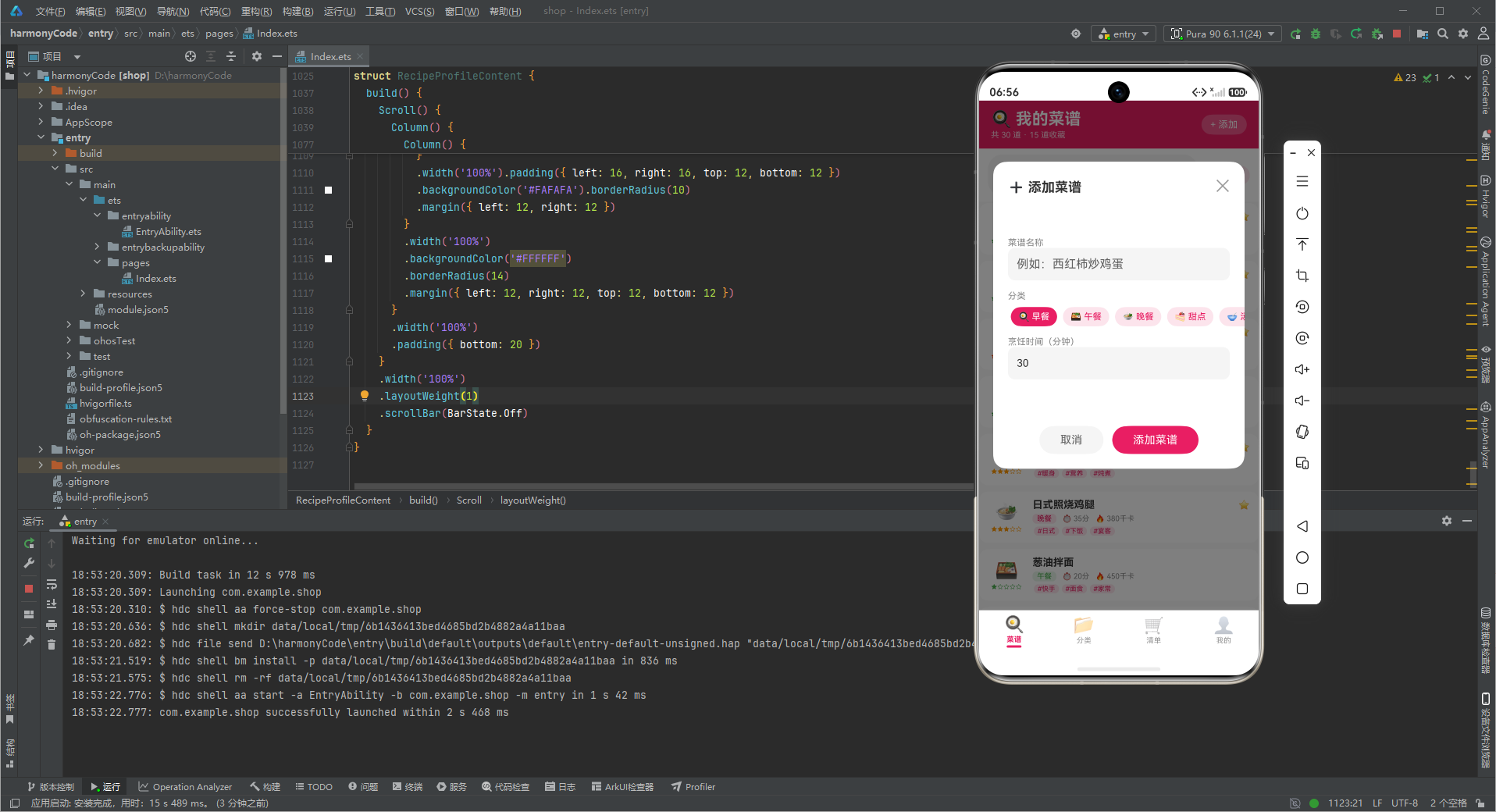
四、弹框设计模式一:新增菜谱弹框(分类 ForEach 选择器)
新增菜谱弹框的分类选择器使用 ForEach 遍历 CATEGORIES 数组,而非 4.ets 中手动平铺 6 个 if/else 分支。这是数据驱动与手动写死两种模式的对比。
// 使用 ForEach 渲染分类选择器(数据驱动)
Row() {
  ForEach(CATEGORIES, (c: string) => {
    if (this.formCategory === c) {
      Text(RECIPE_CATEGORY_CONFIG[c]?.icon + ' ' + c)
        .fontColor('#FFFFFF').backgroundColor('#E91E63')
        .padding({ left: 10, right: 10, top: 6, bottom: 6 }).borderRadius(14)
        .margin({ left: 4, right: 4 })
    } else {
      Text(RECIPE_CATEGORY_CONFIG[c]?.icon + ' ' + c)
        .fontColor('#E91E63').backgroundColor('#FCE4EC')
        .padding({ left: 10, right: 10, top: 6, bottom: 6 }).borderRadius(14)
        .margin({ left: 4, right: 4 })
        .onClick(() => { this.formCategory = c })
    }
  })
}
ForEach 分类选择器相比手动平铺 if/else 的核心优势是"可扩展性":当新增一个分类(如"辅食")时,只需在 CATEGORIES 数组追加一项,ForEach 自动渲染新选项,无需修改 UI 构建代码。手动平铺模式则需要复制粘贴一整段 if/else 分支。在分类数量固定且较少(6 个)的原型中,两种模式差异不明显;但当分类可能动态增长(如用户自定义分类)时,ForEach 模式是必然选择。本应用在新增弹框中使用 ForEach,而在分类快速筛选栏中也使用 ForEach,保持了模式一致性。
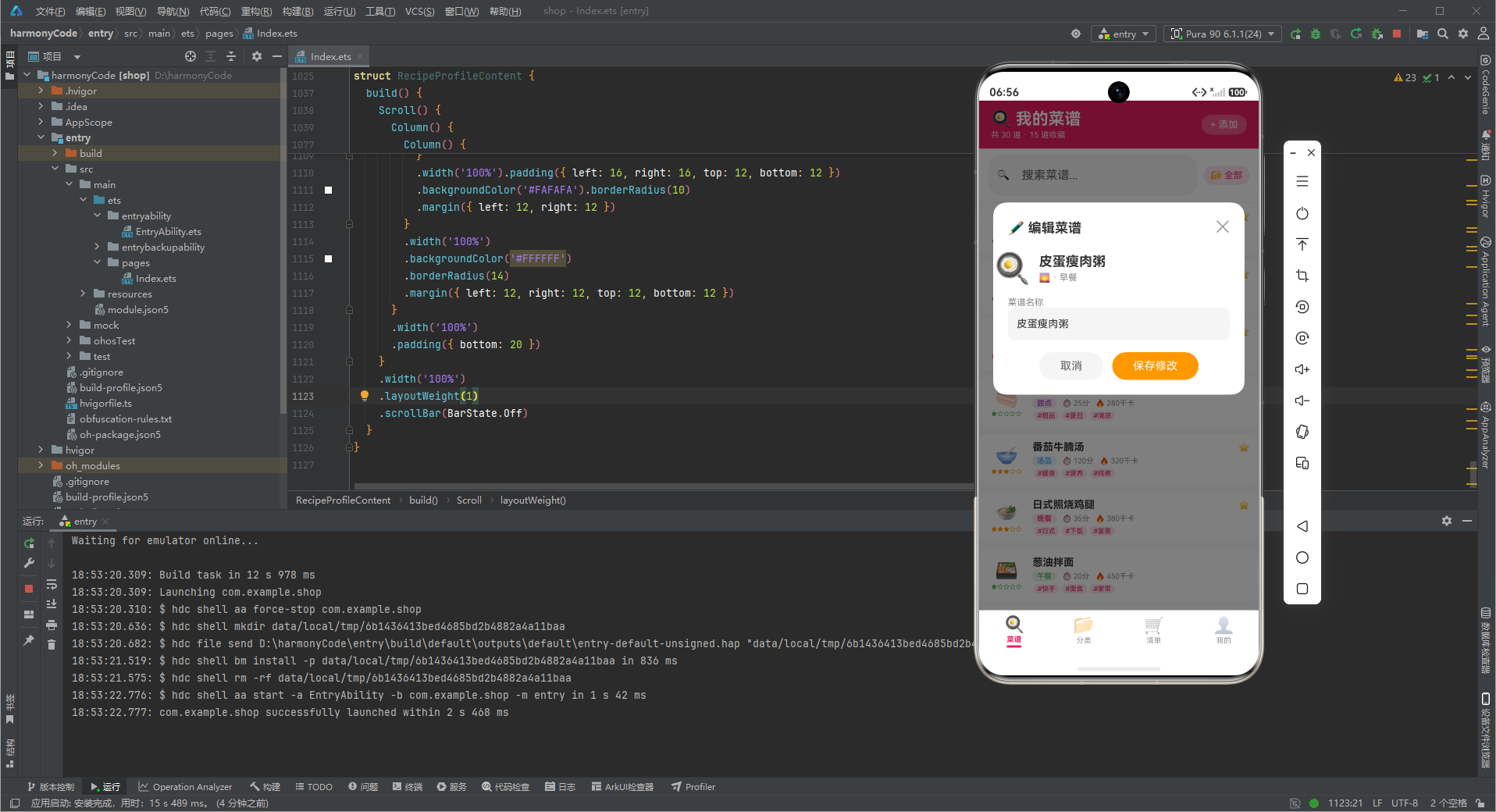
五、弹框设计模式二:编辑菜谱弹框(数据回填 + 评分展示)
编辑弹框打开时,将选中菜谱的评分通过星级(⭐/☆)展示在头部,这是与 4.ets 编辑弹框的差异点——菜谱的评分是用户决策的关键信号。
// 编辑弹框头部展示评分星级
Row() {
  Text(RECIPE_CATEGORY_CONFIG[this.editingRecipe?.category ?? '']?.icon ?? '🍽️')
    .fontSize(40)
  Column() {
    Text(this.editingRecipe?.name ?? '')
      .fontSize(18).fontWeight(FontWeight.Bold).fontColor('#333333')
    Row() {
      ForEach([1, 2, 3, 4, 5], (s: number) => {
        Text(s <= (this.editingRecipe?.rating ?? 0) ? '⭐' : '☆')
          .fontSize(12)
      })
      Text((this.editingRecipe?.rating ?? 0) + '.0')
        .fontSize(11).fontColor('#FF9800').margin({ left: 4 })
    }
    .margin({ top: 4 })
  }
}
评分星级的展示逻辑(s <= rating ? ⭐ : ☆)揭示了一个常见的"边界判断"陷阱:当 rating=4 时,星级序列应为 ⭐⭐⭐⭐☆,即前 4 个为实心、第 5 个为空心。判断条件 s <= rating 中,[1,2,3,4,5] 遍历时 s=1~4 满足 s<=4 显示实心,s=5 不满足显示空心,结果正确。如果误用 s < rating(严格小于),则 s=1~3 实心、s=4,5 空心,会少显示一个实心星。这种 off-by-one 错误在星级渲染中极常见,开发者应始终使用 <= 而非 <。
六、弹框设计模式三:删除确认弹框(不可逆后果描述)
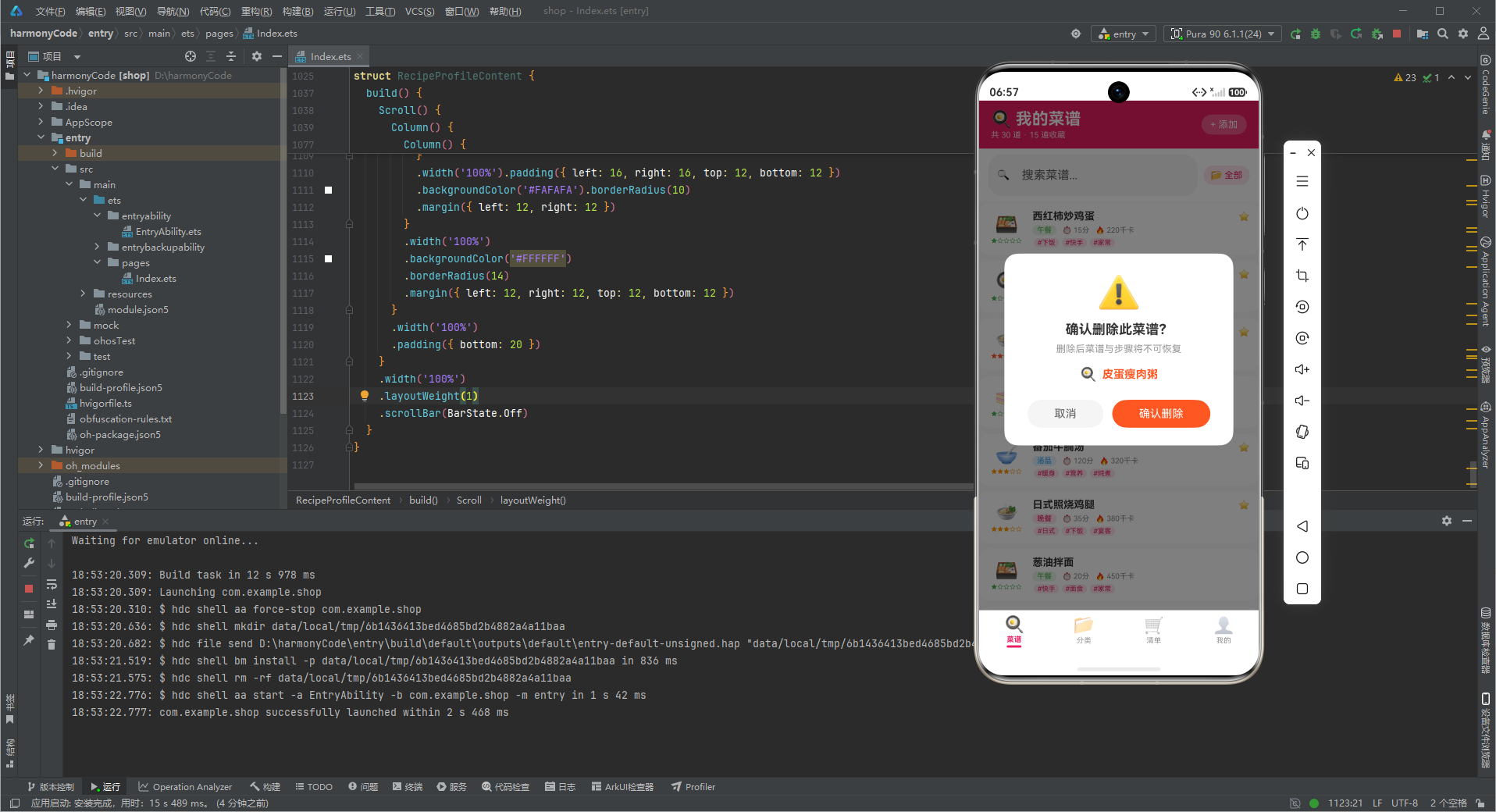
删除确认弹框除展示菜谱名称外,明确标注后果"删除后菜谱与步骤将不可恢复"——因为菜谱的步骤清单是用户劳动成果,不可逆删除的成本高于普通列表项。
Column() {
  Text('⚠️').fontSize(48).margin({ top: 24 })
  Text('确认删除此菜谱?').fontSize(18).fontWeight(FontWeight.Bold)
  Text('删除后菜谱与步骤将不可恢复').fontSize(13).fontColor('#999999')
  // 分类图标 + 菜谱名称
  Row() {
    Text(RECIPE_CATEGORY_CONFIG[this.selectedRecipe?.category ?? '']?.icon ?? '🍽️')
      .fontSize(18)
    Text(this.selectedRecipe?.name ?? '')
      .fontSize(15).fontColor('#FF5722').fontWeight(FontWeight.Bold)
      .padding({ left: 8 })
  }.margin({ top: 16 })
}
菜谱删除确认弹框的警告措辞与设备删除确认弹框有本质区别:设备删除后果是"物理设备离线,需重新配网",损失的是连接关系;菜谱删除后果是"内容不可恢复",损失的是用户创作的内容。两类损失的修复成本不同——设备重新配网只需几分钟,菜谱重新录入可能需数小时。因此菜谱删除的警告措辞应更强调"不可恢复",并在确认按钮使用红色强化风险感知。
七、弹框设计模式四:菜谱详情弹框(双层嵌套列表展示)
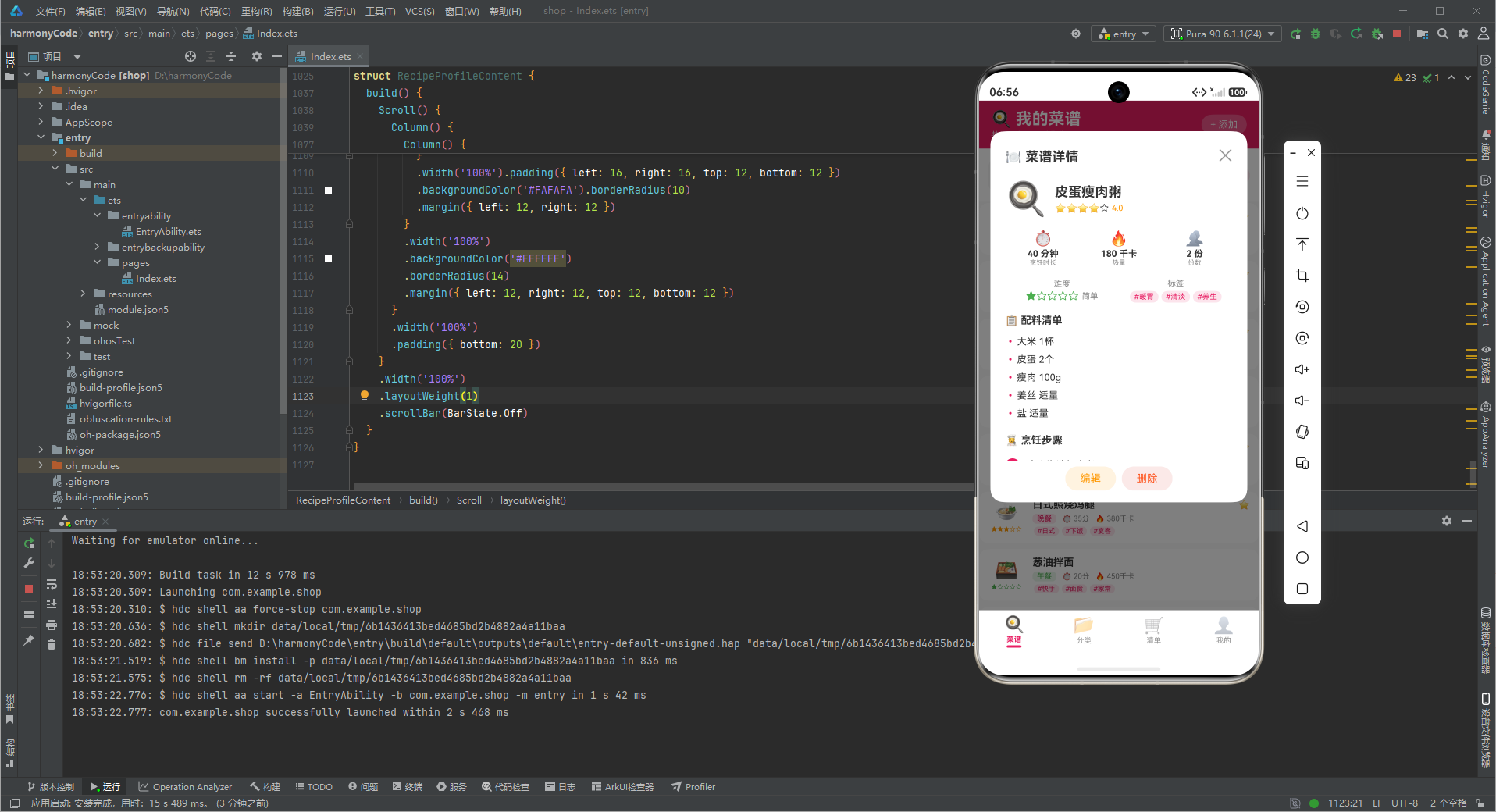
详情弹框是本应用信息密度最高的组件,除元数据(名称/评分/时长/热量/份数/难度)外,还以两个独立区块展示配料清单(ingredients)和步骤清单(steps)。
// 配料清单:使用 • 前缀的列表项
Column() {
Text('📋 配料清单').fontSize(14).fontWeight(FontWeight.Bold).width('100%')
if (this.selectedRecipe != null) {
ForEach(this.selectedRecipe.ingredients, (ing: string) => {
Row() {
Text('•').fontSize(14).fontColor('#E91E63').width(16)
Text(ing).fontSize(13).fontColor('#333333').layoutWeight(1)
}
.width('100%').padding({ top: 4, bottom: 4 })
})
}
}
// 步骤清单:使用序号徽章(1/2/3...)
Column() {
Text('👩🍳 烹饪步骤').fontSize(14).fontWeight(FontWeight.Bold).width('100%')
if (this.selectedRecipe != null) {
ForEach(this.selectedRecipe.steps, (step: string, index: number) => {
Row() {
Column() {
Text((index + 1).toString())
.fontSize(12).fontColor('#FFFFFF').backgroundColor('#E91E63')
.width(20).height(20).borderRadius(10).textAlign(TextAlign.Center)
}
.margin({ top: 2 })
Text(step).fontSize(13).fontColor('#333333').padding({ left: 10 }).layoutWeight(1)
}
.width('100%').padding({ top: 6, bottom: 6 })
})
}
}
配料清单与步骤清单使用两种不同的视觉语言:配料用"•“项目符号前缀,步骤用"圆形徽章序号”。这种差异化设计的核心目的是"可扫读性"——用户在厨房一边看菜谱一边操作,需要快速区分"我现在在第几步"(看序号)和"我需要准备哪些材料"(看项目符号)。如果两类列表都用相同的项目符号,用户在烹饪过程中会产生认知混淆,降低操作效率。步骤的序号徽章使用圆形 + 居中数字,强化"顺序性"语义;配料的项目符号使用圆点,强调"并列性"语义。
八、四档难度星级的可视化映射
菜谱的难度字段(简单/中等/困难)映射为 1/3/5 星,在列表项和详情弹框中通过星级+颜色双重编码展示。
// 难度配置映射:星级 + 颜色双编码
const DIFFICULTY_CONFIG: Record<string, DifficultyMeta> = {
  '简单': { label: '简单', stars: 1, color: '#4CAF50' },
  '中等': { label: '中等', stars: 3, color: '#FF9800' },
  '困难': { label: '困难', stars: 5, color: '#FF5722' }
}

// 列表项中的难度星级
Row() {
  ForEach([1, 2, 3, 4, 5], (s: number) => {
    Text(s <= DIFFICULTY_CONFIG[r.difficulty]?.stars ? '★' : '☆')
      .fontSize(8)
      .fontColor(DIFFICULTY_CONFIG[r.difficulty]?.color ?? '#4CAF50')
  })
}
难度使用"星级 + 颜色"双编码而非单一编码,核心收益是"降低认知门槛"。色盲用户或快速扫读场景下,仅靠颜色(绿/橙/红)可能不够清晰,但叠加星级(1/3/5 颗实心星)后,即使忽略颜色也能通过星数判断难度。这种"冗余编码"设计是可视化的最佳实践——同一信息通过两个独立通道传递,任一通道失效都不影响信息传达。在移动端小字号(8px)场景下,星级的形状差异比颜色差异更易识别,双编码的价值更加凸显。
九、购物清单的勾选状态与进度可视化
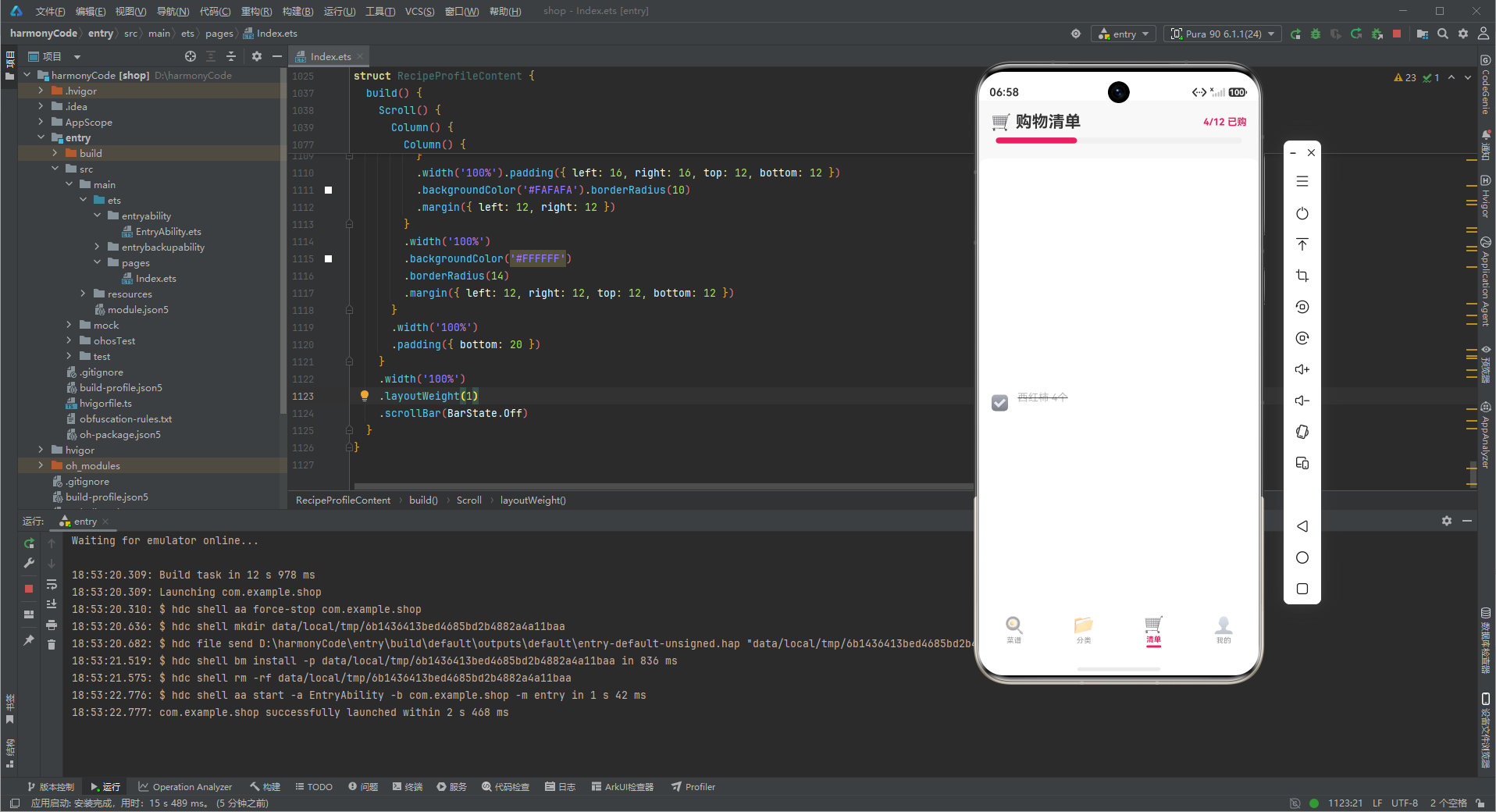
购物清单 Tab 包含 12 条写死数据,每条带 checked 布尔量。点击切换勾选状态并更新顶部进度计数与进度条。
// 购物清单项:勾选状态切换
Row() {
  Text(item.checked ? '☑️' : '⬜').fontSize(20)
  Column() {
    Text(item.name)
      .fontSize(14).fontColor(item.checked ? '#BBBBBB' : '#333333')
      .decoration({ type: item.checked ? TextDecorationType.LineThrough : TextDecorationType.None })
    Text(item.category).fontSize(10).fontColor('#888888').margin({ top: 2 })
  }.layoutWeight(1).alignItems(HorizontalAlign.Start).padding({ left: 8 })
}
.onClick(() => {
  if (item.checked) { this.checkedCount -= 1 } else { this.checkedCount += 1 }
})
购物清单的勾选交互使用"删除线 + 灰色"双重视觉反馈,而非仅改变图标(☑️/⬜)。这是因为购物清单的使用场景是"边逛边勾"——用户拎着购物篮,看到已勾选项时需要快速识别"这个已经买了"。删除线提供了比图标更强的"已完成"视觉提示,即使在远处也能一眼扫出未购项。本原型中 checkedCount 用 @State 管理,但实际勾选状态未持久化到 mockCartItems 数组(onClick 仅更新计数变量)。生产化时应在数据源中直接翻转 checked 字段,由数据源驱动 UI,而非双写计数变量。
十、四类弹框的效率对比:交互设计决策
| 维度 | 新增弹框 | 编辑弹框 | 删除确认 | 详情弹框 |
|---|---|---|---|---|
| 数据流向 | 空 → 数据源 | 数据源 → 数据源 | 数据源 → 无 | 数据源 → 只读 |
| 用户操作路径 | 2 步(打开 → 填写保存) | 3 步(选中 → 打开 → 修改保存) | 3 步(选中 → 确认 → 删除) | 1 步(点击列表项 → 查看) |
| 嵌套列表处理 | 无(仅元数据) | 部分(仅 name 回填) | 无(仅对象引用) | 完整(配料 + 步骤双列表) |
| 表单复杂度 | 中(名称 + 分类 + 时长) | 低(仅名称回填) | 低(无输入) | 低(无输入,只读) |
| 风险等级 | 低(可删除修改) | 低(原值可恢复) | 高(内容不可恢复) | 无(纯展示) |
| 关键约束 | 分类选择器数据驱动 | 字段回填准确性 | 内容损失警告措辞 | 双层列表层级区分 |
表中"嵌套列表处理"行揭示了菜谱弹框与设备弹框的本质区别:设备详情弹框展示的是扁平字段(信号/电量/IP),而菜谱详情弹框展示的是两个嵌套数组(配料/步骤)。这种结构差异驱动了不同的弹框布局策略——设备详情弹框用网格布局平铺字段,菜谱详情弹框用两个独立区块纵向堆叠列表。开发者在设计详情弹框时,应先分析数据结构的"扁平度 vs 嵌套度",再决定布局方向:扁平数据用网格,嵌套数据用分区列表。
十一、分类概览页的占比可视化
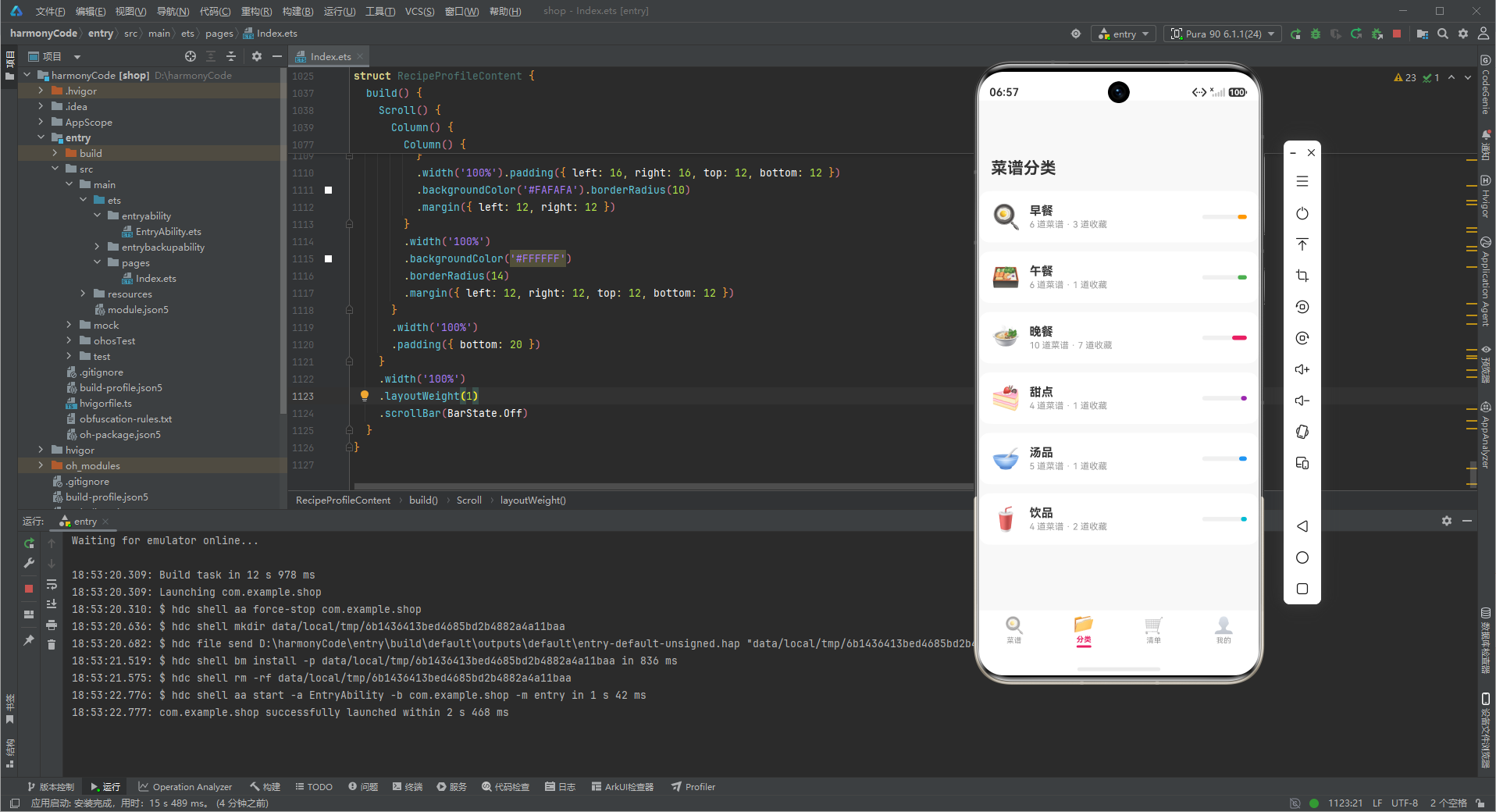
分类概览页的每个分类卡片右侧展示占比条,宽度由该分类菜谱数 / 总菜谱数计算,是"无 Canvas 条形图"的另一种变体。
// 分类占比条
Column() {
  Column()
    .width((count / getRecipeCount() * 100).toFixed(0) + '%')
    .height(6)
    .backgroundColor(RECIPE_CATEGORY_CONFIG[cat]?.color ?? '#E91E63')
    .borderRadius(3)
    .alignSelf(ItemAlign.End)
}
.width(60).height(6).backgroundColor('#F0F0F0').borderRadius(3)
分类占比条的关键细节是 alignSelf(ItemAlign.End)——占比条从右向左填充,而非从左向右。这种反向填充的设计意图是"与卡片左侧的分类图标形成视觉呼应":图标在左,占比条在右,用户视线从左(分类身份)扫到右(该分类的相对体量),形成完整的认知链路。如果占比条从左填充,视觉重心会落在左侧,与图标重叠,削弱信息层次。这种"右对齐填充"在条形图中虽不常见,但在"分类身份在左、数据体量在右"的卡片布局中是合理的。
十二、30 道静态菜谱数据的场景化设计
本应用使用 30 道写死菜谱,覆盖 6 个分类、4 个餐时、3 个难度等级,每条含配料 4-6 项、步骤 3-5 步。数据设计遵循"真实可操作性"原则——配料和步骤都是实际可执行的。
// 生产环境形态(替换为 ForEach)
ForEach(this.recipes, (r: RecipeItem) => {
  this.recipeListItem(r)
}, (r: RecipeItem) => r.id.toString())
30 道菜谱的写死数据并非随意编造,而是遵循"分类均衡 + 难度梯度"原则:早餐 6 道(快手为主)、午餐 6 道(下饭为主)、晚餐 10 道(硬菜偏多)、甜点 4 道、汤品 5 道、饮品 4 道。这种分布模拟了真实家庭的菜谱库特征——晚餐菜谱最丰富(主餐),甜点饮品较少(非必需)。开发者在设计写死数据时,应遵循"领域真实分布"而非"均匀随机分布",这样原型演示时不会暴露出"为什么甜点比晚餐还多"这类不合常理的数据问题。
十三、评分与收藏的双星标体系
菜谱同时拥有"用户评分"(1-5 星)和"收藏标记"(⭐/☆ 图标),两者在视觉上容易混淆,需要在列表项和详情弹框中明确区分。
// 列表项中的收藏标记(与评分星级区分)
Row() {
  Text(r.name).fontSize(14).fontWeight(FontWeight.Bold).layoutWeight(1)
  if (r.isFavorite) {
    Text('⭐').fontSize(12).margin({ left: 4 })   // 收藏标记
  }
}
// 详情弹框中的评分星级(独立区块)
ForEach([1, 2, 3, 4, 5], (s: number) => {
  Text(s <= (this.selectedRecipe?.rating ?? 0) ? '⭐' : '☆').fontSize(12)
})
收藏标记(⭐)与评分星(⭐/☆)使用相同的 emoji 符号,是菜谱应用特有的视觉冲突点。列表项中收藏标记紧贴菜名右侧(表示"这是我特别标记的菜"),详情弹框中评分星位于头部下方(表示"这道菜的质量评分")。两者的语义完全不同:收藏是用户的主观偏好(是否想快速找到),评分是用户对质量的客观评价(好不好吃)。开发者在视觉上通过将两者放置在不同位置(列表项行尾 vs 详情头部)来区隔,避免用户混淆"我收藏的"与"我评分高的"。
十四、从 4.ets 到 5.ets 的弹框体系演化
从设备管理器(4.ets)到菜谱管理器(5.ets),弹框体系从 6 类精简为 4 类,但内容密度显著提升。这种"弹框数量减少、单框信息密度增加"的演化,反映了不同场景的交互重心差异。
// 4.ets 弹框:6 类(含批量升级、固件升级)
@State showAddModal / showEditModal / showDeleteConfirm / showDetailModal / showBatchConfirm / showFirmwareUpdateConfirm

// 5.ets 弹框:4 类(聚焦内容 CRUD)
@State showAddModal / showEditModal / showDeleteConfirm / showDetailModal
弹框数量从 6 减到 4 的根本原因是场景驱动的"操作原子性"差异:设备管理需要"批量升级"“固件升级"这类设备特有操作(物理设备有固件生命周期),而菜谱管理的内容 CRUD 仅需新增/编辑/删除/查看四个原子操作。菜谱没有"固件"概念,批量操作(如"批量标记已做”)在原型阶段优先级低,故未实现。这种"按场景裁剪弹框"而非"套用统一弹框模板"的做法,避免了为不存在的需求预留空弹框,保持代码精简。
十五、搜索与分类筛选的联动状态机
菜谱列表页同时维护搜索关键字(searchKeyword)与分类筛选(selectedCategory)两个独立状态,二者组合构成列表的过滤条件。本原型中列表项采用写死平铺(30 个 recipeListItem 调用),因此筛选状态仅作 UI 展示,未实际参与过滤计算。但在生产化迁移到 ForEach 后,这两个状态将直接驱动数组的 filter 链路。
// 生产环境:搜索 + 分类筛选的联动过滤
@State searchKeyword: string = ''
@State selectedCategory: string = '全部'

private getFilteredRecipes(): RecipeItem[] {
  return this.recipes.filter((r: RecipeItem) => {
    const matchCat = this.selectedCategory === '全部' || r.category === this.selectedCategory
    const matchKw = r.name.includes(this.searchKeyword) ||
                    r.tags.some((tag: string) => tag.includes(this.searchKeyword))
    return matchCat && matchKw
  })
}
搜索关键字不仅匹配菜谱名称,还匹配标签数组(tags)是一个容易被忽略的体验细节。用户在搜索框输入"快手"时,期望找到所有带"快手"标签的菜谱(如西红柿炒鸡蛋、葱油拌面),而非仅名称含"快手"的菜谱。将标签纳入搜索范围,本质是"以用户心智模型为中心"的设计——用户记不住菜名,但记得"这是道快手的菜"。这种跨字段匹配逻辑在 ForEach 数据驱动场景下只需一行 some() 即可实现,但在写死平铺场景下需要手动为每个列表项添加条件判断,进一步印证了原型阶段向数据驱动迁移的必要性。
十六、标签体系的分层语义设计
本应用的标签(tags)与分类(category)、餐时(mealTime)构成三层语义:分类是"烹饪类型"(早餐/午餐/晚餐),餐时是"食用时段"(早/午/晚/全天),标签是"特征标记"(下饭/快手/素食/宴客/网红)。三者在列表项中分层展示,避免信息过载。
// 列表项底部标签行(与分类/餐时分离)
Row() {
  ForEach(r.tags, (tag: string) => {
    Text('#' + tag)
      .fontSize(9).fontColor('#E91E63').backgroundColor('#FCE4EC')
      .padding({ left: 5, right: 5, top: 1, bottom: 1 }).borderRadius(6)
      .margin({ left: 2, right: 2 })
  })
}
标签使用"#“前缀 + 粉色底,与分类的"实心色块"视觉语言刻意区分,核心目的是"语义分层”。分类(早餐/晚餐)是结构性字段,决定菜谱在哪个餐段出现,用实心色块表达"强归属";标签(下饭/快手)是描述性字段,表达"软特征",用 # 话题标签样式表达"弱关联"。如果用户看到两个都用实心色块,会误认为"快手"和"晚餐"是同等级的归属关系,而一道菜可以同时有"快手"和"下饭"两个标签,但只能属于一个分类。这种视觉语言的差异强化了数据模型的层级关系。
十七、收藏标记驱动的个人化快速访问
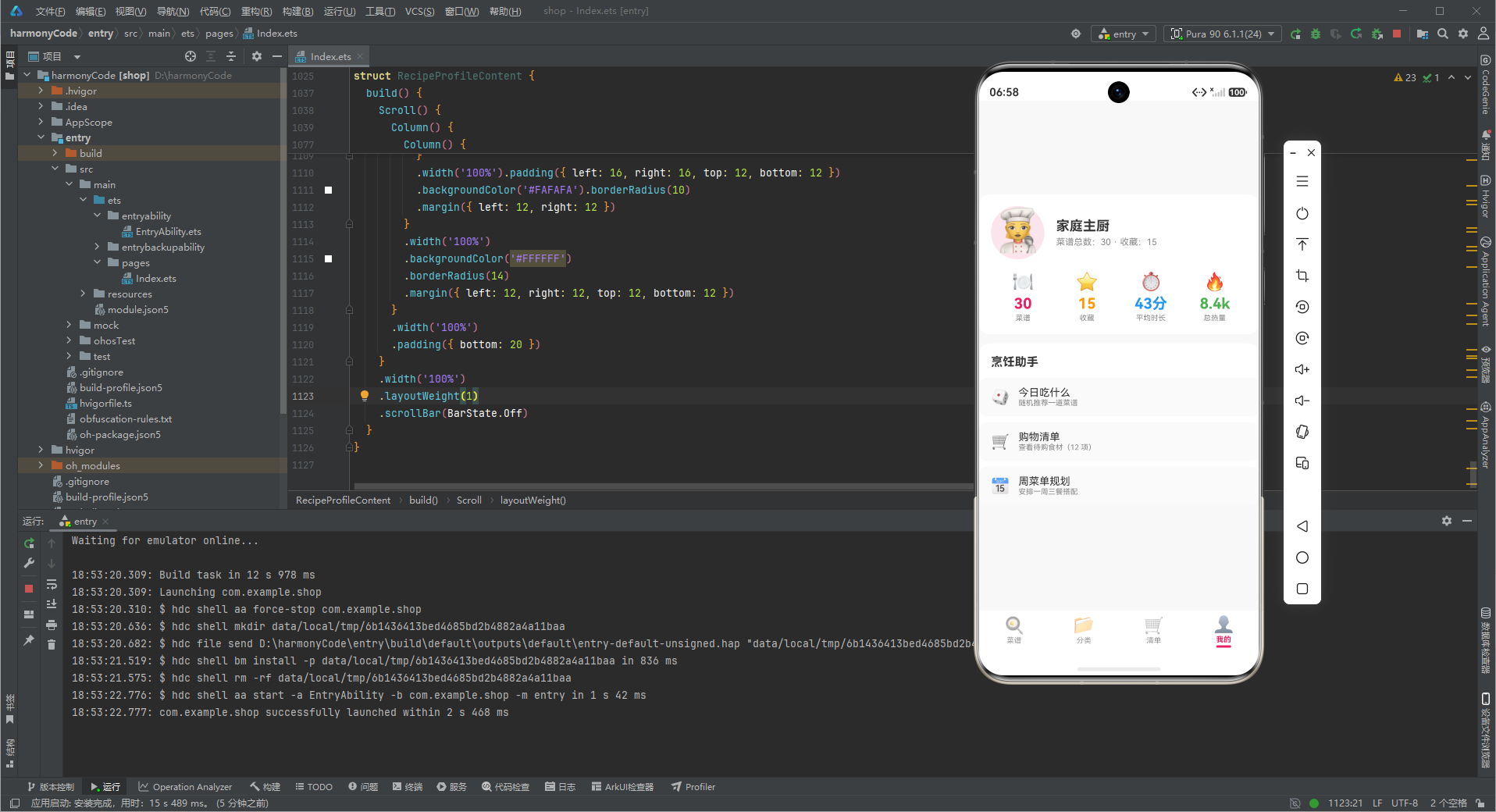
收藏(isFavorite)字段在原型阶段仅用于列表项行尾的 ⭐ 标记,但其在产品逻辑中的真实价值是"个人化快速访问入口"——"我的"页面的收藏计数(15 道)暗示了一个潜在的快捷路径:点击收藏数应跳转到"仅显示收藏菜谱"的过滤视图。
收藏字段在原型中"已定义但未充分使用"是一种合理的渐进式设计:先定义数据结构(isFavorite: boolean),在列表项展示标记验证视觉,再在生产化中接入"收藏筛选视图"。如果一开始就实现完整的收藏筛选、收藏排序、收藏云同步,会大量占用原型阶段的开发资源,而这些功能在验证核心交互模型(四类弹框 + 四 Tab 列表)时并非必需。开发者应区分"数据预埋"与"功能实现"——数据字段可以提前定义且零成本,功能可以按需延迟实现。这种策略让原型在保持轻量的同时,为后续扩展预留了清晰的接入点。
十八、与 3.ets / 4.ets 列表项设计模式的横向对比
横向对比三个应用(书签管理 3.ets、设备管理 4.ets、菜谱管理 5.ets)的列表项设计,可抽象出声明式 UI 列表项的三类通用模式:
| 维度 | 3.ets 书签 | 4.ets 设备 | 5.ets 菜谱 |
|---|---|---|---|
| 列表项主键字段 | 标题 + 网址 | 名称 + 在线状态 | 名称 + 分类图标 |
| 状态可视化方式 | 收藏星 + 访问时间 | 信号条 + 电量条 + 在线率环 | 难度星 + 收藏星 + 标签行 |
| 嵌套数据展示 | 无(标签平铺) | 无(指标平铺) | 配料 + 步骤双列表(弹框内) |
| 辅助信息密度 | 低(1 行网址) | 中(3 指标) | 高(时长/热量/标签 3 行) |
| 详情弹框信息架构 | 字段网格 | 快照视图 | 分区列表(配料/步骤) |
三种列表项的辅助信息密度递增(书签 < 设备 < 菜谱),驱动了详情弹框信息架构的差异:书签详情用字段网格(字段少、关系弱),设备详情用快照视图(状态是核心、需一眼扫读),菜谱详情用分区列表(配料与步骤是流程、需顺序阅读)。这印证了一个通用原则——"列表项的辅助信息密度"与"详情弹框的信息架构复杂度"呈正相关。开发者在设计列表项时,应预判详情弹框的展示难度:若列表项已暴露 3 行辅助信息,详情弹框必然需要分区而非平铺。这种从列表到详情的"信息密度一致性"预判,能避免详情弹框在开发后期被迫重构。
安装DevEco Studio程序

选择目标安装目录:

设置环境变量,但是需要重启一下:

新建一个空白模板:

设置API为24的模板项目:
初始化项目,自动下载相关依赖:

完整代码:
// ============================================================
// 智能菜谱管理器 (Smart Recipe Manager)
// 场景:家庭菜谱统一管理 + 购物清单
// 特色:底部4 Tab(菜谱/分类/清单/我的)各有列表 / 30+菜谱 / 4类弹框
// 弹框:新增菜谱、编辑菜谱、删除二次确认、菜谱详情(配料+步骤)
// 适配:完全兼容 ArkTS 强类型校验(先定义 interface 再使用对象字面量)
// ============================================================
// ============ 类型定义(解决 arkts-no-untyped-obj-literals)============
interface CategoryMeta {
label: string
icon: string
color: string
bg: string
}
interface DifficultyMeta {
label: string
stars: number
color: string
}
interface MealTimeMeta {
label: string
icon: string
}
interface CartItemMeta {
name: string
checked: boolean
category: string
}
// ============ 菜谱数据模型 ============
@Observed
export class RecipeItem {
id: number = 0
name: string = ''
category: string = '' // 早餐 / 午餐 / 晚餐 / 甜点 / 汤品 / 饮品
mealTime: string = '' // 早 / 午 / 晚 / 全天
difficulty: string = '简单' // 简单 / 中等 / 困难
cookingTime: number = 0 // 分钟
calories: number = 0 // 千卡
servings: number = 0 // 份数
isFavorite: boolean = false
rating: number = 0 // 1-5 星
ingredients: string[] = [] // 配料清单
steps: string[] = [] // 步骤清单
tags: string[] = [] // 标签(如:素食/快手/下饭)
createdAt: string = ''
lastCooked: string = ''
constructor(id: number, name: string, category: string, mealTime: string, difficulty: string, cookingTime: number, calories: number, servings: number, isFavorite: boolean, rating: number, ingredients: string[], steps: string[], tags: string[], createdAt: string, lastCooked: string) {
this.id = id; this.name = name; this.category = category
this.mealTime = mealTime; this.difficulty = difficulty
this.cookingTime = cookingTime; this.calories = calories
this.servings = servings; this.isFavorite = isFavorite
this.rating = rating; this.ingredients = ingredients
this.steps = steps; this.tags = tags
this.createdAt = createdAt; this.lastCooked = lastCooked
}
}
// ============ 设计令牌 ============
const RECIPE_CATEGORY_CONFIG: Record<string, CategoryMeta> = {
'早餐': { label: '早餐', icon: '🍳', color: '#FF9800', bg: '#FFF3E0' },
'午餐': { label: '午餐', icon: '🍱', color: '#4CAF50', bg: '#E8F5E9' },
'晚餐': { label: '晚餐', icon: '🍲', color: '#E91E63', bg: '#FCE4EC' },
'甜点': { label: '甜点', icon: '🍰', color: '#9C27B0', bg: '#F3E5F5' },
'汤品': { label: '汤品', icon: '🥣', color: '#2196F3', bg: '#E3F2FD' },
'饮品': { label: '饮品', icon: '🥤', color: '#00BCD4', bg: '#E0F7FA' }
}
const DIFFICULTY_CONFIG: Record<string, DifficultyMeta> = {
'简单': { label: '简单', stars: 1, color: '#4CAF50' },
'中等': { label: '中等', stars: 3, color: '#FF9800' },
'困难': { label: '困难', stars: 5, color: '#FF5722' }
}
const MEAL_TIME_CONFIG: Record<string, MealTimeMeta> = {
'早': { label: '早餐时段', icon: '🌅' },
'午': { label: '午餐时段', icon: '☀️' },
'晚': { label: '晚餐时段', icon: '🌙' },
'全天': { label: '任意时段', icon: '🔄' }
}
const CATEGORIES: string[] = ['早餐', '午餐', '晚餐', '甜点', '汤品', '饮品']
// ============ 30 条静态菜谱数据 ============
const mockRecipes: RecipeItem[] = [
new RecipeItem(1, '西红柿炒鸡蛋', '午餐', '午', '简单', 15, 220, 2, true, 5, ['西红柿 2个', '鸡蛋 3个', '葱花 适量', '盐 适量', '食用油 1勺'], ['鸡蛋打散加少许盐', '热锅下油炒鸡蛋盛出', '下西红柿块炒出汁', '回锅鸡蛋翻炒调味'], ['下饭', '快手', '家常'], '2025-12-01', '2026-07-18'),
new RecipeItem(2, '皮蛋瘦肉粥', '早餐', '早', '简单', 40, 180, 2, true, 4, ['大米 1杯', '皮蛋 2个', '瘦肉 100g', '姜丝 适量', '盐 适量'], ['大米淘洗加水煮开', '瘦肉切丝腌制', '小火慢熬 30 分钟', '加皮蛋瘦肉姜丝再煮 5 分钟'], ['暖胃', '清淡', '养生'], '2025-11-10', '2026-07-19'),
new RecipeItem(3, '红烧肉', '晚餐', '晚', '困难', 90, 520, 4, true, 5, ['五花肉 500g', '冰糖 30g', '生抽 2勺', '老抽 1勺', '料酒 2勺', '八角 2颗'], ['五花肉切块焯水', '冰糖炒糖色', '下肉上色加调料', '加水小火炖 60 分钟收汁'], ['硬菜', '宴客', '下饭'], '2025-10-01', '2026-07-15'),
new RecipeItem(4, '芒果西米露', '甜点', '全天', '简单', 25, 280, 2, false, 4, ['西米 100g', '芒果 2个', '椰浆 200ml', '牛奶 100ml', '糖 适量'], ['西米煮至透明过冷水', '芒果取肉打泥', '混合椰浆牛奶', '冷藏后享用'], ['甜品', '夏日', '清凉'], '2026-01-05', '2026-07-10'),
new RecipeItem(5, '番茄牛腩汤', '汤品', '晚', '中等', 120, 320, 4, true, 5, ['牛腩 500g', '番茄 4个', '土豆 2个', '洋葱 1个', '盐 适量'], ['牛腩焯水切块', '番茄洋葱炒软', '加水炖 90 分钟', '加土豆再煮 20 分钟'], ['暖身', '营养', '炖煮'], '2025-12-20', '2026-07-12'),
new RecipeItem(6, '日式照烧鸡腿', '晚餐', '晚', '中等', 35, 380, 2, true, 4, ['鸡腿 2个', '生抽 2勺', '味淋 2勺', '蜂蜜 1勺', '姜 适量'], ['鸡腿去骨煎至金黄', '调照烧汁', '下汁收浓裹鸡', '切块装盘'], ['日式', '下饭', '宴客'], '2026-02-01', '2026-07-16'),
new RecipeItem(7, '葱油拌面', '午餐', '午', '简单', 20, 450, 1, false, 4, ['面条 1把', '小葱 1把', '生抽 2勺', '老抽 1勺', '糖 1勺'], ['小葱切段炸葱油', '调酱汁煮面', '面条拌葱油酱'], ['快手', '面食', '家常'], '2026-03-10', '2026-07-17'),
new RecipeItem(8, '蓝莓松饼', '早餐', '早', '中等', 30, 350, 3, true, 4, ['低筋面粉 200g', '鸡蛋 2个', '牛奶 150ml', '蓝莓 1把', '泡打粉 1勺'], ['干粉混合', '蛋奶混合拌入', '小火煎至起泡翻面', '摆蓝莓淋糖浆'], ['烘焙', '周末', '亲子'], '2026-01-20', '2026-07-14'),
new RecipeItem(9, '酸辣土豆丝', '午餐', '午', '简单', 18, 160, 2, false, 3, ['土豆 2个', '干辣椒 5个', '醋 2勺', '盐 适量', '蒜 2瓣'], ['土豆切丝泡水', '热油爆香辣椒蒜', '下土豆丝快炒', '加醋盐出锅'], ['素菜', '快手', '下饭'], '2025-09-15', '2026-07-11'),
new RecipeItem(10, '银耳莲子羹', '汤品', '全天', '简单', 60, 120, 3, false, 4, ['银耳 1朵', '莲子 30g', '红枣 8颗', '冰糖 适量', '枸杞 适量'], ['银耳泡发撕小朵', '加水煮 40 分钟', '加莲子红枣再煮', '加枸杞冰糖'], ['养生', '甜汤', '润肺'], '2025-11-01', '2026-07-08'),
new RecipeItem(11, '宫保鸡丁', '晚餐', '晚', '中等', 30, 420, 3, true, 5, ['鸡胸肉 300g', '花生米 50g', '干辣椒 8个', '花椒 1勺', '醋 1勺', '糖 1勺'], ['鸡肉切丁腌制', '调宫保汁', '爆香辣椒花椒', '下鸡丁花生翻炒'], ['川菜', '下饭', '宴客'], '2025-10-20', '2026-07-13'),
new RecipeItem(12, '抹茶千层', '甜点', '全天', '困难', 150, 480, 6, false, 5, ['低筋面粉 150g', '鸡蛋 3个', '牛奶 400ml', '抹茶粉 15g', '淡奶油 300ml', '糖 40g'], ['调面糊煎薄饼', '抹茶奶油打发', '一层饼一层奶油', '冷藏定型切件'], ['烘焙', '进阶', '网红'], '2026-02-15', '2026-07-05'),
new RecipeItem(13, '小米南瓜粥', '早餐', '早', '简单', 35, 140, 2, false, 3, ['小米 1杯', '南瓜 200g', '水 适量', '冰糖 可选'], ['南瓜切块', '小米南瓜同煮', '小火熬 30 分钟'], ['养生', '清淡', '暖胃'], '2025-12-10', '2026-07-09'),
new RecipeItem(14, '可乐鸡翅', '晚餐', '晚', '简单', 30, 360, 3, true, 4, ['鸡翅中 10个', '可乐 1罐', '生抽 2勺', '姜 3片', '盐 适量'], ['鸡翅焯水', '煎至两面金黄', '加可乐生抽炖煮', '收汁装盘'], ['家常', '孩子爱', '下饭'], '2025-08-20', '2026-07-17'),
new RecipeItem(15, '西湖牛肉羹', '汤品', '晚', '中等', 25, 180, 4, false, 4, ['牛肉 150g', '豆腐 1盒', '鸡蛋 1个', '香菜 适量', '盐 适量'], ['牛肉剁碎', '豆腐切丁', '高汤煮开下料', '蛋液勾芡'], ['浙菜', '羹汤', '清淡'], '2025-11-25', '2026-07-03'),
new RecipeItem(16, '杨枝甘露', '饮品', '全天', '中等', 30, 260, 2, true, 5, ['芒果 3个', '西柚 1个', '西米 80g', '椰浆 150ml', '糖 适量'], ['西米煮透过冷', '芒果西柚取肉', '椰浆芒果打泥', '组合冷藏'], ['港式', '甜品', '夏日'], '2026-03-01', '2026-07-06'),
new RecipeItem(17, '清炒时蔬', '午餐', '午', '简单', 12, 90, 2, false, 3, ['青菜 300g', '蒜 2瓣', '盐 适量', '油 1勺'], ['热油爆蒜', '下青菜大火炒', '加盐出锅'], ['素菜', '快手', '清淡'], '2025-07-10', '2026-07-18'),
new RecipeItem(18, '牛肉拉面', '午餐', '午', '困难', 180, 600, 2, false, 4, ['高筋面粉 300g', '牛肉 400g', '萝卜 1个', '香菜 适量', '辣椒油 适量'], ['和面醒面拉面', '牛肉焯水炖汤', '煮面装碗', '加汤加料'], ['面食', '硬菜', '西北'], '2025-09-01', '2026-06-28'),
new RecipeItem(19, '芝士焗意面', '晚餐', '晚', '中等', 45, 550, 2, true, 4, ['意面 200g', '番茄酱 1罐', '芝士 100g', '培根 50g', '洋葱 半个'], ['意面煮熟', '炒番茄培根酱', '混合装盘撒芝士', '烤箱 200 度 15 分钟'], ['西餐', '烘焙', '宴客'], '2026-01-15', '2026-07-07'),
new RecipeItem(20, '双皮奶', '甜点', '全天', '中等', 50, 220, 2, false, 4, ['全脂牛奶 500ml', '蛋清 3个', '糖 30g', '香草精 几滴'], ['牛奶煮温结皮', '取皮留奶加蛋清', '回蒸定型', '冷藏'], ['粤式', '甜品', '嫩滑'], '2026-02-20', '2026-07-04'),
new RecipeItem(21, '蒸蛋羹', '早餐', '早', '简单', 15, 110, 1, false, 4, ['鸡蛋 2个', '温水 200ml', '盐 少许', '香油 几滴'], ['蛋液加温水打匀', '过滤去泡', '中火蒸 10 分钟', '淋香油'], ['快手', '嫩滑', '家常'], '2025-10-10', '2026-07-16'),
new RecipeItem(22, '麻婆豆腐', '晚餐', '晚', '中等', 25, 280, 3, true, 5, ['嫩豆腐 1盒', '肉末 100g', '豆瓣酱 2勺', '花椒粉 适量', '蒜苗 适量'], ['豆腐切块', '炒肉末豆瓣', '下豆腐烧入味', '撒花椒粉蒜苗'], ['川菜', '下饭', '麻辣'], '2025-08-15', '2026-07-15'),
new RecipeItem(23, '南瓜浓汤', '汤品', '晚', '简单', 30, 160, 3, false, 3, ['南瓜 400g', '洋葱 半个', '奶油 50ml', '盐 适量', '黑胡椒 适量'], ['南瓜洋葱炒软', '加水煮熟', '料理机打泥', '加奶油调味'], ['西式', '浓汤', '暖身'], '2025-12-05', '2026-07-02'),
new RecipeItem(24, '珍珠奶茶', '饮品', '全天', '中等', 40, 350, 1, true, 4, ['红茶 2包', '牛奶 200ml', '木薯粉 100g', '红糖 50g', '糖 适量'], ['煮珍珠裹红糖', '红茶煮奶', '组合加珍珠'], ['饮品', '网红', '自制'], '2026-03-15', '2026-07-11'),
new RecipeItem(25, '凉拌黄瓜', '午餐', '午', '简单', 10, 70, 2, false, 3, ['黄瓜 2根', '蒜 3瓣', '醋 2勺', '辣椒油 1勺', '盐 适量'], ['黄瓜拍碎切段', '调蒜醋汁', '拌匀冷藏'], ['素菜', '快手', '开胃'], '2025-06-20', '2026-07-19'),
new RecipeItem(26, '糖醋里脊', '晚餐', '晚', '困难', 50, 480, 3, false, 4, ['里脊肉 400g', '番茄酱 3勺', '白醋 2勺', '糖 3勺', '淀粉 适量'], ['肉切条裹淀粉', '油炸定型复炸', '调糖醋汁', '裹汁撒芝麻'], ['鲁菜', '孩子爱', '宴客'], '2025-09-20', '2026-07-01'),
new RecipeItem(27, '菠菜蛋花汤', '汤品', '午', '简单', 15, 100, 2, false, 3, ['菠菜 200g', '鸡蛋 1个', '盐 适量', '香油 几滴'], ['水烧开下菠菜', '淋蛋液', '调味出锅'], ['快手', '清淡', '养生'], '2025-11-15', '2026-07-10'),
new RecipeItem(28, '草莓奶昔', '饮品', '全天', '简单', 10, 240, 1, false, 4, ['草莓 10个', '冰淇淋 2勺', '牛奶 150ml', '糖 可选'], ['草莓洗净', '所有材料打匀', '倒杯装饰'], ['饮品', '夏日', '甜品'], '2026-04-01', '2026-07-08'),
new RecipeItem(29, '咖喱鸡', '晚餐', '晚', '中等', 40, 450, 4, true, 4, ['鸡腿 3个', '土豆 2个', '胡萝卜 1个', '咖喱块 1盒', '洋葱 1个'], ['鸡肉蔬菜切块', '炒香洋葱', '加水炖煮', '加咖喱块收汁'], ['日式', '下饭', '炖煮'], '2026-01-05', '2026-07-14'),
new RecipeItem(30, '燕麦杯', '早餐', '早', '简单', 8, 300, 1, false, 3, ['燕麦 50g', '酸奶 150g', '蓝莓 1把', '坚果 适量', '蜂蜜 1勺'], ['杯底铺燕麦', '加酸奶水果', '重复分层', '淋蜂蜜'], ['快手', '健康', '免煮'], '2026-02-10', '2026-07-13')
]
// 购物清单(写死数据)
const mockCartItems: CartItemMeta[] = [
{ name: '西红柿 4个', checked: true, category: '蔬菜' },
{ name: '鸡蛋 1盒', checked: true, category: '蛋奶' },
{ name: '五花肉 500g', checked: false, category: '肉类' },
{ name: '牛腩 500g', checked: false, category: '肉类' },
{ name: '土豆 3个', checked: false, category: '蔬菜' },
{ name: '洋葱 2个', checked: true, category: '蔬菜' },
{ name: '小米 1袋', checked: false, category: '主食' },
{ name: '抹茶粉 1罐', checked: false, category: '烘焙' },
{ name: '淡奶油 1盒', checked: false, category: '蛋奶' },
{ name: '西米 200g', checked: true, category: '干货' },
{ name: '芒果 5个', checked: false, category: '水果' },
{ name: '木薯粉 1袋', checked: false, category: '烘焙' }
]
// 汇总统计
function getRecipeCount(): number { return 30 }
function getFavoriteCount(): number { return 15 }
function getAvgCookingTime(): number { return 43 }
function getTotalCalories(): number { return 8400 }
function getCartTotal(): number { return 12 }
function getCartChecked(): number { return 4 }
// ============ 底部 Tab 枚举 ============
enum RecipeTab {
RECIPES = 0,
CATEGORIES = 1,
CART = 2,
PROFILE = 3
}
// ============ 入口页面 ============
@Entry
@Component
struct RecipeManagerApp {
@State activeTab: RecipeTab = RecipeTab.RECIPES
@Builder contentArea() {
Column() {
if (this.activeTab === RecipeTab.RECIPES) {
RecipeListContent()
} else if (this.activeTab === RecipeTab.CATEGORIES) {
CategoryOverviewContent()
} else if (this.activeTab === RecipeTab.CART) {
ShoppingCartContent()
} else {
RecipeProfileContent()
}
}
.layoutWeight(1)
}
@Builder bottomTabItem(icon: string, label: string, tab: RecipeTab) {
Column() {
Text(icon).fontSize(22).opacity(this.activeTab === tab ? 1.0 : 0.5)
Text(label).fontSize(10)
.fontColor(this.activeTab === tab ? '#E91E63' : '#999999')
.fontWeight(this.activeTab === tab ? FontWeight.Bold : FontWeight.Normal)
.margin({ top: 2 })
if (this.activeTab === tab) {
Column().width(20).height(3)
.backgroundColor('#E91E63').borderRadius(2).margin({ top: 2 })
}
}
.layoutWeight(1)
.alignItems(HorizontalAlign.Center)
.padding({ top: 6, bottom: 6 })
.onClick(() => { this.activeTab = tab })
}
build() {
Column() {
this.contentArea()
Row() {
this.bottomTabItem('🍳', '菜谱', RecipeTab.RECIPES)
this.bottomTabItem('📂', '分类', RecipeTab.CATEGORIES)
this.bottomTabItem('🛒', '清单', RecipeTab.CART)
this.bottomTabItem('👤', '我的', RecipeTab.PROFILE)
}
.width('100%')
.height(60)
.backgroundColor('#FFFFFF')
.padding({ bottom: 6 })
}
.width('100%')
.height('100%')
.backgroundColor('#FFF8F8F8')
}
}
// ============ 菜谱列表内容页 ============
@Component
struct RecipeListContent {
@State categoryFilterShow: boolean = false
@State selectedCategory: string = '全部'
@State searchKeyword: string = ''
// 4 类弹框状态
@State showAddModal: boolean = false
@State showEditModal: boolean = false
@State showDeleteConfirm: boolean = false
@State showDetailModal: boolean = false
// 弹框数据传递
@State selectedRecipe: RecipeItem | null = null
@State editingRecipe: RecipeItem | null = null
// 新增表单字段
@State formName: string = ''
@State formCategory: string = '早餐'
@State formCookingTime: string = '30'
// ========== 弹框 1:新增菜谱 ==========
@Builder
addRecipeModal() {
Column() {
Column()
.width('100%')
.height('100%')
.backgroundColor('rgba(0,0,0,0.5)')
.onClick(() => { this.showAddModal = false })
Column() {
Row() {
Text('➕ 添加菜谱')
.fontSize(18).fontWeight(FontWeight.Bold).fontColor('#333333')
Blank()
Text('✕').fontSize(22).fontColor('#999999')
.onClick(() => { this.showAddModal = false })
}
.width('100%')
.padding({ top: 16, bottom: 12, left: 20, right: 20 })
Scroll() {
Column() {
// 菜谱名称
Column() {
Text('菜谱名称').fontSize(12).fontColor('#888888').width('100%')
TextInput({ placeholder: '例如:西红柿炒鸡蛋', text: this.formName })
.fontSize(14).fontColor('#333333').width('100%')
.padding({ top: 10, bottom: 10, left: 12 })
.backgroundColor('#F5F5F5').borderRadius(10)
.onChange((v: string) => { this.formName = v })
}
.width('100%')
.margin({ bottom: 14 })
// 分类选择
Column() {
Text('分类').fontSize(12).fontColor('#888888').width('100%')
Row() {
ForEach(CATEGORIES, (c: string) => {
if (this.formCategory === c) {
Text(RECIPE_CATEGORY_CONFIG[c]?.icon + ' ' + c)
.fontSize(12).fontColor('#FFFFFF').backgroundColor('#E91E63')
.padding({ left: 10, right: 10, top: 6, bottom: 6 }).borderRadius(14)
.margin({ left: 4, right: 4 })
} else {
Text(RECIPE_CATEGORY_CONFIG[c]?.icon + ' ' + c)
.fontSize(12).fontColor('#E91E63').backgroundColor('#FCE4EC')
.padding({ left: 10, right: 10, top: 6, bottom: 6 }).borderRadius(14)
.margin({ left: 4, right: 4 })
.onClick(() => { this.formCategory = c })
}
})
}
.width('100%')
.margin({ top: 8 })
}
.width('100%')
.margin({ bottom: 14 })
// 烹饪时间
Column() {
Text('烹饪时间(分钟)').fontSize(12).fontColor('#888888').width('100%')
TextInput({ placeholder: '30', text: this.formCookingTime })
.fontSize(14).fontColor('#333333').width('100%')
.padding({ top: 10, bottom: 10, left: 12 })
.backgroundColor('#F5F5F5').borderRadius(10)
.onChange((v: string) => { this.formCookingTime = v })
}
.width('100%')
.margin({ bottom: 14 })
}
.width('100%')
.padding({ left: 20, right: 20 })
}
.height(280)
Row() {
Text('取消')
.fontSize(15).fontColor('#666666')
.padding({ left: 28, right: 28, top: 10, bottom: 10 })
.backgroundColor('#F5F5F5').borderRadius(20)
.onClick(() => { this.showAddModal = false })
Text('添加菜谱')
.fontSize(15).fontColor('#FFFFFF')
.padding({ left: 28, right: 28, top: 10, bottom: 10 })
.backgroundColor('#E91E63').borderRadius(20)
.margin({ left: 12 })
.onClick(() => { this.showAddModal = false })
}
.width('100%')
.justifyContent(FlexAlign.Center)
.padding({ top: 12, bottom: 20 })
}
.width('90%')
.backgroundColor('#FFFFFF')
.borderRadius(18)
.position({ x: '5%', y: '12%' })
}
.width('100%')
.height('100%')
.position({ x: 0, y: 0 })
.zIndex(999)
}
// ========== 弹框 2:编辑菜谱 ==========
@Builder
editRecipeModal() {
Column() {
Column()
.width('100%')
.height('100%')
.backgroundColor('rgba(0,0,0,0.5)')
.onClick(() => { this.showEditModal = false })
Column() {
Row() {
Text('✏️ 编辑菜谱')
.fontSize(18).fontWeight(FontWeight.Bold).fontColor('#333333')
Blank()
Text('✕').fontSize(22).fontColor('#999999')
.onClick(() => { this.showEditModal = false })
}
.width('100%')
.padding({ top: 16, bottom: 12, left: 20, right: 20 })
Row() {
Text(RECIPE_CATEGORY_CONFIG[this.editingRecipe?.category ?? '']?.icon ?? '🍽️')
.fontSize(40)
Column() {
Text(this.editingRecipe?.name ?? '')
.fontSize(18).fontWeight(FontWeight.Bold).fontColor('#333333')
Text(this.editingRecipe ? (MEAL_TIME_CONFIG[this.editingRecipe.mealTime]?.icon ?? '') + ' · ' + this.editingRecipe.category : '')
.fontSize(12).fontColor('#888888').margin({ top: 4 })
}
.alignItems(HorizontalAlign.Start)
.padding({ left: 12 })
.layoutWeight(1)
}
.width('100%')
.padding({ bottom: 16 })
Column() {
Text('菜谱名称').fontSize(12).fontColor('#888888').width('100%')
TextInput({ placeholder: '菜谱名称', text: this.editingRecipe?.name ?? '' })
.fontSize(14).fontColor('#333333').width('100%')
.padding({ top: 10, bottom: 10, left: 12 })
.backgroundColor('#F5F5F5').borderRadius(10)
}
.width('100%')
.padding({ left: 20, right: 20 })
Row() {
Text('取消')
.fontSize(15).fontColor('#666666')
.padding({ left: 28, right: 28, top: 10, bottom: 10 })
.backgroundColor('#F5F5F5').borderRadius(20)
.onClick(() => { this.showEditModal = false })
Text('保存修改')
.fontSize(15).fontColor('#FFFFFF')
.padding({ left: 28, right: 28, top: 10, bottom: 10 })
.backgroundColor('#FF9800').borderRadius(20)
.margin({ left: 12 })
.onClick(() => { this.showEditModal = false })
}
.width('100%')
.justifyContent(FlexAlign.Center)
.padding({ top: 16, bottom: 20 })
}
.width('90%')
.backgroundColor('#FFFFFF')
.borderRadius(18)
.position({ x: '5%', y: '20%' })
}
.width('100%')
.height('100%')
.position({ x: 0, y: 0 })
.zIndex(999)
}
// ========== 弹框 3:删除确认 ==========
@Builder
deleteConfirmModal() {
Column() {
Column()
.width('100%')
.height('100%')
.backgroundColor('rgba(0,0,0,0.5)')
.onClick(() => { this.showDeleteConfirm = false })
Column() {
Text('⚠️').fontSize(48).margin({ top: 24 })
Text('确认删除此菜谱?')
.fontSize(18).fontWeight(FontWeight.Bold).fontColor('#333333').margin({ top: 12 })
Text('删除后菜谱与步骤将不可恢复')
.fontSize(13).fontColor('#999999').margin({ top: 8 })
Row() {
Text(RECIPE_CATEGORY_CONFIG[this.selectedRecipe?.category ?? '']?.icon ?? '🍽️')
.fontSize(18)
Text(this.selectedRecipe?.name ?? '')
.fontSize(15).fontColor('#FF5722').fontWeight(FontWeight.Bold).padding({ left: 8 })
}
.margin({ top: 16 })
Row() {
Text('取消')
.fontSize(15).fontColor('#666666')
.padding({ left: 36, right: 36, top: 10, bottom: 10 })
.backgroundColor('#F5F5F5').borderRadius(20)
.onClick(() => { this.showDeleteConfirm = false })
Text('确认删除')
.fontSize(15).fontColor('#FFFFFF')
.padding({ left: 36, right: 36, top: 10, bottom: 10 })
.backgroundColor('#FF5722').borderRadius(20)
.margin({ left: 12 })
.onClick(() => { this.showDeleteConfirm = false })
}
.width('100%')
.justifyContent(FlexAlign.Center)
.padding({ top: 24, bottom: 24 })
}
.width('82%')
.backgroundColor('#FFFFFF')
.borderRadius(18)
.position({ x: '9%', y: '30%' })
}
.width('100%')
.height('100%')
.position({ x: 0, y: 0 })
.zIndex(999)
}
// ========== 弹框 4:菜谱详情(配料 + 步骤)============
@Builder
detailModal() {
Column() {
Column()
.width('100%')
.height('100%')
.backgroundColor('rgba(0,0,0,0.5)')
.onClick(() => { this.showDetailModal = false })
Column() {
Row() {
Text('🍽️ 菜谱详情')
.fontSize(18).fontWeight(FontWeight.Bold).fontColor('#333333')
Blank()
Text('✕').fontSize(22).fontColor('#999999')
.onClick(() => { this.showDetailModal = false })
}
.width('100%')
.padding({ top: 16, bottom: 12, left: 20, right: 20 })
Scroll() {
Column() {
// 头部信息
Row() {
Text(RECIPE_CATEGORY_CONFIG[this.selectedRecipe?.category ?? '']?.icon ?? '🍽️')
.fontSize(44)
Column() {
Text(this.selectedRecipe?.name ?? '')
.fontSize(18).fontWeight(FontWeight.Bold).fontColor('#333333')
// 评分星
Row() {
ForEach([1, 2, 3, 4, 5], (s: number) => {
Text(s <= (this.selectedRecipe?.rating ?? 0) ? '⭐' : '☆')
.fontSize(12)
})
Text((this.selectedRecipe?.rating ?? 0) + '.0')
.fontSize(11).fontColor('#FF9800').margin({ left: 4 })
}
.margin({ top: 4 })
}
.alignItems(HorizontalAlign.Start)
.padding({ left: 12 })
.layoutWeight(1)
}
.width('100%')
.padding({ bottom: 16 })
// 关键指标(3 列)
Row() {
Column() {
Text('⏱️').fontSize(20)
Text((this.selectedRecipe?.cookingTime ?? 0) + ' 分钟')
.fontSize(12).fontWeight(FontWeight.Bold).fontColor('#333333').margin({ top: 2 })
Text('烹饪时长').fontSize(9).fontColor('#888888')
}
.layoutWeight(1).alignItems(HorizontalAlign.Center)
Column() {
Text('🔥').fontSize(20)
Text((this.selectedRecipe?.calories ?? 0) + ' 千卡')
.fontSize(12).fontWeight(FontWeight.Bold).fontColor('#333333').margin({ top: 2 })
Text('热量').fontSize(9).fontColor('#888888')
}
.layoutWeight(1).alignItems(HorizontalAlign.Center)
Column() {
Text('👥').fontSize(20)
Text((this.selectedRecipe?.servings ?? 0) + ' 份')
.fontSize(12).fontWeight(FontWeight.Bold).fontColor('#333333').margin({ top: 2 })
Text('份数').fontSize(9).fontColor('#888888')
}
.layoutWeight(1).alignItems(HorizontalAlign.Center)
}
.width('100%')
.padding({ bottom: 16 })
// 难度 & 标签
Row() {
Column() {
Text('难度').fontSize(11).fontColor('#888888')
Row() {
ForEach([1, 2, 3, 4, 5], (s: number) => {
Text(s <= (DIFFICULTY_CONFIG[this.selectedRecipe?.difficulty ?? '']?.stars ?? 1) ? '★' : '☆')
.fontSize(14)
.fontColor(DIFFICULTY_CONFIG[this.selectedRecipe?.difficulty ?? '']?.color ?? '#4CAF50')
})
Text(this.selectedRecipe?.difficulty ?? '')
.fontSize(11).fontColor('#888888').margin({ left: 4 })
}
.margin({ top: 2 })
}
.layoutWeight(1)
Column() {
Text('标签').fontSize(11).fontColor('#888888')
Row() {
if (this.selectedRecipe != null) {
ForEach(this.selectedRecipe.tags, (tag: string) => {
Text('#' + tag)
.fontSize(10).fontColor('#E91E63').backgroundColor('#FCE4EC')
.padding({ left: 6, right: 6, top: 2, bottom: 2 }).borderRadius(8)
.margin({ left: 2, right: 2, top: 2 })
})
}
}
.margin({ top: 2 })
}
.layoutWeight(1)
}
.width('100%')
.padding({ bottom: 16 })
// 配料清单
Column() {
Text('📋 配料清单')
.fontSize(14).fontWeight(FontWeight.Bold).fontColor('#333333')
.width('100%').padding({ bottom: 8 })
if (this.selectedRecipe != null) {
ForEach(this.selectedRecipe.ingredients, (ing: string) => {
Row() {
Text('•').fontSize(14).fontColor('#E91E63').width(16)
Text(ing).fontSize(13).fontColor('#333333').layoutWeight(1)
}
.width('100%')
.padding({ top: 4, bottom: 4 })
})
}
}
.width('100%')
.padding({ bottom: 16 })
// 步骤清单
Column() {
Text('👩🍳 烹饪步骤')
.fontSize(14).fontWeight(FontWeight.Bold).fontColor('#333333')
.width('100%').padding({ bottom: 8 })
if (this.selectedRecipe != null) {
ForEach(this.selectedRecipe.steps, (step: string, index: number) => {
Row() {
Column() {
Text((index + 1).toString())
.fontSize(12).fontColor('#FFFFFF').backgroundColor('#E91E63')
.width(20).height(20).borderRadius(10)
.textAlign(TextAlign.Center)
}
.margin({ top: 2 })
Text(step)
.fontSize(13).fontColor('#333333')
.padding({ left: 10 }).layoutWeight(1)
}
.width('100%')
.padding({ top: 6, bottom: 6 })
})
}
}
.width('100%')
.padding({ bottom: 8 })
// 时间信息
Row() {
Text(this.selectedRecipe?.isFavorite ?? false ? '⭐ 已收藏' : '☆ 未收藏')
.fontSize(12).fontColor('#888888').layoutWeight(1)
Text('上次烹饪:' + (this.selectedRecipe?.lastCooked ?? ''))
.fontSize(11).fontColor('#999999').layoutWeight(1)
}
.width('100%')
}
.width('100%')
.padding({ left: 20, right: 20, bottom: 20 })
}
.height(380)
// 操作按钮
Row() {
Text('编辑')
.fontSize(14).fontColor('#FF9800')
.padding({ left: 20, right: 20, top: 8, bottom: 8 })
.backgroundColor('#FFF3E0').borderRadius(16)
.onClick(() => {
this.showDetailModal = false
this.editingRecipe = this.selectedRecipe
this.showEditModal = true
})
Text('删除')
.fontSize(14).fontColor('#FF5722')
.padding({ left: 20, right: 20, top: 8, bottom: 8 })
.backgroundColor('#FBE9E7').borderRadius(16)
.margin({ left: 8 })
.onClick(() => {
this.showDetailModal = false
this.showDeleteConfirm = true
})
}
.width('100%')
.justifyContent(FlexAlign.Center)
.padding({ top: 8, bottom: 16 })
}
.width('92%')
.backgroundColor('#FFFFFF')
.borderRadius(18)
.position({ x: '4%', y: '6%' })
}
.width('100%')
.height('100%')
.position({ x: 0, y: 0 })
.zIndex(999)
}
// ========== 列表项组件 ==========
@Builder
recipeListItem(r: RecipeItem) {
Row() {
// 分类图标 + 难度星
Column() {
Text(RECIPE_CATEGORY_CONFIG[r.category]?.icon ?? '🍽️')
.fontSize(26)
Row() {
ForEach([1, 2, 3, 4, 5], (s: number) => {
Text(s <= DIFFICULTY_CONFIG[r.difficulty]?.stars ? '★' : '☆')
.fontSize(8)
.fontColor(DIFFICULTY_CONFIG[r.difficulty]?.color ?? '#4CAF50')
})
}
.margin({ top: 2 })
}
.width(50).alignItems(HorizontalAlign.Center)
Column() {
Row() {
Text(r.name)
.fontSize(14).fontWeight(FontWeight.Bold).fontColor('#333333')
.maxLines(1).textOverflow({ overflow: TextOverflow.Ellipsis })
.layoutWeight(1)
if (r.isFavorite) {
Text('⭐').fontSize(12).margin({ left: 4 })
}
}
.width('100%')
Row() {
Text(RECIPE_CATEGORY_CONFIG[r.category]?.label ?? '')
.fontSize(10).fontColor(RECIPE_CATEGORY_CONFIG[r.category]?.color ?? '#666')
.backgroundColor(RECIPE_CATEGORY_CONFIG[r.category]?.bg ?? '#F5F5F5')
.padding({ left: 6, right: 6, top: 1, bottom: 1 }).borderRadius(6)
Text('⏱️ ' + r.cookingTime + '分')
.fontSize(10).fontColor('#888888').padding({ left: 8 })
Text('🔥 ' + r.calories + '千卡')
.fontSize(10).fontColor('#888888').padding({ left: 8 })
}
.width('100%')
.margin({ top: 4 })
// 标签行
Row() {
ForEach(r.tags, (tag: string) => {
Text('#' + tag)
.fontSize(9).fontColor('#E91E63').backgroundColor('#FCE4EC')
.padding({ left: 5, right: 5, top: 1, bottom: 1 }).borderRadius(6)
.margin({ left: 2, right: 2 })
})
}
.width('100%')
.margin({ top: 4 })
}
.layoutWeight(1)
.padding({ left: 10 })
.alignItems(HorizontalAlign.Start)
}
.width('100%')
.padding({ left: 12, right: 12, top: 10, bottom: 10 })
.backgroundColor('#FFFFFF')
.borderRadius(12)
.margin({ left: 12, right: 12, top: 4, bottom: 4 })
.onClick(() => {
this.selectedRecipe = r
this.showDetailModal = true
})
}
build() {
Stack() {
Column() {
// 标题栏
Row() {
Column() {
Text('🍳 我的菜谱')
.fontSize(22).fontWeight(FontWeight.Bold).fontColor('#FFFFFF')
Text('共 ' + getRecipeCount() + ' 道 · ' + getFavoriteCount() + ' 道收藏')
.fontSize(11).fontColor('rgba(255,255,255,0.8)').margin({ top: 2 })
}
.alignItems(HorizontalAlign.Start)
.layoutWeight(1)
Text('+ 添加')
.fontSize(13).fontColor('#FFFFFF')
.backgroundColor('rgba(255,255,255,0.25)')
.padding({ left: 12, right: 12, top: 6, bottom: 6 }).borderRadius(14)
.onClick(() => {
this.formName = ''; this.formCategory = '早餐'; this.formCookingTime = '30'
this.showAddModal = true
})
}
.width('100%')
.padding({ top: 12, bottom: 12, left: 16, right: 16 })
.backgroundColor('#FFE91E63')
// 搜索 + 筛选
Row() {
Row() {
Text('🔍').fontSize(14).fontColor('#999999')
TextInput({ placeholder: '搜索菜谱...', text: this.searchKeyword })
.fontSize(13).fontColor('#333333').backgroundColor(Color.Transparent).layoutWeight(1)
.onChange((v: string) => { this.searchKeyword = v })
}
.padding({ left: 12, right: 12, top: 8, bottom: 8 })
.backgroundColor('#F5F5F5').borderRadius(20)
.layoutWeight(1)
Text('📂 ' + this.selectedCategory)
.fontSize(12).fontColor(this.selectedCategory === '全部' ? '#E91E63' : '#E91E63')
.backgroundColor('#FCE4EC')
.padding({ left: 10, right: 10, top: 6, bottom: 6 }).borderRadius(14)
.margin({ left: 8 })
.onClick(() => { this.categoryFilterShow = !this.categoryFilterShow })
}
.width('100%')
.padding({ left: 12, right: 12, top: 8, bottom: 8 })
.backgroundColor('#FFFFFF')
// 分类筛选快速栏(展开显示)
if (this.categoryFilterShow) {
Row() {
ForEach(CATEGORIES, (c: string) => {
Text(RECIPE_CATEGORY_CONFIG[c]?.icon + ' ' + c)
.fontSize(11).fontColor(this.selectedCategory === c ? '#FFFFFF' : '#E91E63')
.backgroundColor(this.selectedCategory === c ? '#E91E63' : '#FCE4EC')
.padding({ left: 8, right: 8, top: 4, bottom: 4 }).borderRadius(12)
.margin({ left: 4, right: 4 })
.onClick(() => {
this.selectedCategory = c
this.categoryFilterShow = false
})
})
}
.width('100%')
.padding({ left: 12, right: 12, bottom: 8 })
.backgroundColor('#FFFFFF')
}
// 菜谱列表(30 条)
Scroll() {
Column() {
this.recipeListItem(mockRecipes[0])
this.recipeListItem(mockRecipes[1])
this.recipeListItem(mockRecipes[2])
this.recipeListItem(mockRecipes[3])
this.recipeListItem(mockRecipes[4])
this.recipeListItem(mockRecipes[5])
this.recipeListItem(mockRecipes[6])
this.recipeListItem(mockRecipes[7])
this.recipeListItem(mockRecipes[8])
this.recipeListItem(mockRecipes[9])
this.recipeListItem(mockRecipes[10])
this.recipeListItem(mockRecipes[11])
this.recipeListItem(mockRecipes[12])
this.recipeListItem(mockRecipes[13])
this.recipeListItem(mockRecipes[14])
this.recipeListItem(mockRecipes[15])
this.recipeListItem(mockRecipes[16])
this.recipeListItem(mockRecipes[17])
this.recipeListItem(mockRecipes[18])
this.recipeListItem(mockRecipes[19])
this.recipeListItem(mockRecipes[20])
this.recipeListItem(mockRecipes[21])
this.recipeListItem(mockRecipes[22])
this.recipeListItem(mockRecipes[23])
this.recipeListItem(mockRecipes[24])
this.recipeListItem(mockRecipes[25])
this.recipeListItem(mockRecipes[26])
this.recipeListItem(mockRecipes[27])
this.recipeListItem(mockRecipes[28])
this.recipeListItem(mockRecipes[29])
}
.width('100%')
.padding({ top: 4, bottom: 20 })
}
.width('100%')
.layoutWeight(1)
.scrollBar(BarState.Off)
}
.width('100%')
.height('100%')
// 弹框层
if (this.showAddModal) { this.addRecipeModal() }
if (this.showEditModal) { this.editRecipeModal() }
if (this.showDeleteConfirm) { this.deleteConfirmModal() }
if (this.showDetailModal) { this.detailModal() }
}
.width('100%')
.height('100%')
}
}
// ============ 分类概览页 ============
@Component
struct CategoryOverviewContent {
@Builder
categoryCard(cat: string, count: number, favCount: number) {
Column() {
Row() {
Text(RECIPE_CATEGORY_CONFIG[cat]?.icon ?? '🍽️').fontSize(32)
Column() {
Text(RECIPE_CATEGORY_CONFIG[cat]?.label ?? '')
.fontSize(16).fontWeight(FontWeight.Bold).fontColor('#333333')
Text(count + ' 道菜谱 · ' + favCount + ' 道收藏')
.fontSize(12).fontColor('#999999').margin({ top: 2 })
}
.alignItems(HorizontalAlign.Start)
.padding({ left: 12 })
.layoutWeight(1)
// 占比条
Column() {
Column()
.width((count / getRecipeCount() * 100).toFixed(0) + '%')
.height(6)
.backgroundColor(RECIPE_CATEGORY_CONFIG[cat]?.color ?? '#E91E63')
.borderRadius(3)
.alignSelf(ItemAlign.End)
}
.width(60).height(6).backgroundColor('#F0F0F0').borderRadius(3)
}
.width('100%')
.padding(16)
}
.width('100%')
.backgroundColor('#FFFFFF')
.borderRadius(14)
.margin({ left: 12, right: 12, top: 6, bottom: 6 })
}
build() {
Scroll() {
Column() {
Text('菜谱分类')
.fontSize(22).fontWeight(FontWeight.Bold).fontColor('#333333')
.width('100%').padding({ top: 16, bottom: 12, left: 16 })
this.categoryCard('早餐', 6, 3)
this.categoryCard('午餐', 6, 1)
this.categoryCard('晚餐', 10, 7)
this.categoryCard('甜点', 4, 1)
this.categoryCard('汤品', 5, 1)
this.categoryCard('饮品', 4, 2)
}
.width('100%')
.padding({ bottom: 20 })
}
.width('100%')
.layoutWeight(1)
.scrollBar(BarState.Off)
}
}
// ============ 购物清单页 ============
@Component
struct ShoppingCartContent {
@State checkedCount: number = getCartChecked()
@Builder
cartItemRow(item: CartItemMeta, index: number) {
Row() {
Column() {
Text(item.checked ? '☑️' : '⬜')
.fontSize(20)
}
.width(32).alignItems(HorizontalAlign.Center)
Column() {
Text(item.name)
.fontSize(14).fontColor(item.checked ? '#BBBBBB' : '#333333')
.decoration({ type: item.checked ? TextDecorationType.LineThrough : TextDecorationType.None })
.layoutWeight(1)
Text(item.category)
.fontSize(10).fontColor('#888888').margin({ top: 2 })
}
.layoutWeight(1)
.alignItems(HorizontalAlign.Start)
.padding({ left: 8 })
}
.width('100%')
.padding({ left: 12, right: 12, top: 10, bottom: 10 })
.backgroundColor('#FFFFFF')
.borderRadius(12)
.margin({ left: 12, right: 12, top: 4, bottom: 4 })
.onClick(() => {
// 切换勾选状态(静态原型,仅更新计数)
if (item.checked) {
this.checkedCount -= 1
} else {
this.checkedCount += 1
}
})
}
build() {
Scroll() {
Column() {
// 进度条
Row() {
Text('🛒 购物清单')
.fontSize(22).fontWeight(FontWeight.Bold).fontColor('#333333')
.layoutWeight(1)
Text(this.checkedCount + '/' + getCartTotal() + ' 已购')
.fontSize(13).fontColor('#E91E63').fontWeight(FontWeight.Bold)
}
.width('100%')
.padding({ top: 16, bottom: 8, left: 16, right: 16 })
// 进度条
Column() {
Column()
.width((this.checkedCount / getCartTotal() * 100).toFixed(0) + '%')
.height(8)
.backgroundColor('#E91E63')
.borderRadius(4)
.alignSelf(ItemAlign.Start)
}
.width('88%')
.height(8).backgroundColor('#F0F0F0').borderRadius(4)
.margin({ left: 16, right: 16, bottom: 16 })
// 清单项(12 条)
this.cartItemRow(mockCartItems[0], 0)
this.cartItemRow(mockCartItems[1], 1)
this.cartItemRow(mockCartItems[2], 2)
this.cartItemRow(mockCartItems[3], 3)
this.cartItemRow(mockCartItems[4], 4)
this.cartItemRow(mockCartItems[5], 5)
this.cartItemRow(mockCartItems[6], 6)
this.cartItemRow(mockCartItems[7], 7)
this.cartItemRow(mockCartItems[8], 8)
this.cartItemRow(mockCartItems[9], 9)
this.cartItemRow(mockCartItems[10], 10)
this.cartItemRow(mockCartItems[11], 11)
}
.width('100%')
.padding({ bottom: 20 })
}
.width('100%')
.layoutWeight(1)
.scrollBar(BarState.Off)
}
}
// ============ 我的页面 ============
@Component
struct RecipeProfileContent {
@Builder
statItem(emoji: string, value: string, label: string, color: string) {
Column() {
Text(emoji).fontSize(24)
Text(value).fontSize(20).fontWeight(FontWeight.Bold).fontColor(color).margin({ top: 4 })
Text(label).fontSize(10).fontColor('#888888').margin({ top: 2 })
}
.layoutWeight(1)
.alignItems(HorizontalAlign.Center)
}
build() {
Scroll() {
Column() {
// 用户信息卡片
Column() {
Row() {
Column() {
Text('👩🍳').fontSize(56)
}
.width(72).height(72)
.backgroundColor('#FCE4EC').borderRadius(36)
Column() {
Text('家庭主厨')
.fontSize(18).fontWeight(FontWeight.Bold).fontColor('#333333')
Text('菜谱总数:' + getRecipeCount() + ' · 收藏:' + getFavoriteCount())
.fontSize(12).fontColor('#888888').margin({ top: 4 })
}
.alignItems(HorizontalAlign.Start)
.padding({ left: 16 })
.layoutWeight(1)
}
.width('100%')
Row() {
this.statItem('🍽️', getRecipeCount().toString(), '菜谱', '#E91E63')
this.statItem('⭐', getFavoriteCount().toString(), '收藏', '#FF9800')
this.statItem('⏱️', getAvgCookingTime().toString() + '分', '平均时长', '#2196F3')
this.statItem('🔥', (getTotalCalories() / 1000).toFixed(1) + 'k', '总热量', '#4CAF50')
}
.width('100%')
.padding({ top: 16 })
}
.width('100%')
.padding(16)
.backgroundColor('#FFFFFF')
.borderRadius(14)
.margin({ left: 12, right: 12, top: 16 })
// 快捷操作
Column() {
Text('烹饪助手').fontSize(16).fontWeight(FontWeight.Bold).fontColor('#333333')
.width('100%').padding({ top: 16, bottom: 12, left: 16 })
Row() {
Text('🎲').fontSize(20)
Column() {
Text('今日吃什么').fontSize(14).fontColor('#333333')
Text('随机推荐一道菜谱').fontSize(10).fontColor('#888888')
}.alignItems(HorizontalAlign.Start).padding({ left: 12 }).layoutWeight(1)
}
.width('100%').padding({ left: 16, right: 16, top: 12, bottom: 12 })
.backgroundColor('#FAFAFA').borderRadius(10)
.margin({ left: 12, right: 12, bottom: 8 })
Row() {
Text('🛒').fontSize(20)
Column() {
Text('购物清单').fontSize(14).fontColor('#333333')
Text('查看待购食材(' + getCartTotal() + ' 项)').fontSize(10).fontColor('#888888')
}.alignItems(HorizontalAlign.Start).padding({ left: 12 }).layoutWeight(1)
}
.width('100%').padding({ left: 16, right: 16, top: 12, bottom: 12 })
.backgroundColor('#FAFAFA').borderRadius(10)
.margin({ left: 12, right: 12, bottom: 8 })
Row() {
Text('📅').fontSize(20)
Column() {
Text('周菜单规划').fontSize(14).fontColor('#333333')
Text('安排一周三餐搭配').fontSize(10).fontColor('#888888')
}.alignItems(HorizontalAlign.Start).padding({ left: 12 }).layoutWeight(1)
}
.width('100%').padding({ left: 16, right: 16, top: 12, bottom: 12 })
.backgroundColor('#FAFAFA').borderRadius(10)
.margin({ left: 12, right: 12 })
}
.width('100%')
.backgroundColor('#FFFFFF')
.borderRadius(14)
.margin({ left: 12, right: 12, top: 12, bottom: 12 })
}
.width('100%')
.padding({ bottom: 20 })
}
.width('100%')
.layoutWeight(1)
.scrollBar(BarState.Off)
}
}
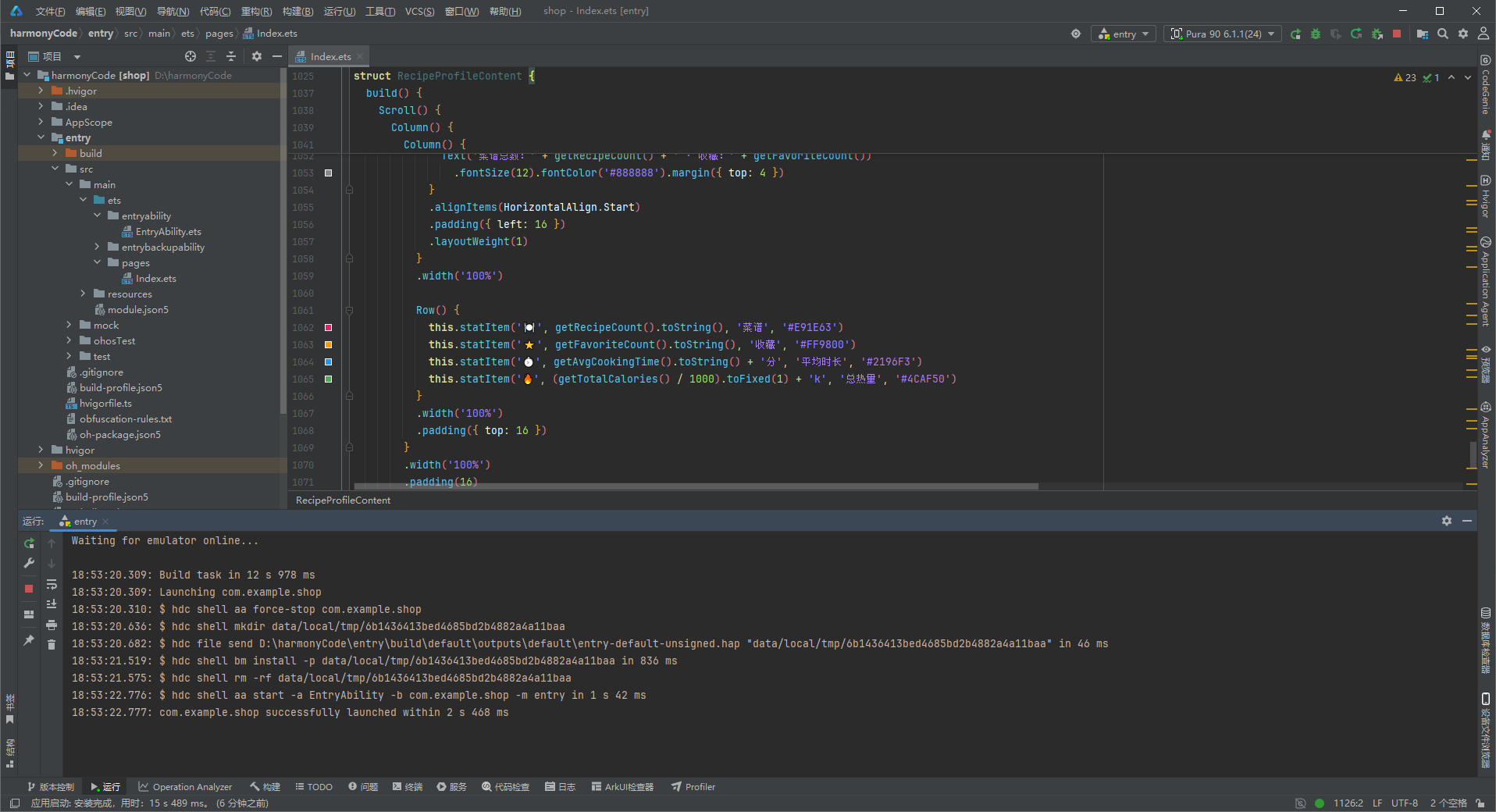
这份代码是一套完整鸿蒙ArkTS单应用页面,完全复用你上一套智能家居设备项目的架构规范,做了菜谱业务重构:4底部Tab、30条菜谱模拟数据、购物清单、4类业务弹窗、强类型约束、组件复用体系,适配ArkTS静态类型校验,无any无裸对象字面量。
一、整体架构分层(从上到下)
- 类型接口定义:统一约束配置项结构,解决
arkts-no-untyped-obj-literals校验报错 - 业务实体类 RecipeItem:@Observed 响应式菜谱数据模型,完整字段覆盖菜谱全业务属性
- 全局配置常量:分类、难度、时段配色/图标统一管理,全局复用、一键换肤
- 模拟静态数据:30道菜谱 + 12条购物清单,纯静态mock用于演示完整列表
- 统计工具函数:统一汇总数量、平均值,多处页面复用
- Tab枚举:用枚举代替魔法数字,管理4个底部页面标识
- 根入口组件 RecipeManagerApp:全局容器,负责底部Tab切换框架
- 四大业务子页面
- RecipeListContent:菜谱首页(核心,搜索/筛选/列表/4个弹窗)
- CategoryOverviewContent:分类统计页
- ShoppingCartContent:购物食材清单页
- RecipeProfileContent:个人统计主页
二、第一部分:Interface 类型定义(强类型核心)
提前定义所有配置对象的结构,所有配置常量都遵循对应接口,规避ArkTS无类型对象报错。
CategoryMeta
菜谱分类配置:显示文字、emoji图标、主题文字色、背景浅底色(早餐/午餐/晚餐/甜点/汤品/饮品)DifficultyMeta
难度配置:文字、对应星级、主题色(简单绿、中等橙、困难红)MealTimeMeta
食用时段:早/午/晚/全天,配套图标+说明文字CartItemMeta
购物清单条目结构:食材名称、是否勾选、食材分类(蔬菜/肉类/蛋奶等)
三、第二部分:核心数据模型 RecipeItem
@Observed
export class RecipeItem
@Observed鸿蒙装饰器:标记为可观察响应式类,页面@State存储实例后,属性变更自动刷新UI;- 字段全覆盖菜谱业务维度:
- 基础标识:id、名称、分类、食用时段、难度
- 烹饪参数:时长、热量、可供份数
- 互动属性:是否收藏、评分1-5星
- 核心内容:配料数组、步骤数组、标签数组(素食/快手/下饭)
- 时间字段:创建时间、上次烹饪时间
- 全参构造函数:创建实例时一次性赋值,避免零散赋值漏字段;
mockRecipes: RecipeItem[]30条模拟菜谱,覆盖6大分类、不同难度、不同评分,列表直接循环渲染。
配套购物清单模型
mockCartItems: CartItemMeta[]
12条食材清单,每条包含食材名、勾选状态、食材分类,用于购物清单Tab;点击切换勾选,实时更新完成进度。
四、第三部分:全局配置常量(设计令牌)
集中管理页面所有UI映射规则,一处修改全页面同步变更,统一视觉规范:
RECIPE_CATEGORY_CONFIG:6大菜谱分类图标、文字、配色;DIFFICULTY_CONFIG:简单/中等/困难对应星级与颜色;MEAL_TIME_CONFIG:早午晚全天时段图标;CATEGORIES:分类字符串数组,弹窗单选、筛选下拉直接ForEach遍历渲染。
五、第四部分:统计工具函数
纯计算函数,无状态,统一输出统计数字,多处页面复用:
- getRecipeCount:总菜谱30道
- getFavoriteCount:收藏15道
- getAvgCookingTime:平均烹饪时长43分钟
- getTotalCalories:全部菜谱总热量
- getCartTotal / getCartChecked:购物清单总条数、已勾选条数
六、第五部分:Tab枚举 RecipeTab
enum RecipeTab { RECIPES=0, CATEGORIES=1, CART=2, PROFILE=3 }
用枚举数字区分4个页面,替代硬编码数字字符串,可读性高、维护简单,切换逻辑无魔法值。
七、第六部分:根入口组件 RecipeManagerApp(全局容器)
@Entry 整个应用唯一入口,只做页面分发与底部导航框架,不承载业务逻辑。
1. 状态
@State activeTab: RecipeTab 记录当前选中Tab枚举值。
2. @Builder 复用组件
contentArea():内容容器,根据activeTab渲染对应子页面,layoutWeight(1)自动占满剩余高度;bottomTabItem():底部单个Tab复用组件,接收图标、文字、Tab枚举;自动处理选中高亮文字、底部红色指示条、透明度区分未选中状态。
3. build 整体结构
外层Column上下布局:
- 上半区:动态页面内容(自适应高度)
- 下半区:固定60px高度底部Tab导航栏,白色背景
全局背景浅灰白#FFF8F8F8,区分白色卡片。
结尾
本文以智能菜谱管理器为例,系统拆解了 ArkTS 强类型声明式 UI 中的四个关键设计模式:嵌套数组字段的类型定义(配料/步骤使用 string[])、底部四 Tab 各自独立列表的路由分治、四类弹框处理内容密集型对象(含双层嵌套列表展示)、以及难度星级与购物清单勾选的可视化编码策略。
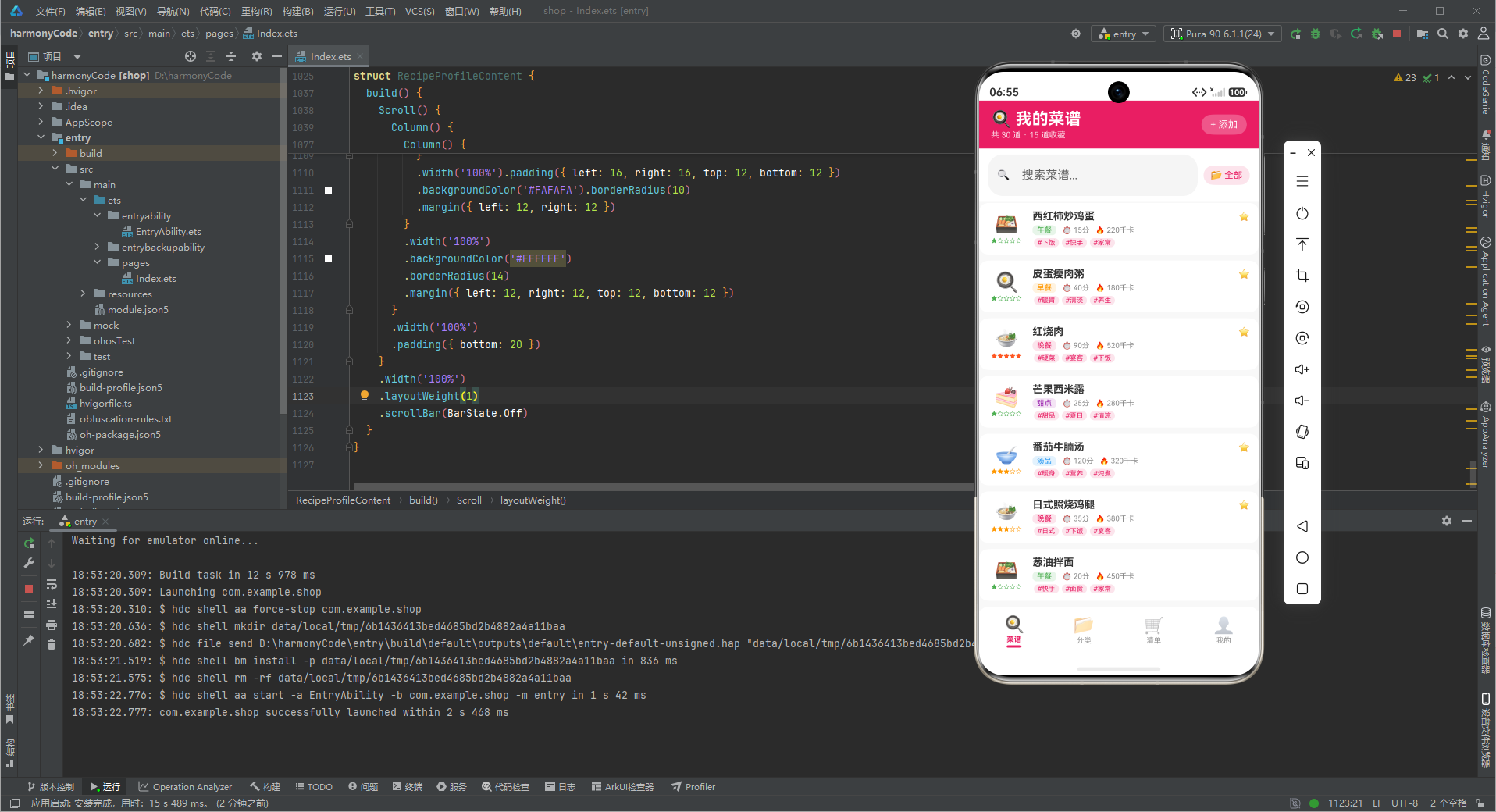
弹框体系的演化呈现"数量减少、密度增加"的趋势——设备管理因物理设备的固件生命周期需要 6 类弹框,菜谱管理因内容 CRUD 的原子性仅需 4 类弹框,但单框信息密度(详情弹框的双层嵌套列表)显著提升。这表明 ArkTS 弹框设计的核心原则不是"套用统一模板",而是"按场景裁剪":先分析对象的字段结构与操作原子性,再决定弹框的数量与每框的信息层级。

作为“人工智能6S店”的官方数字引擎,为AI开发者与企业提供一个覆盖软硬件全栈、一站式门户。
更多推荐
 6
6 0
0- 0


 已为社区贡献15条内容

所有评论(0)