
竞品分析框架-基于鸿蒙的AI竞品分析应用开发实践
App29-竞品分析框架:基于鸿蒙的AI竞品分析应用开发实践
一、应用概述
1.1 应用简介
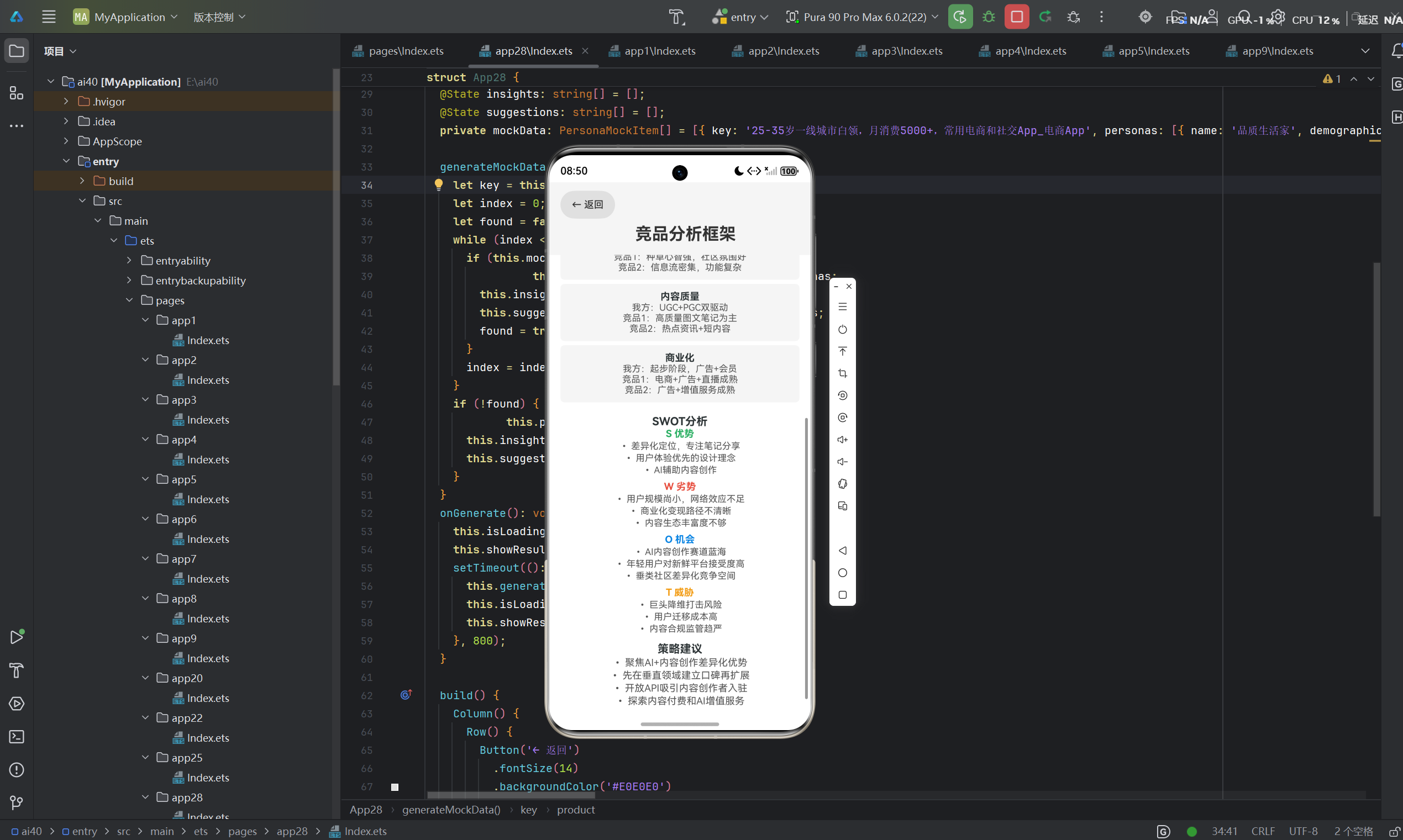
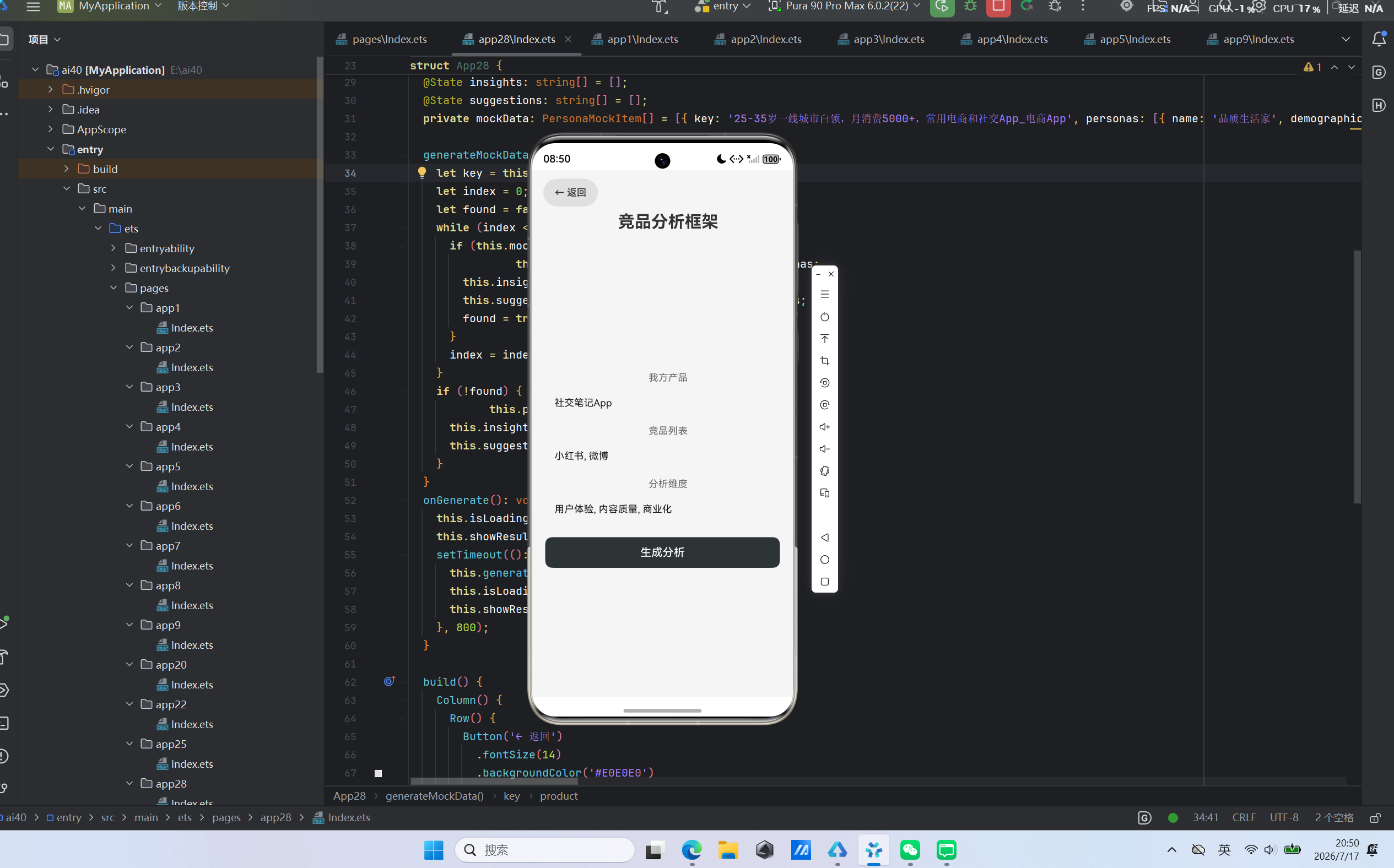
竞品分析框架是一款基于鸿蒙生态开发的智能商业分析应用,旨在帮助产品经理、创业者和市场分析师快速进行竞品对比分析。该应用通过输入我方产品、竞品列表和分析维度,自动生成对比分析表、SWOT分析和策略建议,为商业决策提供数据支持。
1.2 核心功能特性
| 功能特性 | 描述 |
|---|---|
| 产品信息输入 | 支持输入我方产品和竞品名称 |
| 分析维度自定义 | 支持自定义分析维度,如用户体验、内容质量等 |
| 对比分析表 | 自动生成多维度对比分析表 |
| SWOT分析 | 生成优势、劣势、机会、威胁分析 |
| 策略建议 | 根据分析结果提供针对性策略建议 |
| 离线Mock数据 | 内置社交、电商等多场景Mock数据 |
1.3 应用架构设计
┌─────────────────────────────────────────────┐
│              竞品分析框架应用                 │
├─────────────────────────────────────────────┤
│  输入层                                     │
│  ├── 我方产品输入框                          │
│  ├── 竞品列表输入框                          │
│  └── 分析维度输入框                          │
├─────────────────────────────────────────────┤
│  逻辑层                                     │
│  ├── 对比分析引擎                           │
│  ├── SWOT分析模块                           │
│  └── 策略建议生成器                         │
├─────────────────────────────────────────────┤
│  输出层                                     │
│  ├── 对比分析表                             │
│  ├── SWOT分析展示                           │
│  └── 策略建议列表                           │
└─────────────────────────────────────────────┘
二、技术实现详解
2.1 核心数据结构设计
2.1.1 CompareItem接口
interface CompareItem {
  dimension: string;
  our: string;
  comp1: string;
  comp2: string;
}
CompareItem接口定义了单个分析维度的对比数据:
dimension: 分析维度名称our: 我方产品表现comp1: 竞品1表现comp2: 竞品2表现
2.1.2 SWOT接口
interface SWOT {
  strengths: string[];
  weaknesses: string[];
  opportunities: string[];
  threats: string[];
}
SWOT接口定义了SWOT分析的数据结构:
strengths: 优势列表weaknesses: 劣势列表opportunities: 机会列表threats: 威胁列表
2.1.3 CompeteResult接口
interface CompeteResult {
  comparison: CompareItem[];
  swot: SWOT;
  strategies: string[];
}
CompeteResult接口定义了完整的分析结果结构。
2.2 状态管理设计
应用使用@State装饰器管理页面状态:
@Entry
@Component
struct App29 {
  @State product: string = '社交笔记App';
  @State competitors: string = '小红书, 微博';
  @State dimensions: string = '用户体验, 内容质量, 商业化';
  @State isLoading: boolean = false;
  @State showResult: boolean = false;
  @State comparison: CompareItem[] = [];
  @State strengths: string[] = [];
  @State weaknesses: string[] = [];
  @State opportunities: string[] = [];
  @State threats: string[] = [];
  @State strategies: string[] = [];
}
状态变量说明:
product: 我方产品名称competitors: 竞品列表(逗号分隔)dimensions: 分析维度(逗号分隔)isLoading: 加载状态标识showResult: 是否显示结果comparison/strengths/weaknesses/opportunities/threats/strategies: 分析结果字段
2.3 Mock数据匹配机制
应用采用组合关键字匹配策略:
generateMockData(): void {
  let key = this.product + '_' + this.competitors + '_' + this.dimensions;
  let index = 0;
  let found = false;
  while (index < this.mockData.length) {
    if (this.mockData[index].key === key) {
      this.comparison = this.mockData[index].comparison;
      this.strengths = this.mockData[index].swot.strengths;
      this.weaknesses = this.mockData[index].swot.weaknesses;
      this.opportunities = this.mockData[index].swot.opportunities;
      this.threats = this.mockData[index].swot.threats;
      this.strategies = this.mockData[index].strategies;
      found = true;
    }
    index = index + 1;
  }
  if (!found) {
    this.comparison = this.mockData[0].comparison;
    this.strengths = this.mockData[0].swot.strengths;
    this.weaknesses = this.mockData[0].swot.weaknesses;
    this.opportunities = this.mockData[0].swot.opportunities;
    this.threats = this.mockData[0].swot.threats;
    this.strategies = this.mockData[0].strategies;
  }
}
匹配逻辑:
- 将产品名称、竞品列表和分析维度组合作为匹配关键字
- 遍历Mock数据进行精确匹配
- 匹配成功后填充所有结果字段
- 未匹配时使用默认数据兜底
2.4 UI组件设计
2.4.1 输入区域
应用包含三个核心输入组件:
TextInput({ placeholder: '产品名称', text: this.product })
  .fontSize(14).height(40).backgroundColor('#F5F5F5')
  .borderRadius(8).margin({ left: 16, right: 16 })
  .onChange((v: string): void => { this.product = v; });

TextInput({ placeholder: '竞品名称,用逗号分隔', text: this.competitors })
  .fontSize(14).height(40).backgroundColor('#F5F5F5')
  .borderRadius(8).margin({ left: 16, right: 16 })
  .onChange((v: string): void => { this.competitors = v; });

TextInput({ placeholder: '分析维度,用逗号分隔', text: this.dimensions })
  .fontSize(14).height(40).backgroundColor('#F5F5F5')
  .borderRadius(8).margin({ left: 16, right: 16 })
  .onChange((v: string): void => { this.dimensions = v; });
2.4.2 SWOT分析展示
SWOT分析采用颜色编码,便于快速识别:
Text('S 优势').fontSize(14).fontWeight(FontWeight.Bold).fontColor('#27AE60');
ForEach(this.strengths, (s: string): void => {
  Text('• ' + s).fontSize(13).fontColor('#555555').margin({ top: 2 });
});

Text('W 劣势').fontSize(14).fontWeight(FontWeight.Bold).fontColor('#E74C3C').margin({ top: 8 });
ForEach(this.weaknesses, (w: string): void => {
  Text('• ' + w).fontSize(13).fontColor('#555555').margin({ top: 2 });
});

Text('O 机会').fontSize(14).fontWeight(FontWeight.Bold).fontColor('#0984E3').margin({ top: 8 });
ForEach(this.opportunities, (o: string): void => {
  Text('• ' + o).fontSize(13).fontColor('#555555').margin({ top: 2 });
});

Text('T 威胁').fontSize(14).fontWeight(FontWeight.Bold).fontColor('#F39C12').margin({ top: 8 });
ForEach(this.threats, (t: string): void => {
  Text('• ' + t).fontSize(13).fontColor('#555555').margin({ top: 2 });
});
颜色编码规则:
- 优势(S): 绿色 (#27AE60)
- 劣势(W): 红色 (#E74C3C)
- 机会(O): 蓝色 (#0984E3)
- 威胁(T): 橙色 (#F39C12)
三、鸿蒙生态适配策略
3.1 鸿蒙PC适配方案
3.1.1 多窗口布局
在鸿蒙PC端,建议采用三栏布局:
// 鸿蒙PC端布局示意
Row() {
  // 左侧输入区域
  Column() {
    TextInput({ placeholder: '我方产品' }).width('100%');
    TextInput({ placeholder: '竞品列表' }).width('100%');
    TextInput({ placeholder: '分析维度' }).width('100%');
    Button('生成分析').width('100%');
  }.width('25%').padding(16);

  // 中间对比分析区域
  Column() {
    Text('对比分析').fontSize(16).fontWeight(FontWeight.Bold);
    // 对比分析表
  }.width('35%').padding(16);

  // 右侧SWOT和策略区域
  Column() {
    Text('SWOT分析').fontSize(16).fontWeight(FontWeight.Bold);
    // SWOT分析展示
    Text('策略建议').fontSize(16).fontWeight(FontWeight.Bold);
    // 策略建议列表
  }.width('40%').padding(16);
}
3.1.2 表格交互增强
在PC端可增强表格交互能力:
// PC端表格交互示意
Column() {
  Row() {
    Text('维度').width(100).fontWeight(FontWeight.Bold);
    Text('我方').width(120).fontWeight(FontWeight.Bold);
    Text('竞品1').width(120).fontWeight(FontWeight.Bold);
    Text('竞品2').width(120).fontWeight(FontWeight.Bold);
  }.width('100%');

  ForEach(this.comparison, (item: CompareItem): void => {
    Row() {
      Text(item.dimension).width(100);
      Text(item.our).width(120);
      Text(item.comp1).width(120);
      Text(item.comp2).width(120);
    }.width('100%').backgroundColor('#F5F5F5').padding(8);
  });
}
3.1.3 导出功能
PC端支持导出分析报告:
// PC端导出功能示意
Button('导出报告')
  .onClick((): void => {
    // 生成PDF/Excel报告
    // 触发文件下载
  });
3.2 鸿蒙Flutter框架对比分析
| 维度 | 鸿蒙原生(ArkTS) | 鸿蒙Flutter框架 |
|---|---|---|
| 语言 | ArkTS | Dart |
| UI组件 | ArkUI声明式 | Material/Cupertino |
| 表格组件 | 基础组件 | DataTable |
| 图表支持 | 基础 | 丰富的图表库 |
| 报告导出 | 需自定义 | pdf/widgets库 |
| 开发效率 | 较高 | 中等 |
对于竞品分析这类需要复杂表格和图表展示的应用,鸿蒙Flutter框架在组件丰富度方面具有优势。
四、技术亮点与创新
4.1 结构化对比分析
应用生成结构化的对比分析表,便于快速对比:
comparison: [{
  dimension: '用户体验',
  our: '界面简洁,操作流畅',
  comp1: '种草心智强,社区氛围好',
  comp2: '信息流密集,功能复杂'
}, {
  dimension: '内容质量',
  our: 'UGC+PGC双驱动',
  comp1: '高质量图文笔记为主',
  comp2: '热点资讯+短内容'
}, {
  dimension: '商业化',
  our: '起步阶段,广告+会员',
  comp1: '电商+广告+直播成熟',
  comp2: '广告+增值服务成熟'
}]
4.2 完整SWOT分析
应用提供完整的SWOT分析框架:
swot: {
  strengths: [
    '差异化定位,专注笔记分享',
    '用户体验优先的设计理念',
    'AI辅助内容创作'
  ],
  weaknesses: [
    '用户规模尚小,网络效应不足',
    '商业化变现路径不清晰',
    '内容生态丰富度不够'
  ],
  opportunities: [
    'AI内容创作赛道蓝海',
    '年轻用户对新鲜平台接受度高',
    '垂类社区差异化竞争空间'
  ],
  threats: [
    '巨头降维打击风险',
    '用户迁移成本高',
    '内容合规监管趋严'
  ]
}
4.3 针对性策略建议
应用根据分析结果提供针对性的策略建议:
strategies: [
  '聚焦AI+内容创作差异化优势',
  '先在垂直领域建立口碑再扩展',
  '开放API吸引内容创作者入驻',
  '探索内容付费和AI增值服务'
]
五、大模型API集成预留
5.1 API接口设计
预留了大模型API调用接口:
async callAIAPI(product: string, competitors: string, dimensions: string): Promise<CompeteResult> {
  let requestBody: string = JSON.stringify({
    our_product: product,
    competitors: competitors.split(','),
    dimensions: dimensions.split(',')
  });

  let response: Response = await fetch('https://api.example.com/compete-analyzer', {
    method: 'POST',
    headers: {
      'Content-Type': 'application/json',
      'Authorization': 'Bearer YOUR_API_KEY'
    },
    body: requestBody
  });

  let result: CompeteResult = await response.json();
  return result;
}
5.2 降级策略
当API不可用时自动降级到Mock数据模式:
onGenerate(): void {
  this.isLoading = true;
  this.showResult = false;

  setTimeout((): void => {
    this.generateMockData();
    this.isLoading = false;
    this.showResult = true;
  }, 800);
}
六、开发与调试经验
6.1 ArkTS语法约束注意事项
6.1.1 嵌套数据访问
访问嵌套数据结构时需要注意类型安全:
// 正确的嵌套数据访问
this.strengths = this.mockData[index].swot.strengths;
this.weaknesses = this.mockData[index].swot.weaknesses;
6.1.2 字符串分割
ArkTS不支持String.split方法,需实现自定义方法:
split(str: string, separator: string): string[] {
  let result: string[] = [];
  let current: string = '';
  let i = 0;
  while (i < str.length) {
    if (str.charAt(i) === separator) {
      result.push(current);
      current = '';
    } else {
      current = current + str.charAt(i);
    }
    i = i + 1;
  }
  if (current !== '') {
    result.push(current);
  }
  return result;
}
6.2 调试技巧
6.2.1 日志输出
generateMockData(): void {
  let key = this.product + '_' + this.competitors + '_' + this.dimensions;
  console.log('Matching key:', key);
  console.log('Key length:', key.length);
}
6.2.2 断点调试
在DevEco Studio中设置断点,观察:
key变量的生成逻辑- Mock数据的匹配过程
- SWOT数据的赋值操作
七、性能优化策略
7.1 数据结构优化
7.1.1 使用Map提升匹配效率
private mockMap: Map<string, CompeteMockItem> = new Map([
  ['社交笔记App_小红书,微博_用户体验,内容质量,商业化', {...}]
]);

generateMockData(): void {
  let key = this.product + '_' + this.competitors + '_' + this.dimensions;
  let item = this.mockMap.get(key);
  if (item !== undefined) {
    this.comparison = item.comparison;
    this.strengths = item.swot.strengths;
    this.weaknesses = item.swot.weaknesses;
    this.opportunities = item.swot.opportunities;
    this.threats = item.swot.threats;
    this.strategies = item.strategies;
  }
}
7.1.2 预计算关键字
// 优化前:每次调用都重新拼接字符串
let key = this.product + '_' + this.competitors + '_' + this.dimensions;

// 优化后:监听输入变化,预计算关键字
@State computedKey: string = '';

onProductChange(v: string): void {
  this.product = v;
  this.computedKey = v + '_' + this.competitors + '_' + this.dimensions;
}
7.2 渲染优化
7.2.1 列表渲染优化
ForEach(this.strengths, (s: string): void => {
  Text('• ' + s).fontSize(13).fontColor('#555555').margin({ top: 2 });
}, (s: string): string => s);
为ForEach添加keyGenerator。
7.2.2 条件渲染
if (this.isLoading) {
  LoadingProgress().width(36).height(36).color('#2D3436');
}

if (this.showResult && !this.isLoading) {
  // 结果展示
}
八、应用场景与扩展
8.1 主要应用场景
8.1.1 产品规划
产品经理使用竞品分析指导产品规划和功能设计。
8.1.2 商业决策
创业者使用竞品分析评估市场机会和竞争态势。
8.1.3 投资分析
投资者使用竞品分析评估目标公司的竞争优势。
8.2 功能扩展方向
8.2.1 多竞品支持
扩展支持3个以上竞品的对比分析。
8.2.2 历史数据对比
支持不同时期的竞品分析结果对比。
8.2.3 数据可视化
集成图表组件,直观展示对比结果。
8.2.4 报告生成
支持生成专业的竞品分析报告。
九、鸿蒙生态适配展望
9.1 鸿蒙PC深度适配
- 多窗口协作:支持同时打开多个竞品分析项目
- 数据导入:支持从市场研究报告导入数据
- 外接设备支持:支持大屏投影展示分析结果
9.2 鸿蒙Flutter框架迁移路径
- 表格组件:使用DataTable实现对比分析表
- 图表库:使用flutter_charts实现数据可视化
- 报告导出:使用pdf库生成PDF报告
9.3 鸿蒙生态协同
- 与文档应用集成:将分析结果插入文档
- 与演示应用集成:生成演示文稿展示竞品分析
- 与数据分析应用集成:从数据分析应用导入竞品数据
十、总结与展望
10.1 开发总结
竞品分析框架应用基于鸿蒙生态开发,采用ArkTS + ArkUI声明式语法,实现了竞品分析的核心功能。应用包含完整的数据结构定义、状态管理、Mock数据匹配和UI展示逻辑。
10.2 技术价值
该应用展示了鸿蒙生态在商业分析领域的能力:
- 结构化数据处理
- 可视化展示
- 策略生成
- 良好的扩展性
10.3 未来展望
随着鸿蒙生态的发展,竞品分析框架应用将继续优化:
- 接入大模型API提升分析准确性
- 扩展支持更多竞品和维度
- 增强数据可视化能力
- 优化PC端交互体验
通过持续迭代,该应用将成为产品经理和创业者的得力工具,为商业决策提供有力支持。

作为“人工智能6S店”的官方数字引擎,为AI开发者与企业提供一个覆盖软硬件全栈、一站式门户。
更多推荐
 0
0 0
0- 0


 已为社区贡献44条内容

所有评论(0)