
告别 @ohos!10 分钟完成鸿蒙项目新版 API 迁移实战
告别 @ohos!10 分钟完成鸿蒙项目新版 API 迁移实战
升级到 HarmonyOS 7(API 26)后,不少开发者打开旧项目的第一反应就是满屏红色报错:曾经熟悉的 @ohos.net.http、@ohos.hilog、@ohos.file.fs 全都提示找不到模块。这不是你的代码出了 Bug,而是鸿蒙官方已经全面推进 @kit.* 套件体系替代旧版 @ohos.* 命名空间——旧接口仅做兼容保留,所有系统新特性全部更新在 @kit 体系中。
很多人以为迁移是个大工程,其实对于常规业务项目,只要按标准化步骤操作,10分钟就能完成核心代码的迁移适配。本文从环境配置、导入替换、API 细节适配到编译验证,带你一步步完成从 @ohos 到 @kit 的平滑迁移,附完整可运行的前后代码对比,全程基于官方规范与实际开发经验。
一、迁移前必知:为什么要从 @ohos 切换到 @kit
1.1 设计背景:从零散模块到套件化整合
早期鸿蒙系统的 API 以 @ohos. 为前缀,按单一功能拆分成上百个独立模块:网络请求要导入 @ohos.net.http,文件操作要导入 @ohos.file.fs,日志打印要导入 @ohos.hilog。随着系统能力扩充,模块数量持续增长,开发者记忆成本高、导入语句冗余,也不利于系统能力分层迭代。
从 API 12 开始,华为逐步推出 @kit 模块化套件体系,将同类业务能力整合到统一的 Kit 包中;发展到鸿蒙 7(API 26)阶段,@kit 已经成为官方唯一推荐的 API 使用方式——所有新增系统能力只会更新在 @kit 体系中,旧的 @ohos 接口仅做兼容保留,不再新增功能。
1.2 核心差异速览
| 对比维度 | 旧版 @ohos.* 体系 | 新版 @kit.* 体系 |
|---|---|---|
| 组织形式 | 按单一功能拆分的零散模块 | 按业务领域整合的大套件,API 统一聚合 |
| 导入方式 | 一个功能对应一条默认 import 语句 | 同类能力可从同一个 Kit 中批量解构导入 |
| 迭代节奏 | 兼容保留,停止新增能力 | 持续迭代,所有新特性优先更新于此 |
| 适用范围 | 旧版本兼容,OpenHarmony 通用 | HarmonyOS NEXT 全量支持,商用设备标配 |
| 推荐程度 | 旧项目兼容,不建议新功能使用 | 新项目强制首选,官方标准开发规范 |
1.3 迁移前置条件
- 开发工具:DevEco Studio 5.0 及以上版本
- SDK 版本:HarmonyOS NEXT SDK 26.0.0 及以上
- 工程模型:必须为 Stage 模型(HarmonyOS NEXT 已完全不支持 FA 模型,FA 项目需先完成模型迁移)
- 说明:OpenHarmony 开源版本对 @kit 支持有限,商用鸿蒙设备开发统一使用 @kit 体系
二、10 分钟迁移实战:四步完成全量适配
第一步:工程配置校准(耗时约 2 分钟)
迁移的第一步不是改代码,而是先把工程的编译环境对齐标准,否则后续所有导入都会提示找不到模块。
打开工程根目录的 build-profile.json5,将编译 SDK 版本与兼容 SDK 版本统一调整到 26.0.0 及以上:
{
  "app": {
    "signingConfigs": [],
    "compileSdkVersion": "26.0.0",
    "compatibleSdkVersion": "26.0.0",
    "targets": [
      {
        "name": "default",
        "runtimeOS": "HarmonyOS"
      }
    ]
  },
  "modules": [
    {
      "name": "entry",
      "srcPath": "./entry",
      "targets": [
        {
          "name": "default",
          "applyToProducts": ["default"]
        }
      ]
    }
  ]
}
配置完成后同步工程,确保 SDK 正确加载。如果是从 API 23 及更低版本升级,建议先执行一次 Build > Clean Project 清理旧缓存。
第二步:导入语句批量替换(耗时约 3 分钟)
80% 的迁移工作就是导入语句的替换。日常开发中 90% 的常用 API 都集中在 8 个核心 Kit 中,可以通过 IDE 全局替换(快捷键 Ctrl+Shift+R)快速完成批量修改。
高频 API 对应速查表
| 旧版 @ohos 导入写法 | 新版 @kit 导入写法 | 功能说明 |
|---|---|---|
import hilog from '@ohos.hilog' |
import { hilog } from '@kit.PerformanceAnalysisKit' |
日志打印 |
import UIAbility from '@ohos.app.ability.UIAbility' |
import { UIAbility } from '@kit.AbilityKit' |
应用入口组件 |
import http from '@ohos.net.http' |
import { http } from '@kit.NetworkKit' |
HTTP 网络请求 |
import fs from '@ohos.file.fs' |
import { fs } from '@kit.CoreFileKit' |
本地文件读写 |
import router from '@ohos.router' |
import { router } from '@kit.ArkUI' |
页面路由跳转 |
import prompt from '@ohos.promptAction' |
import { promptAction } from '@kit.ArkUI' |
Toast 弹窗提示 |
import preferences from '@ohos.data.preferences' |
import { preferences } from '@kit.ArkData' |
轻量持久化存储 |
import deviceInfo from '@ohos.deviceInfo' |
import { deviceInfo } from '@kit.BasicServicesKit' |
设备信息获取 |
注意:旧版大多是默认导入(
import xxx from),新版统一为解构导入(import { xxx } from),替换时不要遗漏大括号,否则会提示模块无默认导出。
第三步:核心 API 调用细节适配(耗时约 3 分钟)
大部分 API 只改导入路径就能正常运行,但有几个高频模块的调用方式发生了微调,这是迁移最容易踩坑的地方,需要手动适配。
1. 网络请求:销毁方法从全局改为实例方法
旧版 @ohos.net.http 中,destroy() 是挂在 http 全局对象上的方法;迁移到 @kit.NetworkKit 后,销毁方法绑定到请求实例上,避免全局调用混乱。
旧版写法
import http from '@ohos.net.http';

// 创建请求实例
const httpRequest = http.createHttp();
// 发起请求
const res = await httpRequest.request('https://example.com/api');
// 旧版:全局销毁
http.destroy();
新版写法
import { http } from '@kit.NetworkKit';

// 创建请求实例
const httpRequest = http.createHttp();
// 发起请求
const res = await httpRequest.request('https://example.com/api');
// 新版:实例销毁
httpRequest.destroy();
2. 弹窗模块:命名空间更名
旧版的 @ohos.prompt 与 @ohos.promptAction 统一整合进 ArkUI 套件中,导出名为 promptAction,调用参数与用法保持不变。
旧版写法
import prompt from '@ohos.promptAction';

prompt.showToast({ message: '操作成功', duration: 2000 });
新版写法
import { promptAction } from '@kit.ArkUI';

promptAction.showToast({ message: '操作成功', duration: 2000 });
3. Ability 上下文获取
旧版中获取上下文的方式零散,AbilityKit 中统一通过 UIAbilityContext 类型规范获取,生命周期方法保持一致。
旧版写法
import UIAbility from '@ohos.app.ability.UIAbility';
import type AbilityConstant from '@ohos.app.ability.AbilityConstant';
import type Want from '@ohos.app.ability.Want';

export default class EntryAbility extends UIAbility {
  onCreate(want: Want, launchParam: AbilityConstant.LaunchParam): void {
    const context = this.context;
  }
}
新版写法
import { UIAbility, AbilityConstant, Want, UIAbilityContext } from '@kit.AbilityKit';

export default class EntryAbility extends UIAbility {
  onCreate(want: Want, launchParam: AbilityConstant.LaunchParam): void {
    const context: UIAbilityContext = this.context;
  }
}
第四步:编译验证与收尾(耗时约 2 分钟)
完成以上修改后,执行以下操作收尾:
- 点击
File > Invalidate Caches...清理 IDE 缓存,避免旧类型声明干扰 - 执行
Build > Rebuild Project全量编译 - 对于剩余少量冷门模块,对照华为开发者联盟官方 API 参考文档查找对应 Kit
- 运行到模拟器或真机,验证核心功能正常
对于普通的工具类、展示类项目,走完这四步基本就能完成全量迁移,整体耗时不会超过 10 分钟。
三、完整实战对照:旧版 @ohos 项目 → 新版 @kit 项目
下面以一个包含「网络请求、本地存储、日志打印、弹窗提示」的常见页面为例,给出完整的迁移前后代码对照,可直接复制运行。
旧版 @ohos 完整代码
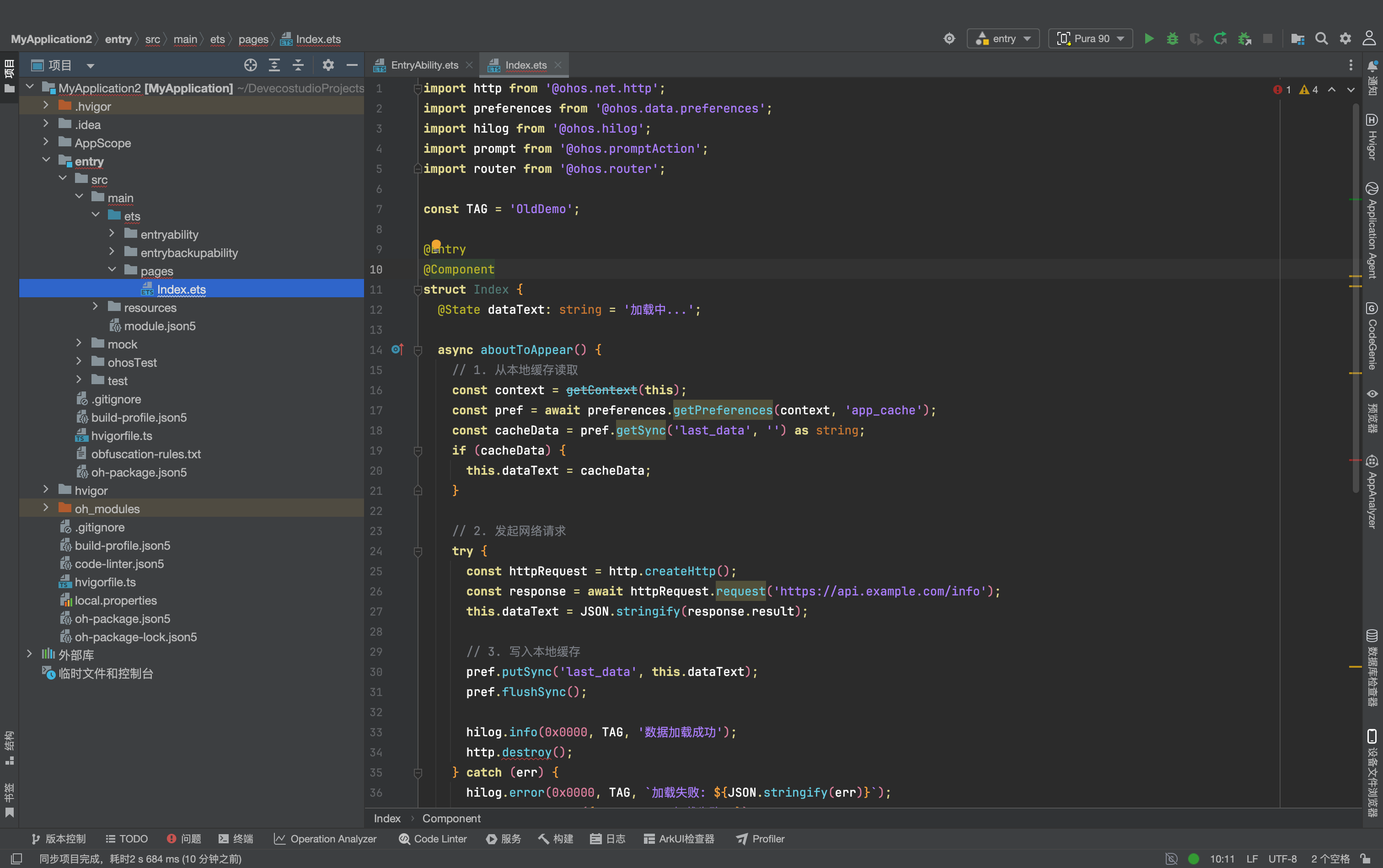
import http from '@ohos.net.http';
import preferences from '@ohos.data.preferences';
import hilog from '@ohos.hilog';
import prompt from '@ohos.promptAction';
import router from '@ohos.router';

const TAG = 'OldDemo';

@Entry
@Component
struct Index {
  @State dataText: string = '加载中...';

  async aboutToAppear() {
    // 1. 从本地缓存读取
    const context = getContext(this);
    const pref = await preferences.getPreferences(context, 'app_cache');
    const cacheData = pref.getSync('last_data', '') as string;
    if (cacheData) {
      this.dataText = cacheData;
    }

    // 2. 发起网络请求
    try {
      const httpRequest = http.createHttp();
      const response = await httpRequest.request('https://api.example.com/info');
      this.dataText = JSON.stringify(response.result);

      // 3. 写入本地缓存
      pref.putSync('last_data', this.dataText);
      pref.flushSync();

      hilog.info(0x0000, TAG, '数据加载成功');
      http.destroy();
    } catch (err) {
      hilog.error(0x0000, TAG, `加载失败: ${JSON.stringify(err)}`);
      prompt.showToast({ message: '加载失败' });
    }
  }

  build() {
    Column({ space: 20 }) {
      Text('旧版 @ohos 示例')
        .fontSize(24)
        .fontWeight(FontWeight.Bold);

      Text(this.dataText)
        .fontSize(16)
        .width('90%');

      Button('跳转到详情页')
        .onClick(() => {
          router.pushUrl({ url: 'pages/Detail' });
        });
    }
    .width('100%')
    .height('100%')
    .padding(20);
  }
}
迁移后 @kit 完整代码
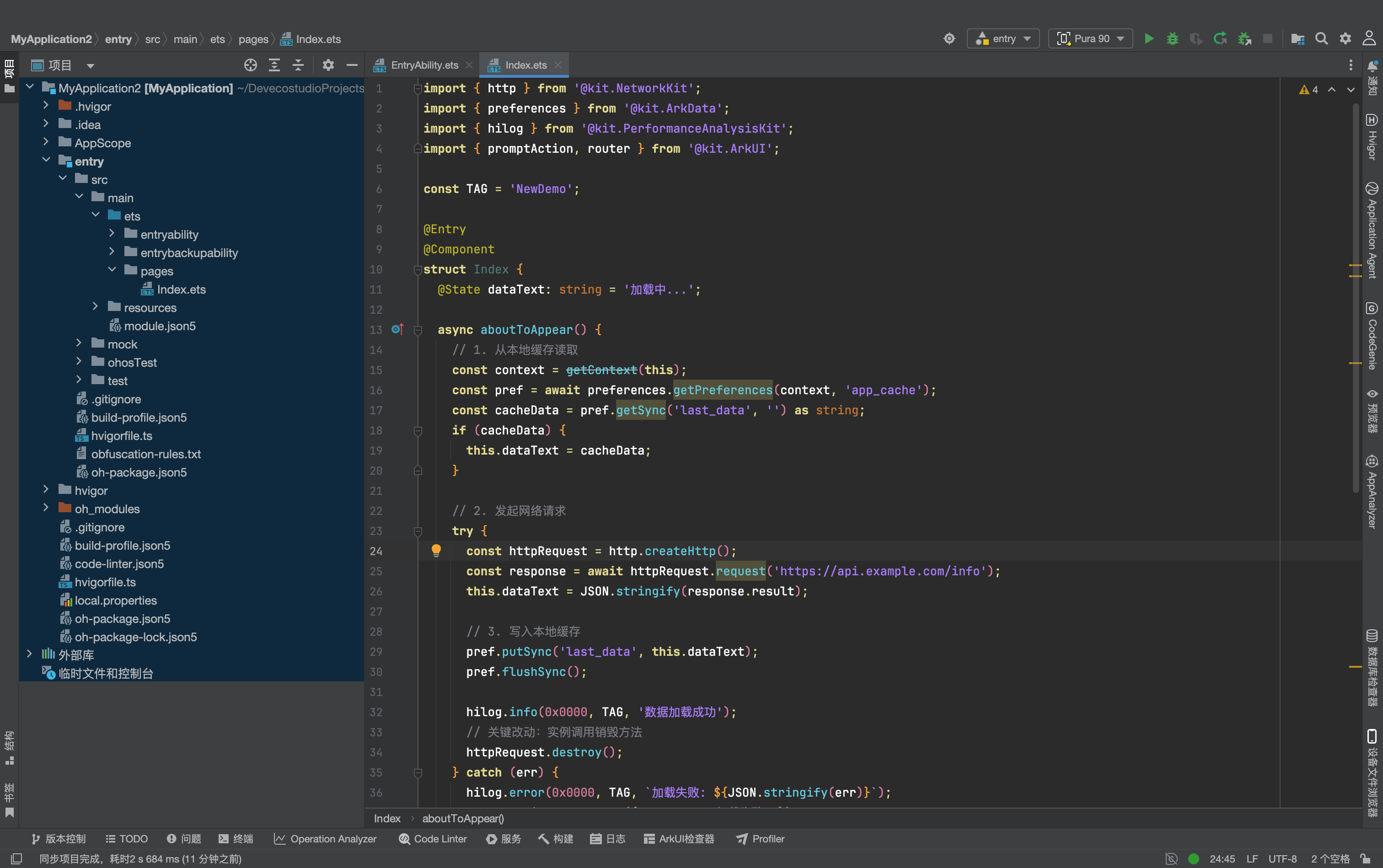
import { http } from '@kit.NetworkKit';
import { preferences } from '@kit.ArkData';
import { hilog } from '@kit.PerformanceAnalysisKit';
import { promptAction, router } from '@kit.ArkUI';

const TAG = 'NewDemo';

@Entry
@Component
struct Index {
  @State dataText: string = '加载中...';

  async aboutToAppear() {
    // 1. 从本地缓存读取
    const context = getContext(this);
    const pref = await preferences.getPreferences(context, 'app_cache');
    const cacheData = pref.getSync('last_data', '') as string;
    if (cacheData) {
      this.dataText = cacheData;
    }

    // 2. 发起网络请求
    try {
      const httpRequest = http.createHttp();
      const response = await httpRequest.request('https://api.example.com/info');
      this.dataText = JSON.stringify(response.result);

      // 3. 写入本地缓存
      pref.putSync('last_data', this.dataText);
      pref.flushSync();

      hilog.info(0x0000, TAG, '数据加载成功');
      // 关键改动:实例调用销毁方法
      httpRequest.destroy();
    } catch (err) {
      hilog.error(0x0000, TAG, `加载失败: ${JSON.stringify(err)}`);
      promptAction.showToast({ message: '加载失败' });
    }
  }

  build() {
    Column({ space: 20 }) {
      Text('新版 @kit 示例')
        .fontSize(24)
        .fontWeight(FontWeight.Bold);

      Text(this.dataText)
        .fontSize(16)
        .width('90%');

      Button('跳转到详情页')
        .onClick(() => {
          router.pushUrl({ url: 'pages/Detail' });
        });
    }
    .width('100%')
    .height('100%')
    .padding(20);
  }
}
可以看到,核心业务逻辑几乎没有改动,主要工作量集中在导入语句替换与个别 API 调用方式微调,迁移成本非常低。
四、迁移高频踩坑与解决方案
1. 报错:Cannot find module ‘@kit.xxx’
- 常见原因:项目
compileSdkVersion配置低于 26,或 SDK 未完整安装;OpenHarmony 项目使用了商用鸿蒙专属 Kit - 解决方案:升级 SDK 到 26.0.0 及以上,检查 build-profile.json5 配置;确认当前工程使用的是 HarmonyOS 商用 SDK,而非 OpenHarmony SDK
2. 报错:xxx is not exported from ‘@kit.xxx’
- 常见原因:API 导出名称发生变化,最典型的就是
prompt改为promptAction - 解决方案:对照官方 API 参考文档确认导出名称,优先使用 IDE 自动补全提示手动导入,避免凭记忆书写
3. 报错:方法不存在 / 参数类型不匹配
- 常见原因:部分 API 在 Kit 化后调整了调用形态,比如 http 的销毁方法、部分异步接口的错误码结构
- 解决方案:优先修改为实例方法调用;对于异步错误捕获,统一通过
BusinessError类型接收,避免硬编码旧版错误码
4. FA 模型项目大面积报错
- 常见原因:HarmonyOS NEXT 已完全移除 FA 模型支持,
featureAbility、AbilitySlice等 API 全部失效 - 解决方案:先完成从 FA 模型到 Stage 模型的架构迁移,再进行 @kit API 替换,这是硬性前提,没有兼容方案
五、总结与迁移建议
@kit 体系不是简单的命名更换,而是鸿蒙 API 工程化的重要升级。对于开发者来说:
- 新项目建议直接基于 @kit 体系开发,不用再学习零散的 @ohos 模块,学习成本更低
- 存量旧项目建议尽早完成迁移,后续鸿蒙 7 的分布式协同、系统智能体、空间化 UI 等新特性,都只在 @kit 体系中提供
- 迁移优先级建议:先替换核心高频模块(日志、网络、UI、存储),再逐步替换冷门业务模块

作为“人工智能6S店”的官方数字引擎,为AI开发者与企业提供一个覆盖软硬件全栈、一站式门户。
更多推荐


 0
0 0
0- 0


 已为社区贡献25条内容

所有评论(0)