
24 RDB 数据库入门:relationalStore 与 DatabaseService 初始化
24 RDB 数据库入门:relationalStore 与 DatabaseService 初始化
前言
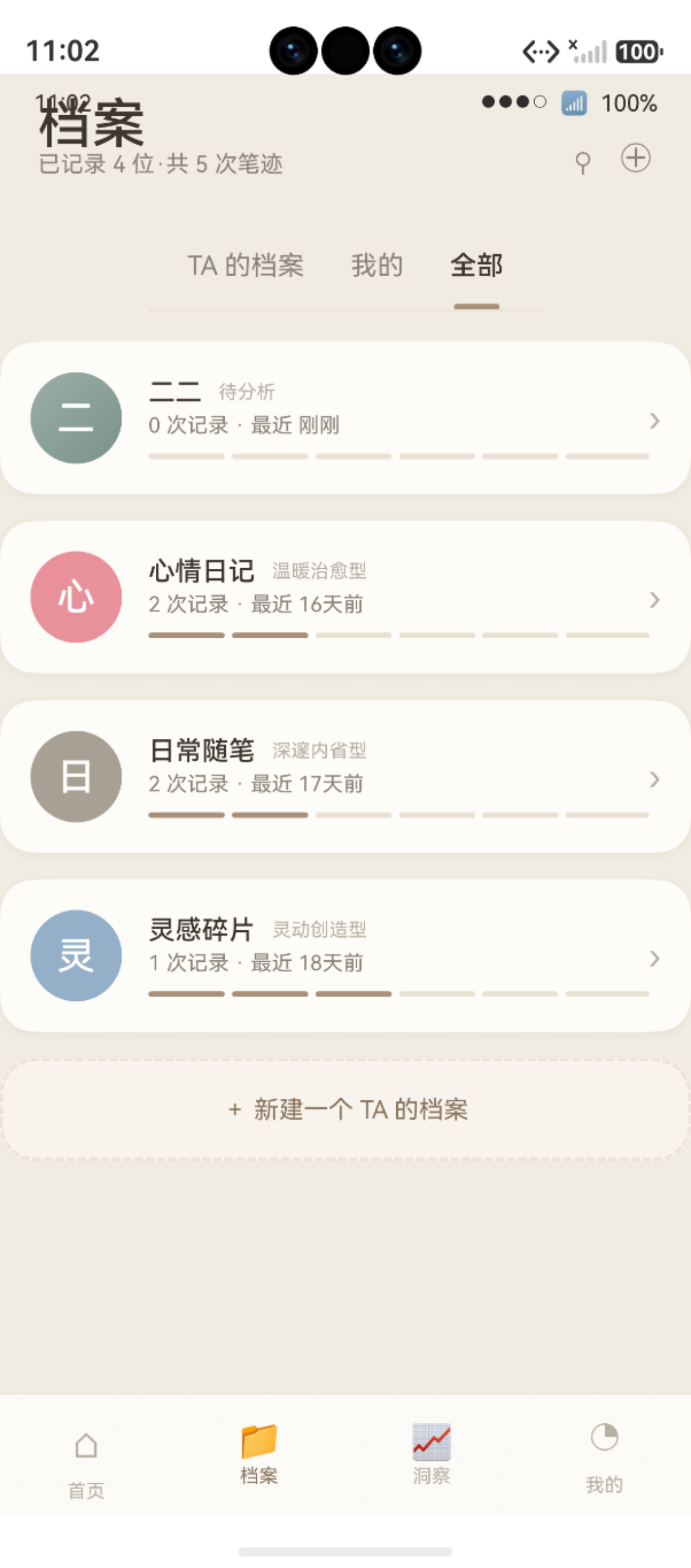
图:24 RDB 数据库入门:relationalStore 与 DatabaseService 初始化 运行效果截图(HarmonyOS NEXT)
在鸿蒙 HarmonyOS 应用开发中,本地数据持久化是构建功能完整的应用的基础能力。鸿蒙提供了 RDB(关系型数据库) 组件,基于 SQLite 引擎,支持完整的 SQL 操作能力。
本文以"鹿鹿·笔迹心理分析"项目中的 [DatabaseService.ets](file:///Users/fiona/Downloads/bijixinli/harmony-app/entry/src/main/ets/features/data/DatabaseService.ets) 为例,从零开始讲解鸿蒙 RDB 数据库的初始化流程、StoreConfig 配置、单例模式和版本管理策略。
鸿蒙官方·relationalStore 文档:developer.huawei.com
项目源码仓库:harmony-app GitHub
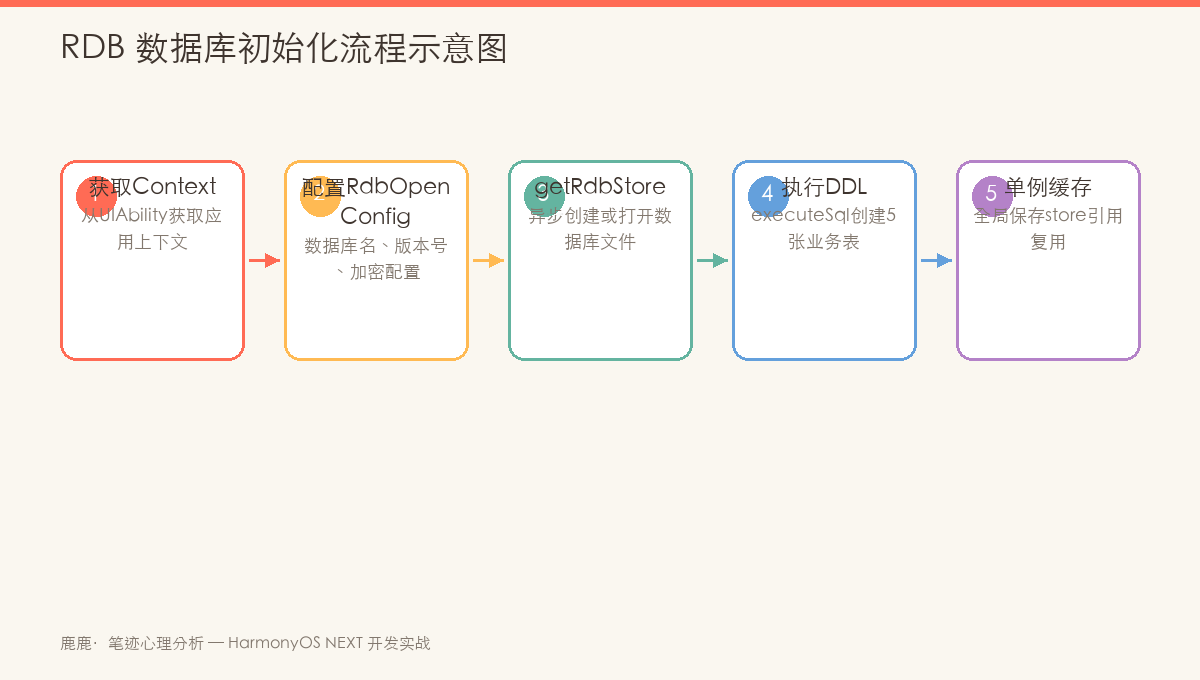
图:鸿蒙 RDB DatabaseService 初始化流程——从 UIAbility.onCreate 到 RdbStore 就绪
一、引入 relationalStore 模块
1.1 模块导入
鸿蒙 RDB 的核心模块是 @ohos.data.relationalStore:
import relationalStore from '@ohos.data.relationalStore'
import { common } from '@kit.AbilityKit'
1.2 模块说明
| 导入路径 | 提供能力 | 版本要求 |
|---|---|---|
@ohos.data.relationalStore | RDB 数据库的创建、查询、更新、删除等所有操作 | API 12+ |
@kit.AbilityKit | UIAbility context(数据库初始化所需的上下文) | API 12+ |
提示:
@kit.AbilityKit是鸿蒙 API 12 的模块化导入方式,替代了旧版的@ohos.ability.ability。
二、StoreConfig 配置详解
2.1 数据库配置
const DB_CONFIG: relationalStore.StoreConfig = {
  name: 'lulu_handwriting.db',              // 数据库文件名
  securityLevel: relationalStore.SecurityLevel.S2  // 安全等级
}

const DB_VERSION = 2   // 当前数据库版本
2.2 配置字段说明
| 字段 | 说明 | 示例值 |
|---|---|---|
name | 数据库文件名(含 .db 后缀) | 'lulu_handwriting.db' |
securityLevel | 安全等级:S1(低)/ S2(中)/ S3(高)/ S4(极高) | SecurityLevel.S2 |
encrypt | 是否加密(默认为 false) | true / false |
安全等级说明:
| 等级 | 适用数据 | 安全要求 |
|---|---|---|
| S1 | 不涉及个人数据 | 无加密要求 |
| S2 | 个人信息(如用户名、头像) | 防止非授权访问 |
| S3 | 敏感个人信息(如位置、生物特征) | 加密存储 |
| S4 | 极敏感数据(如支付密码) | 强加密+隔离 |
"鹿鹿"项目中,主要存储笔迹分析结果和用户档案,属于个人信息范畴,因此使用 S2 等级。
三、DatabaseService 单例模式
3.1 单例类结构
export class DatabaseService {
  private static _instance: DatabaseService | null = null
  private store: relationalStore.RdbStore | null = null
  private initPromise: Promise<void> | null = null

  static getInstance(): DatabaseService {
    if (!DatabaseService._instance) {
      DatabaseService._instance = new DatabaseService()
    }
    return DatabaseService._instance
  }
}
单例设计要点:
- 私有构造函数:禁止外部直接
new DatabaseService() - 静态实例变量:
private static _instance - 静态获取方法:
getInstance()— 首次调用时创建,后续复用 - 三次检查:本项目中还增加了
initPromise缓存,防止并发初始化
3.2 initPromise 的并发保护
async init(context: common.UIAbilityContext): Promise<void> {
  if (this.store) return           // ① 已初始化 → 直接返回
  if (this.initPromise) return this.initPromise  // ② 正在初始化 → 复用 Promise

  this.initPromise = (async () => {
    try {
      this.store = await relationalStore.getRdbStore(context, DB_CONFIG)
      await this.upgrade(this.store, this.store.version, DB_VERSION)
      this.store.version = DB_VERSION
      hilog.info(0x0000, 'DatabaseService', 'RDB 初始化完成 v%d', DB_VERSION)
    } catch (e) {
      hilog.error(0x0000, 'DatabaseService', '初始化失败: %s', JSON.stringify(e))
    }
  })()

  return this.initPromise
}
三次检查的逻辑链:
第 1 次调用 init()
  → store 为 null → 继续
  → initPromise 为 null → 继续
  → 创建新的 Promise,执行 async 初始化
  → 同时调用 init() 的第 2 次调用
  → store 仍为 null → 继续
  → initPromise 不是 null → 直接返回同一个 Promise
  → 第 1 次和第 2 次共享同一个初始化结果
这种设计确保即使多个组件同时调用 init(),也只会执行一次数据库初始化。
四、getRdbStore 创建/打开数据库
4.1 API 调用
this.store = await relationalStore.getRdbStore(context, DB_CONFIG)
| 参数 | 说明 | 示例值 |
|---|---|---|
context | UIAbility/Application 上下文 | EntryAbility 的 context |
config | StoreConfig 配置对象 | { name, securityLevel } |
行为说明:
- 如果
lulu_handwriting.db不存在 → 创建新数据库 - 如果已存在 → 打开已有数据库
- 返回的
RdbStore实例是后续所有操作的入口
4.2 上下文获取
// EntryAbility.ets
export default class EntryAbility extends UIAbility {
  onWindowStageCreate(windowStage: window.WindowStage): void {
    DatabaseService.getInstance().init(this.context).then(async () => {
      // 数据库就绪
    })
  }
}
五、版本管理与升级
5.1 版本读取
数据库初始化完成后,store.version 属性记录了当前数据库文件的实际版本:
const currentVersion = this.store.version // 新库为 0,升级后更新
5.2 升级流程
async init(context: common.UIAbilityContext): Promise<void> {
  // ...
  this.store = await relationalStore.getRdbStore(context, DB_CONFIG)
  await this.upgrade(this.store, this.store.version, DB_VERSION)
  this.store.version = DB_VERSION  // 将磁盘版本更新为最新
  // ...
}
版本生命周期:
App 启动
  ↓
getRdbStore() → 打开已有数据库或创建新数据库
  ↓
读取 store.version(当前版本号)
  ↓
upgrade(from = store.version, to = DB_VERSION) 执行必要的升级
  ↓
store.version = DB_VERSION(更新磁盘版本号)
  ↓
数据库就绪
六、getStore 安全访问
6.1 安全检查
getStore(): relationalStore.RdbStore {
  if (!this.store) {
    throw new Error('DatabaseService 未初始化,请先调用 init()')
  }
  return this.store
}

isReady(): boolean {
  return this.store !== null
}
6.2 在 DAO 中的使用
// UserDao.ets
private static getStore(): relationalStore.RdbStore {
  return DatabaseService.getInstance().getStore()
}
提示:所有 DAO 通过
DatabaseService.getInstance().getStore()获取数据库实例。如果未初始化,会抛出明确的错误提示,而不是静默失败。
七、完整的数据库配置对比
| 配置项 | "鹿鹿"项目配置 | 说明 |
|---|---|---|
| 文件名 | lulu_handwriting.db | 按应用命名 |
| 安全等级 | SecurityLevel.S2 | 个人信息级 |
| 当前版本 | 2 | 支持增量迁移 |
| 单例模式 | 饿汉+Promise | 防并发初始化 |
| 初始化时机 | EntryAbility.onWindowStageCreate | 应用启动后立即初始化 |
| 存储位置 | 系统自动管理 | 应用私有目录,不可直接访问 |
八、常见问题排查
8.1 数据库初始化失败
// ✅ 错误处理
catch (e) {
  hilog.error(0x0000, 'DatabaseService', 'RDB 初始化失败: %s', JSON.stringify(e))
}

// 常见失败原因:
// 1. context 为 undefined(忘记传入)
// 2. 磁盘空间不足
// 3. 未声明 ohos.permission.STORAGE 权限
8.2 getStore 调用时序
// ❌ 错误:init 未完成就调用 getStore
const store = DatabaseService.getInstance().getStore()  // 抛出异常

// ✅ 正确:确保 init 已完成
await DatabaseService.getInstance().init(context)
const store = DatabaseService.getInstance().getStore()
总结
本文从零开始解析了鸿蒙 RDB 数据库的初始化流程:
- 模块导入:
@ohos.data.relationalStore提供完整的 RDB 操作能力 - StoreConfig:配置数据库文件名和安全等级(S2)
- 单例模式:
DatabaseService提供全局唯一的数据库访问入口 - 并发保护:
initPromise确保多次调用init()只执行一次初始化 - 版本管理:
store.version读取当前版本,upgrade()执行增量升级 - 安全访问:
isReady()检查状态,getStore()抛出明确的未初始化异常
互动投票: 你在鸿蒙项目中使用数据库时,最关注哪个方面?
- A. 查询性能与索引优化
- B. 多版本升级兼容性
- C. 并发读写安全
- D. 数据加密与安全等级
欢迎在评论区留言你的选择和使用场景!
下一篇文章将深入 5 张表的完整设计:user、archive、handwriting、report、relation。
如果这篇文章对你有帮助,欢迎点赞👍、收藏⭐、关注🔔,你的支持是我持续创作的动力!
七、常见问题与调试技巧
7.1 数据库文件路径
鸿蒙 RDB 数据库文件默认存储在应用的数据目录下:
/data/app/el2/100/base/<bundleName>/database/<dbName>.db
在 DevEco Studio 中,可以通过 Device File Browser 查看和导出数据库文件,使用 SQLite Browser 等工具打开进行调试。
7.2 常见错误排查
| 错误类型 | 错误信息 | 原因 | 解决方案 |
|---|---|---|---|
| 初始化失败 | getRdbStore failed | context 为 null | 确保传入有效的 UIAbility context |
| 表不存在 | no such table | upgrade() 未执行 | 检查 DB_VERSION 是否正确递增 |
| 未初始化访问 | Database not initialized | init() 未 await | 在 UIAbility.onCreate 中 await init() |
| 字段不存在 | table has no column named xxx | 版本升级漏字段 | ALTER TABLE 补充新字段 |
| 并发写入 | database is locked | 多个写操作竞争 | 使用事务批量操作 |
7.3 事务使用
对于批量插入或多表联动操作,使用事务可以保证数据一致性和提升性能:
async function batchInsert(store: relationalStore.RdbStore, records: ValuesBucket[]): Promise<void> {
  // 开始事务
  await store.beginTransaction()
  try {
    for (const record of records) {
      await store.insert('handwriting', record)
    }
    // 提交事务
    await store.commit()
    hilog.info(0x0000, TAG, `批量插入 ${records.length} 条记录成功`)
  } catch (err) {
    // 回滚事务
    await store.rollBack()
    hilog.error(0x0000, TAG, `批量插入失败,已回滚: %s`, JSON.stringify(err))
    throw err
  }
}
7.4 数据库升级测试
测试版本升级时的常用策略:
// 1. 临时修改 DB_VERSION 触发升级逻辑
const DB_VERSION = 3  // 改为新版本号

// 2. 在 upgrade() 中打印版本信息
private async upgrade(store: relationalStore.RdbStore): Promise<void> {
  const currentVersion = store.version
  hilog.info(0x0000, TAG, `数据库升级: v${currentVersion} → v${DB_VERSION}`)
  // ...升级逻辑
}

// 3. 在真机调试时通过 DevEco 的 hilog 面板查看日志
7.5 性能最佳实践
| 操作 | 推荐做法 | 原因 |
|---|---|---|
| 批量写入 | 使用事务包裹 | 减少磁盘 I/O 次数 |
| 查询优化 | 为高频查询字段建索引 | 避免全表扫描 |
| 连接复用 | DatabaseService 单例持有 store | 避免重复创建连接 |
| 异步操作 | 全程使用 async/await | 不阻塞 UI 线程 |
| 字段选择 | 只查询需要的列 | 减少 ResultSet 解析开销 |
参考资源:
- relationalStore 开发指南
- StoreConfig 配置参考
- [DatabaseService 项目源码](file:///Users/fiona/Downloads/bijixinli/harmony-app/entry/src/main/ets/features/data/DatabaseService.ets)
- RdbStore API 参考
- UIAbility 生命周期
- [EntryAbility 项目源码](file:///Users/fiona/Downloads/bijixinli/harmony-app/entry/src/main/ets/EntryAbility.ets)
- 数据安全等级说明
- 鸿蒙 hilog 日志输出
- HarmonyOS 开发文档
- SQLite 事务官方文档
- DevEco Device File Browser 使用指南

作为“人工智能6S店”的官方数字引擎,为AI开发者与企业提供一个覆盖软硬件全栈、一站式门户。
更多推荐

 5
5 0
0- 0


 已为社区贡献3条内容

所有评论(0)