
Uniapp 鸿蒙实战:推送与消息通知
一、我们要做什么
1.1 消息需求全景
| 消息类型 | 触发时机 | 在线时 | 离线时 | 展示方式 |
|---|---|---|---|---|
| 系统通知(公告、版本更新) | 服务端推送 | WebSocket → 弹通知 | 厂商通道 → 通知栏 | 图标+标题+正文 |
| 即时消息(聊天、评论、点赞) | 服务端推送 | WebSocket → 弹通知 | 厂商通道 → 通知栏 | 会话列表样式 |
| 任务提醒(待办到期) | 服务端定时 | 同上 | 同上 | 定时器样式 |
| 本地通知(本地定时提醒) | 客户端本地触发 | 直接展示 | N/A | 本地通知 API |
1.2 预期效果
- App 打开时:通过 WebSocket 建立长连接,消息实时到达,页面内弹 Toast 或横幅,不写通知栏(减少打扰)。
- App 退后台时:自动切换到厂商通道(华为/小米/OPPO/vivo/苹果 APNs),消息走系统通知栏。
- 点击通知栏消息:拉起 App 并导航到对应详情页,通过 Deep Link / 路由参数实现。
- 角标数字:App 图标右上角显示未读消息总数,点击后清零。
- 通知渠道(鸿蒙):按消息优先级分组为"重要消息"和"普通消息"两个渠道,用户可在系统设置中单独控制。
1.3 主要挑战
- 双通道切换:App 在前台用 WebSocket,离线后切换到厂商推送通道,消息不能重复也不能漏掉。
- 鸿蒙 Next 适配:华为 Push Kit 在鸿蒙 Next 上的接口与安卓 HMS 有差异,需要单独适配。
- 消息去重:同一消息可能同时从 WebSocket 和厂商通道到达,需要客户端幂等处理。
- 角标权限:各平台角标设置方式不同,需要条件编译。
- 点击跳转路由:通知携带的页面路径在 App 启动时正确解析并导航。
二、数据模型设计
统一的消息模型是整个推送系统的基石。以下 TypeScript interface 覆盖推送消息、本地通知和 WebSocket 实时消息的全部字段。
// types/push.ts

/** 推送通道来源 */
export type PushChannel =
  | 'websocket' | 'hw-push' | 'xm-push'
  | 'ov-push' | 'apns' | 'local';

/** 消息优先级 */
export type MessagePriority = 'high' | 'normal' | 'low';

/** 消息类型枚举 */
export type MessageType =
  | 'system' | 'chat' | 'comment' | 'like'
  | 'order' | 'task' | 'follow';

/** 点击跳转目标 */
export interface JumpTarget {
  page: string;                       // 页面路径
  params?: Record<string, string | number>;
}

/** 推送消息核心模型 */
export interface PushMessage {
  /** 全局唯一消息 ID(服务端生成,用于去重) */
  msgId: string;
  type: MessageType;
  channel: PushChannel;
  priority: MessagePriority;
  /** 通知栏标题 */
  title: string;
  /** 通知栏正文 */
  body: string;
  jump?: JumpTarget;
  subtitle?: string;
  imageUrl?: string;
  /** 角标数字 */
  badge?: number;
  /** 消息发送时间戳(毫秒) */
  timestamp: number;
  /** 是否仅在 App 打开时展示 Toast */
  silent?: boolean;
  extras?: Record<string, string>;
  read?: boolean;
}

/** 本地通知配置 */
export interface LocalNotification {
  title: string;
  body: string;
  delay?: number;        // 延迟毫秒(0=立即)
  channelId?: string;
  jump?: JumpTarget;
}

/** WebSocket 消息帧结构 */
export interface WsFrame<T = unknown> {
  type: 'message' | 'ack' | 'ping' | 'pong' | 'subscribe' | 'error';
  code?: number;
  data?: T;
  timestamp?: number;
}

/** 未读状态(Pinia store) */
export interface UnreadState {
  total: number;
  byType: Partial<Record<MessageType, number>>;
  lastMsgId: string | null;
}
以上模型在客户端与服务端共用同一 TypeScript 定义文件(通过 monorepo 的 packages/shared 包分发),确保字段名称和类型完全一致。
三、核心设计决策
3.1 推送通道选型对比
| 方案 | 实时性 | 离线可达 | 开发成本 | 成本 | 推荐场景 |
|---|---|---|---|---|---|
| uni-push 2.0(聚合厂商) | ⭐⭐⭐⭐ | ✅ | 低 | 免费(有配额) | 快速上线、减少多厂商适配 |
| 自建 WebSocket | ⭐⭐⭐⭐⭐ | ❌ | 中高 | 服务器成本 | 强实时聊天、金融行情 |
| 极光/友盟推送 | ⭐⭐⭐⭐ | ✅ | 低 | 收费 | 已有集成 |
| 厂商直连(Push Kit) | ⭐⭐⭐⭐ | ✅ | 高 | 免费(华为) | 鸿蒙 Next 优先 |
选型结论:采用 uni-push 2.0 + 自建 WebSocket 混合方案。
- uni-push 2.0 作为离线推送通道,屏蔽了华为、小米、OPPO、vivo、苹果 APNs 的底层差异。鸿蒙 Next 设备通过华为 Push Kit 接收,uni-push 已内置适配。
- 自建 WebSocket 作为在线实时通道,用于聊天、点赞等高频消息,节省推送配额。
两者按 App 状态自动切换:前台 WebSocket,离线 uni-push。
3.2 消息去重策略
同一 msgId 可能同时从 WebSocket 和厂商通道到达。去重策略:
- 每次收到消息,先查本地已处理 msgId 列表(内存 Set + Storage 持久化最近 500 条)。
- 若 msgId 已存在,跳过处理。
- 若不存在,插入 Set 并写入 Storage,再触发展示逻辑。
3.3 通知渠道设计(鸿蒙)
| 渠道 ID | 渠道名称 | 优先级 | 适用场景 |
|---|---|---|---|
im_channel |
即时消息 | HIGH | 聊天、评论、点赞 |
order_channel |
订单通知 | HIGH | 订单状态变更 |
system_channel |
系统通知 | DEFAULT | 公告、版本更新 |
remind_channel |
提醒 | DEFAULT | 任务到期提醒 |
四、完整代码实现
4.1 推送初始化(uni-push + 鸿蒙适配)
// services/push/init.ts
import { getDeviceInfo } from '@/utils/platform';
import { usePushStore } from '@/stores/push';
import { useMessageStore } from '@/stores/message';
import { checkAndRequestNotifyPermission } from './permissions';

let isPushInited = false;

export async function initPush(): Promise<void> {
  if (isPushInited) return;
  isPushInited = true;

  const granted = await checkAndRequestNotifyPermission();
  if (!granted) {
    console.warn('[Push] 通知权限未授权,降级为纯 WebSocket 模式');
    return;
  }

  const push = uni.requireNativePlugin('uni-starpress') as any;
  if (!push) {
    console.error('[Push] uni-push 原生插件未找到');
    return;
  }

  // 监听消息到达(前台消息)
  push.addListener('pushMessage', (event: any) => {
    handleRemoteMessage(event);
  });

  // 监听通知点击
  push.addListener('notificationClicked', (event: any) => {
    handleNotificationClick(event);
  });

  try {
    const cid = await getPushClientId(push);
    await registerClientId(cid);
  } catch (err) {
    console.error('[Push] 获取 CID 失败', err);
  }
}

async function getPushClientId(push: any): Promise<string> {
  return new Promise((resolve, reject) => {
    push.getClientId({
      success: (res: any) => resolve(res.clientid),
      fail: (err: any) => reject(err),
    });
  });
}

async function registerClientId(cid: string): Promise<void> {
  const deviceInfo = getDeviceInfo();
  await uni.request({
    url: `${import.meta.env.VITE_API_BASE}/push/register`,
    method: 'POST',
    data: { cid, deviceInfo, platform: 'harmony' },
  });
}

function handleRemoteMessage(event: any): void {
  const pushStore = usePushStore();
  const messageStore = useMessageStore();
  const msg = parsePushPayload(event.payload);

  if (msg.silent) {
    messageStore.appendMessage(msg);
    return;
  }

  showNotification(msg);
  messageStore.appendMessage(msg);
  pushStore.incrementUnread(msg.type);
}

function handleNotificationClick(event: any): void {
  const { page, params } = event.payload?.jump ?? { page: 'pages/message/index' };
  setPendingNavigate(buildUrl(page, params));
}
4.2 WebSocket 封装(心跳 + 断线重连)
// services/websocket/index.ts
import type { WsFrame, PushMessage } from '@/types/push';
import { useMessageStore } from '@/stores/message';
import { usePushStore } from '@/stores/push';
import { isMsgIdProcessed, markMsgIdProcessed } from '@/utils/dedup';

const WS_URL = import.meta.env.VITE_WS_URL;
const HEARTBEAT_INTERVAL = 30_000;
const RECONNECT_DELAY_BASE = 1_000;
const RECONNECT_DELAY_MAX = 30_000;

class WebSocketService {
  private ws: UniApp.SocketTask | null = null;
  private heartbeatTimer: ReturnType<typeof setInterval> | null = null;
  private reconnectTimer: ReturnType<typeof setTimeout> | null = null;
  private reconnectAttempts = 0;
  private isManualClose = false;

  connect(token: string): void {
    this.isManualClose = false;
    this.cleanup();

    this.ws = uni.connectSocket({
      url: `${WS_URL}?token=${token}`,
      fail: (err) => {
        console.error('[WS] 连接失败', err);
        this.scheduleReconnect(token);
      },
    });

    this.ws.onOpen(() => {
      console.log('[WS] 已连接');
      this.reconnectAttempts = 0;
      this.startHeartbeat();
      this.subscribeChannels();
    });

    this.ws.onMessage((event) => {
      try {
        const frame: WsFrame<PushMessage> = JSON.parse(event.data as string);
        this.onFrame(frame);
      } catch (e) {
        console.error('[WS] 消息解析失败', e);
      }
    });

    this.ws.onClose(() => {
      console.log('[WS] 连接关闭');
      this.cleanup();
      if (!this.isManualClose) this.scheduleReconnect(token);
    });

    this.ws.onError((err) => console.error('[WS] 错误', err));
  }

  disconnect(): void {
    this.isManualClose = true;
    this.cleanup();
    this.ws?.close();
  }

  private onFrame(frame: WsFrame<PushMessage>): void {
    if (frame.type === 'message') {
      const msg = frame.data as PushMessage;
      if (isMsgIdProcessed(msg.msgId)) return;
      markMsgIdProcessed(msg.msgId);
      useMessageStore().appendMessage(msg);
      usePushStore().incrementUnread(msg.type);
    }
    // 'pong' / 'error' 等帧不触发 UI 变更
  }

  private startHeartbeat(): void {
    this.heartbeatTimer = setInterval(() => {
      this.ws?.send({ data: JSON.stringify({ type: 'ping' }) });
    }, HEARTBEAT_INTERVAL);
  }

  private subscribeChannels(): void {
    this.send({ type: 'subscribe', data: { channels: ['global', 'order'] } });
  }

  send(frame: WsFrame): void {
    this.ws?.send({ data: JSON.stringify(frame) });
  }

  private cleanup(): void {
    if (this.heartbeatTimer) clearInterval(this.heartbeatTimer);
    if (this.reconnectTimer) clearTimeout(this.reconnectTimer);
    this.heartbeatTimer = null;
    this.reconnectTimer = null;
  }

  private scheduleReconnect(token: string): void {
    const delay = Math.min(
      RECONNECT_DELAY_BASE * 2 ** this.reconnectAttempts,
      RECONNECT_DELAY_MAX
    );
    this.reconnectAttempts++;
    console.log(`[WS] ${delay}ms 后重连(第${this.reconnectAttempts}次)`);
    this.reconnectTimer = setTimeout(() => this.connect(token), delay);
  }
}

export const wsService = new WebSocketService();
4.3 通知展示(跨平台条件编译)
// services/notification/index.ts
import type { PushMessage, LocalNotification } from '@/types/push';
import { getDeviceInfo } from '@/utils/platform';

export function showNotification(msg: PushMessage): void {
  const platform = getDeviceInfo().os;
  if (platform === 'harmony') showHarmonyNotification(msg);
  else if (platform === 'ios') showIOSNotification(msg);
  else showAndroidNotification(msg);
}

/** 鸿蒙 Next 通知 */
function showHarmonyNotification(msg: PushMessage): void {
  // #ifdef APP-HARMONY
  const want = {
    bundleName: 'com.atomgit.app',
    abilityName: 'EntryAbility',
    parameters: {
      page: msg.jump?.page || '',
      params: JSON.stringify(msg.jump?.params || {}),
    },
  };

  const notification = {
    id: Math.abs(hashCode(msg.msgId)),
    channelId: getChannelId(msg.type),
    content: {
      title: msg.title,
      text: msg.body,
      additionalText: msg.subtitle,
    },
    want,
    smallIcon: 'notification_icon',
    number: msg.badge ?? 1,
  };

  __uniConfig.harmony?.notification?.publish?.(notification);
  // #endif
}

/** iOS(前台展示) */
function showIOSNotification(msg: PushMessage): void {
  // #ifdef APP-IOS
  // iOS 通知由 APNs 接管,前台收到时展示 Toast
  uni.showToast({ title: msg.title, icon: 'none', duration: 2500 });
  // #endif
}

/** 安卓通知 */
function showAndroidNotification(msg: PushMessage): void {
  // #ifdef APP-ANDROID
  const dcloudNotification = uni.requireNativePlugin('dcloud-notification') as any;
  dcloudNotification?.show({
    title: msg.title,
    content: msg.body,
    payload: { msgId: msg.msgId, jump: msg.jump },
    channelId: getChannelId(msg.type),
  });
  // #endif
}

/** 本地通知 */
export function sendLocalNotification(config: LocalNotification): void {
  setTimeout(() => {
    showNotification({
      msgId: `local_${Date.now()}`,
      type: 'system', channel: 'local', priority: 'normal',
      title: config.title, body: config.body,
      jump: config.jump, timestamp: Date.now(),
    });
  }, config.delay ?? 0);
}

function getChannelId(type: string): string {
  const map: Record<string, string> = {
    chat: 'im_channel', comment: 'im_channel', like: 'im_channel',
    order: 'order_channel', task: 'remind_channel',
    follow: 'im_channel', system: 'system_channel',
  };
  return map[type] ?? 'system_channel';
}

function hashCode(str: string): number {
  let hash = 0;
  for (let i = 0; i < str.length; i++) {
    hash = (hash << 5) - hash + str.charCodeAt(i);
    hash |= 0;
  }
  return hash;
}
4.4 点击跳转(App 启动路由分发)
// utils/navigate.ts

let pendingNavigate: { page: string; params: Record<string, string> } | null = null;

export function setPendingNavigate(url: string): void {
  try {
    const [path, queryStr] = url.split('?');
    const query: Record<string, string> = {};
    if (queryStr) {
      queryStr.split('&').forEach((pair) => {
        const [k, v] = pair.split('=');
        query[decodeURIComponent(k)] = decodeURIComponent(v ?? '');
      });
    }
    pendingNavigate = { page: path, params: query };
  } catch { pendingNavigate = null; }
}

export function consumePendingNavigate() {
  const nav = pendingNavigate;
  pendingNavigate = null;
  return nav;
}

/** App 启动完成后调用,执行挂起的路由 */
export function flushPendingNavigate(): void {
  const nav = consumePendingNavigate();
  if (!nav) return;

  const pages = getCurrentPages();
  const cur = pages[pages.length - 1];

  if (cur?.route === nav.page) {
    // 已在目标页面,更新数据
    (cur as any).$vm?.loadMessages?.(nav.params);
    return;
  }

  const url = buildUrl(nav.page, nav.params);
  uni.navigateTo({ url, fail: () => uni.redirectTo({ url }) });
}

function buildUrl(page: string, params: Record<string, string> = {}): string {
  const q = Object.entries(params)
    .map(([k, v]) => `${encodeURIComponent(k)}=${encodeURIComponent(v)}`)
    .join('&');
  return q ? `${page}?${q}` : page;
}
4.5 消息 Pinia Store(未读 + 角标)
// stores/message.ts
import { defineStore } from 'pinia';
import type { PushMessage, MessageType, UnreadState } from '@/types/push';

const MAX_STORED = 200;

export const useMessageStore = defineStore('message', {
  state: (): { messages: PushMessage[]; unread: UnreadState } => ({
    messages: [],
    unread: { total: 0, byType: {}, lastMsgId: null },
  }),

  actions: {
    appendMessage(msg: PushMessage): void {
      if (this.messages.some((m) => m.msgId === msg.msgId)) return;

      this.messages.unshift(msg);
      if (this.messages.length > MAX_STORED) this.messages.splice(MAX_STORED);

      this.unread.total++;
      if (msg.type) {
        this.unread.byType[msg.type] = (this.unread.byType[msg.type] ?? 0) + 1;
      }
      this.unread.lastMsgId = msg.msgId;
      uni.setStorageSync('unread_state', this.unread);
      this.updateAppBadge();
    },

    markAllRead(): void {
      this.messages.forEach((m) => (m.read = true));
      this.unread = { total: 0, byType: {}, lastMsgId: this.unread.lastMsgId };
      uni.setStorageSync('unread_state', this.unread);
      this.updateAppBadge();
    },

    updateAppBadge(): void {
      // #ifdef APP-IOS || APP-HARMONY
      uni.setApplicationBadgeNumber({ badgeNumber: this.unread.total });
      // #endif
      // #ifdef APP-ANDROID
      (uni.requireNativePlugin('android-badge') as any)?.setBadgeCount?.(this.unread.total);
      // #endif
    },
  },
});
4.6 App 启动流程集成
// App.vue
<script setup lang="ts">
import { onLaunch } from '@dcloudio/uni-app';
import { initPush } from '@/services/push/init';
import { wsService } from '@/services/websocket';
import { flushPendingNavigate } from '@/utils/navigate';
import { useUserStore } from '@/stores/user';

onLaunch(async () => {
  const userStore = useUserStore();
  if (userStore.token) wsService.connect(userStore.token);
  await initPush();
  flushPendingNavigate();
});
</script>
五、深度技术原理
5.1 推送通道的底层机制
移动端推送系统根据设备在线状态分为两条技术路径:
路径一:长连接(App 在线)。App 启动时与推送服务器建立 TCP 长连接(如 WebSocket),服务端可随时推送消息,到达延迟约 100~500ms。客户端通过心跳包(Ping-Pong)维持连接存活,防止 NAT 超时导致连接被回收。心跳间隔通常设为 30 秒,无响应超时阈值 60~90 秒。
路径二:厂商通道(App 离线)。App 退后台后进程被冻结,TCP 连接断开。此时借助手机厂商(华为、小米、OPPO、vivo、苹果)的系统级推送通道,这是 OS 级别的进程间通信,不受 App 生命周期影响。
整体数据流:
用户操作 → 业务服务器 → 推送网关 → 在线走 WebSocket / 离线走厂商通道 → 系统通知栏 → App
5.2 鸿蒙 Push Kit 原理
鸿蒙 Next 的推送能力由 Push Kit 提供,与传统安卓 HMS 的主要差异:
Token 获取:在 EntryAbility.ets 的 onCreate 生命周期中,通过 pushService.getToken() 获取设备推送 Token 并上报业务服务器。
消息类型:Push Kit 将消息分为通知消息(系统通知栏展示)和透传消息(数据推送,App 自行处理)。uni-push 对接的是通知消息路径。
前台消息处理:App 在前台时,Push Kit 不自动弹通知栏,而是将消息通过 onPushMessage 回调传给 App,由 App 决定展示方式。这正是我们在 initPush 中监听 pushMessage 事件的原因。
5.3 WebSocket 心跳与指数退避重连
NAT 设备超时时间通常 30~90 秒,空闲 TCP 连接可能被回收。客户端必须定期发送心跳包,典型间隔 30 秒。
重连策略使用指数退避(Exponential Backoff):首次失败 1 秒后重连,若再次失败则 2 秒后重连,上限 30 秒,每次成功连接后重置计数器。这种策略避免在网络抖动时产生雪崩式重连请求。
5.4 APNs 与华为 Push Kit 类比
| 概念 | 苹果 APNs | 华为 Push Kit |
|---|---|---|
| 设备标识 | Device Token | Push Token |
| 消息类型 | 通知 / 透传(data) | 通知消息 / 透传消息 |
| 前台处理 | didReceiveRemoteNotification |
onPushMessage 回调 |
| 静默推送 | content-available: 1 |
透传消息 |
| 角标 | iconBadgeNumber |
badgeIconType + number |
| 分组 | thread-id(折叠) | 通知渠道(Channel) |
两者都遵循"设备注册 Token → 服务端通过 Token 发消息 → 平台路由到设备 → 触发通知或回调 App"的范式。
六、常见问题解答
Q1:App 退后台后收不到 WebSocket 消息,是什么原因?
这是预期行为。App 退后台后系统会冻结进程,TCP 连接随之断开,WebSocket 无法工作。解决方案是退后台后自动切换到厂商通道(uni-push),消息通过华为 Push Kit 或 APNs 到达系统通知栏。前台 WebSocket 获取毫秒级实时性,离线厂商通道保证消息可达性,两者互补。
Q2:华为 Push Kit Token 拉取失败怎么排查?
依次检查:① AppGallery Connect 已开通 Push Kit 服务;② 项目配置了正确的配置文件(鸿蒙 Next 项目结构与安卓 HMS 不同,路径有差异);③ 设备已登录华为账号且网络可达;④ 系统"通知管理"中已开启"允许通知"。可通过 hilog 查看华为 SDK 错误码:9071 表示配置文件缺失,9072 表示签名校验失败。
Q3:通知点击后如何确保跳转到正确的页面?
核心在于两点:第一,发送通知时在 payload 中正确构造 jump 字段(page 路径 + params);第二,App 冷启动时从启动参数(鸿蒙 want.parameters)解析目标页面路径并导航。setPendingNavigate 和 flushPendingNavigate 配合 App 生命周期确保冷热启动均正确处理。
Q4:消息重复收到怎么办?
在 appendMessage 中通过 msgId 做幂等检查(if (this.messages.some(m => m.msgId === msg.msgId)) return),同时在 WSService 的 onFrame 入口处调用 isMsgIdProcessed 做第一层防护。已处理的 msgId 列表持久化到 Storage(最多 500 条),确保 App 重启后不会误判。
Q5:如何设置通知角标数字?
各平台做法不同。iOS 和鸿蒙使用 uni.setApplicationBadgeNumber;安卓使用原生插件调用 ShortcutBadger。注意:Android 8.0+ 需要为 App 注册桌面快捷方式后才能显示角标,部分国产 ROM(华为 EMUI、小米 MIUI)有自己的角标实现,需要额外接入厂商 SDK 的角标接口。
Q6:iOS 收到了两条相同的通知,是什么问题?
通常是因为同时使用了 uni-push 聚合通道和自建 APNs 直发通道,服务端对同一设备重复投递。检查服务端推送逻辑,确保同一设备的推送只走 uni-push 或 APNs 其中一条。iOS 的 collapseId(折叠 ID)可将同类型通知折叠,但需要服务端配合设置。
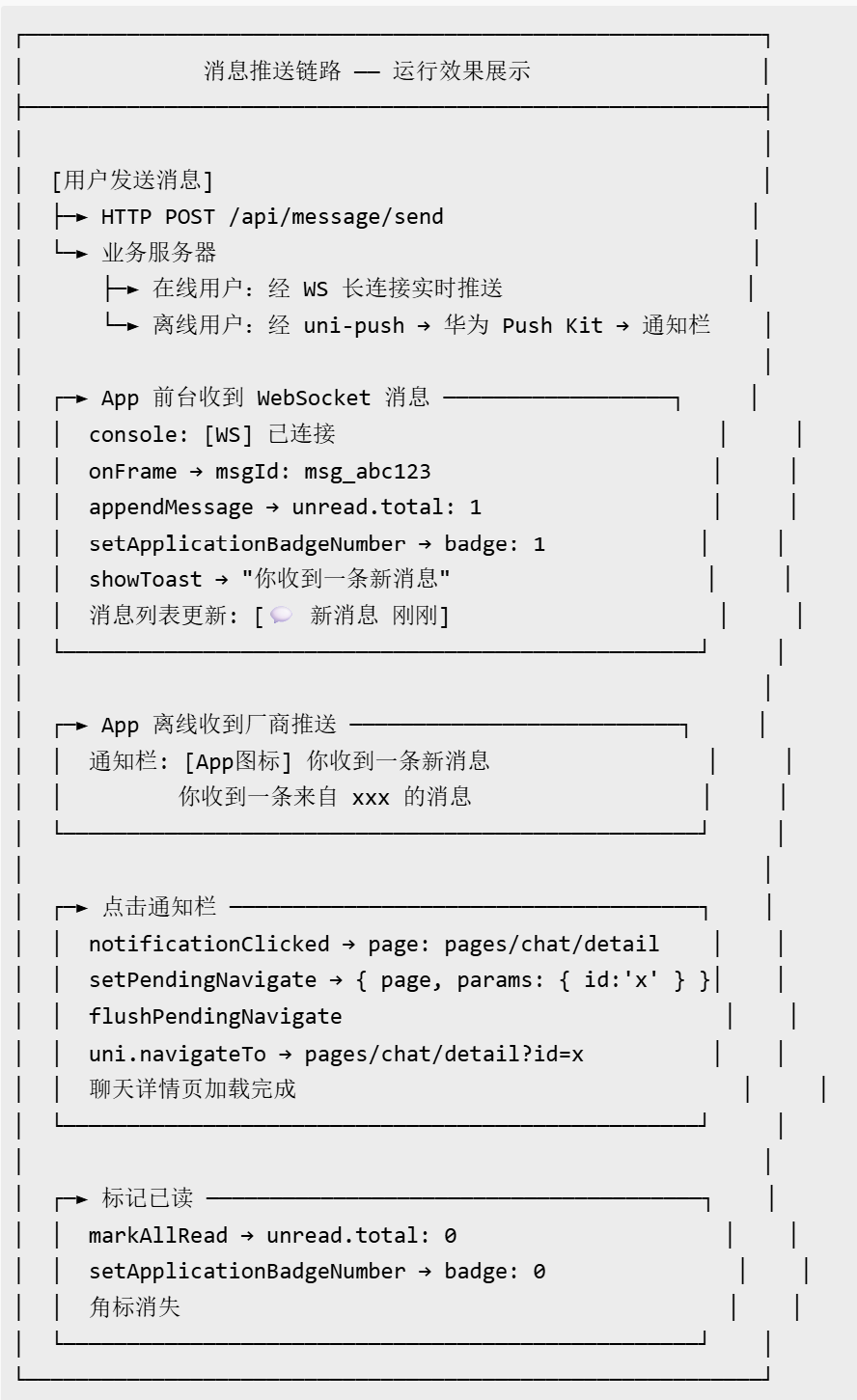
七、运行效果
以下展示消息推送链路中各环节的输出:
八、扩展方向
-
消息聚合:同一会话的多条未读消息聚合为一条通知(“你有 5 条新消息”),减少通知栏干扰。需要服务端在离线推送时按会话 ID 聚合计数。
-
推送效果分析:集成推送打开率、点击率埋点,回传数据到 BI 系统,量化推送 ROI。uni-push 提供基础数据报表,也可对接自定义埋点。
-
跨端统一推送 SDK:若扩展到平板、智慧屏、车机等更多设备,可考虑引入统一推送联盟(UPS)标准,一次接入覆盖全部国产安卓厂商,降低多厂商适配成本。
-
AI 消息摘要:接入大模型推理服务,实现消息智能摘要与夜间低优先级消息过滤。

作为“人工智能6S店”的官方数字引擎,为AI开发者与企业提供一个覆盖软硬件全栈、一站式门户。
更多推荐


 10
10 0
0- 0


 已为社区贡献38条内容

所有评论(0)