
DevEco CLI 工具链实战(6):模拟器全生命周期 emulator
系列: DevEco CLI 工具链实战 · 第 6 篇
引言
devecocli emulator 是最复杂的子命令——9 个子命令覆盖模拟器的完整生命周期。从查看实例、启动/停止、创建/删除虚拟设备,到下载系统镜像、管理许可证,全部可在终端完成。
本文将带你掌握:
- ✅ 模拟器实例的列表、启动与停止
- ✅ 系统镜像的下载与管理
- ✅ 虚拟设备的创建与删除
- ✅ 许可证管理与 9 种设备类型
核心实现
Step 1: emulator list
目标: 列出所有模拟器实例(含已停止的)
devecocli emulator list
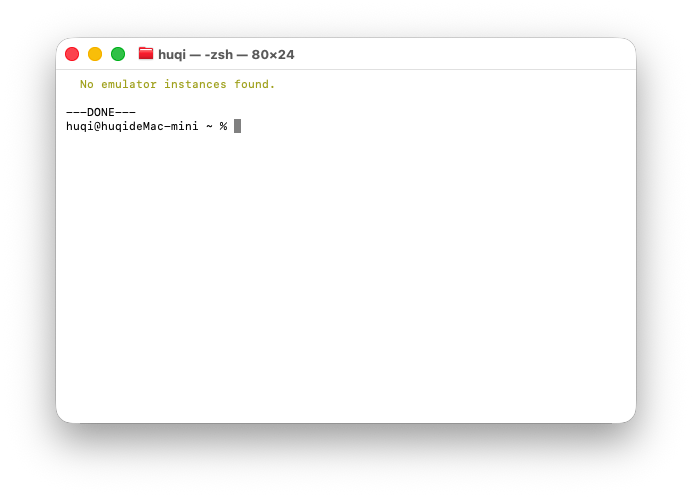
输出示例:
Name              Status    Serial           Device Type
───────────────── ───────── ──────────────── ────────────
Pixel_8_API_26    running   127.0.0.1:5555   phone
Phone_API_24      stopped   -                phone
Tablet_API_26     stopped   -                tablet
与 device list 的区别:emulator list 显示所有实例(含已停止的),并标注运行状态。运行中的实例排在前面。
底层解析:emulator -list -details 的输出可能是 JSON 或文本格式,emulator-list-parse.ts 同时支持两种格式的解析。
Step 2: emulator start / stop
目标: 启动与停止模拟器实例
# 启动单个模拟器
devecocli emulator start "Pixel_8_API_26"

# 启动多个模拟器
devecocli emulator start "Pixel_8_API_26" "Tablet_API_26"

# 停止(按名称或序列号)
devecocli emulator stop "Pixel_8_API_26"
devecocli emulator stop "127.0.0.1:5555"
启动流程:
Emulator.exe以 detached 模式启动(父进程退出后模拟器继续运行)- 轮询
hdc list targets等待 HDC 连接确认 - 连接成功后返回
启动策略:模拟器启动参数有多种组合(-start vs -hvd),EmulatorStartStrategies 会构建候选参数列表并依次尝试:
// src/service/emulator-start-strategies.ts (简化)
static buildStartArgv(name: string, options: StartOptions): string[][] {
  return [
    [name, '-start'],           // 策略 1: -start 参数
    ['-hvd', name],             // 策略 2: -hvd 参数
    [name, '-start', ...extra], // 策略 3: 带额外参数
  ];
}
注意: 名称含空格的实例需要用引号包裹。
Step 3: emulator image
目标: 管理系统镜像
系统镜像是模拟器运行的操作系统映像,需要单独下载。
# 列出已下载的镜像
devecocli emulator image list

# 按设备类型过滤
devecocli emulator image list --device-type phone

# 显示所有镜像(含未下载的)
devecocli emulator image list --all

# JSON 格式输出
devecocli emulator image list --format json

# 下载系统镜像
devecocli emulator image download --device-type phone --os-version "6.0.2"

# 删除系统镜像
devecocli emulator image remove --device-type phone --os-version "6.0.2"
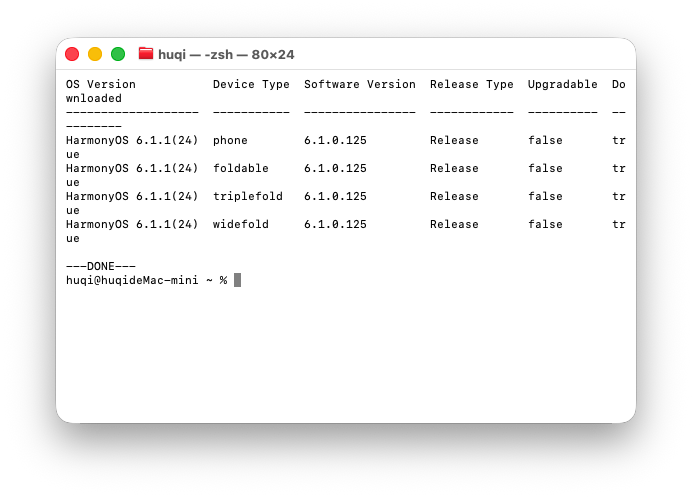
重要:
- 镜像下载通常需要 30+ 分钟
- 下载前必须先接受许可证(
emulator license accept)phone/foldable/widefold/triplefold共享同一份镜像,只需下载一次- 下载失败时
devecocli不会自动重试,需手动重新执行
Step 4: emulator create / delete
目标: 创建和删除虚拟设备
# 创建虚拟设备
devecocli emulator create "MyPhone" --device-type phone --os-version "6.0.2"

# 强制创建(覆盖同名设备)
devecocli emulator create "MyPhone" --device-type phone --os-version "6.0.2" --force

# 删除虚拟设备
devecocli emulator delete "MyPhone"
9 种设备类型:
| 类型 | 说明 | 典型用途 |
|---|---|---|
phone |
手机 | 通用应用开发 |
foldable |
折叠屏 | 大屏适配 |
widefold |
宽折叠屏 | 横屏布局 |
triplefold |
三折叠 | 多屏交互 |
tablet |
平板 | 平板应用 |
2in1 |
二合一设备 | PC 模式 |
2in1 foldable |
二合一折叠 | 变形设备 |
wearable |
穿戴设备 | 手表应用 |
tv |
电视 | 大屏应用 |
注意:
emulator create可能超时(创建过程耗时较长),此时建议在 DevEco Studio Device Manager 中创建,然后emulator list确认。
Step 5: emulator license
目标: 管理模拟器 SDK 许可证
模拟器的系统镜像下载和实例创建都需要先接受许可证协议。
# 查看许可证
devecocli emulator license view

# 接受许可证
devecocli emulator license accept
重要:
license accept必须在交互式终端中执行(需要用户确认),AI Agent 无法自动完成此操作。如果许可证未接受,emulator start和image download会失败并提示。
关键指令
emulator list查看所有实例(含运行状态)start/stop管理实例运行,支持多策略启动image download下载系统镜像,9 种设备类型create/delete管理虚拟设备license accept接受许可证(交互式)
关键代码解读
EmulatorManager
// src/service/emulator-manager.ts (简化)
export class EmulatorManager {
  static async list(): Promise<EmulatorInfo[]>;
  static async start(names: string[]): Promise<void>;
  static async stop(names: string[]): Promise<void>;
  static async create(name: string, options: CreateOptions): Promise<void>;
  static async delete(name: string): Promise<void>;
  static async imageList(options: ImageListOptions): Promise<ImageInfo[]>;
  static async imageDownload(options: ImageOptions): Promise<void>;
  static async imageRemove(options: ImageOptions): Promise<void>;
  static async licenseView(): Promise<void>;
  static async licenseAccept(): Promise<void>;
}
emulator-spawn —— 脱离式进程
// src/utils/emulator-spawn.ts (简化)
export function spawnEmulator(emulatorPath: string, argv: string[]): ChildProcess {
  return execa(emulatorPath, argv, { detached: true, stdio: 'ignore' });
  // detached: true → 父进程退出后模拟器继续运行
}
emulator-list-parse —— 双格式解析
// src/service/emulator-list-parse.ts (简化)
export function parseEmulatorList(output: string): EmulatorInfo[] {
  // 尝试 JSON 格式解析
  try { return parseJsonFormat(output); } catch {}

  // 回退到文本格式解析
  return parseTextFormat(output);
}
常见问题排查
| 问题 | 原因 | 解决方案 |
|---|---|---|
emulator start 失败 |
许可证未接受 | emulator license accept |
image download 超时 |
网络慢 | 手动重试,不自动重试 |
emulator create 超时 |
创建耗时 | 在 DevEco Studio 中创建 |
image list 重复 OS 行 |
phone/foldable 共享镜像 | 每个 OS 版本只操作一次 |
| 启动后 hdc 不连接 | HDC 轮询超时 | 等待更长时间或重启 hdc |
总结
- 9 个子命令覆盖模拟器全生命周期:list/start/stop/create/delete/image×3/license×2
- 启动策略:
EmulatorStartStrategies构建-start/-hvd参数候选列表,带重试 - 9 种设备类型:phone / foldable / widefold / triplefold / tablet / 2in1 / 2in1 foldable / wearable / tv
- 镜像共享:phone / foldable / widefold / triplefold 共享同一份系统镜像
- 许可证 必须在交互式终端接受,AI Agent 无法自动完成
下篇预告
第 7 篇: 日志调试 log —— 深入
devecocli log的 hilog 获取、7 种过滤维度、崩溃日志与实时流。

作为“人工智能6S店”的官方数字引擎,为AI开发者与企业提供一个覆盖软硬件全栈、一站式门户。
更多推荐
 0
0 0
0- 0


 已为社区贡献7条内容

所有评论(0)