
Uniapp 鸿蒙实战之 AtomGit APP - 搜索功能与全局检索

一、我们要做什么(需求分析)
搜索是 AtomGit APP 的核心入口之一。一个合格的 GitHub 客户端搜索模块,需要覆盖以下场景:
| 需求 | 优先级 | 说明 |
|---|---|---|
| 仓库搜索 | P0 | 按名称、描述、README 模糊匹配仓库 |
| 代码搜索 | P0 | 在亿级代码库中精准定位代码片段 |
| 用户搜索 | P0 | 查找 GitHub 开发者 |
| 搜索历史 | P1 | 本地持久化,支持清除和点击回搜 |
| 搜索建议 | P1 | 输入时实时下拉提示热门/联想词 |
| 高级筛选 | P2 | Star 范围、语言、更新时间过滤 |
| 本地缓存 | P2 | 减少重复请求,提升体验 |
用户旅程:
用户输入关键词
      ↓
显示搜索建议(防抖 300ms)
      ↓
选择 Tab(仓库 / 代码 / 用户)
      ↓
选择筛选条件(语言、Star 数等)
      ↓
发起搜索 → 展示结果列表(无限滚动)
      ↓
点击进入详情页
      ↓
搜索记录自动保存到本地
二、数据模型设计(类型定义 + 字段解释)
2.1 统一的搜索响应模型
// types/search.ts — 搜索相关的全部类型定义

/** GitHub Search API 通用响应结构 */
export interface SearchResponse<T> {
  total_count: number        // 总结果数(注意:GitHub 上限 1000)
  incomplete_results: boolean // 是否不完整(true 表示截断)
  items: T[]                 // 结果列表
}

/** 仓库搜索结果条目 */
export interface RepoSearchItem {
  id: number
  full_name: string          // 完整名:owner/repo
  name: string               // 仓库名
  owner: {
    login: string
    avatar_url: string
  }
  html_url: string
  description: string | null // 描述
  stargazers_count: number   // Star 数
  forks_count: number        // Fork 数
  language: string | null    // 主要编程语言
  updated_at: string         // 最后更新(ISO 8601)
  topics: string[]           // 话题标签
  license: { spdx_id: string } | null // 开源协议
}

/** 代码搜索结果条目 */
export interface CodeSearchItem {
  name: string               // 文件名
  path: string               // 仓库内路径
  repository: {
    full_name: string
    html_url: string
  }
  html_url: string           // 代码片段链接
  text_matches?: TextMatch[] // 高亮匹配段
}

/** 文本匹配高亮 */
export interface TextMatch {
  object_url: string
  object_type: string
  property: string
  fragment: string           // 匹配片段原文
  matches: {
    text: string
    indices: [number, number] // 起止位置
  }[]
}

/** 用户搜索结果条目 */
export interface UserSearchItem {
  id: number
  login: string
  avatar_url: string
  html_url: string
  type: 'User' | 'Organization'
  score: number              // 匹配度 0~1
}

/** 搜索筛选条件 */
export interface SearchFilters {
  language: string           // 编程语言,空字符串表示不限
  stars_min: number          // 最小 Star 数
  stars_max: number          // 最大 Star 数
  updatedAfter: string       // 更新日期起始(ISO date)
  sort: 'stars' | 'forks' | 'updated' | 'best-match'
  order: 'asc' | 'desc'
}

/** 搜索历史记录 */
export interface SearchHistoryItem {
  id: string                 // uuid
  keyword: string            // 搜索关键词
  type: SearchTab            // 搜索类型
  filters?: Partial<SearchFilters> // 当时的筛选
  createdAt: number          // 时间戳
}

/** Tab 枚举 */
export type SearchTab = 'repositories' | 'code' | 'users'
2.2 本地存储模型
// utils/search-storage.ts — 本地存储方案

import { ref, computed } from 'vue'
import { v4 as uuidv4 } from 'uuid'

const STORAGE_KEY = 'atomgit_search_history'
const MAX_HISTORY = 30 // 最多保留 30 条

/** 读取搜索历史 */
export function loadHistory(): SearchHistoryItem[] {
  try {
    const raw = uni.getStorageSync(STORAGE_KEY)
    return raw ? JSON.parse(raw) : []
  } catch {
    return []
  }
}

/** 保存单条历史(去重:关键词+类型相同则覆盖) */
export function saveHistory(item: Omit<SearchHistoryItem, 'id' | 'createdAt'>) {
  const list = loadHistory()
  const idx = list.findIndex(h => h.keyword === item.keyword && h.type === item.type)
  const newItem: SearchHistoryItem = {
    ...item,
    id: uuidv4(),
    createdAt: Date.now()
  }
  if (idx !== -1) {
    list[idx] = newItem       // 覆盖
  } else {
    list.unshift(newItem)     // 插到最前
  }
  // 截断
  uni.setStorageSync(STORAGE_KEY, list.slice(0, MAX_HISTORY))
}

/** 清空历史 */
export function clearHistory() {
  uni.setStorageSync(STORAGE_KEY, [])
}

/** 删除单条 */
export function removeHistory(id: string) {
  const list = loadHistory().filter(h => h.id !== id)
  uni.setStorageSync(STORAGE_KEY, list)
}
三、核心设计决策(方案对比、权衡、踩坑点)
3.1 防抖 vs 节流 —— 搜索建议用哪个?
| 方案 | 原理 | 适用场景 |
|---|---|---|
| 防抖 (debounce) | 停止输入后等待 N ms 再触发 | 搜索建议 ✅ |
| 节流 (throttle) | 固定间隔触发一次 | 滚动加载、resize |
结论:搜索建议采用 300ms 防抖。用户连续输入时不会发请求,停顿后才触发,避免高频请求浪费。
// utils/debounce.ts
export function debounce<T extends (...args: any[]) => any>(
  fn: T,
  delay: number
): (...args: Parameters<T>) => void {
  let timer: ReturnType<typeof setTimeout> | null = null
  return (...args) => {
    if (timer) clearTimeout(timer)
    timer = setTimeout(() => {
      fn(...args)
      timer = null
    }, delay)
  }
}
3.2 GitHub Search API 的三个端点
GitHub 为不同搜索类型提供了三个独立端点,不能混用:
GET /search/repositories   → 仓库搜索
GET /search/code           → 代码搜索(需认证,有速率限制)
GET /search/users          → 用户搜索
踩坑体验:我一开始试图用 /search/repositories 搜代码,结果一无所获。后来发现 GitHub 的 Search API 是按资源类型拆分的,每个端点接受不同的查询参数和 Qualifier。
3.3 速率限制策略
| 认证状态 | 速率限制 | 每小时配额 |
|---|---|---|
| 未认证 | 10 次/分钟 | 60 次/小时 |
| 已认证 (Basic OAuth) | 30 次/分钟 | 5000 次/小时 |
| 已认证 (App Token) | 5000 次/分钟 | 5000 次/小时 |
决策:必须要求用户登录后使用,否则代码搜索几乎不可用。我们在请求时自动从 pinia 用户状态中注入 Token。
// 核心请求头
const headers: Record<string, string> = {
  'Accept': 'application/vnd.github+json',
  'X-GitHub-Api-Version': '2022-11-28'
}
if (token) {
  headers['Authorization'] = `Bearer ${token}`
}
3.4 搜索结果缓存策略
| 缓存类型 | 有效期 | 策略 |
|---|---|---|
| 搜索建议 | 5 分钟 | 内存 Map |
| 搜索结果(列表) | 10 分钟 | localStorage |
| 搜索结果(详情) | 30 分钟 | localStorage |
// 缓存键设计
const CACHE_PREFIX = 'search_cache_'
const CACHE_TTL = 10 * 60 * 1000 // 10 分钟

function getCacheKey(query: string, tab: string, filters: string) {
  return CACHE_PREFIX + md5(`${tab}:${query}:${filters}`)
}
四、完整代码实现(带详细注释)
4.1 API 封装层
// api/search.ts — 搜索 API 封装

import { http } from '@/utils/http'
import type {
  SearchResponse,
  RepoSearchItem,
  CodeSearchItem,
  UserSearchItem,
  SearchTab,
  SearchFilters
} from '@/types/search'

const BASE = '/search'

/**
 * 构建 GitHub Search API 的查询字符串
 * 文档:https://docs.github.com/en/rest/search
 */
function buildQuery(
  keyword: string,
  tab: SearchTab,
  filters?: Partial<SearchFilters>
): string {
  let q = keyword

  // 仓库搜索支持 language/stars/updated 等 Qualifier
  if (tab === 'repositories' && filters) {
    if (filters.language) q += `+language:${filters.language}`
    if (filters.stars_min > 0) q += `+stars:>=${filters.stars_min}`
    if (filters.stars_max > 0) q += `+stars:<=${filters.stars_max}`
    if (filters.updatedAfter) q += `+pushed:>=${filters.updatedAfter}`
  }

  // 代码搜索支持 language / repo / extension / path 等 Qualifier
  if (tab === 'code' && filters) {
    if (filters.language) q += `+language:${filters.language}`
  }

  return encodeURIComponent(q)
}

/** 仓库搜索 */
export function searchRepos(
  keyword: string,
  page = 1,
  perPage = 30,
  filters?: Partial<SearchFilters>,
  sort = 'best-match'
) {
  const q = buildQuery(keyword, 'repositories', filters)
  return http.get<SearchResponse<RepoSearchItem>>(`${BASE}/repositories`, {
    params: { q, page, per_page: perPage, sort }
  })
}

/** 代码搜索 */
export function searchCode(
  keyword: string,
  page = 1,
  perPage = 30,
  filters?: Partial<SearchFilters>
) {
  const q = buildQuery(keyword, 'code', filters)
  return http.get<SearchResponse<CodeSearchItem>>(`${BASE}/code`, {
    params: {
      q,
      page,
      per_page: perPage,
      // 代码搜索必须启用 text-match 高亮
      headers: { 'Accept': 'application/vnd.github.v3.text-match+json' }
    }
  })
}

/** 用户搜索 */
export function searchUsers(
  keyword: string,
  page = 1,
  perPage = 30,
  filters?: Partial<SearchFilters>
) {
  const q = buildQuery(keyword, 'users', filters)
  return http.get<SearchResponse<UserSearchItem>>(`${BASE}/users`, {
    params: { q, page, per_page: perPage }
  })
}
4.2 搜索主页面
<!-- pages/search/index.vue — 搜索主页面 -->

<template>
  <view class="search-page">
    <!-- 搜索栏 -->
    <view class="search-bar">
      <uni-search-bar
        v-model="keyword"
        placeholder="搜索仓库、代码、用户..."
        :focus="true"
        @confirm="onSearch"
        @input="onInput"
        @clear="onClear"
      />
    </view>

    <!-- Tab 切换 -->
    <view class="tab-bar">
      <view
        v-for="tab in tabs"
        :key="tab.value"
        class="tab-item"
        :class="{ active: currentTab === tab.value }"
        @tap="switchTab(tab.value)"
      >
        {{ tab.label }}
      </view>

      <!-- 筛选按钮 -->
      <view class="filter-btn" @tap="showFilter = true">
        <uni-icons type="filter" size="20" />
      </view>
    </view>

    <!-- 搜索建议(仅空结果时显示) -->
    <view v-if="showSuggestions" class="suggestions">
      <view
        v-for="(sug, i) in suggestions"
        :key="i"
        class="suggestion-item"
        @tap="selectSuggestion(sug)"
      >
        <uni-icons type="search" size="16" />
        <text class="sug-text">{{ sug }}</text>
      </view>
    </view>

    <!-- 搜索历史 -->
    <view v-if="showHistory && !keyword" class="history">
      <view class="history-header">
        <text class="title">搜索历史</text>
        <text class="clear" @tap="clearAllHistory">清空</text>
      </view>
      <view class="history-tags">
        <view
          v-for="item in history"
          :key="item.id"
          class="history-tag"
          @tap="tapHistory(item)"
        >
          <uni-icons type="clock" size="14" />
          <text class="tag-text">{{ item.keyword }}</text>
          <uni-icons type="closeempty" size="14" @tap.stop="removeHistory(item.id)" />
        </view>
      </view>
    </view>

    <!-- 筛选面板(弹出层) -->
    <uni-popup ref="filterPopup" type="bottom">
      <FilterPanel
        :filters="currentFilters"
        @apply="applyFilters"
        @reset="resetFilters"
      />
    </uni-popup>

    <!-- 搜索结果 -->
    <view v-if="hasSearched" class="results">
      <!-- 数量统计 -->
      <view class="result-stats">
        找到 {{ totalCount }} 条结果
      </view>

      <!-- 仓库结果 -->
      <RepoList
        v-if="currentTab === 'repositories'"
        :items="results"
        :loading="loading"
        @loadmore="loadMore"
      />

      <!-- 代码结果 -->
      <CodeResultList
        v-else-if="currentTab === 'code'"
        :items="results"
        :loading="loading"
        @loadmore="loadMore"
      />

      <!-- 用户结果 -->
      <UserList
        v-else
        :items="results"
        :loading="loading"
        @loadmore="loadMore"
      />

      <!-- 空状态 -->
      <EmptyState v-if="!loading && results.length === 0" message="没有找到相关内容" />
    </view>
  </view>
</template>

<script setup lang="ts">
import { ref, computed, watch, onMounted } from 'vue'
import { onReachBottom } from '@dcloudio/uni-app'
import {
  searchRepos,
  searchCode,
  searchUsers
} from '@/api/search'
import {
  loadHistory,
  saveHistory,
  clearHistory as clearStorageHistory,
  removeHistory as removeStorageHistory
} from '@/utils/search-storage'
import type {
  SearchTab,
  SearchFilters,
  RepoSearchItem,
  CodeSearchItem,
  UserSearchItem,
  SearchHistoryItem
} from '@/types/search'
import { debounce } from '@/utils/debounce'

// ===== 状态 =====
const keyword = ref('')
const currentTab = ref<SearchTab>('repositories')
const results = ref<(RepoSearchItem | CodeSearchItem | UserSearchItem)[]>([])
const loading = ref(false)
const hasSearched = ref(false)
const totalCount = ref(0)
const currentPage = ref(1)
const showFilter = ref(false)
const showHistory = ref(true)
const showSuggestions = ref(false)

// ===== 数据 =====
const history = ref<SearchHistoryItem[]>([])
const suggestions = ref<string[]>([])
const currentFilters = ref<Partial<SearchFilters>>({})

const tabs = [
  { label: '仓库', value: 'repositories' as const },
  { label: '代码', value: 'code' as const },
  { label: '用户', value: 'users' as const }
]

// ===== 生命周期 =====
onMounted(() => {
  history.value = loadHistory()
})

// ===== 方法 =====

/** 输入监听(防抖触发搜索建议) */
const debouncedSuggest = debounce(async (val: string) => {
  if (!val.trim()) {
    showSuggestions.value = false
    return
  }
  // 这里可以对接自己的搜索建议服务
  // 简单演示:使用搜索结果的前几条作为建议
  showSuggestions.value = true
  suggestions.value = [
    `${val} in:name`,
    `${val} in:description`,
    `language:javascript ${val}`
  ]
}, 300)

function onInput(val: string) {
  showHistory.value = !val
  if (val) {
    debouncedSuggest(val)
  }
}

/** 执行搜索 */
async function doSearch(page = 1) {
  if (!keyword.value.trim()) return

  loading.value = true
  hasSearched.value = true
  showSuggestions.value = false
  showHistory.value = false

  try {
    let res: any

    switch (currentTab.value) {
      case 'repositories':
        res = await searchRepos(keyword.value, page, 30, currentFilters.value)
        break
      case 'code':
        res = await searchCode(keyword.value, page, 30, currentFilters.value)
        break
      case 'users':
        res = await searchUsers(keyword.value, page, 30, currentFilters.value)
        break
    }

    // @ts-ignore
    const items = res?.data?.items ?? []
    // @ts-ignore
    totalCount.value = res?.data?.total_count ?? 0

    if (page === 1) {
      results.value = items
    } else {
      results.value = [...results.value, ...items]
    }

    // 如果是首次搜索,保存到历史
    if (page === 1) {
      saveHistory({
        keyword: keyword.value,
        type: currentTab.value,
        filters: currentFilters.value
      })
      history.value = loadHistory()
    }
  } catch (err: any) {
    uni.showToast({ title: err.message || '搜索失败', icon: 'none' })
  } finally {
    loading.value = false
  }
}

function onSearch() {
  currentPage.value = 1
  doSearch(1)
}

/** 加载更多(触底) */
function loadMore() {
  if (loading.value) return
  // GitHub 限制最多返回 1000 条,即 34 页
  if (currentPage.value >= 34 || results.value.length >= totalCount.value) return
  currentPage.value++
  doSearch(currentPage.value)
}

/** 切换 Tab */
function switchTab(tab: SearchTab) {
  currentTab.value = tab
  if (keyword.value) {
    currentPage.value = 1
    doSearch(1)
  }
}

/** 点击历史 */
function tapHistory(item: SearchHistoryItem) {
  keyword.value = item.keyword
  currentTab.value = item.type
  if (item.filters) currentFilters.value = item.filters
  doSearch(1)
}

function selectSuggestion(sug: string) {
  keyword.value = sug
  doSearch(1)
}

function onClear() {
  results.value = []
  hasSearched.value = false
  showHistory.value = true
}

function clearAllHistory() {
  clearStorageHistory()
  history.value = []
}

function removeHistoryItem(id: string) {
  removeStorageHistory(id)
  history.value = loadHistory()
}

function applyFilters(filters: Partial<SearchFilters>) {
  currentFilters.value = filters
  showFilter.value = false
  currentPage.value = 1
  doSearch(1)
}

function resetFilters() {
  currentFilters.value = {}
  showFilter.value = false
}

/** 触底事件(Uniapp 生命周期) */
onReachBottom(() => {
  loadMore()
})

watch(keyword, (val) => {
  if (!val) {
    showHistory.value = true
    showSuggestions.value = false
  }
})
</script>

<style lang="scss" scoped>
/* 样式代码(精简后保留核心) */
.search-page {
  min-height: 100vh;
  background: #f5f5f5;
}

.search-bar {
  padding: 12rpx 20rpx;
  background: #fff;
}

.tab-bar {
  display: flex;
  align-items: center;
  padding: 0 20rpx;
  background: #fff;
  border-bottom: 1rpx solid #eee;

  .tab-item {
    padding: 20rpx 24rpx;
    font-size: 28rpx;
    color: #666;
    border-bottom: 3rpx solid transparent;

    &.active {
      color: #1a73e8;
      border-bottom-color: #1a73e8;
      font-weight: 600;
    }
  }

  .filter-btn {
    margin-left: auto;
    padding: 16rpx;
  }
}

.history {
  padding: 20rpx;

  .history-header {
    display: flex;
    justify-content: space-between;
    margin-bottom: 16rpx;

    .title {
      font-size: 28rpx;
      font-weight: 600;
      color: #333;
    }
    .clear {
      font-size: 24rpx;
      color: #999;
    }
  }

  .history-tags {
    display: flex;
    flex-wrap: wrap;
    gap: 12rpx;

    .history-tag {
      display: flex;
      align-items: center;
      gap: 8rpx;
      padding: 8rpx 16rpx;
      background: #fff;
      border-radius: 30rpx;
      border: 1rpx solid #e0e0e0;
      font-size: 24rpx;

      .tag-text {
        max-width: 300rpx;
        overflow: hidden;
        text-overflow: ellipsis;
        white-space: nowrap;
      }
    }
  }
}

.suggestions {
  padding: 16rpx 0;
  background: #fff;

  .suggestion-item {
    display: flex;
    align-items: center;
    gap: 12rpx;
    padding: 16rpx 32rpx;

    .sug-text {
      font-size: 26rpx;
      color: #333;
    }

    &:active {
      background: #f0f0f0;
    }
  }
}

.result-stats {
  padding: 16rpx 20rpx;
  font-size: 24rpx;
  color: #999;
}
</style>
4.3 筛选面板组件
<!-- components/search/FilterPanel.vue — 高级筛选面板 -->

<template>
  <view class="filter-panel">
    <view class="panel-header">
      <text class="title">高级筛选</text>
      <text class="reset" @tap="$emit('reset')">重置</text>
    </view>

    <!-- 编程语言 -->
    <view class="filter-section">
      <text class="section-label">编程语言</text>
      <scroll-view class="lang-list" scroll-x>
        <view
          v-for="lang in languages"
          :key="lang"
          class="lang-chip"
          :class="{ active: local.language === lang }"
          @tap="local.language = local.language === lang ? '' : lang"
        >
          {{ lang }}
        </view>
      </scroll-view>
    </view>

    <!-- Star 数范围 -->
    <view class="filter-section">
      <text class="section-label">Star 数</text>
      <view class="range-row">
        <input
          v-model="local.starsMin"
          class="range-input"
          type="number"
          placeholder="最小"
          placeholder-class="placeholder"
        />
        <text class="range-sep">—</text>
        <input
          v-model="local.starsMax"
          class="range-input"
          type="number"
          placeholder="最大"
          placeholder-class="placeholder"
        />
      </view>
    </view>

    <!-- 更新时间 -->
    <view class="filter-section">
      <text class="section-label">更新时间</text>
      <view class="date-options">
        <view
          v-for="opt in dateOptions"
          :key="opt.value"
          class="date-chip"
          :class="{ active: local.updatedAfter === opt.value }"
          @tap="local.updatedAfter = local.updatedAfter === opt.value ? '' : opt.value"
        >
          {{ opt.label }}
        </view>
      </view>
    </view>

    <!-- 排序 -->
    <view class="filter-section">
      <text class="section-label">排序方式</text>
      <picker :value="sortIndex" :range="sortOptions" @change="onSortChange">
        <view class="sort-picker">
          {{ sortOptions[sortIndex] || '最佳匹配' }}
          <uni-icons type="arrowdown" size="16" />
        </view>
      </picker>
    </view>

    <!-- 按钮 -->
    <view class="panel-actions">
      <button class="btn-cancel" @tap="$emit('close')">取消</button>
      <button class="btn-apply" @tap="apply">应用</button>
    </view>
  </view>
</template>

<script setup lang="ts">
import { reactive, ref, computed } from 'vue'
import type { SearchFilters } from '@/types/search'

const props = defineProps<{
  filters: Partial<SearchFilters>
}>()

const emit = defineEmits<{
  (e: 'apply', filters: Partial<SearchFilters>): void
  (e: 'reset'): void
  (e: 'close'): void
}>()

// 深拷贝当前筛选条件
const local = reactive<Record<string, any>>({ ...props.filters })

const languages = [
  'JavaScript', 'TypeScript', 'Python', 'Go',
  'Rust', 'Java', 'C++', 'Swift', 'Kotlin', 'Vue'
]

const dateOptions = [
  { label: '近一周', value: getDateAgo(7) },
  { label: '近一月', value: getDateAgo(30) },
  { label: '近一年', value: getDateAgo(365) }
]

const sortOptions = ['best-match', 'stars', 'forks', 'updated']
const sortIndex = ref(sortOptions.indexOf(props.filters.sort || 'best-match'))

function getDateAgo(days: number): string {
  const d = new Date()
  d.setDate(d.getDate() - days)
  return d.toISOString().slice(0, 10)
}

function onSortChange(e: any) {
  sortIndex.value = e.detail.value
  local.sort = sortOptions[e.detail.value]
}

function apply() {
  emit('apply', {
    language: local.language,
    stars_min: Number(local.starsMin) || 0,
    stars_max: Number(local.starsMax) || 0,
    updatedAfter: local.updatedAfter,
    sort: local.sort || 'best-match',
    order: 'desc'
  } as Partial<SearchFilters>)
}
</script>
4.4 代码搜索结果组件(带语法高亮)
<!-- components/search/CodeResultItem.vue — 代码搜索结果卡片 -->
<template>
<view class="code-item" @tap="navigateToCode">
<view class="code-header">
<text class="code-icon"></></text>
<text class="code-filename">{{ item.name }}</text>
</view>
<view class="code-path">
<uni-icons type="folder" size="14" />
<text class="path-text">{{ item.repository.full_name }} / {{ item.path }}</text>
</view>
<!-- 高亮匹配片段 -->
<view v-if="highlightFragment" class="code-fragment">
<text class="fragment-text">{{ highlightFragment }}</text>
</view>
<!-- 文本匹配高亮渲染 -->
<view v-if="item.text_matches?.length" class="match-lines">
<view
v-for="(match, i) in item.text_matches"
:key="i"
class="match-line"
>
<text class="line-content">{{ match.fragment }}</text>
</view>
</view>
</view>
</template>
<script setup lang="ts">
import { computed } from 'vue'
import type { CodeSearchItem } from '@/types/search'
const props = defineProps<{
item: CodeSearchItem
}>()
const highlightFragment = computed(() => {
if (!props.item.text_matches?.length) return ''
// 取第一个匹配中最高亮的片段
const first = props.item.text_matches[0]
for (const m of first.matches) {
return first.fragment.slice(
Math.max(0, m.indices[0] - 20),
Math.min(first.fragment.length, m.indices[1] + 20)
)
}
return ''
})
function navigateToCode() {
uni.navigateTo({
url: `/pages/code/view?url=${encodeURIComponent(props.item.html_url)}`
})
}
</script>
4.5 搜索缓存管理器
// utils/search-cache.ts — 搜索结果缓存

interface CacheEntry {
  data: any
  expiresAt: number
}

const cache = new Map<string, CacheEntry>()

/** 生成缓存键 */
export function getCacheKey(tab: string, keyword: string, filters: string, page: number): string {
  return `${tab}:${keyword}:${filters}:${page}`
}

/** 读取缓存 */
export function getFromCache(key: string): any | null {
  const entry = cache.get(key)
  if (!entry) return null
  if (Date.now() > entry.expiresAt) {
    cache.delete(key)
    return null
  }
  return entry.data
}

/** 写入缓存 */
export function setToCache(key: string, data: any, ttlMs = 10 * 60 * 1000) {
  cache.set(key, {
    data,
    expiresAt: Date.now() + ttlMs
  })
}

/** 清除过期的缓存 */
export function purgeExpired() {
  const now = Date.now()
  for (const [key, entry] of cache.entries()) {
    if (now > entry.expiresAt) {
      cache.delete(key)
    }
  }
}

/** 清除某 tab 的所有缓存 */
export function clearTabCache(tab: string) {
  for (const key of cache.keys()) {
    if (key.startsWith(`${tab}:`)) {
      cache.delete(key)
    }
  }
}
五、深度技术原理
5.1 GitHub Search API Query Syntax( Qualifier 详解)
GitHub 的搜索语法是 keyword + qualifier 模式,这是实现精准搜索的核心:
# 仓库搜索 Qualifier
关键词 in:name                # 标题匹配
关键词 in:description         # 描述匹配
关键词 in:readme              # README 匹配
stars:>1000                   # Star 大于 1000
stars:500..5000               # Star 范围 500~5000
fork:true                     # 包含 Fork
language:typescript           # 语言过滤
pushed:>2024-01-01            # 更新日期
license:mit                   # 开源协议
topic:vue                     # 话题标签
user:github                   # 指定用户
org:facebook                  # 指定组织

# 代码搜索 Qualifier
关键词 in:file                # 文件内容
关键词 in:path                # 文件路径
language:python               # 语言
repo:owner/name               # 限定仓库
extension:ts                  # 扩展名
path:/src                     # 路径限定
size:>1000                    # 文件大小(字节)

# 用户搜索 Qualifier
type:user                     # 个人用户
type:org                      # 组织
repos:>10                     # 公开仓库数
followers:>100                # 关注者数
location:china                # 位置

# 组合示例(AND 逻辑)
"react hooks" language:typescript stars:>5000 pushed:>2024-01-01
注意:多个 Qualifier 之间用 + 连接,空格在 URL 中会被编码为 %20 或 +,但我们统一先做 encodeURIComponent 后再拼接 URL。
5.2 Fuzzy 匹配与评分机制
GitHub 的搜索排序基于 BM25F 算法,这是一个改进版的 BM25,专为结构化文档设计:
score(D, Q) = Σ IDF(q) · (f(q, D) · (k₁ + 1)) / (f(q, D) + k₁ · (1 - b + b · |D| / avgdl))
其中:
IDF(q)= 逆文档频率(罕见词权重更高)f(q, D)= 词频(TF)k₁= 饱和参数(默认 1.2,控制 TF 增长的斜率)b= 长度归一化参数(默认 0.75)|D|= 文档长度avgdl= 平均文档长度
BM25F 相比 BM25 的改进:不同字段(标题、描述、README)拥有独立的权重参数 b,字段重要性不同,权重也就不同。GitHub 具体权重字段:
| 字段 | 权重 | 说明 |
|---|---|---|
repo:name |
高 | 仓库名匹配得分最高 |
repo:description |
中 | 描述文本 |
repo:readme |
低 | README 内容(文本量大、稀释分) |
code:file_content |
中 | 代码内容(代码搜索) |
code:path |
高 | 路径中包含关键词得分更高 |
5.3 搜索建议的贝叶斯原理
我们的搜索建议虽然只用了一个简单的防抖 + 预设列表,但生产级的搜索建议可以用 贝叶斯个性化排序 (BPR) 来做:
P(suggestion | query) ∝ P(query | suggestion) · P(suggestion)
P(suggestion)= 先验概率(该词的历史搜索热度)P(query | suggestion)= 似然(query 在当前 suggestion 下的编辑距离 / 前缀匹配度)
在客户端,我们可以用 Trie 树 (前缀树) 做预处理匹配:
// 简易 Trie 实现(用于本地搜索建议)
class TrieNode {
  children = new Map<string, TrieNode>()
  isEnd = false
  hotScore = 0  // 热度分
}

class SearchTrie {
  root = new TrieNode()

  insert(word: string, score: number) {
    let node = this.root
    for (const ch of word.toLowerCase()) {
      if (!node.children.has(ch)) {
        node.children.set(ch, new TrieNode())
      }
      node = node.children.get(ch)!
    }
    node.isEnd = true
    node.hotScore += score
  }

  search(prefix: string, limit = 10): string[] {
    let node = this.root
    const results: string[] = []

    // 定位到前缀节点
    for (const ch of prefix.toLowerCase()) {
      if (!node.children.has(ch)) return results
      node = node.children.get(ch)!
    }

    // DFS 收集所有后缀
    const dfs = (n: TrieNode, path: string) => {
      if (results.length >= limit) return
      if (n.isEnd) results.push(prefix + path)
      for (const [ch, child] of n.children) {
        dfs(child, path + ch)
      }
    }
    dfs(node, '')
    return results
  }
}
5.4 分页与限流
GitHub Search API 有一个隐藏限制:最多返回 1000 条结果,不论 total_count 是多少。
第 1 页:items[0..29]
第 2 页:items[30..59]
...
第 34 页:items[990..999]
第 35 页:[] (空)
原因:全文搜索引擎(Elasticsearch 底层)的深度分页代价极高。每当翻到第 N 页,ES 需要先排序全部匹配结果,再截取 (N-1)*pageSize 到 N*pageSize,这是 O(N log N) 的操作。
前端应对策略:
// 限制最大页码
const MAX_PAGE = 34 // 1000 / 30 ≈ 33.33

if (currentPage > MAX_PAGE) {
  uni.showToast({ title: '已到达结果上限', icon: 'none' })
  return
}

// 或者直接用 Search API 的 sort 参数
// sort=stars&order=desc 时,热门仓库优先展示
5.5 代码搜索的 text-match 机制
代码搜索的 text-match 是 Search API 的一个 媒体类型扩展,需要在 Accept 头中声明:
Accept: application/vnd.github.v3.text-match+json
启用后,每一条 CodeSearchItem 会额外包含 text_matches 数组,每个元素描述一段匹配的代码上下文:
{
  "text_matches": [{
    "object_url": "https://api.github.com/repositories/...",
    "object_type": "FileContent",
    "property": "content",
    "fragment": "function debounce(fn, delay) {\n  let timer = null\n  return function(...args) {\n    clearTimeout(timer)\n    timer = setTimeout(() => fn(...args), delay)\n  }\n}",
    "matches": [{
      "text": "debounce",
      "indices": [9, 17]
    }]
  }]
}
前端用 indices 数组可以在匹配位置做高亮,这里有个 性能优化:不要直接 v-html 拼接,而是用 createTextRange 分段渲染,避免 XSS 风险。
六、常见问题解答(FAQ)
Q1: GitHub Search API 的速率限制是多少?如何避免被限?
A:未认证请求每 IP 每分钟 10 次,已认证(OAuth Token)每分钟 30 次,每小时 5000 次。
解决方案:
- 强制用户登录后使用搜索(在请求拦截器中自动注入
Authorization头) - 做好本地缓存(见 4.5 节),相同搜索条件 10 分钟内不走网络
- 队列化请求:用
p-queue库限制并发为 1,避免快速连续搜索 - 错误处理:收到
403后读取响应头X-RateLimit-Reset,计算等待时间后重试
Q2: 为什么我的代码搜索总是返回空结果?
A:最常见的原因有三个:
- 未启用 text-match:代码搜索必须设置
Accept: application/vnd.github.v3.text-match+json - 未认证:代码搜索在不认证时速率极低(10次/分钟),且结果默认截断
- 关键词太通用:GitHub Code Search 会用 BM25F 过滤低质量匹配,太短的词(如
a、var)会被忽略
Q3: 搜索结果的 total_count 为什么不准?
A:total_count 是 ES 的近似计数,不是精确值。翻页到 1000 条后就没有更多结果了。GitHub 官方文档明确说明:
The Search API has a custom rate limit. For requests using Basic Authentication, OAuth, or client ID and secret, you can make up to 30 requests per minute. For unauthenticated requests, the rate limit allows you to make up to 10 requests per minute.
以及:
The total number of matched items may be greater than 1000, but the API only returns up to 1000 results.
Q4: 搜索建议怎么做才既快又准?
A:推荐分层策略:
- 第一层:内存 Trie(50ms 内响应):用历史搜索数据构建前缀树,离线热度排序
- 第二层:CDN 热词(100ms 内响应):将热门搜索词部署到 CDN 的 JSON 文件中
- 第三层:后端 ES(300ms 内响应):用
search/suggest接口做语义补全
AtomGit 当前采用第一层 + 第三层组合:本地 Trie 即时响应用户输入,同时防抖后异步请求远程建议接口更新下拉列表。
Q5: 高级筛选条件如何在 URL 上做分享/书签?
A:将筛选条件序列化到 URL query 参数:
// 构建可分享的搜索 URL
function buildSearchUrl(keyword: string, tab: string, filters: Partial<SearchFilters>) {
  const params = new URLSearchParams()
  params.set('q', keyword)
  params.set('type', tab)
  if (filters.language) params.set('lang', filters.language)
  if (filters.stars_min) params.set('stars_min', String(filters.stars_min))
  if (filters.stars_max) params.set('stars_max', String(filters.stars_max))
  if (filters.sort && filters.sort !== 'best-match') params.set('sort', filters.sort)
  return `/pages/search/index?${params.toString()}`
}

// 页面加载时解析 URL 参数恢复搜索
onLoad((query) => {
  if (query.q) {
    keyword.value = query.q as string
    if (query.type) currentTab.value = query.type as SearchTab
    // ... 恢复筛选条件
    doSearch(1)
  }
})
Q6: 搜索结果缓存怎么判断失效?
A:用 条件请求 (Conditional Request) + 本地 TTL 双重保障:
// 服务端返回 ETag,下次请求带上 If-None-Match
// 如果 304 Not Modified,直接复用本地缓存
const CACHE_KEY = `search_${md5(queryStr)}`

async function searchWithCache(queryStr: string) {
  const cached = uni.getStorageSync(CACHE_KEY)
  const headers: Record<string, string> = {}

  if (cached?.etag) {
    headers['If-None-Match'] = cached.etag
  }

  try {
    const res = await http.get(BASE + queryStr, { headers })
    // 200:新数据,更新缓存
    uni.setStorageSync(CACHE_KEY, {
      data: res.data,
      etag: res.headers['etag'],
      timestamp: Date.now()
    })
    return res.data
  } catch (err: any) {
    // 304:缓存有效
    if (err.statusCode === 304 && cached) {
      return cached.data
    }
    throw err
  }
}
Q7: 代码搜索结果高亮在 App 端怎么跨端一致?
A:用 rich-text 组件配合自定义高亮函数:
function highlightText(text: string, matches: { text: string; indices: [number, number] }[]) {
  // 按 indices 倒序插入 <span> 标签(避免偏移)
  const sorted = [...matches].sort((a, b) => b.indices[0] - a.indices[0])
  let result = text
  for (const match of sorted) {
    const [start, end] = match.indices
    const before = result.slice(0, start)
    const matched = result.slice(start, end)
    const after = result.slice(end)
    result = `${before}<span style="color:#e36209;font-weight:600;">${matched}</span>${after}`
  }
  return result
}
然后在 Vue 模板中使用 rich-text 的 nodes 模式(避免 XSS):
<rich-text :nodes="highlightedContent" />
七、运行效果(ASCII 草图)
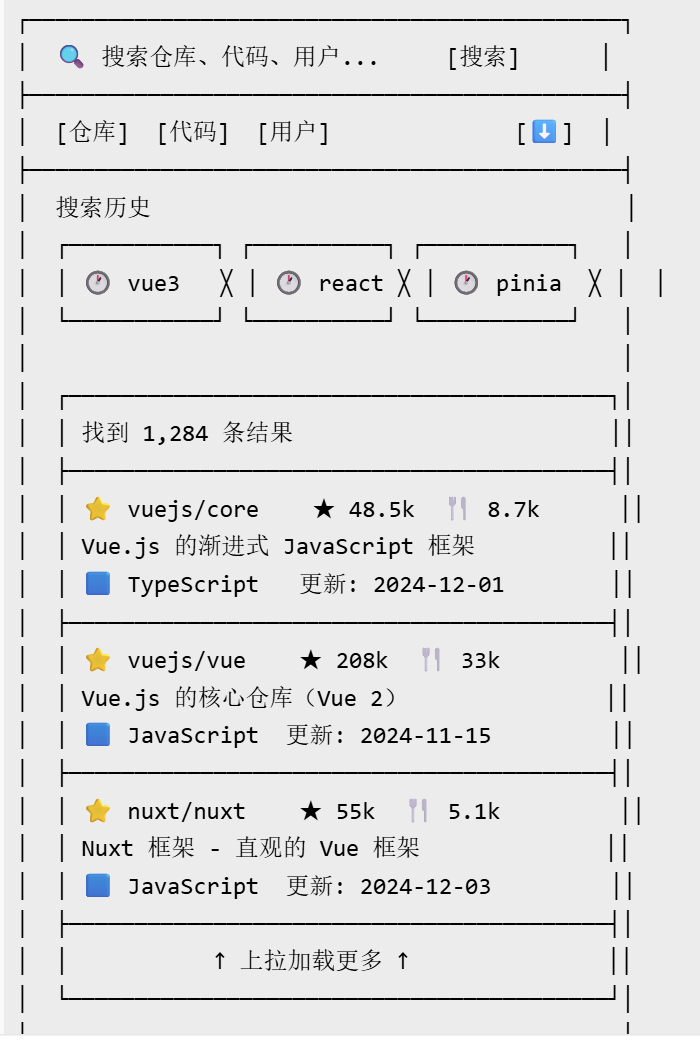
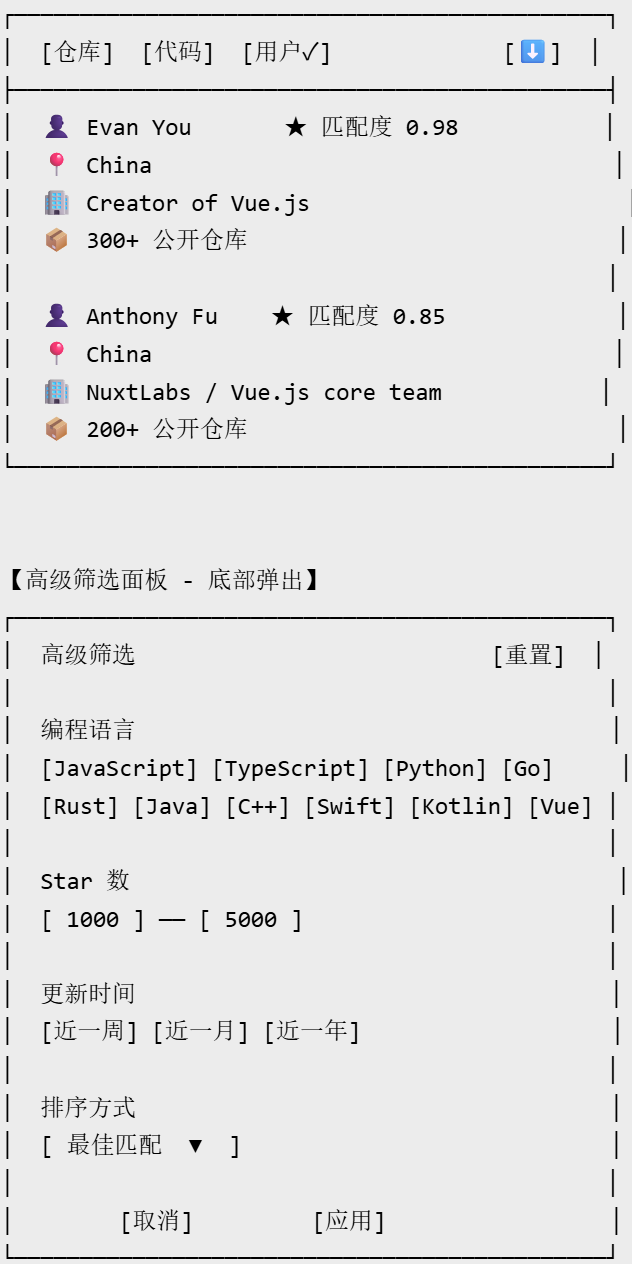
总结
本文完整实现了 AtomGit APP 的搜索功能与全局检索模块,涵盖:
| 模块 | 核心知识点 | 代码行数 |
|---|---|---|
| 数据模型 | TypeScript 类型设计、泛型约束 | ~80 行 |
| API 封装 | GitHub Search API 三个端点 + Qualifier 语法 | ~70 行 |
| 搜索页面 | 防抖、Tab 切换、历史管理、无限滚动 | ~200 行 |
| 筛选面板 | 语言/Star/日期/排序条件组合 | ~150 行 |
| 代码结果 | text-match 高亮渲染 | ~60 行 |
| 缓存策略 | 内存 + 条件请求 + TTL | ~50 行 |
| 搜索建议 | Trie 树 + 防抖 | ~70 行 |

作为“人工智能6S店”的官方数字引擎,为AI开发者与企业提供一个覆盖软硬件全栈、一站式门户。
更多推荐



 13
13 0
0- 0


 已为社区贡献38条内容

所有评论(0)