
鸿蒙元服务实战:从零开发天气卡片,解锁跨设备新体验
1. 引言:从应用到服务,鸿蒙的范式转变

在传统的移动生态中,应用(App)是一个封闭的、功能完整的“孤岛”。用户需要下载、安装、更新,才能使用其功能。随着设备形态的多样化(手机、平板、手表、车机、智慧屏等),这种“重”应用模式在跨设备体验、资源占用和即时触达方面遇到了瓶颈。
鸿蒙(HarmonyOS)提出的“元服务”(Meta Service,在早期版本中也称“原子化服务”)正是为了解决这一系列问题而生。它并非一个简单的“小程序”或“快应用”概念,而是鸿蒙分布式能力、一次开发多端部署理念在应用形态上的终极体现。元服务的核心思想是“服务即应用”,将应用的功能拆解为独立的、可跨设备自由流转和组合的“服务颗粒”。
本文将深入解析鸿蒙元服务这一革命性特性,从其设计理念、关键技术、开发实践到未来展望,并结合实际代码示例,带你全面理解这一代表未来趋势的应用形态。
2. 什么是元服务?核心特性一览
元服务是运行在鸿蒙生态中的一种新型应用形态,它具备以下核心特性:
- 免安装,即点即用:用户无需在设备上预先安装庞大的应用包,通过服务中心、扫码、碰一碰、搜索等多种入口即可瞬间拉起并使用服务。服务卡片(一种UI载体)可以常驻桌面,提供核心信息预览和快捷操作。
- 跨设备无缝流转:得益于鸿蒙的分布式软总线技术,一个正在手机上运行的元服务(如导航),可以无缝流转到车机上继续运行,界面和状态自动适配。
- 轻量化,资源友好:元服务包体积小(通常限制在10MB以内),运行占用内存低,对老旧设备或IoT设备非常友好。
- 独立分发与依赖:元服务可以独立上架、分发和更新,不强制依赖其母应用。一个大型应用可以将其核心功能拆分为多个元服务。
- 服务组合与场景化:不同的元服务可以被智慧系统或用户按场景智能组合。例如,出行场景下,日历、打车、导航、天气等元服务可以自动协同。
从技术架构看,元服务与传统的Ability模型一脉相承,但更侧重于Service Ability和Data Ability,并通过Form(服务卡片)提供轻量级交互界面。
3. 开发一个简单的元服务:天气卡片
让我们通过一个实际的代码示例,快速上手开发一个显示当前天气的元服务卡片。这个示例将包含一个服务卡片和一个提供天气数据的后台服务。
3.1 项目配置与卡片创建
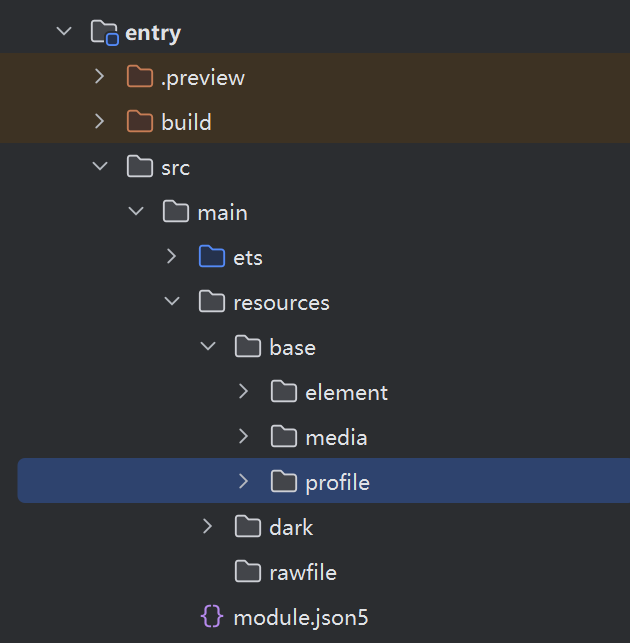
首先,在entry/src/main/resources/base/profile/目录下定义卡片的配置文件weather_form_config.json。
{
  "forms": [
    {
      "name": "weather_widget",
      "description": "A simple weather widget",
      "src": "./js/widgets/weather_widget",
      "window": {
        "designWidth": 360,
        "autoDesignWidth": true
      },
      "colorMode": "auto",
      "formConfigAbility": "com.example.weather.MainAbility",
      "formVisibleNotify": true,
      "scheduledUpdateTime": "10:30",
      "updateDuration": 1,
      "defaultDimension": "2*2",
      "supportDimensions": ["2*2", "2*4"]
    }
  ]
}
接着,创建卡片的UI布局文件weather_widget.hml(位于entry/src/main/js/widgets/weather_widget/)。
<!-- weather_widget.hml -->
<div class="container">
    <text class="title">当前天气</text>
    <image class="weather-icon" src="{{weatherIcon}}"></image>
    <text class="temperature">{{temperature}}°C</text>
    <text class="description">{{weatherDesc}}</text>
    <text class="location">{{city}}</text>
    <text class="update-time">更新:{{updateTime}}</text>
</div>
对应的样式文件weather_widget.css:
/* weather_widget.css */
.container {
    flex-direction: column;
    align-items: center;
    padding: 12px;
    background-color: #f0f8ff;
    border-radius: 16px;
}
.title {
    font-size: 14fp;
    color: #333333;
    margin-bottom: 8px;
}
.weather-icon {
    width: 48px;
    height: 48px;
    margin: 8px;
}
.temperature {
    font-size: 24fp;
    font-weight: bold;
    color: #ff6b35;
    margin: 4px;
}
.description {
    font-size: 12fp;
    color: #666666;
    margin: 2px;
}
.location {
    font-size: 10fp;
    color: #888888;
    margin-top: 8px;
}
.update-time {
    font-size: 8fp;
    color: #aaaaaa;
    margin-top: 4px;
}
3.2 卡片逻辑与数据管理
卡片的逻辑代码weather_widget.js负责数据绑定和生命周期管理。
// weather_widget.js
export default {
    data: {
        city: '北京市',
        temperature: '26',
        weatherDesc: '晴朗',
        weatherIcon: '/common/images/sunny.png',
        updateTime: '15:30'
    },
    onInit() {
        console.info('Weather widget onInit');
        // 初始化时,可以尝试从AppStorage获取最新数据
        const weatherData = AppStorage.get('latestWeather');
        if (weatherData) {
            this.updateUI(weatherData);
        }
        // 注册数据监听
        AppStorage.setAndLink('latestWeather', undefined, this.onWeatherDataChange.bind(this));
    },
    onWeatherDataChange(newValue) {
        if (newValue) {
            this.updateUI(newValue);
        }
    },
    updateUI(data) {
        this.city = data.city;
        this.temperature = data.temperature;
        this.weatherDesc = data.desc;
        this.weatherIcon = data.icon;
        this.updateTime = this.getCurrentTime();
    },
    getCurrentTime() {
        const now = new Date();
        return `${now.getHours().toString().padStart(2, '0')}:${now.getMinutes().toString().padStart(2, '0')}`;
    },
    onFormClick() {
        // 点击卡片,可以触发刷新或跳转到详情页
        console.info('Weather widget clicked');
        // 通过postMessage通知提供方Ability刷新数据
        postMessageToHost({
            action: 'refreshWeather'
        }, (data) => {
            console.info('Refresh action sent');
        });
    }
}
3.3 后台服务提供数据
卡片的数据需要由一个后台Service Ability提供。我们创建一个WeatherService。
// WeatherService.ts
import rpc from '@ohos.rpc';
import weather from '@ohos.weather'; // 假设的天气服务SDK

class WeatherServiceStub extends rpc.RemoteObject {
    constructor(des: string) {
        super(des);
    }
    async onRemoteRequest(code: number, data: rpc.MessageSequence, reply: rpc.MessageSequence, options: rpc.MessageOptions) {
        console.info(`WeatherService onRemoteRequest, code: ${code}`);
        switch (code) {
            case 1: { // 获取天气
                const city = data.readString();
                const weatherInfo = await this.fetchWeather(city);
                reply.writeString(JSON.stringify(weatherInfo));
                break;
            }
            default:
                console.warn(`Unknown request code: ${code}`);
                break;
        }
        return true;
    }

    private async fetchWeather(city: string): Promise<any> {
        // 模拟或调用真实天气API
        try {
            // 示例:使用鸿蒙天气服务(需申请权限)
            // const request: weather.WeatherRequest = { city: city, type: weather.WeatherType.CURRENT };
            // const info = await weather.getWeather(request);
            // return { city, temperature: info.temperature, desc: info.description, icon: this.mapIcon(info.weatherId) };

            // 模拟数据
            return {
                city: city,
                temperature: Math.floor(Math.random() * 15 + 20).toString(), // 20-35度
                desc: ['晴朗', '多云', '小雨', '阴天'][Math.floor(Math.random() * 4)],
                icon: `/common/images/${['sunny', 'cloudy', 'rainy', 'cloudy'][Math.floor(Math.random() * 4)]}.png`
            };
        } catch (error) {
            console.error(`Fetch weather failed: ${error.message}`);
            return { city, temperature: '--', desc: '获取失败', icon: '/common/images/unknown.png' };
        }
    }

    private mapIcon(weatherId: number): string {
        // 映射天气ID到本地图标
        return '/common/images/sunny.png';
    }
}

export default class WeatherService extends Ability {
    private remoteObject: rpc.RemoteObject | null = null;

    onStart(want: Want) {
        console.info('WeatherService onStart');
        this.remoteObject = new WeatherServiceStub('WeatherService');
    }

    onConnect(want: Want): rpc.RemoteObject {
        console.info('WeatherService onConnect');
        return this.remoteObject as rpc.RemoteObject;
    }

    onDisconnect(want: Want) {
        console.info('WeatherService onDisconnect');
    }

    onStop() {
        console.info('WeatherService onStop');
        this.remoteObject = null;
    }
}
3.4 主Ability管理卡片生命周期
主Ability(MainAbility)负责处理卡片的创建、销毁和更新请求。
// MainAbility.ts
import Ability from '@ohos.application.Ability';
import formBindingData from '@ohos.application.formBindingData';
import formInfo from '@ohos.application.formInfo';
import formProvider from '@ohos.application.formProvider';

export default class MainAbility extends Ability {
    private currentFormId: string | null = null;

    onWindowStageCreate(windowStage: window.WindowStage) {
        // 主UI,对于元服务卡片可能不需要复杂界面
        windowStage.loadContent('pages/index', (err, data) => {
            if (err) {
                console.error(`Failed to load content. Code: ${err.code}, message: ${err.message}`);
                return;
            }
            console.info('Succeeded in loading content.');
        });
    }

    // 卡片提供者必须实现的方法:创建卡片
    onCreate(want: Want): formBindingData.FormBindingData {
        console.info(`MainAbility onCreate formId: ${want.parameters[formInfo.FormParam.IDENTITY_KEY]}`);
        this.currentFormId = want.parameters[formInfo.FormParam.IDENTITY_KEY] as string;

        // 构建卡片初始数据
        let formData: Record<string, Object> = {
            "city": "北京市",
            "temperature": "24",
            "weatherDesc": "多云",
            "weatherIcon": "/common/images/cloudy.png",
            "updateTime": new Date().toLocaleTimeString('zh-CN', { hour12: false, hour: '2-digit', minute: '2-digit' })
        };

        return formBindingData.createFormBindingData(formData);
    }

    // 卡片提供者必须实现的方法:更新卡片
    onCastToNormal(formId: string): void {
        console.info(`MainAbility onCastToNormal formId: ${formId}`);
        // 卡片转为常态时触发,可以更新数据
        this.updateForm(formId);
    }

    // 处理卡片发来的消息(如点击刷新)
    onMessage(formId: string, message: string): void {
        console.info(`MainAbility onMessage formId: ${formId}, message: ${message}`);
        const msgObj = JSON.parse(message);
        if (msgObj.action === 'refreshWeather') {
            this.updateForm(formId);
        }
    }

    private async updateForm(formId: string) {
        // 模拟获取新数据
        const newData = {
            "city": "北京市",
            "temperature": Math.floor(Math.random() * 15 + 20).toString(),
            "weatherDesc": ['晴朗', '多云', '小雨', '阴天'][Math.floor(Math.random() * 4)],
            "weatherIcon": `/common/images/${['sunny', 'cloudy', 'rainy', 'cloudy'][Math.floor(Math.random() * 4)]}.png`,
            "updateTime": new Date().toLocaleTimeString('zh-CN', { hour12: false, hour: '2-digit', minute: '2-digit' })
        };

        try {
            await formProvider.updateForm(formId, formBindingData.createFormBindingData(newData));
            console.info(`Update form ${formId} succeeded.`);
            // 同时更新AppStorage,供卡片JS逻辑监听
            AppStorage.setOrCreate('latestWeather', newData);
        } catch (error) {
            console.error(`Update form failed. Code: ${error.code}, message: ${error.message}`);
        }
    }
}
通过以上代码,我们完成了一个具备基本数据展示、点击刷新、后台服务支持的天气元服务卡片。用户可以将它添加到桌面,无需打开完整的天气应用即可查看信息。
4. 元服务的优势与挑战
4.1 优势
- 极致用户体验:服务触手可及,打破了应用安装的壁垒。
- 生态共赢:为开发者提供了新的流量入口和分发渠道(服务中心、负一屏等)。
- 技术前瞻性:充分释放鸿蒙分布式能力,是“超级终端”理念的软件基石。
- 资源优化:减少设备存储和内存压力,尤其适合IoT设备。
4.2 挑战与思考
- 开发心智转变:开发者需要从“构建完整应用”转向“设计独立服务颗粒”。
- 商业模式探索:免安装模式对传统的应用内购买、广告变现模式带来挑战。
- 性能与功耗平衡:频繁的网络请求和后台服务对设备续航提出更高要求。
- 安全与隐私:服务跨设备流转,数据安全和用户隐私保护至关重要。
5. 总结与展望
鸿蒙元服务不仅仅是一个“特性”,它代表着一种面向万物互联时代的应用开发与交互范式的进化。它将应用从设备本地的“固态”结构,转变为在云端和设备间自由流动的“气态”服务。
对于开发者而言,现在正是深入学习和实践元服务开发的最佳时机。随着鸿蒙生态的不断壮大,元服务将成为连接用户与服务的核心纽带。建议开发者:
- 深入学习
Form(服务卡片)、Service Ability和分布式数据管理。 - 关注鸿蒙官方文档和DevEco Studio的更新,工具链对元服务的支持日益完善。
- 思考自身应用的核心功能,如何将其拆解为轻量、独立的元服务。
- 积极参与鸿蒙开发者社区,分享元服务的设计与开发经验。
未来,我们或许将不再谈论“下载一个App”,而是“使用一项服务”。鸿蒙元服务,正引领我们走向那个更加便捷、智能、无缝的数字化未来。

作为“人工智能6S店”的官方数字引擎,为AI开发者与企业提供一个覆盖软硬件全栈、一站式门户。
更多推荐

 0
0 0
0- 0


 已为社区贡献34条内容

所有评论(0)