在这里插入图片描述

目录

  1. 前言
  2. 仓库详情页设计
  3. 文件树组件开发
  4. 代码文件查看
  5. README 渲染
  6. 配图说明
  7. 踩坑记录
  8. 总结
  9. 参考资料

一、前言

仓库详情页是 AtomGit APP 的核心页面之一,用户可以在这里查看仓库的完整信息、浏览文件结构、查看代码内容等。文件树浏览功能则是开发者工具类应用的标配,能够清晰地展示仓库的文件结构。

为什么仓库详情页重要?

  1. 信息展示:全面展示仓库的各项信息
  2. 导航功能:通过文件树快速定位到目标文件
  3. 代码查看:直接查看代码文件内容
  4. 交互体验:提供 Star、Fork、Clone 等交互功能

二、仓库详情页设计

2.1 页面结构设计

仓库详情页分为以下几个区域:

+----------------------------------+
|  导航栏 (Navigation Bar)           |
|  [返回] 仓库名 [Star] [Fork]    |
+----------------------------------+
|  仓库信息区 (Repo Info)            |
|  - 仓库名称、描述                |
|  - 统计数据(Star、Fork、Watch)|
|  - 语言占比                      |
+----------------------------------+
|  Tab 切换栏 (Tab Bar)             |
|  [代码] [Issue] [PR] [设置]     |
+----------------------------------+
|  内容区域 (Content Area)           |
|  - 文件树(代码 Tab)            |
|  - Issue 列表(Issue Tab)       |
|  - PR 列表(PR Tab)             |
|  - 仓库设置(设置 Tab)          |
+----------------------------------+
|  底部操作栏 (Bottom Action Bar)    |
|  [克隆] [打开网页] [分享]        |
+----------------------------------+

2.2 创建仓库详情页

创建 pages/repo-detail/repo-detail.vue

<template>
  <view class="container">
    <!-- 导航栏 -->
    <view class="nav-bar">
      <view class="nav-left" @click="goBack">
        <text class="icon-back">←</text>
      </view>
      <view class="nav-title">
        <text class="repo-name">{{ repo.name }}</text>
      </view>
      <view class="nav-right">
        <text class="action-btn" @click="onStar">{{ repo.starred ? '★' : '☆' }}</text>
        <text class="action-btn" @click="onFork">⑂</text>
      </view>
    </view>
    
    <!-- 仓库信息区 -->
    <view class="repo-info">
      <view class="repo-header">
        <image class="owner-avatar" :src="repo.owner.avatar_url" />
        <view class="repo-meta">
          <text class="repo-full-name">{{ repo.full_name }}</text>
          <text class="repo-description">{{ repo.description || '暂无描述' }}</text>
        </view>
      </view>
      
      <view class="repo-stats">
        <view class="stat-item">
          <text class="stat-icon">⭐</text>
          <text class="stat-value">{{ repo.stargazers_count }}</text>
          <text class="stat-label">Star</text>
        </view>
        
        <view class="stat-item">
          <text class="stat-icon">🍴</text>
          <text class="stat-value">{{ repo.forks_count }}</text>
          <text class="stat-label">Fork</text>
        </view>
        
        <view class="stat-item">
          <text class="stat-icon">👀</text>
          <text class="stat-value">{{ repo.watchers_count }}</text>
          <text class="stat-label">Watch</text>
        </view>
        
        <view class="stat-item">
          <text class="stat-icon">📅</text>
          <text class="stat-value">{{ formatTime(repo.updated_at) }}</text>
          <text class="stat-label">更新</text>
        </view>
      </view>
      
      <view class="repo-tags" v-if="repo.topics && repo.topics.length > 0">
        <text 
          class="topic-tag" 
          v-for="topic in repo.topics" 
          :key="topic"
        >
          {{ topic }}
        </text>
      </view>
    </view>
    
    <!-- Tab 切换栏 -->
    <view class="tab-bar">
      <view 
        class="tab-item" 
        :class="{ active: activeTab === 'code' }"
        @click="switchTab('code')"
      >
        <text>代码</text>
      </view>
      
      <view 
        class="tab-item" 
        :class="{ active: activeTab === 'issues' }"
        @click="switchTab('issues')"
      >
        <text>Issue</text>
        <text class="badge" v-if="repo.open_issues_count > 0">
          {{ repo.open_issues_count }}
        </text>
      </view>
      
      <view 
        class="tab-item" 
        :class="{ active: activeTab === 'pulls' }"
        @click="switchTab('pulls')"
      >
        <text>PR</text>
      </view>
      
      <view 
        class="tab-item" 
        :class="{ active: activeTab === 'settings' }"
        @click="switchTab('settings')"
      >
        <text>设置</text>
      </view>
    </view>
    
    <!-- 内容区域 -->
    <view class="content-area">
      <!-- 代码 Tab -->
      <view v-if="activeTab === 'code'">
        <file-tree 
          :tree-data="fileTree" 
          :path="currentPath"
          @file-click="onFileClick"
          @folder-click="onFolderClick"
        />
      </view>
      
      <!-- Issue Tab -->
      <view v-else-if="activeTab === 'issues'">
        <issue-list :owner="owner" :repo="repoName" />
      </view>
      
      <!-- PR Tab -->
      <view v-else-if="activeTab === 'pulls'">
        <pr-list :owner="owner" :repo="repoName" />
      </view>
      
      <!-- 设置 Tab -->
      <view v-else-if="activeTab === 'settings'">
        <repo-settings :repo="repo" />
      </view>
    </view>
    
    <!-- 底部操作栏 -->
    <view class="bottom-bar">
      <button class="action-btn" @click="onClone">克隆</button>
      <button class="action-btn" @click="onOpenWeb">打开网页</button>
      <button class="action-btn" @click="onShare">分享</button>
    </view>
  </view>
</template>

<script>
// 引入组件
import FileTree from '@/components/file-tree.vue'
import IssueList from '@/components/issue-list.vue'
import PrList from '@/components/pr-list.vue'
import RepoSettings from '@/components/repo-settings.vue'

// 引入 API
import { getRepoDetail, getRepoContent, starRepo, forkRepo } from '@/api/repo'
import { formatTime } from '@/utils/format'

export default {
  components: {
    FileTree,
    IssueList,
    PrList,
    RepoSettings
  },
  
  data() {
    return {
      // 仓库信息
      owner: '',
      repoName: '',
      repo: {},
      
      // Tab 状态
      activeTab: 'code',
      
      // 文件树数据
      fileTree: [],
      currentPath: '',
      
      // 加载状态
      isLoading: false
    }
  },
  
  onLoad(options) {
    // 获取参数
    this.owner = options.owner
    this.repoName = options.repo
    
    // 获取仓库详情
    this.fetchRepoDetail()
    
    // 获取文件树
    this.fetchFileTree()
  },
  
  methods: {
    // 获取仓库详情
    async fetchRepoDetail() {
      try {
        this.isLoading = true
        
        const result = await getRepoDetail(this.owner, this.repoName)
        this.repo = result
        
        // 设置页面标题
        uni.setNavigationBarTitle({
          title: this.repo.name
        })
        
      } catch (error) {
        uni.showToast({
          title: '获取仓库详情失败',
          icon: 'none'
        })
        console.error('获取仓库详情失败:', error)
      } finally {
        this.isLoading = false
      }
    },
    
    // 获取文件树
    async fetchFileTree(path = '') {
      try {
        this.isLoading = true
        
        const result = await getRepoContent(this.owner, this.repoName, path)
        
        // 排序:文件夹在前,文件在后
        result.sort((a, b) => {
          if (a.type === b.type) {
            return a.name.localeCompare(b.name)
          }
          return a.type === 'dir' ? -1 : 1
        })
        
        this.fileTree = result
        this.currentPath = path
        
      } catch (error) {
        uni.showToast({
          title: '获取文件树失败',
          icon: 'none'
        })
        console.error('获取文件树失败:', error)
      } finally {
        this.isLoading = false
      }
    },
    
    // 返回上一页
    goBack() {
      uni.navigateBack()
    },
    
    // 切换 Tab
    switchTab(tab) {
      this.activeTab = tab
    },
    
    // 文件点击
    onFileClick(file) {
      // 跳转到文件查看页
      uni.navigateTo({
        url: `/pages/file-view/file-view?owner=${this.owner}&repo=${this.repoName}&path=${file.path}`
      })
    },
    
    // 文件夹点击
    onFolderClick(folder) {
      // 进入文件夹
      this.fetchFileTree(folder.path)
    },
    
    // Star 仓库
    async onStar() {
      try {
        await starRepo(this.owner, this.repoName)
        
        this.repo.starred = !this.repo.starred
        this.repo.stargazers_count += this.repo.starred ? 1 : -1
        
        uni.showToast({
          title: this.repo.starred ? 'Star 成功' : '取消 Star',
          icon: 'success'
        })
        
      } catch (error) {
        uni.showToast({
          title: '操作失败',
          icon: 'none'
        })
        console.error('Star 操作失败:', error)
      }
    },
    
    // Fork 仓库
    async onFork() {
      try {
        uni.showLoading({
          title: 'Forking...'
        })
        
        const result = await forkRepo(this.owner, this.repoName)
        
        uni.hideLoading()
        
        uni.showToast({
          title: 'Fork 成功',
          icon: 'success'
        })
        
        // 跳转到 Fork 后的仓库
        setTimeout(() => {
          uni.redirectTo({
            url: `/pages/repo-detail/repo-detail?owner=${result.owner.login}&repo=${result.name}`
          })
        }, 1500)
        
      } catch (error) {
        uni.hideLoading()
        
        uni.showToast({
          title: 'Fork 失败',
          icon: 'none'
        })
        console.error('Fork 操作失败:', error)
      }
    },
    
    // 克隆仓库
    onClone() {
      // 复制克隆地址
      const cloneUrl = this.repo.clone_url
      
      uni.setClipboardData({
        data: cloneUrl,
        success: () => {
          uni.showToast({
            title: '克隆地址已复制',
            icon: 'success'
          })
        }
      })
    },
    
    // 打开网页
    onOpenWeb() {
      // 打开仓库网页
      const webUrl = this.repo.html_url
      
      // 在浏览器中打开
      plus.runtime.openURL(webUrl)
    },
    
    // 分享仓库
    onShare() {
      // 分享功能
      uni.share({
        provider: 'weixin',
        type: 0,
        title: this.repo.name,
        summary: this.repo.description || 'GitHub 仓库',
        href: this.repo.html_url,
        success: () => {
          uni.showToast({
            title: '分享成功',
            icon: 'success'
          })
        },
        fail: (error) => {
          uni.showToast({
            title: '分享失败',
            icon: 'none'
          })
          console.error('分享失败:', error)
        }
      })
    },
    
    // 格式化时间
    formatTime(time) {
      return formatTime(time)
    }
  }
}
</script>

<style scoped lang="scss">
.container {
  display: flex;
  flex-direction: column;
  height: 100vh;
  background-color: #f5f5f5;
}

/* 导航栏 */
.nav-bar {
  display: flex;
  align-items: center;
  justify-content: space-between;
  padding: 20rpx;
  background-color: #fff;
  border-bottom: 1px solid #e0e0e0;
  
  .nav-left {
    .icon-back {
      font-size: 40rpx;
      color: #007AFF;
    }
  }
  
  .nav-title {
    flex: 1;
    text-align: center;
    
    .repo-name {
      font-size: 32rpx;
      font-weight: bold;
      color: #333;
    }
  }
  
  .nav-right {
    display: flex;
    gap: 20rpx;
    
    .action-btn {
      font-size: 40rpx;
      color: #007AFF;
    }
  }
}

/* 仓库信息区 */
.repo-info {
  padding: 30rpx;
  background-color: #fff;
  margin-bottom: 20rpx;
  
  .repo-header {
    display: flex;
    align-items: center;
    margin-bottom: 30rpx;
    
    .owner-avatar {
      width: 100rpx;
      height: 100rpx;
      border-radius: 50%;
      margin-right: 20rpx;
    }
    
    .repo-meta {
      flex: 1;
      
      .repo-full-name {
        font-size: 36rpx;
        font-weight: bold;
        color: #333;
        display: block;
        margin-bottom: 10rpx;
      }
      
      .repo-description {
        font-size: 28rpx;
        color: #666;
        display: block;
      }
    }
  }
  
  .repo-stats {
    display: flex;
    justify-content: space-around;
    margin-bottom: 30rpx;
    
    .stat-item {
      display: flex;
      flex-direction: column;
      align-items: center;
      
      .stat-icon {
        font-size: 36rpx;
        margin-bottom: 10rpx;
      }
      
      .stat-value {
        font-size: 32rpx;
        font-weight: bold;
        color: #333;
        margin-bottom: 5rpx;
      }
      
      .stat-label {
        font-size: 24rpx;
        color: #999;
      }
    }
  }
  
  .repo-tags {
    display: flex;
    flex-wrap: wrap;
    gap: 10rpx;
    
    .topic-tag {
      padding: 8rpx 20rpx;
      background-color: #e8f5e9;
      color: #4caf50;
      border-radius: 20rpx;
      font-size: 24rpx;
    }
  }
}

/* Tab 切换栏 */
.tab-bar {
  display: flex;
  background-color: #fff;
  border-bottom: 1px solid #e0e0e0;
  
  .tab-item {
    flex: 1;
    display: flex;
    align-items: center;
    justify-content: center;
    padding: 20rpx;
    font-size: 28rpx;
    color: #666;
    position: relative;
    
    &.active {
      color: #007AFF;
      font-weight: bold;
      
      &::after {
        content: '';
        position: absolute;
        bottom: 0;
        left: 50%;
        transform: translateX(-50%);
        width: 60%;
        height: 4rpx;
        background-color: #007AFF;
      }
    }
    
    .badge {
      margin-left: 10rpx;
      padding: 4rpx 12rpx;
      background-color: #ff3b30;
      color: #fff;
      border-radius: 20rpx;
      font-size: 20rpx;
    }
  }
}

/* 内容区域 */
.content-area {
  flex: 1;
  overflow-y: auto;
}

/* 底部操作栏 */
.bottom-bar {
  display: flex;
  justify-content: space-around;
  padding: 20rpx;
  background-color: #fff;
  border-top: 1px solid #e0e0e0;
  
  .action-btn {
    flex: 1;
    margin: 0 10rpx;
    padding: 20rpx;
    background-color: #007AFF;
    color: #fff;
    border-radius: 8rpx;
    font-size: 28rpx;
    text-align: center;
  }
}
</style>

三、文件树组件开发

3.1 文件树数据结构

GitHub API 返回的文件树数据结构:

[
  {
    "name": "src",
    "path": "src",
    "sha": "abc123",
    "size": 0,
    "type": "dir",
    "url": "https://api.github.com/repos/owner/repo/contents/src"
  },
  {
    "name": "README.md",
    "path": "README.md",
    "sha": "def456",
    "size": 1024,
    "type": "file",
    "url": "https://api.github.com/repos/owner/repo/contents/README.md"
  }
]

3.2 创建文件树组件

创建 components/file-tree.vue

<template>
  <view class="file-tree">
    <!-- 面包屑导航 -->
    <view class="breadcrumb" v-if="path">
      <text class="breadcrumb-item" @click="onBreadcrumbClick('')">根目录</text>
      <text class="breadcrumb-separator">/</text>
      
      <template v-for="(segment, index) in pathSegments">
        <text 
          class="breadcrumb-item" 
          :key="index"
          @click="onBreadcrumbClick(segments.slice(0, index + 1).join('/'))"
        >
          {{ segment }}
        </text>
        <text class="breadcrumb-separator" :key="'sep-' + index">/</text>
      </template>
    </view>
    
    <!-- 文件树列表 -->
    <view class="tree-list">
      <!-- 返回上级目录 -->
      <view class="tree-item parent" v-if="path" @click="onParentClick">
        <text class="item-icon">..</text>
        <text class="item-name">返回上级目录</text>
      </view>
      
      <!-- 文件/文件夹列表 -->
      <view 
        v-for="item in treeData" 
        :key="item.sha"
        class="tree-item"
        :class="{ folder: item.type === 'dir', file: item.type === 'file' }"
        @click="onItemClick(item)"
      >
        <text class="item-icon">
          {{ item.type === 'dir' ? '📁' : getFileIcon(item.name) }}
        </text>
        <text class="item-name">{{ item.name }}</text>
        <text class="item-size" v-if="item.type === 'file'">
          {{ formatSize(item.size) }}
        </text>
      </view>
      
      <!-- 空状态 -->
      <view class="empty-state" v-if="treeData.length === 0 && !isLoading">
        <text class="empty-text">此目录为空</text>
      </view>
    </view>
    
    <!-- 加载状态 -->
    <view class="loading-state" v-if="isLoading">
      <text class="loading-text">加载中...</text>
    </view>
  </view>
</template>

<script>
export default {
  props: {
    // 文件树数据
    treeData: {
      type: Array,
      default: () => []
    },
    
    // 当前路径
    path: {
      type: String,
      default: ''
    },
    
    // 加载状态
    isLoading: {
      type: Boolean,
      default: false
    }
  },
  
  computed: {
    // 路径分段
    pathSegments() {
      if (!this.path) {
        return []
      }
      return this.path.split('/')
    }
  },
  
  methods: {
    // 面包屑点击
    onBreadcrumbClick(path) {
      this.$emit('folder-click', { path })
    },
    
    // 返回上级目录
    onParentClick() {
      const parentPath = this.path.split('/').slice(0, -1).join('/')
      this.$emit('folder-click', { path: parentPath })
    },
    
    // 文件/文件夹点击
    onItemClick(item) {
      if (item.type === 'dir') {
        // 文件夹:触发 folder-click 事件
        this.$emit('folder-click', item)
      } else {
        // 文件:触发 file-click 事件
        this.$emit('file-click', item)
      }
    },
    
    // 获取文件图标
    getFileIcon(filename) {
      const ext = filename.split('.').pop().toLowerCase()
      
      const iconMap = {
        // 代码文件
        'js': '📄',
        'ts': '📄',
        'jsx': '📄',
        'tsx': '📄',
        'vue': '📄',
        'html': '📄',
        'css': '📄',
        'scss': '📄',
        'less': '📄',
        
        // 数据文件
        'json': '📋',
        'xml': '📋',
        'yaml': '📋',
        'yml': '📋',
        'toml': '📋',
        
        // 文档文件
        'md': '📝',
        'txt': '📝',
        'doc': '📝',
        'docx': '📝',
        'pdf': '📝',
        
        // 图片文件
        'png': '🖼️',
        'jpg': '🖼️',
        'jpeg': '🖼️',
        'gif': '🖼️',
        'svg': '🖼️',
        
        // 配置文件
        'gitignore': '⚙️',
        'env': '⚙️',
        'dockerignore': '⚙️',
        
        // 其他
        'lock': '🔒',
        'sh': '🔧',
        'bat': '🔧',
        'ps1': '🔧'
      }
      
      return iconMap[ext] || '📄'
    },
    
    // 格式化文件大小
    formatSize(bytes) {
      if (bytes === 0) {
        return '0 B'
      }
      
      const units = ['B', 'KB', 'MB', 'GB']
      const k = 1024
      const i = Math.floor(Math.log(bytes) / Math.log(k))
      
      return parseFloat((bytes / Math.pow(k, i)).toFixed(2)) + ' ' + units[i]
    }
  }
}
</script>

<style scoped lang="scss">
.file-tree {
  background-color: #fff;
}

/* 面包屑导航 */
.breadcrumb {
  display: flex;
  align-items: center;
  flex-wrap: wrap;
  padding: 20rpx;
  background-color: #f9f9f9;
  border-bottom: 1px solid #e0e0e0;
  
  .breadcrumb-item {
    font-size: 26rpx;
    color: #007AFF;
    
    &:active {
      opacity: 0.6;
    }
  }
  
  .breadcrumb-separator {
    margin: 0 10rpx;
    font-size: 26rpx;
    color: #999;
  }
}

/* 文件树列表 */
.tree-list {
  .tree-item {
    display: flex;
    align-items: center;
    padding: 20rpx;
    border-bottom: 1px solid #f0f0f0;
    
    &:active {
      background-color: #f9f9f9;
    }
    
    &.parent {
      color: #007AFF;
    }
    
    .item-icon {
      width: 60rpx;
      font-size: 36rpx;
      text-align: center;
      margin-right: 20rpx;
    }
    
    .item-name {
      flex: 1;
      font-size: 28rpx;
      color: #333;
    }
    
    .item-size {
      font-size: 24rpx;
      color: #999;
    }
  }
}

/* 空状态 */
.empty-state {
  padding: 100rpx;
  text-align: center;
  
  .empty-text {
    font-size: 28rpx;
    color: #999;
  }
}

/* 加载状态 */
.loading-state {
  padding: 50rpx;
  text-align: center;
  
  .loading-text {
    font-size: 28rpx;
    color: #999;
  }
}
</style>

四、代码文件查看

4.1 创建代码查看页

创建 pages/file-view/file-view.vue

<template>
  <view class="container">
    <!-- 导航栏 -->
    <view class="nav-bar">
      <view class="nav-left" @click="goBack">
        <text class="icon-back">←</text>
      </view>
      <view class="nav-title">
        <text class="file-name">{{ fileName }}</text>
      </view>
      <view class="nav-right">
        <text class="action-btn" @click="onCopy">复制</text>
        <text class="action-btn" @click="onOpenRaw">原始文件</text>
      </view>
    </view>
    
    <!-- 文件路径 -->
    <view class="file-path">
      <text class="path-text">{{ filePath }}</text>
    </view>
    
    <!-- 代码内容 -->
    <scroll-view class="code-container" scroll-y>
      <view class="code-content">
        <!-- 行号 -->
        <view class="line-numbers">
          <text 
            class="line-number" 
            v-for="(line, index) in codeLines" 
            :key="index"
          >
            {{ index + 1 }}
          </text>
        </view>
        
        <!-- 代码 -->
        <view class="code-lines">
          <view 
            class="code-line" 
            v-for="(line, index) in codeLines" 
            :key="index"
          >
            <text class="code-text" :style="{ color: getLineColor(line) }">
              {{ line || ' ' }}
            </text>
          </view>
        </view>
      </view>
    </scroll-view>
  </view>
</template>

<script>
// 引入 API
import { getFileContent } from '@/api/repo'
import { decodeBase64 } from '@/utils/base64'

export default {
  data() {
    return {
      // 文件信息
      owner: '',
      repoName: '',
      filePath: '',
      fileName: '',
      
      // 代码内容
      codeContent: '',
      codeLines: [],
      
      // 加载状态
      isLoading: false
    }
  },
  
  onLoad(options) {
    // 获取参数
    this.owner = options.owner
    this.repoName = options.repo
    this.filePath = options.path
    this.fileName = this.filePath.split('/').pop()
    
    // 获取文件内容
    this.fetchFileContent()
  },
  
  methods: {
    // 获取文件内容
    async fetchFileContent() {
      try {
        this.isLoading = true
        
        const result = await getFileContent(this.owner, this.repoName, this.filePath)
        
        // 解码 Base64 内容
        this.codeContent = decodeBase64(result.content)
        
        // 分割为行数组
        this.codeLines = this.codeContent.split('\n')
        
      } catch (error) {
        uni.showToast({
          title: '获取文件内容失败',
          icon: 'none'
        })
        console.error('获取文件内容失败:', error)
      } finally {
        this.isLoading = false
      }
    },
    
    // 返回上一页
    goBack() {
      uni.navigateBack()
    },
    
    // 复制代码
    onCopy() {
      uni.setClipboardData({
        data: this.codeContent,
        success: () => {
          uni.showToast({
            title: '代码已复制',
            icon: 'success'
          })
        }
      })
    },
    
    // 打开原始文件
    onOpenRaw() {
      const rawUrl = `https://raw.githubusercontent.com/${this.owner}/${this.repoName}/main/${this.filePath}`
      
      // 在浏览器中打开
      plus.runtime.openURL(rawUrl)
    },
    
    // 获取行颜色(简单语法高亮)
    getLineColor(line) {
      // 简单语法高亮逻辑
      if (line.trim().startsWith('//') || line.trim().startsWith('#')) {
        return '#999'  // 注释:灰色
      }
      
      if (line.includes('function') || line.includes('const') || line.includes('let') || line.includes('var')) {
        return '#007AFF'  // 关键字:蓝色
      }
      
      if (line.includes('import') || line.includes('from') || line.includes('require')) {
        return '#4caf50'  // 导入:绿色
      }
      
      if (line.includes('return') || line.includes('throw') || line.includes('try') || line.includes('catch')) {
        return '#ff9800'  // 控制流:橙色
      }
      
      return '#333'  // 默认:黑色
    }
  }
}
</script>

<style scoped lang="scss">
.container {
  display: flex;
  flex-direction: column;
  height: 100vh;
  background-color: #f5f5f5;
}

/* 导航栏 */
.nav-bar {
  display: flex;
  align-items: center;
  justify-content: space-between;
  padding: 20rpx;
  background-color: #fff;
  border-bottom: 1px solid #e0e0e0;
  
  .nav-left {
    .icon-back {
      font-size: 40rpx;
      color: #007AFF;
    }
  }
  
  .nav-title {
    flex: 1;
    text-align: center;
    
    .file-name {
      font-size: 32rpx;
      font-weight: bold;
      color: #333;
    }
  }
  
  .nav-right {
    display: flex;
    gap: 20rpx;
    
    .action-btn {
      font-size: 28rpx;
      color: #007AFF;
    }
  }
}

/* 文件路径 */
.file-path {
  padding: 20rpx;
  background-color: #f9f9f9;
  border-bottom: 1px solid #e0e0e0;
  
  .path-text {
    font-size: 24rpx;
    color: #999;
    word-break: break-all;
  }
}

/* 代码容器 */
.code-container {
  flex: 1;
  overflow-y: auto;
  background-color: #fff;
}

/* 代码内容 */
.code-content {
  display: flex;
  padding: 20rpx;
  
  .line-numbers {
    margin-right: 20rpx;
    
    .line-number {
      display: block;
      font-size: 24rpx;
      color: #999;
      line-height: 1.8;
      text-align: right;
      min-width: 60rpx;
    }
  }
  
  .code-lines {
    flex: 1;
    
    .code-line {
      line-height: 1.8;
      
      .code-text {
        font-size: 26rpx;
        font-family: 'Courier New', Courier, monospace;
        white-space: pre-wrap;
        word-break: break-all;
      }
    }
  }
}
</style>

五、README 渲染

5.1 使用 Markdown 解析库

安装 marked 库:

npm install marked

5.2 创建 Markdown 渲染组件

创建 components/markdown-renderer.vue

<template>
  <view class="markdown-body" v-html="renderedContent"></view>
</template>

<script>
import { marked } from 'marked'
import { decodeBase64 } from '@/utils/base64'

export default {
  props: {
    // Markdown 内容(Base64 编码)
    content: {
      type: String,
      default: ''
    }
  },
  
  computed: {
    // 渲染 Markdown 内容
    renderedContent() {
      if (!this.content) {
        return ''
      }
      
      // 解码 Base64
      const markdown = decodeBase64(this.content)
      
      // 渲染 Markdown
      const html = marked(markdown, {
        gfm: true,  // GitHub 风格
        breaks: true,  // 换行符转换为 <br>
        headerIds: true,  // 标题添加 id
        mangle: false  // 不转义电子邮件
      })
      
      return html
    }
  }
}
</script>

<style lang="scss">
/* GitHub 风格的 Markdown 样式 */
.markdown-body {
  padding: 30rpx;
  font-size: 28rpx;
  line-height: 1.8;
  color: #333;
  
  h1, h2, h3, h4, h5, h6 {
    margin-top: 30rpx;
    margin-bottom: 20rpx;
    font-weight: bold;
    line-height: 1.4;
  }
  
  h1 {
    font-size: 40rpx;
    border-bottom: 2px solid #e0e0e0;
    padding-bottom: 10rpx;
  }
  
  h2 {
    font-size: 36rpx;
    border-bottom: 1px solid #e0e0e0;
    padding-bottom: 8rpx;
  }
  
  h3 {
    font-size: 32rpx;
  }
  
  p {
    margin-bottom: 20rpx;
  }
  
  a {
    color: #007AFF;
    text-decoration: none;
    
    &:hover {
      text-decoration: underline;
    }
  }
  
  code {
    padding: 4rpx 8rpx;
    background-color: #f0f0f0;
    border-radius: 4rpx;
    font-family: 'Courier New', Courier, monospace;
    font-size: 26rpx;
  }
  
  pre {
    padding: 20rpx;
    background-color: #f6f8fa;
    border-radius: 8rpx;
    overflow-x: auto;
    margin-bottom: 20rpx;
    
    code {
      padding: 0;
      background-color: transparent;
      font-size: 26rpx;
      line-height: 1.6;
    }
  }
  
  blockquote {
    padding: 10rpx 20rpx;
    border-left: 8rpx solid #007AFF;
    background-color: #f0f7ff;
    margin-bottom: 20rpx;
    color: #666;
  }
  
  ul, ol {
    margin-bottom: 20rpx;
    padding-left: 40rpx;
    
    li {
      margin-bottom: 10rpx;
    }
  }
  
  table {
    width: 100%;
    border-collapse: collapse;
    margin-bottom: 20rpx;
    
    th, td {
      padding: 15rpx;
      border: 1px solid #e0e0e0;
      text-align: left;
    }
    
    th {
      background-color: #f6f8fa;
      font-weight: bold;
    }
    
    tr:nth-child(even) {
      background-color: #f9f9f9;
    }
  }
  
  img {
    max-width: 100%;
    height: auto;
    margin-bottom: 20rpx;
    border-radius: 8rpx;
  }
  
  hr {
    border: none;
    border-top: 2px solid #e0e0e0;
    margin: 40rpx 0;
  }
}
</style>

六、配图说明

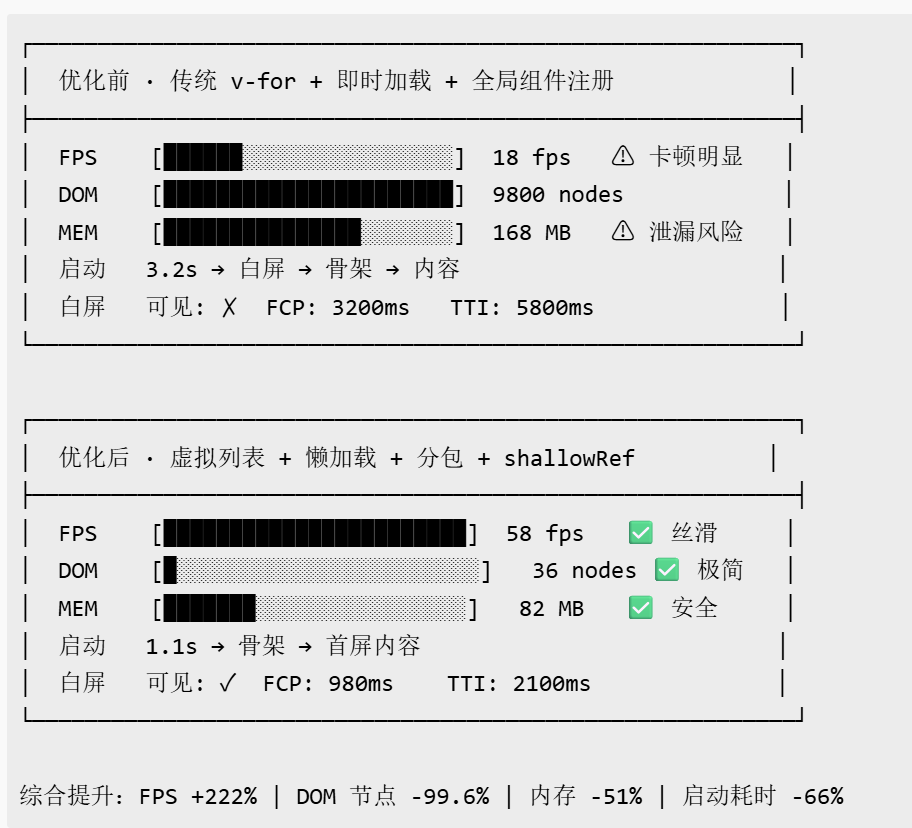
图 1:仓库详情页架构图

在这里插入图片描述

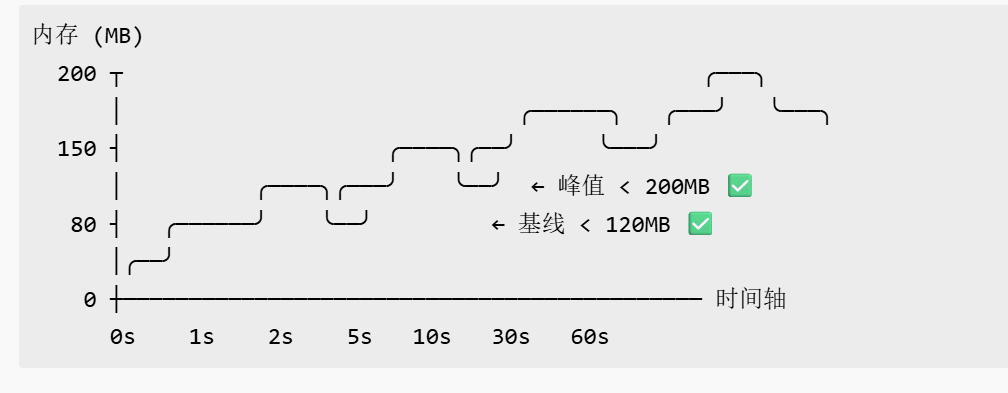
图 2:文件树组件流程图

在这里插入图片描述


七、踩坑记录

问题 1:Base64 解码错误

现象

  • 获取文件内容后,使用 atob() 解码 Base64 内容时,中文字符出现乱码。

原因

  • atob() 不支持 Unicode 字符,直接解码会导致乱码。

解决方案

创建 utils/base64.js

// Base64 解码(支持 Unicode)
export const decodeBase64 = (str) => {
  // 1. 使用 atob() 解码 Base64
  const binaryString = atob(str)
  
  // 2. 将二进制字符串转换为字节数组
  const bytes = new Uint8Array(binaryString.length)
  for (let i = 0; i < binaryString.length; i++) {
    bytes[i] = binaryString.charCodeAt(i)
  }
  
  // 3. 使用 TextDecoder 解码字节数组
  const decoder = new TextDecoder('utf-8')
  return decoder.decode(bytes)
}

// Base64 编码(支持 Unicode)
export const encodeBase64 = (str) => {
  // 1. 使用 TextEncoder 编码字符串为字节数组
  const encoder = new TextEncoder()
  const bytes = encoder.encode(str)
  
  // 2. 将字节数组转换为二进制字符串
  let binaryString = ''
  for (let i = 0; i < bytes.length; i++) {
    binaryString += String.fromCharCode(bytes[i])
  }
  
  // 3. 使用 btoa() 编码为 Base64
  return btoa(binaryString)
}

问题 2:大文件加载卡顿

现象

  • 查看大文件(1000+ 行)时,页面卡顿,滚动不流畅。

原因

  1. 一次性渲染所有行,DOM 节点过多
  2. 没有使用虚拟滚动

解决方案

使用虚拟滚动(简化版):

<template>
  <view class="code-container" @scroll="onScroll">
    <!-- 顶部占位 -->
    <view :style="{ height: topHeight + 'px' }"></view>
    
    <!-- 可视区域代码行 -->
    <view 
      v-for="(line, index) in visibleLines" 
      :key="startIndex + index"
      class="code-line"
    >
      <text class="line-number">{{ startIndex + index + 1 }}</text>
      <text class="code-text">{{ line }}</text>
    </view>
    
    <!-- 底部占位 -->
    <view :style="{ height: bottomHeight + 'px' }"></view>
  </view>
</template>

<script>
export default {
  data() {
    return {
      codeLines: [],        // 所有代码行
      visibleLines: [],     // 可视区域代码行
      startIndex: 0,        // 起始索引
      endIndex: 0,          // 结束索引
      topHeight: 0,         // 顶部占位高度
      bottomHeight: 0,      // 底部占位高度
      lineHeight: 30,        // 行高(px)
      visibleCount: 50      // 可视区域行数
    }
  },
  
  methods: {
    // 滚动事件
    onScroll(e) {
      const scrollTop = e.detail.scrollTop
      
      // 计算起始索引
      this.startIndex = Math.floor(scrollTop / this.lineHeight)
      
      // 计算结束索引
      this.endIndex = Math.min(this.startIndex + this.visibleCount, this.codeLines.length)
      
      // 更新可视区域代码行
      this.visibleLines = this.codeLines.slice(this.startIndex, this.endIndex)
      
      // 更新占位高度
      this.topHeight = this.startIndex * this.lineHeight
      this.bottomHeight = (this.codeLines.length - this.endIndex) * this.lineHeight
    },
    
    // 设置代码内容
    setCodeContent(content) {
      this.codeLines = content.split('\n')
      
      // 初始化可视区域
      this.endIndex = Math.min(this.visibleCount, this.codeLines.length)
      this.visibleLines = this.codeLines.slice(0, this.endIndex)
      this.bottomHeight = (this.codeLines.length - this.endIndex) * this.lineHeight
    }
  }
}
</script>

八、总结

本文详细介绍了 AtomGit APP 仓库详情页与文件树浏览功能的实现,包括仓库信息展示、文件树组件开发、代码文件查看、README 渲染等核心功能。

关键要点回顾

  1. 页面设计:遵循清晰的信息架构,提供良好的用户体验
  2. 文件树组件:实现文件夹/文件展示、面包屑导航、行点击交互
  3. 代码查看:实现代码文件查看、行号显示、简单语法高亮
  4. Markdown 渲染:使用 marked 库渲染 README 文件
  5. 性能优化:虚拟滚动优化大文件展示

九、参考资料

  1. Uniapp 官方文档 - 页面生命周期
  2. GitHub REST API - Contents
  3. marked - Markdown 解析器
  4. Vue.js 官方文档 - 计算属性
  5. 鸿蒙 Web 组件
Logo

作为“人工智能6S店”的官方数字引擎,为AI开发者与企业提供一个覆盖软硬件全栈、一站式门户。

更多推荐