
Uniapp 鸿蒙实战之 AtomGit APP - 首页设计与仓库列表实现
·

前言
为什么首页设计至关重要?
首页是用户进入应用后的第一印象,直接影响用户体验和应用评价。对于 Git 客户端而言,首页需要:
- 快速展示核心内容:用户最关心的仓库列表
- 高效的信息检索:搜索、筛选、分类
- 流畅的交互体验:下拉刷新、上拉加载、滚动流畅
- 清晰的信息层级:项目名称、描述、星标数等关键信息一目了然
技术架构选型图

核心内容
一、首页 UI 设计实现
1.1 首页布局结构
pages/repos/repos.vue
<template>
  <view class="repos-page">
    <!-- 搜索栏 -->
    <view class="search-bar">
      <uni-search-bar
        v-model="searchKeyword"
        placeholder="搜索仓库..."
        @confirm="handleSearch"
        @clear="handleClear"
      />
    </view>

    <!-- 筛选标签 -->
    <scroll-view class="filter-tabs" scroll-x>
      <view class="tabs-container">
        <view
          v-for="(tab, index) in filterTabs"
          :key="index"
          :class="['tab-item', { active: activeTab === tab.value }]"
          @click="switchTab(tab.value)"
        >
          <text class="tab-text">{{ tab.label }}</text>
        </view>
      </view>
    </scroll-view>

    <!-- 仓库列表 -->
    <scroll-view
      class="repo-list"
      scroll-y
      @scrolltolower="loadMore"
      refresher-enabled
      :refresher-triggered="isRefreshing"
      @refresherrefresh="onRefresh"
    >
      <!-- 空状态 -->
      <view v-if="repoList.length === 0 && !isLoading" class="empty-state">
        <image class="empty-icon" src="/static/images/empty.png" mode="aspectFit"></image>
        <text class="empty-text">暂无仓库数据</text>
        <button class="retry-btn" @click="fetchRepos">重新加载</button>
      </view>

      <!-- 列表项 -->
      <view
        v-for="repo in repoList"
        :key="repo.id"
        class="repo-card"
        @click="navigateToDetail(repo)"
      >
        <view class="repo-header">
          <image class="avatar" :src="repo.owner.avatar_url" mode="aspectFill"></image>
          <view class="repo-info">
            <text class="repo-name">{{ repo.full_name }}</text>
            <text class="repo-desc">{{ repo.description || '暂无描述' }}</text>
          </view>
        </view>

        <view class="repo-meta">
          <view class="meta-item">
            <uni-icons type="star" size="14" color="#f39c12"></uni-icons>
            <text class="meta-text">{{ formatNumber(repo.stargazers_count) }}</text>
          </view>

          <view class="meta-item">
            <uni-icons type="fork" size="14" color="#3498db"></uni-icons>
            <text class="meta-text">{{ formatNumber(repo.forks_count) }}</text>
          </view>

          <view class="meta-item">
            <view class="lang-dot" :style="{ backgroundColor: getLangColor(repo.language) }"></view>
            <text class="meta-text">{{ repo.language || '未知' }}</text>
          </view>

          <text class="update-time">{{ formatTime(repo.updated_at) }}</text>
        </view>

        <!-- 话题标签 -->
        <view v-if="repo.topics && repo.topics.length > 0" class="topics">
          <text
            v-for="(topic, index) in repo.topics.slice(0, 3)"
            :key="index"
            class="topic-tag"
          >
            {{ topic }}
          </text>
        </view>
      </view>

      <!-- 加载更多 -->
      <view v-if="isLoading" class="loading-state">
        <uni-load-more :status="loadMoreStatus"></uni-load-more>
      </view>

      <!-- 没有更多 -->
      <view v-if="!hasMore && repoList.length > 0" class="no-more">
        <text class="no-more-text">没有更多了</text>
      </view>
    </scroll-view>
  </view>
</template>

<script setup>
import { ref, onMounted, computed } from 'vue'
import githubApi from '@/api/github.js'

// 搜索关键词
const searchKeyword = ref('')

// 筛选标签
const filterTabs = [
  { label: '全部', value: 'all' },
  { label: '热门', value: 'popular' },
  { label: '趋势', value: 'trending' },
  { label: '前端', value: 'frontend' },
  { label: '后端', value: 'backend' },
  { label: '移动端', value: 'mobile' }
]

// 当前激活的标签
const activeTab = ref('all')

// 仓库列表
const repoList = ref([])

// 分页参数
const currentPage = ref(1)
const pageSize = ref(20)
const hasMore = ref(true)

// 加载状态
const isLoading = ref(false)
const isRefreshing = ref(false)
const loadMoreStatus = ref('more')

/**
 * 获取仓库列表
 */
const fetchRepos = async (isRefresh = false) => {
  if (isLoading.value) return

  isLoading.value = true
  loadMoreStatus.value = 'loading'

  try {
    const params = {
      page: currentPage.value,
      per_page: pageSize.value,
      sort: getSortParam()
    }

    let response
    if (searchKeyword.value) {
      // 搜索仓库
      response = await githubApi.searchRepos(searchKeyword.value, params)
      response = response.items
    } else {
      // 获取仓库列表
      response = await githubApi.getUserRepos('github', params)
    }

    if (isRefresh) {
      repoList.value = response
    } else {
      repoList.value = [...repoList.value, ...response]
    }

    // 判断是否还有更多
    hasMore.value = response.length === pageSize.value

    if (hasMore.value) {
      currentPage.value++
    }

    loadMoreStatus.value = hasMore.value ? 'more' : 'noMore'
  } catch (error) {
    console.error('获取仓库列表失败:', error)
    uni.showToast({
      title: '加载失败',
      icon: 'none'
    })
    loadMoreStatus.value = 'error'
  } finally {
    isLoading.value = false
    isRefreshing.value = false
  }
}

/**
 * 下拉刷新
 */
const onRefresh = () => {
  isRefreshing.value = true
  currentPage.value = 1
  hasMore.value = true
  fetchRepos(true)
}

/**
 * 加载更多
 */
const loadMore = () => {
  if (!hasMore.value || isLoading.value) return
  fetchRepos()
}

/**
 * 搜索
 */
const handleSearch = () => {
  currentPage.value = 1
  hasMore.value = true
  repoList.value = []
  fetchRepos(true)
}

/**
 * 清空搜索
 */
const handleClear = () => {
  searchKeyword.value = ''
  currentPage.value = 1
  hasMore.value = true
  repoList.value = []
  fetchRepos(true)
}

/**
 * 切换筛选标签
 */
const switchTab = (value) => {
  activeTab.value = value
  currentPage.value = 1
  hasMore.value = true
  repoList.value = []
  fetchRepos(true)
}

/**
 * 获取排序参数
 */
const getSortParam = () => {
  const sortMap = {
    all: 'updated',
    popular: 'stars',
    trending: 'updated',
    frontend: 'stars',
    backend: 'stars',
    mobile: 'stars'
  }
  return sortMap[activeTab.value] || 'updated'
}

/**
 * 格式化数字
 */
const formatNumber = (num) => {
  if (num >= 10000) {
    return (num / 1000).toFixed(1) + 'k'
  }
  return num.toString()
}

/**
 * 获取语言颜色
 */
const getLangColor = (lang) => {
  const colorMap = {
    JavaScript: '#f1e05a',
    TypeScript: '#2b7489',
    Python: '#3572A5',
    Java: '#b07219',
    Go: '#00ADD8',
    Rust: '#dea584',
    'C++': '#f34b7d',
    Vue: '#41b883',
    React: '#61dafb'
  }
  return colorMap[lang] || '#cccccc'
}

/**
 * 格式化时间
 */
const formatTime = (timestamp) => {
  const date = new Date(timestamp)
  const now = new Date()
  const diff = (now - date) / 1000

  if (diff < 60) return '刚刚'
  if (diff < 3600) return `${Math.floor(diff / 60)} 分钟前`
  if (diff < 86400) return `${Math.floor(diff / 3600)} 小时前`
  if (diff < 2592000) return `${Math.floor(diff / 86400)} 天前`
  if (diff < 31536000) return `${Math.floor(diff / 2592000)} 个月前`
  return `${Math.floor(diff / 31536000)} 年前`
}

/**
 * 跳转到仓库详情
 */
const navigateToDetail = (repo) => {
  uni.navigateTo({
    url: `/pages/repo-detail/repo-detail?owner=${repo.owner.login}&repo=${repo.name}`
  })
}

// 页面加载时获取数据
onMounted(() => {
  fetchRepos()
})
</script>

<style lang="scss" scoped>
.repos-page {
  display: flex;
  flex-direction: column;
  height: 100vh;
  background: #f5f5f5;
}

// 搜索栏
.search-bar {
  background: #fff;
  padding: 16rpx;
  box-shadow: 0 2rpx 8rpx rgba(0, 0, 0, 0.05);
}

// 筛选标签
.filter-tabs {
  background: #fff;
  border-bottom: 1rpx solid #e5e5e5;

  .tabs-container {
    display: flex;
    padding: 16rpx;
    white-space: nowrap;
  }

  .tab-item {
    display: inline-flex;
    align-items: center;
    padding: 12rpx 24rpx;
    margin-right: 16rpx;
    border-radius: 32rpx;
    background: #f0f0f0;
    transition: all 0.3s;

    &.active {
      background: linear-gradient(135deg, #667eea 0%, #764ba2 100%);

      .tab-text {
        color: #fff;
      }
    }

    .tab-text {
      font-size: 28rpx;
      color: #666;
    }
  }
}

// 仓库列表
.repo-list {
  flex: 1;
  overflow: hidden;
}

// 仓库卡片
.repo-card {
  background: #fff;
  margin: 16rpx;
  padding: 24rpx;
  border-radius: 16rpx;
  box-shadow: 0 2rpx 8rpx rgba(0, 0, 0, 0.05);

  .repo-header {
    display: flex;
    margin-bottom: 16rpx;

    .avatar {
      width: 64rpx;
      height: 64rpx;
      border-radius: 8rpx;
      margin-right: 16rpx;
    }

    .repo-info {
      flex: 1;
      overflow: hidden;

      .repo-name {
        display: block;
        font-size: 32rpx;
        font-weight: bold;
        color: #24292e;
        margin-bottom: 8rpx;
        overflow: hidden;
        text-overflow: ellipsis;
        white-space: nowrap;
      }

      .repo-desc {
        display: -webkit-box;
        font-size: 26rpx;
        color: #666;
        line-height: 1.5;
        -webkit-line-clamp: 2;
        -webkit-box-orient: vertical;
        overflow: hidden;
      }
    }
  }

  .repo-meta {
    display: flex;
    align-items: center;
    margin-bottom: 16rpx;

    .meta-item {
      display: flex;
      align-items: center;
      margin-right: 24rpx;

      .meta-text {
        font-size: 24rpx;
        color: #666;
        margin-left: 8rpx;
      }

      .lang-dot {
        width: 12rpx;
        height: 12rpx;
        border-radius: 50%;
        margin-right: 8rpx;
      }
    }

    .update-time {
      margin-left: auto;
      font-size: 24rpx;
      color: #999;
    }
  }

  .topics {
    display: flex;
    flex-wrap: wrap;
    gap: 8rpx;

    .topic-tag {
      padding: 8rpx 16rpx;
      background: #e1f5fe;
      color: #0277bd;
      font-size: 22rpx;
      border-radius: 16rpx;
    }
  }
}

// 空状态
.empty-state {
  display: flex;
  flex-direction: column;
  align-items: center;
  justify-content: center;
  padding: 120rpx 0;

  .empty-icon {
    width: 240rpx;
    height: 240rpx;
    margin-bottom: 32rpx;
  }

  .empty-text {
    font-size: 28rpx;
    color: #999;
    margin-bottom: 32rpx;
  }

  .retry-btn {
    padding: 16rpx 48rpx;
    background: linear-gradient(135deg, #667eea 0%, #764ba2 100%);
    color: #fff;
    font-size: 28rpx;
    border-radius: 32rpx;
    border: none;
  }
}

// 加载状态
.loading-state {
  padding: 32rpx 0;
}

// 没有更多
.no-more {
  text-align: center;
  padding: 32rpx 0;

  .no-more-text {
    font-size: 24rpx;
    color: #999;
  }
}
</style>
二、仓库卡片组件封装
2.1 组件设计
components/repo-card/repo-card.vue
<template>
  <view class="repo-card" @click="handleClick">
    <!-- 卡片头部 -->
    <view class="card-header">
      <image
        class="owner-avatar"
        :src="repo.owner.avatar_url"
        mode="aspectFill"
        lazy-load
      ></image>
      <view class="card-title">
        <text class="repo-name">{{ repo.full_name }}</text>
        <text class="repo-owner">{{ repo.owner.login }}</text>
      </view>
      <view class="card-badge" v-if="repo.private">
        <text class="badge-text">私有</text>
      </view>
    </view>

    <!-- 描述 -->
    <view class="card-body" v-if="repo.description">
      <text class="repo-description">{{ repo.description }}</text>
    </view>

    <!-- 元信息 -->
    <view class="card-footer">
      <view class="stat-item">
        <uni-icons type="star" size="14" color="#f39c12"></uni-icons>
        <text class="stat-value">{{ formatNumber(repo.stargazers_count) }}</text>
      </view>

      <view class="stat-item">
        <uni-icons type="eye" size="14" color="#3498db"></uni-icons>
        <text class="stat-value">{{ formatNumber(repo.watchers_count) }}</text>
      </view>

      <view class="stat-item">
        <uni-icons type="fork" size="14" color="#9b59b6"></uni-icons>
        <text class="stat-value">{{ formatNumber(repo.forks_count) }}</text>
      </view>

      <view class="stat-item language">
        <view
          class="lang-color"
          :style="{ backgroundColor: languageColor }"
        ></view>
        <text class="stat-value">{{ repo.language || 'Unknown' }}</text>
      </view>
    </view>

    <!-- 话题标签 -->
    <view class="card-topics" v-if="showTopics && repo.topics && repo.topics.length">
      <text
        v-for="(topic, index) in displayTopics"
        :key="index"
        class="topic-item"
      >
        #{{ topic }}
      </text>
      <text v-if="repo.topics.length > maxTopics" class="topic-more">
        +{{ repo.topics.length - maxTopics }}
      </text>
    </view>
  </view>
</template>

<script setup>
import { computed } from 'vue'

// Props
const props = defineProps({
  repo: {
    type: Object,
    required: true
  },
  showTopics: {
    type: Boolean,
    default: true
  },
  maxTopics: {
    type: Number,
    default: 3
  }
})

// Emits
const emit = defineEmits(['click'])

// 计算属性:语言颜色
const languageColor = computed(() => {
  const colors = {
    JavaScript: '#f1e05a',
    TypeScript: '#2b7489',
    Python: '#3572A5',
    Java: '#b07219',
    Go: '#00ADD8',
    Rust: '#dea584',
    'C++': '#f34b7d',
    Vue: '#41b883',
    HTML: '#e34c26',
    CSS: '#563d7c',
    Shell: '#89e051',
    Swift: '#ffac45',
    Kotlin: '#F18E33',
    Dart: '#00B4AB'
  }
  return colors[props.repo.language] || '#cccccc'
})

// 计算属性:显示的话题
const displayTopics = computed(() => {
  return props.repo.topics?.slice(0, props.maxTopics) || []
})

/**
 * 格式化数字
 */
const formatNumber = (num) => {
  if (num >= 1000000) {
    return (num / 1000000).toFixed(1) + 'M'
  }
  if (num >= 1000) {
    return (num / 1000).toFixed(1) + 'K'
  }
  return num.toString()
}

/**
 * 点击事件
 */
const handleClick = () => {
  emit('click', props.repo)
}
</script>

<style lang="scss" scoped>
.repo-card {
  background: #fff;
  border-radius: 16rpx;
  padding: 24rpx;
  margin-bottom: 16rpx;
  box-shadow: 0 2rpx 12rpx rgba(0, 0, 0, 0.08);
  transition: all 0.3s;

  &:active {
    transform: scale(0.98);
    box-shadow: 0 1rpx 8rpx rgba(0, 0, 0, 0.1);
  }
}

// 卡片头部
.card-header {
  display: flex;
  align-items: center;
  margin-bottom: 16rpx;

  .owner-avatar {
    width: 64rpx;
    height: 64rpx;
    border-radius: 12rpx;
    margin-right: 16rpx;
  }

  .card-title {
    flex: 1;
    overflow: hidden;

    .repo-name {
      display: block;
      font-size: 32rpx;
      font-weight: bold;
      color: #24292e;
      margin-bottom: 4rpx;
      overflow: hidden;
      text-overflow: ellipsis;
      white-space: nowrap;
    }

    .repo-owner {
      font-size: 24rpx;
      color: #586069;
    }
  }

  .card-badge {
    padding: 6rpx 16rpx;
    background: #fff5f5;
    border: 1rpx solid #ffd7d7;
    border-radius: 8rpx;

    .badge-text {
      font-size: 22rpx;
      color: #e74c3c;
    }
  }
}

// 卡片内容
.card-body {
  margin-bottom: 16rpx;

  .repo-description {
    font-size: 26rpx;
    color: #586069;
    line-height: 1.6;
    display: -webkit-box;
    -webkit-line-clamp: 2;
    -webkit-box-orient: vertical;
    overflow: hidden;
  }
}

// 卡片底部
.card-footer {
  display: flex;
  align-items: center;
  gap: 24rpx;

  .stat-item {
    display: flex;
    align-items: center;

    .stat-value {
      font-size: 24rpx;
      color: #586069;
      margin-left: 6rpx;
    }

    &.language {
      margin-left: auto;

      .lang-color {
        width: 12rpx;
        height: 12rpx;
        border-radius: 50%;
        margin-right: 8rpx;
      }
    }
  }
}

// 话题标签
.card-topics {
  display: flex;
  flex-wrap: wrap;
  gap: 8rpx;
  margin-top: 16rpx;
  padding-top: 16rpx;
  border-top: 1rpx solid #eaecef;

  .topic-item {
    padding: 8rpx 16rpx;
    background: #e1f5fe;
    color: #0277bd;
    font-size: 22rpx;
    border-radius: 16rpx;
  }

  .topic-more {
    padding: 8rpx 16rpx;
    background: #f0f0f0;
    color: #666;
    font-size: 22rpx;
    border-radius: 16rpx;
  }
}
</style>
三、状态管理
3.1 使用 Pinia 管理仓库数据
stores/repos.js
import { defineStore } from 'pinia'
import githubApi from '@/api/github.js'

export const useReposStore = defineStore('repos', {
  state: () => ({
    // 仓库列表
    repoList: [],
    // 当前页
    currentPage: 1,
    // 每页数量
    pageSize: 20,
    // 是否还有更多
    hasMore: true,
    // 加载状态
    isLoading: false,
    // 筛选条件
    filter: {
      keyword: '',
      sort: 'updated',
      language: ''
    }
  }),

  getters: {
    // 过滤后的列表
    filteredRepoList: (state) => {
      let list = state.repoList

      if (state.filter.language) {
        list = list.filter(repo => repo.language === state.filter.language)
      }

      return list
    }
  },

  actions: {
    /**
     * 获取仓库列表
     */
    async fetchRepos(isRefresh = false) {
      if (this.isLoading) return

      this.isLoading = true

      try {
        const params = {
          page: this.currentPage,
          per_page: this.pageSize,
          sort: this.filter.sort
        }

        let response
        if (this.filter.keyword) {
          response = await githubApi.searchRepos(this.filter.keyword, params)
          response = response.items
        } else {
          response = await githubApi.getUserRepos('github', params)
        }

        if (isRefresh) {
          this.repoList = response
        } else {
          this.repoList = [...this.repoList, ...response]
        }

        this.hasMore = response.length === this.pageSize

        if (this.hasMore) {
          this.currentPage++
        }
      } catch (error) {
        console.error('获取仓库列表失败:', error)
        throw error
      } finally {
        this.isLoading = false
      }
    },

    /**
     * 刷新列表
     */
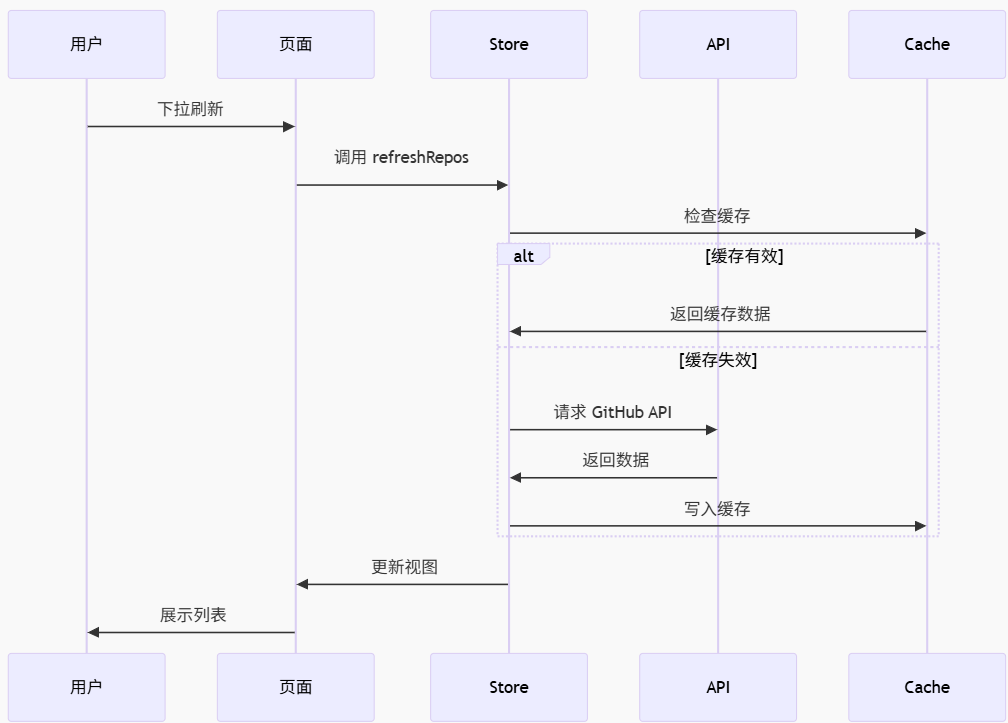
    async refreshRepos() {
      this.currentPage = 1
      this.hasMore = true
      await this.fetchRepos(true)
    },

    /**
     * 设置筛选条件
     */
    setFilter(filter) {
      this.filter = { ...this.filter, ...filter }
      this.refreshRepos()
    },

    /**
     * 清空列表
     */
    clearRepos() {
      this.repoList = []
      this.currentPage = 1
      this.hasMore = true
    }
  },

  // 持久化配置
  persist: {
    key: 'atomgit-repos',
    storage: {
      getItem: (key) => uni.getStorageSync(key),
      setItem: (key, value) => uni.setStorageSync(key, value)
    }
  }
})
四、性能优化
4.1 列表虚拟滚动
对于长列表,可以使用虚拟滚动提升性能:
<template>
  <!-- 使用 uni-ui 的 list 组件 -->
  <uni-list>
    <uni-list-item
      v-for="repo in visibleRepos"
      :key="repo.id"
      :title="repo.full_name"
      :note="repo.description"
      :thumb="repo.owner.avatar_url"
      @click="navigateToDetail(repo)"
    />
  </uni-list>
</template>

<script setup>
import { ref, computed, onMounted, onUnmounted } from 'vue'

// 可见区域的仓库列表
const visibleRepos = computed(() => {
  const startIndex = Math.floor(scrollTop.value / ITEM_HEIGHT)
  const endIndex = startIndex + VISIBLE_COUNT
  return repoList.value.slice(startIndex, endIndex)
})

// 滚动位置
const scrollTop = ref(0)

// 每项高度
const ITEM_HEIGHT = 200

// 可见数量
const VISIBLE_COUNT = 10

// 处理滚动
const handleScroll = (e) => {
  scrollTop.value = e.detail.scrollTop
}
</script>
4.2 图片懒加载
<template>
  <image
    :src="repo.owner.avatar_url"
    mode="aspectFill"
    lazy-load
    :fade-in="true"
  ></image>
</template>
4.3 数据缓存
/**
 * 获取仓库列表(带缓存)
 */
const fetchReposWithCache = async (params) => {
  const cacheKey = `repos_${JSON.stringify(params)}`

  // 尝试从缓存读取
  const cache = uni.getStorageSync(cacheKey)
  if (cache && Date.now() - cache.timestamp < 300000) { // 5分钟缓存
    return cache.data
  }

  // 请求新数据
  const data = await githubApi.getUserRepos('github', params)

  // 写入缓存
  uni.setStorageSync(cacheKey, {
    data,
    timestamp: Date.now()
  })

  return data
}
配图说明
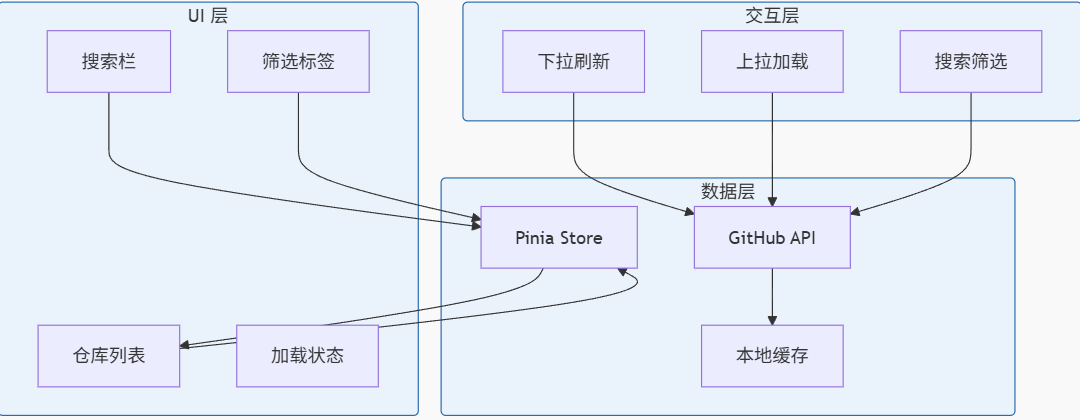
图 2:数据流程图
实战演示
步骤 1:测试首页功能
- 下拉刷新:在列表顶部下拉,触发刷新
- 上拉加载:滚动到底部,自动加载下一页
- 搜索仓库:输入关键词,查看搜索结果
- 筛选切换:点击筛选标签,切换不同类型
步骤 2:优化用户体验
- 添加骨架屏:在加载时显示骨架屏,避免白屏
- 错误重试:网络错误时提供重试按钮
- 空状态设计:无数据时显示友好提示
踩坑记录
坑点 1:scroll-view 下拉刷新不生效
问题:设置了 refresher-enabled 但下拉刷新无反应
解决方案:
<!-- 需要设置固定高度 -->
<scroll-view
  style="height: 100vh;"
  scroll-y
  refresher-enabled
  :refresher-triggered="isRefreshing"
  @refresherrefresh="onRefresh"
>
坑点 2:GitHub API 限流
问题:请求过于频繁返回 403 错误
解决方案:
- 添加 Token 认证
- 实现请求节流
- 使用缓存减少请求
// 添加请求节流
const throttleRequest = (() => {
  let lastTime = 0
  return (fn, delay = 1000) => {
    const now = Date.now()
    if (now - lastTime >= delay) {
      lastTime = now
      return fn()
    }
    return Promise.reject(new Error('请求过于频繁'))
  }
})()
坑点 3:图片加载失败
问题:头像图片加载失败显示裂图
解决方案:
<template>
  <image
    :src="avatarUrl"
    @error="handleImageError"
  ></image>
</template>

<script setup>
const handleImageError = (e) => {
  avatarUrl.value = '/static/images/default-avatar.png'
}
</script>
总结
本文详细讲解了 AtomGit APP 首页与仓库列表的实现,包括:
- UI 设计:搜索栏、筛选标签、仓库卡片
- 组件封装:可复用的仓库卡片组件
- 状态管理:Pinia 管理全局数据状态
- 性能优化:虚拟滚动、懒加载、数据缓存
- 交互体验:下拉刷新、上拉加载、错误处理

作为“人工智能6S店”的官方数字引擎,为AI开发者与企业提供一个覆盖软硬件全栈、一站式门户。
更多推荐


 5
5 0
0- 0


 已为社区贡献38条内容

所有评论(0)