
实训:使用鸿蒙系统写出一篇简历
·
实例:
@Entry
@Component
struct PersonalResume {
  build() {
    Column({ space: 15 }) {
      // 1. 标题:个人简历
      Text("个人简历")
        .fontSize(32)
        .fontWeight(FontWeight.Bold)
        .width('100%')
        .textAlign(TextAlign.Center)
        .margin({ bottom: 10 })

      // 2. 个人信息+照片框(修正版,可正常运行)
      Row({ space: 15 }) {
        Column({ space: 12 }) {
          Text("姓名:孟宇婷    性别:女")
            .fontSize(16)
            .width('100%')
            .textAlign(TextAlign.Start)

          Text("年龄:19        毕业院校:河北软件")
            .fontSize(16)
            .width('100%')
            .textAlign(TextAlign.Start)

          Text("专业:计算机    生日:2006.07.16")
            .fontSize(15)
            .width('100%')
            .textAlign(TextAlign.Start)
        }
        .width('65%')
        .alignItems(HorizontalAlign.Start)
        // 右侧照片
        Image($r('app.media.cxstudy_1781081872270'))
          .width('28%')
          .height(130)
          .objectFit(ImageFit.Cover)
          .border({ width: 1, color: Color.Gray })
          .borderRadius(8)
      }
      .width('90%')
      .height(150)
      .padding({ left: 15, right: 15, top: 10, bottom: 10 })
      .border({ width: 1, color: Color.Gray })
      .alignItems(VerticalAlign.Center)
      // 3. 联系信息
      Column({ space: 0 }) {
        Text("邮箱:2393371330@qq.com")
          .fontSize(20)
          .width('100%')
      }
      .width('90%')
      .padding(10)
      .border({ width: 1, color: Color.Gray })

      // 4. 个人经历
      Column({ space: 8 }) {
        Text("个人经历")
          .fontSize(22)
          .fontWeight(FontWeight.Bold)
          .width('100%')
          .textAlign(TextAlign.Center)
        Text("在校学习鸿蒙开发、页面布局、组件使用")
          .fontSize(18)
          .width('100%')
      }
      .width('90%')
      .padding(10)
      .border({ width: 1, color: Color.Gray })

      // 5. 所获荣誉
      Column({ space: 8 }) {
        Text("所获荣誉")
          .fontSize(22)
          .fontWeight(FontWeight.Bold)
          .width('100%')
          .textAlign(TextAlign.Center)
        Text("在校完成登录页、轮播图、简历页面实训")
          .fontSize(18)
          .width('100%')
      }
      .width('90%')
      .padding(10)
      .border({ width: 1, color: Color.Gray })

      // 6. 求职意向
      Column({ space: 8 }) {
        Text("求职意向")
          .fontSize(22)
          .fontWeight(FontWeight.Bold)
          .width('100%')
          .textAlign(TextAlign.Center)
        Text("前端开发实习生 / 鸿蒙应用开发实习生 / 计算机相关岗位")
          .fontSize(18)
          .width('100%')
      }
      .width('90%')
      .padding(10)
      .border({ width: 1, color: Color.Gray })

    }
    .width('100%')
    .height('100%')
    .padding({ top: 30, bottom: 30 })
    .alignItems(HorizontalAlign.Center)
    .backgroundColor('#f8f8f8')
  }
}
成果展示: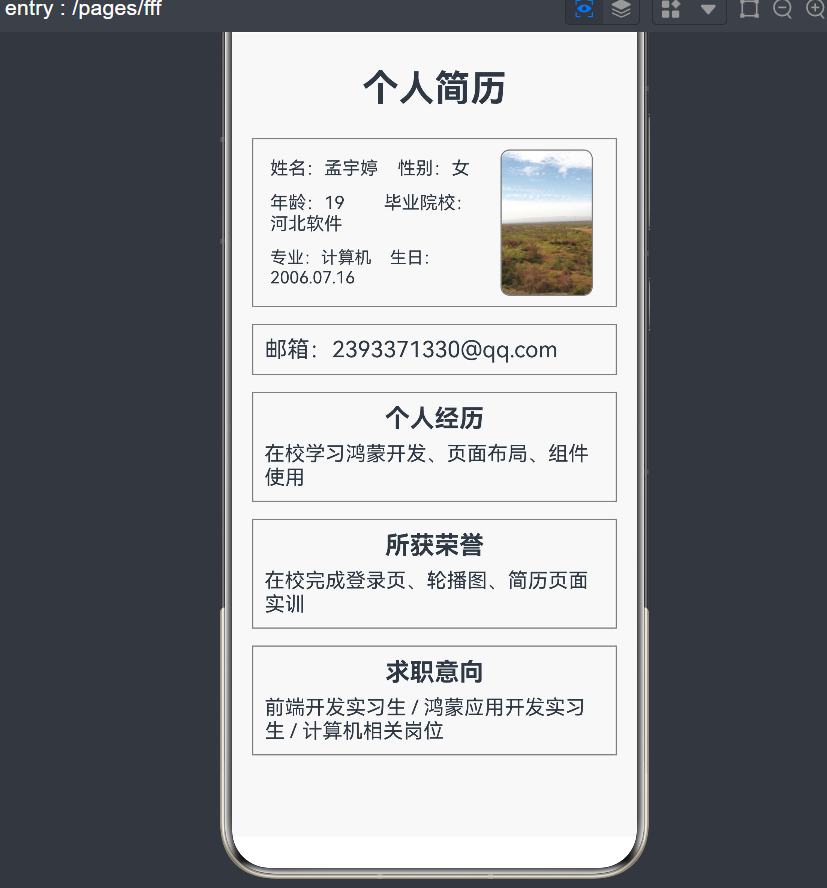
逐步解析:
-
Column({ space: 15 })Column = 垂直排列布局,内部元素从上往下依次摆放。space:15:内部每两个子组件之间,自动留出 15 像素的间距,不用手动加 margin。 -
样式属性逐条解释:
左侧 Column 文字区域
.width('100%'):宽度铺满整个手机屏幕.height('100%'):高度铺满整个屏幕.padding({ top: 30, bottom: 30 }):整体上下留出内边距,内容不会紧贴屏幕顶端和底部.alignItems(HorizontalAlign.Center):让 Column 内部所有子元素水平居中.backgroundColor('#f8f8f8'):页面背景设置成浅灰白色,不再是默认纯白Text("个人简历"):文本组件,用来显示文字。.fontSize(32):文字字号 32px。.fontWeight(FontWeight.Bold):文字加粗。.width('100%'):文本宽度占满整行。.textAlign(TextAlign.Center):文字在自身宽度内居中对齐。.margin({ bottom: 10 }):下方外边距 10,和下面的个人信息区块隔开。Row({ space: 15 })Row = 水平布局,内部元素从左到右横向排列。space:15:左右两块内容中间空出 15 像素距离。Row 整体样式:
.width('90%'):只占屏幕宽度 90%,左右留白.height(150):固定区块高度 150px.padding(...):区块内部四周留出内边距,文字不会贴着边框.border:给整个信息框加上灰色实线边框.alignItems(VerticalAlign.Center):让左右两部分垂直居中对齐- 内部嵌套 Column,三行文字垂直排列,
space:12控制三行文字上下间距。 - 每一条 Text:
- 设置字号
.width('100%')占满该行宽度.textAlign(TextAlign.Start)文字左对齐
.width('65%'):左侧文字区域占这一行总宽度的 65%。右侧 Image 头像
Image($r('app.media.图片名称'))读取项目资源文件夹里的图片,图片必须放到entry/src/main/resources/base/media目录下。.width('28%'):图片宽度占整行 28%。.height(130):图片高度固定。.objectFit(ImageFit.Cover):图片等比例铺满框,多余部分自动裁切,防止拉伸变形。.border:给头像加灰色边框。.borderRadius(8):圆角 8px,让照片边角变圆润- 后续基本同上

作为“人工智能6S店”的官方数字引擎,为AI开发者与企业提供一个覆盖软硬件全栈、一站式门户。
更多推荐
 1
1 0
0- 0


 已为社区贡献4条内容

所有评论(0)