
鸿蒙ArkUI路由跳转+注册登录完整实战博客
一、项目功能介绍
本项目基于鸿蒙原生ArkTS开发,全程使用基础组件+路由router+弹窗AlertDialog,无自定义陌生代码,实现完整流程:
1. 引导首页:点击切换注册/登录页面
2. 注册页面:两次密码不一致、内容为空 → 注册失败弹窗;密码一致 → 携带账号密码跳转主页
3. 登录页面:可跳转注册页,后续匹配注册账号密码完成校验
4. 个人主页:接收注册路由传参,展示登录用户名
5. 配置json路由路径,解决页面跳转404报错
业务规则:
✅ 注册:账号/密码/确认密码不能为空,两次密码必须相同,否则注册失败
✅ 路由:注册成功携带账号密码跳转主页
✅ 互通:注册页可跳登录、登录页可跳注册、首页可双向跳转
二、config.json路由页面配置(写完项目后添加并且同步文件)
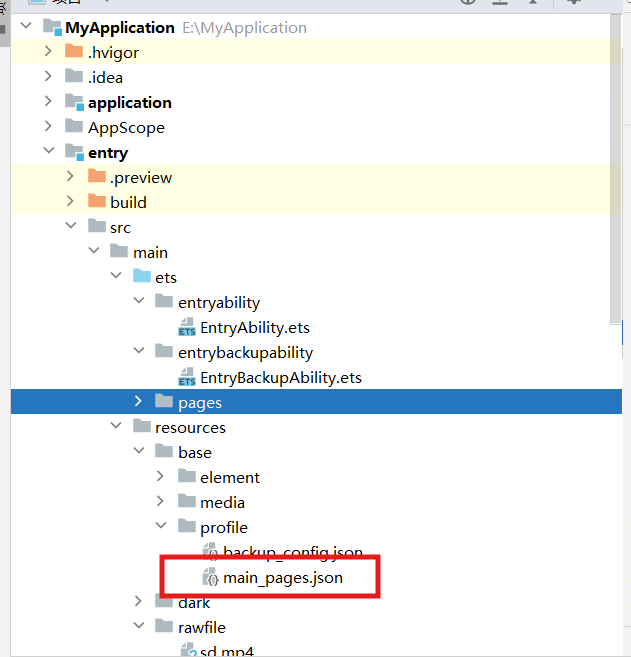
{
  "src": [
    "pages/Index",
    "pages/RouterDemo",
    "pages/RouterRegister",
    "pages/RouterLogin",
    "pages/HomePage"
  ]
}
三、代码一:引导首页 RouterDemo.ets
功能:入口页面,一键跳转注册、登录页面
import router from '@ohos.router';
@Entry
@Component
struct RouterDemo{
  build(){
    Column({space:20}){
      //跳转到注册页面
      Text('没有账号,立即注册')
        .fontSize(22)
        .fontColor(0x1677ff)
        .onClick(()=>{
        router.pushUrl({
          url:"pages/RouterRegister"
        })
      })
      //跳转到登陆页面
      Text('已有账号,立即登录')
        .fontSize(22)
        .fontColor(0x1655dd)
        .onClick(()=>{
          router.pushUrl({
            url:"pages/RouterLogin"
          })
        })
    }.width('100%')
    .height('100%')
    .padding(12)
  }
}
四、代码二:注册页面 RouterRegister.ets
核心功能:双向绑定账号密码、两次密码校验、空值校验、注册失败弹窗、注册成功路由传参跳转主页
import router from '@ohos.router';
import AlertDialog from '@ohos.promptAction';
@Entry
@Component
struct RouterRegister{
  @State username:string = ""
  @State password:string = ""
  @State password2:string = ""

  build() {
    Column({space:25}){
      Image($r('app.media.cover'))
        .width(120)
        .height(120)
        .borderRadius(60)

      Text("注册")
        .fontSize(32)
        .fontWeight(FontWeight.Bolder)
      Row(){
        Text("账号")
          .fontSize(26)
          .width('40%')
          .textAlign(TextAlign.Center)
        TextInput({text:this.username})
          .width('60%')
          .height(50)
          .onChange((value:string)=> {
            this.username = value
          })

      }
      Row(){
        Text("密码")
          .fontSize(26)
          .width('40%')
          .textAlign(TextAlign.Center)

          TextInput({text:this.password})
          .width('60%')
          .height(50)
          .type(InputType.Password)
            .onChange((value:string)=> {
            this.password = value
            })

      }

      Row(){
        Text("确认密码")
          .fontSize(26)
          .width('40%')
          .textAlign(TextAlign.Center)

        TextInput({text:this.password2})
          .width('60%')
          .height(50)
          .type(InputType.Password)
          .onChange((value:string)=> {
            this.password2 = value
          })

      }

      Text("已有账号,立即登录")
        .fontSize(22)
        .fontColor(0xababab)
        .onClick(()=>{
          router.pushUrl({
            url:"pages/RouterLogin"
          })
        })
      Button("立即注册")
        .width('100%')
        .height(50)
        .fontSize(24)
        .onClick(()=>{
          //校验:账号密码不为空 + 两次密码一致
          if ((this.username!="") && (this.password!="") && (this.password2!="") &&(this.password==this.password2)){
            //注册成功:携带账号密码跳转主页
            router.pushUrl({
              url:"pages/HomePage",
              params:{
                username:{
                  username:this.username,
                  password:this.password
                }
              }
            })
          }
          else {
            //注册失败弹窗
            AlertDialog.show({
              title:"注册失败",
              message:`注册的两次密码为空或者不一致,${this.username}`,
              confirm:{
                value:"确定",
                action:()=>{}
              }
            })
          }
        })
    }
    .width('100%')
    .height('100%')
    .padding(15)
  }
}
五、代码三:登录页面 RouterLogin.ets
功能:输入账号密码、跳转注册页面、后续匹配注册账号密码做登录校验,全程原生组件
import router from '@ohos.router';
@Entry
@Component
struct RouterLogin{
  @State username:string = ""
  @State password:string = ""
  build() {
    Column({space:25}){
      Image($r('app.media.cover'))
        .width(120)
        .height(120)
        .borderRadius(60)

      Text("登 录")
        .fontSize(32)
        .fontWeight(FontWeight.Bold)

      Row({space:15}){
        Text("账 号")
          .fontSize(26)
        TextInput({text:this.username})
          .width("70%")
          .height(50)
          .onChange((val:string)=>{
            this.username = val
          })
      }
      Row({space:15}){
        Text("密 码")
          .fontSize(26)
        TextInput({text:this.password})
          .width("70%")
          .height(50)
          .type(InputType.Password)
          .onChange((val:string)=>{
            this.password = val
          })
      }
      Text("没有账号,立即注册")
        .fontSize(22)
        .fontColor(0xababab)
        .onClick(()=>{
          router.pushUrl({
            url:"pages/RouterRegister"
          })
        })
      Button("立 即 登 录")
        .width('100%')
        .height(50)
        .fontSize(24)
    }
    .width('100%')
    .height('100%')
    .padding(15)
  }
}
六、代码四:个人主页 HomePage.ets
功能:接收注册页路由传递的账号数据,页面加载渲染用户名
import router from '@ohos.router';
@Entry
@Component
struct HomePage{
  @State username:string = ""

  //页面加载获取路由传参
  onPageShow(): void {
    const params = router.getParams() as Record<string,any>
    if (params){
      this.username = params.username.username
    }
  }
  build() {
    Column(){
      Text(`你好 ${this.username}`)
        .fontSize(45)
    }
    .width('100%')
    .height('100%')
    .justifyContent(FlexAlign.Center)
  }
}
七、项目完整流程总结
1. 启动进入RouterDemo首页,自由选择注册/登录
2. 注册页填写信息:
❌ 空内容 / 两次密码不同 → 弹窗提示注册失败
✅ 信息完整+密码一致 → 携带账号密码跳转Home主页
3. 注册页可一键跳转登录页,登录页可一键跳转注册页,页面互通
4. 主页接收路由参数,展示当前登录用户名
八、用到知识点总结(考试作业考点)
1. 布局组件:Column垂直布局、Row水平布局
2. 路由api:router.pushUrl页面跳转、router.getParams路由传参
3. 状态管理:@State双向数据绑定
4. 弹窗组件:AlertDialog全局弹窗提示
5. 表单组件:TextInput输入框、密码框type加密模式
6. 逻辑判断:if判断完成注册校验、非空判断

作为“人工智能6S店”的官方数字引擎,为AI开发者与企业提供一个覆盖软硬件全栈、一站式门户。
更多推荐
 1
1 0
0- 0


 已为社区贡献3条内容

所有评论(0)