
菜谱 - 图片资源管理实现美食推荐工具 鸿蒙源码实战
一、项目概述
1.1 应用背景
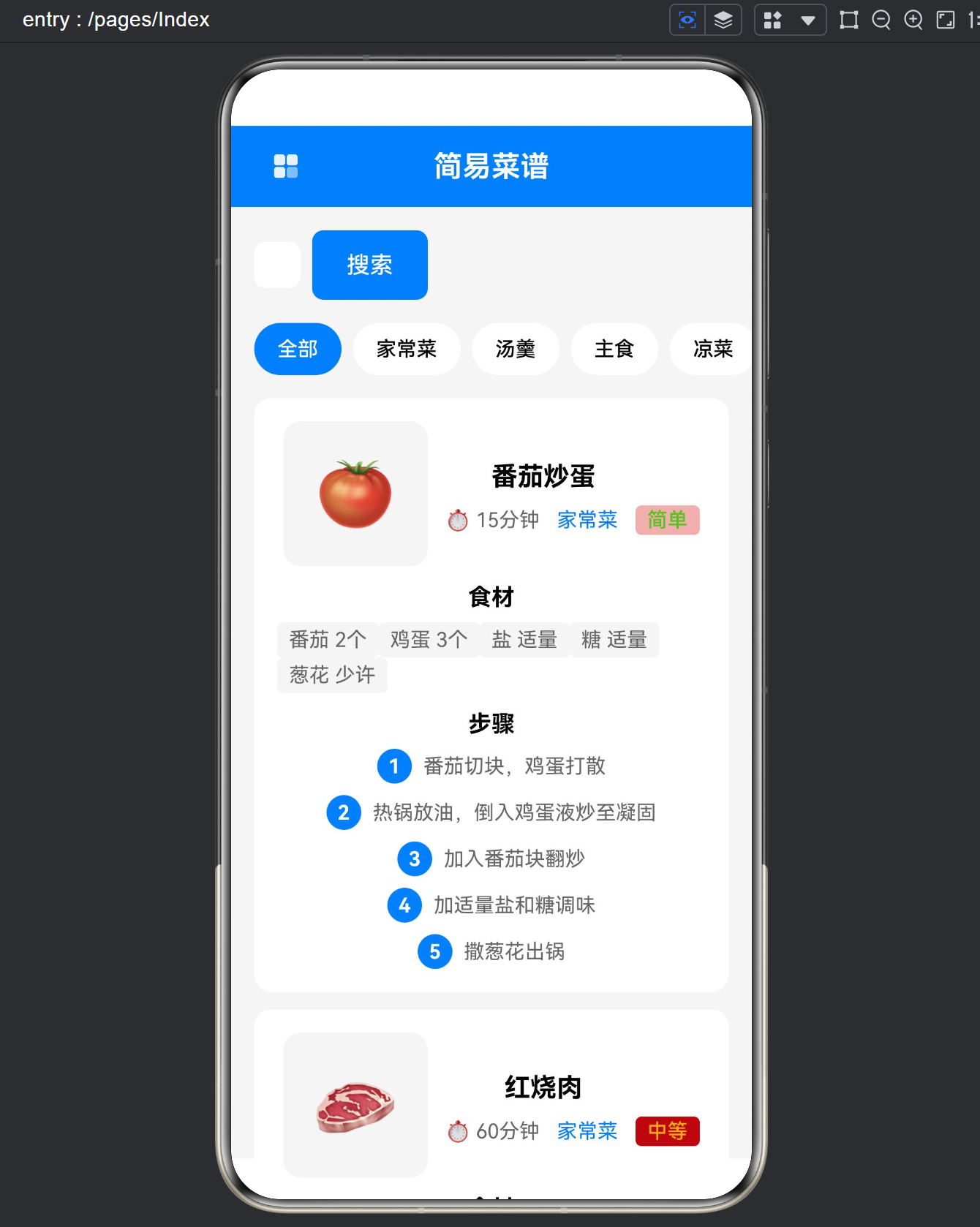
本文档详细介绍 HarmonyOS 平台上「简易菜谱」应用的技术实现方案。该应用是一款面向家庭用户设计的轻量级菜谱管理工具,集菜谱浏览、分类筛选、收藏管理等功能于一体。应用采用纯静态数据结构设计,所有菜谱数据直接内置于代码中,无需网络请求,非常适合初学者学习 ArkTS 声明式 UI 开发。
1.2 主要功能
| 功能模块 | 实现描述 |
|---|---|
| 菜谱浏览 | 展示8道精选家常菜谱,每道菜谱包含名称、图片、分类、烹饪时间、难度等级 |
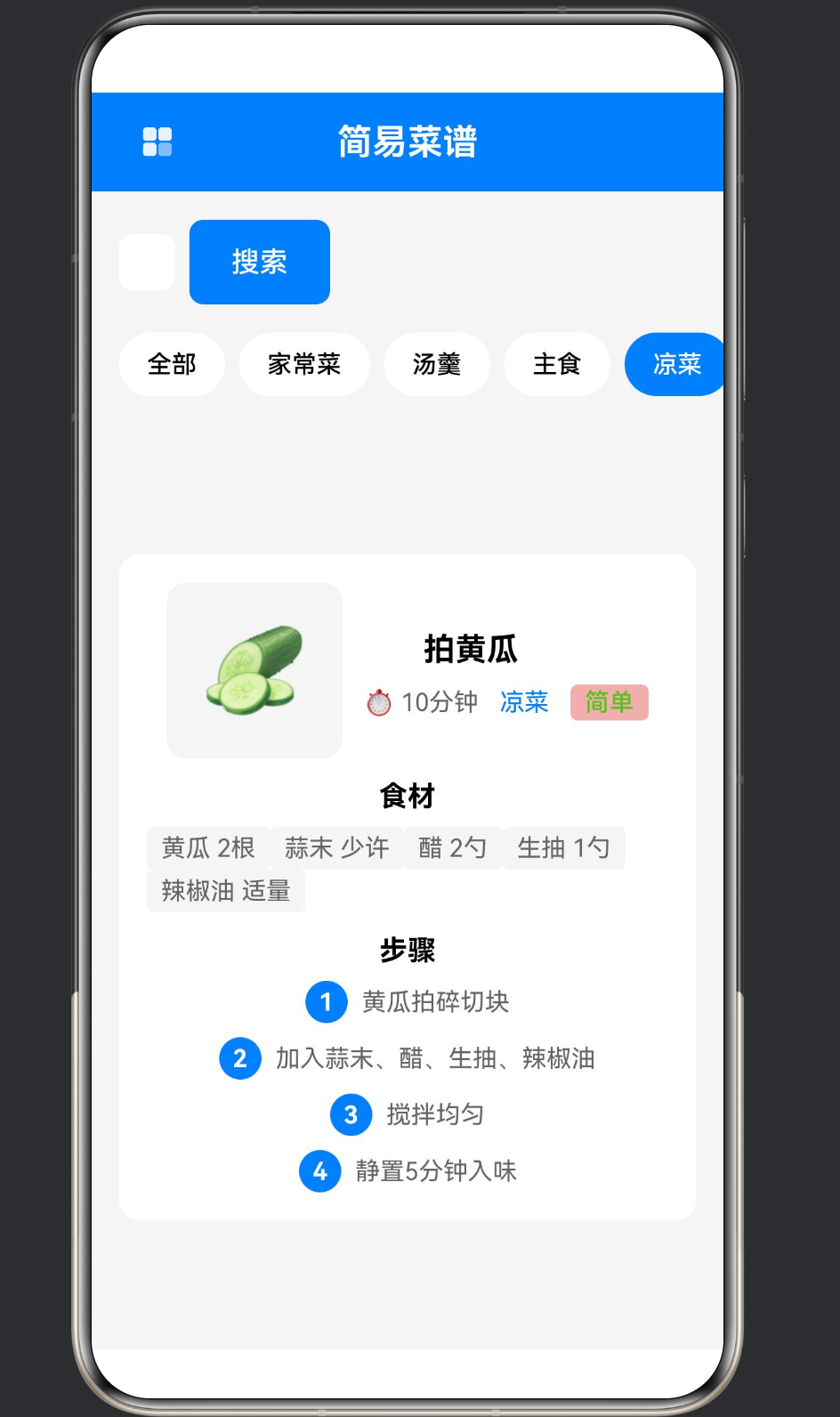
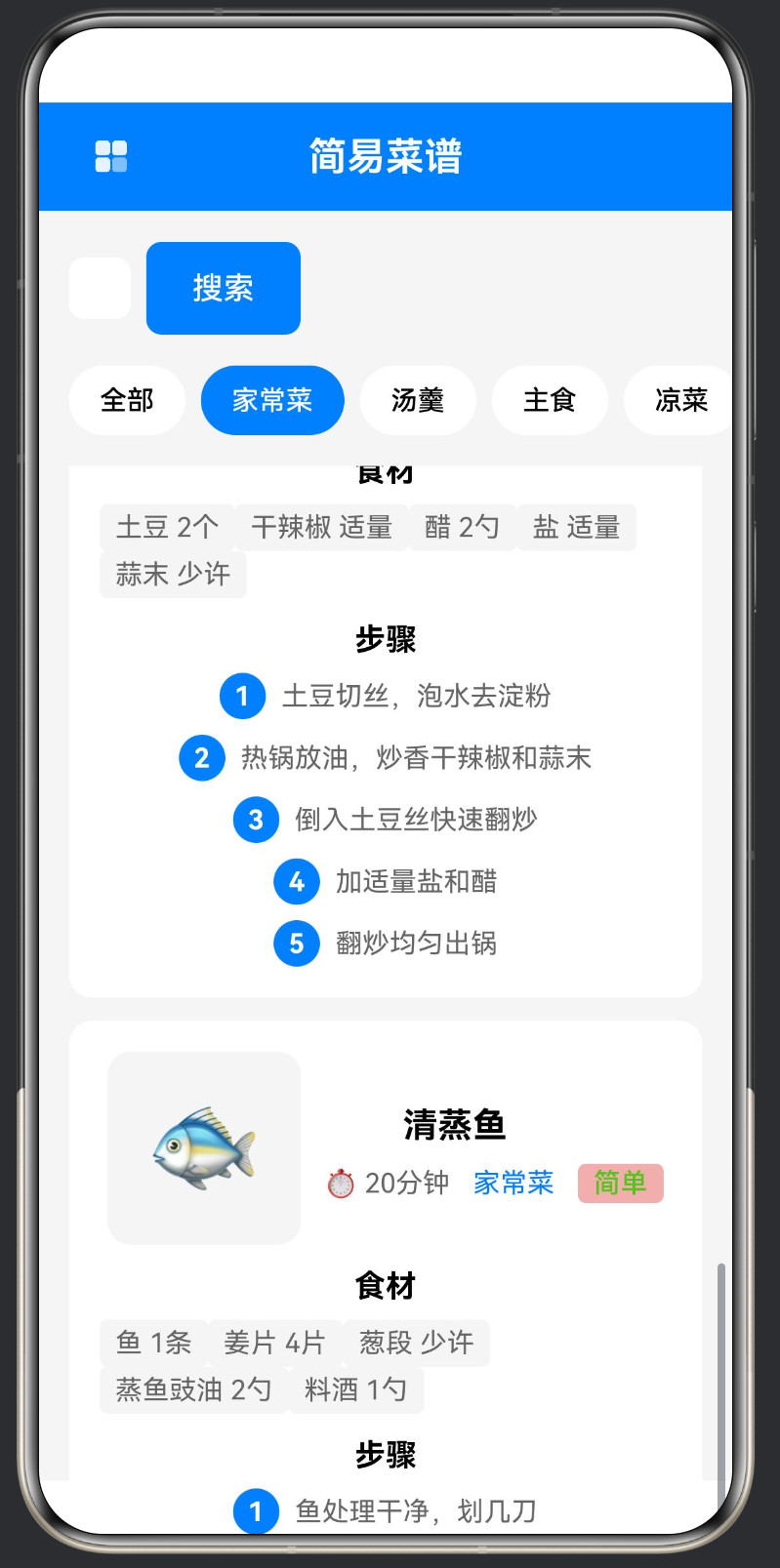
| 分类筛选 | 支持按「全部」「家常菜」「汤羹」「主食」「凉菜」「甜品」六个分类进行筛选 |
| 关键词搜索 | 支持按菜谱名称和分类进行模糊搜索 |
| 收藏管理 | 支持对喜欢的菜谱添加/取消收藏,收藏状态自动持久化到本地存储 |
| 详情展示 | 展示每道菜谱的食材清单和详细烹饪步骤 |
1.3 技术栈
// 技术选型
- 框架: ArkUI (HarmonyOS SDK)
- 语言: ArkTS (静态类型 superset of TypeScript)
- 状态管理: @State 装饰器
- 本地存储: @ohos.data.preferences
- 路由跳转: AppRouter (项目封装)
- UI组件: Column/Row/Stack/Scroll/Text/Button 等基础组件
二、数据结构设计
2.1 菜谱数据模型
菜谱应用的核心是数据模型的设计。本应用采用 TypeScript 接口定义静态数据结构,所有菜谱数据以内联数组的形式存储在组件内部。
interface App_RecipeItem {
  app_id: string;                              // 菜谱唯一标识符
  app_name: string;                            // 菜谱名称
  app_image: string;                           // 菜谱展示图片(Emoji)
  app_category: string;                        // 菜谱分类
  app_time: string;                            // 烹饪耗时
  app_difficulty: '简单' | '中等' | '困难';    // 难度等级(联合类型)
  app_ingredients: string[];                   // 食材清单数组
  app_steps: string[];                         // 烹饪步骤数组
  app_favorite: boolean;                       // 是否收藏(运行时状态)
}
设计要点分析:
-
联合类型约束:
app_difficulty字段使用联合类型'简单' | '中等' | '困难'进行约束,编译期即可排除非法值,比使用字符串类型更加安全。 -
**动静分离:
app_favorite字段是运行时状态,与静态菜谱数据分离存储。这种设计避免了将用户数据混入原始数据结构,简化了数据管理逻辑。 -
统一前缀命名:所有变量使用
app_前缀,避免与其他模块的命名冲突。
2.2 内置菜谱数据
// 8道内置菜谱
private app_recipes: App_RecipeItem[] = [
  {
    app_id: '1',
    app_name: '番茄炒蛋',
    app_image: '🍅',
    app_category: '家常菜',
    app_time: '15分钟',
    app_difficulty: '简单',
    app_ingredients: ['番茄 2个', '鸡蛋 3个', '盐 适量', '糖 适量', '葱花 少许'],
    app_steps: ['番茄切块,鸡蛋打散', '热锅放油,倒入鸡蛋液炒至凝固', '加入番茄块翻炒', '加适量盐和糖调味', '撒葱花出锅'],
    app_favorite: false
  },
  {
    app_id: '2',
    app_name: '红烧肉',
    app_image: '🥩',
    app_category: '家常菜',
    app_time: '60分钟',
    app_difficulty: '中等',
    app_ingredients: ['五花肉 500g', '姜片 3片', '葱段 少许', '料酒 2勺', '生抽 2勺', '老抽 1勺', '冰糖 适量'],
    app_steps: ['五花肉切块,冷水下锅焯水', '锅中放油,炒冰糖至融化', '加入五花肉翻炒上色', '加葱姜料酒生抽老抽翻炒', '加水没过肉,小火炖40分钟', '大火收汁'],
    app_favorite: false
  },
  // ... 其他6道菜谱
];
Emoji 图片方案的优势:
- 零资源依赖:无需准备图片资源文件,降低应用体积
- 跨分辨率兼容:Emoji 是矢量渲染,任意分辨率下都清晰
- 语义化表达:🍅 代表番茄、🥩 代表肉类、🐟 代表鱼类,用户直观理解
三、核心代码模块详解
3.1 模块一:生命周期与数据初始化
3.1.1 aboutToAppear 初始化逻辑
aboutToAppear(): void {
  // Step 1: 初始化静态菜谱数据
  this.app_recipes = [
    // ... 8道菜谱数据
  ];

  // Step 2: 从本地存储读取收藏状态
  const app_storedFavorites: string = app_getString('recipe_favorites', '[]');
  try {
    this.app_favorites = JSON.parse(app_storedFavorites);
  } catch (error) {
    this.app_favorites = [];
  }

  // Step 3: 将收藏状态同步到菜谱数据
  this.app_recipes.forEach((app_recipe: App_RecipeItem) => {
    app_recipe.app_favorite = this.app_favorites.includes(app_recipe.app_id);
  });
}
执行流程说明:
| 步骤 | 操作 | 说明 |
|---|---|---|
| 1 | 数据赋值 | 将内置静态数据赋值给 @State 变量,触发 UI 更新 |
| 2 | 读取持久化 | 调用 AppStorage 读取本地存储的收藏 ID 数组 |
| 3 | 异常处理 | 使用 try-catch 防止 JSON 解析失败导致应用崩溃 |
| 4 | 状态同步 | 遍历菜谱数组,根据收藏 ID 数组设置每道菜的收藏状态 |
3.1.2 aboutToDisappear 持久化逻辑
aboutToDisappear(): void {
  app_setString('recipe_favorites', JSON.stringify(this.app_favorites));
}
设计考量:
aboutToDisappear在页面离开时自动调用,确保收藏状态被保存- 使用
JSON.stringify将数组序列化为字符串进行存储 - 与
aboutToAppear形成读写对称,保证数据一致性
3.2 模块二:收藏状态管理
3.2.1 收藏切换实现
app_toggleFavorite(app_id: string): void {
  // 维护收藏 ID 数组
  const app_index: number = this.app_favorites.indexOf(app_id);
  if (app_index !== -1) {
    this.app_favorites.splice(app_index, 1);  // 取消收藏
  } else {
    this.app_favorites.push(app_id);          // 添加收藏
  }

  // 同步更新菜谱数据中的收藏状态
  const app_recipe = this.app_recipes.find((app_item: App_RecipeItem) => app_item.app_id === app_id);
  if (app_recipe) {
    app_recipe.app_favorite = !app_recipe.app_favorite;
  }

  // 持久化保存
  app_setString('recipe_favorites', JSON.stringify(this.app_favorites));
}
状态流转图:
用户点击收藏按钮
       │
       ▼
┌──────────────────────────────────┐
│  检查 app_favorites 是否包含 ID   │
└──────────────────────────────────┘
       │
   ┌───┴───┐
   │包含   │不包含
   ▼       ▼
splice   push
(移除)   (添加)
   │       │
   └───┬───┘
       ▼
┌──────────────────────────────────┐
│  查找对应菜谱,切换 app_favorite  │
└──────────────────────────────────┘
       │
       ▼
┌──────────────────────────────────┐
│  JSON.stringify 持久化到本地存储   │
└──────────────────────────────────┘
3.2.2 收藏按钮渲染
Button(app_recipe.app_favorite ? '❤️' : '🤍')
  .width(32)
  .height(32)
  .backgroundColor($r('app.color.app_color_transparent'))
  .onClick(() => this.app_toggleFavorite(app_recipe.app_id))
渲染逻辑:
- 根据
app_favorite布尔值切换 Emoji 图标 - 红色实心爱心「❤️」表示已收藏
- 白色空心爱心「🤍」表示未收藏
- 点击事件直接传递菜谱 ID,触发状态更新
3.3 模块三:ForEach 嵌套渲染
ForEach 是 ArkTS 中用于渲染列表的核心组件。本应用展示了多层嵌套 ForEach 的典型用法。
3.3.1 分类标签横向滚动列表
Scroll({ direction: Axis.Horizontal }) {
  Row({ space: 8 }) {
    ForEach(this.app_categories, (app_category: string) => {
      Button(app_category)
        .height(36)
        .fontSize(14)
        .fontWeight(FontWeight.Medium)
        .backgroundColor(this.app_selectedCategory === app_category
          ? $r('app.color.app_color_primary')
          : $r('app.color.app_color_white'))
        .fontColor(this.app_selectedCategory === app_category
          ? $r('app.color.app_color_white')
          : $r('app.color.app_color_text_primary'))
        .borderRadius(18)
        .padding({ left: 16, right: 16 })
        .onClick(() => this.app_selectedCategory = app_category)
    })
  }
  .width('100%')
  .padding({ left: 16, right: 16 })
}
结构解析:
Scroll (水平滚动容器)
  └── Row (水平布局)
        └── ForEach
              └── Button (分类标签按钮)
状态联动:
- 当前选中分类
app_selectedCategory与按钮背景色/文字颜色联动 - 选中的按钮使用主题色背景,未选中使用白色背景
- 胶囊形状通过
borderRadius(18)实现
3.3.2 菜谱卡片主列表
ForEach(this.app_getFilteredRecipes(), (app_recipe: App_RecipeItem) => {
  Column({ space: 12 }) {  // 菜谱卡片容器
    // 卡片头部:图片 + 名称 + 收藏按钮
    Row({ space: 12 }) { ... }

    // 食材区域:嵌套 ForEach
    Column({ space: 8 }) {
      Text('食材')
      Row({ space: 8, wrap: true }) {
        ForEach(app_recipe.app_ingredients, (app_ingredient: string) => {
          Text(app_ingredient)
        })
      }
    }

    // 步骤区域:嵌套 ForEach
    Column({ space: 8 }) {
      Text('步骤')
      Column({ space: 8 }) {
        ForEach(app_recipe.app_steps, (app_step: string, app_index: number) => {
          Row({ space: 8 }) {
            // 步骤编号圆圈
            Stack() { Text(`${app_index + 1}`) }
            // 步骤描述文字
            Text(app_step)
          }
        })
      }
    }
  }
  .width('100%')
  .backgroundColor($r('app.color.app_color_white'))
  .borderRadius(12)
  .padding(16)
})
嵌套层级说明:
| 层级 | 组件 | 用途 |
|---|---|---|
| L1 | ForEach | 遍历过滤后的菜谱列表 |
| L2 | Column | 单个菜谱卡片容器 |
| L3 | Row (食材) | 食材列表横向排列 |
| L3 | ForEach (食材) | 遍历食材数组 |
| L3 | Column (步骤) | 步骤列表垂直排列 |
| L3 | ForEach (步骤) | 遍历步骤数组 |
3.3.3 食材标签流式布局
Row({ space: 8, wrap: true }) {
  ForEach(app_recipe.app_ingredients, (app_ingredient: string) => {
    Text(app_ingredient)
      .fontSize(14)
      .fontColor($r('app.color.app_color_text_secondary'))
      .padding({ left: 8, right: 8, top: 4, bottom: 4 })
      .backgroundColor($r('app.color.app_color_background'))
      .borderRadius(4)
  })
}
.width('100%')
wrap: true 的作用:
- 启用自动换行功能
- 当一行放不下时,自动换到下一行继续排列
space: 8设置标签之间的间距- 实现类似「标签云」的视觉效果
3.3.4 步骤编号渲染
ForEach(app_recipe.app_steps, (app_step: string, app_index: number) => {
  Row({ space: 8 }) {
    Stack() {
      Text(`${app_index + 1}`)
        .fontSize(14)
        .fontWeight(FontWeight.Bold)
        .fontColor($r('app.color.app_color_white'))
    }
    .width(24)
    .height(24)
    .backgroundColor($r('app.color.app_color_primary'))
    .borderRadius(12)  // 圆形背景
    .justifyContent(FlexAlign.Center)
    .alignItems(HorizontalAlign.Center)

    Text(app_step)
      .fontSize(14)
      .fontColor($r('app.color.app_color_text_secondary'))
      .flexGrow(1)  // 占满剩余空间
  }
})
技术细节:
app_index从 0 开始,渲染时需要+1显示从 1 开始的编号Stack组件实现圆形编号背景borderRadius(12)是width(24)/height(24)的一半,正好是圆形flexGrow(1)让步骤文字占满容器右侧空间
3.4 模块四:难度颜色映射系统
3.4.1 颜色映射函数
app_getDifficultyColor(app_difficulty: string): string {
  switch (app_difficulty) {
    case '简单':
      return '#52C41A';   // 绿色
    case '中等':
      return '#FAAD14';   // 黄色
    case '困难':
      return '#FF4D4F';   // 红色
    default:
      return '#999999';   // 灰色(兜底)
  }
}
颜色编码含义:
| 难度等级 | 颜色代码 | 颜色名称 | 语义 |
|---|---|---|---|
| 简单 | #52C41A | 绿色 | 积极、安全、易完成 |
| 中等 | #FAAD14 | 黄色 | 警告、需要注意 |
| 困难 | #FF4D4F | 红色 | 危险、复杂、高要求 |
3.4.2 难度标签渲染
Text(app_recipe.app_difficulty)
  .fontSize(14)
  .fontWeight(FontWeight.Medium)
  .fontColor(this.app_getDifficultyColor(app_recipe.app_difficulty))  // 文字颜色
  .padding({ left: 8, right: 8, top: 2, bottom: 2 })
  .backgroundColor(`${this.app_getDifficultyColor(app_recipe.app_difficulty)}1A`)  // 背景色(带透明)
  .borderRadius(4)
透明度处理技巧:
- 背景色使用
${color}1A格式,其中1A是 16 进制透明度(约为 10% 透明度) - 这样文字颜色和背景色形成呼应又有区分
borderRadius(4)创造轻微圆角效果
3.5 模块五:搜索与分类筛选
3.5.1 过滤函数实现
app_getFilteredRecipes(): App_RecipeItem[] {
  let app_result: App_RecipeItem[] = this.app_recipes;

  // 分类过滤
  if (this.app_selectedCategory !== '全部') {
    app_result = app_result.filter((app_item: App_RecipeItem) =>
      app_item.app_category === this.app_selectedCategory
    );
  }

  // 关键词搜索过滤
  if (this.app_searchText.trim() !== '') {
    const app_searchLower: string = this.app_searchText.toLowerCase();
    app_result = app_result.filter((app_item: App_RecipeItem) =>
      app_item.app_name.toLowerCase().includes(app_searchLower) ||
      app_item.app_category.toLowerCase().includes(app_searchLower)
    );
  }

  return app_result;
}
双重过滤逻辑:
- 分类优先:先按分类筛选,减少后续搜索范围
- 搜索其次:在分类结果中按关键词二次过滤
- 大小写不敏感:
toLowerCase()统一转小写进行比较
3.5.2 搜索框组件
Row({ space: 8 }) {
  TextInput({ placeholder: '搜索菜谱...', text: this.app_searchText })
    .width('flexGrow')
    .height(48)
    .fontSize(16)
    .backgroundColor($r('app.color.app_color_white'))
    .borderRadius(8)
    .padding({ left: 16 })
    .onChange((app_value: string) => {
      this.app_searchText = app_value;
    })

  Button('搜索')
    .width(80)
    .height(48)
    .fontSize(16)
    .fontWeight(FontWeight.Medium)
    .backgroundColor($r('app.color.app_color_primary'))
    .fontColor($r('app.color.app_color_white'))
    .borderRadius(8)
}
.width('100%')
.padding({ left: 16, right: 16 })
状态绑定:
TextField的text参数与app_searchText双向绑定onChange回调中更新状态变量- 使用
flexGrow(1)让输入框占满按钮以外的剩余空间
3.5.3 空结果展示
if (this.app_getFilteredRecipes().length === 0) {
  Column({ space: 8 }) {
    Text('未找到相关菜谱')
      .fontSize(16)
      .fontColor($r('app.color.app_color_text_tertiary'))
    Text('请尝试搜索其他关键词')
      .fontSize(14)
      .fontColor($r('app.color.app_color_text_secondary'))
  }
  .width('100%')
  .padding({ top: 60, bottom: 60 })
  .alignItems(HorizontalAlign.Center)
}
四、持久化存储实现
4.1 AppStorage 工具类
import dataPreferences from '@ohos.data.preferences';
import type common from '@ohos.app.ability.common';

let app_pref_instance: dataPreferences.Preferences | null = null;

export class AppStorage {
  // 初始化 preferences 实例
  static async app_init(app_context: common.UIAbilityContext): Promise<void> {
    try {
      app_pref_instance = await dataPreferences.getPreferences(app_context, 'app_storage');
    } catch (error) {
      console.error(`存储初始化失败: ${error}`);
    }
  }

  // 异步存储字符串
  static async app_setString(app_key: string, app_value: string): Promise<void> {
    if (app_pref_instance !== null) {
      try {
        await app_pref_instance.putSync(app_key, app_value);
        await app_pref_instance.flushSync();
      } catch (error) {
        console.error(`存储设置失败: ${error}`);
      }
    }
  }

  // 同步获取字符串
  static app_getString(app_key: string, app_defaultValue: string): string {
    if (app_pref_instance !== null) {
      try {
        return app_pref_instance.getSync(app_key, app_defaultValue) as string;
      } catch (error) {
        console.error(`存储获取失败: ${error}`);
        return app_defaultValue;
      }
    }
    return app_defaultValue;
  }
  // ... 其他类型方法省略
}
设计模式分析:
-
单例模式:
app_pref_instance作为模块级变量,确保整个应用共用一个 preferences 实例 -
同步/异步分离:
app_setString使用异步方法,避免阻塞 UI 线程app_getString使用同步方法,适合页面初始化时读取
-
错误处理:所有操作都有 try-catch 包裹,失败时返回默认值而非崩溃
4.2 数据序列化
// 保存时:数组 → JSON字符串
app_setString('recipe_favorites', JSON.stringify(this.app_favorites));

// 读取时:JSON字符串 → 数组
const app_storedFavorites: string = app_getString('recipe_favorites', '[]');
try {
  this.app_favorites = JSON.parse(app_storedFavorites);
} catch (error) {
  this.app_favorites = [];
}
存储格式示例:
// 本地存储的实际内容
"recipe_favorites": "[\"1\",\"3\",\"5\"]"
五、完整页面结构
5.1 整体布局
build() {
  Column() {                          // 根容器
    CommonTitleBar({...})             // 顶部导航栏

    Column({ space: 16 }) {           // 主内容区
      // 搜索栏
      Row({ space: 8 }) {...}

      // 分类标签横向滚动
      Scroll({ direction: Axis.Horizontal }) {...}

      // 菜谱列表(可滚动)
      Scroll() {
        Column({ space: 12 }) {
          ForEach(this.app_getFilteredRecipes(), ...)  // 嵌套渲染
        }
        .width('100%')
        .padding({ left: 16, right: 16 })
      }
      .flexGrow(1)                    // 占据剩余高度
    }
    .width('100%')
    .flexGrow(1)
    .padding({ top: 16 })
  }
  .width('100%')
  .height('100%')
  .backgroundColor($r('app.color.app_color_background'))
}
5.2 布局层级图
┌────────────────────────────────────┐
│           CommonTitleBar            │  ← 56px 固定高度
├────────────────────────────────────┤
│            主内容区                  │
│  ┌──────────────────────────────┐  │
│  │        搜索栏 Row             │  │  ← TextField + Button
│  └──────────────────────────────┘  │
│  ┌──────────────────────────────┐  │
│  │   Scroll(Horizontal)         │  │  ← 分类标签横向滚动
│  │   [全部][家常菜][汤羹]...     │  │
│  └──────────────────────────────┘  │
│  ┌──────────────────────────────┐  │
│  │        Scroll(Vertical)       │  │  ← 菜谱列表垂直滚动
│  │   ┌────────────────────────┐  │  │
│  │   │      菜谱卡片 1         │  │  │
│  │   │  ┌─────┬─────────────┐  │  │  │
│  │   │  │ 🍅  │ 番茄炒蛋 ❤️ │  │  │  │
│  │   │  │     │ 15分钟 家常菜│  │  │  │
│  │   │  └─────┴─────────────┘  │  │  │
│  │   │  食材: [番茄][鸡蛋][盐]  │  │  │
│  │   │  步骤: ① 番茄切块...    │  │  │
│  │   └────────────────────────┘  │  │
│  │   ┌────────────────────────┐  │  │
│  │   │      菜谱卡片 2         │  │  │
│  │   └────────────────────────┘  │  │
│  └──────────────────────────────┘  │
└────────────────────────────────────┘
六、组件复用设计
6.1 CommonTitleBar 通用标题栏
@Component
export struct CommonTitleBar {
  app_title: string = '';
  app_showBack: boolean = true;
  app_backCallback?: () => void;

  build() {
    Row() {
      if (this.app_showBack) {
        Button() {
          Image($r('app.media.foreground'))
            .width(24)
            .height(24)
            .fillColor($r('app.color.app_color_white'))
        }
        .width(44)
        .height(44)
        .backgroundColor($r('app.color.app_color_transparent'))
        .onClick(() => {
          if (this.app_backCallback !== undefined) {
            this.app_backCallback();
          } else {
            AppRouter.app_back();
          }
        })
      }

      Text(this.app_title)
        .fontSize(20)
        .fontWeight(FontWeight.Bold)
        .fontColor($r('app.color.app_color_white'))
        .flexGrow(1)
        .textAlign(TextAlign.Center)

      Blank()
        .width(44)
    }
    .width('100%')
    .height(56)
    .backgroundColor($r('app.color.app_color_primary'))
    .padding({ left: 16, right: 16 })
  }
}
复用方式:
// 在 Recipe 页面中使用
CommonTitleBar({
  app_title: '简易菜谱',
  app_showBack: true
})
设计特点:
| 特性 | 实现 | 说明 |
|---|---|---|
| 高度固定 | height(56) | 标准导航栏高度 |
| 居中标题 | flexGrow(1) + textAlign(Center) | 标题永远居中 |
| 返回按钮 | if (this.app_showBack) | 可配置显示/隐藏 |
| 自定义回调 | app_backCallback | 可覆盖默认返回行为 |
| 右侧占位 | Blank().width(44) | 保证标题视觉居中 |
七、样式与主题
7.1 颜色资源引用
应用使用 $r('app.color.xxx') 方式引用资源文件中的颜色值:
// 背景色
$r('app.color.app_color_background')

// 主题色
$r('app.color.app_color_primary')

// 文字颜色
$r('app.color.app_color_text_primary')
$r('app.color.app_color_text_secondary')
$r('app.color.app_color_text_tertiary')

// 透明色
$r('app.color.app_color_transparent')

// 白色
$r('app.color.app_color_white')
资源引用的优势:
- 主题支持:一处修改全局生效,便于适配深色/浅色主题
- 一致性:保证应用中所有相同用途的颜色一致
- 可维护性:颜色值集中管理,避免硬编码散落
7.2 圆角系统
| 场景 | 圆角值 | 组件 |
|---|---|---|
| 搜索框 | borderRadius(8) | TextField, Button |
| 分类标签 | borderRadius(18) | Button |
| 菜谱卡片 | borderRadius(12) | Column |
| 食材标签 | borderRadius(4) | Text |
| 步骤编号 | borderRadius(12) | Stack (24x24) |
圆角数值参考:
4px:小圆角,适用于标签类小元素8px:中等圆角,适用于输入框、按钮12px:大圆角,适用于卡片容器18px:胶囊形,适用于标签选择器
八、关键实现技巧
8.1 条件渲染处理空状态
if (this.app_getFilteredRecipes().length === 0) {
  Column({ space: 8 }) {
    Text('未找到相关菜谱')
    Text('请尝试搜索其他关键词')
  }
  .width('100%')
  .padding({ top: 60, bottom: 60 })
  .alignItems(HorizontalAlign.Center)
}
使用场景:
- 搜索无结果时显示友好提示
- 分类下没有菜谱时显示引导信息
- 网络异常时显示错误状态
8.2 数组操作避免解构
错误写法(ArkTS 不支持):
// 不支持解构赋值
const [first, ...rest] = this.app_favorites;
正确写法:
// 使用 indexOf + splice 替代
const app_index: number = this.app_favorites.indexOf(app_id);
if (app_index !== -1) {
  this.app_favorites.splice(app_index, 1);
}
8.3 字符串模板拼接透明度
// 错误写法
.backgroundColor('#52C41A1A')  // 可能被误认为是颜色值的一部分

// 正确写法
.backgroundColor(`${this.app_getDifficultyColor(app_difficulty)}1A`)
模板字符串的优势:
- 颜色和透明度清晰分离
- 便于动态计算透明度值
- 可读性更好
8.4 避免使用 this 在静态方法
// 错误:在静态方法中使用 this
static app_getFilteredRecipes(): App_RecipeItem[] {
  return this.app_recipes;  // 编译错误
}

// 正确:组件方法(非静态)
app_getFilteredRecipes(): App_RecipeItem[] {
  return this.app_recipes;  // OK
}
九、页面路由集成
9.1 页面配置
在 main_pages.json 中注册页面:
{
  "src": [
    "pages/life/Recipe"
  ]
}
9.2 页面跳转
// 从其他页面跳转到菜谱页面
AppRouter.app_navigateTo('pages/life/Recipe');
十、总结
10.1 技术要点回顾
| 模块 | 核心技术点 |
|---|---|
| 数据结构 | TypeScript 接口定义、联合类型约束、动静数据分离 |
| 状态管理 | @State 装饰器、双向数据绑定、生命周期钩子 |
| 列表渲染 | ForEach 嵌套、Scroll 滚动、wrap 自动换行 |
| 条件渲染 | if-else 空状态处理、三元表达式样式切换 |
| 持久化 | Preferences API、JSON 序列化、异常处理 |
| 样式系统 | 资源引用、圆角系统、颜色映射 |
10.2 扩展方向
- 数据外部化:将菜谱数据移至 JSON 文件,支持动态加载
- 搜索优化:支持拼音搜索、模糊匹配
- 收藏列表:新增「我的收藏」专属页面
- 详情页:点击菜谱卡片进入完整详情页,支持大图展示
- 离线支持:借助 Preferences 实现完全离线可用
10.3 学习建议
- 从简单入手:先理解单个组件的用法,再学习组件嵌套
- 理解状态驱动:ArkUI 的核心理念是「状态决定 UI」
- 善用工具方法:将重复逻辑抽取为工具函数
- 注意约束规范:ArkTS 有诸多限制,遵循规范能少走弯路
文档信息
- 编写日期:2026年6月
- 页面路径:
entry/src/main/ets/pages/life/Recipe.ets

作为“人工智能6S店”的官方数字引擎,为AI开发者与企业提供一个覆盖软硬件全栈、一站式门户。
更多推荐



 2
2 0
0- 0


 已为社区贡献75条内容

所有评论(0)