
鸿蒙 PC使用ohos-pip-autosign激活自动签名工具,安装第三方库pendulum实现Python时区友好的日期时间库
·
欢迎加入开源鸿蒙PC社区:https://harmonypc.csdn.net/
欢迎在PC社区平台申请新建项目:https://atomgit.com/OpenHarmonyPCDeveloper
AtomGit 仓库地址:https://atomgit.com/OpenHarmonyPCDeveloper/ohos_python_numpy
1. 环境搭建:
本文介绍在鸿蒙 PC+CodeArts IDE 搭建 Python 开发环境。借助鸿蒙专属包管理器 Harmonybrew 安装适配版 Python,搭配 ohos-pip-autosign 自动签名工具,解决系统对动态库的签名限制。通过虚拟环境隔离依赖,以 NumPy 完成安装与脚本测试,成功解决权限报错,搭建出可用的 Python 开发环境。
可以参考以下文章OpenHarmony 鸿蒙 PC + CodeArts IDE 实现 Python开发完整开发环境搭建指南
一、Django 使用 validators 第三方库做表单校验
1. 安装依赖
pip install django validators
2. 两种使用方式
方式1:Django Form 表单内直接校验(视图层手动判断)
# forms.py
from django import forms
import validators

class UserRegisterForm(forms.Form):
    username = forms.CharField(max_length=32, label="用户名")
    email = forms.CharField(label="邮箱")
    phone = forms.CharField(label="手机号")
    website = forms.CharField(required=False, label="个人主页")
    age = forms.IntegerField(label="年龄")

    def clean(self):
        cleaned_data = super().clean()
        email = cleaned_data.get("email")
        phone = cleaned_data.get("phone")
        website = cleaned_data.get("website")
        age = cleaned_data.get("age")

        # 使用 validators 第三方库校验
        # 校验邮箱
        if not validators.email(email):
            self.add_error("email", "邮箱格式不合法")
        # 手机号
        if not validators.mobile_phone(phone):
            self.add_error("phone", "手机号格式错误,请输入11位中国大陆手机号")
        # 网址(非空才校验)
        if website and not validators.url(website):
            self.add_error("website", "URL格式错误,必须以http/https开头")
        # 年龄区间
        if not validators.between(age, min=1, max=120):
            self.add_error("age", "年龄必须在1~120之间")

        return cleaned_data
方式2:自定义 Django Validator(全局复用,Model字段也能用)
封装成Django标准校验器,可直接给 models.CharField / Form字段使用
# validators_ext.py
from django.core.exceptions import ValidationError
import validators

# 邮箱校验器
def validate_email_format(value):
    if not validators.email(value):
        raise ValidationError("邮箱格式非法")

# 手机号校验器
def validate_phone(value):
    if not validators.mobile_phone(value):
        raise ValidationError("手机号格式错误")

# URL校验器
def validate_url(value):
    if value and not validators.url(value):
        raise ValidationError("网址格式错误")
在 Model 模型中使用
# models.py
from django.db import models
from .validators_ext import validate_email_format, validate_phone

class User(models.Model):
    username = models.CharField(max_length=32)
    email = models.CharField(max_length=100, validators=[validate_email_format])
    phone = models.CharField(max_length=11, validators=[validate_phone])
在 Form 字段上直接挂载校验器
from django import forms
from .validators_ext import validate_email_format, validate_phone, validate_url

class UserForm(forms.Form):
    email = forms.CharField(validators=[validate_email_format])
    phone = forms.CharField(validators=[validate_phone])
    website = forms.CharField(required=False, validators=[validate_url])
视图调用示例 views.py
from django.shortcuts import render
from .forms import UserRegisterForm

def register(request):
    if request.method == "POST":
        form = UserRegisterForm(request.POST)
        if form.is_valid():
            # 校验通过,获取干净数据
            data = form.cleaned_data
            return render(request, "success.html", {"data": data})
    else:
        form = UserRegisterForm()
    return render(request, "register.html", {"form": form})
模板简单渲染 register.html
<form method="post">
    {% csrf_token %}
    {{ form.as_p }}
    <button type="submit">提交</button>
</form>
3. 补充:Django 原生 vs 第三方 validators 区别
- Django 自带校验器功能有限,没有手机号、身份证、银行卡、UUID、URL完整校验;
validators第三方库内置几十种通用格式,不用手写正则;- 生产建议封装自定义校验器,同时支持 Model + Form 复用。
二、pendulum 库完整详解 + 全套 Demo
1. pendulum 是什么
pendulum 是 Python 功能极强、时区友好的日期时间库,弥补 datetime、arrow 的短板:
- 时区原生支持,自动处理夏令时、时区转换,比 arrow 时区更稳定;
- 链式调用,语法优雅,支持人性化中文相对时间;
- 完美解析各种日期字符串,自动识别时区;
- 时间差、时间段、日历、星期、月份操作更强大;
- 格式化、本地化、多语言内置;
- 可无缝替换原生 datetime,兼容标准库操作。
适用场景
- 跨时区项目(海外业务、国际化后台)
- 报表统计、按周/月/季度分组统计
- 日志时间解析、前端时间字符串解析
- 消息列表展示「几分钟前、几天前」
- 定时任务时间区间计算
2. 安装
pip install pendulum
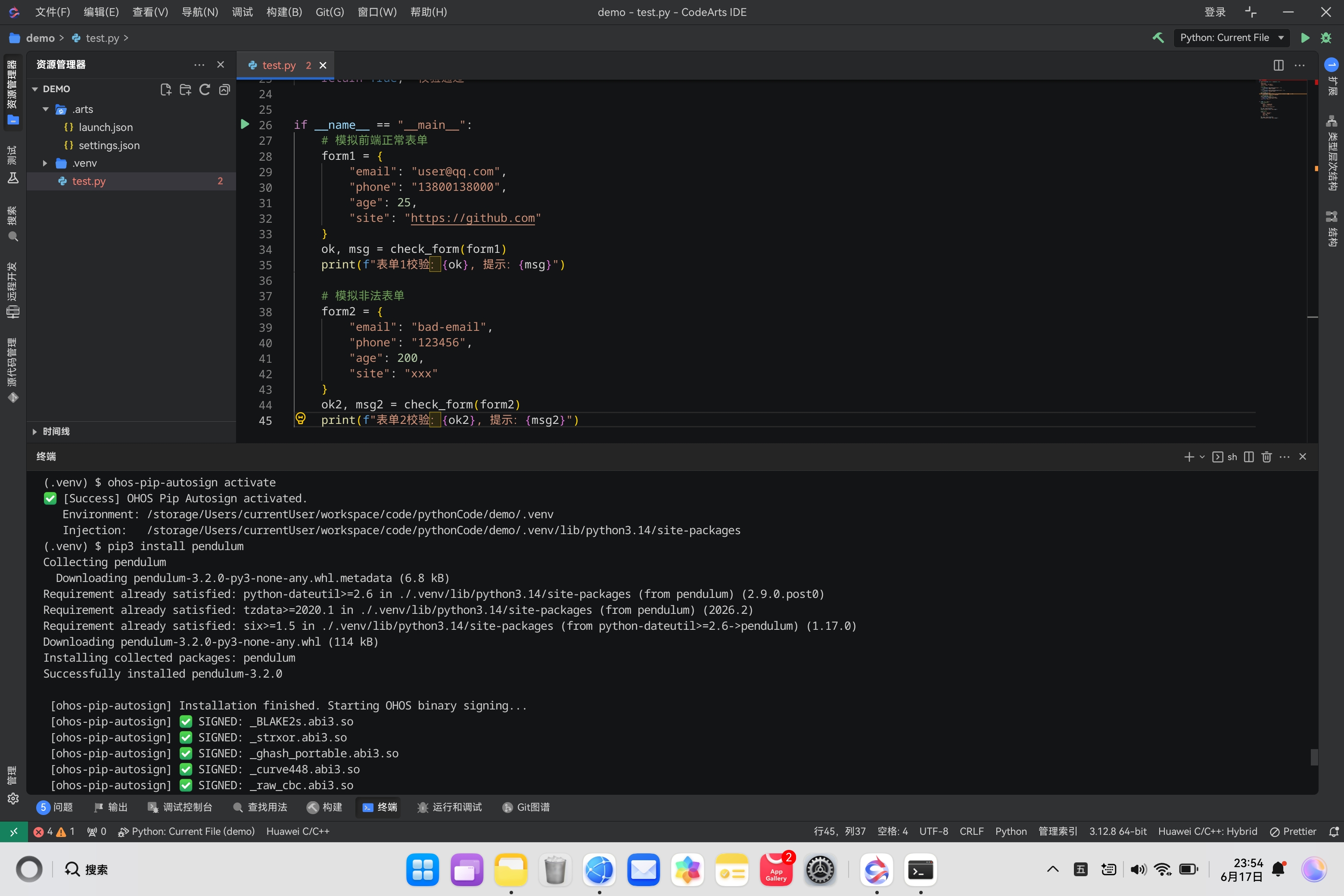
3. 基础导入
import pendulum
完整可运行 Demo 分场景
Demo1:获取当前时间、格式化、时间戳
import pendulum

# 本地当前时间(东八区 Asia/Shanghai)
now = pendulum.now("Asia/Shanghai")
print("完整时间对象:", now)
print("标准格式:", now.format("YYYY-MM-DD HH:mm:ss"))
print("纯日期:", now.to_date_string())
print("纯时间:", now.to_time_string())
print("中文格式:", now.format("YYYY年MM月DD日 HH时mm分"))

# UTC 零时区
utc_now = pendulum.utcnow()
print("\nUTC时间:", utc_now.format("YYYY-MM-DD HH:mm:ss"))

# 时间戳
ts_sec = now.int_timestamp  # 秒
ts_ms = now.int_timestamp * 1000  # 毫秒
print("秒时间戳:", ts_sec)
print("毫秒时间戳:", ts_ms)

# 时间戳还原
t1 = pendulum.from_timestamp(ts_sec, tz="Asia/Shanghai")
print("时间戳还原:", t1.format("YYYY-MM-DD"))
Demo2:解析任意格式日期字符串(自动识别时区)
import pendulum

time_list = [
    "2026-06-18",
    "2026/06/18 14:30",
    "20260618102000",
    "2026-06-18T08:00:00Z",  # UTC标准
    "2026年06月18日"
]

for s in time_list:
    dt = pendulum.parse(s, tz="Asia/Shanghai")
    print(f"{s:<30} → {dt.format('YYYY-MM-DD HH:mm:ss')}")

# 严格指定格式解析
dt_custom = pendulum.from_format("18|06|2026", "DD|MM|YYYY", tz="Asia/Shanghai")
print("\n自定义分隔解析:", dt_custom.format("YYYY-MM-DD"))
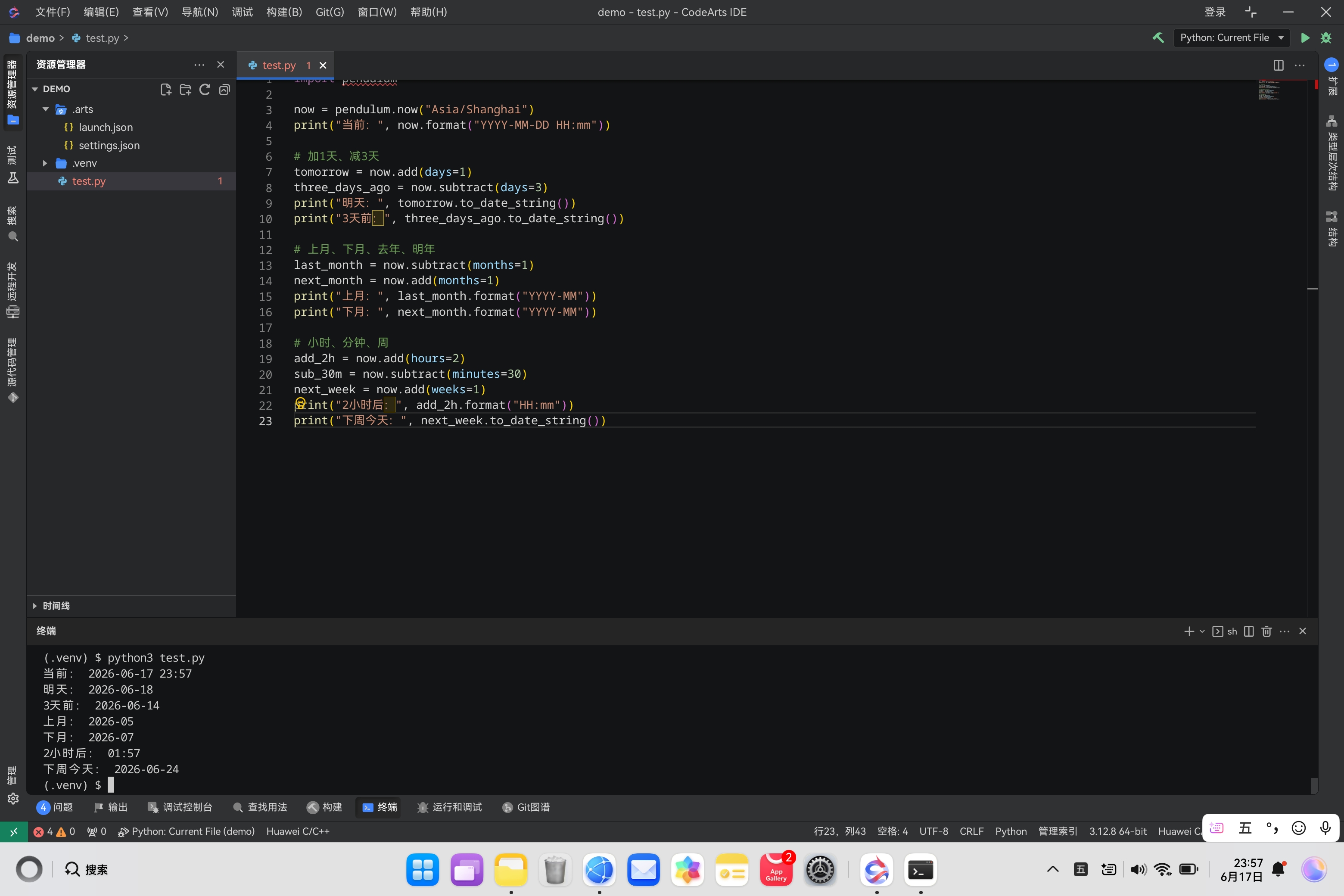
Demo3:时间偏移(加减年/月/日/时/分/周)
import pendulum

now = pendulum.now("Asia/Shanghai")
print("当前:", now.format("YYYY-MM-DD HH:mm"))

# 加1天、减3天
tomorrow = now.add(days=1)
three_days_ago = now.subtract(days=3)
print("明天:", tomorrow.to_date_string())
print("3天前:", three_days_ago.to_date_string())

# 上月、下月、去年、明年
last_month = now.subtract(months=1)
next_month = now.add(months=1)
print("上月:", last_month.format("YYYY-MM"))
print("下月:", next_month.format("YYYY-MM"))

# 小时、分钟、周
add_2h = now.add(hours=2)
sub_30m = now.subtract(minutes=30)
next_week = now.add(weeks=1)
print("2小时后:", add_2h.format("HH:mm"))
print("下周今天:", next_week.to_date_string())
Demo4:获取区间边界(当日0点、当月首尾、季度、年份)
import pendulum

now = pendulum.now("Asia/Shanghai")

# 当日零点、当日最后一秒
day_start = now.start_of("day")
day_end = now.end_of("day")
print("今日0点:", day_start.format("YYYY-MM-DD HH:mm:ss"))
print("今日23:59:59:", day_end.format("YYYY-MM-DD HH:mm:ss"))

# 当月首尾
month_start = now.start_of("month")
month_end = now.end_of("month")
print("\n本月第一天:", month_start.to_date_string())
print("本月最后一天:", month_end.to_date_string())

# 季度、年份
q_start = now.start_of("quarter")
year_start = now.start_of("year")
print("\n本季度起始:", q_start.to_date_string())
print("今年第一天:", year_start.to_date_string())
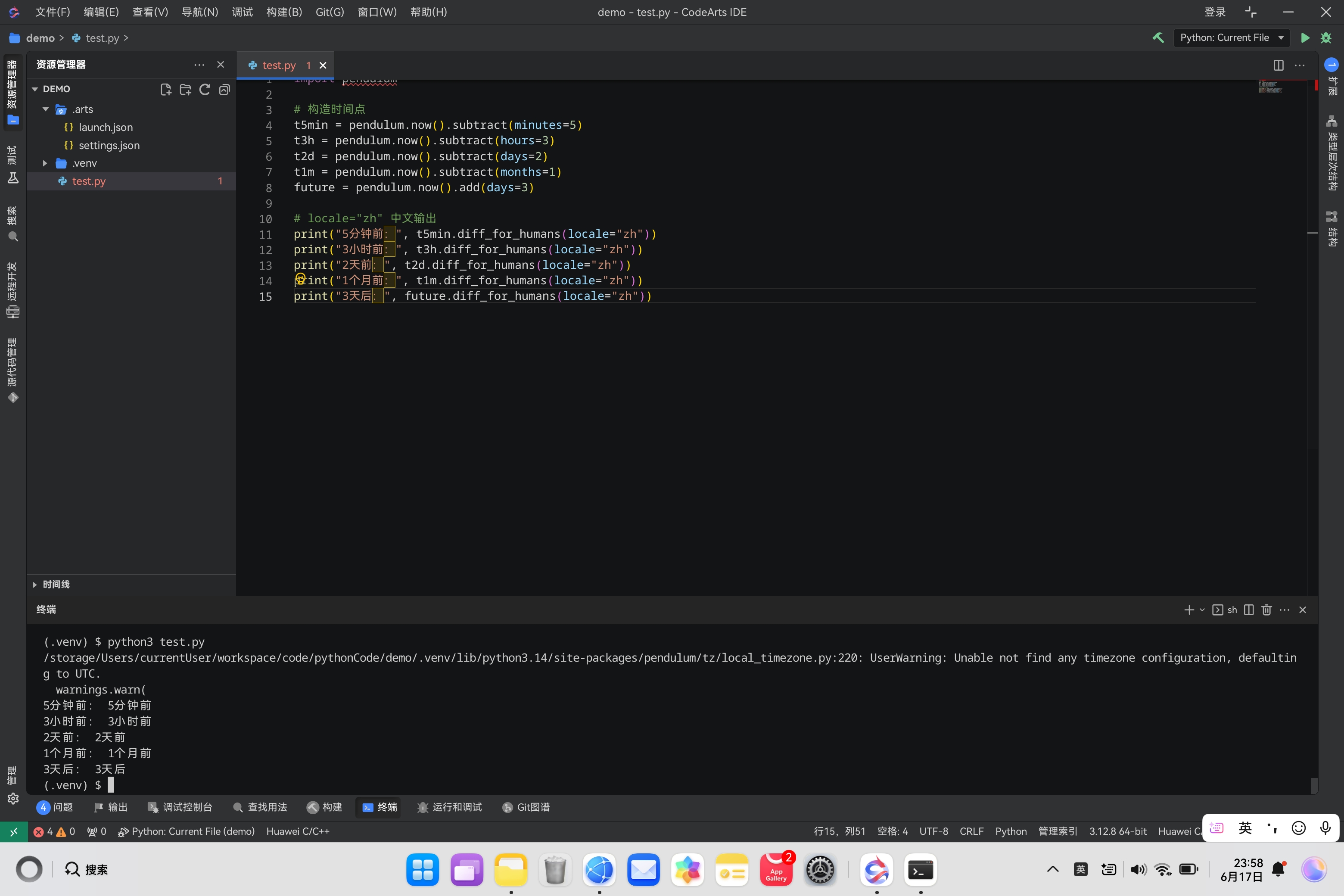
Demo5:中文人性化相对时间(几分钟前/几天后)
import pendulum

# 构造时间点
t5min = pendulum.now().subtract(minutes=5)
t3h = pendulum.now().subtract(hours=3)
t2d = pendulum.now().subtract(days=2)
t1m = pendulum.now().subtract(months=1)
future = pendulum.now().add(days=3)

# locale="zh" 中文输出
print("5分钟前:", t5min.diff_for_humans(locale="zh"))
print("3小时前:", t3h.diff_for_humans(locale="zh"))
print("2天前:", t2d.diff_for_humans(locale="zh"))
print("1个月前:", t1m.diff_for_humans(locale="zh"))
print("3天后:", future.diff_for_humans(locale="zh"))
Demo6:时区转换(UTC ↔ 北京时间、纽约时间)
import pendulum

# UTC转北京时间
utc_dt = pendulum.utcnow()
cn_dt = utc_dt.in_tz("Asia/Shanghai")
print("UTC:", utc_dt.format("YYYY-MM-DD HH:mm:ss"))
print("北京时间:", cn_dt.format("YYYY-MM-DD HH:mm:ss"))

# 北京时间转纽约时区
ny_dt = cn_dt.in_tz("America/New_York")
print("纽约时间:", ny_dt.format("YYYY-MM-DD HH:mm:ss"))
Demo7:时间比较、差值、区间判断
import pendulum

t1 = pendulum.parse("2026-01-01", tz="Asia/Shanghai")
t2 = pendulum.parse("2026-06-18", tz="Asia/Shanghai")
now = pendulum.now("Asia/Shanghai")

# 大小判断
print("t1 < t2:", t1 < t2)
print("t2 > t1:", t2 > t1)
print("相等:", t1.is_same_day(t2))

# 是否在区间内
start = pendulum.parse("2026-01-01")
end = pendulum.parse("2026-12-31")
print("当前在2026年内:", now.is_between(start, end))

# 计算差值
diff_days = t2.diff(t1).in_days()
diff_hours = t2.diff(t1).in_hours()
print(f"相差天数:{diff_days}")
print(f"相差小时:{diff_hours}")
Demo8:项目通用时间工具封装
import pendulum

class PendulumTimeUtil:
    TZ = "Asia/Shanghai"

    @staticmethod
    def now_str(fmt="YYYY-MM-DD HH:mm:ss"):
        return pendulum.now(PendulumTimeUtil.TZ).format(fmt)

    @staticmethod
    def get_ms_ts():
        return pendulum.now(PendulumTimeUtil.TZ).int_timestamp * 1000

    @staticmethod
    def parse_time(date_str):
        return pendulum.parse(date_str, tz=PendulumTimeUtil.TZ)

    @staticmethod
    def get_day_range(offset=0):
        """offset=0今天 -1昨天 1明天"""
        target = pendulum.now(PendulumTimeUtil.TZ).add(days=offset)
        s = target.start_of("day").format()
        e = target.end_of("day").format()
        return s, e

    @staticmethod
    def get_month_range(offset=0):
        target = pendulum.now(PendulumTimeUtil.TZ).add(months=offset)
        s = target.start_of("month").to_date_string()
        e = target.end_of("month").to_date_string()
        return s, e

    @staticmethod
    def human_cn(dt):
        return dt.diff_for_humans(locale="zh")


if __name__ == "__main__":
    util = PendulumTimeUtil()
    print("当前时间:", util.now_str())
    print("毫秒时间戳:", util.get_ms_ts())
    print("今日区间:", util.get_day_range(0))
    t = pendulum.now().subtract(hours=2)
    print("相对时间:", util.human_cn(t))
三、pendulum 对比 arrow / datetime 优势
- 时区更强:arrow 夏令时偶尔出错,pendulum 底层基于 pytz,国际化稳定;
- 内置多语言本地化,中文友好;
- 时间段、季度、日历操作API更完善;
diff_for_humans原生支持中文,无需额外配置;- 可直接转标准 datetime 对象兼容老代码:
dt = pendulum.now().datetime
四、使用注意事项
- 所有时间建议显式指定时区
tz="Asia/Shanghai",避免服务器时区混乱; - 解析带Z的UTC时间字符串会自动识别时区;
- 与Django配合时,存入数据库建议统一转
YYYY-MM-DD HH:mm:ss字符串或时间戳; - 如需转回原生datetime:
pendulum_obj.datetime;转回date:pendulum_obj.date()。

作为“人工智能6S店”的官方数字引擎,为AI开发者与企业提供一个覆盖软硬件全栈、一站式门户。
更多推荐
 0
0 0
0- 0


 已为社区贡献9条内容

所有评论(0)