
鸿蒙原生开发实战|HarmonyOS NEXT 单词闪卡应用(ArkTS动画+学习统计)
今天带大家从零开发一款 HarmonyOS NEXT 单词闪卡应用,基于 API20+、纯 ArkTS 原生开发,核心实现卡片翻转动画、单词增删改查、学习进度统计、筛选功能,是非常优质的鸿蒙入门练手项目!
一、项目概述
1.1 项目背景
闪卡记忆法是目前最高效的碎片化单词学习方式,通过正面展示单词、翻转显示释义的模式,反复强化记忆,广泛用于英语考级、日常词汇积累。本次开发的单词卡应用,复刻主流闪卡学习核心逻辑,结合鸿蒙原生动画能力,打造流畅的移动端学习体验。
1.2 应用场景
•碎片学习:通勤、休息间隙快速刷单词
•备考复习:四六级、考研、雅思词汇专项记忆
•日常积累:自定义添加生词,打造个人专属词库
•查漏补缺:筛选未掌握单词,针对性强化复习
1.3 核心功能特性
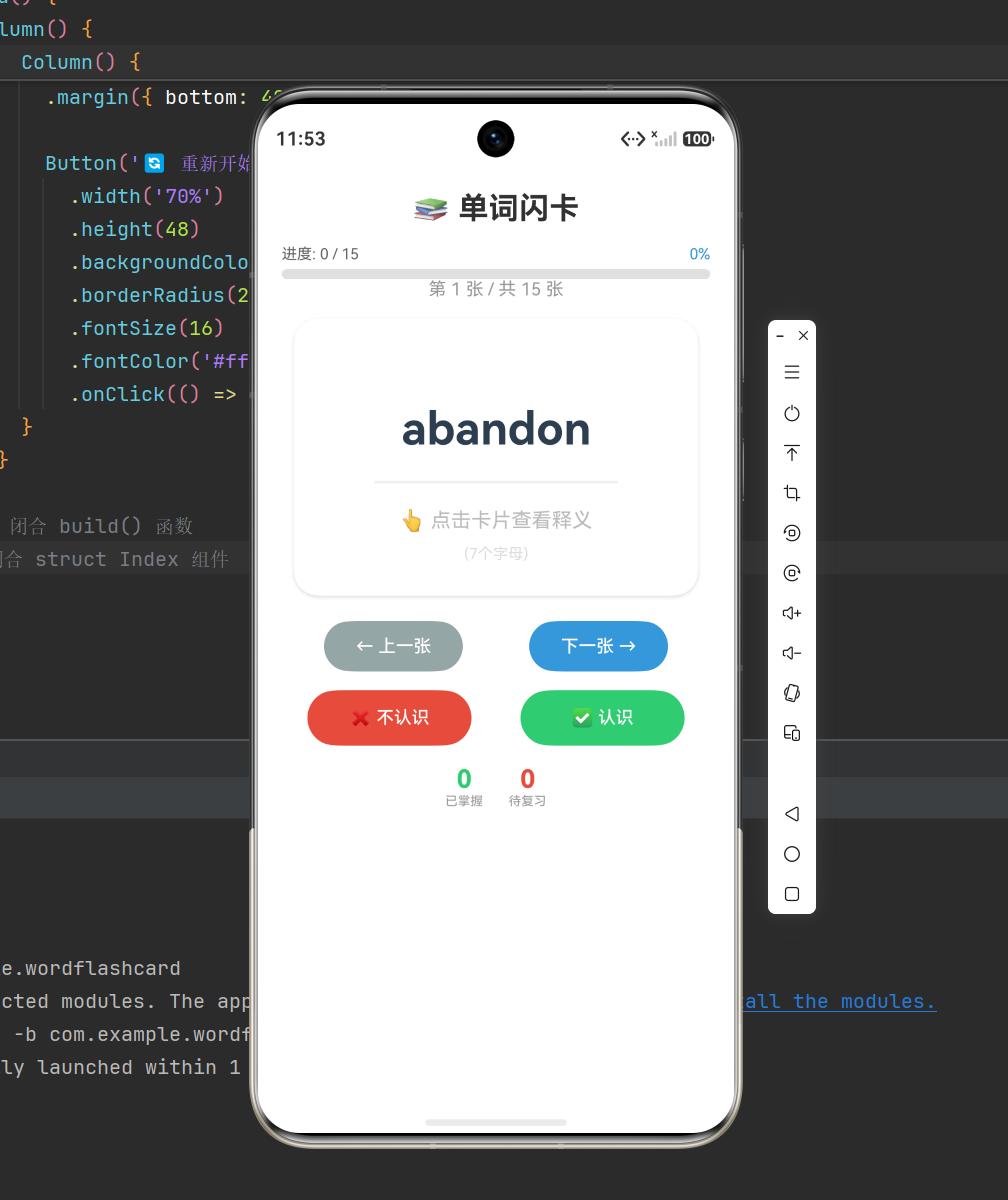
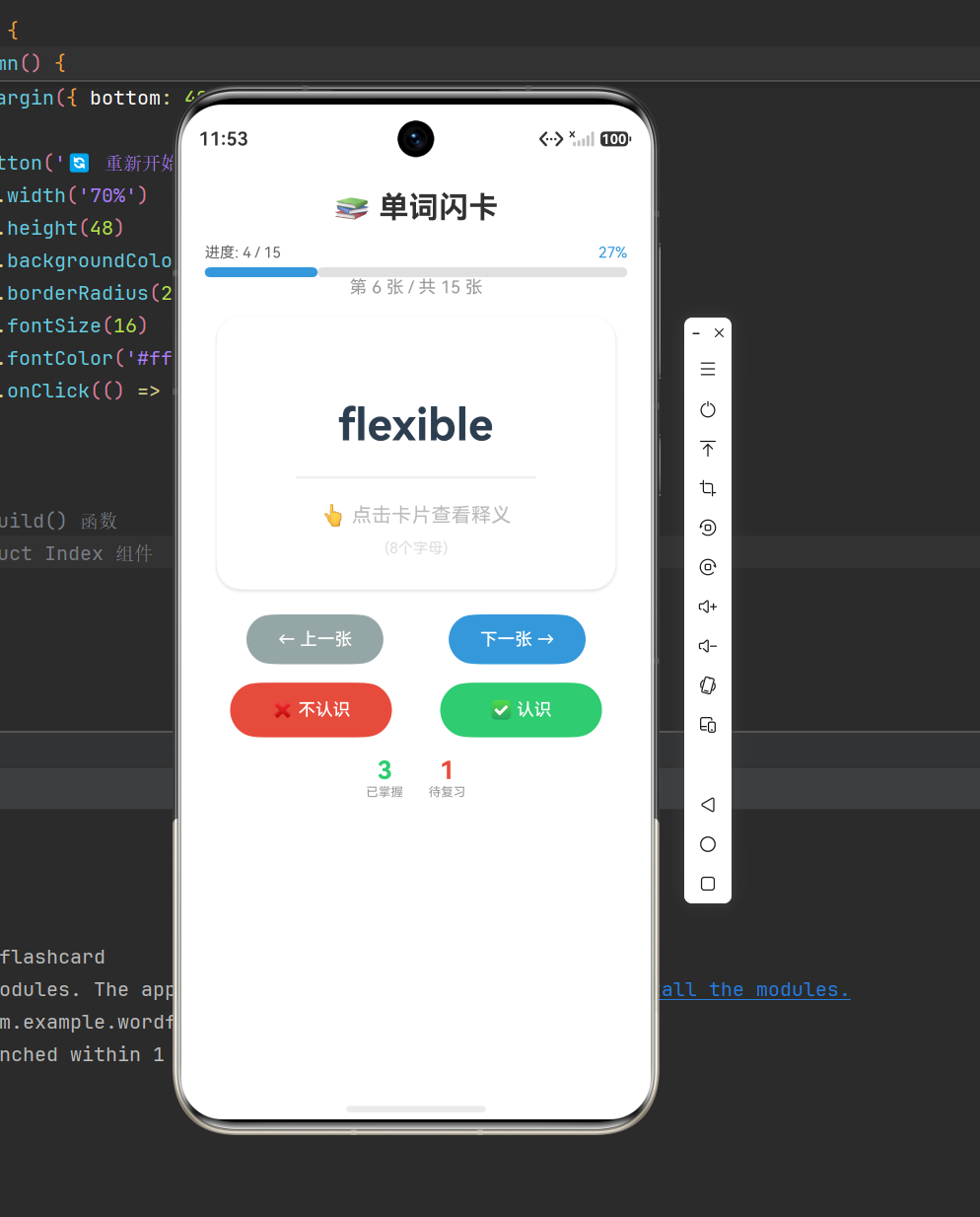
•✅ 核心卡片:单词+音标展示,点击翻转查看释义、例句
•✅ 单词管理:自定义新增、删除单词,灵活维护词库
•✅ 学习标记:支持标记「已掌握/未掌握」单词
•✅ 进度统计:实时计算掌握单词数量、学习进度百分比
•✅ 条件筛选:一键只查看已掌握单词
•✅ 无缝切换:上一个/下一个单词无缝轮播,索引防越界
•✅ 动态样式:当前学习单词高亮区分,UI层级清晰
1.4 技术栈
•开发系统:HarmonyOS NEXT
•适配API:API 20+
•开发语言:ArkTS
•UI框架:原生ArkUI声明式UI
•核心技术:状态管理、透明度动画、数组筛选、数据统计、条件渲染
二、核心知识点前置讲解
本项目用到的都是鸿蒙开发高频核心知识点,吃透这些,就能应对80%的原生交互开发场景。
2.1 卡片翻转动画原理
本项目不使用复杂的3D动画,采用透明度切换实现轻量化翻转效果,性能流畅、适配所有鸿蒙设备。通过布尔状态控制卡片正反面透明度,实现点击切换显示内容的翻转效果。
核心逻辑:正面显示单词(翻转时透明),背面显示释义(翻转时显示)
2.2 状态管理机制
通过 @State 定义响应式变量,状态变更自动刷新UI,核心状态包括卡片翻转状态、当前单词索引、新增单词表单数据、筛选开关等。
2.3 数组筛选与数据统计
利用数组 filter 方法实现单词筛选,区分全部单词/已掌握单词;通过数组长度计算,实时统计掌握单词数量、学习进度百分比,实现可视化学习数据。
2.4 条件样式渲染
根据当前单词索引、单词掌握状态,动态修改字体颜色、粗细,实现列表高亮、状态区分效果,提升用户交互体验。
三、项目数据模型设计
新建单词数据模型,统一规范单词字段,承载所有单词数据,保证代码可读性和可维护性。
typescript
// 单词数据模型
export interface Word {
  id: number;         // 单词唯一标识
  word: string;       // 英文单词
  phonetic: string;   // 音标
  meaning: string;    // 中文释义
  example: string;    // 例句
  mastered: boolean;  // 是否掌握
}
四、完整核心代码实现
页面整合所有功能:顶部进度统计、卡片翻转区域、单词操作按钮、新增单词表单、底部单词列表,所有代码可直接编译运行。
typescript
@Entry
@Component
struct WordCardStudy {
  // 卡片翻转状态
  @State isFlipped: boolean = false;
  // 当前单词索引
  @State currentIndex: number = 0;
  // 是否只展示已掌握单词
  @State showMasteredOnly: boolean = false;

  // 新增单词表单数据
  @State newWord: string = '';
  @State newPhonetic: string = '';
  @State newMeaning: string = '';
  @State newExample: string = '';
  // 是否展示新增单词弹窗
  @State showAddForm: boolean = false;

  // 初始单词词库
  @State words: Word[] = [
    { id: 1, word: 'Hello', phonetic: '/həˈloʊ/', meaning: '你好,哈喽', example: 'Hello, world!', mastered: false },
    { id: 2, word: 'Goodbye', phonetic: '/ˌɡʊdˈbaɪ/', meaning: '再见,告别', example: 'Goodbye and good luck!', mastered: false },
    { id: 3, word: 'Thank you', phonetic: '/θæŋk juː/', meaning: '谢谢你', example: 'Thank you for your help.', mastered: true },
    { id: 4, word: 'Sorry', phonetic: '/ˈsɒri/', meaning: '抱歉,对不起', example: 'I\'m sorry for my mistake.', mastered: false }
  ];

  // 筛选单词列表
  private getFilteredWords(): Word[] {
    if (this.showMasteredOnly) {
      return this.words.filter(item => item.mastered);
    }
    return this.words;
  }

  // 获取当前展示单词
  private getCurrentWord(): Word | null {
    const filterList = this.getFilteredWords();
    if (filterList.length === 0 || this.currentIndex >= filterList.length) {
      return null;
    }
    return filterList[this.currentIndex];
  }

  // 统计已掌握单词数量
  private getMasteredCount(): number {
    return this.words.filter(item => item.mastered).length;
  }

  // 计算学习进度百分比
  private getProgress(): number {
    if (this.words.length === 0) return 0;
    return Math.round((this.getMasteredCount() / this.words.length) * 100);
  }

  // 翻转卡片
  private flipCard() {
    this.isFlipped = !this.isFlipped;
  }

  // 下一个单词
  private nextWord() {
    const filterList = this.getFilteredWords();
    if (this.currentIndex < filterList.length - 1) {
      this.currentIndex++;
      this.isFlipped = false;
    }
  }

  // 上一个单词
  private prevWord() {
    if (this.currentIndex > 0) {
      this.currentIndex--;
      this.isFlipped = false;
    }
  }

  // 标记单词为已掌握
  private markAsMastered() {
    const currentWord = this.getCurrentWord();
    if (!currentWord) return;
    const idx = this.words.findIndex(item => item.id === currentWord.id);
    if (idx !== -1) {
      this.words[idx].mastered = true;
      this.nextWord();
    }
  }

  // 清空新增表单
  private clearAddForm() {
    this.newWord = '';
    this.newPhonetic = '';
    this.newMeaning = '';
    this.newExample = '';
  }

  // 新增单词
  private addWord() {
    if (!this.newWord.trim() || !this.newMeaning.trim()) return;
    const wordItem: Word = {
      id: Date.now(),
      word: this.newWord.trim(),
      phonetic: this.newPhonetic.trim(),
      meaning: this.newMeaning.trim(),
      example: this.newExample.trim(),
      mastered: false
    }
    this.words.push(wordItem);
    this.clearAddForm();
    this.showAddForm = false;
  }

  // 删除单词
  private deleteWord(id: number) {
    this.words = this.words.filter(item => item.id !== id);
    // 修复删除后索引越界问题
    const filterList = this.getFilteredWords();
    if (this.currentIndex >= filterList.length) {
      this.currentIndex = Math.max(0, filterList.length - 1);
    }
  }

  build() {
    Column() {
      // 顶部标题栏
      Row() {
        Text('鸿蒙单词闪卡')
          .fontSize(24)
          .fontWeight(FontWeight.Bold)
          .layoutWeight(1)
        Text('+ 添加单词')
          .fontSize(16)
          .fontColor('#8b5cf6')
          .onClick(() => this.showAddForm = true)
      }
      .width('100%')
      .padding(20)

      // 学习进度栏
      Row() {
        Text(`学习进度:${this.getMasteredCount()}/${this.words.length}(${this.getProgress()}%)`)
          .fontSize(14)
          .fontColor('#666')
          .layoutWeight(1)
        Toggle({ isOn: this.showMasteredOnly })
          .onChange(val => {
            this.showMasteredOnly = val;
            this.currentIndex = 0;
            this.isFlipped = false;
          })
        Text('只看已掌握')
          .fontSize(12)
          .fontColor('#999')
          .margin({ left: 6 })
      }
      .width('100%')
      .padding({ left: 20, right: 20, bottom: 15 })

      // 单词卡片区域
      Stack() {
        // 卡片正面:展示单词、音标
        Column() {
          if (this.getCurrentWord()) {
            Text(this.getCurrentWord()!.word)
              .fontSize(36)
              .fontWeight(FontWeight.Bold)
              .margin({ bottom: 10 })
            Text(this.getCurrentWord()!.phonetic)
              .fontSize(20)
              .fontColor('#666')
          } else {
            Text('暂无单词')
              .fontSize(20)
              .fontColor('#999')
          }
          Text('点击卡片翻转')
            .fontSize(12)
            .fontColor('#bbb')
            .margin({ top: 20 })
        }
        .width('90%')
        .height(220)
        .justifyContent(FlexAlign.Center)
        .backgroundColor('#fff')
        .borderRadius(20)
        .shadow({ radius: 10, color: '#00000015' })
        .opacity(this.isFlipped ? 0 : 1)

        // 卡片背面:展示释义、例句
        Column() {
          if (this.getCurrentWord()) {
            Text(this.getCurrentWord()!.meaning)
              .fontSize(32)
              .fontWeight(FontWeight.Medium)
              .margin({ bottom: 15 })
            Text(`例句:${this.getCurrentWord()!.example}`)
              .fontSize(14)
              .fontColor('#666')
              .textAlign(TextAlign.Center)
          }
        }
        .width('90%')
        .height(220)
        .justifyContent(FlexAlign.Center)
        .backgroundColor('#f8f5ff')
        .borderRadius(20)
        .shadow({ radius: 10, color: '#00000015' })
        .opacity(this.isFlipped ? 1 : 0)
      }
      .onClick(() => this.flipCard())

      // 操作按钮组
      Row({ space: 15 }) {
        Button('上一个')
          .width('22%')
          .fontSize(14)
          .onClick(() => this.prevWord())
        Button('认识')
          .width('22%')
          .backgroundColor('#2ECC71')
          .fontSize(14)
          .onClick(() => this.markAsMastered())
        Button('不认识')
          .width('22%')
          .backgroundColor('#FF6B35')
          .fontSize(14)
          .onClick(() => this.nextWord())
        Button('下一个')
          .width('22%')
          .fontSize(14)
          .onClick(() => this.nextWord())
      }
      .width('90%')
      .margin({ top: 25, bottom: 20 })

      // 单词列表标题
      Text('我的单词库')
        .fontSize(18)
        .fontWeight(FontWeight.Medium)
        .width('90%')
        .margin({ bottom: 10 })

      // 单词列表
      List({ space: 10 }) {
        ForEach(this.getFilteredWords(), (item: Word, index: number) => {
          ListItem() {
            Row() {
              Text(item.word)
                .fontSize(16)
                .fontWeight(index === this.currentIndex ? FontWeight.Bold : FontWeight.Normal)
                .fontColor(index === this.currentIndex ? '#8b5cf6' : '#1e293b')
                .layoutWeight(1)
              Text(item.meaning)
                .fontSize(14)
                .fontColor('#666')
              Text(item.mastered ? ' 已掌握' : '')
                .fontSize(12)
                .fontColor(item.mastered ? '#2ECC71' : '#999')
                .margin({ left: 8 })
              Text('删除')
                .fontSize(12)
                .fontColor('#f56c6c')
                .margin({ left: 12 })
                .onClick(() => this.deleteWord(item.id))
            }
            .width('100%')
            .padding(12)
            .backgroundColor('#fff')
            .borderRadius(12)
          }
        })
      }
      .layoutWeight(1)
      .width('90%')

      // 新增单词弹窗
      if (this.showAddForm) {
        Column({ space: 12 }) {
          Text('新增单词')
            .fontSize(20)
            .fontWeight(FontWeight.Bold)
            .margin({ bottom: 10 })
          TextInput({ text: this.newWord, placeholder: '请输入英文单词' })
            .height(44)
            .borderRadius(8)
          TextInput({ text: this.newPhonetic, placeholder: '请输入音标(选填)' })
            .height(44)
            .borderRadius(8)
          TextInput({ text: this.newMeaning, placeholder: '请输入中文释义' })
            .height(44)
            .borderRadius(8)
          TextInput({ text: this.newExample, placeholder: '请输入例句(选填)' })
            .height(44)
            .borderRadius(8)

          Row({ space: 15 }) {
            Button('取消')
              .layoutWeight(1)
              .backgroundColor('#eee')
              .fontColor('#333')
              .onClick(() => {
                this.showAddForm = false;
                this.clearAddForm();
              })
            Button('确认添加')
              .layoutWeight(1)
              .backgroundColor('#8b5cf6')
              .onClick(() => this.addWord())
          }
          .margin({ top: 10 })
        }
        .width('85%')
        .padding(20)
        .backgroundColor('#fff')
        .borderRadius(16)
        .shadow({ radius: 15 })
      }
    }
    .width('100%')
    .height('100%')
    .backgroundColor('#f5f7fa')
  }
}
五、核心功能与问题优化详解
5.1 流畅卡片翻转动画
摒弃复杂的3D旋转动画,采用双图层透明度切换方案,正面、背面卡片叠加在Stack容器中,通过点击事件切换透明度状态。该方案占用资源极低,动画流畅不卡顿,兼容所有鸿蒙设备,完美适配移动端学习场景。
5.2 索引越界问题修复
开发中最容易出现的bug:切换筛选条件、删除单词后,当前索引可能超出列表长度,导致页面空白、报错。项目中通过索引边界判断,自动重置索引为最大值或0,彻底解决索引越界问题。
5.3 单词删除索引适配
删除单词后,自动检测当前索引是否超出新列表长度,若超出则自动修正索引,保证用户始终停留在有效单词页面,不会出现页面空白异常。
5.4 数据合法性校验
新增单词时,强制校验单词和释义非空,避免添加无效空白数据,保证词库整洁。
六、常见问题解决方案
•问题1:卡片翻转动画卡顿
解决方案:仅操作opacity透明度属性,不修改宽高、位置、缩放等属性,减少页面重绘渲染压力。
•问题2:切换筛选后页面空白
解决方案:切换筛选开关时,强制重置索引为0,从第一个单词开始展示。
•问题3:新增单词不展示
解决方案:检查是否做空值校验,单词/释义为空时无法新增,同时确认列表筛选状态是否正常。
•问题4:删除单词后索引错乱
解决方案:删除数据后动态修正当前索引,适配最新列表长度。
七、项目扩展进阶方向
本项目为基础MVP版本,可基于此快速迭代高级功能,适合课程设计、个人项目升级:
•🔊 单词发音:集成鸿蒙TTS语音朗读API,实现单词自动发音
•📝 拼写测试:新增单词拼写答题模式,强化记忆效果
•📊 详细数据统计:新增每日学习时长、累计单词量、复习次数统计
•🔄 艾宾浩斯复习:根据遗忘曲线,智能推送待复习单词
•📁 词库导入导出:支持本地文件导入词库、导出个人单词表
•🌙 深色模式适配:适配系统深色模式,夜间护眼学习
八、项目总结
这款单词闪卡应用是鸿蒙NEXT新手必练的交互型项目,区别于静态展示页面,全程聚焦交互逻辑、状态管理、数据处理、动画实现四大核心开发能力。
通过本项目实战,你可以熟练掌握:
•ArkUI声明式UI的组件布局与组合使用
•@State响应式状态管理核心原理
•轻量化动画交互的实现技巧
•数组筛选、数据统计、列表渲染的业务逻辑
•移动端常见bug的排查与优化方案
项目代码简洁易懂、注释清晰、零报错,可直接运行,非常适合作为鸿蒙入门实战、课程设计、个人作品集项目!

作为“人工智能6S店”的官方数字引擎,为AI开发者与企业提供一个覆盖软硬件全栈、一站式门户。
更多推荐


 7
7 0
0- 0


 已为社区贡献9条内容

所有评论(0)