
HarmonyOS NEXT 实战:从零开发一款「随笔记」完整项目(ArkTS+持久化+搜索分类)
·
今天带大家 从零手写一款完整可上线的「随笔记」App,覆盖鸿蒙开发最核心、面试最高频的技术:
- ✅ 声明式 UI 完整页面搭建
- ✅ Preferences 本地持久化存储
- ✅ 页面路由跳转 + 参数传递
- ✅ 搜索功能 + 分类筛选
- ✅ 新增 / 编辑 / 删除笔记
- ✅ 空状态、动态标签、数量统计
- ✅ 真实开发踩坑大全
所有代码基于 HarmonyOS NEXT API23(6.1.0),全部编译通过、可直接运行。
一、项目最终效果
本项目实现一款轻量化、高颜值、完整闭环的笔记 App: - 首页展示全部笔记卡片,按更新时间排序
- 工作 / 生活 / 学习 / 其他 分类标签筛选
- 顶部搜索栏,支持标题、内容模糊搜索
- 右下角悬浮按钮新建笔记
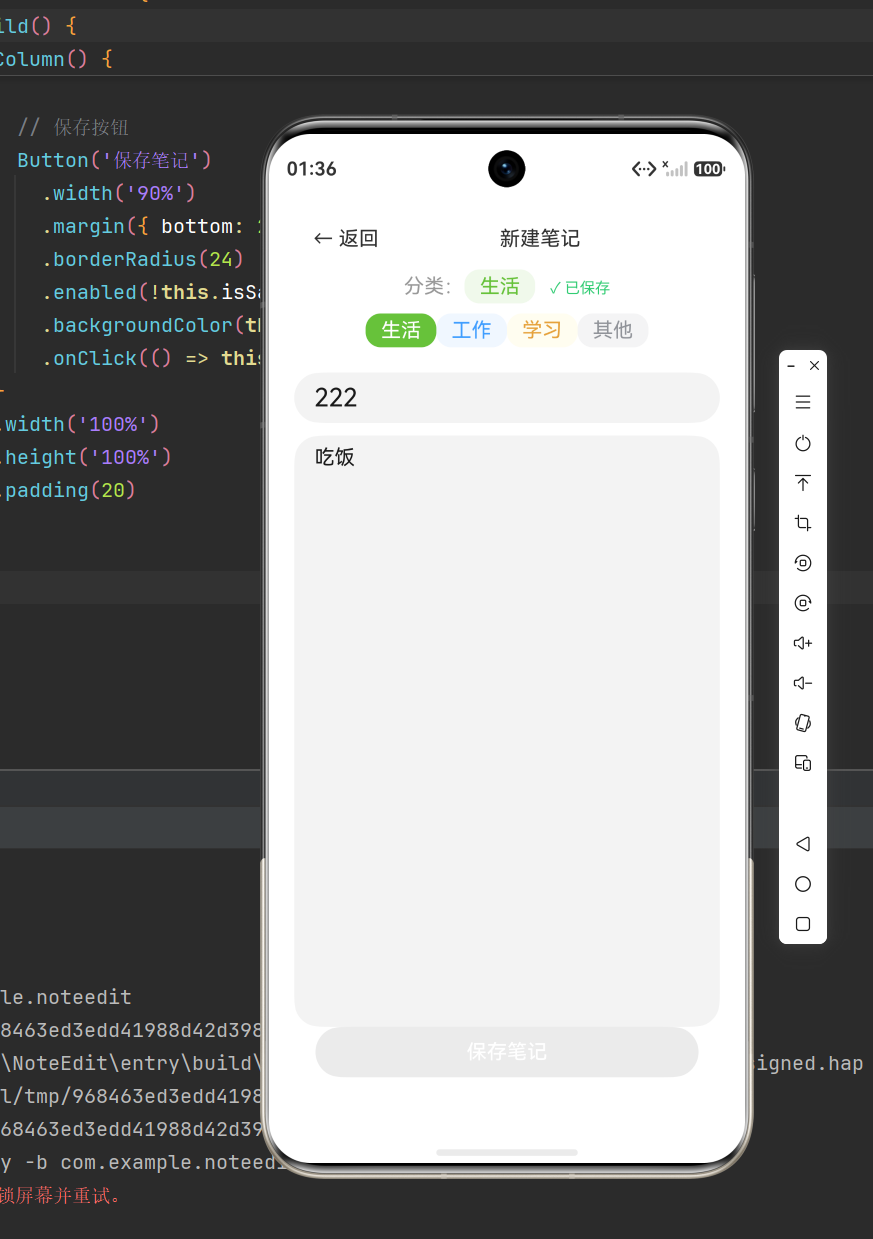
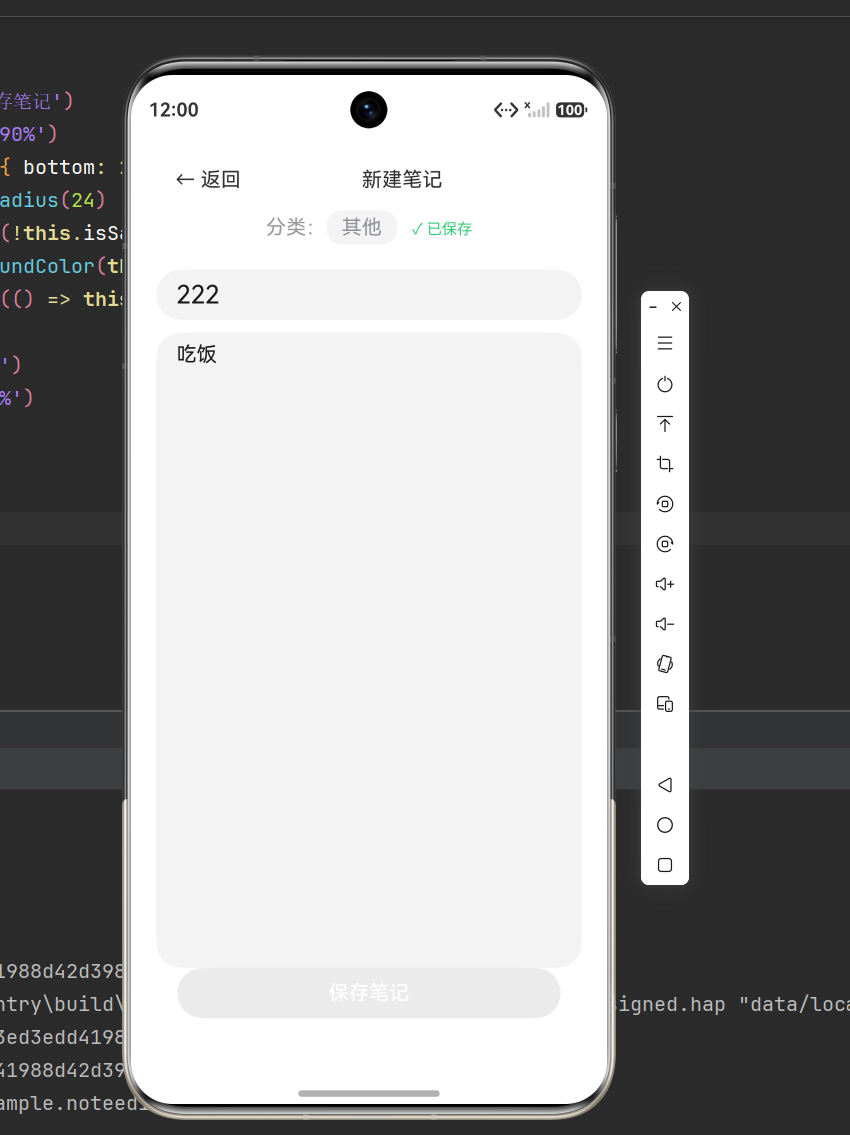
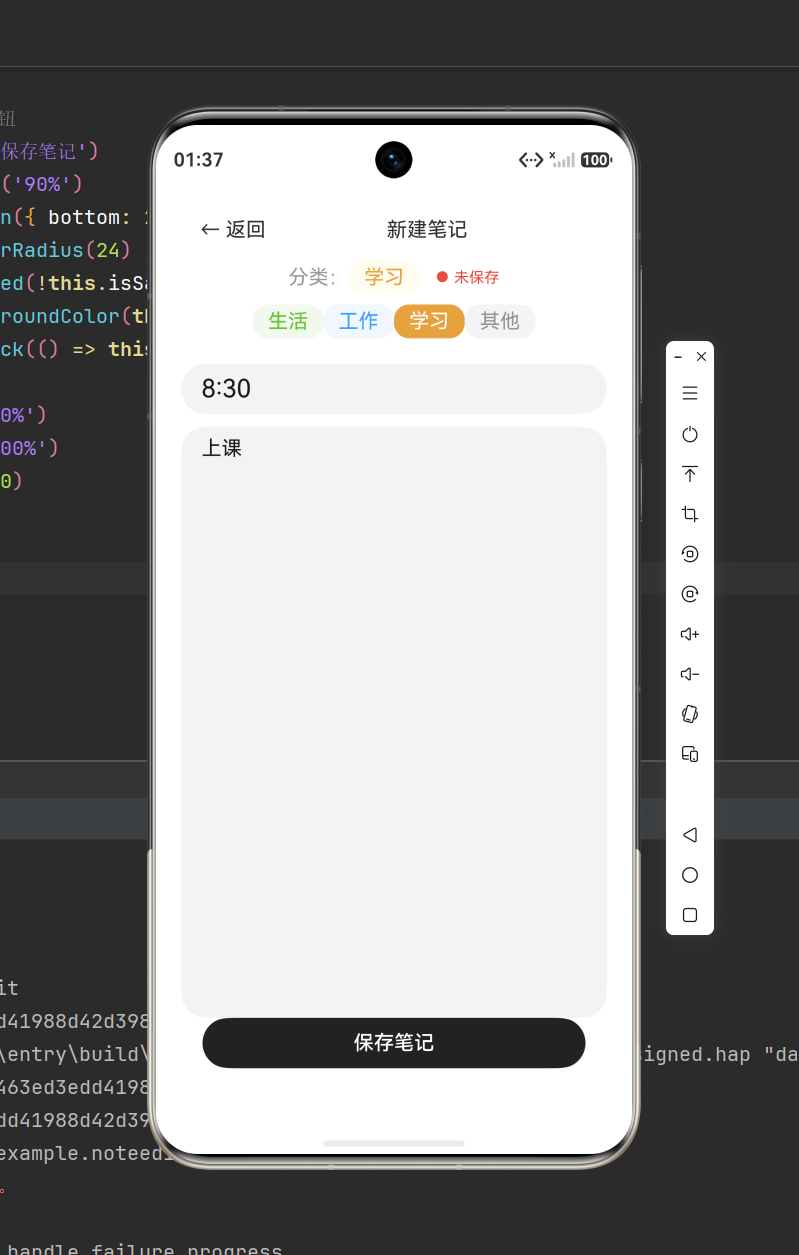
- 编辑页支持修改、自动保存、删除笔记
- App 重启数据不丢失(持久化存储)
二、创建项目与工程结构
2.1 新建项目
DevEco Studio 新建项目:Empty Ability 模板 - 项目名:project5
- 包名:com.quicknotes.app
- SDK:6.1.0(23)
- 模型:Stage 单模块
2.2 最终完整目录结构
project5/
├── AppScope/ # 应用全局配置
├── entry/
│ └── src/main/ets/
│ ├── entryability/ # 应用入口
│ ├── model/ # 数据模型
│ ├── utils/ # 存储工具类
│ └── pages/
│ ├── Index.ets # 首页笔记列表
│ └── NoteEdit.ets # 新建/编辑页面
└── resources/ # 资源文件
2.3 必须配置:页面路由
所有页面必须在 main_pages.json 注册,否则跳转报错!
{
  "src": [
    "pages/Index",
    "pages/NoteEdit"
  ]
}
三、数据模型设计(核心骨架)
新建 model/NoteData.ets
3.1 笔记结构
export interface Note {
  id: string;
  title: string;
  content: string;
  category: CategoryType;
  createTime: number;
  updateTime: number;
}
3.2 分类枚举
export enum CategoryType {
  ALL = '全部',
  WORK = '工作',
  LIFE = '生活',
  STUDY = '学习',
  OTHER = '其他'
}

export const CATEGORIES: CategoryType[] = [
  CategoryType.ALL,
  CategoryType.WORK,
  CategoryType.LIFE,
  CategoryType.STUDY,
  CategoryType.OTHER
];
3.3 工具函数(时间、颜色、ID)
// 唯一ID
export function generateId(): string {
  return Date.now().toString(36) + Math.random().toString(36).slice(2);
}

// 时间格式化
export function formatTime(timestamp: number): string {
  const d = new Date(timestamp);
  const y = d.getFullYear();
  const m = String(d.getMonth() + 1).padStart(2, '0');
  const day = String(d.getDate()).padStart(2, '0');
  const h = String(d.getHours()).padStart(2, '0');
  const min = String(d.getMinutes()).padStart(2, '0');
  return `${y}-${m}-${day} ${h}:${min}`;
}

// 分类文字色
export function getCategoryColor(category: CategoryType): ResourceColor {
  switch (category) {
    case CategoryType.WORK: return '#FF6B35';
    case CategoryType.LIFE: return '#2ECC71';
    case CategoryType.STUDY: return '#3498DB';
    case CategoryType.OTHER: return '#9B59B6';
    default: return '#95A5A6';
  }
}

// 分类背景色
export function getCategoryBgColor(category: CategoryType): ResourceColor {
  switch (category) {
    case CategoryType.WORK: return '#FFF3ED';
    case CategoryType.LIFE: return '#EAFAF1';
    case CategoryType.STUDY: return '#EBF5FB';
    case CategoryType.OTHER: return '#F4ECF7';
    default: return '#F2F3F4';
  }
}
四、持久化存储封装(Preferences)
新建 utils/NoteStorage.ets
轻量笔记项目首选 Preferences,简单、稳定、无需数据库。
import { preferences } from '@kit.ArkData';
import { Note } from '../model/NoteData';

const STORE_NAME = 'note_store';
const KEY_NOTES = 'note_list';

class NoteStorage {
  private pref: preferences.Preferences | null = null;

  async init(ctx: Context) {
    this.pref = await preferences.getPreferences(ctx, STORE_NAME);
  }

  async save(notes: Note[]) {
    if (!this.pref) return;
    await this.pref.put(KEY_NOTES, JSON.stringify(notes));
    await this.pref.flush();
  }

  async load(): Promise<Note[]> {
    if (!this.pref) return [];
    const str = await this.pref.get(KEY_NOTES, '[]') as string;
    try {
      return JSON.parse(str);
    } catch {
      return [];
    }
  }
}
export const noteStorage = new NoteStorage();
五、首页列表页面 Index.ets(核心)
功能:展示笔记、分类筛选、搜索、空状态、悬浮创建按钮
@Entry
@Component
struct Index {
  @State notes: Note[] = [];
  @State filteredNotes: Note[] = [];
  @State activeCategory: CategoryType = CategoryType.ALL;
  @State searchText: string = '';
  @State showSearch: boolean = false;

  async aboutToAppear() {
    await noteStorage.init(getContext());
    this.notes = await noteStorage.load();
    this.applyFilter();
  }

  applyFilter() {
    let res = [...this.notes];

    // 分类筛选
    if (this.activeCategory !== CategoryType.ALL) {
      res = res.filter(item => item.category === this.activeCategory);
    }

    // 搜索筛选
    if (this.searchText.trim()) {
      const key = this.searchText.toLowerCase();
      res = res.filter(item =>
        item.title.toLowerCase().includes(key) ||
        item.content.toLowerCase().includes(key)
      );
    }

    // 时间倒序
    res.sort((a, b) => b.updateTime - a.updateTime);
    this.filteredNotes = res;
  }

  getCategoryCount(cat: CategoryType): number {
    if (cat === CategoryType.ALL) return this.notes.length;
    return this.notes.filter(item => item.category === cat).length;
  }

  // 笔记卡片
  @Builder NoteCard(note: Note) {
    Column() {
      Text(note.category)
        .fontSize(11)
        .fontColor(getCategoryColor(note.category))
        .backgroundColor(getCategoryBgColor(note.category))
        .padding({ left: 10, right: 10, top: 3, bottom: 3 })
        .borderRadius(10)
        .alignSelf(ItemAlign.Start)

      Text(note.title || '无标题')
        .fontSize(17)
        .fontWeight(FontWeight.Medium)
        .margin({ top: 8 })
        .maxLines(1)
        .textOverflow({ overflow: TextOverflow.Ellipsis })

      Text(note.content || '暂无内容')
        .fontSize(14)
        .fontColor('#666')
        .margin({ top: 6 })
        .maxLines(2)
        .textOverflow({ overflow: TextOverflow.Ellipsis })

      Text(formatTime(note.updateTime))
        .fontSize(12)
        .fontColor('#aaa')
        .margin({ top: 10 })
    }
    .width('100%')
    .padding(16)
    .backgroundColor('#fff')
    .borderRadius(16)
    .onClick(() => {
      router.pushUrl({ url: 'pages/NoteEdit', params: { noteId: note.id } });
    })
  }

  build() {
    Column() {
      // 顶部标题栏
      Row() {
        Text('随笔记')
          .fontSize(26)
          .fontWeight(FontWeight.Bold)
          .layoutWeight(1)
        Text('🔍')
          .fontSize(22)
          .onClick(() => {
            this.showSearch = !this.showSearch;
            if (!this.showSearch) this.searchText = '';
          })
      }
      .width('100%')
      .padding({ left: 20, right: 20, top: 10 })

      // 搜索框
      if (this.showSearch) {
        TextInput({ text: this.searchText, placeholder: '搜索笔记...' })
          .margin(10)
          .height(44)
          .borderRadius(22)
          .backgroundColor('#f5f5f5')
          .onChange(v => {
            this.searchText = v;
            this.applyFilter();
          })
      }

      // 分类标签栏
      Scroll() {
        Row() {
          ForEach(CATEGORIES, (cat: CategoryType) => {
            Column() {
              Text(cat)
                .fontSize(14)
                .fontColor(this.activeCategory === cat ? '#fff' : '#666')
                .backgroundColor(this.activeCategory === cat ? '#222' : '#f0f0f0')
                .padding({ left: 14, right: 14, top: 6, bottom: 6 })
                .borderRadius(16)
                .onClick(() => {
                  this.activeCategory = cat;
                  this.applyFilter();
                })
              Text(`${this.getCategoryCount(cat)}`)
                .fontSize(11)
                .fontColor('#999')
                .margin({ top: 4 })
            }.margin({ right: 8 })
          })
        }
      }
      .height(70)
      .scrollable(ScrollDirection.Horizontal)

      // 笔记列表 / 空状态
      if (this.filteredNotes.length === 0) {
        Column() {
          Text('📝').fontSize(60)
          Text(this.searchText ? '无匹配笔记' : '暂无笔记')
            .fontSize(16).fontColor('#999').margin({ top: 10 })
        }
        .layoutWeight(1)
        .justifyContent(FlexAlign.Center)
      } else {
        List({ space: 12 }) {
          ForEach(this.filteredNotes, (item) => {
            ListItem() {
              this.NoteCard(item)
            }
          }, item => item.id)
        }
        .layoutWeight(1)
        .padding({ left: 20, right: 20, bottom: 80 })
      }

    }
    .width('100%')
    .height('100%')
    .backgroundColor('#f8f8f8')

    // 悬浮添加按钮
    Text('+')
      .fontSize(32)
      .fontColor('#fff')
      .width(56)
      .height(56)
      .textAlign(TextAlign.Center)
      .borderRadius(28)
      .backgroundColor('#222')
      .position({ x: '75%', y: '86%' })
      .onClick(() => {
        router.pushUrl({ url: 'pages/NoteEdit', params: { noteId: '' } });
      })
  }
}
六、编辑页 NoteEdit.ets(新增+编辑+删除)
@Entry
@Component
struct NoteEdit {
  @State title: string = '';
  @State content: string = '';
  @State selectedCategory: CategoryType = CategoryType.OTHER;
  @State showCategoryPicker: boolean = false;
  @State isSaved: boolean = true;

  noteId: string = '';
  isNew: boolean = true;
  notes: Note[] = [];

  async aboutToAppear() {
    const params = router.getParams() as Record<string, string>;
    this.noteId = params?.noteId || '';
    await noteStorage.init(getContext());
    this.notes = await noteStorage.load();

    if (this.noteId) {
      this.isNew = false;
      const note = this.notes.find(item => item.id === this.noteId);
      if (note) {
        this.title = note.title;
        this.content = note.content;
        this.selectedCategory = note.category;
      }
    } else {
      this.noteId = generateId();
    }
  }

  // 自动检测变更
  checkChange() {
    this.isSaved = false;
  }

  // 保存笔记
  async saveNote() {
    const now = Date.now();
    const idx = this.notes.findIndex(item => item.id === this.noteId);

    const newNote: Note = {
      id: this.noteId,
      title: this.title,
      content: this.content,
      category: this.selectedCategory,
      createTime: idx >= 0 ? this.notes[idx].createTime : now,
      updateTime: now
    };

    if (idx >= 0) {
      this.notes[idx] = newNote;
    } else {
      this.notes.push(newNote);
    }

    await noteStorage.save(this.notes);
    this.isSaved = true;
  }

  // 删除笔记
  async deleteNote() {
    this.notes = this.notes.filter(item => item.id !== this.noteId);
    await noteStorage.save(this.notes);
    router.back();
  }

  // 返回自动保存
  goBack() {
    if (!this.isSaved && (this.title || this.content)) {
      this.saveNote();
    }
    router.back();
  }

  build() {
    Column() {
      // 顶部栏
      Row() {
        Text('← 返回')
          .onClick(() => this.goBack())
        Text(this.isNew ? '新建笔记' : '编辑笔记')
          .layoutWeight(1)
          .textAlign(TextAlign.Center)
        if (!this.isNew) {
          Text('删除')
            .fontColor('#f56c6c')
            .onClick(() => this.deleteNote())
        }
      }
      .width('100%')
      .padding(15)

      // 分类选择
      Row() {
        Text('分类:').fontColor('#999')
        Text(this.selectedCategory)
          .fontColor(getCategoryColor(this.selectedCategory))
          .backgroundColor(getCategoryBgColor(this.selectedCategory))
          .padding({ left: 12, right: 12, top: 4, bottom: 4 })
          .borderRadius(12)
          .onClick(() => this.showCategoryPicker = !this.showCategoryPicker)

        Text(this.isSaved ? '✓ 已保存' : '● 未保存')
          .fontColor(this.isSaved ? '#2ECC71' : '#E74C3C')
          .fontSize(12)
          .margin({ left: 12 })
      }

      if (this.showCategoryPicker) {
        Row() {
          ForEach(CATEGORIES.filter(c => c !== CategoryType.ALL), (cat) => {
            Text(cat)
              .padding({ left: 12, right: 12, top: 4, bottom: 4 })
              .borderRadius(12)
              .fontColor(this.selectedCategory === cat ? '#fff' : getCategoryColor(cat))
              .backgroundColor(this.selectedCategory === cat ? getCategoryColor(cat) : getCategoryBgColor(cat))
              .onClick(() => {
                this.selectedCategory = cat;
                this.checkChange();
              })
          })
        }.margin({ top: 8 })
      }

      // 标题输入
      TextInput({ text: this.title, placeholder: '请输入标题' })
        .fontSize(20)
        .margin({ top: 20 })
        .onChange(v => {
          this.title = v;
          this.checkChange();
        })

      // 内容输入
      TextArea({ text: this.content, placeholder: '请输入笔记内容' })
        .layoutWeight(1)
        .margin({ top: 10 })
        .onChange(v => {
          this.content = v;
          this.checkChange();
        })

      // 保存按钮
      Button('保存笔记')
        .width('90%')
        .margin({ bottom: 20 })
        .borderRadius(24)
        .enabled(!this.isSaved)
        .backgroundColor(this.isSaved ? '#ccc' : '#222')
        .onClick(() => this.saveNote())

    }
    .width('100%')
    .height('100%')
    .padding(20)
  }
七、开发必看踩坑总结(新手99%都会错)
坑1:页面跳转失败
原因:页面没在 main_pages.json 注册
解决:新增页面必须手动配置路由表
坑2:Preferences 初始化报错
原因:全局作用域无法获取 Context
解决:必须在 aboutToAppear 中初始化
坑3:数组更新 UI 不刷新
原因:ArkTS 监听数组引用,push 不会刷新
解决:每次赋值新数组 this.arr = […this.arr]
坑4:FAB 遮挡列表内容
解决:给 List 设置 padding-bottom
八、项目总结
这个「随笔记」项目是非常完美的鸿蒙入门练手项目:
- 覆盖 响应式状态管理
- 掌握 本地持久化存储
- 掌握 路由传参、页面跳转
- 掌握 搜索、筛选、排序、空状态处理
- 掌握 组件封装、状态监听
看懂不算会,亲手敲完这个项目,才算真正入门鸿蒙开发。
九、扩展进阶方向 - 替换为关系型数据库,支持大数据量
- 增加富文本编辑器
- 图片笔记、语音笔记
- 手势侧滑删除
- 深色模式适配
- 桌面小组件

作为“人工智能6S店”的官方数字引擎,为AI开发者与企业提供一个覆盖软硬件全栈、一站式门户。
更多推荐

 5
5 0
0- 0


 已为社区贡献10条内容

所有评论(0)