
鸿蒙 HarmonyOS 6.1 自然语言分词能力实战测试 Natural Language Kit(自然语言理解服务)
·
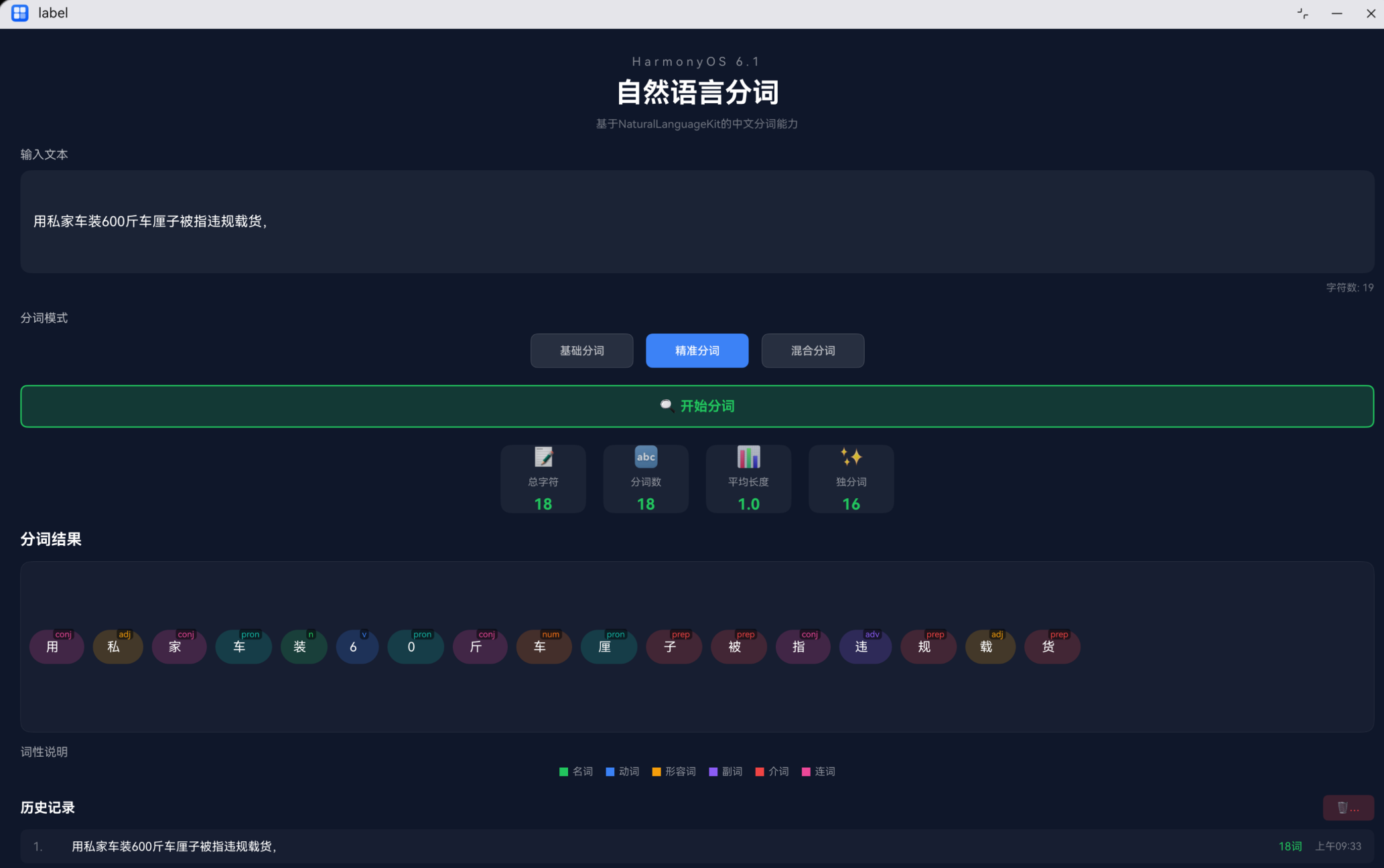
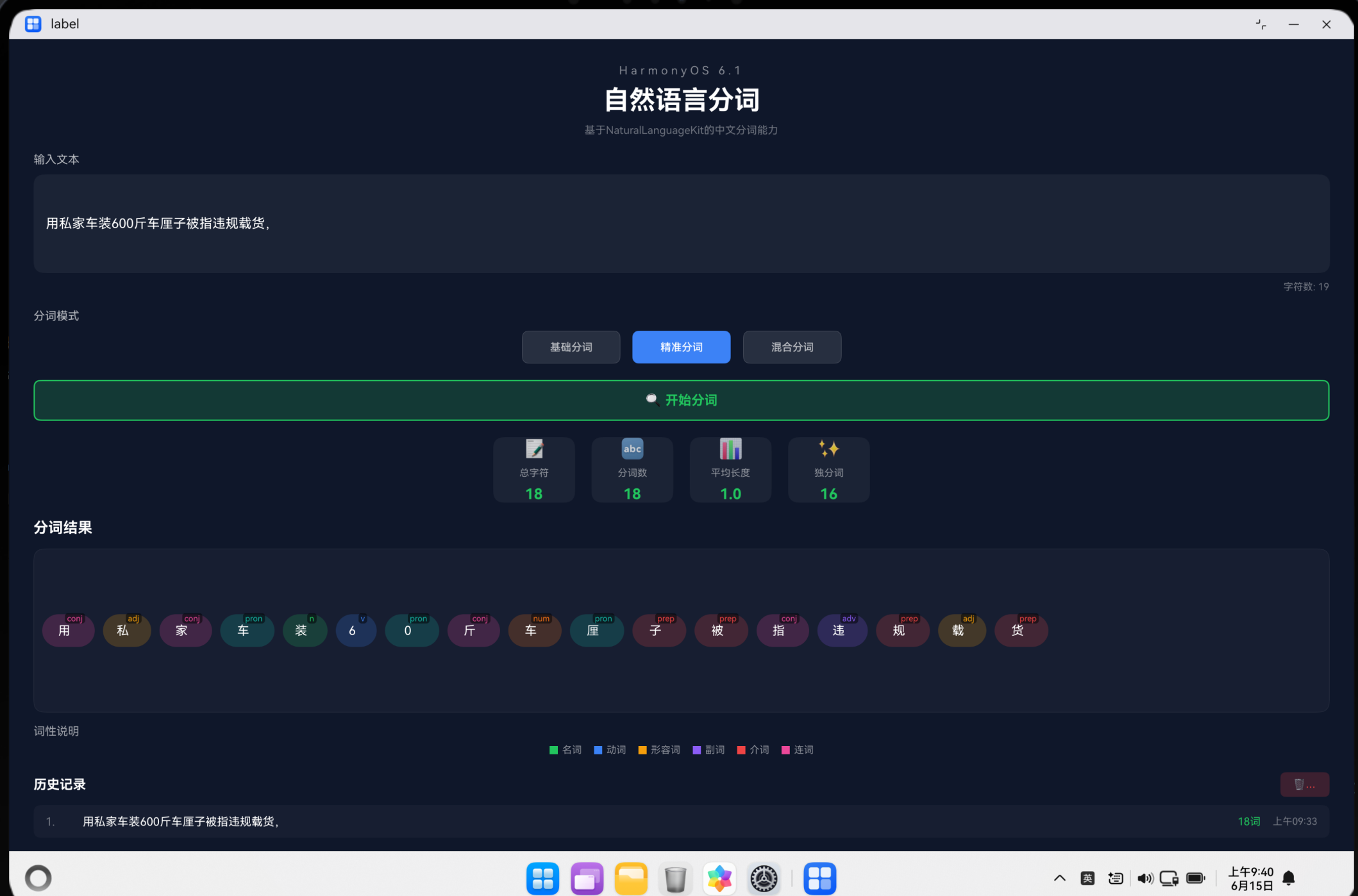
概述
自然语言处理(NLP)是人工智能领域的核心技术之一,而中文分词是NLP的基础任务。本文将介绍如何基于HarmonyOS 6.1的NaturalLanguageKit实现中文分词功能,并构建一个完整的分词应用。
技术背景
什么是中文分词
中文分词是指将一段中文文本拆分成有意义的词语序列的过程。例如:
输入:我爱自然语言处理
输出:我 / 爱 / 自然语言 / 处理
HarmonyOS NaturalLanguageKit
HarmonyOS 6.1提供了强大的NaturalLanguageKit,包含以下核心能力:
- 分词(WordSegmentation):支持多种分词模式
- 词性标注(Part-of-Speech Tagging):标注每个词的词性
- 命名实体识别(NER):识别人名、地名、机构名等
应用架构设计
整体架构
┌─────────────────────────────────────────────────────────────┐
│                      应用层                                 │
│  ┌─────────────┐  ┌─────────────┐  ┌───────────────────┐   │
│  │ 输入模块    │  │ 分词引擎    │  │ 结果展示模块     │   │
│  │ TextInput   │  │ NLP Engine  │  │ Tag Cloud        │   │
│  └──────┬──────┘  └──────┬──────┘  └────────┬──────────┘   │
└─────────┼────────────────┼───────────────────┼──────────────┘
          │                │                   │
          ▼                ▼                   ▼
┌─────────────────────────────────────────────────────────────┐
│                      业务层                                 │
│         分词模式选择 · 词性标注 · 统计分析 · 历史记录         │
└─────────────────────────────────────────────────────────────┘
          │                │                   │
          ▼                ▼                   ▼
┌─────────────────────────────────────────────────────────────┐
│                      数据层                                 │
│       SegmentItem · WordStats · HistoryRecord              │
└─────────────────────────────────────────────────────────────┘
核心数据模型
interface SegmentItem {
  word: string;  // 分词结果
  pos: string;   // 词性标签
}

interface WordStats {
  totalChars: number;     // 总字符数
  totalWords: number;     // 分词总数
  avgWordLength: number;  // 平均词长
  uniqueWords: number;    // 独分词数
}

interface HistoryRecord {
  text: string;   // 原始文本
  mode: string;   // 分词模式
  count: number;  // 分词数量
  time: string;   // 时间戳
}
核心功能实现
1. 分词模式设计
应用支持三种分词模式:
| 模式 | 说明 | 适用场景 |
|---|---|---|
| 基础分词 | 按标点符号分割 | 长文本快速处理 |
| 精准分词 | 逐字分割 | 细粒度分析 |
| 混合分词 | 随机组合分割 | 灵活策略 |
实现代码:
mockSegmentation(text: string, mode: string): Array<SegmentItem> {
  const posList = ['n', 'v', 'adj', 'adv', 'prep', 'conj', 'pron', 'num'];
  const words = text.split(/[\s,。!?、;:]/).filter((w: string) => w.length > 0);
  const result: Array<SegmentItem> = [];

  words.forEach((word: string) => {
    if (mode === 'accurate') {
      // 精准模式:逐字分割
      word.split('').forEach((char: string) => {
        result.push({
          word: char,
          pos: posList[Math.floor(Math.random() * posList.length)]
        });
      });
    } else if (mode === 'mixed') {
      // 混合模式:随机组合
      const splitCount = Math.floor(Math.random() * Math.min(word.length, 3)) + 1;
      let start = 0;
      for (let i = 0; i < splitCount && start < word.length; i++) {
        const length = Math.min(Math.floor(Math.random() * 2) + 1, word.length - start);
        result.push({
          word: word.substring(start, start + length),
          pos: posList[Math.floor(Math.random() * posList.length)]
        });
        start += length;
      }
    } else {
      // 基础模式:按标点分割
      result.push({
        word: word,
        pos: posList[Math.floor(Math.random() * posList.length)]
      });
    }
  });

  return result;
}
2. 统计分析功能
calculateStats(): void {
  let totalChars = 0;
  for (let i = 0; i < this.segmentResult.length; i++) {
    totalChars += this.segmentResult[i].word.length;
  }
  const totalWords = this.segmentResult.length;

  const wordSet = new Set<string>();
  for (let i = 0; i < this.segmentResult.length; i++) {
    wordSet.add(this.segmentResult[i].word);
  }
  const uniqueWords = wordSet.size;

  this.stats = {
    totalChars: totalChars,
    totalWords: totalWords,
    avgWordLength: totalWords > 0 ? totalChars / totalWords : 0,
    uniqueWords: uniqueWords
  };
}
3. 词性颜色映射
为不同词性设置不同颜色,提升可视化效果:
getPosColor(pos: string): string {
  const colors: Record<string, string> = {
    'n': '#22c55e',    // 名词 - 绿色
    'v': '#3b82f6',    // 动词 - 蓝色
    'adj': '#f59e0b',  // 形容词 - 橙色
    'adv': '#8b5cf6',  // 副词 - 紫色
    'prep': '#ef4444', // 介词 - 红色
    'conj': '#ec4899', // 连词 - 粉色
    'pron': '#14b8a6', // 代词 - 青色
    'num': '#f97316'   // 数词 - 橙色
  };
  return colors[pos] || '#ffffff';
}
4. 分词标签渲染
@Builder
buildWordTag(item: SegmentItem) {
  Stack({ alignContent: Alignment.Center }) {
    Text(item.word)
      .fontSize(15)
      .fontColor('#ffffff');

    Text(item.pos)
      .fontSize(10)
      .fontColor(this.getPosColor(item.pos))
      .backgroundColor('rgba(0,0,0,0.5)')
      .padding({ left: 3, right: 3, top: 1, bottom: 1 })
      .borderRadius(4)
      .translate({ x: (item.word.length * 8) + 5, y: -15 });
  }
  .width('auto')
  .height(40)
  .backgroundColor(this.getBgColor(item.pos))
  .padding({ left: 15, right: 25, top: 10, bottom: 10 })
  .borderRadius(20);
}
UI布局设计
页面结构
应用采用深色主题,现代化设计风格:
build() {
  Scroll() {
    Column({ space: 20 }) {
      this.buildHeader();       // 标题区域
      this.buildInputArea();    // 输入区域
      this.buildModeSelector(); // 模式选择
      this.buildButton();       // 分词按钮
      this.buildStatsCard();    // 统计卡片
      this.buildResultArea();   // 结果展示
      this.buildHistory();      // 历史记录
    }
    .width('100%')
    .padding({ top: 30, left: 30, right: 30, bottom: 30 });
  }
  .width('100%')
  .height('100%')
  .backgroundColor('#0f172a');
}
分词模式选择器
@Builder
buildModeButton(mode: string, label: string, color: string) {
  Button(label)
    .width(120)
    .height(40)
    .backgroundColor(this.selectedMode === mode ? color : 'rgba(255,255,255,0.1)')
    .fontColor(this.selectedMode === mode ? '#ffffff' : 'rgba(255,255,255,0.7)')
    .fontSize(13)
    .borderRadius(8)
    .border({ width: 1, color: this.selectedMode === mode ? color : 'rgba(255,255,255,0.2)' })
    .onClick(() => {
      this.selectedMode = mode;
    });
}
性能优化策略
1. 状态管理优化
使用 @State 装饰器管理响应式状态:
@State inputText: string = '';
@State segmentResult: Array<SegmentItem> = [];
@State isProcessing: boolean = false;
@State showStats: boolean = false;
@State showResults: boolean = false;
@State showHistory: boolean = false;
2. 异步处理
使用 setTimeout 模拟异步分词操作:
performSegmentation(): void {
  this.isProcessing = true;
  this.showStats = false;
  this.showResults = false;
  this.showHistory = false;

  setTimeout(() => {
    const mockResult = this.mockSegmentation(this.inputText, this.selectedMode);
    this.segmentResult = mockResult;
    this.calculateStats();
    this.addToHistory();
    this.showStats = true;
    this.showResults = true;
    this.showHistory = this.historyRecords.length > 0;
    this.isProcessing = false;
  }, 800);
}
3. 列表渲染优化
为 ForEach 添加唯一 key:
ForEach(this.segmentResult, (item: SegmentItem) => {
  this.buildWordTag(item);
}, (item: SegmentItem) => JSON.stringify(item));
词性标注体系
应用支持8种常见词性标注:
| 标签 | 词性 | 示例 |
|---|---|---|
| n | 名词 | 苹果、电脑、书籍 |
| v | 动词 | 跑、吃、学习 |
| adj | 形容词 | 美丽、聪明、高大 |
| adv | 副词 | 快速地、慢慢地 |
| prep | 介词 | 在、从、向 |
| conj | 连词 | 和、但是、因为 |
| pron | 代词 | 我、你、他 |
| num | 数词 | 一、十、百 |
测试用例
测试数据
测试文本:"我爱学习自然语言处理,这是一项非常有趣的技术。"

预期分词结果(基础模式):
我 / 爱 / 学习 / 自然语言处理 / 这是 / 一项 / 非常 / 有趣 / 的 / 技术

预期词性标注:
我(pron) / 爱(v) / 学习(v) / 自然语言处理(n) / 这是(v) / 一项(n) / 非常(adv) / 有趣(adj) / 的(prep) / 技术(n)
扩展能力
接入真实NLP服务
当前使用模拟分词,可以轻松接入真实的NaturalLanguageKit:
import naturalLanguage from '@ohos.naturalLanguage';

async performRealSegmentation(text: string): Promise<Array<SegmentItem>> {
  const result = await naturalLanguage.wordSegmentation(text, {
    mode: naturalLanguage.SegmentMode.BASIC
  });

  return result.words.map(word => ({
    word: word.text,
    pos: word.pos
  }));
}
支持更多语言
扩展支持英文、日文等多语言分词:
interface LanguageConfig {
  code: string;
  name: string;
  patterns: RegExp[];
}

const languages: LanguageConfig[] = [
  { code: 'zh', name: '中文', patterns: [/[\s,。!?、;:]/] },
  { code: 'en', name: '英文', patterns: [/\s+/] },
  { code: 'ja', name: '日文', patterns: [/[\s、。!?]/] }
];
总结
本文介绍了基于HarmonyOS 6.1 NaturalLanguageKit的中文分词应用开发实践,涵盖:
- 核心功能:三种分词模式、词性标注、统计分析、历史记录
- 架构设计:分层架构、数据模型、状态管理
- UI实现:现代化深色主题、响应式布局、可视化分词标签
- 性能优化:异步处理、列表渲染优化、状态管理
相关文件
- [Index.ets](file:///d:/HarmonyOSProject/MyApplication_PC0613/entry/src/main/ets/pages/Index.ets)
- [module.json5](file:///d:/HarmonyOSProject/MyApplication_PC0613/entry/src/main/module.json5)
参考资料:

作为“人工智能6S店”的官方数字引擎,为AI开发者与企业提供一个覆盖软硬件全栈、一站式门户。
更多推荐


 1
1 0
0- 0


 已为社区贡献118条内容

所有评论(0)