
【鸿蒙ArkUI】音乐播放器应用技术实现——定时器生命周期与播放状态管理详解
第一章 项目概述
1.1 项目定义
本项目实现一款单页面音乐播放器应用,核心目标是通过播放控制场景深入理解ArkUI的状态管理和定时器生命周期。
1.2 功能矩阵
| 功能ID | 功能名称 | 优先级 | 技术实现 | 状态 |
|---|---|---|---|---|
| F01 | 歌曲列表展示 | P0 | List + ForEach | ✅ |
| F02 | 播放/暂停 | P0 | 定时器 + @State | ✅ |
| F03 | 上一首/下一首 | P0 | 取模循环 + playSong | ✅ |
| F04 | 进度模拟 | P0 | setInterval(100ms) | ✅ |
| F05 | 收藏交互 | P1 | @State数组更新 | ✅ |
| F06 | 底部导航 | P2 | 静态Tab展示 | ✅ |
| F07 | 数据持久化 | P3 | @StorageLink | ⏳ |
| F08 | 进度拖动 | P3 | Slider组件 | ⏳ |
| F09 | 播放模式 | P3 | 状态枚举 | ⏳ |
1.3 技术选型
| 技术维度 | 选择方案 | 备选方案 | 选择理由 |
|---|---|---|---|
| UI框架 | ArkUI声明式 | ArkUI命令式 | 声明式更简洁,适合数据驱动场景 |
| 数据存储 | 平行数组 | 对象数组 | 数据固定不变,索引访问更方便 |
| 进度模拟 | setInterval | requestAnimationFrame | setInterval更简单,精度够用 |
| 播放状态 | boolean | 枚举 | 当前只有播放/暂停两种状态 |
| 组件结构 | 单文件 | 多组件拆分 | 学习阶段单文件更易理解 |
1.4 项目结构
MusicApp/
├── AppScope/
│   ├── app.json5                    # bundleName: com.example.musicapp
│   └── resources/
├── entry/
│   ├── src/main/
│   │   ├── ets/
│   │   │   ├── entryability/
│   │   │   │   └── EntryAbility.ets
│   │   │   └── pages/
│   │   │       └── Index.ets            # 核心代码(约230行)
│   │   └── resources/
│   ├── module.json5                  # 设备类型:phone
│   └── build-profile.json5
└── oh_modules/
第二章 数据模型设计
2.1 数据结构
采用平行数组存储8首歌曲的静态数据:
// 封面Emoji图标
private readonly COVERS: string[] = [
  '🎵', '🎤', '🎧', '🎸', '🎹', '🎻', '🎷', '🎶'
]

// 歌曲标题
private readonly TITLES: string[] = [
  '起风了', '光年之外', 'Shape of You', '加州旅馆',
  'River Flows in You', '卡农', 'Fly Me to the Moon', '南山南'
]

// 歌手名
private readonly ARTISTS: string[] = [
  '买辣椒也用券', '邓紫棋', 'Ed Sheeran', 'Eagles',
  'Yiruma', 'Pachelbel', 'Frank Sinatra', '马頔'
]

// 歌曲时长(秒)
private readonly DURATIONS: number[] = [320, 245, 233, 391, 286, 342, 253, 312]
2.2 平行数组 vs 对象数组
平行数组(本项目):
| 优势 | 劣势 |
|---|---|
| ForEach中索引访问简洁 | 数据关联不直观 |
| 适合固定数据 | 扩展性较差 |
| 类型安全 | 字段多时维护不便 |
对象数组(备选):
interface Song {
  cover: string
  title: string
  artist: string
  duration: number
}
| 优势 | 劣势 |
|---|---|
| 数据关联清晰 | 访问需要.操作符 |
| 扩展方便 | 代码略长 |
| 适合动态数据 | 需要定义接口 |
选型决策: 由于歌曲数据固定不变且字段少(4个),平行数组更简洁。如果数据从网络获取或字段超过5个,建议使用对象数组。
2.3 歌曲数据表
| 索引 | 封面 | 歌曲 | 歌手 | 时长(秒) | 格式化 |
|---|---|---|---|---|---|
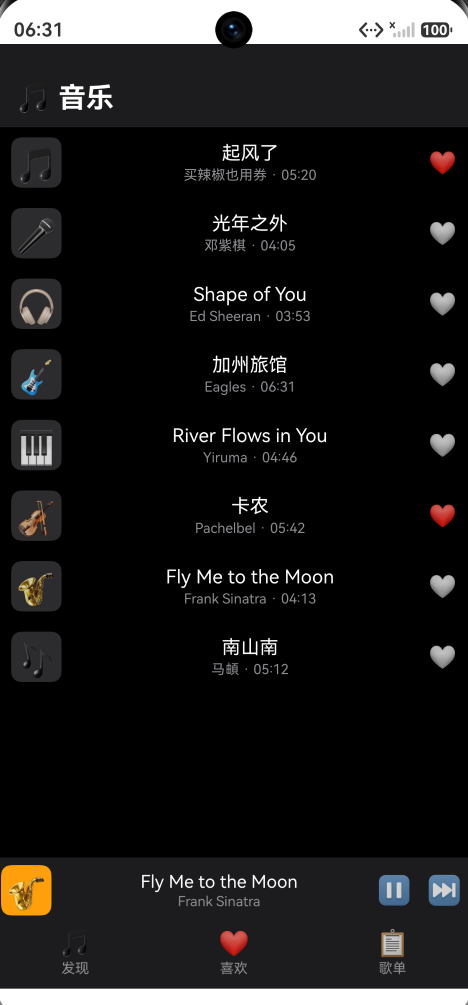
| 0 | 🎵 | 起风了 | 买辣椒也用券 | 320 | 05:20 |
| 1 | 🎤 | 光年之外 | 邓紫棋 | 245 | 04:05 |
| 2 | 🎧 | Shape of You | Ed Sheeran | 233 | 03:53 |
| 3 | 🎸 | 加州旅馆 | Eagles | 391 | 06:31 |
| 4 | 🎹 | River Flows in You | Yiruma | 286 | 04:46 |
| 5 | 🎻 | 卡农 | Pachelbel | 342 | 05:42 |
| 6 | 🎷 | Fly Me to the Moon | Frank Sinatra | 253 | 04:13 |
| 7 | 🎶 | 南山南 | 马頔 | 312 | 05:12 |
第三章 状态管理架构
3.1 状态变量定义
@Entry
@Component
struct Index {
  @State playing: boolean = false        // 播放状态
  @State curIndex: number = 0            // 当前歌曲索引
  @State prog: number = 0                // 播放进度(0-100)
  @State liked: boolean[] = [false, false, false, false, false, false, false, false]

  private tid: number = -1               // 定时器ID
}
3.2 状态变量详细说明
| 变量 | 装饰器 | 类型 | 初始值 | 取值范围 | 响应式 | 用途 |
|---|---|---|---|---|---|---|
| playing | @State | boolean | false | true/false | 是 | 控制播放/暂停图标、定时器启停 |
| curIndex | @State | number | 0 | 0-7 | 是 | 控制底部栏显示的歌曲信息 |
| prog | @State | number | 0 | 0-100 | 是 | 控制进度显示 |
| liked | @State | boolean[] | [false×8] | true/false | 是 | 控制每首歌的收藏图标 |
| tid | private | number | -1 | ≥-1 | 否 | 存储定时器ID |
注意: tid 用 private 修饰而非 @State,因为它不需要触发UI更新。定时器ID是内部管理数据,不直接对应UI元素。
3.3 状态流转图
                          ┌──────────┐
                          │  初始状态  │
                          │ playing  │
                          │ = false  │
                          │ prog = 0 │
                          └────┬─────┘
                               │
                    ┌──────────┼──────────┐
                    │          │          │
              点击歌曲    点击▶️按钮    点击⏸️按钮
                    │          │          │
                    ▼          ▼          ▼
             ┌──────────┐ ┌──────────┐ ┌──────────┐
             │ playing  │ │ playing  │ │ playing  │
             │ = true   │ │ = true   │ │ = false  │
             │ prog = 0 │ │ prog保持 │ │ prog保持 │
             │ 定时器运行│ │ 定时器运行│ │ 定时器停止│
             └────┬─────┘ └────┬─────┘ └──────────┘
                  │            │
                  │     ┌──────┘
                  │     │
                  ▼     ▼
           ┌──────────────────┐
           │   定时器触发      │
           │   prog++ (100ms) │
           └───────┬──────────┘
                   │
            ┌──────┴──────┐
            │             │
        prog < 100    prog = 100
            │             │
            ▼             ▼
     ┌──────────┐  ┌──────────┐
     │ 继续推进  │  │ 播放完成  │
     │ prog++   │  │ playing  │
     └──────────┘  │ = false  │
                   │ prog = 0 │
                   │ 定时器停止│
                   └──────────┘
3.4 状态之间的依赖关系
playing ─────────────────────────────→ 定时器启停
                                         │
                                         ▼
                                      prog 递增
                                         │
                                         ▼
                                   进度UI更新

curIndex ─────────────────────────→ 底部栏歌曲信息
                                        │
                                        ▼
                                   封面/歌名/歌手

liked[idx] ───────────────────────→ 爱心图标
                                        │
                                        ▼
                                   ❤️ / 🤍
第四章 定时器管理
4.1 定时器生命周期
定时器是本项目最核心的技术点。整个生命周期包含四个阶段:
    创建          运行          停止          销毁
      │             │             │             │
 startTimer()   每100ms       stopTimer()   aboutToDisa...
      │         prog++            │        ppear()
      │             │             │             │
  tid = setId    if(prog<100)   if(tid!==-1)  stopTimer()
                prog++          clearInterval
                else           tid = -1
                stopTimer()
4.2 创建定时器
private startTimer(): void {
  this.stopTimer()  // 阶段1:清理旧定时器

  // 阶段2:创建新定时器
  this.tid = setInterval(() => {
    // 阶段3:定时器回调
    if (this.prog < 100) {
      this.prog++     // 进度递增
    } else {
      // 阶段4:播放完成处理
      this.stopTimer()
      this.playing = false
      this.prog = 0
    }
  }, 100)  // 间隔:100毫秒
}
代码分析:
| 行 | 代码 | 作用 | 重要性 |
|---|---|---|---|
| 1 | this.stopTimer() |
防重复启动 | ⭐⭐⭐ |
| 3 | this.tid = setInterval(...) |
创建并存储ID | ⭐⭐⭐ |
| 4 | if (this.prog < 100) |
边界判断 | ⭐⭐ |
| 5 | this.prog++ |
进度递增 | ⭐⭐⭐ |
| 8 | this.stopTimer() |
完成后清理 | ⭐⭐⭐ |
4.3 停止定时器
private stopTimer(): void {
  if (this.tid !== -1) {
    clearInterval(this.tid)
    this.tid = -1
  }
}
防御性编程分析:
| 检查 | 条件 | 目的 |
|---|---|---|
| tid !== -1 | 无效ID检查 | 避免clearInterval无效ID |
| clearInterval | 停止定时器 | 释放资源 |
| tid = -1 | 重置ID | 标记无定时器 |
4.4 生命周期清理
aboutToDisappear(): void {
  this.stopTimer()
}
清理的必要性:
| 风险类型 | 说明 | 后果 |
|---|---|---|
| 内存泄漏 | 定时器闭包持有组件引用 | 组件无法被GC回收 |
| 空指针异常 | 回调中访问已销毁的状态变量 | 运行时崩溃 |
| 资源浪费 | 定时器持续占用CPU | 耗电增加 |
| 状态错乱 | 多次进出页面定时器叠加 | 进度飞快 |
4.5 定时器配置参数
| 参数 | 值 | 计算说明 | 替代值 |
|---|---|---|---|
| 间隔 | 100ms | 每秒10次更新 | 50ms(更流畅)/200ms(更省电) |
| 范围 | 0-100 | 百分比 | 0-1000(更精细) |
| 单曲时长 | 10秒 | 100×100ms | 根据DURATIONS动态计算 |
精度分析:
| 间隔 | 每秒更新 | 视觉效果 | CPU开销 |
|---|---|---|---|
| 50ms | 20次 | 非常流畅 | 较高 |
| 100ms | 10次 | 流畅 | 适中 |
| 200ms | 5次 | 略有跳跃 | 低 |
100ms是精度和性能的最佳平衡点。
第五章 播放控制逻辑
5.1 播放指定歌曲
private playSong(idx: number): void {
  this.curIndex = idx      // 切换歌曲索引
  this.playing = true      // 设置播放状态
  this.prog = 0            // 进度归零
  this.stopTimer()         // 清理旧定时器
  this.startTimer()        // 启动新定时器
}
执行顺序分析:
| 步骤 | 操作 | 状态变化 | UI更新 |
|---|---|---|---|
| 1 | curIndex = idx | 切换歌曲 | 底部栏信息更新 |
| 2 | playing = true | 开始播放 | 按钮变⏸️ |
| 3 | prog = 0 | 进度归零 | 进度显示归零 |
| 4 | stopTimer() | 停旧定时器 | 无 |
| 5 | startTimer() | 启新定时器 | 进度开始推进 |
为什么先stopTimer再startTimer?
防止多个定时器同时运行。如果先startTimer再stopTimer,新定时器会被立即停止。
5.2 播放/暂停切换
private togglePlay(): void {
  if (this.playing) {
    this.stopTimer()
    this.playing = false
  } else {
    this.startTimer()
    this.playing = true
  }
}
状态机转换:
| 当前状态 | 触发条件 | 执行操作 | 目标状态 |
|---|---|---|---|
| 播放中 | 点击⏸️ | stopTimer + playing=false | 暂停 |
| 暂停中 | 点击▶️ | startTimer + playing=true | 播放中 |
关键特性: 暂停不重置进度。继续播放时进度从暂停位置继续。
5.3 上一首/下一首
private nextSong(): void {
  this.playSong((this.curIndex + 1) % this.TITLES.length)
}

private prevSong(): void {
  this.playSong((this.curIndex - 1 + this.TITLES.length) % this.TITLES.length)
}
5.4 循环播放算法详解
下一首取模运算:
curIndex = 0: (0+1) % 8 = 1
curIndex = 1: (1+1) % 8 = 2
curIndex = 2: (2+1) % 8 = 3
curIndex = 3: (3+1) % 8 = 4
curIndex = 4: (4+1) % 8 = 5
curIndex = 5: (5+1) % 8 = 6
curIndex = 6: (6+1) % 8 = 7
curIndex = 7: (7+1) % 8 = 0  ← 回到第一首
上一首取模运算(需要+length处理负数):
curIndex = 0: (0-1+8) % 8 = 7 % 8 = 7  ← 跳到最后一首
curIndex = 1: (1-1+8) % 8 = 8 % 8 = 0
curIndex = 2: (2-1+8) % 8 = 9 % 8 = 1
curIndex = 7: (7-1+8) % 8 = 14 % 8 = 6
负数取模问题:
| 语言/环境 | (-1) % 8 的结果 |
|---|---|
| JavaScript | -1 |
| Python | 7 |
| C/C++ | -1 |
| Java | -1 |
| ArkTS | -1 |
ArkTS中负数取模结果为负数,因此上一首需要 + length 处理。
第六章 数组响应式更新
6.1 问题背景
ArkUI中 @State 修饰的数组有特殊的响应式规则:
// ❌ 不会触发UI更新
this.liked[idx] = !this.liked[idx]

// ✅ 会触发UI更新
const newLiked = [...this.liked]
newLiked[idx] = !newLiked[idx]
this.liked = newLiked
6.2 本项目的实现
private toggleLike(idx: number): void {
  const newLiked: boolean[] = []
  for (let i = 0; i < this.liked.length; i++) {
    newLiked.push(i === idx ? !this.liked[i] : this.liked[i])
  }
  this.liked = newLiked
}
实现分析:
| 步骤 | 操作 | 说明 |
|---|---|---|
| 1 | 创建空数组 newLiked | 准备新数据 |
| 2 | for循环遍历原数组 | 逐个元素处理 |
| 3 | 目标索引取反,其他保持 | 只修改一个元素 |
| 4 | 整体赋值 | 触发UI更新 |
6.3 ArkTS @State数组响应式规则总结
| 操作方式 | 是否触发更新 | 示例 |
|---|---|---|
| 整体赋值 | ✅ | this.arr = newArr |
| push/pop | ✅ | this.arr.push(item) |
| splice | ✅ | this.arr.splice(1, 1) |
| 索引赋值 | ❌ | this.arr[0] = newVal |
| sort/reverse | ❌ | this.arr.sort() |
最佳实践: 需要修改数组元素时,优先使用展开运算符或map创建新数组:
// 方法1:展开运算符
this.liked = this.liked.map((v, i) => i === idx ? !v : v)

// 方法2:创建新数组(本项目采用)
const newLiked: boolean[] = []
for (...) { newLiked.push(...) }
this.liked = newLiked
第七章 UI布局实现
7.1 页面结构
Column (全屏,背景#000000)
├── Row (标题栏,背景#1C1C1E)
│   ├── Text('🎵 音乐')
│   └── Blank()
├── List (歌曲列表,layoutWeight=1)
│   └── ForEach → ListItem → Row
│       ├── Text (封面,背景#2C2C2E)
│       ├── Column (歌名+歌手)
│       └── Text (爱心按钮)
├── Row (底部控制栏,高52px,背景#1C1C1E)
│   ├── Text (当前封面,背景#FF9F0A)
│   ├── Column (歌名+歌手)
│   ├── Text (播放/暂停按钮)
│   └── Text (下一首按钮)
└── Row (底部导航,高52px,背景#1C1C1E)
    └── ForEach → Column (图标+文字)
7.2 色彩体系
| 元素 | 颜色值 | 色彩名称 | 用途 |
|---|---|---|---|
| 页面背景 | #000000 | 纯黑 | 主背景 |
| 标题栏/控制栏 | #1C1C1E | 深灰 | 固定区域背景 |
| 列表封面背景 | #2C2C2E | 中灰 | 歌曲封面容器 |
| 当前播放封面 | #FF9F0A | 橙色 | 标识当前播放 |
| 主文字 | Color.White | 白色 | 歌名、金额等 |
| 辅助文字 | #8E8E93 | 浅灰 | 歌手、时长等 |
| 收藏爱心 | ❤️/🤍 | 红/白 | 收藏状态 |
7.3 歌曲列表实现
List() {
  ForEach(
    this.TITLES,                              // 数据源
    (title: string, idx: number) => {          // 子项生成
      ListItem() {
        Row() {
          Text(this.COVERS[idx])
            .fontSize(26).width(40).height(40)
            .textAlign(TextAlign.Center).lineHeight(40)
            .backgroundColor('#2C2C2E').borderRadius(8)

          Column() {
            Text(title).fontSize(15).fontColor(Color.White).maxLines(1)
            Text(this.ARTISTS[idx] + ' · ' + this.fmt(this.DURATIONS[idx]))
              .fontSize(11).fontColor('#8E8E93').margin({ top: 2 })
          }
          .layoutWeight(1).margin({ left: 8 })

          Text(this.liked[idx] ? '❤️' : '🤍').fontSize(18)
            .onClick(() => { this.toggleLike(idx) })
        }
        .width('100%')
        .padding({ top: 8, bottom: 8, left: 12, right: 12 })
        .onClick(() => { this.playSong(idx) })
      }
    },
    (title: string, idx: number) => title + String(idx)  // 键值生成
  )
}
.layoutWeight(1).width('100%').backgroundColor('#000000')
ForEach参数详解:
| 参数 | 类型 | 说明 |
|---|---|---|
| 第一参数 | DataSource | 数据源数组 |
| 第二参数 | (item, index) => void | 子项生成函数 |
| 第三参数 | (item, index) => string | 键值生成函数(唯一标识) |
7.4 底部控制栏
Row() {
  Text(this.COVERS[this.curIndex])
    .fontSize(26).width(40).height(40)
    .textAlign(TextAlign.Center).lineHeight(40)
    .backgroundColor('#FF9F0A')
    .borderRadius(8).margin({ left: 4 })

  Column() {
    Text(this.TITLES[this.curIndex])
      .fontSize(14).fontColor(Color.White).maxLines(1)
    Text(this.ARTISTS[this.curIndex])
      .fontSize(11).fontColor('#8E8E93').margin({ top: 1 })
  }
  .layoutWeight(1).margin({ left: 8 })

  Text(this.playing ? '⏸️' : '▶️')
    .fontSize(22).margin({ right: 12 })
    .onClick(() => { this.togglePlay() })

  Text('⏭️')
    .fontSize(22).margin({ right: 8 })
    .onClick(() => { this.nextSong() })
}
.width('100%').height(52).backgroundColor('#1C1C1E')
视觉设计要点:
| 设计决策 | 实现方式 | 目的 |
|---|---|---|
| 橙色封面背景 | #FF9F0A | 与列表灰色封面区分 |
| maxLines(1) | 单行截断 | 防止长歌名换行 |
| 播放/暂停图标 | 三元表达式 | 动态反映播放状态 |
| layoutWeight(1) | 信息区占满 | 歌名可显示更长 |
7.5 底部导航
Row() {
  ForEach([['🎵', '发现'], ['❤️', '喜欢'], ['📋', '歌单']], (a: string[]) => {
    Column() {
      Text(a[0]).fontSize(20)
      Text(a[1]).fontSize(11).margin({ top: 2 }).fontColor('#8E8E93')
    }
    .layoutWeight(1)
    .alignItems(HorizontalAlign.Center)
    .padding({ top: 4, bottom: 6 })
  }, (a: string[]) => a[1])
}
.width('100%').height(52).backgroundColor('#1C1C1E').padding({ bottom: 4 })
第八章 工具函数
8.1 时间格式化
private fmt(d: number): string {
  const m = Math.floor(d / 60)
  const s = d % 60
  return (m < 10 ? '0' : '') + String(m) + ':' +
         (s < 10 ? '0' : '') + String(s)
}
输入输出映射:
| 输入(秒) | 计算(m, s) | 输出 |
|---|---|---|
| 320 | (5, 20) | 05:20 |
| 245 | (4, 5) | 04:05 |
| 233 | (3, 53) | 03:53 |
| 391 | (6, 31) | 06:31 |
| 286 | (4, 46) | 04:46 |
| 342 | (5, 42) | 05:42 |
| 253 | (4, 13) | 04:13 |
| 312 | (5, 12) | 05:12 |
| 60 | (1, 0) | 01:00 |
| 9 | (0, 9) | 00:09 |
| 0 | (0, 0) | 00:00 |
补零逻辑: (n < 10 ? '0' : '') + String(n) 确保两位数显示。
第九章 完整代码
@Entry
@Component
struct Index {
  @State playing: boolean = false
  @State curIndex: number = 0
  @State prog: number = 0
  @State liked: boolean[] = [false, false, false, false, false, false, false, false]

  private tid: number = -1

  private readonly COVERS: string[] = ['🎵', '🎤', '🎧', '🎸', '🎹', '🎻', '🎷', '🎶']
  private readonly TITLES: string[] = ['起风了', '光年之外', 'Shape of You', '加州旅馆', 'River Flows in You', '卡农', 'Fly Me to the Moon', '南山南']
  private readonly ARTISTS: string[] = ['买辣椒也用券', '邓紫棋', 'Ed Sheeran', 'Eagles', 'Yiruma', 'Pachelbel', 'Frank Sinatra', '马頔']
  private readonly DURATIONS: number[] = [320, 245, 233, 391, 286, 342, 253, 312]

  aboutToDisappear(): void {
    this.stopTimer()
  }

  private toggleLike(idx: number): void {
    const newLiked: boolean[] = []
    for (let i = 0; i < this.liked.length; i++) {
      newLiked.push(i === idx ? !this.liked[i] : this.liked[i])
    }
    this.liked = newLiked
  }

  private playSong(idx: number): void {
    this.curIndex = idx
    this.playing = true
    this.prog = 0
    this.stopTimer()
    this.startTimer()
  }

  private togglePlay(): void {
    if (this.playing) {
      this.stopTimer()
      this.playing = false
    } else {
      this.startTimer()
      this.playing = true
    }
  }

  private startTimer(): void {
    this.stopTimer()
    this.tid = setInterval(() => {
      if (this.prog < 100) {
        this.prog++
      } else {
        this.stopTimer()
        this.playing = false
        this.prog = 0
      }
    }, 100)
  }

  private stopTimer(): void {
    if (this.tid !== -1) {
      clearInterval(this.tid)
      this.tid = -1
    }
  }

  private nextSong(): void {
    this.playSong((this.curIndex + 1) % this.TITLES.length)
  }

  private prevSong(): void {
    this.playSong((this.curIndex - 1 + this.TITLES.length) % this.TITLES.length)
  }

  private fmt(d: number): string {
    const m = Math.floor(d / 60)
    const s = d % 60
    return (m < 10 ? '0' : '') + String(m) + ':' + (s < 10 ? '0' : '') + String(s)
  }

  build() {
    Column() {
      Row() {
        Text('🎵 音乐').fontSize(22).fontWeight(FontWeight.Bold).fontColor(Color.White)
        Blank()
      }
      .width('100%').padding({ left: 16, right: 16, top: 30, bottom: 10 })
      .backgroundColor('#1C1C1E')

      List() {
        ForEach(this.TITLES, (title: string, idx: number) => {
          ListItem() {
            Row() {
              Text(this.COVERS[idx]).fontSize(26).width(40).height(40)
                .textAlign(TextAlign.Center).lineHeight(40)
                .backgroundColor('#2C2C2E').borderRadius(8)
              Column() {
                Text(title).fontSize(15).fontColor(Color.White).maxLines(1)
                Text(this.ARTISTS[idx] + ' · ' + this.fmt(this.DURATIONS[idx]))
                  .fontSize(11).fontColor('#8E8E93').margin({ top: 2 })
              }.layoutWeight(1).margin({ left: 8 })
              Text(this.liked[idx] ? '❤️' : '🤍').fontSize(18)
                .onClick(() => { this.toggleLike(idx) })
            }
            .width('100%').padding({ top: 8, bottom: 8, left: 12, right: 12 })
            .onClick(() => { this.playSong(idx) })
          }
        }, (title: string, idx: number) => title + String(idx))
      }
      .layoutWeight(1).width('100%').backgroundColor('#000000')

      Row() {
        Text(this.COVERS[this.curIndex]).fontSize(26).width(40).height(40)
          .textAlign(TextAlign.Center).lineHeight(40)
          .backgroundColor('#FF9F0A').borderRadius(8).margin({ left: 4 })
        Column() {
          Text(this.TITLES[this.curIndex]).fontSize(14).fontColor(Color.White).maxLines(1)
          Text(this.ARTISTS[this.curIndex]).fontSize(11).fontColor('#8E8E93').margin({ top: 1 })
        }.layoutWeight(1).margin({ left: 8 })
        Text(this.playing ? '⏸️' : '▶️').fontSize(22).margin({ right: 12 })
          .onClick(() => { this.togglePlay() })
        Text('⏭️').fontSize(22).margin({ right: 8 })
          .onClick(() => { this.nextSong() })
      }
      .width('100%').height(52).backgroundColor('#1C1C1E')

      Row() {
        ForEach([['🎵', '发现'], ['❤️', '喜欢'], ['📋', '歌单']], (a: string[]) => {
          Column() {
            Text(a[0]).fontSize(20)
            Text(a[1]).fontSize(11).margin({ top: 2 }).fontColor('#8E8E93')
          }.layoutWeight(1).alignItems(HorizontalAlign.Center)
            .padding({ top: 4, bottom: 6 })
        }, (a: string[]) => a[1])
      }
      .width('100%').height(52).backgroundColor('#1C1C1E').padding({ bottom: 4 })
    }
    .width('100%').height('100%').backgroundColor('#000000')
  }
}
第十章 运行验证
10.1 构建步骤
Build > Build Hap(s)/APP(s) > Build Hap(s)
10.2 功能验证
| 测试项 | 操作步骤 | 预期结果 |
|---|---|---|
| 初始状态 | 启动App | 显示8首歌曲列表 |
| 播放歌曲 | 点击第3首 | 底部栏显示Shape of You,按钮变⏸️ |
| 暂停 | 点击⏸️ | 进度停止,按钮变▶️ |
| 继续 | 点击▶️ | 进度继续 |
| 下一首 | 点击⏭️ | 切到第4首,进度归零 |
| 循环 | 在第8首点⏭️ | 回到第1首 |
| 收藏 | 点击🤍 | 变❤️ |
| 取消收藏 | 点击❤️ | 变🤍 |
| 播放完成 | 等待10秒 | 进度归零,按钮变▶️ |
10.3 效果截图
第十一章 技术要点总结
11.1 核心知识点
| 知识点 | 实现方式 | 重要性 |
|---|---|---|
| 定时器管理 | setInterval + clearInterval + aboutToDisappear | ⭐⭐⭐ |
| 防重复启动 | startTimer内先stopTimer | ⭐⭐⭐ |
| 循环播放 | 取模运算(+length处理负数) | ⭐⭐⭐ |
| 数组响应式 | 整体赋值触发更新 | ⭐⭐⭐ |
| 状态驱动UI | @State修饰器 | ⭐⭐⭐ |
| 列表渲染 | List + ForEach + 键值函数 | ⭐⭐ |
| 时间格式化 | Math.floor + 取模 + 补零 | ⭐⭐ |
| 生命周期清理 | aboutToDisappear | ⭐⭐⭐ |
11.2 最佳实践
| 实践 | 说明 |
|---|---|
| 防御性编程 | 操作前检查条件(tid !== -1) |
| 资源成对管理 | 有创建就有销毁 |
| 状态最小化 | 只用必要的@State变量 |
| 防重复操作 | 启动前先停止 |
| 安全取模 | 负数取模加数组长度 |
第十二章 扩展方向
12.1 功能扩展
| 扩展项 | 技术方案 | 优先级 |
|---|---|---|
| 进度拖动 | Slider组件 + onChange | P1 |
| 播放模式 | 枚举(顺序/随机/单曲) + 算法切换 | P2 |
| 数据持久化 | @StorageLink保存liked和playing | P2 |
| 音量控制 | AudioVolumeGroupManager | P3 |
| 歌词显示 | LRC解析 + 文本滚动 | P3 |
| 搜索功能 | TextInput + 过滤算法 | P3 |
| 组件拆分 | 提取SongItem、PlayerBar组件 | P2 |
| 动画效果 | rotate动画 + opacity过渡 | P3 |
12.2 性能优化
| 优化项 | 方案 | 场景 |
|---|---|---|
| LazyForEach | 懒加载列表 | 歌曲数量>50 |
| 组件缓存 | @Reusable | 列表项复用 |
| 避免频繁更新 | 降低定时器频率 | 省电模式 |
| 图片缓存 | Image组件缓存策略 | 使用真实封面 |
第十三章 结语
本文从数据模型设计、状态管理架构、定时器生命周期、播放控制逻辑、数组响应式更新、UI布局实现六个维度,详细讲解了鸿蒙音乐播放器应用的技术实现。
核心技术要点回顾:
- 定时器管理是本项目的技术核心,必须遵循"启动前先停旧的,退出时一定要清理"两条规则
- @State数组响应式更新需要整体赋值,索引赋值不会触发UI刷新
- 取模循环要注意负数取模问题,加数组长度后再取模确保结果非负
- 状态驱动UI是声明式开发的核心思想,通过修改状态变量驱动UI自动更新
通过本项目,开发者可以深入理解ArkUI的状态管理和定时器生命周期管理,为后续开发更复杂的交互应用打下坚实基础。
参考资料:
如果本文对你有帮助,欢迎点赞收藏! ⭐

作为“人工智能6S店”的官方数字引擎,为AI开发者与企业提供一个覆盖软硬件全栈、一站式门户。
更多推荐



 8
8 0
0- 0


 已为社区贡献2条内容

所有评论(0)