
HarmonyOS 6.1 设备类型配置错误解决方案-鸿蒙PC版
欢迎加入开源鸿蒙PC社区:
https://harmonypc.csdn.net/
atomgit仓库地址:https://atomgit.com/2401_83963238/hongmeng61fps60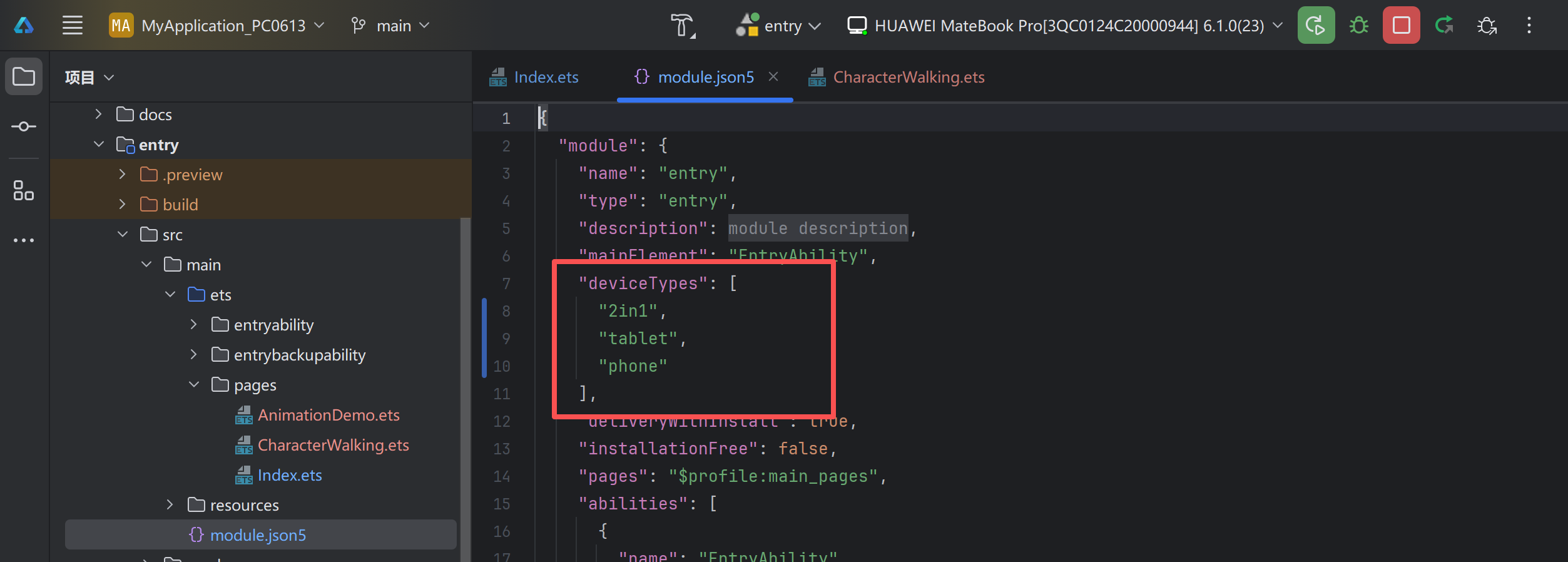
这个地方是可以在创建项目后进行修改的,包括包名什么的如果创建项目的时候出现错误也都是可以在这个文件/build-profile.json5里进行修改的。
运行成功: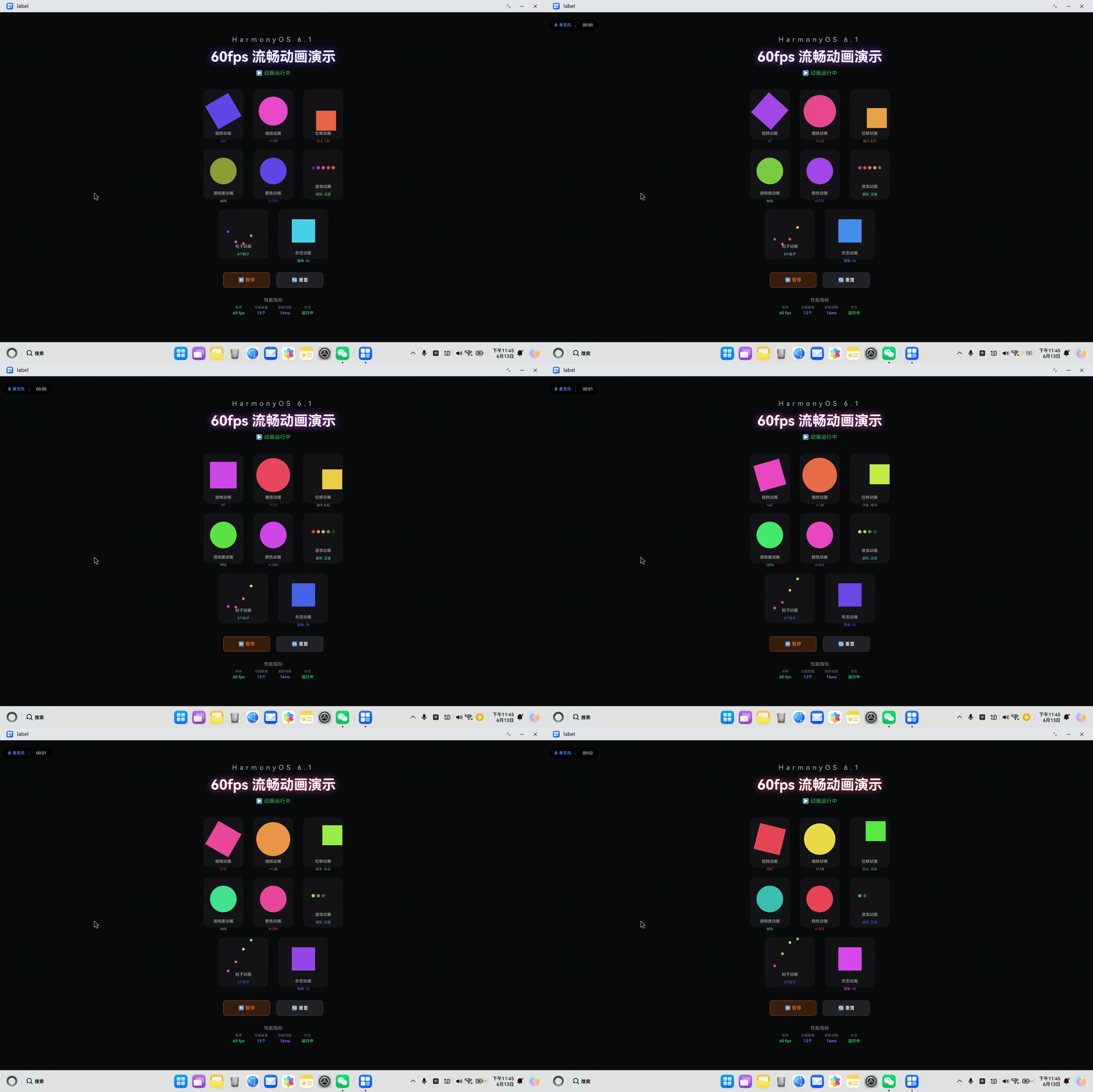
一、问题概述
1.1 错误信息
> hvigor ERROR: Failed :entry:default@PreBuild...
> hvigor ERROR: 00303214 Configuration Error
Error Message: The type of target device does not match the device type configured by module: entry.
Required device type:UNKNOWN, current module device type:2in1

* Try the following:
  > Make sure the deviceTypes field set in module.json5 under src/main of the module directory contains the required type.
  > Make sure the device types specified under target in the build-profile.json5 file of the module directory contain the required one.
  > Check whether the hvigorfile.ts or hvigorconfig.ts file contains any code that may change the module deviceTypes settings.
1.2 错误分析
错误原因:
错误信息明确指出设备类型不匹配:
- 要求的设备类型:
UNKNOWN(未知) - 当前配置的设备类型:
2in1(二合一设备)
根本原因:
HarmonyOS 应用需要在 module.json5 中明确声明支持的设备类型。如果设备类型配置不完整或不匹配,会导致构建失败。
1.3 问题影响
| 影响 | 描述 |
|---|---|
| 构建失败 | 无法编译和打包应用 |
| 设备不兼容 | 应用可能无法在目标设备上运行 |
| 调试困难 | 开发者无法在真机上测试应用 |
二、解决方案
2.1 修改 module.json5
文件位置:
entry/src/main/module.json5
原始配置:
{
  "module": {
    "name": "entry",
    "type": "entry",
    "deviceTypes": [
      "2in1"
    ],
    // ...
  }
}
修复方案:
{
  "module": {
    "name": "entry",
    "type": "entry",
    "deviceTypes": [
      "2in1",
      "tablet",
      "phone"
    ],
    // ...
  }
}
说明:
2in1:二合一设备(PC、平板电脑)tablet:平板电脑phone:智能手机
2.2 修改 build-profile.json5(可选)
文件位置:
entry/build-profile.json5
如果需要针对特定设备构建,可以在 targets 中指定设备类型:
{
  "targets": [
    {
      "name": "default",
      "deviceType": "2in1"
    },
    {
      "name": "ohosTest",
      "deviceType": "phone"
    }
  ]
}
三、设备类型详解
3.1 HarmonyOS 支持的设备类型
| 设备类型 | 代码 | 说明 | 典型设备 |
|---|---|---|---|
| 智能手机 | phone |
手机设备 | 华为Mate系列、P系列 |
| 平板电脑 | tablet |
平板设备 | 华为MatePad |
| 二合一设备 | 2in1 |
PC/平板二合一 | 华为MateBook E |
| 电视 | tv |
智能电视 | 华为智慧屏 |
| 穿戴设备 | wearable |
手表、手环 | 华为Watch GT |
| 车载设备 | car |
车载系统 | 华为HiCar |
3.2 不同场景的设备类型配置
场景一:PC 应用(推荐)
"deviceTypes": [
  "2in1",
  "tablet",
  "phone"
]
适用场景:
- 桌面应用
- 平板应用
- 手机应用
场景二:纯 PC 应用
"deviceTypes": [
  "2in1"
]
适用场景:
- 仅限 PC 和二合一设备
- 桌面专属应用
场景三:跨设备应用
"deviceTypes": [
  "phone",
  "tablet",
  "2in1",
  "tv",
  "wearable"
]
适用场景:
- 全场景应用
- 超级应用
3.3 设备类型选择建议
根据应用类型选择:
| 应用类型 | 推荐设备类型 | 说明 |
|---|---|---|
| 游戏应用 | phone, tablet |
触控优先 |
| 效率应用 | tablet, 2in1 |
键鼠+触控 |
| 多媒体应用 | phone, tablet, tv |
多种屏幕尺寸 |
| 办公应用 | tablet, 2in1 |
生产力工具 |
| PC 应用 | 2in1 |
Windows 风格 |
四、ArkTS 开发中的设备适配
4.1 响应式布局
使用栅格布局适配不同屏幕:
@Entry
@Component
struct AdaptiveLayout {
  build() {
    Column() {
      // 根据屏幕尺寸调整布局
      if (this.isLargeScreen()) {
        this.buildDesktopLayout();
      } else {
        this.buildMobileLayout();
      }
    }
  }

  isLargeScreen(): boolean {
    // 根据设备类型判断
    return true; // 实际应用中需要获取屏幕信息
  }

  @Builder
  buildDesktopLayout() {
    Row() {
      Column() { /* 侧边栏 */ }
        .width('20%');
      Column() { /* 主内容 */ }
        .width('80%');
    }
  }

  @Builder
  buildMobileLayout() {
    Column() {
      Column() { /* 顶部导航 */ }
      Column() { /* 主内容 */ }
    }
  }
}
4.2 特性检测
检查设备能力:
import deviceInfo from '@ohos.deviceInfo';

let deviceType = deviceInfo.deviceType;
console.info('Device Type:', deviceType);

if (deviceType === '2in1') {
  // PC 特定功能
} else if (deviceType === 'tablet') {
  // 平板特定功能
} else if (deviceType === 'phone') {
  // 手机特定功能
}
4.3 输入方式适配
区分触控和键鼠:
@State inputMode: string = 'touch';

onTouch(event: TouchEvent) {
  if (event.type === TouchType.Down) {
    this.inputMode = 'touch';
  }
}

// 根据输入模式调整 UI
if (this.inputMode === 'touch') {
  // 触控友好设计
  Button('按钮')
    .width(200)
    .height(60);
} else {
  // 键鼠友好设计
  Button('按钮')
    .width(120)
    .height(40);
}
五、常见问题排查
5.1 问题一:设备类型配置缺失
症状:
Error: Required device type:UNKNOWN
原因:
module.json5 中没有配置 deviceTypes 字段。
解决方案:
{
  "module": {
    "deviceTypes": [
      "2in1",
      "tablet",
      "phone"
    ]
  }
}
5.2 问题二:设备类型不匹配
症状:
Error: current module device type:2in1 does not match required type:phone
原因:
配置的设备类型与目标设备不匹配。
解决方案:
根据目标设备类型,在 deviceTypes 中添加对应的类型。
5.3 问题三:多设备类型冲突
症状:
Error: Multiple device types configured but no default specified
原因:
多个设备类型可能导致默认启动配置冲突。
解决方案:
在 abilities 中指定 defaultDeviceType:
{
  "abilities": [
    {
      "name": "EntryAbility",
      "defaultDeviceType": "2in1",
      // ...
    }
  ]
}
5.4 问题四:PC 应用在手机上无法安装
症状:
应用在 PC 上构建成功,但在手机上无法安装。
原因:
deviceTypes 只配置了 2in1,不包含 phone。
解决方案:
"deviceTypes": [
  "2in1",
  "phone"
]
六、最佳实践
6.1 设备类型配置规范
Do’s(应该做):
// ✅ 明确列出所有支持的设备类型
"deviceTypes": [
  "2in1",
  "tablet"
]

// ✅ 根据应用需求选择合适的设备类型
// ✅ 包含 PC 应用:至少包含 "2in1"
// ✅ 包含手机应用:添加 "phone"
// ✅ 包含平板应用:添加 "tablet"
Don’ts(不应该做):
// ❌ 不要只配置一个设备类型(除非应用仅限该设备)
"deviceTypes": [
  "2in1"
]

// ❌ 不要遗漏目标设备类型
"deviceTypes": []  // 空数组会导致 UNKNOWN 错误

// ❌ 不要配置不存在的设备类型
"deviceTypes": [
  "desktop"  // 不存在的类型,会导致错误
]
6.2 开发和测试流程
开发阶段:
- 确定目标设备类型
- 在
module.json5中配置设备类型 - 使用 DevEco Studio 的设备模拟器测试
- 在真机上进行适配测试
构建阶段:
- 选择目标设备类型
- 执行
hvigor构建命令 - 检查构建日志中的设备类型信息
- 生成对应的 HAP 包
发布阶段:
- 根据目标市场选择设备类型
- 生成多个设备类型的安装包
- 在应用市场上传对应的包
6.3 设备适配检查清单
基础配置:
- ✅
module.json5中配置了deviceTypes - ✅ 包含所有目标设备类型
- ✅ 没有配置无效的设备类型
代码适配:
- ✅ 实现了响应式布局
- ✅ 处理了不同屏幕尺寸
- ✅ 适配了不同输入方式
测试验证:
- ✅ 在目标设备上测试
- ✅ 验证功能和 UI 正常
- ✅ 检查性能和兼容性
七、完整配置示例
7.1 PC 应用配置
适用场景: 桌面应用、二合一设备、平板
{
  "module": {
    "name": "entry",
    "type": "entry",
    "description": "$string:module_desc",
    "mainElement": "EntryAbility",
    "deviceTypes": [
      "2in1",
      "tablet"
    ],
    "deliveryWithInstall": true,
    "installationFree": false,
    "pages": "$profile:main_pages",
    "abilities": [
      {
        "name": "EntryAbility",
        "defaultDeviceType": "2in1",
        "srcEntry": "./ets/entryability/EntryAbility.ets",
        "skills": [
          {
            "entities": ["entity.system.home"],
            "actions": ["ohos.want.action.home"]
          }
        ]
      }
    ]
  }
}
7.2 跨平台应用配置
适用场景: 手机、平板、PC 全平台
{
  "module": {
    "name": "entry",
    "type": "entry",
    "description": "$string:module_desc",
    "mainElement": "EntryAbility",
    "deviceTypes": [
      "phone",
      "tablet",
      "2in1"
    ],
    "deliveryWithInstall": true,
    "installationFree": false,
    "pages": "$profile:main_pages",
    "abilities": [
      {
        "name": "EntryAbility",
        "defaultDeviceType": "phone",
        "srcEntry": "./ets/entryability/EntryAbility.ets",
        "skills": [
          {
            "entities": ["entity.system.home"],
            "actions": ["ohos.want.action.home"]
          }
        ]
      }
    ]
  }
}
八、总结
8.1 关键要点
- 设备类型配置是必须的:
module.json5中必须包含deviceTypes字段 - 选择合适的设备类型:根据应用目标选择支持的设备类型
- 包含所有目标设备:确保包含所有需要部署的设备类型
- 避免无效类型:不要使用不存在的设备类型代码
8.2 常见设备类型代码
| 设备类型 | 代码 | 典型设备 |
|---|---|---|
| 二合一设备 | 2in1 |
PC、平板电脑 |
| 平板电脑 | tablet |
平板设备 |
| 手机 | phone |
智能手机 |
8.3 解决方案总结
问题: 设备类型配置错误导致构建失败
原因: deviceTypes 配置不完整或不匹配
解决方案:
- 在
module.json5中配置deviceTypes字段 - 添加所有目标设备类型(如
2in1,tablet,phone) - 根据应用需求选择合适的设备类型
8.4 后续建议
开发建议:
- 在项目开始时就确定目标设备类型
- 在开发过程中使用设备模拟器进行测试
- 定期在真机上验证应用功能
配置建议:
- PC 应用至少包含
2in1 - 跨平台应用包含所有目标设备类型
- 避免配置无效的设备类型代码
测试建议:
- 在每种目标设备上进行测试
- 验证 UI 适配和功能完整性
- 检查性能和兼容性表现

作为“人工智能6S店”的官方数字引擎,为AI开发者与企业提供一个覆盖软硬件全栈、一站式门户。
更多推荐
 1
1 0
0- 0


 已为社区贡献11条内容

所有评论(0)