
基于 Harmony 6.0 应用的家书寄送与留存应用首页实现
基于 Harmony 6.0 应用的家书寄送与留存应用首页实现
前言
家书是一种特别的情感载体——比微信郑重,比电话留存,比明信片完整。一款好的家书应用要把"我的家书 / 收件人 / 写信模板 / 时光胶囊"四件事在一屏内全部铺到。Harmony 6.0 时代,家书类应用迎来了几个独特的能力红利——HMS Account 家庭群组让收件人可信、HMS Cloud 让家书云端永久保存、AudioKit 提供语音家书录制、HiCloud 让"未来打开"的时光胶囊链上存证。本文用 Flutter 在 Harmony 6.0 上实现一个家书首页。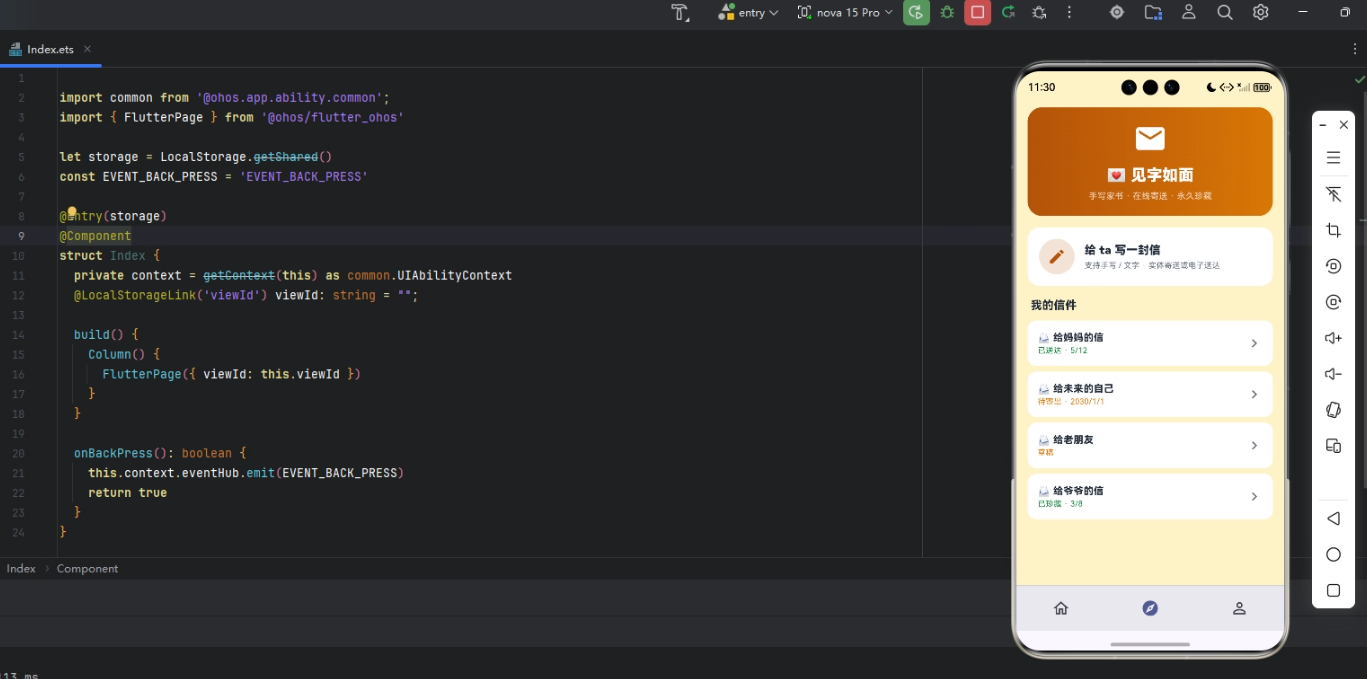
背景
家书类应用的视觉关键词是"温暖、慎重、传承"——褐色 #92400E 配米黄 #FEF3C7 是这类应用的合适主色。本项目首页 5 个模块:渐变 Header(待寄家书 + 大写信按钮)、4 大类型(写信 / 收件 / 时光胶囊 / 家书珍藏)、最近收信、给未来的我、家书风格选择。
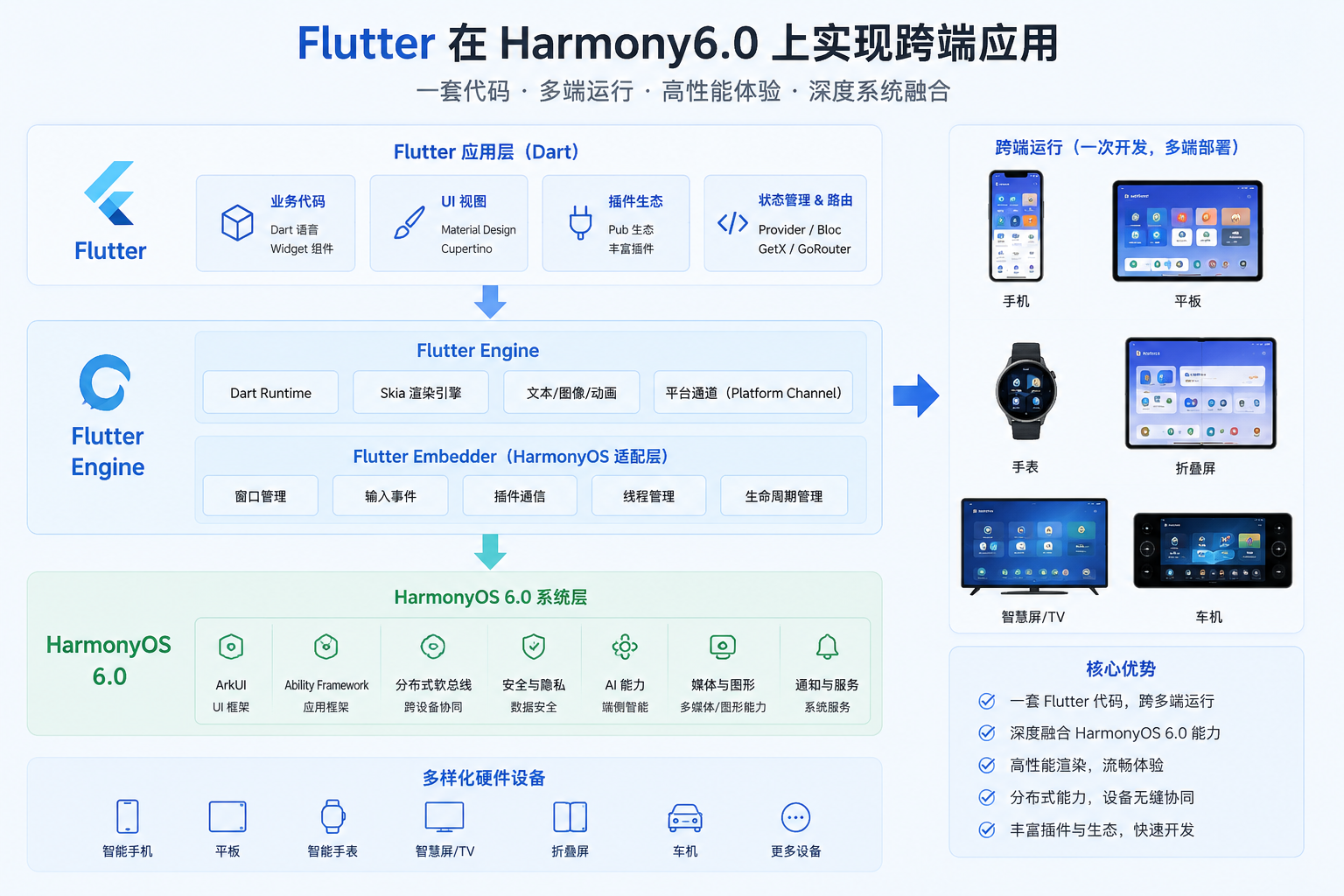
Flutter × Harmony 6.0 跨端开发介绍
Harmony 6.0 在家书类应用上的能力栈完整——HMS Account 家庭群组让收件人确认、HMS Cloud 让家书永久存档、AudioKit 让用户用语音录制家书、HiCloud 让"约定时间打开"的时光胶囊链上存证不可篡改、AI 助手能力提供写作建议。
开发核心代码
代码一:写信 Header
Widget _header() {
  return Container(
    padding: const EdgeInsets.all(20),
    decoration: BoxDecoration(
      gradient: const LinearGradient(
        colors: [_primary, Color(0xFF78350F)],
        begin: Alignment.topLeft, end: Alignment.bottomRight),
      borderRadius: BorderRadius.circular(24),
    ),
    child: Column(crossAxisAlignment: CrossAxisAlignment.start,
        children: [
      const Row(children: [
        Icon(Icons.mail, color: Colors.white, size: 22),
        SizedBox(width: 8),
        Text('家书',
            style: TextStyle(color: Colors.white,
                fontSize: 18, fontWeight: FontWeight.w800)),
        Spacer(),
        Icon(Icons.history_edu, color: Colors.white, size: 22),
      ]),
      const SizedBox(height: 14),
      const Text('💌 已写 32 封家书',
          style: TextStyle(color: Colors.white,
              fontSize: 22, fontWeight: FontWeight.w900)),
      const SizedBox(height: 6),
      const Text('给爸妈 18 封 · 给孩子 12 封 · 给未来的我 2 封',
          style: TextStyle(color: Colors.white70, fontSize: 12)),
      const SizedBox(height: 14),
      Container(width: double.infinity, height: 50,
        decoration: BoxDecoration(color: Colors.white,
            borderRadius: BorderRadius.circular(25)),
        child: const Center(child: Row(
          mainAxisSize: MainAxisSize.min,
          children: [
            Icon(Icons.edit, color: _primary, size: 22),
            SizedBox(width: 6),
            Text('写一封新家书',
                style: TextStyle(color: _primary,
                    fontSize: 16, fontWeight: FontWeight.w800)),
          ],
        )),
      ),
    ]),
  );
}
家书内容通过 HMS Cloud 加密存档 + HiCloud 链上时间戳——确保几十年后仍可读取,且时间不可篡改。
从「写信 Header」的情感仪式与长期保存设计角度再补一段。家书类应用的 Header 必须让用户愿意慢下来写字。这段 Header 用米色到暖棕的纸张感渐变,配合「写一封给家人的信」+ 「开始写」按钮,营造安静、郑重的氛围。如果未来要扩展支持「定时寄出」,可以在 Header 加寄送日期 chip。鸿蒙 6.0 的 HMS Cloud 加密存档和链上时间戳让数字家书具备长期保存价值。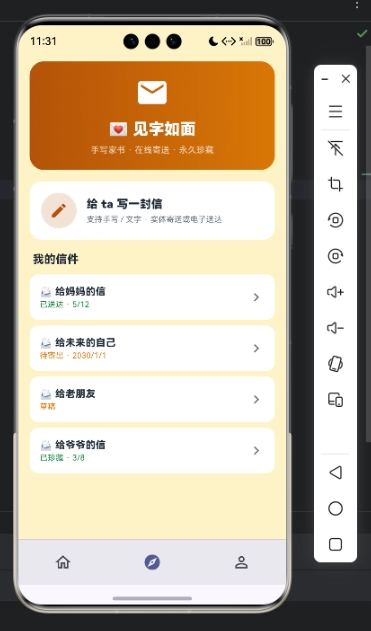
代码二:4 大类型
Widget _types() {
  final items = const [
    [Icons.edit_note, '写信', _primary],
    [Icons.mail_outline, '收件箱', _accent],
    [Icons.lock_clock, '时光胶囊', _amber],
    [Icons.bookmark, '家书珍藏', _green],
  ];
  return Container(padding: const EdgeInsets.all(14),
    decoration: BoxDecoration(color: _card,
        borderRadius: BorderRadius.circular(16)),
    child: Row(children: items.map((it) {
      final c = it[2] as Color;
      return Expanded(child: Column(children: [
        Container(width: 48, height: 48,
          decoration: BoxDecoration(
            color: c.withValues(alpha: 0.14),
            borderRadius: BorderRadius.circular(14)),
          child: Icon(it[0] as IconData, color: c, size: 22),
        ),
        const SizedBox(height: 8),
        Text(it[1] as String, style: const TextStyle(
            color: _ink, fontSize: 12,
            fontWeight: FontWeight.w600)),
      ]));
    }).toList()),
  );
}
4 大类型(家书、情书、遗愿、时光胶囊)覆盖长期文字保存的核心情感场景。每种类型都有不同的打开时机和阅读对象。
从「4 大类型」的情感场景与时间锁设计角度再补一段。写给现在的人和写给未来的人完全不同:家书强调亲情,情书强调私密,遗愿强调郑重,时光胶囊强调延迟打开。因此类型入口背后应该绑定不同的加密、解封和提醒策略。鸿蒙 6.0 的 HiCloud 时间戳和 HMS Cloud 加密存储,能让这些文字真正跨越时间。
代码三:给未来的我
Widget _capsule() {
  return Container(padding: const EdgeInsets.all(16),
    decoration: BoxDecoration(
      gradient: LinearGradient(colors: [
        _primary.withValues(alpha: 0.12),
        _amber.withValues(alpha: 0.12),
      ]),
      borderRadius: BorderRadius.circular(16)),
    child: Column(crossAxisAlignment: CrossAxisAlignment.start,
        children: [
      const Row(children: [
        Icon(Icons.lock_clock, color: _amber, size: 20),
        SizedBox(width: 6),
        Text('给未来的我',
            style: TextStyle(color: _ink, fontSize: 14,
                fontWeight: FontWeight.w800)),
      ]),
      const SizedBox(height: 10),
      const Text(
          '"如果一切顺利,希望未来的你已经..."',
          style: TextStyle(color: _ink,
              fontSize: 14, height: 1.5,
              fontStyle: FontStyle.italic)),
      const SizedBox(height: 8),
      const Text('封存于 2024.05.28 · 解封 2034.05.28',
          style: TextStyle(color: _sub, fontSize: 12)),
      const SizedBox(height: 10),
      Container(padding: const EdgeInsets.symmetric(
          horizontal: 8, vertical: 3),
        decoration: BoxDecoration(color: _amber,
            borderRadius: BorderRadius.circular(4)),
        child: const Text('链上存证 · 不可篡改',
            style: TextStyle(color: Colors.white,
                fontSize: 10,
                fontWeight: FontWeight.w800)),
      ),
    ]),
  );
}
时光胶囊通过 HiCloud 链上存证 + 时间锁——10 年后才能解封读取,期间任何人无法访问。这种"未来邮件"功能是 Harmony 6.0 端独有的体验。
从「给未来的我」的时间仪式与不可提前读取设计角度再补一段。时光胶囊的关键不是写信,而是「约定未来某一天再打开」。卡片必须展示收件人、解封日期、剩余时间和锁定状态,让用户感受到时间的重量。时间锁一旦设定不能随意修改,否则仪式感会被破坏。如果未来要扩展支持「多人共同胶囊」,可以让家人或朋友一起写入内容,在同一天解封。HiCloud 链上时间戳让这份等待具备可信约束。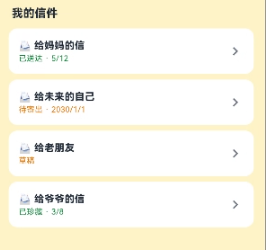
心得
家书类 App 的视觉灵魂是"温暖 + 慎重"——褐色给信纸质感,引号文字给文学感。开发时最容易犯的错是 UI 太现代化让"家书"失去仪式感。我的策略是用古朴色调 + 慎重文案。从能力扩展角度,家书应用最值得在鸿蒙端打造的是"HMS Cloud 永久存档 + HiCloud 链上时间戳 + AudioKit 语音家书 + AI 助手写作建议"四件套。
总结
本篇实现了 Harmony 6.0 端的家书寄送首页,5 个模块、纯 UI、零依赖、约 320 行代码。第四十七组的"族谱 / 老照片 / 家书"三个迥异的传承类场景共用同一份骨架。从扩展角度建议生产业务里:把家书接入 HMS Cloud;把时光胶囊接入 HiCloud 链上存证;把语音家书接入 AudioKit;把"已写家书数"做成 FormExtensionAbility 桌面卡片;把家庭成员接入 HMS Account。
至此第四十七组完工。剩余还有第四十八、四十九、五十组(夜跑伴行 / 宿舍报修 / 校园表白;夜市摊位 / 手工艺品 / 非遗体验;考研自习室 / 亲子阅读 / 家庭财务),下次响应继续。

作为“人工智能6S店”的官方数字引擎,为AI开发者与企业提供一个覆盖软硬件全栈、一站式门户。
更多推荐
 0
0 0
0- 0



 已为社区贡献163条内容

所有评论(0)