
MQTT Client的Tauri应用移植到 OpenHarmony 鸿蒙 PC/ARM64 实践记录
摘要:本文详细记录了将基于Tauri v1的MQTT桌面客户端移植到OpenHarmony ARM64平台的完整过程。项目采用Rust后端(rumqttc)与纯HTML/JS前端,通过Tauri v2的OHOS分支实现跨平台编译。文章涵盖环境配置(Windows 10 + Rust 1.95 + OHOS SDK)、项目结构重构(适配Tauri v2标准布局)、交叉编译关键步骤(目标aarch64
本文以项目 AtomMQTT Client(一个基于 Tauri v1 + HTML/JS + rumqttc 的 MQTT 桌面客户端)为蓝本,完整记录了一次从 Windows 10 宿主机 将 Tauri 应用交叉编译到 OpenHarmony ARM64 的实战过程。文章面向有 Rust/Node.js 基础、但第一次接触鸿蒙开发的读者,力求每一步都可复现。
更多交流学习,欢迎加入开源鸿蒙PC社区:https://harmonypc.csdn.net/
- 编译环境:Windows 10 x86_64 · Rust 1.95.0 · OHOS SDK 6.x · Tauri v2 (OHOS fork)
- 目标平台:OpenHarmony ARM64 (aarch64-unknown-linux-ohos)
- 项目地址:https://atomgit.com/qq8864/atomMqtt/tree/master/tools/tauri-mqtt-client
前言
2025 年,华为正式推出鸿蒙 PC 操作系统,HarmonyOS(OpenHarmony)完成了手机 → 平板 → PC 的全场景覆盖。随着鸿蒙生态向桌面端延伸,如何将现有的桌面应用快速移植到鸿蒙平台 成为开发者关注的热点。
Tauri 作为 Electron 的轻量化替代方案,以其精巧的体积和 Rust 高性能后端著称。而 icherfu/tauri 的 OpenHarmony 分支,使得 Tauri 应用可以运行在鸿蒙设备上——这意味着我们手中的 Vue/React 代码加上 Rust 后端,几乎不改就能编译成原生鸿蒙应用。
本文以项目 AtomMQTT Client(一个基于 Tauri v1 + HTML/JS + rumqttc 的 MQTT 桌面客户端)为蓝本,完整记录了一次从 Windows 10 宿主机 将 Tauri 应用交叉编译到 OpenHarmony ARM64 的实战过程。文章面向有 Rust/Node.js 基础、但第一次接触鸿蒙开发的读者,力求每一步都可复现。
项目介绍
原始项目
atomgit地址:https://atomgit.com/qq8864/atomMqtt/tree/master/tools/tauri-mqtt-client
AtomMQTT Client 是一个功能完整的 MQTT 桌面客户端,采用纯 HTML/JS/CSS 前端 + Tauri v1 + Rust 后端架构:
| 组件 | 技术选型 |
|---|---|
| 前端 | 纯 HTML + JavaScript + CSS(无框架) |
| 后端框架 | Tauri v1.6 |
| MQTT 协议 | rumqttc 0.24 |
| 异步运行时 | Tokio |
| 目标平台 | Windows(x86_64) |
核心功能:
- MQTT 连接/断开(支持 username/password 认证)
- 消息发布(支持 QoS 0/1/2、Retain)
- 主题订阅/取消订阅
- 消息日志查看(支持 Hex 显示、JSON 格式化)
- 连接状态监控
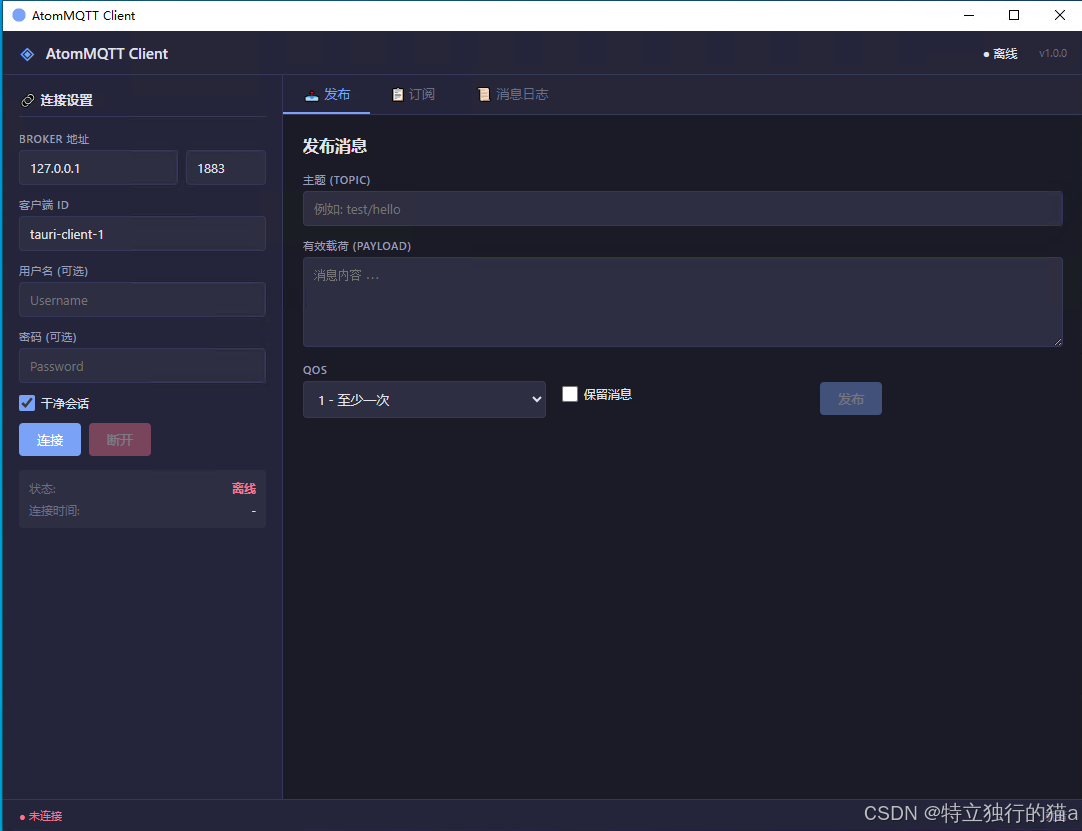
真机验证截图:
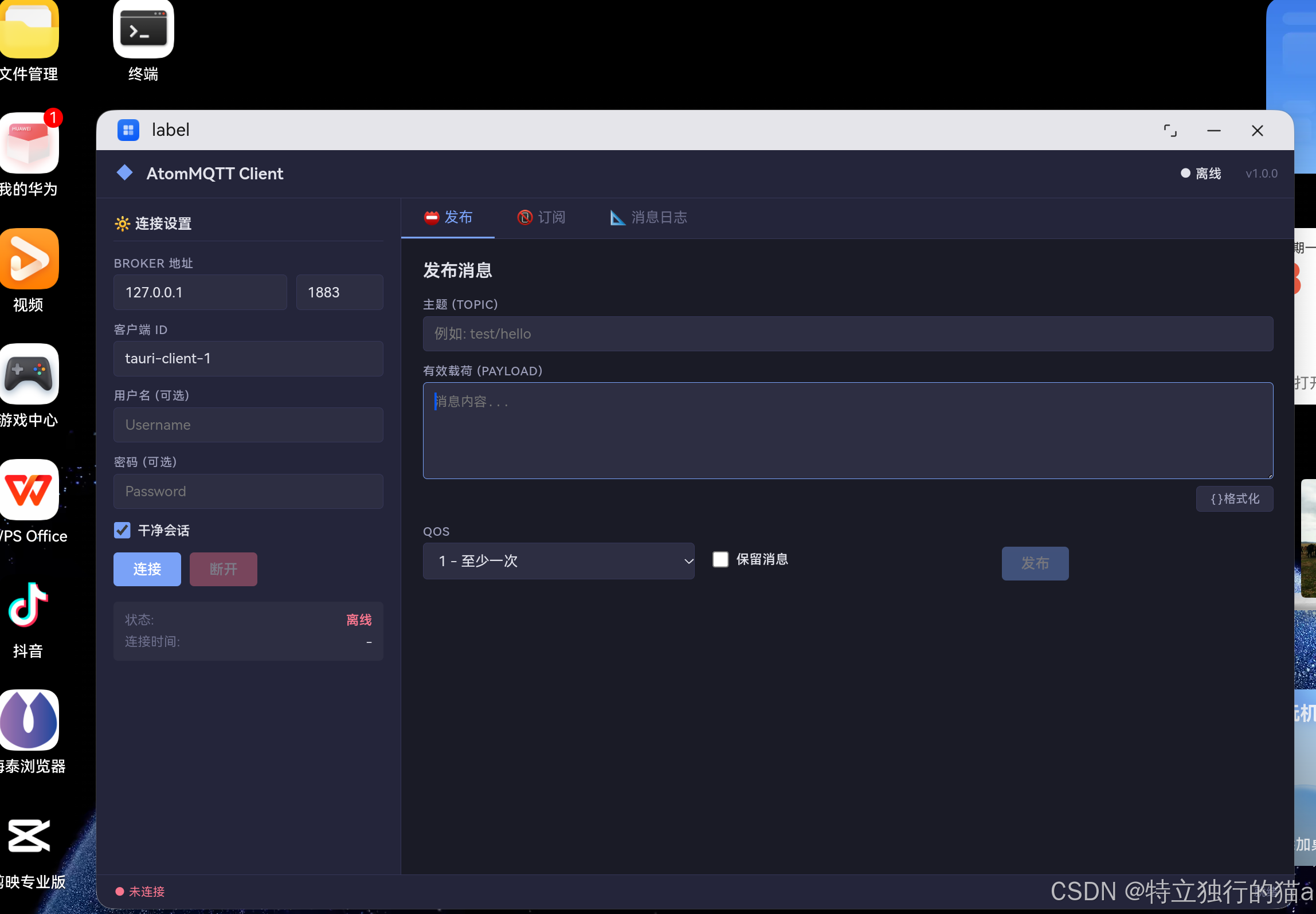
移植目标
将该项目完整移植到 OpenHarmony 鸿蒙 PC/ARM64 设备,具体要求:
- 使用 Tauri v2 的 OHOS 分支(
icherfu/tauri feat/open-harmony) - 交叉编译 Rust 后端为 .so 动态库
- 生成完整的 DevEco Studio 项目结构
- 可在鸿蒙设备上运行
技术选型与方案设计
架构迁移
┌──────────────────────────┐     ┌──────────────────────────┐
│     移植前 (Tauri v1)     │     │     移植后 (Tauri v2)     │
│                          │     │                          │
│  public/                 │     │  public/                 │
│   ├── index.html         │     │   ├── index.html         │
│   ├── script.js          │     │   ├── script.js          │
│   └── styles.css         │     │   └── styles.css         │
│  src/                    │     │  src-tauri/              │
│   └── main.rs            │     │   ├── src/lib.rs         │
│  Cargo.toml (root)       │     │   ├── src/main.rs        │
│  tauri.conf.json (root)  │     │   ├── Cargo.toml         │
│                          │     │   ├── tauri.conf.json    │
│                          │     │   └── gen/ohos/          │
│                          │     │       └── (DevEco项目)   │
└──────────────────────────┘     └──────────────────────────┘
关键变化
- Tauri v1 → v2:API 变更,lib.rs + main.rs 分离模式
- 扁平结构 → src-tauri 标准布局:遵循 Tauri v2 约定
- Windows PE → ELF .so:目标从 x86_64-pc-windows-msvc 变为 arch64-unknown-linux-ohos
- MSVC/LLD → OHOS NDK clang:链接器更换
环境搭建
宿主机环境
操作系统 : Windows 10 x86_64
Rust     : 1.95.0 (stable)
Node.js  : 24.15.0
OHOS SDK : D:\\software\\sdk\\default\\openharmony\\native
安装步骤
1. Rust 工具链
# 已安装 Rust 1.95.0,确认版本
rustc --version   # rustc 1.95.0
cargo --version   # cargo 1.95.0

# 添加 OHOS 交叉编译目标
rustup target add aarch64-unknown-linux-ohos
rustup target add x86_64-unknown-linux-ohos
Rust 官方已将 OHOS 目标提升至 Tier 2 with Host Tools 级别,意味着 Rust 标准库(std)已预编译并可通过 rustup 直接下载,无需自行编译。
2. OHOS SDK
OHOS NDK 位于 D:\software\sdk\default\openharmony\native,包含:
| 组件 | 路径 | 说明 |
|---|---|---|
| OHOS Clang | llvm\bin\clang.exe | C/C++ 编译器,版本 15.0.4 |
| OHOS LLD | llvm\bin\lld.exe | LLVM 链接器 |
| OHOS AR | llvm\bin\llvm-ar.exe | 归档工具 |
| sysroot | sysroot\ | 包含 musl libc 及 OHOS 系统库 |
| CMake | uild\cmake\ohos.toolchain.cmake | NDK CMake 工具链 |
3. 网络加速配置
国内网络环境需要配置代理加速:
# GitHub 代理 (ghfast.top)
git config --global url.\"https://ghfast.top/https://github.com\".insteadOf \"https://github.com\"

# crates.io 镜像 (USTC 稀疏索引)
# 在 .cargo/config.toml 中配置
[source.crates-io]
replace-with = \"ustc-sparse\"

[source.ustc-sparse]
registry = \"sparse+https://mirrors.ustc.edu.cn/crates.io-index/\"
项目结构重构
移植前:Tauri v1 扁平结构
tauri-mqtt-client/
├── Cargo.toml           # 根目录 Cargo.toml
├── tauri.conf.json      # 根目录配置
├── build.rs             # 构建脚本
├── .cargo/config.toml   # cargo 配置
├── src/
│   └── main.rs          # 单文件入口 + 所有业务逻辑
├── public/              # 前端文件 (HTML/JS/CSS)
└── icons/
移植后:Tauri v2 标准结构
tauri-mqtt-client/
├── public/              # 前端文件 (不变)
├── src-tauri/           # Tauri v2 后端
│   ├── Cargo.toml       # OHOS 依赖配置
│   ├── build.rs         # Tauri v2 构建脚本
│   ├── tauri.conf.json  # Tauri v2 配置
│   ├── .cargo/config.toml  # OHOS 交叉编译配置
│   ├── src/
│   │   ├── lib.rs       # Tauri v2 入口
│   │   └── main.rs      # 程序入口
│   ├── icons/
│   └── gen/ohos/        # DevEco Studio 项目
│       ├── AppScope/
│       ├── entry/
│       │   ├── src/main/ets/    # ArkUI 页面
│       │   ├── src/main/resources/  # 资源文件
│       │   └── libs/arm64-v8a/  # .so 库目录
│       └── build-profile.json5
├── ohos-x86_64-clang.cmd  # 链接器包装脚本
├── build-ohos.ps1         # OHOS 构建脚本
└── (保留原始文件)
核心代码迁移:main.rs → lib.rs + main.rs
Tauri v1 入口(原始):
fn main() {
    tauri::Builder::default()
        .manage(AppState::new())
        .invoke_handler(tauri::generate_handler![...])
        .run(tauri::generate_context!())
        .expect(\"error while running tauri application\");
}
Tauri v2 入口(移植后):
// lib.rs - 导出 run() 函数
#[cfg_attr(mobile, tauri::mobile_entry_point)]
pub fn run() {
    tauri::Builder::default()
        .manage(AppState::new())
        .invoke_handler(tauri::generate_handler![...])
        .run(tauri::generate_context!())
        .expect(\"error while running tauri application\");
}

// main.rs - 调用 lib.rs
#![cfg_attr(
    all(not(debug_assertions), target_os = \"windows\"),
    windows_subsystem = \"windows\"
)]
fn main() {
    tauri_mqtt_client_lib::run();
}
交叉编译配置
链接器包装脚本
OHOS NDK 提供的 x86_64-unknown-linux-ohos-clang 是 Shell 脚本,Windows 上无法直接使用。需要创建 .cmd 包装脚本:
@echo off
REM ohos-x86_64-clang.cmd - OHOS clang 链接器包装
\"D:\\software\\sdk\\default\\openharmony\\native\\llvm\\bin\\clang.exe\" ^
  -target x86_64-linux-ohos ^
  --sysroot=\"D:\\software\\sdk\\default\\openharmony\\native\\sysroot\" ^
  -D__MUSL__ -fuse-ld=lld %*
Cargo 交叉编译配置
# src-tauri/.cargo/config.toml
[target.aarch64-unknown-linux-ohos]
linker = \"..\\\\ohos-x86_64-clang.cmd\"
ar = \"D:\\software\\sdk\\default\\openharmony\\native\\llvm\\bin\\llvm-ar.exe\"
rustflags = [
    \"-C\", \"link-arg=-fuse-ld=lld\",
    \"-C\", \"link-arg=--rtlib=compiler-rt\",
]
依赖与构建工具链
依赖选择
原始项目使用 Tauri v1.6 + crates.io 版本。移植到 OHOS 需要切换到 Tauri v2 的 OHOS 分支:
[dependencies]
# 使用 richerfu/tauri OHOS 分支
tauri = { path = \"..\\\\tauri-ohos\\\\crates\\\\tauri\" }

# OHOS 宏展开需要 napi 支持
[target.'cfg(target_env = \"ohos\")'.dependencies]
napi-derive-ohos = \"1.1\"
napi-ohos = { version = \"1.1\", features = [\"napi8\"] }

# 业务依赖保持不变
rumqttc = \"0.24\"
tokio = { version = \"1.36\", features = [\"full\"] }
serde = { version = \"1.0\", features = [\"derive\"] }
chrono = { version = \"0.4\", features = [\"serde\"] }
安装 tauri-cli (OHOS 版本)
# 克隆并修复版本冲突后安装
git clone --branch feat/open-harmony https://ghfast.top/https://github.com/richerfu/tauri.git tauri-ohos

# 修复 cargo-mobile2 版本(关键!)
# 将 tauri-ohos/crates/tauri-cli/Cargo.toml 中的
# cargo-mobile2 = \"0.20.6\" 改为 cargo-mobile2 = \"0.22\"

# 安装
cargo install --path tauri-ohos/crates/tauri-cli

# 安装 ohrs
cargo install ohrs
踩坑: auri-apps/tauri 的 eat/open-harmony 分支的 [patch] 段引用了 cargo-mobile2 的 eat/ohos 分支(v0.22.4),但 auri-cli 要求的版本是 ^0.20.6(解析为 v0.20.7)。版本不匹配导致 patch 未生效,编译报 cannot find open_harmony in cargo_mobile2。修复方法是将依赖版本改为 “0.22”。
编译问题排查与修复
问题清单
| 序号 | 错误信息 | 原因 | 修复方法 |
|---|---|---|---|
| 1 | cannot find open_harmony in cargo_mobile2 | cargo-mobile2 版本不匹配,patch 未应用 | 将 tauri-cli 的 cargo-mobile2 依赖改为 “0.22” |
| 2 | cannot find crate for core (aarch64 target) | 默认目标为 ARM64,未安装对应 std | |
| ustup target add aarch64-unknown-linux-ohos | |||
| 3 | icon…is not RGBA / unexpected end of file | 图标文件损坏(33 bytes),需 RGBA 格式 PNG | 用 Node.js 生成 128x128 RGBA PNG |
| 4 | cannot find module napi_derive_ohos | OHOS 宏展开需要 napi 依赖 | 添加 |
| api-derive-ohos 和 | |||
| api-ohos 条件依赖 | |||
| 5 | ConnectionError::ConnectionRefused 类型错误 | rumqttc 0.24 中为 tuple variant | 改为 Err(ConnectionError::ConnectionRefused(_)) |
| 6 | publish.pkid 类型 u16 而非 Option | rumqttc API 变更 | 改为 Some(publish.pkid) |
| 7 | OHOS_HOME 未设置或路径错误 | CLI 自动拼接 | |
| ative/ | OHOS_HOME 设为 SDK 根目录(不含 | ||
| ative) |
图标文件修复
// 用 Node.js 生成最小 RGBA PNG
const zlib = require('zlib');
const png = createPNG(128, 128, 122, 162, 247, 255);
// 写入 src-tauri/icons/icon.png
// 写入 gen/ohos/entry/src/main/resources/base/media/icon.png
OHOS 特有依赖
在 Cargo.toml 中添加条件依赖:
[target.'cfg(target_env = \"ohos\")'.dependencies]
napi-derive-ohos = \"1.1\"
napi-ohos = { version = \"1.1\", features = [\"napi8\"] }
这是因为 #[cfg_attr(mobile, tauri::mobile_entry_point)] 宏在 OHOS 目标下会展开为使用
api-derive-ohos 和
api-ohos 的代码,但这些 crate 不在默认依赖链中。
OHOS 原生项目生成
初始化
cd src-tauri
# 设置 OHOS SDK 路径
\ = \"D:\\software\\sdk\\default\\openharmony\"
# 初始化 OHOS 项目
cargo tauri ohos init --skip-targets-install
cargo tauri ohos init 自动生成完整的 DevEco Studio 项目:
gen/ohos/
├── AppScope/app.json5          # 应用级配置
├── build-profile.json5          # 构建配置
├── hvigor/hvigor-config.json5  # 构建工具配置
├── entry/
│   ├── build-profile.json5     # 模块构建配置
│   ├── src/main/
│   │   ├── module.json5        # 模块配置
│   │   ├── ets/entryability/   # Ability 入口
│   │   ├── ets/pages/          # 页面
│   │   └── resources/          # 资源文件
│   ├── libs/arm64-v8a/         # .so 库位置
│   └── oh-package.json5        # 包配置
└── OhosConfiguration.json
前端资源
前端文件(HTML/JS/CSS)被复制到
esources/rawfile/ 目录,通过 Index.ets 的 Web() 组件加载:
// Index.ets
@Entry
@Component
struct Index {
  build() {
    Row() {
      Column() {
        Web({ src: \('index.html'), controller: new webview.WebviewController() })
          .width('100%')
          .height('100%')
      }
    }
    .height('100%')
  }
}
构建产物说明
编译命令
\ = \"D:\\software\\sdk\\default\\openharmony\"
cd src-tauri
cargo tauri ohos build -t aarch64
产物结构
src-tauri/target/aarch64-unknown-linux-ohos/release/
└── libtauri_mqtt_client_lib.so          # 4.6 MB

src-tauri/gen/ohos/entry/libs/arm64-v8a/
└── libtauri_mqtt_client_lib.so          # 4.6 MB (已复制)
文件类型验证
# OHOS ELF 文件特征
\$ file libtauri_mqtt_client_lib.so
ELF 64-bit LSB shared object, ARM aarch64, version 1 (SYSV), dynamically linked, stripped
体积优化
Cargo.toml 中配置了 release profile 优化:
[profile.release]
lto = true              # 链接时优化
opt-level = \"z\"        # 优化体积
strip = \"symbols\"      # 剥离符号
codegen-units = 1       # 单编译单元(利于优化)
panic = \"abort\"        # panic 直接 abort(减少体积)
部署与运行
完整流程
命令行部署
# 连接 OHOS 设备
hdc list targets

# 安装 HAP
hdc install -r path/to/entry-default-signed.hap

# 运行
hdc shell aa start -a EntryAbility -b com.atomgit.mqtt-client
注意:HAP 打包需要 DevEco Studio,纯命令行环境暂无法完成端到端构建。cargo tauri ohos build 目前只负责 Rust 交叉编译和文件整理。
关键要点与踩坑记录
1. cargo-mobile2 版本冲突
这是最大的坑。 auri-apps/tauri 的 eat/open-harmony 分支通过 [patch.crates-io] 段将 cargo-mobile2 指向 eat/ohos 分支(v0.22.4)。但 auri-cli 自身依赖 cargo-mobile2 = “^0.20.6”,Cargo 解析为 v0.20.7。版本不匹配导致 patch 被跳过,OHOS 模块不可用。
修复:将 crates/tauri-cli/Cargo.toml 中的 cargo-mobile2 = “0.20.6” 改为 cargo-mobile2 = “0.22”。
2. GitHub 代理与 crates.io 镜像
国内网络环境需要双重加速:
- GitHub 代码拉取:配置 git config --global url.“https://ghfast.top/https://github.com”.insteadOf “https://github.com”
- crates.io 下载:配置 USTC 稀疏镜像 sparse+https://mirrors.ustc.edu.cn/crates.io-index/
3. OHOS_HOME 路径陷阱
cargo tauri ohos build 会自动在 OHOS_HOME 后拼接
ative/ 路径。所以 OHOS_HOME 应设为 SDK 根目录:
正确:\ = \"D:\\software\\sdk\\default\\openharmony\"
错误:\ = \"D:\\software\\sdk\\default\\openharmony\\native\"
4. 图标必须为 RGBA
Tauri 的 generate_context!() 宏会验证图标格式。必须为 RGBA(4 通道)PNG,RGB(3 通道)会报错 icon is not RGBA。
5. OHOS 目标下 mobile cfg 的激活
当 target triple 为 arch64-unknown-linux-ohos 时,Rust 的 cfg(target_env = “ohos”) 生效。Tauri v2 的 #[cfg_attr(mobile, tauri::mobile_entry_point)] 宏在 cfg(mobile) 条件下展开。这需要
api-derive-ohos 和
api-ohos crate 在编译时可用,需作为条件依赖添加。
6. 关于 ohpm 和 HAP 打包
cargo tauri ohos build 的 Rust 编译部分已成功完成,但最后的 HAP 打包步骤依赖 DevEco Studio 提供的 ohpm(鸿蒙包管理器)和 Hvigor 构建工具。当前宿主机未安装 DevEco Studio,因此 HAP 打包会报 ohpm not found。解决方案:
- 在开发机上安装 DevEco Studio
- 将 gen/ohos/ 目录导入 DevEco Studio
- 在 IDE 中完成 HAP 构建和签名
总结
最终成果
AtomMQTT Client 已成功从 Windows 上的 Tauri v1 应用 移植为 OpenHarmony ARM64 平台的 Tauri v2 原生应用:
- ✅ Rust 后端交叉编译成功,生成 libtauri_mqtt_client_lib.so(4.6 MB)
- ✅ 所有 9 个 Tauri Command 完整移植(connect/disconnect/publish/subscribe/unsubscribe/get_messages/clear_messages/get_connection_status/get_subscriptions)
- ✅ HTML/JS/CSS 前端零改动,通过 WebView 加载
- ✅ DevEco Studio 项目完整可用
- ❌ HAP 打包需 DevEco Studio(已生成完整项目结构)
移植工作流
git clone
  → 配置 GitHub 代理 + crates.io 镜像
  → 安装 OHOS Rust targets
  → cargo install tauri-cli (OHOS) + ohrs
  → 修复 cargo-mobile2 版本冲突
  → cargo tauri ohos init
  → cargo tauri ohos build -t aarch64
  → DevEco Studio 打开 gen/ohos/
  → 构建 HAP
  → hdc install 到设备
经验教训
- 依赖版本匹配是最大的坑 — 特别是 [patch] 段的版本不匹配问题,需要深入理解 Cargo 的 patch 机制
- OHOS 工具链仍在早期 — Tauri OHOS 分支存在一些粗糙的地方(依赖版本不匹配、Windows 支持不完整),但核心路径是通的
- 网络环境是关键瓶颈 — 在国内编译依赖大量 GitHub/crates.io 的代码,代理和镜像配置必不可少
- 纯 HTML/JS 前端是移植优势 — 无框架前端在跨平台时零改动,如有 npm/pnpm 构建步骤则需注意构建脚本
展望
从实践的角度看,在 Windows 上交叉编译 Tauri 到鸿蒙 ARM64 已经是一条可行的技术路径。回顾整个流程,涉及的技术栈虽然不少——Rust 交叉编译、OHOS NDK、Tauri v2 API、DevEco Studio——但每一步都有明确的目标和可验证的产出。
当前 OHOS 分支仍处于早期阶段,还有一些明显的"糙点":
- 依赖版本需要手动修复
- HAP 打包依赖 DevEco Studio
- Windows 宿主环境需要额外适配
但这些都不是结构性障碍,而是成熟度问题。随着更多开发者加入、社区反馈推动迭代,这些问题都会逐步收窄。
对于希望在 2026 年抢占鸿蒙桌面生态先机的团队来说,现在就是了解它、尝试它的最佳时机。
更多交流学习,欢迎加入开源鸿蒙PC社区:https://harmonypc.csdn.net/

作为“人工智能6S店”的官方数字引擎,为AI开发者与企业提供一个覆盖软硬件全栈、一站式门户。
更多推荐


 1
1 0
0- 0


 已为社区贡献29条内容

所有评论(0)