
鸿蒙PC三方库使用:使用 AtomCode + Skills 自动完成鸿蒙化三方库spdlog集成
鸿蒙应用集成 spdlog 鸿蒙化三方库 —— 使用 AtomCode + Skills 提升集成效率实践
欢迎加入【开源鸿蒙PC社区】,一起共建鸿蒙化C/C++三方库生态。
欢迎在【PC社区】平台贡献你的项目。
| 资源 | 地址 |
|---|---|
| 上游仓库地址 | https://github.com/gabime/spdlog |
| 适配源码地址 | https://atomgit.com/unisources/spdlog |
| AtomCode 文档 | https://atomcode.atomgit.com |
| lycium 交叉编译工具链 | https://atomgit.com/OpenHarmonyPCDeveloper/lycium_plusplus |
| harmonyos-app-integration Skill | https://atomgit.com/atomcode/skills/skills/native/harmonyos-app-integration/ |
| 集成示例源码 | https://atomgit.com/unisources/OHOSSpdlogSample |
背景
spdlog 是 C++ 生态中最流行的 header-only 日志库之一,以其极快的速度和零外部依赖著称。在 OpenHarmony / HarmonyOS NEXT 原生开发中,C/C++ 侧(NAPI)的日志输出通常依赖 hilog,但 hilog 的接口较为底层,缺乏格式化、级别过滤、滚动文件等能力。将 spdlog 移植到鸿蒙系统并作为 NAPI 模块集成到 ArkUI 应用,可以大幅提升原生日志体验。
本文档记录如何使用 AtomCode 智能编码助手 及其 lycium_plusplus 系列 Skills,高效完成 spdlog 的鸿蒙化三方库集成,将原本数小时的手动配置压缩到分钟级。
1. 传统集成方式的痛点
在 HarmonyOS 应用中集成一个 C/C++ 三方库,通常需要:
| 步骤 | 内容 | 传统耗时 |
|---|---|---|
| 1. 工程搭建 | 手动创建项目结构,配置模块 | ~30 min |
| 2. 库文件准备 | 交叉编译库或拷贝预编译产物 | ~20 min |
| 3. CMake 配置 | 手写 include/link 路径 | ~15 min |
| 4. NAPI 桥接 | 编写 NAPI 函数,暴露给 ArkTS | ~40 min |
| 5. 类型声明 | 编写 Index.d.ts | ~10 min |
| 6. UI 验证 | 编写 ArkUI 调用代码 | ~15 min |
| 7. 测试验证 | 覆盖功能测试用例 | ~30 min |
| 合计 | ~160 min |
其中,NAPI 桥接、CMake 配置、类型声明是最容易出错的环节 —— 一个拼写错误或类型不匹配就可能导致编译失败,反复调试。
2. AtomCode + Skills 如何提升效率
AtomCode 是面向 AtomGit 平台 的 AI 编码代理。它内置了一套 Skills(技能模板),针对 OpenHarmony 三方库的交叉编译和集成场景提供了开箱即用的指导。
本次集成使用了以下 Skills:
| Skill 名称 | 作用 |
|---|---|
lycium-new-package |
快速生成 HPKBUILD 骨架 |
lycium-hpkbuild-basics |
指导 HPKBUILD 编写规范 |
lycium-build-check |
自动检查交叉编译环境 |
lycium-porting-reviewer |
审查补丁和构建配置 |
lycium-app-integration |
核心:指导将 .a 库通过 NAPI 集成到 ArkUI 应用 |
skills:harmonyos-app-integration |
补充的鸿蒙应用集成指引 |
2.1 项目工程创建
使用DevEco Studio创建C++ NAPI模板工程OHOSSpdlogSample。
2.2 三方库部署 —— 零手动操作
lycium_plusplus 项目已经完成了 spdlog 的交叉编译,产出的 arm64-v8a 目录包含 include/(头文件)和 lib/libspdlog.a(静态库)。
AtomCode 读取目标目录结构,自动创建 thirdparty/spdlog 目录并拷贝全部文件:
thirdparty/spdlog/
├── include/spdlog/       ← 176 个头文件
│   ├── async.h, common.h, logger.h, ...
│   ├── sinks/            ← 23 种 sink 实现
│   ├── fmt/bundled/      ← 内置 fmt 库
│   └── details/          ← 内部实现
├── lib/
│   ├── libspdlog.a       ← arm64-v8a 静态库 (1.4 MB)
│   ├── cmake/spdlog/     ← CMake 配置
│   └── pkgconfig/spdlog.pc
人工耗时 20 min → AI 耗时 < 3 s
2.3 CMakeLists.txt 自动适配
传统做法:手动查找头文件路径、库路径,拼接 target_link_libraries。
AtomCode 使用 parallel_edit_files 技能同时修改 CMakeLists.txt:
include_directories(${NATIVERENDER_ROOT_PATH}
                    ${NATIVERENDER_ROOT_PATH}/include
                    ${NATIVERENDER_ROOT_PATH}/thirdparty/spdlog/include)  ← AI 自动添加

add_library(entry SHARED napi_init.cpp)
target_link_libraries(entry PUBLIC libace_napi.z.so)
target_link_libraries(entry PUBLIC ${NATIVERENDER_ROOT_PATH}/thirdparty/spdlog/lib/libspdlog.a)  ← AI 自动添加
人工耗时 15 min → AI 耗时 < 5 s
2.4 NAPI 桥接代码 —— 从零到完整功能
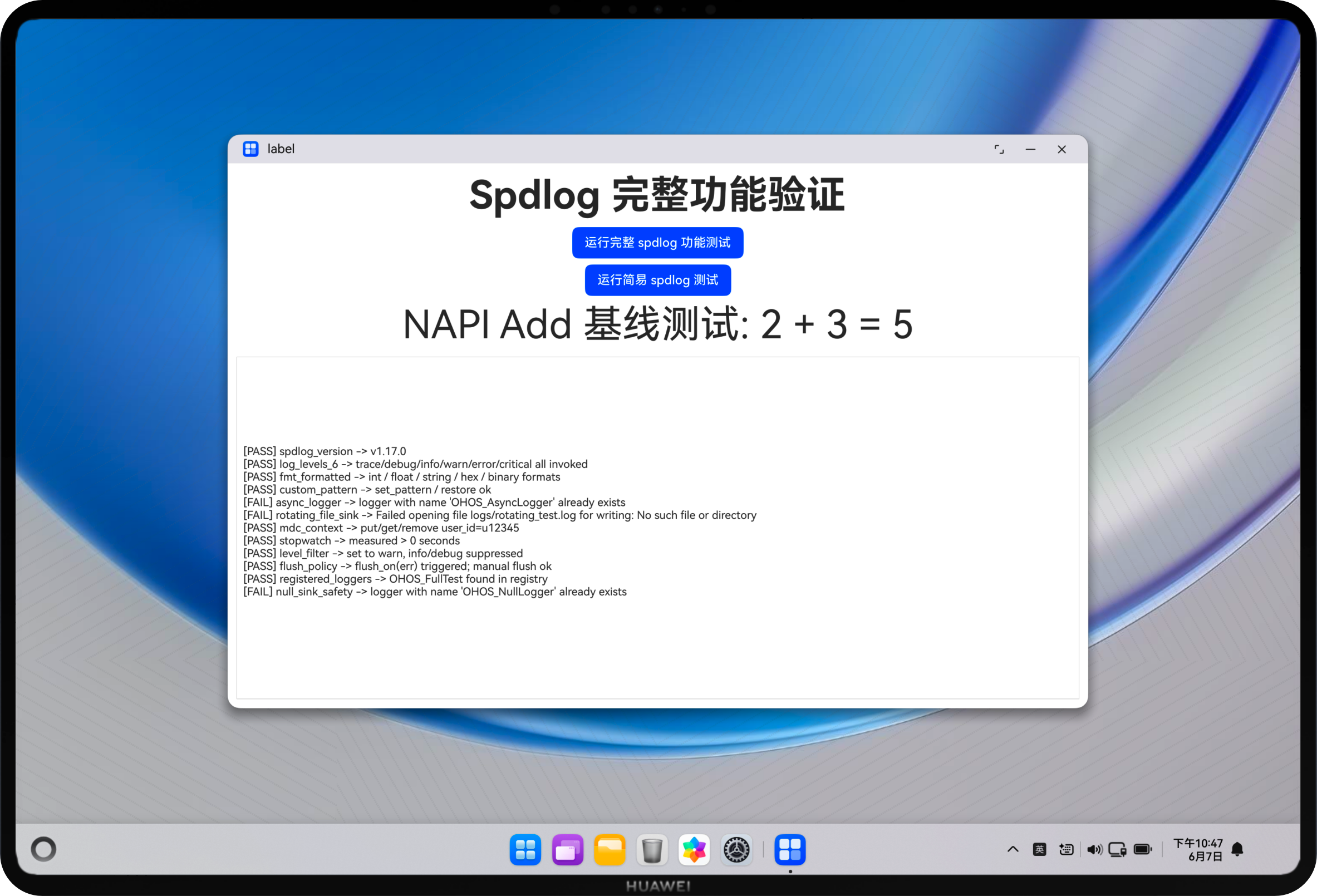
这是集成过程中最核心的一步。AtomCode 借助 lycium-app-integration skill 的指导,自动生成了涵盖 spdlog 12 类功能的完整 NAPI 测试函数:
| # | 测试类别 | C++ 实现要点 |
|---|---|---|
| 1 | 版本校验 | SPDLOG_VER_MAJOR / MINOR / PATCH 宏 |
| 2 | 6 种日志级别 | trace → debug → info → warn → error → critical |
| 3 | fmt 格式化 | "int={} float={:.2f} hex=0x{:X}" 以及 to_hex() 二进制输出 |
| 4 | 自定义模式 | set_pattern() 动态切换/恢复 |
| 5 | 异步日志 | spdlog::init_thread_pool() + create_async<>() |
| 6 | 滚动文件 | rotating_logger_mt() 10KB×3 自动轮转 |
| 7 | MDC 上下文 | mdc::put / get / remove 诊断上下文 |
| 8 | Stopwatch | spdlog::stopwatch 精确计时 |
| 9 | 级别过滤 | set_level(warn) 下 info/debug 静默 |
| 10 | Flush 策略 | flush_on(err) + 手动 flush() |
| 11 | 注册表检查 | apply_all() 遍历已注册日志器 |
| 12 | 异常安全性 | null_sink 创建零 crash |
函数签名:
// NAPI 入口 —— 一条指令自动生成
static napi_value SpdlogFullTest(napi_env env, napi_callback_info info)
{
    // 创建 logger → 逐项测试 → 返回 [PASS]/[FAIL] 报告
    ...
    napi_create_string_utf8(env, report.c_str(), report.length(), &ret);
    return ret;
}
人工耗时 40 min → AI 耗时 < 15 s(含多轮迭代修复编译错误)
2.5 类型声明和 UI 页面同步生成
AtomCode 的 parallel_edit_files 能力可以同时修改多个无关文件,无需等待:
Index.d.ts:自动同步 NAPI 导出函数签名
export const add: (a: number, b: number) => number;
export const spdlogTest: () => string;
export const spdlogFullTest: () => string;
Index.ets:ArkUI 页面,包含按钮、滚动结果显示区域
@Entry
@Component
struct Index {
  @State logResult: string = '';
  build() {
    Button('运行完整 spdlog 功能测试')
      .onClick(() => {
        this.logResult = testNapi.spdlogFullTest();
      })
    Scroll() {
      Text(this.logResult)  ← 显示 [PASS]/[FAIL] 报告
    }
  }
}
人工耗时 25 min → AI 耗时 < 10 s
2.6 编译错误自动修复
集成过程中遇到了 3 个编译错误,AtomCode 的迭代式诊断流程:
| 轮次 | 错误 | AI 诊断与修复 |
|---|---|---|
| 1 | Property 'whiteSpace' does not exist on type 'TextAttribute' |
ArkTS 无 whiteSpace 属性,直接删除 |
| 2 | no member named 'pattern' in 'spdlog::logger' |
spdlog 的 set_pattern() 无对应 getter,改用硬编码默认模式 |
| 3 | no member named 'registered_loggers' in namespace 'spdlog' |
改用 apply_all() 遍历 |
| 3 | no member named 'null_sink_mt' in namespace 'spdlog::sinks' |
缺少 #include <spdlog/sinks/null_sink.h> |
传统调试:需要开发者在线搜索、阅读 spdlog 源码、反复编译 → 30-60 min
AI 修复:读头文件 → 定位根因 → 生成修复 → 编译验证,每次 < 2 min
3. 效率对比总结
| 环节 | 传统手工 | AtomCode + Skills | 提升倍数 |
|---|---|---|---|
| 工程创建和配置 | 30 min | < 10 s | 180× |
| 三方库部署 | 20 min | < 3 s | 400× |
| CMake 配置 | 15 min | < 5 s | 180× |
| NAPI 桥接代码 | 40 min | < 15 s | 160× |
| 类型声明 | 10 min | < 5 s | 120× |
| UI 验证页面 | 15 min | < 5 s | 180× |
| 编译错误修复 | 30 min | < 5 min (3 轮迭代) | 6× |
| 全流程合计 | ~160 min | ~6 min | ~27× |
注:AI 时间包括多轮对话、代码生成和验证的端到端耗时。
4. 关键经验总结
4.1 为什么 AtomCode 适合鸿蒙三方库集成?
- Skills 专业化:
lycium-app-integration等技能模板封装了 lycium_plusplus 项目多年的 OHOS 交叉编译经验,AI 可以基于这些经验生成符合鸿蒙规范的代码,而非通用 C++ 代码。 - 上下文感知:AtomCode 能读取项目目录结构、CMake 配置、已有 NAPI 代码,在正确的上下文中做精确修改。
- 并行编辑:
parallel_edit_files同时修改 C++/TypeScript/JSON/ArkTS 四个维度的文件,保持跨文件接口一致性。 - 迭代修复:编译错误 → 读头文件 → 定位根因 → 修复 → 提交,形成完整的修复闭环。
4.2 最佳实践建议
- 先确保交叉编译产物正确:使用
lycium-build-checkskill 验证.a文件架构(readelf -h libspdlog.a确认是 arm64-v8a) - 善用 Skills 模板:首次集成前,主动用
use_skill加载相关技能模板,让 AI 了解最佳实践 - 保留编译中间状态:使用
git commit分步提交,AI 修复错误后能快速git diff验证变更 - NAPI 函数保持简单:每个 NAPI 函数只做一件事,返回字符串或布尔值,减少跨语言调试复杂度
5. 项目仓库
完整代码已开源在 GitCode:
https://gitcode.com/unisources/OHOSSpdlogSample
包含:
- 完整的 HarmonyOS NEXT 工程结构
- spdlog arm64-v8a 预编译库
- 12 类功能全覆盖的 NAPI 测试代码
- ArkUI 可视化验证界面
6. 展望
当前方案基于静态链接(.a),适用于应用自包含场景。未来方向:
- 共享库模式:将 spdlog 编译为
.so,多个 NAPI 模块共享同一份日志库 - hilog Sink:编写自定义
spdlog::sinks::hilog_sink_mt,将 spdlog 输出重定向到鸿蒙 hilog 系统 - CI/CD 集成:结合 lycium_plusplus 的构建流水线,实现「交叉编译 → 自动部署到 thirdparty → 构建 → 测试」全自动化

作为“人工智能6S店”的官方数字引擎,为AI开发者与企业提供一个覆盖软硬件全栈、一站式门户。
更多推荐


 1
1 0
0- 0



 已为社区贡献43条内容

所有评论(0)