
鸿蒙Next实战开发(二):首页仪表盘与待办事项模块完整开发
鸿蒙Next实战开发(二):首页仪表盘与待办事项模块完整开发
系列第二篇,我们来实现"智慧生活"App的两个核心页面:首页仪表盘和待办事项管理。涵盖天气卡片、健康统计、快捷入口,以及完整的待办CRUD+分类筛选功能。
一、引言
在上一篇中,我们搭建了Tabs底部导航的脚手架,建立了4个Tab组件骨架。本篇将填充其中的前两个——首页仪表盘(HomeContent) 和 待办事项(TodoContent)。
这两个模块涵盖了鸿蒙开发中最常见的 UI 模式:
- 卡片式布局
- 列表渲染与状态管理
- 表单输入与提交
- 条件筛选与数据统计
二、首页仪表盘开发
2.1 整体结构设计
首页仪表盘从上到下的布局为:
┌─────────────────────────┐
│  你好,朋友              │  ← 问候区
│  2024年1月15日 星期一    │
├─────────────────────────┤
│  🌤  26°C   湿度 65%    │  ← 天气卡片
│       晴    风力 3级    │
├──────┬──────┬──────────┤
│ 🚶   │ 🔥   │ 😴      │  ← 健康统计三卡片
│ 6,852│ 423  │ 7.2h    │
│今日步数│消耗千卡│睡眠时长│
├──────┴──────┴──────────┤
│  快捷功能                │  ← 快捷入口
│ 📝记笔记 ✅待办 📊数据 ⚙️设置│
├─────────────────────────┤
│ 💡 每日一言              │  ← 格言区
│ 生活不是等待暴风雨过去... │
└─────────────────────────┘
2.2 问候区实现
每天首次打开应用,用户最先看到的是问候语和当前日期:
@Component
struct HomeContent {
  @State todayDate: string = '';

  aboutToAppear(): void {
    const now = new Date();
    const weekDays = ['日', '一', '二', '三', '四', '五', '六'];
    this.todayDate = `${now.getFullYear()}年${now.getMonth() + 1}月${now.getDate()}日 星期${weekDays[now.getDay()]}`;
  }

  build() {
    Scroll() {
      Column({ space: 16 }) {
        // === 顶部问候语 ===
        Row() {
          Column() {
            Text('你好,朋友')
              .fontSize($r('app.float.subtitle_font_size'))
              .fontWeight(FontWeight.Bold)
              .fontColor($r('app.color.text_primary'));
            Text(this.todayDate)
              .fontSize($r('app.float.caption_font_size'))
              .fontColor($r('app.color.text_tertiary'))
              .margin({ top: 4 });
          }
          .alignItems(HorizontalAlign.Start);
          Blank();
          Text('☀️').fontSize(32);
        }
        .width('100%')
        .padding({ left: 16, right: 16, top: 8 });
      }
    }
  }
}
这里有几个要点:
Scroll+Column组合实现可滚动的垂直布局Blank组件用于自动填充剩余空间,实现内容两端对齐$r('app.float.xxx')引用我们预先定义的资源
2.3 天气卡片
天气卡片使用 emoji + 文字组合,比加载网络图片更轻量:
Column() {
  Row() {
    Text('🌤').fontSize(40);
    Column({ space: 2 }) {
      Text('26°C')
        .fontSize(36)
        .fontWeight(FontWeight.Bold);
      Text('晴')
        .fontSize($r('app.float.caption_font_size'))
        .fontColor($r('app.color.text_secondary'));
    }
    .margin({ left: 12 });
    Blank();
    Column({ space: 2 }) {
      Text('湿度 65%')
        .fontSize($r('app.float.small_font_size'));
      Text('风力 3级')
        .fontSize($r('app.float.small_font_size'));
    }
  }
  .alignItems(VerticalAlign.Center);
}
.width('100%')
.padding(20)
.backgroundColor($r('app.color.card_background'))
.borderRadius($r('app.float.card_radius'))
.shadow({ radius: 6, color: '#1A000000', offsetY: 2 });
卡片阴影是鸿蒙 ArkUI 的特色,通过 shadow 属性设置。参数的 color 使用十六进制颜色加透明度前缀(#1A 表示 10% 不透明度)。
2.4 健康统计三卡片
三张统计卡片使用 Row + layoutWeight(1) 实现三等分布局:
Row({ space: 12 }) {
  // 步数卡片
  Column({ space: 8 }) {
    Text('🚶').fontSize(28);
    Text('6,852')
      .fontSize($r('app.float.subtitle_font_size'))
      .fontWeight(FontWeight.Bold);
    Text('今日步数')
      .fontSize($r('app.float.small_font_size'))
      .fontColor($r('app.color.text_tertiary'));
  }
  .layoutWeight(1)
  .padding(16)
  .backgroundColor($r('app.color.card_background'))
  .borderRadius($r('app.float.card_radius'))
  .shadow({ radius: 4, color: '#0A000000', offsetY: 1 })
  .alignItems(HorizontalAlign.Center);

  // 卡路里卡片(同上,略)
  // 睡眠卡片(同上,略)
}
.width('100%')
.padding({ left: 16, right: 16 });
2.5 快捷功能入口
使用 @Builder 构建函数复用卡片样式:
@Builder
buildQuickAction(icon: string, label: string) {
  Column({ space: 6 }) {
    Text(icon).fontSize(32);
    Text(label)
      .fontSize($r('app.float.small_font_size'))
      .fontColor($r('app.color.text_secondary'));
  }
  .layoutWeight(1)
  .padding(12)
  .backgroundColor($r('app.color.card_background'))
  .borderRadius($r('app.float.button_radius'))
  .shadow({ radius: 4, color: '#0A000000', offsetY: 1 })
  .alignItems(HorizontalAlign.Center);
}
然后在 build() 中调用:
Row({ space: 12 }) {
  this.buildQuickAction('📝', '记笔记');
  this.buildQuickAction('✅', '待办');
  this.buildQuickAction('📊', '数据');
  this.buildQuickAction('⚙️', '设置');
}
三、待办事项模块开发
3.1 功能需求
待办事项模块是App中最具交互性的部分,我们需要实现:
- ✅ 数据统计:全部/待完成/已完成数量
- ✅ 分类筛选:全部/待完成/已完成 Tab 切换
- ✅ 新增代办:输入框 + 提交按钮
- ✅ 勾选完成:点击复选框切换状态
- ✅ 删除代办:点击删除按钮
- ✅ 优先级标签:高/中/低 三种样式
- ✅ 空状态提示:无待办时显示"🎉 没有待办事项"
3.2 数据模型与状态
interface TodoItem {
  id: number;
  text: string;
  completed: boolean;
  priority: 'high' | 'medium' | 'low';
}

@Component
struct TodoContent {
  @State todos: TodoItem[] = [
    { id: 1, text: '完成鸿蒙应用开发', completed: false, priority: 'high' },
    { id: 2, text: '阅读技术文档', completed: true, priority: 'medium' },
    { id: 3, text: '运动30分钟', completed: false, priority: 'medium' },
    { id: 4, text: '整理本周工作计划', completed: false, priority: 'low' },
    { id: 5, text: '学习ArkTS新特性', completed: true, priority: 'high' },
    { id: 6, text: '准备周会汇报材料', completed: false, priority: 'medium' },
  ];
  @State newTodoText: string = '';
  @State filterType: string = 'all';
}
3.3 数据过滤方法
重要:在 ArkTS 中,
@Component内的get访问器在传入ForEach时可能出现绑定丢失问题。因此我们使用方法替代 getter。
getFilteredTodos(): TodoItem[] {
  if (this.filterType === 'active') {
    const result: TodoItem[] = [];
    for (let i = 0; i < this.todos.length; i++) {
      if (!this.todos[i].completed) {
        result.push(this.todos[i]);
      }
    }
    return result;
  }
  if (this.filterType === 'completed') {
    const result: TodoItem[] = [];
    for (let i = 0; i < this.todos.length; i++) {
      if (this.todos[i].completed) {
        result.push(this.todos[i]);
      }
    }
    return result;
  }
  return this.todos;
}
3.4 顶部统计区
三个统计数字使用 Row + 三个 Column 布局:
Row({ space: 12 }) {
  Column({ space: 4 }) {
    Text(`${this.todos.length}`)
      .fontSize(28).fontWeight(FontWeight.Bold)
      .fontColor($r('app.color.primary_color'));
    Text('全部').fontSize(12).fontColor($r('app.color.text_tertiary'));
  }
  .layoutWeight(1).alignItems(HorizontalAlign.Center);

  Column({ space: 4 }) {
    Text(`${this.todoActiveCount}`)
      .fontSize(28).fontWeight(FontWeight.Bold)
      .fontColor($r('app.color.warning_color'));
    Text('待完成').fontSize(12).fontColor($r('app.color.text_tertiary'));
  }
  .layoutWeight(1).alignItems(HorizontalAlign.Center);

  Column({ space: 4 }) {
    Text(`${this.todoCompletedCount}`)
      .fontSize(28).fontWeight(FontWeight.Bold)
      .fontColor($r('app.color.success_color'));
    Text('已完成').fontSize(12).fontColor($r('app.color.text_tertiary'));
  }
  .layoutWeight(1).alignItems(HorizontalAlign.Center);
}
3.5 全局筛选标签
这里使用了一个 全局 @Builder 函数。注意它是定义在 @Component 外部的,可以从任何地方调用:
@Builder
function buildFilterTab(
  label: string,
  type: string,
  currentType: string,
  onClick: (type: string) => void
) {
  Text(label)
    .fontSize(14)
    .fontColor(currentType === type ? Color.White : $r('app.color.text_primary'))
    .padding({ left: 16, right: 16, top: 6, bottom: 6 })
    .backgroundColor(currentType === type
      ? $r('app.color.primary_color')
      : '#FFF3F4F6')
    .borderRadius(16)
    .onClick(() => {
      onClick(type);
    });
}
使用方式:
Row({ space: 8 }) {
  buildFilterTab('全部', 'all', this.filterType, (type: string) => {
    this.filterType = type;
  });
  buildFilterTab('待完成', 'active', this.filterType, (type: string) => {
    this.filterType = type;
  });
  buildFilterTab('已完成', 'completed', this.filterType, (type: string) => {
    this.filterType = type;
  });
  Blank();
}
3.6 新增待办输入框
TextInput + Button 组合,支持回车提交:
Row({ space: 8 }) {
  TextInput({ placeholder: '添加新的待办事项...', text: this.newTodoText })
    .placeholderColor($r('app.color.text_tertiary'))
    .height(44).layoutWeight(1)
    .borderRadius(12)
    .backgroundColor('#FFF3F4F6')
    .onChange((value: string) => { this.newTodoText = value; })
    .onSubmit(() => { this.addTodo(); });

  Button('添加')
    .height(44).borderRadius(12)
    .backgroundColor($r('app.color.primary_color'))
    .fontColor(Color.White)
    .fontSize(16)
    .onClick(() => { this.addTodo(); });
}
3.7 添加待办 - 状态更新要点
在 ArkTS 中更新 @State 数组时,必须创建全新的数组实例,否则框架无法检测到变化:
addTodo(): void {
  if (this.newTodoText.trim().length === 0) return;

  // 计算最大ID
  let maxId = 0;
  for (let i = 0; i < this.todos.length; i++) {
    if (this.todos[i].id > maxId) maxId = this.todos[i].id;
  }

  // 创建全新的数组(深拷贝)
  const newTodos: TodoItem[] = [];
  for (let i = 0; i < this.todos.length; i++) {
    newTodos.push({
      id: this.todos[i].id,
      text: this.todos[i].text,
      completed: this.todos[i].completed,
      priority: this.todos[i].priority
    });
  }

  // 添加新项
  newTodos.push({
    id: maxId + 1,
    text: this.newTodoText.trim(),
    completed: false,
    priority: 'medium'
  });

  this.todos = newTodos;  // 重新赋值触发UI更新
  this.newTodoText = '';
}
⚠️ 常见坑:不要直接
push到@State数组,也不要赋值同一个引用。必须= newArray触发响应式更新。
3.8 待办列表渲染
使用 ForEach 循环渲染,每个待办项通过 @Builder 构建:
Scroll() {
  Column({ space: 8 }) {
    ForEach(this.getFilteredTodos(), (item: TodoItem) => {
      this.buildTodoItem(item);
    });

    // 空状态提示
    if (this.getFilteredTodos().length === 0) {
      Column({ space: 8 }) {
        Text('🎉').fontSize(48);
        Text('没有待办事项')
          .fontSize(16)
          .fontColor($r('app.color.text_tertiary'));
      }
      .width('100%').padding(40)
      .alignItems(HorizontalAlign.Center);
    }

    Blank().height(16);
  }
  .width('100%').padding({ left: 16, right: 16 });
}
3.9 单个待办项 - 自定义Builder
每个待办项包含:复选框 + 文字内容 + 优先级标签 + 删除按钮:
@Builder
buildTodoItem(item: TodoItem) {
  Row({ space: 12 }) {
    // 复选框
    Column() {
      if (item.completed) {
        Text('✓')
          .fontSize(16).fontColor(Color.White)
          .width(24).height(24)
          .backgroundColor($r('app.color.success_color'))
          .borderRadius(12).textAlign(TextAlign.Center);
      } else {
        Row()
          .width(24).height(24)
          .border({ width: 2, color: $r('app.color.divider_color') })
          .borderRadius(12);
      }
    }
    .onClick(() => { this.toggleTodo(item.id); });

    // 文字与优先级
    Column({ space: 4 }) {
      Text(item.text)
        .fontSize(16)
        .fontColor(item.completed
          ? $r('app.color.text_tertiary')
          : $r('app.color.text_primary'))
        .decoration({
          type: item.completed
            ? TextDecorationType.LineThrough
            : TextDecorationType.None
        });
      Row({ space: 6 }) {
        Text(this.getPriorityText(item))
          .fontSize(10)
          .fontColor(this.getPriorityColor(item))
          .border({ width: 1, color: this.getPriorityColor(item) })
          .borderRadius(4)
          .padding({ left: 6, right: 6, top: 2, bottom: 2 });
      }
    }
    .layoutWeight(1)
    .alignItems(HorizontalAlign.Start);

    // 删除按钮
    Text('🗑️').fontSize(18)
      .onClick(() => { this.deleteTodo(item.id); });
  }
  .width('100%').padding(14)
  .backgroundColor($r('app.color.card_background'))
  .borderRadius(12)
  .shadow({ radius: 2, color: '#08000000', offsetY: 1 })
  .alignItems(VerticalAlign.Center);
}
3.10 切换与删除逻辑
toggleTodo(id: number): void {
  const index = this.todos.findIndex(item => item.id === id);
  if (index !== -1) {
    const newTodos: TodoItem[] = [];
    for (let i = 0; i < this.todos.length; i++) {
      if (i === index) {
        newTodos.push({
          id: this.todos[i].id,
          text: this.todos[i].text,
          completed: !this.todos[i].completed,
          priority: this.todos[i].priority
        });
      } else {
        newTodos.push(this.todos[i]);
      }
    }
    this.todos = newTodos;
  }
}

deleteTodo(id: number): void {
  this.todos = this.todos.filter(item => item.id !== id);
}
四、ArkTS 状态管理避坑指南
在实践中,我遇到了几个值得特别注意的问题:
4.1 数组更新必须赋值新引用
// ❌ 错误:不会触发UI更新
this.todos.push(newItem);

// ❌ 错误:引用未变,框架不感知
const arr = this.todos;
arr.push(newItem);
this.todos = arr;

// ✅ 正确:创建全新数组
this.todos = [...this.todos, newItem];  // 但ArkTS不支持展开运算符
// ✅ 正确:手动拷贝
const newArr: TodoItem[] = [];
for (const item of this.todos) { newArr.push({...item}); }
newArr.push(newItem);
this.todos = newArr;
4.2 不要在 ForEach 中使用 getter
// ❌ 可能导致 undefined
ForEach(this.filteredTodos, ...)

// ✅ 使用普通方法
ForEach(this.getFilteredTodos(), ...)
4.3 注意优先级标签的实现
由于 ArkTS 不支持在 JSX 中使用对象字面量动态索引:
// ❌ 不支持
Text({ high: '高', medium: '中', low: '低' }[item.priority])

// ✅ 使用方法替代
getPriorityText(item: TodoItem): string {
  if (item.priority === 'high') return '高优先级';
  if (item.priority === 'medium') return '中优先级';
  return '低优先级';
}
五、本篇小结
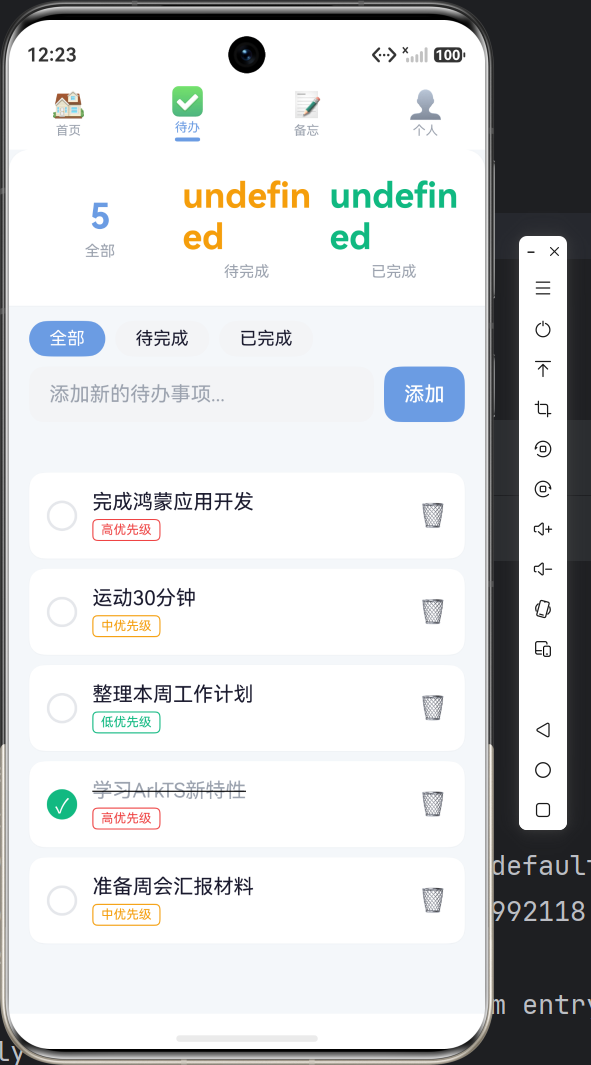
本篇我们完整实现了:
- ✅ 首页仪表盘:问候区 + 天气卡片 + 健康统计 + 快捷入口 + 每日格言
- ✅ 待办事项模块:统计区 + 分类筛选 + 新增代办 + 勾选完成 + 删除 + 优先级标签 + 空状态
- ✅ ArkTS 状态管理核心技巧:数组更新、ForEach 使用、Builder 复用
下篇将开发 备忘录模块 和 笔记详情页,涵盖分类浏览、查看/编辑双模式切换等进阶功能。

作为“人工智能6S店”的官方数字引擎,为AI开发者与企业提供一个覆盖软硬件全栈、一站式门户。
更多推荐
 5
5 0
0- 0


 已为社区贡献39条内容

所有评论(0)