
星座运势-万能词汇应用 - 鸿蒙PC Electron框架完整技术实现指南
星座运势应用项目摘要 该项目是一款基于开源鸿蒙PC开发的星座运势应用,集运势查询、词汇生成、星座配对于一体。采用分层架构设计,包含UI层、业务逻辑层和数据层。核心功能模块包括:12星座卡片展示、随机运势生成(爱情/事业/财运/健康)、4类万能词汇库(支持随机生成与复制)、星座配对评分系统(基于预设评分表)以及星座百科信息展示。数据模型包含完整的星座属性数据、分类词汇库和配对评分矩阵。技术实现上采用
·
欢迎加入开源鸿蒙PC社区:
https://harmonypc.csdn.net/
atomgit仓库地址: https://atomgit.com/tizibanfan/xingzuoyunshi
一、项目概述
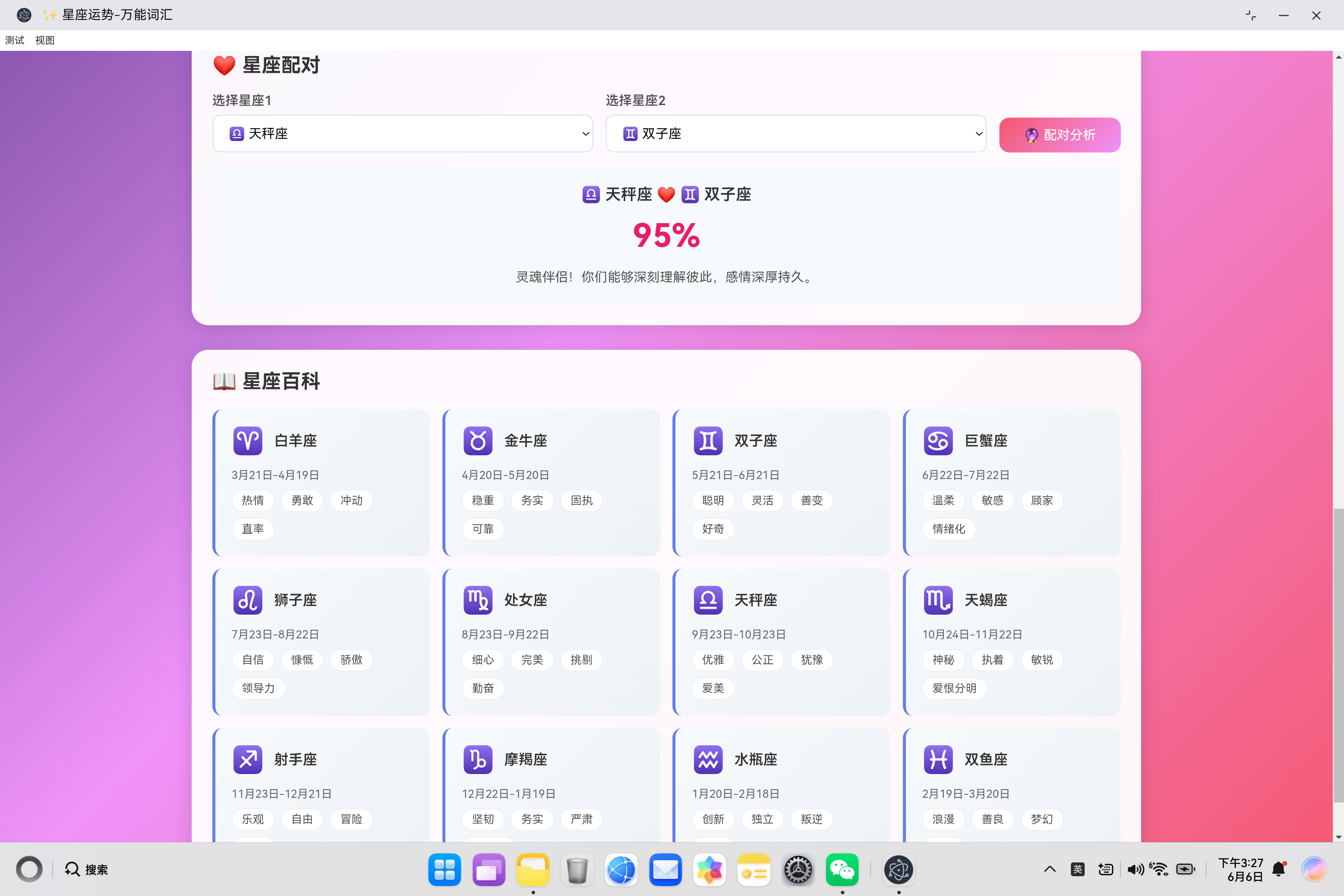
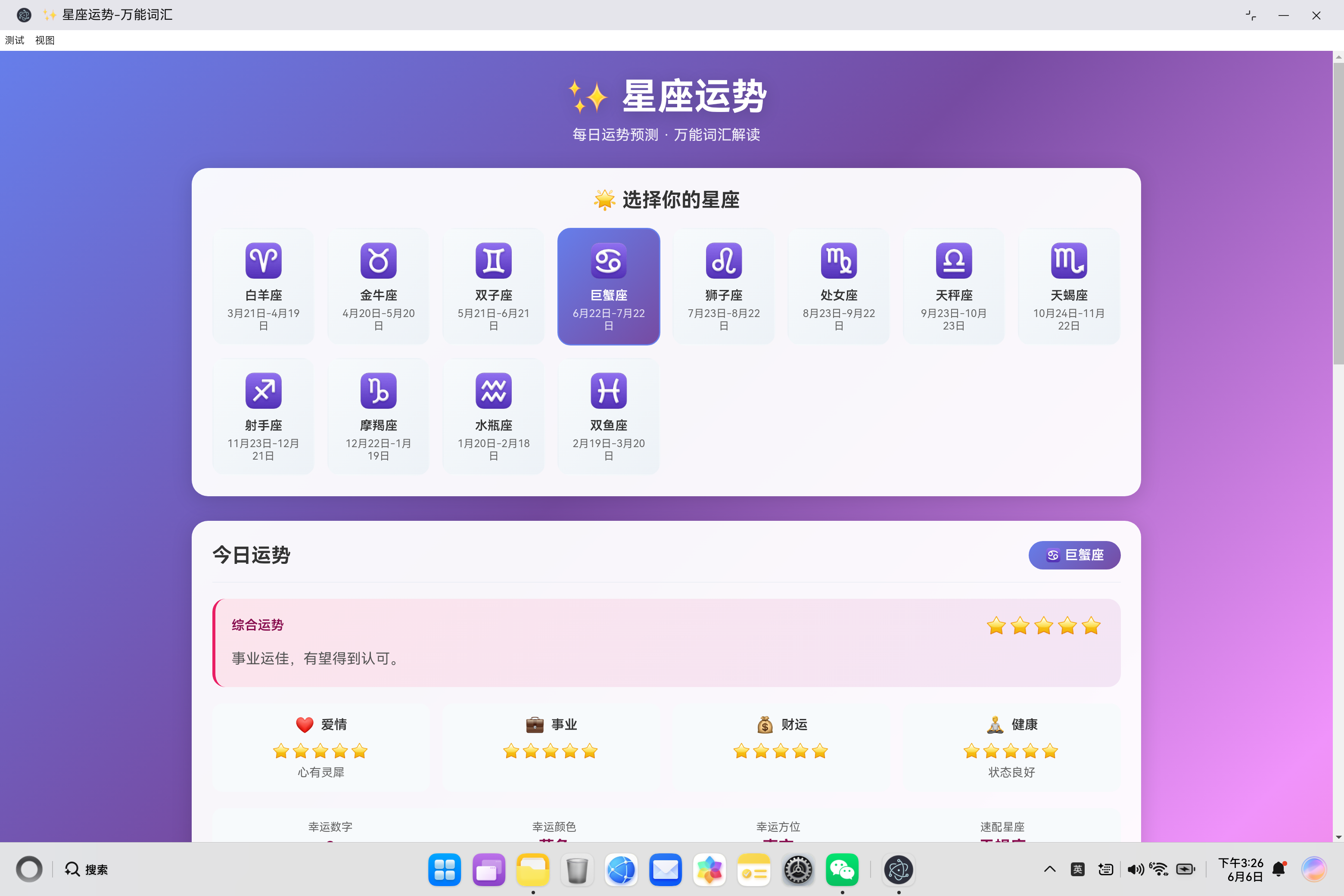
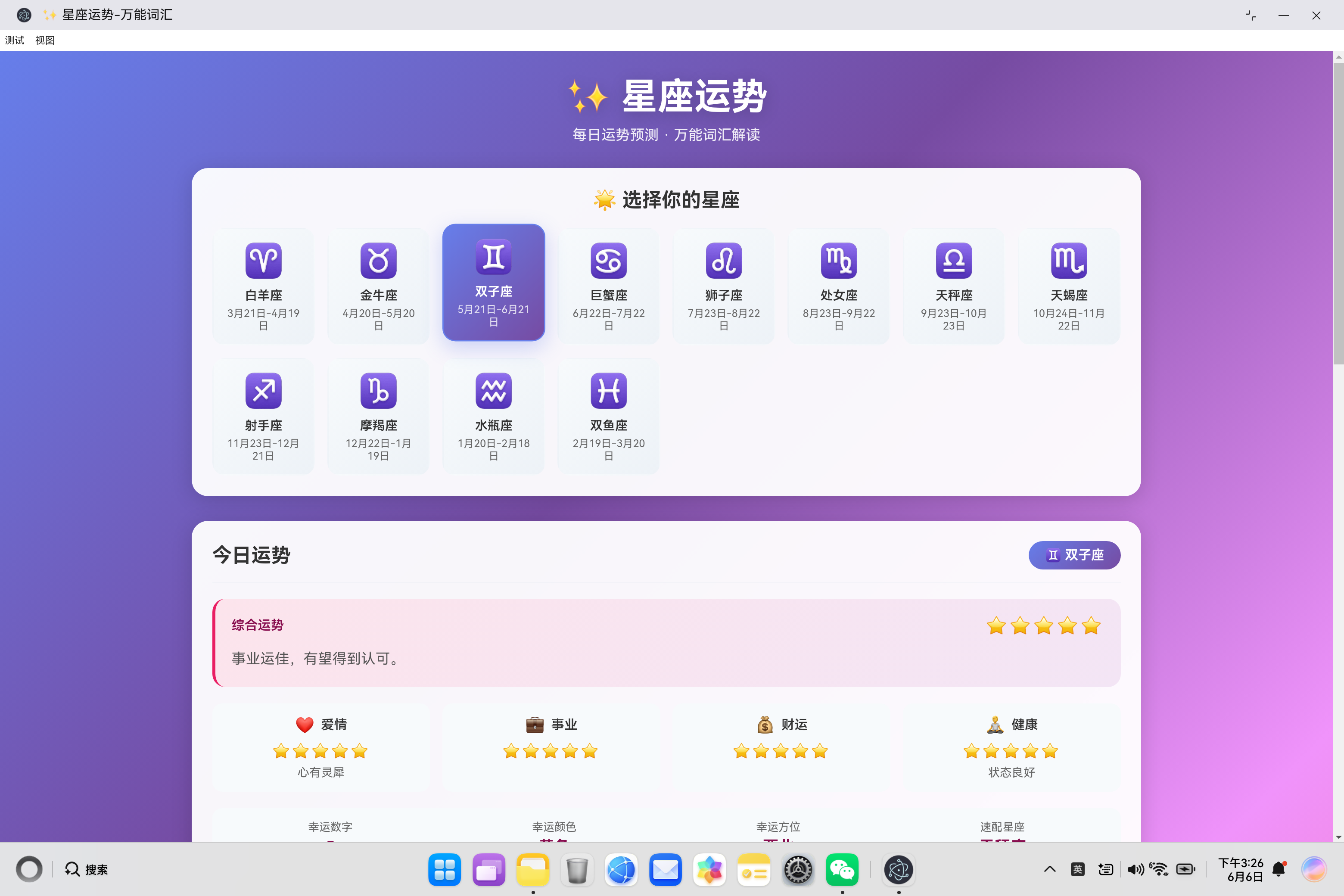
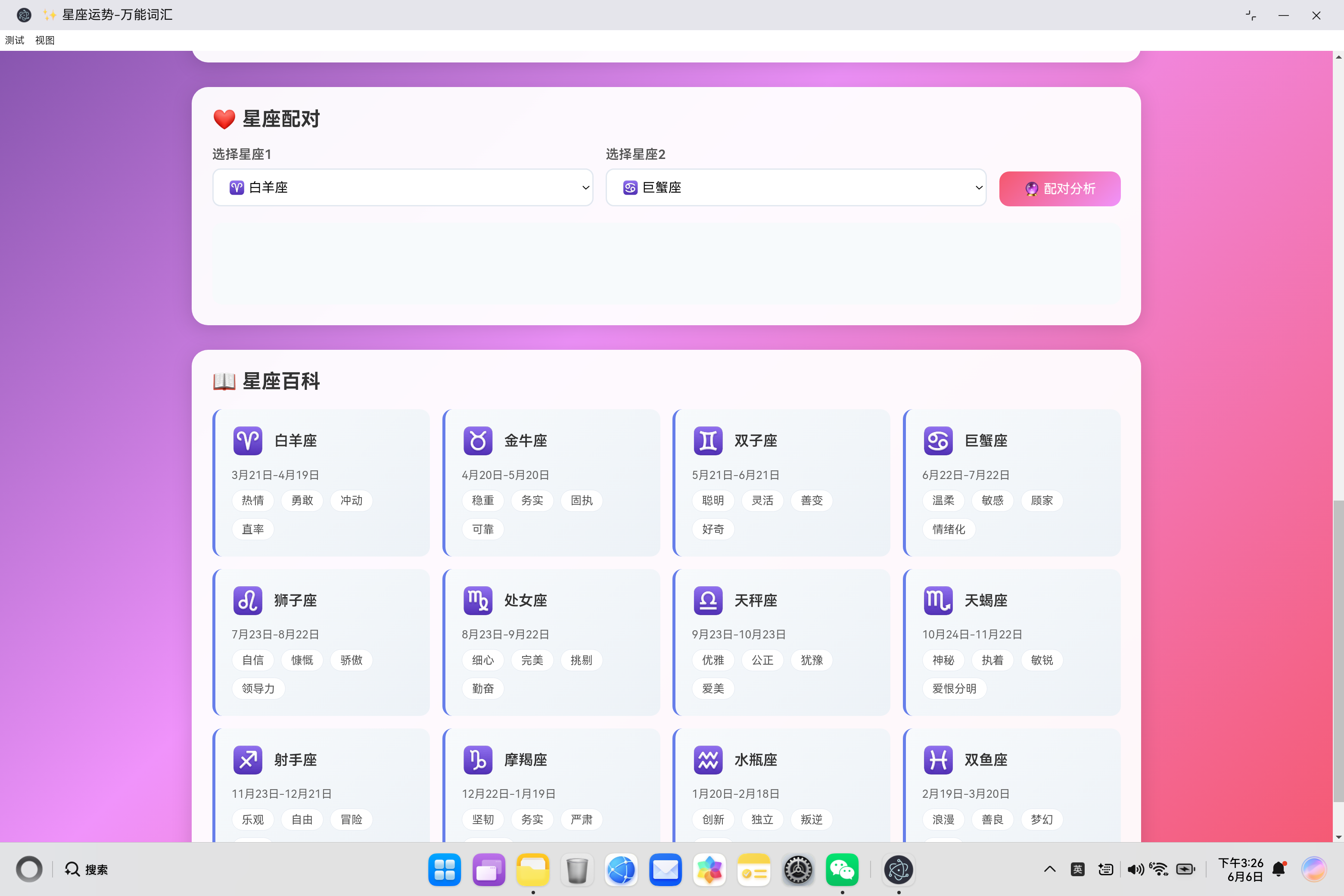
星座运势应用是一款集星座运势查询、万能词汇生成、星座配对于一体的趣味应用。该应用采用现代化的UI设计,提供12星座的详细信息和运势预测。
1.1 系统架构设计
┌─────────────────────────────────────────────────────────────┐
│                     星座运势应用                            │
├─────────────────────────────────────────────────────────────┤
│                    UI层 (index.html)                        │
│  ┌───────────┬───────────┬───────────┬───────────┐        │
│  │ 星座选择  │ 今日运势  │ 万能词汇  │ 星座配对  │        │
│  └───────────┴───────────┴───────────┴───────────┘        │
├─────────────────────────────────────────────────────────────┤
│                  业务逻辑层 (app.js)                         │
│  ┌────────────┬────────────┬────────────┬────────────┐     │
│  │ 数据管理   │ 运势计算   │ 词汇生成   │ 配对分析   │     │
│  └────────────┴────────────┴────────────┴────────────┘     │
├─────────────────────────────────────────────────────────────┤
│                    数据层 (内置数据)                        │
│  ┌──────────────────────────────────────────────────────┐  │
│  │ 星座数据 · 运势文本 · 词汇库 · 配对评分表            │  │
│  └──────────────────────────────────────────────────────┘  │
└─────────────────────────────────────────────────────────────┘
1.2 功能模块
| 模块 | 功能描述 | 技术要点 |
|---|---|---|
| 星座选择 | 12星座卡片展示与切换 | 响应式网格布局 |
| 今日运势 | 综合/爱情/事业/财运/健康运势 | 随机算法、星级评分 |
| 万能词汇 | 4分类词汇展示与随机生成 | 数据过滤、剪贴板操作 |
| 星座配对 | 任意两星座配对分析 | 配对评分表、描述生成 |
| 星座百科 | 星座信息展示 | 卡片列表渲染 |
二、数据模型设计
2.1 星座数据结构
{
    aries: {
        name: '白羊座',
        symbol: '♈',
        dates: '3月21日-4月19日',
        traits: ['热情', '勇敢', '冲动', '直率'],
        luckyNumber: '9',
        luckyColor: '红色',
        luckyDirection: '东方',
        matchZodiac: '狮子座'
    }
}
2.2 词汇数据结构
{
    love: ['心动', '浪漫', '甜蜜', '思念', '默契', ...],
    work: ['专注', '高效', '创新', '突破', '协作', ...],
    life: ['快乐', '幸福', '健康', '平安', '和谐', ...],
    study: ['勤奋', '专注', '坚持', '进步', '智慧', ...]
}
2.3 配对评分表结构
{
    'aries-leo': 95,      // 白羊座与狮子座配对评分
    'taurus-virgo': 95,   // 金牛座与处女座配对评分
    'gemini-libra': 95,   // 双子座与天秤座配对评分
    // ... 更多配对
}
三、核心代码实现详解
3.1 应用类设计
class ZodiacApp {
    constructor() {
        this.zodiacData = this.getZodiacData();
        this.vocabData = this.getVocabData();
        this.currentZodiac = 'aries';
        this.currentCategory = 'love';
        this.init();
    }

    init() {
        this.initDOMReferences();
        this.bindEventListeners();
        this.renderZodiacGrid();
        this.renderZodiacSelects();
        this.renderFortune();
        this.renderVocab();
        this.renderEncyclopedia();
    }
}
初始化流程:
- 加载星座数据和词汇数据
- 设置默认选中的星座和词汇分类
- 初始化DOM引用
- 绑定事件监听器
- 渲染各个组件
3.2 星座数据加载
getZodiacData() {
    return {
        aries: {
            name: '白羊座',
            symbol: '♈',
            dates: '3月21日-4月19日',
            traits: ['热情', '勇敢', '冲动', '直率'],
            luckyNumber: '9',
            luckyColor: '红色',
            luckyDirection: '东方',
            matchZodiac: '狮子座'
        },
        // ... 其他11个星座
    };
}
数据字段说明:
| 字段 | 类型 | 说明 |
|---|---|---|
| name | string | 星座名称 |
| symbol | string | 星座符号(emoji) |
| dates | string | 日期范围 |
| traits | array | 性格特点标签 |
| luckyNumber | string | 幸运数字 |
| luckyColor | string | 幸运颜色 |
| luckyDirection | string | 幸运方位 |
| matchZodiac | string | 速配星座 |
3.3 星座卡片渲染
renderZodiacGrid() {
    const zodiacs = Object.keys(this.zodiacData);
    this.zodiacGrid.innerHTML = zodiacs.map(key => {
        const zodiac = this.zodiacData[key];
        const isActive = key === this.currentZodiac;
        return `
            <div class="zodiac-card ${isActive ? 'active' : ''}"
                 data-zodiac="${key}"
                 onclick="app.selectZodiac('${key}')">
                <div class="zodiac-icon">${zodiac.symbol}</div>
                <div class="zodiac-name">${zodiac.name}</div>
                <div class="zodiac-date">${zodiac.dates}</div>
            </div>
        `;
    }).join('');
}
渲染流程:
- 获取所有星座键名
- 遍历生成卡片HTML
- 根据当前选中状态添加active类
- 绑定点击事件
3.4 运势计算算法
getRandomScore() {
    const date = new Date();
    const day = date.getDate();
    const index = (day + this.currentZodiac.length) % 5;
    return Math.max(3, index + 3);
}

starsToString(count) {
    return '⭐'.repeat(count) + '☆'.repeat(5 - count);
}
算法说明:
- 根据日期和星座名称长度计算随机种子
- 确保评分在3-5星之间
- 将数字评分转换为星星显示
3.5 运势渲染
renderFortune() {
    const zodiac = this.zodiacData[this.currentZodiac];
    const fortunes = this.getFortuneTexts();
    const randomIndex = (seed) => {
        const date = new Date();
        const day = date.getDate();
        return (day + seed) % 10;
    };

    const overallScore = this.getRandomScore();
    // ... 其他评分计算

    this.zodiacBadge.textContent = `${zodiac.symbol} ${zodiac.name}`;
    this.overallStars.textContent = this.starsToString(overallScore);
    this.overallText.textContent = fortunes.overall[randomIndex(0)];
    // ... 更新其他UI元素
}
运势文本获取策略:
- 根据日期生成随机索引
- 确保每天的运势保持稳定
- 不同类别的运势使用不同种子
3.6 万能词汇渲染
renderVocab() {
    const vocabList = this.vocabData[this.currentCategory];
    const displayCount = 12;
    const startIndex = Math.floor(Math.random() * (vocabList.length - displayCount));
    const selectedVocab = vocabList.slice(startIndex, startIndex + displayCount);

    this.vocabContent.innerHTML = `
        <div class="vocab-list">
            ${selectedVocab.map(v => `<div class="vocab-item">${v}</div>`).join('')}
        </div>
    `;
}
词汇选择策略:
- 从词汇库中随机选择12个词汇
- 使用slice方法截取连续片段
- 避免重复选择
3.7 随机词汇生成
generateRandomVocab() {
    const vocabList = this.vocabData[this.currentCategory];
    const shuffled = [...vocabList].sort(() => Math.random() - 0.5);
    const selectedVocab = shuffled.slice(0, 12);

    this.vocabContent.innerHTML = `
        <div class="vocab-list">
            ${selectedVocab.map(v => `<div class="vocab-item">${v}</div>`).join('')}
        </div>
    `;
}
洗牌算法:
- 使用展开运算符创建数组副本
- 使用sort方法打乱顺序
- 取前12个元素
3.8 词汇复制功能
copyVocab() {
    const vocabItems = document.querySelectorAll('.vocab-item');
    const vocabText = Array.from(vocabItems).map(item => item.textContent).join('、');

    navigator.clipboard.writeText(vocabText).then(() => {
        alert('词汇已复制到剪贴板!');
    }).catch(() => {
        alert('复制失败,请手动复制');
    });
}
实现要点:
- 使用querySelectorAll获取所有词汇元素
- 使用map方法提取文本内容
- 使用navigator.clipboard API复制到剪贴板
3.9 星座配对计算
calculateCompatibility() {
    const z1 = this.zodiac1.value;
    const z2 = this.zodiac2.value;

    const score = this.getCompatibilityScore(z1, z2);
    const descriptions = this.getCompatibilityDescriptions();

    let level = 'medium';
    if (score >= 80) level = 'high';
    else if (score <= 50) level = 'low';

    const descIndex = Math.floor(Math.random() * descriptions[level].length);

    // 渲染配对结果
}
配对等级划分:
- 高匹配(80-100分):天生一对、绝佳匹配
- 中匹配(51-79分):需要磨合、潜力配对
- 低匹配(0-50分):需要努力、挑战配对
3.10 配对评分获取
getCompatibilityScore(z1, z2) {
    const pairs = {
        'aries-leo': 95, 'taurus-virgo': 95, 'gemini-libra': 95,
        'cancer-scorpio': 95, 'leo-sagittarius': 95, 'virgo-capricorn': 95,
        'scorpio-pisces': 95, 'sagittarius-aries': 90, 'capricorn-taurus': 90,
        // ... 更多配对
    };

    const key1 = `${z1}-${z2}`;
    const key2 = `${z2}-${z1}`;

    if (key1 in pairs) return pairs[key1];
    if (key2 in pairs) return pairs[key2];

    return Math.floor(Math.random() * 40) + 50;
}
评分策略:
- 优先从配对表中查找
- 支持双向查找(ab和ba)
- 未找到时返回随机分数(50-89)
3.11 星座百科渲染
renderEncyclopedia() {
    const zodiacs = Object.keys(this.zodiacData);
    this.encyclopediaGrid.innerHTML = zodiacs.map(key => {
        const zodiac = this.zodiacData[key];
        return `
            <div class="encyclopedia-card">
                <div class="encyclopedia-header">
                    <div class="encyclopedia-icon">${zodiac.symbol}</div>
                    <div class="encyclopedia-name">${zodiac.name}</div>
                </div>
                <div class="encyclopedia-dates">${zodiac.dates}</div>
                <div class="encyclopedia-traits">
                    ${zodiac.traits.map(t => `<span class="trait-tag">${t}</span>`).join('')}
                </div>
            </div>
        `;
    }).join('');
}
四、UI设计与样式
4.1 渐变背景
body {
    background: linear-gradient(135deg, #667eea 0%, #764ba2 30%, #f093fb 60%, #f5576c 100%);
}
配色方案:
- 紫色系渐变,营造神秘梦幻氛围
- 从紫蓝到粉红的过渡
- 适合星座主题
4.2 星座卡片样式
.zodiac-card {
    background: linear-gradient(135deg, #f7fafc 0%, #edf2f7 100%);
    border-radius: 16px;
    padding: 15px;
    text-align: center;
    cursor: pointer;
    transition: all 0.3s ease;
}

.zodiac-card:hover {
    transform: translateY(-5px);
    box-shadow: 0 8px 25px rgba(102, 126, 234, 0.3);
}

.zodiac-card.active {
    background: linear-gradient(135deg, #667eea 0%, #764ba2 100%);
    color: #fff;
}
交互效果:
- 悬停时上移并添加阴影
- 选中时背景变为紫色渐变
- 平滑过渡动画
4.3 运势卡片样式
.fortune-card {
    background: linear-gradient(135deg, #fce4ec 0%, #f3e5f5 100%);
    border-radius: 16px;
    padding: 20px;
    border-left: 4px solid #e91e63;
}
设计特点:
- 粉色渐变背景
- 左侧红色边框强调
- 圆角卡片设计
4.4 响应式布局
@media (max-width: 768px) {
    .zodiac-grid {
        grid-template-columns: repeat(3, 1fr);
    }

    .fortune-grid {
        grid-template-columns: repeat(2, 1fr);
    }
}

@media (max-width: 480px) {
    .zodiac-grid {
        grid-template-columns: repeat(2, 1fr);
    }

    .fortune-grid {
        grid-template-columns: 1fr;
    }
}
适配策略:
- 桌面端:4列星座卡片
- 平板端:3列星座卡片,2列运势卡片
- 移动端:2列星座卡片,1列运势卡片
五、功能扩展建议
5.1 每日运势推送
scheduleDailyNotification() {
    const now = new Date();
    const tomorrow = new Date(now);
    tomorrow.setDate(tomorrow.getDate() + 1);
    tomorrow.setHours(8, 0, 0, 0);

    const delay = tomorrow - now;

    setTimeout(() => {
        if (Notification.permission === 'granted') {
            new Notification('每日运势提醒', {
                body: `今天的运势来啦!`,
                icon: '✨'
            });
        }
    }, delay);
}
5.2 用户收藏功能
// 扩展数据结构
{
    favorites: ['aries', 'leo', 'scorpio']  // 用户收藏的星座
}

// 收藏功能
toggleFavorite(zodiacKey) {
    if (this.favorites.includes(zodiacKey)) {
        this.favorites = this.favorites.filter(k => k !== zodiacKey);
    } else {
        this.favorites.push(zodiacKey);
    }
    localStorage.setItem('zodiacFavorites', JSON.stringify(this.favorites));
}
5.3 运势历史记录
// 保存每日运势
saveDailyFortune() {
    const today = new Date().toISOString().split('T')[0];
    const record = {
        date: today,
        zodiac: this.currentZodiac,
        fortune: {
            overall: this.overallText.textContent,
            love: this.loveText.textContent,
            // ...
        }
    };

    const history = JSON.parse(localStorage.getItem('fortuneHistory') || '[]');
    history.push(record);
    localStorage.setItem('fortuneHistory', JSON.stringify(history));
}
六、总结
星座运势应用通过完整的功能实现,为用户提供了一个有趣的星座查询工具。核心功能包括:
- 星座选择:12星座卡片展示与切换
- 今日运势:综合、爱情、事业、财运、健康运势
- 万能词汇:4分类词汇展示与随机生成
- 星座配对:任意两星座配对分析
- 星座百科:星座信息展示
技术亮点
- 数据驱动设计:所有星座数据、运势文本、词汇库均采用数据驱动
- 随机算法:基于日期的随机算法确保每日运势稳定
- 响应式布局:适配各种设备尺寸
- 现代化UI:渐变背景、卡片设计、平滑动画
未来扩展方向
- 每日推送:定时推送每日运势提醒
- 用户收藏:收藏喜欢的星座
- 运势历史:记录查看历史运势
- 社交分享:分享运势到社交媒体
- 个性化推荐:根据用户偏好推荐内容

作为“人工智能6S店”的官方数字引擎,为AI开发者与企业提供一个覆盖软硬件全栈、一站式门户。
更多推荐
 0
0 0
0- 0


 已为社区贡献10条内容

所有评论(0)