
鸿蒙PC Electron框架实现日历组件技术详解
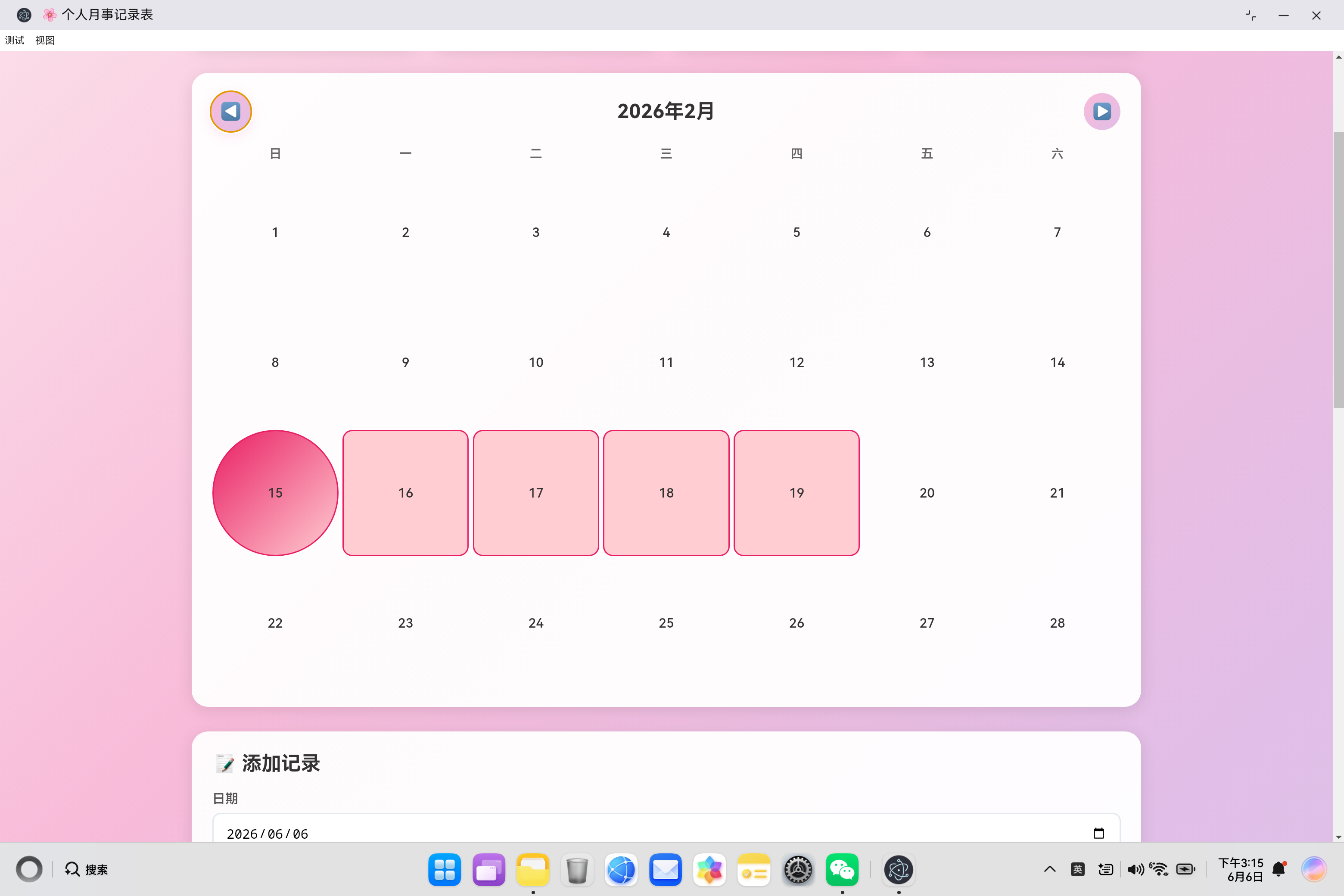
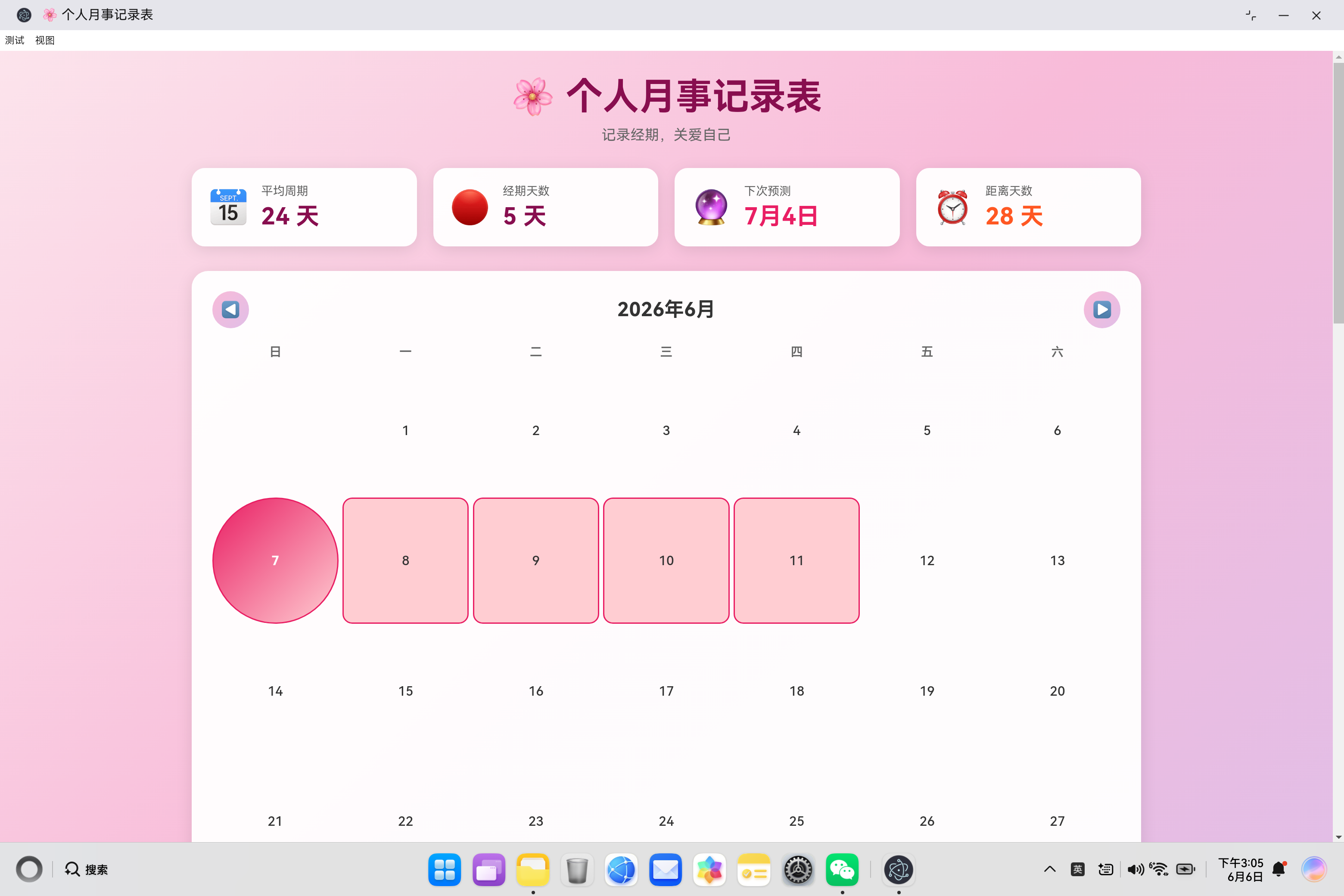
开源鸿蒙PC个人月事记录表日历组件解析 本文详细介绍了个人月事记录表应用中日历组件的设计与实现,主要包括: 核心功能:日期展示、状态标记(经期/排卵期等)、今日高亮、周期预测及交互反馈。 关键算法: 基于JavaScript的日期计算(如获取当月首末天、星期分布) 网格生成逻辑(前置空白填充与日期渲染) 状态优先级判断(今日标记>记录状态>预测标记) 技术亮点: 利用new Date(year,
·
欢迎加入开源鸿蒙PC社区:
https://harmonypc.csdn.net/
atomgit仓库地址: https://atomgit.com/tizibanfan/gerenyueshi
一、日历组件概述
日历组件是个人月事记录表应用的核心交互界面,用于可视化展示经期记录、状态标记和周期预测。本文将深入剖析日历组件的设计思路、实现细节和关键技术点。
1.1 日历组件的核心职责
| 职责 | 说明 |
|---|---|
| 日期展示 | 按月显示所有日期,支持月份切换 |
| 状态标记 | 用不同颜色标记经期、经前综合征、排卵期等状态 |
| 今日高亮 | 突出显示当前日期 |
| 预测显示 | 显示预测的下次经期日期 |
| 交互反馈 | 提供视觉反馈,提升用户体验 |
1.2 设计目标
- 直观性:用户一眼就能看出当前月份的经期状态
- 准确性:正确计算每月天数、起始位置
- 美观性:粉色主题,颜色编码清晰
- 响应式:适配不同屏幕尺寸
二、日历渲染核心算法
2.1 基础数据计算
renderCalendar() {
    // 获取当月第一天
    const firstDay = new Date(this.currentYear, this.currentMonth, 1);

    // 获取当月最后一天
    const lastDay = new Date(this.currentYear, this.currentMonth + 1, 0);

    // 计算第一天是星期几(0-6,0为周日)
    const startDay = firstDay.getDay();

    // 计算当月总天数
    const daysInMonth = lastDay.getDate();

    // ...渲染逻辑
}
关键计算点:
| 计算项 | 方法 | 说明 |
|---|---|---|
| 当月第一天 | new Date(year, month, 1) |
month从0开始 |
| 当月最后一天 | new Date(year, month+1, 0) |
利用JavaScript特性 |
| 第一天星期 | firstDay.getDay() |
返回0-6 |
| 当月天数 | lastDay.getDate() |
返回1-31 |
2.2 JavaScript日期技巧
获取当月最后一天的巧妙方法:
// 正常思维:需要判断月份、闰年等
// JavaScript技巧:直接使用下个月的第0天
const lastDay = new Date(2024, 2, 0);  // 2024年2月的最后一天
console.log(lastDay.getDate());  // 输出:29(2024是闰年)
原理说明:
- JavaScript的Date对象会自动调整超出范围的日期
new Date(2024, 2, 0)实际上是2024年3月的第0天- 也就是2024年2月的最后一天
2.3 日历网格生成
let html = '';

// 生成前置空白格子
for (let i = 0; i < startDay; i++) {
    html += '<div class="calendar-day empty"></div>';
}

// 生成日期格子
for (let day = 1; day <= daysInMonth; day++) {
    const date = new Date(this.currentYear, this.currentMonth, day);
    const dateStr = date.toISOString().split('T')[0];

    // ...状态判断和样式添加

    html += `<div class="${classes}">${day}</div>`;
}

this.calendarGrid.innerHTML = html;
网格生成流程:
第一步:计算前置空白
┌────┬────┬────┬────┬────┬────┬────┐
│ 空 │ 空 │ 空 │    │    │    │    │  ← 第一天是周三,需要3个空格
└────┴────┴────┴────┴────┴────┴────┘

第二步:填充日期
┌────┬────┬────┬────┬────┬────┬────┐
│ 空 │ 空 │ 空 │  1 │  2 │  3 │  4 │
├────┼────┼────┼────┼────┼────┼────┤
│  5 │  6 │  7 │  8 │  9 │ 10 │ 11 │
├────┼────┼────┼────┼────┼────┼────┤
│... │... │... │... │... │... │... │
└────┴────┴────┴────┴────┴────┴────┘
三、状态判断与标记
3.1 日期状态判断流程
for (let day = 1; day <= daysInMonth; day++) {
    const date = new Date(this.currentYear, this.currentMonth, day);
    const dateStr = date.toISOString().split('T')[0];

    // 查找该日期的记录
    const record = this.records.find(r => r.date === dateStr);

    // 判断是否是今天
    const isToday = dateStr === todayStr;

    // 判断是否是预测的下次经期
    const isNextPeriod = nextPeriodDate && dateStr === nextPeriodDate;

    // 构建样式类
    let classes = 'calendar-day';

    if (isToday) classes += ' today';
    if (record) {
        classes += ` ${record.status}`;
        if (this.isPeriodStart(dateStr)) {
            classes += ' period-start';
        }
    }
    if (isNextPeriod && !record) classes += ' next-period';

    html += `<div class="${classes}">${day}</div>`;
}
判断优先级:
1. 基础类:calendar-day(所有日期都有)
2. 今日标记:today(最高优先级)
3. 记录状态:period/pms/fertile/normal
4. 经期开始:period-start(叠加在period上)
5. 预测标记:next-period(仅在无记录时显示)
3.2 经期开始判断算法
isPeriodStart(dateStr) {
    const date = new Date(dateStr);
    const prevDate = new Date(date);
    prevDate.setDate(prevDate.getDate() - 1);

    const prevDateStr = prevDate.toISOString().split('T')[0];
    const prevRecord = this.records.find(r => r.date === prevDateStr);
    const currRecord = this.records.find(r => r.date === dateStr);

    // 当前是经期,前一天不是经期
    return currRecord?.status === 'period' &&
           (!prevRecord || prevRecord.status !== 'period');
}
判断逻辑图解:
情况1:经期开始
┌────┬────┬────┐
│ 正 │ 经 │ 经 │  ← 第一天是经期开始
│ 常 │ 期 │ 期 │
└────┴────┴────┘
      ↑
   period-start

情况2:经期延续
┌────┬────┬────┐
│ 经 │ 经 │ 经 │  ← 不是经期开始
│ 期 │ 期 │ 期 │
└────┴────┴────┘

情况3:经期结束
┌────┬────┬────┐
│ 经 │ 正 │ 正 │  ← 最后一天是经期
│ 期 │ 常 │ 常 │
└────┴────┴────┘
3.3 日期字符串格式化
// ISO格式:YYYY-MM-DD
const dateStr = date.toISOString().split('T')[0];

// 示例
const date = new Date(2024, 0, 15);
console.log(date.toISOString());  // "2024-01-14T16:00:00.000Z"(注意时区)
console.log(dateStr);              // "2024-01-14"
注意事项:
toISOString()会转换为UTC时间- 中国时区(UTC+8)可能导致日期偏移
- 建议使用本地日期格式化方法
改进方案:
// 更准确的本地日期格式化
function formatDateLocal(date) {
    const year = date.getFullYear();
    const month = String(date.getMonth() + 1).padStart(2, '0');
    const day = String(date.getDate()).padStart(2, '0');
    return `${year}-${month}-${day}`;
}
四、月份切换功能
4.1 月份切换实现
prevMonth() {
    if (this.currentMonth === 0) {
        this.currentMonth = 11;
        this.currentYear--;
    } else {
        this.currentMonth--;
    }
    this.renderCalendar();
}

nextMonth() {
    if (this.currentMonth === 11) {
        this.currentMonth = 0;
        this.currentYear++;
    } else {
        this.currentMonth++;
    }
    this.renderCalendar();
}
切换逻辑:
上一月:
┌─────────────────────────────────┐
│ 当前月份 = 0(1月)              │
│ → 切换到11(12月),年份减1      │
├─────────────────────────────────┤
│ 当前月份 > 0                     │
│ → 月份减1                        │
└─────────────────────────────────┘

下一月:
┌─────────────────────────────────┐
│ 当前月份 = 11(12月)            │
│ → 切换到0(1月),年份加1        │
├─────────────────────────────────┤
│ 当前月份 < 11                    │
│ → 月份加1                        │
└─────────────────────────────────┘
4.2 月份标题更新
this.currentMonthEl.textContent = `${this.currentYear}年${this.currentMonth + 1}月`;
显示效果:
- 月份从0开始索引,显示时需要+1
- 格式:
2024年1月、2024年2月等
五、CSS样式设计
5.1 日历网格布局
.calendar-grid {
    display: grid;
    grid-template-columns: repeat(7, 1fr);
    gap: 5px;
}

.calendar-day {
    aspect-ratio: 1;  /* 保持正方形 */
    display: flex;
    align-items: center;
    justify-content: center;
    border-radius: 12px;
    cursor: pointer;
    transition: all 0.3s ease;
    font-size: 1rem;
    font-weight: 500;
}
布局特点:
- 7列网格布局(一周7天)
aspect-ratio: 1保持正方形比例- Flexbox居中对齐日期数字
- 平滑过渡动画
5.2 状态样式设计
/* 空白格子 */
.calendar-day.empty {
    background: transparent;
    cursor: default;
}

/* 今日 */
.calendar-day.today {
    background: linear-gradient(135deg, #e91e63 0%, #c2185b 100%);
    color: #fff;
    font-weight: 700;
}

/* 经期 */
.calendar-day.period {
    background: #ffcdd2;
    border: 2px solid #e91e63;
}

/* 经期开始 */
.calendar-day.period-start {
    background: linear-gradient(135deg, #e91e63 0%, #ffcdd2 100%);
    border-radius: 50%;  /* 圆形标记 */
}

/* 经前综合征 */
.calendar-day.pms {
    background: #fff3e0;
    border: 2px solid #ff9800;
}

/* 排卵期 */
.calendar-day.fertile {
    background: #e3f2fd;
    border: 2px solid #2196f3;
}

/* 下次预测 */
.calendar-day.next-period {
    background: #f3e5f5;
    border: 2px dashed #9c27b0;  /* 虚线边框 */
}
视觉编码表:
| 状态 | 背景色 | 边框 | 特殊效果 |
|---|---|---|---|
| 空白 | 无 | 无 | 无 |
| 今日 | 红色渐变 | 无 | 白色文字 |
| 经期 | 浅红色 | 红色实线 | 无 |
| 经期开始 | 红色渐变 | 无 | 圆形 |
| 经前综合征 | 浅橙色 | 橙色实线 | 无 |
| 排卵期 | 浅蓝色 | 蓝色实线 | 无 |
| 下次预测 | 浅紫色 | 紫色虚线 | 无 |
5.3 悬停交互
.calendar-day:hover {
    background: #fce4ec;
}

.calendar-day.empty:hover {
    background: transparent;  /* 空白格子无悬停效果 */
}
六、响应式设计
6.1 移动端适配
@media (max-width: 480px) {
    .calendar-day {
        font-size: 0.85rem;  /* 缩小字体 */
        border-radius: 8px;  /* 减小圆角 */
    }

    .calendar-weekdays span {
        font-size: 0.8rem;
    }
}
适配策略:
- 缩小字体和圆角
- 保持网格布局不变
- 确保触摸区域足够大(至少44px)
6.2 平板端适配
@media (max-width: 768px) {
    .calendar-section {
        padding: 20px;  /* 减少内边距 */
    }

    .nav-btn {
        width: 40px;
        height: 40px;
    }
}
七、性能优化
7.1 DOM操作优化
// 批量生成HTML,一次性插入
let html = '';
for (let day = 1; day <= daysInMonth; day++) {
    html += `<div class="${classes}">${day}</div>`;
}
this.calendarGrid.innerHTML = html;
优化效果:
- 避免多次DOM插入
- 减少页面重排次数
- 提升渲染性能
7.2 数据查找优化
// 当前实现:每次查找都遍历数组
const record = this.records.find(r => r.date === dateStr);

// 优化方案:使用Map缓存
this.recordMap = new Map();
this.records.forEach(r => this.recordMap.set(r.date, r));

// 查找时直接使用Map
const record = this.recordMap.get(dateStr);
性能对比:
| 方法 | 时间复杂度 | 适用场景 |
|---|---|---|
find() |
O(n) | 少量数据 |
Map.get() |
O(1) | 大量数据 |
7.3 事件绑定优化
// 当前实现:每次渲染后重新生成DOM
// 优化方案:使用事件委托

this.calendarGrid.addEventListener('click', (e) => {
    const dayEl = e.target.closest('.calendar-day');
    if (dayEl && !dayEl.classList.contains('empty')) {
        const day = parseInt(dayEl.textContent);
        this.handleDayClick(day);
    }
});
八、扩展功能
8.1 点击日期添加记录
handleDayClick(day) {
    const date = new Date(this.currentYear, this.currentMonth, day);
    const dateStr = this.formatDateLocal(date);

    // 自动填充日期到表单
    this.recordDate.value = dateStr;

    // 如果已有记录,自动填充其他字段
    const record = this.recordMap.get(dateStr);
    if (record) {
        this.recordStatus.value = record.status;
        this.flowLevel.value = record.flow || '';
        this.recordNote.value = record.note || '';
    }
}
8.2 周数显示
// 计算当前日期是一年中的第几周
function getWeekNumber(date) {
    const firstDayOfYear = new Date(date.getFullYear(), 0, 1);
    const pastDaysOfYear = (date - firstDayOfYear) / 86400000;
    return Math.ceil((pastDaysOfYear + firstDayOfYear.getDay() + 1) / 7);
}

// 在日历头部显示周数
renderWeekNumbers() {
    const firstDay = new Date(this.currentYear, this.currentMonth, 1);
    const weekNum = getWeekNumber(firstDay);

    this.currentMonthEl.textContent =
        `${this.currentYear}年${this.currentMonth + 1}月 · 第${weekNum}周`;
}
8.3 农历日期显示
// 需引入农历转换库
function getLunarDate(date) {
    // 使用农历转换算法
    const lunar = lunarConverter(date);
    return `${lunar.month}月${lunar.day}`;
}

// 在日期格子中显示农历
html += `<div class="${classes}">
    <span class="solar">${day}</span>
    <span class="lunar">${getLunarDate(date)}</span>
</div>`;
九、常见问题与解决方案
9.1 时区问题
问题: 使用toISOString()会导致日期偏移
// 问题示例
const date = new Date(2024, 0, 1);  // 2024年1月1日
console.log(date.toISOString());    // "2023-12-31T16:00:00.000Z"
// 在中国时区(UTC+8),会显示为前一天
解决方案:
function formatDateLocal(date) {
    const year = date.getFullYear();
    const month = String(date.getMonth() + 1).padStart(2, '0');
    const day = String(date.getDate()).padStart(2, '0');
    return `${year}-${month}-${day}`;
}
9.2 闰年二月天数
问题: 需要正确处理闰年二月的29天
// JavaScript自动处理
const feb2024 = new Date(2024, 2, 0);  // 2024年2月最后一天
console.log(feb2024.getDate());        // 29(闰年)

const feb2023 = new Date(2023, 2, 0);  // 2023年2月最后一天
console.log(feb2023.getDate());        // 28(平年)
9.3 跨年月份切换
问题: 月份切换时年份处理
// 正确处理
prevMonth() {
    if (this.currentMonth === 0) {
        this.currentMonth = 11;
        this.currentYear--;  // 年份减1
    } else {
        this.currentMonth--;
    }
}
十、总结
日历组件是个人月事记录表应用的核心交互界面,通过精心的设计和实现,提供了直观、美观、响应式的用户体验。
核心技术要点
- 日期计算:利用JavaScript Date对象的特性简化计算
- 网格布局:CSS Grid实现7列布局,Flexbox居中对齐
- 状态标记:颜色编码清晰区分不同状态
- 月份切换:正确处理跨年边界
- 响应式设计:适配不同屏幕尺寸
最佳实践
- 使用批量DOM操作提升性能
- 使用Map缓存优化数据查找
- 使用事件委托减少事件监听器
- 使用本地日期格式化避免时区问题
未来扩展方向
- 点击交互:点击日期自动填充表单
- 周数显示:显示当前周数
- 农历支持:显示农历日期
- 多视图:支持周视图、年视图
- 拖拽操作:支持拖拽调整记录范围

作为“人工智能6S店”的官方数字引擎,为AI开发者与企业提供一个覆盖软硬件全栈、一站式门户。
更多推荐


 1
1 0
0- 0


 已为社区贡献10条内容

所有评论(0)